

Page 1
C AREMART
CAREMART
User Manual
Caremart EZ-lite
Page 2

~ 1 ~
© 2014 VAN OS MEDICAL UK Ltd., Excel House, Escrick Business Park,
Escrick, York,YO19 6FD -
Tel. +44-(0)1904-720170, Fax +44-(0)1904-720398,
E-mail: [email protected],
YOU AND/OR YOUR ATTENDANT MUST READ AND FULLY UNDERSTAND
THIS MANUAL BEFORE USE.
General Information
You have just purchased a rollator from Van Os Medical UK Ltd. We want to thank
you for your confidence in our Caremart products. The rollator is a quality product.
The policy of Van Os Medical UK Ltd. is to continuously improve the quality and
reliability of our products. We reserve the right, therefore, without proper
notification, to alter this guide.
It is important that you read this manual carefully. The manual contains important
information on the safe use and maintenance of your manual rollator. We
recommend that you keep this manual, it is also your proof of warranty and it can
come in useful later.
The safety instructions in this guide are general guidelines that should be seen as
broad guidelines.
Your new rollator requires frequent maintenance much of which you can do yourself.
We want you to take your rollator once a year to be inspected by an expert.
Caution!
In this guide you will find informative notes and warnings. These are clearly
identified by the symbols and the appearance of the text.
Tip
Information.
Warning:
To avoid personal injury, follow the instructions.
Page 3

~ 2 ~
© 2014 VAN OS MEDICAL UK Ltd., Excel House, Escrick Business Park,
Escrick, York,YO19 6FD -
Tel. +44-(0)1904-720170, Fax +44-(0)1904-720398,
E-mail: [email protected],
Enter the information from your authorized dealer:
Company : …………………………………………………………………
Address: …………………………………………………………………
…………………………………………………………………
Telephone number: …………………………………………………………………
Fax number: …………………………………………………………………
E-mail address: …………………………………………………………………
Website: …………………………………………………………………
Page 4

~ 3 ~
© 2014 VAN OS MEDICAL UK Ltd., Excel House, Escrick Business Park,
Escrick, York,YO19 6FD -
Tel. +44-(0)1904-720170, Fax +44-(0)1904-720398,
E-mail: [email protected],
1 IDENTIFICATION ............................................................................................................ 4
2 GENERAL EXPLANATION OF YOUR ROLLATOR ............................................................... 5
2.1 COMPONENTS OF THE ROLLATOR .................................................................................................5
2.2 GENERAL EXPLANATION OF THE FUNCTION AND POSSIBILITIES OF YOUR ROLLATOR ....................................5
3 SAFETY REGULATIONS ................................................................................................... 6
3.1 GENERAL SAFETY REGULATIONS ...................................................................................................6
3.2 WARNINGS FOR SAFE USE ...........................................................................................................6
4 INSTRUCTIONS FOR USE ................................................................................................ 7
4.1 WALKING WITH YOUR ROLLATOR ..................................................................................................7
4.2 CONFRONTING PAVEMENTS AND UNEQUAL SURFACES .......................................................................8
5 INSTRUCTIONS FOR USE AND MOUNTING OPTIONS ...................................................... 9
5.1 TECHNICAL INFORMATION ..........................................................................................................9
5.2 UNFOLDING AND FOLDING THE ROLLATOR ....................................................................................10
5.3 SEATING ...............................................................................................................................11
5.4 BRAKES ................................................................................................................................11
5.5 SETTING THE HEIGHT OF THE PUSH HANDELS .................................................................................12
5.6 PLACING AND REMOVING THE STORAGE BAG .................................................................................13
5.7 USING THE STEPPER ................................................................................................................14
5.8 TIGHTEN YOUR CRUTCH............................................................................................................14
6 TRANSPORT AND TRANSIT IN CAR ............................................................................... 15
7 MAINTAINANCE .......................................................................................................... 15
8 PROBLEM ANALYSIS AND SOLUTIONS ......................................................................... 15
9 WARRANTY ................................................................................................................. 16
9.1 WARRANTY APPLICATION .........................................................................................................16
9.2 WARRANTY DEFINITION ...........................................................................................................16
10 GENERAL MAINTENANCE INSTRUCTIONS ................................................................ 17
Page 5
~ 4 ~
© 2014 VAN OS MEDICAL UK Ltd., Excel House, Escrick Business Park,
Escrick, York,YO19 6FD -
Tel. +44-(0)1904-720170, Fax +44-(0)1904-720398,
E-mail: [email protected],
6
7
1 IDENTIFICATION
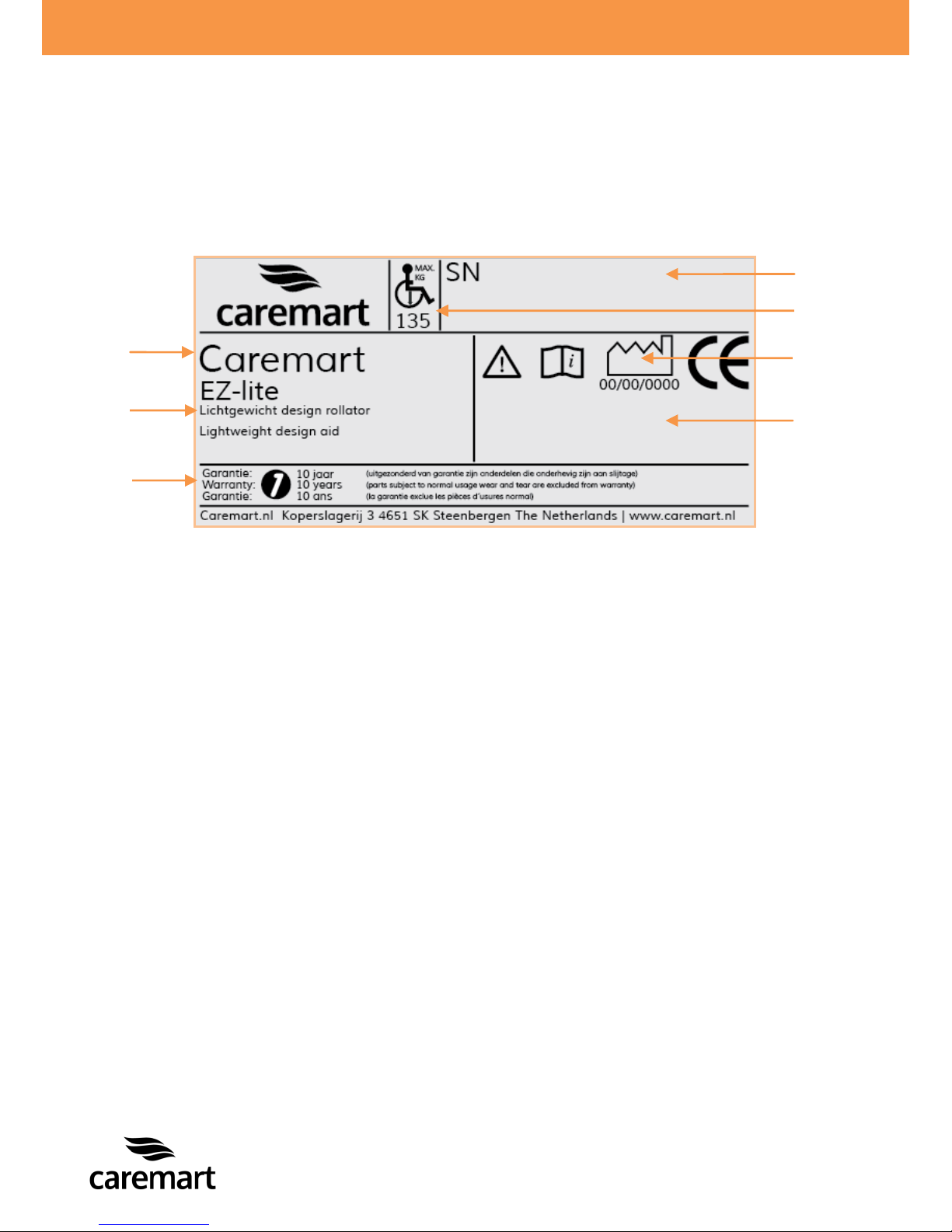
Your Caremart EZ-lite rollator is equipped with a unique serial number. You can find
this number on the frame of your rollator. Below is an example of the frame label on
which you can find the identification number. Furthermore you will find the
explanation of the various data stored on the frame label listed below.
1. Model name The model name from your rollator.
2. Definition Description of the design of your rollator.
3. Warranty This is the warranty period. Chapter 9 describes
your warranty terms and conditions in more
detail.
4. Serial number The unique serial number. You will need this
number when making technical requests or if
warranty parts are required.
5. Maximum weight The largest occupant weight allowed for your
rollator.
6. Production date Production date of your rollator.
7. Type number This number indicates what type of rollator you
have, again this is always required when making
technical calls.
6
4 4 1
2 3 7
5
Page 6
~ 5 ~
© 2014 VAN OS MEDICAL UK Ltd., Excel House, Escrick Business Park,
Escrick, York,YO19 6FD -
Tel. +44-(0)1904-720170, Fax +44-(0)1904-720398,
E-mail: [email protected],
2 GENERAL EXPLANATION OF YOUR ROLLATOR
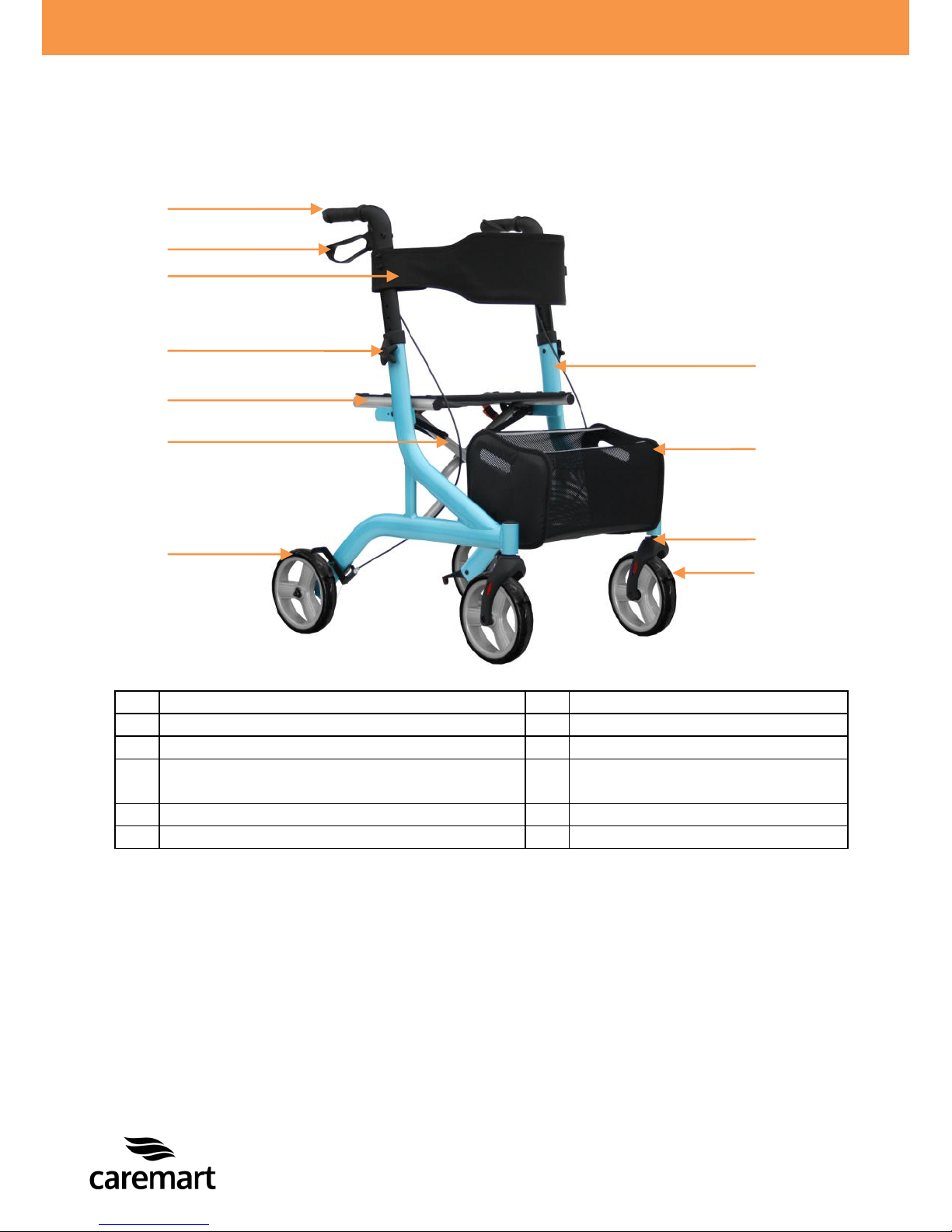
2.1 Components of the rollator
1
Push handle
7
Rear wheel
2
Brake lever
8
Side frame
3
Backrest
9
Storage bag
4
Star knob for height adjustable push
handle Safety bracket
10
Front fork
5
Seat
11
Front wheel
6
Crossbar
Your rollator is equipped with a number of elements and parts. You should know
these before continue reading this manual. Designs and specifications may change
without prior notice.
2.2 General explanation of the function and possibilities of your rollator
The rollator is designed for indoor and outdoor use. The rollator is equipped with
multifunction brakes and stable wheels which roll easily. The rollator is especially
developed so that it can be adjusted to every individual user. Your rollator is a
medical equipment product and is not a standard consumer product. You must follow
this manual completely to ensure good, optimal and safe use of your rollator.
1 2 3 4 5 9 6 8 11 7 10
Page 7

~ 6 ~
© 2014 VAN OS MEDICAL UK Ltd., Excel House, Escrick Business Park,
Escrick, York,YO19 6FD -
Tel. +44-(0)1904-720170, Fax +44-(0)1904-720398,
E-mail: [email protected],
3 SAFETY REGULATIONS
Van Os Medical UK Ltd. specifically disclaims responsibility for any body injury or
property damage which may occur during any use which does not comply with laws or
ordinances. The Caremart Basic is if the instructions for use as described in this
manual are followed you will have a highly secure and stable product. It is however
possible that, when the Caremart Basic is not used properly, dangerous situations
may occur.
3.1 General safety regulations
Protect your Caremart Basic rollator by checking it regularly. When a part of your
rollator is not functioning properly, a dangerous situation could occur.
Warning:
You must keep your rollator in a good state to guarantee safe use.
3.2 Warnings for safe use
Warnings:
Avoid using your rollator on roads. Use pavements if possible;
Do not use your rollator in sand, rough area, wet and slippery surfaces or
surfaces with little grip;
Do not drive into curbs;
Never connect anything to the wheels;
Engage the parking brakes when you are in or on a lift and when you want
to get off;
The maximum weight capacity has been indicated on your rollator frame
label;
Do not push the rollator to far in front of you, this can cause falls and
incorrect positions;
Unauthorized modification and or use of parts not supplied by Van Os
Medical UK Ltd. will invalidate the warranty and may lead to injury to the
user and or damage to the rollator;
Before using your rollator, always check if the brakes are working
perfectly;
When unfolding the rollator, check if the folding mechanism is locked into
place;
Use the parking brake if you are stopping or parking;
Make sure that your rollator is adjusted to the correct height to avoid
incorrect positions and falls;
Page 8
~ 7 ~
© 2014 VAN OS MEDICAL UK Ltd., Excel House, Escrick Business Park,
Escrick, York,YO19 6FD -
Tel. +44-(0)1904-720170, Fax +44-(0)1904-720398,
E-mail: [email protected],
When folding and unfolding the rollator be aware that you do not get stuck
with your fingers between moving parts. This may cause injury;
Do not use the rollator for transporting people or heavy loads;
Do not let children play with your rollator;
Do not use the rollator when the brakes are not working;
The rollator is not intended to be self-propelled while seated;
All wheels must be in contact with the floor at all times during use. This
will ensure the rollator is properly balanced;
The parking brakes must be engaged before using the seat;
Do not use your rollator when it is damaged or has any malfunction.
4 INSTRUCTIONS FOR USE
This rollator is designed for people with reduced walking distance, with balance
disturbances or other disabilities which prevent people to have a normal standing
posture. The use of the rollator will help people improve their mobility.
4.1 Walking with your rollator
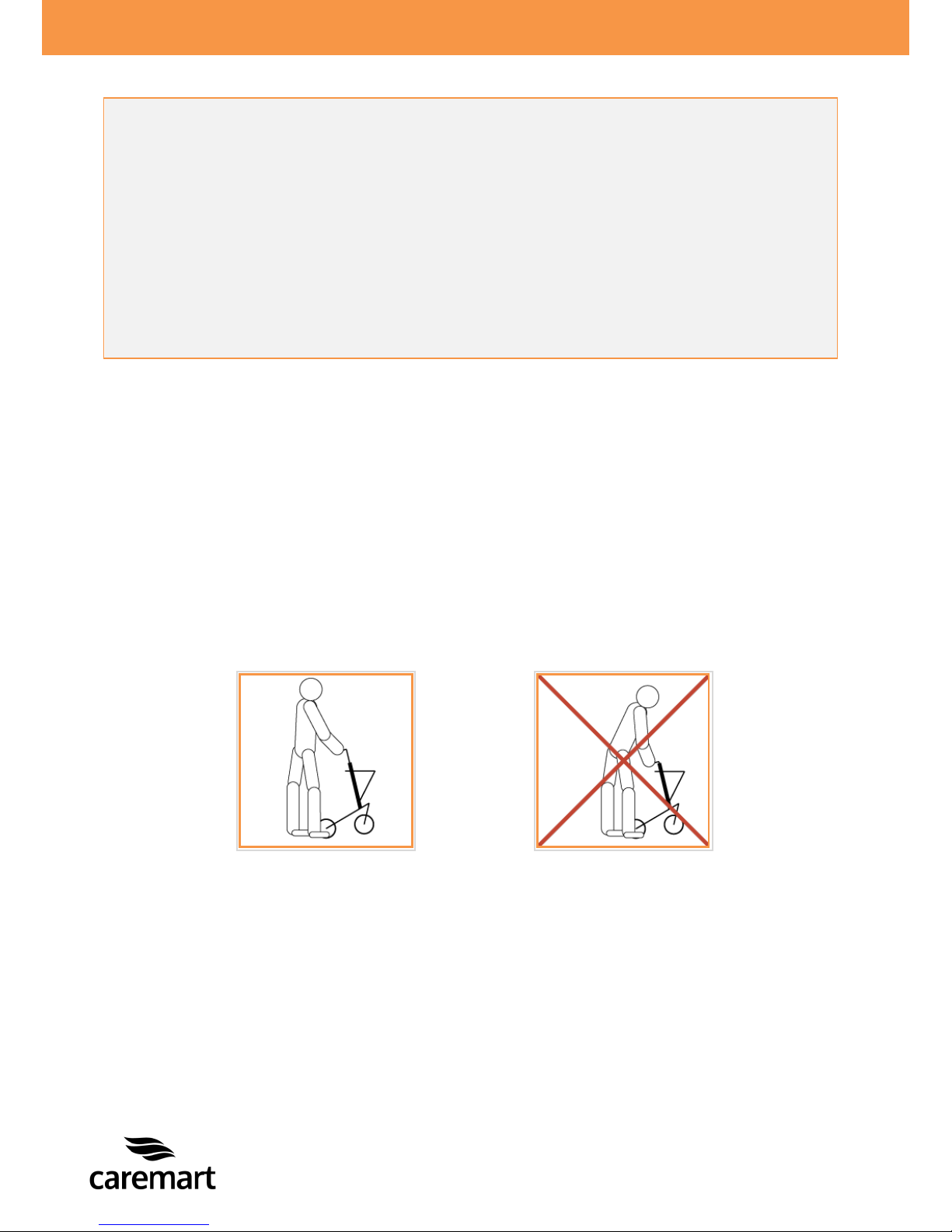
When you are walking with your rollator make sure that you walk fully upright, with
the rollator near your body, see figure 1. This is for the best support and the safest
movements. If you follow this order for movement with your rollator you will have
the correct body position.
Figure 1
Page 9

~ 8 ~
© 2014 VAN OS MEDICAL UK Ltd., Excel House, Escrick Business Park,
Escrick, York,YO19 6FD -
Tel. +44-(0)1904-720170, Fax +44-(0)1904-720398,
E-mail: [email protected],
4.2 Confronting pavements and unequal surfaces
Going up the pavement:
When you want to go up a pavement you should do this in the following manner;
Push the rollator;
Tip the rollator so the front wheels are lifted;
When the front wheels are above the pavement you can let the rollator down;
Now you can push the rollator forwards and place the rear wheels on the
pavement.
Going down the pavement:
Carefully roll the rollator forwards;
When the front wheels are off the pavement you can let the rollator down;
Now you can push the rollator forwards and place the rear wheels back onto the
ground.
Warning:
Do not drive into curbs!
Inspect the slope always for risks, such as holes or slippery and uneven
surfaces before you walk further.
Drive
Page 10

~ 9 ~
© 2014 VAN OS MEDICAL UK Ltd., Excel House, Escrick Business Park,
Escrick, York,YO19 6FD -
Tel. +44-(0)1904-720170, Fax +44-(0)1904-720398,
E-mail: [email protected],
MAKING ADJUSTMENTS TO YOUR ROLLATOR CAN CAUSE BIG RISKS FOR YOUR
SAFETY AND THE FUNCTION OF YOUR ROLLATOR. ADJUSTMENTS MADE BY
YOURSELF ARE STRONGLY ADVISED AGAINST AND CARRIED OUT AT YOUR OWN
RISK.
5 INSTRUCTIONS FOR USE AND MOUNTING OPTIONS
In this chapter we will explore all the possibilities on your rollator.
Your rollator is an Caremart EZ-lite
5.1 Technical information
Caremart EZ-lite
Total height 87.5-95 cm
Total length 72.5 cm
Total width 62.5 cm
Seat depth 25.5 cm
Width between push handles 45 cm
Seat height (from the ground) 53.5 cm
Width folded 25 cm
Maximum user weight 135 kg
Maximum weight storage bag 5 kg
Page 11
~ 10 ~
© 2014 VAN OS MEDICAL UK Ltd., Excel House, Escrick Business Park,
Escrick, York,YO19 6FD -
Tel. +44-(0)1904-720170, Fax +44-(0)1904-720398,
E-mail: [email protected],
5.2 Unfolding and folding the rollator
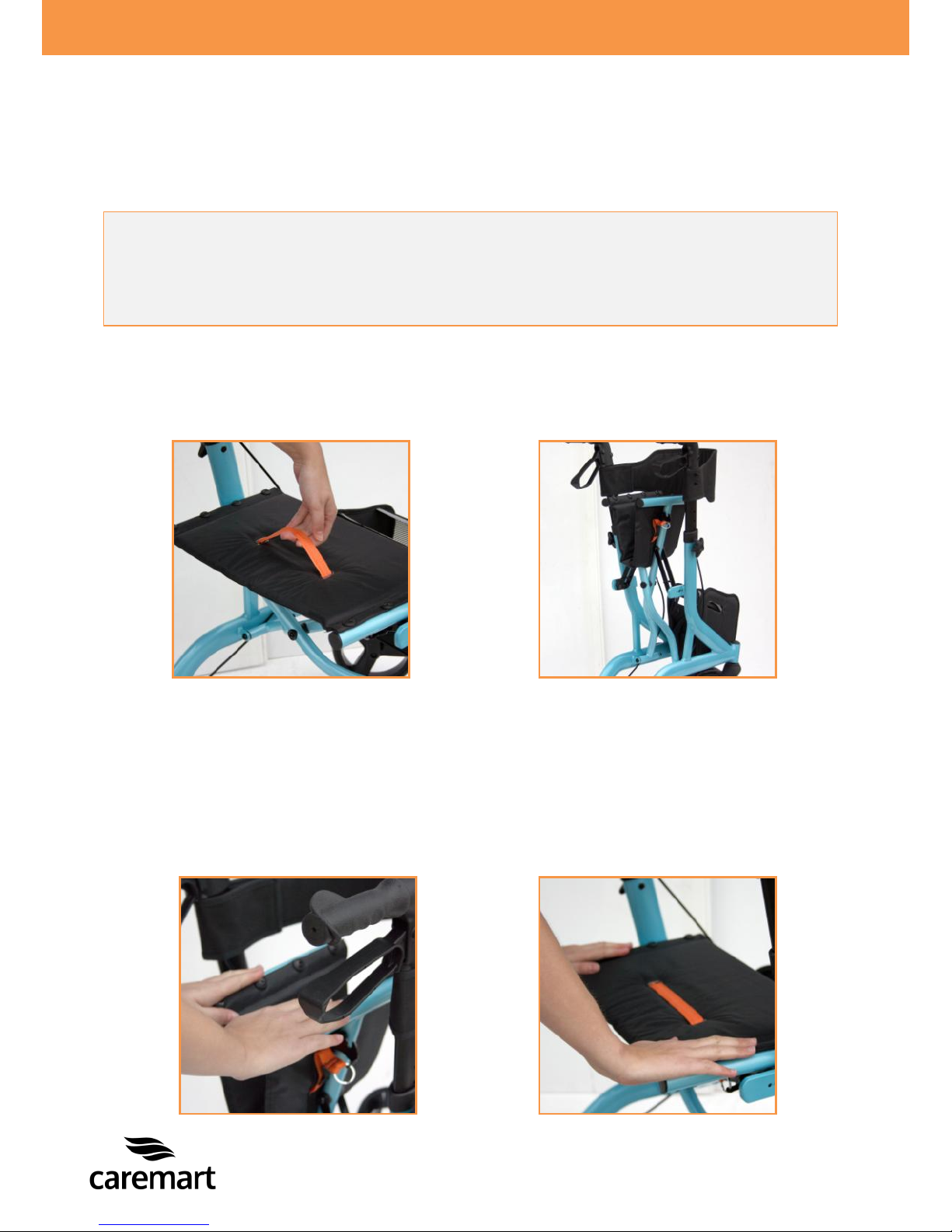
Your rollator can be folded. In this way you can easily carry and transport your
rollator. In folded position your rollator will be in standing position which will provide
stability.
Folding the rollator
Make sure you stand behind the rollator;
Grab the handle of the seat, photo 1 and pull it upwards;
Push the tubes together until the rollator is completely folded, photo 2.
Unfolding the rollator
Make sure you stand behind the rollator;
Push both seat tubes and move them apart, photo 3;
Push the seat tubes downwards until the rollator in folded;
Make sure the frame is completely unfolded and the seat upholstery is flat,
photo 4, you will hear a click this confirms that the rollator is completely
folded.
Warning:
When folding or unfolding the rollator be aware of the danger of trapping
injuries!
Photo 1
Photo 2
Photo 3
Photo 4
Page 12
~ 11 ~
© 2014 VAN OS MEDICAL UK Ltd., Excel House, Escrick Business Park,
Escrick, York,YO19 6FD -
Tel. +44-(0)1904-720170, Fax +44-(0)1904-720398,
E-mail: [email protected],
5.3 Seating
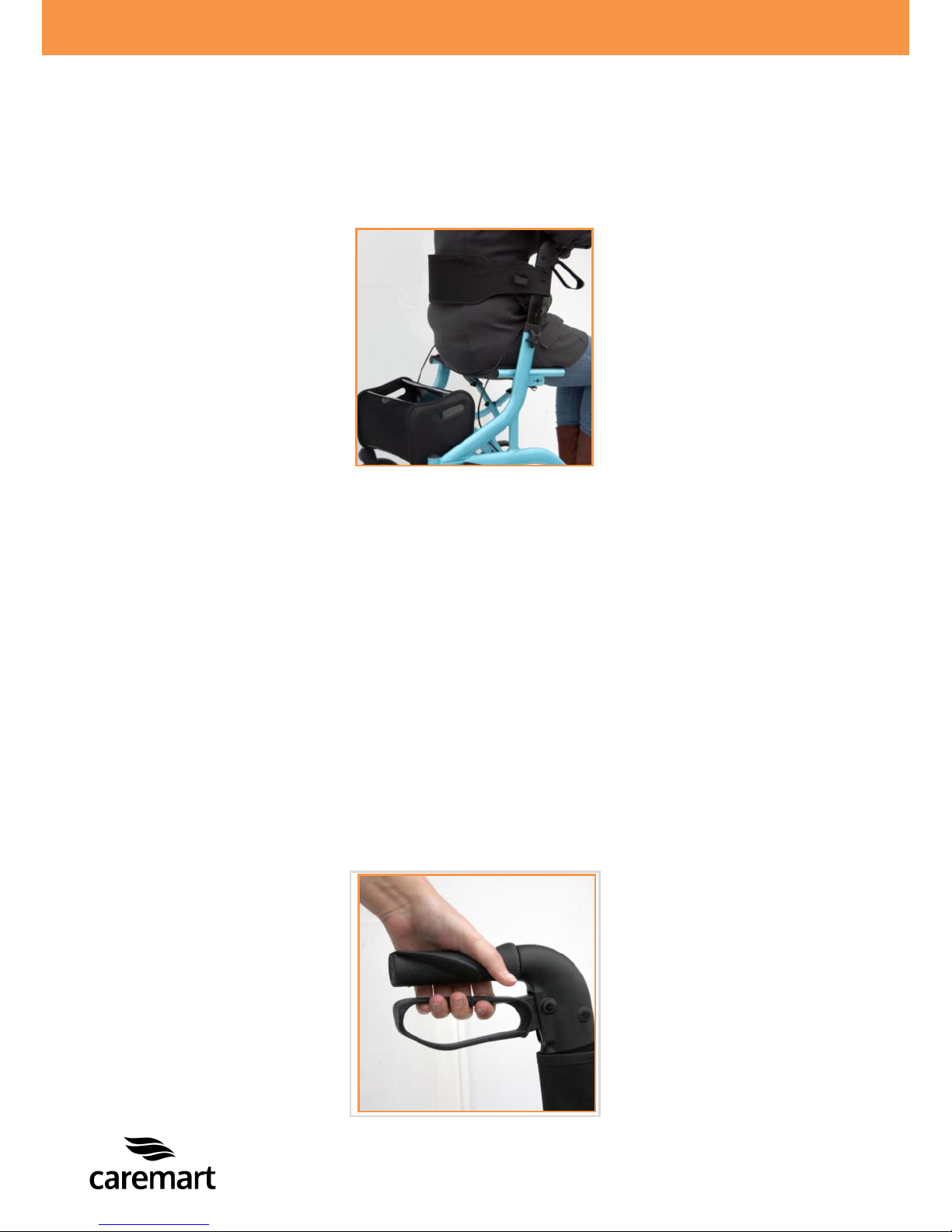
Check if the parking brake is engaged, before you take a seat on the rollator;
Make sure that your feet are between the rear wheels when you’re seated and
with your back towards the direction of travel, photo 5.
5.4 Brakes
Your rollator has two kinds of brakes. While driving you should use the driving brake
and when you are standing still you can use the parking brake.
Using the brakes
While driving your rollator you can slow down by using the brake, when you are
standing still you can use the parking brake.
Driving brake
When you need to slow down speed while pushing the rollator, you have to
squeeze the brake lever to reduce your speed, photo 6;
Be aware that you do not push the rollator while squeezing the brake lever. If
you do attempt to do this, this will cause damage on the tyres and the brakes,
which will result in damaged brakes;
As mentioned earlier in paragraph 3.2, do not use the rollator if the brakes are
defect!
Photo 5
Photo 6
Page 13
~ 12 ~
© 2014 VAN OS MEDICAL UK Ltd., Excel House, Escrick Business Park,
Escrick, York,YO19 6FD -
Tel. +44-(0)1904-720170, Fax +44-(0)1904-720398,
E-mail: [email protected],
Parking brake
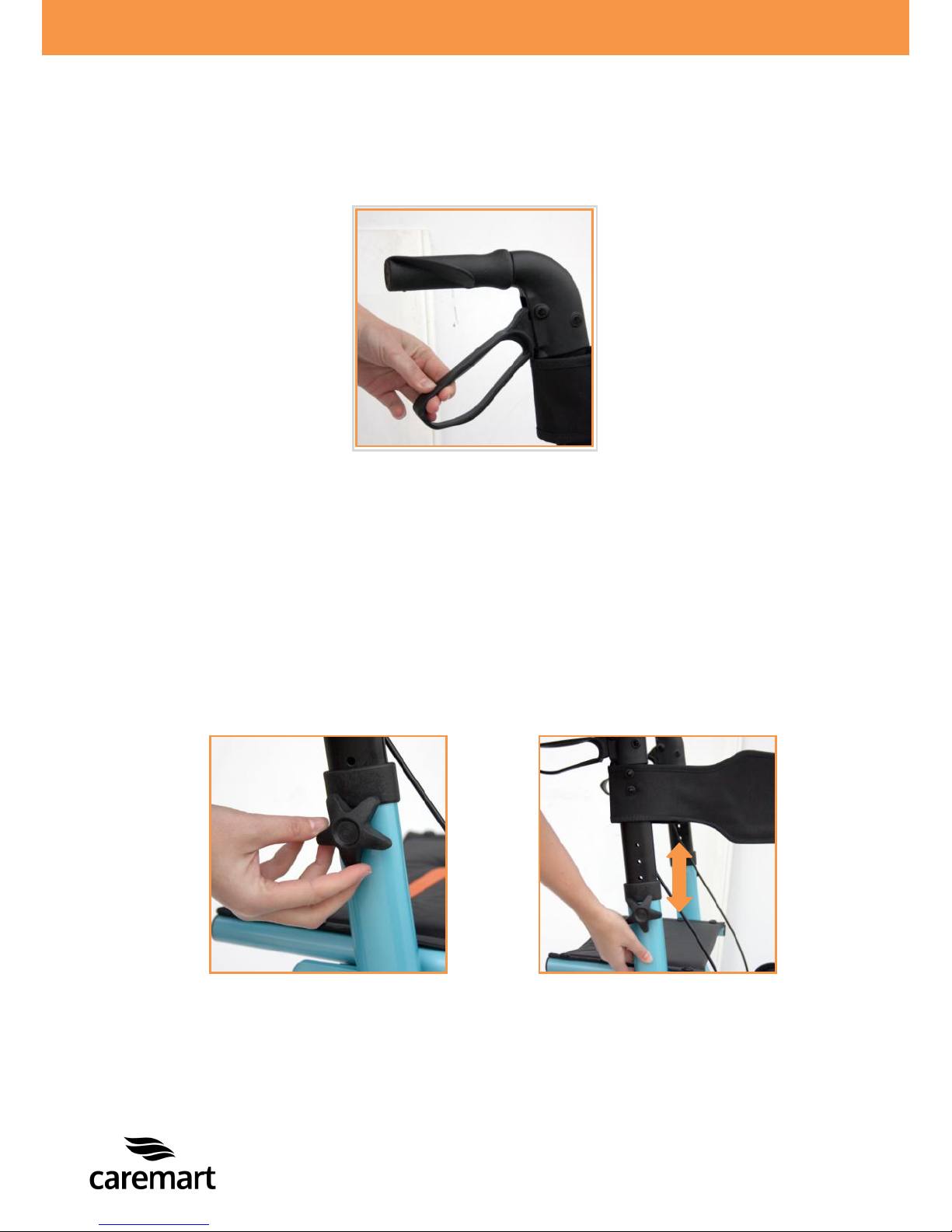
Push the brake lever downwards to engage the parking brake, photo 7, you will
hear a click that will confirm that the parking brake is engaged;
Squeeze to remove the parking brake, this will be confirmed when you hear a
click.
5.5 Setting the height of the push handels
You can adjust the height of the push handles for optimal use of your rollator. You
can set 5 different heights.
Make sure you stand next to your rollator;
Loosen the star knob on the push handles, photo 8;
Pull or push the push handle to the desired height, photo 9;
Tighten the star knob;
Make sure the push handle is correct fitted by moving it up and down;
The push handle is now locked.
Photo 7
Photo 8
Photo 9
Page 14
~ 13 ~
© 2014 VAN OS MEDICAL UK Ltd., Excel House, Escrick Business Park,
Escrick, York,YO19 6FD -
Tel. +44-(0)1904-720170, Fax +44-(0)1904-720398,
E-mail: [email protected],
5.6 Placing and removing the storage bag
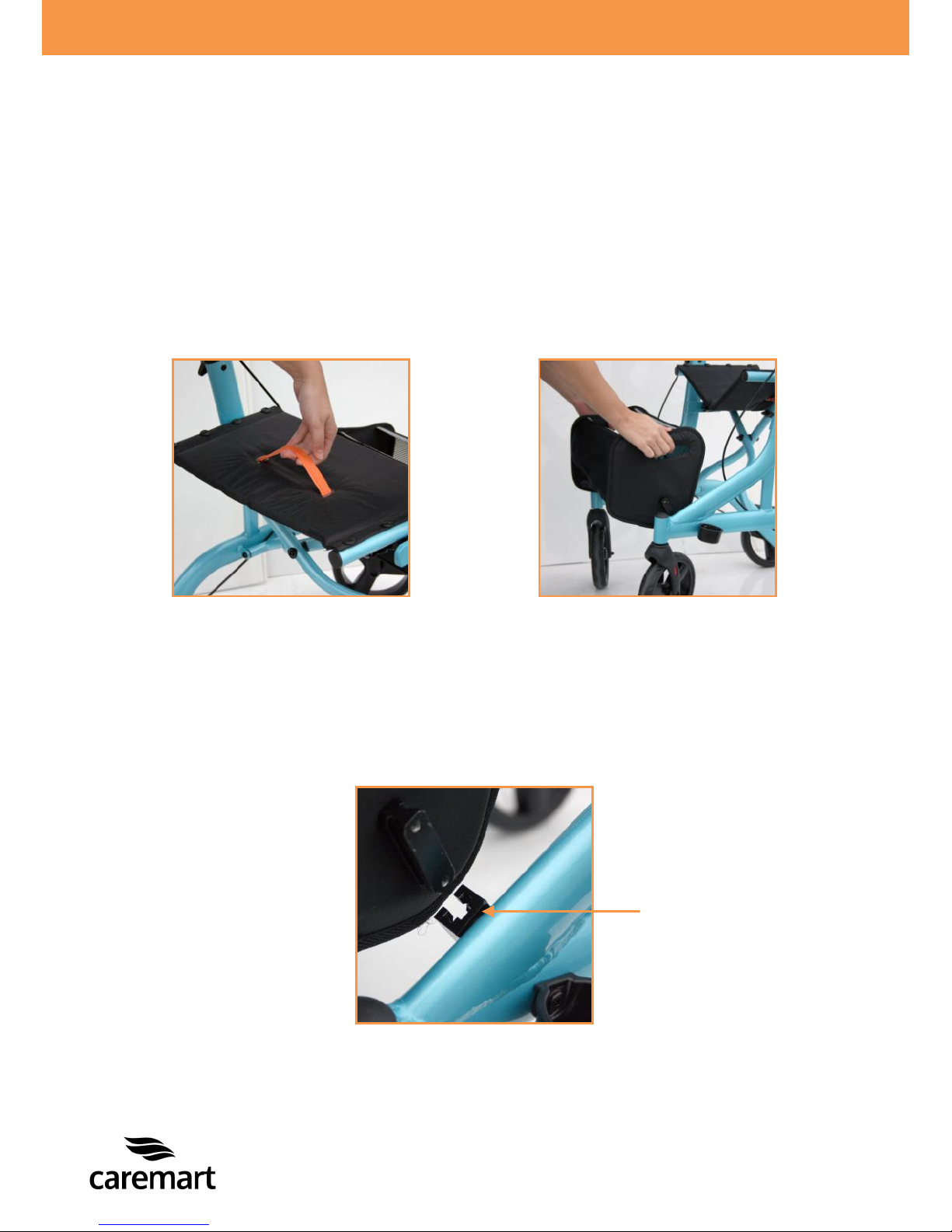
You do not have to remove the storage bag before folding the rollator. The storage
bag moves along with the frame of the rollator. Make sure before folding the storage
bag is empty. If you would like to remove the storage bag please use the following
steps.
Removing the storage bag
Make sure you fold your rollator slightly, photo 10;
Stand in front of your rollator;
Grab the storage bag with both hands and move it towards you, photo 11;
Placing the storage bag
Make sure you fold your rollator slightly;
Stand before your rollator;
Grab the storage bag with both hands;
Slide the storage bag into the mounting blocks, photo 12.
Photo 10
Photo 11
Photo 12
Page 15
~ 14 ~
© 2014 VAN OS MEDICAL UK Ltd., Excel House, Escrick Business Park,
Escrick, York,YO19 6FD -
Tel. +44-(0)1904-720170, Fax +44-(0)1904-720398,
E-mail: [email protected],
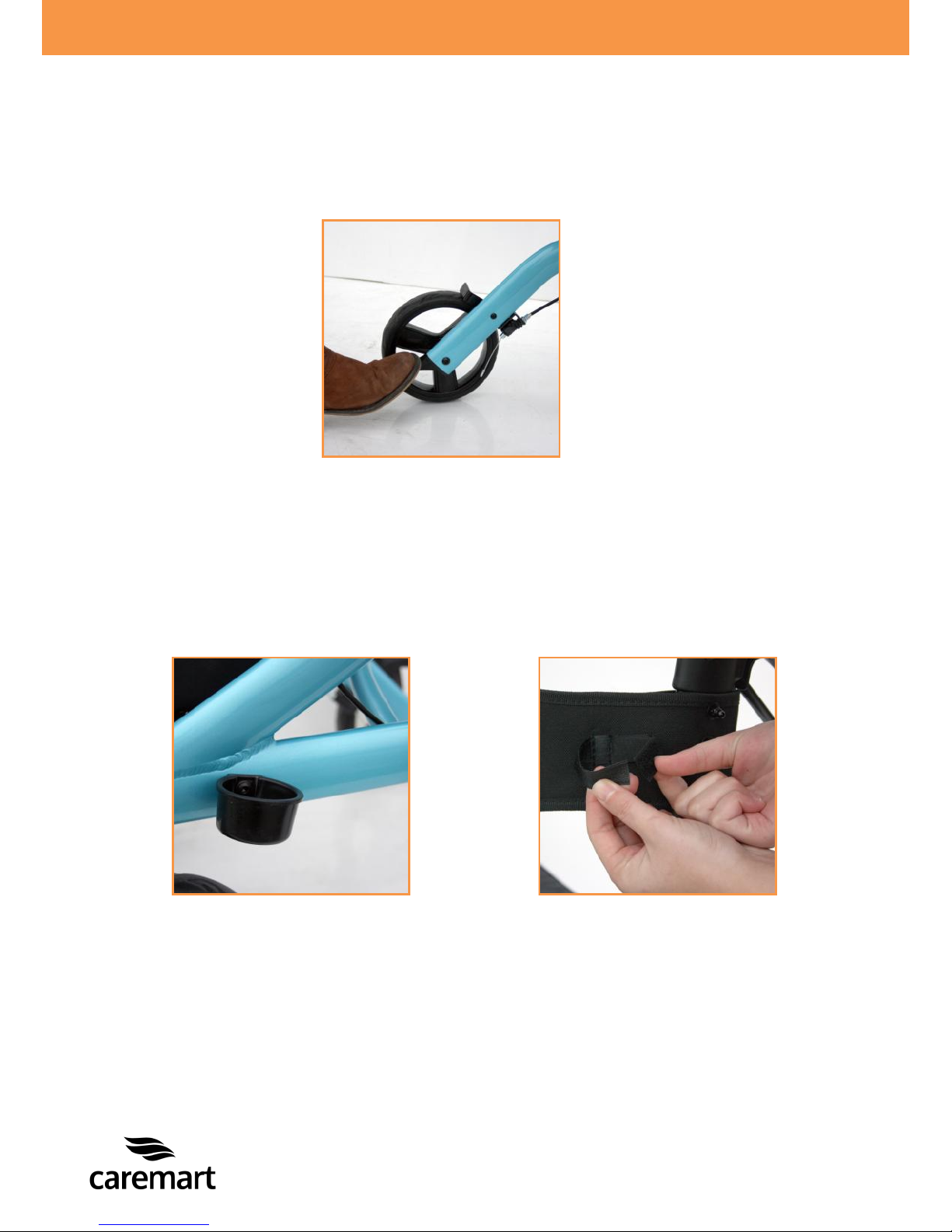
5.7 Using the stepper
When you have to use the stepper, you should follow the following steps;
Step with your foot on the stepper to lift the front wheels, photo 13;
Remove your feet to lower the front wheels on the ground.
5.8 Tighten your crutch
Place your crutch into the crutch holder, photo 14;
Loosen the Velcro adjustment to tighten your crutch against the rollator, photo
15;
Retighten the Velcro, to make sure your crutch can not fall.
Photo 13
Photo 14
Photo 15
Page 16
~ 15 ~
© 2014 VAN OS MEDICAL UK Ltd., Excel House, Escrick Business Park,
Escrick, York,YO19 6FD -
Tel. +44-(0)1904-720170, Fax +44-(0)1904-720398,
E-mail: [email protected],
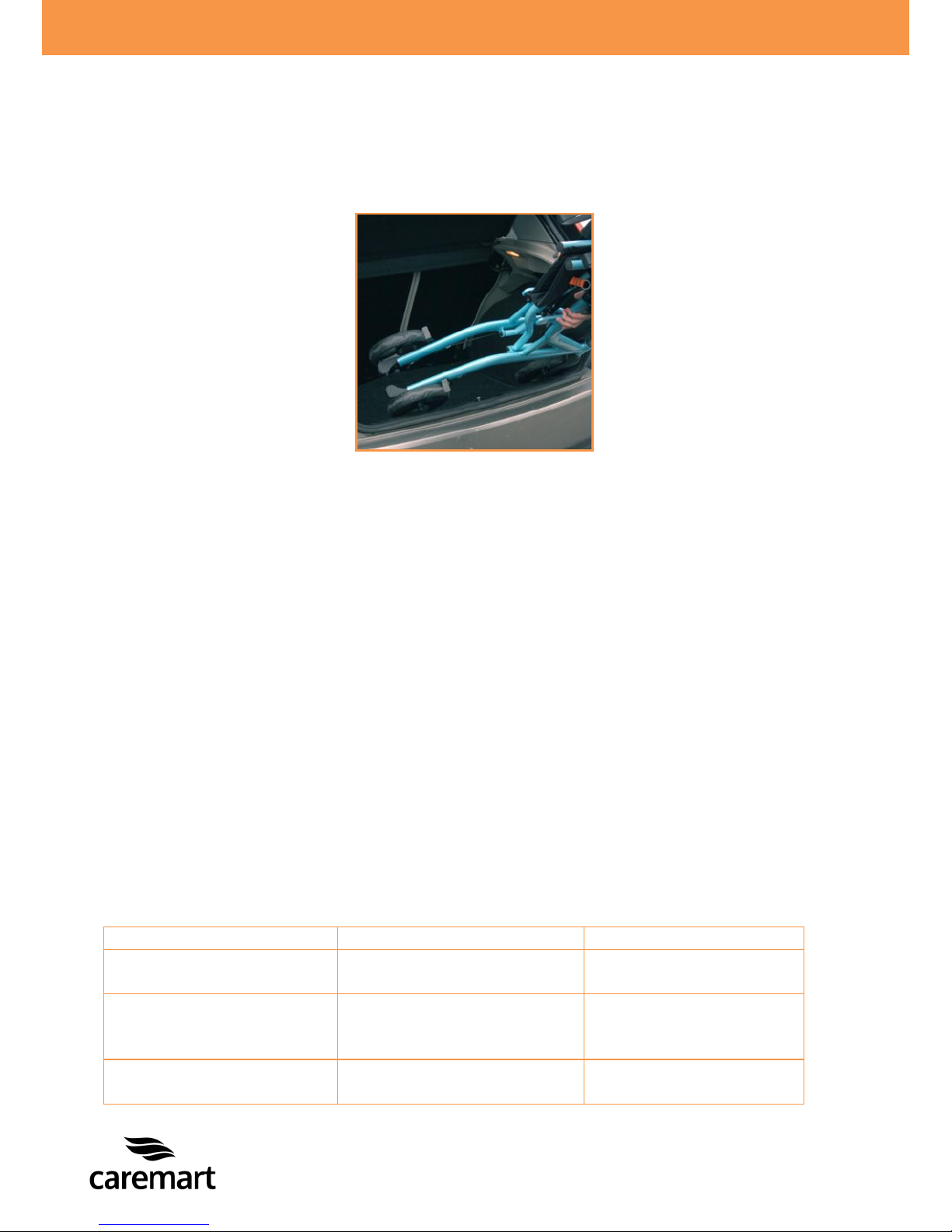
6 TRANSPORT AND TRANSIT IN CAR
Your Caremart rollator is designed to be easily transported by car. You can easily
carry your rollator in or out of the vehicle, photo 16.
7 MAINTAINANCE
It is important to clean your rollator regularly.
Clean the frame. You should wash the frame regularly with warm soapy water;
Clean the brake blocks and springs regularly;
Clean the basket.
Dry the rollator after cleaning. Also dry your rollator after you have been, for
example, in a rainstorm.
8 PROBLEM ANALYSIS AND SOLUTIONS
Your Caremart EZ-lite is inspected and adjusted so that you can use it immediately.
Regular maintenance is essential, especially if the factory set adjustments have been
altered.
The following troubleshooting guide lists several common problems that may occur
and offers corrective actions for each.
Malfunction
Possible cause
Solution
Wheels are not turning
properly
Wheels are dirty
Cleaning the wheels
Parking brake doesn`t
work
The brake pads are
rubbing on the brakes
The brake is bent
Contact a Van Os
Medical UK Ltd.
Tires are worn up
Contact a Van Os
Medical UK Ltd.
Photo 16
Page 17

~ 16 ~
© 2014 VAN OS MEDICAL UK Ltd., Excel House, Escrick Business Park,
Escrick, York,YO19 6FD -
Tel. +44-(0)1904-720170, Fax +44-(0)1904-720398,
E-mail: [email protected],
9 WARRANTY
9.1 Warranty application
Together with your rollator you get the factory warranty. This warranty is only
granted to you as the consumer. It is not intended to be used commercially (like
hiring or institutional use). The warranty is limited to defects to materials and
possible hidden shortages. Caremart offers a warranty period of 1 year.
Tip
We recommend the use of only Van Os Medical UK Ltd. dealer replacement
parts. If you do not use original parts, the warranty will be expired.
9.2 Warranty definition
Your manual is also the warranty form, fill in the relevant details on page 2 and store
it carefully.
Warranty conditions
The warranty period commences upon the date of purchase. If within the warranty
period, your rollator will be defect, it will be repaired or replaced. However you do
need to provide to Caremart a complete filled in warranty registration form, a copy
of the bill with the date of purchase and the original packaging.
Tip
Warranty is not transferrable;
For more information and the location of service agents please visit our
website: www.vanosmedical.com.
This warranty does not include any labour charges incurred by replacements.
Under normal circumstances no responsibility is accepted when the rollator needs
replacement or repairs as a direct result from:
Not maintaining the rollator and parts according to the recommendations of the
manufacturer, or not using the specific original parts;
Damaging the rollator or parts by inattentive use, accident or wrong use;
Adjusting the rollator or parts, different from the specifications of the
manufacturer, or reparations done before the service agent is warned;
If the product is not equipped with an original factory frame number and
identification label as described in the manual, see chapter 1.
Page 18
~ 17 ~
© 2014 VAN OS MEDICAL UK Ltd., Excel House, Escrick Business Park,
Escrick, York,YO19 6FD -
Tel. +44-(0)1904-720170, Fax +44-(0)1904-720398,
E-mail: [email protected],
The rollator that is described and showed in this manual can differ from your own
model in details. However, all instructions are relevant, independent of slightly
different details. We reserve the right to change the product in this manual without
further notice. All drawings, measures and capacities showed in this manual, are
approximations and may be slightly different to your rollator specifications.
Warning:
Caremart can not be liable for any consequent or individual damage
whatsoever. While this manual is created with care it is not exclusive. The
warranty is only valid during the indicated period. If adjustments are made to
the rollator, which have structural impact on the product, the warranty will
expire completely. You can visit www.vanosmedical.com for an enlarged
warranty and supply conditions and an address list of service agents.
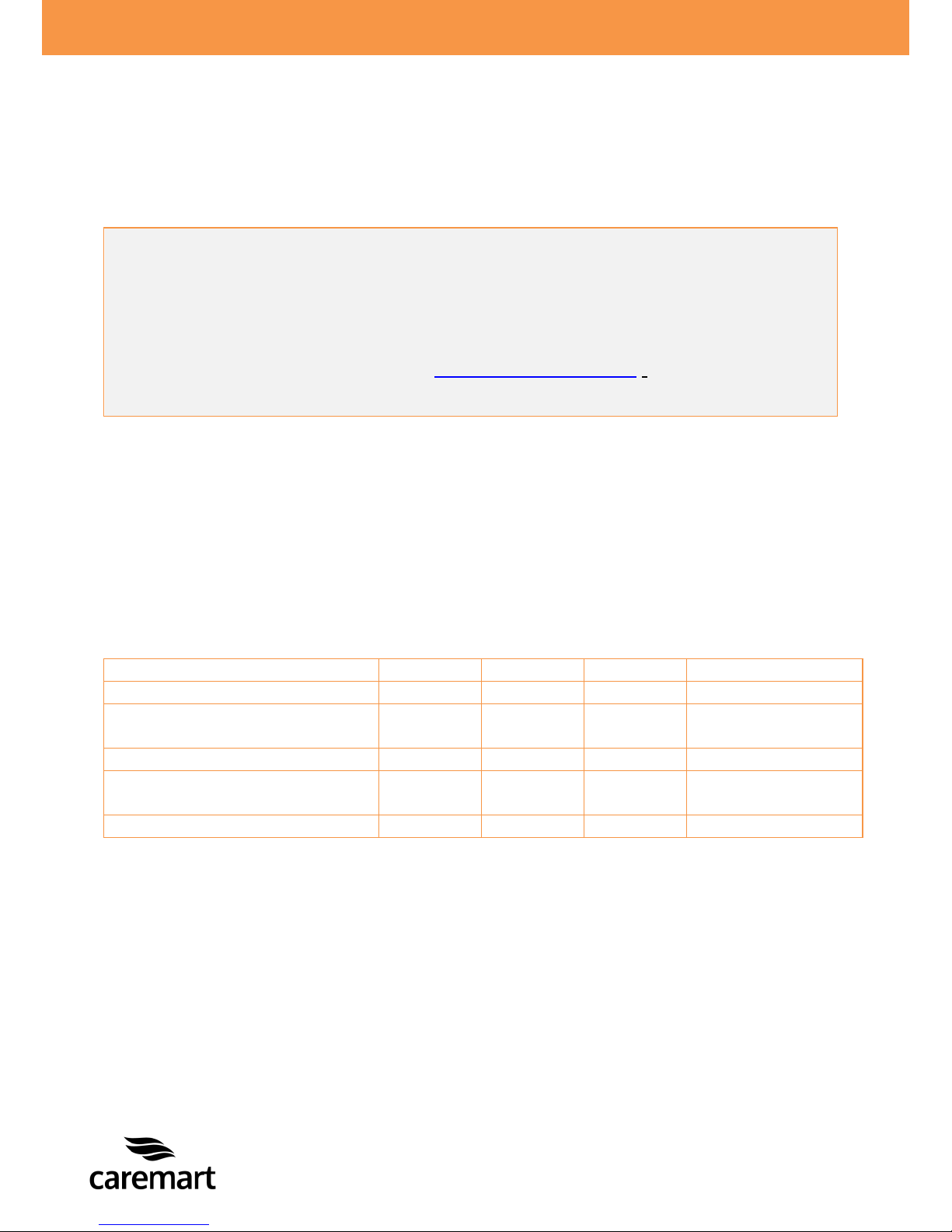
10 GENERAL MAINTENANCE INSTRUCTIONS
Your rollator needs periodical maintenance. A badly maintained rollator will give
more technical problems, turn less flexible and fall out the warranty terms.
Preventive maintenance is most important and many of these things you can easily do
yourself or a friend or family member can help you. We highlight below the
maintenance you can do yourself.
Inspection
Daily
Monthly
Yearly
Done by
Working of the brake
X
User
Checking the reversibility of
front wheels
X
User
Cleaning
X
User
Checking the stability of the
frame
X
Retailers
Oiling the wheel bearing
X
Retailers
Page 19

~ 18 ~
© 2014 VAN OS MEDICAL UK Ltd., Excel House, Escrick Business Park,
Escrick, York,YO19 6FD -
Tel. +44-(0)1904-720170, Fax +44-(0)1904-720398,
E-mail: sales@vanosmedical.com,
Product identification
Product: Walking aids
Brand: Caremart
Model/type: EZ-lite
Version:
Manufacturer: Name Van Os Medical B.V.
Address Koperslagerij 3
4651 SK Steenbergen
Country The Netherlands
EU Representative: Name W. van Os
Address Koperslagerij 3
4651 SK Steenbergen
Country The Netherlands
Function Director
Technical constructed file
Prepared by: Name J.M.J. Brouwer BBA
Function: Research & Development
Issue date: 01-04-2014
TCF date: 01-04-2014
Recertification date:
Means of conformity
The product is in conformity with Directive 93/42/EEC based on the use of a
Technical construction file in accordance with Article 9 (Class I products) of
the Directive
Signature of EU representative:
Place : Steenbergen
Date : 01-04-2014
Number : VOS.TCF.EX.2420
Page 20

CAREMART
CAREMART
CAREMART
CAREMART
 Loading...