

Page 1

Troubleshooting
Problem Possible Solutions
Monitor
power drains
Monitor
screen is
Monitor
beeps while
you are in
Your phone
line is busy
5. T ROU BL ESH O OT ING
battery
quickly
blank
bed
Ensure battery is being fully recharged every day. A full recharge
takes approximately 4 hours and will last 16 hours.
Ensure the monitor is being placed in the base correctly. If the
monitor does not make contact with the plug in the base, it may
not recharge.
It could be that the monitor is not turned on.
Ensure the monitor is turned on by conrming that the LED light
is ashing red or green. If the monitor is asleep, press the blue
button. The screen should light up. If it doesn’t, the monitor may
be low on power. Return the monitor to the base for recharging.
It is possible for your body to block communications between the
sensor and monitor. This will cause warning beeps. To avoid beeps
and maintain the communications link, place the sensor near the
monitor on the bed next to you. Try not to lie on top of it or to get
between the sensor and monitor while you are sleeping.
When the monitor is in the base station and sending information it
will use your telephone line. If someone calls you while the monitor
is using the line, they will get a busy signal. If you try to place a call
while the monitor is transmitting data, you will hear a high- pitched
sound. This is the sound of monitor data being transmitted.
Skin is
irritated or
reddened
Sensor belt
clip is difcult
to put on
54 Troubleshooting
If you notice that the skin under or around your electrode pads is
becoming sensitive, irritated or painful, or if you develop a rash,
please call the CardioNet Patient Service Center immediately at 1866-426-4401. Some people are sensitive or allergic to adhesives.
CardioNet will send you another type of electrode pad.
If you’re wearing a thicker belt and nding that it is difcult to
slide on the Sensor Belt Clip, rst remove the CardioNet Sensor
from the clip. Slide just the clip onto your belt and then reposition
the sensor on the clip.
Page 2
PRECAUTIONS
DISPOSE OF BATTERIES PROPERLY
Observe all local laws for the disposal of alkaline batteries.
WHEN NOT IN USE, REMOVE SENSOR BATTERY
Do not leave the battery in the sensor when it is not in use.
Precautions
AVOID ELECTROMAGNETIC INTERFERENCE
For the best recording results, you should avoid close proximity to heavy equipment or
other sources of electromagnetic interference such as electric blankets, heating pads,
water beds, etc.
POTENTIAL FOR ELECTROMAGNETIC INTERFERENCE
There is a potential for electromagnetic interference to other devices while using the
CardioNet Service.
USE WITH IMPLANTED PACEMAKERS AND ICDs ( DEFIBRILLATORS)
If you have an implanted pacemaker or debrillator (ICD), the manufacturer may have recommended you take certain precautions when using a cellular phone. Since the CardioNet
monitor contains a cellular phone, you should take the same precautions when carrying
and using the monitor. In general, most manufacturers recommend the following:
• You should keep a distance of at least six inches (15 cm) between the cellular phone
and a pacemaker or debrillator.
• You should hold the cellular phone on the opposite side of the body from the pace-
maker or debrillator.
• Don’t carry a cellular phone in a breast pocket or on a belt if that would place the
phone within six inches of the pacemaker or debrillator.
• You should refer to the manufacturer’s information for guidance regarding your pacemaker or ICD and interference issues.
5. T RO U BL ESH O OT ING
Troubleshooting 55
Page 3

Cautions
CAUTIONS
POWER DOWN Monitor AND SENSOR BEFORE SHOWERING
Power down the monitor and remove the sensor before showering. The CardioNet sensor
and monitor are water resistant, not waterproof.
DO NOT GET THE Monitor AND SENSOR WET
Make sure the monitor and sensor stay dry at all times.
LIMITATIONS OF COVERAGE
CardioNet’s ability to obtain information regarding a cardiac event and to contact you or
your physician in a timely manner is limited by a number of factors including:
• Transmission of information about a cardiac event to CardioNet‘s Monitoring Center
is potentially limited by the availability of standard telephone lines and/or cellular phone
coverage.
• There is an inherent time delay from the time that an event is detected to when the
events are analyzed and conrmed by a Certied Cardiac Technician (CCT).
• There is an inherent time delay from when the event is analyzed and conrmed by
the CCT to when CardioNet is able to make contact with you or your physician.
5. T ROU BL ESH O OT ING
• If you or your physician are not accessible by telephone, CardioNet will not succeed
in making contact with you or your physician
56 Troubleshooting
Page 4
Warnings
WARNINGS
FOR ADULT USE ONLY
The CardioNet System is intended for Adult Use only. It shall not be use on infants weighing less than 22 pounds.
FOR USE WITH TELEPHONE SYSTEM
Any patient whose life may be put at signicant risk by the unavailability of the telephone
system should not be monitored by the CardioNet System.
NOT AN APNEA Monitor
The CardioNet monitor is not to be used as an apnea monitor.
USE ONLY WITH CARDIONET ELECTRODES
While wearing the CardioNet sensor, use only electrodes provided by CardioNet.
NOT AN EMERGENCY RESPONSE SERVICE
CardioNet is not an emergency response service. If you experience any symptoms that
concern you, seek medical help.
DO NOT TAMPER WITH DEVICE
There are no serviceable parts in the CardioNet System components. Removing the cover
of any component may alter device performance.
DO NOT TAMPER WITH Monitor BATTERY
The monitor battery can present a re or chemical burn hazard if mistreated. Do not
disassemble, heat above 80C (176 F), incinerate, or recharge using any device other than
the base or the CardioNet supplied power cord.
USE ONLY CARDIONET POWER CORD
Do not use any power cord for the base other than the one provided in the CardioNet
service kit.
DO NOT CONNECT ANY DEVICE TO THE PC PORT ON THE MONITOR
5. T RO U BL ESH O OT ING
The PC port is to be used only by CardioNet personnel.
DO NOT USE NEAR FLAMMABLE ANESTHETIC
Units are not to be used in the presence of ammable anesthetic.
Troubleshooting 57
Page 5

Page 6

S P E C I F I C A T I O N S ,
C O M P L I A N C E &
S Y M B O L S
In this Chapter:
• Specications
• Equipment Symbols
• In Home Requirements
• FCC Compliance
6
Page 7
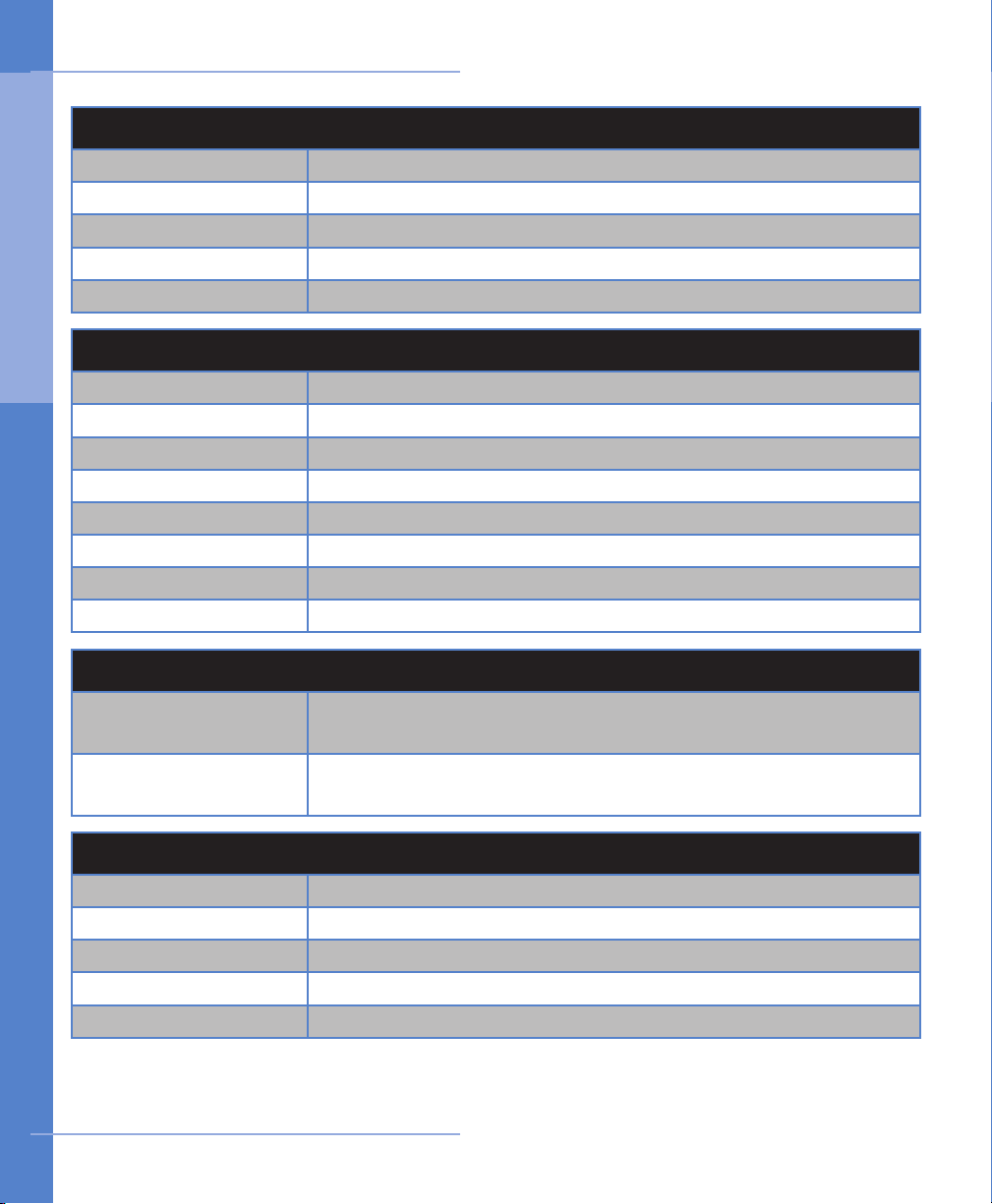
Specifications
PH Y S I CA L
Sensor 3 inches x 4 inches x 1 inch ; Weight: 4.0 oz. with battery
Sensor Neck Strap Adjustable 20 to 32 inches
Monitor 6 inches x 3 inches x 0.8 inches; Weight: 8 oz.
LCD 2.27 inches x 1.7 inches; Touch screen: color, backlit
Base 7 inches x 4 inches x 2.5 inches; Weight: 12 oz.
FU N C T IO NA L
6 . S PE C I FI C A T IO NS
Sample Rate 250 samples per second
Resolution 12 bits
Dynamic range +/- 5 mV
Bandwidth 0.1 to 40 Hz
Channels 2
Battery Life: Monitor Up to 16 hrs (with cleared memory & fully recharged battery)
Battery Life: Sensor 24 hrs (1 AA Alkaline)
Leakage Current
Less than .1 µ A Electrodes
TR A N S MI SS IO N
Sensor to Monitor 900 MHz ISM band RF transmission, digital error corrected.
150 foot range. Retransmission if data is corrupted.
Monitor to Center CDMA (PCS and cellular) wireless, digital error corrected. Tele-
phone line modem, digital error corrected.
OP E R A TI NG C ON D I T IO NS
Opera ting Tempera- Sensor: 20 - 45
o
C; Monitor ; 0 - 45
o
C
Operating Humidity 10% - 95% noncondensing
Storage Temperature -20 - 65
o
C noncondensing
Storage Humidity 5% - 95% noncondensing
Operation Altitude 700 - 1060 millibars
60 Specifications
Page 8

Specifications
CO N N E CT IO NS
Base Power in (15V, 1.2A max); Phone in (RJ-11); Phone out (RJ-11)
Monitor Power in (15V, 1.2A max)
WA L L AD AP TO R
Manufacturer Friwo, Inc (15V, 1.0A)
Model Number FW755M/15
Note: Both the monitor and sensor are internally powered
ST A N D AR DS C OM P L I AN CE
Monitor EN60601-1; AAMI EC-38; FCC Parts 2,15,22,24
Sensor EN60601-1; AAMI EC-38; FCC Part 15
Base EN60950; AAMI EC-38; FCC Part 15, 68
AECG Equipment Type I
Note: This equipment has been tested and found to comply with the limits for medical
devices to the IEC 601-1-2:1993, EN60601-1-2:1994, Medical Device Directive 93/42/EEC
or the Electromagnetic Compatibility Directive 89/336/EEC (use applicable directive).
These limits are designed to provide reasonable protection against harmful interference
in a typical medical installation. This equipment generates, uses and can radiate radio
frequency energy and, if not installed and used in accordance with the instructions, may
cause harmful interference to other devices in the vicinity. However, there is no guarantee
that interference will not occur in a particular installation. If this equipment does cause
harmful interference to other devices, which can be determined by turning the equipment
off and on, the user is encouraged to try to correct the interference by one or more of
the following measures:
6 . S PE C I FI C A T IO NS
• Reorient or relocate the receiving device
• Increase the separation between the equipment
• Connect the equipment into an outlet on a circuit different from that to which the
other device(s) are connected
• Consult the manufacturer or eld service technician for help
Specifications 61
Page 9

Equipment Symbols
SN
BF Type Equipment Consult Users Manual /
Patient Education Guide
6 . S PE C I FI C A T IO NS
Serial Number
In Home Requirements
Touch tone, pulse telephone or cellular / PCS wireless coverage suitable for
1.
data transmission
AC powered outlet
2.
FCC Compliance
This device complies with part 15 and 68 of the FCC Rules. Operation is subject to the
following two conditions: (1) This device may not cause harmful interference and, (2) This
device must accept interference received including interference that may cause undesired
operation.
FC C I D
Sensor ISM QBI-1008
Monitor ISM QBI-1009
Monitor Cell Modem Q9EQ2438F-M
62 Specifications
Page 10

FCC Compliance
FC C C OM PL IA NC E
FCC RULES PART 15
The Model 1004 has been tested and complies with the limits for a class B digital Device,
pursuant to Part 15 of the FCC Rules. These limits are designed to provide reasonable
protection against harmful interference when the equipment is operated in a residential
environment. This equipment generates, uses, and can radiate radio frequency energy
and, if not installed and used in accordance with the instruction manual, can cause harmful interference to radio communications.
CHANGES OR MODIFICATIONS NOT EXPRESSLY APPROVED BY CARDIONET INC. COULD
VOID THE USER’S AUTHORITY TO OPERATE THE EQUIPMENT
FCC RULES PART 68 REGISTRATION
Model 1004 complies with FCC Rules, Part 68. On this equipment is a label that contains,
among other information, the FCC Part 68 registration number.
REN
The Ringer Equivalence Number (REN) is used to determine the quality of devices that
may be connected to the telephone line. Excessive RENs on the telephone line may result
in the devices not ringing in response to an incoming call. In most, but not all areas, the
sum of RENs should not exceed ve (5.0). To be certain of the number of devices that
may be connected to a line, as determined by the total RENs, contact the local telephone
company.
6 . S PE C I FI C A T IO NS
NOTE: RENs are associated with loop-start and ground-start ports. It is not used for
E&M and digital ports. The REN assigned to the Model 1004 is 0.16. If requested, this
information must be given to the telephone company.
SERVICE
In the event of equipment malfunction, all repairs should be performed by
CardioNet, Inc. or an authorized agent. It is the responsibility of users requiring
service to report the need for service to CardioNet, Inc. or to one of ou r
authorized agents. Service can be facilitated through our ofce at: CardioNet, Inc.
1010 Second Avenue, Suite 700 San Diego, CA 92101 619-243-7500.
The telephone company can ask you to disconnect the equipment until the problem is
corrected or until you are sure that the equipment is not malfunctioning.
The Model 1004 interface connects to the Public Switched Telephone Network through a
FCC registered NCTE which species the type of network jack to be used.
Specifications 63
Page 11

FCC Compliance
FC C C OM PL IA NC E
DISRUPTION OF THE NETWORK
If the Model 1004 disrupts the telephone network, the telephone company can discontinue your service temporarily. If possible, the telephone company will notify you in
advance. If advance notice is not practical, they will notify you as soon as possible. You
are also informed of your right to le a complaint with the FCC.
TELEPHONE COMPANY FACILITY CHANGES
The telephone company can make changes in its facilities, equipment, operations, or
6 . S PE C I FI C A T IO NS
procedures that can affect the operation of your equipment. If they do, you should be
notied in advance so you have an opportunity to maintain uninterrupted telephone
service.
FCC RADIO FREQUENCY EXPOSURE INFORMATION
In August 1996, the Federal Communications Commission (FCC) of the United States,
with its action in Report and Order FCC 96-326, adopted an updated safety standard for
human exposure to radio frequency (RF) electromagnetic energy emitted by FCC regulated transmitters. Those guidelines are consistent with the safety standard previously
set by both U.S. and international standards bodies. The design of this device complies
with the FCC guidelines and these international standards. Use only the supplied an-
tenna. Unauthorized antennas, damaged antennas, modications, or attachments could
impair call quality, damage the device, or result in violation of FCC regulations. Please
contact CardioNet if damage to the unit is apparent.
BODY-WORN OPERATION
This device was tested and was found to comply with the FCC exposure requirements. The
device was also tested and found to comply with SAR (Specic Absorption Rate) testing.
For more information about RF exposure, please visit the FCC website at www.fcc.gov.
64 Specifications
Page 12

 Loading...