

Page 1

Page 2

Page 3

Inhalt
Benutzerhandbuch CAPTIVA DVB-T Stick für Android Geräte ............................................
Anwendung ...........................................................................................................................
Terrestrisch DVB-T (Digital Video Broadcasting) ..................................................................
Hinweis zur Entsorgung .........................................................................................................
Benützte Logos ......................................................................................................................
Verpackungsinhalt ..................................................................................................................
Systemvoraussetzungen.........................................................................................................
Installation der Software APP Air DTV / iDTV ........................................................................
DVB-T Stick an das Android Gerät anschließen ....................................................................
DVB-T Stick verwenden - Sendersuchlauf .............................................................................
DVB-T Stick verwenden .........................................................................................................
Technische Daten ................................................................................................................
Geeignete Android Geräte .....................................................................................................
Konformitätserklärung ...........................................................................................................
2
2
4
4
7
8
8
8
1
1
1
1
1
1
Page 4

Benutzerhandbuch CAPTIVA DVB-T Stick für Android Geräte
Vielen Dank für den Kauf des CAPTIVA DVB-T Stick für Android Geräte.
Dieses Handbuch enthält die Beschreibung zur Inbetriebnahme und Anwendung
des DVB-T Stick. Bitte lesen Sie dieses Handbuch sorgfältig, bevor der DVB-T Stick
verwendet wird. Bewahren Sie dieses Handbuch auf.
Anwendung
Der DVB-T Stick empfängt DVB-T Programme und stellt diese auf dem
Tablet oder Smartphone mit Android Betriebssystem dar. Das TV Signal wird durch
die mitgelieferte terrestrische Antenne empfangen. Eine Internetverbindung für den
Empfang der DVB-T Programme ist nicht notwendig.
Terrestrisch DVB-T (Digital Video Broadcasting)
Der Empfang von DVB-T ist in verschiedenen Regionen und Ländern unterschiedlich.
Für Deutschland finden Sie weitere Informationen unter
www.ueberallfernsehen.de
Hinweis zur Entsorgung
Dieses Gerät darf nicht mit dem Hausmüll entsorgt werden.
Bitte entsorgen Sie dieses Gerät an kommunalen Recyclingstellen. Die Rückgabe ist
kostenlos und gesetzlich vorgeschrieben.
Benützte Logos
Alle Markennamen und Logos sind eingetragene Warenzeichen ihrer jeweiligen
Eigentümer.
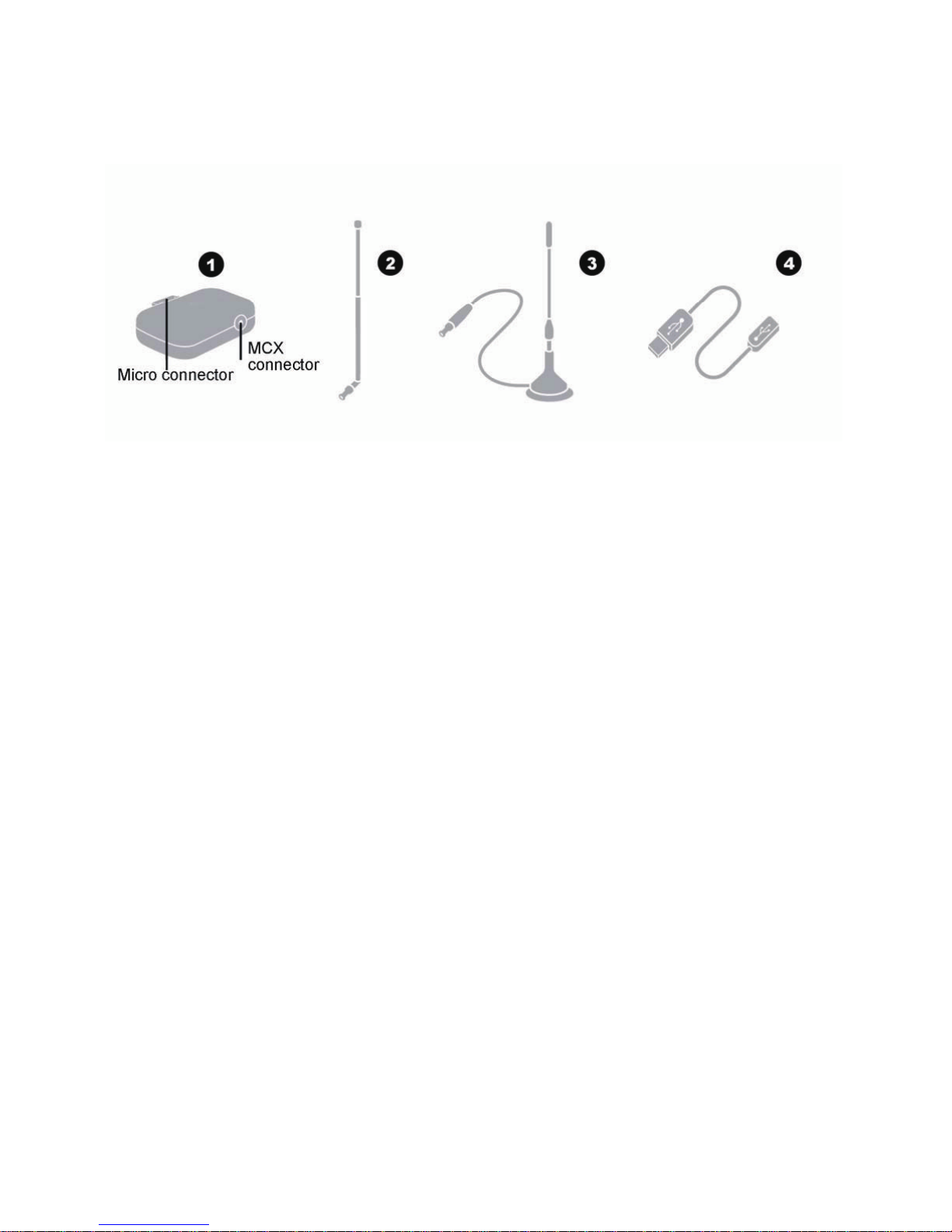
Verpackungsinhalt
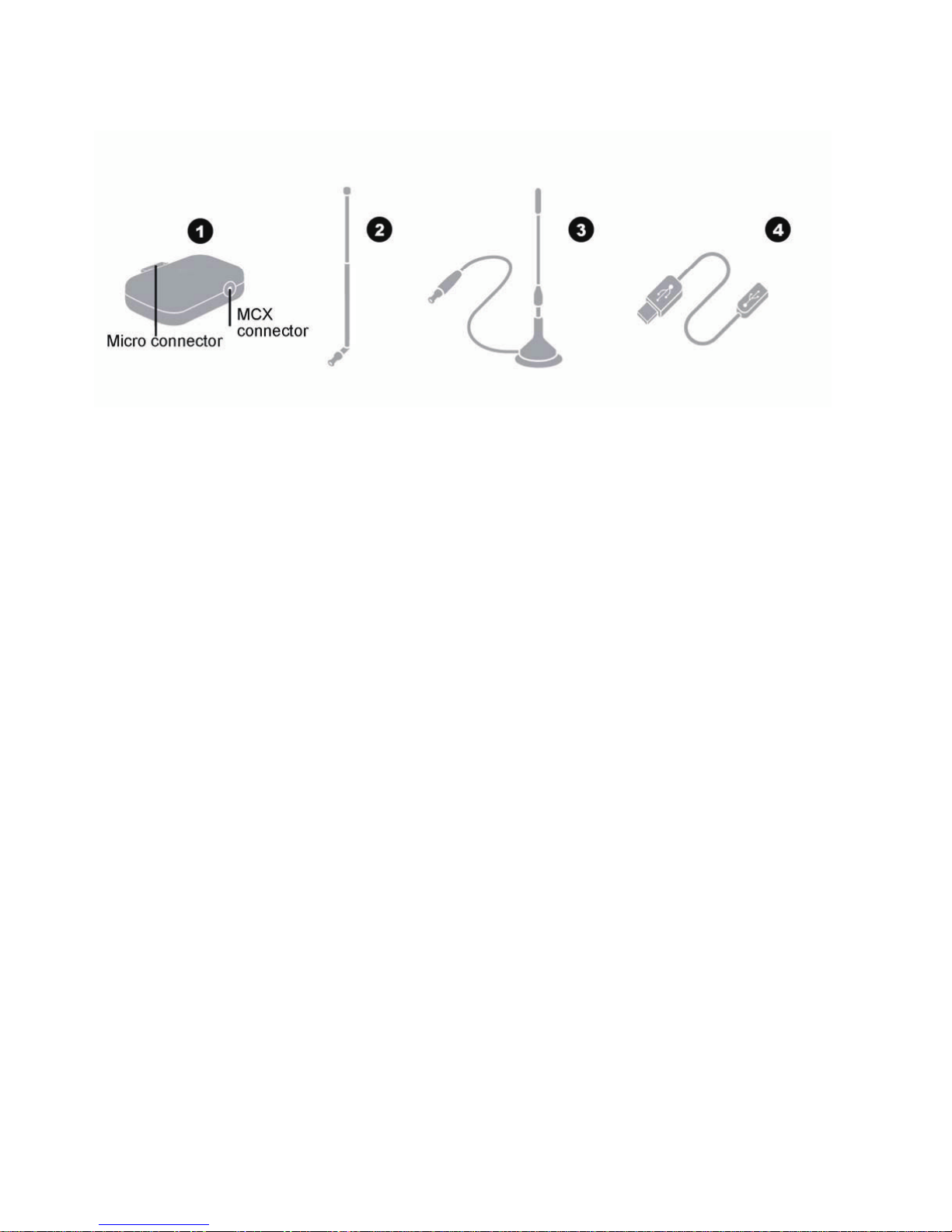
- DVB-T Stick (1)
- Mini Teleskopantenne (2)
- Stabantenne (3)
- micro USB zu micro OTG Kabel (4)
- mini USB zu micro OTG Kabel (4)
- doppelseitige selbstklebende Halterung
1
Page 5
Systemvoraussetzungen
- Android Gerät mit Display (Tablet, Smartphone) mit NEON CPU Unterstützung
- Android 4.03 oder höher
- Android Geräte mit mini oder micro USB Anschluss und OTG Unterstützung
- DVB-T Empfang (Sender und Empfangsstärke sind je nach Region unter schiedlich
- App Air DTV oder iDTV kostenlos über Google PlayStore downloadbar
Installation der Software APP Air DTV / iDTV
Bevor der DVB-T Stick erstmals genutzt wird, muss die App Air DTV oder iDTV auf
Ihrem Android Gerät installiert werden. Die App ist kostenlos im Google Play Store
verfügbar. Hierzu ist eine Internetverbindung notwendig.
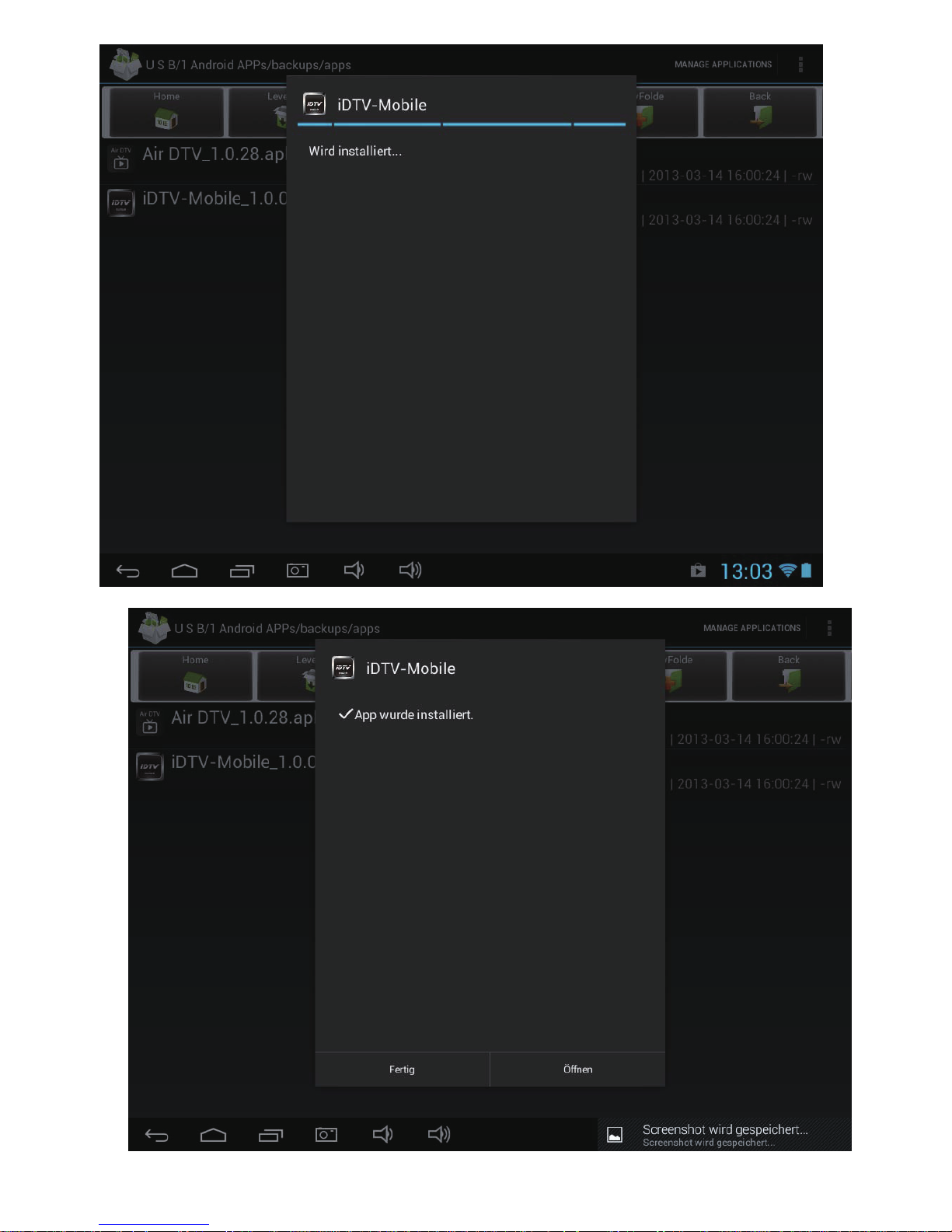
1. Öffnen Sie Google Play Store mit dem Android Gerät
2. Geben Sie als Suchbegriff Air DTV oder iDTV ein.
3. Installieren Sie die Air DTV oder iDTV.
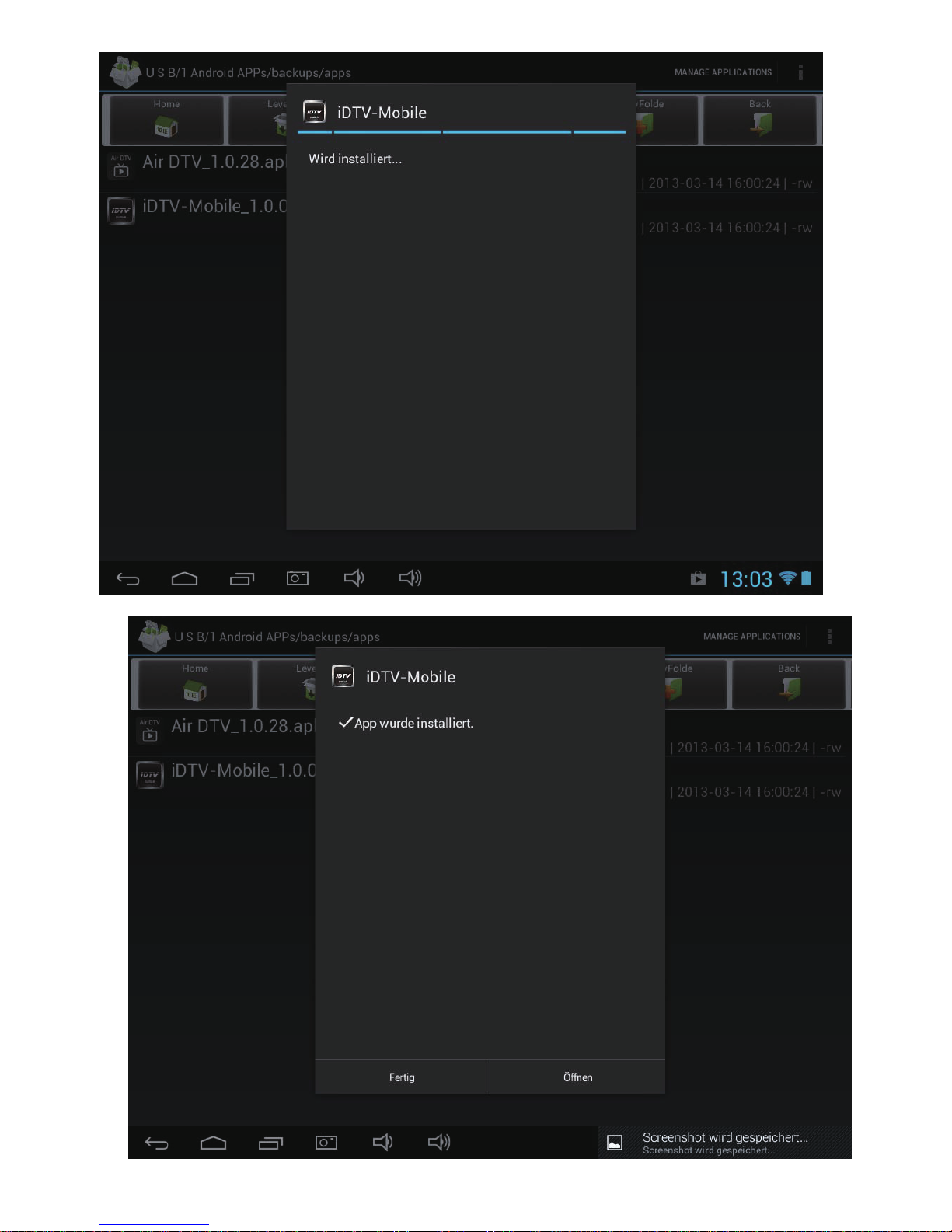
Nachdem die Installation abgeschlossen wurde wählen Sie „Fertig“
2
Page 6
3
Page 7
DVB-T Stick an das Android Gerät anschließen
Benutzen Sie die beigelegten micro USB zu micro OTG Kabel oder
mini USB zu micro OTG Kabel um den DVB-T Stick mit dem Android Gerät zu
verbinden. Mit der beigelegten doppelseitigen selbstklebenden Halterung kann der
DVB-T Stick auf der Rückseite des Android Gerätes befestigt werden.
Sollte ihr Android Gerät eine micro USB Buchse haben, kann der DVB-T Stick auch
direkt angesteckt werden.
Achtung: Der DVB-T Stick erhält die Spannungsversorgung vom Android Gerät
und verringert die Akku-Laufzeit, auch wenn kein DVB-T Sender
angezeigt wird. Entfernen Sie den DVB-T Stick vom Android Gerät,
wenn er nicht benutzt wird.
DVB-T Stick verwenden - Sendersuchlauf
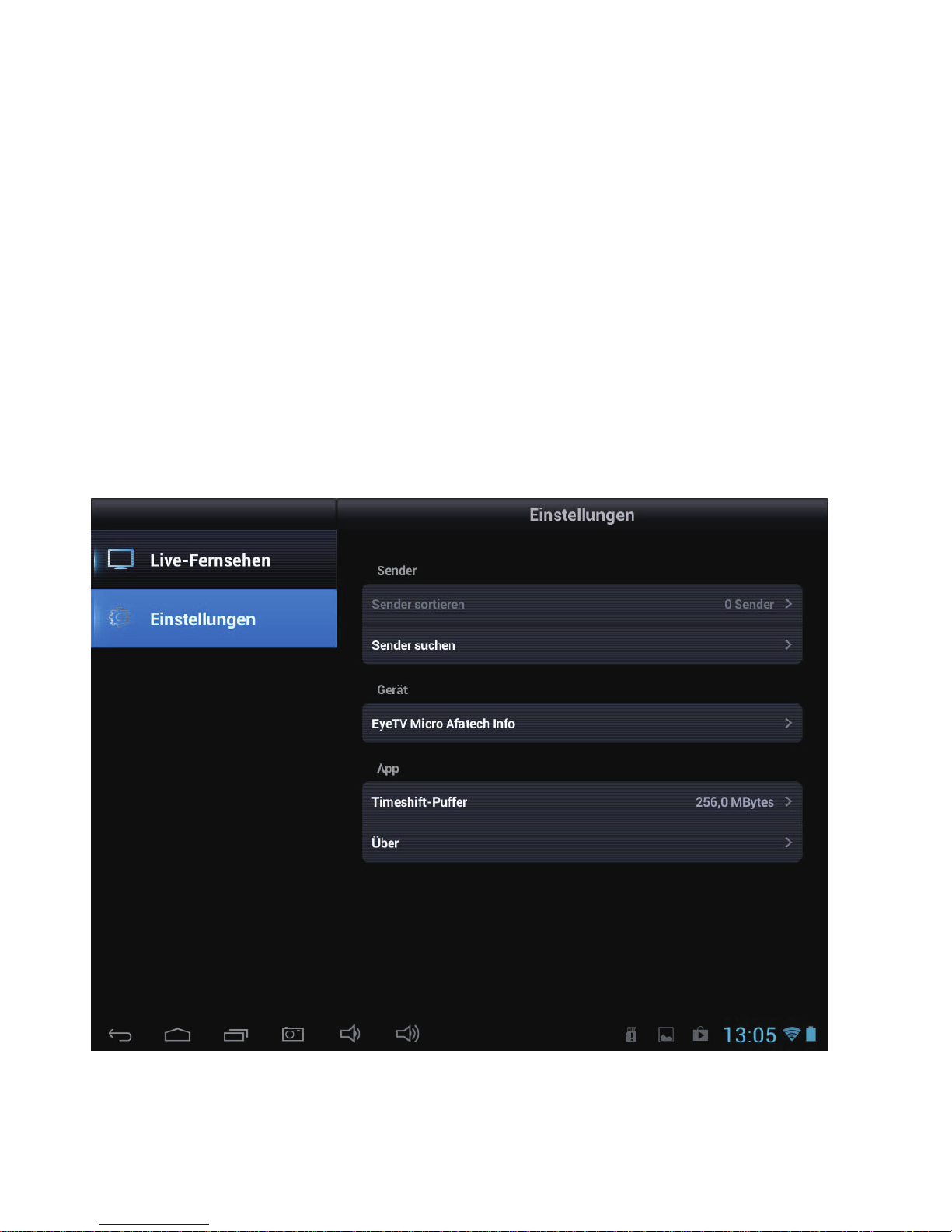
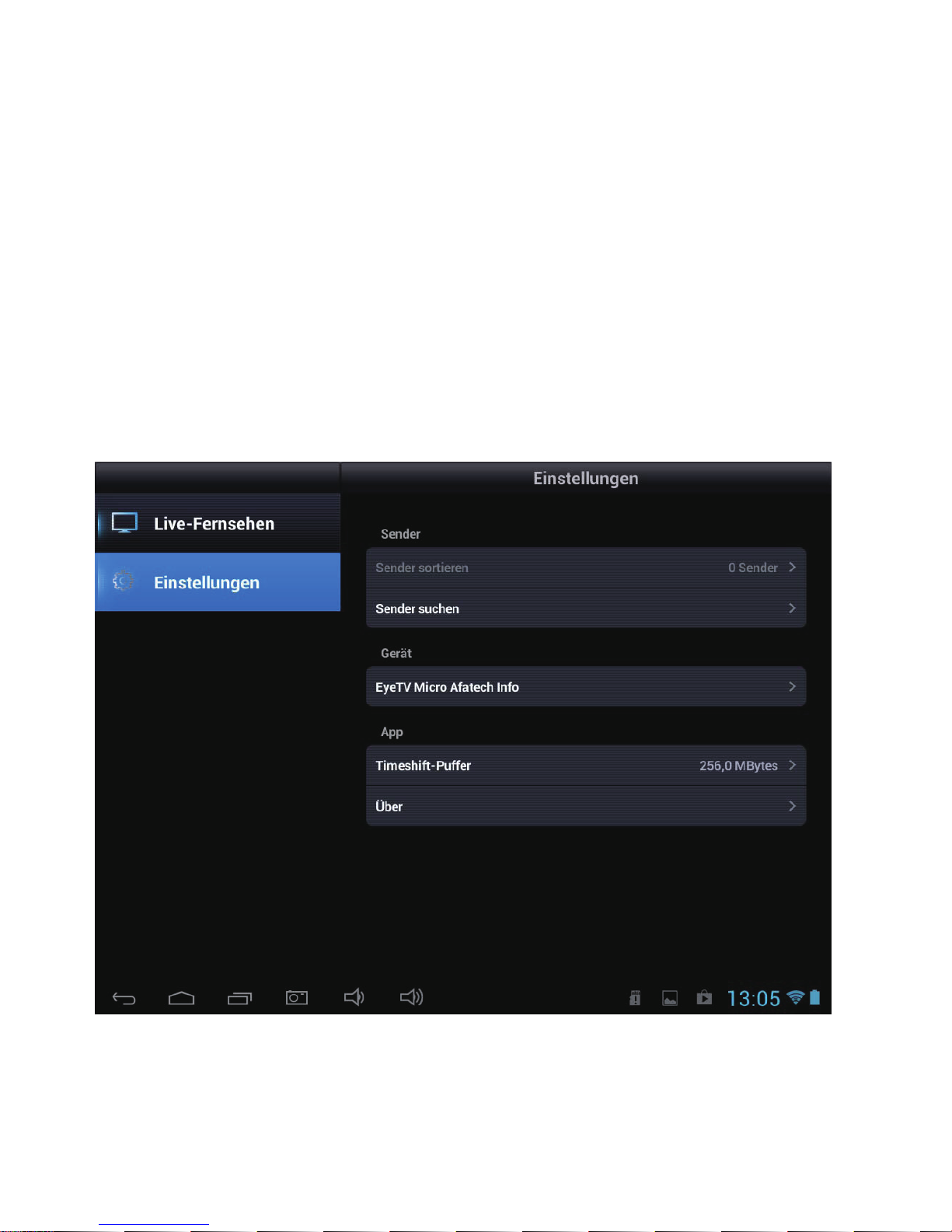
Öffnen Sie die App Air DTV oder iDTV und tippen auf Einstellungen / Sender suchen.
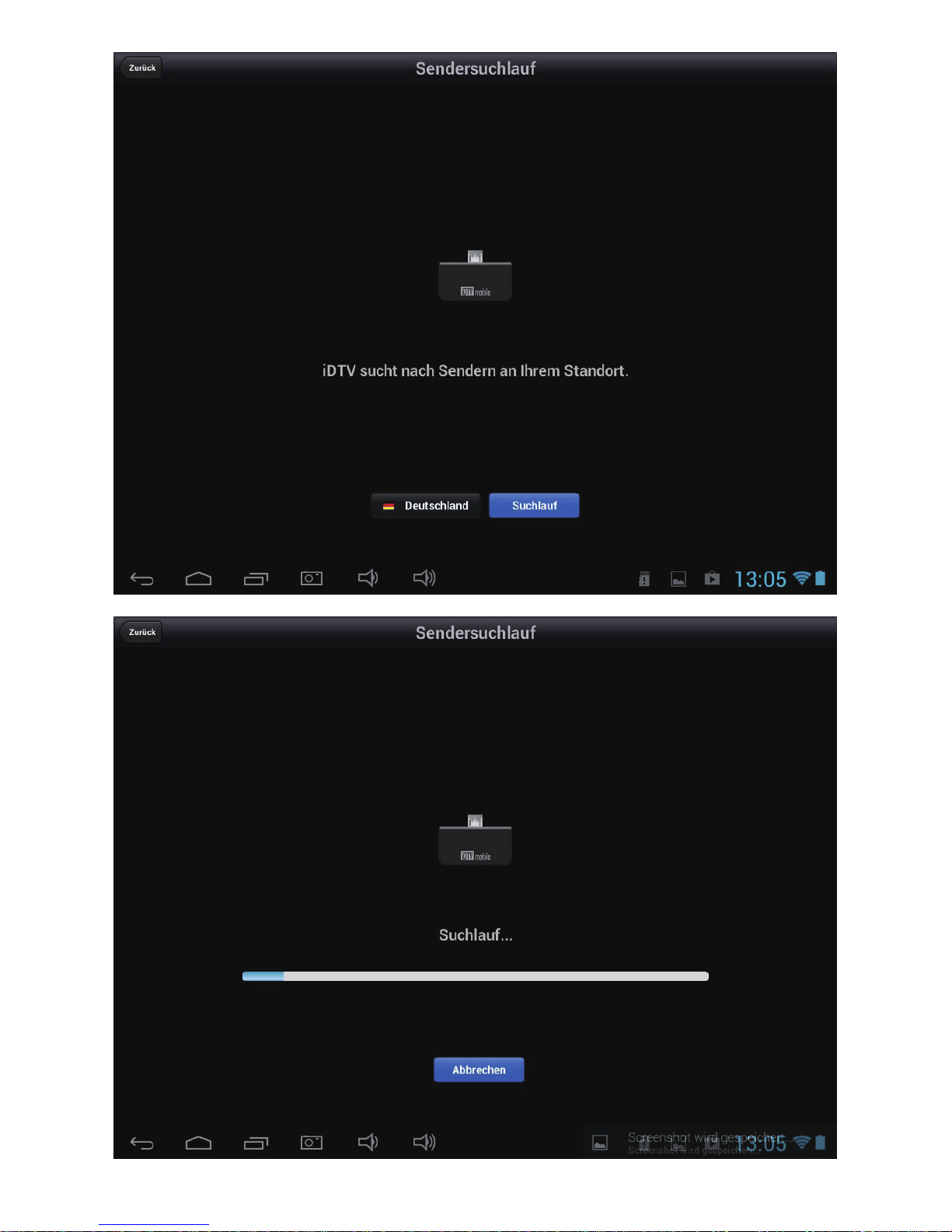
Wählen Sie das Land und starten den Sendersuchlauf.
4
Page 8
5
Page 9
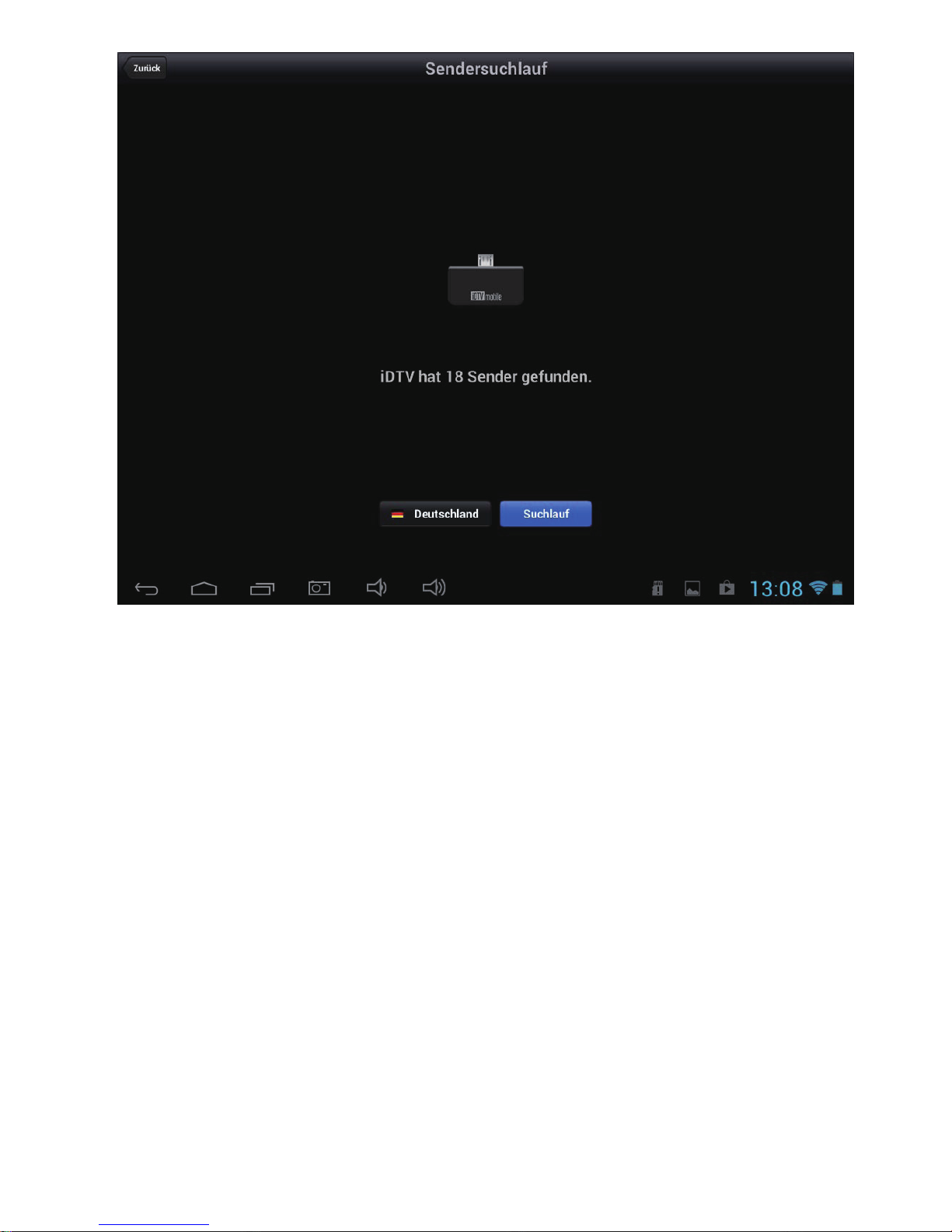
Bitte mit „Zurück“ den Sendersuchlauf beenden, sobald der Sendersuchlauf
abgeschlossen ist.
6
Page 10
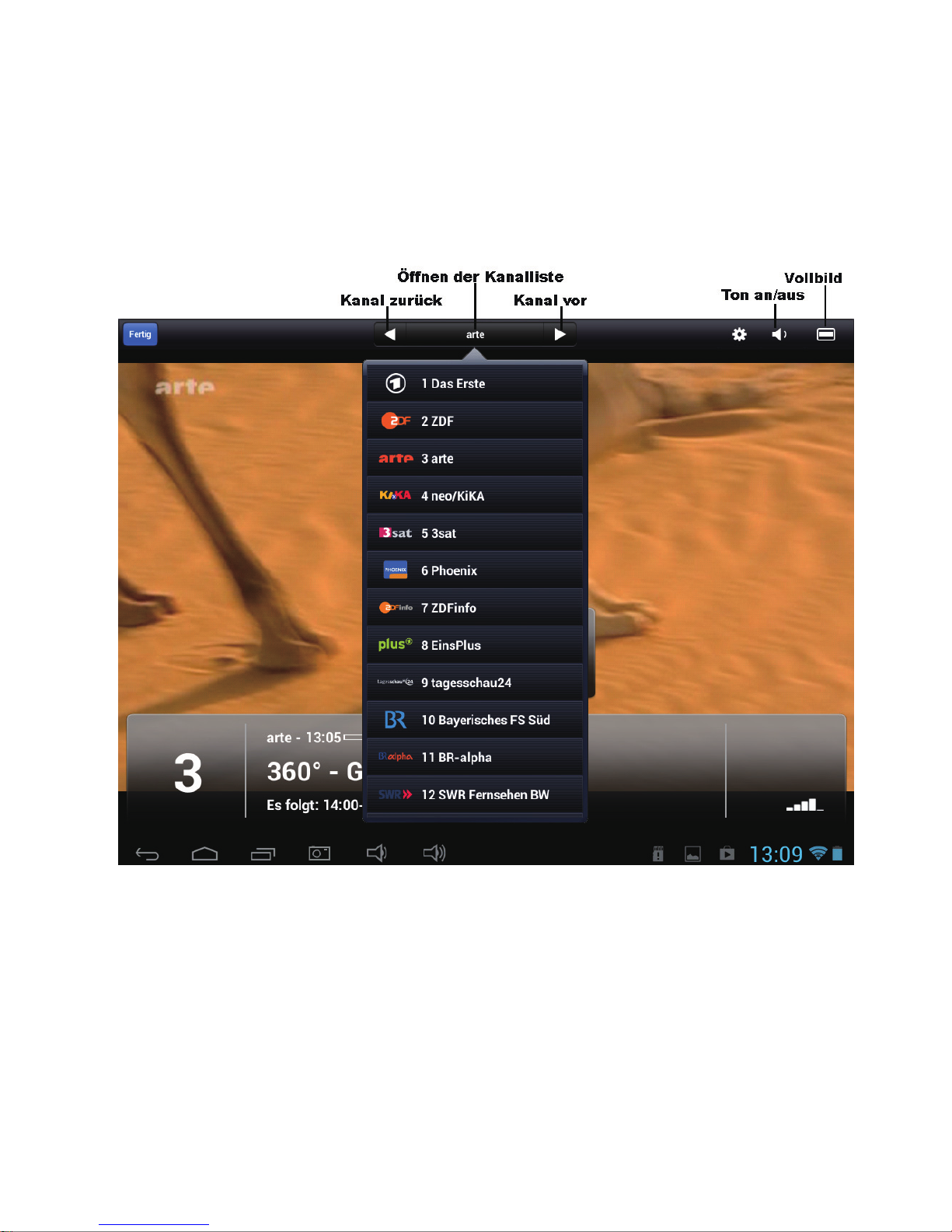
DVB-T Stick verwenden
Kanal zurück: wechseln Sie zum vorherigen Kanal
Kanal vor: wechseln Sie zum nächsten Kanal
Öffnen der Kanalliste: alle verfügbaren Kanäle werden angezeigt und der
entsprechende Kanal kann ausgewählt werden.
Ton Aus/ An: benützen Sie diese Funktion um den Ton Aus- oder
Einzuschalten
Vollbild: ändert die Anzeige auf Vollbild
7
Page 11

Technische Daten:
Anschluss: micro USB 2.0
TV Tuner: Eingangssignal 75 Ohm (VHF/ UHF)
Empfangsfrequenz – VHF 174 – 230 MHz
UHF 470 – 862 MHz
Demodulator and FEC Kanal Bandbreite 6, 7, 8 MHz
COFDEM Mode 2K, 8K
Code Rate 1/2, 2/3, 3/4, 5/6, 7/8
Guard interval 1/4, 1/8, 1/16 or 1/32
Spannungsversorgung: über USB des Android Gerätes
Größe: ca. 31 x 21 x 8.6 mm
Gewicht: ca. 15 g
Geeignete Android Geräte:
CAPTIVA PAD 7, 8, 8 Pro, 10, 10.1
Samsung Galaxy SII, SIII, Note, Note II
ASUS Nexus 7, MEMO Pad, EeePad 2 (TF201)
Acer ICONIA Tab A510
Archos 101XS
HTC One X (OS 4.1.1 above)
One X Plus (OS 4.1.1 above)
Hersteller / Importeur:
CAPTIVA GmbH
Siemensstrasse 9
D-85221 Dachau / Deutschland
Tel: ++49 (0) 8131 / 5695-0
Fax: ++49 (0) 8131 / 5695-500
www.captiva-power.com
Konformitätserklärung
Hiermit wird bestätigt, dass dieses Gerät, bei bestimmungsgemäßer Verwendung,
die grundlegenden Anforderung der EMV-Richtlinie 2004/108/EG erfüllt.
8
Page 12

Page 13

Content
User Manual CAPTIVA DVB-T Stick for Andriod Devices .....................................................
Application ............................................................................................................................
Terrestrial DVB-T (Digital Video Broadcasting) .....................................................................
Note on disposal .................................................................................................................
Used Logos ............................................................................................................................
Package content .................................................................................................................
System requirements..............................................................................................................
Installing the software APP Air DTV / iDTV............................................................................
Connect the DVB-T Stick to the Android Device....................................................................
Using the DVB-T Stick – search channels ...........................................................................
Using the DVB-T Stick ...........................................................................................................
Specifications .........................................................................................................................
Supported Android device .....................................................................................................
Declaration of Conformity........................................................................................................
2
2
4
4
7
7
8
8
1
1
1
1
1
1
Page 14
User Manual CAPTIVA DVB-T Stick for Android Devices
Thank you for purchasing the CAPTIVA DVB-T Stick for Android Devices.
This user manual includes the commissioning and usage of the DVB-T stick. Please
read this manual carefully before using the DVB-T Stick. Please keep the manual.
Application
This DVB-T stick receives DVB-T stations and displays it on the tablet or smartphone
running Android operating system. The TV signal will be received via the included
terrestrial antenna. There is not any internet connection required to receive the
DVB-T stations.
Terrestrial DVB-T (Digital Video Broadcasting)
The reception of DVB-T signal is different in different regions and countries.
For Germany you will find more information at
www.ueberallfernsehen.de
Note on disposal
This device should not be disposed of with household wast.
Please dispose of this device commercially or at municipal recycling plants. Return is
free of charge and is prescribed by law.
Used Logos
All brandmarks, trademarks and products are registered by their respective company.
Package content
- DVB-T Stick (1)
- mini-retractable antenna (2)
- rod antenna (3)
- micro USB zu micro OTG cable (4)
- mini USB zu micro OTG cable (4)
- double-sided adhesive mounting
1
Page 15
System requirements
- Android device with display (Tablet, Smartphone) mit NEON CPU support
- Android 4.03 or higher
- Android device with mini or micro USB connector and OTG support
- DVB-T reception (station and quality of reception could deviate in different
regions)
- App Air DTV or iDTV free of charge downloadable at Google PlayStore
Installing the software APP Air DTV / iDTV
It is needed to install the APP Air DTV or iDTV at your Android Device before using
the DVB-T stick the first time. The APP is free for charge downloadable at Google
Play Store. For this purpose, an internet connection is required.
1. Open the Google Play Store with the Android device.
2. Enter the search term AirDTV or iDTV.
3. Install the APP Air DTV or iDTV.
After the installation has completed, select finish.
2
Page 16
3
Page 17
Connect the DVB-T Stick to the Android Device
Please use the enclosed micro USB to micro OTG cable or mini USB to micro OTG
cable to connect the DVB-T stick with the Android device. The DVB-T stick can be
fixed with the enclosed double-sided adhesive mounting at the rear of the Android
device.
It is possible to connect the DVB-T stick without using the cable, if the Android device
has a micro USB socket.
Caution: The DVB-T Stick is powered by the Android device and reduce the
battery life time, even there is not any DVB-T channel watched.
Please disconnect the DVB-T stick from the Android device, if it is not
used.
Using the DVB-T Stick – search channels
Open the APP AirDTV or iDTV and touch settings / search channels.
4
Page 18
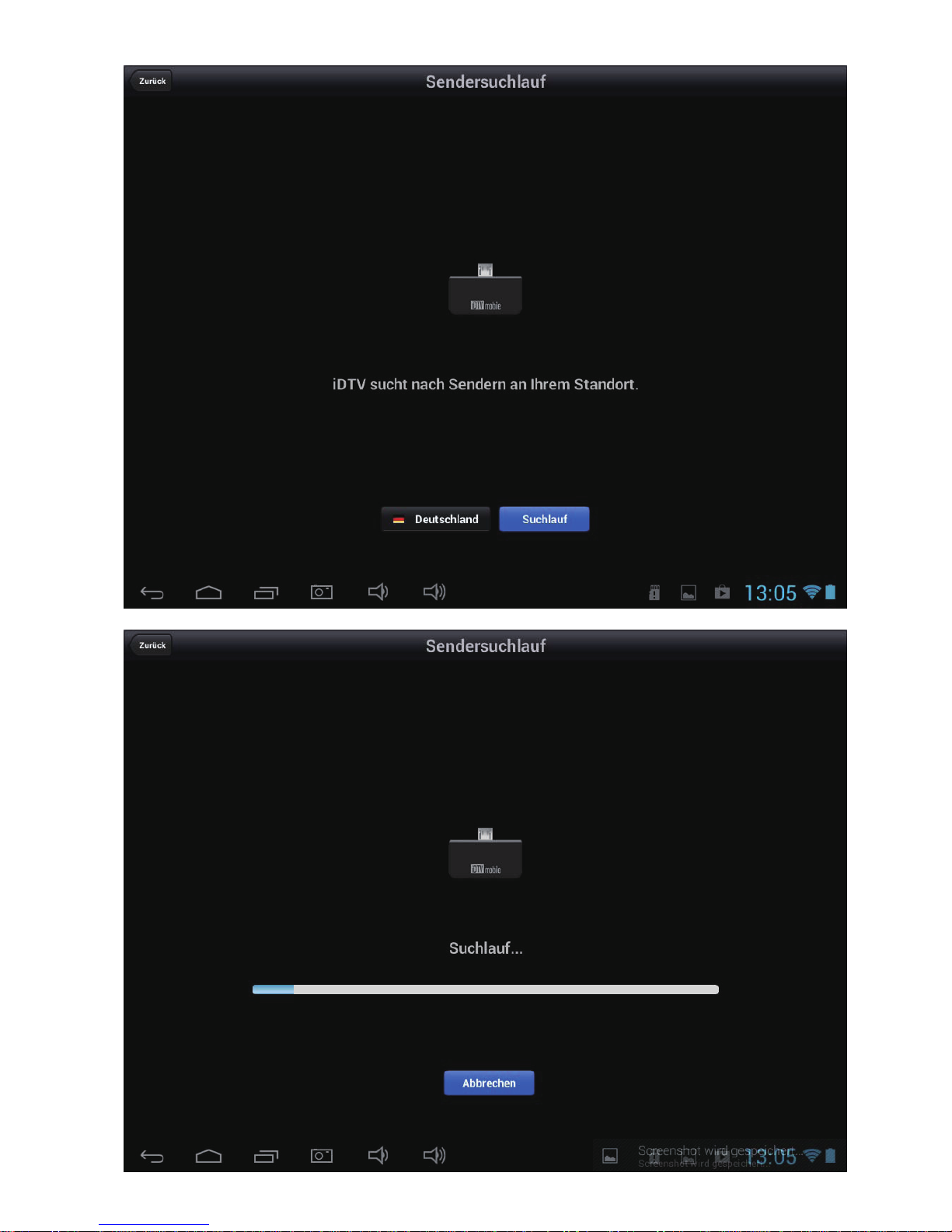
Select the country and start the channel search.
5
Page 19
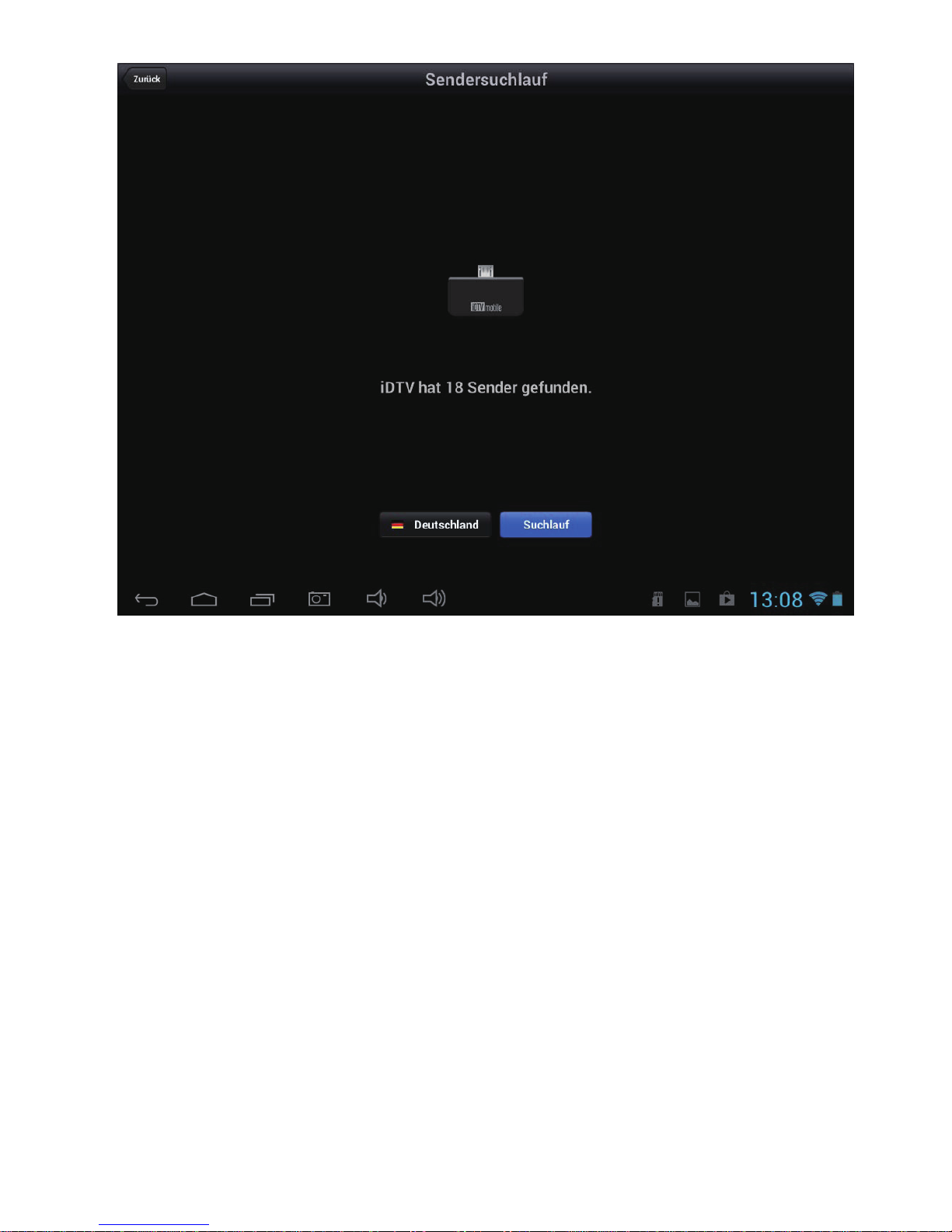
Please touch return if the channel search is finished.
6
Page 20
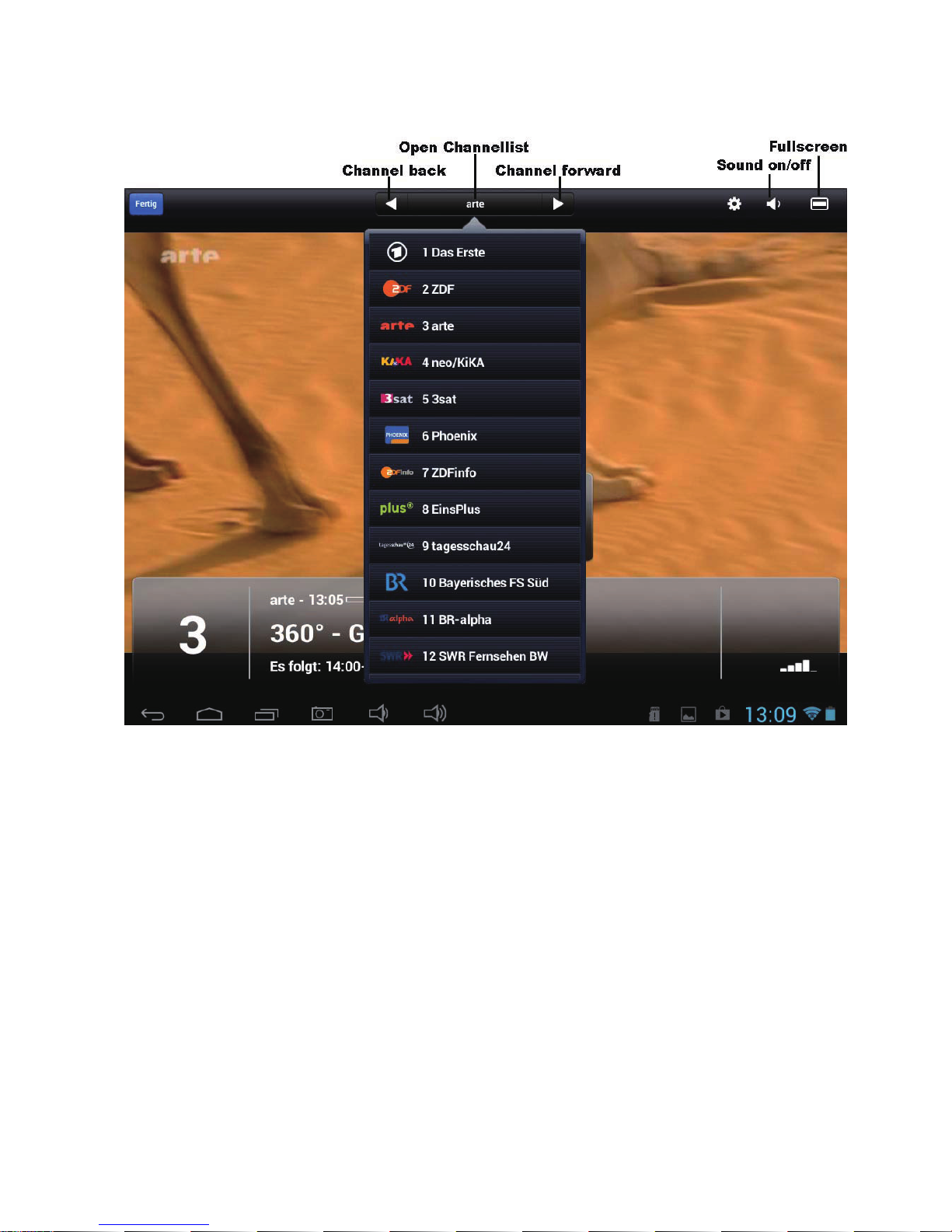
Using the DVB-T Stick
Channel back: change to previous channel
Channel forward: change to next channel
Open channel list: shows all available channels and select the desired
channel
Sound On/ Off: use this button to switch on / off the sound
Fullscreen: change to full screen
Specifications:
Interface: micro USB 2.0
TV Tuner: Input signal 75 Ohm (VHF/ UHF)
Receiving frequency – VHF 174 – 230 MHz
UHF 470 – 862 MHz
Demodulator and FEC Channel Bandwidth 6, 7, 8 MHz
COFDEM Mode 2k, 8K
Code Rate 1/2, 2/3, 3/4, 5/6, 7/8
Guard interval 1/4, 1/8, 1/16 or 1/32
7
Page 21

Power supply: via USB from Android device
Dimension: approx. 31 x 21 x 8.6 mm
Weight: approx. 15 g
Supported Android device:
CAPTIVA PAD 7, 8, 8 Pro, 10, 10.1
Samsung Galaxy SII, SIII, Note, Note II
ASUS Nexus 7, MEMO Pad, EeePad 2 (TF201)
Acer ICONIA Tab A510
Archos 101XS
HTC One X (OS 4.1.1 above)
One X Plus (OS 4.1.1 above)
Manufacturer / Importeur:
CAPTIVA GmbH
Siemensstrasse 9
D-85221 Dachau / Deutschland
Tel: ++49 (0) 8131 / 5695-0
Fax: ++49 (0) 8131 / 5695-500
www.captiva-power.com
Declaration of Conformity
It is hereby confirmed, that this device, when use as intended, complies with the
essential requirements regarding the EMC-directive 2004/108/EG.
8
Page 22

Page 23

Page 24
 Loading...