

Page 1

ID-Star 4054 ePassport Reader
Instruction manual
Bedienungsanleitung
Revision 0.91
o
Océ Document Technologies GmbH
Page 2

The reproduction, distribution and use of this document and
Océ Document Technologies GmbH All rights, including rights created by patent grant
Max-Stromeyer-Strasse 116 or registration of utility or design, are reserved.
D-78467 Konstanz
Tel.: +49 (0) 75 31 87 – 0 Subject to availability. Technical data subject to change.
Document no. L93123-N110-X-*-7419 Copyright Océ Document Technologies GmbH
Order no. 440246
Revision: 0.91 Printed in Germany
L93123-N11-X-*-7419
its contents is not permitted without express written
consent. Offenders will be liable for damages.
Page 3

Contents
Contents
Introduction .........................................................................................................1-1
1
1.1 System overview of ID-Star 4054 ePassport Reader .........................................1-1
1.2 Safety instructions ..............................................................................................1-3
1.3 Scope of delivery ................................................................................................1-4
1.4 Performance features .........................................................................................1-4
2 Installation and set-up instructions .....................................................................2-1
2.1 Before installation ...............................................................................................2-1
2.2 Electrical connection conditions..........................................................................2-1
2.3 Setting up the scanner........................................................................................2-2
2.4 Connecting the ID-Star 4054 ePassport Reader to a PC ...................................2-3
2.5 Installing device drivers ......................................................................................2-4
3 Operating instructions.........................................................................................3-1
3.1 Switching on the device ......................................................................................3-1
3.2 ID-Star 4054 ePassport Reader display .............................................................3-2
3.3 Reading documents............................................................................................3-3
3.4 Switching off the system .....................................................................................3-5
3.5 Verification of document using the UV-illumination ............................................3-5
4 Maintenance and care ........................................................................................4-1
5 Safety precautions ..............................................................................................5-1
5.1 Trouble shooting .................................................................................................5-1
5.2 Customer services addresses ............................................................................5-2
5.3 Test document ....................................................................................................5-2
6 Additional technical information ..........................................................................6-1
6.1 Travel document specification according to the ICAO standard.........................6-1
6.2 Applicable regulations concerning reading of ePassports ..................................6-1
6.3 Device dimensions..............................................................................................6-2
6.4 ID-Star 4054 ePassport Reader data sheet........................................................6-3
7 Regulatory Compliance Statements ...................................................................7-1
7.1 CE certificate ......................................................................................................7-1
7.2 Verification of the declared compliance ..............................................................7-1
7.3 Declaration of FCC conformity............................................................................7-2
Figures
Figure 1: The ID-Star 4054 system in action ....................................................................1-1
Figure 2: Mains adapter....................................................................................................2-1
Figure 3: Set-up installation instructions...........................................................................2-2
Figure 4: Connections on the ID-Star 4054 ......................................................................2-3
Figure 5: ID-Star 4054 with mains adapter and attached FireWire cable.........................2-4
Figure 6: The position of the switch on the mains adapter ...............................................3-1
Figure 7: Switch in the ‘ON’ position.................................................................................3-1
Figure 8: Status LED on the mains adapter......................................................................3-2
Figure 9: LED display on the scan unit.............................................................................3-2
Figure 10: Placing a document on the scanner ................................................................3-4
Figure 11: Switch in the ‘OFF’ position.............................................................................3-5
Figure 12: Test ID.............................................................................................................5-2
Figure 13: Device dimensions ..........................................................................................6-2
L93123-N11-X-*-7419
Page 4
Introduction
1 Introduction
This manual provides general operating instructions and information on how to correctly
operate the ID-Star 4054 ePassport Reader. A separate document describes how to
integrate the ID-Star 4054 ePassport Reader into a software application.
In keeping with its features and general applications, the ID-Star 4054 ePassport Reader
is also referred to as the ID-Star ePR, where ePR stands for ePassport Reader. This is to
express that the device has the capability to read so called ePassports. The
is a device alternative of the ID-Star 4054 CSR (Color Security Reader).
The ID reader is activated and controlled by a software application. Therefore, it is
important to read through the software documentation for your given application in order
to operate the system and understand the display elements.
1.1 System overview of ID-Star 4054 ePassport Reader
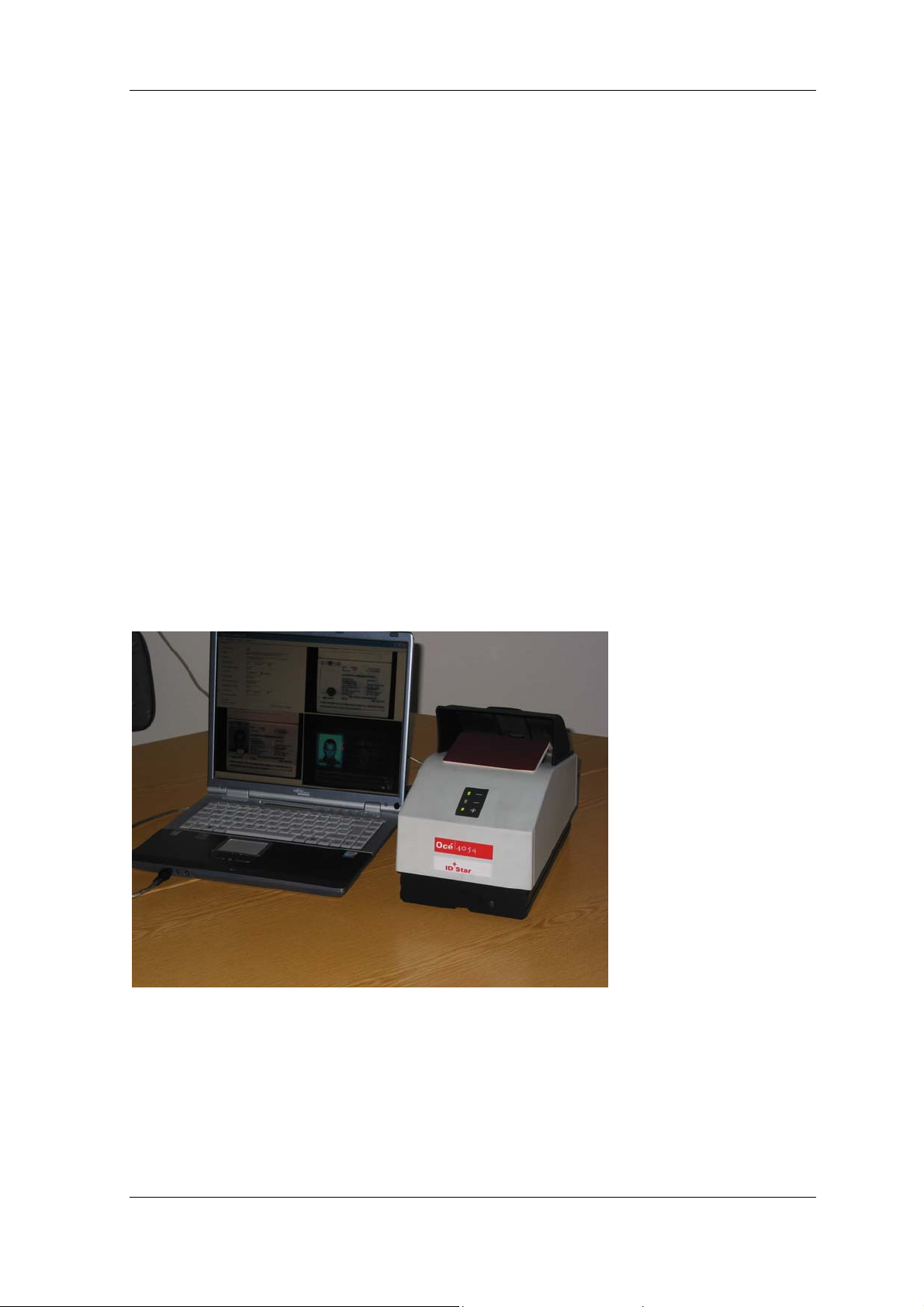
The ID-Star ePR is a device to collect data from travel documents. It integrates a scanner
unit to capture the optical properties of the documents and a RFID reader to give access
to the optional RFID components in modern passports. The device combines the benefits
of a compact design with state-of-the-art technology and the simplest ease of use.
Collecting both types of data is done in a single pass operation, that means the passport
has to be placed only once on the reader to read both properties of the document.
ID-Star ePR
Figure 1: The ID-Star 4054 ePR system in action
The scanner section of the ID-Star 4054 is designed to create color images of all kinds of
documentation, particularly travel documents. Various types of light can be used to
illuminate documents when imaging. By using various illuminations, you can capture
documents in compliance with standards as well as perform various authentication
checks. The images are transferred using a FireWire interface to a PC for further
processing. All additional processing takes place on the PC and includes features such as
real-time verification of document authenticity, character recognition (document reading)
L93123-N11-X-*-7419 1-1
Page 5

Introduction
and archiving. In particular, the ID-Star 4054 provides you with fast and extremely reliable
recognition of travel documents. This feature has been developed in accordance with the
ICAO standard
(International Civil Aviation Organisation).
In parallel to the optical scanning and processing of the document the integrated RFIDreader can be used to read the data from the chip. The ID-4054 ePR contains an antenna
which was developed specially for this device and makes it possible to collect the chip
data independent of its location in the passport. By this technology it is possible to read
and verify all data from the passport by placing it only once on the ID-Star. The RFIDreader can automatically read all kind of chips (e.g. ISO 14443 type A and type B) which
are compliant with the standards of ICAO
(see chapter 6.2 regarding the regulation
concerning reading of ePassports). The software development kit (SDK) which is part of
the product delivery supports all common standards like e.g. BAC, secure messaging,
active authentication.
L93123-N11-X-*-7419 1-2
Page 6

Introduction
1.2 Safety instructions
ATTENTION: The ID-Star 4054 ePassport Reader contains
sensitive, precision optical equipment. The sensitive components
may be damaged if the device is dropped or subjected to severe
vibrations. Exercise caution when handling the ID-Star 4054
ID-reader.
WARNING: NEVER open the housing on the ID-Star or power
supply. If you experience difficulties with your ID-reader, please
return it to the factory or authorised service partner for inspection.
For information on customer service, see chapter “Customer
services addresses”.
WARNING: Opening the housing may expose you to voltages
higher than 24 V / SELV.
WARNING: For safety reasons, only use the original power
supply included in the delivery.
WARNING: The device is not protected against moisture. Never
submerge the device or any of the components in water. Take
care to protect the device from being splashed.
Note: In cases of emergency (for instance, damage to housing,
controls or power cable, or exposure liquids or foreign
substances), immediately switch off the device, unplug the power
and contact our customer service department. (chapter
“Customer services addresses
”)
Caution: Any changes or modifications not expressly approved
by the party responsible for compliance could void the user’s
authority to operate the equipment
NOTE: The ID-Star can be operated with laptops, desktops and PC towers that meet the
system requirements (see chapter “ID-Star 4054 ePR data sheet
”).
L93123-N11-X-*-7419 1-3
Page 7

Introduction
1.3 Scope of delivery
The ID-Star 4054 ePR document reader system comprises the following components:
• ID-Star 4054 ePassport Reader unit
• Desktop power supply
• 6/6-pin IEEE 1394 FireWire cable
• USB 2.0 A-B cable
Optional components:
• FireWire PCI board
• FireWire PCMCIA adaptor
• Power cable for connecting the desktop power supply to the power outlet
(only selected cables available)
1.4 Performance features
For performance features, please see chapter “ID-Star 4054 ePR data sheet
”.
L93123-N11-X-*-7419 1-4
Page 8
Installation and set-up instructions
2 Installation and set-up instructions
Please pay attention to the safety instructions contained in the previous chapter.
2.1 Before installation
Before connecting the ID-Star 4054, please ensure the following:
1. The packaging is not damaged
2. The ID-Star 4054 ePR is complete
3. Your system meets the system requirements (see chapter: ID-Star data sheet
We recommend that you do not dispose of the original packaging. Please retain it in case
you need to return the device.
2.2 Electrical connection conditions
For safety reasons, only use the original power supply included in the delivery.
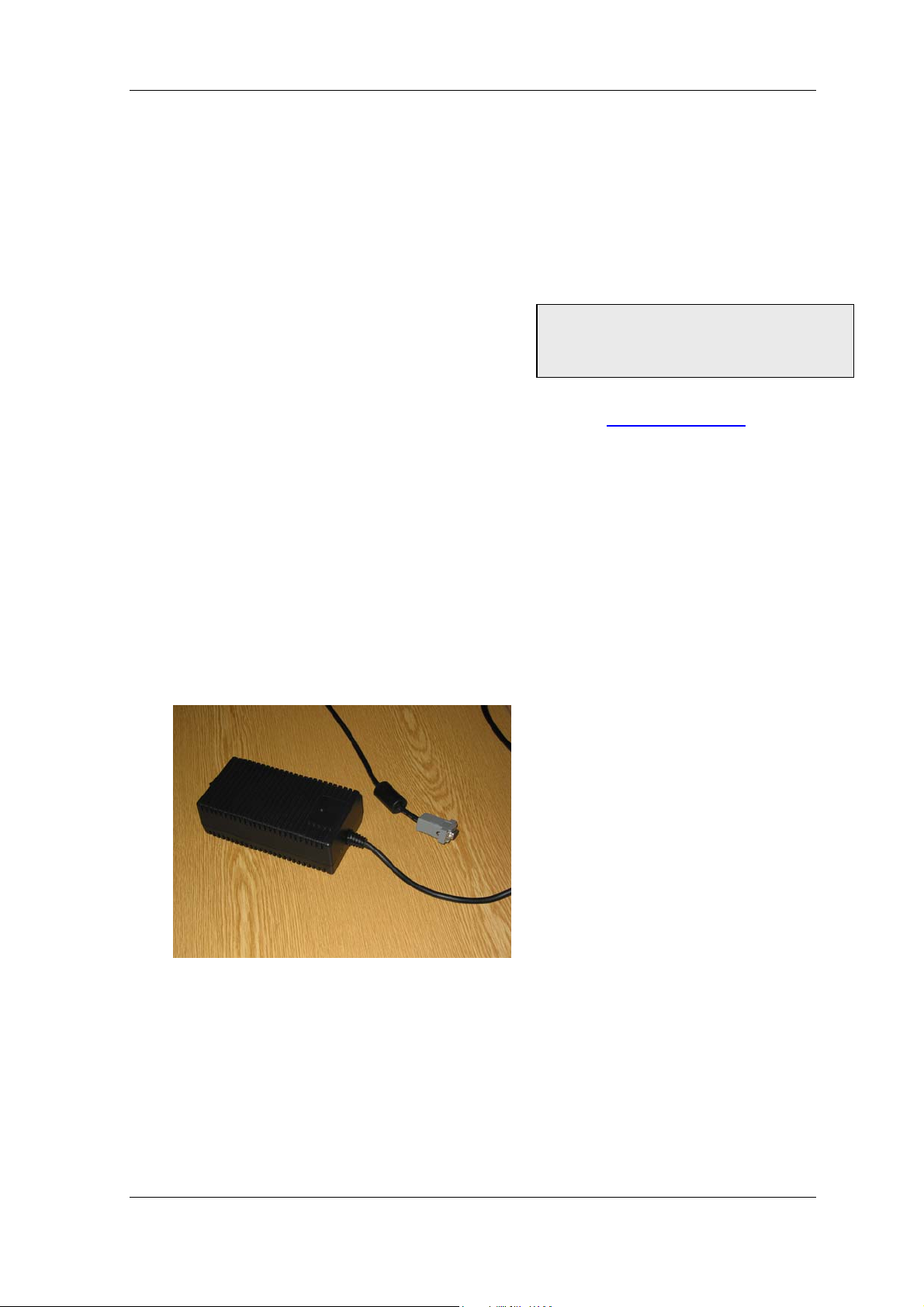
The ID-Star 4054 ePassport Reader power supply is only intended for operation with AC
voltages. The following conditions must be maintained:
Input voltage: 100 V to 240 VAC
Power frequency: 50 Hz to 60 Hz
Contact your dealer immediately if
the delivery is damaged or
incomplete!
)
Figure 2: Power supply
Once you have checked the input voltage, the power supply may be attached to the power
outlet using the appropriate cable. For some countries, the device is delivered with the
appropriate cable.
If not included in the delivery, you should obtain a suitable cable. Please ensure that the
cable is approved for use in the country of operation.
L93123-N11-X-*-7419 2-1
Page 9
Installation and set-up instructions
The following connection values apply for the scanner:
Nominal voltage: 24 VDC
Nominal current: 2.5 A
For safety reasons, only use the original power supply included in the delivery.
2.3 Setting up the scanner
The ID-Star 4054 ePassport ID reader is designed for operation either indoors or in
covered areas outside.
Condensation may form if the device is moved inside from a cold environment. If this is
the case, please wait until the temperature differential has balanced out and the device is
completely dry before attempting to operate it.
Never place the power supply on a surface that is sensitive to heat.
Never obscure the ventilation slots on the power supply.
Protect the system from dust, humidity and heat.
Do not place any heavy objects on the ID-Star 4054 ePR or on the power supply.
Please organise the work place so that the glass screen on the image capture unit is not
subjected to glare from direct light (harsh light sources in the viewing direction) or
reflections.
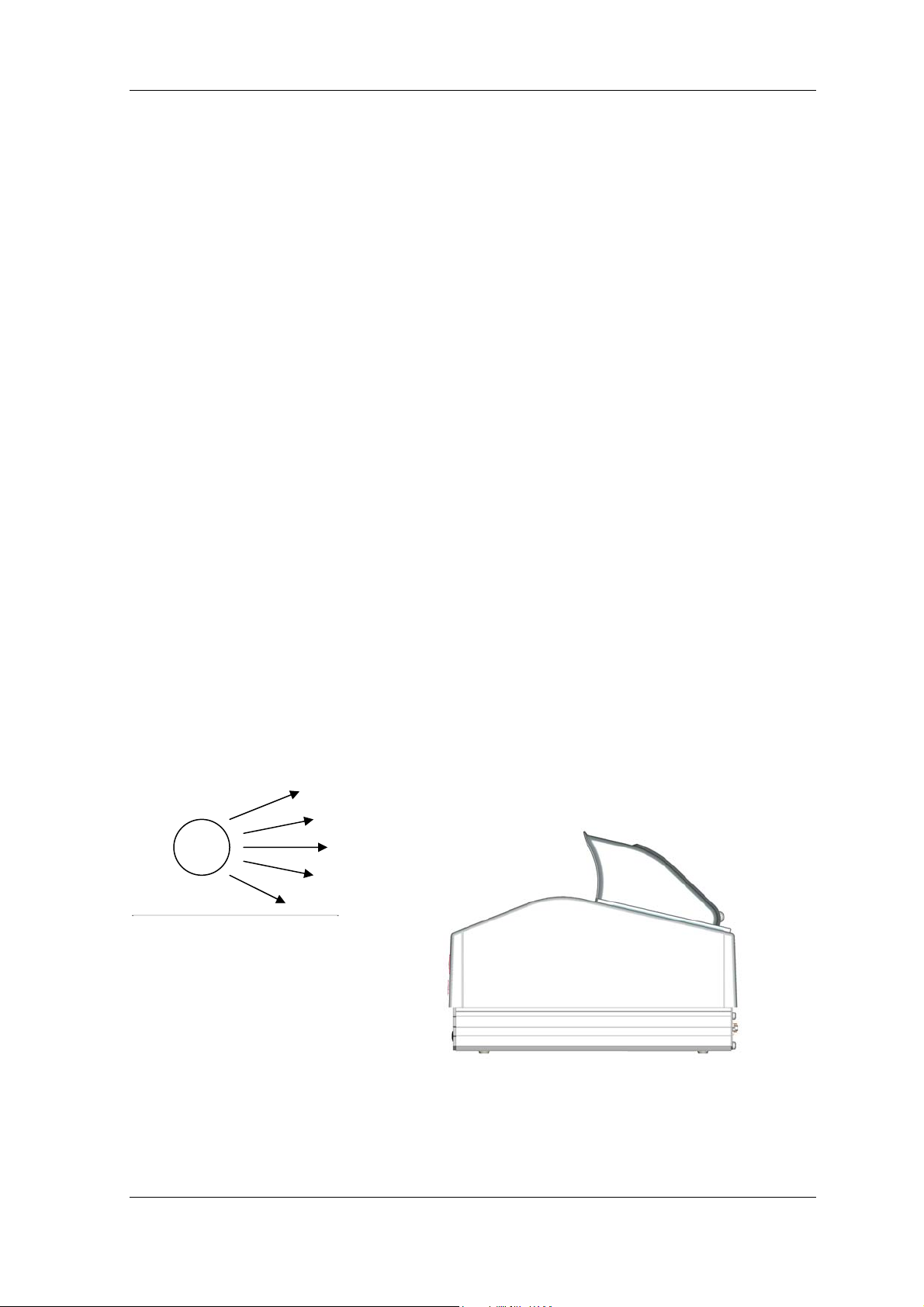
The image quality of your scanning results may suffer if harsh light sources point directly
into the scanner. The same applies to highly reflective surfaces positioned in the same
direction.
The illustration below is an example of an inappropriate position!
light source
Figure 3: Set-up installation instructions
L93123-N11-X-*-7419 2-2
Page 10
Installation and set-up instructions
To avoid fatigue while sitting or standing to operate the device, we recommend positioning
the scanner so that it is at the same level as your elbows. This way, you can easily reach
the scanner by bending your lower arm.
2.4 Connecting the ID-Star 4054 ePassport Reader to a PC
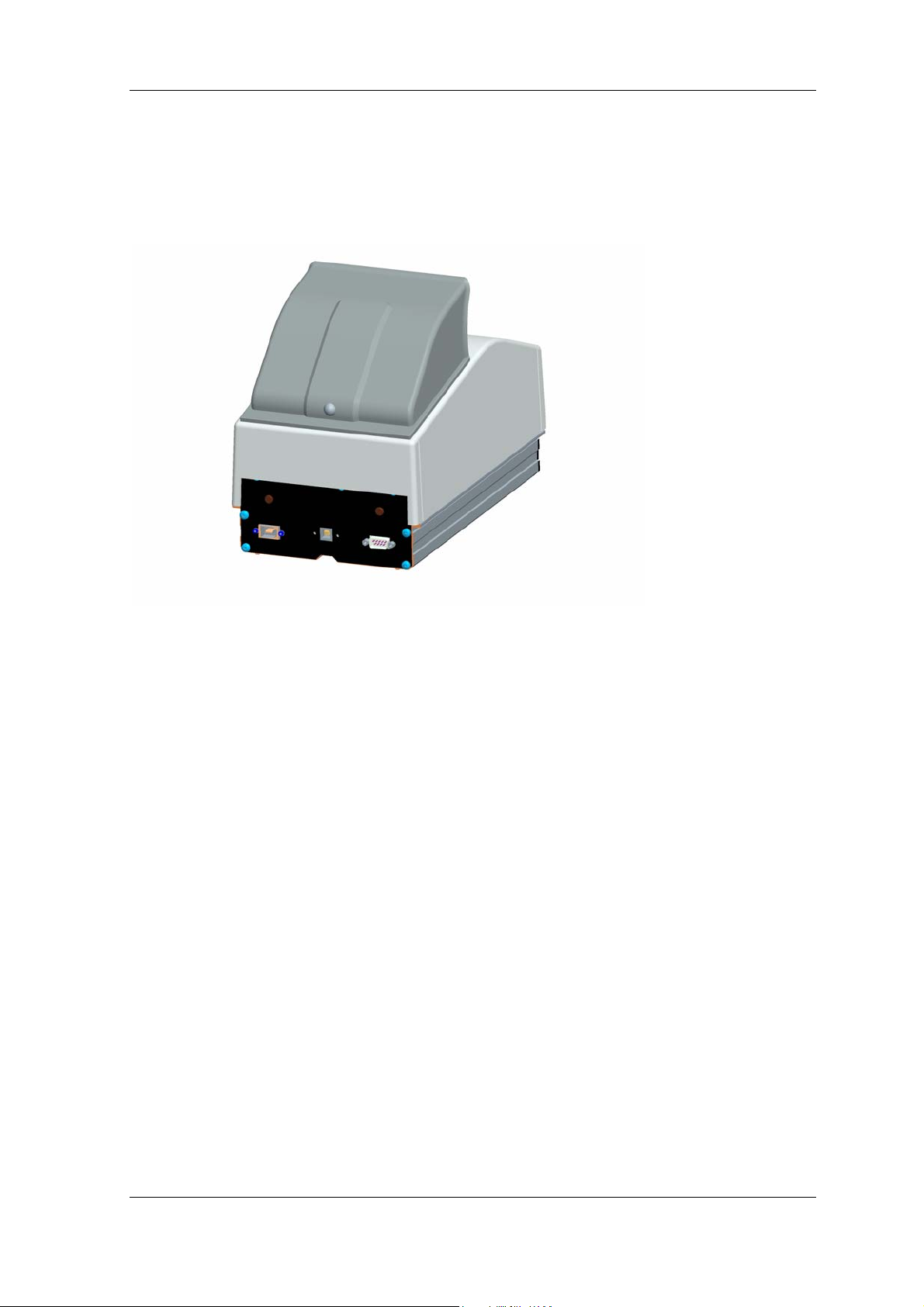
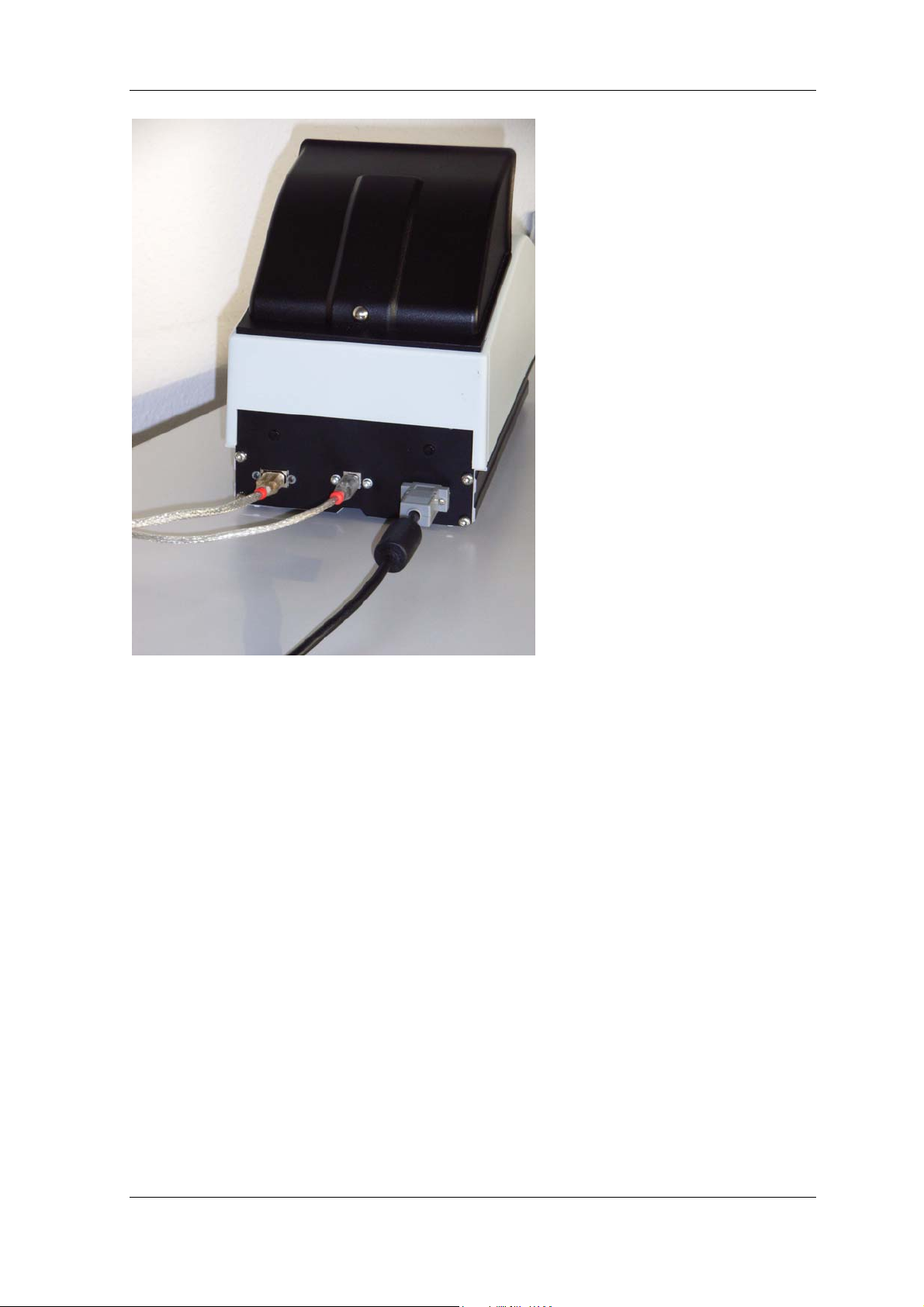
Figure 4: Connections on the ID-Star 4054 ePassport Reader
Connect the power supply to the nine-pin socket on the ID-Star 4054 ePassport Reader
and screw it in place.
Then connect a suitable power cable to the power supply.
Connect the cable to the outlet.
You can now connect the ID-Star 4054 ePR to the FireWire connection on your PC using
a suitable FireWire cable.
Now you are ready to connect the USB socket of the ID-Star 4054 ePR with the intended
USB socket of the PC.
Note: The ID-Star 4054 ePR is a „high-power bus-powered functions“ device according to
the USB specification. That means, the RFID section of the ID-Star ePR is powered from
the USB-cable. Therefore the USB-port of the PC has to be able to deliver current to the
USB-Bus. Should a certain PC not be able to deliver power to the USB-Bus (what is a real
exception), a self powered USB-hub between the PC and the ID-Star can be used to
provide current to the ID-Star ePR.
L93123-N11-X-*-7419 2-3
Page 11
Installation and set-up instructions
Figure 5: ID-Star 4054 ePR with power supply and attached interface cables.
2.5 Installing device drivers
To operate the ID-Star 4054 ePassport Reader, you must first install the necessary drivers
on the PC. Please follow the instructions contained in the description of your application
software. This should contain a chapter that describes software and driver installation.
The operating system will ask you to install the device drivers the first time you connect
and/or activate the ID-Star 4054 ePR. Insofar as your software manufacturer has not
taken any special measures, you will need to install a driver each time you connect either
a new or another scanner to your PC.
L93123-N11-X-*-7419 2-4
Page 12
Operating instructions
3 Operating instructions
3.1 Switching on the device
The system is ready for operation as soon as the following is complete: the device is
connected as described in Chapter 2
outlet using the power supply (see below) and the application software is loaded and
started. Please ensure that the scanner’s glass panel is not covered when switching on
the device.
, the PC and the scanner are connected to the power
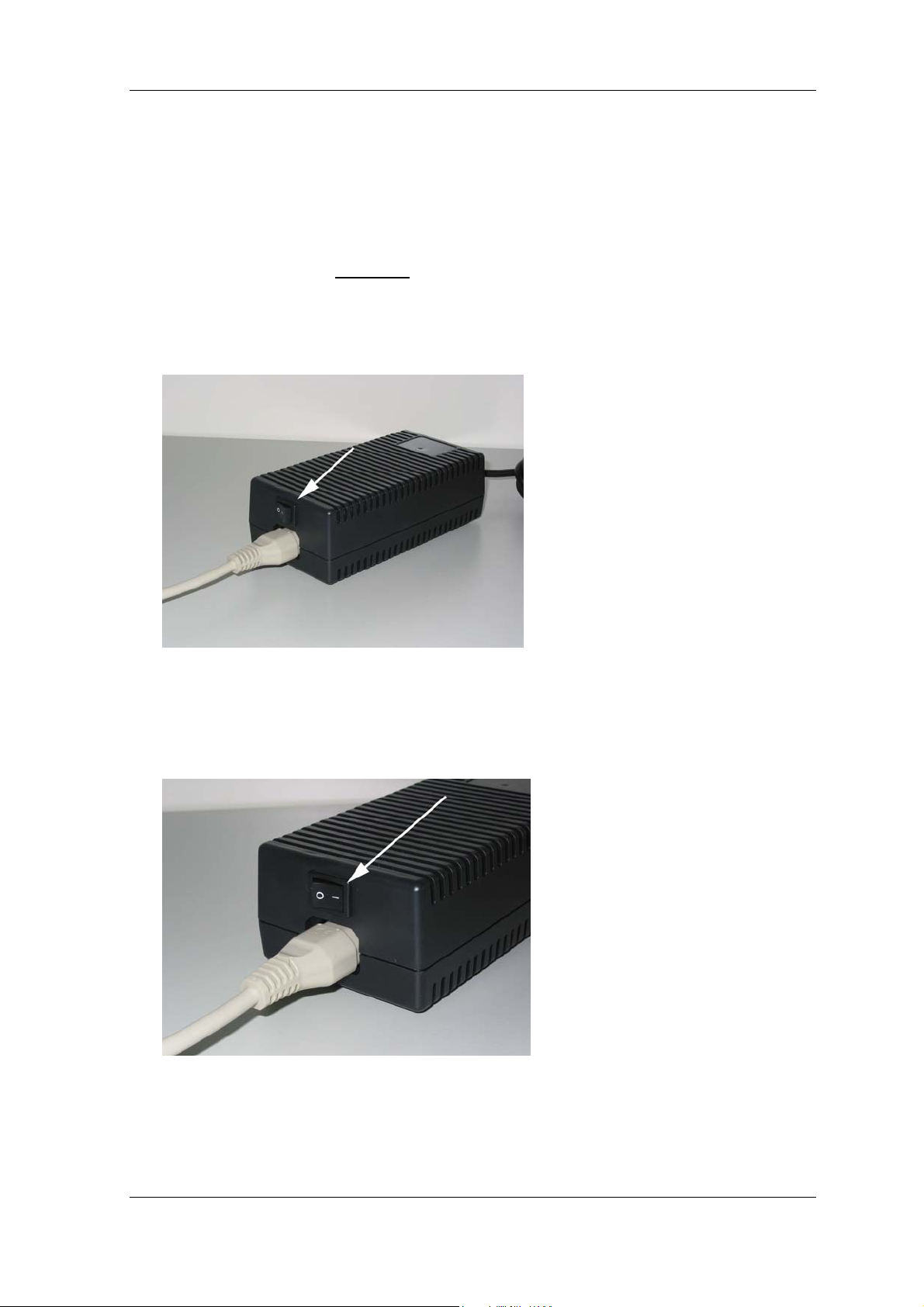
Figure 6: The position of the switch on the power supply
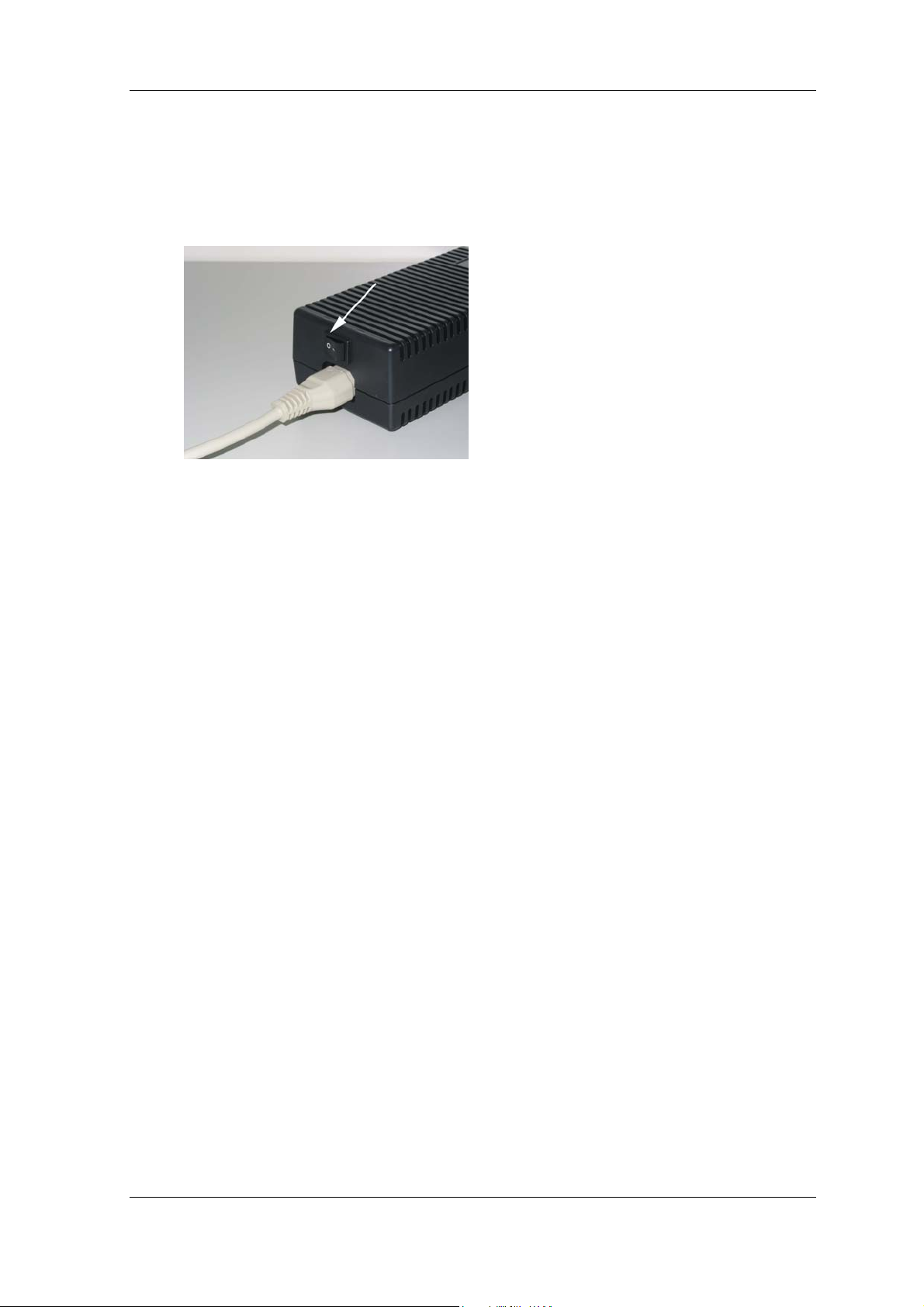
To switch on, move the switch to the position shown in Figure 7 by pressing “-”.
Figure 7: Switch in the ‘ON’ position
L93123-N11-X-*-7419 3-1
Page 13
Operating instructions
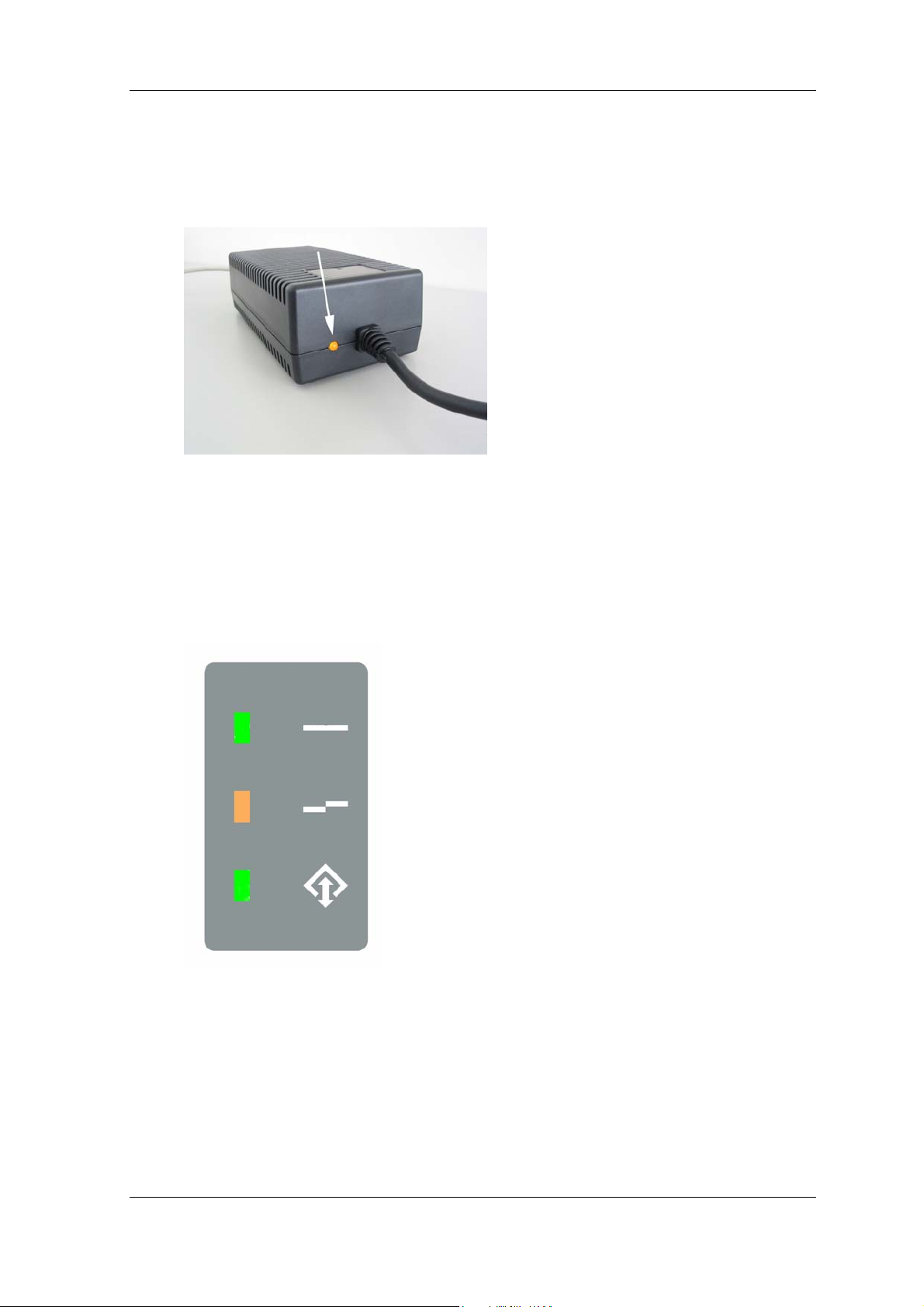
If the power supply has been switched on and correctly connected to the outlet via a
suitable cable, an LED will light up on the power supply. The LED is located opposite the
switch.
Figure 8: Status LED on the power supply
3.2 ID-Star 4054 ePassport Reader display
A display is integrated in the ID-Star 4054 ePR housing that can be used for guidance.
Figure 9: LED display on the scan unit
All three LEDs are controlled by the application software. The meaning of the LED status
depends on the application software and you will find this in the documentation specific to
your application software.
L93123-N11-X-*-7419 3-2
Page 14

Operating instructions
Once the scanner has been switched on, all three of the scanner’s operating LEDs are
initially dark. This is because they are controlled exclusively by the appropriate application
software.
3.3 Reading documents
The specific application software determines whether scanning starts automatically when
a new document is placed on the scanner or whether the user needs to carry out further
steps. Please check your software manual to see which operation mode is active in your
case.
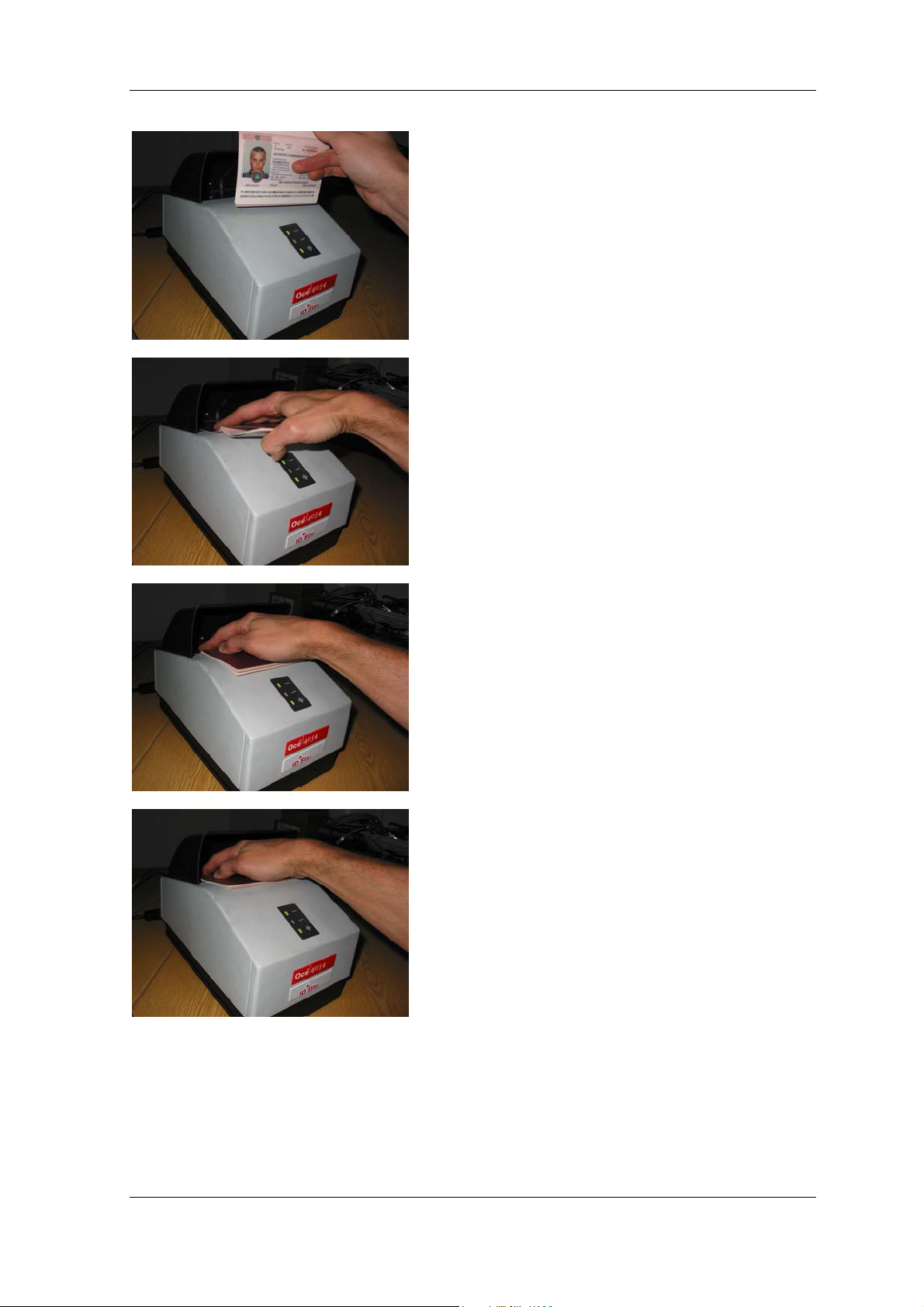
The following illustrations demonstrate how to place a document on the scanner:
L93123-N11-X-*-7419 3-3
Page 15
Operating instructions
Hold the document
in your hand …
Place the
document on the
upper area of the
scanner and on the
glass panel ….
Slide the document
down ….
Until the front edge
of the document
touches the catch
rail
Figure 10: Placing a document on the scanner
The document must remain still on the glass panel for the duration of the scan.
L93123-N11-X-*-7419 3-4
Page 16
Operating instructions
3.4 Switching off the system
To switch off the system, please use the switch on the power supply. To do this, push “0”
to the position shown in Figure 11.
Figure 11: Switch in the ‘OFF’ position
3.5 Verification of document using the UV-illumination
If your application checks the documents using the UV-light source, it is possible that the
operator will come in contact with UVA-light. The irradiation used hereby is harmless and
within the legal limits.
L93123-N11-X-*-7419 3-5
Page 17

Maintenance and care
4 Maintenance and care
The ID-Star 4054 ePassport Reader system does not require maintenance.
However, dirt on the glass plate of the scanner may impair the scanning and recognition
results.
It is therefore recommended that you clean the glass plate on a regular basis.
To clean the glass plate, we recommend you use regular glass cleaner.
L93123-N11-X-*-7419 4-1
Page 18

Safety precautions
5 Safety precautions
Only authorized qualified personnel should carry out repairs on the device. Unauthorized
opening of the housing and improper repairs may endanger the user (risk of electric shock
or fire).
5.1 Trouble shooting
What should I do if…
1. ... the application cannot find the scanner
⇒ Check whether the adapter is switched on and that the main power cable is firmly
attached to the scanner and power supply.
⇒ Check the FireWire connection.
⇒ Ensure that the application has only been started once and/or that only one piece of
application software is using ID-Star 4054 ePassport Reader.
2. ... the reader system produces poor recognition results
Possible causes:
• The original document moved during the scan.
⇒ Repeat the read process while ensuring that the original document does not move.
• The glass plate of the scanner is dirty.
⇒ Clean the glass.
• The document does not conform with the ICAO norm.
3. ... placing a document on the scanner does not trigger scanning
⇒ Please read the operating manual relevant to your application. The application
software determines whether the reader triggers scanning automatically or if it has
to be started manually.
⇒ When switching on the device, an original document had been placed on the glass
plate and the scanner could not be scaled correctly.
⇒ Please check whether the ball in the lid is dirty or whether there are other reasons
why it cannot be recognized.
4. ... slight clattering noise can be heard while moving or placing the ID-Star 4054 ePR.
⇒ This is not a fault on the device. For technical reasons, one of the components
used inside the device produces this noise. This may result in a light clatter in
some devices but should not be a cause for concern.
L93123-N11-X-*-7419 5-1
Page 19
Safety precautions
5.2 Customer services addresses
Océ Document Technologies GmbH
Max-Stromeyer-Straße 116
D-78467 Constance
Support hotline:
Tel.: +49 (0) 75 31 / 87 – 47 00
Fax: +49 (0) 75 31 / 87 – 46 99
E-mail: [email protected]
Depending on your project, you may choose to receive customer service support from a
service partner instead of the manufacturer. In this case, please consult the appropriate
service partner.
5.3 Test document
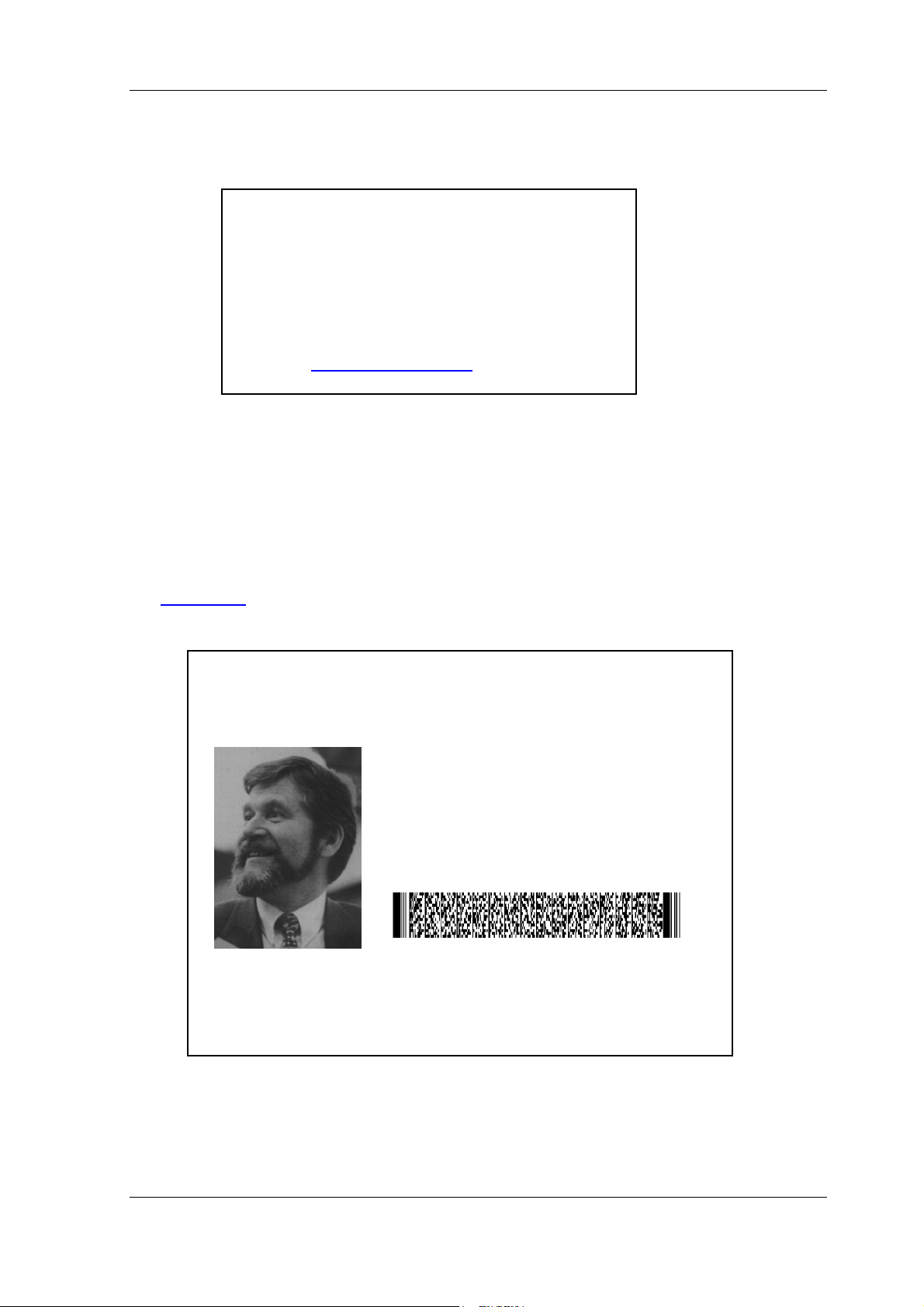
The following illustration is a test document. This is used to check the ID-Star 4054’s read
function for reading the machine readable zone (MRZ) on a document in accordance with
the ICAO norm
.
REPUBLIC OF UTOPIA
PASSPORT /
PASSEPORT
P<UTOSAMPLEDOC<<MIKE<JOSEPH<<<<<<<<<<<<<<<<<
Type/Type Country code / Code du pa ys Passport No. / N° du passeport
P UTO L898902 C
Surname / Nom
SAMPLEDOC
Given names / Prénoms
MIKE JOSEPH
Nationality / Nationalité
UTOPIAN
Date of birth / Date de naissances Personal No. / N° personnel
23 JAN/JAN 45 ZE 184226 B
Sex / Sexe Place of birth / Lieu des naissance
M ZENITH
Date of issue / Date de déliverance Authority / Autorité
24 JUN/JUIN 02 PASSPORT OFFICE
Date of expiry / Date d’éxpiration
23 JUN/JUIN 12
L898902C<3UTO4501239M1206234ZE184226B<<<<<14
Figure 12: Test ID
Note: This test document is not convenient to test the RFID reading functionality as it
does not contain any RFID chip.
L93123-N11-X-*-7419 5-2
Page 20

Additional technical information
6 Additional technical information
6.1 Travel document specification according to the ICAO standard
The personal documents to be read must conform with the applicable guidelines in the
ICAO norm.
You can obtain a copy of the International Civil Aviation Organisation paper entitled
Machine Readable Travel Documents, from:
Document Sales Unit
International Civil Aviation Organization
1000 Sherbrooke Street West, Suite 400
Montreal, Quebec
Canada H3A 2R2
Tel.: +1 (514) 2 85 – 82 19
Fax: +1 (514) 2 88 – 47 72
http://www.icao.int
Travel documents are dealt with in the ICAO publication doc9303.
6.2 Applicable regulations concerning reading of ePassports
The ePassports to be read must conform with the standards for ePassports. The most
important standards in this scope are:
• ICAO Technical Report "Biometrics Deployment of Machine Readable Travel
Documents V2.0"
• ICAO Technical Report "Development of a Logical Data Structure -LDS for Optional
Capacity Expansion Technologies" Revision 1.7
• ICAO Technical Report "PKI for Machine Readable Travel Documents offering ICC
read-only access V1.1"
In addition all the standards referenced in the above mentioned documents (e.g.
ISO 14443 A/B part 1 – 4) are preconditions for proper reading of the documents.
These three documents are published by ICOA. They (amongst others) can be
downloaded from the website of ICAO: http://www.icao.int/mrtd/Home/Index.cfm
L93123-N11-X-*-7419 6-1
Page 21
Additional technical information
6.3 Device dimensions
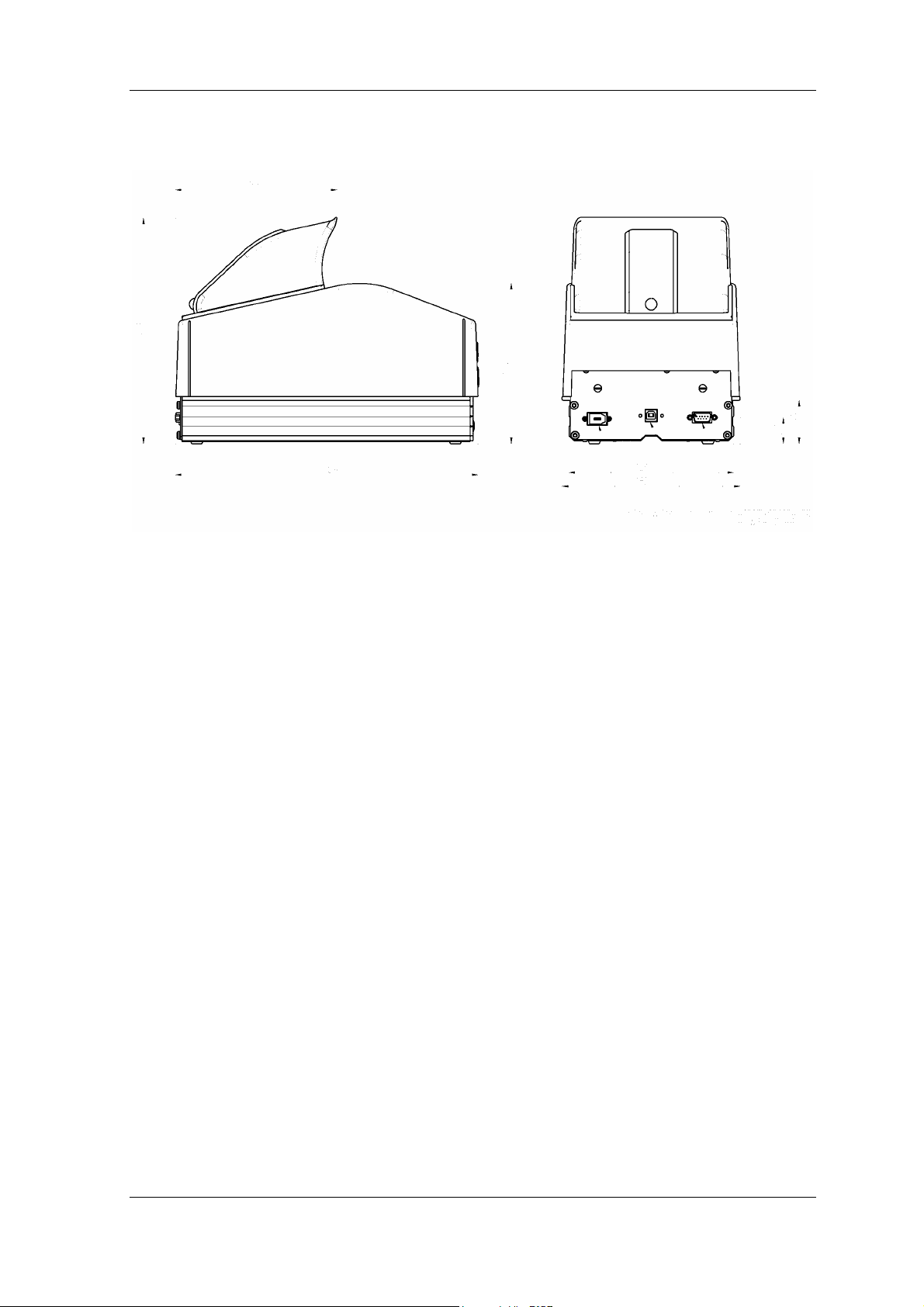
Figure 13: Device dimensions
L93123-N11-X-*-7419 6-2
Page 22

Additional technical information
6.4 ID-Star 4054 ePassport Reader data sheet
Application Special scanner designed to capture documents,
especially travel IDs including functionality to read
ePassports (passports containing RFID
technology)
Subsystem optical scanning and
character recognition
Illumination included B900 infrared band
Neutral white light
UV *1)
Special illumination for taking images of
documents with Confirm Security Laminate *1)
*1) the presence of these illuminations is
dependent on the product configuration
Imaging technology Area sensor
Optical resolution 320 dpi * 320 dpi
Image size 150 mm * 95 mm (width * height)
Character recognition software The SDK includes proprietary ODT character
recognition software for reading the machine
readable zone
Additional character recognition software can be
used to read other areas on documents.
Recommendation: Océ Document Technologies
character recognition software
Time required to read a document < 1 sec (reading the MRZ using the image
coming from the infrared illumination)
Types of documents read The following are recognised automatically:
Passports (ICAO DOC9303 part 1)
Visas (ICAO DOC9303 part 2)
ID-cards (TD1 and TD2) (ICAO DOC9303 part 3)
Even visa labels that are askew can be read
Real-time verification The read function verifies check digits in the MRZ
Further real-time verification checks can be
integrated in the software.
L93123-N11-X-*-7419 6-3
Page 23

Additional technical information
Image output Color and grey-scale images of the documents
are transferred to the software using the TIF
format
Subsystem reading of
ePassports
Position of RFID unit in the
document
Reading of the data in the chip can be done
independent of the location of the chip in the
passport.
Max. transfer rate up to 848 kbps
Max. data volume The reader does not limit the amount of data
which can be read from the chip
Implemented document standards see section Applicable regulations concerning
reading of ePassports
LDS 1.7, PKI 1.1, more details in section 6.2
Supported ISO Standards ISO 14443 A/B
Part 1 - 4
Complete unit
ID-Star 4054 ePR electrical data Nominal voltage: 24 VDC
Nominal current: 2.5 A
Power supply Power supplied by the desktop power supply
included in the delivery
For safety reasons, only use the original power
supply included in the delivery.
Desktop power supply input
voltage range
100 to 240 VAC
50 to 60 Hz
Dimensions 310 mm x 185 mm x 235 mm (L * W * H)
(see chapter “device dimensions”
)
Weight 3700 g (ID-Star 4054 ePR)
700 g (power supply)
Operating temperature 0°C to 50°C
PC connection optical scanner part via FireWire interface,
IEEE 1394a
RFID reader is connected using USB 2.0
(compatible with USB 1.1) The ID-Star 4054 ePR
is a device of the class “high-power bus-powered
functions)
L93123-N11-X-*-7419 6-4
Page 24

Additional technical information
PC requirements
Supported operating systems Windows 2000, XP
Software integration Integrated using the software development kit
Clock rate
RAM
OHCI-compatible FireWire interface
The imaging and processing time is longer when
using a less powerful PC
OHCI compliant Firewire interface
USB interface with the ability to supply current
(see chapter 2.4
(SDK) supplied according to respective customer
requirements
The application software is not included in the
delivery
The library contains functions for controlling the
device and reading documents in line with
ICAO doc9303
≥ 900 MHz
≥ 256 MB
)
Operator guidance The device contains 3 LED’s which can be used
by the application to give hints to the operator.
L93123-N11-X-*-7419 6-5
Page 25

Regulatory Compliance Statements
7 Regulatory Compliance Statements
7.1 CE certificate
7.2 Verification of the declared compliance
The compliance of the product with the regulations was verified by TÜV PRODUCT
SERVICE and the certificate with the No. Z1A 04 04 40845 011 was assigned.
In addition the product was verified to be compliant to the regulatory defined by OSHA
and the certificate with No. U8 04 04 40845 012 was assigned.
The shipped version of this device complies with the requirements of the
EEC directives 89/336&EEC “Electromagnetic compatibility” and
72/23/ECC “Low voltage directive”.
Organizations Currently Recognized By OSHA as NRTLs (National Recognized Testing
Laboratories) can be found on http://www.osha.gov/dts/otpca/nrtl/nrtllist.html
L93123-N11-X-*-7419 7-1
.
Page 26

Regulatory Compliance Statements
7.3 Declaration of FCC conformity
Note: This equipment has been tested and found to comply with the limits for a Class A
digital device, pursuant to part 15 of the FCC Rules. These limits are designed to provide
reasonable protection against harmful interference when the equipment is operated in a
commercial environment. This equipment generates, uses and can radiate radio
frequency energy and, if not installed and used in accordance with the instruction manual,
may cause harmful interference to radio communications. Operation of this equipment in a
residential area is likely to cause harmful interference in which case the user will be
required to correct the interference at his own expense.
Caution: Any changes or modifications not expressly approved by the party responsible
for compliance could void the user’s authority to operate the equipment.
The Grantee Code T7F was assigned by FCC, the product code is IDS4054EPR.
L93123-N11-X-*-7419 7-2
Page 27

Form for readers’ letters
To
Océ Document Technologies GmbH
– Abteilung FS 3 –
Postfach 10 01 54
From
Name
Company
Street
Town, postcode/ZIP
D-78401 Konstanz
Country
Phone
Data
Readers’ letter on the manual
ID-Star 4054 ePassport Reader
Instruction manual
Revision 0.91
Document no.
L93123-N11-X-*-7419
Order no.
440 246
To help us constantly improve this document, the editorial department for user manuals would
welcome your comments and advice.
Please use this preprinted form to send us your comments and suggestions for improvements and, if
applicable, with improved/corrected copies of the pages concerned.
Page Criticisms/comments/corrections/suggestions
Page 28

o
Océ Document Technologies GmbH
Max-Stromeyer-Straße 116
D-78467 Konstanz
Telephone: +49 75 31 87 – 0
Fax: +49 75 31 87 – 45 67
http://www.odt-oce.com
 Loading...