

Page 1

CB351 user guide
Wireless
Speaker
Bluetooth Wireless
The easiest way to stream
wirelessly and enjoy great
audio for all your music,
videos, games and apps
Page 2
WARNING: Changes or modications to this unit not expressly approved by the party responsible for
compliance would void the user's authority to operate the equipment.
ATTENTION: POUR ÉVITER LES CHOC ÉLECTRIQUES, INTRODUIRE LA LAME LA PLUS LARGE DE
LA FICHE DANS LA BORNE CORRESPONDANTE DE LA PRISES ET POUSSER JUSQU’AU FOND.
CAUTION: TO REDUCE THE RISK OF ELECTRIC SHOCK, DO NOT REMOVE COVER (OR BACK). NO
USER-SERVICEABLE PARTS INSIDE. REFER SERVICING TO QUALIFIED SERVICE PERSONNEL.
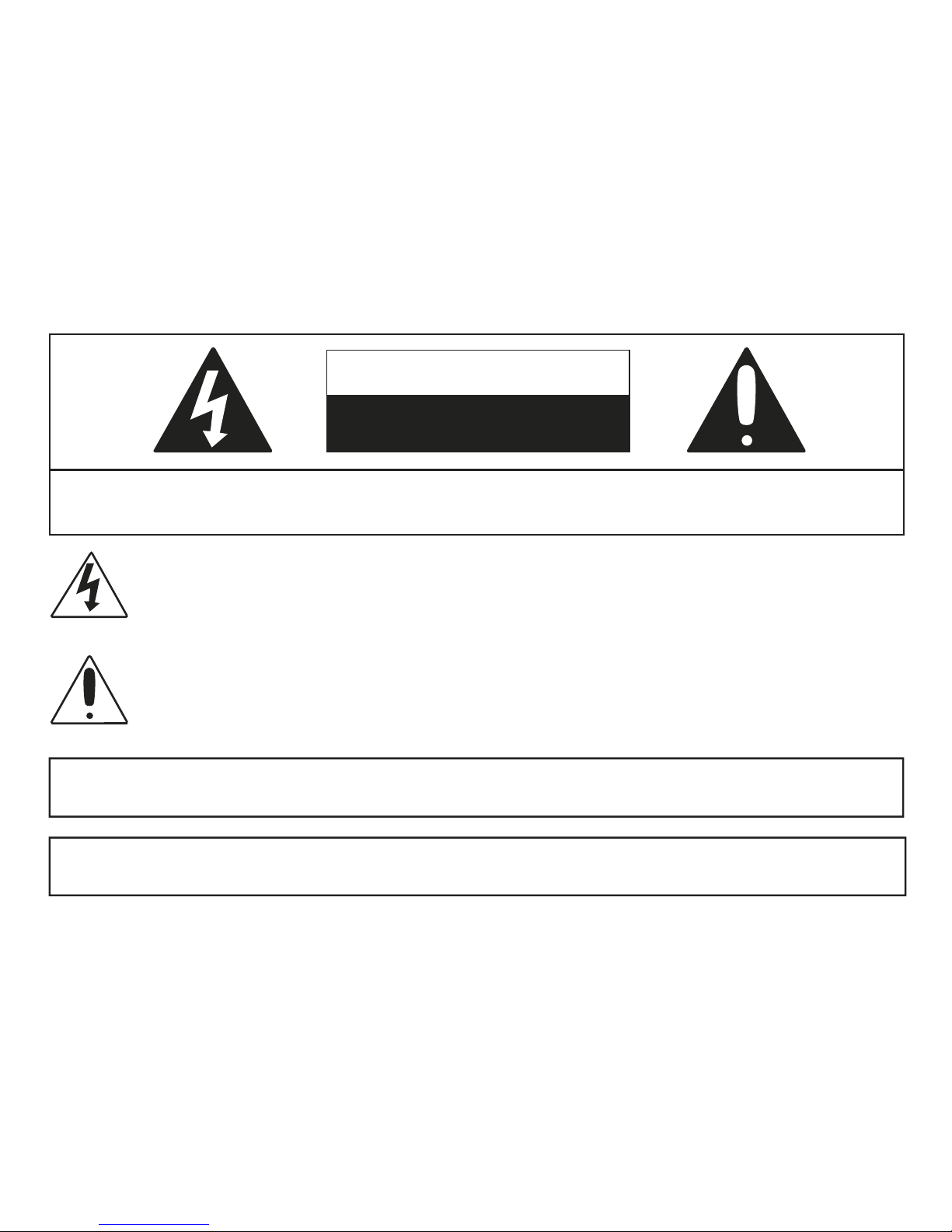
CAUTION
RISK OF ELECTRIC SHOCK
DO NOT OPEN
DANGEROUS VOLTAGE: The lightning ash with arrowhead symbol, within an equilateral triangle
is intended to alert the user to the presence of uninsulated dangerous voltage within the product’s
enclosure that may be of sufcient magnitude to constitute a risk of electric shock to persons.
ATTENTION: The exclamation point within an equilateral triangle is intended to alert the user to
the presence of important operating and maintenance (servicing) instructions in the literature
accompanying the appliance.
Page 3

SURGE PROTECTORS: It is recommended to use a surge protector for AC connection. Lightning and power
surges ARE NOT covered under warranty for this product.
NOTE: This equipment has been tested and found to comply with the limits for a Class B digital device,
pursuant to Part 15 of the FCC Rules. These limits are designed to provide reasonable protection against
harmful interference in a residential installation. This equipment generates, uses and can radiate radio
frequency energy and, if not installed and used in accordance with the instructions, may cause harmful
interference to radio communications. However, there is no guarantee that interference will not occur in
a particular installation. If this equipment does cause harmful interference to radio or television reception,
which can be determined by turning the equipment off and on, the user is encouraged to try to correct the
interference by one or more of the following measures:
• Reorient or relocate the receiving antenna.
• Increase the separation between the equipment and receiver.
• Connect the equipment into an outlet on a circuit different from that to which the
receiver is connected.
• Consult the dealer or an experienced radio/TV technician for help.
Compliance information: This device complies with Part 15 of the FCC Rules. Operation is subject to
the following two conditions: (1) this device may not cause harmful interference, and (2) this device must
accept any interference received, including interference that may cause undesired operation.
WARNING: TO PREVENT FIRE OR SHOCK HAZARD, DO NOT EXPOSE THIS UNIT TO RAIN OR MOISTURE.
Page 4

SAFETY PRECAUTIONS
a. Do not expose this unit or the AC/DC adapter to dripping or splashing water.
Keep liquid-lled objects, such as vases, away from this unit and AC/DC adapter.
b. Only use attachments / accessories specied by the manufacturer.
c. Ensure that the AC/DC adapter is easily accessible.
d. Please note the information printed underneath the unit.
e. Do not impede the ventilation of this unit by covering the ventilation openings with items
such as newspapers, table-cloths, curtains, etc.
f. Keep open ames, such as lighted candles, away from this unit.
g. Do not place this unit in closed bookcases, racks, or other spaces without proper
ventilation.
h. Unplug this unit during lightning storms or when unused for long periods of time.
i. Use only the same or equivalent type batteries as there is a danger of explosion if the
incorrect batteries are used or they are installed incorrectly.
j. Batteries should not be exposed to excessive heat such as direct sunshine, re, etc.
k. Dispose of batteries properly according to environmental regulations.
Page 5
power adapter option
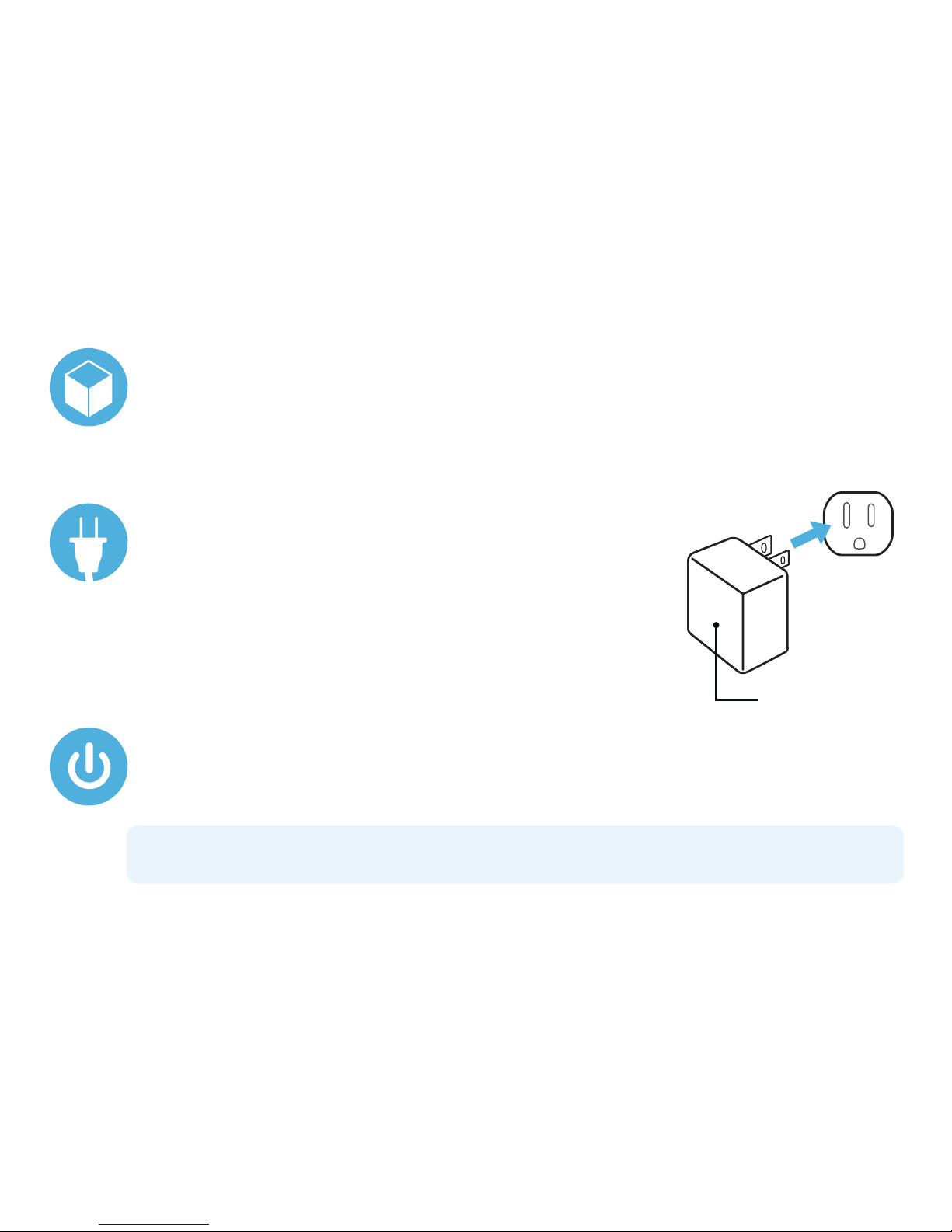
To use CB351 with an existing power source, connect the
supplied power adapter (DC 6V 2A) to the DC IN jack on the
back of your CB351 (see “location of controls”) and plug the
other end into a standard wall outlet (100~240V 50-60Hz).
AC outlet
AC/DC adapter plug
inside the box
CB351 Wireless Speaker, AC power adapter, 3.5mm Line In Audio Cable and user guide.
turning the unit on
Press the Power Button and the blue LED will illuminate, indicating that the CB351 is on.
note: During portable use, the LED will change to red and ash when the batteries are
low and need to be replaced.
Page 6

battery powered option
For portable use, you can install batteries to power your CB351. Playback time is
approximately 8 hours at 75% volume and varies by type of music.
u
Open the Battery Door.
v
Insert four “AA” batteries into the battery
compartment, being careful to observe proper
polarity, as shown here.
w
Close the Battery Door.
note: Alkaline batteries are recommended for the longest play time.
precautions when using batteries
• Use only the size and type of batteries specied “AA”
• Do not mix different types of batteries (e.g. Alkaline, Rechargeable and standard Carbon Zinc) or old batteries with new ones.
• Dead batteries must be removed to prevent battery leakage
• Dispose of batteries properly according to environmental regulations
• Batteries should not be exposed to excessive heat such as sunshine, re, etc.
• Remove batteries if they lose power or if the CB351 is not going to be used for extended periods of time.
Page 7
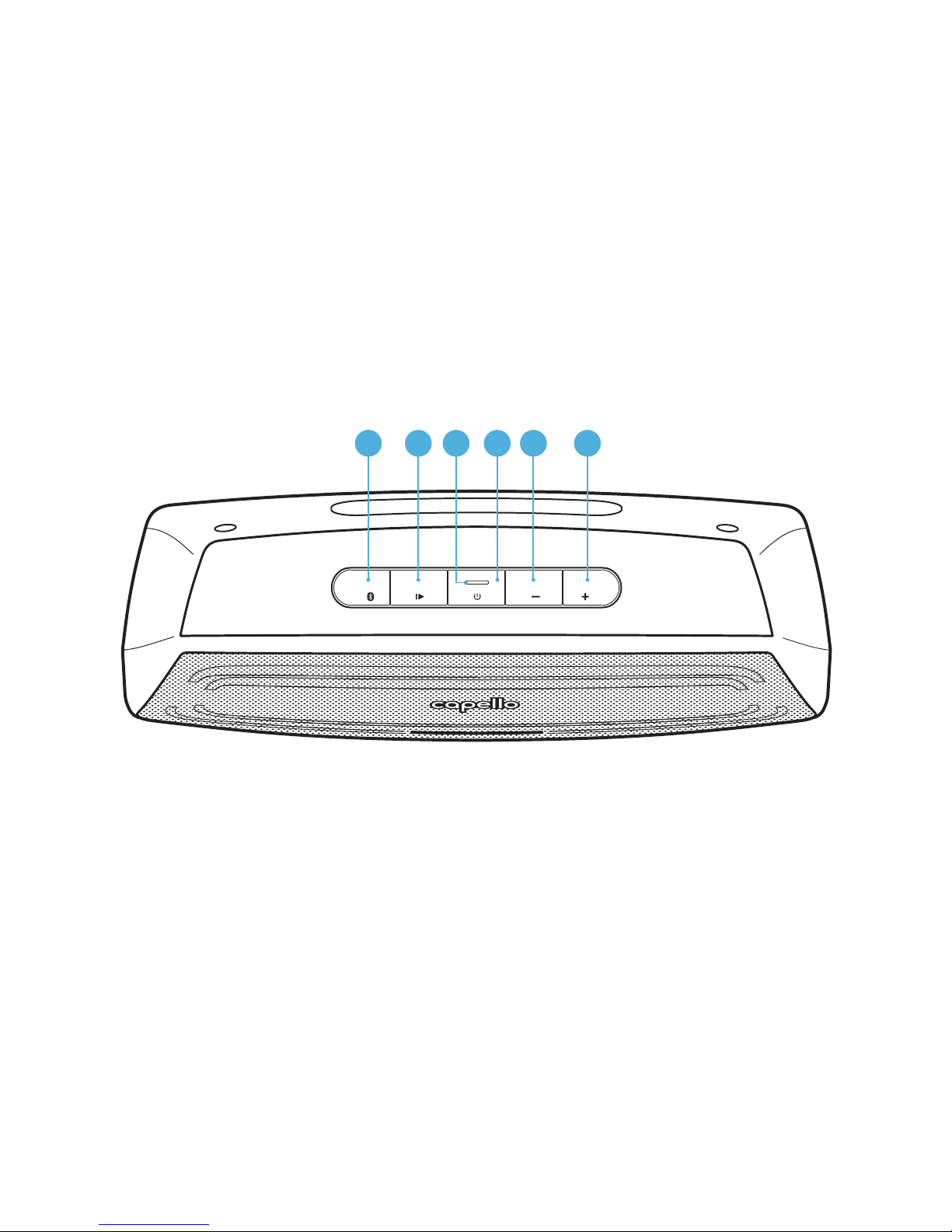
u
Bluetooth (Pair) Button
v
Play / Pause Button
w
LED Display Indicator
x
Power Button
y
Volume – Down Button
U
Volume + Up Button
location of controls
21 3 4 5 6
Page 8
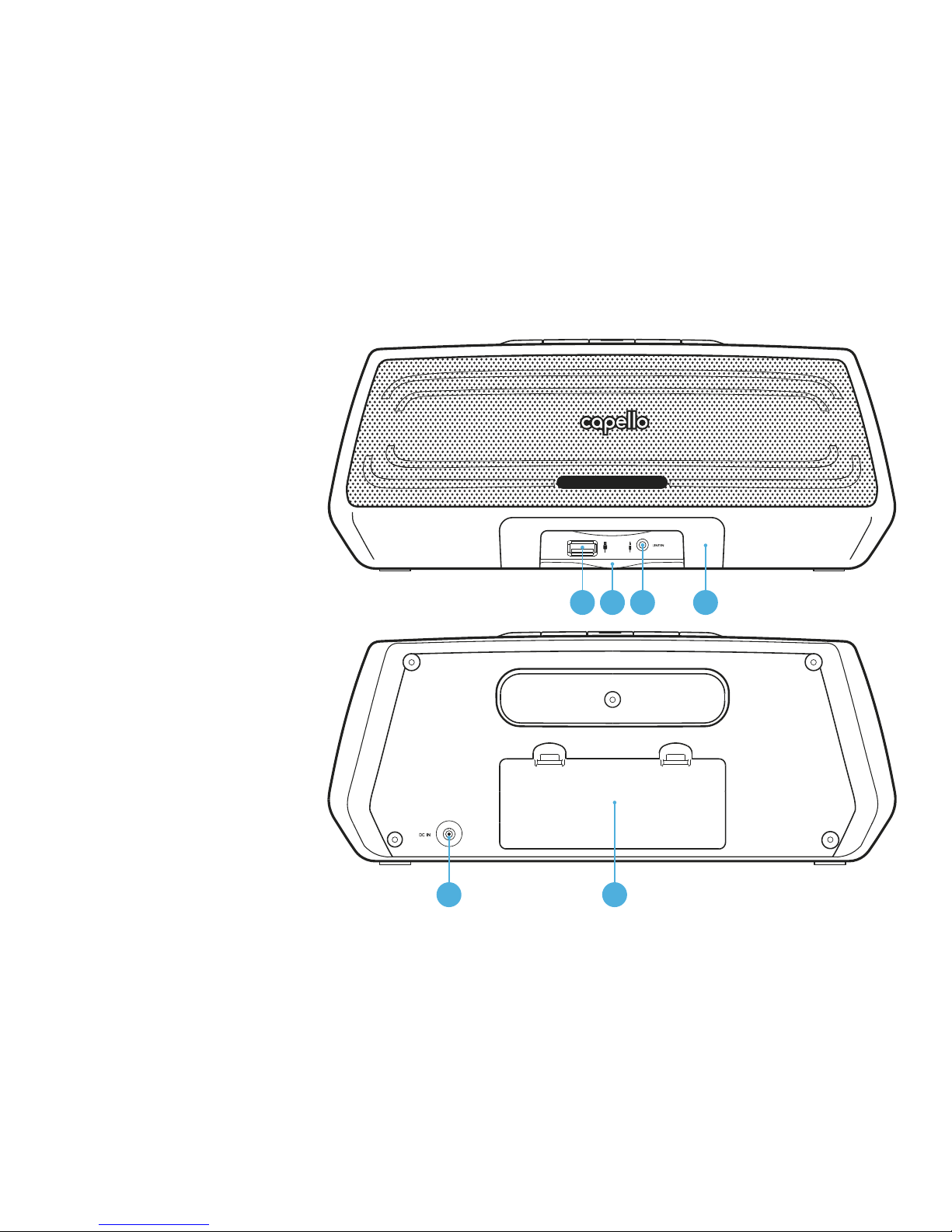
V
USB Charging Port
W
External Jack Door
X
3.5mm Line In Jack
at
Pull Out Tray
ak
DC Power In Jack
al
Battery Door
7 8 9 10
11 12
Page 9
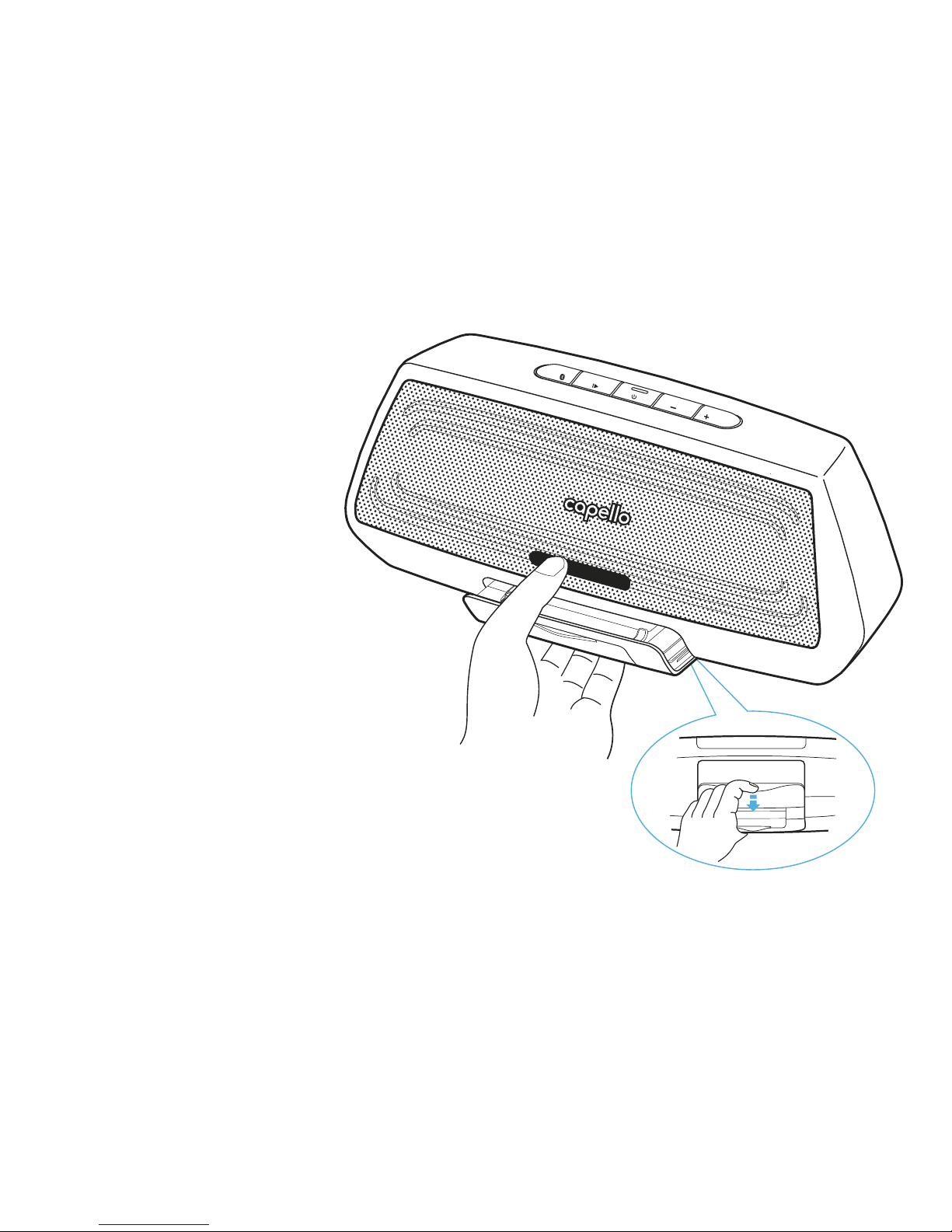
pull out tray
The CB351 includes a Pull Out Tray.
This feature is designed to give you the
option to rest your phone or device on the
Pull Out Tray while charging or streaming
audio to the unit.
To open and use the Pull Out Tray, simply
place your ngers on the back edge of the
tray as shown here, then gently slide it out
until it stops.
(bottom view)
Page 10

streaming music and audio
with Bluetooth wireless
You can stream audio wirelessly to your CB351 from up to 33’ away using your iPhone, iPad,
iPod, Android, laptop or other Bluetooth wireless technology enabled device.
u
Press the Power Button to turn on your CB351.
v
Then press the Pair Button. The blue LED on your CB351 will ash regularly.
w
Turn on your Bluetooth wireless device and then activate the feature with
Bluetooth wireless.
x
Search for the Bluetooth wireless devices and select CB351. If asked for a password,
enter ‘0000’.
y
The Blue LED on your CB351 will change from ashing to solid, indicating that your
Bluetooth wireless device is connected to your CB351.
note: Press and hold the Pair Button for 3 seconds to disconnect the Bluetooth wireless
connection. Your CB351 will return to pairing mode and the Blue LED will ash.
Page 11

reconnecting your
Bluetooth wireless devices
Once your Bluetooth wireless device has been paired with your CB351, it is simple to reconnect
them when you want to stream music/audio again.
u
Make sure that your CB351 is powered on and within range.
v
Select ‘CB351’ from the list on your Bluetooth wireless device.
w
The Blue LED on your CB351 will change from ashing to solid, indicating that your
Bluetooth wireless device is reconnected to your CB351.
note: For best audio performance, turn the volume on your Bluetooth source device all
the way up.
Page 12

line in connection
You can also play audio from other devices using the included 3.5mm Line In audio cable.
u
Press the Power Button to turn on your CB351
v
Insert one end of the 3.5mm audio cable into the Line In jack on the front of your CB351
w
Insert the other end of the 3.5mm audio cable into the Line Out or headphone jack of your
external audio device (e.g. iPad, iPod shufe, mobile phone, MP3 player or other digital
media player, etc.)
x
Press the Play/Pause button on your external audio device to start playback. Press again to
pause playback.
notes: For best audio performance and minimal distortion, avoid turning the volume on
your audio source all the way up.
Your CB351 can only play audio from one source at a time. If your CB351 is connected to
a Line In source, the Bluetooth wireless will not function. Simply unplug the 3.5mm Line In
audio cable and press the Pair Button to switch to Bluetooth wireless (if necessary, select
‘CB351’ on your Bluetooth wireless device).
The Volume – Down or Volume + Up buttons do NOT function when playing music through
Line In audio cable.
Page 13

USB charging port
This unit includes a USB port placed on the front (see “location of controls”).
The USB port supplies 1A and will support powering and charging most devices including
iPhones, iPads, iPods, smart phones, Android and most other USB devices. The USB port can
only be used when CB351 is connected to an AC power source, it will not power or charge
while operating from batteries in portable mode. (USB cable sold separately)
Page 14
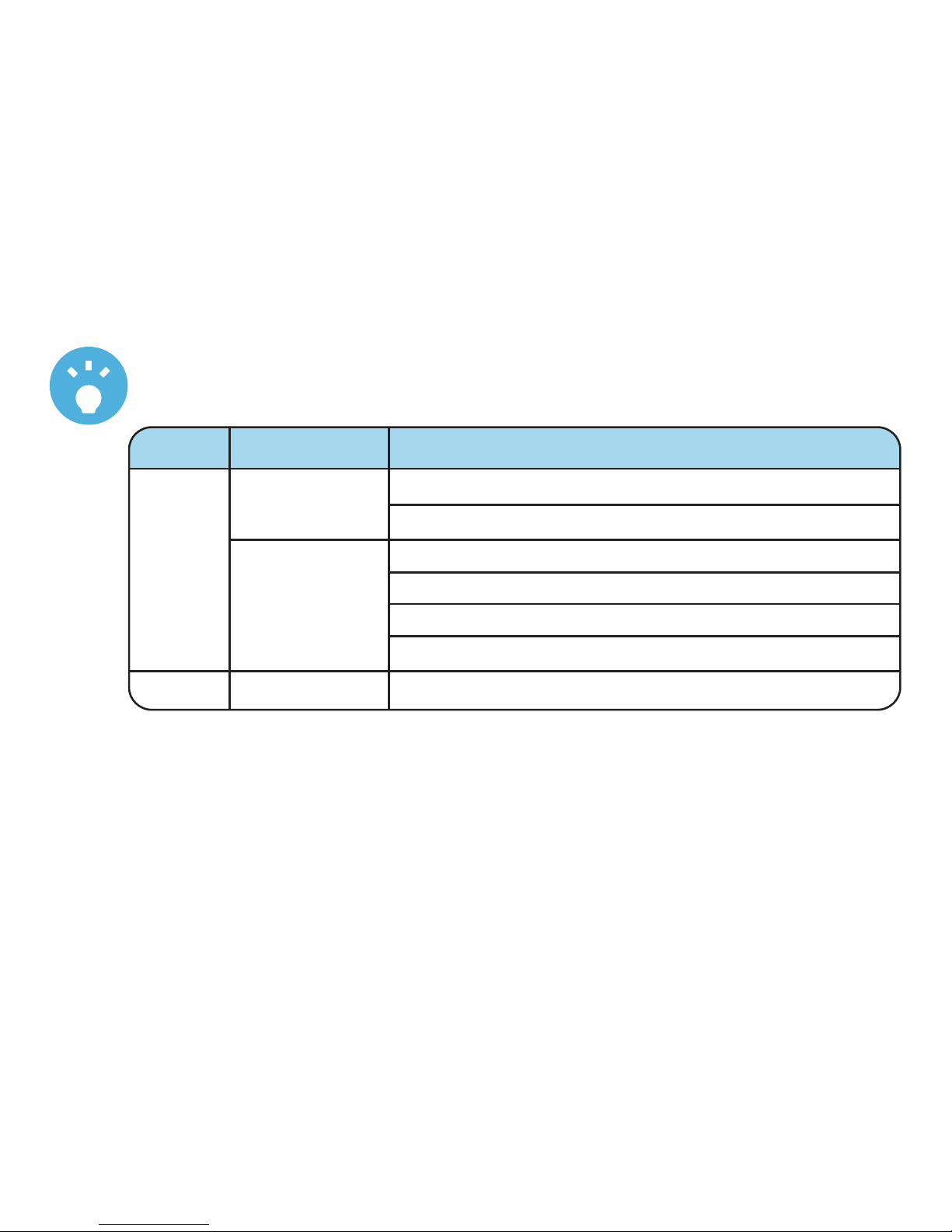
Steady
LED display indicators
LED LED Status Speaker Status
Connected to Bluetooth wireless device
Line In mode
Power On
BLUE Bluetooth Pairing mode
Flashing Volume button pressed when volume is at minimum
Volume button pressed when volume is at maximum
RED Flashing Battery is low
Page 15

notes
Page 16

For further assistance, please visit our website: hellocapello.com or contact customer
service at [email protected] or 1-855-896-1795.
Life Lab International Ltd
The Bluetooth® word mark and logos are registered trademarks owned by Bluetooth SIG, Inc.
and any use of such marks by Life Lab International LTD. is under license. Other trademarks
and trade names are those of their respective owners.
 Loading...