

Page 1
2
Canon’s LCOS Projectors:
Exceptional Color. Intricate Detail.
Page 2
2
Canon’s REALiS brand projectors feature LCOS (liquid crystal on silicon)
technology, recently described by a leading trade magazine as “sort of
a ‘best of breed’ combination of LCD and DLP technologies.” LCOS
technology produces lattice-free seamless images, and unlike LCD has no
“screen door effect” to mute color and detail. LCOS technology has been
highly coveted for providing extremely crisp images, intricate details,
easy-to-read type (as small as 7 pt.) and “HD images that jump out at the
viewer in breathtaking quality,” making it the ideal projector for demanding
uses and applications. These include medical image presentations, display
of CAD engineering drawings and blueprints, faithful color reproduction of
professional photography, as well as countless uses for business, higher
education and government.
The Difference is in The Details
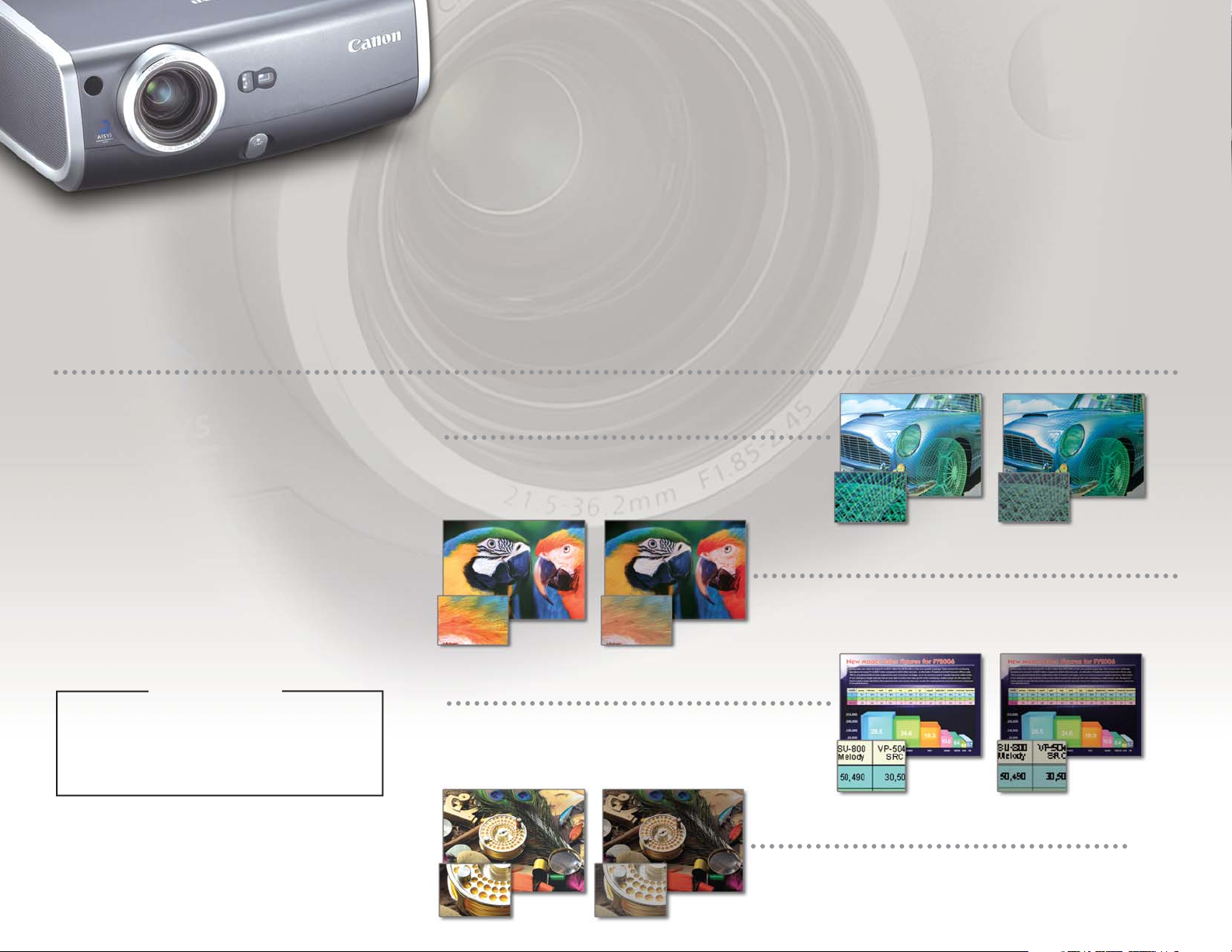
The surface area of each pixel in Transmissive LCD
projectors is small, creating an overall grid-like
lattice effect (“screen door effect”), which results
in muted colors and text that appears faint and
uneven. REALiS LCOS projectors have minimal
gaps between the pixels, creating color-rich,
detailed images, and text that appears dark and
crisp. The advantages are easy to see:
REALiS LCOS Projectors vs.
Transmissive LCD Projectors
Display of fine lines: CAD images, blueprints, and fine
lines are reproduced smoothly and accurately with REALiS
high-resolution projectors.
Display of Fine Lines
REALiS SXGA+ models can be presented with
exceptional color and intricate detail.
Display of Color and Detail
By using more pixels for each letter, REALiS projectors
can display easy-to-read type, as small as 7 pt.
often illegible on LCD-based XGA projectors.
Display of Small Text
REALiS lattice-free images ensures smooth, crisp
displays of fine grained objects, including metallic
surfaces, typically dulled by LCD projectors.
Display of Fine Grained Objects
LCOS Technology displays even subtle color
gradation and tones of black and grey, which
enhance visual accuracy, while DLP has a
limited grey scale.
LCOS LCD
LCOS LCD
LCOS vs. DLP
LCOS LCD
LCOS LCD
1
Page 3
3
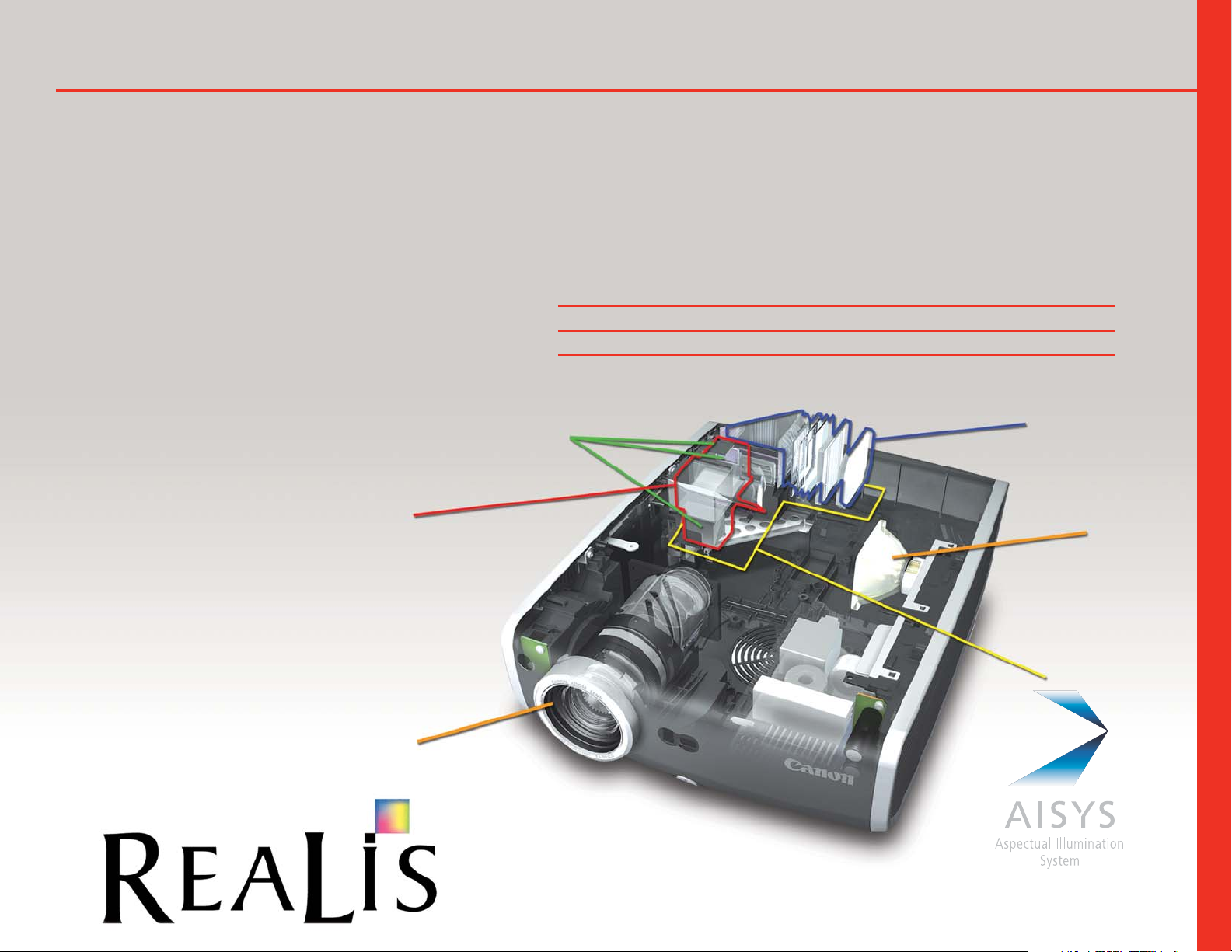
Canon's proprietary AISYS optical system enhances LCOS technology to achieve
crisp, color-rich, intricately-detailed images by efficiently utilizing and equalizing
light from the projector lamp. This unique technology effectively boosts the performance functions of brightness and contrast to optimize image quality, in a more
compact housing that maximizes affordability. New Optical elements were incorpo-
rated into the illumination optical system to enhance uniformity
of light. The Polarizing Beam Splitters (PBS) in the color separation and
recombination system were redesigned for more precise light control (SX6,
SX60 and X600 models) resulting in a new standard in bright, beautiful,
high-contrast projected images.
The Secret is AISYS-Enhanced LCOS Technology
Canon’s LCOS Projectors: What’s Behind “Color So Real?”
LCOS Reflective LCD Panels (Liquid Crystal On Silicon)
Illumination
Optical System
Creates highly
uniform light
Projection
Lamp
Color Separation/Recombination System
Newly developed optical PBS for color separation
with a new layout boosts the brightness of
the projected image
PBS:Polarization Beam Splitter
Projection Lens
Advantages of the AISYS Optical System
• Seamless image
• High Definition
THE TECHNOLOGY
• High Contrast
• Accurate Color Reproduction
• Compact Size
• Brightness
Page 4
4
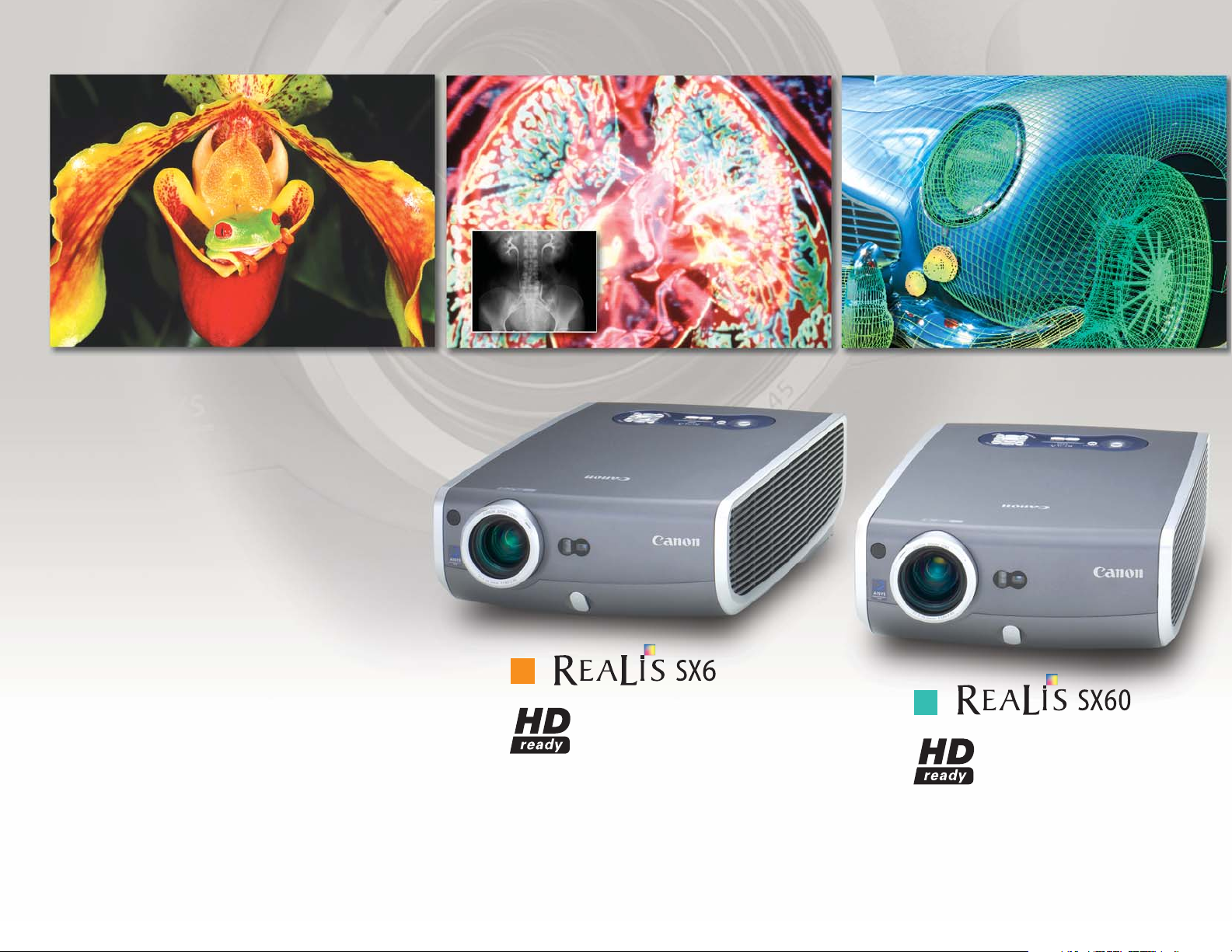
• SXGA+ (1400x1050)
• LCOS and AISYS Improved
• 1.7x Powered Zoom Lens
• 3500 ANSI Lumens
• 1000:1 Contrast Ratio
• Adobe RGB Color Match System
• Auto Set-up
• HDCP Compliant
SX6
SX60
Medical Imaging Engineering DesignProfessional Photography
• SXGA+ (1400x1050)
• LCOS and AISYS Improved
• 1.7x Powered Zoom Lens
• 2500 ANSI Lumens
• 1000:1/2000:1 Contrast Ratio
• Home Cinema Mode
• Auto Set-up
• HDCP Compliant
Page 5
5
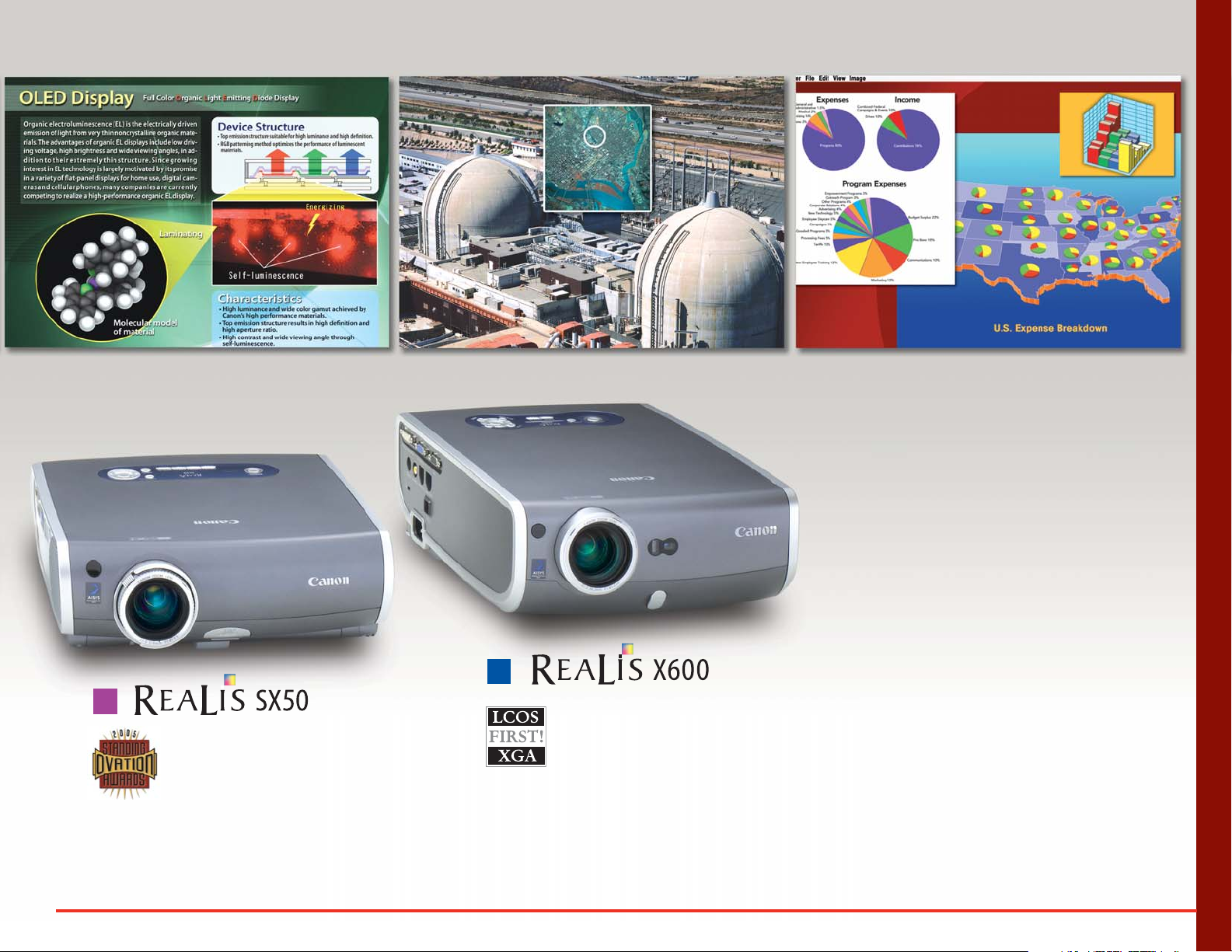
SX50
X600
Higher Education BusinessGovernment
THE FULL LINE
• SXGA+ (1400x1050)
• LCOS and AISYS
• 1.7x Zoom Lens
• 2500 ANSI Lumens
• 1000:1 Contrast Ratio
• XGA (1024x768)
• LCOS and AISYS Improved
• 1.7x Powered Zoom Lens
• 3500 ANSI Lumens
• 1000:1 Contrast Ratio
• Auto Set-up
• HDCP Compliant
For Applications that Require Precise Color and Detail.
Page 6
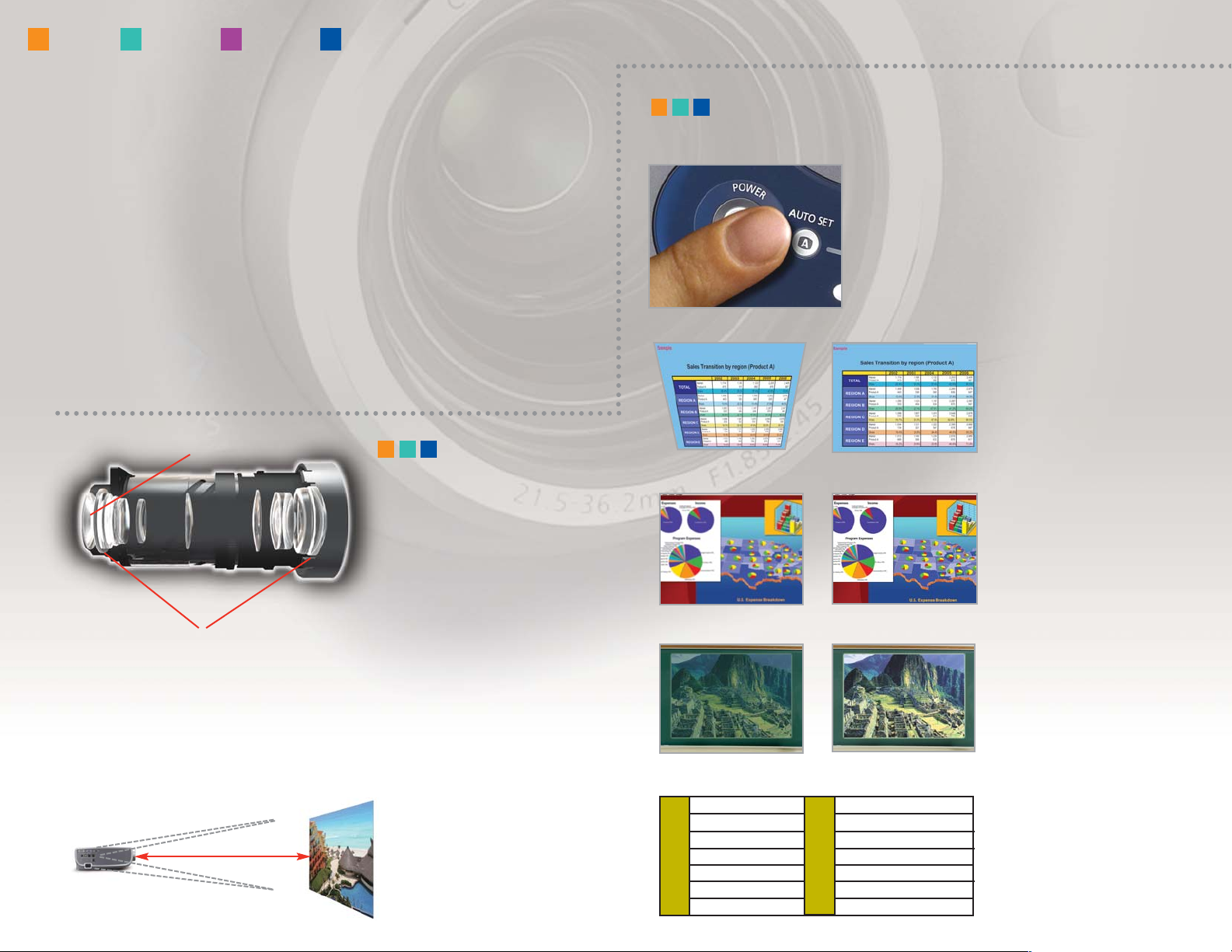
Canon’s SX6, SX60 and X600 are
equipped with a 1.7X Powered Zoom
Lens. The lens configuration is a
six-group assembly with 12 elements
and four moving groups, featuring
one UD lens and two high-precision
double-sided aspherical lenses.
Genuine Canon Optics
1.7x Power Zoom Lens
Two high-precision double-sided aspherical lenses
UD lens
SX6 SX60 SX50 X600
The REALiS Advantage
Throw Distance
The 1.7x Ultra-Wide Powered Zoom Lens has the widest zoom range of any of Canon’s
projector lenses, giving you a diagonal screen size range of 40” (at a very short distance
of 3.9’) to 100” at 9.8’ and up to 300” maximum. (See chart page 11.)
9.8 Ft.
Placement for projection
on a 100-inch screen.
Auto Input
Automatically detects the image
signal from the input terminal,
identifies it as the input signal
and selects it for display.
Auto Screen Color
Automatically adjusts the
color balance according to
the projection surface’s color.
Press Auto Set, and within seconds your input source
is connected, distortion corrected, focus sharpened
and color balanced.
Auto Set-up
Auto Focus
An infrared sensor on the
front of the unit measures the
distance to the screen and
adjusts the focus in as quickly
as one second.
Auto Keystone
Automatically calculates
the angle of the projector
and corrects for image
distortion. Vertical (
+
–
200).
Canon's three new LCOS Multimedia Projectors, the REALiS SX6, REALiS
SX60, and REALiS X600 join the award-winning REALiS SX50 to create an
impressive line-up of high and super-high (SXGA+) resolution projectors.
Whether it’s medical and engineering professionals displaying intricatelydetailed, color-rich images; professional photographers or graphic artists
needing to precisely match Adobe RGB color; business people or educators
presenting charts and images in stunning detail; government or security
users requiring exacting imagery; or even discerning home theatre
enthusiasts, Canon's new REALiS Multimedia Projector line provides
the features and performance to meet their needs.
Digital PC DVI-I
Digital Video DVI-I
Analog PC DVI-I, Mini D-sub 15
Component Mini D-sub 15
SCART Mini D-sub 15
Video RCA signal
S-Video Mini DIN4
Input Signal
Terminal
6
Page 7
7
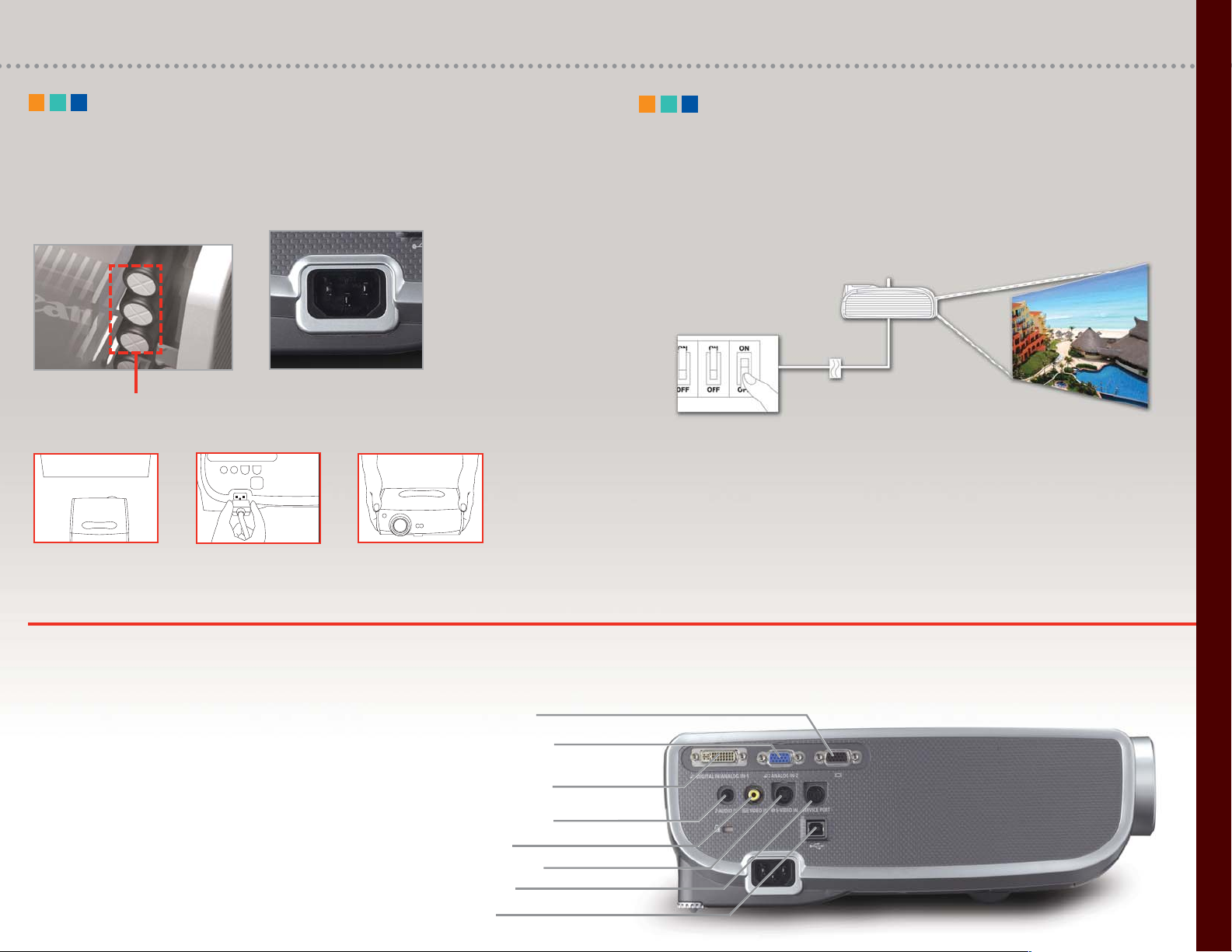
Service port
Video input
S-Video terminal
Stereo audio input
Analog RGB input/
Component input
Monitor output
Digital RGB input/
Analog RGB input (DVI-I)
The SX6, SX60, and X600 models feature DVI-I
and analog component HD input interfaces. In
addition to SD signals from DVD players, these
projectors can display high-definition digital
video signals as large as 1080i.
• HDCP Compliant DVI-I terminal, Motion Adaptive
IP conversion, and Film Mode (2-3 Pull down)
Compatible with a variety of image input signals, including HDTV.
Feature-Rich Technology Engineered For Excellence.
The SX6, SX60, and X600 models are equipped with an internal charging system to
run the fan. This makes it possible to unplug the projector right after using it, while
the internal charging system keeps the fan running.
Off and Go
Internal charging system
for cooling fan.
When presentation
is finished, the unit can be
unplugged immediately.
The SX6, SX60 and X600 can be switched on and off from a central control
terminal without actually pressing the buttons on the main unit, permitting
remote operation when the projector is mounted overhead. It is also possible
to control the power supply by simply connecting or disconnecting the
power cable.
Direct Power ON
When Direct Power setting is 'On', the
projector starts up automatically when power
is supplied and is ready to display images
in approx. 20 seconds.
THE FEATURES
USB port
Page 8
8
SX6 SX60 SX50 X600
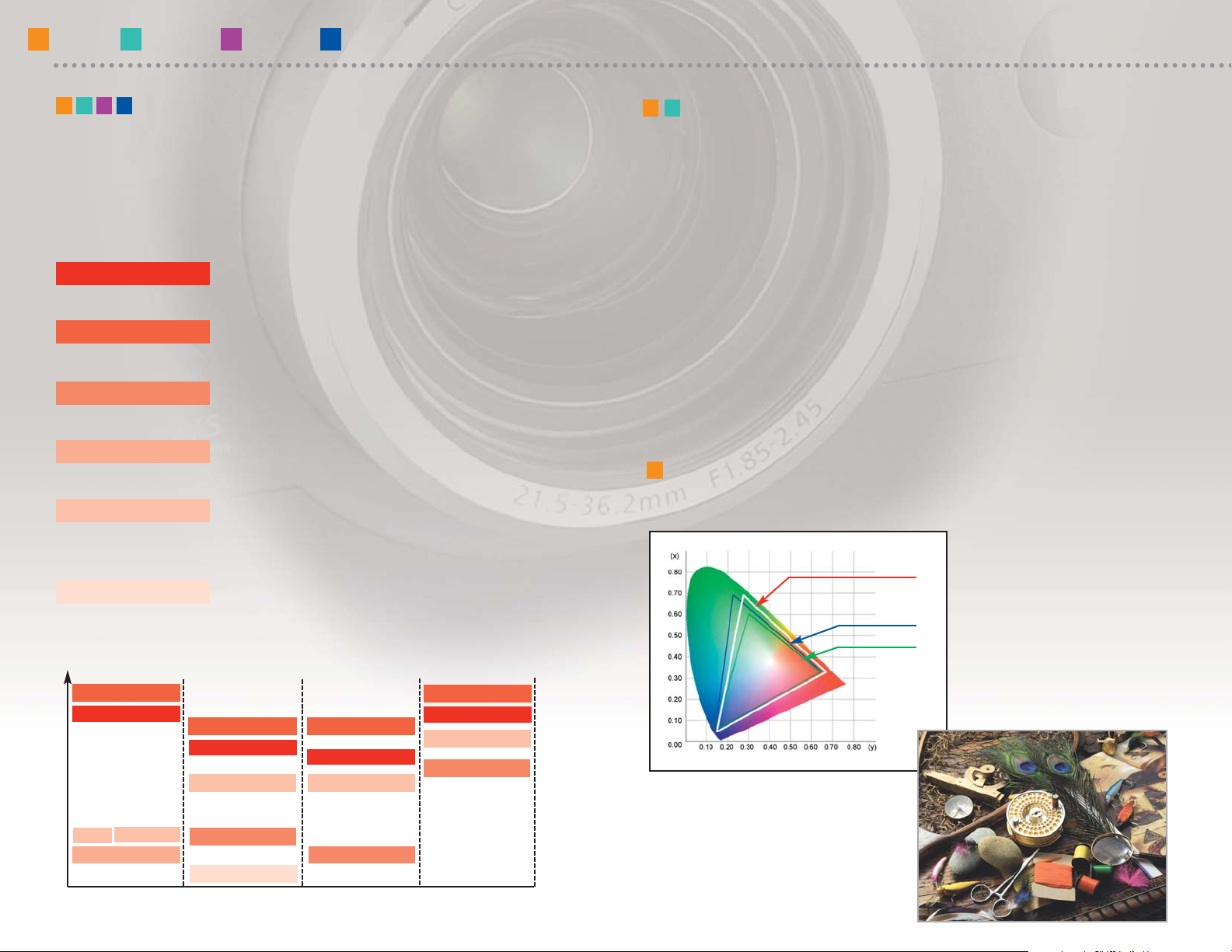
A special RGB color filter on the
SX6 enables virtually accurate
Adobe RGB color as well as sRGB,
which is ideal for professional
photography, design, publishing
and printing. (SX6 only)
Adobe RGB Color Match System
SX6 COLOR SPACE
Adobe RGB support
Among the highest available ratios
(as of December 2005; Canon data)
Select the image mode to suit the characteristics of the content: "Presentation"
mode for briefings and conferences, "Adobe RGB" or "sRGB" when color
reproduction is critical, etc.
Image Modes
SX6 SX60 SX50 X600
Presentation
Standard
sRGB Adobe RGB
Movie & Photo
Movie
Standard:
Prioritizes reproduction of white, closely matching the
image characteristics of the original
Presentation
:
Produces a bright, high-contrast display for ease of
viewing text and numerical data
Movie/Cinema
:
Suitable for displaying theatrical content; image
quality emphasizes gradations in dark areas
Movie & Photo: For display of video and digital camera images; clearly
defines gradations and improves color reproduction
Adobe RGB/sRGB: Reproduces colors in the appropriate color space for
accurate projection of content produced in specific
standardized formats
Home Cinema: Controls brightness while enhancing contrast to a ratio
of 2000:1; for display of theatrical content in
pitch-dark rooms
Sophisticated Canon color management technology, initially developed
for digital cameras and printers, has been adapted for the new line of
multimedia projectors. Proprietary color filters incorporated in the
AISYS optical system expand the color space that can be displayed.
The SX6 is fitted with a special RGB color filter that enables 100% support
of sRGB and virtually accurate reproduction of Adobe RGB. The SX60
Cinema filter makes it possible to display the original colors of the film
before conversion to a video signal.
More Faithful Color: Special Color Filters
for Adobe RGB and Home Cinema achieve
Expanded Color Space
REALiS projectors produce
scanless, grid-free images for
realistic reproduction of colors
and textures in photos.
sRGB
Brightness
Adobe RGB
Presentation
Standard
Presentation
Standard
Presentation
Standard
sRGB
sRGB
sRGB
Movie
Cinema
Home Cinema
Page 9
9
THE FEATURES
The SX60 multimedia projector is
equipped with a home cinema filter
making it ideal for this application.
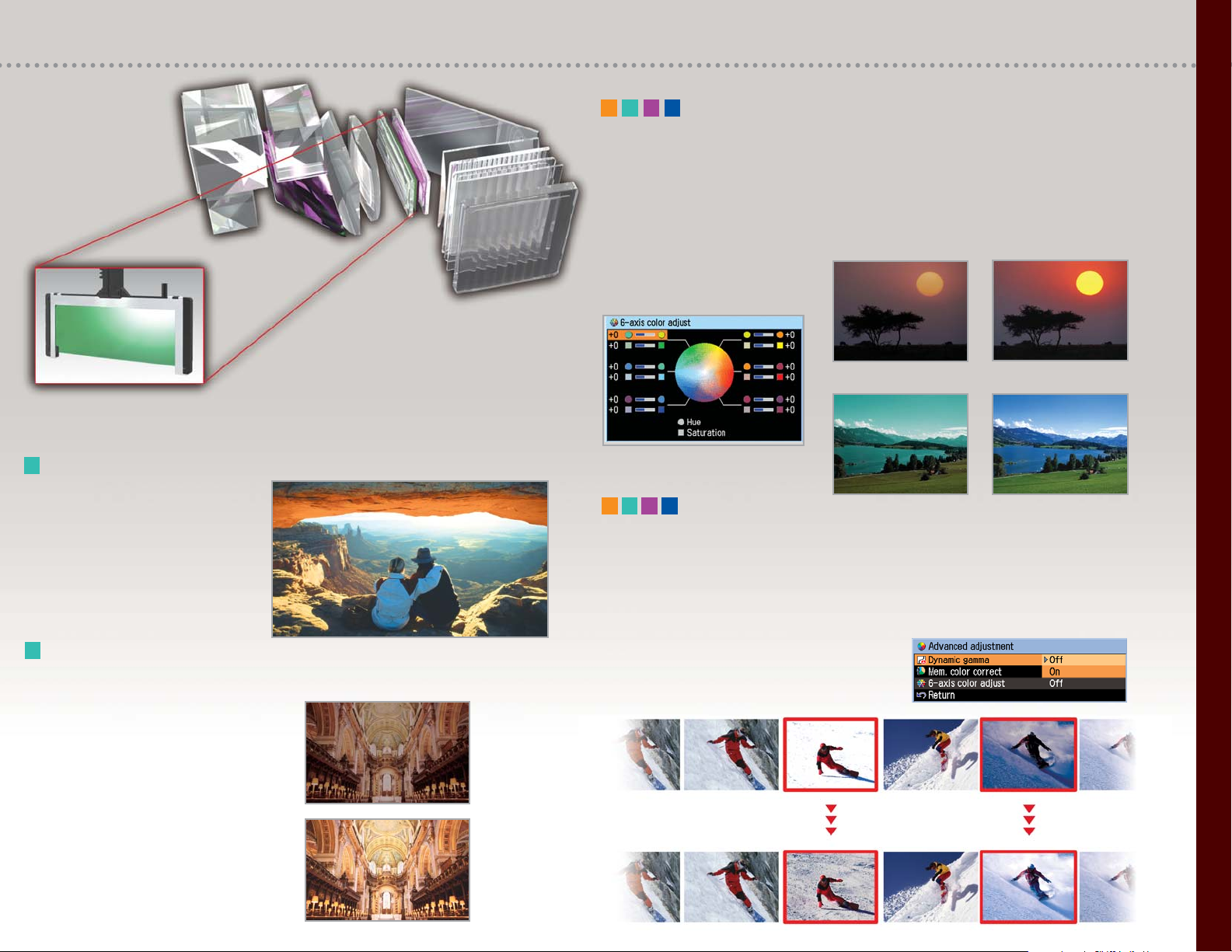
Home Cinema Mode
• Adobe RGB filter (SX6)
• Cinema filter (SX60)
Crisp Blacks Create Rich Shadow Detail
Precise control prevents excess light
leakage, producing rich, detailed
gradation even in shadowed portions
of projected images. And the crisp
blacks produced by the LCOS reflective
panels create images with realistic
depth and dimension.
Conventional
Home Use
Projector
SX60
Dynamic Gamma
When dynamic gamma is 'on' gamma is automatically adjusted to optimum values.
When projecting moving images with rapid shifts in brightness, each frame is
displayed with optimum contrast balance to prevent washed-out whites and
blocked-up blacks.
A 6-Axis Color Adjustment function has been incorporated to meet the demands of
professionals with demanding color requirements. Both hue and saturation can be
adjusted on independent RGB and CMYK color axes.
6-Axis Color Adjustments
More orange in the sunset
A bluer sky
In bright scenes, gamma is adjusted
according to the brightness, automatically
compensating for washed-out areas and
reproducing gradation in the bright sections.
In scenes containing dark areas, gamma is
adjusted for the entire image, including dark
sections, minimizing blocked-up shadows.
Page 10
10
SX6 SX60 SX50 X600
Convenient Remote Control functions for
sophisticated presentations
Digital Zoom
Enlarges a selected single
area of the screen, such as
specific data in a graph;
images can be enlarged a
maximum of 12x*.
* Resolution of the enlarged section is reduced.
Spot
Highlights a portion of the image on the screen;
the spotlight can be made larger or smaller and
moved anywhere on the screen.
Freeze
Freeze-frame function lets you freeze the on-screen
display for pauses in the presentation, such as
changing PC connections or checking the
subsequent image file.
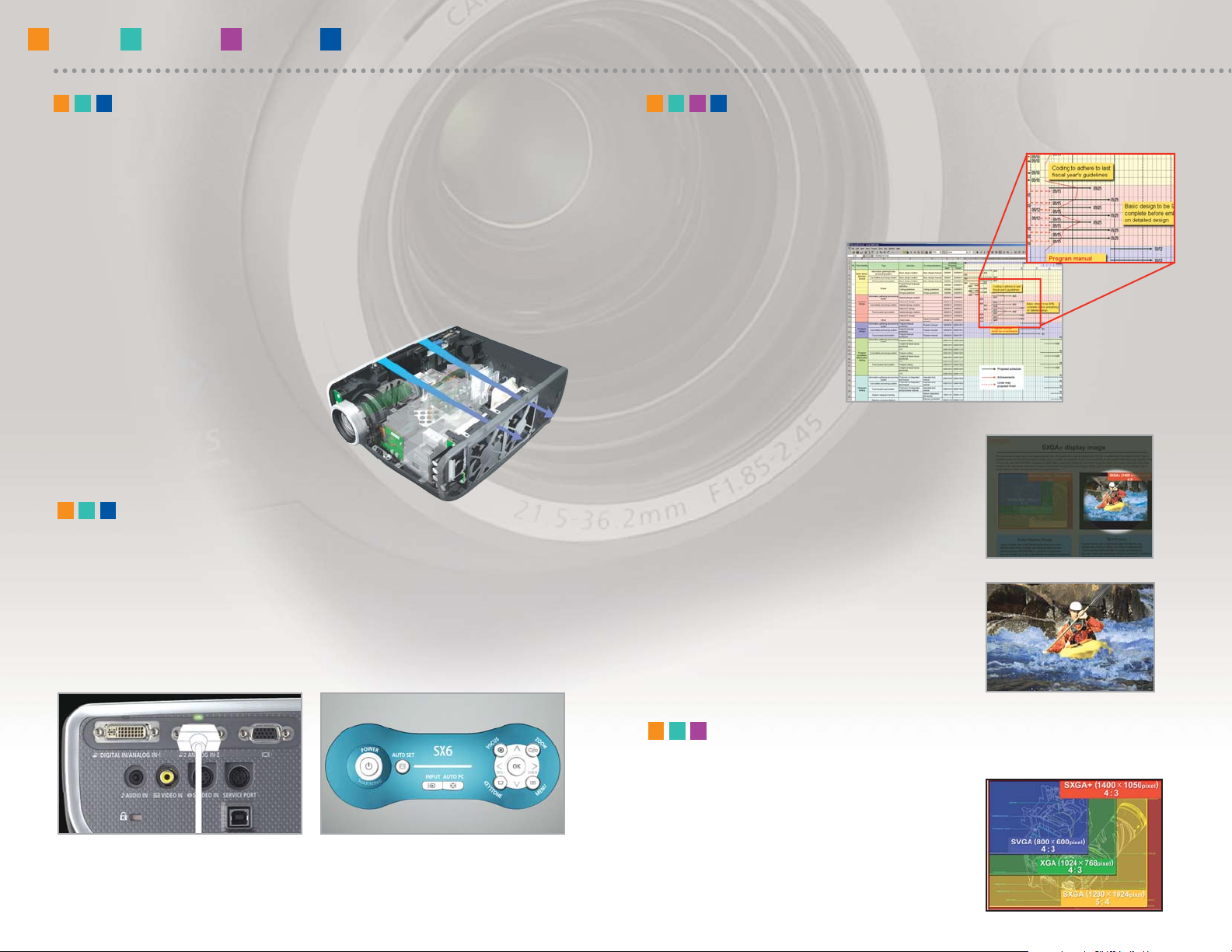
LEDs on the SX6, SX60 and X600 indicate the projector's connections and operational
status at a glance. When several image input devices are connected, a LED indicates
which image signal is selected as the input. The LED illumination on the operation
panel flashes to indicate start-up, end of presentation, and other user commands.
LED Illumination
LED indicates connector responding
to image signal.
LEDs flash to indicate/confirm
specific operations.
Input terminals
Operations panel
Vents designed for efficient cooling
In-line layout for
unobstructed ventilation
Large fan operates at lower speed
Quiet Operation
In a projector, heat is generated by its projection lamp and powersupply circuits. The cooling system required to dissipate this heat is
one of the main reasons why projectors tend to be noisy. In the new SX6,
SX60 and X600, ventilation vents, cooling fan, and layout of the optical
array have been engineered with noise prevention in mind, resulting
in exceptionally quiet operation.
Super-High (SXGA+) Resolution
SXGA+ can project 3.1 times the display area
of SVGA and 1.9 times the area of XGA to clearly
display large amounts of detailed information,
such as simultaneous projection of multiple
PC windows (SX6, SX60, SX50 only).
Page 11
11
THE FEATURES
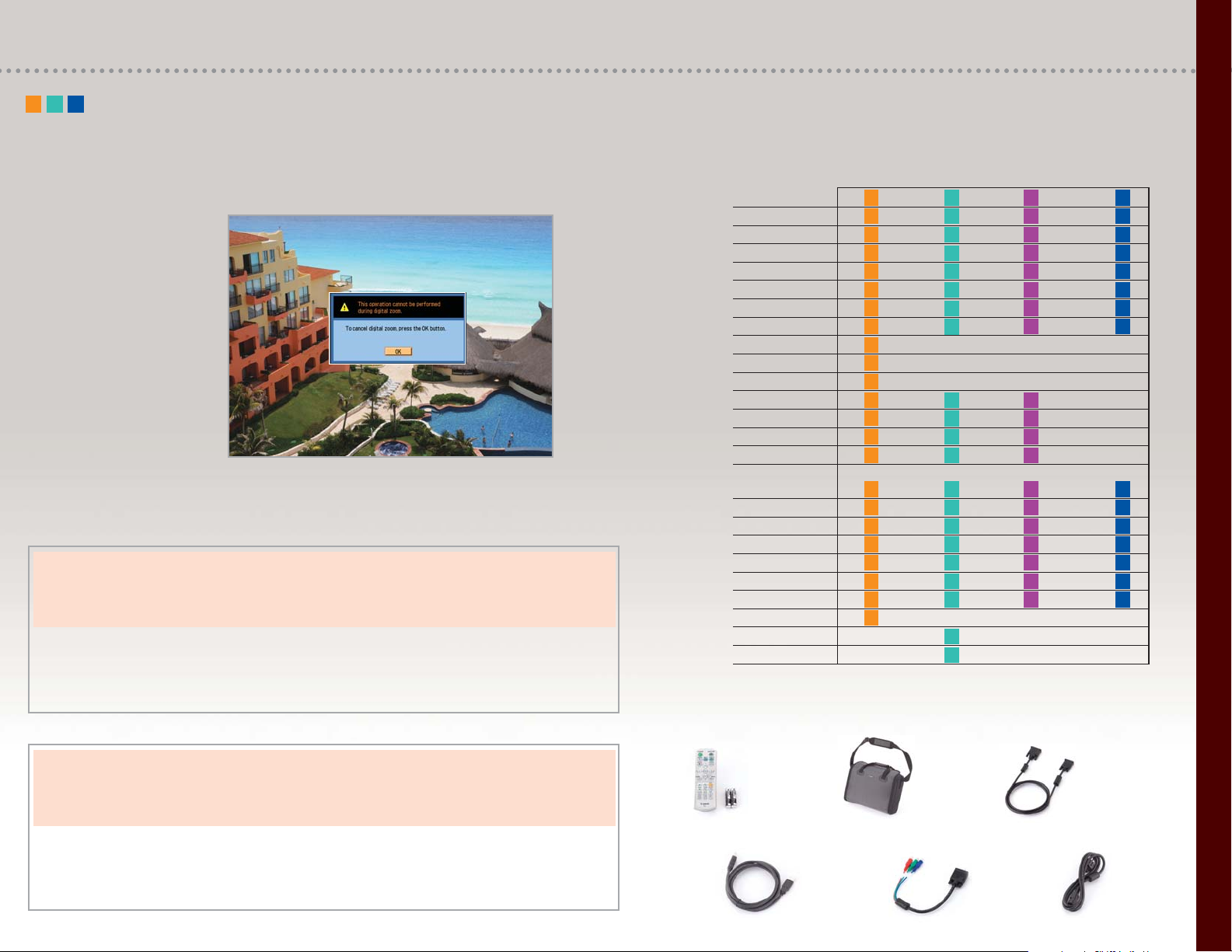
The SX6, SX60 and X600 display guide messages in an on-screen window,
providing feedback on invalid operations and set-up tips. The same window also
introduces auto set-up and
Off & Go functions when
power is switched on or off.
Guide Functions
Canon Throw Distance Chart
Kit Contents
Business
Government
Education
Exhibits
Trade Shows
Hotels
Retail
Malls
Publishing
Design
Photography
Medical
CAD Engineering
Structural Design
Architecture
Presentations
Seminars
Displays
Lectures
Documentation
Information
Visual Artwork
Color Matching
Entertainment
Home Cinema
Markets
Applications
SX6 SX60 SX50 X600
Select the Projector Right for Your Application
SX6, SX60, X600
Projector Screen Size 40” 80” 100” 150” 200” 300”
Screen Size – horizontally 2’8” 5’4” 6’8” 10’0” 13’4” 20’0”
Projection distance 3’11” – 6’5” 7’9” – 12’11” 9’8” – 16’2” 14’7” – 24’4” 19’6” – 29’6” 29’4” – 29’6”
(shortest to longest)
SX50
Projector Screen Size 40” 80” 100” 150” 200” 300”
Screen Size – horizontally 2’8” 5’4” 6’8” 10’0” 13’4” 20’0”
Projection distance 3’11” – 6’6” 7’10” – 13’1” 9’10” – 16’4” 14’10” – 24’7” 19’10” – 29’10” 29’9” – 29’10”
(shortest to longest)
SX6, SX60, X600
Projector Screen Size 40” 80” 100” 150” 200” 300”
Screen Size – horizontally 2’11” 5’10” 7’3” 10’11” 14’6” n/a
Projection distance 4’2” – 7’0” 8’5” – 14’1” 10’7” – 17’8” 15’11” – 26’6” 21’3” – 29’6” n/a
(shortest to longest)
SX50
Projector Screen Size 40” 80” 100” 150” 200” 300”
Screen Size – horizontally 2’11” 5’10” 7’3” 10’11” 14’6” n/a
Projection distance 4’3” – 7’1” 8’7” – 14’3” 10’9” – 17’10” 16’2” – 26’10” 21’7” – 29’10” n/a
(shortest to longest)
4:3 Aspect Ratio
16:9 Aspect Ratio
USB Cable Component Video Power Cord
Adapter Cable
Remote Control Soft Case Computer Cable (DVI-VGA)
Page 12
Ceiling Mount
RS-CL01 (SX50)
RS-CL06 (SX60, SX6,X600)
1-800-OK-CANON
www.canonprojectors.com
Canon U.S.A., Inc.
One Canon Plaza
Lake Success, NY 11042, U.S.A.
Canon Canada Inc.
6390 Dixie Road, Mississauga
Ontario L5T 1P7 Canada
Canon Mexicana, S. DE R.L. DE C.V.
Blvd. M. A. Camacho No. 138, Piso PB
15, 16 y 17, Col. Lomas de Chapultepec,
C.P. 11000 México, D.F. México
Canon Latin America, Inc.
703 Waterford Way, Suite 400
Miami, FL 33126, U.S.A.
Replacement Lamp
RS-LP02 (SX6, X600)
RS-LP03 (SX60)
RS-LP01 (SX50)
Network Adapter
RS-NA01
RS-232C Cable RS-CA01
Ceiling Pipe
RS-CL03 (14.17 in.)
RS-CL04 (21.65 in.)
RS-CL05 (29.92 in.)
Ceiling Plate
RS-CL02
1
Systems Contractor News, October 2005 in
Realis SX50 review.
Errors and omissions excepted. Weight and
dimensions are approximate. Specifications
subject to change without notice. Projected
images simulated.
© 2006 Canon U.S.A., Inc. All rights reserved.
Canon is a registered trademark of Canon Inc.
in the United States and may also be a registered
trademark in other countries. IMAGEANYWARE
is a trademark of Canon.
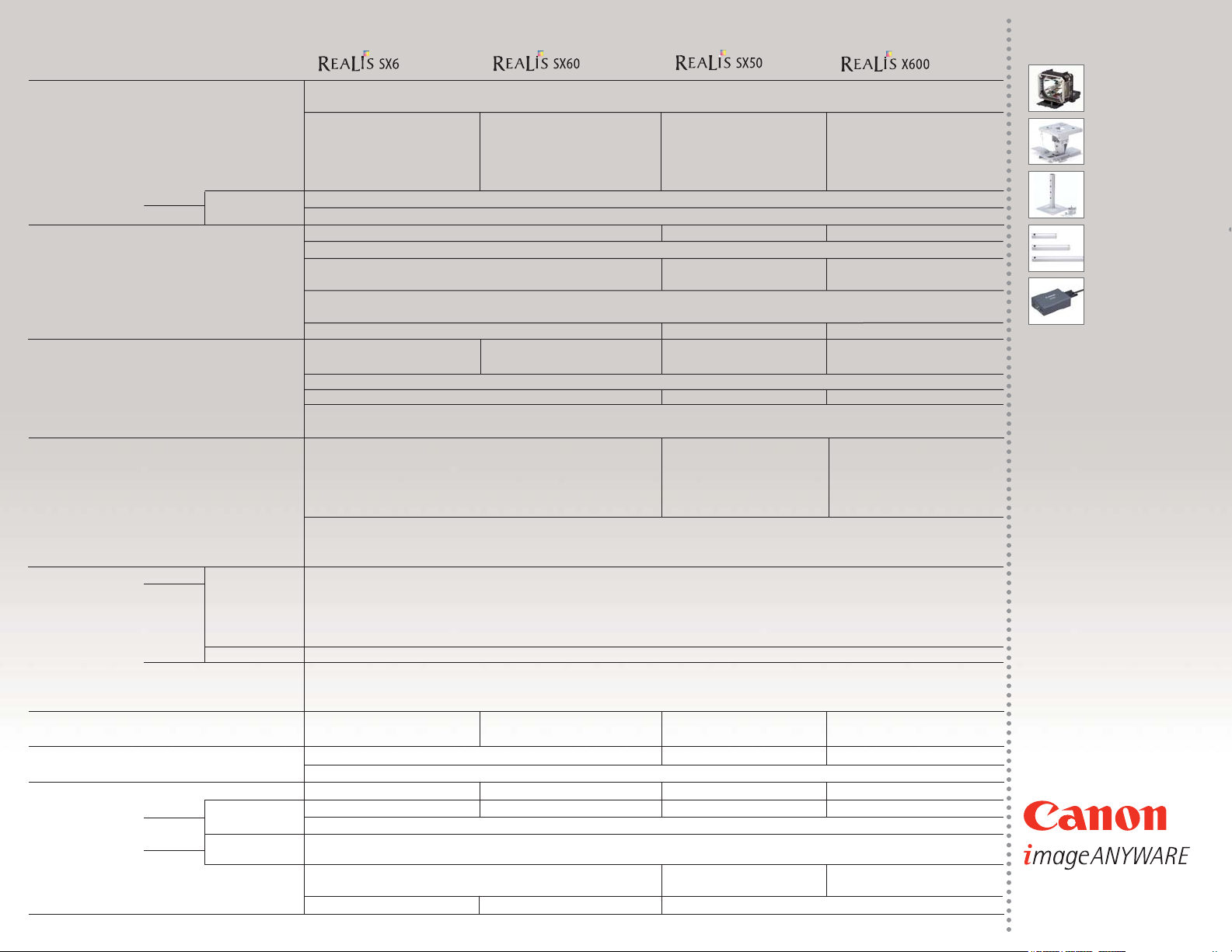
Product
Basics Imaging Device
0.7' Reflective LCD panels (LCoS) x 3
Aspect ratio
4:3
Native Resolution SXGA+ SXGA+ SXGA+ XGA
Brightness 3500 ANSI Lumens 2500 ANSI Lumens 2500 ANSI Lumens 3500 ANSI Lumens
Uniformity 88% 88% 85% 88%
Contrast 1000:1 1000:1 2000:1 1000:1 1000:1
(Home Cinema Mode)
Keystone
Vertical
+/- 20 degrees (Auto/Manual) +/- 20 degrees(Manual) +/- 20 degrees (Auto/Manual)
Horizontal
+/- 20 degrees(Manual)
Optics Projection lens
F1.85 - 2.5 , f=21.7 - 35.8 mm F1.85 - 2.5 f=22.0 - 37.0 mm F1.85 - 2.5 f=21.7 - 35.8 mm
Lens shift
9:1, Fixed
Zoom
1.7x Powered , 12x Digital 1.7x Manual, 12x Digital 1.7x Powered , 12x Digital
Focus
Powered (Auto/Manual) Manual Powered (Auto/Manual)
Screen size 40" - 300"
Projection distance coverage
3.9 - 29.5ft (1.2 - 9m) / 100”: 9.8 - 16.1ft (3.0 - 4.9m)
Throw Ratio
1.46 – 2.43:1 1.48 – 2.45:1 1.46 – 2.43:1
Image Adjustments Color Mode Adobe RGB, sRGB,
sRGB, Presentation, Standard, sRGB, Presentation, Standard, sRGB, Presentation, Standard, Movie
Presentation, Standard, Movie & Photo
Movie, Home Cinema Cinema
Color Adjust Dynamic Gamma, 6-axis (RGBCMY) Color Adjustment
Wall Correction
Auto/Manual Manual Auto/Manual
Mounting Ceiling/Rear/Ceiling and Rear
Tilt Angle
Adjusting feet up to 10 degrees
Input Signals Analog PC input
UXGA/SXGA+/WXGA/SXGA/XGA/SVGA/VGA UXGA/SXGA+/SXGA/XGA/
UXGA/SXGA+/WXGA/SXGA XGA/
SVGA/VGA SVGA/VGA
Digital PC input SXGA+/SXGA/WXGA/XGA SVGA/VGA SXGA+/SXGA/XGA SVGA/VGA XGA/SVGA/VGA
Scanning frequency H:15 - 100 kHz , V: 50 - 100 Hz, Dot clock: 170 MHz H:15 - 80 kHz , V: 50 - 100 Hz, H:15 - 100 kHz , V: 50 - 100 Hz,
Dot clock: 170 MHz Dot clock: 170 MHz
Video/S-video input NTSC/PAL/SECAM/NTSC4.43/PAL-M/PAL-N
Component input 1080i/1035i/720p/575p/480p/575i/480i
Digital video input 1080i/1035i/720p/575p/480p
Termimals Input DVI-I 29pin Digital PC input/Analog PC input/Digital Video input
Mini D-sub 15pin
Analog PC input /Component input/SCART input
RCA x1
Video input
Mini DIN 4pin
S-Video input
Stereo mini jack
Stereo audio input
Output
Mini D-sub 15pin
Analog PC output
Build-in Speaker 1W (Mono)
Control Terminal RS-232C
Network
YES (Optional Network Adapter)
Lamp
Type
270W NSH 180W NSH 200W NSH 270W NSH
Lamp Life (Quiet/Normal) 2000/1500 Hours 4000/2500 Hours 2000/1500 Hours 2000/1500 Hours
Remote Control Sensor
Wireless Infrared, Front/Back Wireless Infrared, Front Wireless Infrared, Front/Back
Mouse Control USB
Ratings
Fan Noise (Normal/Quiet)
35/31 dB 30/27 dB 37dB/34 dB 35/31 dB
Power
Consumption
355W/290W/7W 250W/225W/7W 290W/240W/6W 355W/290W/7W
Voltage
AC 100 to 240V , 50/60Hz
Temperature
Operating
41 to 95 F (5 to 35 C)
Storage
-22 to 140 F (-30 to 60 C), 5%RH-90%RH
Dimensions ( W x D x H)
8.9 x 13.2 x 4.5 in. (226 x 336 x 114 mm) 11.2 x 3.8 x 11.3 in. 8.9 x 13.2 x 4.5 in.
(284 x 96 x 286 mm) (226 x 336 x 114 mm)
Weight 10 .4 lbs (4.7 kg) 10 .1 lbs (4.6 kg) 8.6 lbs (3.9 Kg) 10 .4 lbs (4.7 kg)
Product Specifications
0060W390 04/06
Optional Accessories
(Normal/Quiet/Stand-by)
 Loading...