

Canon imagePROGRAF IPF MFP M40, imagePROGRAF iPF825, imagePROGRAF iPF815, imagePROGRAF iPF765, imagePROGRAF iPF760 Technical Documents
...Page 1
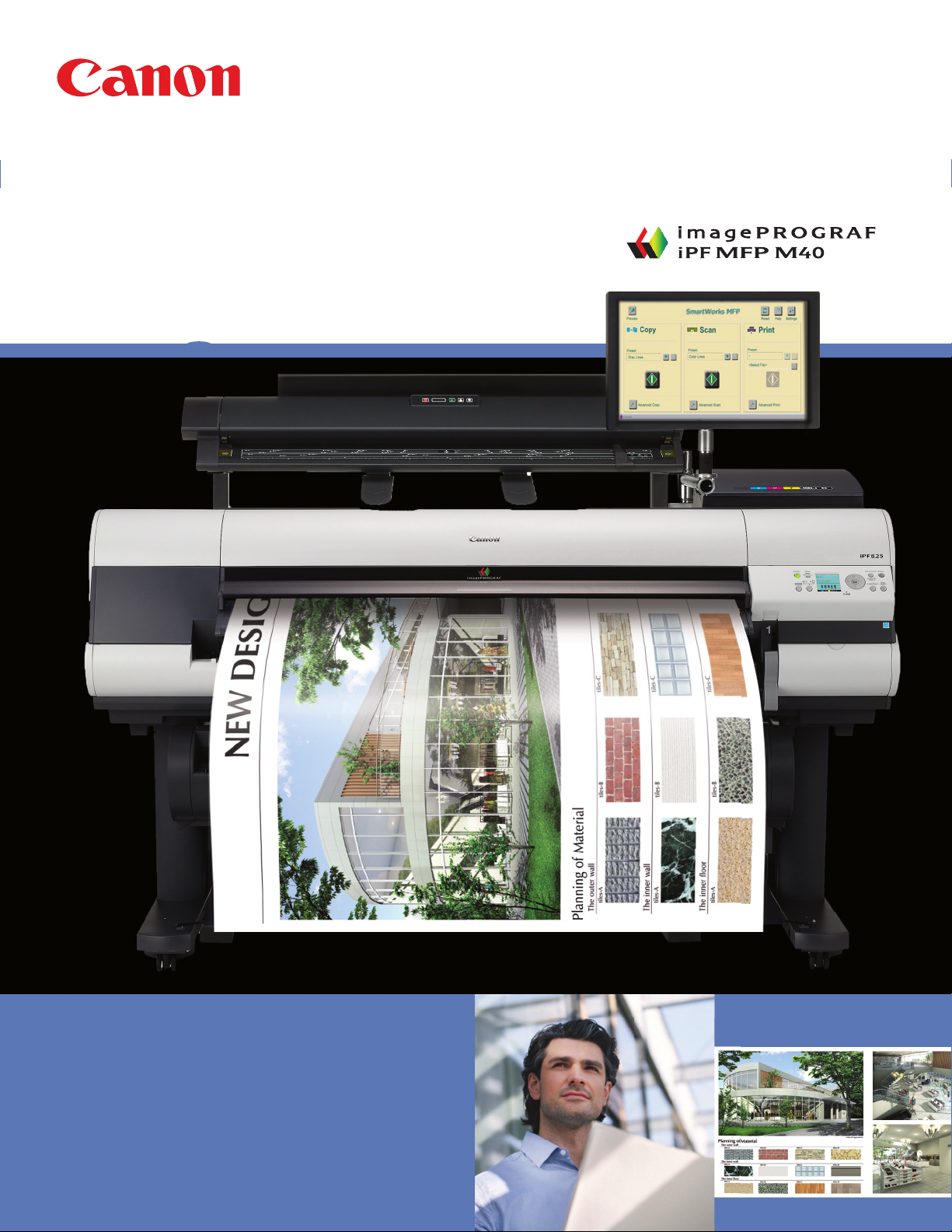
imagePROGRAF
TECHNICAL
DOCUMENTS
MFP LARGE-FORMAT IMAGING
Page 2
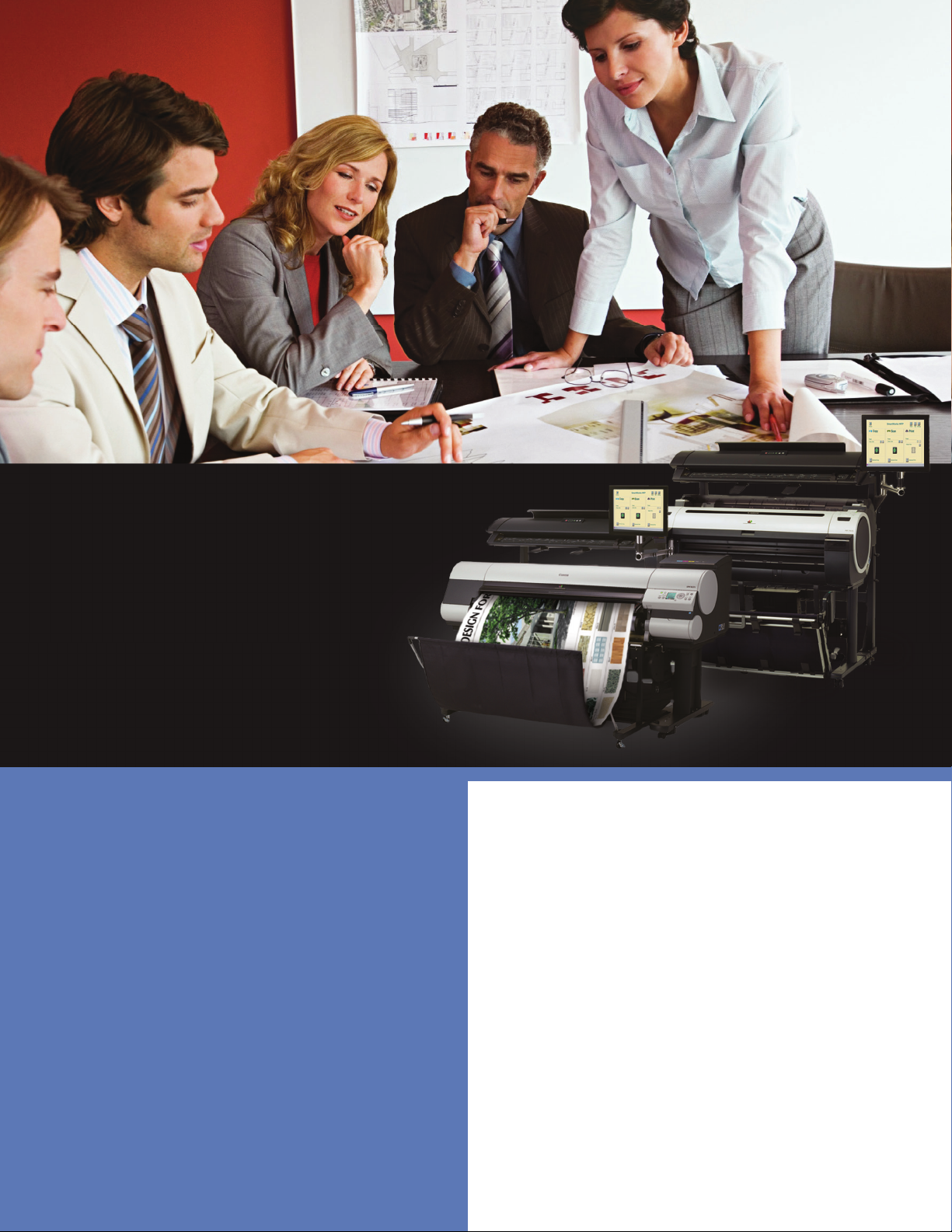
Introducing the
imagePROGRAF iPF
MFP M40 System
Large-format scan-to-copy/
fi le/share solutions
The Canon imagePROGRAF iPF MFP M40
systems are multicomponent, multifunction
solutions for architects, engineers,
construction, GIS, and other professionals
who need to scan, edit, save, share,
and print large-format documents easily
and effi ciently.
2
FEATURES
• M40 Scanner with SingleSensor assembly
*
technology
scan speeds.
• SmartWorks MFP scan to copy/ fi le/share
software includes new custom presets, image
enhancements, and all new cloud integration.
• Direct Print & Share is Canon’s Cloud Portal
software for fi le sharing.
• A customizable system–choose between 36”
or 44” printers for maximum versatility.
• Computer, Touch-Screen Monitor, and Stand
are all included in the system.
* Single Sensor assembly tech nology means that multiple sensors are contained in one
assembly device.
delivers incredibly fast and accurate
Page 3
imagePROGRAF MFP
VERSATILITY
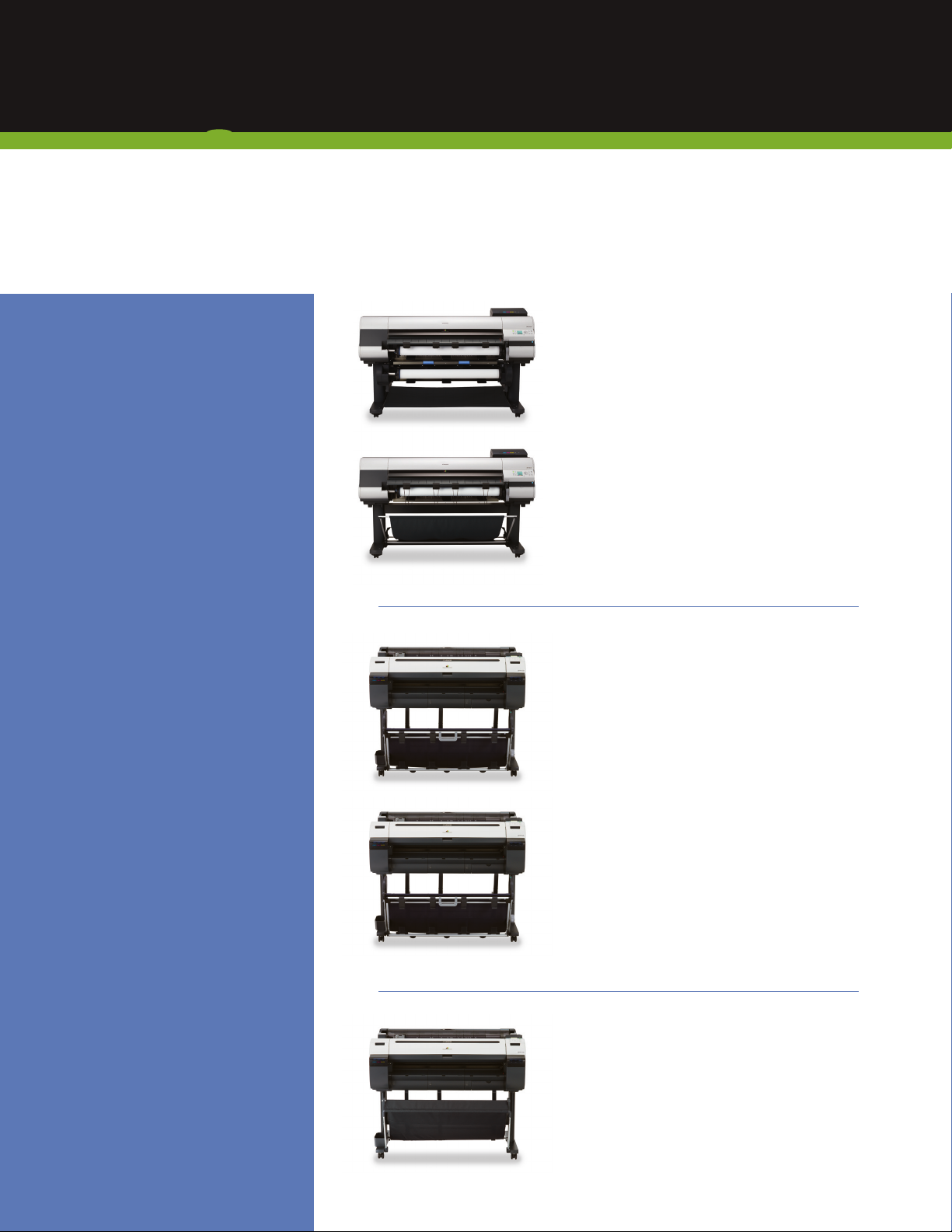
Choose the printer that best fi ts your workfl ow—and budget. With fi ve imagePROGRAF models
in the MFP M40 system line-up, it’s easy to customize your system.
CANON
TECHNOLOGY
Unique 5-Color Reactive Ink System
• High resolution: up to
2400 x 1200 dpi output
• Double set of Matte Black
ink channels maximizes
monochrome print speed
• Economy print mode helps
cut down on ink cost for
draft prints
• 15,360 -nozzle print-head with
FINE technology
MORE THAN
JUST DRAWINGS
Canon’s imagePROGRAF
5-color line of printers has
what you need to simplify,
strengthen, and complete
your workfl ow. For poster
creation made simple, Canon’s
PosterArtist Lite software
gives you the tools you
need to help you produce an
eye-popping banner or display
in just a few easy steps. Also
included are a Print Plug-in for
Microsoft® O f fi c e and Accounting
Manager* software to help you
keep track of ink, media, and
total job costs.
*
PC only
iPF825
iPF815
iPF765
iPF760
iPF825/iPF815
• 44” 5-color large-format printers
• Dual-roll capability with automatic
switching for enhanced production
(iPF825 only)
• Large-capacity ink tanks
(330ml and 700ml tanks available)
• Built-in 160GB hard drive
• Sub ink tank system
iPF765/iPF760
• 36” 5-color large-format printers
• Flat stacker/basket neatly stacks up to 20
plain paper prints, 24” x 36” in size
• Interface lock system allows you to
password-protect all user interfaces
• Built-in 250GB hard drive (iPF765 only)
iPF750
• 36” 5-color large-format printer
• Borderless printing
• Bundled with a variety of software
solutions to help enhance your workfl ow
• Entry-level, low-cost solution
3
Page 4
imagePROGRAF iPF MFP M40 SYSTEM
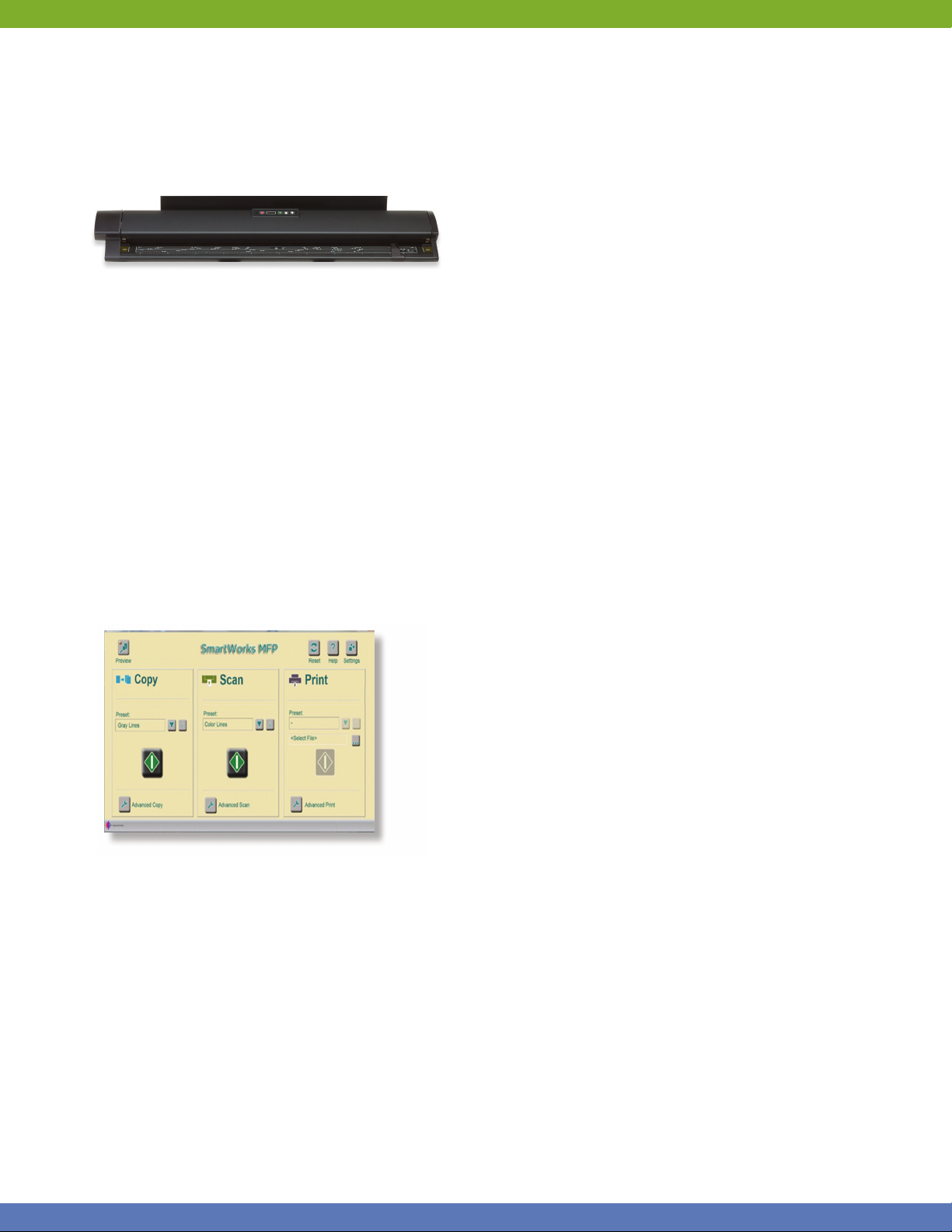
M40 SCANNER
The M40 scanner with SingleSensor assembly
technology brings the MFP solution to a whole
new level. You have the ability to scan documents
at incredible speeds and, with the included USB 3
connection, experience data transfer speeds of up
to 10 times faster than on previous MFP models!
The intuitive control panel embedded on the scanner
helps make operation of the device incredibly easy,
and its compact design helps space become a nonissue when using and storing the device.
• Optical resolution of 1200 dpi
• Scan speeds of 13 inches per second
monochrome and 3 inches per second color
• Capability to accept media of different
thickness (up to 2mm)
SMARTWORKS
SYSTEM
Experience the vast customization options that come
with your MFP system. The Canon imagePROGRAF
iPF MFP M40 large-format imaging system is
designed to be a complete scan-to-copy, fi le, and
share solution. The system includes an imagePROGRAF
iPF large-format printer, M40 large-format scanner,
MFP stand, computer, SmartWorks MFP software,
and a large touch-screen monitor. This solution
provides a fast and effective system for printing,
copying, archiving, and distributing maps, drawings,
renderings, site and facilities management plans,
design and layout proofs, posters, and more.
With the iPF765 or iPF760 printer, the integrated
stand allows the user to position the monitor
in a variety of confi gurations to provide optimal
functionality and comfort, as well as allowing the
user to mount the stand onto the printer for a true
all-in-one structure, or keep them separate for easy
maneuverability. The MFP solution includes a
touch-screen monitor, and users now have the option
of selecting to have their scanned documents come
straight out the back of the scanner, or rewind to the
front for easy retrieval. Customization is truly brought
to a whole new level with the iPF MFP M40 system.
• Fully operational PC for vast customization
and creativity
• Integrated stand for structural customization
(iPF765 and iPF760 printers only)
MARKETS
The iPF MFP M40 system is designed to help bring a
fully operational work solution to you out in the fi eld
The included SmartWorks MFP scan-to-copy/fi le/
share software has been enhanced and now helps
you to be more effi cient than ever before.
• New user interface for easy navigation
• Ability to add custom presets with one-touch
retrieval for those often-used settings
• New image enhancements for white point
adjust, black point adjust, sharpen, mirror,
and invert
• Full integration with Direct Print & Share
Cloud Portal software
4
and provide you with all the tools to help enhance
your technical document productivity. Whether
you have a low-volume architecture fi rm or a high
production enterprise environment, you can choose
the right printing solution to meet your workfl ow
requirements. See how the MFP solution can bring
your business to the next level. This solution’s
capability to help you produce high image quality
at impressive speeds— and achieve remarkable
productivity—help make it a welcome addition for
anyone looking to advance in the AEC, GIS, and
other technical industries.
Page 5
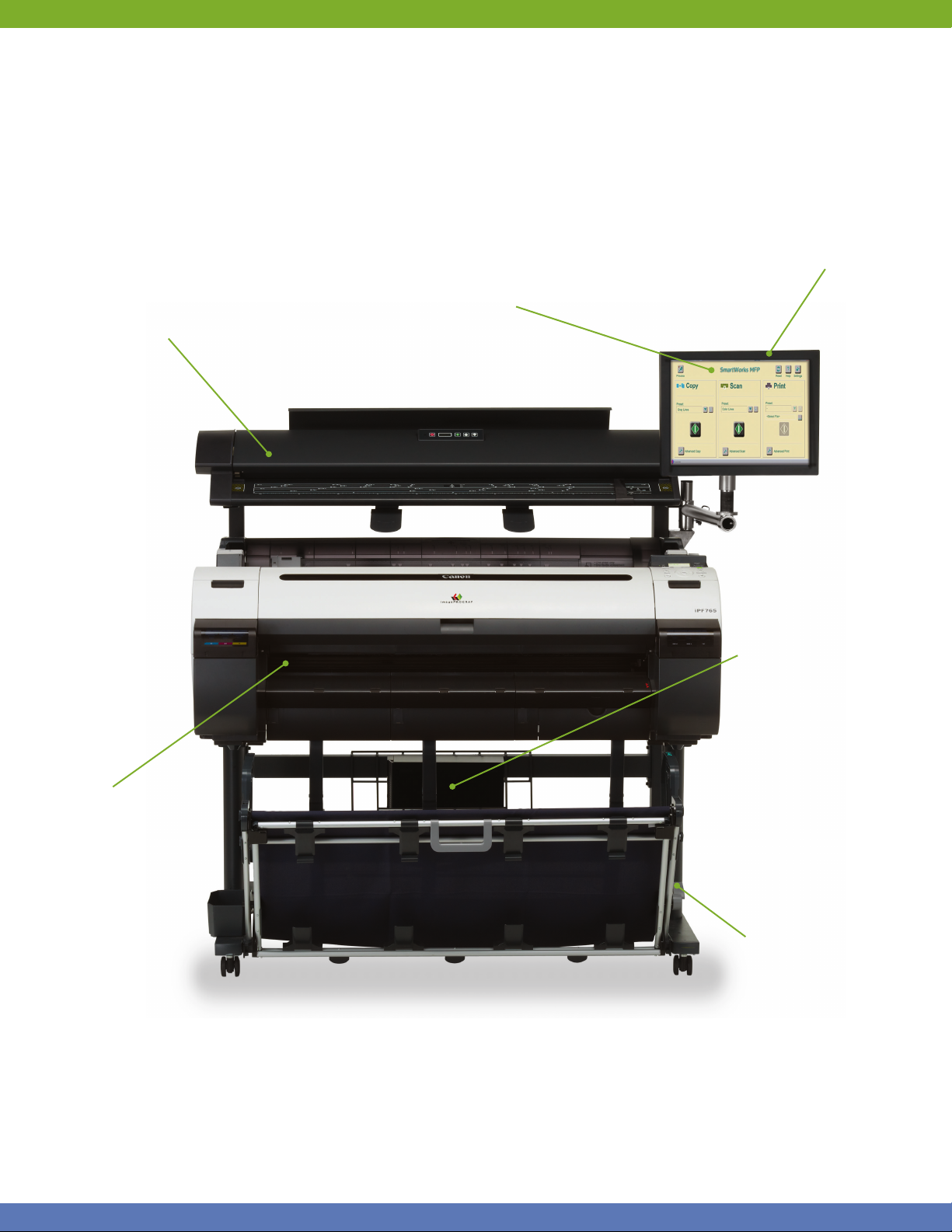
M40 Large-Format Scanner
• SingleSensor assembly technology
• Scans images up to 40”wide
Large-Format Ink-Jet Printer
Five models to choose from
SmartWorks MFP Software
Featuring one-touch “green button”
Copy, Scan, and Print functions
Touch-Screen Monitor
On-Board PC Software
and Workflow Solutions
• Direct Print and Share
Cloud Portal Solution
• PosterArtist Lite
• Canon Printer Driver
• Print Plug-in for
Microsoft Office
• Accounting Manager
Feature
MFP Stand
5
Page 6
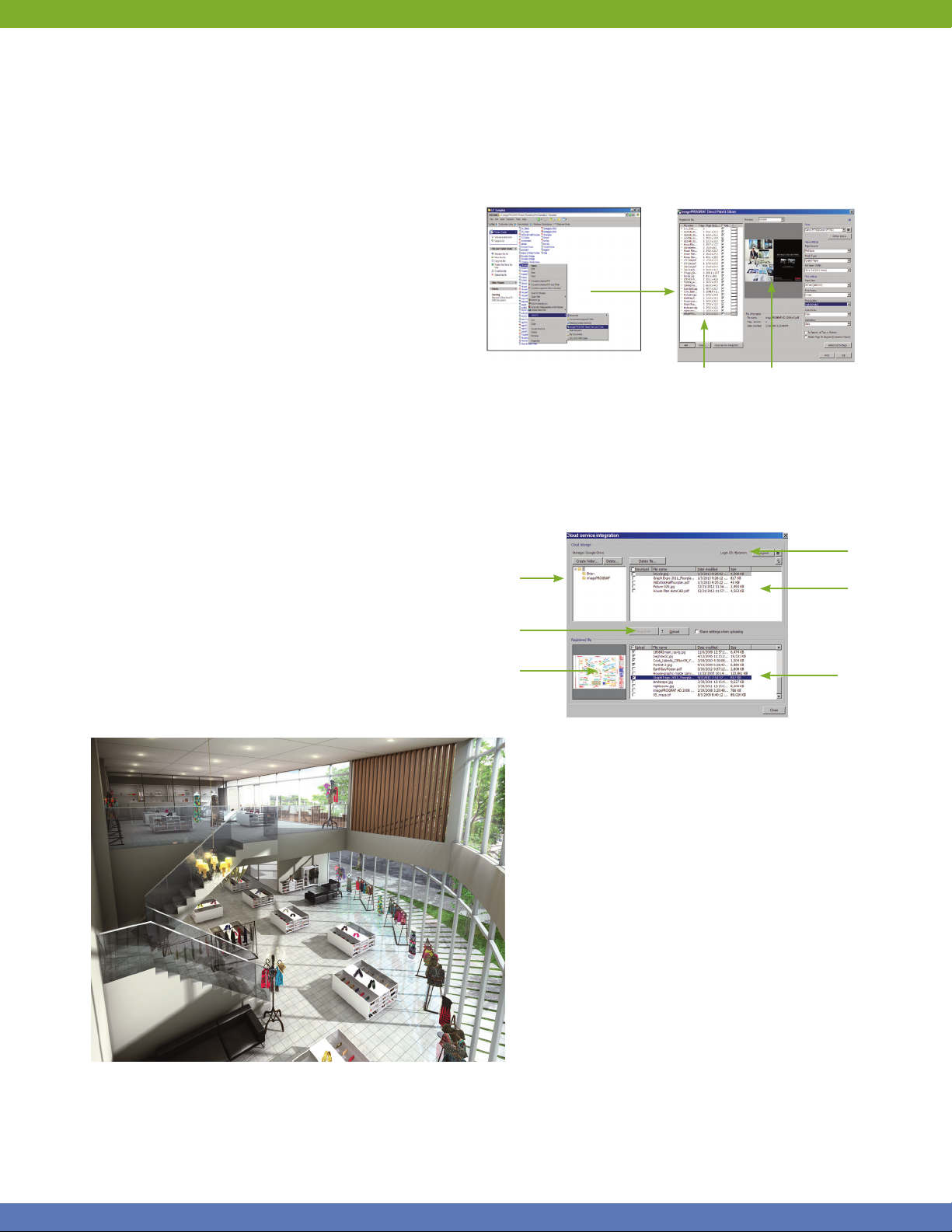
DIRECT PRINT & SHARE SOFTWARE
*
Canon’s Direct Print & Share
service that allows users to expand their workfl ow.
**
Through a Google
account, users are given the
ability to scan and upload documents to their own
cloud storage space and have those documents
printed from almost anywhere!
Easily print PDFs, TIFFs, and JPEGs through the
user-friendly interface, and even have the ability to
do batch printing. To help further integrate with your
Canon printer and software, Direct Print & Share
comes with a print plug-in for SmartWorks MFP V3
(also included) and AutoCAD
make cloud use through this software incredibly easy.
Scan, upload, download, and print directly from these
software solutions to help streamline your workfl ow.
FEATURES
• Accessible from almost anywhere in the world
• 5GB of free storage
• Batch printing of multiple fi les
• Integration with software solutions, such as
SmartWorks MFP V3 and AutoCAD
• Drag-and- drop TIFF, JPEG, and PDF fi les to
shortcut icon
is a cloud-based portal
®
(sold separately) to
1. Select a fi le
2. Right-click to send
Folder options
for saved fi les
Upload and
download fi les
to the cloud
iPF Direct Print & Share
Cloud Service Integration
Print job
management
Cloud Storage
Print settings
Real-time preview
Password
protected
Files stored
on Cloud
File preview
Files to be
uploaded
*Direct P rint & Share c omes embedded with the imagePROGRAF iPF MFP M40 System, and is also available as a free downlo ad at http ://usa.canon.com/dow nloads.
**You must open a G oogle Clo ud account to take advantage of the cloud functionality. Stora ge capac ity and any p ricing the reof is based o n Google’s current offering and is at
Google’s discretion. Your Google Cloud account is subject to G oogle’s terms and condit ions, whic h is subject to c hange at Go ogle’s discretion. Neit her Canon I nc., nor Ca non U.S. A.,
Inc. represents or warrants any third-party product, service or feature referenced hereunder.
6
Page 7
imagePROGRAF
PRINTER SPECIFICATIONS
Output Width
44” Wide
Numb er of Ink Tanks
6
Color S et
Dye: Cyan, Magenta, Yellow, Black
Pigment: Matte Black
Ink Type
Dye/Pigment Reactive Ink
Ink Tank Size
330ml and 700ml
Maxi mum Prin t Resolut ion (dpi )
2400 x 1200
Total Nu mber of Noz zles
15,360
Ink Droplet
Consistent 4pl
Maximum Print Speed
(1200 x 1200 dpi on Plain Paper)
688 sq.ft. per hr.*
Prin t Speed Bes t Qualit y Mode
(2400 x 1200 dpi on Photo Gloss Paper)
89 sq.ft. per hr.*
Soft ware/Utilities /Applications
• Canon Printer Driver
• HDI Driver
• Print Plug-in for Microsoft Office
• Digital Photo Front-Access
• Remote User Interface
• Media Configuration Tool
• Supports HP-GL/2, HP RTL Files
• PosterArtist Lite
• PosterArtist (optional) (PC only)
• Third-Party RIPs (optional)
Special Features
• Dual Media Rolls (iPF825 only)
• Accounting Manager (PC only)
• Economy Color Mode
• Sub Ink Tank System
• Independent Rotary Cutter
Printer Dimensions ( H x W x D)
iPF825: 45” x 74.5” x 50.9” (with basket)
iPF815: 45” x 74.5” x 38.4
Printer Weight
iPF825: Approx. 417 lb.
iPF815: Approx. 305 lb.
Printer Memory
384MB RAM
32GB Dedicated File Processing Memory
Hard Drive
160GB
Connectivity
USB 2.0: 10/100Base-T/TX
Operating System
Windows®,** Macintosh®**
* OS: Wind ows XP SP 2, CPU: Pe ntium® 4 3.2G Hz, RAM :
1GB, Application: Adobe
2.0 Hi- Speed, Data use d: ISO /JIS-S CID No.5 , Output
image size : A1 (5 80mm x 72 4.9mm ) for iPF6 55/6 50/ 610,
A2 ( 410mm x 512.5mm) for i PF510 using opt ional Roll Fe ed.
Measure d by Canon Inc . Each print t ime does not in clude
data tra nsfer time. Th e print spee d may vary de pending on
the data vo lume and size, P C, applic ation, sof tware, me dia
type, a nd interfac e.
**
Pl ease visit w ww.usa.canon.com/download for availability.
®
Photoshop® 7.0, Interfa ce: USB
Output Width
36” Wide
Numb er of Ink Tanks
6
Color S et
Dye: Cyan, Magenta, Yellow, Black
Pigment: Matte Black, Matte Black
Ink Type
Dye/Pigment Reactive Ink
Ink Tank Size
130ml
†
Maxi mum Prin t Resolut ion (dpi )
2400 x 1200
Total Nu mber of Noz zles
15,360
Ink Droplet
Consistent 4pl
Maximum Print Speed
(1200 x 1200 dpi on Plain Paper)
733 sq.ft. per hr.*
Prin t Speed Bes t Qualit y Mode
(2400 x 1200 dpi on Photo Gloss Paper)
79 sq.ft. per hr.*
PRINTER SPECIFICATIONS
Soft ware/Utilities /Applications
iPF765/760
• Canon Printer Driver
• Optimization Module for AutoCAD
(PC only)
• Print Plug-in for Microsoft Office
• Remote User Interface
• Media Configuration Tool
• PosterArtist Lite
• PosterArtist (optional) (PC only)
• Third-Party RIPs (optional)
iPF750
• Canon Printer Driver
• HDI Driver
• Digital Photo Front-Access
• Print Plug-in for Microsoft Office
• Remote User Interface
• Media Configuration Tool
• Supports HP-GL/2, HP RTL
• PosterArtist Lite
• PosterArtist (optional) (PC only)
• Third-Party RIPs (optional)
Printer Dimensions (H x W x D )
41.8” x 51.3” x 34.5”
41.8” x 51.3” x 43.3 (when Basket is in the extended
position for flatbed stacking, iPF765/760 only)
Printer Weight
Approx. 141.3 lb.
Special Features
iPF765/760
• Flat Stacker/Basket
• Interface Lock
• Accounting Manager (PC only)
• Sub Ink Tank System
• Top-loading Roll Feed
iPF750
• Accounting Manager (PC only)
• Sub Ink Tank System
• Top-loading Roll Feed
• Gigabit Ethernet Support
• Intuitive Operation Panel
Printer Memory
256MB (32GB iPF765 only)
Hard Drive
250GB (iPF765 only)
Connectivity
USB 2.0: 10/100/1000Base-T/TX
Operating System
Windows,** Macintosh**
†
The starter ink tanks in the package with the printer are not the same
capacity as the replacement ink tanks specified here.
*
OS: Windows XP SP2, CPU: Pentium 4 3.2GHz, RAM: 1GB, Applica-
tion: Adobe Photoshop 7.0, Interface: USB 2.0 Hi-Speed, Data used:
ISO/JIS-SCID No.5, Output image size: A0 (827mm x 1033.8mm).
Measured by Canon Inc. Each print time does not include data transfer time. The print speed may vary depending on the data volume and
size, PC, application, software, media type, and interface.
**
Please visit www.usa.canon.com/download for availability.
7
Page 8
imagePROGRAF
M40 SCANNER SPECIFICATIONS
Scan Speed*
• 48 -bit Full Color @ 200 dpi: 3” (per second)
• 8-bit Grayscale and Monochrome @ 200 dpi :
13” (per second)
Scan Modes
• 16.7-million Color RGB (24-bit)
• 256 color RGB Ad aptive Indexed Color Palette (8-bit)
• 256- level Grayscale (8-bit)
• Black and White (1-bit)
Color Space
Normalized RGB
Resolution
• 9600 dpi ( maximum interpolated)
• 1200 dpi ( optical)
Scan Accuracy* *
+/- 0.1% ; +/ - 1 pixel
Maxi mum Image W idth
40”
Maximum Media Wid th
42”
Maxi mum Scan L ength
96”
Maximum Media Thickness
0.079” (2mm )
Media F eed Sys tem
Single large diameter precision ground drive roller;
adaptive CIS media focus management and media
guide mechanism; intuitive face-up, front-loading,
and front /rear- exit media path with side justifi cation;
automatic media size detection with reliable optical
media sensors
Digital Imaging Technology
Contact Image Sensor (CIS ) Technology (SingleSensor
Assembly)
• 5x close -spaced “dee p focus” CIS ( 25,000 pixels )
• 48 -bit RGB digital color image capture ( 50,400 pixels)
• 16- bit grayscale image capture
• Panchromatic monochrome and black and white
• Bi-directional extra long- life LED light system for
optimum object illumination and instant-on
scanning capabilit y
Digit al Image Pr ocessin g
• 2D Intelligent Adaptive Thresholding (I AT) (1-bit mode )
• Fixed Threshold Black and White (1-bit mode)
• Dynamic Normalization A pplication (D NA) with
16-bit Super Sampling
User Status and One-Touch Operation
Center mounted LCD scanner control panel;
walk-up operation and user selection of scanner mode
with stop, forward, rewind, scan, and copy buttons;
local language o ptions, panel overlay, and Magnetic
Media Guide
Included Software
• Smar tWorks MFP Scan-to-fi le, Copy, E- mail with
Real-time Image Viewer. Sup ports T IFF, JPEG, TIFF
G4, and P DF.
• Direct Print & Share Cloud Port al Solution
Operating System
Windows 7 Professional (6 4- bit)
User Maintenance
Installable Plug- and-Play Scanner; Simple Cleaning
Scann er Inter face Ki t
Superspeed USB 3.0 ( PC Connector Compatible with
USB 2.0 and USB 3.0 sockets )
Operating Environments
10 – 35°C, 35-80% RH, Non-condensing
External Power Supply
100 -250 VAC Autosensing + /- 10%, 50 -6 0Hz
Scanner Power Consumption
• 53Wh (scanning)
• 5Wh (stand -by )
Compliances
VCCL , CB, CE, F CC, UL, RoHS, ENERGY STAR
Stand and Scanner Dimensions
Height : Swing Arm: 57.5”
Straight A rm (max): 6 6”
Width: Swing Ar m (max ): 69.9”
Straight A rm: 53.6
Depth : 31.5”
Stand and Scanner Weight
Approx. 120.4 lb.
®
Wha t’s In The Bo x?
• M40 Scanner with Power Cord and USB 3.0 and USB
2.0 Cables (sc anner to ser ver)
• 2 Meter US B Cable ( server to printer)
• M40 MFP Stand
• M40 MFP Stand Assembl y Instructions
• Smar tWorks MFP Software
• Computer
• Flat Panel Touch-screen Display
• Installation and Operation M anual
• Operator Manual on CD- ROM
• Document Return Guide
• Magnetic Paper Guide
*
The scan rate is propo rtional across the full range of
resoluti ons supported by the sc anner. Actua l scan
times will depend on th e host system p erformance.
Quoted top speeds may b e limited by the effective
bandwidth of the US B 2 and is not guaranteed for all
media types.
**
The quote d scan accu racy may vary depen ding on the
operating environment and the thickness of the media.
The imagePROGRAF iPF MFP M40 systems contain multiple components, some of which
are manufactured by third parties. To the extent that such third party offerings come with
limited warranties, such limited warranties are hereby passed to the purchaser, and Canon
shall have no obligation or any liability with respect to such third party offerings.
As an ENERGY STAR® Partner, Canon U.S.A., Inc. has determined that this product meets
the ENERGY STAR guidelines for energy effi ciency. ENERGY STAR and the ENERGY STAR
mark are registered U.S. marks. CANON, IMAGEPROGRAF, and the GENUINE logo are
registered trademarks of Canon Inc. in the United States and may also be registered
trademarks or trademarks in other countries. IMAGEANYWARE is a trademark of Canon.
All other referenced product names and marks are trademarks of their respective owners
and are hereby acknowledged. Some items may not be available at this time; please check
for availability. Specifi cations and availability subject to change without notice. All printer
output images and effects are simulated. MFP shown with iPF825 and iPF765 printer.
©2013 Canon U.S.A., Inc. All rights reserved.
0175W110
0313-iPFM40-5M-LCR
1-800-OK-CANON
www.usa.canon.com
Canon U.S.A., Inc.
One Canon Park
Melville, NY 11747
 Loading...