

Page 1
Page 2
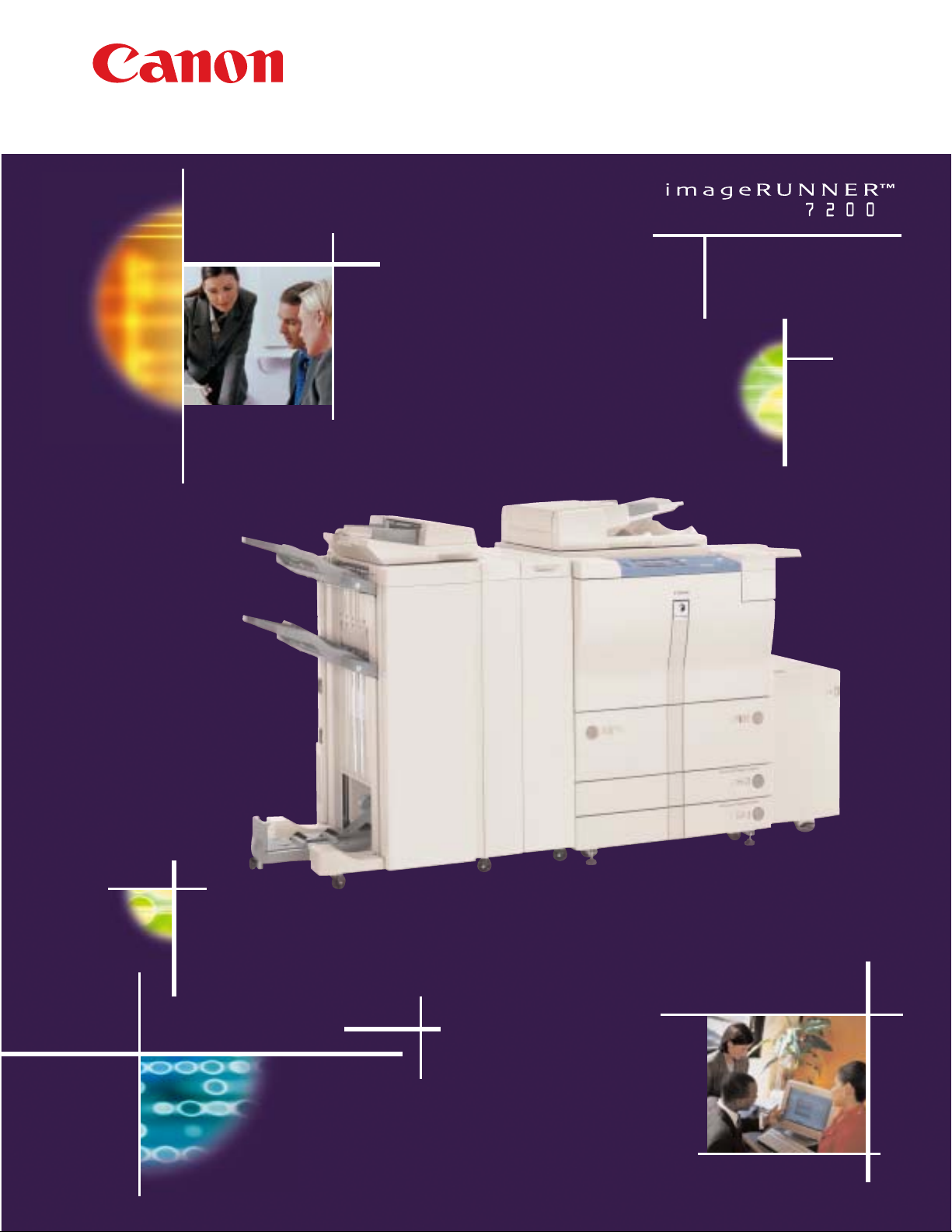
HIGH-PERFORMANCE MULTIFUNCTIONALITY
IS NOW WITHIN YOUR REACH
Who says you can’t have it all? With the Canon imageRUNNER™ 7200,
you get a high-speed digital copier, network printer, network scanner, and
office communications hub, all in one. Now you can copy, print, scan, store,
and send your documents to multiple locations utilizing just one device,
regardless of your document’s form, content, or ultimate destination.
Stop wasting valuable time working
around the limitations of your
current office equipment. With the
Canon imageRUNNER 7200 you won’t
need to alter your job to fit the capabilities
of the machine. The imageRUNNER 7200’s
extensive feature set will allow you to
complete the job exactly as you want it,
in as few steps as possible. Whether your
document requires basic copying and
finishing, on-line printing and insertion,
scanning and archiving, or manipulation
and distribution, rely on just ONE device—
the imageRUNNER 7200—to get every
piece of the job done.
With the new Canon imageRUNNER 7200
you CAN have it all – faster, easier, and
more affordably than you could have ever
imagined.
Page 3
copy
Walk Up to a World of Possibilities…
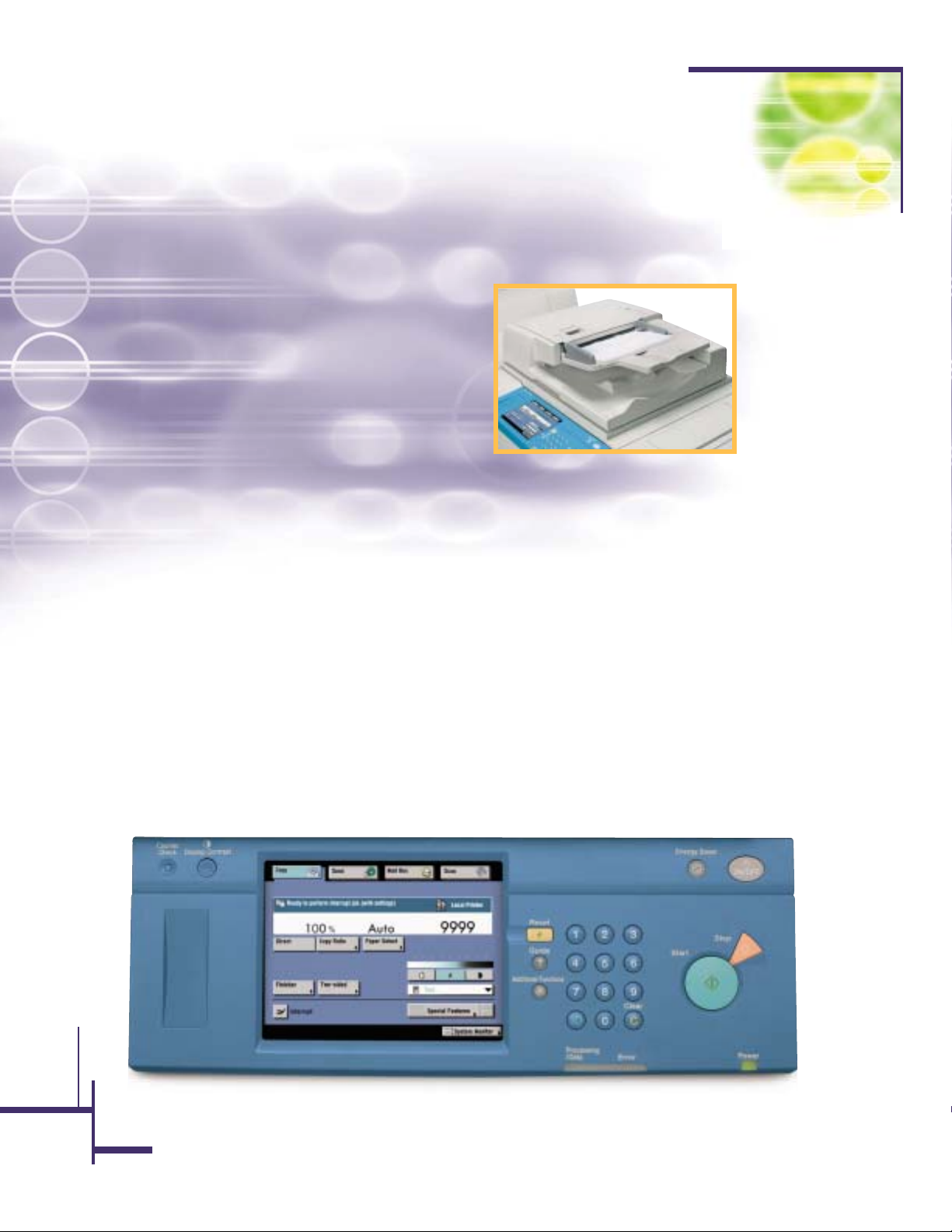
The imageRUNNER 7200 comes standard as a
72-page-per-minute digital copier with a total
programmable copy set capacity of 9,999. Up to 100
simplex or duplex originals in sizes from statement
to ledger can be fed through the device’s automatic
document feeder to accommodate large document
sets. Documents can be copied onto a wide variety of
paper sizes and types, including tabs, transparencies,
and card stock. The imageRUNNER 7200 can be
equipped with up to six different paper sources for a
total of 7,650 letter-sized sheets, so that long copy
jobs can run uninterrupted. Automatic paper tray
switching and on-the-fly paper reloading further
enhance productivity.
As a stand-alone copier, the imageRUNNER 7200
boasts a number of standard features, such as Trayless
Duplexing, Proof Print, Sample Set, Pagination, Sheet
and Cover Insertion, Image Combination, and Copying
onto Tabs, that makes the completion of everyday jobs
quicker and easier. To facilitate the production of complex jobs, the imageRUNNER 7200 also has a 10GB
Hard Drive as standard. This internal image server
hosts a number of unique features such as Job
Build, Copy Reservation, Scan-Once-Print-Many,
Auto Image Orientation, Forms Storage, and Job
Done Notification.
The imageRUNNER 7200 also offers several choices
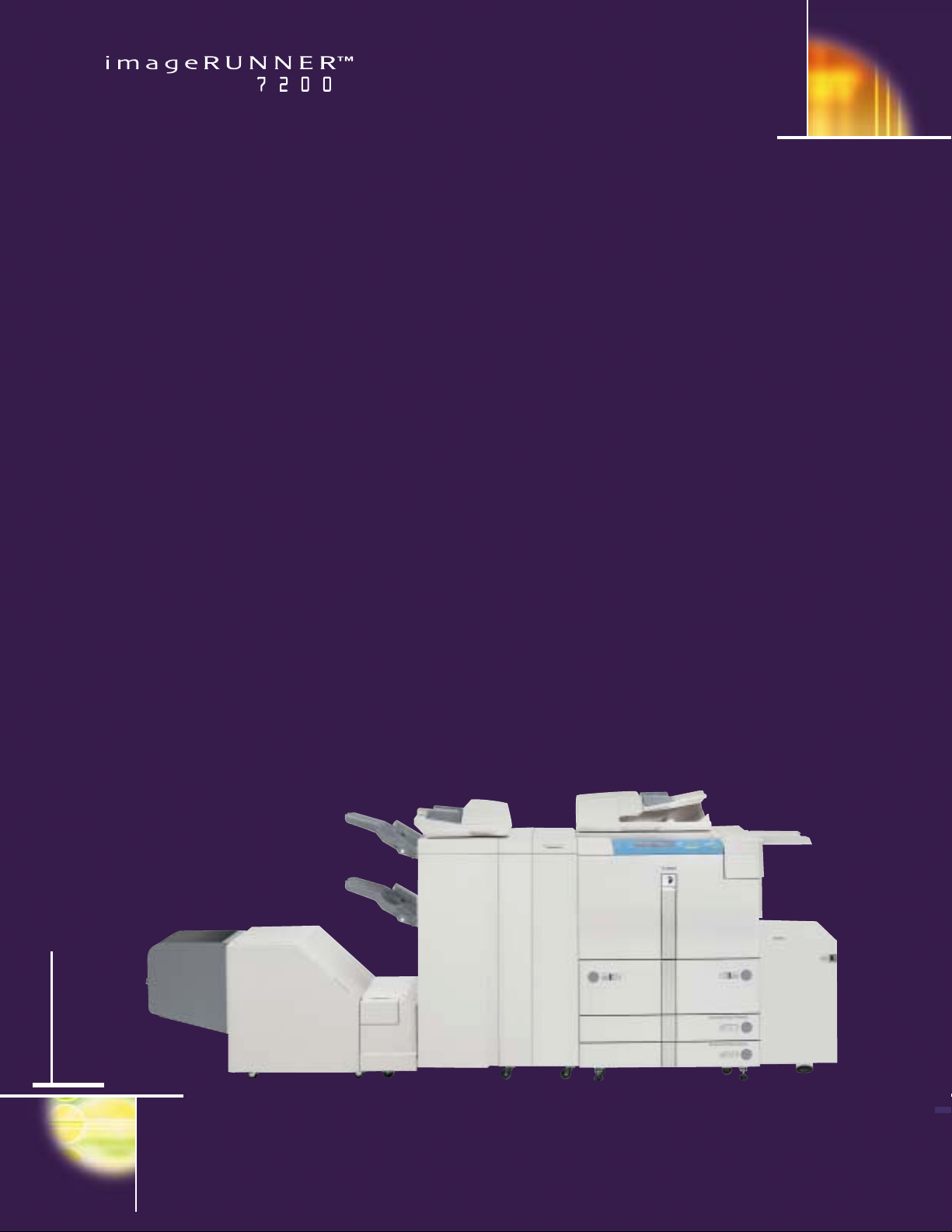
in finishing. Three distinct finishers are available that
are designed to handle the applications most common to high-volume departments. From stapling to
hole-punching, saddle-stitched booklet-making,
booklet-trimming, z-folding, and post-process
insertion, the imageRUNNER 7200 can be configured
to meet all your document-finishing needs.
Standard 100-sheet Automatic Document Feeder
Page 4
…Or Take On the World from Your Desktop
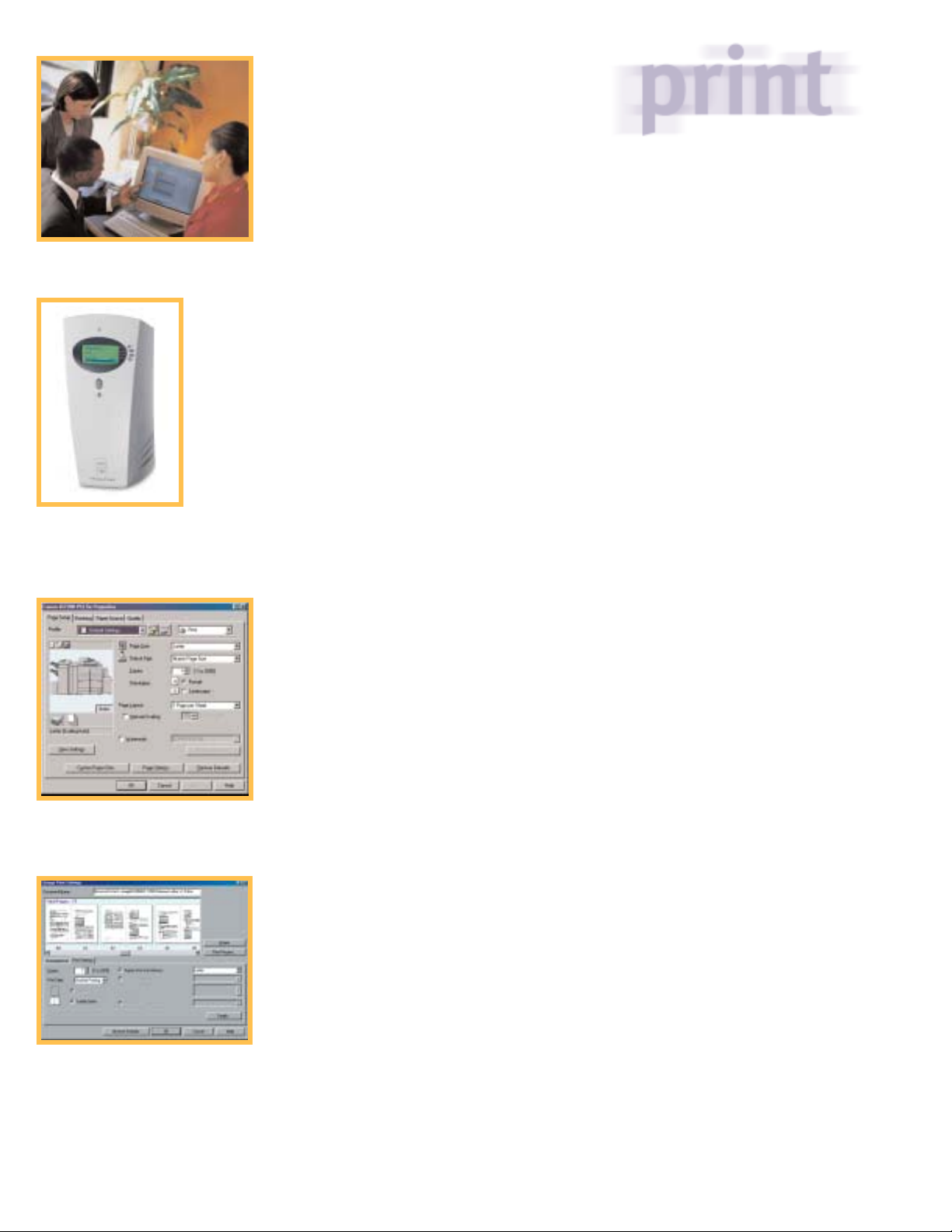
The optional imagePASS-M1
Print Controller
Driver Page Setup Tab
Page Composer is a make-ready tool
that allows users to review and manipulate
whole documents before printing.
When configured with one of two optional print
controllers, the imageRUNNER 7200 becomes a
powerful networked device, giving users full
access to the imageRUNNER 7200’s advanced
capabilities right from their desktops. Users can
choose either the Canon-designed Network
Multi-PDL Printer Kit-B3 or the imagePASS-M1
Print Controller, developed by Canon and
Electronics for Imaging. Both enable 2400 x 600 dpi
interpolated print resolution, and are designed
to integrate seamlessly with your existing network infrastructure.
The Canon-customized controller leverages the
standard 250MHz processor embedded into each
imageRUNNER 7200 base model. This controller
is best suited for text-intensive documents
common to the general office environment, and
where PCL page description language represents
the bulk of jobs sent to the printer.
The imagePASS-M1 Print Controller features an
Intel
®
Pentium®III 500MHz Mobile processor,
and is designed for environments in which
complex graphics, variable data, or true
Adobe
®
PostScript®files make up the majority
of print jobs. An imageRUNNER 7200 equipped with
an imagePASS-M1 Print Controller gives users full
access to EFI™ print utilities such as WebTools,™
DocBuilder,™ Command WorkStation,™ and
Fiery
®
FreeForm.™
An imageRUNNER 7200, equipped with either the
Network Multi-PDL Printer Kit-B3 or imagePASS-M1
Print Controller, can be upgraded to support
Canon’s Universal Send™ suite, a unique set of
features that allows you to distribute scanned
documents to multiple destinations in one
simple operation.
Both controller choices come with printer driver
software that is extremely easy to use, even
without prior experience using a network
connected device. A graphic image of the
imageRUNNER 7200 is displayed in the printer
driver window, indicating all currently installed
hardware options, paper sizes, and paper levels.
If the status of the device changes at any time,
this image is automatically updated so that the
user is aware of the latest device capabilities.
Using the Page Setup Tab within the driver,
users can save frequently used Job Profiles,
insert annotations, add watermarks, and send
confidential/sensitive documents to the printer
as a Secured Print. The imageRUNNER 7200’s
printer drivers also come with Canon’s Page
Composer software, a document make-ready
tool that allows users to review and manipulate
whole documents before printing.
Without any added cost, customers have access
to even more powerful capabilities when two
imageRUNNER 7200, imageRUNNER 8500, or
imageRUNNER 105 devices are connected on a
network. Using the Remote Copy feature, a user
can scan an original at one of the imageRUNNER
devices, and print it on another. And the Cascade
Copy feature allows users to split a print job
between two different imageRUNNER devices on
the network for a combined output speed of up to
177 pages per minute (with the imageRUNNER 105
as a selected device).
Page 5
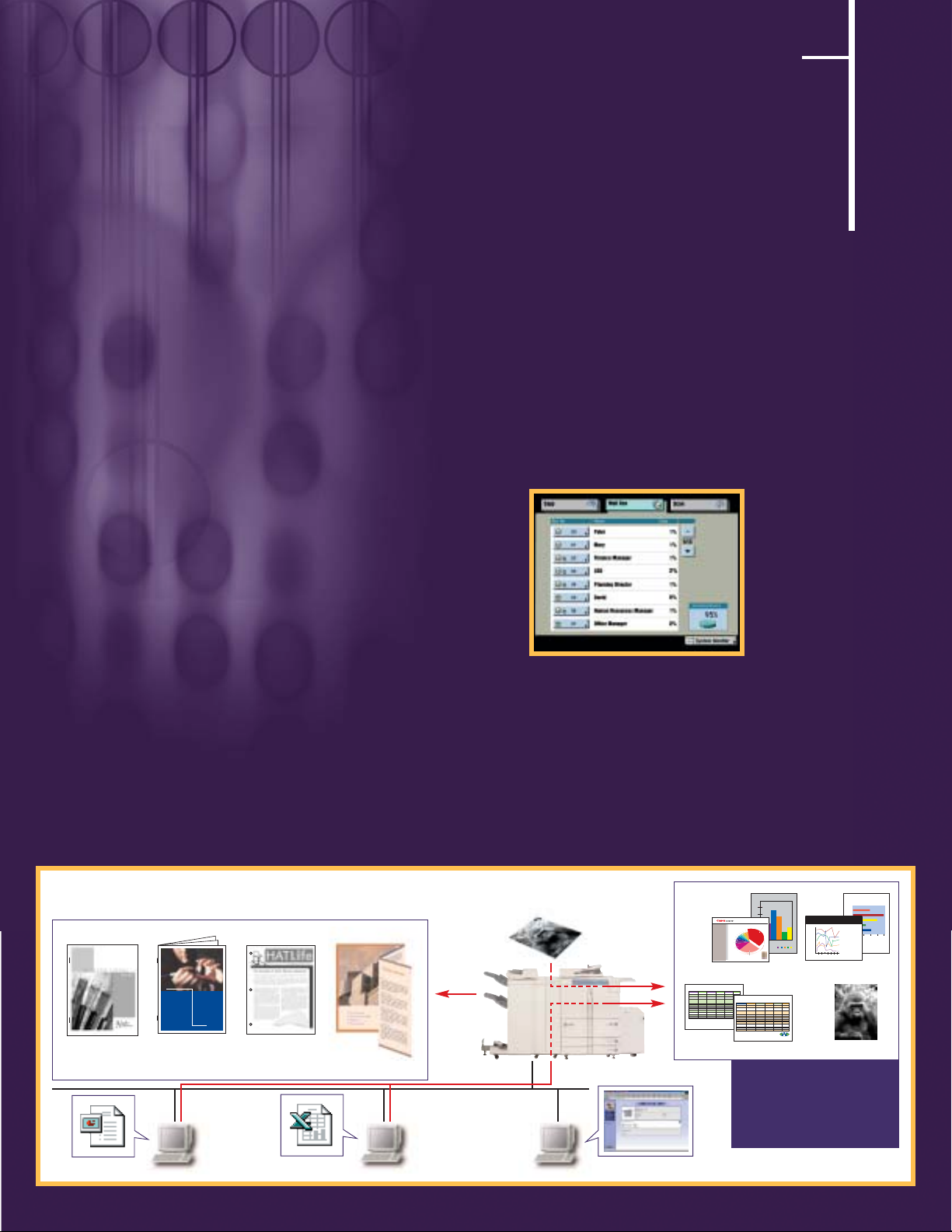
scan and store
Digitize and Organize
Like its predecessors, the imageRUNNER 7200 provides users with tremendous flexibility in converting
hard-copy documents to electronic form.
All network-connected imageRUNNER 7200 devices
come equipped with Canon’s Network ScanGear software. Using a ScanGear-enabled imageRUNNER 7200,
users running TWAIN-compliant application software
can scan documents from the device for transmission
over the network. Scanned images can then be
manipulated at the desktop as needed.
Canon’s eCopy™ ShareScan™ option can also be
configured with the imageRUNNER 7200, allowing
users to scan and send their documents via E-mail,
I-fax, or to the desktop at the touch of a button.
Once documents are scanned to a user’s PC, Canon’s
eCopy Desktop™ Software can then be used to
manipulate the images via an extensive group of
markups tools. Scanned images can also be run
through an OCR program embedded within the software, and then delivered via I-fax or E-mail to their
final destinations.
Users can scan and store hard-copy originals directly
on the imageRUNNER 7200’s hard drive using the
device’s standard Mail Box function. Up to 100 user
Mail Boxes are available for storage, with a total
document capacity of 7,700 pages. Once scanned,
documents can be moved between Mail Boxes,
combined, renamed, erased, and printed as
required. Documents stored in Mail Boxes can be
password-protected for security, and accessed
either at the imageRUNNER 7200 or at a user’s
desktop using the Remote UI™ JBIG viewer.
Documents scanned via Universal Send or eCopy
ShareScan can be also be stored on the network
using Canon’s new imageWARE™ Document
Manager software. Scanned documents can be
stored and organized within an extensive document
library and retrieved for later viewing.
Produce professionally finished documents.
PowerPoint®File
Excel File
View and Print
Documents in
Mail Box by
Using Remote UI
A Variety of Finishings
100-sheet
Stapling
imageRUNNER 7200 POD Solutions
The imageRUNNER 7200 allows
users to combine files from
different applications with
scanned hard-copy originals to
produce fully finished documents.
Picture
Cover Insertion
and Bookletmaking
Two- or Threehole-punching
Z-folding
Output from Excel
Finishing
Hard-copy Original
Mail Box
Output from PowerPoint
Up to 7,700 pages of documents can be
stored in the Mail Boxes.
PHARMA UPDATE
A Global Report
2000
Full-color
Copier
Market Share
Source: Dataquest (March 2001)
Note: Each share is rounded to the
nearest tenth of a percent.
SPECIFICATIONS:
MODEL EVG100398 EVG100398 EVG100398 EVG100398 EVG100398
OVEN CAPACITY 1.4 cu. ft. 1.2 cu. ft. 1.4 cu. ft. 1.2 cu. ft. 1.4 cu. ft.
COOKING UNIFORMITY Carousel Carousel Carousel Carousel Carousel
14" dia.glass turntable 16" dia. turntable 14" dia.glass turntable 16" dia. glass turntable 16" dia. turntable
DISPLAY 2-line 16 digit 5 digit LCD 2-color interactive 2-line 16 digit 5 digit LCD
SPECIAL FEATURES 16 Sensor Cook settings 12 Instant Action foods Minute Plus Minute Plus 16 Cook settings
More From Your Microwave CompuDefrost Breakfast Bar–5 foods 10 Power Levels 5 foods
Child Lock One Dish Dinners–5 recipes Demo Mode Super Defrost CompuDefrost
Timer Beverage Center Clock Touch On Audible Elimination
COLOR Black Black Silver Silver White
OUTPUT POWER 1100W 1100W 1100W 1100W 1100W
EXT DIMENSIONS(W x H x D) 19-1/2" x 14" x 20-5/8" 19-1/2" x 14" x 20-5/8" 19-1/2" x 14" x 20-5/8" 19-1/2" x 14" x 20-5/8" 19-1/2" x 14" x 20-5/8"
INT DIMENSIONS (W x H x D) 17-3/4" x 8-1/4" x 17" 17-3/4" x 8-1/4" x 17" 17-3/4" x 8-1/4" x 17" 17-3/4" x 8-1/4" x 17" 17-3/4" x 8-1/4" x 17"
INTERIOR Acrylic with light Acrylic with light Acrylic with light Acrylic with light Acrylic with light
APPROX. WEIGHT Net: 44 lb. Net: 44 lb. Net: 44 lb. Net: 44 lb. Net: 44 lb.
Shipping: 48 lb. Shipping: 48 lb. Shipping: 48 lb. Shipping: 48 lb. Shipping: 48 lb.
AC LINE VOLTAGE 120V, single phase, 60Hz, 120V, single phase, 60Hz, 120V, single phase, 60Hz, 120V, single phase, 60Hz, 120V, single phase, 60Hz,
AC only AC only AC only AC only AC only
AC POWER REQUIRED 1.65kW, 14.0A 1.65kW, 14.0A 1.65kW, 14.0A 1.65kW, 14.0A 1.65kW, 14.0A
SAFETY COMPLIANCE FCC, DHHS, UL listed FCC, DHHS, UL listed FCC, DHHS, UL listed FCC, DHHS, UL listed FCC, DHHS, UL listed
UPC CODE 0123456789 9876543210 0123456789 9876543210 9876543210
Specifications subject to change without notice. Specifications subject to change without notice.
Specifications change without notice.
321 Jane Street Suite XYZ Nowhere, NY 01000
023.777.7890 f023.777.7899 www.evg.erg
Quarterly Sales Per Store
200
150
100
Others
Kyocera
Canon
4.1%
Mita
34.8%
Lanier
2.1%
2.1%
50
Konica
2.2%
Toshiba
2.5%
Minolta
3.5%
Savin
3.7%
0
Sharp
4.4%
sales are computed
based on reports that
Ricoh
11.2%
have been submitted
by store managers
BCDE
A
Xerox
29.6%
Initial Savings Flow
Nina
Anton
Matt
Noel
Ging
1 2 3 4 5 6 7
Speed Test Performance
Dec
Nov
Oct
Sept
savings flow is based
the number of days
Aug
that have been included
in this case study
measurements are based on miles per hour
DAY
5 10 15 20 25
Product Information Guide
MODEL EVG100398 EVG100398 EVG100398 EVG100398 EVG100398
OVEN CAPACITY 1.4 cu. ft. 1.2 cu. ft. 1.4 cu. ft. 1.2 cu. ft. 1.4 cu. ft.
COOKING UNIFORMITY Carousel Carousel Carousel Carousel Carousel
14" dia.glass turntable 16" dia. turntable 14" dia.glass turntable 16" dia. glass turntable 16" dia. turntable
DISPLAY 2-line 16 digit 5 digit LCD 2-color interactive 2-line 16 digit 5 digit LCD
SPECIAL FEATURES 16 Sensor Cook settings 12 Instant Action foods Minute Plus Minute Plus 16 Cook settings
More From Your Microwave CompuDefrost Breakfast Bar–5 foods 10 Power Levels 5 foods
Child Lock One Dish Dinners–5 recipes Demo Mode Super Defrost CompuDefrost
Timer Beverage Center Clock Touch On Audible Elimination
COLOR Black Black Silver Silver White
OUTPUT POWER 1100W 1100W 1100W 1100W 1100W
EXT DIMENSIONS(W x H x D) 19-1/2" x 14" x 20-5/8" 19-1/2" x 14" x 20-5/8" 19-1/2" x 14" x 20-5/8" 19-1/2" x 14" x 20-5/8" 19-1/2" x 14" x 20-5/8"
INT DIMENSIONS (W x H x D) 17-3/4" x 8-1/4" x 17" 17-3/4" x 8-1/4" x 17" 17-3/4" x 8-1/4" x 17" 17-3/4" x 8-1/4" x 17" 17-3/4" x 8-1/4" x 17"
INTERIOR Acrylic with light Acrylic with light Acrylic with light Acrylic with light Acrylic with light
APPROX. WEIGHT Net: 44 lb. Net: 44 lb. Net: 44 lb. Net: 44 lb. Net: 44 lb.
Shipping: 48 lb. Shipping: 48 lb. Shipping: 48 lb. Shipping: 48 lb. Shipping: 48 lb.
AC LINE VOLTAGE 120V, single phase, 60Hz, 120V, single phase, 60Hz, 120V, single phase, 60Hz, 120V, single phase, 60Hz, 120V, single phase, 60Hz,
AC only AC only AC only AC only AC only
AC POWER REQUIRED 1.65kW, 14.0A 1.65kW, 14.0A 1.65kW, 14.0A 1.65kW, 14.0A 1.65kW, 14.0A
SAFETY COMPLIANCE FCC, DHHS, UL listed FCC, DHHS, UL listed FCC, DHHS, UL listed FCC, DHHS, UL listed FCC, DHHS, UL listed
UPC CODE 0123456789 9876543210 0123456789 9876543210 9876543210
Specifications subject to change without notice.
321 Jane Street Suite XYZ Nowhere, NY 01000
023.777.7890 f023.777.7899 www.evg.erg
Page 6
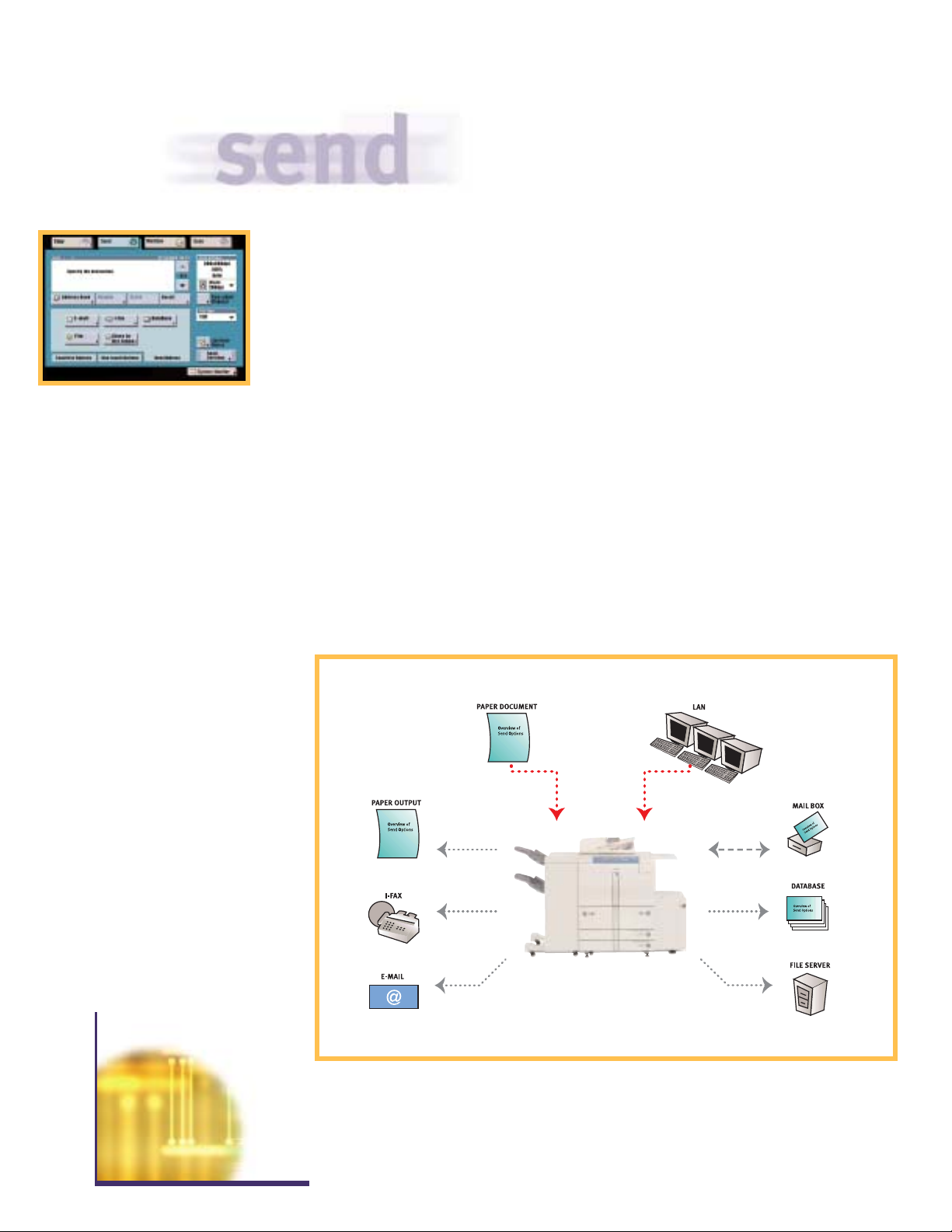
Break Through the Communication Barriers
Canon’s optional Universal Send upgrade, combined with eCopy Desktop Software, takes the
imageRUNNER 7200’s scanning capabilities even
further. Using Universal Send, hard-copy
documents can be scanned at the device and
delivered to multiple destinations simultaneously.
The advanced functions of Universal Send allow
users to communicate, manage, and share information as never before. Documents can be
distributed through the following “Send” vehicles:
Send via E-mail – Send scanned documents
as E-mail attachments in TIFF, Multipage TIFF, or
PDF formats.
Send via Internet Fax – Bypass the PSTN and
send scanned documents over the Internet as fax
transmissions, at no cost.
Send to a File Server – Store scanned docu-
ments in a centralized directory for archival or
sharing purposes (FTP, Windows,
®
NetWare®).
Send to a Mail Box – Organize and archive
digital documents in 100 Mail Boxes for sharing,
merging, printing, or sending at a later time.
Send to a Database (Salutation) – Store digi-
tized information in a centralized database
(such as Canon’s imageWARE) for enterprisewide access.
imageRUNNER 7200
Universal Send
Page 7
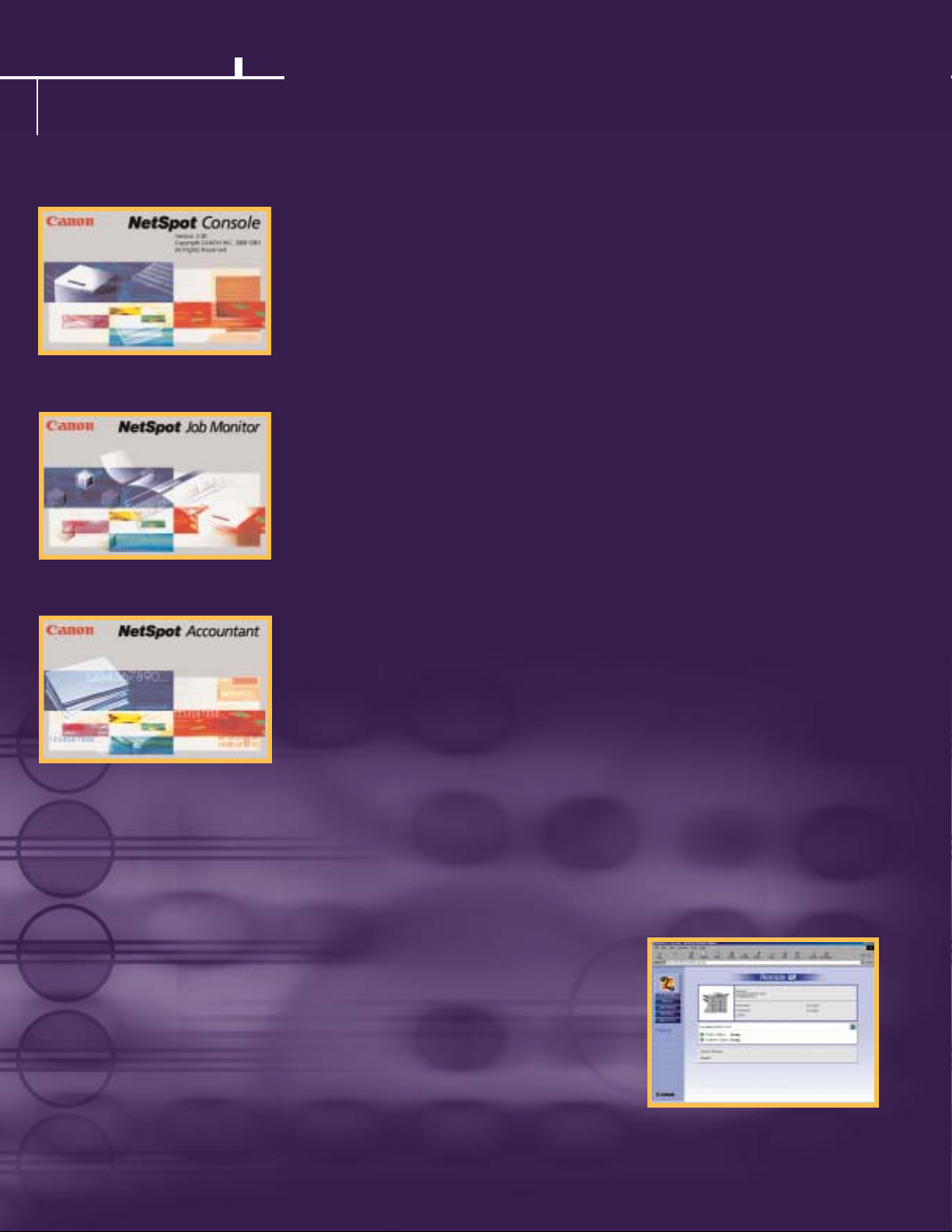
manage
Networking Know-how
The imageRUNNER 7200, like all Canon networked systems, ships with a comprehensive set of
utilities designed to simplify device installation and network management for both end-users
and administrators:
Remote UI – The imageRUNNER 7200 ships
standard with Canon’s Remote UI (User-interface)
feature. By entering the IP address of the device
from a standard web browser, users gain instant
access to device status and configuration, job
management functions, user Mail Boxes and
more–all from a desktop PC, and with no additional software requirements.
NetSpot®Console – NetSpot Console is a
web-based utility capable of installing and managing Canon networked systems, including the
imageRUNNER 7200, on most customer
networks. Through NetSpot Console, network
administrators are provided a convenient,
platform-independent utility to install and
manage Canon devices from anywhere within
the enterprise. In addition to basic installation
support, NetSpot Console also delivers administrator alerts, notifying administrators of device
status conditions such as low toner, paper jams,
and others. For added convenience, NetSpot
Console is also capable of managing third-party
printers complying with the standard Printer
MIB, thereby consolidating network device
management via one utility.
NetSpot Job Monitor – To manage and track
the progress of print jobs, Canon supplies
NetSpot Job Monitor. This utility runs as an
automated task in the Windows System Tray,
and can be configured to report job conditions
based on administrator or end-user preferences.
Significant to NetSpot Job Monitor is its ability
to deliver end-of-job notification to end-users,
ensuring that they are always informed of the
completion of submitted work.
NetSpot Accountant* – NetSpot Accountant
is an optional utility available for the
imageRUNNER 7200 that is capable of providing
comprehensive job tracking and analysis for
cost-accounting and workflow optimization. Using
NetSpot Accountant, network administrators can
track all activity at the imageRUNNER 7200,
including copying, printing, scanning, and billing
internal or external clients for device utilization.
A wide range of configuration settings are
available for NetSpot Accountant, enabling
administrators to track device usage in a myriad
of ways. NetSpot Accountant is ideal for legal
customers, or any customer who desires to
account for imageRUNNER 7200 device utilization.
Enterprise-management Integration – In
addition to the NetSpot utilities mentioned,
Canon also supplies plug-in modules for the
most popular enterprise-management applications in use today. Supported applications
include Microsoft
®
Management Console,
CA-Unicenter, HP
®
OpenView,®Tivoli®TME,
and BMC Patrol.
®
Through these plug-ins,
Canon permits easy management of the
imageRUNNER 7200 and other Canon networked
devices from directly within the enterprisemanagement system console.
Remote User-interface
*Optional utility. Please check with your Canon-authorized dealer for availability.
Page 8
As an Energy Star®Partner, Canon U.S.A., Inc. has determined that this product meets the Energy Star®guidelines for energy efficiency, except when
attached to the optional Token Ring Adapter on the Network Multi-PDLPrinter Kit-B
3 or the optional imagePASS-M1 Print Controller. The Energy Star name is
a registered trademark of the U.S. Environmental Protection Agency. Intel and Pentium are registered trademarks of Intel Corporation. Adobe and PostScript are
registered trademarks of Adobe Systems Incorporated. Apple is a trademark of Apple Computer, Inc., registered in the U.S. and other countries, and AppleTalk
is a registered trademark of Apple Computer, Inc. Solaris is a trademark of Sun Microsystems, Inc. in the United States and other countries. Fiery is a registered
trademark and EFI, WebTools, Fiery Downloader, Fiery Link, DocBuilder, Command WorkStation and FreeForm are trademarks of Electronics for Imaging, Inc.
eCopy, ShareScan, and Desktop are trademarks of eCopy, Inc. Windows, Windows NT, PowerPoint, and Microsoft are registered trademarks of Microsoft
Corporation in the United States and/or other countries. NetWare and Novell are registered trademarks, and IPX/SPX is a trademark of Novell, Inc. HP, PCL, and
OpenView are registered trademarks of Hewlett-Packard Company. Tivoli is a registered trademark of Tivoli Systems Inc. in the United States, other countries,
or both. Patrol is a registered trademark of BMC Software, Inc. Canon and NetSpot are registered trademarks and Canon Know How, IMAGERUNN ER, and the
GENUINE logo are trademarks of Canon Inc. IMAGEWARE, Universal Send and Remote UI are trademarks, and IMAGEANYWARE is a service mark of Canon U.S.A., Inc.
All other terms and product names may be trademarks or registered trademarks of their respective owners and are hereby acknowledged.
Specifications are subject to change without notice.
0027W662
0302-iR7200-100M
imageRUNNER 7200 Specifications
Type: Digital, Multifunction Imaging System
Imaging System: Laser Dry Electrostatic Transfer
Developing System: Dry Monocomponent Toner Projection
Image Server Memory: Standard
192MB RAM + 10GB HDD
First-copy Time:
3.1 Seconds from Platen Glass
4.3 Seconds from ADF
Warm-up Time:
6 Minutes or Less
Acceptable Originals: Sheets, Books,
3-dimensional Items
Max. Original Size:
11" x 17" (Ledger)
Max. Copy Size:
11" x 17" (Ledger)
Min. Copy Size:
4-1/8" x 5-7/8"
Max. Copy Reservation: 5 Jobs
Copy/Scanning Resolution:
600 dpi x 600 dpi
1200 dpi x 600 dpi Interpolated
Printing Resolution:
600 dpi x 600 dpi
2400 dpi x 600 dpi Interpolated
Halftone:
256 Gradations of Gray
Copy Speed:
72 cpm (Letter)
36 cpm (Ledger)
Duplexing: Standard Automatic Trayless
Magnification Reduction/
Enlargement:
25% to 400% in 1% Increments
Paper Supply
Standard: Dual Front-loading Trays
(
1,500 Sheets Each)
Dual Front-loading Cassettes
(
550 Sheets Each)
50-sheet Stack Bypass
Optional:
3,500-sheet Paper Deck-M1
(Total: 7,650 Sheets)
Multiple Copies:
1 to 9,999
Paper Weights: 17 lb. Bond to 110 lb. Index (All Paper Sources)
Mail Box:
100 (7,700 Pages/Letter)
Dept. ID:
1,000 (7-digit IDs and Passwords)
Supplies
Drum: Amorphous Silicon – Estimated Yield:
5,000,000 Impressions
Maximum Duty Cycle:
350,000 Impressions per Month
Toner: Magnetic Positive Toner –
Estimated Yield:
33,000 Images
ACCESSORIES
Automatic Document Feeder
Acceptable Originals: Statement to Ledger
Scanning Speed:
55 ppm (Letter)
Capacity:
100 Sheets (All Sizes/20 lb.)
Paper Weights:
13 lb. Bond to 32 lb. Index
Finisher-K1N/K2N (Optional)
Number of Trays: 2 Trays
Tray Capacity
Top Tray:
1,000 Sheets (All Sizes)
Offset Stacking
Lower Tray:
2,000 Sheets (Letter)
1,000 Sheets (11" x 17", Legal)
Offset Stacking
Staple Position:
1 - Any Corner
2 - Side Margin
Max. Stapling Capacity:
100 Sheets (Letter/Statement)
50 Sheets (Letter-R/Legal/11" x 17")
Hole-punch (K
2N Only): 3 Holes (11" x 17", Letter)
2 Holes (Legal, Letter-R)
Saddle Finisher-K3N (Optional)
Number of Trays: 3 Trays
Tray Capacity
Top Tray:
1,000 Sheets (All Sizes)
Offset Stacking
Lower Tray:
2,000 Sheets (Letter)
1,000 Sheets (11" x 17", Legal)
Offset Stacking
Saddle-stitch Tray:
30 Sets
Staple Position:
1 - Any Corner
2 - Side Margin
Max. Stapling Capacity:
100 Sheets (Letter/Statement)
50 Sheets (Letter-R/Legal/11" x 17")
Hole-punch:
3 Holes (11" x 17", Letter)
2 Holes (Legal, Letter-R)
Saddle-stitch Capabilities
Saddle-stitch Paper Sizes:
11" x 17", Letter
Stapling Capacity:
15 Sheets (60 Pages)
Folding: V-folding Standard
Paper Deck-M1 (Optional)
Paper Capacity: 3,500 Sheets
Paper Size: Letter
Paper Weights:
17 lb. Bond to 110 lb. Index
Document Insertion Unit-B1▲(Optional)
Paper Sizes: Letter-R to 11" x 17"
Paper Weights: 17 lb. Bond to 110 lb. Index
Feeder Capacity: Letter, Letter-R:
100 Sheets
Legal,
11" x 17": 50 Sheets
Paper Folding Unit-C1▲(Optional)
Paper Sizes: 11" x 17" Only
Paper Weights:
17 lb. Bond to 22 lb. Bond
Fold Type: Z-fold
Booklet Trimmer-A1▲(Optional)
Sheet Capacity: 30 Sheets (60 Pages)
Stack Capacity:
2,000 Pages
Dust Capacity:
2,000 Pages
Network Multi-PDL Printer Kit-B3 (Optional)
PDL Support: PostScript 3 Emulation
PCL
®
5e, PCL®6
Interface Connections: RJ-45 (10/100Base-T)
IEEE
1284
Token Ring (Optional Card)
■
Protocol Stacks: Ethernet
IPX/SPX
TM
: 802.2, 802.3
Ethernet II, 802.2 SNAP
TCP/IP
AppleTalk
®
Phase II
Network OS: Novell
®
NetWare v3.2, 4.1, 4.11, 4.2, 5, 5.1
Windows®95/98/Me
Windows NT
®
4.0/2000/XP
Solaris
TM
1.x, 2.5 or Later
*
Apple®System 7.5 or Higher
Print Service: NDPS, Port
9100, IPP
Additional Functions
Supported: Network ScanGear, Remote UI,
NetSpot, Universal Send
Canon imagePASS-M1 Print Controller (Optional)
■
Hardware: External Stand-alone Controller
Processor: Intel Mobile Pentium III
500MHz
Memory:
128MB DIMM
Storage:
10.2GB Hard Disk Drive
PDL Support: Adobe PostScript
3
PCL 5e, PCL 6, PJL
Interface Connections: RJ-45 (10/100Base-T)
IEEE
1284
Token Ring (Optional Card)
Protocol Stacks: Ethernet
IPX/SPX:
802.2, 802.3
Ethernet II, 802.2 SNAP
TCP/IP
AppleTalk:
802.2 SNAP and AppleTalk Phase II
Network OS: Novell NetWare v
3.2, 4.1, 4.11, 4.2, 5, 5.1
Windows 95/98/Me
Windows NT
4.0/2000/XP
Solaris 1.x, 2.5 or Later
*
Apple System 8.6 or Higher
Print Service: NDPS, Port
9100, IPP
Additional Functions
Supported: Network ScanGear, Remote UI, Universal Send,
NetSpot (except Job Monitor)
Additional Functions
Standard: Command WorkStation, Fiery Downloader,
TM
Fiery Link,TMWebTools
Send Expansion-A1 SET (for Universal Send Support)
Sending Method: E-mail, I-fax, Database (Salutation), File Server
(IPX, FTP, SMB)
Address Book Capacity: Maximum
1,800
File Format: TIFF, PDF, MTIFF
Sending Size: Statement to Ledger
Scan Density:
200 dpi, 300 dpi, 400 dpi, 600 dpi
ENERGY STAR : The Symbol for Energy Efficiency
®
1-800-OK-CANON
www.usa.canon.com
Canon U.S.A., Inc.
One Canon Plaza
Lake Success, NY 11042
printed on recycled
paper in the u.s.a.
E
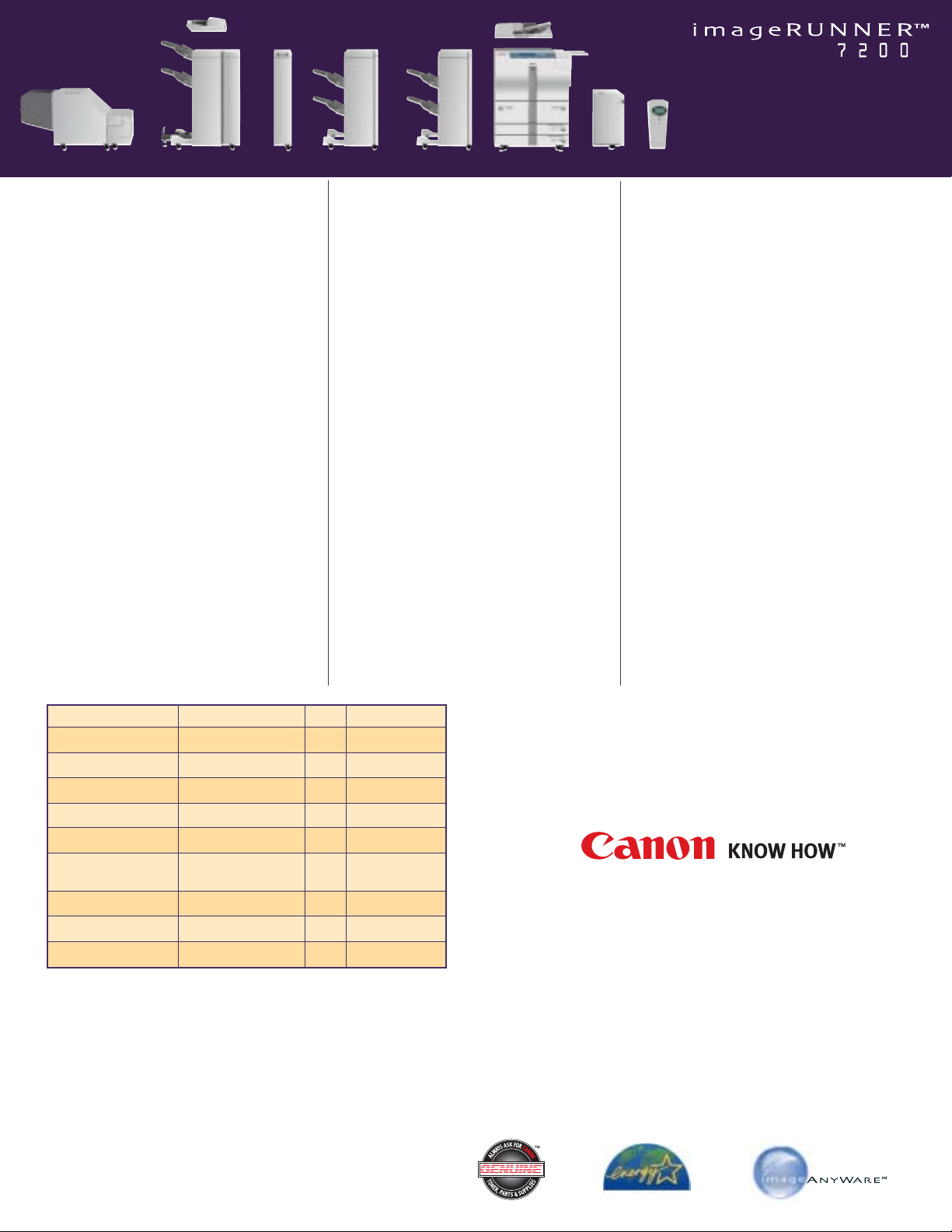
Document Insertion Unit-B1
▲
Paper Folding
Unit-C
1
▲
Finisher-K1N
Finisher-K
2N
imageRUNNER
7200
Paper Deck-M1
Automatic Document Feeder
Saddle Finisher-K
3N
*Please check with your local Canon-authorized Dealer for availability.
▲
The Document Insertion Unit-B1, the Paper Folding Unit-C1, and the
Booklet Trimmer-A
1 can only be used with the Saddle Finisher-K3N.
■
The imageRUNNER 7200 is not Energy Star®compliant when attached
to the optional Token Ring Adapter on the Network Multi-PDL Printer
Kit-B
3 or the optional imagePASS-M1 Print Controller.
Canon imagePASS-M1
Print Controller
Booklet Trimmer-A
1
▲
Dimensions Table
Dimensions (H x W x D)
Weight
Power
imageRUNNE R 7200 Main Unit 46-1/8" x 30-1/8" x 31-3/8" 602 lb. 208V, 60Hz, 12A
(1171mm x 764mm x 795mm) (273kg)
Finisher-K1N 39-1/4" x 26-1/4" x 29-1/8" 141 lb. Directly from Main Unit
(995mm x 667mm x 738mm) (64kg)
Finisher-K
2N 39-1/4" x 26-1/4" x 29-1/8" 145 lb. Directly from Main Unit
(995mm x 667mm x 738mm) (66kg)
Saddle Finisher-K
3N 39-1/4" x 31-5/8" x 29-1/8" 280 lb. Directly from Main Unit
(995mm x 803mm x 738mm) (127kg)
Paper Deck-M
1 22-5/8" x 12-3/4" x 23" 90.3 lb. Directly from Main Unit
(574mm x 323mm x 583mm) (41kg)
Document Insertion Unit-B
1 5-5/8" x 22-1/8" x 23" 35 lb. Directly from Main Unit
(144mm x 561mm x 584mm) (16kg)
(with Auxiliary Tray Opened)
Paper Folding Unit-C1 39-1/4" x 7-1/4" x 26-5/8" 108 lb. Directly from Main Unit
(995mm x 184mm x 675mm) (49kg)
Booklet Trimmer-A1 22" x 44" x 24" 149 lb. 120V, 3A
(560mm x 1118mm x 610mm) (68kg)
imagePASS-M
1 Print Controller 14" x 6-3/8" x 11" 11.6 lb. 110-240V, 1A
(355mm x 162mm x 279mm) (5.3kg)
 Loading...