

Page 1
Color imageCLASS®MF8380Cdw
Product Specifications
Printer Specifications
Printer Type
Color Laser
Print Speed (default print mode: 2-sided)
Up to 10 ppm (2-sided, plain paper letter)*
Up to 21 ppm (1-sided, plain paper letter)*
First Print Time
Black/Color: Approx. 14.3 seconds (letter)
Printer Language
UFR II LT (Host-based)
Print Resolution
Up to 600 x 600 dpi
2400 x 600 dpi quality
Maximum Print Size
Up to 8.5" x 14"
Print Modes
Booklet, Poster, Watermark, Toner Saver,
Page Composer
Print Memory
256MB (shared)
Direct Print From USB
Yes (JPEG, TIFF)
Copier Specifications
Copy Type
Color Laser
Copy Speed
Black/Color: Up to 21 cpm (letter)
Duplex Copy/Bind Type
Yes (Black/Color: up to 10 cpm
letter)/Book, Calendar
Copy Resolution
Up to 600 x 600 dpi
Original Type
Text, Text/Photo (default), Text/Photo
(quality), Printed Image
Halftones
256 levels
Warm-up Time
Approx. 23 seconds
First CopyTime
Black/Color: Approx. 15.3/16.0
seconds (letter)
Recovery Time
Approx. 8 seconds
Maximum Number of Copies
99 copies
Reduction/Enlargement
25%, 50%, 64%, 78%/
129%, 200%, 400%
Zoom
25–400% in 1% increments
Copy Siz e
Platen: Up to 8.5" x 11"
ADF: 5.5" x 5" to 8.5" x 14"
Copy Features
Frame Erase, Memory Sort, 2 on 1, 4 on 1,
ID Card Copy
Copy Memory
256MB (shared)
1
Fax Specifications
Modem Speed
Up to 33.6 Kbps (Super G3)
Fax Resolution
Up to 406 x 391 dpi (ultra fine)
2
TransmissionTime
JBIG (approx. 3.0 seconds)
Memory Capacity
Up to 512 sheets
Speed Dials
19 favorite dials; 181 coded dials
Group Dialing
199 destinations
Sequential Broadcasting
Yes, up to 210 destinations
Duplex Fax
Yes
Receive Modes
Fax only, Manual, Answering,
Fax/Tel AutoSwitch
Fax Features
Distinctive Ring Pattern Detection, Error
Correction Mode, Remote RX, Dual Access,
Auto Redial, Fax Activity Reports
Memory Backup
Yes, 5 minutes
Activity Reports
Yes, Activity Result & Activity Management
PC Fax
Yes (sending only)
Fax Forwarding
Yes (Fax/I-Fax —> Fax, Email, SMB)
3
Scanner Specifications
Scan Type
Color Contact Image Sensor (CIS)
Color Depth
24-bit
Scan Resolution
Up to 600 x 600 dpi (optical)
Up to 9600 x 9600 dpi (interpolated)
Scan Size
Platen: Up to 8.5" x 11"
ADF: 5.5" x 5" to 8.5" x 14"
Duplex Scan
Yes
Compatibility
TWAIN, WIA
Output File Formats
Hi-Compression PDF, Searchable PDF
JPEG, TIFF, BMP, PNG
Scan Features
Rotate, Push Scan, Pull Scan
Scan to USB
Yes, USB Host 1.1 (PDF, JPEG,TIFF)
5
Send Specifications
Scan to Email
Yes (PDF, Hi-Compression PDF)
Scan to SMB
Yes (PDF, JPEG, TIFF, Hi-Compression PDF)
Paper Handling Specifications
Standard Paper Source(s)
250-sheet cassette
50-sheet multipurpose tray
Optional Paper Source(s)
250-sheet cassette
Document Feeder
50-sheet Duplex
Paper Output
125 sheets (face down)
6
plus
6
6
6
Paper Weight
16 to 43 lb. bond (cassette)
16 to 58 lb. bond (multipurpose tray)
Media Sizes
Letter, Legal, A4, A5, B5, B6, Statement,
Executive
Media Types
Plain Paper, Heavy Paper, Recycled Paper,
Color Paper, Coated Paper, Transparencies,
Labels, Small Documents, Envelopes
Envelope Capacity
10 envelopes (cassette)
5 envelopes (multipurpose tray)
Envelope Types
Com 10, Monarch, DL, C5, B5
Connectivity &
Software Specifications
Standard Interface(s)
USB 2.0 Hi-Speed, 10/100 Base-T Ethernet
(Network), IEEE 802.11 b/g/n (wireless)
WiFi Access Mode
Infrastructure Mode
WiFi Authentication Methods
Open System, Shared Key,
WPA-PSK, WPA2-PSK
WiFi Encryption Modes
WEP (64/128-bit), TKIP, AES
WPS Easy Setup Support Methods
Push-button mode, PIN code mode
USB Functions
Print, PC Fax, Scan
Network Functions
Print, PC Fax, Scan
Embedded Web Server (Remote UI)
Yes
Web Browser Support for Remote UI
Microsoft Internet Explorer 6.0 or higher,
Safari 3.2.1 or higher
Print Protocols
LPD, RAW, WSD
Supported Network Protocols
TCP/IP v.4, TCP/IP v.6 (print only)
TCP/IP Set of Application Services
4
DHCP, BOOTP, RARP, ARP+PING, Auto IP,
, PDF,
WINS (IP v.4), DHCP v.6 (IP v.6),
Bonjour (mDNS), HTTP, HTTPS,
POP before SMTP (IP v.4, IP v.6)
Network Management Protocols
SNMP v.1, SNMP v.3 (print and send email/SMB)
MIB
RFC1213 (MIB-II), RFC1514 (Host
Resources MIB), RFC1759 (Printer MIB),
Canon MIB
Operating Systems
®
Windows
(RI/R2), Windows Vista
2003, Windows XP/2000
Mac
Cable Included
Power Cord, Phone Cable
(USB not included)
Bundled Software
Canon Drivers, MF ToolBox,
Document Management & OCR Software
Drivers available for download from
usa.canon.com
7, Windows Server®2008
®
OS X 10.4.9 & up, Linux8(print only)
Ordering Information
MFP and Accessories
Color imageCLASS® MF8380Cdw 5120B001AA
Cartridge 118 Black (yields approx. 3,400 pages based on ISO/IEC Standard) 2662B001AA
Cartridge 118 Cyan (yields approx. 2,900 pages based on ISO/IEC Standard) 2661B001AA
Cartridge 118 Magenta (yields approx. 2,900 pages based on ISO/IEC Standard) 2660B001AA
Cartridge 118 Yellow (yields approx. 2,900 pages based on ISO/IEC Standard) 2659B001AA
Cartridge 118 VP Black (yields approx. 6,800 pages based on ISO/IEC Standard) 2662B004AA
Color imageCLASS® MF8000s Virtual CarePAK 5120B040AA
Color imageCLASS® MF8000s E-CarePAK 5707B023AA
®
, Windows Server
Environmental Specifications
Power Consumption
Maximum: Approx. 1200W
Standby: Approx. 23W
Energy Saver: Approx. 1.4W wired,
Approx. 2.2W by wireless connection
Noise Level
During Operation: 67.0 dB or less
During Standby: 43.0 dB or less
Operating Environment
Temperature: 50oF - 86oF
Humidity: 20% - 80% RH (no condensation)
General Specifications
7
Dimensions
17.0" (W) x 19.2" (D) x 18.9" (H)
Unit Weight (without/with cartridge)
Approx. 62.0 lbs./68.4 lbs.
Package Weight
Approx. 83.8 lbs.
Warranty
1 year limited exchange/carry-in warranty
(Extended warranty available)
Cartridge 118
Black: Yields approx. 3,400 pages
based on ISO/IEC Standard
Cyan: Yields approx. 2,900 pages
based on ISO/IEC Standard
Magenta: Yields approx. 2,900 pages
based on ISO/IEC Standard
Yellow: Yields approx. 2,900 pages
based on ISO/IEC Standard
Cartridge 118 VP
Black: Yields approx. 6,800 pages
based on ISO/IEC Standard
Cartridge Type
Single Cartridge System
Department Counter
Yes (print, copy, scan)
LCD Display
5-row backlit LCD
Duty Cycle
Up to 40,000 pages per month
Department ID Management
Yes (up to 300 IDs)
Additional Security
IP Filtering, MAC Address Filtering, Secure
Print, IEEE 802.1X, SNMP v.3, HTTPS
Languages
English, French, Spanish, Portuguese
Features and specifications are
subject to change without notice.
* Print speed is based on internal testing. Print speed
may vary depending on the number of copies
selected, as well as on the settings for size, type
and orientation of paper.
1 Letter size, after being restored from Energy Saver mode.
2 The Public Switched Telephone Network currently
supports fax modem speeds of 28.8Kbps or lower,
depending on telephone line conditions. Sending and
receiving fax machines need to conform to ITU-T v.34
guidelines.
3 Based on ITU-T #1 Chart (standard mode).
4 Combined with ToolBox feature. Hi-Compression
PDF and Searchable PDF are Windows only.
5 PNG supports Mac OS only.
6 Based on 20 lb. bond paper.
7 Wireless performance may vary based on terrain
and distance between printer and wireless network
clients.
8 Mac® OS X 10.4.9 and up and Linux® OS (print
only) compatibility to be announced; visit
usa.canon.com for driver download availability.
9 Warranty program is subject to certain conditions
and restrictions. See the warranty card for details.
(sound power)
50.6 dB or less
(sound pressure)
(sound power)
Inaudible
(sound pressure)
9
©2011 Canon U.S.A., Inc. Canon and imageCLASS are registered trademarks of Canon Inc. in the United States and may be registered trademarks or trademarks in other
countries. imageANYWARE is a trademark of Canon. The Super G3 logo is a trademark of Canon Inc. Microsoft, Windows, the Windows logo and Windows 7 are either
trademarks or registered trademarks of Microsoft Corporation in the United States and/or other countries. Wi-Fi is a registered trademark of the Wi-Fi Alliance. The
‘Wi-Fi CERTIFIED’ logo is a certification mark of the Wi-Fi Alliance. The Wi-Fi Protected Setup Mark is a mark of the Wi-Fi Alliance. All other product and brand names
are trademarks of their respective owners. Specifications are subject to change without notice. As an ENERGY STAR partner, Canon U.S.A., Inc. has determined that this
product meets the ENERGY STAR guidelines for energy efficiency. The limited warranty given by Canon U.S.A., Inc. is for Canon imageCLASS MF8380Cdw models
purchased and used in the United States.
0157W050
Page 2
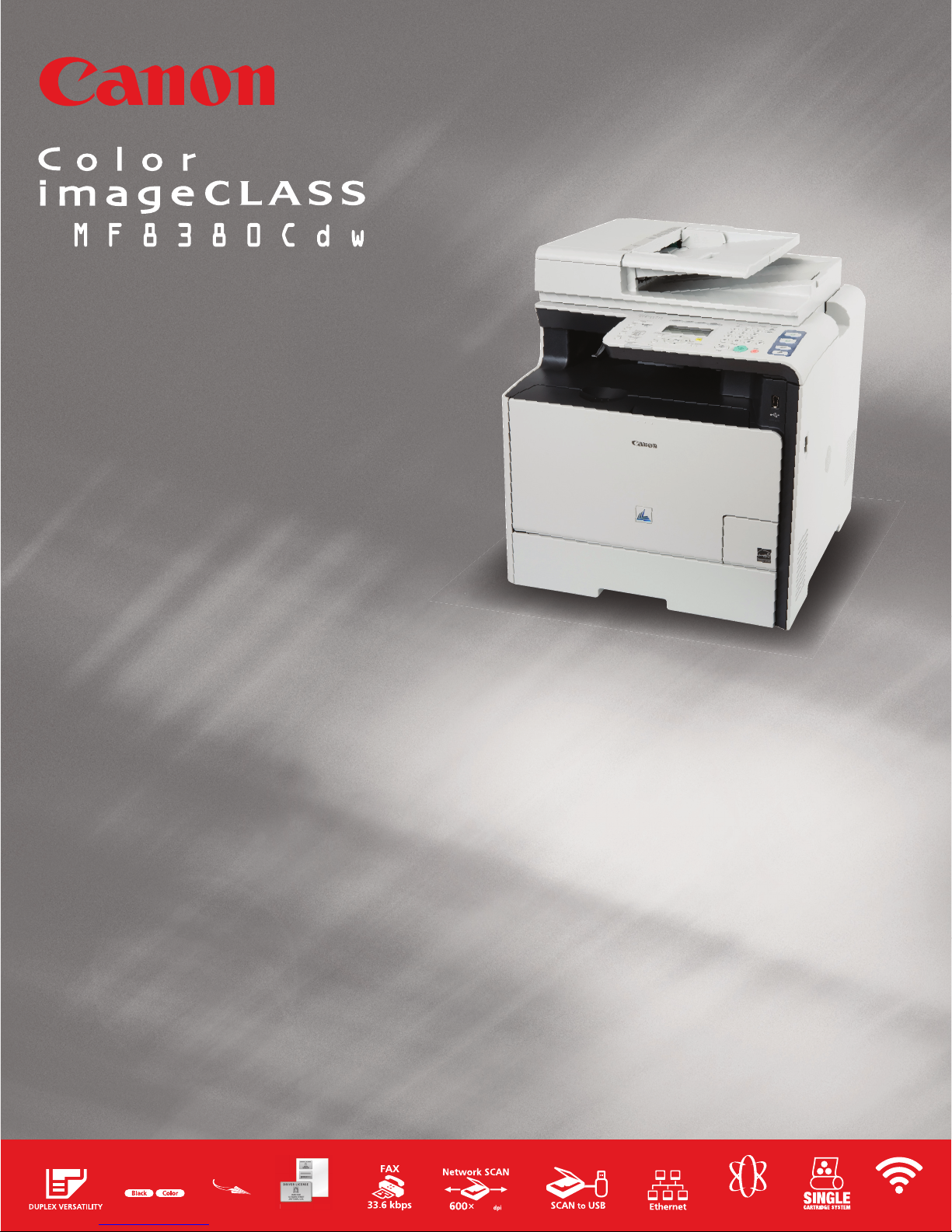
Color Laser
Multifunction Printer
• Duplex Versatilty — two-sided printing,
scanning, copying and faxing
• Print and copy at the same speed of up to
21 ppm in color and black & white
• Quick First Print provides first print time of
approximately 15 seconds
• 33.6 Kbps Super G3 fax
• Scan in color up to 9600 dpi quality
(interpolated) with up to 600 dpi optical
resolution
• Scan to and print from USB for files on the go
• Send scanned documents directly to email or
file server
• 250-sheet cassette plus 50-sheet multipurpose
tray; optional 250-sheet cassette*
• Up to 50-sheet* DADF (Duplex Automatic
Document Feeder)
• Remote device management through
embedded web server
• Built-in Ethernet port for network printing,
PC faxing and scanning
• USB 2.0 Hi-Speed for optimal performance
• Efficient energy-saving mode; approximately
1.4W (wired), 2.2W (wireless) of energy used
• User-friendly 5-line LCD for easy navigation
• Password-protected Department ID
Management helps to control device usage
• Single Cartridge System for cost-efficient
supplies replenishment
* Based on 20 lb. bond paper.
DUPLEX PRINTER
DIGITAL COPIER
SUPER G3 FAX
COLOR SCANNER
NETWORK CAPABILITIES
Print, Copy, Fax, Scan with the Color imageCLASS® MF8380Cdw
Color Laser Multifunction Printer from Canon.
WiFi Capable:
Access all functions wirelessly, with encryption mode and easy setup
support methods.
Duplex Versatility:
Print on two sides – use half the paper! Two-sided output for printing,
copying and receiving faxes saves space and reduces paper consumption.
Quick First Print:
Why waste time waiting for your print to arrive? With Canon’s
QFP technology, your first print will arrive in approximately 15 seconds.
Desktop Solution:
Specifically designed for home/small office placement and provides
convenient access to the office functions you require.
Network Capabilities:
Increase productivity and cost-efficiency with the built-in Ethernet port for
networking. Share printing, PC faxing and scanning directly from a PC.
QUICK
1st
PRINT
600
$
ECO-CONSCIOUS
ID CARD COPY
ID CA
RD CO
PY
21 21
ppm/cpm
WiFi
Page 3
a
d
e
c
f
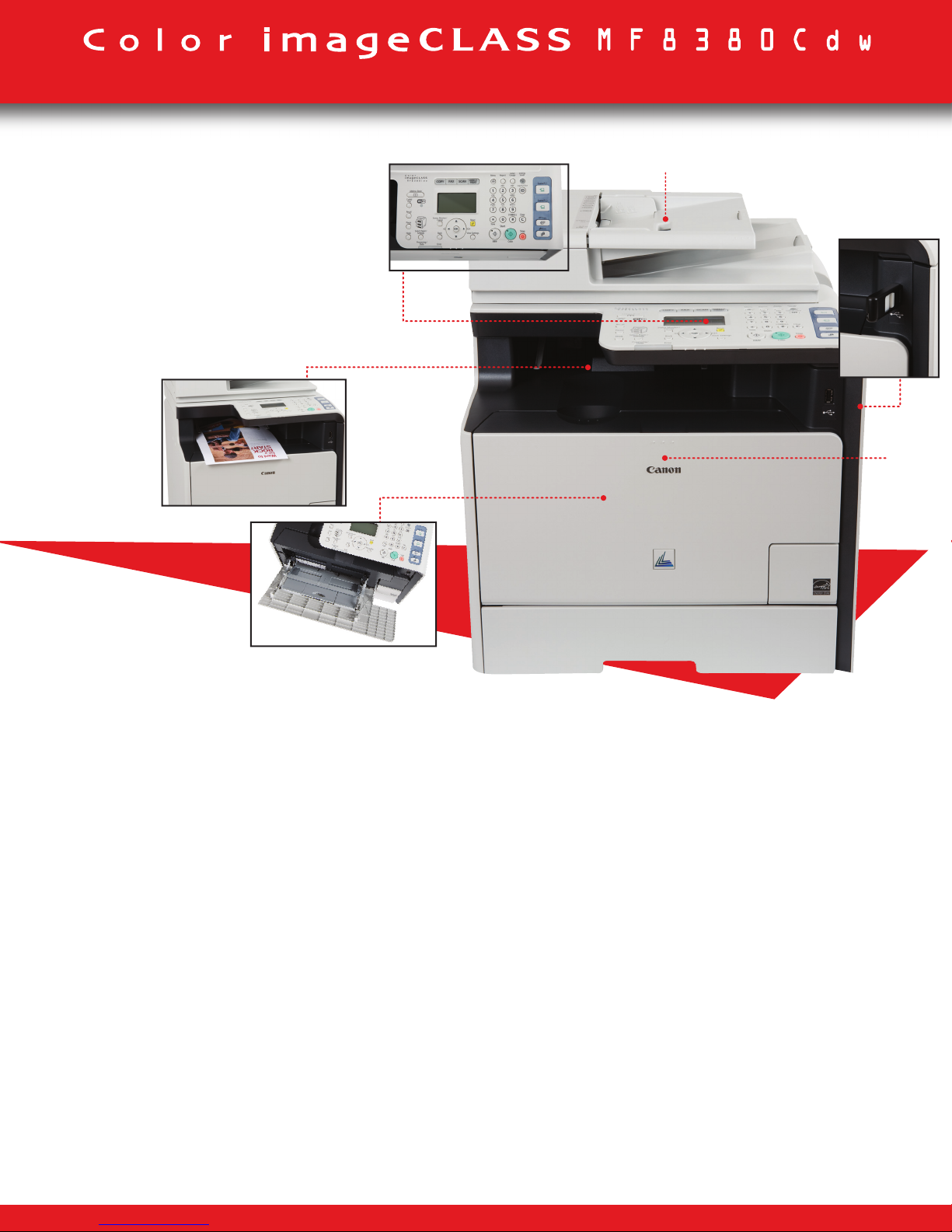
a 50-sheet Duplex Automatic Document Feeder
b Intuitive Control Panel
c Internal Output Tray (no protruding output trays)
d USB Flash Drive Slot
e Easy Front-Loading Single Cartridge System
f Extendable 50-sheet Multipurpose Paper Tray
b
Print Sample
Color Laser Multifunction Printer
EASY-TO-USE
Smart Design & Compact
Designed for ease of use in your small office
environment, the MF8380Cdw provides access to the
control panel, supplies and paper sources right from the
front of the unit. Now, there is no need to reach around
to locate your prints or change the consumable.
Intuitive Scanning
Enjoy stress-free scanning with simple installation and
easy operation. Customize your scanning needs in
advance to transmit a scanned image directly into a
network folder, a bundled document management and
OCR software program, or as an email attachment. You
can even scan in Canon’s business-friendly high
compression PDF mode, which reduces file size without
compromising image quality.
User Friendly Control Panel
The MF8380Cdw features One Touch Button support that
gives you instant access to key functions and is featured
directly on the control panel. The 5-line LCD with
graphic display provides outstanding usability while
guided user animation within the display simplifies once
complex tasks with illustrated on-screen instructions.
Wireless Capabilities
By going wireless, you’ll have the freedom to conveniently
send print jobs to your device from any location in your
home or small office*. The MF8380Cdw has a Wi-Fi
Protected Setup (WPS) option for a one-touch connection to simplify the task of connecting your device to a
wireless network. Furthermore, you’ll reduce wiring
clutter and help prevent security breaches with WEP
and WPA-PSK.
*Wireless performance may vary based on terrain and distance between printer and wireless network clients.
Page 4
Color Laser Multifunction Printer
AMAZING IMAGING PERFORMANCE
Superior Color Imaging
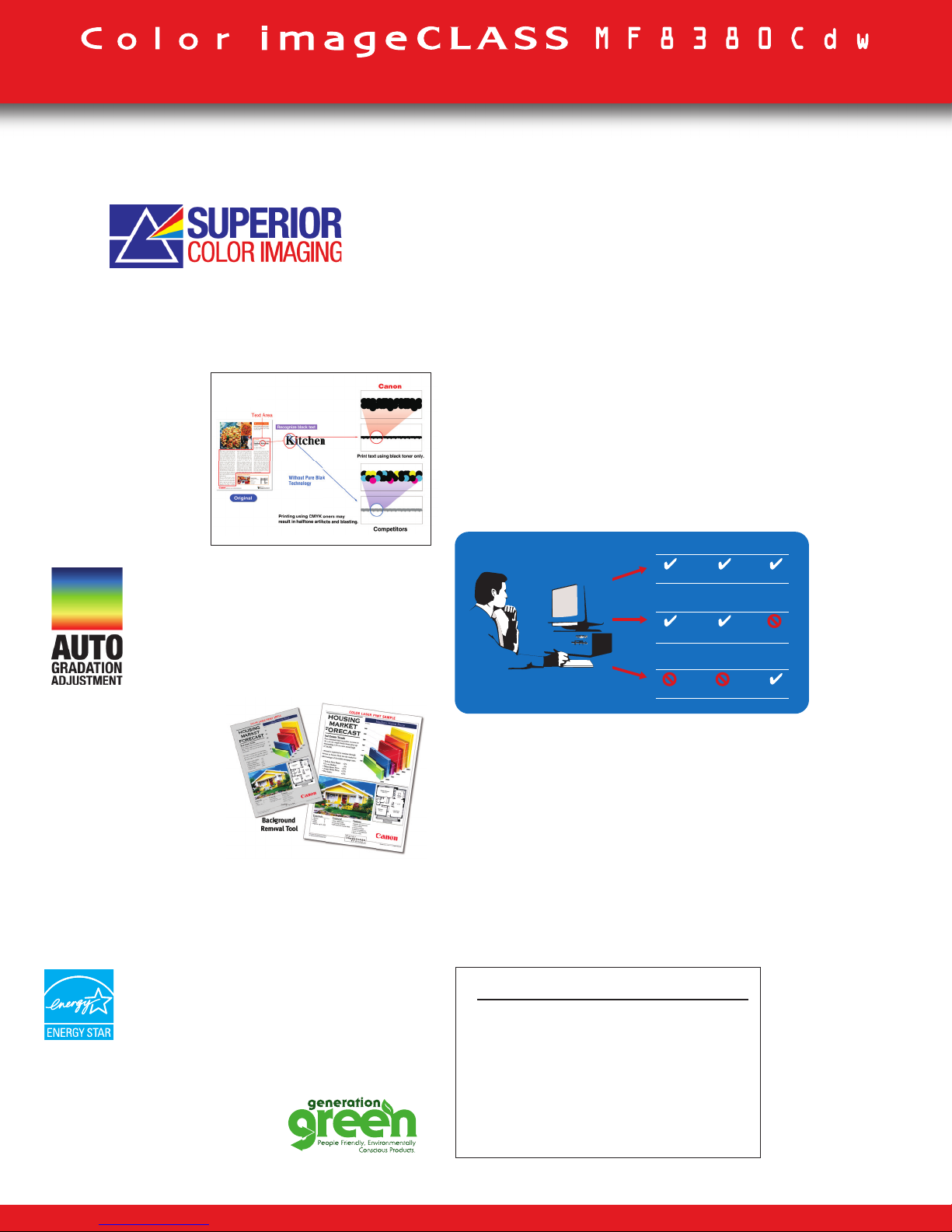
The Superior Color Imaging technologies built into the
MF8380Cdw capture fine details with remarkable toneon-tone clarity, helping images stay true to the original.
Pure Black Technology
Pure Black Technology
helps to ensure the
richest blacks by
utilizing only the black
toner when printing,
copying, or scanning,
in comparison to
traditional methods of
combining toner colors.
Auto Gradation Adjustment
The Auto Gradation Adjustment automatically adjusts the gradation, color and
density in accordance with the ambient
temperature and humidity, for more
consistent output quality.
Background Removal
Revitalize old documents
with the background
removal tool. Automatically
erasing the aged or
antiqued background
during copying and scanning,
it leaves you with the
content you want without the look of a discolored document.
ENVIRONMENTALLY CONSCIOUS
ENHANCED FEATURES
All Mode Duplex
The MF8380Cdw features auto duplex functionality which
allows you to print, copy, fax or color scan from one-sided
originals to produce two-sided output with ease, cutting
your paper usage as much as half.
Direct Print/Scan to USB
If you’re on-the-go, the MF8380Cdw offers a USB port to
facilitate scanning files directly to, or printing files directly
from, a USB removable media.
Department ID Management
A key way to control output costs is by setting limits on
who can use the machine. Department ID Management
allows an administrator to set up to 300 User IDs
and Passwords, so that costs may be monitored and
controlled. You can even restrict color usage to specific
users or departments.
Cost Control
Scan to Email/Scan to Network
Easily scan paper documents and send them to a
recipient through E-mail or File Server, bringing your work
environment increased efficiency.
Auto Fax Forwarding
You can set the MF8380Cdw to forward your received fax
documents to a fax number or fax group. Your gain is
enhanced document control; you can ensure your received
faxes reach the right hands automatically and efficiently.
Executive Suite
SCANPRINT COPY
Purchasing Dept.
SCANPRINT COPY
Marketing Dept.
SCANPRINT COPY
Energy Saver Mode
The intelligent Energy Saver Mode reduces
your power consumption to approximately
1.4 watts wired and 2.2 watts wireless of
energy and meets Energy Star guidelines,
helping you save money on energy costs.
Generation Green
The MF8380Cdw is part of Canon’s
Generation Green program which
highlights the company’s
commitment to sustainability.
For More Information Visit
www.usa.canon.com/consumer
For the name of the nearest dealer,
call: 1-800-OK-CANON
Canon U.S.A., Inc.
One Canon Plaza
Lake Success NY 11042
 Loading...