

Page 1
Corporate Solutions
Page 2

Corporate
Solutions
A NEW ERA OF COLOR –
THE CANON COLOR imageRUNNER C4580 SERIES
Unleash power, speed, flexibility, and connectivity in your office
With robust functionality, advanced print engine technology,
superior paper-handling, and professional finishing options,
the Color imageRUNNER C4580 Series models are the ideal
multifunction devices for your office.
The Color imageRUNNER C4580 Series delivers output at speeds
o 45 pages per minute (letter) in monochrome and up to
of up t
40 ppm (letter) in brilliant color. Fast print speeds and warm-up
times are achieved through Canon’sTwin-Belt Fusing Technology.
And at true 1200 dpi, every word will appear with absolute clarity
with the highly precise four-beam laser scanner.
A fast and reliable 100-sheet Duplexing AutomaticDocument
Feeder (DADF) enables you to efficiently scan/copy high-volume
uments at up to 70 impressions per minute (ipm) at 300 dpi
doc
in black and white and color.
Two versions of the Color imageRUNNER C4580 Series are
available—an “i” model and a “Base” model. The “i” model,
designed for general office environments, is bundled with features
providing out-of-the-box business productivity. The “Base”
model is highly customizable and offers a selection of options
demandin
st fit
to be
The Color
of up to 1.
(Multifunctional Embedded Application Platform) technology
for customized workflows. With high-capacity finishing options,
professional output is available for any project.
When it comes to connectivity, the Color imageRUNNER C4580
Series enables efficient document distribution with Canon’s Color
Universal Send technology. Standard on all models, it provides
compr
multiple locations across the hall or around the globe.
imag
5GB, an 80GB har
sive dissemination of information simultaneously to
ehen
g color environments.
580 Series provides memory capacity
eRUNNER
C4
d drive, and Canon’s innovative MEAP
®
Page 3
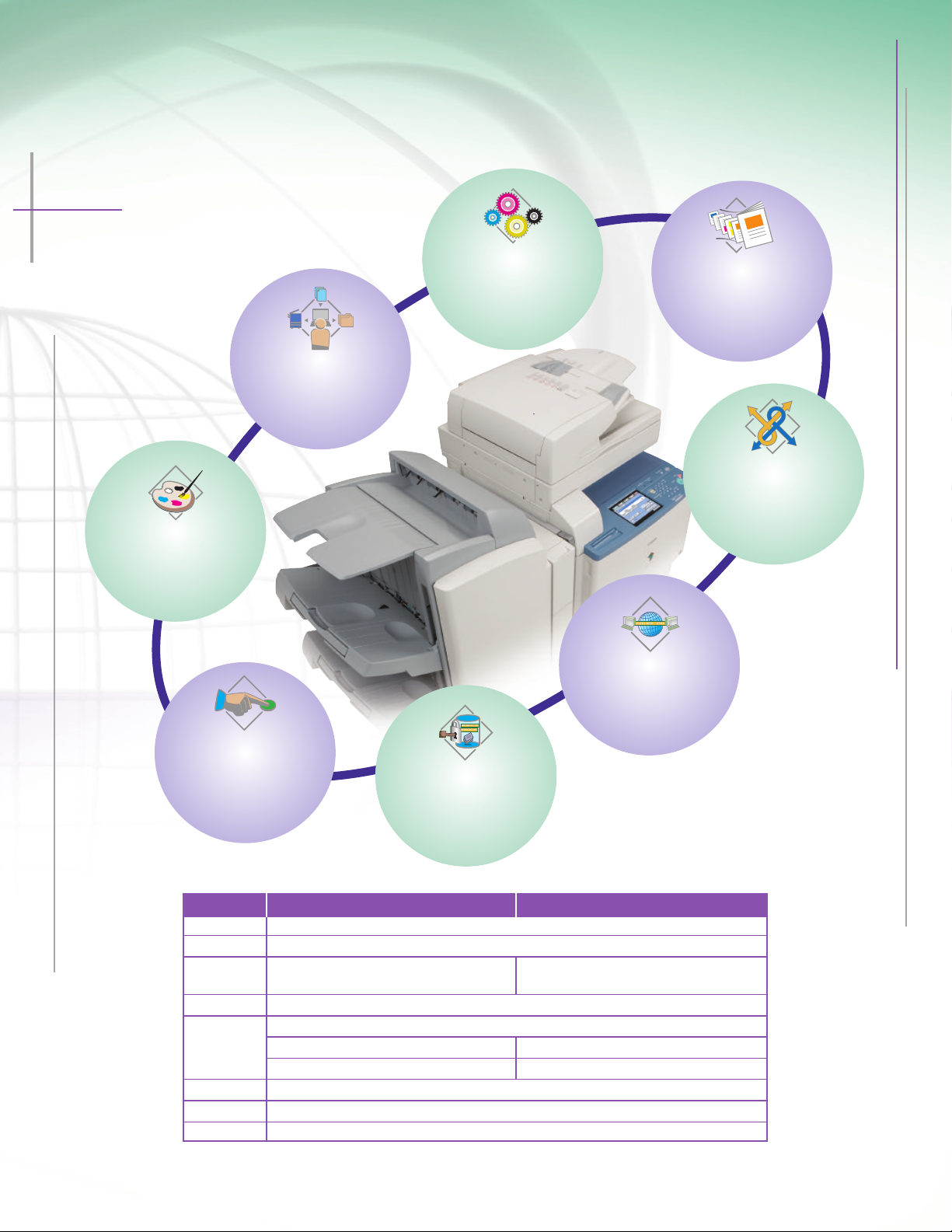
COLOR imageRUNNER C4580 SERIES OVERVIEW
Productivity far beyond the norm
SCALABILITY
Create custom applications and
interfaces with MEAP technology
and streamline workflow
productivity for users.
POWERFUL IMAGING
Choose options and software
for increased productivity in
corporate or professional
color environments.
E
FFICIENCY
Canon’s new imageCHIP
architecture provides
increased speed, power,
and functionality.
HIGH QUALITY
AND PRODUCTIVITY
Copy, scan, and print documents
faster, and output them
with professional finishing
options.
SUPERIOR COMMUNICATION
Create and store documents
with powerful tools and
distribute them easily with
standard Color Universal
Send technology.
INTERNET-READY
Collaborate on your documents
via the Internet or browse and
print Web content right
from the device.
USER-FRIENDLY
Searchable CD-based manuals
and easy-to-use color display
panel with guided help key for
users, and advanced tools for
administrators.
SECURITY AND ACCESSIBILITY
Advanced security features
protect your data, while
accessibility options ensure
cess to all users.
ac
Function Color imageRUNNER C4580 Color imageRUNNER C4580i
Copy Standard
Mail Box Standard
Print Optional:* UFR II, PCL, PostScript Emulation,** Standard: UFR II, PCL
Scan Standard: Color NetworkScanGear
Color Universal Standard: Color UniversalSend
Send
uper G3 Fax Optional: Single-Line or Multi-Line
S
Web Access Optional
MEAP
Choose one of three print controller options: UFR II/PCL Printer Kit-N2, imagePASS-H1, or ColorPASS-GX100.
*
Optional: Universal Send PDF Advanced Feature Set Standard: Universal Send PDF Advanced Feature Set
Optional: Universal Send PDF Security Feature Set Standard: Universal Send PDF Security Feature Set
** PS Printer Kit-N2 option requires the UFR II/PCL Printer Kit-N2; also requires 512MB RAM.
Ado
®
be
®3™
ript
tSc
s
o
P
ard
and
St
Option
al: P
Emulation**
ript
tSc
s
o
Page 4
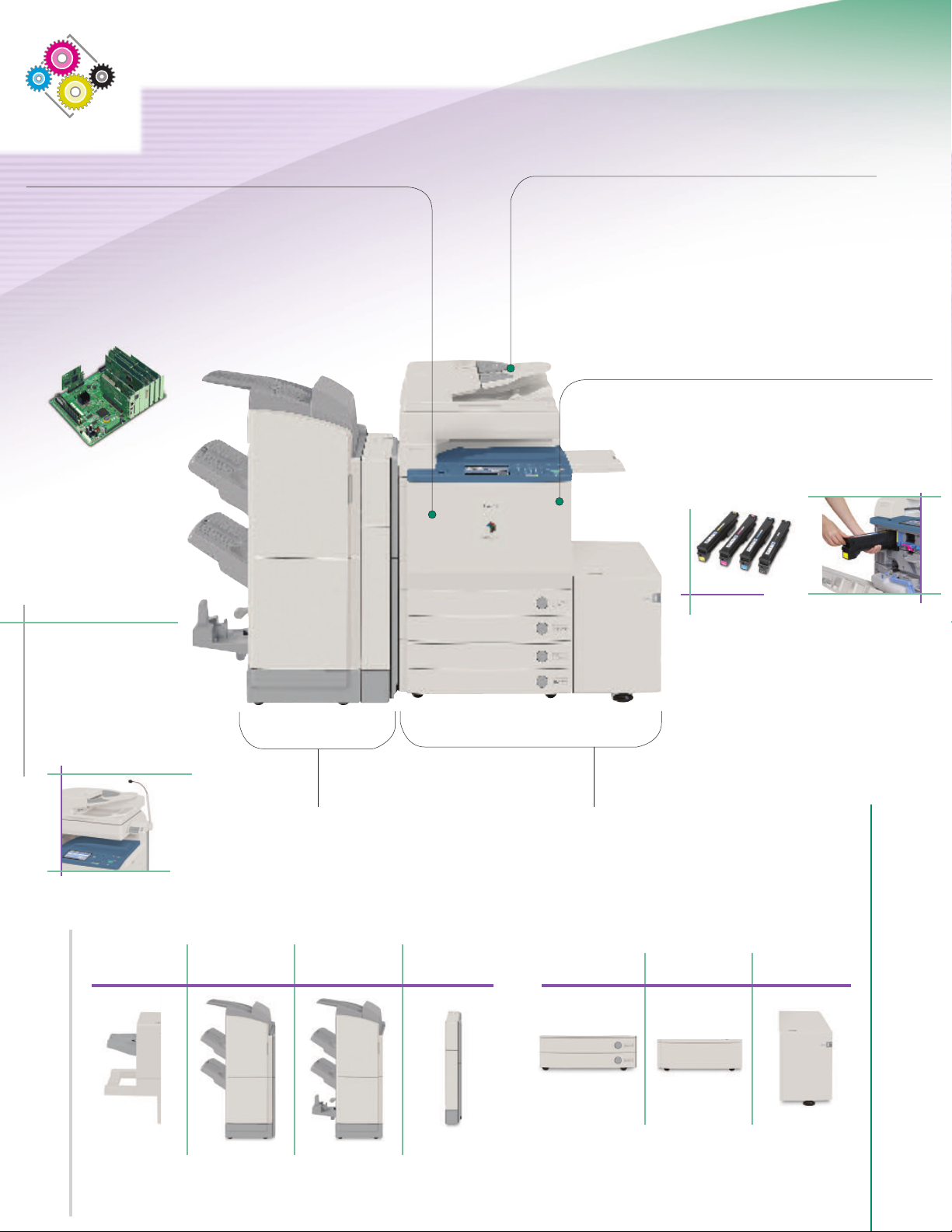
The Anatomy of an Efficient Performer
Canon imageCHIP System Architecture
• imageCHIP architecture provides more speed
and power for greater productivity
• Up to 1.5GB RAM and 80GB HDD
• Dedicated dual processor design
• Mail Box: local archival solution
Remote UI device management
•
obust Speed
R
• Up to 70-ipm high-speed color and black-and-white scanning
• Standard 100-sheet Duplexing Automatic Feeder
• 45 ppm (black and white); 40 ppm (color) printing
Reliable Consumables and Supplies
• Durable Canon OPC Drum
• Easy-to-replace toner cartridges
• Oil-free color S-toners
Accessibility Options
• Voice Operation Kit
• Remote Operator’s Software Kit
• ADF Access Handle
• Braille Label Kit
Finisher-X1 Finisher-W1 Saddle
anced Finishing Options
Adv
Three types of finishers
• Corner, double, saddle-stitch
• Extensive stacking capacity
le-punching
Ho
T
•
o or thr
w
ee holes
Finisher-W2
Puncher
Unit-AH1
Superior Paper-Handling
• Up to 5,000-sheet paper capacity
ass Tray; Alignment Tray Option
p
y
B
sheet
• 100-
• Up to 140 lb. Index media weights
• Up to 12" x 18" media sizes
ain
eedin
F
assette
C
g Unit
-
Z2
P
ede
Pl
t
s
al-E1
aper D
P
ec
Y1
-
k
Page 5
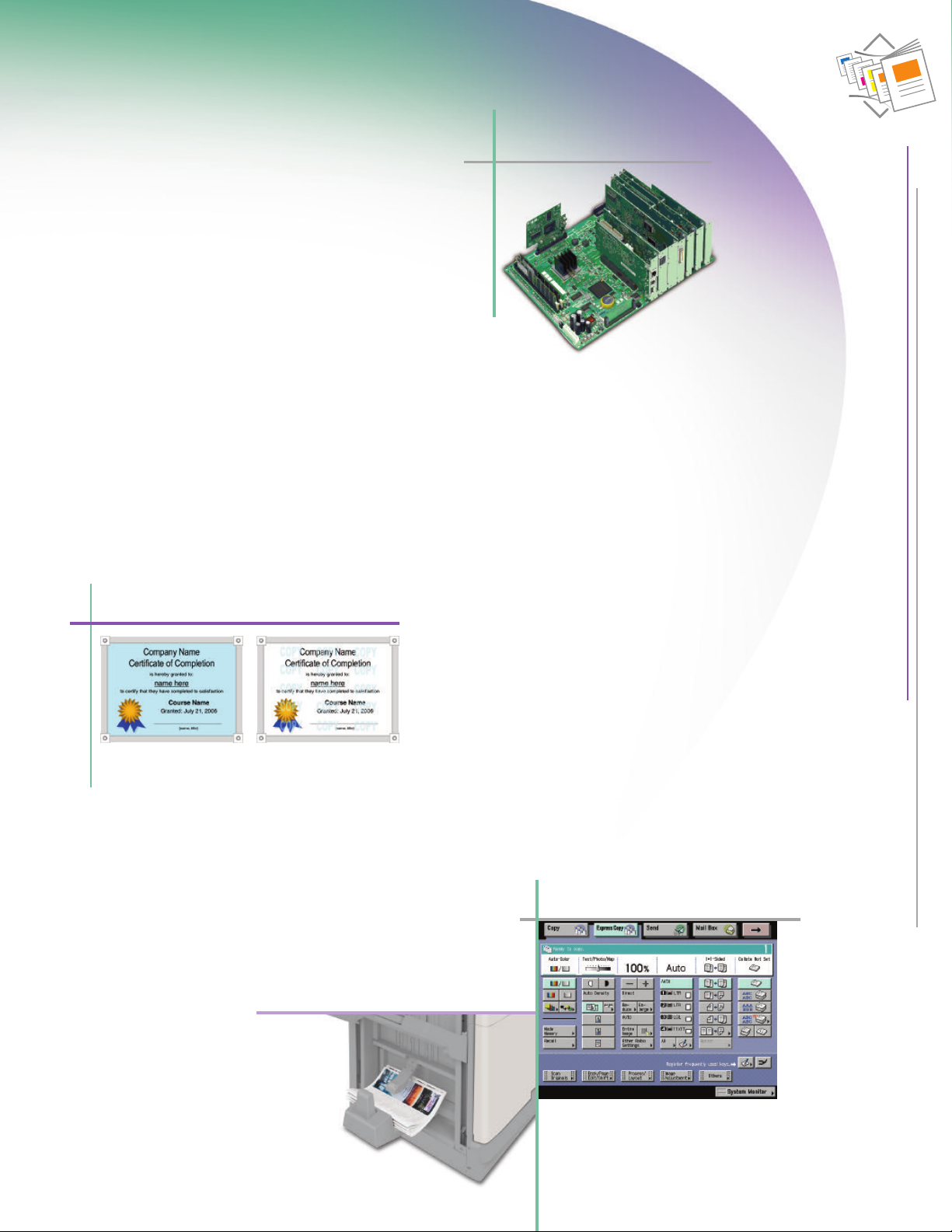
High Quality and Productivity
Uncompromising business performance
NEW-GENERATION IMAGE PROCESSING
The Color imageRUNNER C4580 Series is powered by Canon’s
evolutionary imageCHIP system architecture. This not only
enables simultaneous copying, printing, scanning, sending,
and faxing, but it will change the way you think about using
color in your office.
AL DYNAMICS
DIGIT
Adding digital data to copies and prints is easy and powerful.
Create ad hoc watermarks, select preset stamps, add page and
copy set numbering, and/or date stamping to any output with
control over size, position, colors, and density. You can also
embed sec
to help prevent security leaks of confidential information.
ure watermarks that appear when copies are made
imageCHIP System Architecture
COMPLEX JOBS MADE SIMPLE
The Color imageRUNNER C4580 Series makes the production of
complicated documents manageable. Users can combine different
sets of documents into one with Job Block Combination at the device.
Each set can be configured to run with unique settings, such as paper
type, finishing, color, and more, then reproduced or stored as a new
ument in a Mail Box. From the desktop, individual or groups of
doc
pages in documents can be configured with the new Exceptional
Settings tab* in the print driver to control output settings, such as
media type, paper size, input tray, and finishing options.
Secure Watermark
riginal document with hidden text
O
and background color
Hidden text appears on copies
that are made
THE PERFECT FINISHING TOUCHES
eRUNNER C4580 Series offers professional
imag
olor
C
The
finishin
g options that collate, staple, hole-punch, or saddle-
stitch to create impressive documents efficiently. And with
Correction, each page in your large booklets
ep
e
r
C
ic
omat
Aut
ly positioned.
ect
wil
l be per
f
BRILLIANT BUSINESS COLOR
For general office environments, the Color imageRUNNER C4580
Series efficiently tackles print tasks for Microsoft
ion
cat
and XPS,** as well as an option for PostScript 3 emulation.
FASTER COPYING
y
op
C
user
for novice users, while an Express Copy menu provides advanced
users quick access to various copying modes on a single screen.
Saddle Finisher-W2
®
Office appli-
s. It supports Canon’s UFR II (Ultra Fast Rendering), PCL,
operations are greatly simplified through the choice of two
faces. The standard copy display simplifies operations
er
int
Express Copy Screen
equires PS Printer Kit-N2 option.
* R
** Please check with your Authorized Canon Dealer for availability.
Page 6
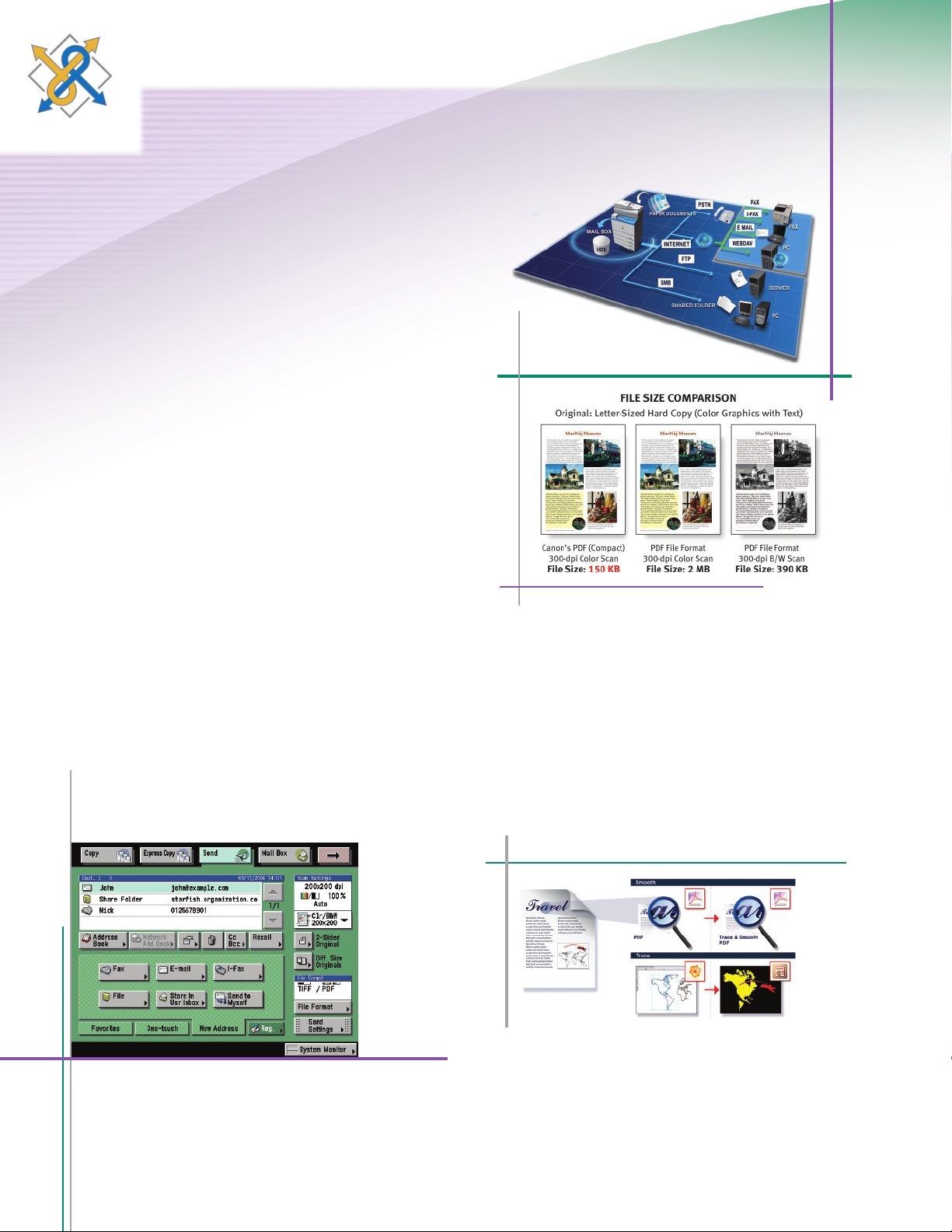
Superior Communication
Enhance your digital world with Color Universal Send
With Canon’s proprietary Universal Send technology, the Color
imageRUNNER C4580 Series enables you to distribute scanned
documents to multiple network destinations—such as e-mail
and Internet fax addresses, local Mail Boxes, fax, network folders,
and document management systems—in one simple operation.
Quickly and easily send documents to user addresses in a local
Address Book, look up users from multiple LDAP servers on your
network, or manually enter a destination. When Single Sign-On
SO) or Simple Devic
(S
used, a new time-saving feature enables you to send documents
to yourself in a single click.
e Log-in (SDL) authentication modes are
Universal Send
PDF High Compression Mode
Color Universal Send offers powerful options to master creation,
distribut
PDF
ion, and archiving of your documents. Universal Send
es (standard on the “i” model) provide
Advanced F
eatur
additional functionality such as PDF High Compression, Trace
& Smooth PDF, and Searchable PDF modes.
Send Main Screen
PDF HIGH COMPRESSION TECHNOLOGY
To reduce network bandwidth requirements when sending
color documents, Canon’s proprietary PDF High Compression
Mode c
an significantly reduce the size of PDF files. And with
Canon’s exclusive Trace & Smooth PDF feature, text in PDF files
can be converted to outlines for sharper edges and increased
readability. The outline data can also be manipulated in
Adobe Illustrator
race & Smooth PDF
T
®
to create elements for other documents.
CREATING SEARCHABLE PDF DOCUMENTS
scanning for PDF creation, the text is then embedded
er
t
Af
within the file for extraction or keyword searches with the
Searchable PDF feature. This allows you to easily scan and
anned documents into your electronic workflow.
c
s
t
er
v
on
c
Page 7
Internet-ready
Maximize the power of the Web
HIGH-VOLUME FAX CAPABILITY
The Color imageRUNNER C4580 Series supports the option
to add a single- or multi-line Super G3 fax module to further
extend the capabilities of Color Universal Send. Incoming
faxes can also be automatically routed to other devices,
destinations, or users with the Job Forwarding feature for
superior workflow management.
ADVANCED WORKGROUP COLLABORATION
The Color imageRUNNER C4580 Series includes internal Mail
Boxes for document storage and print-on-demand applications.
Documents can be combined and printed as a single job or sent
to mult
iple destinat
ions in a
variety of formats. For files that are
too large for e-mail or require a large distribution list, the URL
Send feature can e-mail a link to notify recipients that they can
remot
ely
preview
via PC and, if necessary, print from the device.
DESKTOP INTEGRATION
The Color imageRUNNER C4580 Series is designed to work
seamlessly with Canon’s imageWARE
™
Document Manager
Personal Version 4 as a total end-to-end document solution.
You can capture, archive, retrieve, and manipulate documents
within the imageRUNNER devices’ Mail Boxes right from your
desktop computer, seamlessly integrating your workspace
wit
he devic
h t
e.
The Color imageRUNNER C4580 Series provides more ways
to share information with the world beyond your office than
ever before.
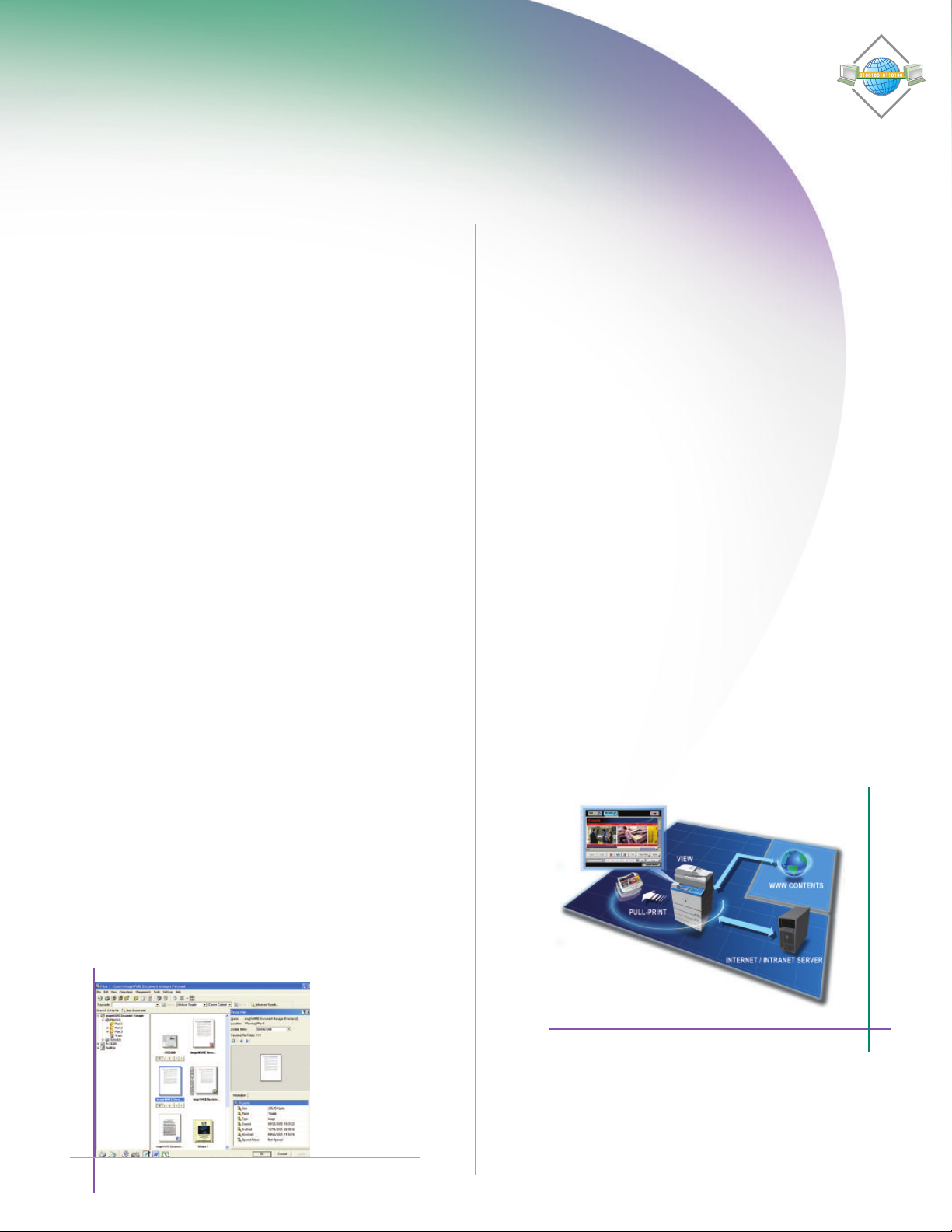
WEB BROWSING AND PRINTING
With the industry’s first Web Access Software option, you can
browse the Web or corporate intranets directly from the device’s
color
touch-p
anel. The Web Access function enables you to print
Web pages or PDF files from the Internet or your network, even
when you don’t have access to a computer.*
WEB-BASED DOCUMENT COLLABORATION
Color Universal Send supports the Web-based Distributed
Authoring and Versioning (WebDAV) protocol, enabling you to
secur
ernet.
Int
ely send doc
Col
uments to a shared storage service over the
s with others, whether they’re
laborat
e on doc
ument
in the office, on the road, or at home–for increased productivity.
imageWARE Document Manager Personal Version 4
cess Software
Ac
b
e
W
* When configured on the “Base” model, requires UFR II/PCL Printer Kit-N2 if printing Web pages;
requires PS Printer Kit-N2 on “Base” and “i” models if printing PDF files.
Page 8
Powerful Imaging
Scalability
Flexible color productivity for your office
Canon offers flexible print controller options developed for the
Color imageRUNNER C4580 “Base” model. The ColorPASS-GX100
and imag
quality for corporate and professional color environments.
imagePASS-H1 CONTROLLER
The imagePASS-H1 is a high-performance
embed
color-intensive multi-user environments.
Featuring a dedicated Intel
M 1.
provides improved color matching,
genuine Adobe PostScript 3 support,
and PCL.
ePASS-H1 controllers increase productivity and color
ded controller designed to handle
5GHz pr
, the imagePASS-H1
essor
oc
®
Celeron
®
imagePASS-H1
Solutions that evolve with your business
As your business grows, the Color imageRUNNER C4580 Series
will continue to provide value with features and options designed
o extend your capabilities.
t
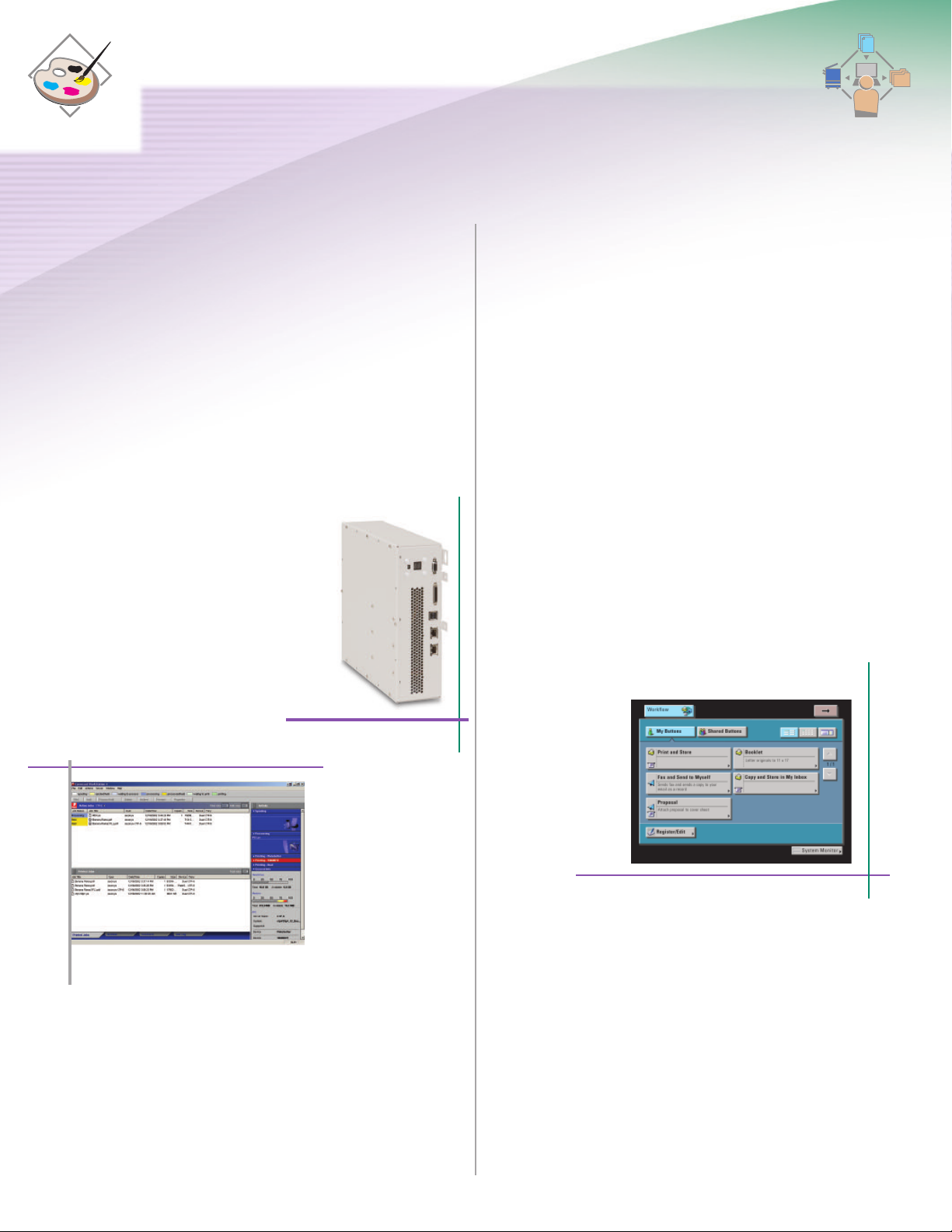
OPERATIONAL EFFICIENCY
Breeze through complex tasks and help to reduce operator
mistakes using the new Workflow Composer option. Workflow
Composer enables users to configure one button to perform
multiple actions, such as copying, sending, and storing at the
e in a single step. For even greater convenience, workflow
devic
s can also be created and edited from the desktop.
ton
but
EFI Utility
ColorPASS-GX100 CONTROLLER
The ColorPASS-GX100 is a powerful external server which
to graphic-intensive users and production environments.
s
er
at
c
by an Intel Pentium
en
Driv
®
4 3.2GHz
ocessor, the
pr
ColorPASS-GX100 controller supports demanding color
ing.
s
s
e
imag
e and high-
olume pr
v
oc
Workflow Composer Screen
Page 9
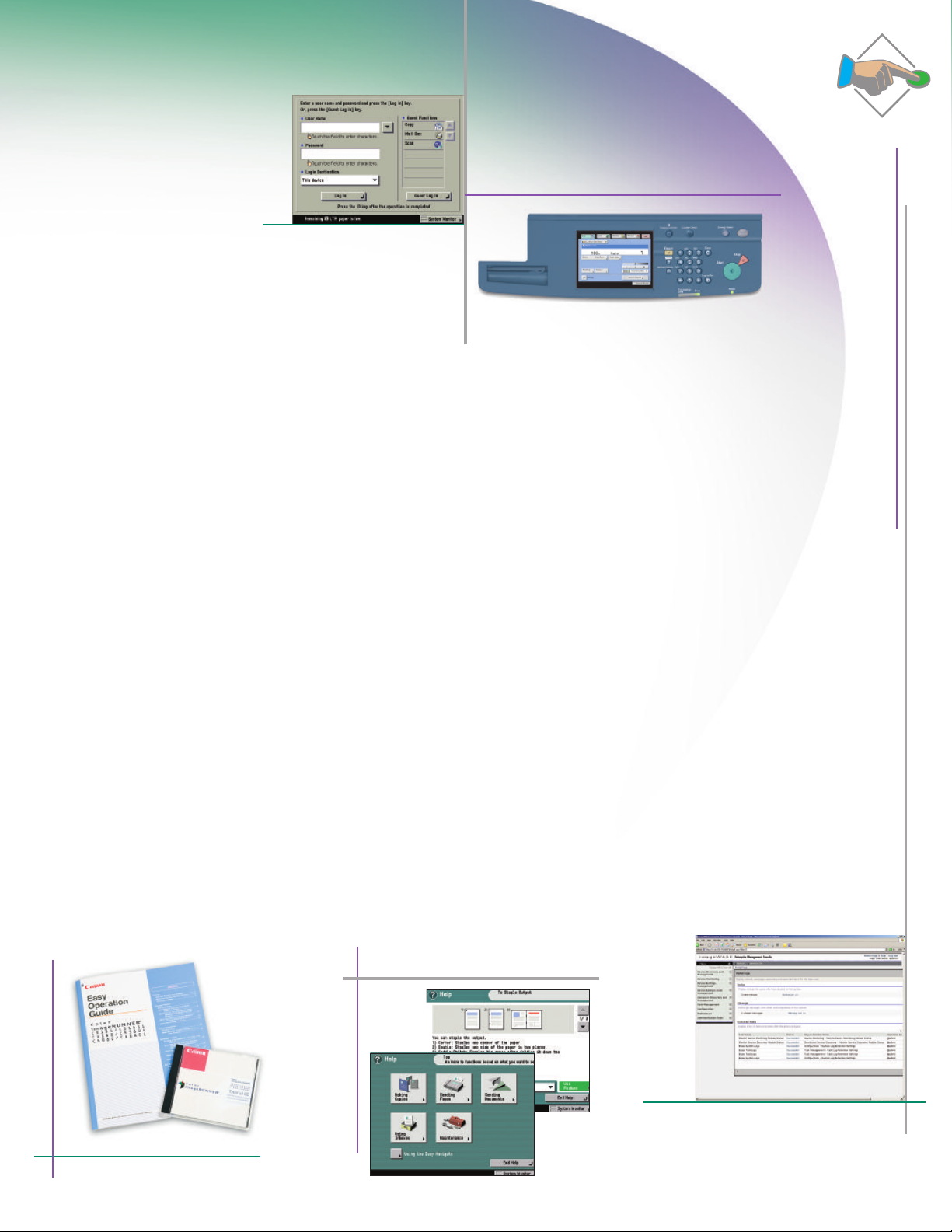
Access Management System Screen
User-Friendly
Simplicity for users
For users, the Color imageRUNNER C4580 Series facilitates
operations with its easy-to-read full-color touch panel, interactive
help menus, insightful documentation and tutorials, and remote
operation capabilities. Streamlined administration is achieved
through powerful features for user access and privileges, and
device management.
SUPPORT TOOLS FOR OPERATORS
Whether you’re a beginner or an advanced user, the Color
imageRUNNER C4580 Series is easy to navigate. An easy
operation guide provides step-by-step instructions on how to
operate the device’s main functions. And the [Help] hard key on
the devic
In
e provide
stead of bulky manuals, device documentation is CD-based
and features search tools to find answers quickly and easily.
User tutorials in Macromedia
an be distributed through your network or corporate
and c
anet for smooth deployment.
intr
REMOTE UI (USER INTERFACE)
The Color imageRUNNER C4580 Series can be accessed through
a Web browser from any computer on the network. The Remote
UI utility provides the ability to check the status of the device,
track the progress of current jobs, monitor paper and toner
els, adminis
lev
s instructions and explanations for operation.
®
Flash®format are also available
er the Mail Box, and edit the Address Book.
t
Control Panel
…and for administrators
FLEXIBLE USER ADMINISTRATION
Administrators have a choice of methods to control access
and privileg
es to the Color
Authentication schemes include Single Sign-On (SSO) using
network accounts, Simple Device Log-In (SDL), and Department
ID Mode wit
h optional Control Card/Card Reader system. Using
the Access Management System, administrators have powerful
ol over access to the Color imageRUNNER C4580 Series and
contr
its functions for even greater security and cost control—at both
the user and group levels.
COMPREHENSIVE DEVICE MANAGEMENT
Canon’s
imageWARE Enterprise Management Console (EMC)
is a Web-based utility that facilitates centralized management
networked devices. Built upon an extensible framework, it
of
enables remote management of device settings, discovery of
new devices using automated tasks, and device error notifications
a e-mail.
vi
Administrators can also easily replicate settings
and Address Books across multiple devices through the Device
Information Delivery Function (DIDF ), as well as push-print
-based desktop computers for rapid deployment.
C
o P
t
s
er
driv
imageRUNNER C4580 Series devices.
Easy Operation Guide and Tutorial CD
Help Key
imageWARE Enterprise Management Console
Page 10
Security and Accessibility
DEVICE ACCESS AND DATA SECURITY
The Color imageRUNNER C4580 Series includes features to help
guard against unauthorized access to the device and its data.
In addition to user-level authentication, it can also restrict
access from the network. The series also supports IPv6 for
enhanced network infrastructure management. To protect your
tored, scanned, and printed data, the HDD Data Erase option
s
ves delet
remo
permanent
ly
three times. The HDD Data Encryption option provides additional
security by encrypting data before it’s written to the hard disk
drive and has ac
hieved Common Criteria (CC) certification.
ed files by overwriting them up to
Document Security
Encrypted Secured Print
Watermark/Secure Watermark
Copy Set Numbering
Encrypted PDF
Digital Signature PDF
F
AX Forwarding
FAX Destination Confirmation
HDD Security
HDD Data Erase
HDD Data Encryption
HDD Format
Mail Box Password
Protection
Job Log Conceal
Mail Server Security
POP Authentication before SMTP
SMTP Authentication
Device Management and Security Overview
Network Security
MAC Address Filtering
IP Address Filtering
SSL Encryption
Network Application On/Off
USB Block
Destination Restriction
Internet
Device AccessSecurity
Department ID (up to 1000 IDs)
User Authentication (SDL/SSO)
Access Management System
Control Card/Card Reader System
Smart Card Authentication
Device Management
DIDF (Device Information Delivery Function)
Key Switch Unit
Digital Signature PDF
Voice Operation Kit
DOCUMENT SECURITY
The Universal Send PDF Security Feature Set option prevents
impersonation or interception of your documents. Digital Device
ure Mode and the optional Digital User Signature Mode
nat
Sig
provide verification of a document’s source. Additionally, you
can password-protect your documents with the Encrypted PDF
feature and securely print them over the network using the
Encrypted Secured Print feature.
ACCESSIBILITY
ers solutions that go even further to ensure access for
f
anon of
C
every authorized user of the Color imageRUNNER C4580 Series
devices. The device can be controlled with spoken commands
ation Kit. The firstCanon release of its kind
e Oper
oic
V
he
g t
in
us
for the U.S. market, the kit provides speech synthesis and voice
recognition for individuals who are blind, or have poor vision or
mobility/dexterity impairments.
Encr
ypt
ed
Sec
ur
ed P
rint Screen
Page 11
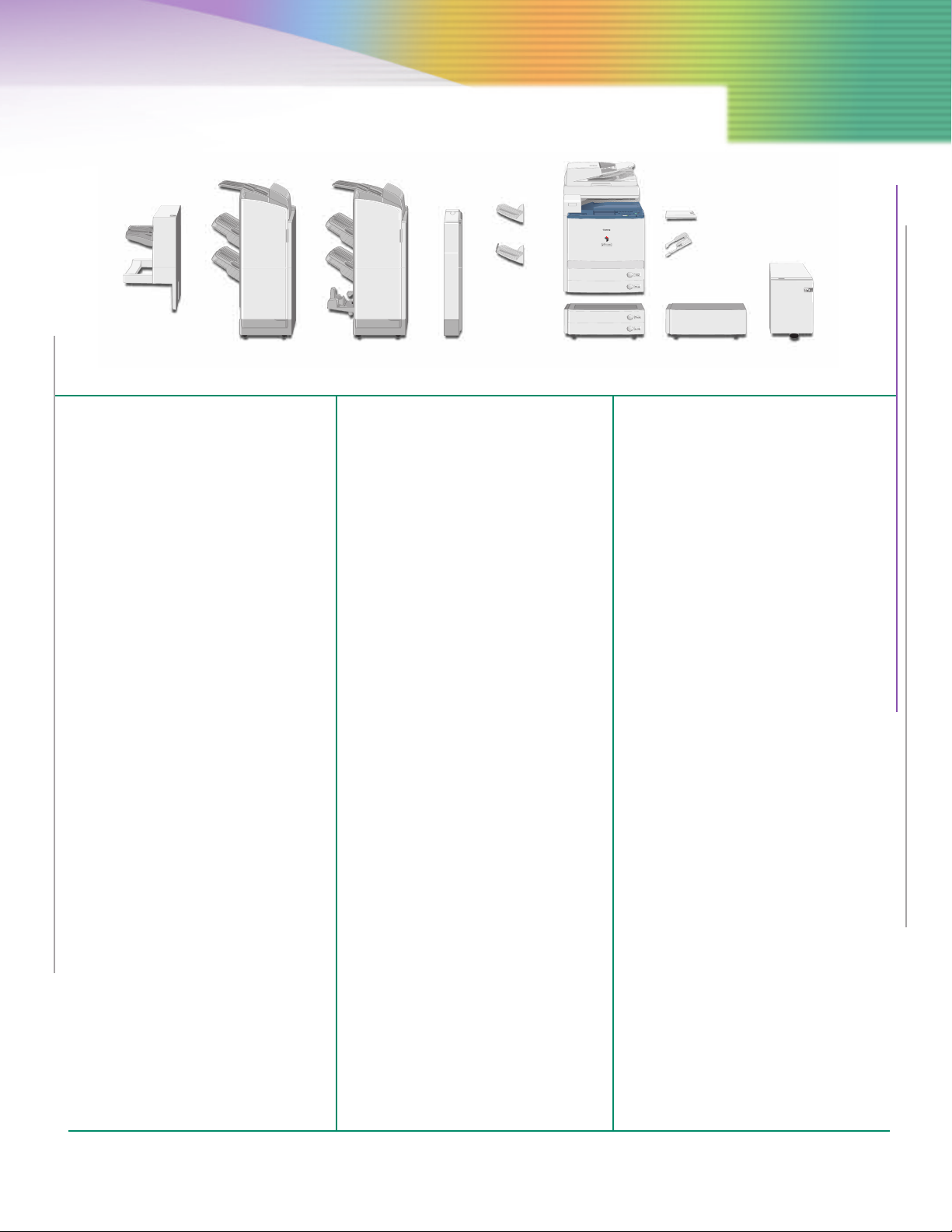
inisher-X1 Finisher-W1 Saddle
F
Finisher-W2
uncher
P
Unit-AH1
opy Tray-N1
C
opy Tray-M1
C
assette
C
Feeding Unit-Z2
Document Tray-J1
tack Bypass
S
Alignment Tray-B1
lain
P
Pedestal-E1
Specifications
aper Deck-Y1
P
MAIN UNIT
Type: Color Digital Multifunction
Imaging System
Copying Method: Laser Dry Electrostatic Transfer
Developing System: Dry Dual Component Developing
emory: Standard 1GB RAM
M
System
mum 1.5GB RAM
Maxi
Hard Disk Drive: 80GB
ce
Network Inte
rfa
Connections: 10/100Base-TX (RJ-45)
Other Interface: USB 2.0 (Device), USB 2.0 (Host)
First-Copy Time: 9.6 Seconds (Color)
Warm-Up Time: 4 Minutes and 30 Seconds After
Copy/Print Speed
(B/W, Color): Up to 45/40 ppm (Letter)
6.7 Seconds (B/W)
Powering On
Scan Resolution: 600 dpi x 600 dpi
Copy Resolution: 600 dpi x 600 dpi
Engine Resolution: 1200 dpi x 1200 dpi
Halftone: 256 Gradations (Continuous-Tone)
Paper Sources
Standard: Dual 550-Sheet Paper Cassettes
Optional: Dual 550-Sheet Paper Cassettes
100-Sheet Stack Bypass
2,700-Sheet Paper Deck
Paper Sizes
Drawers: 12" x 18", 11" x 17", Legal,
Bypass: 12" x 18", 11" x 17", Legal,
etter, Letter-R, Statement-R,
L
Executive
Letter, Letter-R, Statement-R,
Executive, 12-5/8" x 17-11/16",
Irregular size (3-15/16" x 5-7/8"
to 12-7/8" x 18") and Envelopes
Acceptable Paper Weight
ers: 17 lb. Bond to 110 lb. Index
w
a
Dr
Bypass: 17 lb. Bond to 140 lb. Index
Duplexing: Standard Automatic Trayless
Duplexing (Executive to
12" x 18")
Image Reader: Color Image Reader-F1 (Standard)
able Originals: Sheet, Book, 3-Dimensional
ept
c
c
A
riginal Size: 11" x 17"
ax. O
M
Document Feeding Method: Duplexing Automatic Document
e O
l
ab
ept
c
c
A
Objects (up to 4.4 lb.)
Feeder (Standard)
riginals: Statement to 11"x 17"
Paper Capacity: 100 Sheets
Acceptable Paper
Weight of Originals: Simplex 11 to 32 lb. Bond
peed:
S
an
Sc
(H x W x D): 35" x 24-3/8" x 33-1/2"
s
ion
s
Dimen
(42 t
Duplex 13 to 32 lb. Bond
(50 to 128 g/m
70 ipm (300 d
51 ipm (600 dpi)
o 128 g/m
pi)
2
)
2
)
Weight: Approximately 295 lb. (134kg)
Power Requirements: 120V AC, 60Hz, 15A
Power Consumption: 1,665W
Plug: NEMA 5-15P
oner (Estimated Yield): Black: 26,000 Images @ 5%
T
opy Features
C
ultiple Copies: 1 to 999
M
Coverage
olor: 30,000 Images @ 5%
C
Coverage
Max. Copy Reservation: 10 Jobs
olor Mode: Auto Color, Full Color, Black,
C
opy Exposure: Automatic or Manual (9 Levels)
C
Single Color, Two Colors
Magnification
Preset Reduction: 25%, 50%, 64%, 73%, 78%
Preset Enlargement: 121%, 129%, 200%, 400%
Zoom Mode: 25% - 400% (1% Increments)
Mail Box Features
Max. Mail Boxes Supported: 100 User Inboxes, 1 Memory
Scan Feature
Network TWAIN Scan: Standard
RX Inbox, 50 Confidential Fax
Inboxes
Network Scan Utility: Color Network ScanGear
Color Universal Send Feature (Standard)
Color Mode: Auto Color Select
Address Book Capacity: Max. 1,800 Destinations
Sending Methods: E-Mail, I-FAX, SMB, File Server
(Full Color/Gray Scale)
Auto Color Select (Full Color, B/W)
Full Color, Grayscale, B/W
(Includes 200 One-Touch Buttons)
Max. 5 LDAP Servers
(FTP, IPX, WebDAV), User Inbox,
Super G3 Fax (Optional)
Communication Protocol
File: FTP (TCP/IP), SMB (TCP/IP),
NCP (IPX), WebDAV
E-Mail/I-Fax: SMTP, POP3, I-FAX (Simple, Full)
Data Format
Fi
le, E-Mail: TIFF, JPEG, PDF, PDF (Compact),*
I-Fax: B/W: TIFF (MH,MR, MMR)
PDF (Trace & Smooth),* PDF (OCR),*
rypted PDF,** Digital Signature
Enc
PDF
(D
ev
e,** U
ic
ser***)
Color: TIFF (Profile-C)
OPTIONAL ACCESSORIES
Super G3 Fax Board-V2/Super G3 Multi-Line Fax Board-H2
Applicable Line: Public Switched Telephone
onnection Lines: One-Line (Super G3 Fax Board-V2),
C
Siz
al
rigin
g/O
Sendin
din
or
ec
R
Color UFR II/PCL Printer Kit-N2 (Standard for C4580i)
CPU:
g/Printin
g
Memory: 1GB RAM (Std.), 1.5GB RAM (Max.)
Network (PSTN)
uper G3 M
(S
s
o-Line
w
T
Fax Board-H2)
e: Statement to 11" x 17"
Size: Statement to 11" x 17"
Canon Dual Custom Processor
(Shared)
ed)
ar
(Sh
lti-Line
u
Hard Disk Drive 80GB (Shared)
Supported PDL: UFR II/PCL 5c/PCL 6
ptional PDL Support: PostScript 3 Emulation
O
(PS Printer Kit-N2
Printer Drivers
FR II: Windows
U
PCL 5c: Windows (Windows 98/Me/2000/
PCL 6: Windows (Windows 98/Me/2000/
ss
XPS:
PS3 (Optional): Windows (Windows 98/Me/2000/
imagePASS-H1
Connectable Device: Color imageRUNNER C4580
Server 2003, Windows Vista™)
itrix MetaFrame
C
acintosh
M
P/Ser
X
Citrix MetaFrame
XP/Server 2003, Windows Vista)
Citrix MetaFrame
Windows Vista
XP/Server 2003, Windows Vista)
Citrix MetaFrame
Macintosh (OS 10.2.8 or Later)
CPU: Celeron
s
)
®
Windows 2000/XP/
(
®
OS 10.2.8 or Later)
(
ver 2003, Windows Vista)
®
M 1.5GHz
System: System 8e
Memory: 256MB (Std.), 512MB (Max.)
Hard Disk Drive: 80GB
Interfaces (to LAN): 10/100/1000Base-T (RJ-45)
Supported PDL: Adobe
®
PostScript®3, PCL 5c
Utility Software: Remote Scan 5.3
Command WorkStation for
Windows
Command WorkStation for Mac
s: 256MB RAM, Secure Erase v1.0,
Option
olorPASS-GX100
C
Connectable Device: Color imageRUNNER C4580
CPU: Intel
ystem: System 8
S
Hot Folders v2.0, Impose v2.6
®
Pentium®4, 3.2GHz
Memory: 1GB (Std.), 2GB (Max.)
d Disk Drive: 160GB
Har
DVD-ROM: Standard
es (to LAN): 10/100/1000Base-T (RJ-45)
ac
f
er
Int
Supported PDL: Adobe PostScript 3
Options: 1GB RAM, GA Package, GA
Cassette Feeding Unit-Z2
s:
e
Siz
aper
P
Paper Drawers Capacity: 550 Sheets x 2 Cassettes
Pr
Impose v2.6, ACI Kit, Removable
HDD
12" x 18", 11" x 17", Legal,
Letter, Letter-R, Statement-R,
Ex
[20 lb. Bond (80g/m2)]
emium, Pr
e
utiv
ec
oduction Package,
Dimensions (H x W x D): 12-1/4" x 24-3/8" x 27-3/4"
Paper Deck-Y1
Paper Size: Letter
k Capacity: 2,700 Sheets (20 lb. Bond
ec
aper D
P
80g/m2)
Dimensions (H x W x D): 17" x 12-3/4" x 23-1/4"
(Specifications are continued on back cover.)
Page 12
inisher-X1
F
umber of Trays: 1 Tray
N
Paper Size
tandard: 12" x 18", 11" x 17", Legal,
S
Non-Standard Size: (3-15/16" x 5-7/8" to
eight: 17 lb. Bond to 140 lb. Index
W
Paper Capacity Per Tray: 1,000 Sheets (Letter, Statement-R,
Paper Capacity of
taple Mode: 1,000 Sheets/30 Sets (Letter,
S
x. Stapling Capacity
a
M
etter, Executive: 50 Sheets (17 lb. to 20 lb. Bond)
L
1" x 17", Legal,
1
Letter-R: 30 Sheets (17 lb. to 20 lb. Bond)
taple Mode: Corner (11" x 17", Legal, Letter,
S
Letter, Letter-R, Statement-R,
xecutive
E
2-7/8" x 18")
1
xecutive)
E
500 Sheets (12" x 18", 11" x 17",
egal, Letter-R)
L
Executive) 500 Sheets/30 Sets
11" x 17", Legal, Letter-R)
(
30 Sheets (20 lb. to 28 lb. Bond)
heets (28 lb. Bond to 140 lb.
S
2
Index)
20 lb. to 28 lb. Bond)
0 Sheets (
2
2 Sheets (28 lb. Bond to 140 lb.
ndex)
I
Letter-R, Executive)
Dimensions (H x W x D): 28-5/8" x 16-1/4" x 24"
Finisher-W1/Saddle Finisher-W2
Number of Trays: 3 Trays
Paper Size
Standard: 12" x 18", 11" x 17", Legal,
Non-Standard Size: (3-15/16" x 5-7/8" to
Letter, Letter-R, Statement-R,
Executive
12-7/8" x 18")
Paper Weight: 17 lb. Bond to 140 lb. Index
Paper Capacity Per Tray
Non-Collating Tray: 250 Sheets (Letter, Statement-R,
Upper Tray: 1,300 Sheets (Letter, Statement-
Executive)
125 Sheets (12" x 18", 11" x 17",
Legal, Letter-R)
R, Executive)
50 Sheets (12" x 18", 11" x 17",
6
egal, Letter-R)
Lower Tray: 2,450 Sheets (Letter)
aper Capacity of Staple Mode
P
Upper/Lower Tray: 1,300 Sheets/100 Sets (Letter,
L
1,700 Sheets (Statement-R,
xecutive)
E
650 Sheets (12" x 18", 11" x 17",
egal, Letter-R)
L
xecutive)
E
50 Sheets/50 Sets (11" x 17",
6
Legal, Letter-R, Staple with
ifferent paper sizes)
d
Max. Stapling Capacity
etter, Executive: 50 Sheets (17 lb. to 20 lb. Bond)
L
1" x 17", Legal,
1
Letter-R: 30 Sheets (17 lb. to 20 lb. Bond)
e Mode: Corner (11" x 17", Legal, Letter,
Stapl
Saddle-Stitching
Acceptable Paper Sizes: 12" x 18", 11" x 17", Legal,
Saddle Stitch Capacity: 15 Sheets (17 lb. to 20 lb. Bond)
Tray Capacity: 25 Sets (1 to 5 Sheets)
0 Sheets (20 lb. to 28 lb. Bond)
3
2 Sheets (28 lb. Bond to 140 lb.
ndex)
I
0 Sheets (20 lb. to 28 lb. Bond)
2
2 Sheets (28 lb. Bond to 140 lb.
Index)
Letter-R, Executive)
(11" x 17", Legal, Letter,
ouble
D
etter-R, Executive)
L
Letter-R
10 Sheets (20 lb. to 28 lb. Bond)
15 Sets (6 to 10 Sheets)
10 Sets (11 to 15 Sheets)
Folding: V-Fold
Dimensions (H x W x D): 46-1/4" x 26-3/4" x 25-7/8"
Puncher Unit-AH1
Paper Size: 11" x 17", Legal, Letter, Letter-R
Max. Paper Weight: 17 lb. Bond to 140 lb. Index
Punch Type: 3 Holes (Letter, 11" x 17")
Punch Waste Tray Capacity: When approximately 3,000
2 Holes (Legal, Letter-R)
Sheets of paper have been
punched
Dimensions (H x W x D): 32-3/4" x 4-1/4" x 24-1/2"
ther Optional Accessories
O
•
ncrypted Secured Print
E
S
•
Barcode Printing Kit-A1
•
Web Access Software-E1
•
U
Advanced Feature Set-A1
•
Universal Send PDF Security
F
•
Digital User Signature PDF
Kit-A1
•
S
•
S
•
Super G3 Multi-Line
Fax Board-H2
•
i
E
•
HDD Encryption Kit-B1
•
H
•
V
Fo
oftware-C1
niversal Send PDF
eature Set-A1
ecure Watermark-A1
s
uper G3 Fax Board-V2
mageRUNNER 512MB
xpansion RAM-C1
DD Erase Kit-A1
oice Guidance Kit-A2
otnotes:
•
Voice Operation Kit-A1
•
emote Operator’s Software
R
n
it-A2
K
•
Plain Pedestal-E1
•
ocument Tray-J1
D
•
opy Tray-M1
C
•
Copy Tray-N1
•
tack Bypass Alignment
S
ray-B1
T
•
Card Reader-D1
•
Key Switch Unit-A2
•
raille Label Kit-A1
B
•
ADF Access Handle-A1
•
Stamp Unit-A1
•
Copy Suite
e
•
imageWARE™ Suite
•
Access Management System
it-A1
K
•
Workflow
Compos
er-B1
* When configured on C4580, requires Universal Send PDF
Advanced Feature Set-A1
** When configured on the C4580, requires Universal Send
PDF Security Feature Set-A1
*** Requires Digital User Signature Kit-A1
s
Requires iR 512MB Expansion RAM-C1
ss
Check with your Authorized Canon Dealer for availability.
Available with Saddle Finisher-W2 Only
Puncher Unit-AH1 can only be installed with either the
Finisher-W1 or Saddle Finisher-W2.
Requires UFR II/PCL Printer Kit-N2
When configured on the C4580, requires UFR II/PCL
Printer Kit-N1 if printing Web pages; requires PS Printer
Kit-N2 on C4580/C4580i if printing PDF files
Standard on C4580i
n
Voice Guidance Kit and Voice Operation Kit cannot be
installed together.
n
As an ENERGY STAR®Partner, Canon U.S.A., Inc. has determined that these products meet
the ENERGY STAR guidelinesfor energy efficiency. ENERGY STAR and the ENERGY STAR mark
are registered U.S. marks. Microsoft, Windows, and Windows NT are registered trademarks
and Windows Vista is a trademark of Microsoft Corporation in the United States and/or
other countries. Macintosh is a trademarkof Apple Computer, Inc. Adobe, Acrobat, and
PostScript are registered trademarks of Adobe Systems Incorporated in the United States
and/or other countries. Intel, Celeron, and Pentium are registered trademarks of Intel
Corporation. CANON, IMAGERUNNER, and MEAP are registered trademarks of Canon Inc. in
the Uni ted States and may also be registered trademarks or trademarks in other countries.
IMAGEWARE is a registered trademark of Canon U.S.A., Inc. in the United States and is a
trademark of Canon Inc. in certain countries. IMAGEANYWARE is a trademark of Canon.
All referenced product names and other marks are trademarks of their respective owners.
pec
S
©2007 Canon U.S.A., Inc. All rights reserved.
eder
F
ub
s
anon U.S.
C
Enforcement Agencies in connection with claims of unauthorized copying.
0098W249
0707-C4580-30M-LIS
printed on recycled
ap
p
and av
s
ation
ific
ohibits copying of certain documents. Violators may be
w pr
La
al
altie
o pen
t
ect
j
., Inc
A
.s
he u
t
er in
lity subject to change without notice.
i
ab
l
ai
s. We suggest that you check with your own legal counsel.
. and C
.a.
a, Inc. intend to cooperate with Law
d
a
an
anon C
1-800-OK
www
-CANON
sa.canon.com
.u
Canon U.S.A., Inc.
One Canon Plaza
Lake Success, NY
11042
 Loading...