

Page 1
2
1
5
3
6
4
7
1
2
2
1
1
2
3
4
5
Se dispone de tutoriales
en vídeo
ENGLISH
Video Tutorials Available
EN
ES
EN
EN
ES
ES
EN
ES
EN
ES
EN
ES
EN
ES
Getting Started
Guía de inicio
ESPAÑOL
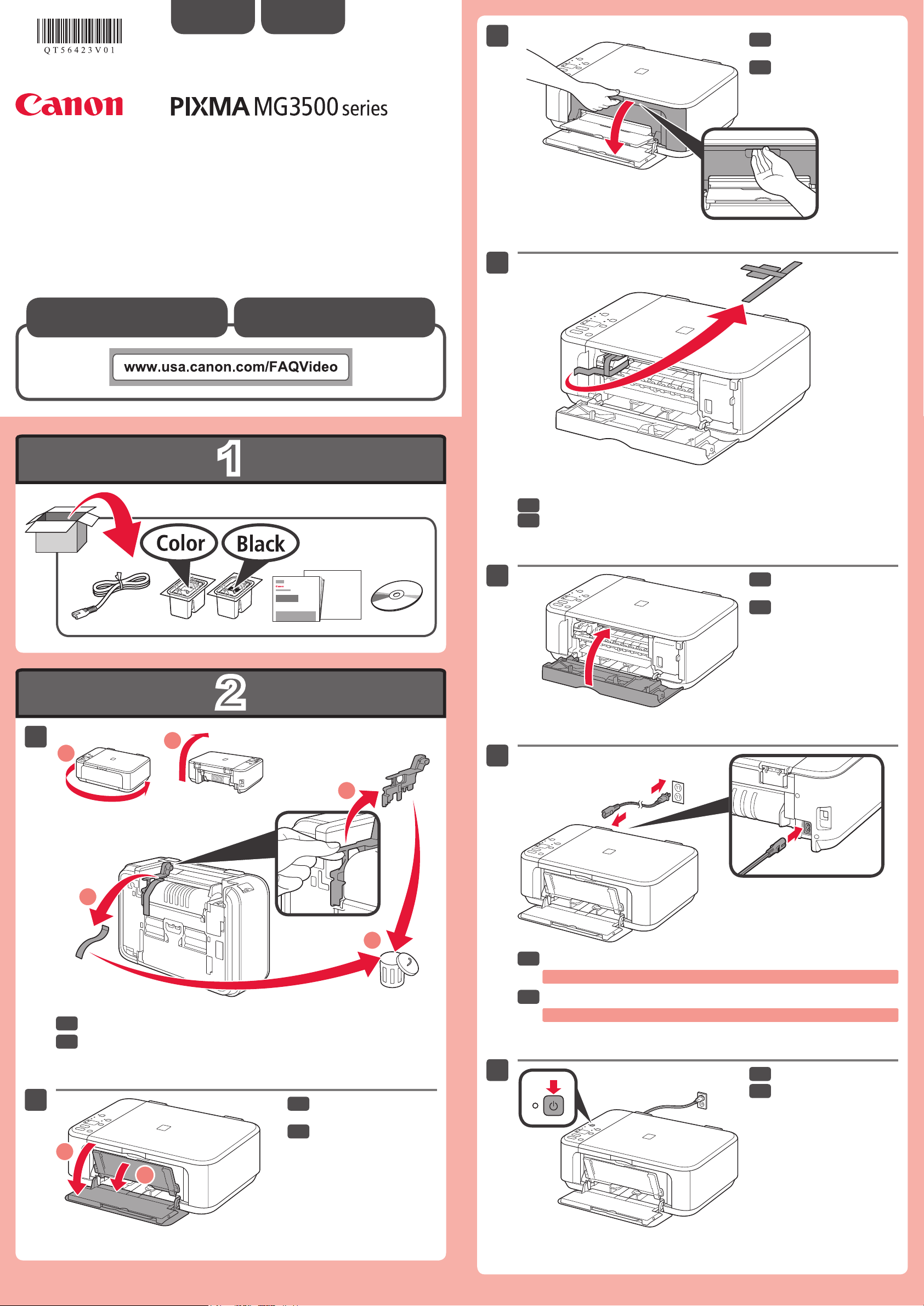
Open the Paper Output
Cover.
Abra la tapa de salida del
papel.
Remove the orange tape and protective material.
Retire la cinta naranja y el material de protección.
Close the Paper Output
Cover.
Cierre la tapa de salida del
papel.
Remove the orange tape and protective material on the back of the machine.
Retire la cinta naranja y el material de protección de la parte posterior del
equipo.
Open the Front Cover and
the Paper Output Tray.
Abra la cubierta delantera
y la bandeja de salida del
papel.
QT5-6423-V01 PRINTED IN XXXXXXXX
XXXXXXXX © CANON INC. 2013
Connect the power cord.
Do not connect the USB cable yet.
Conecte el cable de alimentación.
No conecte aún el cable USB.
Press the ON button.
Pulse el botón ACTIVADO
(ON).
Page 2
3
8
1
2
3
4
5
6
1
2
7
(A)
EN
ES
EN
ES
EN
ES
EN
ES
EN
ES
EN
ES
ENESEN
ES
EN
ES
EN
ES
EN
ES
EN
ES
(B)
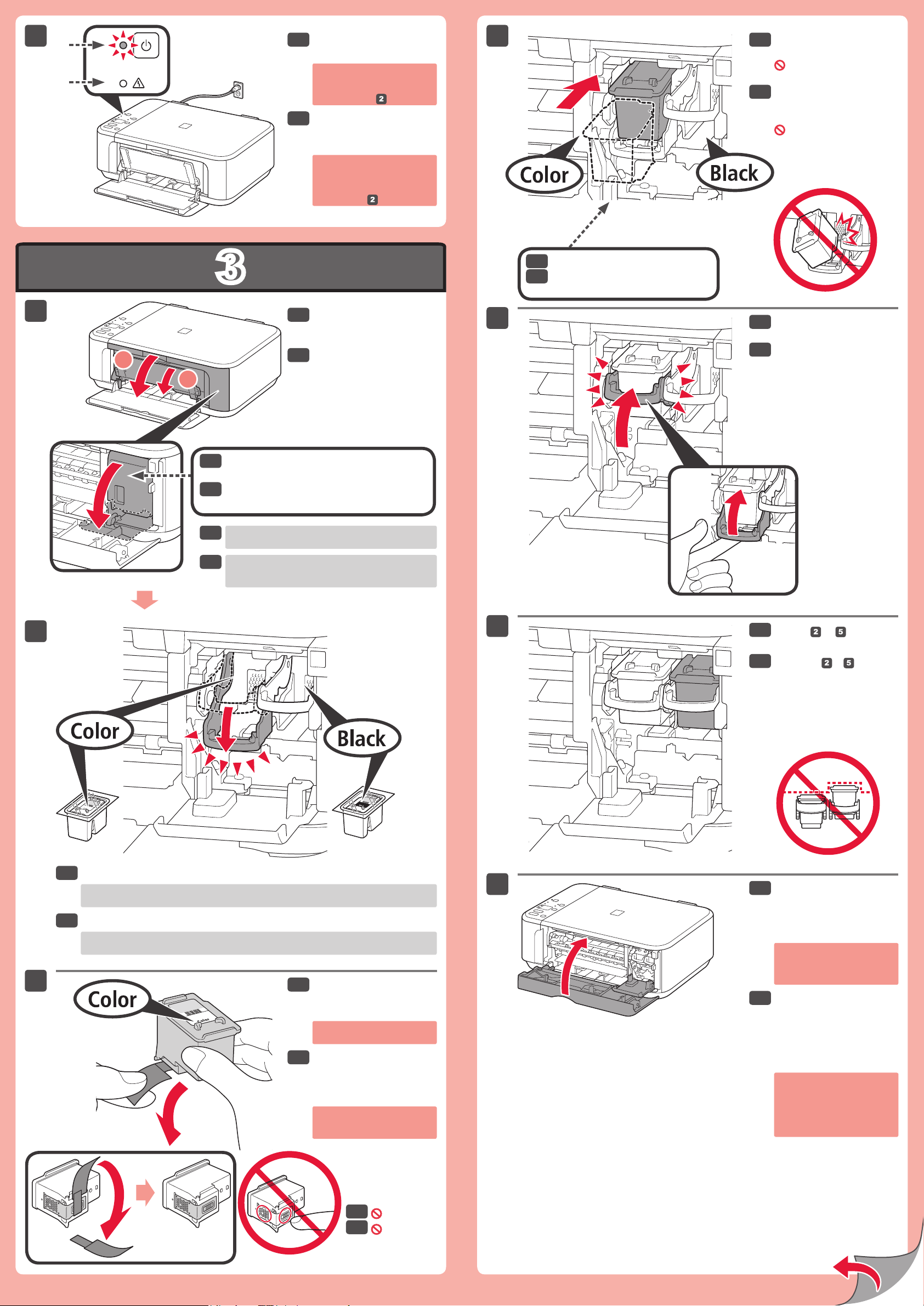
Check that the ON lamp
(A) lights green.
If the Alarm lamp (B) ashes
orange, press the ON button
to turn OFF the machine,
then redo from .
Compruebe que la luz de
ACTIVADO (ON) (A) se
ilumina en verde.
Si la luz de Alarma (Alarm)
parpadea (B) en naranja,
pulse el botón ACTIVADO
(ON) para apagar el equipo y
repita desde .
Insert it straight until it stops.
Insértelo recto hasta que se
detenga.
Insert the FINE Cartridge
until it stops.
Do not knock it against the
sides!
Inserte el cartucho FINE
(FINE Cartridge) hasta
que se detenga.
¡No lo golpee contra los
lados!
Open the Paper Output
Tray and the Paper Output
Cover.
Abra la bandeja de salida
del papel y la tapa de
salida del papel.
Check that the Head Cover has opened
automatically.
Compruebe que la cubierta del cabezal se
ha abierto automáticamente.
If the Head Cover is closed, close the Paper Output
Cover and open it again to open the Head Cover.
Si la cubierta del cabezal está cerrada, cierre la tapa
de salida del papel y vuelva a abrirla para abrir la
cubierta del cabezal.
Lift the Ink Cartridge Lock
Lever.
Levante la palanca de
bloqueo del cartucho de
tinta.
Repeat to to install
the other FINE Cartridge.
Repita de
instalar el otro cartucho
FINE (FINE Cartridge).
a
para
Lower the Ink Cartridge Lock Lever.
The left is where the Color FINE Cartridge is to be installed and the right is where the
Black FINE Cartridge is to be installed.
Baje la palanca de bloqueo del cartucho de tinta.
A la izquierda debe instalarse el cartucho FINE (FINE Cartridge) de color y a la derecha
debe instalarse el cartucho FINE (FINE Cartridge) negro.
Unpack the FINE
Cartridge, then remove the
protective tape.
Be careful of ink on the
protective tape.
Desembale el cartucho
FINE (FINE Cartridge) y
retire la cinta protectora.
Tenga cuidado con la tinta de
la cinta protectora.
Close the Paper Output
Cover.
The ON lamp ashes green for
about 1 minute. Wait until it is
lit, then proceed.
If the Alarm lamp ashes
orange, check that the FINE
Cartridges are installed
correctly.
Cierre la tapa de salida del
papel.
La luz de ACTIVADO (ON)
parpadea en verde durante
aproximadamente 1 minuto.
Espere a que se encienda y
continúe.
Si la luz de Alarma (Alarm)
parpadea en naranja,
compruebe que los cartuchos
FINE (FINE Cartridges) estén
instalados correctamente.
Do not touch!
¡No tocar!
Page 3
4
5
1
2
3
4
5
1
2
1
2
Configuración para papel
normal
Cargar papel
fotográfico
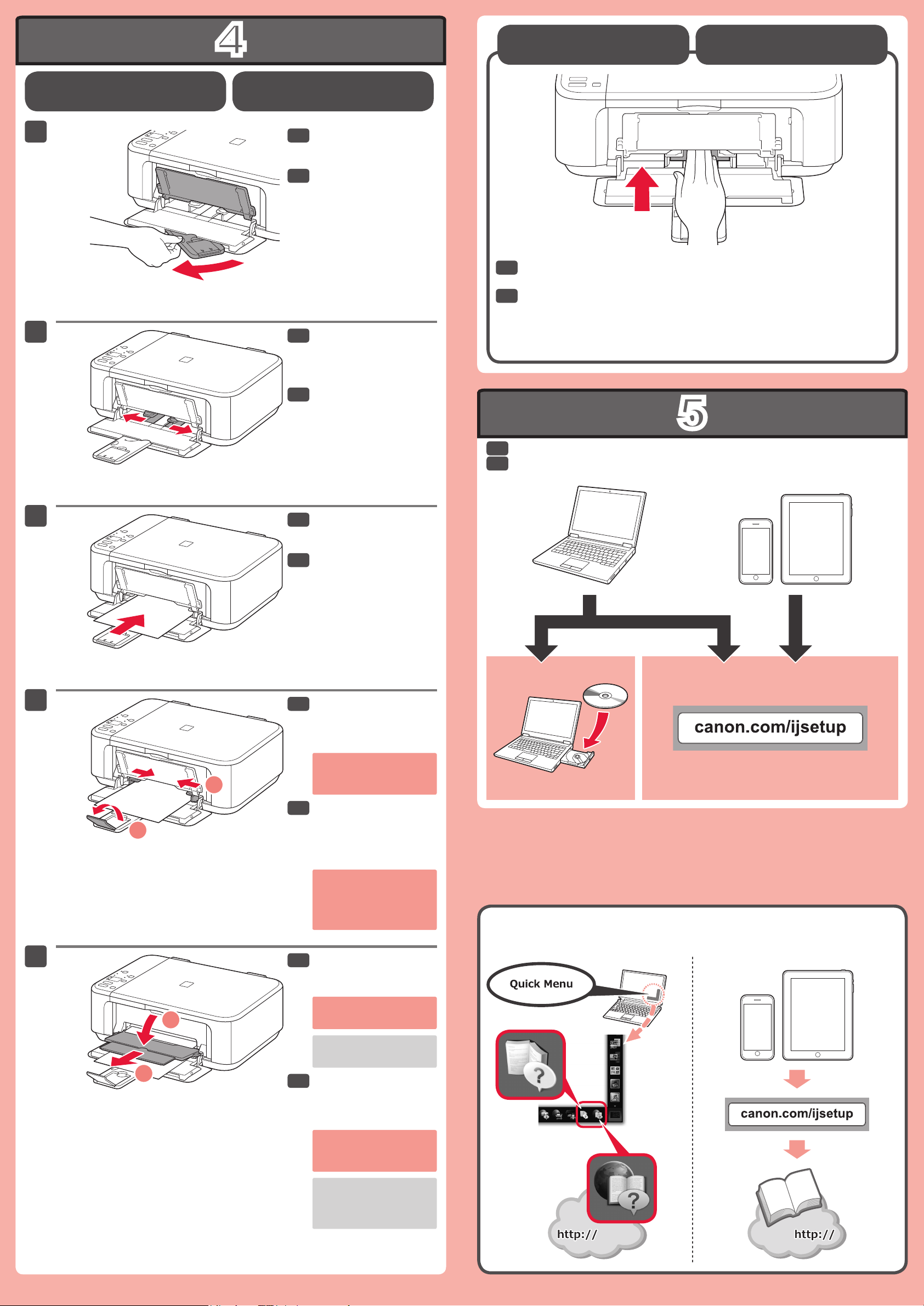
Check that the Paper
Setting Plain Paper
Loading Photo Paper
EN
ES
EN
ES
EN
ES
EN
ES
ENESEN
ESENES
Output Tray is closed, then
pull out the Paper Support.
Compruebe que la bandeja
de salida del papel está
cerrada y extraiga el
soporte del papel.
Slide the right Paper
Guide to the end.
The left Paper Guide moves
simultaneously with the right
guide.
Deslice la guía del papel
derecha hacia el lado.
La guía del papel izquierda se
mueve al mismo tiempo que la
derecha.
When using photo paper, machine settings for media type and size should be
adjusted. For details, refer to the On-screen Manual or Online Manual.
Cuando use papel fotográco, deberá ajustar la conguración del equipo al
tipo y al tamaño del soporte. Para obtener más detalles, consulte el Manual
en pantalla o el Manual en línea.
Install the software on your devices.
Instale el software en sus dispositivos.
Insert paper with the print
side facing down until it
stops.
Inserte el papel con el
lado de impresión hacia
abajo hasta que se
detenga.
Adjust the Paper Guide
to t the paper size used,
then open the Output Tray
Extension.
Do not press the Paper
Guide too tightly against the
edge of the paper. It can
cause paper jams.
Ajuste la guía del papel al
tamaño del papel utilizado
y abra la extensión de la
bandeja de salida.
No presione la guía del papel
demasiado contra el borde
del papel. Puede ocasionar
atascos de papel.
Open the Paper Output
Tray and the Paper Output
Support.
Printing without opening the
Paper Output Tray causes
an error.
For information about paper,
refer to the On-screen
Manual or Online Manual.
Abra la bandeja de salida
del papel y el soporte de
la salida del papel.
Si imprime sin abrir la
bandeja de salida del papel,
provocará un error.
Para obtener más información
sobre el papel, consulte el
Manual en pantalla o el
Manual en línea.
Manuals
Manuales
 Loading...