

Page 1
LV-X4 / 7230
SERIAL FUNCTIONAL SPECIFICATION
History of Modification
Rev. Contents Date Note
New Document
2004.08.03
A New model LV-7230 added 2005.02.10
Page 2

SERIAL FUNCTIONAL SPECIFICATION
CONTENT
1. Overview .......................................................................................................................4
2. Interface Specification..................................................................................................4
3. Connection ....................................................................................................................4
4. Notes for Communication.............................................................................................5
5. Functional Execute Command Table...........................................................................6
6. Status Read Command Table.......................................................................................6
7. Functional Execution Command..................................................................................7
7.1. Format .................................................................................................................... 7
7.2. When the command pipelining is needed .............................................................7
7.3. Transfer Example...................................................................................................7
7.4. Operation Requirements .......................................................................................7
7.5. Power ON Command .............................................................................................8
7.6. Power OFF Command (Quick Power OFF)...........................................................8
7.7. Power OFF Command............................................................................................8
7.8. Computer 1 Command...........................................................................................8
7.9. Computer 2 Command...........................................................................................8
7.10. Video Command ...................................................................................................8
7.11. Volume + Command .............................................................................................8
7.12. Volume - Command..............................................................................................9
7.13. Audio Mute ON Command ..................................................................................9
7.14. Audio Mute OFF Command ................................................................................9
7.15. Video Mute ON Command...................................................................................9
7.16. Video Mute OFF Command .................................................................................9
7.17. Screen Normal size Command ............................................................................9
7.18. Screen Wide size Command.................................................................................9
7.19. Image Standard Command................................................................................10
7.20. Image High contrast Command ........................................................................10
7.21. Image Cinema Command ..................................................................................10
7.22. Custom Command..............................................................................................10
7.23. Image Blackboard (Green) Command...............................................................10
7.24. Menu ON Command ..........................................................................................10
7.25. Menu OFF Command ........................................................................................10
7.26. Display Clear Command....................................................................................10
7.27. Brightness + Command .....................................................................................10
7.28. Brightness - Command ......................................................................................11
7.29. Computer 2 RGB Command.............................................................................. 11
7.30. Image (Toggle) Command..................................................................................11
Item Contents Page 2/18
Page 3

SERIAL FUNCTIONAL SPECIFICATION
7.31. ON Start Setting Command..............................................................................11
7.32. ON Start Cancellation Command ..................................................................... 11
7.33. Power Management Ready Command..............................................................11
7.34. Power Management OFF Command................................................................. 11
7.35. Power Management Shut down Command....................................................... 11
7.36. D.Zoom + Command...........................................................................................12
7.37. D.Zoom - Command............................................................................................12
7.38. Video Auto Command.........................................................................................12
7.39. Video Video Command .......................................................................................12
7.40. Video S-Video Command....................................................................................12
7.41. Pointer Right Command ....................................................................................12
7.42. Pointer Left Command.......................................................................................12
7.43. Pointer Up Command ........................................................................................12
7.44. Pointer Down Command....................................................................................13
7.45. Mouse Right Click Command............................................................................13
7.46. Enter Command.................................................................................................13
7.47. Freeze ON Command.........................................................................................13
7.48. Freeze OFF Command.......................................................................................13
7.49. Computer 1 Analog RGB Command..................................................................13
7.50. Computer 1 Scart Command.............................................................................13
7.51. Computer 1 Component Command...................................................................13
7.52. Page Up Command ............................................................................................14
7.53. Page Down Command........................................................................................14
7.54. Auto PC Adj. Command .....................................................................................14
7.55. Presentation Timer Command ..........................................................................14
7.56. Keystone↑ Command.......................................................................................14
7.57. Keystone↓ Command.......................................................................................14
8. State Read Command.................................................................................................15
8.1. Format ..................................................................................................................15
8.2. Transfer Example.................................................................................................15
8.3. Status Read Command ........................................................................................15
8.4. Input Mode Read Command................................................................................18
8.5. Lamp Time Read Command ................................................................................18
8.6. Setting Read Command .......................................................................................18
8.7. Temp Read Command ..........................................................................................18
Item Contents Page 3/18
Page 4
SERIAL FUNCTIONAL SPECIFICATION
1. Overview
1.1. This Specification defines projector control commands for LV-X4 / 7230 (0.8”XGA model).
1.2. The projector control commands are for controlling projector through RS232C from a
computer.
2. Interface Specification
Item Specification
Shynchro system Asynchronous
Transmission Speed 9600 / 19200
Data Length 8 bit
Parity None
Stop Bit 1
Flow Control None
1. Transfer rate: initial setting value is 19200
2. Transfer rate can be changed by service mode
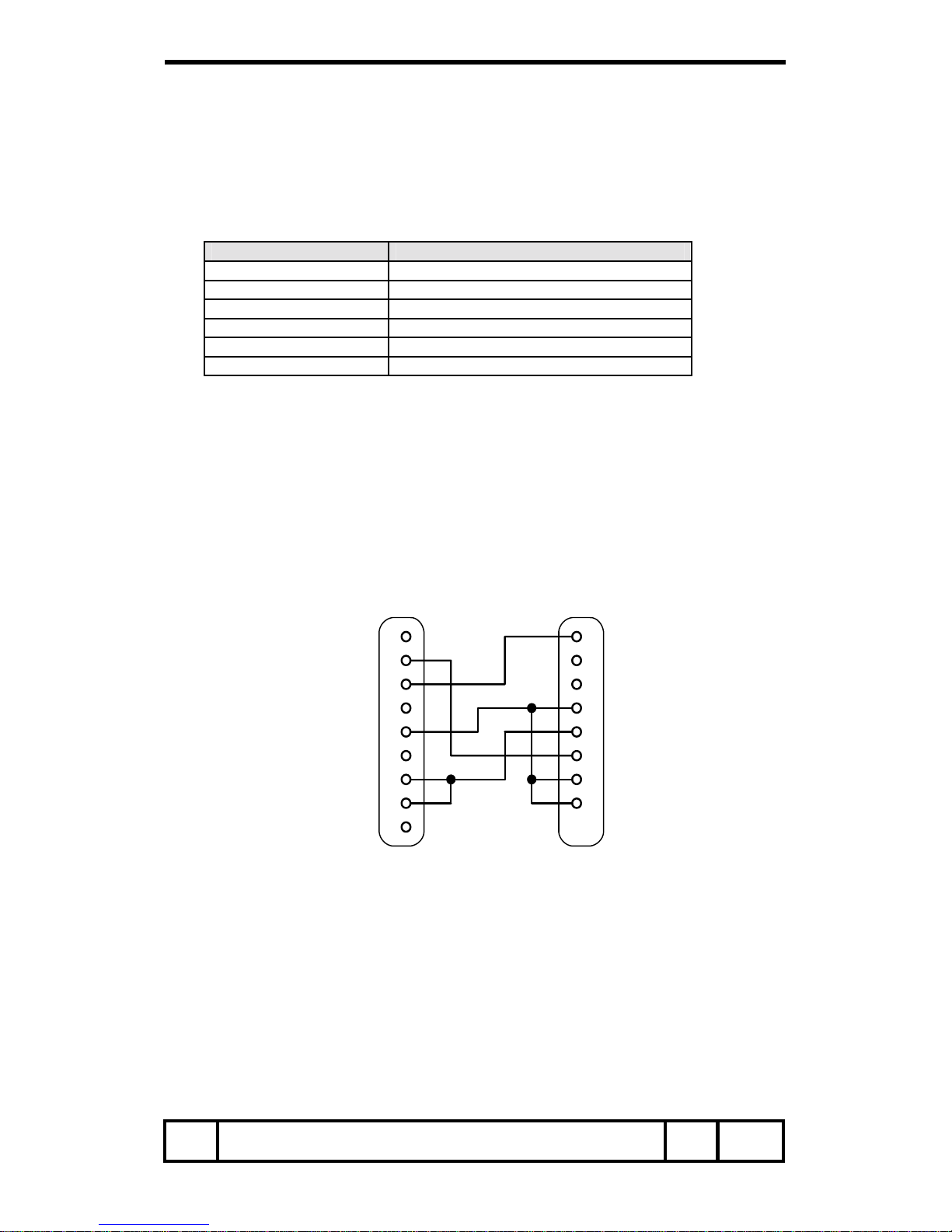
3. Connection
The serial cable that is specified in the specification as below must be used for a connection to a
computer and a projector.
PC Projector
COM 1 SERVICE PORT
1
2
3
4
5
6
7
8
9
1
2
3
4
5
6
7
8
CD
SG
RXD
TXD
DTR
DSR
RTS
CTS
RING
(D-Sub 9 Pin) (Mini-DIN 8 Pin)
Item Overview Page 4/18
Page 5

SERIAL FUNCTIONAL SPECIFICATION
4. Notes for Communication
4.1. The projector command is defined one command/one line that starts “ C” and ends carriage
return (0x0D).
4.2. The projector starts decoding after the carriage return.
4.3. There are two types of command, functional execution commands and state read commands.
Example of Functional Execution Command: “C05” [CR]
Example of State Read Command: “CR0” [CR]
4.4. It clears information of accepting buffer as following terms.
1. When a projector receives LF (0xoA) or EOF (0x1A)
2. When it takes more than one second to receive on e command
(Until the projector receives the carriage return after the projector receives the first data)
4.5. When control command pipelining, after the response, wait interval of time as below.
1. COMMAND such as ”VOLUME +/-“! 100ms
2. Other COMMAND! 500ms
4.6. Wait at least 500 ms after the response, when status read command pipelining.
4.7. Do not issue any command before the Response.
When there is no response after 5 seconds, issue next command.
4.8. It takes about 7 seconds for internal initialization after plugging in AC. During this time, it
cannot process command. Do not issue any commands.
4.9. 7 seconds after Power ON from Standby, even when a projector receives a command, a
computer receives acceptable response, but it does not execute for internal initialization and
lamp lighting process. However, Status Read Commands are executed after 500ms when
they receive acceptable response.
4.10. About performance during processing count down or cooling down.
When a projector receives After Stand By or Power ON, Even when a projector receives a
command, a computer receives response to accept the command, but it does not execute
for internal initialization and lamp lighting process. However, Status Read Commands
are executed.
4.11. About performance when changing INPUT.
After receiving INPUT switching command, when receiving commands between 5 seconds
from starting the switching to completing the switching, a computer receives acceptable
command, but it is not executed.
However, status read commands are executed after a computer receives response to
accept the command, after 500ms.
4.12. Response for Status Read Command after accepting has different characters.
See ”Status Read Command Table”.
4.13. Characters for commands must be Capital (A - Z).
Item Notes for Communication Page 5/18
Page 6
SERIAL FUNCTIONAL SPECIFICATION
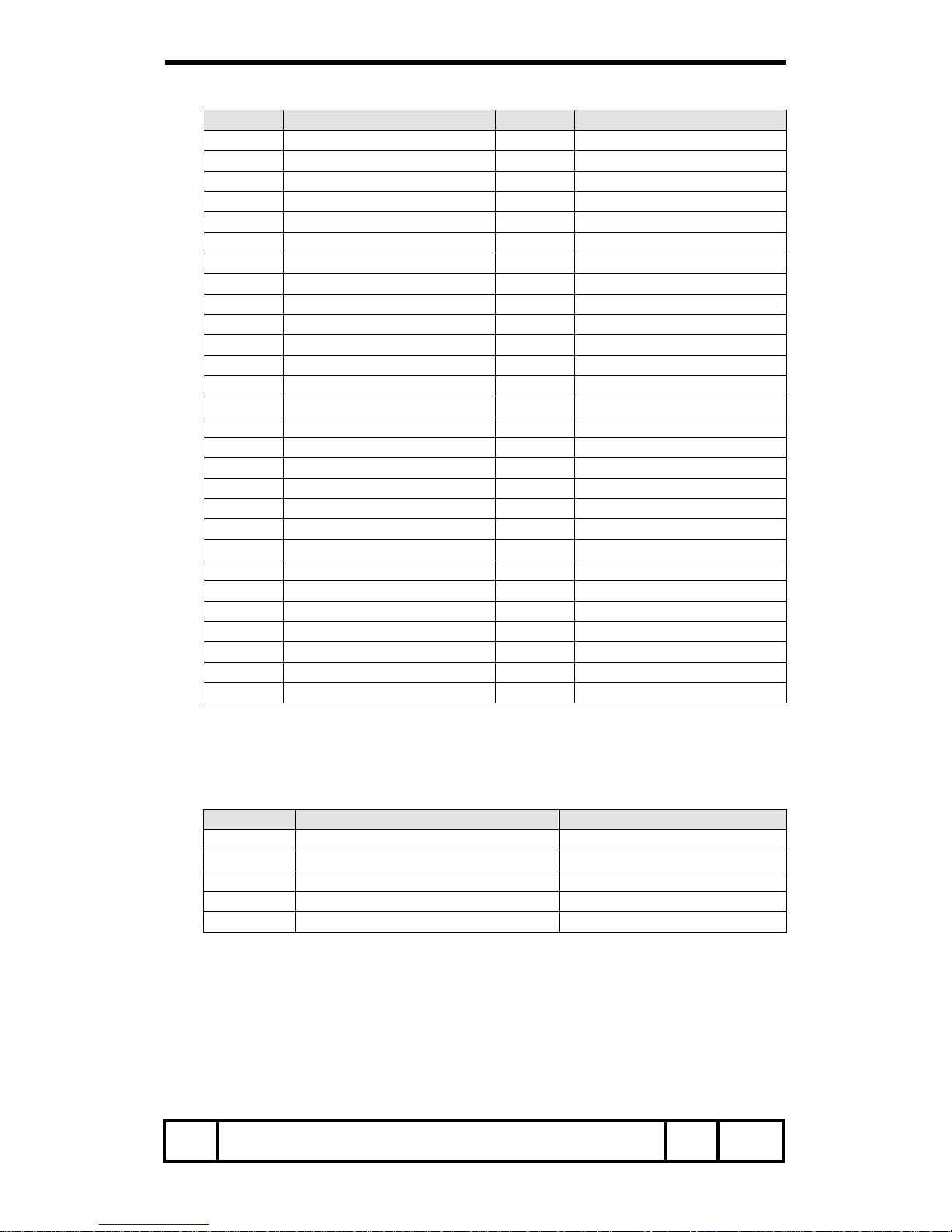
5. Functional Execution Command Table
Command
Item
Command Item
C00 Power ON C2A Power Management Ready
C01 Power OFF (Quick Power OFF) C2B Power Management OFF
C02 Power OFF C2E Power Management Shut down
C05 Computer 1 C30 D.Zoom +
C06 Computer 2 C31 D.Zoom C07 Video C32 Video_ Auto
C09 Volume + C33 Video_ Video
C0A Volume - C34 Video_ S-Video
C0B Audio Mute ON C3A Pointer Right
C0C Audio Mute OFF C3B Pointer Left
C0D Video Mute ON C3C Pointer Up
C0E Video Mute OFF C3D Pointer Down
C0F Screen Normal size (4:3) C3E Mouse Right Click
C10 Screen Wide size (16:9) C3F Enter
C11 Image_ Standard C43 Freeze ON
C12 Image_ High contrast C44 Freeze OFF
C13 Image_ Cinema C50 Computer 1_ Analog RGB
C14 Image_ Custom C51 Computer 1_ Scart
C18 Image_ Blackboard (Green) C54 Computer 1_ Component
C1C Menu ON C59 Page Up
C1D Menu OFF C5A Page Down
C1E DISPLAY CLEAR C89 Auto PC Adj.
C20 Brightness + C8A Presentation Timer
C21 Brightness - C8E
Keystone↑
C25 Computer 2_ RGB C8F
Keystone↓
C27 Image (Toggle)
C28 ON Start Enable
C29 ON Start Disable
6. Status Read Command Table
Command
Function Note
CR0 Status Read
CR1 Input Mode Read
CR3 Lamp Time Read
CR4 Setting Read
CR6 Temp Read
Item Functional Execution & Status Read Command Table Page 6/18
Page 7
SERIAL FUNCTIONAL SPECIFICATION
7. Functional Execution Command
7.1. Format
1. PC issues a command as below form at
“C” COMMAND [CR]
COMMAND: 2 characters (See Functional Execution Command Table)
2. A projector decodes received data and sends a return result after being ready to
receive next command.
[ACK] [CR]: (0x06, 0x0D) When received functional execution commands.
“?” [CR]: When cannot read received data.
7.2. When the command pipelining is needed
When some functions need command pipelining, the performance is the same as the
remote control’s performance.
1. System: issue any commands every 100ms after receiving response
2. When receiving any relevant command, the function is executed continuously for
120ms.
3. When receiving the same command continuously, with 120ms, the function is executed
for 120ms form the moment.
4. The next command is not issued after 120ms, and the execution is stopped.
5. If the projector receives other incoming commands within 120ms, the execution is
stopped.
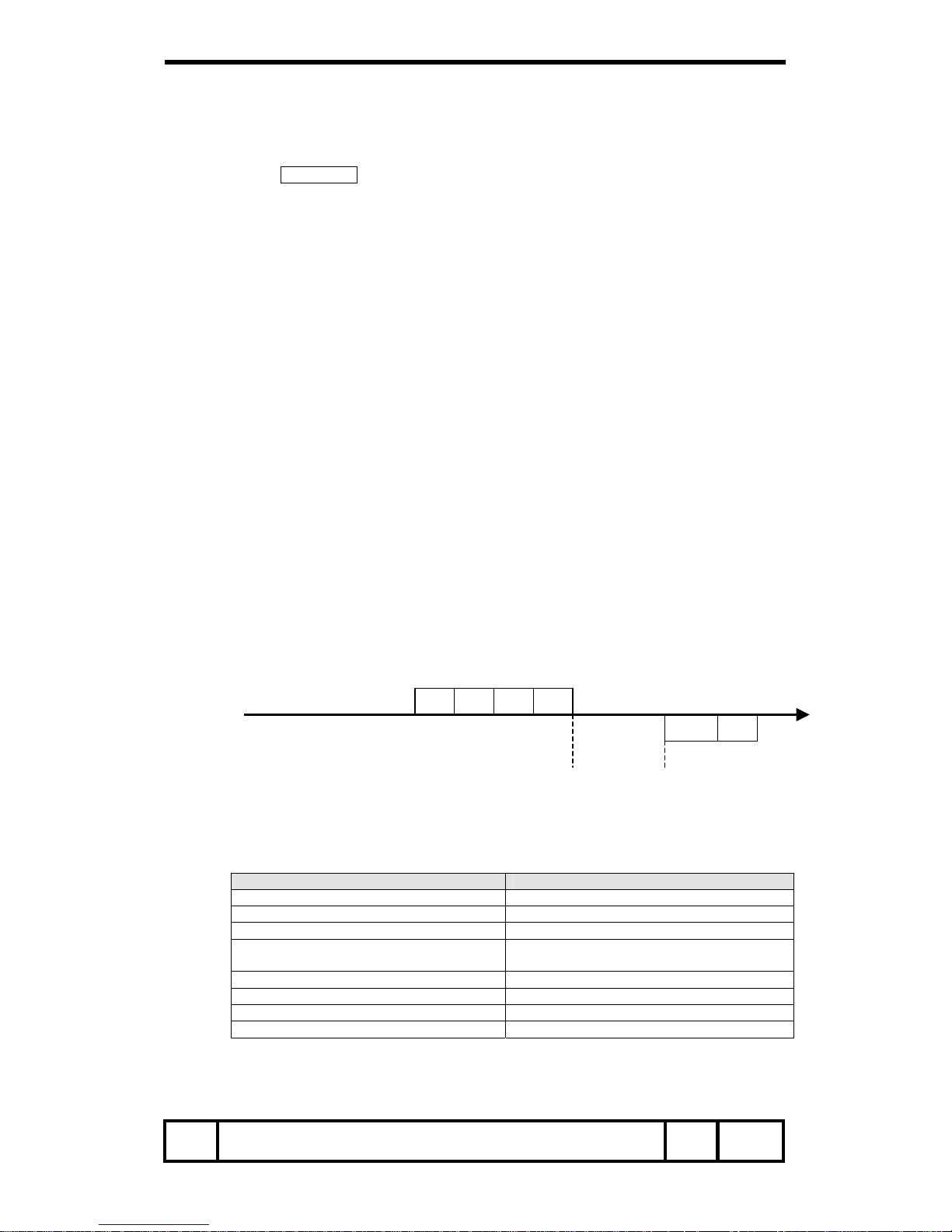
7.3. Transfer Example
Change to Video mode with Basic Command
Command
PC → Projector “C” “0” “7” CR
Projector → PC ACK CR
Processing
(A few ms--1s)
7.4. Operation Requirements
When the projector’s status in this below, functional execution commands are limited.
Status Read Commands are available even in this table status.
Projector Status Available Functional Execution Commands
Standby Mode C00: Power ON
Processing Countdown C00: Power ON (Terminate Countdown)
Processing Cooling Down N/A
Processing Cooling Down due to abnormal
temperature
N/A
Abnormal Temperature Status N/A
Processing Mode Change N/A
Processing Power Save/Cooling Down N/A
Processing Power Save C00: Power ON, C01: Power OFF
Note) When the status is above, even if the projector receives other command
in the above status, the projector returns [ACK] [CR].
Item Functional Execution Command
Page 7/18
Page 8
SERIAL FUNCTIONAL SPECIFICATION
7.5. Power ON Command
Command “C00” [CR]
Detail
Power ON
When already Power ON, no need to do.
When sending this command during processing Count Down, Count Down is
terminated.
Acceptable [ACK] [CR]
Response
Unacceptable “?” [CR]
7.6. Power OFF Command (Quick Power OFF)
Command “C01” [CR]
Detail
Power OFF (Standby)
When Power OFF with POWER button of the projector or the remote control,
“Power OFF” will be displayed. However, as soon as this command is sent,
Quick Power OFF is executed.
Acceptable [ACK] [CR]
Response
Unacceptable “?” [CR]
7.7. Power OFF Command
Command “C02” [CR]
Detail
Power OFF (Standby)
When Power OFF with ON-OFF button of the projector or the remote control,
“Power OFF” will be displayed. However, as soon as this command is sent,
Power OFF is executed.
Acceptable [ACK] [CR]
Response
Unacceptable “?” [CR]
7.8. Computer 1 Command
Command “C05” [CR]
Detail Select Computer 1 input
Acceptable [ACK] [CR]
Response
Unacceptable “?” [CR]
7.9. Computer 2 Command
Command “C06” [CR]
Detail Select Computer 2 input
Acceptable [ACK] [CR]
Response
Unacceptable “?” [CR]
7.10. Video Command
Command “C07” [CR]
Detail Select Video input
Acceptable [ACK] [CR]
Response
Unacceptable “?” [CR]
7.11. Volume + Command
Command “C09” [CR]
Detail
Volume Up
This Command works same as “VOLUME +” of the projector and the remote
control.
Acceptable [ACK] [CR]
Response
Unacceptable “?” [CR]
Item Functional Execution Command
Page 8/18
Page 9
SERIAL FUNCTIONAL SPECIFICATION
7.12. Volume - Command
Command “C0A” [CR]
Detail
Volume Down
This Command works same as “VOLUME -” of the projector and the remote
control.
Acceptable [ACK] [CR]
Response
Unacceptable “?” [CR]
7.13. Audio Mute ON Command
Command “C0B” [CR]
Detail
Sound Mute ON
This command works same as “MUTE” of the projector and the remote control,
but this command does not work for “MUTE OFF”.
Acceptable [ACK] [CR]
Response
Unacceptable “?” [CR]
7.14. Audio Mute OFF Command
Command “C0C” [CR]
Detail
Sound Mute OFF
This command works the same as “MUTE” of the Remote Control button for
MUTE OFF, but does not work for “MUTE ON”.
Acceptable [ACK] [CR]
Response
Unacceptable “?” [CR]
7.15. Video Mute ON Command
Command “C0D” [CR]
Detail
Video Mute ON
This command works same as “NO SHOW” of the remote control, but does not
work for “NO SHOW OFF”.
Acceptable [ACK] [CR]
Response
Unacceptable “?” [CR]
7.16. Video Mute OFF Command
Command “C0E” [CR]
Detail
Video Mute OFF
This command works the same as “NO SHOW” of the remote control for Video
Mute OFF, but does not work for “No Show ON”.
Acceptable [ACK] [CR]
Response
Unacceptable “?” [CR]
7.17. Screen Normal size Command
Command “C0F” [CR]
Detail Set video screen size to Normal (4:3)
Acceptable [ACK] [CR]
Response
Unacceptable “?” [CR]
7.18. Screen Wide size Command
Command “C10” [CR]
Detail Set video screen size to Wide (16:9)
Acceptable [ACK] [CR]
Response
Unacceptable “?” [CR]
Item Functional Execution Command
Page 9/18
Page 10
SERIAL FUNCTIONAL SPECIFICATION
7.19. Image_ Standard Command
Command “C11” [CR]
Detail Set Image to Standard Mode
Acceptable [ACK] [CR]
Response
Unacceptable “?” [CR]
7.20. Image_ High contrast Command
Command “C12” [CR]
Detail Set Image to High contrast Mode
Acceptable [ACK] [CR]
Response
Unacceptable “?” [CR]
7.21. Image_ Cinema Command
Command “C13” [CR]
Detail Set Image to Cinema Mode
Acceptable [ACK] [CR]
Response
Unacceptable “?” [CR]
7.22. Image_ Custom Command
Command “C14” [CR]
Detail Set Image to Custom Mode
Acceptable [ACK] [CR]
Response
Unacceptable “?” [CR]
7.23. Image_ Blackboard (Green) Command
Command “C18” [CR]
Detail Set Image to Blackboard (Green) Mode
Acceptable [ACK] [CR]
Response
Unacceptable “?” [CR]
7.24. Menu ON Command
Command “C1C” [CR]
Detail Display Menu of On Screen Display
Acceptable [ACK] [CR]
Response
Unacceptable “?” [CR]
7.25. Menu OFF Command
Command “C1D” [CR]
Detail Clear Menu of On Screen Display
Acceptable [ACK] [CR]
Response
Unacceptable “?” [CR]
7.26. Display Clear Command
Command “C1E” [CR]
Detail
Clear the On Screen Display
Clear the On screen Display unconditionally
Acceptable [ACK] [CR]
Response
Unacceptable “?” [CR]
7.27. Brightness + Command
Command “C20” [CR]
Detail Brightness of user control +1
Acceptable [ACK] [CR]
Response
Unacceptable “?” [CR]
Item Functional Execution Command
Page 10/18
Page 11
SERIAL FUNCTIONAL SPECIFICATION
7.28. Brightness - Command
Command “C21” [CR]
Detail Brightness of user control -1
Acceptable [ACK] [CR]
Response
Unacceptable “?” [CR]
7.29. Computer 2_ RGB Command
Command “C25” [CR]
Detail Select Computer 2-RGB input
Acceptable [ACK] [CR]
Response
Unacceptable “?” [CR]
7.30. Image (Toggle) Command
Command “C27” [CR]
Detail
Switch Image setting status
This command works the same as the remote control’s “IMAGE” button.
Acceptable [ACK] [CR]
Response
Unacceptable “?” [CR]
7.31. ON Start Enable Command
Command “C28” [CR]
Detail
Set to Power ON Start
This status is stored in EEPROM, so even if turning off and on.
Acceptable [ACK] [CR]
Response
Unacceptable “?” [CR]
7.32. ON Start Disable Command
Command “C29” [CR]
Detail
Clear to Power ON Start
This status is stored in EEPROM, so even if turning off and on.
Acceptable [ACK] [CR]
Response
Unacceptable “?” [CR]
7.33. Power Management Ready Command
Command “C2A” [CR]
Detail
Set Power Management to Ready mode.
This status is stored in EEPROM, so even if turning off and on.
Acceptable [ACK] [CR]
Response
Unacceptable “?” [CR]
7.34. Power Management OFF Command
Command “C2B” [CR]
Detail
Set Power Management to OFF mode.
This status is stored in EEPROM, so even if turning off and on.
Acceptable [ACK] [CR]
Response
Unacceptable “?” [CR]
7.35. Power Management Shut down Command
Command “C2E” [CR]
Detail
Set Power Management to Shut down mode.
This status is stored in EEPROM, so even if turning off and on.
Acceptable [ACK] [CR]
Response
Unacceptable “?” [CR]
Item Functional Execution Command
Page 11/18
Page 12
SERIAL FUNCTIONAL SPECIFICATION
7.36. D.Zoom + Command
Command “C30” [CR]
Detail
Moving on to Digital Zoom Mode and make the screen image bigger.
This command works the same as the remote control’s “D.ZOOM UP” button.
Acceptable [ACK] [CR]
Response
Unacceptable “?” [CR]
7.37. D.Zoom - Command
Command “C31” [CR]
Detail
Moving on to Digital Zoom Mode and make the screen image smaller.
This command works the same as the remote control’s “ZOOM DOWN” button.
Acceptable [ACK] [CR]
Response
Unacceptable “?” [CR]
7.38. Video_ Auto Command
Command “C32” [CR]
Detail Select Auto input for Video.
Acceptable [ACK] [CR]
Response
Unacceptable “?” [CR]
7.39. Video_ Video Command
Command “C33” [CR]
Detail Select Video input for Video.
Acceptable [ACK] [CR]
Response
Unacceptable “?” [CR]
7.40. Video_ S-Video Command
Command “C34” [CR]
Detail Select S-Video input for Video.
Acceptable [ACK] [CR]
Response
Unacceptable “?” [CR]
7.41. Pointer Right Command
Command “C3A” [CR]
Detail
Move Pointer to right On Screen Display.
This command works the same as the Remote Control’s “>” button.
Acceptable [ACK] [CR]
Response
Unacceptable “?” [CR]
7.42. Pointer Left Command
Command “C3B” [CR]
Detail
Move Pointer to right On Screen Display.
This command works the same as the Remote Control’s “<” button.
Acceptable [ACK] [CR]
Response
Unacceptable “?” [CR]
7.43. Pointer Up Command
Command “C3C” [CR]
Detail
Move Pointer to UP On Screen Display.
This command works the same as the Remote Control’s “UP” button.
Acceptable [ACK] [CR]
Response
Unacceptable “?” [CR]
Item Functional Execution Command
Page 12/18
Page 13
SERIAL FUNCTIONAL SPECIFICATION
7.44. Pointer Down Command
Command “C3D” [CR]
Detail
Move Pointer to Down On Screen Display.
This command works the same as the Remote Control’s “DOWN” button.
Acceptable [ACK] [CR]
Response
Unacceptable “?” [CR]
7.45. Mouse Right Click Command
Command “C3E” [CR]
Detail
This command works the same as the Remote Control’s “MOUSE RIGHT
CLICK” button.
Acceptable [ACK] [CR]
Response
Unacceptable “?” [CR]
7.46. Enter Command
Command “C3F” [CR]
Detail
This command works the same as the Projector and Remote Control’s “SET”
button.
Acceptable [ACK] [CR]
Response
Unacceptable “?” [CR]
7.47. Freeze ON Command
Command “C43” [CR]
Detail
Make the Freeze screen.
This command works the same as the Remote Control’s FREEZE” button.
Do not work the Freeze OFF.
Acceptable [ACK] [CR]
Response
Unacceptable “?” [CR]
7.48. Freeze OFF Command
Command “C44” [CR]
Detail
Clear to Freeze screen.
このコマンドは、RC 送信器の「FREEZE」ボタンで Freeze ON 状態を解除する
時と同じ動作であるが、Freeze OFF の一方向で Freeze ON はしない。
Acceptable [ACK] [CR]
Response
Unacceptable “?” [CR]
7.49. Computer 1_ Analog RGB Command
Command “C50” [CR]
Detail Select Computer-1 of Analog RGB input.
Acceptable [ACK] [CR]
Response
Unacceptable “?” [CR]
7.50. Computer 1_ Scart Command
Command “C51” [CR]
Detail Select Computer-1 of Scart input.
Acceptable [ACK] [CR]
Response
Unacceptable “?” [CR]
7.51. Computer 1_ Component Command
Command “C54” [CR]
Detail Select Computer-1 of Component input.
Acceptable [ACK] [CR]
Response
Unacceptable “?” [CR]
Item Functional Execution Command
Page 13/18
Page 14
SERIAL FUNCTIONAL SPECIFICATION
7.52. Page Up Command
Command “C59” [CR]
Detail Page Up for PowerPoint when PC and USB are connected.
Acceptable [ACK] [CR]
Response
Unacceptable “?” [CR]
7.53. Page Down Command
Command “C5A” [CR]
Detail Page Down for PowerPoint when PC and USB are connected.
Acceptable [ACK] [CR]
Response
Unacceptable “?” [CR]
7.54. Auto PC Adj. Command
Command “C89” [CR]
Detail
Execute Auto PC Adj. command.
This command works the same as a remote control’s “AUTO PC ” button.
While Auto PC Adj. is working and a computer issues another command, Auto
PC Adj. stops.
Acceptable [ACK] [CR]
Response
Unacceptable “?” [CR]
7.55. Presentation Timer Command
Command “C8A” [CR]
Detail
Set a presentation timer to active.
This command works the same as the remote control’s “P-TIMER” button.
Acceptable [ACK] [CR]
Response
Unacceptable “?” [CR]
7.56. Keystone↑ Command
Command “C8E” [CR]
Detail Adjust keystone. Make the screen image length at the top edge shorter.
Acceptable [ACK] [CR]
Response
Unacceptable “?” [CR]
7.57. Keystone↓ Command
Command “C8F” [CR]
Detail Adjust keystone. Make the screen image length at the bottom edge shorter.
Acceptable [ACK] [CR]
Response
Unacceptable “?” [CR]
Item Functional Execution Command
Page 14/18
Page 15
SERIAL FUNCTIONAL SPECIFICATION
8. Status Read Command
8.1. Format
1. A PC issues commands fin format as below.
“CR” COMMAND [CR]
COMMAND: 1 character (See Status Read Command Table)
2. When a projector receives the appropriate command, it returns a character line as the
required data.
Required Data [CR]
Required Data: A character line (See Status Read Command Table)
3. When receiving data cannot be decode, the projector returns, “?” [CR].
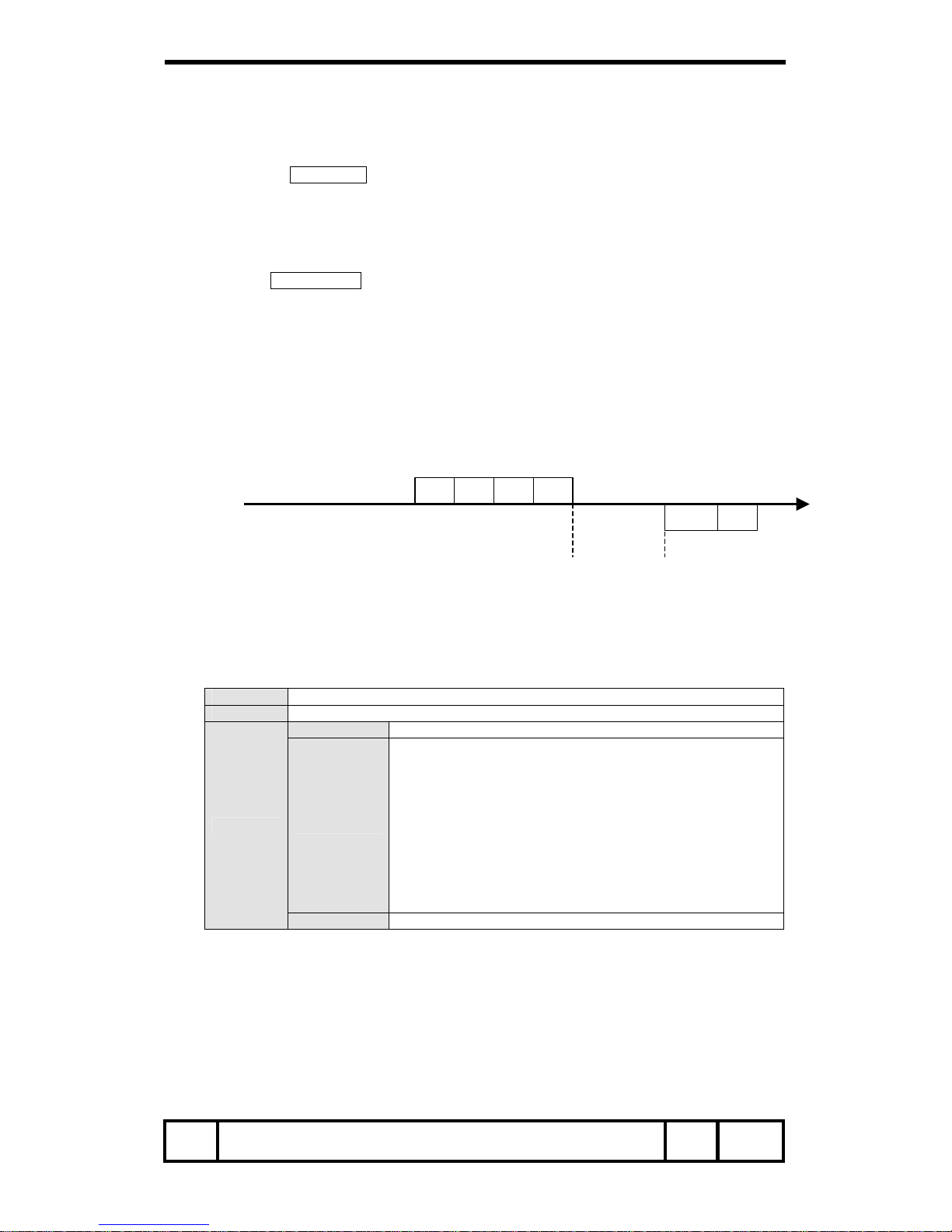
8.2. Transfer Example
Get input mode for the projector by commands.
Command (current input mode command issue)
PC → Projector “C” “R” “1” CR
Projector → PC “1” CR
←―――→
Response
(A few ms--1s)
(Shows
Computer 1 is selected)
8.3. Status Read Command
Command “CR0” [CR]
Detail Get the projector status.
Acceptable “%1” [CR]
%1
“00” = Power ON
“80” = Standby
“40” = Processing Count Down
“20” = Processing Cooling Down
“10” = Power Failure
“28” = Processing cooling down due to abnormal temperature
“08” = Abnormal Temperature
“88” = Normal after recovering abnormal temperature
“02” = Cannot accept RS232C command
“24” = Processing Cooling Down for Power Save
“04” = Power Save
Response
Unacceptable “?” [CR]
{Response Detail}
8.3.1. “00” [CR]
Status: Power ON
The image is displayed normally.
Item Status Read Command
Page 15/18
Page 16

SERIAL FUNCTIONAL SPECIFICATION
8.3.2. “80” [CR]
Status: Standby
When the status is Standby, Status Read Commands are always acceptable, but
Functional Execution Commands are not acceptable except Power ON Command.
8.3.3. “40” [CR]
Status: Processing Count down
When “Display” in Setting Menu is ON and Power ON is executed, it starts
processing Count Down.
When “Display” OFF in the setting menu is set, processing Count Down is skipped
and the status moves to Power ON quickly.
8.3.4. “20” [CR]
Status: Processing Cooling
When status is Power ON, and Power OFF Command is executed, it moves to
cooling status.
This cooling status automatically moves on to Standby after the lamp turns off and
the fan spin for about 90seconds.
This cooling down works for lamps and other optical accessories.
Control commands are not available for this status.
8.3.5. “10” [CR]
Status: Abnormal power
When the power supply voltage inside the projector reaches abnormal, the power
will be automatically turned off. The projector returns “10” [CR] and cooling fan is
also stopped at the time.
8.3.6. “28” [CR]
Status: Processing Cooling Down by abn ormal temperature
When the temperature inside a projector is out of the operating temperature, it
automatically starts cooling down. Response is “28” [CR].
Even if the temperature is processing low, the cooling down is executed.
8.3.7. “08” [CR]
Status: Abnormal temperature
When the temperature does not go down after cooling down due to the abnormal
temperature, this is the Response. The projector keeps the Standby status.
8.3.8. “88” [CR]
Status: Normal status after recovering abnormal temperature
When the temperature goes down after cooling down and moving to Standby status,
this is the response.
This status keeps until the next operation. In short, when Power On is executed, the
temperature information is canceled, and works normal.
Item Status Read Command
Page 16/18
Page 17
SERIAL FUNCTIONAL SPECIFICATION
8.3.9. “02” [CR]
Status: RS232C Command is unacceptable
When a computer receives this response, try to execute Status Read Command
again.
8.3.10. “24” [24]
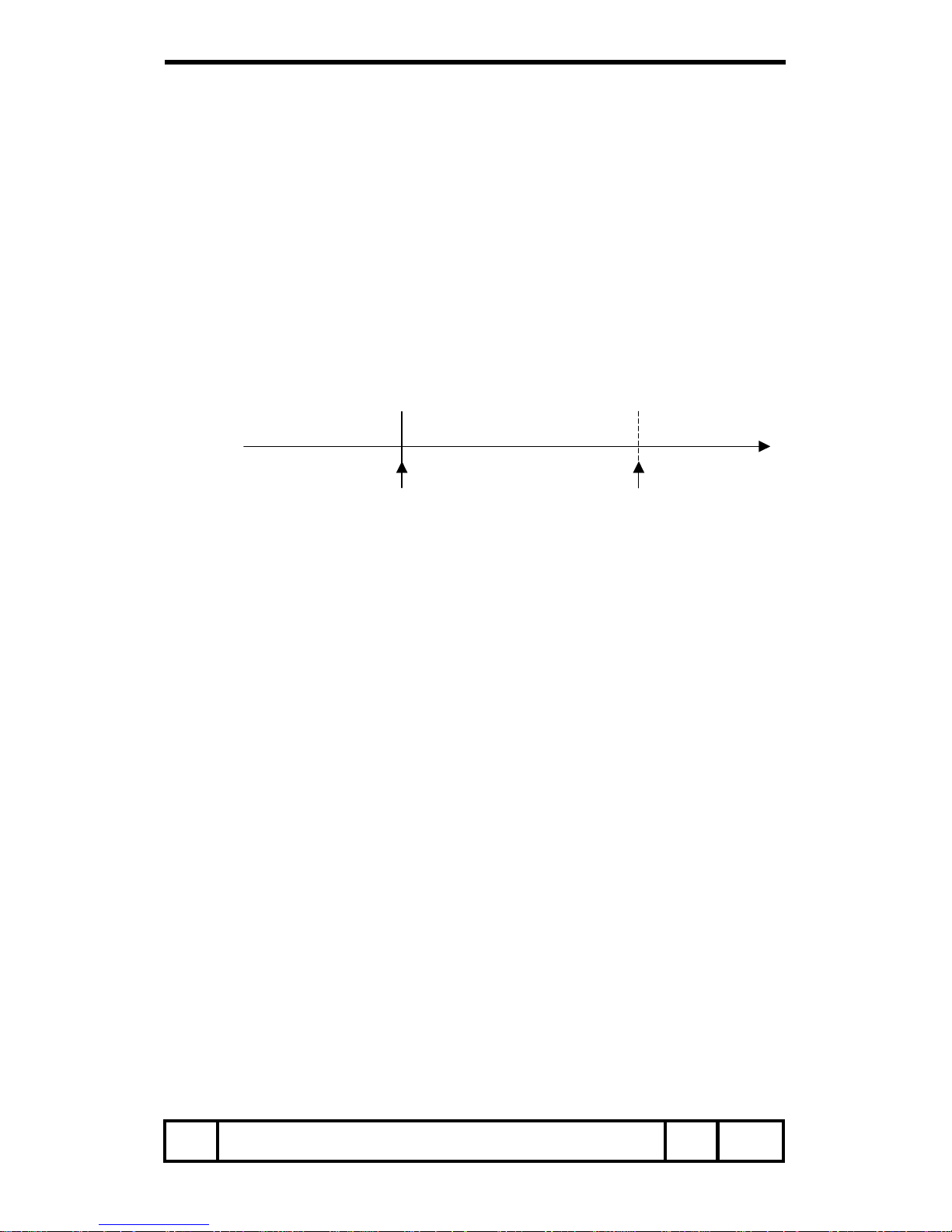
Status: Processing cooling down by power save
When Power Management function is ON in setting menu and there is no signal for
5 minutes, it moves on to Power Save/Cooling Down after tuning off the lamps.
(During this process, Green LED is OFF)
The control command is invalid.
After this cooling down continues for about 90 seconds, it moves on to power save.
(Green LED flashes)
Status: No signal Cooling down by power save Power save
Response: “00” “24” “04”
After 5 minutes with no signal After about 90 seconds
8.3.11. “04” [CR]
Status: Power Save
When the Power Management function is ON in setting menu, and there is no
signal for 5 minutes, it moves on to power save status after power save and cooling
down.
Control commands as below are available in this status.
*Power ON Command: “C00” [CR] --------- Move on the status of power on
*Power OFF Command: “C01” [CR] -------- Move on the status of standby
Moving on to the status of Power ON is the same action as moving on to the Power
ON from the status of normal standby.
Item Status Read Command
Page 17/18
Page 18
SERIAL FUNCTIONAL SPECIFICATION
Item Status Read Command
Page 18/18
8.4. Input Mode Read Command
Command “CR1” [CR]
Detail Get selected Input mode
Acceptable “%1” [CR]
%1
“1” = Computer-1 is selected
“2” = Computer-2 is selected
“3” = Video is selected
Response
Unacceptable “?” [CR]
8.5. Lamp Time Read Command
Command “CR3” [CR]
Detail Get total lamp running hours
Acceptable “%1” [CR]
%1
Show as 4 digits.
Ex.: “0410” [CR] !410 hours
Response
Unacceptable “?” [CR]
8.6. Setting Read Command
Command “CR4” [CR]
Detail Get setting status for screen such as Ceiling / Rear
Acceptable “%1” [CR]
%1
“11” [CR] = Normal Screen Setting
“10” [CR] = Flip vertical image (Rear&Ceiling ON)
“01” [CR] = Flip horizontal image (Rear ON)
“00” [CR] = Flip vertical & horizontal image (Ceiling ON)
Response
Unacceptable “?” [CR]
8.7. Temp Read Command
Command “CR6” [CR]
Detail
Get the temperature inside a projector.
When some temperature sensors are installed in the projector, it is possible to
know the temperature all at once.
Acceptable “%1_%2_%3” [CR]
%1, %2, %3
%1 = Temperature, sensor 1
%2 = Temperature, sensor 2
%3 = Temperature, sensor 3
Temperature data form shows as 00.0.
When the temperature sinks to -, the first character is “-” like
“-05.5” [CR].
When cannot return the temperature data due to hardware
problems, the first character is “E” like ”E00.0” [CR].
When some temperature sensors are installed, the projector
sends command continuously.
“_31.5__35.2__33.4” [CR]
There is the first sensor’s information, and after one space,
there is the second sensor’s information.
Response
Unacceptable “?” [CR]
 Loading...