

Page 1
ADVANCED
AIO PERFORMER
• UFRII Lt Print Technology for
no wait-time
• 30ppm print & copy speed
• 50-sheet Duplex ADF
• 128MB RAM shared memory
• Quick First Print (QFP)
within 8 seconds
• Network-ready
HIGH RELIABILITY
• Low power save mode
(approximately 3W)
• Save 50% & more paper with
Auto-Duplex print & copy
• Toner-save mode for longer
lasting supply
• On-Demand Fixing Technology
• No separate parts, no waste
with all-in-one Cartridge 320
• Energy Star & RoHS compliant
ECO-FRIENDLY
SOLUTIONS
Laser Multi-Function Printer
D 1 1 5 0
Living with Canon Eco-Office MFP
BE RESILIENT IN BUSINESS
WITH A RELIABLE PARTNER WHO DELIVERS
• Up to 20,000 pages monthly
duty cycle***
• Up to 5000 pages yield**
of cartridge
• On-Demand Fixing Technology
• Super-G3 FAX speed
with UHQ
TM
• Department ID Management
Page 2
A New Class of Reliability
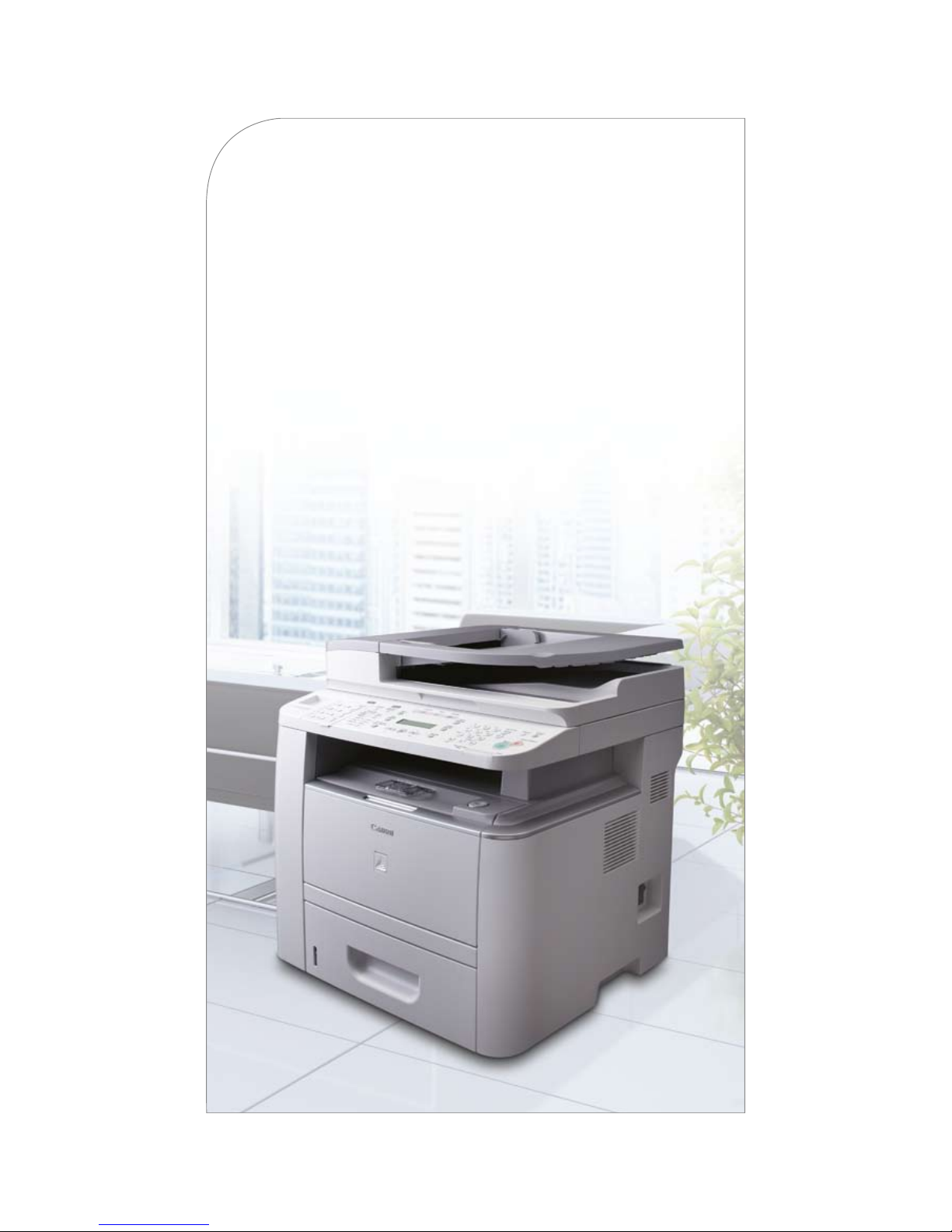
At only 45 cm wide, it does not take the imageCLASS D1150 much to do what it
does best. Along with a generous 128 MB of built-in RAM, this workhorse also
has mass paper input capacity of up to 1050-sheets – ensuring undisrupted
productivity and zero wastage in your business operation.
While eco-office features like automatic duplex printing, copying and faxing
capabilities help save more than 50 percent in paper usage, low power
consumption (approximately 3W) translates to smaller operations bills. These
benefits are but the tip of the iceberg though, with scores more to come.
Page 3
An Eco-Ofce For
Business Sustainability
• The imageCLASS D1150’s Energy Saver Mode
puts the system to sleep after a user-specified
period of non-use (adjustable from three to
30 minutes). When activated, the device will
consume only approximately 3W of power. Or,
simply press the [Energy Saver] key for instant
activation to sleep mode power savings.
• The
Toner Save Mode reduces the toner
amount used to create copies and prints,
extending the life of toner yield (of up to 50
percent more) and lowering the cost per page.
Simply select between On/Off.
•
Auto Duplex printing, copying & faxing can
be done with its built-in duplex input (50-sheet
Duplex ADF) and duplex printing features for
paper savings of 50 percent and more!
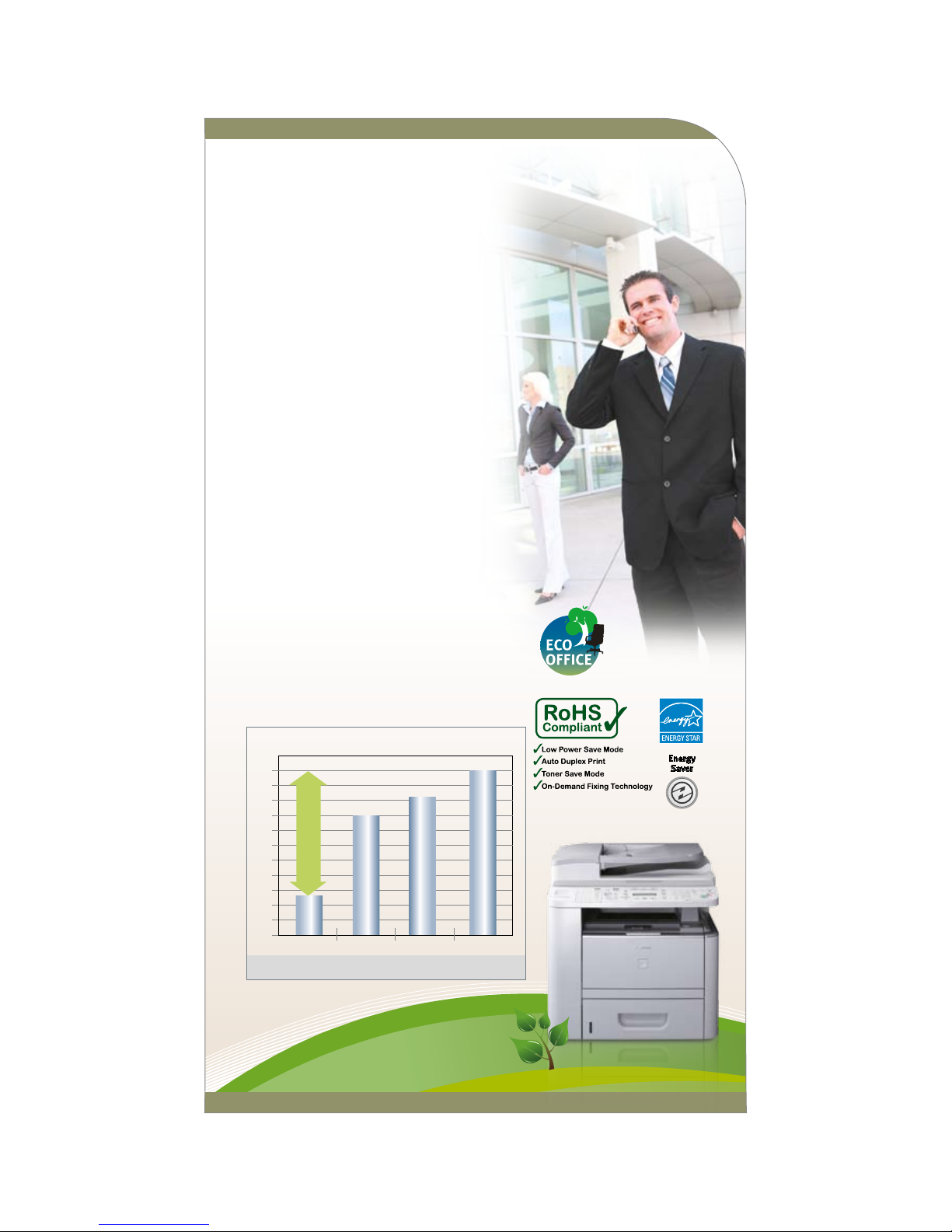
• Lowest Typical Electricity Consumption rating
by Energy Star® for savings of more than
4 times against other comparable devices.
This translates to long-term business savings.
1
0.5
0
D1150
Brand B
comparable models
Brand S
comparable models
Brand X
comparable models
1.5
(Kilowatt Hour / Week)
TEC R ating (KWh/week) www.eu-energystar.org
2
2.5
3
1.3
KWh/
wk
3.5
4
4.5
5
5.5
6
4.0
KWh/
wk
4.6
KWh/
wk
5.5
KWh/
wk
More than
4x
savings!
Page 4
Canon Technology Assurance
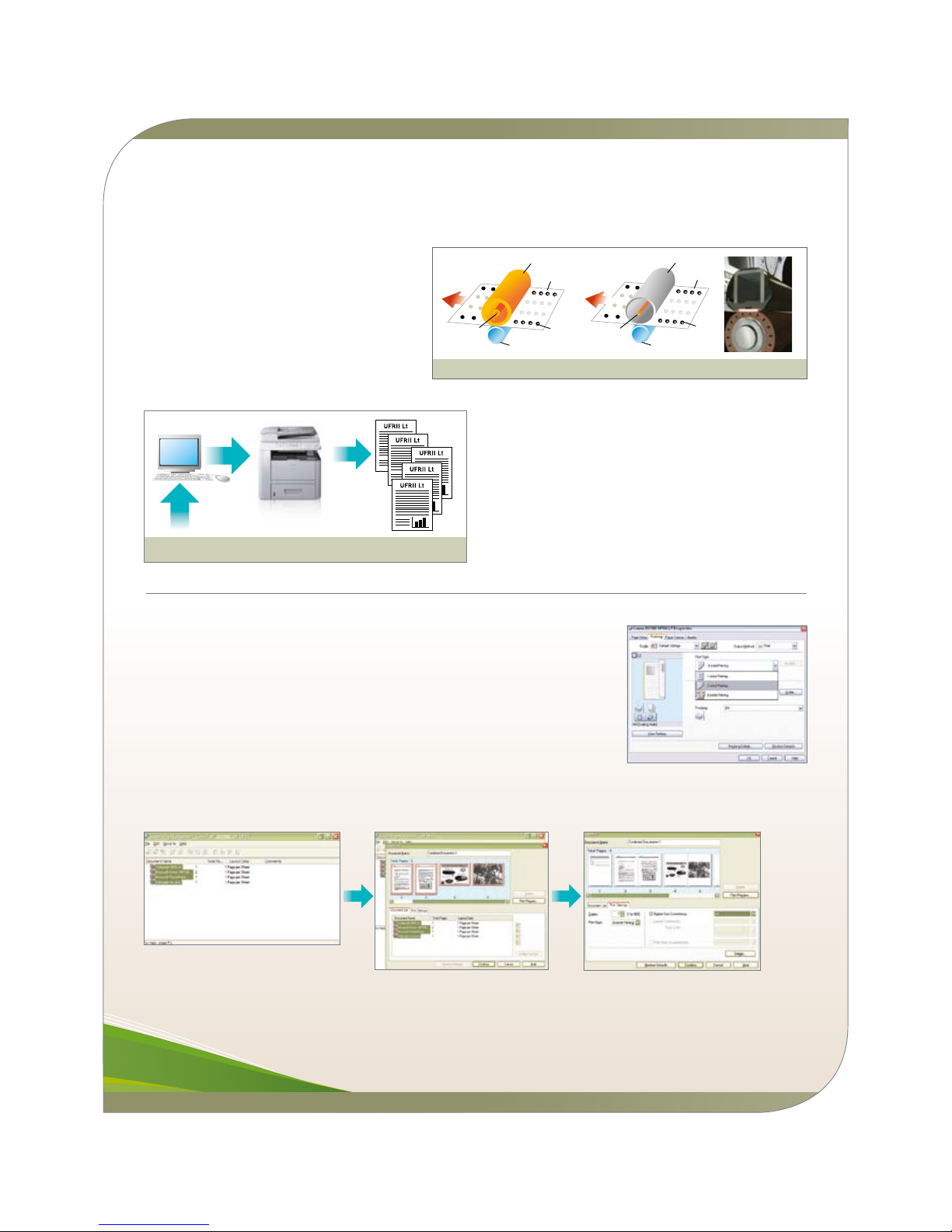
Tired of printers taking forever to start up? The
imageCLASS D1150 speeds ahead with On-Demand
Fixing (SURF) technology. This cutting-edge marvel
transfers heat instantly only when the machine is
printing, so it takes minimum time and energy to warm
up – you get first copies before you can say “Wow!”
Rolle r Fixing Method On-De mand Fixin g Method
Fixing Film
Paper
Toner
Pressure Roller
Ceramic
heater
Fixing
Image
Surface
Paper
Toner
Pressure Roller
Heater
Fixing Roller
Fixing
Image
Surface
UFR II
Lite
UFRII Lt (Ultra Fast Ren derin g) Printing System
10MB
1MB
30ppm (A4)
Not a fan of long print queues? You’ll love Canon’s in-built
UFRII LT (Ultra Fast Rendering) printing system as you
won’t have to rely on your printer alone to do all the jobs.
It enables integration between your computer and the
printer’s RAM for simultaneous job processing, balancing the
workload and speeding up the printing process. The result?
Quick First Print (QFP) of approximately 8 seconds, less
downtime, and no expensive RAM upgrades required.
Print & Save
Go for its ready-option Booklet Print finishing, or select 2-on-1 plus 2-sided print finishing.
You can print all your documents and yet save up to 75 percent of total paper use!
In addition, the unique Canon Page Composer feature in the Printer Driver lets you combine
different file formats - PDF, JPEG, TIFF or BMP - into one single document output, improving
productivity and convenience. Select [Edit & Preview] in the Output Method of the printer
dialogue, set and off you go!
Canon Page Composer (Edi t & P review) feature
Page 5
Zoom In On The Best Results
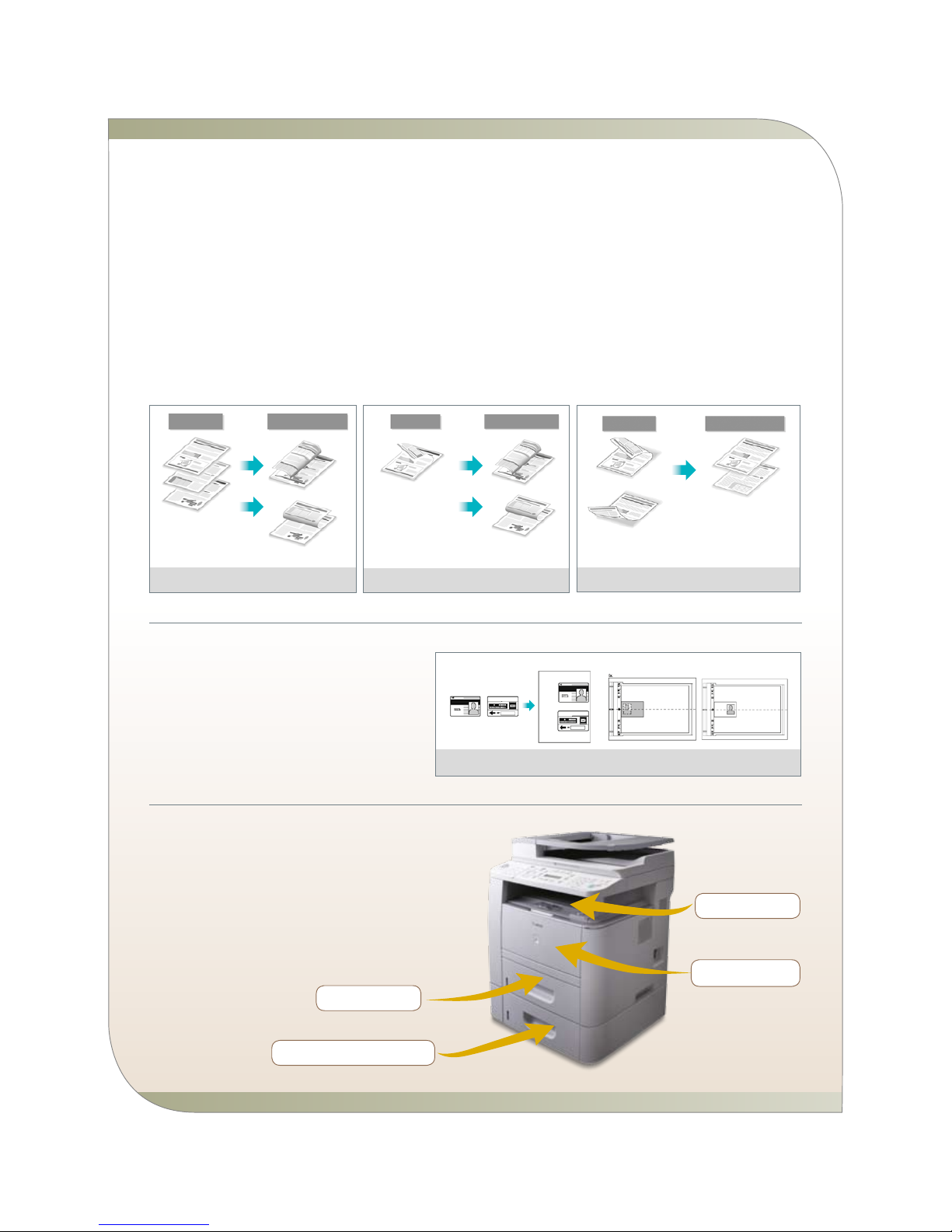
You don’t have to squint to see the fine print anymore. The imageCLASS D1150 copy feature lets you zoom in and out manually from
50 to 200 percent as you copy.
Best of all, its auto 2-sided printing/copying feature is better than a 4-on-1 copy combination, saving you up to four times the amount
of paper! Input four A4-original pages and select 2-sided and 2-on-1. You get four pages on a 1-sheet output at a great readability
range of 70 percent scale of every A4-original.
Worried about fitting in your limited edition hard-cover magazines? The imageCLASS D1150 platen glass is sized up-to-Legal which
allows more space to scan and copy of magazine-size thick books.
ORIGI NAL
COPY OUTPUT
Copy a one- sided
origi nal on to bo th
sides of th e out put
Book Type
Calen dar ty pe
1 to 2-sided
2 to 2-sided
Copy a two-sided
original onto both
sides of the output by
automatically reversing
sides of the original
placed in the feeder
Book Type
Calen dar Type
COPY OUTPUT
ORIGI NAL
2 to 1-sided
Copy a two- sided origi nal
onto one si de of the o utput
by au tomati cally rever sing
sides of th e ori ginal placed
in th e feed er
COPY OUTPUT
ORIGI NAL
Calen dar Type
Book Type
Colla te/ 2-on-1 (ID Card Copy )
ID Car d
Copy
Personal Security
Keep your identity intact with a hassle-free ID Card
Copy feature. Simply place your card on the platen
glass, press the [Collate/2-on-1] button till you see
[ID Card Copy] appear, and copy away.
Built For Volume
Its standard paper cassette capacity can take 500-sheet or one-
rim of papers at once, meaning you don’t have to stop for a refill
too often. For envelope printing, there’s a 50-sheet multipurpose
tray for multiple-sizes paper feed (up to Legal paper size). Other
media within the range of 60 – 190 gsm thickness can be fed,
or up to 5 envelopes at a time.
Envel ope pr intin g up t o
LGL s ize pa per
150-s heet o utput tray
Optio nal Ca ssett e Feed ing Un it-U1 :
500-s heet c apaci ty
500-s heet p aper tray
Page 6
Straighten Out Your Fax
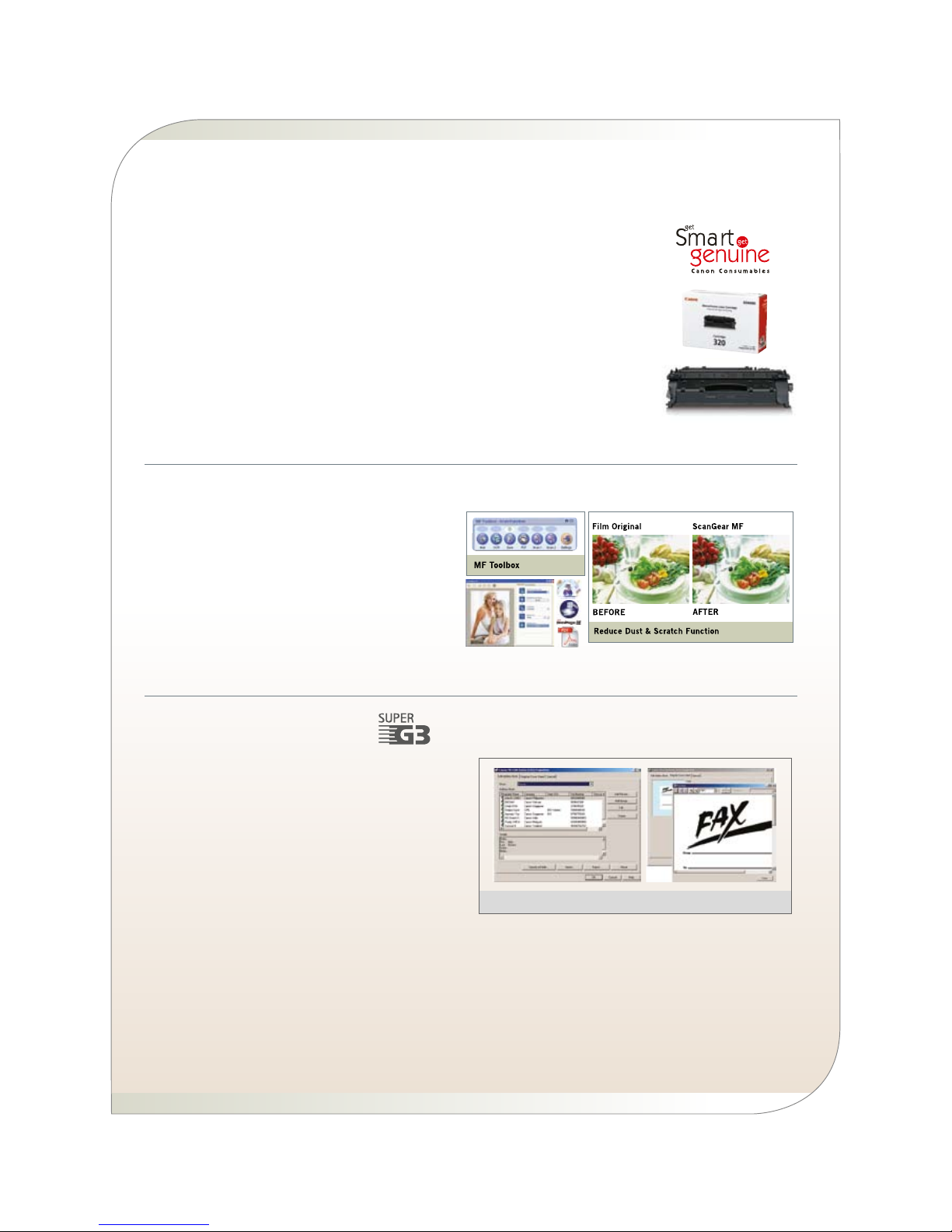
Minimise your telephone bill when you send and receive fax
messages using the Super-G3 Fax technology, transmitting at
approximately 3 seconds per page.
Its high capacity speed dialling feature (19 one-touch, 180
coded and 198 group dials) offers convenience when faxing to
your top groups of business partners or to frequent personal
contacts.
In addition, Canon’s UHQ™ (Ultra High Quality) image
processing technology guarantees your recipients receive crisp
and clear image-quality faxes.
Best of all, the fax memory can record up to 512 fax pages to
ensure that not a single fax is missed.
PC-Fa x (Paperless Faxing )
Plus, the imageCLASS D1150’s built-in PC-Fax feature enables
paperless faxing – sending the fax directly from your computer
desktop. You can even set an off-peak time to transmit your
fax documents (from 0000 – 2359 hrs) with the Delayed Fax
Sending feature!
Going Beyond SOHOs
The robustly-built engine has maximum endurance of a 20,000-page monthly duty cycle, while
128 MB of RAM system memory further extends its print volume capacity beyond any small office. It
can comfortably fit the bill of any workgroup with a monthly print volume of 2,000 – 5,000 pages.
Topping it off, the imageCLASS D1150 is designed with a high-capacity all-in-one toner
cartridge 320, which can last up to 5,000 pages*. In today’s business environment, this all-in-one
toner suits the growing demand for fuss-free and self-manageable office equipment.
To fully optimise your printer performance, only use Canon’s genuine consumables for maximum
protection and warranty assurance for your device.
*Average yield is in accordance with ISO/IEC19752
The Best Business Resolution
Where your business is concerned, minimal compromises
should only be allowed. Not only do you need crisp and clear
scanning for documents, you’ll need them fast and in minimal
data sizes as well. The readily available MF Toolbox scanning
software comes with PDF conversion. Turn your hardcopies
into PDF compact, Multi-page PDF, and Searchable PDF
files, by simply selecting the PDF file option available in
the toolbox.
Page 7
Ready For The Bigger Network
It’s important that everyone at work gets along, and
the imageCLASS D1150’s built-in network print and
PC-Fax features ensure that everyone can share the benefits of
an advanced document hub.
Recommended for workgroups of up to 15 users (monthly print
volume of 2,000–5,000 pages), it comes with substantially larger
address book space (up to 200), where you can enjoy improved
flexibility in maintaining your business contacts.
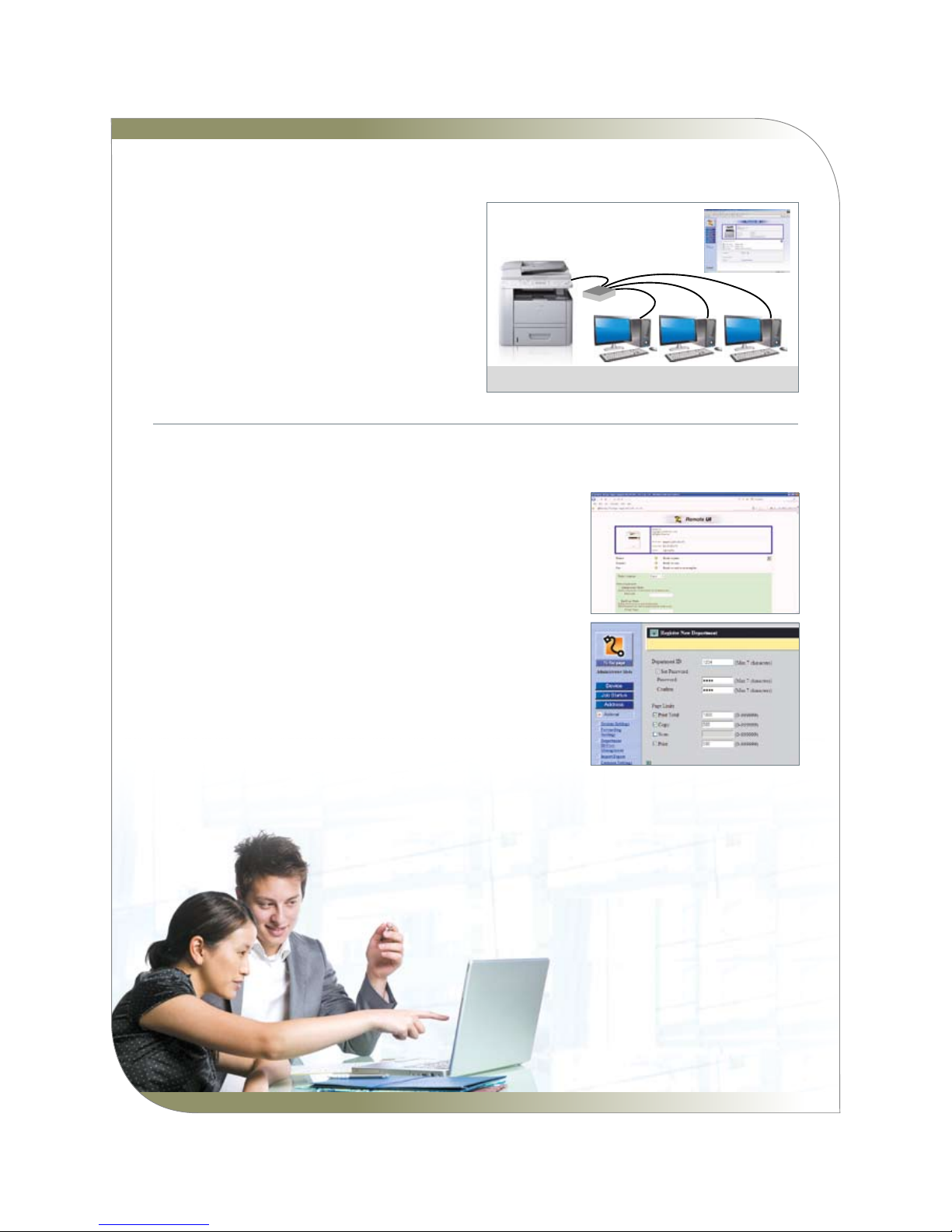
Netwo rking Capabilities
PC Pr int/PC Fax/ Remote UI
Work Smart, Manage Smarter
The built-in Canon Remote UI (User Interface) rides on a web-browser platform
for you to monitor the status of your device, and to update the Address Book and
Department IDs at ease.
Basic device access management can also be done using the built-in
Department ID Management feature. Every device can store up to 100 registered
user IDs.
Functions available are:
• View page totals for Print/Scan/Copy/Total Print by each department
• Set page limits for total print, copy, black scan, print by ID per usage
(from zero to 999,999 pages)
• Accept or reject print jobs from computers with unknown IDs
With the imageCLASS D1150, shift the full focus to your business, without having
to sweat the small stuff.
Page 8
Afghanistan:
Ishan National Co. Ltd
P.O.Box 559
Opp: Ministry of J ustice
Kabul - Afghanista n
Tel: 0093-2-2101727
Bangladesh:
Flora Limited
Adamjee Court Anne x-2 (4th Floor)
119-120 Motijheel Commercial Area
Dhaka 1000 Banglad esh
Tel: 880-2-716-2742-46 / 225
Fax: 880-2-955-003 0
www.floralimited.com
Brunei:
Interhouse Company
No. 5 -7 Bunut Jay a Complex
Spg 574 Jalan Tutong BF1320
P.O Box 423, Seri Complex
Bandar Seri Begawa n BA 1779
Brunei Darussalam
Tel: 673-2-653 001
Fax: 673-2-653 003
Cambodia:
Royal Cambodia Co. , Ltd
#437 Preah Monivon g Blvd
Phnom Penh
Kingdom of Cambodi a
Tel: 855-23-428955
Fax: 855-23-722961
India:
Canon India Privat e Limited
2nd Floor, Tower A & B
Cyber Greens, DLF Phase III
Gurgaon – 122002
Haryana, India
Tel: 91-124-516 0000
Fax: 91-124-516 00 11
www.canon.co.in
Indonesia:
PT Samafitro
Jalan Ir. H Juanda No.8
Jakarta 10120, Ind onesia
Tel: 62-21-345 5521
Fax: 62-21-384 427 1
www.samafitro.co.id
Malaysia:
Canon Marketing (M alaysia) Sdn. Bhd
Block D, Peremba S quare
Saujana Resort Sec tion U2,
40150 Shah Alam
Selangor Darul Ehs an, Malaysia
Tel: 60-3-7844 6000 / 7845 005 5
Fax: 60-3-7844 619 6 / 6198
www.canon.com.my
Maldives:
Simdi Company Pvt Ltd.
No.3 Koli Umaru Ma niku
Goalhi Male’ 20-02
Republic of Maldiv es
Tel: 960-333 4421
Fax: 960-333 4424
Myanmar:
Accel Internationa l Co. Ltd.
FJV Commercial Cen tre
Level 6, No 422 - 426
Strand Road Botata ung Township
Yangon, Myanmar
Tel: 951-202 092 to 96
Fax: 951-202 079
Nepal:
International Elec tronics Concern (P) Ltd
Kha 14 1st Floor
Haratibhawan Putal isadak
Ramshah Path, Kath mandu, Nepal
P.O Box 12588
Tel: 977-1-442 1991
Fax: 977-1-442 190 9
Pakistan:
Shirazi Trading Company (Pvt.) Ltd
8th Floor, Adamjee House
I.I Chundrigar Roa d
Karachi 74000 Paki stan
Tel: 92-21-241 7737
Fax: 92-21-242 041 7
www.shirazitrading.com.pk
Sri Lanka:
Metropolitan Commu nications Ltd.
85, Braybrooke Pla ce Colombo 02
Sri Lanka
Tel: 94-11-243 7797
Fax: 94-11-244 898 0
Thailand:
Canon Marketing (T hailand) Co. Ltd
10th Floor Bangkok City Tower
179/34-45 South Sa thorn Road
Bangkok 10120
Tel: 66-2-344 9999
Fax: 66-2-344 9960
www.canon.co.th
Vietnam:
Canon Singapore Pt e Ltd
Ho Chi Minh City R epresentative Office
Unit 437-439-441 H ai Ba Trung Street
Ward 8 District 3, H o Chi Minh City, Vietnam
Tel: 848-820 0466
Fax: 848-820 0477
Hanoi City Represe ntative Office
15 Nguyen Chi Than h
Hanoi, Vietnam
Tel: 844-771 1677
Fax: 844-771 1678
www.canon.com.vn
0131W162 © Canon Singapore Pte Ltd, Mar 2009
D 1 1 5 0
Specifications
SOUTH & SOUTH EAST AS IA REGI ONAL HE ADQUARTE RS
CANON SINGAPORE PTE. LTD.
1 HarbourFront Avenue #04-01, Keppel Bay Tower, Singapore 098632
Tel: 65-6799 8888 Fax: 65-6799 8882 www.canon-asia.com
CANON SALES S UBSIDIA RIES & BUSINES S PARTNERS
Dealer’s Stamp
All information contained in this brochure is correct at the time of printing. Some information could become dated due to product improvements or other changes. Canon bears no responsibility for any discrepancies.
GENERAL SPECIFICATIONS
Multifunction Type Monochrome Laser Print, Copy, Colour
Scan, Fax, Auto Duplex, Network-ready
Fixing Method On-Demand Fixing SURF Technology
Standard Interface &
Connectivity
USB & Network
(Ethernet 10Base-T/ 100Base-TX)
OS Compatibility
Win OS:
2000 / XP / Server2003 (network only) /
Vista / Server2008 (network only)
Mac OS X & Linux OS various version*
Driver Utility (CD ROM) UFRII LT Printer Driver, Fax Driver,
MF Toolbox
Other Bundled
Scan Software
OmniPage SE (OCR), PageManager
(OCR, PDF) by Custom Installation
Dimension
Main Unit (W x D x H)
450 x 472 x 464 mm
Weight
(Main Unit including
Cartridge)
20.6 Kg
Power Source AC 220-240V, 50-60Hz
Acoustic Noise Level Standby: approx. 43db
Operation: 69.5db
System Memory
(On Board)
128MB (Shared)
Warm-Up Time < 16-sec
Power Consumption
Max 1090 W
Standby 12 W
Sleep 3 W
Energy Star Yes (TEC rate:
1.32 KWh/week)
DEVICE CONSUMPTION CAPACITY
Toner Cartridge Type All-in-One (Black)
Model Cartridge 320
Yield** 5000 pages (bundled 2300 pages)
Durability
(Monthly Duty Cycle)
up to 20,000 pages***
Print Volume
(Monthly Usage)
2000-5000 pages per month
PAPER HANDLING
Auto Document Feeder 50-sheet (Duplex ADF)
Document Size Up to LGL (ADF/Platen)
Paper input capacity 500-sheet paper cassette
50-sheet Multipurpose Tray (Bypass)
Optional Paper cassette Cassette Feeding Unit-U1 (500-sheet)
Paper Output 150 sheets (face down)
Paper Weight
60~120g/m2 (cassette)
60~190g/m2 (Multipurpose tray)
KEY FEATURES
PRINT
PDL UFRII LT
Print Speed Up to 30 ppm (A4)
Print Resolution 600 x 600 dpi
1200 x 600 dpi (smoothing)
Auto Duplex Print
Yes
First Print Output Time
(FPOT)
approx. 8-sec
Print Memory 128MB (Shared)
Print Output Size Up to LGL (including Custom Sizes)
Others Page Composer, Booklet Print,
Poster Print, Watermarks, Toner Save
COPY
Type Monochrome Laser
Copy Speed Up to 30 cpm (A4)
Copy Resolution 600 x 600 dpi
Halftones 256 level
Auto Duplex Copy Yes with Duplex Scanning (1:2, 2:2, 2:1)
First Copy Output Time
(FCOT)
approx. 8-sec
Copy Memory 128MB (Shared)
Zoom 50%~200% in 1% increments
Copy Size Up to LGL (ADF/Platen)
Others ID Card Copy, Electronic Sort,
Toner Save mode, 2-sided, 2-on-1
combination, Reserved Copy
COLOUR SCAN
Scanning Element Colour CIS
Scanning Resolution 600 x 1200 dpi (optical)
9600 x 9600 dpi (interpolated)
Color Depth
24bit
Document Size Up to LGL (ADF / platen)
LOCAL SCANNING
Host Interface USB 2.0 Hi-speed
Win OS Compatible Win 2000 / XP / Vista
Software MF Toolbox, ScanGear MF driver
MF Toolbox Scan Scan to Email/PDF/File/Applications
File Format JPEG, PDF (compact, searchable PDF),
TIFF, BMP
Compatibility WIA 1.0 (XP & Vista only), TWAIN
Free bundling software Omnipage (OCR) & Pagemanager
Mac OS Compatible Mac OS X later version****
Software ScanGear MF
Compatibility TWAIN
File Format Depending on Mac Application used.
FAX
Modem Speed 33.6 Kbps, Super-G3
(approx. 3-sec/page)
Fax Resolution Standard, Fine, Super Fine, Ultra Fine
(up to 409 x 391 dpi)
Image Processing
System
UHQ™ (Ultra High Quality)
Compression Modes MH, MR, MMR, JBIG
Fax Memory Capacity 512 pages
Fax-memory backup Yes (up to 15 min)
Address Book/
Speed Dial
19 one-touch, 180 coded dials,
198 group dials
Sequential
Broadcasting
200 locations
Delayed Transmission Yes (1 pre-set time)
Receive Mode FAX Only, Manual, Answering DRPD,
Fax/Tel Auto SW
Remote Reception Yes (default ID: 25)
Other Fax Receiving
Features
Memory Lock reception,
Auto Reception Reduction, ECM
Dual Access Yes (up to 70 reservation)
Auto Double-sided
Faxing
Yes (Sending & Receiving)
Report / List Activity & Rx / Tx Report (Up to 40
transactions/page), Non-delivery report
PC-Fax Sending (Fax Driver)
NETWORKING & MANAGEMENT UTILITY
Network Interface Ethernet
Network Type 10Base-T/ 100Base-TX
Network Print Yes (Win, Mac, Linux OS)
Network PC Fax Yes (Win, Mac OS)
Device Management By Remote User Interface (HTML-based)
Feature Management By Department ID (100 IDs)
Department Counter
Copy/Print/Scan
*
Driver for Mac & Linux OS are not bundled with products;
will be available via web download on http://support-asia.canon-asia.com/
Mac OS X & Linux OS Driver available only in Q3-2009.
**
Declared yield value in accordance with ISO/IEC 19752
***
Duty cycle value provides a comparison of product robustness in relation to other
Canon Laser All-in-One devices and it shows the maximum number of pages of
image output per month; And is different from recommended monthly print volume
value which is normally used for optimum device performance where factors like
device life over a given warranty period and supplies replacement intervals are
accounted for.
****
Compatible to Mac OS X later version available in Q3-2009
 Loading...