

Page 1
Page 2
A NEW-GENERATION, DIGITAL-MULTIFUNCTION
WORKGROUP SOLUTION FROM THE
INDUSTRY LEADER.
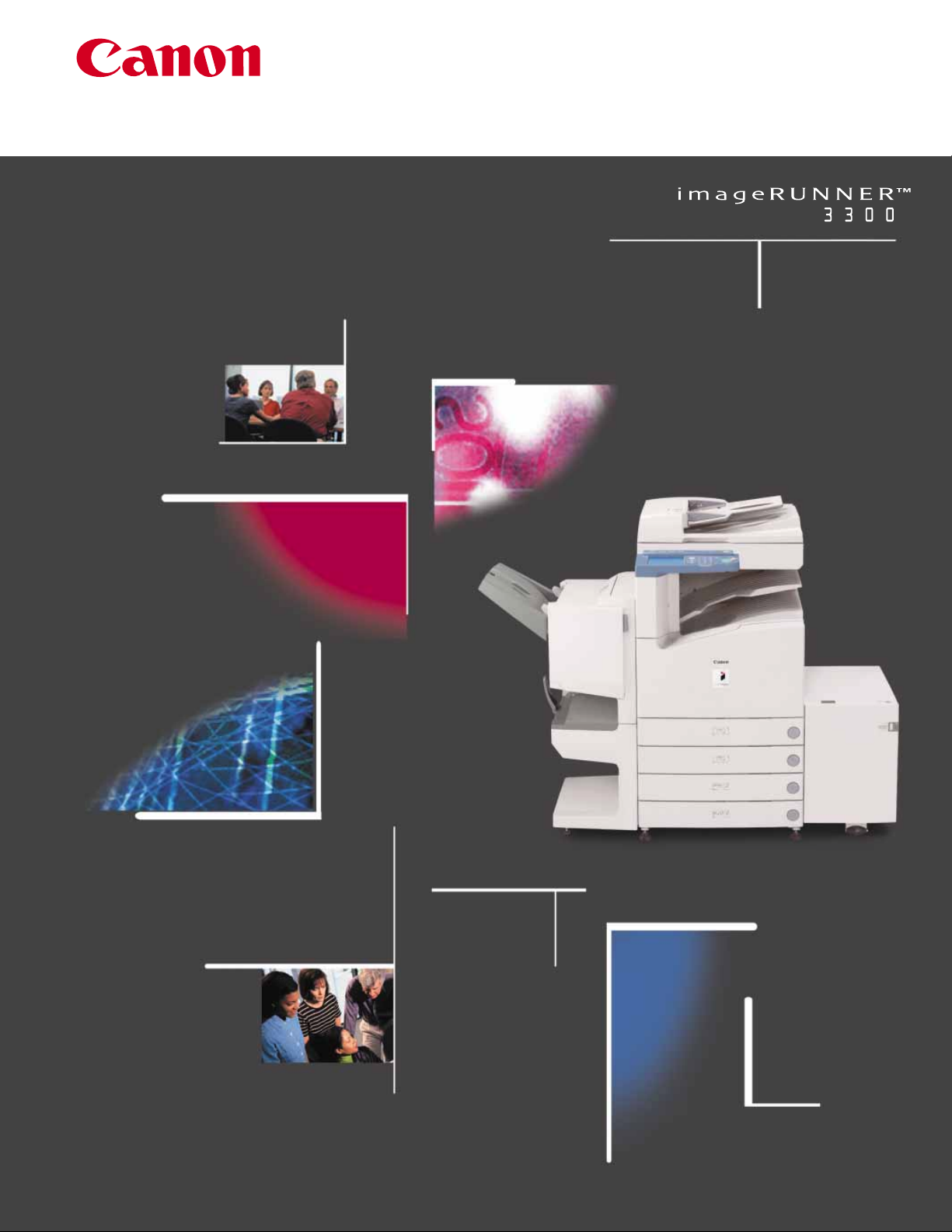
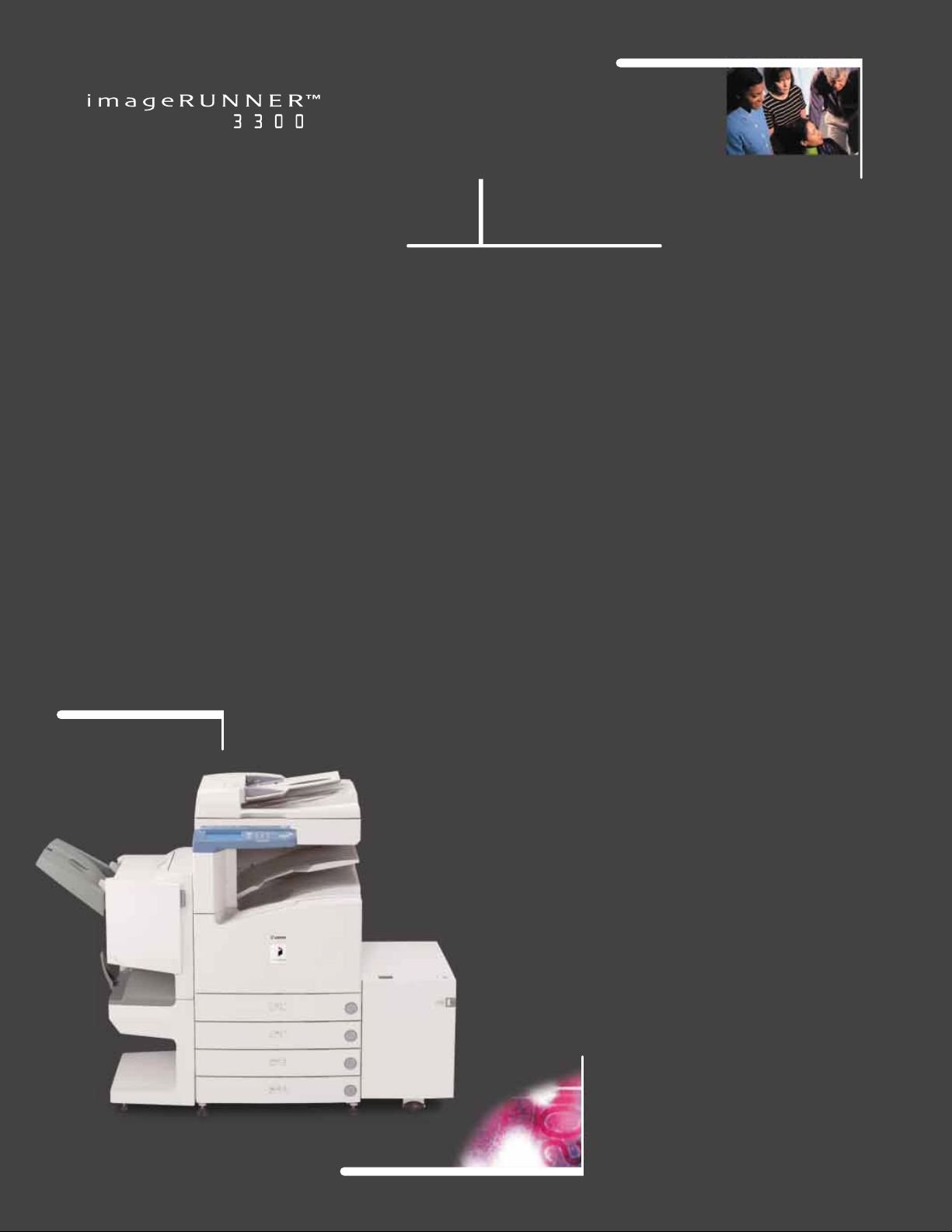
Introducing the new imageRUNNERTM3300 from Canon—
offering unsurpassed performance in stand-alone or
networked document-management environments.
Built upon Canon’s newly developed, network-oriented architecture, termed imagePlatform,
the imageRUNNER 3300 offers 33-page-per-minute speed, with advanced copy, print, scan,
and fax features, and the highest level of image quality, network integration, and ele-
vated multitasking capabilities on the market.
Designed specifically for the needs of corporate
workgroups, the imageRUNNER 3300 allows your
organization to manage its hard-copy and electronic-based information, regardless of form,
content, or location, to give you the level of
efficiency you are accustomed to, plus a competitive advantage.
Page 3
A Truly Modular System
The imageRUNNER 3300 delivers newgeneration, digital-multifunction capabilities
designed to meet every application need and
budget of small- to medium-sized enterprises.
This model offers advanced digitalcopying features as standard, including the scanning of
hard-copy originals into an internal Mail Box
system. As a truly modular system, the
imageRUNNER 3300 can be configured to
address the Network Printing, Super G3
Faxing, and Network Scanning requirements of workgroups as needed.
Increased Productivity
Without Compromises
When short deadlines need to be met,
the imageRUNNER 3300 is up to the task.
With Scan-Once-Print-Many technology and
enhanced multifunction capabilities, the
imageRUNNER 3300 accelerates copy, print,
fax, or scan job completion, while driving significant document-throughput capabilities.
The imageRUNNER 3300 delivers many of the
advanced features typically associated with
high-volume, high-priced systems, such as
Copy Reservation, Job Build, BookletPrinting,
and more. Easy-to-use device drivers and
utilities provide users and administrators
with unmatched levels of device status and
job-management capabilities in the industry.
With Canon’s proprietary RAPID Fusing
System
™
, the imageRUNNER 3300 provides
quick, on-demand operation that virtually
eliminates the long warm-up periods typically
associated with conventional devices, and
helps reduce energy consumption costs. A
compact, “wingless” design brings powerful
features to your workgroup, without compromising office space.
Superior Image Quality
Is Always Standard
Canon’s world-class leadership in image
quality—capturing the highest level of detail
in every document—is standard on every
imageRUNNER 3300. Delivering copy output
at 1200 x 600 dpi resolution, and print output
at an astounding 2400 x 600 dpi resolution,
you’ll find yourself asking, “Is this a copy, or
the original?”
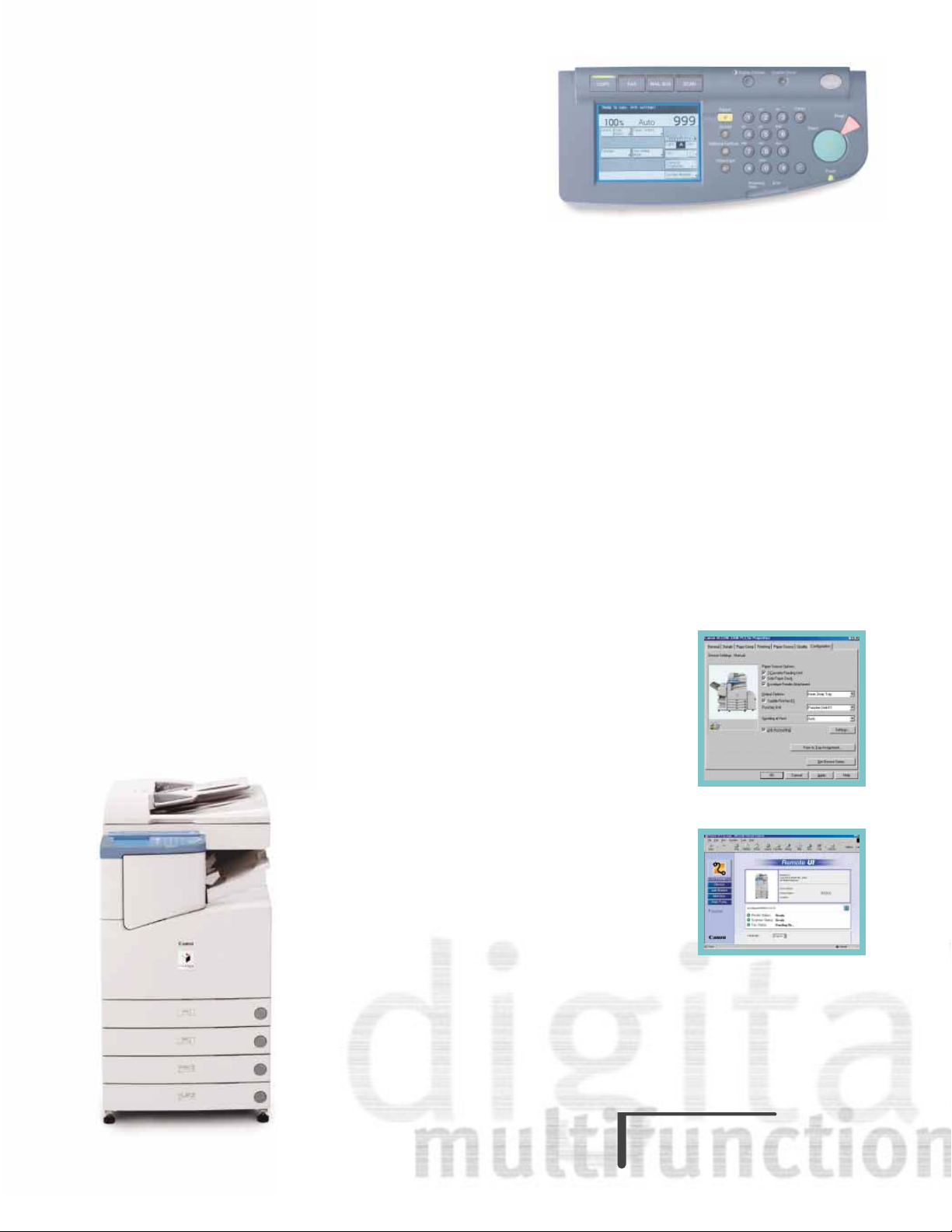
The imageRUNNER 3300 provides all the
necessary tools for quick and intuitive
operation of all device functions—saving
you valuable time to do other tasks.
Remote UI
™
Print Driver Device Configuration Tab
Page 4
Set New Expectations For
Office Productivity
At its core, the imageRUNNER 3300 provides
unique functionality and information-management via an internal 5.1GB Image Server and
128MB of RAM. Examples of these features
include the following:
Scan-Once-Print-Many – Fully leverages the
inherent digital features of the device, and
reduces scanner wear by making copies from
images stored in memory.
Concurrency – Elevates overall multitasking
capabilities by synchronizing scanner, image
processor, and engine operation. As an
example, users can store up to five copy jobs
in memory while current copy or print jobsare
being processed.
Confidential Mail Boxes – Up to 100 mail
boxes can accept scanned and printed data,
permitting users to easily combine paperand electronic-based information.
Advanced Input, Throughput,
And Output Features
While most multifunction devices are
content just to deliver the basics, the
imageRUNNER 3300 offers the most extensive level of input, throughput, and output
capabilities in its class.
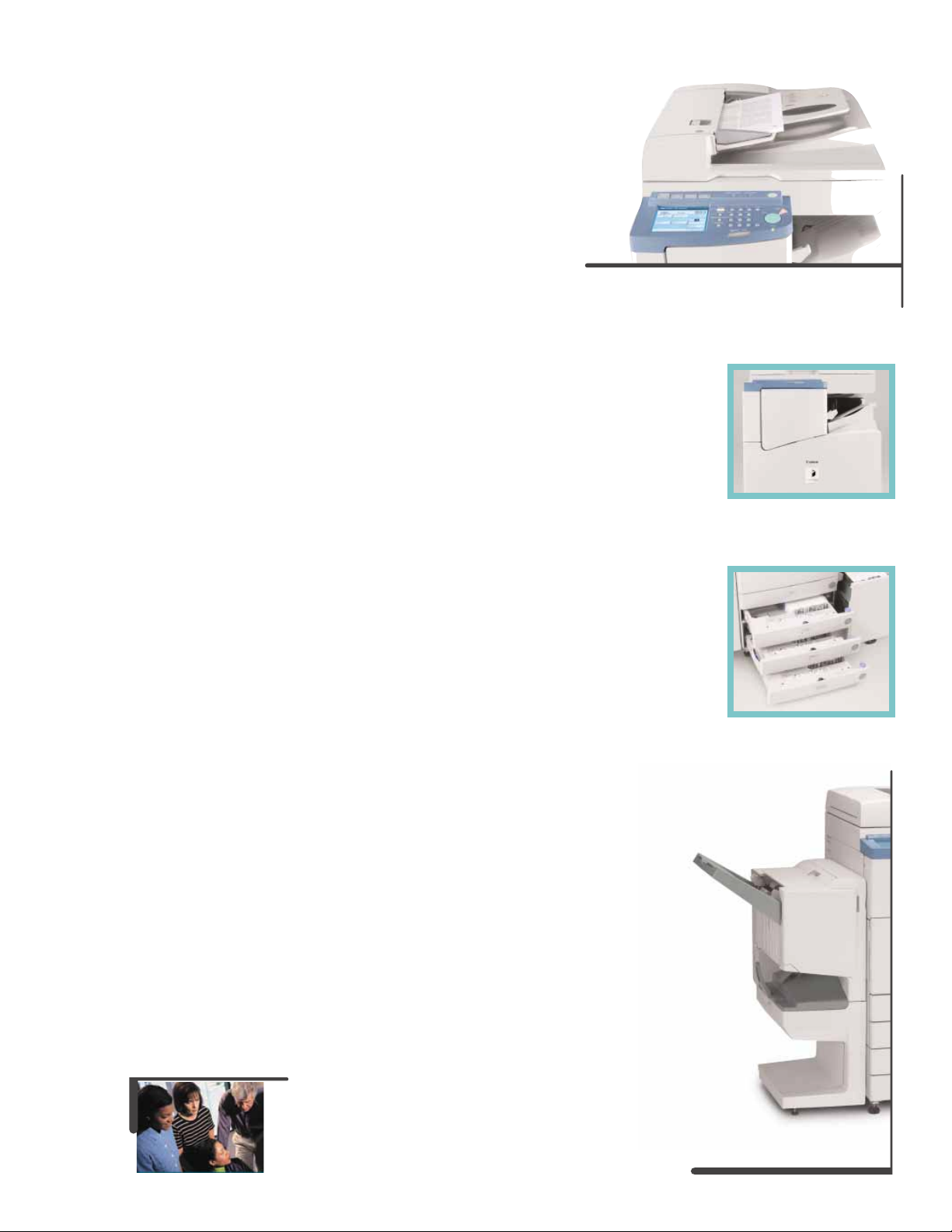
For maximum input productivity, an optional
50-sheet capacity Duplexing Automatic
Document Feeder (DADF) makes quick work
of handling multipage and different-size
originals. The DADF leverages Trayless
Duplexing of the device, and works with a
newly designed scanning unit for fast firstcopy output times.
The imageRUNNER 3300 ships with a standard paper capacity of 1,050 sheets, and
offers the flexibility to support up to 4,550
sheets. With support for feeding non-standard paper sizes and weights, transparencies, and envelopes, the imageRUNNER 3300
can address the volume requirements of virtually any size workgroup.
The imageRUNNER 3300 offers the most
advanced finishing features of any product in
its class.
An optional internally mounted finishing unit
makes the imageRUNNER 3300 ideally suited
for environments with limited space, and
for small office environments that require
professional-looking, finished documents.
For more advanced document-finishing
needs, choose the optional Saddle Finisher,
which offers stapled output, including multiposition stapling, folded saddle-stitched
booklets, and support for two- or three-holepunched output. An inner tray system works
with the Saddle Finisher to neatly separate
copy, print, and faxoutput for fast distribution.
Raise Your Productivity
To New Standards
Saddle Finisher
Duplexing Automatic Document Feeder
Paper Cassettes
Internal Finisher
Page 5
Network Connectivity Should
Not Be An Afterthought
Why Stand-alone When
You Can Connect
Canon’s clear advantage lies in our seamless
integration with customer networks, giving
users the ability to leverage system capabilities from their desktops. In choosing
Canon products, your organization will benefit
from initial investment protection other manufacturers simply cannot match.
A New Level Of Printing Functionality
The imageRUNNER 3300 is ideally suited to
handle the printing requirements of workgroups and departments, with a print
controller capable of handling 10/100
Ethernet or Token Ring connections, using
PostScript
®
3 Emulation and PCL®5e and
PCL 6 print languages.
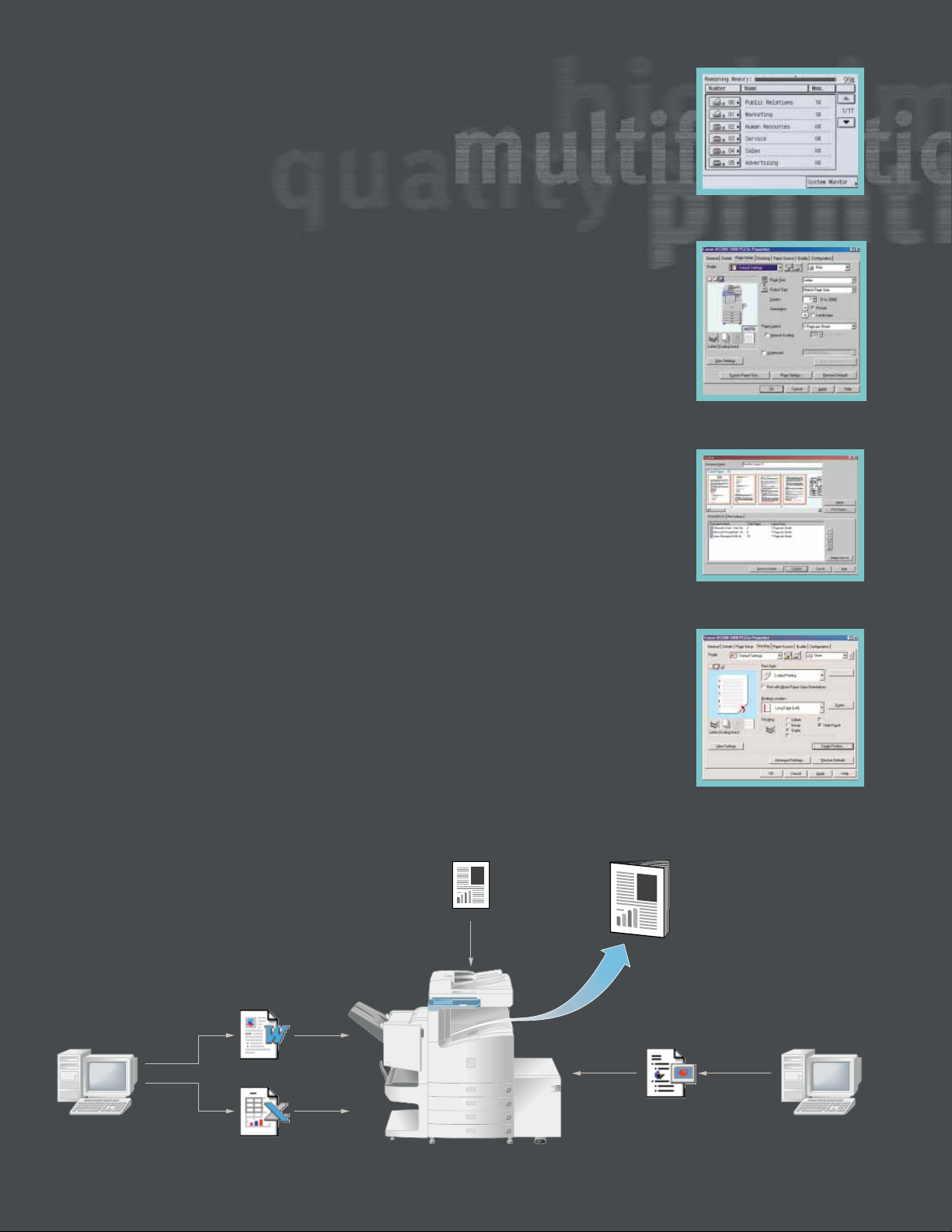
Canon has created print driver software
designed with an easy-to-use user-interface
that is friendly for the novice, yet capable
enough to handle the demands of powerusers. The driver software displays a dynamic
image of the device, indicating installed hardware options, paper size, and paper levels.
As attributes change, the driver automatically informs the users of the latest device
capabilities. To further simplify use, Canon
offers the ability to view page layout settings
from within the driver prior to printing. Using
this driver capability, users are assured their
output will print asexpected, with no surprises.
Other significant capabilities include the
ability to save frequently used print settings,
annotate documents, add watermarks, and
select extensive document-finishing and
booklet-making features.
We haven’t forgotten the network administrator! Canon offers multiple installation
methods, and ships the only driver software
available on the marketcapable of discovering
devices on the network. This allows administrators to automatically configure all equipped
options with just a click of the mouse.
Canon has equipped these systems with
extensive printing capabilitiesnot found on traditional network laser printers. Some of these
enhanced capabilities include the following:
Mail Box Printing – Users can send printdata
to personal mail boxes for integration with
other stored images, thereby creating new
compound documents.
Page Composer – Users can combine and print
documents that were created in different
applications as a single document, preview
and manipulate the merged file through a
thumbnail view, and change settings on-the-fly.
Secured Print – Permits entry of a confidential PIN from within the print driver. Printing
will begin only upon user-entry of his/her
confidential PIN number at the device.
Driver Properties Finishing Tab
Page Composer Screen
User Mail Box Screen
Print Driver Page Setup Tab
Original
Final Merged
Document
PowerPoint
®
Excel
Word
Merge scanned images with documents from various applications to create one document.
Page 6
Merging Hard-copy And
Electronic Information
Today, while most new information is created
electronically, it is estimated that the majority of corporate information still resides on
paper. The imageRUNNER 3300 permits easy
integration of paper and electronic information to streamline information availability
and management.
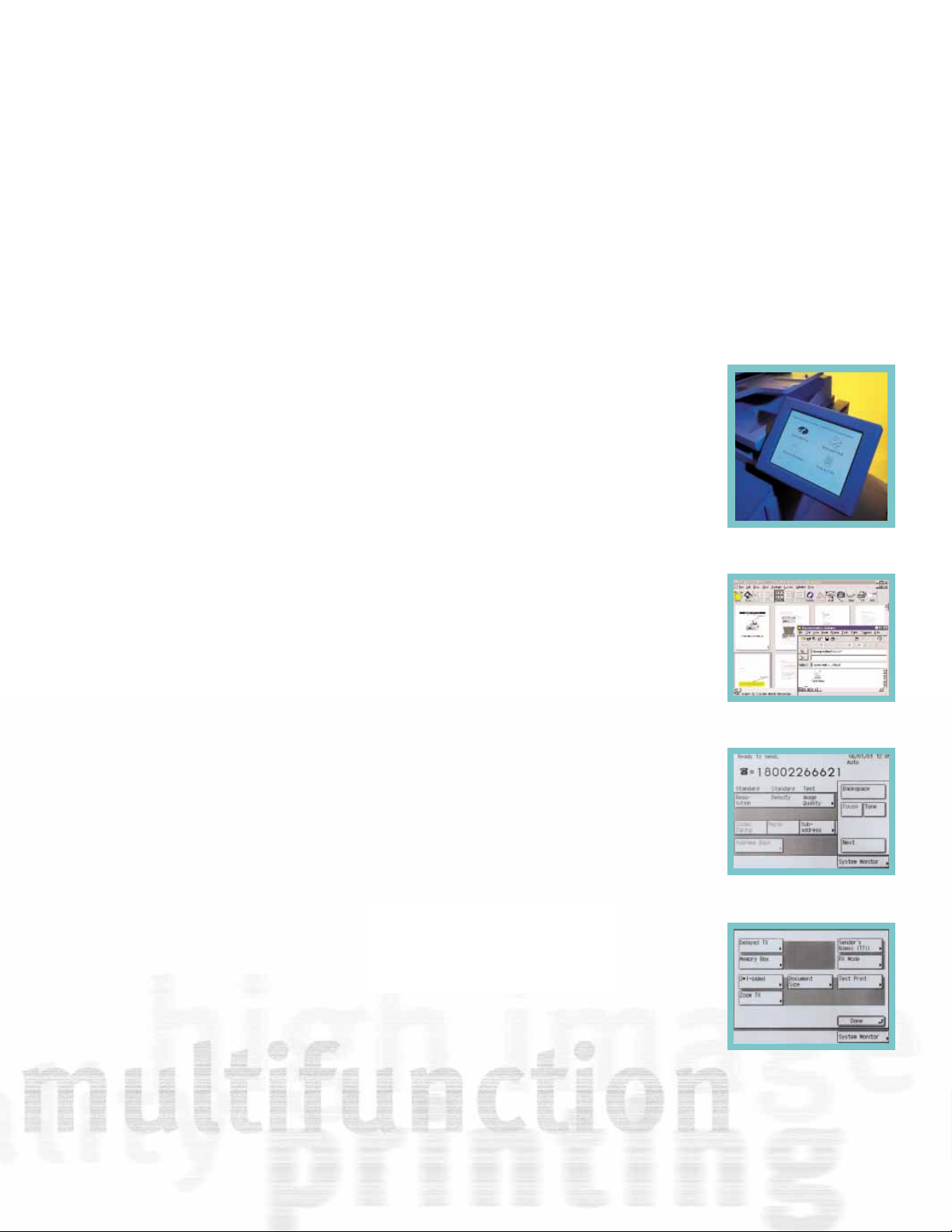
The imageRUNNER 3300 ships standard with
the ability to scan documents to internal user
mail boxes. Users may also view images
stored in a mail box through the Remote UI
function. This function is ideally suited to users
who wish to combine scanned documentswith
electronic print documents at the device.
For network scanning and workflow requirements, Canon’s NetworkTWAIN driver software
provides enhanced scanning capabilities on
the imageRUNNER 3300 through any TWAINcompliant software application.
When outfitted with eCopy
™
ShareScan™and
eCopy Desktop
™
software, customers can
turn the imageRUNNER 3300 into a sophisticated, yet easy-to-use document delivery system. eCopy ShareScan provides walk-up
users with the ability to capture and preview
documents while integrating to LAN Fax and
user-desktops. Using eCopy Desktop, users
have a powerful tool for adding annotations
and mark-ups, or for converting scanned documents to editable text via OCR. eCopy
Desktop also links to E-mail, LAN Fax, and
document-management software for easy
distribution of manipulated, scanned images.
Faxing More Capable Than
Stand-alone Devices
The imageRUNNER 3300 provides fax capabilities far more capable than most standalone devices available on the market today.
At 33.6 Kbps transmission speed, or approximately 3 seconds per page*, users will save
time and dramatically reduce transmission
costs. With the optional DADF, you can greatly
enhance faxing productivity by scanning
simplex or duplex documents of sizes up to
11" x 17". Canon’s world-class leadership in
image quality will ensure that both sent and
received fax transmissions will be clear and
legible.
Address Book – Stores frequently used destinations through one-touch buttons and
coded-dial numbers through the touchscreen user-interface panel.
Memory Reception – The device can be programmed to hold all incoming documents in
memory prior to printing. Through a web
browser, users can then preview the contents
of the received document for easy identification prior to printing or deleting, if necessary.
Bridging The Paper
And Digital Worlds
*Approximate 3-second-per-page fax transmission time based
on ITU-T No. 1 Chart (MMR, Standard Mode) at 33.6 Kbps
modem speed when transmitting to another v.34 machine. The
Public Switched Telephone Network (PSTN) currently supports
28.8 Kbps modem speeds or lower, depending on telephone
line conditions.
Main Fax Screen
Fax Screen Special Features
eCopy ShareScan
eCopy Desktop
Page 7
No One On Your Team Will
Feel Stranded
The imageRUNNER 3300 comes equipped
with a comprehensive set of system utilities
designed to simplify operation and management for both end-users and network
administrators. These tools provide easy
device installation and network management, while supplying a level of devicestatus and job-management capabilities
unmatched in the industry.
You Need To Do More Than Just
Connect To The Network
To truly support customer requirements,
networked devices must be easy to install,
provide seamless integration with existing
network-management applications, and permit management from anywhere in the
enterprise. Canon’s comprehensive solution
to these customer requirements is embodied within Canon’s NetSpot
®
Suite and
Remote UI utilities.
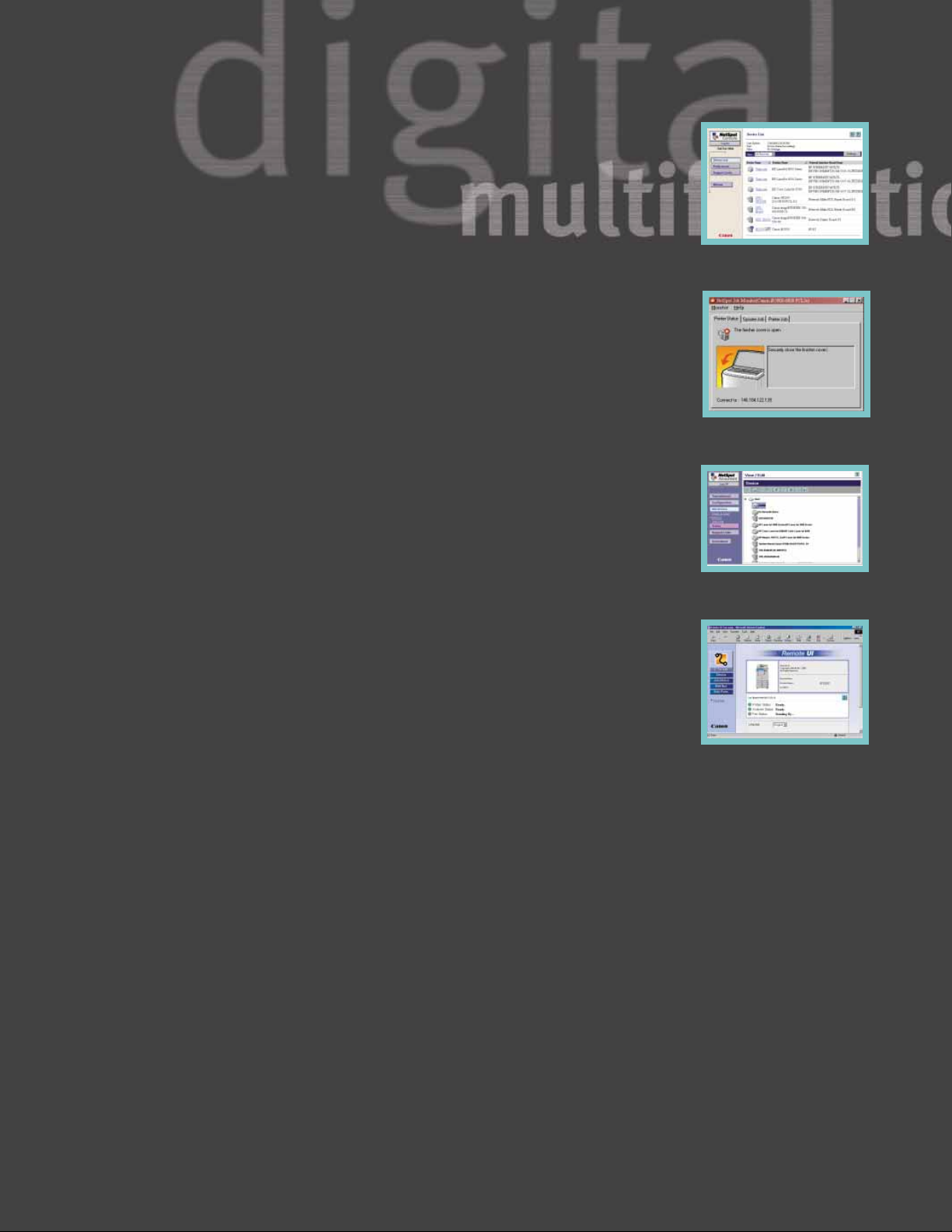
Canon’s NetSpot Suite consists of the following utilities:
NetSpot Console – NetSpot Console is a webbased installation and management utility
capable of installing and managing Canon
networked systems on most customer networks from anywhere within the enterprise.
In addition to basic installation support,
NetSpot Console delivers notification ofdevice
status conditions, such as low toner, paper
jams, and others. For added convenience,
NetSpot Console is also capable of managing
third-party printers complying with the standard Printer MIB, thereby consolidating network device management via one utility.
NetSpot Job Monitor – To track progress and
manage print jobs, Canon supplies NetSpot
Job Monitor, which runs as an automated
task in the Windows
®
System Tray, and can
be configured to report job conditions based
on administrator or end-user preferences.
Significant to NetSpot Job Monitor is its ability to deliver end-of-job notification to endusers, ensuring that they are informed of the
completion of submitted work.
NetSpot Accountant** – NetSpot Accountant
is an optional utility capable of providing
comprehensive job tracking and analysis for
cost accounting and workflow optimization.
Using NetSpot Accountant, network administrators can track a myriad of activity, including copying, printing, and scanning, and bill
internal or external clients for device utilization. NetSpot Accountant is ideal for any
customer who desires to account for
imageRUNNER 3300 device utilization.
In addition to these utilities, Canon also supplies plug-in modules for most popular enterprise-management applications in use today.
Included in this list of supported applications are Microsoft
®
Management Console,
CA-Unicenter TNG
®
, HP®OpenView®, Tivoli
®
NetView®, and BMC Patrol®. Through these
plug-ins, Canon permits easy management of
Canon networked devices from directly within the enterprise-management system console.
Remote UI – The Remote UI function turns any
web browser into an imageRUNNER 3300
desktop command and control center.
Simply enter the IP address of the remote
device to get instant access to job status,
address book, media options, program settings, and more. In addition, users can
stop, start, or reprint jobs or view images
that were previously stored in an internal
mail box from anywhere on the network.
An Impressive Team
Canon’s pioneering efforts in creating the
digital multifunction marketplace has
provided us with a considerable advantage
in identifying emerging customer needs.
This experience, combined with our
exhaustive funding of new research and
development, has allowed us to assume a
commanding position in today’s office and
production environments.
Our goal is simple: to provide the best solutions to your document- and informationmanagement needs. We think you will agree
that Canon’s functional and integrated
network capabilities set new benchmarks in
the marketplace, and clearly enable our customers to drive greater levels of productivity,
efficiency, and a competitive advantage.
An All-star Player Sporting
All The Tools
**Available second half 2001.
Check with your local Canon-authorized Dealer for availability.
Remote UI
NetSpot Job Monitor–Status
Notification Device
NetSpot Console Device ListSelection
NetSpot Accountant–Device List Display
Page 8

imageRUNNER 3300 Specifications
Main Unit
Type: Digital, Multifunction Imaging System
Imaging System: Laser Dry Electrostatic Transfer
Developing System: Dry Monocomponent Toner
Projection
Fixing System: RAPID Fusing System
Image Server Memory: Standard 128MB RAM + 5.1GB
HDD (Max. Capacity: Approx.
4,000 Originals)
First-copy Time: 5.8 Seconds from Platen Glass
6.6 Seconds from ADF
Warm-up Time: 10 Seconds or Less From Sleep Mode
29 Seconds from Main Power Off
Copy/Print Speed: 33 ppm (Letter)
Max. Mail Boxes Supported: 100
Max. Copy Reservation: 5 Jobs
Actual Resolution: 600 dpi x 600 dpi
Interpolated Resolution: 1200 dpi x 600 dpi (Copy)
2400 dpi x 600 dpi (Print)
Halftone: 256 Gradations of Gray
Duplexing: Standard Automatic Trayless
Duplexing
Magnification Reduction/
Enlargement: 25% to 800% (in 1% increments)
Paper Supply
Standard: Dual 500-sheet Paper Cassettes
(1,000 Sheets)
Stack Bypass (50 Sheets)
Optional: Dual 500-sheet Paper Cassettes
(1,000 Sheets)
Paper Deck (2,500 Sheets)
Exposure Control: Automatic or Manual
Multiple Copies: 1 to 999
Max. Original Size: 11" x 17" (Ledger)
Paper Weights: 17 lb. to 20 lb. Bond (Cassette)
17 lb. to 32 lb. Bond (Stack Bypass)
Power Source: 120V AC, 60Hz, 15A
Drum: OPC—Estimated Yield: 55,000
Impressions
Max. Duty Cycle: 120,000 Impressions Per Month
Toner: Estimated Yield: 15,000 Images
(at 6% Coverage)
Dimensions (H x W x D): 40-1/8" x 22-1/4" x 26-3/4"
(1,020mm x 565mm x 678mm)
Weight: 176.3 lb. (80kg)
Duplexing Automatic Document Feeder-H1 (Optional)
Acceptable Originals: Statement-R to Ledger
Capacity: 50 Sheets (20 lb. Bond, Letter)
Max. Paper Weight: 10 lb. to 32 lb. Bond (Letter)
Cassette Feeding Unit-W1 (Optional)
Paper Capacity: 2 x 500-sheet Paper Cassettes
Paper Size
Top Cassette: Statement-R to Legal
Bottom Cassette: Statement-R to Ledger
Paper Weights: 17 lb. to 20 lb. Bond
Envelope Feeder Attachment-B1 (Optional)
Envelope Size: COM10, DL, Monarch, ISO-B5,
ISO-C5, Yougata-4
Feeder Capacity: Approx. 50 Envelopes or
1-1/4" (31.75mm)
Paper Deck-L1 (Optional)
Paper Capacity: 2,500 Sheets (20 lb. Bond)
Paper Size: Letter
Paper Weights: 17 lb. to 20 lb. Bond
Finisher-J1 (Optional)
Number of Trays: One Tray
Tray Capacity: 300 Sheets (Letter)
Staple Position/Capacity: Top Corner (30 Sheets)
Saddle Finisher-G1 (Optional)
Number of Trays: Four trays, including Saddle-stitch
Tray and Inner 2-WayTray
Tray Capacity
Top Tray: 1,000 Sheets (Letter)
Inner 2-Way Tray: 100 Sheets (Letter)
250 Sheets (Letter)
Saddle-stitch Tray: 500 Sheets
Staple Position: Multiposition Stapling
(1) Top Corner, (2) Side Margin,
(3) Saddle-stitch
Stapling Capacity: 50 Sheets (Letter)
10 Sheets Saddle-stitched
(Letter, Ledger)
Saddle-stitch Specifications
Total Sides Imaged: 40 (10 Sheets)
Total Sets: 1 to 5Sheets/20 Saddle-stitched Sets
6 to 10 Sheets/10 Saddle-stitched Sets
Folding: V-folding Standard
Attachable Accessories: Puncher Unit-K1
Puncher Unit-K1 (Option for Saddle Finisher-G1)
Punch Method: Sequential Processing System
Punch Types: 2-hole/3-hole (Auto Change)
Paper Sizes: 2-hole (Letter-R, Legal)
3-hole (Letter, Ledger)
Punch Dust Stock: Approx. 3,000 Sheets
Super G3 Fax Board-J1 (Optional)*
Applicable Line: Public Switched Telephone
Network (PSTN)
Connection Lines: One (J1)
Transmission Time**: ECM-MMR Approx. 3 Seconds
per Page (33,600 bps)
Compression System: MMR, MR, MH, JBIG
Sending Sizes: Statement to Ledger
Auto Dial Function: Address Book: 200 Destinations
Image Memory: Approx. 3,700 Pages
Network Multi-PDL Printer Kit-C1 (Optional)
Type: Embedded Print/Network
Processor: Canon Custom Processor
250MHz—Shared
RAM: 128MB (Std./Max.)—Shared
Hard Disk: 5.1GB—Shared
PDL Support: PCL 5e, PCL 6, PostScript 3
Emulation
Internal Fonts: 136 PostScript Fonts,
117 Adobe
®
Type Fonts,
19 TrueType
®
Fonts, 80 PCL Roman
Fonts, 32 PCL Bar-code Fonts
Interface Connections: RJ-45 (10/100Base-T)
IEEE 1284 (Compatibility: Nibble,
Byte and ECP mode)
Token Ring* (Optional Card)
Protocol Stacks: IPX/SPX
™
: 802.2, 802.3,
Ethernet II, 802.2 SNAP,
TCP/IP,
SMB
AppleTalk
®
: 802.2 SNAP and
AppleTalk Phase II Only
Network OS: Novell
®
NetWare®v.3.2, 4.1,
4.11, 4.2, 5 (IPX/SPX),
Windows
®
95/98/Me (TCP/IP),
Windows NT
®
4.0 (TCP/IP),
Windows 2000 (TCP/IP), Solaris
™
1.x, 2.5 or later (TCP/IP), Apple
®
System 7.5 or higher (DDP)
Cabinet Paper Deck-L1Cassette Feeding Unit-W1
Main Unit
Platen Cover Type E
Feeder (DADF-H1)
Finisher-J1 Inner 2-Way Tray-A1
Saddle Finisher-G1
Copy Tray-F1
0501-iR3300
As an ENERGY STAR®Partner, Canon U.S.A., Inc. has determined that thisproduct meets the ENERGY STAR®guidelines
for energy efficiency. The E
NERGY STAR name is a registered trademark of the U.S. Environmental Protection Agency.
Adobe and PostScript are trademarks of Adobe Systems Incorporated. HP, PCL, and OpenView are
registered trademarks of Hewlett-Packard Company. Unicenter TNG is a registered trademark of Computer
Associates International. Tivoli and NetView are registered trademarks of Tivoli Systems Inc., in the United States,
other countries, or both. Patrol is a registered trademark of BMC Software, Inc. Apple, AppleTalk, and TrueType
are registered trademarks of Apple Computer, Inc. Novell and NetWare are registered trademarks, and IPX/SPX
is a trademark ofNovell, Inc. in the United States and other countries. Microsoft, PowerPoint, Windows, and
Windows NT are registered trademarks of Microsoft Corporation in the United States and/or other countries.
Solaris is a trademark of Sun Microsystems, Inc. Canon and NetSpot are registered trademarks, and
IMAGERUNNER, RAPID Fusing System, Canon Know How, and the GENUINE logo are trademarks of Canon Inc.
Remote UI is a trademark,and IMAGEANYWARE is a service mark of Canon U.S.A.,Inc. All other terms and product
names may be trademarks or registered trademarks of their respective owners, and are hereby acknowledged.
Specifications subject to change without notice.
1-800-OK-CANON
www.usa.canon.com
Canon U.S.A., Inc.
One Canon Plaza
Lake Success, NY 11042
*Available second half 2001.
Check with your local Canon-authorized Dealer for availability.
**Approximate 3-second-per-page fax transmission time based on
ITU-T No. 1 Chart (MMR, Standard Mode) at 33.6 Kbps modem speed
when transmitting to another v.34 machine. The Public Switched
Telephone Network (PSTN) currently supports 28.8 Kbps modem
speeds or lower, depending on telephone line conditions.
 Loading...