

Page 1
Corporate Solutions
Page 2
Co r po r at e S o l u t i o n s
INTRODUCING THE imageRUNNER 3245/3245i/3235/3235i MODELS
Seamless Integration to Let Your Business RUN
The new Canon imageRUNNER 3245/3245i/3235/3235i models will
capture the imagination of businesses that want to run their offices
more seamlessly and captivate users with intuitive features that
increase productivity. Now companies and workgroups can truly
achieve their business goals and perform like never before
through tighter integration with existing infrastructures and
enhanced usability.
Why settle for less when the imageRUNNER 3245/3245i/3235/3235i
models are well within your reach? From copying to scanning,
printing to storing, and sending to customizing, there’s no better
solution for workgroups and small offices. Featuring a new system
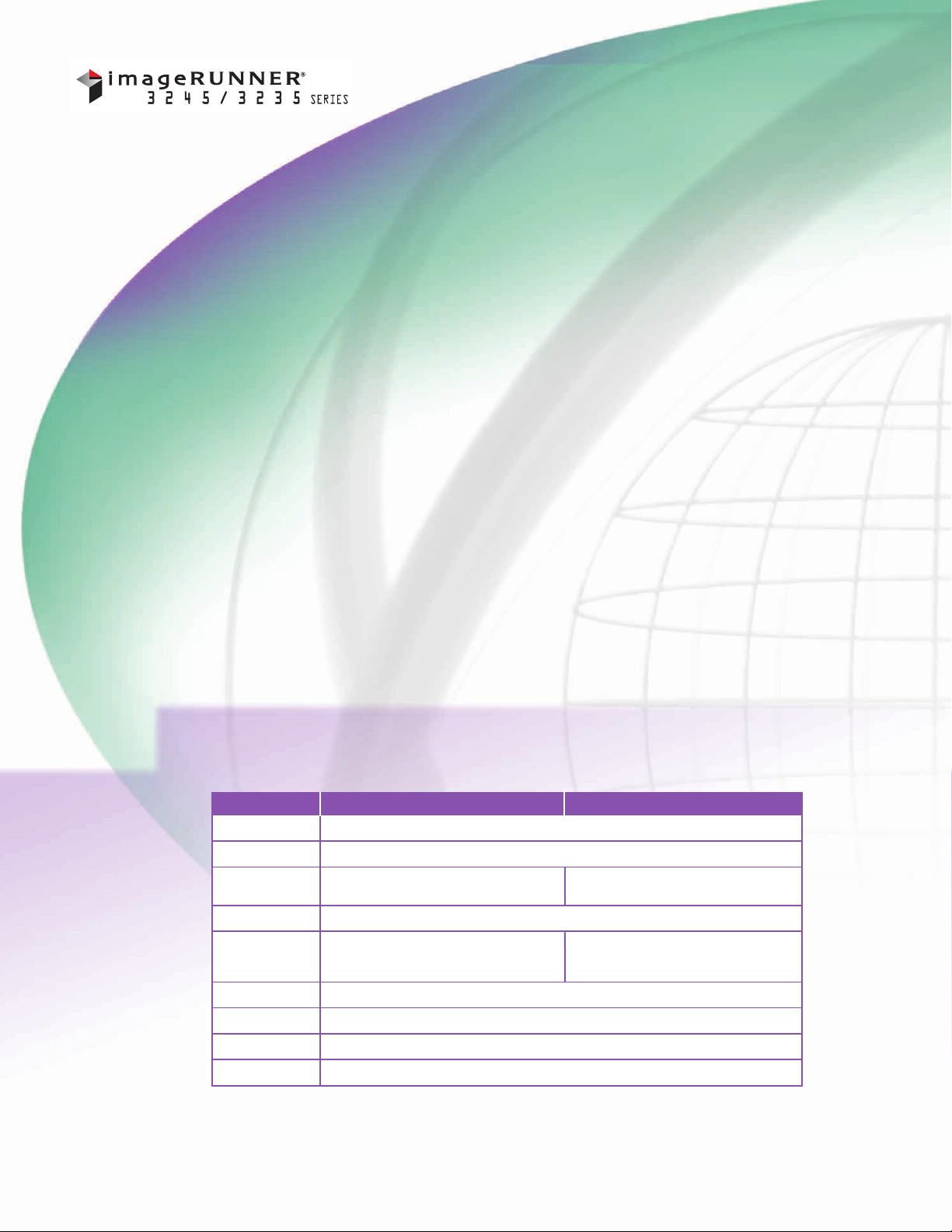
Function imageRUNNER 3245/3235 imageRUNNER 3245i/3235i
Copy Standard
Mail Box Standard
Print Standard: UFR II Standard: UFR II,
Scan Standard: Color NetworkScanGear
Color UniversalSend Optional: Color Universal Send* Standard: Color Universal Send
Super G3 Fax Optional (1, 2, or 3 lines)
Web Access Optional
USB Memory Support Optional
®
MEAP
Optional: PCL 5e/6, PostScript 3 Emulation PCL 5e/6, PostScript 3 Emulation
Optional: Advanced Feature Set** Standard: Advanced Feature Set**
Optional: SecurityFeature Set*** Standard: Security Feature Set***
architecture that’s both highly compact and customizable, it’s
never been so easy to connect your total enterprise.
Two different versions of the devices are available—an “i” model
and a “Base” model. The “i” model comes bundled with many
standard features for out-of-the-box business productivity, such as
PCL5e/6 support, PostScript
®3™
emulation, and advanced sending
capabilities. The “Base” model is highly configurable and offers
a selection of options to best fit your unique environment.
Standard
* ColorU-Send Trial KitStandard.
** IncludesHighCompression, Searchable, and Trace & Smooth Modes.
*** Includes Digital Device Signature and Encrypted PDF.
Page 3

EXPERIENCE HEIGHTENED PERFORMANCE
AND MORE ADVANCED FEATURES
New Canon imageCHIP II System Architecture
Providesfasterprocessing and interface response time
•
3245/3235 models: standard 512MB RAM + 256MB RAM
•
3245i/3235imodels: standard 1GB RAM + 256MB RAM
Dedicated dual processor design
•
Optional USB memory device support
•
Mail Box for local document archival
•
imageCHIP II
High-Quality Print Performance
Standard UFR II PrintController
•
PCLand PostScript 3 emulation standard
•
on 3245i/3235i models (optional on
3245/3235 models)
Up to 1200 x 1200 dpi printing
•
Efficient Speeds
Output at up to 45/35 pages per minute
•
New high-quality color scanner standard
•
Standard 100-sheet DADF, with scan speeds up to 51 ppm
•
Quick 35-second warm-up time and less than 4-second
•
first-copy-out time
Reliable Consumables and Supplies
Easy-to-replace Set-OnToner cartridge
•
On-the-flytoner replacement
•
Toner
Compact Productivity
Internal Finisher
•
– Up to 50-sheet corner stapling
– Up to 1,000-sheetcapacity
– Optional second trayfor sorting
– Optional hole-punch capabilities
Inner2-WayTray Option
•
– Two output trays for 350-sheet
total capacity
Accessibility
Voice Guidance Kit
•
Voice Operation Kit
•
Accessibility Handle
•
Braille Label Kit
•
Device Management and Security
HDD Encrypt and Erase
•
Removable HDD
•
•Access ManagementSystem
Updated SingleSign-On Feature
•
DepartmentID Security
•
Internet Protocol Security (IPsec)
•
imageWAREEnterprise Management Console
•
Device Information Delivery Function
•
Superior Paper Handling
Up to 4,950-sheet papercapacity
•
Standard dual 550-sheet
•
papercassettes
Standard 50-sheet Bypass Tray
•
Maximum Paper Supply
Page 4
Enhanced Document Productivity and Usability
RUN your projects reliably. RUN your workflows smoothly.
POWERFUL NEW SYSTEM ARCHITECTURE
The imageRUNNER 3245/3245i/3235/3235i models are built
upon Canon’s new imageCHIP II System Architecture for even
greater multitasking capabilities and faster processing and
response times.
HIGH-SPEED DUPLEX COLOR SCANNING
Whether you need to capture a single page or scan reams of
paper, the imageRUNNER 3245/3245i/3235/3235i models can
quickly create copies and electronic color versions of your
original documents. You can even import documents into
TWAIN-compliant applications on the desktop.
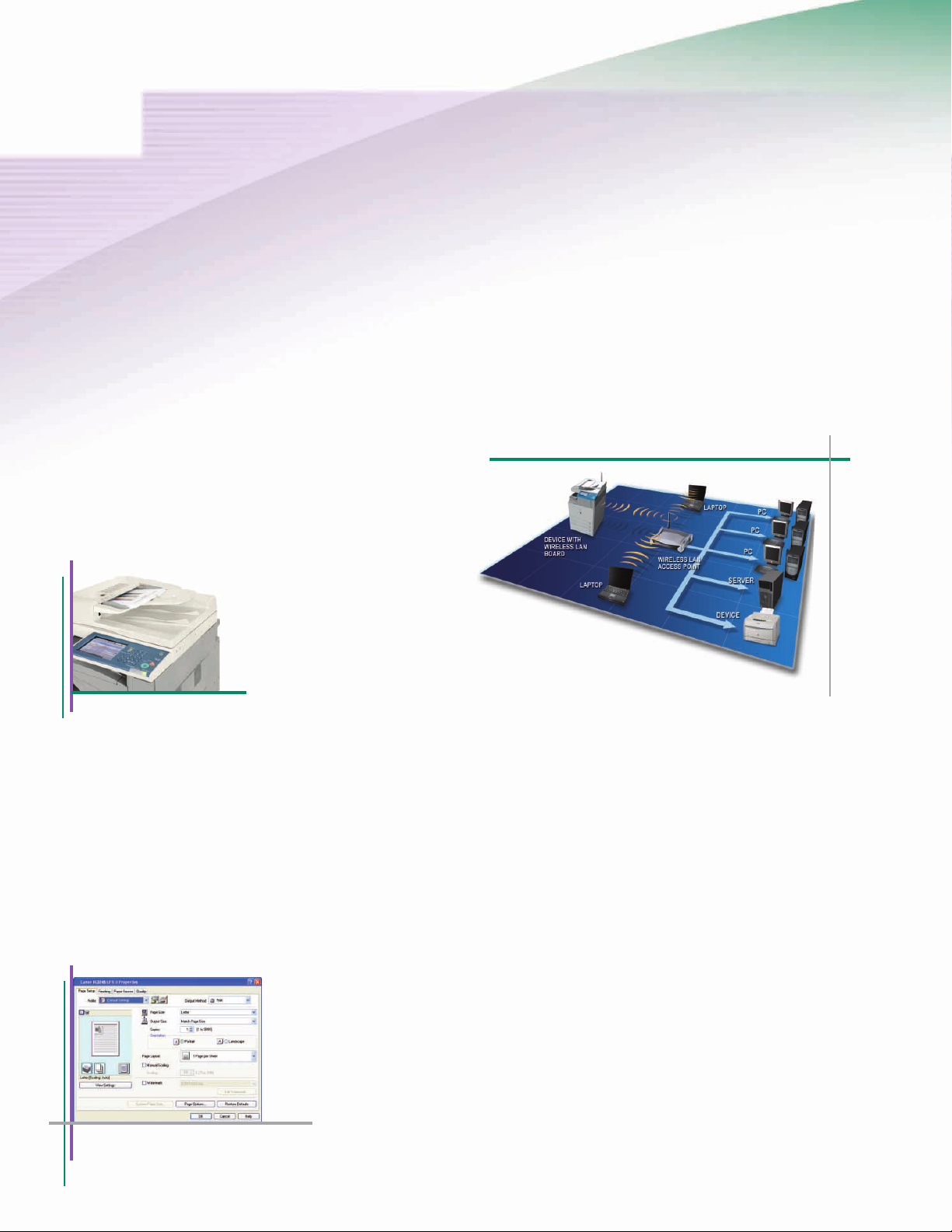
Duplexing Automatic Document Feeder
NETWORK PRINTING WITH EXCEPTIONAL CLARITY
With Standard UFR II print technology, any of the Canon
imageRUNNER 3245/3245i/3235/3235i models are also networkenabled printers. This Canon proprietary technology is optimized
to facilitate high-speed printing by utilizing the user’s desktop
computer for data processing. Support for PCL5e/6 and PS3
emulation is also available. Users will appreciate the highquality output at resolutions of up to 1200 x 1200 dpi for
stunning results.
WIRELESS LAN CONNECTIVITY
Connecting your imageRUNNER 3245/3245i/3235/3235i models
to a local area network has neverbeen easier thanks to the
Wireless LAN connectivityoption.This wireless technology
supports 802.11 g/b standards and includes security
encryption protocols.
Wireless LAN Kit
CONSOLIDATE MULTIPLE FAX DEVICES
Busy offices that need more than one or two phone lines for
faxes can consolidate stand-alone devices into one with support
for up to three fax lines. Canon’s fax driver also allows users
to fax documents right from their desktop computer for even
greater productivity.
STOP WAITING AND START WORKING
Are you tired of waiting for your output on other printers? The
imageRUNNER 3245/3245i/3235/3235i models include Canon’s
RAPIDFusing System, which delivers virtually zero waiting time
between jobs for nonstop productivity, fast warm-up times, and
reduced energy consumption.
UFR II Print Driver
Page 5
INTEGRATION WITH USB INTERFACE
Portable USB memory devices have become a part of the
everyday workflow in many office environments. The Canon
imageRUNNER 3245/3245i/3235/3235i models can become a
part of that workflow with the ability to directly print from or
scan to a USB memory device with support for PDF, JPEG, or
TIFF file formats.* You can also connect an external keyboard
through the device’s USB interface to more easily and quickly
enter send-to destinations, file names, and more.
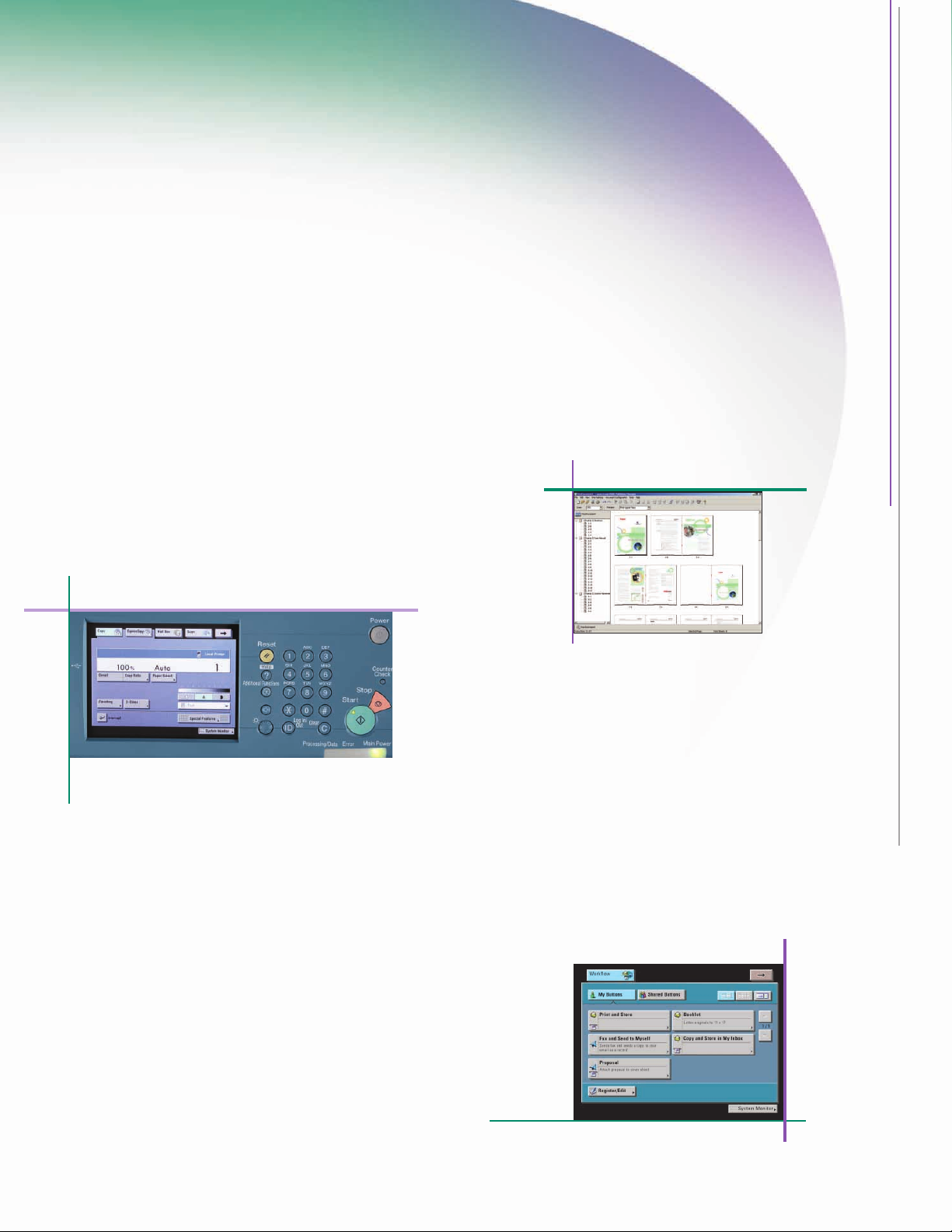
EASY-TO-OPERATE CONTROL PANEL
Canon realizes that the power of any device is affected by the
intuitiveness of the interface. To unlockthe full potential of the
imageRUNNER 3245/3245i/3235/3235i models, the control panel
has been designed with a new TFT touch-screen, providing a
widerviewing angle and greater contrast to facilitate operation.
Control Panel
PROFESSIONAL DOCUMENT PRODUCTION FROM THE DESKTOP
Whenyou need to produce impressive documents such as
reports, booklets, brochures, or tabs, Canon’s imageWARE
Publishing Manager software option provides powerful
desktop tools. Documents can be created through a simple
drag-and-drop interface with filesfrom many differentsources,
including databases, Microsoft
®
Word, Excel, PowerPoint®,
Web pages, or spreadsheets. A number of editing, annotating,
stamping, endorsing, watermarking, and impositioning tools
are available as well.
imageWARE Publishing Manager
ELECTRONIC OPERATOR MANUALS
Any questions you might have while using the Canon
imageRUNNER 3245/3245i/3235/3235i models can be
answered with the new HTML-based Operator Manual.
Information can be searched, printed, and even
bookmarked through a Web browser.
* Requires the USB Memory Connectivity Kit.Forthe imageRUNNER3245/3235
models, the PS Printer Kit-AA1 or the Direct Print Kit-F1 is required forprinting
from USB Memory device.
ACHIEVE OPERATIONAL EFFICIENCY
Breeze through complex tasks and help to reduce operator
errors with the Workflow Composer option for the Canon
imageRUNNER 3245/3245i/3235/3235i models. Workflow
Composer enables users to configure one button to perform
multiple actions, such as copying, sending, and storing at the
device in a single step. For even greater convenience, workflow
buttons can also be created and edited from desktop with
Workflow Composer Editor.
Workflow Composer Screen
Page 6
Streamlined Document Distribution and Management
RUN your ideas actively. RUN your archives effectively.
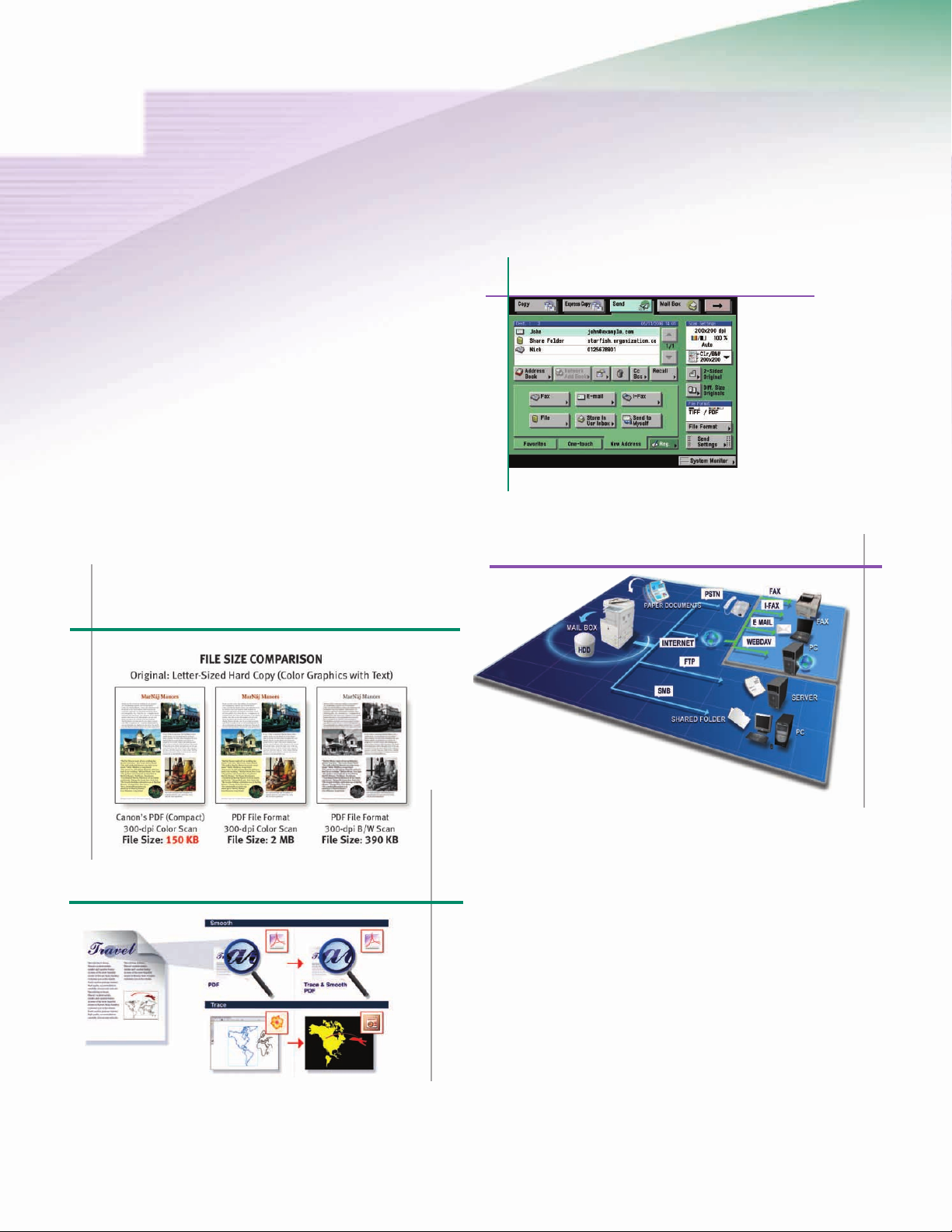
COMMUNICATE BRILLIANTLY WITH COLOR UNIVERSAL SEND
Sending documents to recipients across the office or around
the world is easier than ever with Canon’s Color Universal
Send technology.* This helps users to quickly distribute
scanned documents to multiple network destinations—such
as e-mail and Internet fax addresses, local Mail Boxes, fax,
network folders, and WebDAV servers—in a simple operation.
Destinations can be entered manually or searched in the local
Address Book or LDAP servers on the network. Scanned
documents can be sent in TIFF, PDF, JPEG, or XPS format.
High Compression Mode
Color Universal Send Main Screen
UniversalSend
Trace & Smooth PDF Mode
* Standardon imageRUNNER 3245i/3235i models; optional on
imageRUNNER 3245/3235 models but Trial Kit is standard.
ADVANCED SENDING FEATURES
For more powerful ways to send documents, the Universal Send
Advanced Feature Set* provides additional features to master
the creation, distribution, and archiving of your documents.
Canon’s proprietary High Compression Mode can significantly
reduce the size of PDF/XPS files to send color documents faster.
The Trace & Smooth PDF feature can converttext, line art, and
graphics in scanned documents to scalable artwork (vector
graphics data) that’s less jagged at the edges and can be
manipulated in Adobe
®
Illustrator®to create elements for other
documents. After scanning for digital creation, Searchable
PDF/XPS Mode embeds the text within the file to enable
extraction or keyword searches.
Page 7
DOCUMENT STORAGE AND MANAGEMENT
Streamline your document storage tasks with the Mail Box
feature—a great solution for frequent reprinting of forms and
static documents. Each Mail Box can be personalized with a
user name, password, and document deletion period. The
Copy and Store and Store and Print functions streamline
workflows by combining multiple tasks and ensuring that
a digital original is automatically archived.
Take control of your document storage and retrieval with
Canon’s imageWARE Document Manager Personal. This
software enables you to capture, archive, edit, retrieve,
and manipulate documents stored in a Mail Box right
from your desktop computer, seamlessly integrating
your workspace with the device. For archiving your
critical business documents and records throughout
the organization, imageWARE Document Manager
Workgroup and imageWARE Document Manager
Enterprise Editions can store vast amounts of
information in a centralized electronic repository.
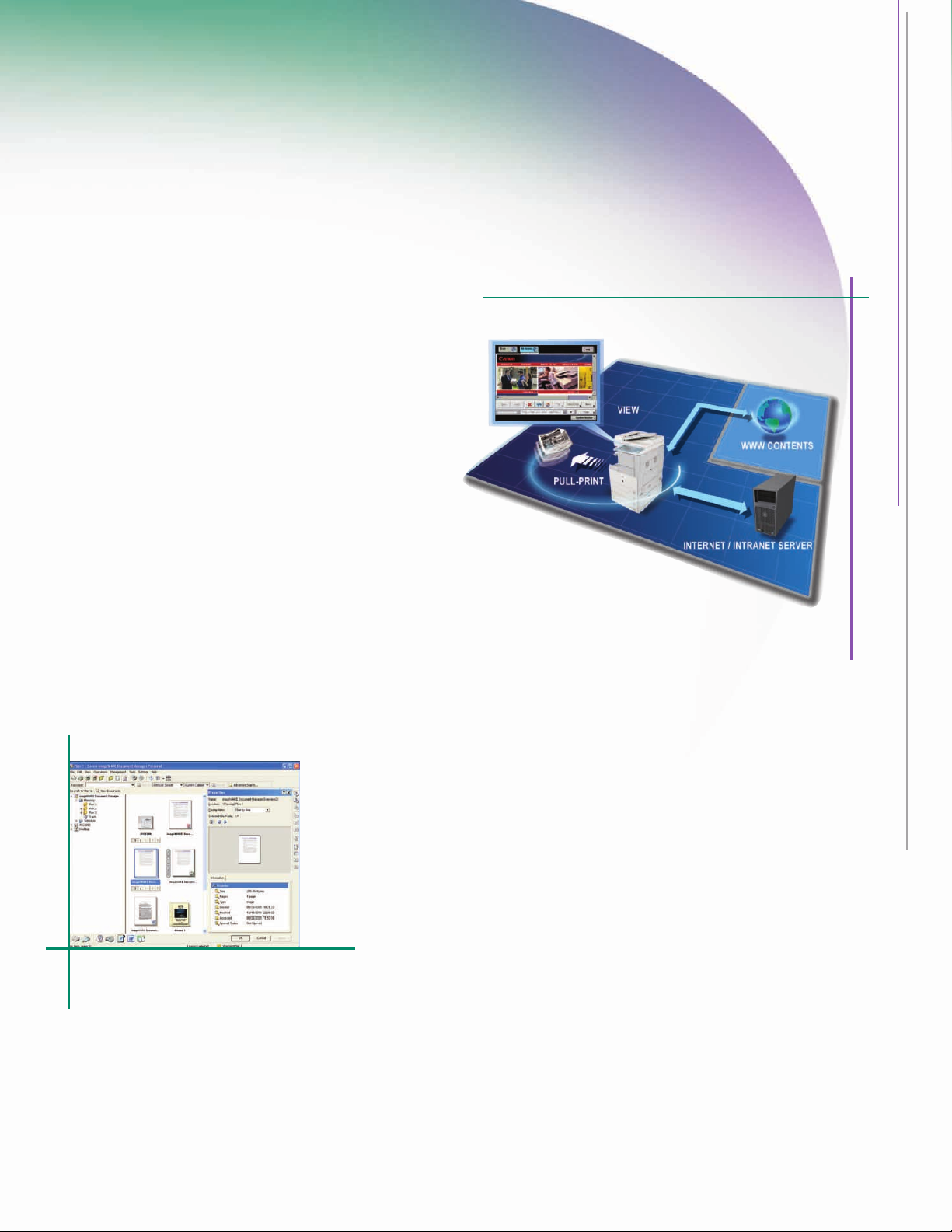
Web Access Software
WEB BROWSING AND PRINTING
With Canon’s Web Access software option, you can browse
the Web or corporate intranets directly from the device’s
color touch-panel.*
Print Web pages or PDF files from the Internet or your
network—even when you don’t have access to a computer—
with the Web Access Software option.**
imageWARE Document Manager Personal
* RequiresWeb AccessSoftware-G1. Requires Additional Memory Type A on imageRUNNER 3245/3235
modelsto view Flashcontents on Webpages.
** Requires PS Printer Kit-AA1 or Direct PrintKit-F1 on imageRUNNER 3245/3235models to print PDF files.
Page 8
Robust Device Management and Security
RUN your applications harmoniously. RUN your communications securely.
NETWORK USER ACCOUNT INTEGRATION
Protect your device against unauthorized use with security
features that seamlessly integrate with your existing network
infrastructure. With the new version of Single Sign-On (SSO),
up to 5,000 users can be authenticated on the device against
a domain server using the same network credentials and
without requiring any additional server. This updated SSO
feature also integrates with the optional Access Management
System to provide more granular control over device
permissions.
FLEXIBLE USER AUTHENTICATION METHODS
Canon offers several authentication methods to meet the needs
of nearly any environment when deploying a single device or an
entire fleet. In addition to network authentication with SSO
accounts, administrators can also choose from Department ID
Mode or Simple Device Log-In (SDL). With Department ID Mode,
device access is controlled with user names and passwords
stored locally. SDL is an enhanced form of Department ID where
each user enters his or her personal ID and password below the
proper Department ID for greater tracking capabilities.
ADVANCED USER AND GROUP-LEVEL DEVICE ACCESS
In environments that require more sophisticated permissions
to the functions and features that are accessible to users, the
optional Access ManagementSystem delivers precise control.
This system allows administrators to create as many as 100
roles that define privileges and can then be assigned to each
user or groups of users.These privileges can be used to restrict
access to functions such as print, fax, scan, copy, and send as
well as features within each function, such as 2-on-1 copying.
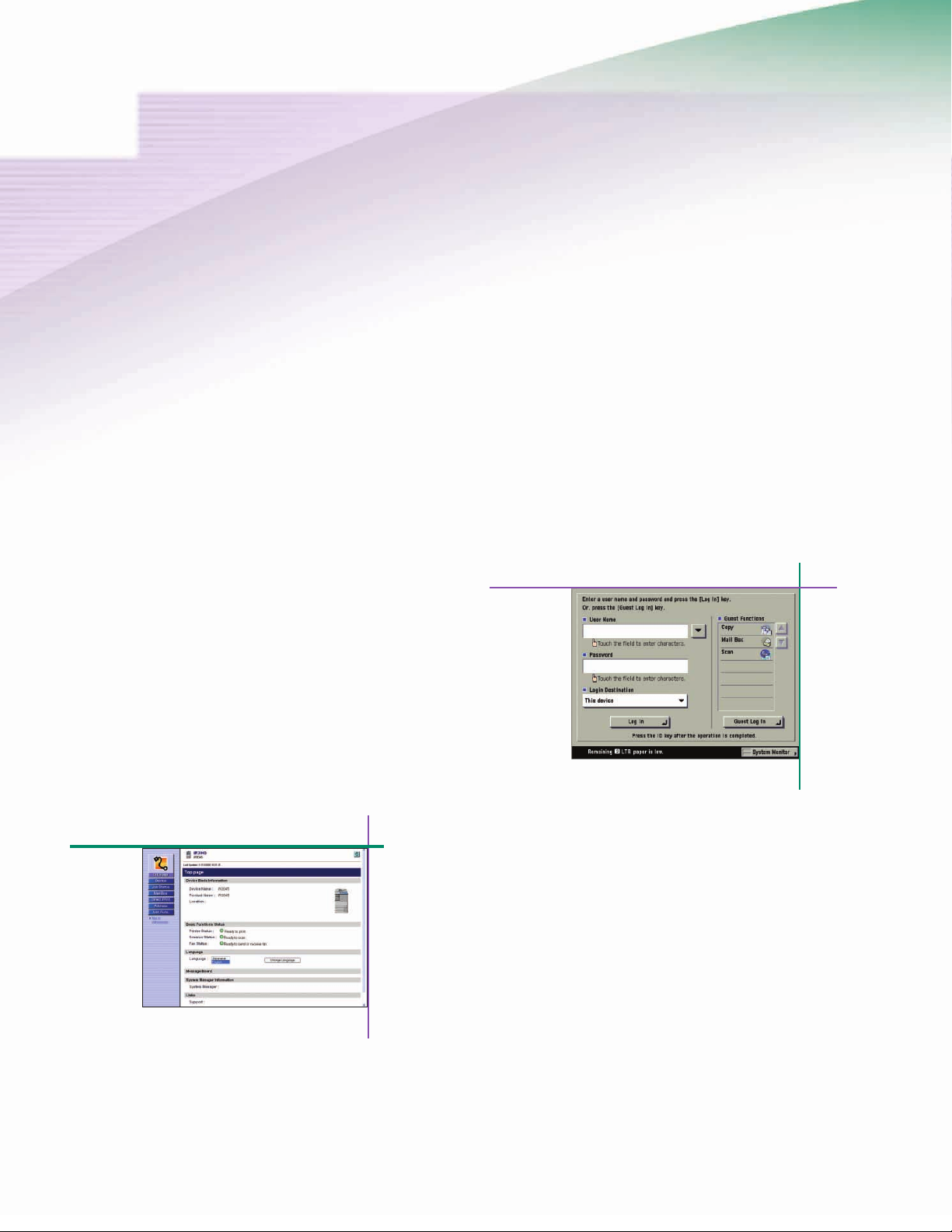
Access Management System Screen
Remote UI
REMOTE DEVICE MANAGEMENT
If you have ever needed to checkthe status of a printdevice
fromyour desk, track the progress of your currentjobs, or
monitor paper and toner levels, then you’ll appreciate the
standard Remote UI utility. This utility provides access to the
device through a standard Web browser from any computer on
the network and also allows administrators to remotely manage
Mail Boxes and the local Address Book.
Page 9
ENTERPRISE-WIDE DEVICE MANAGEMENT
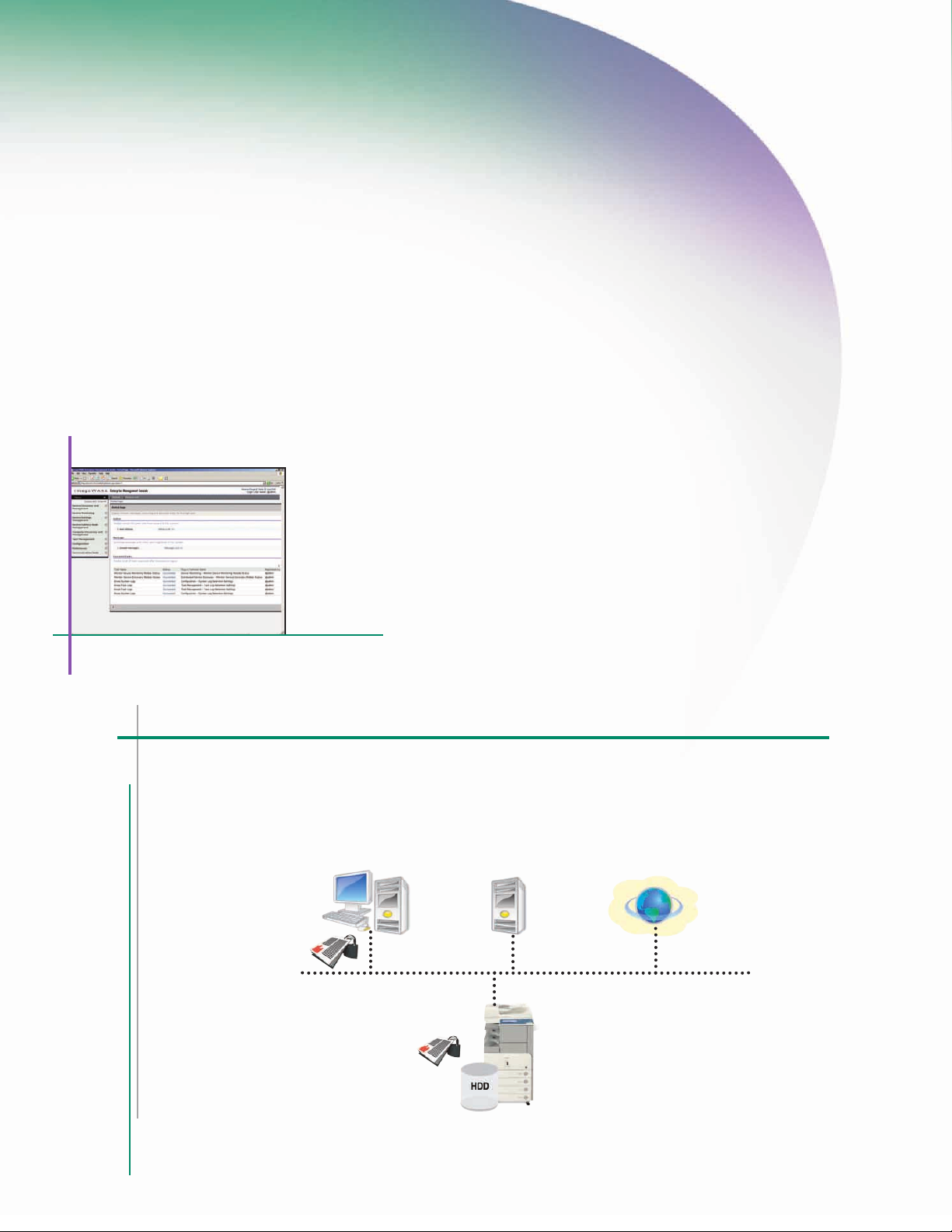
Administering a fleet of devices can be cumbersome without the
righttools.That’s why Canon developed imageWARE Enterprise
Management Console (EMC), a Web-based utility that facilitates
centralized control over networked devices. Built upon an
extensible framework, it enables remote management of device
settings, discovery of new devices using automated tasks, and
device error notifications via e-mail. Administrators can also
easily replicate Address Books across multiple devices through
the Device Information Delivery Function (DIDF) and push print
drivers to PC-based desktop computers for rapid deployment.
imageWAREEnterprise Management Console
DEFENSE AGAINST NETWORKTHREATS
Beyond user-level authentication, the Canon
imageRUNNER 3245/3245i/3235/3235i models
can also restrict network access to specific IP/MAC
addresses and service ports. And with IPv6 support
built-in, the device is ready to meet your future network
infrastructure requirements. Optional IPSec support
can also add an additional layer of network security.
PROTECTING THE SECURITY OF YOUR DATA
Protect your imageRUNNER 3245/3245i/3235/3235i model
with advanced features that guard against unauthorized
data access. To protect your stored, scanned, and printed
data, the HDD Data Erase Kit option automatically
overwrites previously stored data.The HDD Data Encryption
Kit option provides additional security by encrypting data
before it’s committed to the hard disk drive. Both kits
have achieved EAL3 Common Criteria (CC) certification.
For environments desiring the ability to easily remove
the internal hard drive when the device isn’tin use, a
Removable Hard Disk Drive option is also available.
Device Management and Security Overview
Document Security
Encrypted Secured Print
•
Watermark/Secure Watermark
•
Copy Set Numbering
•
Encrypted PDF
•
Digital Signature PDF
•
Digital Signature XPS
•
FAXForwarding
•
Fax Destination Confirmation
•
HDD Security
HDD Data Erase
•
HDD Data Encryption
•
HDD Format
•
Mail Box Password Protection
•
Job Log Conceal
•
Removable Hard Disk Drive
•
Mail Server Security
POP Authentication before SMTP
•
SMTP Authentication
•
Network Security
MACAddress Filtering
•
IP Address Filtering
•
Network Application On/Off
•
USB Block
Internet
Device Access Security
Department ID (up to 1,000 IDs)
•
UserAuthentication (SDL/SSO)
•
Access Management System
•
Control Card/Card ReaderSystem
•
SmartCardAuthentication
•
Device Management
DIDF (Device Information Delivery Function)
•
imageWARE Enterprise Management Console
•
•
Destination Restriction
•
IPSec
•
IEE802.1 x (Wire/Wireless)
•
Page 10
Environmentally-Conscious and Easily Accessible
RUN your resources efficiently. RUN your devices universally.
FEATURES DESIGNED TO SAVE ENERGY AND CONSUMABLES
Canon takes the preservation of our environment seriously and
has developed a number of technologies that promote resource
conservation. At the core of the imageRUNNER 3245/3245i/
3235/3235i models is the RAPID Fusing System, which is more
energy-efficient than conventional systems. This allows for
quick start-up times, resulting in less energy consumption.
Each model is ENERGY STAR
1W in Sleep Mode.
When it comes to saving on the costs of consumables such as
paper and toner, the imageRUNNER 3245/3245i/3235/3235i
models can help minimize the distribution of originals in
hard-copy form with Universal Send. Features such as PC Faxing
and Fax Forwarding also make it possible to send documents
without the need to print them first.
®
qualified and uses less than
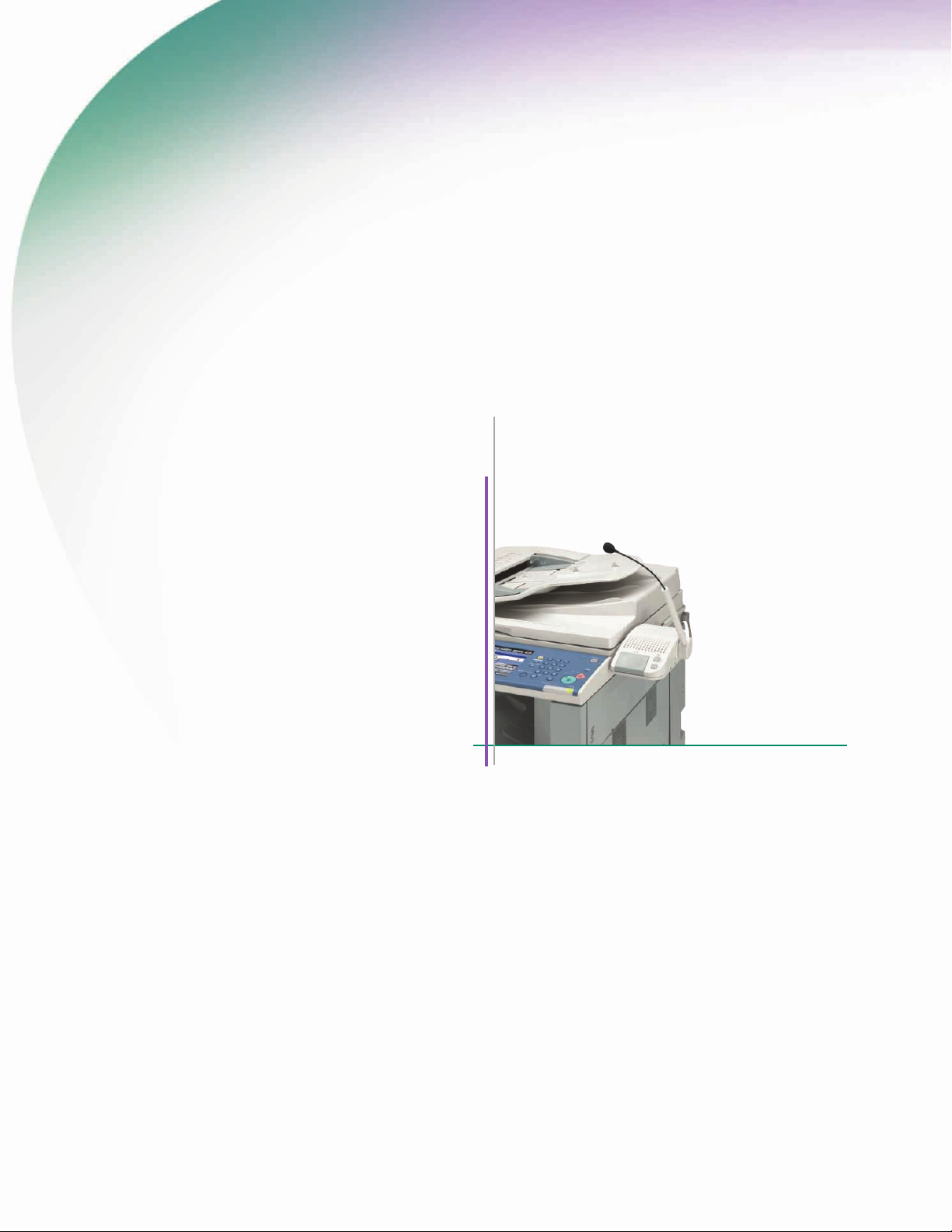
Voice Operation Kit
If printed copies are needed, the intuitive drivers on the
desktop make it easy for users to print on both sides of a
page and even print multiple pages on a single sheet to
help save paper.
* ForimageRUNNER 3245/3235 models, AdditionalMemoryType A is required
to install Voice OperationKit.
ENSURING ACCESSIBILITY FOR ALL AUTHORIZED USERS
Canon offers a number of options to ensure easy access for
individuals with disabilities. Users have access to all system
functions from a laptop or desktop PC using the Remote
Operator’s Software Kit option to emulate the device control
panel on a computer monitor. Individuals with visual or
mobility/dexterity impairments can receive audible confirmation of select functions with the Voice Guidance Kit, and
control thedevice through spoken commands using the Voice
Operation Kit.*The optional Braille Label Kit improves access
to control panel functions by adding transparent labels to
hard keys on the device, and the Access Handle option
helps seated users to easily close the document feeder.
Page 11
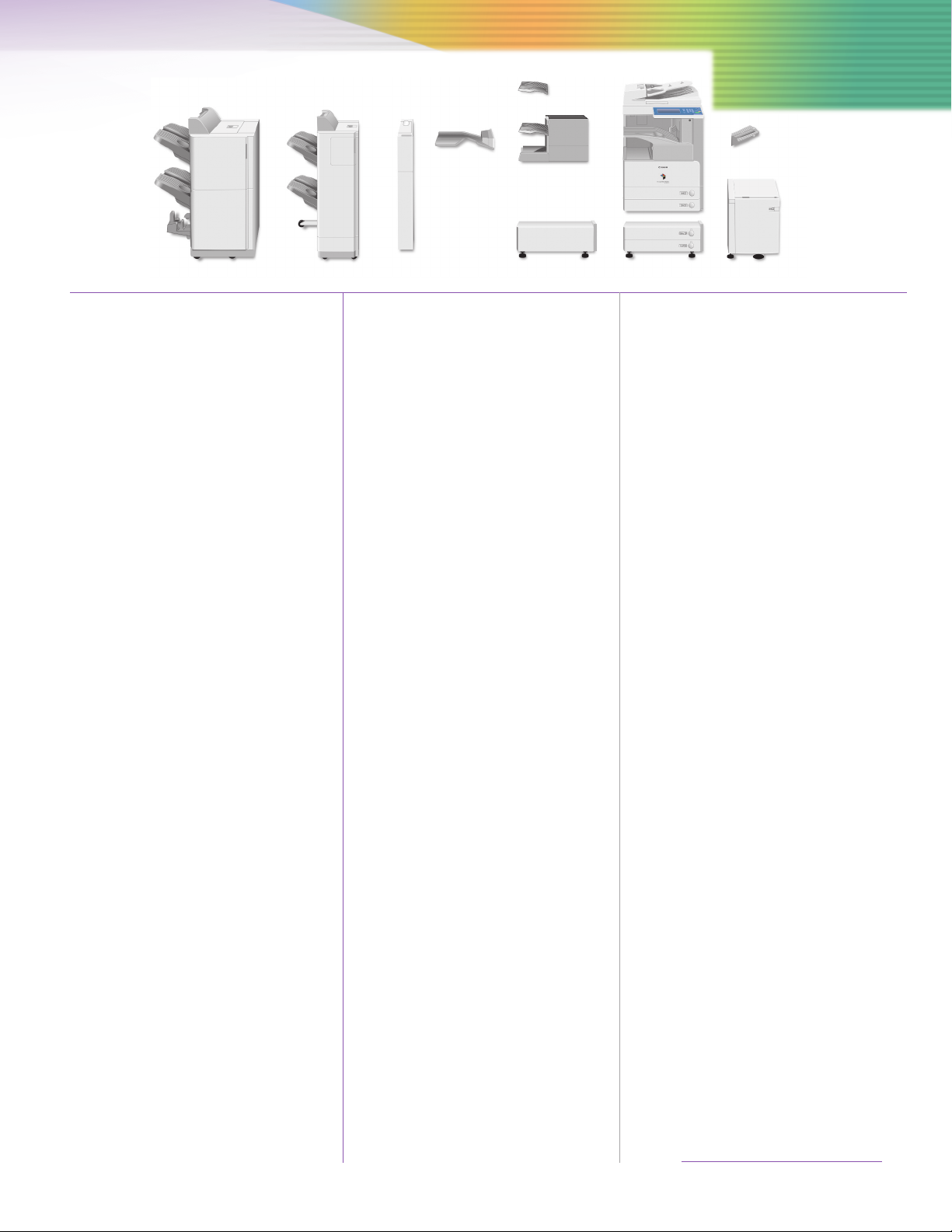
Inner 2-Way Tray-D1
Additional Finisher Tray-B1
Finisher-S1
Main Unit
Specifications
Copy Tray-J1
Saddle Finisher-AE2
Finisher-AE1
MAIN UNIT
Type: Monochrome Digital Multifunction
Copying Method: Laser Dry Electrostatic Transfer
Developing System: Dry Monocomponent Toner
Fixing System: RAPID Fusing System
Std. Memory
imageRUNNER3245/3235: 512MB RAM + 256MB RAM
imageRUNNER 3245i/3235i: 1GB RAM + 256MB RAM
Max. Memory: 1GB RAM + 768MB RAM
Hard Disk Drive: 60GB
Copy/Print Speed (Letter)
imageRUNNER 3245/3245i: Up to45 ppm
imageRUNNER3235/3235i: Up to 35 ppm
First-Copy Time: 3.9 Seconds (From Platen Glass)
Warm-Up Time: 10 Seconds or Less From
Network Interface
Connections: 10/100/1000 Base-TX (R J-45),
Acceptable Originals: Sheets, Books, and 3-Dimensional
Max. Original Copy Size: 11" x 17"
Min. Copy Size: 3-7/8" x 5-7/8" (Stack Bypass)
Acceptable Paper Sizes: 11" x 17", Legal, Letter, Letter-R
Scan Resolution: 600 x 600 dpi
Copy Resolution: 1200 x 600 dpi (Interpolated)
Print Resolution: 1200 x 1200 dpi
Halftone: 256 Gradations of Gray
Document Feeding Method: 100-Sheet Duplexing Automatic
Duplexing: Standard Automatic Trayless
Paper Supply
Standard: Dual 550-Sheet Paper Cassettes
Optional: Dual 550-Sheet Paper Cassettes
Maximum: 4,950 Sheets
Acceptable Paper Sizes
Upper Cassette: Legal, Letter, Letter-R,
Lower Cassette: 11" x 17", Legal, Letter, Letter-R,
Stack Bypass: 11" x 17", Legal, Letter, Letter-R,
Acceptable Paper Weight
Cassettes: 17 lb. to 24 lb. Bond
Stack Bypass: 17 lb. to 32 lb. Bond
Dimensions (H x W x D): 35-1/2" x 22-1/4" x 27-5/8"
Weight: 181 lb. (82kg)
Power Requirements: 120V AC, 60Hz, 10A
Imaging System
Projection
5.9 Seconds (From DADF)
Sleep Mode
35 Seconds or Less From
Main Power Off
USB 2.0 (Device), USB 2.0 (Host) x 2
Objects up to 4.4 lb.
■
Document Feeder (Standard)
Duplexing
+ 50-Sheet Stack Bypass
+ 2,700-Sheet Paper Deck
Statement-R, Executive
Statement-R, Executive
Statement-R, Executive, Free Size
(3-7/8" x 5-7/8" to 11-5/8"x 17"),
and Envelopes
(901mm x 565mm x 700mm)
Puncher
Unit-M1
Cabinet-P1 Cassette
Power Consumption: 1.41kW (Max.)
Plug: NEMA 5-15P
Toner (Estimated Yield): 24,000 Impressions at 6%
Image Coverage
Copy Features
Multiple Copies: 1 – 999
Max. Copy Reservation: 20 Jobs
Exposure: Automatic or Manual (9 Levels)
Magnification
Preset Reduction: 25%, 50%, 64%, 73%, 78%
Preset Enlargement: 121%, 129%, 200%, 400%
Zoom Mode
Platen: 25% - 400% (in 1% Increments)
DADF: 25% - 200% (in 1% Increments)
Print Features
CPU: Canon Custom Processor
Std. Memory
imageRUNNER 3245/3235: 512MBRAM+ 256MB RAM (Shared)
imageRUNNER3245i/3235i: 1GB RAM + 256MBRAM (Shared)
Max. Memory: 1GB RAM + 768MB RAM ( Shared)
Hard Disk Drive: 60GB (Shared)
Maximum Print Resolution: 1200 x 1200 dpi
■
Supported PDL
imageRUNNER 3245/3235: Std. UFR II, Opt. PCL5e/6,PS 3 em.
imageRUNNER3245i/3235i: Std. UFR II, PCL 5e/6, PS 3 em.
Supported OS
UFR II: Windows®2000/XP/Server 2003/
Windows Vista
Citrix MetaFrame
Macintosh
®
®
OS X (OS10.2.8 or later)
PCL 5e/6: Windows 2000/XP/Server 2003/
WindowsVista
Citrix MetaFrame
PS 3 em.: Windows 2000/XP/Server 2003/
Windows Vista
Citrix MetaFrame
Macintosh OS X (OS 10.3.8 or later)
Mail Box Features
Max. Mail Boxes Supported: 100 User Inboxes, One Memory RX
Inbox, 50 Confidential Fax Inboxes
Scan Features
Network TWAIN Scan: Standard
Network Scan Utility: Color Network ScanGear
Color Universal Send Features (Standard for 3245i/3235i models;
Optional on 3245/3235 models)
Color Mode: Auto Color Select
(Full Color/Grayscale)
Auto Color Select (Full Color, B/W)
Full Color Grayscale, B/W
Address Book Capacity: Max. 1,800 Destinations
(Includes 200 One-Touch Buttons)
Max. 5 LDAP Servers
Sending Methods: E-mail, I-fax, SMB, File Server
(FTP, IPX, WebDAV), User Inbox,
Super G3 Fax (Optional)
Communication Protocol
File: FTP (TCP/IP), SMB (TCP/IP),
NCP (IPX), WebDAV
E-mail/I-fax: SMTP, POP3, I-fax (Simple, Full)
Feeding Unit-Y3
Paper Deck-Q1
Data Format
File, E-mail: TIFF, JPEG, PDF, XPS, PDF/XPS
(Compact),** PDF (Trace &
Smooth),** PDF/XPS (OCR),**
Encrypted PDF,*** Digital Device
Signature PDF/XPS,*** Digital
User Signature PDF/XPS
▲
I-fax: B/W: TIFF (MH, MR, MMR)
USB Memory Media
Supported Applications: Scan to USB Memory Media,
Print from USB Memory Media
Supported Print File Formats: TIFF, JPEG, PDF
Supported Scan File Formats: TIFF, JPEG, PDF, PDF (Compact),**
PDF (Trace & Smooth),** PDF
(OCR),** Encrypted PDF,***
Digital Device Signature PDF,***
Digital User Signature PDF
▲
Required Accessories
imageRUNNER 3245/3235: USB Memory Connectivity Kit-A1,
PS Printer Kit-AA1 or Direct Print
Kit-F1 for printing
imageRUNNER3245i/3235i:USB Memory Connectivity Kit-A1
Duplexing Automatic Document Feeder
Acceptable Originals: Statement to 11" x 17"
Acceptable Weights
One-Sided Scanning: 11 lb. to 32 lb. Bond
Two-Sided Scanning: 13 lb. to 32 lb. Bond
Paper Capacity: 100 Sheets (20 lb. Bond)
OPTIONAL ACCESSORIES
Cassette Feeding Unit-Y3
Acceptable Paper Sizes: 11" x 17", Legal, Letter, Letter-R,
Paper Capacity: Dual 550-Sheet Cassettes
Acceptable Paper Weight: 17 lb. to 24 lb. Bond
Weight: Approx. 50.7 lb. (23kg)
Paper Deck-Q1
Acceptable Paper Size: Letter
Paper Capacity: 2,700 Sheets (20 lb. Bond)
Acceptable Paper Weight: 17 lb. to 24 lb. Bond
Dimensions (H x W x D): 18-5/8" x 14-5/8" x 23-1/4"
Weight: Approx. 65.3 lb. (29.6kg)
Inner 2-Way Tray-D1
Number of Trays: Two
Acceptable Paper Sizes: 11" x 17", Legal, Letter, Letter-R,
Acceptable Paper Weight: 17 lb. to 32 lb. Bond
Paper Capacity Per Tray
Upper Tray: 100 Sheets (LTR), 50 Sheets
Lower Tray: 250 Sheets (LTR), 100 Sheets
Attachable Accessories: Copy Tray-J1
Finisher-S1
Statement-R, Executive
(1,100 Sheets at 20 lb. Bond)
(473mm x 372mm x 591mm)
Statement-R, Executive,
Envelope, Freesize
(3-7/8" x 5-7/8" to 11-3/4" x 17")
(Other Sizes)
(Other Sizes)
Specifications are continued on back.
Page 12
Number of Trays: One (Second Tray Optional)
Acceptable Paper Sizes: 11" x 17", Legal, Letter, Letter-R,
Statement-R, Executive,
Envelope, Freesize
(3-7/8" x 5-7/8" to 11-3/4" x 17")
Acceptable Paper Weight: 17 lb. to 32 lb. Bond
Tray Capacity
Non-collate, Collate,
Group Mode: 1,000 Sheets (Letter, Statement-R)
500 Sheets (11" x 17", Legal,
Letter-R)
Staple Mode: 1,000 Sheets/30 Sets (Letter)
500 Sheets/30 Sets (11" x 17",
Legal, Letter-R)
Tray Capacity (with Additional Finisher Tray-B1)
Non-collate, Collate,
Group Mode: 300 Sheets Per Tray (Letter,
Statement-R)
150 Sheets Per Tray (11" x 17",
Legal, Letter-R)
Staple Mode: 300 Sheets/30Sets Per Tray(Letter)
150 Sheets/30 Sets Per Tray
(11" x 17", Legal, Letter-R)
Staple Position
Top Left Corner: 11" x 17" (Landscape), Legal
(Landscape), Letter, Letter-R
Top Right Corner: 11" x 17" (Portrait), Legal
(Portrait)
Max. Stapling Capacity: 50 Sheets (Letter)
30 Sheets (11" x 17", Legal,
Letter-R)
Attachable Accessories: Additional Finisher Tray-B1
Puncher Unit-R1
Copy Tray-J1
Puncher Unit-R1 (Option for Finisher-S1)
Acceptable Paper Sizes: 11" x 17", Legal, Letter, Letter-R
Acceptable Paper Weight: 17 lb. to 32 lb. Bond
Punch Type
Two Holes: Legal, Letter-R
Three Holes: 11" x 17'', Letter
Punch Waste Capacity
Two Holes: Approx. 2,500 Sheets
Three Holes: Approx. 1,500 Sheets
Finisher-AE1/Saddle Finisher-AE2
Number of Trays: 2 Trays
Acceptable Paper Sizes: 11" x 17", Legal, Letter, Letter-R,
Statement,Statement-R, Executive,
Envelope, Freesize (3-7/8"x 5-7/8"
to 11-3/4" x 17")
Acceptable Paper Weight: 17 lb. to 32 lb. Bond
Tray Capacity
Non-collate, Collate,
Group Mode: 1,000 Sheets (Letter, Statement-R,
Executive)
500 Sheets (11" x 17", Legal,
Letter-R)
Staple Mode: 1,000 Sheets/30 Sets (Letter,
Executive)
500 Sheets/30 Sets (11" x 17",
Legal, Letter-R)
Staple Positions: Corner Staple, Double-Staple
Max. Stapling Capacity: 50 Sheets (Letter, Executive)
30 Sheets (11" x 17", Legal,
Letter-R)
Saddle-Stitching*
Acceptable Paper Sizes: 11" x 17", Legal, Letter-R
Saddle-Stitch Capacity: 15 Sheets (60-Page Booklets)
Tray Capacity: 25 Sets (1 to 5 Sheets)
15 Sets (6 to 10 Sheets)
10 Sets (11 to 15 Sheets)
Folding: V-Folding
Dimensions (H x W x D)
Finisher-AE1: 40-7/8" x 25-3/8" x 25-7/8"
(1037mm x 643mm x 657mm)
Saddle Finisher-AE2: 40-7/8" x 29-3/8" x 25-7/8"
(1037mm x 747mm x 657mm)
Attachable Accessories: Puncher Unit-M1
Puncher Unit-M1 (Optionfor Finisher-AE1/Saddle Finisher-AE2)
Acceptable Paper Sizes: 11" x 17", Legal, Letter, Letter-R
Acceptable Paper Weight: 17 lb. to 32 lb. Bond
Punch Type
Two Holes: Legal, Letter-R
Three Holes: 11" x 17", Letter
Punch Waste Capacity: Approx. 3,000 Sheets
PCL Printer Kit-AA1 (Standard for imageRUNNER 3245i/3235i Models)
PDL: PCL 5e, PCL 6
Internal Fonts: 80 Scalable Fonts, 30 Barcode,
10 Bitmap, 2 OCR Fonts
Supported OS: Windows 2000/XP/Server 2003/
Windows Vista
Citrix MetaFrame
PS Printer Kit-AA1▲▲(Standard for imageRUNNER 3245i/3235i
Models)
PDL: PostScript 3 Emulation
Internal Fonts: 136 Scalable Fonts
Supported OS: Windows 2000/XP/Server 2003/
Windows Vista
Citrix MetaFrame
Macintosh OS X (OS10.3.8or later)
Su
per G3 Fax Board
Applicable Line: Public Switched Telephone
Network (PSTN)
Connection Lines: Up to 3
Sending/Original Size: Statement to 11" x 17"
Receiving/Printing Size: Statement to 11" x 17"
OTHER OPTIONAL ACCESSORIES
• Cabinet-P1
• FL Cassette-Y1(replacement)
• FL Cassette-Z1(replacement)
• Envelope Feeder
Attachment-C2
• Copy Tray-J1
• Document Tray-J1
• Card Reader-C1
• Carder Reader Kit-B3
• PCL Printer Kit-AA1
• PS Printer Kit-AA1
• Direct Print Kit-F1
• Barcode Printing Kit-A1▲▲
• Encrypted Secure Print
Software-C1▲▲
• Color Universal Send Kit-P1
• Universal Send Advanced
Feature Set-B1
• Universal Send Security
Feature Set-B1
• Digital User Signature
Kit-B1
,
†††
,
†††
• eCopy Suite
• Web Access Software-G1
• USB Memory Connectivity
Kit-A1
■
1200 x 1200 dpi printing resolution is not available with PCL5e.
Available with Saddle Finisher-AE2 only.
*
Requires Universal Send Advanced Features Set-B1
**
(standard on 3245i/3235i).
Requires Universal Send Security Feature Set-B1
***
(standard on 3245i/3235i).
▲ Requires Digital User Signature Kit-A1.
▲▲ Requires PCL Printer Kit-AA1.
†
Requires Additional Memory Type A to display Web Flash
content. Requires the PS Printer Kit-AA1 or Direct
Print Kit-F1 if printing PDF files.
††
Requires Additional Memory Type A.
†††
Requires Color Universal Send Kit-P1 or USB Memory
Connectivity Kit-A1.
Standard with imageRUNNER 3245i/3235i models.
• Secure Watermark-A1
• Super G3 Fax Board-AC1
• Super G3 2nd Line Fax
Board-AC1
• Super G3 2nd/ 3rd Line Fax
Board-AC1
• Additional Memory Type A
(512MB)
• System Upgrade RAM-A1
• Access Management
System Kit-A2
• HDD Data Encryption Kit-B5
• HDD Data Erase Kit-B2
• Braille Label Kit-E1
• ADF Access Handle-A1
• Voice Operation Kit-B1
• Voice Guidance Kit-D1
• Remote Operator’s
Software Kit-A3
• Workflow Composer-B3
• Expansion Bus Board-E1
• Wireless LAN Board-A1
• IP Sec Board-A1
†
• Removable Hard Disk Drive
Kit-C1
††
As an ENERGY STAR®Partner, Canon U.S.A., Inc. has determined that these products meet the
ENERGY STAR guidelines for energy efficiency. ENERGYSTAR and the ENERGYSTAR mark are registered
U.S. marks. Microsoft, PowerPoint, Windows and Windows Vista are registered trademarks of
Microsoft Corporation in the United States and/or other countries. Adobe and Illustrator are
registered trademarks of Adobe Systems Incorporated in the United States and/or other countries.
Macintosh is a trademark of Apple Inc. CANON, IMAGERUNNER, MEAP, and the GENUINE logo are
registered trademarks of Canon Inc. in the United States and may also be registered trademarks or
trademarks in other countries. IMAGEWARE is a registered trademarkof Canon U.S.A., Inc. in the
United States and is a trademark of Canon Inc. in certain other countries. IMAGEANYWAREis a
trademark of Canon. All other referenced product names and marks are trademarks of their respective
owners and are hereby acknowledged.
Specifications and availability subject to change without notice.
©2008 Canon U.S.A., Inc. All rights reserved.
0121W538
0608-3245/3235-100M-LCR
printed on recycled
paper in the u.s.a.
1-800-OK-CANON
www.usa.canon.com
Canon U.S.A., Inc.
One Canon Plaza
Lake Success, NY 11042
 Loading...