

Page 1
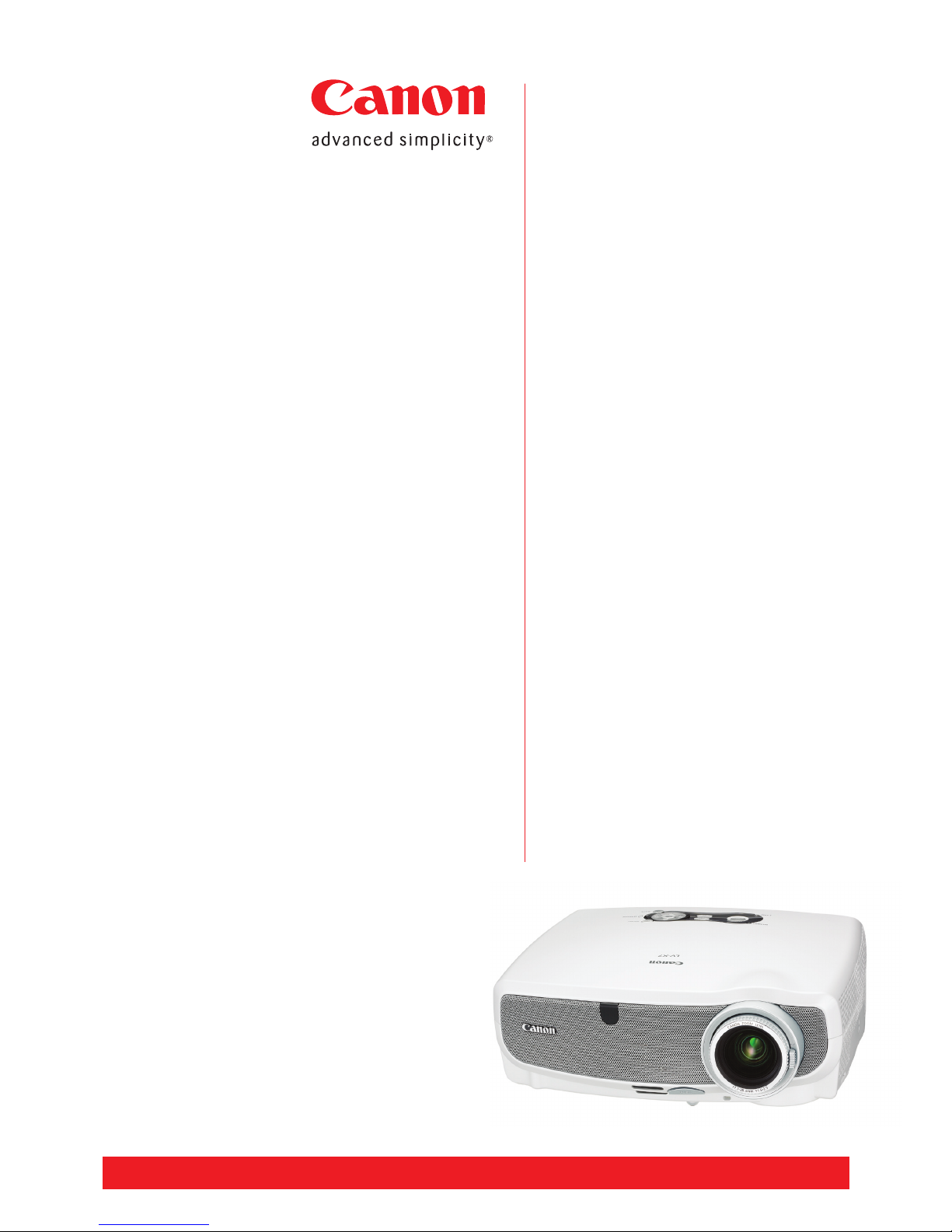
LV-X7 portable
multimedia projector
The affordable portable
The LV-X7 offers many of the features of
higher-end projectors in a compact and
affordable package. XGA resolution, rear
projection capabilities, whisper quiet
operation and genuine Canon optics are
just some of the features of this
economical portable projector.
At a glance…
• 1,500 ANSI lumens brightness
• XGA resolution (1,024 x 768 pixels)
• 500:1 contrast ratio
• 25dB in quiet mode
• 1.6x optical zoom lens
• Weighs only 2.9kgs
• RGB Out for external monitor
• Up to 4,000 hours lamp life
• Automatic power-off timer
• Remote control option
• Ceiling mount
• Password protection and control panel key lock
• Connect direct to a laptop, VCR, DVD,
video camera and more
Portable and versatile
With its easy placement, clear projection on a variety of surfaces, including
blackboards, and with brightness and contrast that is easy on the eyes, the
LV-X7 is ideal for use in classrooms and small meeting rooms. However, with
its combination of features and input options, this versatile projector can
adapt to a variety of applications.
Clear and faithful presentations
A powerful combination of 1,500 lumens of brightness and XGA resolution
helps the LV-X7 produce wonderfully clear and faithful presentations. Still
images, video movies and even detailed graphs and diagrams are projected
equally well.
Genuine Canon 1.6x optical zoom
Particularly useful in small rooms and awkward placement situations, the
LV-X7's short focal length lens can project an image that is 1.52-metres
across (diagonally) from less than two metres away. From 2.9 metres, it can
fill a screen 2.54-metres across.
Easy to set up and operate
You'll also find the LV-X7 is extremely quick and easy to set up and
operate. Use the direct source select keys on the control panel, for
example, to select from four types of input with the press of a button.
Fast to warm up and cool down
When time is of the essence, you'll appreciate the LV-X7's fast warm up time
– it's ready to go in only eight seconds. Cool down takes only 30 seconds,
so it can be put away soon after the presentation is over – perfect for when
you are on the run.
Wall colour correction
The Wall Colour Correction feature automatically adjusts colour levels for a
presentation so that it appears as it should on blackboards and other non-
white surfaces. There are seven wall colour options to choose from.
Individual colour management
To ensure your presentations look their best, you can use the LV-X7's Colour
Management feature to fine tune individual colours in an image. In addition
to colour and colour balance, it enables you to adjust brightness, contrast
and sharpness.
Five automatic image modes
Five automatic image modes help you select the balance of settings for a
presentation with the press of a button. They include Standard Mode for
viewing presentations under regular conditions, Presentation Mode for when
you need added brightness for sharp graphs and photos, and Cinema Mode
for watching movies in darkened rooms.
canon.com.au
Page 2
* RS-CA01’s pin assignment is not suitable to these projectors. # Do not attach a different model’s attachment. The size and weight of a
product are different from other models.
™ A ll company and product names are trademarks or regis tered trademarks of their respective manufacturers in their markets and
countries. Canon reserves the right to change specifications without notice.
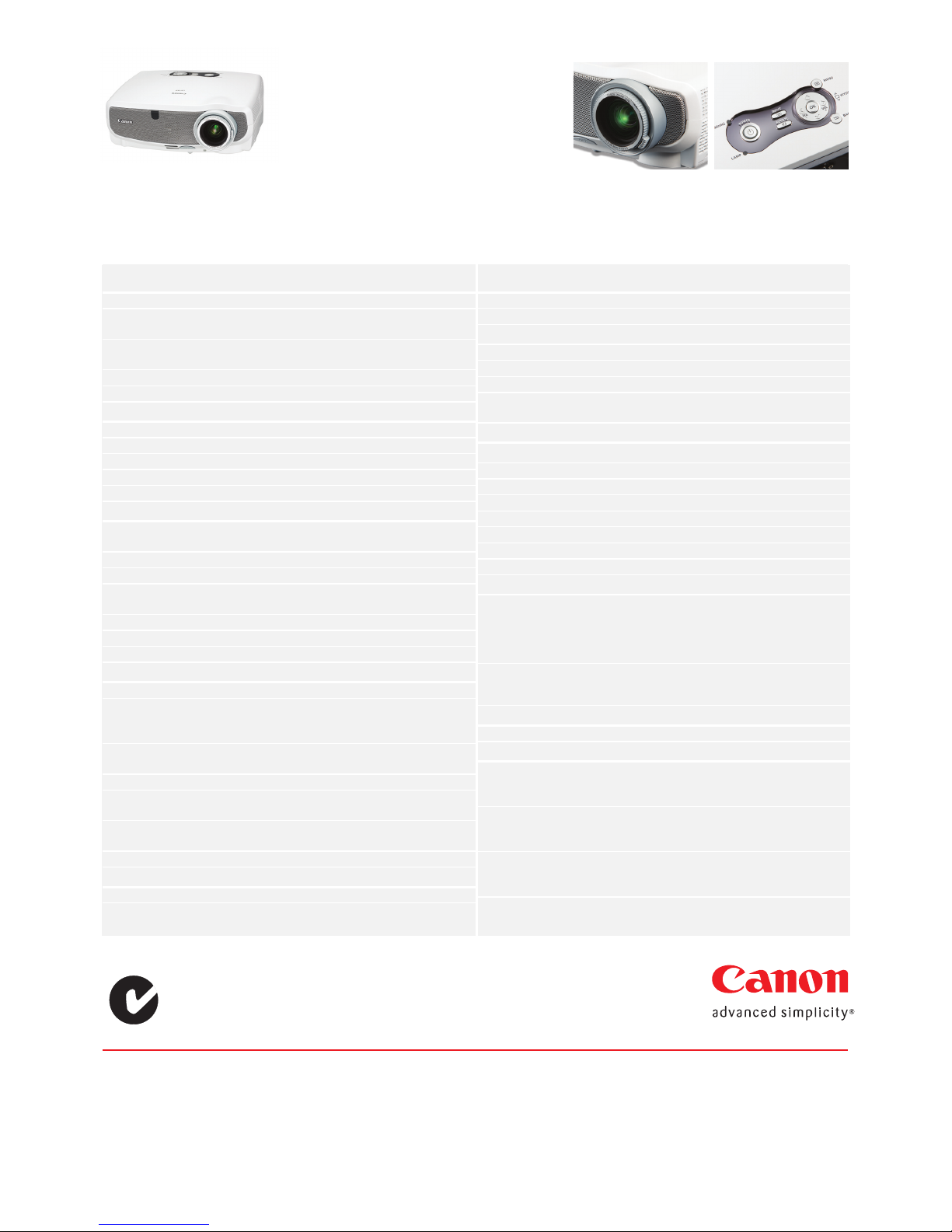
MODEL LV-X7
Product class Ultra Portable
LCD Panel Transmissive LCD, Poly-silicon
TFT Active Matrix
Size & number 0.6” diagonal with Microlens,
3 panels
Aspect ratio 4:3
Native resolution 1024 x 768 (XGA); 786,432 pixels
OPTICS
Light source 150W NSH lamp
Lens F No. & focal length F1.6 – F2.5; f=17.7 – 28.3mm
Zoom magnification 1.6x
Zoom & focus control Manual zoom; Manual focus
Lens shift 8.6:1.4 (fixed)
IMAGE
Brightness 1500 lumens
(silent mode 1200 lumens)
Uniformity 85%
Contrast ratio 500:1 (full on : full off)
Projection distance coverage 1.1m ~ 8.8m
(2.9 – 4.6m for 100” image)
Screen size 25” ~ 300” (610 x 4.57cm)
Digital zoom x1 ~ x4 (x16 area ratio)
Keystone correction range ±30 degrees up/down direction
IMAGE SIGNALS
Analogue RGB UXGA/SXGA/XGA/SVGA/VGA/MAC
Composite / S-video Colour systems:
NTSC/NTSC4.43/SECAM/
PAL/PAL-M/PAL-N/PAL-60
Component scan systems 1080p/1080i/720p/575p/575i/
480p/480i
Progressive scan 540 TV lines
Scan frequency H:15 ~ 100 kHz, V:50 ~ 120 Hz,
Dot clock: 108 MHz
Display modes Standard, presentation, cinema,
video, sRGB
Image enhancement Digital gamma correction
MECHANICS
Adjustment foot To slant body with max 10 degrees
Built-in speaker 1W, monaural
TERMINALS
Mini D-sub15 pin Analogue PC / Component
RCA x1 (for image) Video input
RCA x2 Audio input
S terminal (mini DIN4) S-video input
Stereo mini jack (in) Audio output
Mini D-sub 15 pin Analogue PC output
Service port (mini DIN8) Terminal used for servicing the
projector
RATINGS
Dimensions (W x H x D) 310mm x 265mm x 109mm
Mass 2.9kg
Rated supply voltage AC100 ~ 240V; 50/60Hz
Power consumption Normal 205W / Silent: 170W
Standby 9W
Noise (A-curve) Normal: 32dBA / Silent: 25dBA
Ambient temperature range 5 ~ 40˚C
Storage temperature range -10 ~ 50˚C
MAIN SUPPLIED ACCESSORIES
Remote control: Power supply: 3.0 DC V;
uses two AAA batteries (incl.);
Communication range:
About 7m (within ±30 degrees
of the receiver)
Computer connection cable: Dsub15-Dsub15
for connection with PC
transmits analogue PC signals
REPLACEMENT PART
Replacement lamp LV-LP27 150W-NSH
OPTIONAL ACCESSORIES
Component cable LV-CA32 3RCA (female)-Dsub15
for video apparatus connection
transmits analogue video signals
RS-232C cable LV-CA34* DIN8-Dsub9 for connection with PC;
transmits analogue RS-232C
control signals
Ceiling attachment LV-CL11# For ceiling mount; Consult a
building professional before
attempting to mount the projector
WARRANTY:
2 Years ( 90 days for lamp)
LV-X7 portable
multimedia projector
Canon Zoom Lens
Control Panel
Sydney
1 Thomas Holt D rive
Nort h Ryde NSW 2113
Ph (02) 9805 2600
Fax (02) 9 887 3137
Melbourne
33 Lakeside D rive
Burw ood Ea st VIC 3151
Ph (03) 9881 00 00
Fax (03) 9881 0316
Brisbane
Sout hgate Corporate Park
18 Southgate Ave nue
Canno n Hill QL D 4170
Ph (07) 3909 5000
Fax: (07 ) 3909 50 68
Adelaide
1 Sout h Road
Thebarto n SA 5031
Ph (08) 8201 9100
Fax (08) 8 352 5365
Perth
68 Hasl er Road
Osbor ne Par k WA 6017
Ph (08) 9347 2222
Fax (08) 9242 4120
Canberra
98 Barr ier Street
Fyshwick ACT 2609
Ph (02) 6206 5999
Fax (02) 6 206 5933
Auckland
Akor anga Bu siness Par k
Akor anga Dr ive
Northcote
Ph (09) 489 0 300
Fax (09) 489 0399
canon.com.au
 Loading...