

Page 1

Tblue2
OPERATING INSTRUCTION
WIRELESS
STEREO HEADSET
Page 2

TECHNICAL PARAMETERS
Talk time: 4hours
music time: 4hours
Standby time: 180hours
Transmit distance: 10m
Noise reduction: CVC noise reduction
Solution: CSR
Bluetooth version: V3.0
Bluetooth protocols: A2DP/HFP/HSP
Weight: 8.6g
Dimension: 51×19×24mm
Page 3
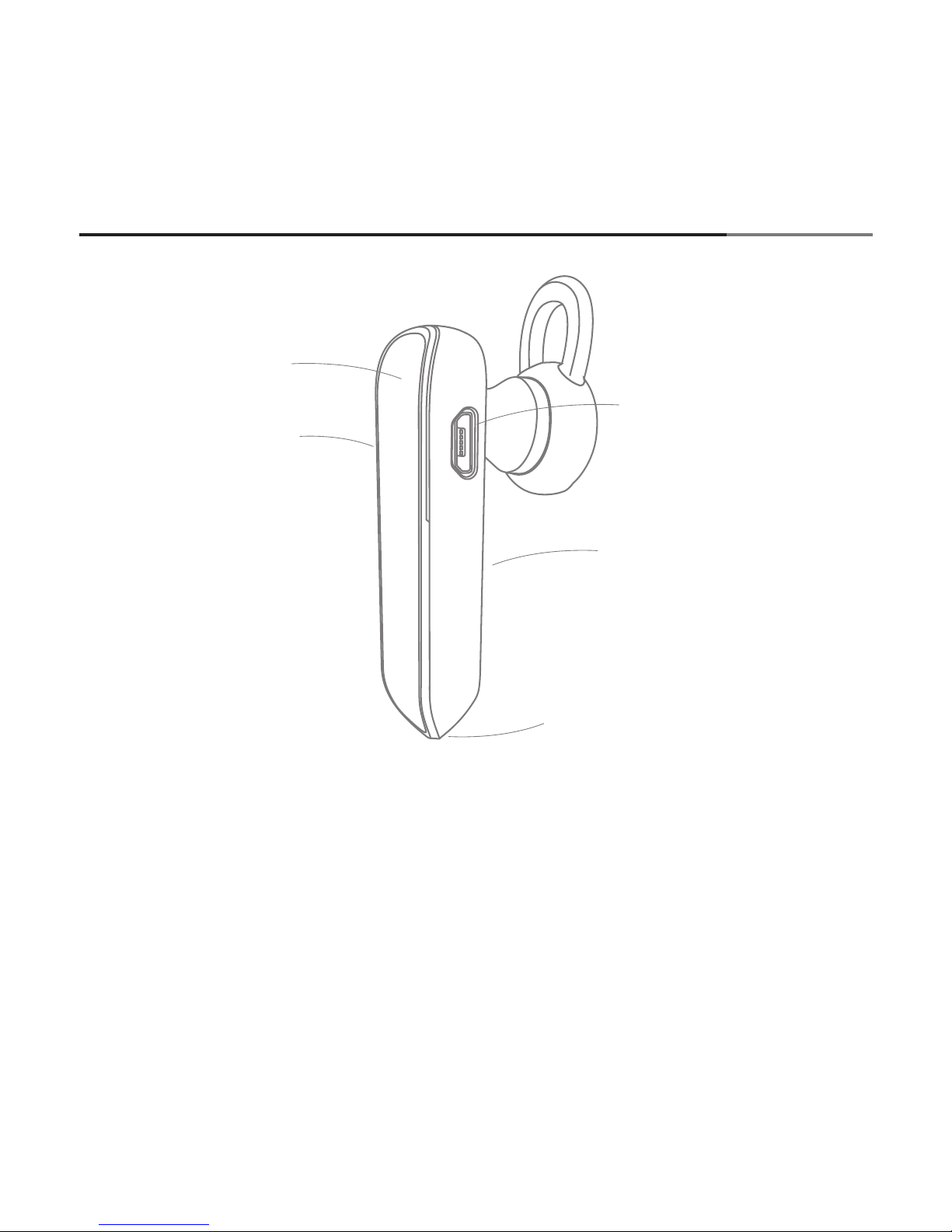
STANDARD SCHEMATIC DIAGRAM
※ Please read this manual and all safety precautions before using the headset to
ensure the safety of the right Use.Suggest properly preserved this manual for future
reference.The picture included is use only for illustration.The real product may be
different
① Multifunction button
② Volume button
③ The charging jack
④ Status indicator
⑤ Talking microphone
①
③
⑤
②
④
Page 4

The headset built in the chargeable battery that can't be disassembled inside.
Make sure the headset is fully charged before first time using.
1. Use the AC charger to connect with the charge jack..
2. plug the AC charger into the power socket.red indicator is on while charging.
3. The red indicator change to blue after fully charged,then pull out the AC
charger from the power socket.
CHARGE
※ Please don't plug in and pull out the AC charger frequently while charging,
to avoid the shortening life time of the bluetooth headset
1. How to turn on the Bluetooth headset
While the headset is in turned-off status,long press the multifunction button
for about 4 seconds,the blue indicator flashes 4 times along with the beep
alert,after this the bluetooth headset is turned on and will be in standby status.
TURN ON OR TURN OFF THE HEADSET
※ Ensure there is enough power before using the bluetooth headset.
2. How to turn off the Bluetooth headset
While the headset is in turned-on status,long press the multifunction button
for about 4 seconds,the red indicator flashes 1 time along with beep alert,after
this the bluetooth headset is turned off and will be in turned-off status.
Page 5

Pairing two Bluetooth devices to set up encrypted wireless connection and
began to communicate with each other.While pairing, please ensure that the
distance between two Bluetooth devices the headset are within effective
distance.
PAIRING & CONNECT
How to start pairing?
Press and hold the multifunction button about 7 seconds to switch on the
headset, the red and blue indicator lights flashes alternately.
Activate the Bluetooth feature on mobile phone and search for Bluetooth
headset(Please refer to the mobile phone user manual)
Select"iblue6"from the list of found devices on your phone (The list is
displayed as Tblue2)
If necessary,enter passcode 0000 to pair and connect the headset to your
device.
※ Your Bluetooth headset support simple pairing function, without the PIN
code it will be able to complete the pairing (If the mobile phone Support)
Page 6

BASIC OPERATION
Function
Operation
LED Status
Voice instruction
Starting
up
Pairing
Press the multifunction key for
about 3 to 7
seconds on the
shutdown state
Red and blue
lights flashing
alternately
with beep
alert
The headset from shutdown to the starting
up, then enter pairing
mode, and then wait
for the mobile phone
and headset pair with
password input,
connect etc.
——
Shut
down
Press and hold the
multifunction button for about 4
seconds
The red indicator
flashes once
the headset is in
switched off status
Online
Standby
Automatically
entered the online
after a successful
Pairing and connection Standby
Status
the blue indicator
flashes in every
8 seconds
the headset will be in
standby status and
Then can process following the handsfree
service described
——
Answer
calling
The telephone
rings, short press
(about 1 second)
the headset multifunction key
Red and blue
lights blinking
continuously
——
When someone calls
Bluetooth headset a
continuous tone, short
press the headset
multifunction button,
the machine can
answer the phone
Reject
calling
When there is incoming call,press
and hold the multifunction button
then release within 2 seconds
when there is incoming
calls,press and hold the
multifunction button
then release to reject
the call
—— ——
Page 7

Last
number
redial
Press the multifunction button two
times continuous
on the online
standby
In the online standby
double-click the multiple
function keys, phone
number of mobile phone
automatically dials the
last call
The blue indicator
light flashes once
every 8 seconds
——
End
the call
During a call, press
the multifunction
button (about 1
seconds) to end
the call
then the headset
go in online standby status,The
blue indicator
light flashes once
every 8 seconds
To end the call in call
process, short press
the multifunction key,
or use a mobile phone
hang up button to end
the call
——
Voice
dialing
Short press in
multi-function
key then release
when in the online
standby status
calling the blue
indicator light
blinking once
every 8 seconds
In the online standby
short release in multifunction key, then
according to the
prompt to mobile phone earphone say mobile
phone mail list stored,
the number to be dialed
the names (mobile
phone must support
voice dialing)
——
Mute on
/off
On the calling
process, doubleclick the multifunction button
The calling process,
doubleclick the multifunction button after
release, can let the
other party can not hear
our voice, you can hear
the sound of her voice
Volume
Up
During a call, short
or long press the
”+” volume button
Short or long press the
”+”volume key,volume
will gradually increase,
when the volume to
maximum and increase
the volume keys will
not add to the headset
earphone volume,
——
——
——
——
Page 8

It will
show
battery
status
on iphone
Connect the
headset with
Iphone
in the top right corner
of the screen mobile
phone (the left of
mobile phone battery)
show the battery of
the headset
Volume
Down
During a call,
short or long
press the”-”
volume button
Short or long press the
”-” volume button, the
volume will be reduced
gradually, when the
volume to the most
hours according to the
volume down button
will not be reduced.
The earphone volume,
the headset will "beep"
prompt a tone, volume
is adjusted to minimum
——
——
——
——
there will be "tick"
sound tone, prompting
the volume is adjusted
to the maximum
call
transfer
to mobile
phone
press and hold the
multifunction
button for 2
seconds during
phone call
Press and hold the
multifunction button for
2 seconds during phone
call to transfer the call
the mobile phone,the
headset will be disconnected with the mobile
phone,after ending the
——
Automatically
pairing
Press the
multifunction
button for
about 3 seconds
Press the multifunction
button for about 3
seconds when the
headset is turned off,
the headset will search
for the last connected
device,and automatically connect with it
the blue indicator
flashes continuously for 4 times
with beep
alert
with beep
alert
Page 9

charge
With the matching
charger
The red indicator is
on,the red indicator
will change to blue
after the fully
charged
The red indicator light
is on, after the fully
charged,red indicator
change to blue,it will
takes about 1 hours to
be charged fully
Lowvoltage
indication
The red light
flashes once
every 8 seconds
when the headset battery voltage is lower than
3.3V, the red indicator
and alert tone will remind
you of low voltage in
every 20 seconds
Automatically turn
off when
in unconnected
status for
long time
The headset will be turnedoff automatically
after unconnected for
3 minutes
Clear
pairing
list
To clear pairing list,
switch off the headset,press and hold
the volume ”+” and
volume”-” buttons,
connect the headset to charger for
about 4 seconds
and then released
the blue indicator
flashes continuously for 3 times
To clear pairing list,
switch off the headset,
press and hold the volume ”+” and volume”-”
buttons,connect the
headset to charger for
about 4 seconds and
then released
Headset
hardware
reset
press and hold the
multifunction
button and connect
the headset to a
charger
the red indicator
is on
To reset the headset.
switch on the headset,
press and hold the multifunction button and
connect the headset to
——
——
——
——
——
——
——
——
phone call,the headset
will connect to the
mobile phone
automatically
Page 10

FAQ AND SOLUTIONS
Q: Can the bluetooth headset be connected with the laptop,PC or PDA?
A: The device that support the bluetooth version and function can be
connected with the headset.
Notes: Please refer to the user manual of the laptop,PC and PDA devices.
Q: What devices will affect the quality of calls?
A: The quality of calls may be affected by the wireless devices, electrostatic
noise will occurs commonly,please keep the bluetooth headset away from the
radio waves electrical appliances,in order to prevent interference.
Notes: Please be aware of the position of the devices making radio waves
during phone calls with bluetooth headset.
a charger,release the
multifunction button
after connection with
the charger
Q: Will my phone conversation be listened by other bluetooth mobile phones?
A: The radio-frequency power of bluetooth is far lower than regular mobile
phone signal power,so the bluetooth signal is hard to be monitored by the
third party device.Because after bluetooth headset connected with the
mobile phone,a secure connecting will be built between the headset and the
device.
Q: How should I clean my bluetooth headset?
A: Please use dry and soft cloth to clean it.
Notes: Please keep the cloth dry and soft.
Page 11

Q: The bluetooth headset can't be power on..
A: 1)the battery is empty.
2)the power on button press itn't long enough
Solution:
1)Charge the bluetooth headset with the charger.
2)Long press the multifuntion button for about 4 secs
Notes:
1)Charge the bluetooth headset for more than 2 hours.
2)Press the multifuntion button till the red and blue indicator flashes
alternately.
Q: The bluetooth headset can't be power off.
A: The bluetooth headset program errors occur by the incorrect operation.
Solution: Please refer to the step'headset hardware reset'in 'basic
operation'
Notes: Make sure the charging time not too long.
Q: The bluetooth headset can not be searched.
A: 1)Check if the bluetooth headset is power on. and searchable;
2)Errors with the device bluetooth program.
3)Check if the bluetooth headset near the radio wave devices.
Solution:
1)Please refer to 'Turn on or Turn off the headset'description to reboot the
headset.
2)Do not operate other programs when searching and connecting the
bluetooth headset with the mobile phone;
3)Keep the bluetooth headset and devices away from other radio waves
electrical devices.
Notes:
1)Please be aware that the headset will turns into standby mode after 2
minutes if it doesn't pair with any devices when the bluetooth headset is
switched on.
2)Please reboot the mobile phone and search again.
3)Please be aware that radio waves electrical devices may affect the operation.
Page 12

BATTERY INFORMATION
The electricity of the Bluetooth headset is provided by the inner battery.
Do not connect the headset with the charger if unnecessary or fully charged.
overcharge will shorten the battery life. the headset power will release
automatically after fully charged with or without using. Do not put the headset
in the place where the temperature is too high or too low.For nstance, leave
the headset in a locked car in summer.That will shorten its capacity and life.
※ Keep the battery temperature between 15℃ and 25℃ otherwise too hot or too cold may
affect its performance. Do not throw it to fire to avoid explosion. Please recycle the invalid
batteries correctly.
Do not throw,impact,scrape,screw,hit or vibrate the headset,don't place
heavy things on it.
Keep the headset away from magnets,electronics and loudspeaker.
Keep the headset away from the extreme temperature(working temperature
range -10℃~45℃).
Keep the headset away from the moist environment.
Do not disassemble the bluetooth headset.
Touch the button smoothly.
Do not clean your headset with the corrosive cleanser.
NOTES & TIPS
Q: Some of the function descriped in user manual are not available.
A: Different connected devices have different functions.For instance,when the
bluetooth headset connected with PDA,and MP4 and other devices.If the
headset is multipointed,some functions may be unavailable.
 Loading...