

Page 1

Getting Started
For the first time using the hands free, please:
Charge handsfree with the provided saver charger for 3 hours.
Ensure a Bluetooth function supporting mobile phone is ready for pairing.
Pairing with a phone
Before using the handsfree, you must pair it with the mobile phone first. Once the handsfree and the phone
has paired, they store the ID of each other. Thus they can connect to each other automatically . Y ou can check,
delete or rename the paired device in the devices list of the mobile phone.
Charging
Charge with saver charger(cigarette light adaptor)
Switch on the handsfree.
Connect the saver charger to the in car cigarette
socket, and then to the charging port of the
handsfree.
Indicator light flashes red and blue altern ately.
Notes:
Charge the handsfree only with the saver charger supplier provided.
Maximum charging time: 3 hours
Indicator light stops flashing red when fully charged.
Talking time: up to 10 hours
Standby time: up to 200 hours
Low battery signals: indicator light flashes red and ‘do’ sound until handsfree is
recharged.
Do not charge up to 24 hours.
Switch On/Off
Switch on handsfree
Press and hold the Multifunction Key for 4/5 seconds until you hear a low to high ‘dodo’ sound and indicator
light flashes blue.
Switch off headset
Press and hold the Multifunction Key for 4/5 seconds until you hear a high to low ‘dodo’ sound and indicator
light flashes red and then goe s off.
1. Place the Bluetooth handsfree and the Bluetooth mobile within a distance of 1 meter.
2. Switch on the Bluetooth mobile and enable Bluetooth feature. *If the phone have ’Profile’ options, you are
recommended to select ‘Handsfree/Car Kit Profile’ rather than ‘Headset Profile’.
3. Turn on the handsfree. The indicator light flashes blue every 5 second indicates it is in idle mode.
4. On the Bluetooth mobile, searching for device, ‘HF009’ will appear in the device list.
5. Select device ‘HF009’ and enter pa ss key ‘8888’. The indicator light turns blue steadily . Pairing completed.
6. Make sure the paired mobile has returned to main menu. Check if the mobile displays any Bluetooth
status info.
7. The volume is automatically set to middle level. For best performance, press ‘+’ or ‘-’ to adjust a suitable
volume level.
* Some phones automatically connect to headset as the pairing is completed. Some phones require
manually built up the connection. Please refer to your phone’s user manual.
Y ou should now be able to make wireless communication with the ha ndsfree. Keep the distance between the
handsfree and the mobile within 10 meters a nd free from obsta cles. Y ou ca n dial a nd receive calls by the
phone, or activate the voice dialing, redial the la st number a nd receive calls through the hands free.
* ‘Handsfree/Car Kit Profile’ supports ‘Caller ID display’, ‘Redial the la st number’, ‘Call waiting’ a nd ‘Call
transfer’ functions. If the mobile phone only supports ‘Headset Profile’, those functions are not available.
6
7
Page 2

Connect/Reconnect to phone
When the handsfree is switched on, press the Multifunction Key once and the handsfree will automatically
connects to the paired mobile phones nearby. If the handsfree has paired with many mobile phones and they
are within 10 meters, the handsfree will connect to the last connected mobile phone.
Different phones connect with handsfree in different methods. The following are the 2 methods, namely A
and B:
Switch to/
from
waiting call
Transfer to
phone
Operation
During a call, when another call dials in,
press multifunction twice for switching to
the 2nd call. Press twice again to switch
back.
During a call, press and hold multifunction key.
Indicator Light &
Sound
‘do’ sound
-
LCD DisplayStatus
CALLER
NUMBER
TRANSFER
A: When the handsfree is in standby mode and is dialing or receiving a call by the phone, the phone
connects to handsfree automatically.
When receiving a call, redialing or activating the voice dial through the handsfree, the handsfree
connects to the phone automatically.
B: After the handsfree and the phone are connected, the handsfree sends signals to the phone to keep
the connection.
For method B, if the handsfree and the phone are disconnected, manual reconnection is required:
EITHER
OR
8
Press Multifunction Key once, the handsfree will connect to the phone again. If the
phone confirms to the reconnection signal, reconnection completed.
In the setting menu of the phone, select ‘HF009’ from ‘Paired Device’. Select the
‘connect’ and the phone will connect to the handsfree.
Re-dial last
number
Voice dial
Mute/Unmute
microphone
Adjust
Volume
Privacy call
Disconnect
with mobile
Low battery
Charging
Charging
completed
In standby mode, press multifunction key
twice.
In standby mode, press multifunction key
once.
During a call, press together ‘+’ and ‘-’
buttons once.
Click ‘+’ or ‘-’ button to control the voice
gain.
Connect external headphone to headphone port.
Press and hold ‘+’ or ‘-’ button.
-
Connect to charger and switch on the power
Within 3 hours
-
A tone from the handsfree indicates the phone is ready to
receive voice tag.
‘do’ sound. Y ou can still hear
the other side.
-
-
-
Red on and ‘do’ sound.
Flashes red & blue
Stops flashing red
REDIAL
VOICEDIAL >
CALLING
-
displays volume
level
-
DISCON
LOWBATT
CHARGING
BLUETOOTH
5
Page 3
Switch on
Connect/
Reconnect
(with paired
phone.)
Switch off
Pairing
(for the first
time using
the
handsfree)
Receive
call
Reject call
Quick User Guide
Operation
From off mode, press and hold multifunction key for 4/5 sec. Pull out the microphone
handle.
In Idle mode, press multifunction key once,
OR
On mobile phone, select paired device
‘HF009’ and then ‘Connect’.
In standby mode, press and hold multifunction key for 4/5 sec.
1. Switch on the handsfree.
2. Enable Bluetooth feature of the mobile
phone.
3. In the Bluetooth menu, select ‘add
device’ or ‘search device’.
4. ‘HF009’ appears in the device list, press
‘yes’.
5.Enter pass key ‘8888’. Pairing
completed.
6. Edit the device name if you would like to
personalize it.
When handsfree is ringing, press multifunction key once.
When handsfree is ringing, press multifunction key twice.
Indicator Light &
Sound
A low to high ‘dodo’ sound.
Flashes blue every 5 second
indicates in idle mode.
Flashes blue every half second indicates searching for
paired devices. If connected
to mobile, blue always on indicates in standby mode.
A high to low ‘dodo’ sound &
indicator light off.
Flashes blue every 5 second
indicates in idle mode.
Blue always on, indicates in
standby mode.
-
-
LCD DisplayStatus
POWERON >
BLUETOOTH
CONNECTED
POWEROFF
PAIRED
CALLER
NUMBER
REJECT
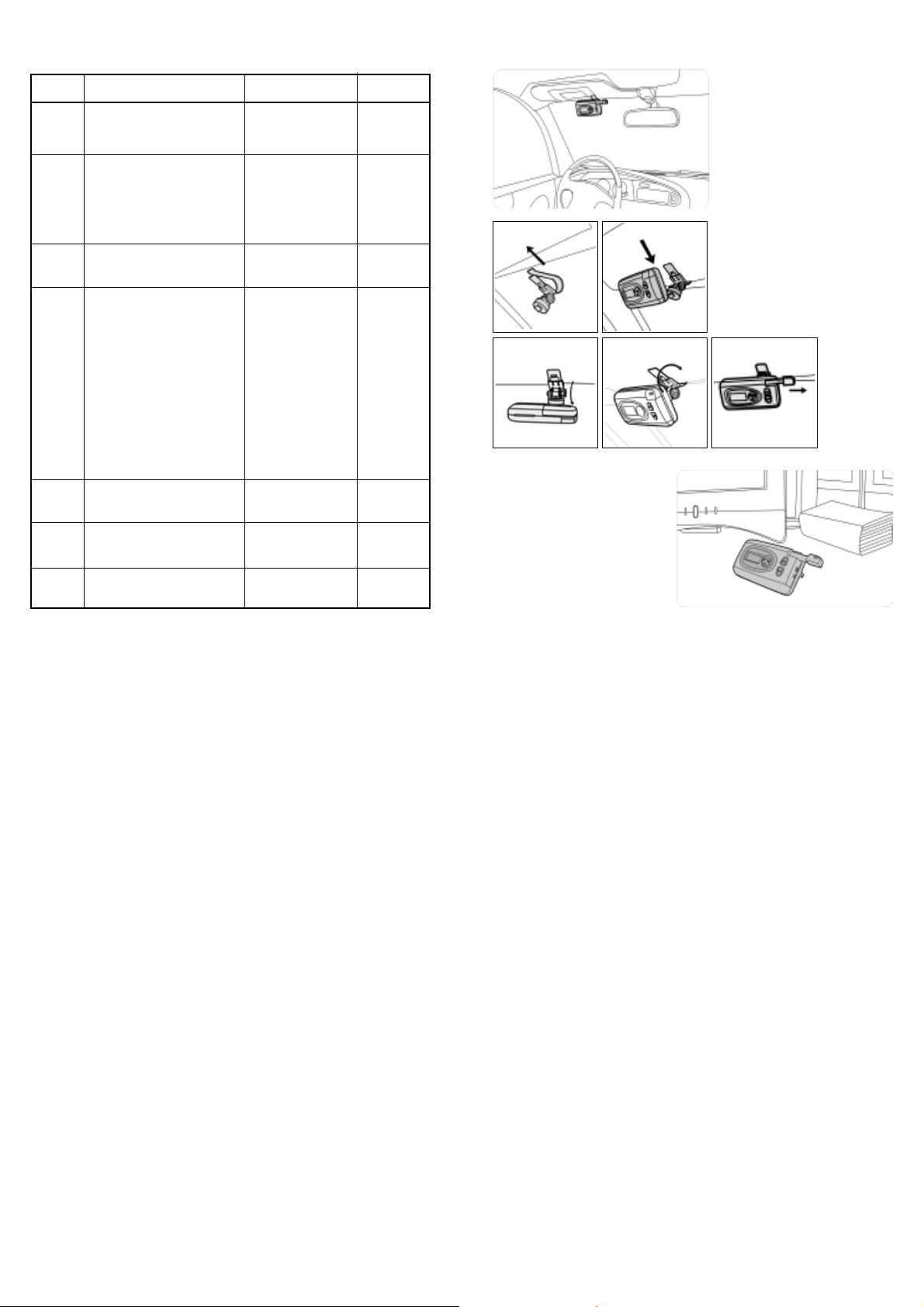
Use in car
1 2
3 4 5
Use in office / home
1. Pull up the stand at the backside.
2. Put it on a flat surface and pull out the
microphone handle.
1. Inside the car, clip the provided
bracket to the sun visor as shown.
2. Fix the handsfree on the bracket.
3. To flip the handsfree up or down,
first release the screw of the bracket
a little bit.
4. After the handsfree has adjusted to a com fortable view angle facing you, lock the
screw.
5. Make sure the microphone handle is pull
out.
End call
4
During a call, press multifunction key
once.
-
REJECT
9
Page 4
Handsfree functions
Receive call
Reject call
End call
Switch to/from waiting call
(Call waiting)
Transfer to phone
(Call transfer)
Redial the last number
Voice dial
Muting/Un-muting
Adjust volume
Privacy call
Disconnect with mobile
* Functions ‘Caller ID display’, ‘Redial the la st number’, ‘Call waiting’ a nd ‘Call trans fer’ are supported by
Handsfree Profile instead of Headset Prof ile. For using those functions, please check if the mobile phone
supports Handsfree Profile.
* Function ‘Volume Level Display’ is available if the phone supports ‘Remote Volume Control’.
10
When handsfree is ringing, the LCD displays the calling number. Press
Multifunction Key once to receive the call and ‘CONNECTED’ will be
displayed.
When handsfree is ringing, the LCD displays the calling number. Press
Multifunction Key twice to reject the call and ‘REJECT’ will be displayed.
During a call, press Multifunction Key once. LCD displays ‘REJECT’.
When a second call dials in during a call, the LCD displays the second
calling number and ‘dodo’ sound from the handsfree. Press Multifunction
Key twice to switch to the second call. Press twice again to switch back to the
first call.
During a call, press and hold Multifunction Key once. LCD displays
‘TRANSFER’.
In standby mode, press Multifunction Key twice. The last number will be
redialed. LCD displays ‘REDIAL’.
Ensure that the mobile phone supports Voice Control Dialing. In standby
mode, press Multifunction Key once. LCD displays ‘VOICEDIAL’. Y ou will
hear a tone from the handsfree. It indicates the mobile phone is ready to
receive voice tag. Speak the na me of the person you wish to call. Then the
mobile starts the voice dial automatically.
T o temporarily mute the microphone, press together the volume ‘+’ and ‘-’
buttons once. Y ou will hear ‘do’ sounds. This will allow you to hear the other
side but the other side does not hear you.
Press ‘+’ and ‘-’ buttons to a suitable volume level. LCD displays the volume
level.
Connect external headphone. This will allow you to hear the other side but the
other people inside the car do not hear the other side.
For connecting the handsfree to another mobile, in standby mode, press and
hold the handsfree ‘+’ and ‘-’ buttons. LCD displays ‘DISCON’.
Overview
Bluetooth Portable Handsfree Car Kit
Model BTHF009
Thank you for selecting BTHF009 Bluetooth portable handsfree car kit. It is a rechargeable speakerphone
which is easy to operate in car and portable to use a nywhere. It is specially designed for connecting Bluetooth
compatible mobile phones in car. No matter the car is ignited or not, you can enjoy the freedom to make and
receive calls without connecting with wires.
This handsfree car kit is specially designed for Bluetooth mobile phones or other Bluetooth compatible devices that support the Handsfree or Headset profiles.
The Bluetooth wireless technology is a worldwide specification for a small form-factor, low-cost
and short-range (about 10 meters) radio solution providing links between mobile computers, mobile phones, other portable and handheld devices and connectivity to the internet.
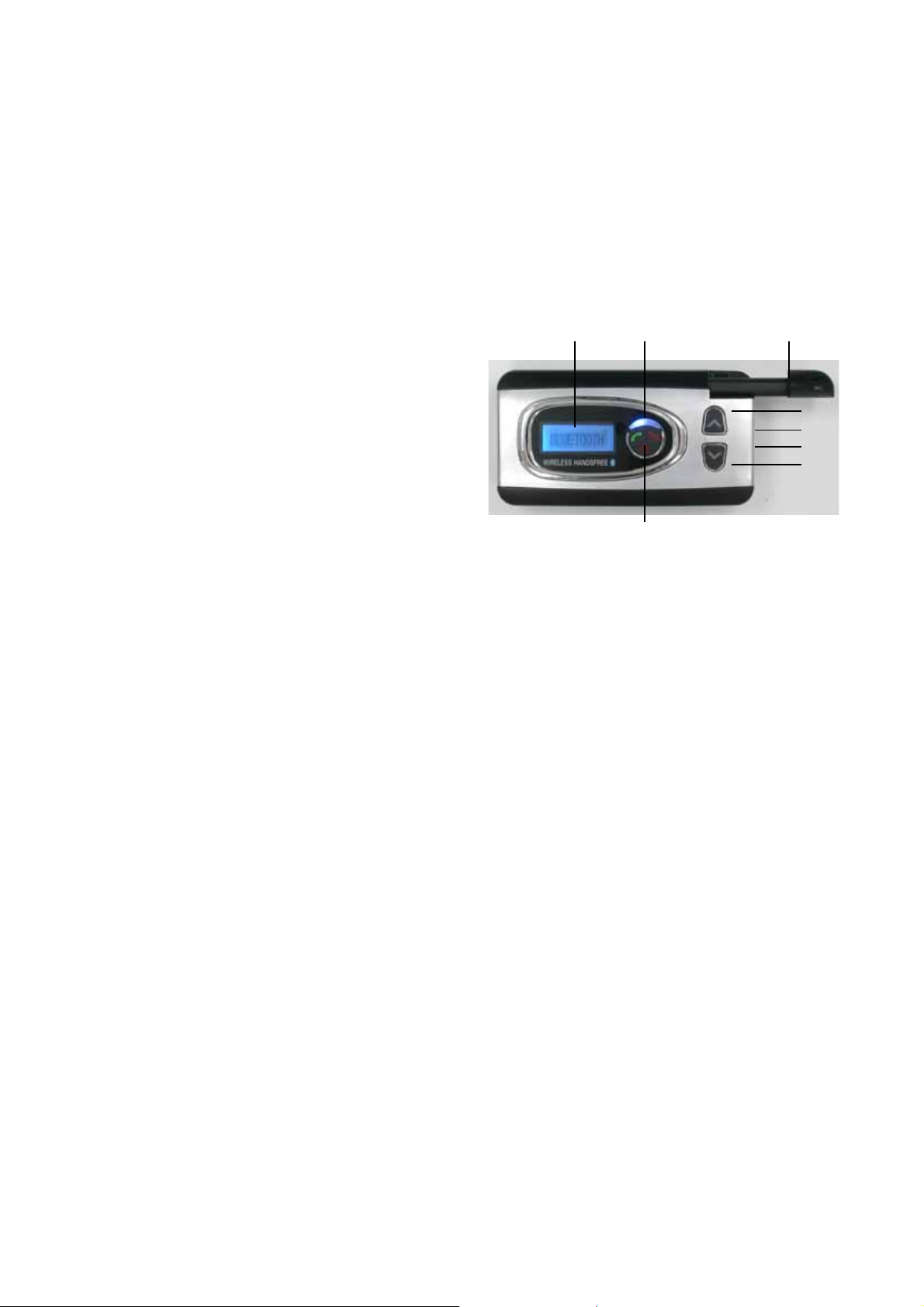
LCD display
indicator light
multifunction key
microphone on the pull-out handle
volume +
charging port
headphone port
volume -
3
Page 5

Contents
Care and maintenance
Switch off the handsfree if not in use.
Do not try to replace the rechargeable battery inside handsfree.
Charge handsfree only with the supplied charger.
Do not try to open the supplied charger.
Overview ....................................................................
Quick User Guide ...................................................
Getting Started .........................................................
Charging ..................................................................
Switching On/Off ......................................................
Pairing with a phone .................................................
Connect/Reconnect to phone ...................................
Use in car .................................................................
Use in office/home ....................................................
Handsfree functions .................................................
Care and maintenance .............................................
Specification .............................................................
FCC Notice ..............................................................
2
4-5
3
6
6
6
7
8
9
9
10
11
11
12
Bluetooth Specification
Bluetooth Profile Supported
Frequency Range
Working Distance Range
Dimensions (main unit)
Weight (main unit)
DSP
Pairing
Charging Time
T alking T ime
Standby Time
Rechargeable Battery
Battery Protection
Input Current
Input Voltage
Speaker Power
Speaker Impedance
Sensitivity of Microphone
Specification
: Version 1.2 compliant
: Headset and Handsfree Profiles
: 2.4 GHz spectrum
: 10 meters (class 2)
: 108 (L) x 57 (W) x 31 (T) mm
: 129 g
: Full duplex transmission, noise suppres sion and echo cancellation.
: Up to 4 mobile phones
: Within 3 hours
: Up to 10 hours
: Up to 200 hours
: Lithium Ion, 3.6 V , 1 100 mAh installed
: Over charge and over discharge protection
: 350 mA (internal controlled)
: DC 5 V
: 2 W (max.)
: 8 ohm
: -47 dB
11
Page 6

Notice 1
Y ou are cautioned that changes or modifications not expressly approved by the party
responsible for compliance could void the user’s authority to operate the equipment.
User Manual
Notice 2
This equipment has been tested and found to comply with the limits for a Class B digital
device, pursuant to part 15 of the FCC rules. These limits are designed to provide reasonable protection against harmful interference in a residential installation. This equipment
generates, uses and can radiate radio frequency energy and, if not installed and used in
accordance with the instructions, may cause harmful interference to radio communications.
This equipment complies with FCC radiation exposure limits set forth for an uncontrolled
environment. End users must follow the specific operating instructions for satisfying RF
exposure compliance. This transmitter must not be co-located or operating in conjunction
with any other antenna or transmitter.
For Model BTHF009
Bluetooth Portable Hands free Car Kit
 Loading...