

Page 1
Introduction
STEP 1 (Pole Mount)
STEP 2 (Pole Mount)
STEP 3 (Pole Mount)
cnPilot | e700
802.11ac 4x4 8dBi WLAN Omni Access Point
IP67 Industrial Grade Gigabit Wi-Fi
Quick Start Guide
This guide provides quick installation steps for cnPilot e700
Access Points (APs).
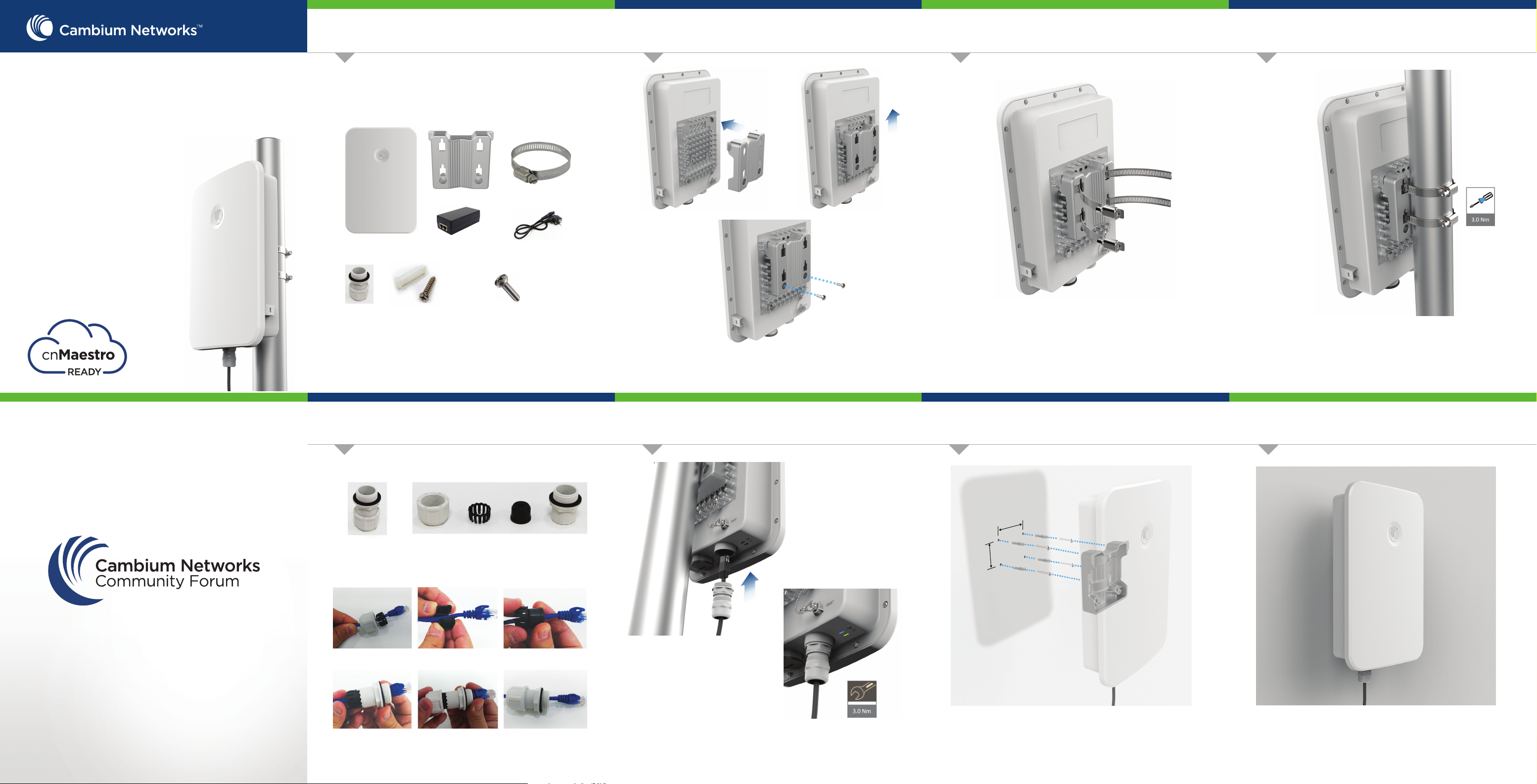
Package Contents
e700 Access Point
Cable gland
(Qty. 2)
Mounting bracket
PoE Injector
Wall mounting kit
(Qty. 4)
Hose clamp (Qty. 2)
Power Cord
M5x12mm Philips screw
(Qty. 2)
Tools Required
• Phillips screwdriver (Wall Mounting and Mounting Device Bracket)
• Flat head screwdriver (Pole Mounting)
• 8 mm wrench (Pole Mounting)
Assemble the radio holder to the pole mounting bracket
and secure it with M5x12mm screw by applying 3.0 Nm
torque.
Insert hose clamps through pole mounting bracket and
clamp to pole by applying 3.0 Nm torque.
Align the radio chassis with the guide rails of radio
holder and slide it downwards until it clicks into place.
STEP 4 STEP 5 (Pole Mount)
Cable gland components
Cap Plastic Seal Body
Gland Assembly
Cable gland assembly sequence
1. Pass cable through cap.
Components
3. Insert seal into the plastic.2. Put seal over the cable.
STEP 1 (Wall Mount)
65
47
STEP 2 (Wall Mount)
JOIN THE CONVERSATION
community.cambiumnetworks.com
Part No.: P005964
Revision: A
4. Insert seal into body.
6. Assembled cable gland.5. Assemble cap and body.
Insert RJ45 to radio housing and the lock cable gland to
radio housing with 1.5Nm to 2Nm torque.
For suggested Lightning Protection Deployment, visit
http://bit.ly/cnPilot_Lightning
Take a Ø4.7mm concrete wall drill, and drill 4 holes as
per the size shown in the figure. Press fit the plastic wall
anchor to the wall. Put a fastener to the wall leaving
4mm to 5mm gap between wall and fastener head.
Place the device to the wall. Use the four mounting slots
given on the back of the radio to mount to the wall.
Page 2
Powering Up
Configure Management PC
Quick Link Setup
Hardware Overview
Hardware Overview
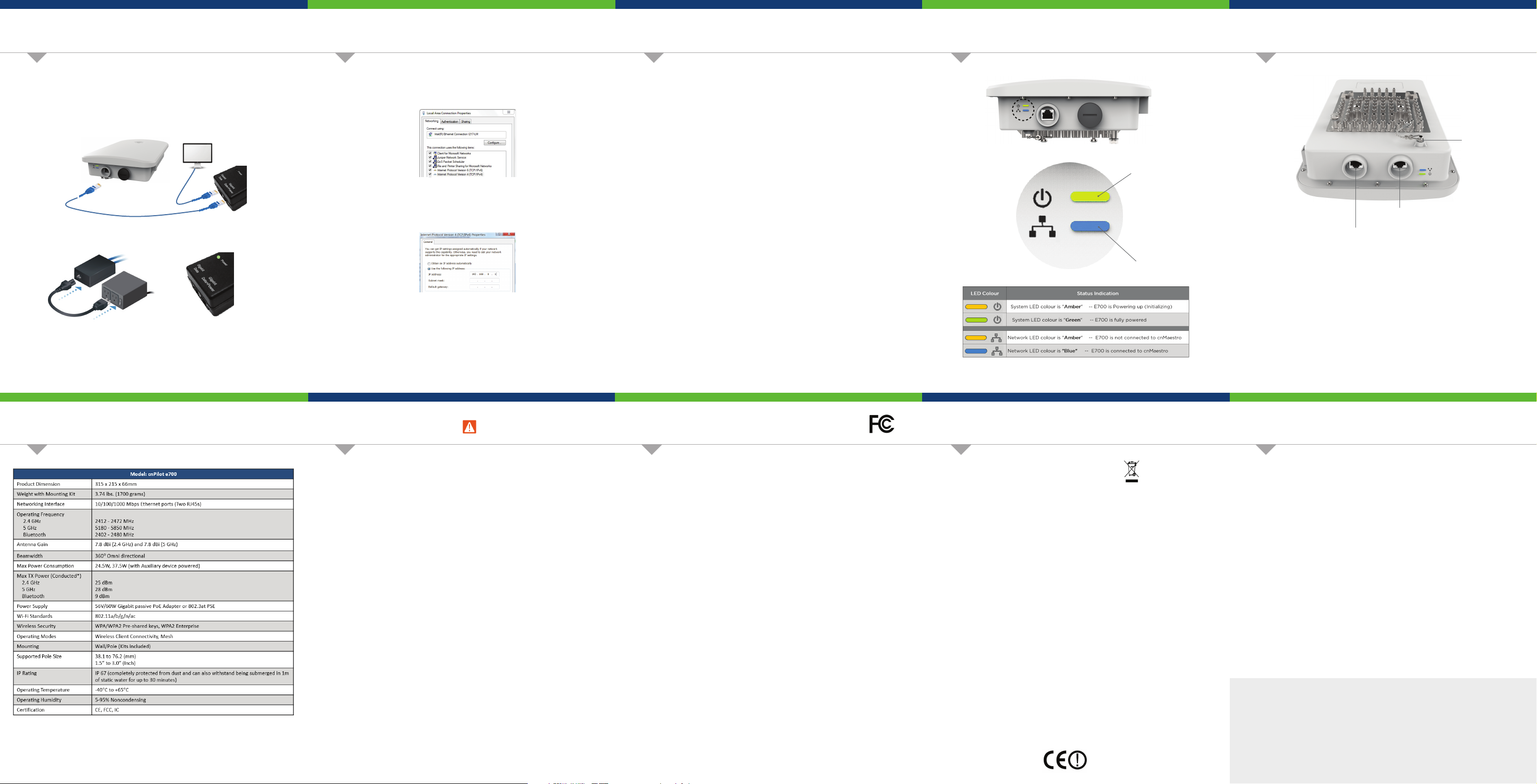
Connect the Ethernet cable from Eth1/PoE-IN of e700 to the PoE
1.
port of Gigabit Data + Power
Connect an Ethernet cable from your LAN or Computer to the
2.
Gigabit Data port of the PoE adapter.
Connect the Power Cord to the adapter, and then plug the Power
3.
Cord into a power outlet.
Once powered ON -- Power LED should illuminate continuously on
PoE Adapter.
**Shielded Category 5 (or above) cabling should be used for all
outdoor wired Ethernet connections and should be grounded
through the AC ground of the PoE.
1.
Select Properties for the Ethernet port. In Windows it is found in
Control Panel > Network and Internet > Network Connections > Local
Area Connection.
2.
IP Address Configuration
Default IP address received via DHCP.
cnPilot e700 will use a default static IP address of 192.168.0.1, If there
is no DHCP server
3.
Default Login information
- Username: admin
- Password: admin
Management Protocols enabled by default –http or https (webpage
management interface access), SSH (CLI management interface access).
Using a web browser, navigate to 169.254.1.1 and login with
1.
username: admin and password: admin
Navigate to the Quick Start menu and click the ‘Go To Next Page’.
2.
Configure your Region and Country of operation. Click the ‘Go To
3.
Next Page’.
Configure the Carrier Frequency. Click the ‘Go To Next Page’.
4.
Select the Synchronization source. Click the ‘Go To Next Page’.
5.
Configuration - IP Address, a Subnet Mask, and a Gateway IP
6.
Address OR DHCP state to Enabled to have the IP address, subnet
mask, and gateway IP address automatically configured by a
DHCP server. Click the ‘Go To Next Page’.
Click the ‘Save Changes’ button. Click the ‘Reboot’ button.
7.
System LED
Network LED
Reset Button
Main Port
Secondary Port
Secondary Port
The Secondary port is a Gigabit Ethernet port used for bridging.
Reset
The Reset button serves two functions for e700:
- To restart, press and release the Reset button quickly.
- To restore to factory default settings, press and hold the
Reset button for more than 10 seconds.
Main Port
The Main port is a Gigabit Ethernet port used to connect the power and
should be connected to the LAN and DHCP server.
Specifications
*Regulatory dependent
Safety Notice
Warning:
To prevent loss of life or physical injury, observe the following safety guidelines. In no
event shall Cambium Networks be liable for any injury or damage caused during the
installation of e700 platform. Ensure that only qualified personnel install.
Only use attachments/accessories specified by the manufacturer.
Electrical Safety Information
1.
Compliance with manufacturer’s label for voltage, frequency, and current
requirements. Connecting to a dierent power source than those specified may
result in improper operation, damage to equipment or pose a fire hazard if the
limitations are not followed.
2.
There are no serviceable parts inside this equipment. Service should be
provided only by a qualified service technician.
3.
This equipment is provided with a detachable power cord which has an integral
safety ground wire intended for connection to a grounded safety outlet.
a.
Do not substitute the power cord with one that is not the provided
approved type. Never use an adapter plug to connect to a 2-wire outlet
as this will defeat the continuity of the grounding wire.
b.
The equipment requires the use of the ground wire as a part of the safety
certification, modification or misuse can provide a shock hazard that can
result in serious injury or death.
c.
Contact a qualified electrician or the manufacturer if there are questions
about the installation prior to connecting the equipment.
d.
Protective earthing is provided by Listed AC adapter. Building installation
shall provide appropriate short-circuit backup protection.
e.
Protective bonding must be installed in accordance with local national
wiring rules and regulations.
FCC Compliance
This equipment has been tested and found to comply with the limits for a Class B digital device,
pursuant to Part 15 of the FCC Rules. These limits are designed to provide reasonable protection
against harmful interference in a residential installation. This equipment generates, uses and can
radiate radio frequency energy and, if not installed and used in accordance with the instructions, may
cause harmful interference to radio communications. However, there is no guarantee that interference
will not occur in a particular installation. If this equipment does cause harmful interference to radio or
television reception, which can be determined by turning the equipment o and on, the user is
encouraged to try to correct the interference by one of the following measures:
- Reorient or relocate the receiving antenna.
- Increase the separation between the equipment and receiver.
- Connect the equipment into an outlet on a circuit dierent from that to which the receiver is
connected.
- Consult the dealer or an experienced radio/TV technician for help.
FCC Caution: Any changes or modifications not expressly approved by the party responsible for
compliance could void the user’s authority to operate this equipment.
This device complies with Part 15 of the FCC Rules. Operation is subject to the following two
conditions: (1) This device may not cause harmful interference, and (2) this device must accept any
interference received, including interference that may cause undesired operation.
For product available in the USA/Canada market, only channel 1~11 can be operated. Selection of other
channels is not possible.
Professional installation is required.
IMPORTANT NOTE:
FCC Radiation Exposure Statement:
This equipment complies with FCC radiation exposure limits set forth for an uncontrolled environment.
This equipment should be installed and operated with minimum distance 25cm between the radiator &
your body.
RoHS/WEEE/CE Compliance
Caring for the Environment: RoHS/WEEE
European Directive 2002/96/EC requires that the equipment bearing this symbol on the product
and/or its packaging must not be disposed of with unsorted municipal waste. The symbol indicates
that this product should be disposed of separately from regular household waste streams. It is your
responsibility to dispose of this and other electric and electronic equipment via designated collection
facilities appointed by the government or local authorities. Correct disposal and recycling will help
prevent potential negative consequences to the environment and human health. For more detailed
information about the disposal of your old equipment, please contact your local authorities, waste
disposal service, or the shop where you purchased the product.
CE Marking
This equipment complies with EU radiation exposure limits set forth for an uncontrolled environment.
This equipment should be installed and operated with minimum distance 20cm between the radiator
& your body.
All operational modes:
2.4GHz: 802.11b, 802.11g, 802.11n (HT20), 802.11n (HT40)
5GHz: 802.11a, 802.11ac (VHT20), 802.11ac (VHT40), 802.11ac (VHT80)
The frequency, mode and the maximum transmitted power in EU are listed below:
2412-2472MHz (802.11n HT40 MCS0): 18.48 dBm
5500-5700MHz (802.11ac VHT80 MCS0/Nss1): 28.14 dBm
5745-5825 MHz (802.11ac (VHT20)-(ChS-20MHz): 30.02 dBm
Hereby, [Cambium Networks Inc.] declares that the radio equipment type [cnPilot e700] is in
compliance with Directive 2014/53/EU.
IC Statement
This device complies with Industry Canada license-exempt RSS standard(s). Operation is subject to the
following two conditions: (1) this device may not cause interference, and (2) this device must accept any
interference, including interference that may cause undesired operation of the device.
Le présent appareil est conforme aux CNR d'Industrie Canada applicables aux appareils radio exempts de
licence. L'exploitation est autorisée aux deux conditions suivantes : (1) l'appareil ne doit pas produire de
brouillage, et (2) l'utilisateur de l'appareil doit accepter tout brouillage radioélectrique subi, même si le
brouillage est susceptible d'en compromettre le fonctionnement.
For product available in the USA/Canada market, only channel 1~11 can be operated. Selection of other
channels is not possible.
Pour les produits disponibles aux États-Unis / Canada du marché, seul le canal 1 à 11 peuvent être exploités.
Sélection d'autres canaux n'est pas possible.
IMPORTANT NOTE:
IC Radiation Exposure Statement:
This equipment complies with IC RSS-102 radiation exposure limits set forth for an uncontrolled
environment. This equipment should be installed and operated with minimum distance 28 cm between the
radiator & your body.
Cet équipement est conforme aux limites d'exposition aux rayonnements IC établies pour un environnement
non contrôlé. Cet équipement doit être installé et utilisé avec un minimum de 28 cm de distance entre la
source de rayonnement et votre corps.
Online Resources
User Guide and software downloads:
https://support.cambiumnetworks.com/files/e700/
Lightning Protection Deployment Diagram:
http://bit.ly/cnPilot_Lightning
Support:
http://www.cambiumnetworks.com/support/
Contact us:
http://www.cambiumnetworks.com/support/contact-support/
 Loading...