

Page 1
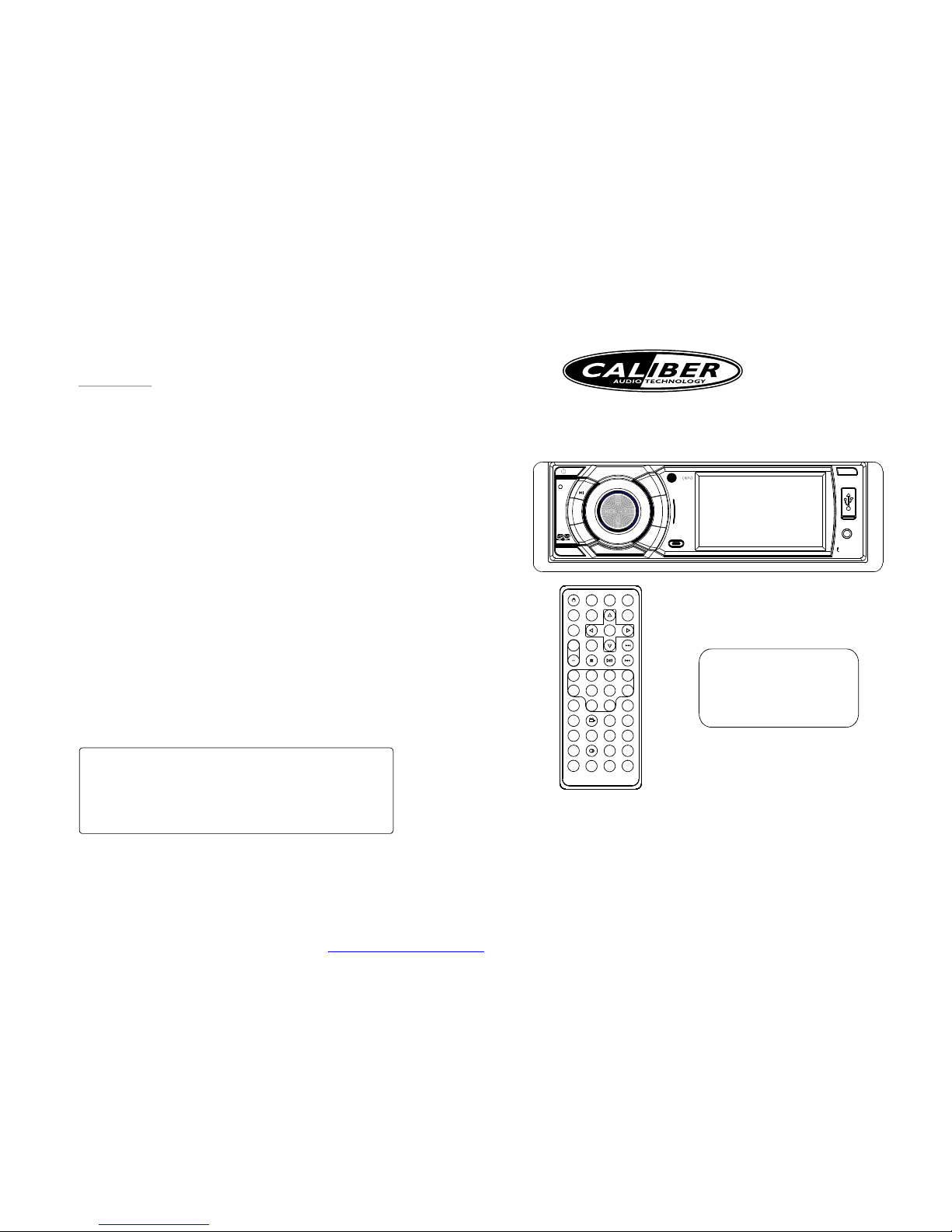
4IN1CARAUDIOSYSTEM
WITHDVD.JPEG.MP4.MP3.WMA.CD
USBANDMMC/SDPLAYER
AM/FM-RDSDIGITALPLLTUNINGRADIO
InstructionManual
FullyCompatibletoThese
FormatsofFiles:DVD,
JPEG,MP4,MP3,WMA,CD.
Remark:Anyinformationsubjecttochangewithoutfurthernotice
SLOW_FWD
A-B
ZOOM
AUDIO
INT
LOC
ST
CLK
5
9/AF
6
-101+10
2
+
SETUP
SEL
MU MODE
PWR
EQ
SUBTITLETITLE/PBC
RPT RDM
SEARCH
APS
0/10
TA
7
10+
/PTY
8
3
4
0K
MENU
BAND P/N
PROG
OSD LOUD
STEP
U.S.PatentNos.6,836,549;6,381,747;7,050,698;6,516,132;and5,583,936.
THISPRODUCTINCORPORATESCOPYRIGHTPROTECTION
TECHNOLOGYTHATISPROTECTEDBYU.S.PATENTSAND
OTHERINTELLECTUALPROPERTYRIGHTS.USEOFTHIS
COPYRIGHTPROTECTIONTECHNOLOGYMUSTBE
AUTHORIZEDBYMACROVISION,ANDISINTENDEDFOR
HOMEANDOTHERLIMITEDVIEWINGUSESONLYUNLESS
OTHERWISEAUTHORIZEDBYMACROVISION.REVERSE
ENGINEERINGORDISASSEMBLYISPROHIBITED.
ManufacturedunderlicensefromDolbyLaboratories.
Dolbyandthedouble-DsymbolaretrademarksofDolbyLaboratories.
7.Specification
GeneralSpecification
PowerSupplyRequirement..................................................DC12V
MaximumPowerOutput...................4x75W(measuredatDC14.4V)
Dimensions(wxhxd)...........................................178x50x165mm
DVDDeckSpecification
Format.....................................DVD/VCD/JPEG/MP4/MP3/WMA/CD
VideoSystem....................NTSC/PAL/PAL-M/PAL-N/AUTO(optional)
AudioSystem..............................................................24bit/96KHz
LoadingSystem..........................................................AutoLoading
MountingAngle.................................................................0to+/-30
Video
VideoType...................................................................16:9and4:3
VideoOutputlevel......................................Composite:1.00.2Vp-p
Loadimpedance:75ohms
HorizontalResolution................................................................600
Audio
AudioOutput(Analogaudio)..........................................2.0Vrms
FrequencyResponse.............................20Hz~20KHz(at1KHz0dB)
S/NRatio(Audio).............................................90dB
Separation..............................................................................50dB
Radio
FMSection
Frequencyrange..............................................87.5MHz-108.0MHz
Usablesensitivity......................................................................3uV
I.FFrequency....................................................................10.7MHz
AMSection
Frequency..........................................................522KHz-1620KHz
Specification
Specification
(at1KHz0dB)
Specification
±
≥
+0
-1.0
3"TFT
UP
/MU
N
D
A
P
S
DN
USB
AUX
1
4
RDM
INT
2
3
RPT
6
+10
5
-10
MODE
TA
AF
REL
+
PUSHSEL
_
VOL
B
VIDEO
TM
MCD770
PDF created with FinePrint pdfFactory trial version http://www.pdffactory.com
Page 2

6.TheTroubleShooting
PleasereadtheusersmanualcarefullybeforeusingtheDVDplayer.Ifyouhaveanytroubles
inusingthisplayer,trytosolvetheproblemsbythesuggestionsmentionedbelow.Ifyoucan
notremovethetroubleafterusingallthesuggestions,pleasecontactthecompanyorthe
technicalservicecenterauthorizedbyus.Forthesakeofyoursafety,pleasedonotopenthe
coverandrepairtheplayerbyyourself,ifthat,itmaycauseelectricshock.
NOPICTURE,SOUNDANDINDICATION
*Ensurethatthepowerswitchison.
*Ensurethatthewallinletisok.
*Ensurethatthepowercordisnotdamagedorthefuseisnotblown.
*Ensurethatthepowerplugisconnectedtotheinlettightly.
NOSOUNDBUTPICTUREOK
*EnsurethattheplayersaudiooutputhasagoodconnectionwithTVsaudioinput.
*Checkwhethertheaudioconnectorisdamaged.
*Checkwhetheryouhaveturneddownthevolume.
*EnsurethatyouhavesettherightAUDIOsetupoftheplayer.
*Ensurethattheaudioisnotundermute.
NOPICTUREBUTSOUNDOK
*EnsurethattheplayersvideooutputhasagoodconnectionwithTVsvideoinput.
*EnsurethatyouhaveturnedyourTVtotheAVinputchannelconnectingtoyourplayer.
*Checkwhetherthevideoconnectorisdamaged.
*EnsurethatyouhavesettherightVIDEOsettingsoftheplayer.
BLACKANDWHITEPICTUREORSCREENROLLING
*EnsurethatyouhavesettherightTVSYSTEM(e.g.PAL,NTSC)setting.
FLAWSOFPICTUREORSOUND
*CheckwhetherthesettingofAUDIOisright.
*Checkwhetherthediscisscratchedorstained.
*CheckwhethertheAVconnectorandtheoutputterminalisstained.
*CheckwhetherthereiscondensationinsidetheLens.Ifso,leavetheplayeroffforanhour
orso,thentryagain.
*Checkwhethertheinstallationangleislessthan30.
DISPLAYNODISCORBADDISC
*Ensurethatyouhaveputthedisconthetray.
*Checkwhetherthediscisputinthereverseside.
*Checkwhetherthediscisdistorted.
*Checkwhetherthediscisstainedorscratchedbadly.
*Ensurethatthediscformatiscompatibletotheplayer.
*Ensurethatthetemperatureinsidethecarisnottoohigh.Ifso,cooloffuntiltheambient
temperaturereturnstonormal.
*Replaceanotherdisctoinsertitintothedisccompartment.
REMOTECONTROLISINSENSITIVEORDOESNOTWORK
*Checkthebatteriesofremotecontrolandmakesurethattheyarenotflat.
*DirecttheremotecontroltotheIRsensoroftheplayer.
*CheckwhethertherearesomeobstaclesbetweentheremotecontrolandIRsensor.
SOMEFUNCTIONBUTTONSDONOTWORK
*Turnoffthepower,thenturnonagain.
*Resettheunittozero,thenturnonagain.
*Removethefrontpanelfromtheunit,theninstallitagainandthenturnonagain.
THERADIODOESNOTWORK
*Checkwhethertheantennacableisconnectedfirmly.Ormanuallytuneforastation.
PDF created with FinePrint pdfFactory trial version http://www.pdffactory.com
Page 3

1.BeforeOperation...........................................................................................3
1.1Glossary................................................................................................3
1.2Precautions............................................................................................3
1.3MaintenanceandCleaningofDiscs..........................................................4
1.4BatteryInformationoftheRemoteControl.................................................4
1.5TheRemoteControlDescription..............................................................5
1.6LocationsandNamesoftheControls.......................................................6
1.7DescriptionoftheRearCabinet...............................................................7
1.8UnitInstallation......................................................................................8
2.CommonOperation........................................................................................9
3.RadioOperation..........................................................................................11
4.BasicDisc,USBorMMC/SDOperation..........................................................13
4.1BeginPlayback......................................................................................13
4.2PausePlayback.....................................................................................14
4.3StopPlayback.......................................................................................14
4.4SelectChapter/TrackwiththeUP/DNorthe>>|/|<<Buttons......................14
4.5SelectChapter/TrackwiththeNumberButtons.........................................14
4.6SelectChapter/TrackwiththeRoot/PBCMenu.........................................14
4.7TerminatethePlayback..........................................................................15
5.AdvancedDisc,USBorMMC/SDOperation...................................................15
5.1PlaybackwithSpeed..............................................................................15
5.2PlaybackwithSlowSpeed......................................................................15
5.3PlaybackwithStillFrame.......................................................................16
5.4PlaybackRepeatedly.............................................................................16
5.4.1One/AllRepeat...................................................................................16
5.4.2A-BRepeat.........................................................................................16
5.5PlaybackinScanMode..........................................................................17
5.6PlaybackfromaspecifiedChapter/TrackoraSpecifiedTime....................17
5.7PlaybackinRandom..............................................................................17
5.8PlaybackinDifferentAngle.....................................................................17
5.9PlaybackinZoomMode.........................................................................17
5.10ChangetheCaptionLanguage..............................................................18
5.11ChangetheAudioLanguage.................................................................18
5.12ChangetheVideoSignalSystem..........................................................18
5.13LookoverthePlaybackStatus..............................................................18
5.14ProgramPlayback...............................................................................19
5.15PlaybackthePictureCDinJPEGFormat...............................................19
5.16Mp4OPERATION................................................................................20
5.17ESPandFunction..........................................................................20
5.18USBandMMC/SDReaderOperation.....................................................20
5.19TheDVDSystemMenuSetupOperation................................................20
5.20TheParentalControl............................................................................24
5.21TheRegionCode.................................................................................25
6.TheTroubleShooting...................................................................................26
7.Specification...............................................................................BottomCover
Contents
ID3
5
Q:NoDVDplayback.ScreendisplaysREGIONERRORafterinsertingdiscinto
disccompartment.Why?
A:
Appendix:TheregioncodeofDVD:
TheMotionPictureAssociationofAmereca(MPAA)dividedtheworldinto6
regions,andnamedeveryregionacode,namelyregioncode.Theregioncodes
andthecountriesorareasrepresentedbytheregioncodesareasfollows:
Region1:America,Canada,East-PacificInlands;
Region2:Japan,WestEurope,NorthEurope,Egypt,SouthAfrica,MiddleEast;
Region3:South-eastAsiancountriesincludeTaiwan,HongKong,SouthCorea,
Thailand,indonesia,etc.;
Region4:Australia,NewZealand,CentralSouthAmerica,SouthPacificInlands;
Region5:Russia,Mongolia,IndianPeninsula,MiddleAsia,EastEurope,North
Corea,NorthAfrica,North-westAsiaetc.;
Region6:Chinamainland.
Basically,whenaDVDmoviediscfortheversionofregion6wasdecidednotto
issue,weneedtopurchaseanotherDVDplayerthatcanplaytheDVDmoviedisc
fortheversionofnon-region6.Inordertoviewthisdisc,viewerwhodoesnothave
thenon-region6DVDplayerfacilitieswillhavetospendextrasumofmoneytobuy
it.Theproblemscausedfromtheareacodeinconsistencybetweenthediscandthe
DVDplayerhaspushedfortheproductionofUnlock-VersionDVDplayerfacilities,
andsomeDVDdiscsetsallowusertomodifytheareacodesforalimitednumberof
times.Butnotethatonlythediscsproducedbythe8biggestfilmmakingcompanies
ofAmericarestrictso,theyarenotoneoforiginalDVDformat.Thatistosay,the
DVDmoviediscsnotproducedbythe8biggestfilmmakingcompaniesofAmerica
werenotrestrictedbytheruleofregioncode.Generally,theyarecalled
FreeRegionCodediscsorFullRegiondiscs.The8biggestfilmmakingcompanies
ofAmericaareasfollows:
1.WarnerBros;
2.Colmbia;
3.20thCenturyFOX;
4.Paramount;
5.Universal;
6.UA(UnitedArtist);
7.MGM(MetroDogwynMayer);
8.WaltDisney
.21TheRegionCode
BecausetheDVDplayeranddischavedifferentregioncodes.Iftheydonot
match,theDVDplayercannotplaythedisc.
PDF created with FinePrint pdfFactory trial version http://www.pdffactory.com
Page 4

1.BeforeOperation
1.1Glossary
PBC(playbackcontrol)
Thisisasignal(menu)recordedinthediscwithSVCDorVCD2.0
formatusedfortheplaybackcontrol.ForthediscscontainingPBC,Itcan
playbackinteractivesoftwarewiththemenudisplayedonmonitorscreen.
Ifthedisccontainsstillimages,itcanplaybackhighdefinitionstillimages.
Title
Generally,thetitleistheimportantpartofDVDdisc.forexample,the
themepartofmovieistitle1,thepartdescribedhowtomakemovieistitle
2,thecastistitle3,etc.Everytitlecontainsaserialnumberthatiseasyto
lookup.
Chapter
Atitlecanbedividedintoseveral blocks,sothateveryblockcanbeoperated
asaunit,theunitiscalledachapter.Thechaptercontainsatleastoneunit.
Track
ItisthebiggestcomponentofVCD.Generally,everysongofkaraokedisc
isatrack.
1.2Precautions
Safety
1.PowerSource:Theunitshouldbeconnectedtopowersupplyonlyof
thetypedescribedintheoperatinginstructionsorasmarkedontheunit.
2.Theunitisdesignedfornegativeterminalofthebatterywhichis
connectedtothevehicleearth.Pleaseconfirmbeforeinstallation.
3.Donotallowthespeakerwirestobeshortedtogetherwhentheunitis
switchedon.Otherwiseitmayoverloadorburnoutthepoweramplifier.
4.Donotinstallthedetachablepanelbeforeconnectingallthewire.
1.Donotusethisunitwhenwaterandmoistureisnearit.
2.IfmoistureformsinsidetheLens,itmaynotoperateproperly.Tocorrect
thisproblem,waitaboutonehourforthemoisturetoevaporate.
3.Ifthecarinteriorisextremelyhot,donotuse theplayeruntilthecarhas
beendrivenforawhiletocoolofftheinterior.
Environment
5.20TheParentalControl
Q:AfterinsertingDVDdiscintodisccompartment,adialoguewindowwillappear
askingforapasswordof4digits.Why?
A:ThisisbecausethatthediscmovieyouareplayingwasratedwiththeParental
Control,andthecurrentratinglevelofDVDplayerislowerthanoneofcurrent
disc.YoumustinputrightpasswordandenterittoentryParentalControlsetup
menuandthensetaequalorhigherratinglevelthanoneofcurrentdisc.Sothat
youcanplaybackthedisc.
!
*Ifyouhavenotchangedthepassword,thefactorypresetpasswordfortheDVD
playerwillbeempty.Sothatyoushouldinputadesiredpasswordandinputit
againtoverifyittoentertheParentalControlsetupmenu.
*FortheratinglevelsetupofParentalControloftheDVDplayer,pleasereferto
therelativecontentofLOCKsetupmenufordetails.
Accessories:ParentalControl
TheParentalControlfunctionofaDVDplayercancontroltheplaybackofmovie
ratedlevelinadisc.CansettheDVDplayer(includesoftwareplayerinPC)tobea
certainratinglevelwithSETUPMENUonTVscreen.Iftheratinglevelsetinthe
discishigherthanonesetintheDVDplayer,theDVDplayercannotplaybackthe
disc.SometimestheParentalControlsequencesinsomediscsaredifferentfrom
eachother.Theratinglevelsetupcanbeprotectedbythepassword.Therein,ifyou
selectUnlockitem,theParentalControlfunctionwillbeinvalid,thecontentofdisc
willbeplayedtotally.
ThediscmoviecanbedesignedasthattheDVDplayerwillplaybackthedifferent
versionofcontentofasamemovieaccordingtothedifferentratinglevelsetby
ParentalControl.DependontheDVDfeatureofseamlessswitchingdescribedabove,
thescenesthatarenotfittingforchildrenwillbeclearedorreplacedbytheother
fittingsceneautomatically.
AllratinglevelsofParentalControlareasfollows:
Unlock
1KidSafe
2G
3PG
4PG13
5PGR
6R
7NC17
8Adult
NOTE
PDF created with FinePrint pdfFactory trial version http://www.pdffactory.com
Page 5
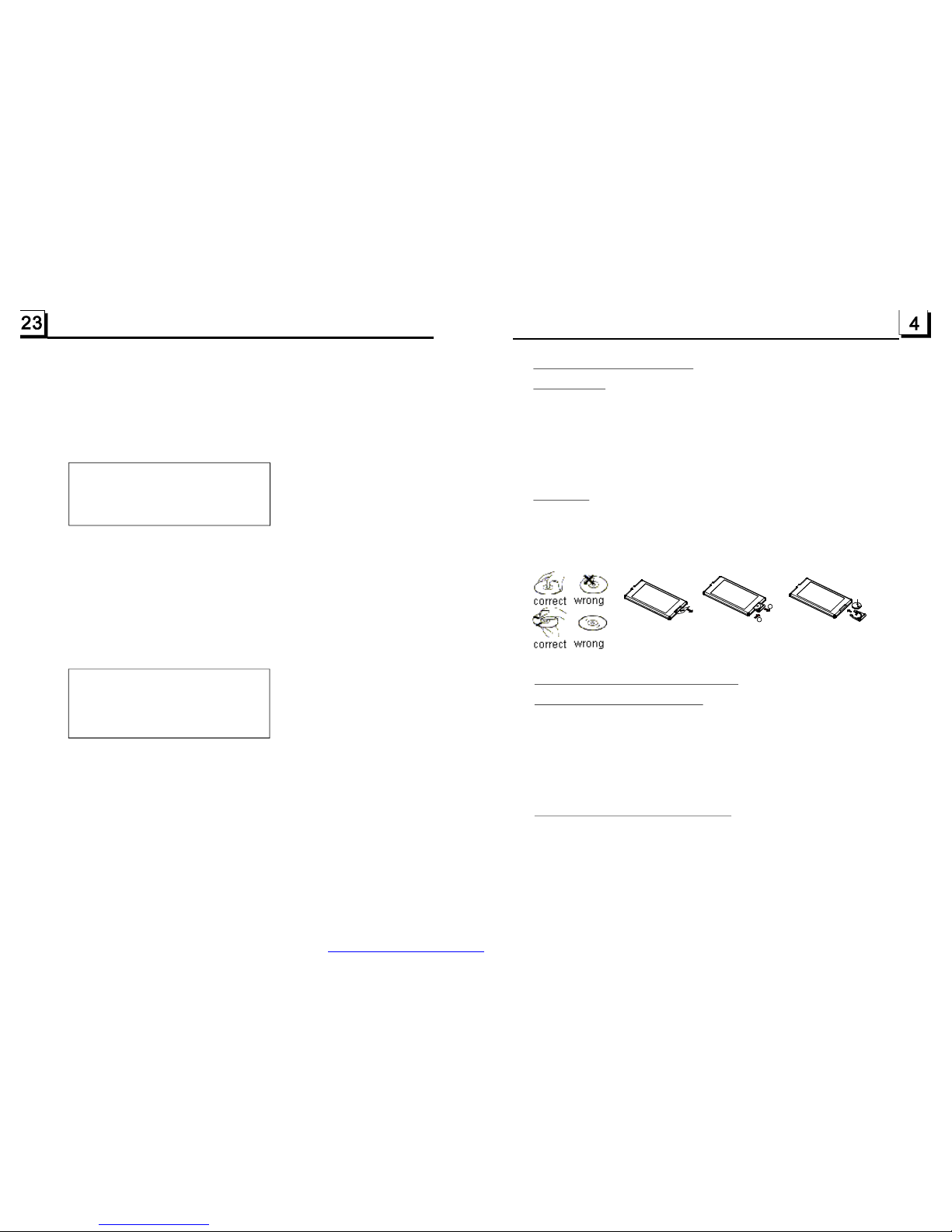
1.3MaintenanceandCleaningofDiscs
DiscMaintenance
1.Toh
1.
.
keepthediscclean,andlethediscbyitsedge,donottouchthedisc
surfaceoftheplayside.
2.Donotstickpaperortapeonthedisc.Ifthereisglue(oranalog)onthe
discsurface,mustwipeitupbeforeusing.
3.Donotexposethedisctodirectsunlight,ornearbyheatsourcessuchas
caliduct,orleaveitinacarparkedindirectsunlightwheretherecanbea
considerableriseintemperature.
4.Putthediscinsidedisccasetokeeptemperatureafterfinishingplayback.
Beforeplaying,wipethediscwithacleanlint.wipethediscoutwardsfrom
thedisccenter.
2.
DiscCleaning
Donotusepetrol,thinners,commerciallyavailablecleanersoranti-static
spraysforplasticLP'stowipediscs
1.4BatteryInformationoftheRemoteControl
ReplaceBatteryintheRemoteControl
NoteabouttheBatteryoftheRemoteControl::
1.
3.Donotshortthebattery.
4.Donotthrowthebatteryintothefire.
5.Toavoidtheriskofaccident,keepthebatteryoutofreachofchildren.
1.Beforeusingtheremotecontrolforthefirsttime,pulltheinsulating
sheetoutoftheremotecontrolasthedirectionindicatedbythe
arrow.(seefig.1)
2.PressthemovableblockholdasthedirectionindicatedbytheAarrow
(Seefig.2),thenpullthebatteryholderoutoftheremotecontrolas
thedirectionindicatedbytheBarrow(seefig.2).
3.Replacetheoldbatterybyanewbatterywith(+)polaritysideupward.
(Seefig.3).
4.Insertthebatteryholdertotheoriginalpositioninremotecontrol.
(Seefig.3).
Improperuseofbatterymaycauseoverheatingorexplosion.sothat
Result ininjuryorfire.
2.Batteryleakagemaycausedamagetotheremotecontrol(Battery
Life:6monthswithnormaluseinnormalroomtemperature).
Fig.1
Fig.2
Fig.3
A
B
+sideup
Itisforadjustingthehueofthevideooutput.
Itisforadjustingthesaturationofthevideooutput.
Itisforadjustingthesharpnessofthevideooutput.
Itisforselectingyourdesiredsoundeffectwhenthereisnocenterspeaker
andsubwoofer.Thereare3modes:LT/RT,STEREO,VSS.
LT/RT:WhenplayingadiscwithPROLOGICDolbystereoeffect,choosethe
item,soitwilloutputaudiosignalwithvividtheatreeffect.
STEREO:Ifyouchoosetheitem,whenoutputtingaudiosignalwith5.1channels,
itwilloutputtheleftandrightchannelsofsignal;whenoutputtingaudiosignal
with2channels,itwilloutputthecommon2channelsofstereosignal.
VSS:Ifyouchoosetheitem,whenplayingadiscrecordedwith5.1channels,
themainchannelspeakerscanoutputaudiosignalwithVSSeffect.
Itisforselectingaudiooutputmode
AfterselectingthecompressionmodeofLINEOUT,settheitem,soyoucan
adjustthelinearcompressionratio.IfyousetittobeFULL,thePeak-to-Peak
valueoftheaudiosignalistheminimum;ifyousetittobeOFF,thePeak-toPeakvalueisthemaximum.
Itisforselectingadesiredaudiooutputmodefortheleftandrightwaysofsignal.
ItismainlyforKaraokeofAc3.Thereare4modesinallasfollows:
STEREO,MONOL,MONOR,MIXMONO.
HUE
SATURATION
SHARPNESS
5.19.5SPEAKERSETUP
5.l9.6DIGITALSETUP
OPMODE
DYNAMICRANGE
DUALMONO
SPEAKERSETUP
DOWNMIX
EXITSETUP
DIGITALSETUP
OPMODE
DYNAMICRANGE
DUALMONO
EXITSETUP
DOWNMIX
PDF created with FinePrint pdfFactory trial version http://www.pdffactory.com
Page 6
ThisitemisforselectingthelanguageoftheSYSTEMMENUandalloperating
promptinterfacedisplayedduringplayback.
Thisitemisforselectingaaudiolanguage.
Thisitemisforselectingasubtitlelanguage.
Thisitemisforselectingadiscmenulanguage.
thereisonlyANALOGmode,i.e.SPDIF/OFF,notoptional.
Itisforselectingyourdesiredbasicmusictone(fromlowtohigh).
5.19.2LANGUAGESETUP
OSDLANGUAGE
AUDIOLANG
SUBTITLELANG
MENULANG
5.l9.3AUDIOSETUP
AUDIOOUT
KEY
5
LANGUAGESETUP
OSDLANGUAGE
AUDIOLANG
SUBTITLELANG
MENULANG
AUDIOSETUP
AUDIOOUT
KEY
VIDEOSETUP
BRIGHTNESS
CONTRAST
HUE
SATURATION
SHARPNESS
.l9.4VIDEOSETUP
BRIGHTNESS
CONTRAST
Itisforadjustingthebrightnessofthevideooutput.
Itisforadjustingthecontrastofthevideooutput.
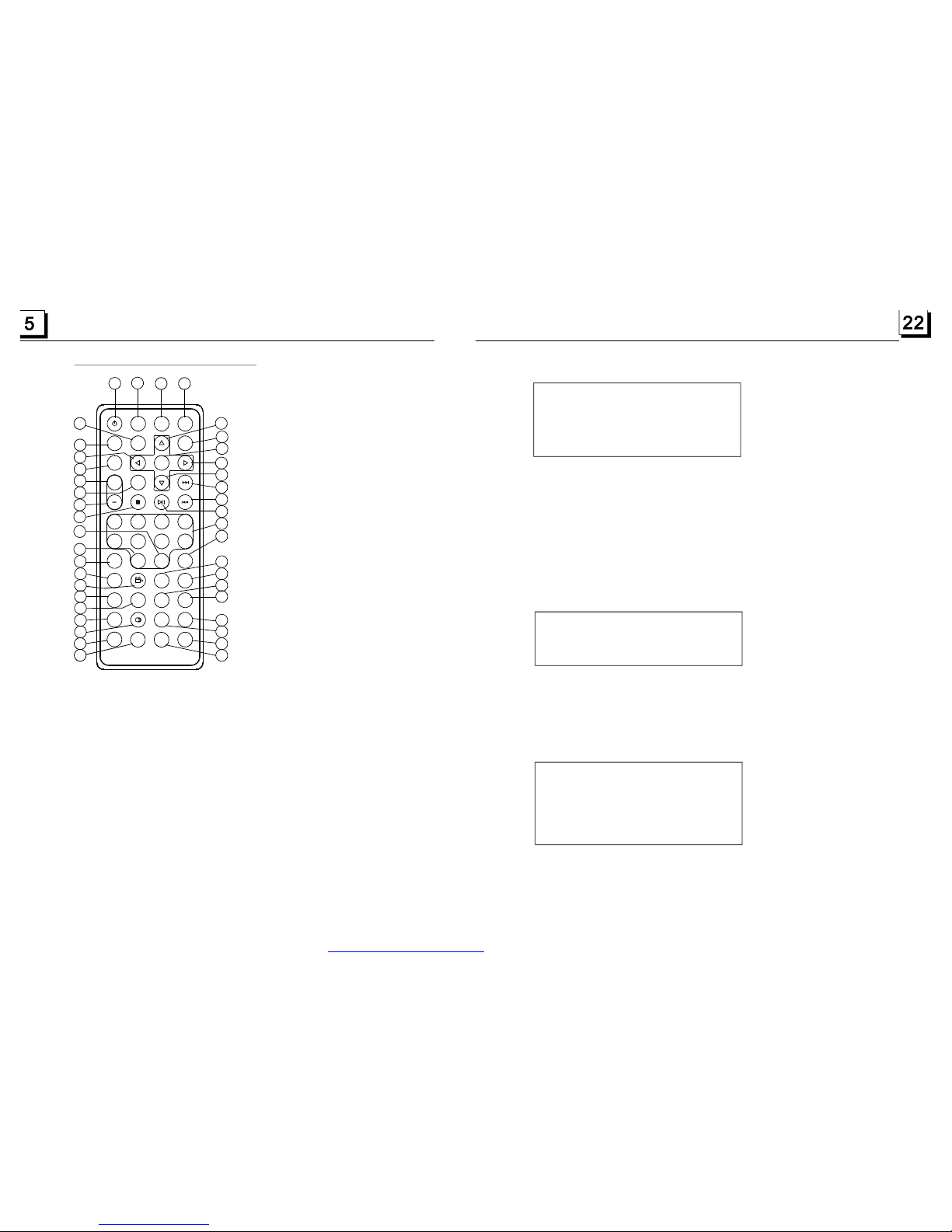
1.5TheRemoteControlDescription
16.SEARCHBUTTON
17.RDMBUTTON
18.RPTBUTTON
19.SUBTITLEBUTTON
20.TITLE/PBCBUTTON
21.ANGLE/STBUTTON
22.ZOOMBUTTON
23.AUDIOBUTTON
24.CLKBUTTON
25.A-BBUTTON
26.INTBUTTON
27.EQBUTTON
28.LOC/SLOW-FWDBUTTON
29.MUTEBUTTON
30.STOPBUTTON
31.VOLUME-BUTTON
32.<BUTTON
33.OKBUTTON
34.VOLUME+BUTTON
35.BANDBUTTON
36.PROGBUTTON
37.OSDBUTTON
38.LOUDBUTTON
39.STEPBUTTON
40.TABUTTON
41.AFBUTTON
1.P/NBUTTON
2.MENUBUTTON
3.POWERBUTTON
4.^BUTTON
5.>>|BUTTON
6.>BUTTON
7.|<<BUTTON
8.vBUTTON
9.SELBUTTON
12.10+/PTYBUTTON
13.SETUPBUTTON
14.MODEBUTTON
15.APSBUTTON
10.PLAY/PAUSEBUTTON
11.NUMBER(0~10,+10
-10)BUTTONS
1
2
3
4
5
6
7
9
8
10
11
12
13
14
15
16
17
18
19
20
21
22
23
24
25
26
27
28
29
30
31
32
33
34
35
40
41
3936
37
38
SLOW_FWD
A-B
ZOOM
AUDIO
INT
LOC
ST
CLK
5
9/AF
6
-101+10
2
+
SETUP
SEL
MU MODE
PWR
EQ
SUBTITLETITLE/PBC
RPT RDM
SEARCH
APS
0/10
TA
7
10+
/PTY
8
3
4
0K
MENU
BAND
P/N
PROG
OSD LOUD
STEP
PDF created with FinePrint pdfFactory trial version http://www.pdffactory.com
Page 7

2
13
1.6LocationsandNamesoftheControls
ThefigureoftheUnitChassisFacetAfterremovingtheFrontPanel
Thefigureofthefrontpanel
21 2324
1.POWER/MUTEBUTTON
2.DISCSLOT
3.RELEASEBUTTON
4.MODE
5.TABUTTON
6.SELBUTTON
ANDVOLKNOB
7.AFBUTTON
8.SMALLMONITOR
9.IRREMOTESENSOR
10.BANDBUTTON
11.UPANDDNBUTTONS
12.APSBUTTON
13.EJECTBUTTON
14.1/PLAY/PAUSEBUTTON
15.2/INTBUTTON
16.3/RPTBUTTON
17.4/RDMBUTTON
18.5/-10BUTTON
19.6/+10BUTTON
20.USBSOCKET
21.RESETBUTTON
22.AUXINSOCKET
23.LEDINDICATOR
24.SD/MMCCARDSLOT
FortheDVDSystemMenu,thereare6setuppagesinall.Theydisplayasfollows:
5.19.1SYSTEMSETUP
TVSYSTEM
TVTYPE
PASSWORD
RATING
DEFAULT
ThisproductsupportsoutputofvariousTVsystem.
IfyourTVsethasonlyNTSCorPALsystem,thescreenwillblinkandbecome
colorlesswhenawrongTVsystemisselected.Inthiscase,presstheN/Pbutton
toswitchtherightTVsystemtomatchtheTVcolorsystem.
ThesetupitemisformatchingTVscreensize.
4:3PS:ChoosetheitemwhenconnectingaTVsetwith4:3screen.Whenplaying
thepictureswith16:9size,theleftandrightpartsofthevideowillbecutout,
anddisplayinfullscreen.
4:3LB:ChoosetheitemwhenconnectingaTVsetwith4:3screen.Whenplaying
thepictureswith16:9size,thetopandbottompartsoftheTVscreenwillbe
turnedintoablacksquarerespectively.
16:9:ChoosetheitemwhenconnectingaTVsetwith16:9widescreen.
ThissetupitemisforlockingorunlockingtheratingleveloftheParentalControl.
Thedefaultedstateislocked.Thedefaultedpasswordis0000.
Youcansetanewpasswordthatyoulike:SelectthePASSWORDitemandthen
pressthe>buttontoenterit,theninputtheoriginalpassword0000,andthen
presstheOKbuttontounlockit.Pressthe>buttontoenteritagain,theninput
anewpasswordthatyoulikeandthenpresstheOKbuttontomakeiteffective.
BeforetheotherpersonsseetheManual,youshouldgetthepasswordinmind
andcutoutthepartofPASSWORDintheManual.
TheitemisforsettinganewratingleveloftheParentalControl.
1.SelectthePASSWORDitemandthenpressthe>buttontoenterit,theninput
thepasswordmentionedabove,andthenpresstheOKbuttontounlockthe
settingoftheratingleveloftheParentalControl.
2.SelecttheRATINGitemandthenpressthe>buttontoenterit,thenusethe
directionbuttonstoselectyourdesiredratinglevel,thenpresstheOKbutton
toconfirm.
3.SelectthePASSWORDitemagainandthenpressthe>buttontoenterit,then
inputthepassword,andthenpresstheOKbuttontolockthenewsettingof
theratingleveloftheParentalControl.
Thisitemisformakingallsetupitemschangebacktooriginalstatus.
SYSTEMSETUP
TVSYSTEM
TVTYPE
PASSWORD
RATING
DEFAULT
1 3
4
5
6
10
7
9
811
12
14
15
16
17
18
19
2022
11
3"TFT
UP
/MU
N
D
A
P
S
DN
USB
AUX
1
4
RDM
INT
2
3
RPT
6
+10
5
-10
MODE
TA
AF
REL
+
PUSHSEL
_
VOL
B
VIDEO
TM
PDF created with FinePrint pdfFactory trial version http://www.pdffactory.com
Page 8
7
20
3.DuringJPEGplayback,pressoneofthe>/</^/vbuttonstochangetheangleof
viewingpicturethatisdisplayingasfollows:
>:90degcw;<:90degccw;^:UP<-->DOWN;v:LEFT<-->RIGHT
DuringJPEGplayback,pressthePROGbuttontochangethemodeofrefreshpicture.
DuringJPEGplayback,presstheSTOPbuttontostopplayingandreturntotheroot
menu.
*DuringJPEGplayback,thefollowingbuttonsarenotavailable:SLOW-FWD,
SUBTITLE,TITLE,ANGLE,STEP,AUDIO,RDM,INTandA-B.
*InJPEGmode,theotheroperationsaresameasonesinMP3/WMAmode.
5
1.TherootmenuisdisplayedonTVwhenbeginningtoswitchonDISCmode,thenitwill
automaticallyplaythefirstfile.
Duringplayback,presstheSTOPbuttontostopplayingandreturntotherootmenu.
2.Whendisplayingtherootmenu,pressthedirectionbuttonstoselectyourdesired
FOLDERorfile,thenpresstheOKorPLAYbuttontoopentheFOLDER,orplaythe
selectedfile.
Whendisplayingtherootmenu,youcanalsousethenumberbuttonstoselectthe
serialnumberofthefileandplaythefile.
*TheANGLE,PROG,RDM,INTandTITLE/PBCbuttonarenotvalid.
*TheotherfunctionsaresameasonesinDVDdisc;buttheRPTfunctionissame as
oneinMP3/WMA.
5
ThereisESPfunctionforallformatsofdiscs.
InMP3/WMAmode,duringplayback,theinformationofthefilename,foldername,
willbescrollingontheLCDdisplay.Aslongasthe
currentplayingmusiccontainsrelevanttaginformationinversion1.0/2.0
format,the3itemsunderlinedabovewillbescrollingontheLCDdisplay;otherwise,
theywillnot.
5
PowerontheDVDplayer,theninserttheUSBstorageorMMC/SDCard(firstlyflipdown
thefrontpanel),andthenthemonitorwilldisplaytherootmenuoftheUSBstorageor
MMC/SDCard.
Alltheoperationsaresameasonesofthecorrespondingformat.
WhenyouwanttopullouttheCard,firstlypushit,andthenpullitout.
5
1.PresstheSETUPbuttonontheremotecontrollertoaccesstheDVDSystemMenuon
themonitor.
2.Thereare6setuppagesinallfortheSystemMenu.Pressthe>or<buttontoselect
andesiredsetuppage.
3.Pressthe^orvbuttontoselectansetupitemintheselectedsetuppage.
4.Pressthe>buttontoenterthesetupitem.Thenpressthevor^buttontoselecta
desiredmodeofthesetupitem,finallypresstheOKbuttontoconfirmit.
*Pressthe<buttontoreturntotheupperlevel.
*PresstheSETUPbutton againorusethedirectionbuttonstohighlighttheitemofthe
EXITSETUPandthenpresstheOKbuttontoexittheSystemMenu.
.16MP4Operation
.17ESPandFunction
songstitle,artistandalbum
.18USBandMMC/SDReaderOperation
.19TheDVDSystemMenuSetupOperation
ID3
MP3ID3
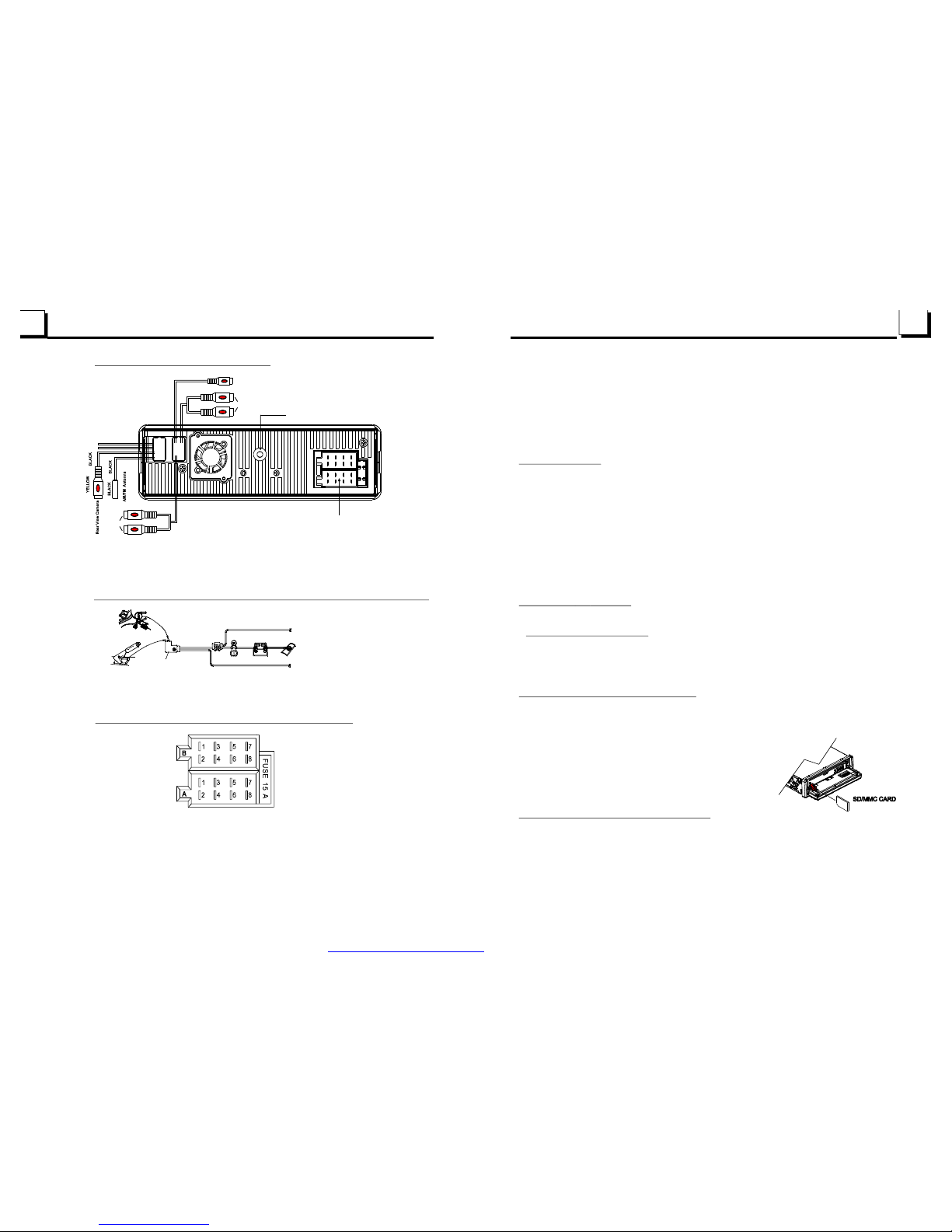
Connectingtheparkingbrakelinetotheparkingbrakesystembuiltinthecar
Parkingbrake
Parkingbrakeswitch
(insidethecar)
Parkingbrakeline(Green)
Tometallicbodyorchassisofthecar
TheDescriptionoftheFixedISOFemaleConnector
CONNECTORA
1.
2.
3.
4.Memory+12V
5.AutoAntenna
6.
7.12V(ToIgnitionKey)
8.GROUND
CONNECTORB
1.RearRightSpeaker(+)
2.RearRightSpeaker(-)
3.FrontRightSpeaker(+)
4.FrontRightSpeaker(-)
5.FrontLeftSpeaker(+)
6.FrontLeftSpeaker(-)
7.RearLeftSpeaker(+)
8.RearLeftSpeaker(-)
ReversallineWhite
ParkingLineGREEN
Note:1.afterconnectingtheParkingLine,thevideoonthesmallmonitorofthefrontpanelwillbedisplayonlyafter brakingthecar.
2. UsetheclipendofaGroundLineprovidedbymanufacturertoconnecttheFixingScrewBolt,useanotherendoftheGround
Linetoconnectthenegativepoleofthepowersource.Otherwise,thevideoonscreenmaybeflashes.
FixingScrewBolt
FixedISOFemaleConnector
GRAY
GRAY
VIDEOOUT
YELLOW
YELLOW
BLACK
REDR
WHITEL
BLACK
RCALINEOUT
SUBWOOFER
GREY
GREEN
1.7DescriptionoftheRearCabinet
PDF created with FinePrint pdfFactory trial version http://www.pdffactory.com
Page 9

5
Itallowsyoutoentertheorderinwhichyouwantsomechapters/tracksin
DVD/VCD/MP3/WMA/CDdisctoplay.
1Duringplayback,pressthePROGbuttontoenteraprograminterfaceas
follows:
forDVDdiscsforVCD/MP3/WMA/CDdiscs
2Usethedirectionbuttonstomovecursorontothedesiredplaceforinputting
thesequencenumber.
3Usethenumberbuttontoinputdesiredsequencenumberoftitle/chapter/
trackwithdesiredsequence.
4UsethedirectionbuttontomovecursorontoPlayitem,thenpresstheOK
buttontoplaytheprogrammedtitles/chapters/tracksinprogrammedorder;
onlypressingthePLAYbuttonalsocanplaytheprogrammedtitles/chapters
/tracksinprogrammedorder.
*Toexitprogramplayback,firstlypresstheSTOPbutton,thenpressthePLAY
buttontoentersequenceplayback;orpressthePROGbuttontwiceagain.
*Toremovetheallprogrammedsequencenumbers,movethecursoronto
Clearitem,thenpresstheOKbutton.
*Tochangetheprogrammedsequence,movethecursorontotheitemyou
wanttochange,inputthedesiredsequencenumber.
*DuringVCDplayback,ifitisinPBCONmode,atthesametimeofentering
thestateofprogramplayback,itturnsoffPBCmode.
5
1.TherootmenuisdisplayedonthemonitorwhenbeginningtoswitchonDISC
mode.Atthetime,itplaysMP3/WMAfile.(theTITLEorMENUbuttonisnot
available).
Intherootmenu,theleftfilesorticonisforMP3/WMAfile;themiddlefilesort
iconisforJPEGfile;therightfilesorticonisforVIDEOfile.Ifoneofthese3
filesortdoesnotexist,youcannotmovecursorontothefilesorticon.
2.Whendisplayingtherootmenu,pressthedirectionbuttonstoselectyour
desiredFOLDER,fileorfilesorticon,thenpresstheOKorPLAYbuttonto
opentheFOLDER,orplaytheselectedfile,orplayonlythissortoffile.
Whendisplayingtherootmenu,youcanalsousethenumberbuttonsto
selecttheserialnumberofthefileandplaythefile.
WhenyouselectaJPEGfilesorticon,pressthe^or>buttontoselectthe
firstJPEGfile,thenpressthevbuttontoselectthedesiredJPEGfile,finally
presstheOKorPLAY/PAUSEbuttontodisplaytheJPEGpictureinfullscreen
fromtheselectedJPEGpicture.
.14ProgramPlayback
.15PlaybackthePictureCDinJPEGFormat
PROGRAM
TCTCTCTC
1__:__5__:__9__:__13__:__
2
3
4
PlayClear
__:__6__:__10__:__14__:__
__:__7__:__11__:__15__:__
__:__8__:__12__:__16__:__
PROGRAM
1____5____9____13____
2
3
4
PlayClear
____6____10____14____
____7____11____15____
____8____12____16____
1.8UNITINSTALLATION
INSTALLATIONINSTRUCTIONS
Toreduceskippingorjamming
ofdiscs,pleasefix themetal
straponthemetalconnectedto
thechassisofthecar.
METALSTRAP
DASHBOARD
SLIDINGMETALHOUSING
TODRAWTHECHASSISOUTOFTHE
SLIDINGMETALHOUSING,INSERT
THELEFTANDRIGHTKEYPLATES
INTOTHETWOSIDESOFCHASSIS.
FRONTPANEL
PLASTICTRIMOUT
UNITCHASSIS
SELECTTHEPROPERTABS
OFTHESLIDINGMETAL
HOUSINGTOFIXTHE
SLIDINGMETALHOUSING.
NOTE
REMOVETHEDECKTRANSPORT
SCREWSBEFOREINSTALLINGIT.
Thisisananti-theftinstallation,with
theunithavingaslidingmetalsleeve.
REMOVETHESLIDINGMETALHOUSING
EJECTBUTTON
RESETBUTTON
PDF created with FinePrint pdfFactory trial version http://www.pdffactory.com
Page 10
2.CommonOperation
1.Toturnon/offtheunit
Underpoweroffmode,pressthePOWERbuttontoturnontheunit.
Underpoweronmode,pressandholdthePOWERbuttononthefrontpanel
orbrieflypressthePOWERbuttonontheremotecontrollertoturnofftheunit.
2.Toselectfunctionmode
PresstheMODEbuttontoselectTUNER,DISC(Afterinsertingadisc),USB
(AfterinsertingaUSBstorage),Card(AfterinsertingaMMCorSDcard),or
AUXmode.
3.Toadjustsoundlevel
RotatetheVOLknobonthefrontpanelorpressorholdthe+or-buttonon
theremotecontrollertodirectlyadjustthevolumelevel.
4.Tomutesound
PresstheMUTEbuttonontheremotecontrollertoturnon/offMUTEmode.
BrieflypressingthePOWERbuttononthefrontpanelalsocanturnon/off
MUTEmode.
InMUTEmode,theMUTEmodecanbereleasedbypressingthefollowing
buttons:MUTE,VOLor+/-,SEL,MODE.
5.Todisplayandadjusttheclocktime
PresstheCLKbuttononremotecontrollertodisplayclocktimeonthesmall
monitorofthefrontpanel.
ThenpressandholdtheCLKbuttontochangethecolorofthehourofthe
clock,thenrotatetheVOLknobonthefrontpanelorpressthe+or-button
ontheremotecontrollertoadjustthehour;andthenbriefly presstheSEL
buttontochangethecoloroftheminuteoftheclock,thenrotatetheVOL
knobonthefrontpanelorpressthe+or-buttonontheremotecontrollerto
adjusttheminute.
6.ToselectapresetEQmode
PresstheEQbuttontoselectthepresetmusicequalizercurves:POP,ROCK,
CLAS,FLAT.Thesoundeffectwillbechanged.
ZOOMx2,ZOOMx3,ZOOMx4,ZOOMx1/2,ZOOMx1/3,ZOOMx1/4,ZOOMOFF.
Pressoneofthe^/v/>/<buttonstoselecttheareayouwanttoenlarge.
WhenplayingDVDdiscs,presstheSUBTITLEbuttonrepeatedlytoselect
thelanguageofthecaptionorturnoffthecaption.(dependonthediscused.)
WhenplayingVCD/MP3/WMA/CDdiscs,thebuttonisnotavailable.
1.WhenplayingDVDdiscs,presstheAUDIObuttonrepeatedlyontheIR
remotecontroltoselectthedesiredlanguagetype(dependonthediscused)
2.WhenplayingVCDdiscs,presstheAUDIObuttonrepeatedlytoselectthe
soundmodeoftheMONOL,MONOR,andStereo,nolanguagefunction.
3.WhenplayingCD/WMA/MP3discs,theAUDIObuttonisinvalid.
DuringplaybackofDVD/VCDdisc,presstheBAND(P/N)buttononthefront
panelorontheremotecontrolrepeatedlytochangetheVIDEOSIGNAL
SYSTEMmodeasfollows:
-->PAL-->PAL-M-->PAL-N-->NTSC-->AUTO-->
1.WhenplayingDVDdiscs,presstheOSDbuttonrepeatedlyontheremote
controltoturnon/offtheplaybackstatus.Whenitison,itwilldisplaythe
informationsuchas:theserialnumberoftheplayingtitle,theserialnumber
oftheplayingchapter,theelapsedtimeoftheplayingchapter,theremaining
timeoftheplayingchapter,theelapsedtimeoftheplayingtitle,theremaining
timeoftheplayingtitle,etc.
2.WhenplayingVCD/CDdiscs,presstheOSDbuttonrepeatedlyontheremote
controltoturnon/offtheplaybackstatus.Whenitison,itwilldisplaythe
informationsuchas:theserialnumberoftheplayingtrack,theelapsedtime
oftheplayingtrack,theremainingtimeoftheplayingtrack,theelapstedtime
ofthedisc,theremainingtimeofthedisc.
3.WhenplayingMP3/WMAdiscs,presstheOSDbuttonrepeatedlyonthe
remotecontroltoturnon/offtheplaybackstatus.Whenitison,itwill
displaytheinformationsuchas:theserialnumberoftheplayingtrack,the
elapsedtimeoftheplayingtrack,theremainingtimeoftheplayingtrack.
5.10ChangetheCaptionLanguage
5.11ChangetheAudioLanguage
5.12ChangetheVideoSignalSystem
5.13LookoverthePlaybackStatus
PDF created with FinePrint pdfFactory trial version http://www.pdffactory.com
Page 11

7.Todemountthefrontpanel
8.Tomountthefrontpanel
9.Toturnon/offLOUDNESSmode
PresstheLOUDbuttonontheremotecontrollertoturnon/offLOUDNESS
mode.
WhenturningonLOUDNESSmode,itwillenhancebasslevelimmediately
whenthebassisnotenough.
10.Toresettheunit
whenthebuttonsarenoteffectiveor
soundisdistorted,presstheRELEASEbuttontodetachthefrontpanel
fromtheunit,then
.
11.Toadjustthesoundequalizercurves
Toadjustthesoundequalizercurves,brieflyandrepeatedlypresstheSEL
buttontoselectthesoundequalizercurvesofVOL,BAS(withoutpresetEQ),
TRE(withoutpresetEQ),BAL,FAD,thenrotatetheVOLknobonthefront
panelorpressthe+or-buttontoadjustlevel.
displayisincorrect,orthefunction
useasharppointtopresstheRESETbutton,whichwill
resettofactorydefault,andre-instatethecorrectfunctions
Fig.1 Fig.2 Fig.3 Fig.4
5.5PlaybackinScanMode
5.6Playbackfromaspecifiedchapter/trackoraspecifiedtime
5.7PlaybackinRandom
.8PlaybackinDifferentAngle
.9PlaybackinZoomMode
1.WhenplayingVCD(PBCOFF)/CDdiscs,presstheINTbuttontoplaythe
previous10secondspartofeachtrackonthedisc.PresstheINTbutton
againtoresumenormalplayback.
2.WhenplayingDVD/MP3/WMAdiscs,theINTbuttonisnotavailable.
1.WhenplayingDVDdiscs,presstheSEARCHbuttontodisplayainterface
andhighlightthetitleitem,thenusethenumberbuttonstoinputtheserial
numberofthetitle;usethedirectionbuttonstohighlightthechapteritem,
thenusethenumberbuttonstoinputtheserialnumberofthechapter;you
canstillusethedirectionbuttonstohighlightthetimeitem,thenusethe
numberbuttonstoinputthedesiredtimetostartplayback;finallypressthe
OKorPLAYbuttontoplaytheselectedchapterorplayfromtheselectedtime.
2.WhenplayingVCD/MP3/WMA/CDdiscs,presstheSEARCHbuttontodisplay
ainterfaceandhighlightthetrackitem,thenusethenumberbuttonstoinput
theserialnumberofthetrack;youcanstillusethedirectionbuttonstohighlightthetimeitem,thenusethenumberbuttonstoinputthedesiredtimeto
startplayback;finallypresstheOKorPLAYbuttontoplaytheselectedtrack
orplayfromtheselectedtime.
WhenplayingDVD/VCD(PBCOFF)/MP3/WMA/CDdiscs,presstheRDM
buttontoswitchbetweenRANDOM(ON)/RANDOMOFF.WheninRANDOM
(ON)mode,itwillplayinrandom.
5
1.WhenplayingVCD/MP3/WMA/CDdiscs,theANGLEbuttonontheIRremote
controlisnotavailable.
2.WhenplayingDVDdiscs,presstheANGLEbuttonrepeatedlyontheIR
remotecontroltoviewindifferentangle.(ThisfunctionisonlyfortheDVD
discswithANGLEfunction)
5
InDVD/VCDmode,duringplayback,presstheZOOMbuttoncontinuously
toenlargeacertainareaoftheimagesonthescreenwiththesemultiples:
PDF created with FinePrint pdfFactory trial version http://www.pdffactory.com
Page 12

Duringslowforward,pressthePLAYbuttontoresumenormalplayback.
Thefunctionisonlyforvideo.
5
IftheunitiscurrentlyrunningDVD/VCDdisc,presstheSTEPbutton
consecutivelytodisplaythestillframeforwardwithstepbystep.
PressthePLAYbuttontoresumenormalplayback.
5
5
1.InthemodeofDVDdiscplayback:
PresstheRPTbuttontoselectREPCHAPTER,REPTITLE,REPALL
orREPOFF.
2.InthemodeofVCD(PBCOFF)/CDdiscplayback:
presstheRPTbuttontoselectREPONE,REPALLorOFF.
WhenitisinthestateofPBCON,duringVCDdiscplaying,theRPT
buttonarenotavailable.
3.InthemodeofMP3/WMAdiscplayback:
PresstheRPTbuttontoselectREPONE,REPDIR,REPALLorOFF.
5
Pressthebuttonifyouwanttorepeataspecificsegmentonadisc
thatyoudefine:
1.Pressthebuttonatapoint(A)whereyouwantittobethestartpoint
oftherepeatsegment.Pressthebuttonagainatapoint(B)whereyou
wantittobetheterminalpointoftherepeatsegment.Thenitwillplaythe
segmentrepeatedly.
2.TocanceltheA-Brepeatmodeandresumenormalplayback,pressthe
buttonforthethirdtime.
.3Playbackwithstillframe
.4PlaybackRepeatedly
.4.1ONE/ALLRepeat
.4.2A-BRepeat
A-B
A-B
A-B
A-B
Note:
DuringVCD/MP3/WMA/CDplayback,pointsAandBmustbewithinthe
sametrack.
DuringDVDplayback,pointsAandBcanbeselectedfromdifferentchapters.
3.RadioOperation
1.BANDBUTTON
InRADIOmode,presstheBANDbuttonontheremotecontroloronthefrontpanelto
selectyourdesiredradiobandofandAM2,andtheselectedband
willbedisplayedonthesmallmonitorofthefrontpanel.
2.TUNE/SEEKUP/DOWNBUTTONS
InRADIOmode:
1)PressandholdtheUP/DNbuttononthefrontpanelorthe>>|/|<<buttonontheremote
controltoautomaticallysearchup/downforaavailablestationfromthecurrentfrequency.
2)BrieflypresstheUP/DNbuttononthefrontpanelorthe>>|/|<<buttonontheremotecontrol
tomanuallysearchupordownwithstepbystepforyourdesiredstationfromthecurrent
frequency.
3.APSBUTTON
InRADIOmode:
1)WhenpressingandholdingtheAPSbutton,theradiosearchesfromthelowestfrequencyand
checksthesignalstrengthleveluntil1cyclesearchisfinished.Andthenthe6strongeststations
arepresettothecorrespondingpresetnumbermemorybank.TheASoperationisimplemented
ineachbankoftheselectedband.WhentheASoperationisfinished,itwillresumebroadcasting
ontheM1.(Itcanstore3x6stationsforFMand2x6stationsforAMinall)
2)WhenbrieflypressingtheAPSbuttononthefrontpanelortheremotecontrol, theradio
searchesforeachpresetstationfromtheM1.Whenthefieldstrengthlevelismorethanthe
thresholdlevelofthestoplevel,theradioholdsatthatpresetnumberforfewsecondswith
releasingmute,andthensearchesagain.Afterfinishingacircleofsearching,itwillstop
searchingontheM1.
NOTE:InFMband,FM1,FM2,FM3ischeckedoneatatime.
InAMband,ischeckedoneatatime.
4.PRESETSTATION[1-6]BUTTONS
InRADIOmode:
1)Tomemorizethecurrentfrequencyonthecurrentband,pressandholdanyoneofthesixpreset
buttons(1-6).
2)Torecallthepresetmemoryonthecurrentband,pressoneofthepresetbuttons[1-6].
5.STEREO/MONOBUTTON
PresstheSTbuttonontheremotecontroltoselecttheSTEREOorMONOsoundmodefor
FMband.
6.LOCBUTTON
1)InRADIOmode,whenthesignalofthedistanceradiostationareveryweakandthereceiving
effectisbadduringtuning,checkwhetherthereisthewordLOConLCD.Ifthereistheword
LOConLCD,pressthisbuttontoturnofftheLOCfunction,thentuneagainforthedistance
radiostation;
2)InRADIOmode,whenthesignalsfromthelocalradiostationsaretoostrong,thiscouldlead
tointerference.pressthisbuttontoturnon theLOCfunction,andtheLOCiconwillbelitupon
theLCD.Re-tuneforthelocalstationrequired.
FM1,FM2,FM3,AM1
AM1,AM2
PDF created with FinePrint pdfFactory trial version http://www.pdffactory.com
Page 13

InVCDmode
1.WhenstartingtoturnonthePBCfunction,itwillplayfromthebeginningof
thedisctillitdisplaythePBCmenuonTVscreenifthediscincludethePBC
menu.
2.Pressthenumberbuttonstoselectyourdesiredtracktoplay.
InMP3/WMAmode
1.Therootmenuisdisplayedonthemonitorscreenallthetime(andtheTITLE
orMENUbuttonisnotavailable).
2.PressthedirectionbuttonstoselectyourdesiredFOLDER,thenpressthe
OKorPLAYbuttontoopentheFOLDER,andthenpressthedirectionbuttons
toselectyourdesiredfile,finallypresstheOKbuttontoplaytheselectedfile.
InCDmode,theTITLE,PBC,MENUbuttonsaredisabled.
4
1.PresstheRELEASEbuttontodetachthefrontpanelfromtheunit,thenpress
theEJECTbuttontoejectdisc,andthenremovethediscandflipupthefront
paneltillhearingaclip.
2.PressandholdthePOWERbuttononthefrontpanelorbrieflypressthe
POWERbuttonontheremotecontrollertoturnofftheDVDplayer.
5
Duringnormalplayback,pressandholdtheUP/DNbuttononthefrontpanel
orthe>>|/|<<buttonontheremotecontrollercontinuouslytofastforwards
orbackwardsatthefollowingspeeds:x2,x4,x8,x20,normal.
Duringspeedplayback,pressthePLAYbuttontoresumenormalplayback.
5
Duringplayback,presstheSLOW_FWDbuttontoexecutetheSlow
Forwardfunction.
WitheachconsecutivepressingoftheSLOW_FWDbutton,theplayback
speeddecreases.ThespeedlevelsinSlowForwardasfollows:
x1/2,x1/3,x1/4,x1/5,x1/6,x1/7,normal.
.7TerminatethePlayback
5.1PlaybackwithSpeed
.2PlaybackwithSlowSpeed
.AdvancedDisc,USBorMMC/SDOperation
7.PTY(PROGRAMTYPE)BUTTON
WhenpresstheVOL+orVOL-buttonontheremote
controllerorrotatetheVOLknobonthefrontpaneltoselectoneofPTY
programs:<-->NEWS<-->AFFAIRS<-->INFO<-->SPORT<-->EDUCATE
<-->DRAMA<-->CULTURE<-->SCIENCE<-->VARIED<-->WEATHER<-->
FINANCE<-->CHILDREN<-->SOCIAL<-->RELIGION<-->PHONEIN<-->
TRAVEL<-->LEISURE<-->DOCUMENT<-->PTYNONE<-->POPM<-->
ROCKM<-->EASYM<-->LIGHTM<-->CLASSICS<-->OTHERM<-->
JAZZ<-->COUNTRY<-->NATIONM<-->OLDIES<-->FOLKM<-->
When
AfterselectingoneofthePTYprograms,itwilldisplaySEEKPTYand
automaticallysearchforthestationofthePTYprogram.Ifthestationof
thePTYprogramdoesnotexist,itwilldisplayPTYNONEandthenreturn
backtothenormalstation.
8.AF[ALTERNATIVEFREQUENCIES]BUTTON
WhenpressingtheAFbuttonbriefly,theAFswitchingmodeisselectedand
thestateoftheAFswitchingmodeisdisplayedbyAFsegmentindisplay.
Segmentoff:AFswitchingmodeoff.
Segmenton:AFswitchingmodeon,andhasRDSinformation.
Segmentflashing:AFswitchingmodeon,butRDSinformationisnot
receivedyet.
WhentheAFswitchingmodeisselected,theradiochecksthesignalstrength
oftheAFallthetime.TheintervalofcheckingtimeofeachAFsdependson
thesignalstrengthofthecurrentstation,fromafewminuteforthestrong
stationtoafewsecondsfortheweakstation.EverytimethatanewAFis
strongerthanthecurrentstation,itswitchesovertothatfrequencyforvery
shorttime,andtheNEWFREQUENCYisdisplayedfor1-2second.Because
themutetimeoftheAFswitchingorthecheckingtimeisveryshort,itis
almostinaudibleincaseofnormalprogram.(WhenAFflashonLCD,itwill
searchforthestrongerRDSstation.IfAFandTPflashonLCD,itcanonly
searchforthetrafficannouncementstation).
InFMmode,whenAFison,SEEK,(SCAN),AUTO-MEMORYfunctioncan
onlyreceiveandsavetheRDSprogram.
9.TA[TRAFFICANNOUNCEMENT]BUTTON
PresstheTAbuttonshortlytoturnonTAsearchmode.
Whentrafficannouncementistransmitted:
1).IftheunitisinDiscPlaymode,itwillswitchtoradiomodetemporarily.
2).TemporarilyswitchovertoanEONlinkedstationwhenEONdetectsa
trafficannouncementonthatotherprogram,andTA,TPwillbedisplayed
onLCD
*TAinterruptionfunction:
ThecurrenttrafficannouncementiscancelledbypressingTAbutton
shortly.
*WhenTAison,SEEK,(SCAN),AUTOMEMORYfunctioncanbereceived
orsavedonlywhentrafficprogramidentificationcodehasbeenreceived.
PressthePTYbuttonshortlytoselectoneofthefollowingmode:
PTYMUSICgroup--PTYSPEECHgroup--PTYOFF
PTYgroupison,
PTYgroupison,pressingthe6numberbuttonsalsocanselectoneof
PTYprogramsasabove.
PDF created with FinePrint pdfFactory trial version http://www.pdffactory.com
Page 14

4.BasicDisc,USBorMMC/SDOperation
4.1Beginplayback
1.PressthePOWERbuttonbrieflytoturnontheDVDplayer.
2
AfterturningontheDVDplayer,pleaseturnonthemonitor,andensurethat
thevideooutputofthemonitoristhevideoinputfromtheDVDplayer
connectedwiththemonitor.
?CommonQuestion
Q:ThereisnotanythingisdisplayedonTVscreenwhentheDVDplayeris
turnedon.Howtosolvetheproblem?
A:EnsurethattheTVwassettorightvideoinput(notTVchannel);for
example,ifyoumakeVIDEO1INPUTofTVandDVDplayerconnected
witheachother,thenyouneedsetTVtoVIDEO1.
.PresstheRELEASEbuttontodetachthefrontpanelfromtheunit.
3.InsertadiscintotheDISCSLOT(Labelsurfaceup),thenflipupthe
frontpaneltillhearingaclip.
! NOTE
1.Forsomediscsthatareseriouslyscratchedorpoormanufacturingor
recordingquality,itmaynotplay.
2.Iftheplayercannotreaddiscundernormalcondition,pleasetryto
ejectandreloadthediscagain.
3. Remark:
1)InadditiontonormalCDandDVD,thisunitsupportstoplayCD-R,
CD-R/W,DVD-RandDVD-R/Waswell;however,dependingonthe
conditionsoftherecordingequipment,recordingprogramorthedisc
itself,someCD-R,CD-R/W,DVD-RorDVD-R/Wmaynotplay.
2)WhendealingwithCD-R,CD-R/W,DVD-RorDVD-R/Wrecording,
toohighrecordingspeedmayresultinpoorsignalqualityandtherefore,
itisrecommendabletoselectasloweraspossiblerecordingspeed.
4.2PausePlayback
.3StopPlayback
.4SelectChapter/TrackwiththeUP/DNorthe>>|/|<<Button
.5SelectChapter/TrackwiththeNumberButtons
.6SelectChapter/TrackwiththeRoot/PBCMenu(Ifthediscincludesthe
root/PBCmenu)
WhenplayingDVD/VCD/CD/MP3/WMAdiscs,pressthePAUSEbuttononIR
remotecontroltopausetheplayback,pressthePLAYbuttontoresumenormal
playback.
4
WhenplayingDVD/VCD/MP3/WMA/CDdiscs,presstheSTOPbuttononceto
pausetheplayback,thenpressthePLAYbuttontoresumethenormalplayback;
presstheSTOPbuttontwicetostoptheplayback,thenpressthePLAYbutton
tostartplaybackfromthebeginningofthefirstchapter/track.
4
PresstheUP/DNbuttononthefrontpanelorthe>>|/|<<buttononthe
remotecontrolduringplaybacktoselectthenextorlastchapter/trackto
playback.
Note:PresstheUP/DNorthe>>|/|<<buttonmultipletimestoadvance
multiplechapters/tracksforwardorbackward.
4
WhenplayingDVD/VCD(PBCOFF)/MP3/WMA/CDdiscs,pressoneofthe1~9
andthe0/10numberbuttonstodirectlyselectandplaythe1stto10thtrack/
chapter(the0/10buttonisusedasthe10button).
Ifyouwanttoplaythetrack/chapterwithserialnumberbiggerthan10,
usethe10+,1~9and0/10button.Forexample1,toplaythe13thtrack/
chapter,firstlypressthe10+buttononce,thenpressthe3button.For
example2,toplaythe34thtrack/chapter,firstlypressthe10+buttonfor3
times,thenpressthe4button.(the0/10buttonisusedasthe0button)
Note:pressingandholdingthe+10or-10buttonswillallowyoutoplaythenext
10orlast10chapter/track(onlyforMP3/WMA).
4
WhenplayingDVDdiscs:
1.PresstheTITLEbuttonontheremotecontroltodisplaythetitlelist.
2.Pressthedirectionbuttonstoselectyourdesiredtitle,andthenpresstheOK
orPLAYbuttontoopentherootmenuoftheselectedtitle.
3.Pressthedirectionbuttonstoselectyourdesiredchapter,finallypressthe
OKorPLAYbuttontoplaytheselectedchapter.
Duringplayback,pressingtheMENUbuttoncandirectlydisplaytheroot
menuofthetitlethatisplaying.
PDF created with FinePrint pdfFactory trial version http://www.pdffactory.com
 Loading...