

Page 1
Title Page
LNK
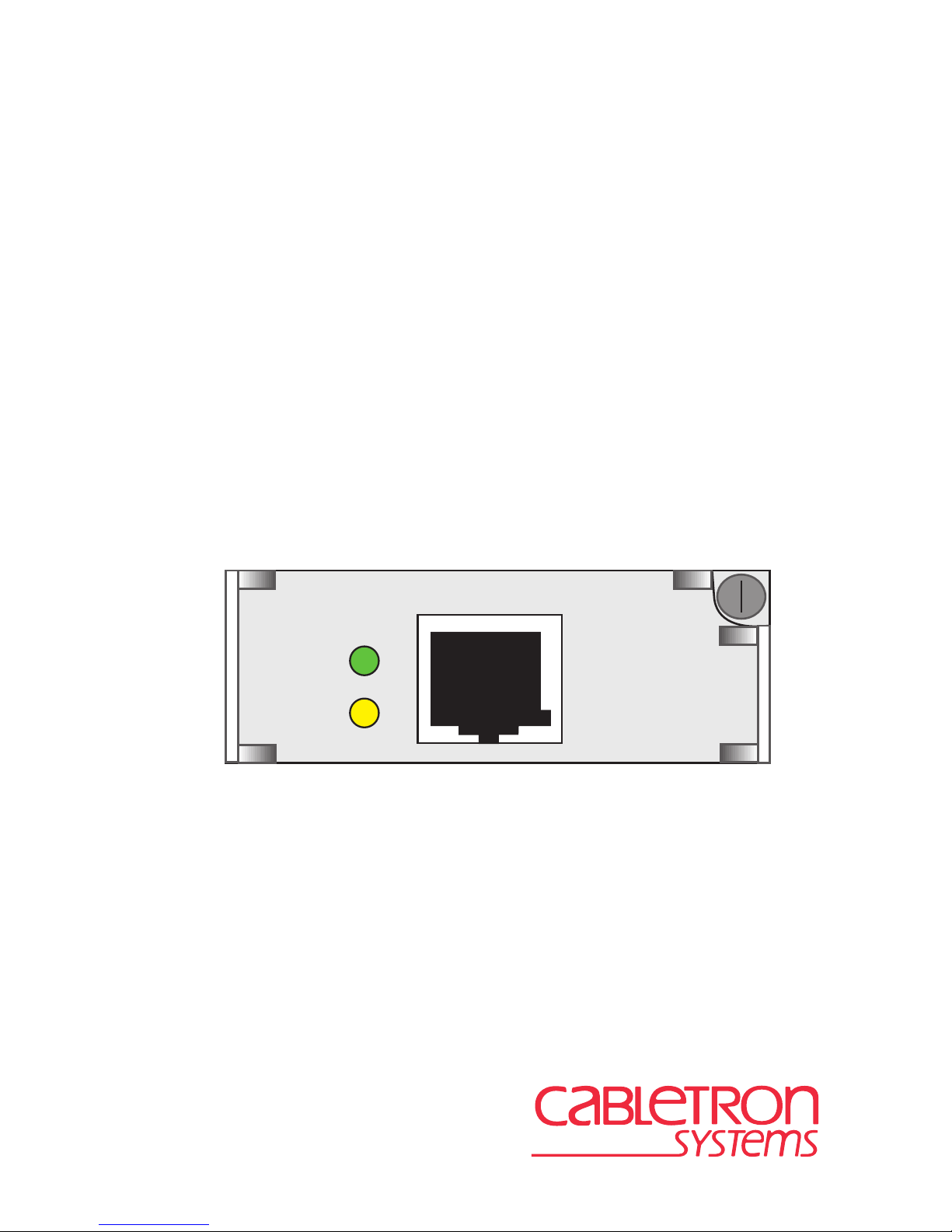
SWPIM-DDS
Installation Guide
9033036-01
STS
SWPIM-DDS
Page 2

Page 3

Only qualified personnel should perform installation
procedures.
NOTICE
Cabletron Systems reserves the right to make changes in specifications and other information
contained in this document without prior notice. The reader should in all cases consult Cabletron
Systems to determine whether any such changes have been made.
The hardware, firmware, or software described in this manual is subject to change without notice.
IN NO EVENT SHALL CABLETRON SYSTEMS BE LIABLE FOR ANY INCIDENTAL,
INDIRECT, SPECIAL, OR CONSEQUENTIAL DAMAGES WHATSOEVER (INCLUDING BUT
NOT LIMITED TO LOST PROFITS) ARISING OUT OF OR RELATED TO THIS MANUAL OR
THE INFORMATION CONTAINED IN IT, EVEN IF CABLETRON SYSTEMS HAS BEEN
ADVISED OF, KNOWN, OR SHOULD HAVE KNOWN, THE POSSIBILITY OF SUCH
DAMAGES.
Cabletron Systems, Inc.
35 Industrial Way
Rochester, NH 03867
1999 by Cabletron Systems, Inc.
All Rights Reserved
Printed in the United States of America
Order Number: 9033036-01 October 1999
Cabletron Systems, SPECTRUM
trademark of Cabletron Systems, Inc.
All other product names mentioned in this manual may be trademarks or registered trademarks of
their respective companies.
, and
LANVIEW
are registered trademarks and
SmartSwitch
is a
FCC NOTICE
This device complies with Part 15 of the FCC rules. Operation is subject to the following two
conditions: (1) this device may not cause harmful interference, and (2) this device must accept any
interference received, including interference that may cause undesired operation.
NOTE:
device, pursuant to Part 15 of the FCC rules. These limits are designed to provide reasonable
protection against harmful interference when the equipment is operated in a commercial environment.
This equipment uses, generates, and can radiate radio frequency energy and if not installed in
accordance with the operator’s manual, may cause harmful interference to radio communications.
Operation of this equipment in a residential area is likely to cause interference in which case the user
will be required to correct the interference at his own expense.
This equipment has been tested and found to comply with the limits for a Class A digital
WARNING:
party responsible for compliance could void the user’s authority to operate the equipment.
Changes or modifications made to this device which are not expressly approv ed by the
SWPIM-DDS Installation Guide i
Page 4

Notice
INDUSTRY CANADA NOTICE
This digital apparatus does not exceed the Class A limits for radio noise emissions from digital
apparatus set out in the Radio Interference Regulations of the Canadian Department of
Communications.
Le présent appareil numérique n’émet pas de bruits radioélectriques dépassant les limites applicables
aux appareils numériques de la class A prescrites dans le Règlement sur le brouillage radioélectrique
édicté par le ministère des Communications du Canada.
NOTICE:
equipment meets telecommunications network protective, operational and safety requirements as
prescribed in the appropriate Terminal Equipment Technical Requirements documents (s). The
department does not guarantee the equipment will operate to the user’s satisfaction.
Before installing this equipment, users should ensure that it is permissible to be connected to the
facilities of the local telecommunications company. The equipment must also be installed using an
acceptable method of connection. The customer should be aware that compliance with the above
conditions may not prevent degradation of service in some situations.
Repairs to certified equipment should be coordinated by a representative designated by the supplier.
Any repairs or alterations made by the user to this equipment, or equipment malfunctions, may give
the telecommunications company cause to request the user to disconnect the equipment.
Users should ensure for their own protection that the electrical ground connections of the power
utility , telephone lines and internal metallic water pipe system, if present, are connected together . This
precaution may be particularly important in rural areas.
such connections themselves, but should contact the appropriate electric inspection authority, or
electrician, as appropriate.
NOTICE:
indication of the maximum number of terminals allowed to be connected to a telephone interface. The
termination on an interface may consist of any combination of devices subject only to the requirement
that the sum of the ringer equivalence Numbers of all the devices does not exceed 5.
The Industry Canada label identifies certified equipment. This certification means that the
Caution:
The Ringer Equivalence Number (REN) assigned to each terminal device provides an
Users should not attempt to make
VCCI NOTICE
This is a Class A product based on the standard of the Voluntary Control Council for Interference by
Information Technology Equipment (VCCI). If this equipment is used in a domestic environment,
radio disturbance may arise. When such trouble occurs, the user may be required to take corrective
actions.
ii SWPIM-DDS Installation Guide
Page 5

Notice
CABLETRON SYSTEMS, INC.
PROGRAM LICENSE AGREEMENT
IMPORTANT: THIS LICENSE APPLIES FOR USE OF PR ODUCT IN THE FOLLOWING
GEOGRAPHICAL REGIONS:
CANADA
MEXICO
CENTRAL AMERICA
SOUTH AMERICA
BEFORE OPENING OR UTILIZING THE ENCLOSED PRODUCT,
CAREFULLY READ THIS LICENSE AGREEMENT.
This document is an agreement (“Agreement”) between You, the end user, and Cabletron
Systems, Inc. (“Cabletron”) that sets forth your rights and obligations with respect to the Cabletron
software program (“Program”) in the package. The Program may be contained in firmware, chips or
other media. UTILIZING THE ENCLOSED PRODUCT, YOU ARE AGREEING TO BECOME
BOUND BY THE TERMS OF THIS AGREEMENT, WHICH INCLUDES THE LICENSE AND
THE LIMITATION OF WARRANTY AND DISCLAIMER OF LIABILITY. IF YOU DO NOT
AGREE TO THE TERMS OF THIS AGREEMENT, RETURN THE UNOPENED PRODUCT TO
CABLETRON OR YOUR DEALER, IF ANY, WITHIN TEN (10) DAYS FOLLO WING THE DATE
OF RECEIPT FOR A FULL REFUND.
IF YOU HAVE ANY QUESTIONS ABOUT THIS AGREEMENT, CONTACT CABLETRON
SYSTEMS +1-603-332-9400. Attn: Legal Department.
1. LICENSE.
package subject to the terms and conditions of this License Agreement.
You may not copy, reproduce or transmit any part of the Program except as permitted by the
Copyright Act of the United States or as authorized in writing by Cabletron.
2. OTHER RESTRICTIONS.
Program.
3. APPLICABLE LAW.
laws and in the state and federal courts of New Hampshire. You accept the personal jurisdiction and
venue of the New Hampshire courts.
4. EXPORT REQUIREMENTS.
regulation by agencies of the U.S. Government, including the U.S. Department of Commerce, which
prohibit export or diversion of certain technical products to certain countries, unless a license to export
the product is obtained from the U.S. Government or an exception from obtaining such license may be
relied upon by the exporting party.
If the Program is exported from the United States pursuant to the License Exception CIV under
the U.S. Export Administration Regulations, You agree that You are a civil end user of the Program
and agree that You will use the Program for civil end uses only and not for military purposes.
You have the right to use only the one (1) copy of the Program provided in this
You may not reverse engineer, decompile, or disassemble the
This License Agreement shall be interpreted and governed under the
You understand that Cabletron and its Affiliates are subject to
SWPIM-DDS Installation Guide iii
Page 6

Notice
If the Program is exported from the United States pursuant to the License Exception TSR under
the U.S. Export Administration Regulations, in addition to the restriction on transfer set forth in
Sections 1 or 2 of this Agreement, You agree not to (i) reexport or release the Program, the source
code for the Program or technology to a national of a country in Country Groups D:1 or E:2 (Albania,
Armenia, Azerbaijan, Belarus, Bulgaria, Cambodia, Cuba, Estonia, Georgia, Iraq, Kazakhstan,
Kyrgyzstan, Laos, Latvia, Libya, Lithuania, Moldova, North Korea, the People’s Republic of China,
Romania, Russia, Rwanda, Tajikistan, Turkmenistan, Ukraine, Uzbekistan, Vietnam, or such other
countries as may be designated by the United States Government), (ii) export to Country Groups D:1
or E:2 (as defined herein) the direct product of the Program or the technology, if such foreign
produced direct product is subject to national security controls as identified on the U.S. Commerce
Control List, or (iii) if the direct product of the technology is a complete plant o r any major
component of a plant, export to Country Groups D:1 or E:2 the direct product of the plant or a major
component thereof, if such foreign produced direct product is subject to national security controls as
identified on the U.S. Commerce Control List or is subject to State Department controls under the
U.S. Munitions List.
5. UNITED STATES GOVERNMENT RESTRICTED RIGHTS.
was developed solely at private expense; (ii) contains “restricted computer software” submitted with
restricted rights in accordance with section 52.227-19 (a) through (d) of the Commercial Computer
Software-Restricted Rights Clause and its successors, and (iii) in all respects is proprietary data
belonging to Cabletron and/or its suppliers. For Department of Defense units, the Product is considered
commercial computer software in accordance with DFARS section 227.7202-3 and its successors, and
use, duplication, or disclosure by the Government is subject to restrictions set forth herein.
6. EXCLUSION OF WARRANTY.
writing, Cabletron makes no warranty, expressed or implied, concerning the Program (including its
documentation and media).
CABLETRON DISCLAIMS ALL WARRANTIES, OTHER THAN THOSE SUPPLIED TO
YOU BY CABLETRON IN WRITING, EITHER EXPRESS OR IMPLIED, INCLUDING BUT
NOT LIMITED TO IMPLIED WARRANTIES OF MERCHANTABILITY AND FITNESS FOR A
PARTICULAR PURPOSE, WITH RESPECT TO THE PROGRAM, THE ACCOMPANYING
WRITTEN MATERIALS, AND ANY A CCOMPANYING HARDWARE.
7. NO LIABILITY FOR CONSEQUENTIAL DAMAGES.
CABLETRON OR ITS SUPPLIERS BE LIABLE FOR ANY DAMAGES WHATSOEVER
(INCLUDING, WITHOUT LIMITATION, DAMAGES FOR LOSS OF BUSINESS, PROFITS,
BUSINESS INTERRUPTION, LOSS OF BUSINESS INFORMATION, SPECIAL, INCIDENTAL,
CONSEQUENTIAL, OR RELIANCE DAMAGES, OR OTHER LOSS) ARISING OUT OF THE
USE OR INABILITY TO USE THIS CABLETRON PRODUCT, EVEN IF CABLETRON HAS
BEEN ADVISED OF THE POSSIBILITY OF SUCH DAMAGES. BECAUSE SOME STATES DO
NOT ALLOW THE EXCLUSION OR LIMITATION OF LIABILITY FOR CONSEQUENTIAL OR
INCIDENTAL DAMAGES, OR IN THE DURATION OR LIMITATION OF IMPLIED
WARRANTIES IN SOME INSTANCES, THE ABOVE LIMITATION AND EXCLUSIONS MAY
NOT APPLY TO YOU.
Except as may be specifically provided by Cabletron in
IN NO EVENT SHALL
The enclosed Product (i)
iv SWPIM-DDS Installation Guide
Page 7

Notice
CABLETRON SYSTEMS SALES AND SERVICE, INC.
PROGRAM LICENSE AGREEMENT
IMPORTANT: THIS LICENSE APPLIES FOR USE OF PRODUCT IN THE UNITED
STATES OF AMERICA AND BY UNITED STATES OF AMERICA
GOVERNMENT END USERS.
BEFORE OPENING OR UTILIZING THE ENCLOSED PRODUCT,
CAREFULLY READ THIS LICENSE AGREEMENT.
This document is an agreement (“Agreement”) between You, the end user, and Cabletron Systems
Sales and Service, Inc. (“Cabletron”) that sets forth your rights and obligations with respect to the
Cabletron software program (“Program”) in the package. The Program may be contained in firmware,
chips or other media. UTILIZING THE ENCLOSED PRODUCT, YOU ARE AGREEING TO
BECOME BOUND BY THE TERMS OF THIS AGREEMENT, WHICH INCLUDES THE
LICENSE AND THE LIMITATION OF WARRANTY AND DISCLAIMER OF LIABILITY. IF
YOU DO NOT AGREE TO THE TERMS OF THIS AGREEMENT, RETURN THE UNOPENED
PRODUCT TO CABLETRON OR YOUR DEALER, IF ANY, WITHIN TEN (10) DAYS
FOLLOWING THE DATE OF RECEIPT FOR A FULL REFUND.
IF YOU HAVE ANY QUESTIONS ABOUT THIS AGREEMENT, CONTACT CABLETRON
SYSTEMS +1-603-332-9400. Attn: Legal Department.
1. LICENSE.
package subject to the terms and conditions of this License Agreement.
You may not copy, reproduce or transmit any part of the Program except as permitted by the
Copyright Act of the United States or as authorized in writing by Cabletron.
2. OTHER RESTRICTIONS.
Program.
3. APPLICABLE LAW.
laws and in the state and federal courts of New Hampshire. You accept the personal jurisdiction and
venue of the New Hampshire courts.
4. EXPORT REQUIREMENTS.
regulation by agencies of the U.S. Government, including the U.S. Department of Commerce, which
prohibit export or diversion of certain technical products to certain countries, unless a license to export
the product is obtained from the U.S. Government or an exception from obtaining such license may be
relied upon by the exporting party.
If the Program is exported from the United States pursuant to the License Exception CIV under
the U.S. Export Administration Regulations, You agree that You are a civil end user of the Program
and agree that You will use the Program for civil end uses only and not for military purposes.
You have the right to use only the one (1) copy of the Program provided in this
You may not reverse engineer, decompile, or disassemble the
This License Agreement shall be interpreted and governed under the
You understand that Cabletron and its Affiliates are subject to
SWPIM-DDS Installation Guide v
Page 8

Notice
If the Program is exported from the United States pursuant to the License Exception TSR under
the U.S. Export Administration Regulations, in addition to the restriction on transfer set forth in
Sections 1 or 2 of this Agreement, You agree not to (i) reexport or release the Program, the source
code for the Program or technology to a national of a country in Country Groups D:1 or E:2 (Albania,
Armenia, Azerbaijan, Belarus, Bulgaria, Cambodia, Cuba, Estonia, Georgia, Iraq, Kazakhstan,
Kyrgyzstan, Laos, Latvia, Libya, Lithuania, Moldova, North Korea, the People’s Republic of China,
Romania, Russia, Rwanda, Tajikistan, Turkmenistan, Ukraine, Uzbekistan, Vietnam, or such other
countries as may be designated by the United States Government), (ii) export to Country Groups D:1
or E:2 (as defined herein) the direct product of the Program or the technology, if such foreign
produced direct product is subject to national security controls as identified on the U.S. Commerce
Control List, or (iii) if the direct product of the technology is a complete plant o r any major
component of a plant, export to Country Groups D:1 or E:2 the direct product of the plant or a major
component thereof, if such foreign produced direct product is subject to national security controls as
identified on the U.S. Commerce Control List or is subject to State Department controls under the
U.S. Munitions List.
5. UNITED STATES GOVERNMENT RESTRICTED RIGHTS.
was developed solely at private expense; (ii) contains “restricted computer software” submitted with
restricted rights in accordance with section 52.227-19 (a) through (d) of the Commercial Computer
Software-Restricted Rights Clause and its successors, and (iii) in all respects is proprietary data
belonging to Cabletron and/or its suppliers. For Department of Defense units, the Product is considered
commercial computer software in accordance with DFARS section 227.7202-3 and its successors, and
use, duplication, or disclosure by the Government is subject to restrictions set forth herein.
6. EXCLUSION OF WARRANTY.
writing, Cabletron makes no warranty, expressed or implied, concerning the Program (including its
documentation and media).
CABLETRON DISCLAIMS ALL WARRANTIES, OTHER THAN THOSE SUPPLIED TO
YOU BY CABLETRON IN WRITING, EITHER EXPRESS OR IMPLIED, INCLUDING BUT
NOT LIMITED TO IMPLIED WARRANTIES OF MERCHANTABILITY AND FITNESS FOR A
PARTICULAR PURPOSE, WITH RESPECT TO THE PROGRAM, THE ACCOMPANYING
WRITTEN MATERIALS, AND ANY A CCOMPANYING HARDWARE.
7. NO LIABILITY FOR CONSEQUENTIAL DAMAGES.
CABLETRON OR ITS SUPPLIERS BE LIABLE FOR ANY DAMAGES WHATSOEVER
(INCLUDING, WITHOUT LIMITATION, DAMAGES FOR LOSS OF BUSINESS, PROFITS,
BUSINESS INTERRUPTION, LOSS OF BUSINESS INFORMATION, SPECIAL, INCIDENTAL,
CONSEQUENTIAL, OR RELIANCE DAMAGES, OR OTHER LOSS) ARISING OUT OF THE
USE OR INABILITY TO USE THIS CABLETRON PRODUCT, EVEN IF CABLETRON HAS
BEEN ADVISED OF THE POSSIBILITY OF SUCH DAMAGES. BECAUSE SOME STATES DO
NOT ALLOW THE EXCLUSION OR LIMITATION OF LIABILITY FOR CONSEQUENTIAL OR
INCIDENTAL DAMAGES, OR IN THE DURATION OR LIMITATION OF IMPLIED
WARRANTIES IN SOME INSTANCES, THE ABOVE LIMITATION AND EXCLUSIONS MAY
NOT APPLY TO YOU.
Except as may be specifically provided by Cabletron in
IN NO EVENT SHALL
The enclosed Product (i)
vi SWPIM-DDS Installation Guide
Page 9

Notice
CABLETRON SYSTEMS LIMITED
PROGRAM LICENSE AGREEMENT
IMPORTANT: THIS LICENSE APPLIES FOR THE USE OF THE PRODUCT IN THE
FOLLOWING GEOGRAPHICAL REGIONS:
EUROPE
MIDDLE EAST
AFRICA
ASIA
AUSTRALIA
PACIFIC RIM
BEFORE OPENING OR UTILIZING THE ENCLOSED PRODUCT,
CAREFULLY READ THIS LICENSE AGREEMENT.
This document is an agreement (“Agreement”) between You, the end user, and Cabletron
Systems Limited (“Cabletron”) that sets forth your rights and obligations with respect to the
Cabletron software program (“Program”) in the package. The Program may be contained in firmware,
chips or other media. UTILIZING THE ENCLOSED PRODUCT, YOU ARE AGREEING TO
BECOME BOUND BY THE TERMS OF THIS AGREEMENT, WHICH INCLUDES THE
LICENSE AND THE LIMITATION OF WARRANTY AND DISCLAIMER OF LIABILITY. IF
YOU DO NOT AGREE TO THE TERMS OF THIS AGREEMENT, RETURN THE UNOPENED
PRODUCT TO CABLETRON OR YOUR DEALER, IF ANY, WITHIN TEN (10) DAYS
FOLLOWING THE DATE OF RECEIPT FOR A FULL REFUND.
IF YOU HAVE ANY QUESTIONS ABOUT THIS AGREEMENT, CONTACT CABLETRON
SYSTEMS +1-603-332-9400. Attn: Legal Department.
1. LICENSE.
package subject to the terms and conditions of this License Agreement.
You may not copy, reproduce or transmit any part of the Program except as permitted by the
Copyright Act of the United States or as authorized in writing by Cabletron.
2. OTHER RESTRICTIONS.
Program.
3. APPLICABLE LAW.
law. The English courts shall have exclusive jurisdiction in the event of any disputes.
4. EXPORT REQUIREMENTS.
regulation by agencies of the U.S. Government, including the U.S. Department of Commerce, which
prohibit export or diversion of certain technical products to certain countries, unless a license to export
the product is obtained from the U.S. Government or an exception from obtaining such license may be
relied upon by the exporting party.
If the Program is exported from the United States pursuant to the License Exception CIV under
the U.S. Export Administration Regulations, You agree that You are a civil end user of the Program
and agree that You will use the Program for civil end uses only and not for military purposes.
You have the right to use only the one (1) copy of the Program provided in this
You may not reverse engineer, decompile, or disassemble the
This License Agreement shall be governed in accordance with English
You understand that Cabletron and its Affiliates are subject to
SWPIM-DDS Installation Guide vii
Page 10

Notice
If the Program is exported from the United States pursuant to the License Exception TSR under
the U.S. Export Administration Regulations, in addition to the restriction on transfer set forth in
Sections 1 or 2 of this Agreement, You agree not to (i) reexport or release the Program, the source
code for the Program or technology to a national of a country in Country Groups D:1 or E:2 (Albania,
Armenia, Azerbaijan, Belarus, Bulgaria, Cambodia, Cuba, Estonia, Georgia, Iraq, Kazakhstan,
Kyrgyzstan, Laos, Latvia, Libya, Lithuania, Moldova, North Korea, the People’s Republic of China,
Romania, Russia, Rwanda, Tajikistan, Turkmenistan, Ukraine, Uzbekistan, Vietnam, or such other
countries as may be designated by the United States Government), (ii) export to Country Groups D:1
or E:2 (as defined herein) the direct product of the Program or the technology, if such foreign
produced direct product is subject to national security controls as identified on the U.S. Commerce
Control List, or (iii) if the direct product of the technology is a complete plant o r any major
component of a plant, export to Country Groups D:1 or E:2 the direct product of the plant or a major
component thereof, if such foreign produced direct product is subject to national security controls as
identified on the U.S. Commerce Control List or is subject to State Department controls under the
U.S. Munitions List.
5. UNITED STATES GOVERNMENT RESTRICTED RIGHTS.
was developed solely at private expense; (ii) contains “restricted computer software” submitted with
restricted rights in accordance with section 52.227-19 (a) through (d) of the Commercial Computer
Software-Restricted Rights Clause and its successors, and (iii) in all respects is proprietary data
belonging to Cabletron and/or its suppliers. For Department of Defense units, the Product is considered
commercial computer software in accordance with DFARS section 227.7202-3 and its successors, and
use, duplication, or disclosure by the Government is subject to restrictions set forth herein.
6. EXCLUSION OF WARRANTY.
writing, Cabletron makes no warranty, expressed or implied, concerning the Program (including its
documentation and media).
CABLETRON DISCLAIMS ALL WARRANTIES, OTHER THAN THOSE SUPPLIED TO
YOU BY CABLETRON IN WRITING, EITHER EXPRESS OR IMPLIED, INCLUDING BUT
NOT LIMITED TO IMPLIED WARRANTIES OF MERCHANTABILITY AND FITNESS FOR A
PARTICULAR PURPOSE, WITH RESPECT TO THE PROGRAM, THE ACCOMPANYING
WRITTEN MATERIALS, AND ANY A CCOMPANYING HARDWARE.
7.
NO LIABILITY FOR CONSEQUENTIAL DAMAGES. IN NO EVENT SHALL
CABLETRON OR ITS SUPPLIERS BE LIABLE FOR ANY DAMAGES WHATSOEVER
(INCLUDING, WITHOUT LIMITATION, DAMAGES FOR LOSS OF BUSINESS, PROFITS,
BUSINESS INTERRUPTION, LOSS OF BUSINESS INFORMATION, SPECIAL, INCIDENTAL,
CONSEQUENTIAL, OR RELIANCE DAMAGES, OR OTHER LOSS) ARISING OUT OF THE
USE OR INABILITY TO USE THIS CABLETRON PRODUCT, EVEN IF CABLETRON HAS
BEEN ADVISED OF THE POSSIBILITY OF SUCH DAMAGES. BECAUSE SOME STATES DO
NOT ALLOW THE EXCLUSION OR LIMITATION OF LIABILITY FOR CONSEQUENTIAL OR
INCIDENTAL DAMAGES, OR IN THE DURATION OR LIMITATION OF IMPLIED
WARRANTIES IN SOME INSTANCES, THE ABOVE LIMITATION AND EXCLUSIONS MAY
NOT APPLY TO YOU.
Except as may be specifically provided by Cabletron in
The enclosed Product (i)
viii SWPIM-DDS Installation Guide
Page 11

DECLARATION OF CONFORMITY
Notice
Application of Council Directive(s):
Manufacturer’s Name:
Manufacturer’ s Address:
European Representative Name:
European Representative Address:
Conformance to Directive(s)/Product Standards:
Equipment Type/Environment:
89/336/EEC
73/23/EEC
Cabletron Systems, Inc.
35 Industrial Way
PO Box 5005
Rochester, NH 03867
Mr. J. Solari
Cabletron Systems Limited
Nexus House, Newbury Business Park
London Road, Newbury
Berkshire RG14 2PZ, England
EC Directive 89/336/EEC
EC Directive 73/23/EEC
EN 55022
EN 50082-1
EN 60950
Networking Equipment, for use in a
Commercial or Light
Environment.
Industrial
We the undersigned, hereby declare, under our sole responsibility, that the equipment packaged
with this notice conforms to the above directives.
Manufacturer Legal Representative in Europe
Mr. Ronald Fotino Mr. J. Solari
___________________________________ ___________________________________
Full Name Full Name
Compliance Engineering Manager Managing Director - E.M.E.A.
___________________________________ ___________________________________
Title Title
Rochester, NH, USA Newbury, Berkshire, England
___________________________________ ___________________________________
Location Location
SWPIM-DDS Installation Guide ix
Page 12

Notice
x SWPIM-DDS Installation Guide
Page 13

CONTENTS
INTRODUCTION
Using This Guide..........................................................................xiii
Structure of This Guide.................................................................xiii
SWPIM-DDS Features .................................................................xiv
Theory of Operation.......................................................................xv
Related Manuals...........................................................................xvi
Document Conventions...............................................................xvii
Getting Help................................................................................ xviii
CHAPTER 1 INSTALLATION
1.1 Unpacking the SWPIM-DDS........................................................1-1
1.2 Installing the SWPIM-DDS ..........................................................1-2
1.3 LANVIEW LED Indications..........................................................1-4
1.4 Connecting to the Network..........................................................1-5
1.5 Completing the Installation..........................................................1-5
APPENDIX A SPECIFICATIONS
A.1 Physical Properties......................................................................A-1
A.2 Network Interface ........................................................................A-1
A.2.1 Recommended WAN Cable............................................A-2
A.3 Environmental Requirements......................................................A-2
A.4 Regulatory Compliance...............................................................A-3
SWPIM-DDS Installation Guide xi
Page 14

Contents
xii SWPIM-DDS Installation Guide
Page 15

INTRODUCTION
Only qualified personnel should perform installation
procedures.
Welcome to the Cabletron Systems SWPIM-DDS Installation Guide
. This
manual gives an introduction to the SWPIM-DDS, lists features and
capabilities, details the cabling pinouts, and explains how to install the
SWPIM-DDS.
The SWPIM-DDS (Sliding WAN Physical Interface Module) provides
remote connectivity using Digital Data Service (DDS), to extend the
functionality for a host platform designed to receive the SWPIM
architecture.
The term “host platform” may be used to indicate the device or
NOTE
module, such as the SSR-600 or the HSIM-SSR-600, into
which the SWPIM-DDS is installed.
USING THIS GUIDE
Read through this guide completely to understand the features and
capabilities of the SWPIM-DDS.
A general working knowledge of WAN and Ethernet and IEEE 802.3 data
communications networks and their physical layer components is helpful
before using the SWPIM-DDS.
STRUCTURE OF THIS GUIDE
This guide is organized as follows:
This
Introduction
this manual, lists technology and user’s guides that may help the user to
set up and manage the SWPIM-DDS, gives an overview of the
SWPIM-DDS and its features, and information on how to get help from
Cabletron Systems.
Chapter 1,
into a host platform, and gives the LED indications.
SWPIM-DDS Installation Guide xiii
Installation
provides preliminary information that will aid in using
, provides instructions on how to install the device
Page 16

Introduction
Appendix A,
Specifications
, contains information on functionality and
operating specifications, connector pinouts for the SWPIM-DDS,
environmental requirements, and physical properties.
SWPIM-DDS FEATURES
Interfaces
The SWPIM-DDS can be installed into any Cabletron Systems host
platform that supports the SWPIM architecture, such as the SSR-600, or
the HSIM-SSR-600.
The SWPIM-DDS uses an RJ48 connector supporting USOC RJ48S.
Refer to Figure A-1 in Appendix A for pin assignments.
The SWPIM-DDS provides a DDS interface that includes a built-in
Channel Service Unit/Digital Service Unit (CSU/DSU) for direct
connection to a DDS line, which supports DDS-PRI mode (56 Kbps ).
Diagnostic Loopbacks
The following diagnostic loopbacks are supported on the SWPIM-DDS:
•
Required Remote CSU loopback (activated by a reversal of the
simplex loop current)
•
Optional Non-Latching remote DSU loopback (activ ated by a near
constant receipt of activation word)
•
Local loopback for system testing
Refer to the appropriate host platform software manual for details on
using the diagnostic loopback tests.
LEDs
The SWPIM-DDS has two LEDs, one to indicate link and the other to
indicate status of the SWPIM. Refer to Chapter 1 for more details.
Software Configuration
Refer to the host platform software user’s manual for information on how
to configure the SWPIM-DDS using software.
WAN Protocols
For supported WAN protocols, refer to the host platform software user’s
manual.
xiv SWPIM-DDS Installation Guide
Page 17

Introduction
THEORY OF OPERATION
The DDS interface consists of the following: framer/transceiver and line
isolation/protection.
DDS Framer/Transceiver
The SWPIM-DDS provides the framing and transceiver functionality for
DDS-PRI and DDS-CC (Clear Channel).
DDS-PRI -
DDS-PRI is a full duplex 56k link. There is no framing in the
loop data, therefore the loop speed is also 56k. Data on the loop is a
simple serial data stream:
----------d1 d2 d3 d4 d5 d6 d7------------
The incoming data is amplified and filtered, checked for Bipolar
Violations, and the differential pair is converted to a single bit stream. In
the conversion, the receive clock is extracted and dejittered. On the
transmit side, the serial data stream is converted to a differential pair and
the proper pulse shaping is provided. These same functions are performed
in each framing mode.
Because there is no frame, alarms and control information are all sent
using Bipolar Violations. The incoming Bipolar Violations are deciphered
and the host platform CPU is alerted. The host platform CPU can then tell
which code is being received. These same codes can also be transmitted
using Bipolar Violations.
DDS-CC -
DDS-CC is a full duplex 64k link. The Clear Channel (CC)
format does not require a framing bit but uses the same format as the
Secondary Channel (SC). The only difference between Clear Channel and
Secondary Channel is that the ninth bit position is used in the primary
channel and not used for control. The loop speed is 72k but the primary
channel rate is 64k.
Data in the loop is in the following format:
----------d1 d2 d3 d4 d5 d6 d7 F d8------------
Where F equals the framing bit. The framing bit repeats itself in the
following format:
101100
SWPIM-DDS Installation Guide xv
Page 18

Introduction
RELATED MANUALS
The following Cabletron Systems manuals may help the user to set up and
manage the SWPIM-DDS:
SSR-600 Installation Guide
HSIM-SSR-600 Installation Guide
6C105 SmartSwitch 6000 Overview and Setup Guide
Ethernet Technology Guide
Cabling Guide
Cabletron Systems applicable software manuals for the SSR-600 and the
HSIM-SSR-600 host platforms (Cabletron Routing Software Manuals):
Bridging Configuration Guide
Event Logging System Message Guide
Network Interface Operations Guide
Routing Protocols Reference Guide
Routing Protocols User's Guide
System Software Guide
ClearVISN Routing Configurator User's Guide
Systems Network Architecture Guide
Quick Reference Guide
DTF (Data Trace Facility) User Guide
The manuals referenced above can be obtained on the World Wide Web in
Adobe Acrobat Portable Document Format (PDF) at the following site:
http://www.cabletron.com/
xvi SWPIM-DDS Installation Guide
Page 19
DOCUMENT CONVENTIONS
The following conventions may be used in this document:
Note
symbol. Calls the reader’s attention to any item of
NOTE
TIP
information that may be of special importance.
Tip
symbol. Conveys helpful hints concerning procedures or
actions.
Introduction
!
CAUTION
Caution
damage to the equipment.
Electrical Hazard Warning
that could result in personal injury or death due to an electrical
hazard.
symbol. Contains information essential to avoid
symbol. Warns against an action
SWPIM-DDS Installation Guide xvii
Page 20

Introduction
GETTING HELP
For additional support related to this device or document, contact
Cabletron Systems using one of the following methods:
Login
Password
To send comments or suggestions concerning this document, contact the
Cabletron Systems Technical Writing Department via the following
email address:
Make sure to include the document Part Number in the email message.
http://www.cabletron.com/
anonymous
your email address
Before calling Cabletron Systems, have the following information
ready:
•
Your Cabletron Systems service contract number
•
A description of the failure
•
A description of any action(s) already taken to resolve the problem
(e.g., changing mode switches, rebooting the unit, etc.)
•
The serial and revision numbers of all involved Cabletron Systems
products in the network
•
A description of your network environment (layout, cable type, etc.)
•
Network load and frame size at the time of trouble (if known)
•
The device history (i.e., have you returned the device before, is this a
recurring problem, etc.)
•
Any previous Return Material Authorization (RMA) numbers
xviii SWPIM-DDS Installation Guide
Page 21

CHAPTER 1
INSTALLATION
Only qualified personnel should install the SWPIM-DDS.
This chapter covers the following items:
•
Unpacking the SWPIM-DDS (Section 1.1)
• Installing the SWPIM-DDS into the host platform (Section 1.2)
• A description of the LANVIEW LED indications (Section 1.3)
• Connecting the SWPIM-DDS to the network (Section 1.4)
• What to do once the SWPIM-DDS is installed (Section 1.5)
1.1 UNPACKING THE SWPIM-DDS
Use static electricity precautions when handling the SWPIM-DDS.
Failure to observe static safety precautions could cause
!
CAUTION
1. Open the packing box and remove the SWPIM-DDS.
!
CAUTION
2. Attach the antistatic strap (refer to the instructions in the antistatic
wrist strap package) before removing the SWPIM-DDS from the
antistatic packaging.
3. Verify that the SWPIM-DDS is undamaged. Refer to Getting Help if
there is any damage to the device. Do not attempt to install the
SWPIM-DDS if it is damaged.
damage to the SWPIM-DDS. F ollow static saf ety handling rules
and wear the antistatic wrist strap shipped with the
SWPIM-DDS.
Do not cut the non-conductive bag to remove the device.
Damage could result from sharp objects contacting the device
or components.
SWPIM-DDS Installation Guide 1-1
Page 22

Chapter 1: Installation
1.2 INSTALLING THE SWPIM-DDS
The SWPIM-DDS can be installed in any available open slot in the host
platform. To install the SWPIM-DDS, proceed as follows:
1. The host platform may be powered down, if desired. Be aware of loss
of desired parameters. Refer to the host platform manual to check the
parameters that would be lost from memory if the host platform is
powered down.
2. Remove the blank panel covering the slot in the host platform in which
the SWPIM-DDS will be installed. The blank panel is removed by
prying it off.
3. Ensure that the antistatic wrist strap is attached and employed as
recommended.
Observe all precautions to prevent damage from Electrostatic
!
CAUTION
Discharge (ESD).
4. Remove the SWPIM-DDS from the antistatic bag. (Save the bag in the
event the device must be removed from the host platform).
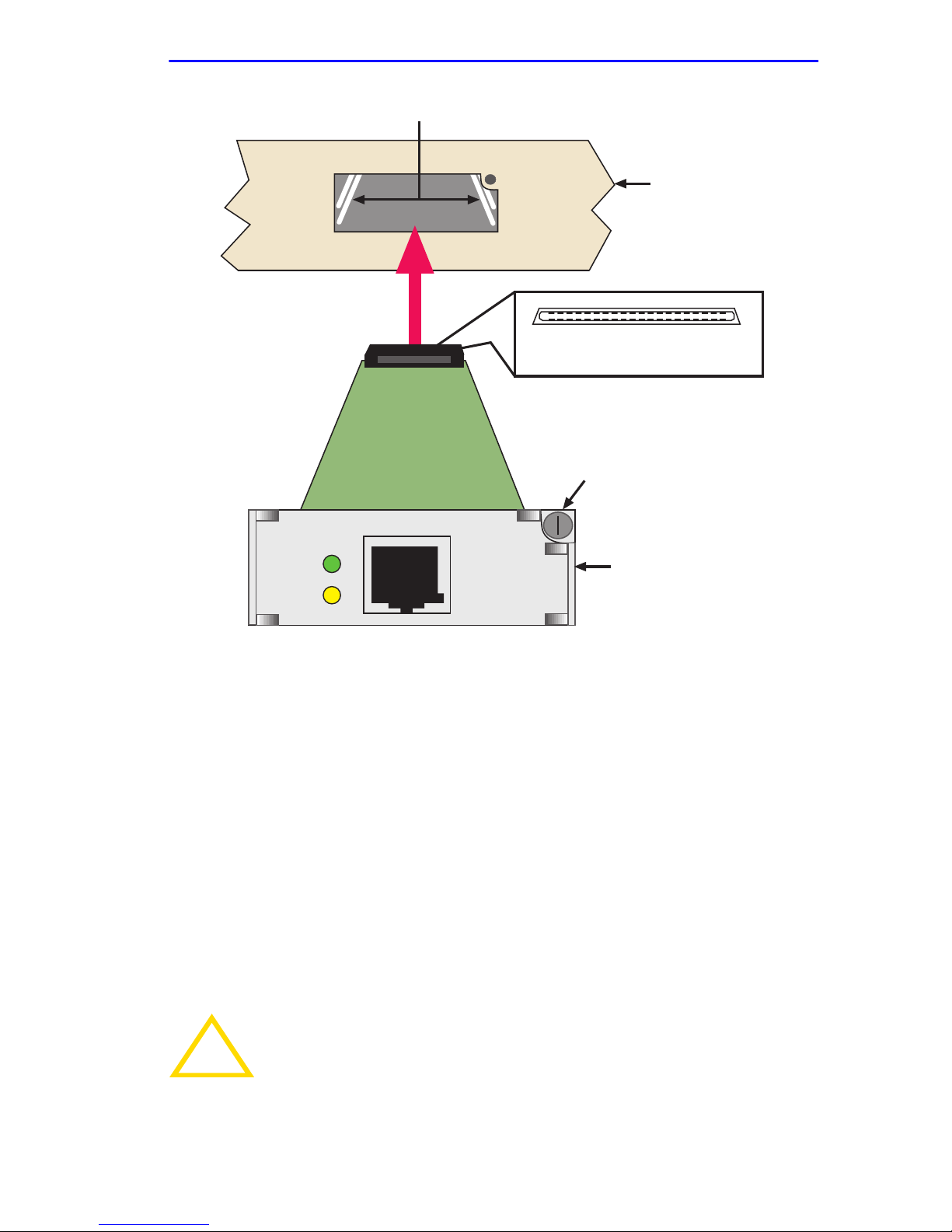
5. Hold the SWPIM-DDS with the faceplate facing away (right side up)
from the host platform. The 40-pin connector should be facing towards
the empty slot, with the wide part of the connector oriented down, as
shown in Figure 1-1.
6. Locate the rail guides inside the slot in which the SWPIM-DDS will
be installed. See Figure 1-1.
1-2 SWPIM-DDS Installation Guide
Page 23
Rail Guides
Installing the SWPIM-DDS
Host Platform
2140
20
View of Host Connector End
of the SWPIM-DDS
Thumbscrew
1
LNK
STS
SWPIM-DDS
SWPIM-DDS
Network Connector End
3036_1
Figure 1-1 Installing the SWPIM-DDS into the Host Platform
7. Install the SWPIM-DDS in the host platform by aligning the
SWPIM-DDS with the rail guides in the host platform and sliding it in.
Take care that the SWPIM-DDS slides in straight and properly
engages the backplane host connector. Do not force the device.
8. Fasten the SWPIM-DDS with the thumbscrew.
9. Replace power to the host platform, if neccessary. Check to see that
the host platform LED indicators go to their normal configuration. If
they do not, remove the SWPIM-DDS from the host platform and
contact Cabletron Systems.
Do not connect any WAN cables until the SWPIM-DDS has
!
CAUTION
been configured in software. The phone company may shut
down a line that has an unconfigured connection on it.
SWPIM-DDS Installation Guide 1-3
Page 24

Chapter 1: Installation
10. The SWPIM-DDS must be configured before the WAN connection is
made. Once the SWPIM-DDS has been configured, the host platform
must undergo a soft or hard restart in order for the SWPIM-DDS to be
recognized and for traffic to pass. Refer to the appropriate software
manual to configure the SWPIM-DDS.
1.3 LANVIEW LED INDICATIONS
Refer to Table 1-1 for the Link (LNK) LED indications for the
SWPIM-DDS.
Table 1-1 Link (LNK) LED
Color Indication
Off Disabled or Not Configured
Red No Link
Amber Transmit or Receive Traffic
Green Port is Active
Blinking Green Port is in Standby
Refer to Table 1-1 for the Status (STS) LED indications for the
SWPIM-DDS.
Table 1-2 Status (STS) LED
Color Indication
Off Normal or Disabled
Amber Out of Service
Blinking Amber Port in Test Mode
1-4 SWPIM-DDS Installation Guide
Page 25
Connecting to the Network
1.4 CONNECTING TO THE NETWORK
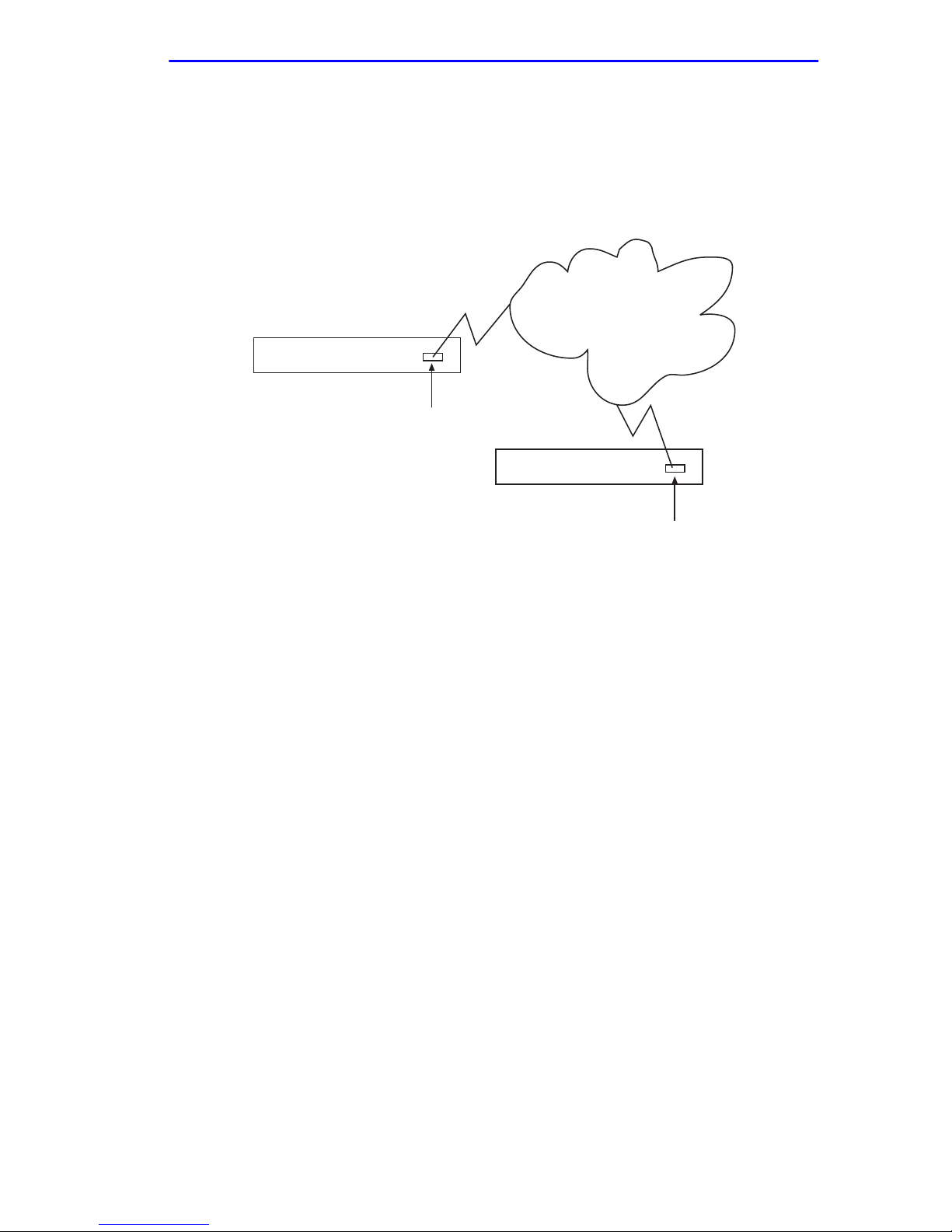
Figure 1-2 depicts a typical configuration for the SWPIM-DDS.
Cabletron Systems part number for the cable is 9360119-x, where x
represents the length of the cable.
Site 1
SSR-600
SWPIM-DDS
SSR-600
Figure 1-2 Typical Configuration
WAN Cloud
Site 2
SWPIM-DDS
1.5 COMPLETING THE INSTALLATION
After installing the SWPIM-DDS, the SWPIM-DDS will need to be
configured for the network. Refer to the host platform software
documentation in order to set up and manage the SWPIM-DDS using the
software.
SWPIM-DDS Installation Guide 1-5
Page 26

Chapter 1: Installation
1-6 SWPIM-DDS Installation Guide
Page 27
APPENDIX A
SPECIFICATIONS
This section describes the environmental specifications and safety and
approval requirements for the SWPIM-DDS. Cabletron Systems reserves
the right to change these specifications at any time without notice.
A.1 PHYSICAL PROPERTIES
Dimensions: 1.91 H x 5.40 W x 19.05 D (cm)
0.75 H x 2.125 W x 7.50 D (in)
Weight (Unit): .068 kg (0.15 lb)
Nominal current draw on +5V
supply from host platform: 165 mA
MTBF (Predicted):
9,678,856 hours
A.2 NETWORK INTERFACE
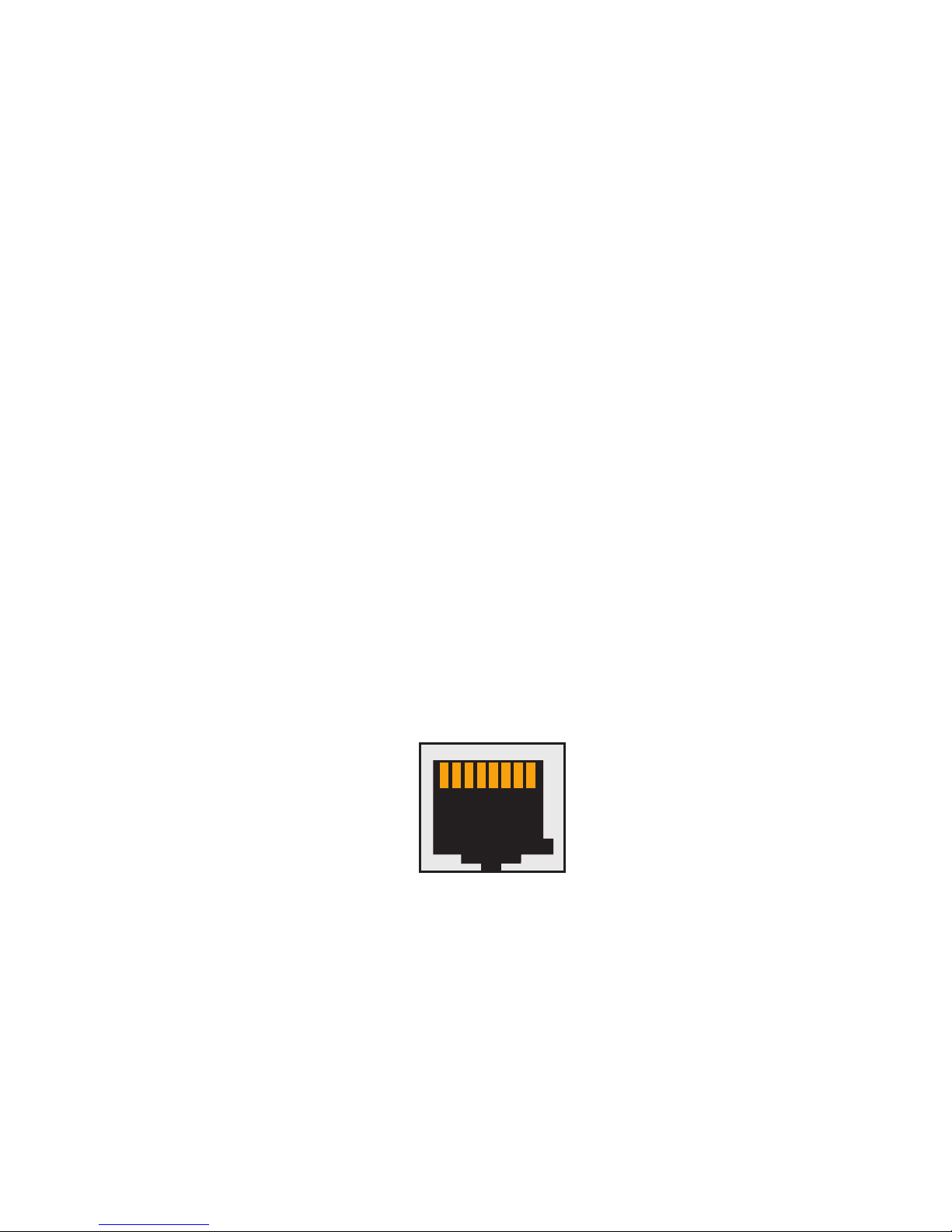
The WAN connection can be seen in Figure A-1.
1 2 3 4 5 6 7 8
strj45
Figure A-1 RJ48 Pinout
The SWPIM-DDS uses an RJ48 connector for the network port that
supports the pin assignments in T able A-1. The pinouts are designed
according to USOC RJ48S.
SWPIM-DDS Installation Guide A-1
Page 28

Appendix A: Specifications
Table A-1 RJ48 Pinouts
Pin Signal
1 Transmit Ring
2 Transmit Tip
3 Not Used
4 Not Used
5 Not Used
6 Not Used
7 Receiv e Tip
8 Receive Ring
A.2.1 Recommended W AN Cable
Cabletron Systems part number for the DDS Line Interface Cable:
9360119-x
(where x is the desired length of the cable)
A.3 ENVIRONMENTAL REQUIREMENTS
Operating Temperature: +5° to +40°C (41° to 104°F)
Non-operating Temperature: -30° to +90°C (-22° to 194°F)
Operating Humidity:
5% to 90% (Non-condensing)
A-2 SWPIM-DDS Installation Guide
Page 29

A.4 REGULATORY COMPLIANCE
Regulatory Compliance
Safety
UL 1950 (without D3 deviations), CSA C22.2
No. 950, and EN 60950
EMI FCC Part 15 Class A, EN 55022 Class A and
VCCI V-3
Electromagnetic
Compatibility (EMC)
EN 50082-1 including: IEC 801-2 (ESD),
IEC 801-3 (Radiated Susceptibility), and
IEC 801-4 (EFT/B)
NEBS TR-NWT-000063: Network Equipment
Building System (NEBS) Generic Equipment
Requirements.
GR-1089-CORE: EMC and Electrical Safety
Generic Criteria for Network
Telecommunications Equipment.
SWPIM-DDS Installation Guide A-3
Page 30

Appendix A: Specifications
A-4 SWPIM-DDS Installation Guide
 Loading...