

Page 1
EPIM-3PS Book Page 1 Tuesday, August 18, 1998 8:42 AM
EPIM-3PS
Installation Guide
Cabletron Systems, P.O. Box 5005, Rochester, NH 03866-5005
P/N 9031283-01
Page 2

EPIM-3PS Book Page 2 Tuesday, August 18, 1998 8:42 AM
Page 3

EPIM-3PS Book Page i Tuesday, August 18, 1998 8:42 AM
NOTICE
Cabletron Systems reserves the right to make changes in specifications and other information contained in this document without prior notice. The reader should in all cases consult Cabletron Systems to determine whether any such changes have been made.
The hardware, firmware, or software described in this manual is subject to change without
notice.
IN NO EVENT SHALL CABLETRON SYSTEMS BE LIABLE FOR ANY INCIDENTAL, INDIRECT, SPECIAL, OR CONSEQUENTIAL DAMAGES WHATSOEVER (INCLUDING
BUT NOT LIMITED TO LOST PROFITS) ARISING OUT OF OR RELATED TO THIS
Notice
MANUAL OR THE INFORMATION CONTAINED IN IT, EVEN IF CABLETRON SYSTEMS HAS BEEN ADVISED OF, KNOWN, OR SHOULD HAVE KNOWN, THE POSSIBILITY OF SUCH DAMAGES.
© Copyright November 1994 by:
Cabletron Systems, Inc.
P.O. Box 5005
Rochester, NH 03866-5005
All Rights Reserved
Printed in the United States of America
Part Number: 9031283-01 November 1994
BRIM, EPIM-3PS, EMM-E6, ESXMIM, MicroMMAC
of Cabletron Systems, Inc.
CompuServe
is a registered trademark of CompuServe, Inc.
, and
NBR-420/620
are trademarks
This device complies with Part 15 of the FCC rules. Operation is subject to the following
two conditions: (1) this device may not cause harmful interference, and (2) this device
must accept any interference received, including interference that may cause undesired
operation.
FCC NOTICE
i
Page 4

EPIM-3PS Book Page ii Tuesday, August 18, 1998 8:42 AM
Notice
NOTE:
digital device, pursuant to Part 15 of the FCC rules. These limits are designed to provide
reasonable protection against harmful interference when the equipment is operated in a
commercial environment. This equipment uses, generates, and can radiate radio frequency energy and if not installed in accordance with the operator’s manual, may cause harmful interference to radio communications. Operation of this equipment in a residential area
is likely to cause interference in which case the user will be required to correct the interference at his own expense.
WARNING:
proved by the party responsible for compliance could void the user’s authority to operate
the equipment.
This equipment has been tested and found to comply with the limits for a Class A
Changes or modifications made to this device which are not expressly ap-
DOC NOTICE
This digital apparatus does not exceed the Class A limits for radio noise emissions from
digital apparatus set out in the Radio Interference Regulations of the Canadian Department of Communications.
Le présent appareil numérique n’émet pas de bruits radioélectriques dépassant les limites
applicables aux appareils numériques de la class A prescrites dans le Règlement sur le
brouillage radioélectrique édicté par le ministère des Communications du Canada.
CABLETRON SYSTEMS, INC.
PROGRAM LICENSE AGREEMENT
IMPORTANT:
This document is an agreement between you, the end user, and Cabletron Systems, Inc.
(“Cabletron”) that sets forth your rights and obligations with respect to the Cabletron software program (the “Program”) contained in this package. The Program may be contained
in firmware, chips or other media.
Before utilizing this product, carefully read this License Agreement.
ii
Page 5

EPIM-3PS Book Page iii Tuesday, August 18, 1998 8:42 AM
BY UTILIZING THE ENCLOSED PRODUCT, YOU ARE AGREEING TO BECOME
BOUND BY THE TERMS OF THIS AGREEMENT, WHICH INCLUDES THE LICENSE
AND THE LIMITATION OF WARRANTY AND DISCLAIMER OF LIABILITY. IF YOU DO
NOT AGREE TO THE TERMS OF THIS AGREEMENT, PROMPTLY RETURN THE UNUSED PRODUCT TO THE PLACE OF PURCHASE FOR A FULL REFUND.
CABLETRON SOFTWARE PROGRAM LICENSE
Notice
1. LICENSE.
in this package subject to the terms and conditions of this License Agreement.
You may not copy, reproduce or transmit any part of the Program except as permitted
by the Copyright Act of the United States or as authorized in writing by Cabletron.
2. OTHER RESTRICTIONS.
ble the Program.
3. APPLICABLE LAW.
der the laws and in the state and federal courts of New Hampshire. You accept the
personal jurisdiction and venue of the New Hampshire courts.
You have the right to use only the one (1) copy of the Program provided
You may not reverse engineer, decompile, or disassem-
This License Agreement shall be interpreted and governed un-
EXCLUSION OF WARRANTY
AND DISCLAIMER OF LIABILITY
1. EXCLUSION OF WARRANTY.
Cabletron in writing, Cabletron makes no warranty, expressed or implied, concerning
the Program (including Its documentation and media).
Except as may be specifically provided by
CABLETRON DISCLAIMS ALL WARRANTIES, OTHER THAN THOSE SUPPLIED
TO YOU BY CABLETRON IN WRITING, EITHER EXPRESS OR IMPLIED, INCLUDING BUT NOT LIMITED TO IMPLIED WARRANTIES OF MERCHANTABLITY AND
FITNESS FOR A PARTICULAR PURPOSE, WITH RESPECT TO THE PROGRAM,
THE ACCOMPANYING WRITTEN MATERIALS, AND ANY ACCOMPANYING
HARDWARE.
iii
Page 6

EPIM-3PS Book Page iv Tuesday, August 18, 1998 8:42 AM
Notice
2. NO LIABILITY FOR CONSEQUENTIAL DAMAGES
CABLETRON OR ITS SUPPLIERS BE LIABLE FOR ANY DAMAGES WHATSOEVER (INCLUDING, WITHOUT LIMITATION, DAMAGES FOR LOSS OF BUSINESS,
PROFITS, BUSINESS INTERRUPTION, LOSS OF BUSINESS INFORMATION,
SPECIAL, INCIDENTAL, CONSEQUENTIAL, OR RELIANCE DAMAGES, OR OTHER LOSS) ARISING OUT OF THE USE OR INABILITY TO USE THIS CABLETRON
PRODUCT, EVEN IF CABLETRON HAS BEEN ADVISED OF THE POSSIBILITY OF
SUCH DAMAGES. BECAUSE SOME STATES DO NOT ALLOW THE EXCLUSION
OR LIMITATION OF LIABILITY FOR CONSEQUENTIAL OR INCIDENTAL DAMAGES, OR ON THE DURATION OR LIMITATION OF IMPLIED WARRANTEES IN
SOME INSTANCES THE ABOVE LIMITATIONS AND EXCLUSIONS MAY NOT APPLY TO YOU.
. IN NO EVENT SHALL
UNITED STATES GOVERNMENT RESTRICTED RIGHTS
The enclosed product (a) was developed solely at private expense; (b) contains “restricted computer software” submitted with restricted rights in accordance with Section 5222719 (a) through (d) of the Commercial Computer Software - Restricted Rights Clause and
its successors, and (c) in all respects is proprietary data belonging to Cabletron and/or its
suppliers.
For Department of Defense units, the product is licensed with “Restricted Rights” as defined in the DoD Supplement to the Federal Acquisition Regulations, Section 52.227-7013
(c) (1) (ii) and its successors, and use, duplication, disclosure by the Government is subject to restrictions as set forth in subparagraph (c) (1) (ii) of the Rights in Technical Data
and Computer Software clause at 252.227-7013. Cabletron Systems, Inc., 35 Industrial
Way, Rochester, New Hampshire 03867.
iv
Page 7

EPIM-3PS Book Page 1 Tuesday, August 18, 1998 8:42 AM
Introduction
Introduction
Welcome to the EPIM-3PS Installation Guide. This manual
guides you through the installation and setup of the
EPIM-3PS and includes the following sections:
• BRIM Installation Considerations
• Installing the EPIM-3PS
• Making Connections
• EPIM-3PS LEDs
BRIM Installation Considerations
You can install your EPIM-3PS in any device that supports
both BRIM and EPIM technology (e.g., EMM-E6,
MicroMMAC, ESXMIM or the NBR-420/620),
BRIM and the EPIM-3PS must go into equivalent slots in
order to be correctly recognized by local management.
Table 1 lists the EPIM-3PS and BRIM port match-ups for
the various Cabletron modules.
but,
the
Page 1
Page 8

EPIM-3PS Book Page 2 Tuesday, August 18, 1998 8:42 AM
BRIM Installation Considerations
Table 1. EPIM-3PS/BRIM Configuration
Cabletron
Module EPIM Slot BRIM Slot
ESXMIM EPIM Slot BRIM Slot
EMM-E6 Top EPIM Slot (1) Top BRIM Slot (E)
MicroMMAC EPIM 1 BRIM Slot on rear of
chassis
NBR 420/620 Port A (1st EPIM-3PS)
Port B (2nd EPIM-3PS)
You
must
match the BRIM slot with the correct EPIM slot.
Port E (1st BRIM)
Port F (2nd BRIM)
Refer to your BRIM documentation for specific BRIM and
EPIM installation procedures.
Note
: On some de vices, the EPIM slot is located
under
the
BRIM slot. In these cases, install the EPIM-3PS and
connect the internal Ethernet cable to the EPIM
before
installing the BRIM.
Page 2
Page 9

EPIM-3PS Book Page 3 Tuesday, August 18, 1998 8:42 AM
Installing the EPIM-3PS
Installing the EPIM-3PS
To install the EPIM-3PS into a Media Interface Module
(MIM):
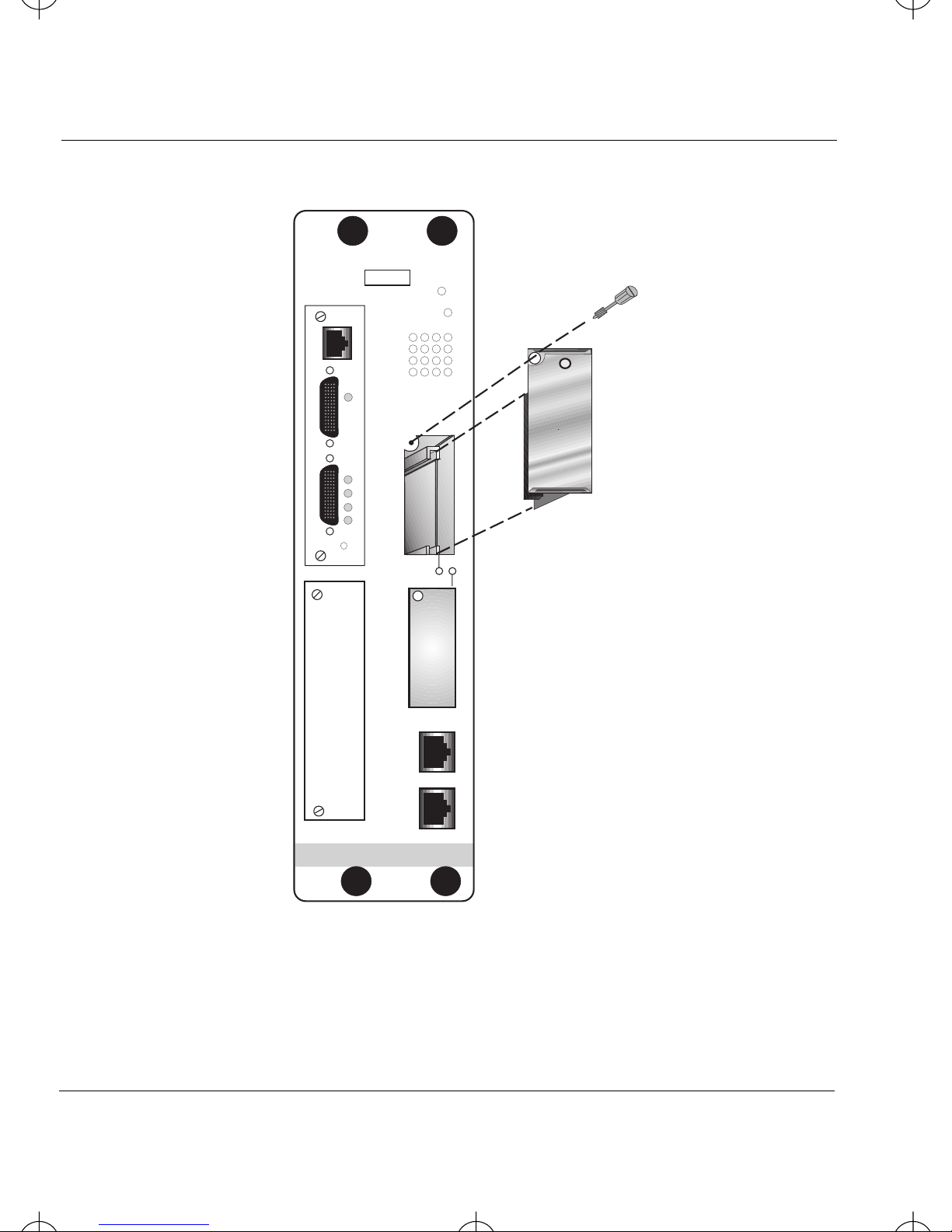
1.) Remove the mounting screw shown in Figure 1.
Note
: When remo ving an EPIM, be sure to pull the module
straight out to prevent damage to the connector.
2.) Remove the coverplate or the EPIM (whichever
applies).
3.) Slide your EPIM-3PS into place, making sure that the
connectors on the rear of the EPIM are fully engaged
with the connectors on the MIM.
4.) Reinstall the mounting screw.
Page 3
Page 10
EPIM-3PS Book Page 4 Tuesday, August 18, 1998 8:42 AM
Installing the EPIM-3PS
EMM-E6
SN
CONSOLE
S0
STBY
RCV
XMT
CLN
RESET
CPU
D C B A
S1 S0
S1
LANPWR SYS
E
RESET
F
ETHERNET
E
PI
M
1
E
PI
M
2
C
O
M
1
C
O
M
2
Figure 1. EPIM-3PS Installation
Page 4
Page 11

EPIM-3PS Book Page 5 Tuesday, August 18, 1998 8:42 AM
Connecting the EPIM-3PS to a BRIM
Connecting the EPIM-3PS to a BRIM
To connect an EPIM-3PS to a BRIM:
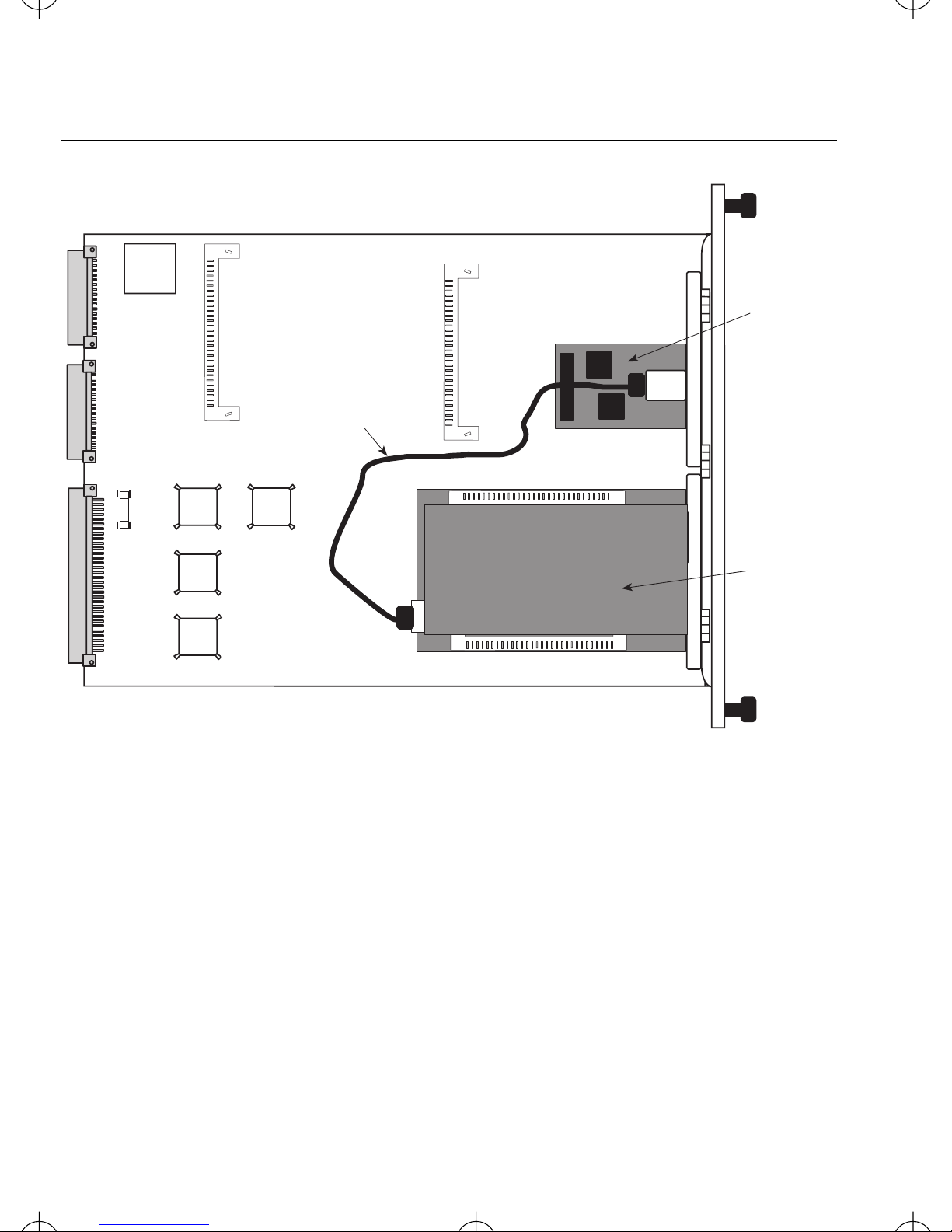
1.) Plug one end of the Ethernet cable (P/N 9372088) into
the EPIM-3PS (Figure 2).
2.) Plug the other end of the cable into the BRIM.
3.) After returning the MIM to the MMAC , returning power
to your hub, and reconnecting to the network, the
BRIM is now ready for operation.
Note
: To disconnect the Ethernet cable from the
EPIM-3PS, carefully insert a small flat screwdriver between
the clip on the connector and the circuit board.
Page 5
Page 12
EPIM-3PS Book Page 6 Tuesday, August 18, 1998 8:42 AM
Connecting the EPIM-3PS to a BRIM
Ethernet Cable
EPIM-3PS
BRIM
Figure 2. Connecting a BRIM to the EPIM-3PS
Page 6
Page 13
EPIM-3PS Book Page 7 Tuesday, August 18, 1998 8:42 AM
EPIM LED
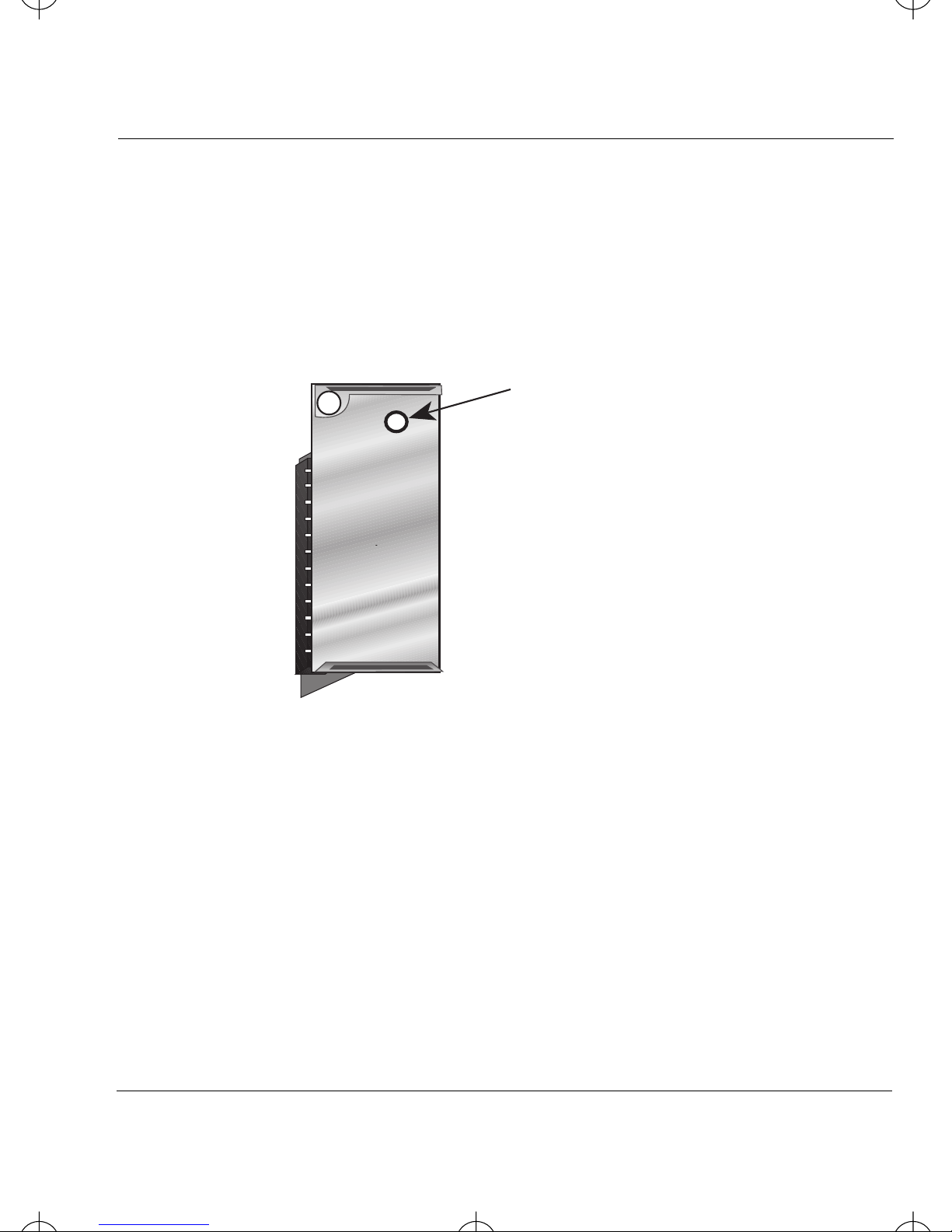
The EPIM-3PS has one amber LED that indicates a
connection exists between the BRIM and EPIM-3PS.
Connection LED
EPIM LED
Figure 3. EPIM-3PS LED
Page 7
Page 14

EPIM-3PS Book Page 8 Tuesday, August 18, 1998 8:42 AM
Getting Help
Getting Help
If you have questions, or need additional help, contact
Cabletron Systems Technical Support:
By phone (603) 332-9400
Monday-Friday; 8am-8pm EST
By CompuServe
®
GO CTRON from any ! prompt
By Internet mail [email protected]
Page 8
 Loading...