

Page 1

User Manual
Product Name: 2.4G air mouse with key board
Brand: Cabletime
Model: 641-1000
Manufacture: Shenzhen C&D Electronics Co., Ltd.
Page 2
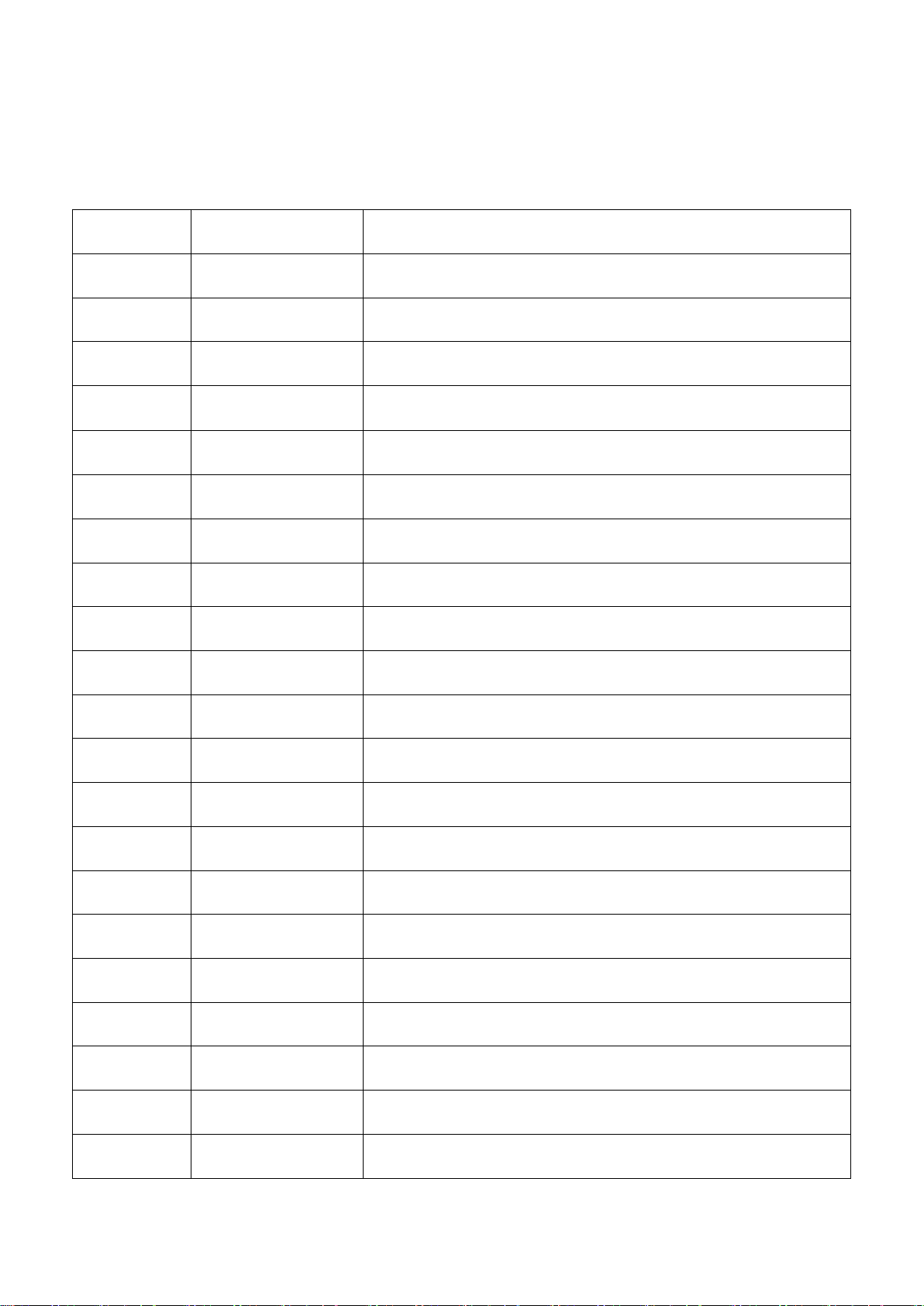
1, Button :
No.
Button
Function
01
Power
Turn ON/OFF
02
HOME
Main Page /Menu
03
LIVE TV
Live TV
04
CC
Cartoon
05
SLEEP
Sleep model
06
WEATHER
Weather
07
◀◀
Fast Backward
08
‖
Pause
09
▶
Play
10
▶▶
Fast Forward
11
BACK
Back
12
MOUSE ON/OFF
Air Mouse Turn ON/OFF
13
GUIDE
GUIDE
14
SELECT
SELECT
15
↑
Up
16
↓
Down
17
←
Left
18
→
Right
19
Vol +
Voice Up
20
Vol -
Voice Down
21
CH+
Last Chanel
Specification
Page 3
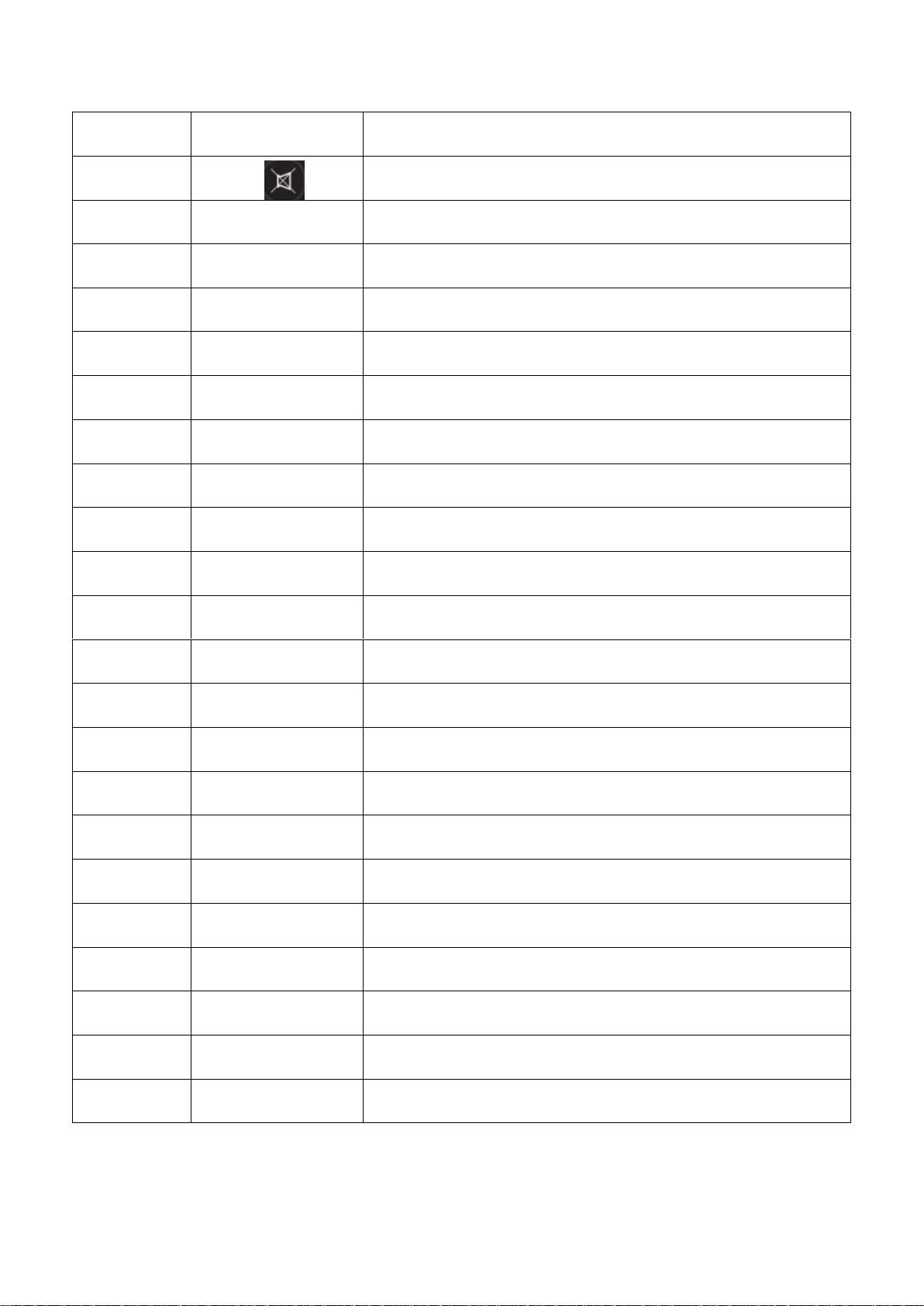
22
CH-
Next Chanel
23
Quiet
24
EXIT
EXIT
25
1
Key Number 1
26
2
Key Number2
27
3
Key Number3
28
4
Key Number4
29
5
Key Number5
30
6
Key Number6
31
7
Key Number 7
32
8
Key Number8
33
9
Key Number9
34
0
Key Number0
35
INFO
Information
36
SEARCH
Search
37
SETTINGS
Settings
38
LAST
List
39
INPUT
Input
40
“-”
“-”button
41
Red
Function button
42
Green
Function button
43
Yellow
Function button
44
Blue
Function button
Page 4
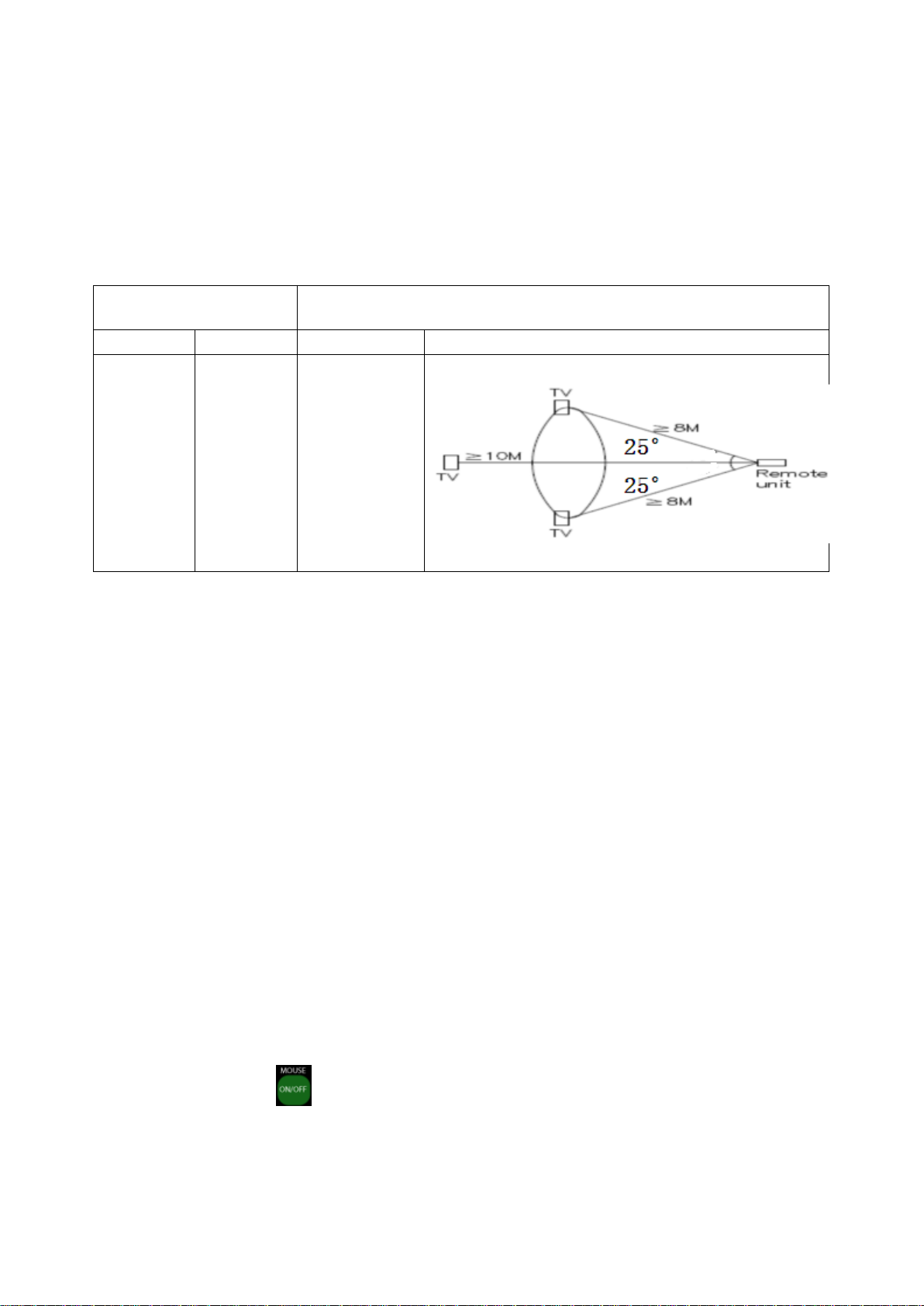
Wireless
IR model
Distance
12m
Distance
10m
Angle
10m
Angle
8m
2:Signal Range
As below。
3、How to match:
Make sure the device is power on, press button “1” and “9 ” at the
same time.
The Remote Control will search the receiver automatically.
LED on Remote Control will flicker for three times slowly, then
the match success.
4、Air Mouse Model:
Press button to turn off/on the air mouse model.
The computer pointer will move alone with the movement of the air mouse.
Page 5

The Air mouse will be closed after 30 seconds motionlessness. press
to restart.
5、Full Qwerty Model:
Upturn keyboard side, full qwerty model will be started.
Downturn keyboard side, full qwerty model will be closed.
Page 6

FCC Caution.
This device complies with part 15 of the FCC Rules. Operation is subject to the
following two conditions:
(1) This device may not cause harmful interference, and
(2) this device must accept any interference received, including interference that may
cause undesired operation.
Any Changes or modifications not expressly approved by the party responsible for
compliance could void the user's authority to operate the equipment.
Note: This equipment has been tested and found to comply with the limits for a Class
B digital device, pursuant to part 15 of the FCC Rules. These limits are designed to
provide reasonable protection against harmful interference in a residential installation.
This equipment generates uses and can radiate radio frequency energy and, if not
installed and used in accordance with the instructions, may cause harmful interference
to radio communications. However, there is no guarantee that interference will not
occur in a particular installation. If this equipment does cause harmful interference to
radio or television reception, which can be determined by turning the equipment off
and on, the user is encouraged to try to correct the interference by one or more of the
following measures:
-Reorient or relocate the receiving antenna.
-Increase the separation between the equipment and receiver.
-Connect the equipment into an outlet on a circuit different from that to which the
receiver is connected.
-Consult the dealer or an experienced radio/TV technician for help.
IC Warning
This device complies with Industry Canada licence-exempt RSS standard(s).
Operation is subject to the following two conditions:
(1) This device may not cause interference, and
(2) This device must accept any interference, including interference that may cause
undesired operation of the device.
Le présent appareil est conforme aux CNR d'Industrie Canada applicables aux
appareils radio exempts de licence. L'exploitation est autorisée aux deux conditions
suivantes:
(1) l'appareil ne doit pas produire de brouillage, et
(2) l'utilisateur de l'appareil doit accepter tout brouillage radioélectrique subi, même si
le brouillage est susceptible d'en compromettre le fonctionnement
 Loading...