

Page 1
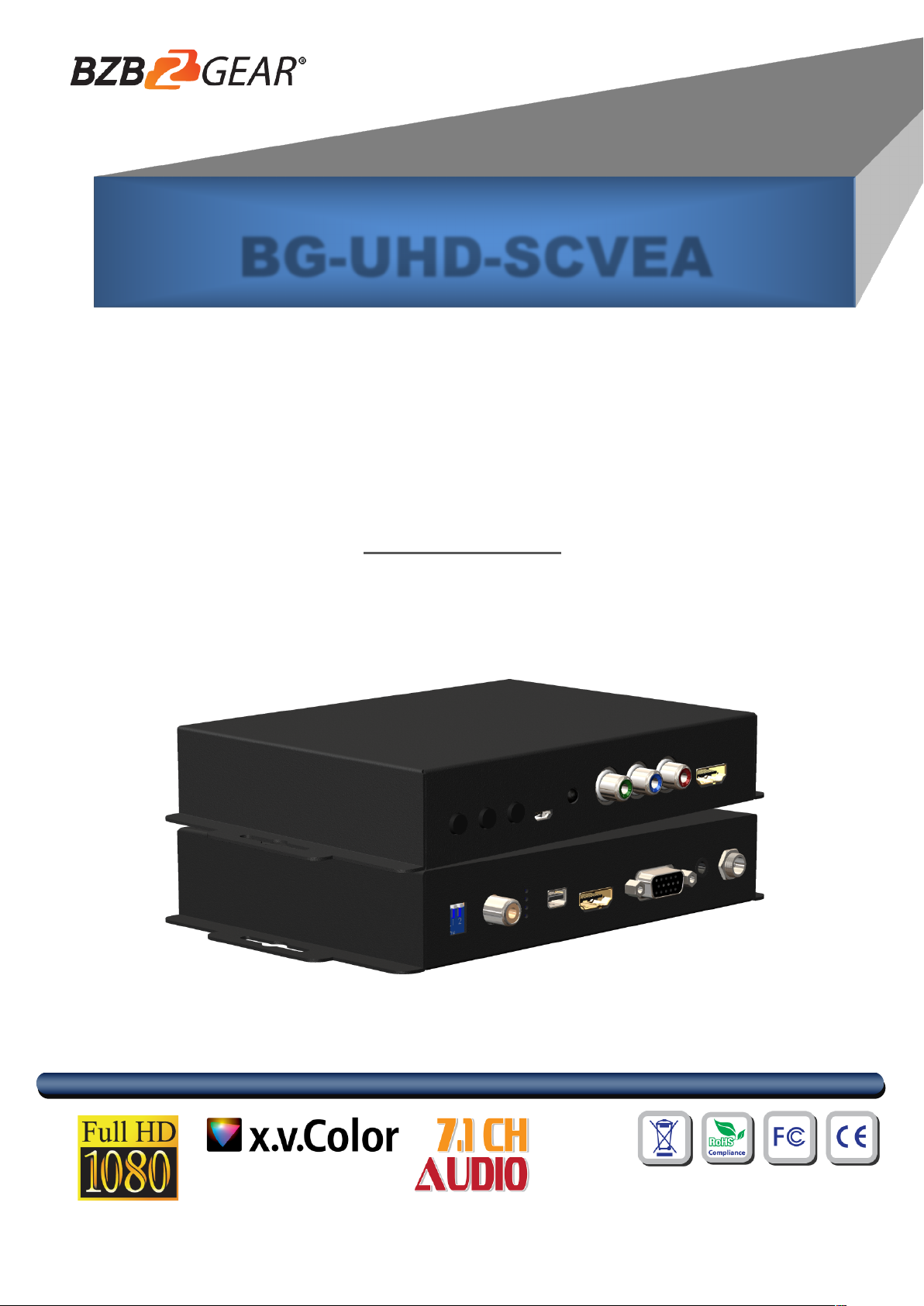
BG-UHD-SCVEA
HDMI/DP/VGA/CVBS/YPbPr to HDMI
Scaler Converter
User Manual
Page 2
TABLE OF CO NT ENTS
Safety and Notice
The BG-UHD-SCVEA HDMI/DP/VGA/CVBS/YPbPr to HDMI Scaler Converter has been tested for
conformance to safety regulations and requirements, and has been certified for international use.
However, like all electronic equipment, the BG-UHD-SCVEA should be used with care. Please read
and follow the safety instructions to protect yourself from possible injury and to minimize the risk of
damage to the unit.
● Follow all instructions and warnings marked on this unit.
● Do not attempt to service this unit yourself, except where explained in this manual.
● Provide proper ventilation and air circulation and do not use near water.
● Keep objects that might damage the device and assure that the placement of this unit is on a
stable surface.
● Use only the power adapter and power cords and connection cables designed for this unit.
● Do not use liquid or aerosol cleaners to clean this unit. Always unplug the power to the device
before cleaning.
INTRODUCTION ................................................................................................................ 1
FEATURES ........................................................................................................................ 1
PACKAGE CONTENTS ................................................................................................... 1
SPECIFICATIONS .............................................................................................................. 2
PANEL DESCRIPTION ...................................................................................................... 3
CONNECTION DIAGRAM .................................................................................................. 5
OSD MENU ........................................................................................................................ 6
OPERATION APPROACH.................................................................................................. 7
LIMITED WARRANTY ...................................................................................................... 11
SECOND YEAR ASSURANCE…………...……………………………………………….....12
MISSION STATEMENT……………………………………………………………………..…12
Page 3

1
INTRODUCTION
The BG-UHD-SCVEA HDMI/DP/VGA/CVBS/YPbPr to HDMI Scaler Converter provides a professional
way to scale and convert multiple format (HDMI/DP/VGA/CVBS/YPbPr) to HDMI compliant format. This
device supports video conversion and scaling from analog & digital to HDMI. With BG-UHD-SCVEA, the
bothersome video format issues will not become a bottleneck in your applications and the handy audio
support can make the input video and audio become HDMI ready.
FEATURES
l Supports Input HDMI1.4 /DP1.1/ VGA/CVBS/YPbPr
l IR remote control
l Button control
l Remote control via Micro-USB
l OSD control interface
l Input maximum pixel rate : 165MHz
l Output resolution up to 4K/30 444
l Supports multiple VESA resolutions
l Deinterlacer supported
l Supports video enhancement features
l Over / under scanning adjustable
l Video H/V mirror supported
l Active video area adjustment supported
l Stable and independent output signal quality.
l USB firmware upgradable for expanding compatibility
l Wall-mount housing design for easy installation
PACKAGE CONTENTS
l 1x BG-UHD-SCVEA
l 1x 12V/2A power supply unit
l 1x IR Remote control
l 1x User Manual
l 1x Installation software CD
Page 4

2
Model Name
BG-UHD-SCVEA
Technical
Role of usage
HDMI/DP/VGA/CVBS/YPbPr to HDMI Converter
HDMI standards
HDMI 1.4
Input Video Maximum
Pixel Rate
165MHz
Output Video bandwidth
10.2Gbps
Output Video support
up to 4K2K@30 4:4:4
Audio support
PCM 2 (32KHz–192KHz Fs sample rate)
ESD protection
[1] Human body model — ±19kV [air-gap discharge] & ±12kV [contact discharge]
[2] Core chipset — ±2kV
PCB stack-up
4-layer board [impedance control — differential 100W; single 50W]
Firmware update
Feasible via USB Port
CEC Channel
N/A
Input
1x HDMI + 1x VGA + 1x DP +1x RCA + 1x YPbPr + 1x stereo(for VGA)
Output
1x HDMI
HDMI connector
Type A [19-pin female]
USB connector
Micro B
Mechanical
BG-UHD-SCVEA
Housing
Metal enclosure
Dimensions
[L x D x H]
Model
144 x 113 x 30mm[5.6" x 4.4" x 1" ]
Package
264 x 170 x 77mm[10.3" x 6.7" x 3"]
Carton
430 x 358 x 291mm[1'4" x 1'2" x 11.5"]
Weight
Model
264g[9.3 oz]
Package
724g[1.6 lbs]
Fixedness
Wall-mounting case with screws
Power supply
12V 2A DC
Power consumption
6 Watts [max]
Operation temperature
0~40°C [32~104°F]
Storage temperature
-20~60°C [-4~140°F]
Relative humidity
20~90% RH [no condensation]
SPECIFICATIONS
Page 5
3
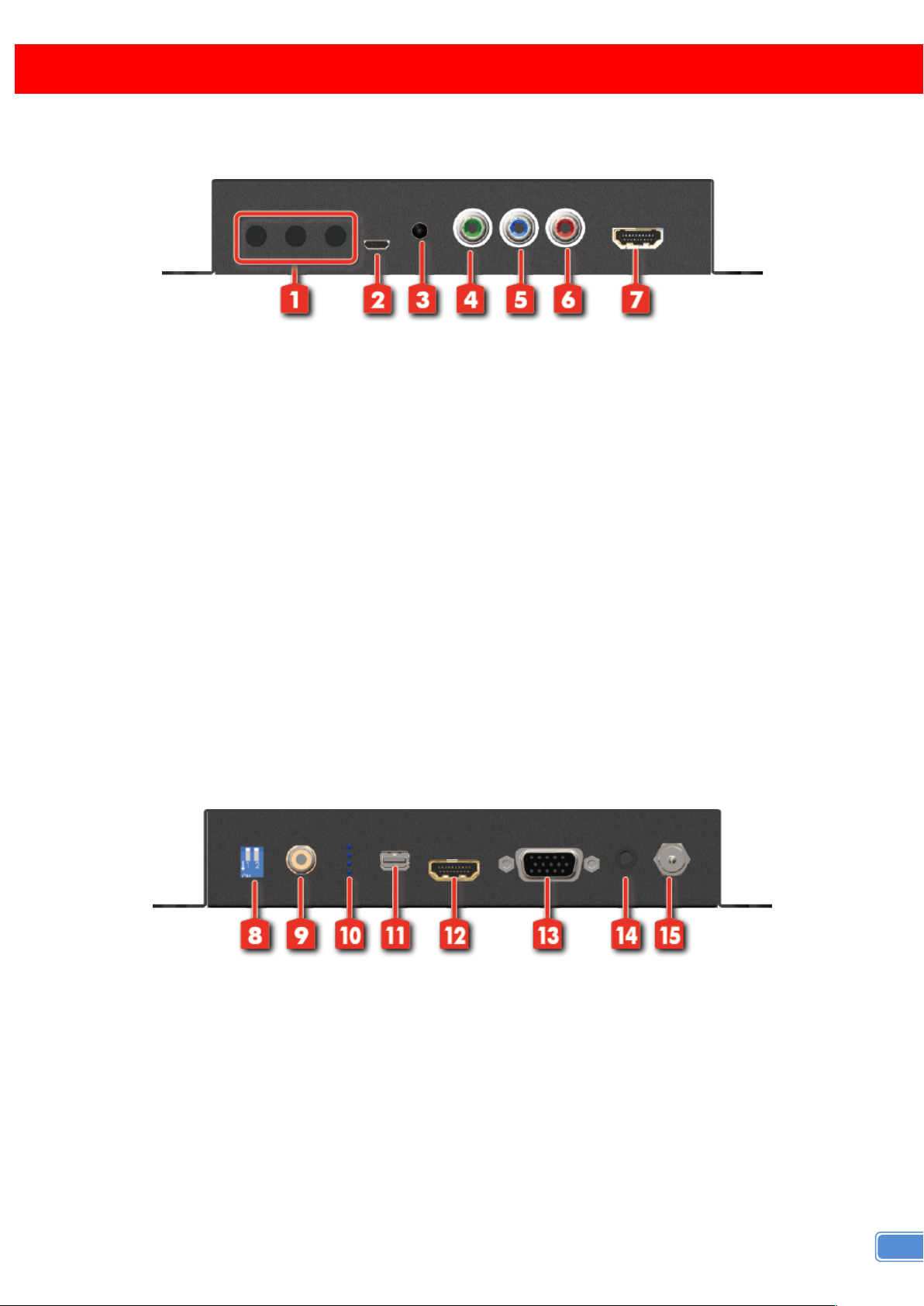
Front Panel
1. PUSH BUTTON
[LEFT]: Down Button
[MID]: Up Botton
PANEL DESCRIPTION
[RIGHT]: Menu/Enter Button
2. Micro USB: Micro-USB port for control port
3. IR SENSOR: IR sensor for receiving the IR commands from IR remote
4. COMPONENT – Y INPUT
5. COMPONENT – Pb INPUT
6. COMPONENT – Pr INPUT
7. HDMI OUTPUT: Connect to a HDMI display
Rear Panel
8. DIP SWITCH: For firmware update
PIN 1: F/W update
PIN 2: Reserved
9. CVBS INPUT
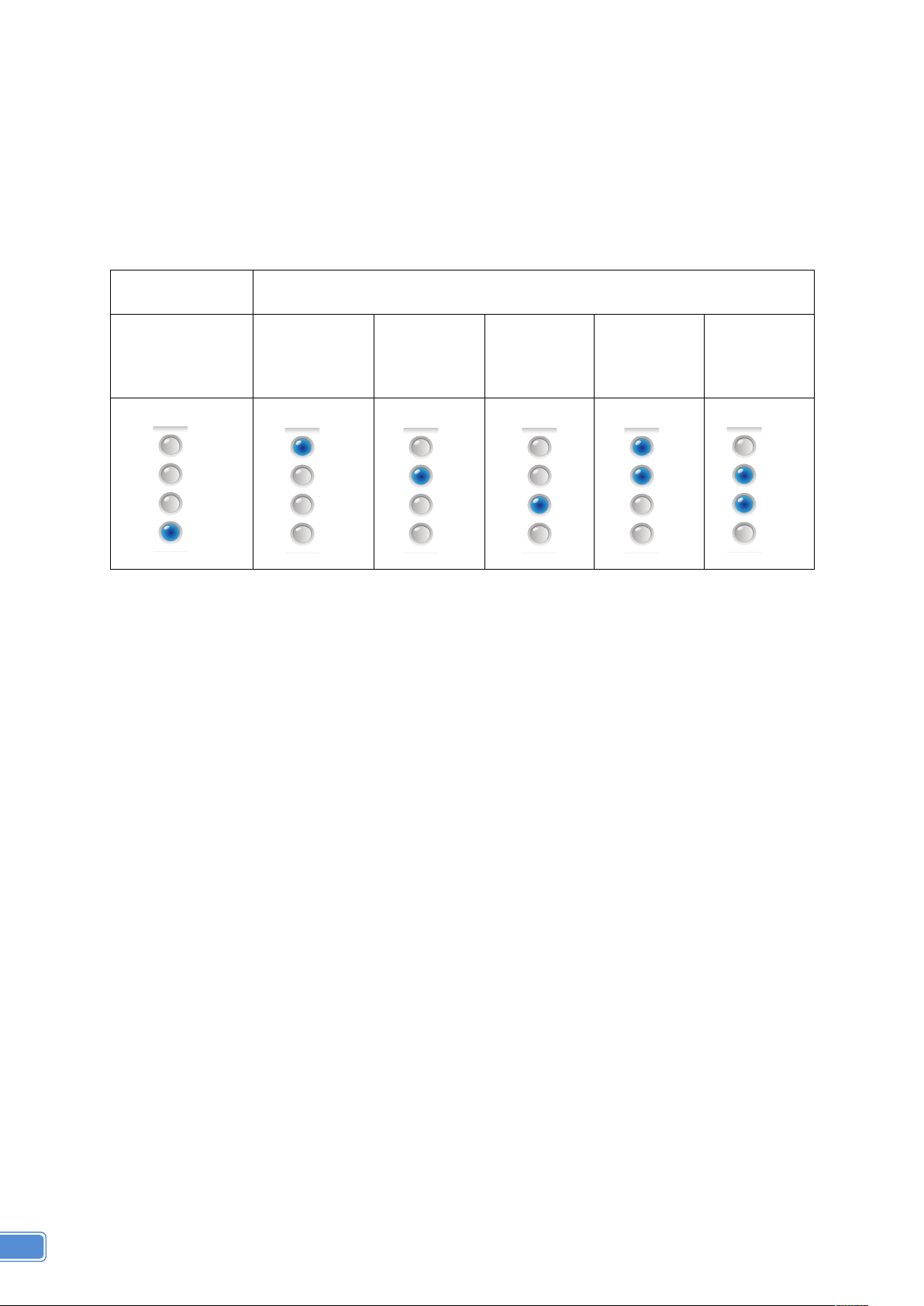
10. LED INDICATOR: Please refer to “Notes”
11. DP INPUT: Connect to a DP source
Page 6
4
Power&
Indicator&LED
Signal&Indicator&LED
Power&
DisplayPort& & &
VGA&
HDMI&
YPbPr&
CVBS&
&&&&&
&
12. HDMI INPUT: Connect to a HDMI source
13. VGA INPUT: Connect to a VGA source
14. STEREO AUDIO INPUT (for VGA): connect to analog stereo audio source
15. +12V DC: Interlocking power jack for 12V DC power supply unit
*Notes: LED INDICATOR
Page 7
5
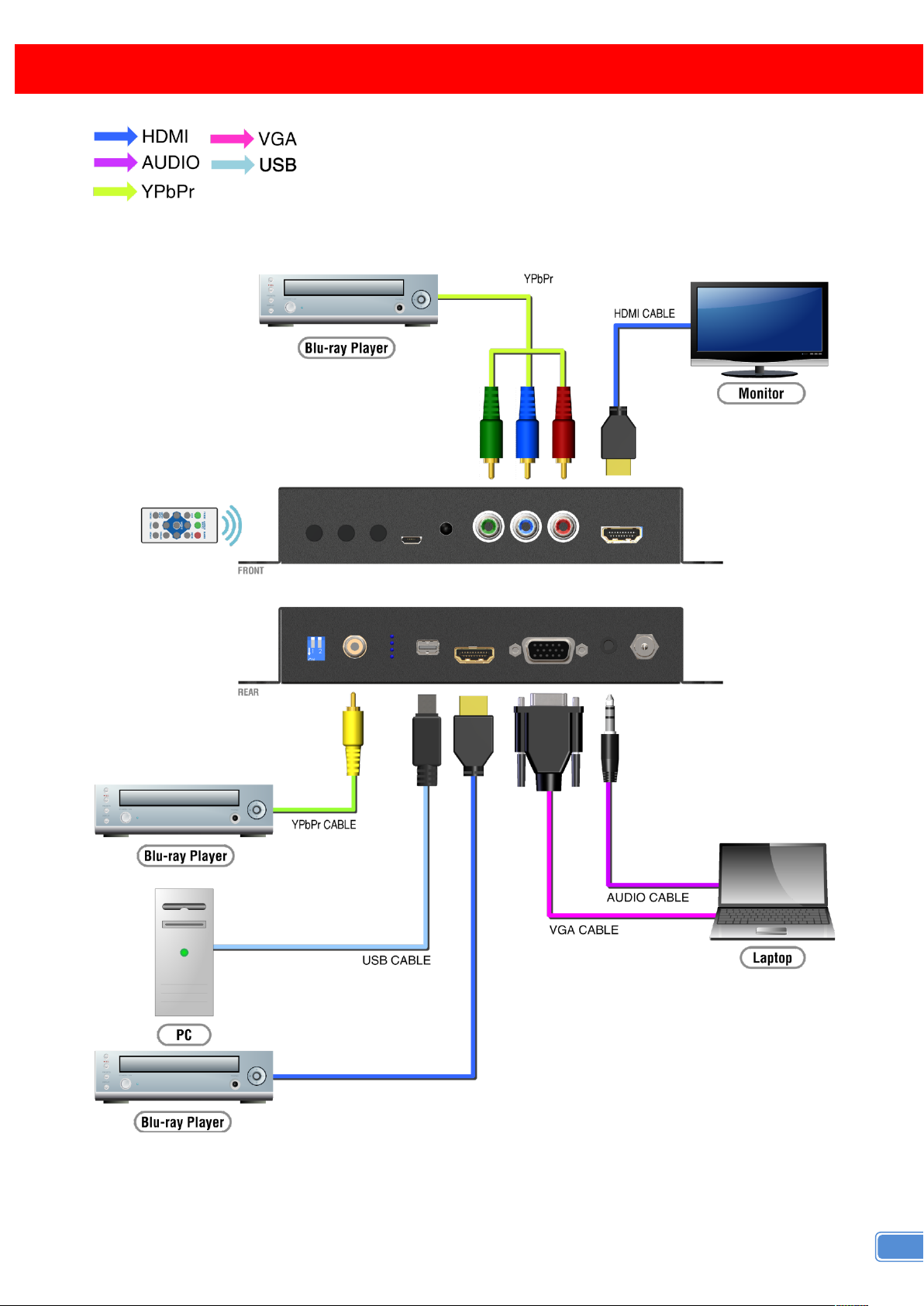
CONNECTION DIAGRAM
Page 8

6
1.Output Setup
Output Format
Test Pattern
Disable, White, Cross,
Hatch, Color, Gray,
Windows, H-Ramp,
W-HRamp, W-VRamp,
Diagonal
Audio Mute
Off, On
Input Type
HDMI, VGA, DP, YPbPr,
CVBS
Return
2.Image
Contrast
0~255 of Contrast Level
Brightness
0~255 of Brightness Level
Saturation
0~255 of Saturation Level
Hue
0~255 of Hue Level
Gamma Adjust
Off, 1.1, 1.3, 0.7, 0.9
Color Tone
Off, Green, Skin
Edge Enhance
Off, Max, Mid, Min
Sharpness
0~64 of Sharpness Level
Return
3.Adjustment
Under/Over Scan
-50%~50% of Scan Level
Aspect Ratio
Stretch, 16:9, 4:3
H-Mirror
Off, On
V-Mirror
Off, On
H-Shift
-100~100 of H-Shift Level
V-Shift
-50~50 of V-Shift Level
Return
4. System
Input Format
F/W Version
Factory Reset
Return
5. Exit
OSD MENU
Page 9
7
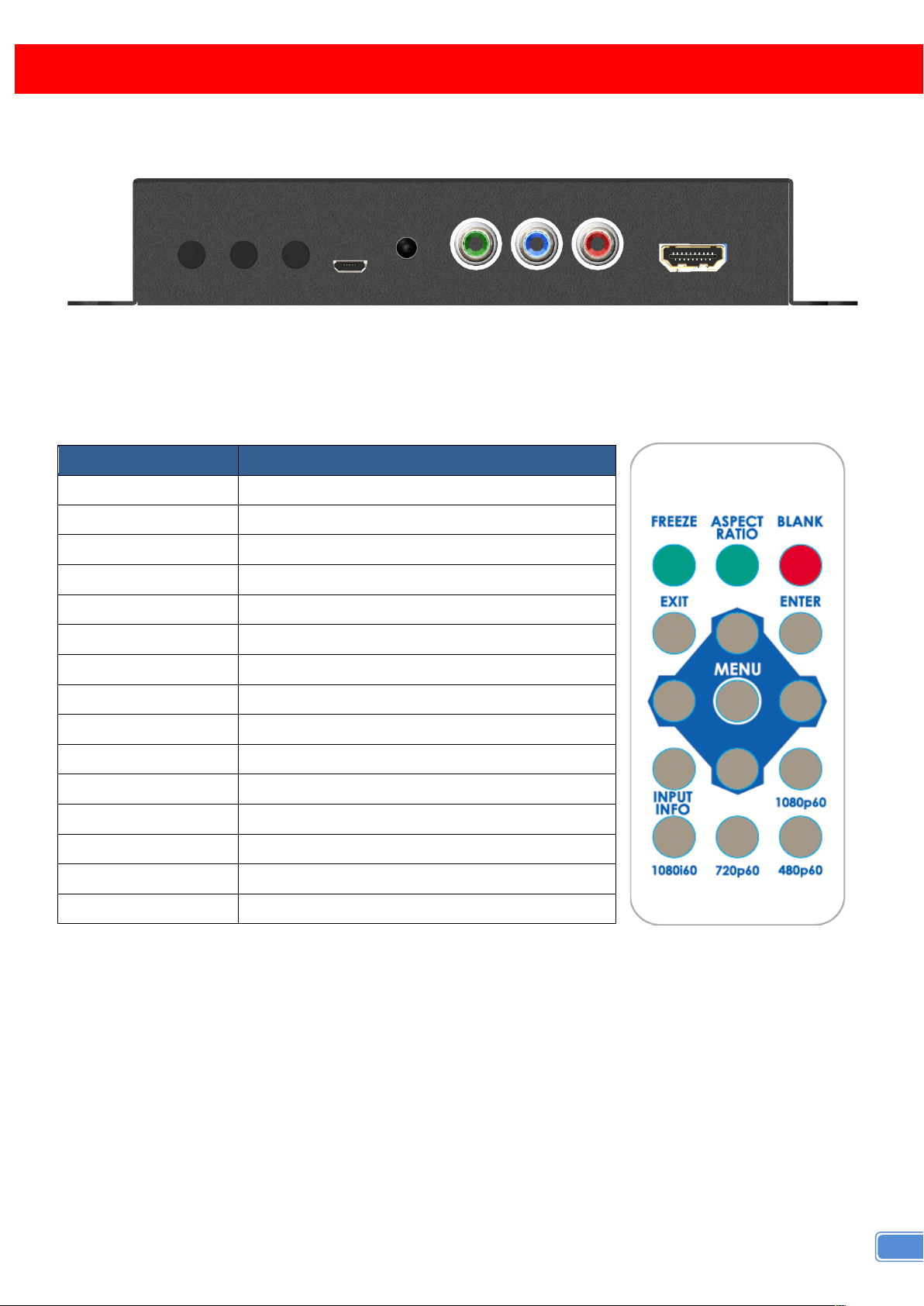
Button
Function
FREEZE
Freeze video
ASPECT RATIO
Aspect ratio change
BLANK
Blank video
EXIT
Exit OSD
ENTER
Enter key
UP
Up key
LEFT
Left key
RIGHT
Right key
DOWN
Down key
MENU
Menu on
INPUT INFO
Source resolution information
1080p60
Select 1080p60 output resolution
1080i60
Select 1080i60 output resolution
720p60
Select 720p60 output resolution
480p60
Select 480p60 output resolution
OPERATION APPROACH
Method A: Push-in Button
Method B: IR Remote Control
Page 10
8
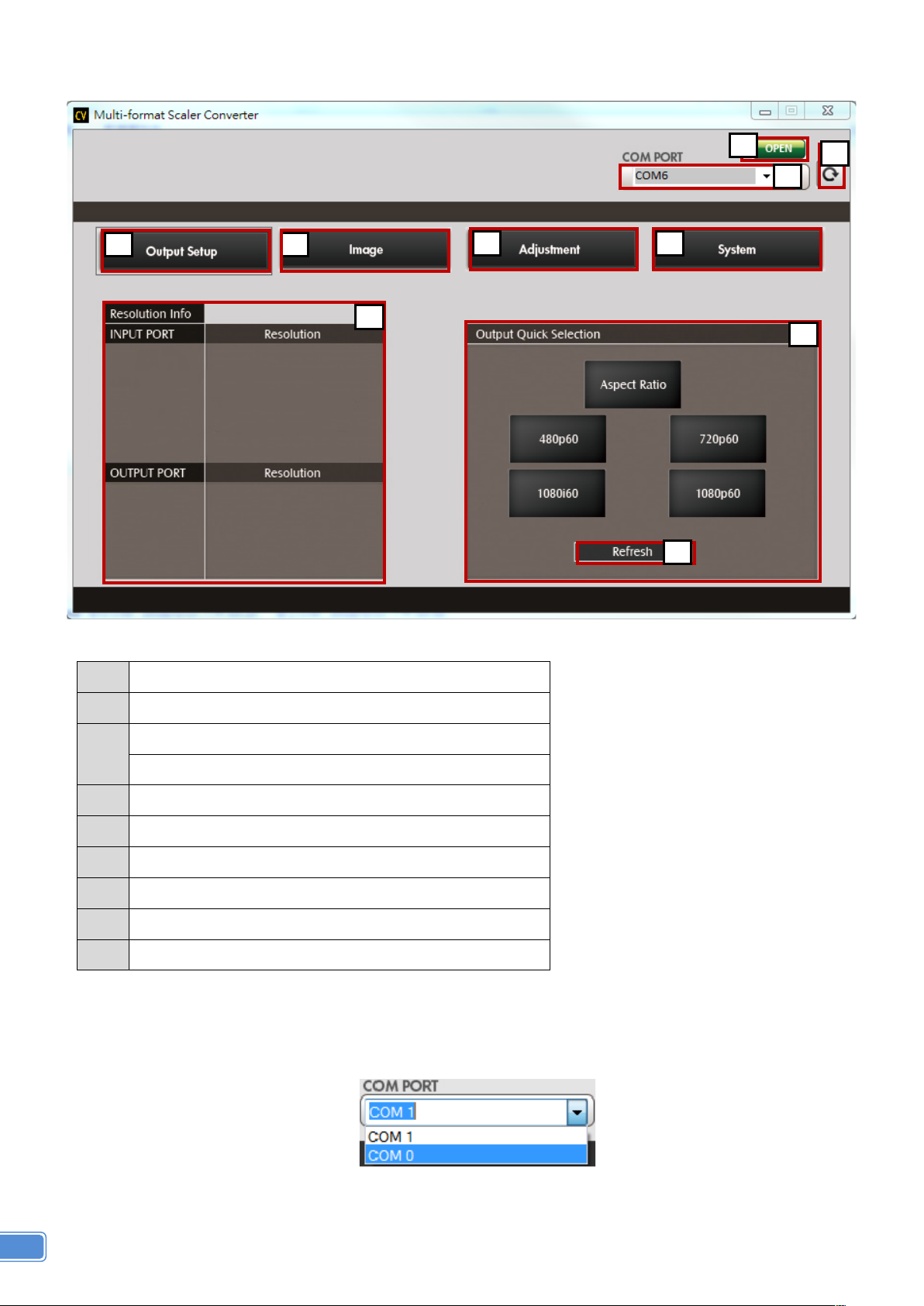
1
COM Port Selection
2
COM Port Detection Button
3
Connect/Disconnect Button
4
Output Setup Button
5
Image Button
6
Adjustment Button
7
System Button
8
Input / Output Resolution Info
9
Output Quick Selection Button
10
Refresh Input / Output Resolution Info Button
10
9
8
7
6
5
4
1
2
3
Method C: IR Remote Control through Micro-USB port
1. COM Port Selection
Please select the application COM PORT
Page 11
9
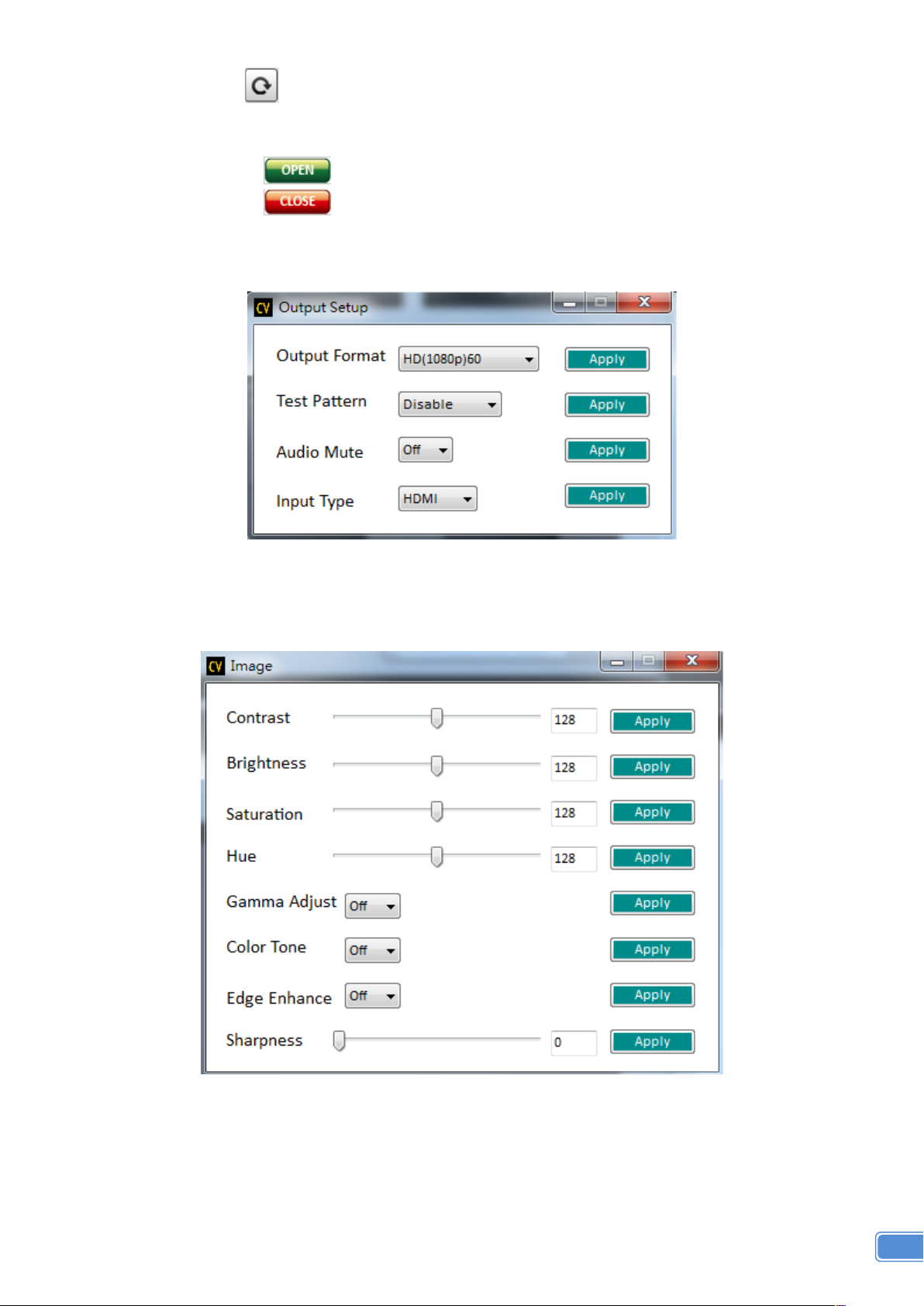
2. COM Port Detection Button
Click this button to detect the COM PORT
3. Connect/Disconnect Button
1) Click this button to connect
2) Click this button to disconnect
4. Output Setup Button
5. Image Button
Page 12
10
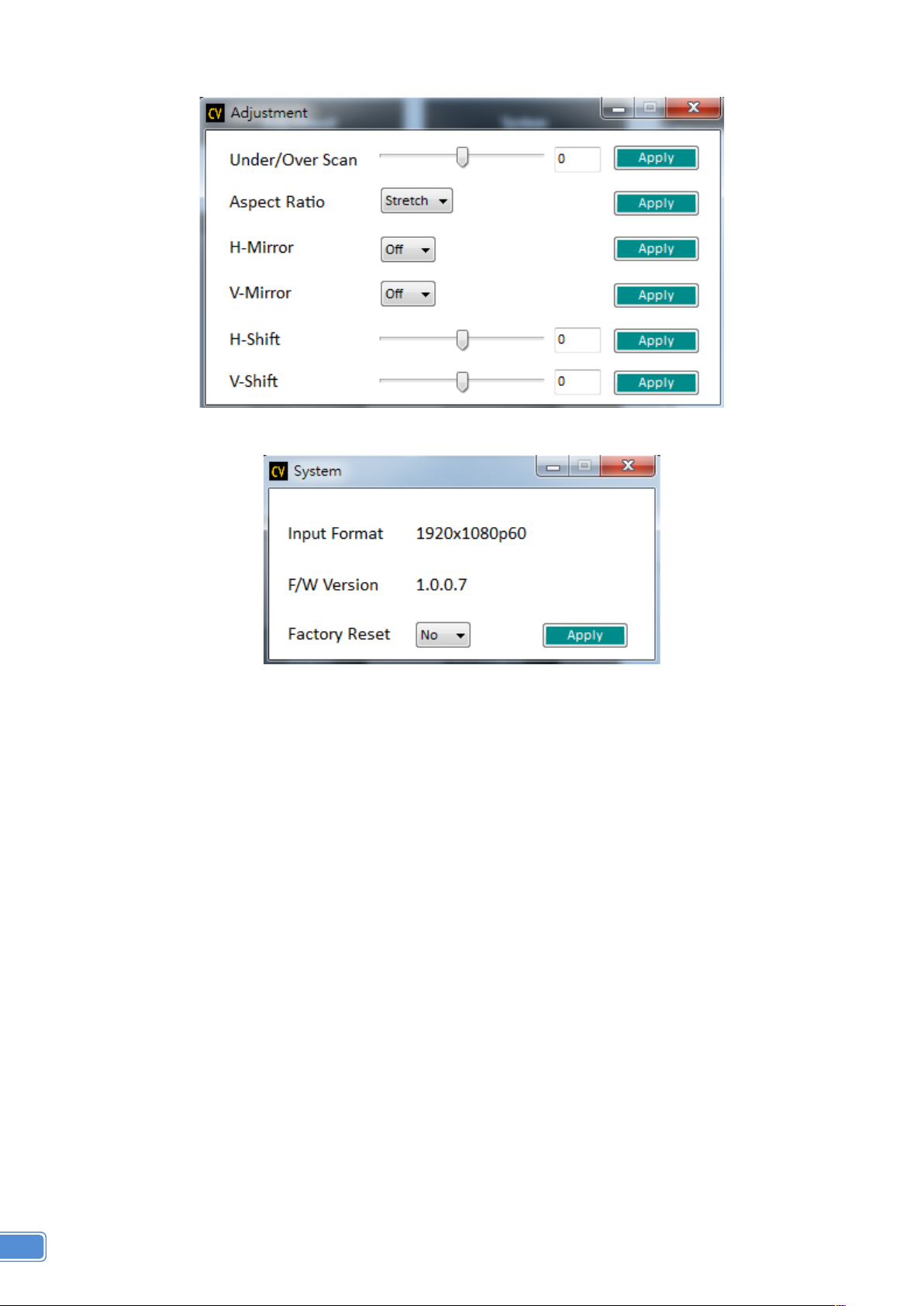
6. Adjustment Button
7. System Button
1) Input Format:
To view the current input resolution
2) F/W Version Information
3) Factory Reset Button
8. I/O Port and Resolution Info
To display the information about the I/O Port and the applied Resolution
9. Output Quick Selection Button
Common functions for quick setting
10. Refresh Button
To refresh the status of the converter
Page 13
11
LIMITED WARRANTY
The SELLER warrants the BG-UHD-SCVEA HDMI/DP/VGA/CVBS/YPbPr to HDMI Scaler
Converter to be free from defects in the material and workmanship for 1 year from the date of purchase
from the SELLER or an authorized dealer. Should this product fail to be in good working order within
1-year warranty period, The SELLER, at its option, repair or replace the unit, provided that the unit has
not been subjected to accident, disaster, abuse or any unauthorized modifications including static
discharge and power surges.
Unit that fails under conditions other than those covered will be repaired at the current price of parts
and labor in effect at the time of repair. Such repairs are warranted for 90 days from the day of reshipment
to the BUYER. If the unit is delivered by mail, customers agree to insure the unit or assume the risk of loss
or damage in transit. Under no circumstances will a unit be accepted without a return authorization
number.
The warranty is in lieu of all other warranties expressed or implied, including without limitations, any
other implied warranty or fitness or merchantability for any particular purpose, all of which are expressly
disclaimed.
Proof of sale may be required in order to claim warranty. Customers outside Taiwan are responsible
for shipping charges to and from the SELLER. Cables are limited to a 30-day warranty and cable must be
free from any markings, scratches, and neatly coiled.
The content of this manual has been carefully checked and is believed to be accurate. However, The
SELLER assumes no responsibility for any inaccuracies that may be contained in this manual. The
SELLER will NOT be liable for direct, indirect, incidental, special, or consequential damages resulting
from any defect or omission in this manual, even if advised of the possibility of such damages. Also, the
technical information contained herein regarding the BG-UHD-SCVEA features and specifications
is subject to change without further notice.
Page 14
12
SECOND YEAR ASSURANCE
BZBGEAR wants to assure you peace of mind. We're so confident in the quality of our products
that along with the manufacturer's one-year limited warranty, we are offering free second-year
warranty coverage upon registration*.
Taking advantage of this program is simple, just follow the steps below:
1. Register your product within 90 days of purchase by visiting BZBGEAR.com/warranty.
2. Complete the registration form. Provide all necessary proof of purchase details, including
serial number and a copy of your sales receipt.
For questions, please call 1.888.660.2962 or email [email protected].
For complete warranty information, please visit BZBGEAR.com/warranty or scan the QR code
below.
*Terms and conditions apply. Registration is required.
MISSION STATEMENT
!
BZBGEAR manifests from the competitive nature of the audiovisual industry to innovate while
keeping the customer in mind. AV solutions can cost a pretty penny, and new technology only
adds to it. We believe everyone deserves to see, hear, and feel the advancements made in
today’s AV world without having to break the bank. BZBGEAR is the solution for small to
medium-sized applications requiring the latest professional products in AV.
We live in a DIY era where resources are abundant on the internet. With that in mind, our team
offers system design consultation and expert tech support seven days a week for the products in
our BZBGEAR catalog. You’ll notice comparably lower prices with BZBGEAR solutions, but the
quality of the products is on par with the top brands in the industry. The unparalleled support from
our team is our way of showing we care for every one of our customers. Whether you’re an
integrator, home theater enthusiast, or a do-it-yourselfer, BZBGEAR offers the solutions to allow
you to focus on your project and not your budget.
 Loading...