

Page 1

BG-PSC8X2-REC
HDMI Receiver over Cat5e/Cat6
(HD BaseT)
VER 1.4
Page 2

Thank you for purchasing this product
For optimum performance and safety, please read these instructions carefully
before connecting, operating or adjusting this product. Please keep this manual
for future reference.
Surge protection device recommended
This product contains sensitive electrical components that may be damaged
by electrical spikes, surges, electric shock, lighting strikes, etc. Use of surge
protection systems is highly recommended in order to protect and extend the
life of your equipment.
Table of Contents
I. Introduction...........................................................................................
II. Features................................................................................................
III. Package Contents.............................................................................
IV. Specifications.....................................................................................
V. Operation Controls and Functions....................................................
VI. Application Example.........................................................................
2
2
3
3
4
8
Page 3
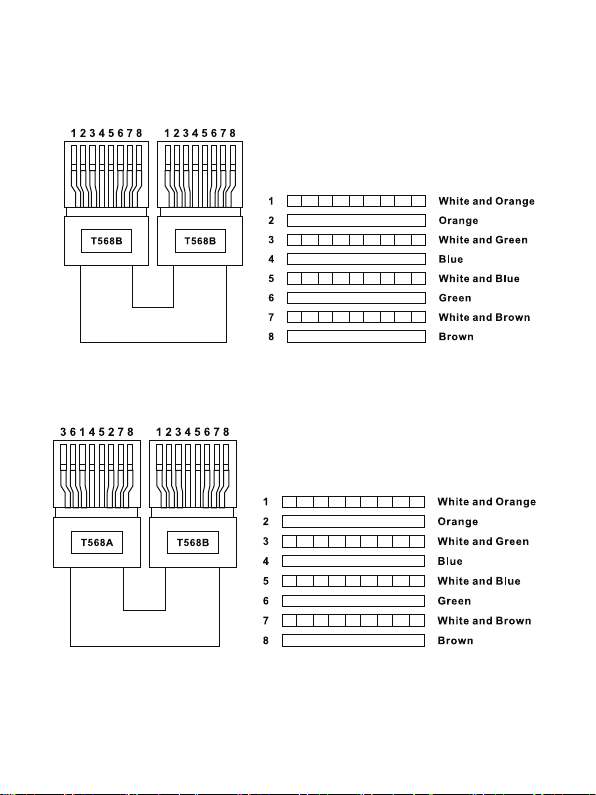
Advanced:
The receiver using UTP cable termination follows the standard of
IEEE-568A and IEEE-568B.
Direct interconnection method
Cross interconnection method
- 1/8 -
Page 4

I. Introduction
The BG-PSC8X2-REC HDMI Receiver is a tool which can extend your
HDMI signal over 328ft/100meters to a compatible display. It is
designed to accept a HDBaseT signal which can be transmitted by
category cable. It also supports bi-directional IR and RS232.
II. Features
1. POE(Power Over Ethernet)function support, either TX or RX powered
24V@1A,another don’t need power form the DC jack. POE Power
Consumption less than 10W. ※
2. Use single UTP LAN cable (CAT-5E/6) to substitute HDMI cable to achieve
long distances transmission.
3. UTP cable termination follows the standard of IEEE-568A or IEEE-568B.
4. Transmission distance: ※Over CAT6 cable
100 meters: 1080P @60Hz36bit; 3D1080P@30Hz36bit;
70 meters: 1080P @60Hz@48bit; 1080P@120Hz@24bit; 3D1080P@60Hz
@36bit; 4K x 2K@30Hz@24bit.
5. Support display resolutions up to 4K x 2K@60Hz
6. Full HD support: 1080p@60Hz@48 bit/pixels, 1080p@120Hz@24 bit/
pixels, 3D 1080P60Hz and 4K x 2K@30Hz@24bit
7. Transfer Bidirectional Infrared control signal together with the HDMI signal.
※ See the description 2.
8. Transfer Bidirectional RS232 control signal together with the HDMI signal.
※ See the description 3.
See the description 1
- 2/8 -
Page 5

III. Package
1. HDMI Extender Receiver ----------------------------------------------------
2. Wideband IR Tx ----------------------------------------------------------------
3. Wideband IR Rx ---------------------------------------------------------------
4. 24V1A DC Power Supply ----------------------------------------------------
5. Operation Manual --------------------------------------------------------------
6. Phoenix Contact----------------------------------------------------------------
7. Mounting ears-------------------------------------------------------------------
IV. Specifications
1. Frequency Bandwidth----------
2. Receiver Input/Output Ports--
3. Power Supply---------------------
4. ESD Protection
Human Body Model:------------
5. Dimensions (mm)----------------
6. Weight------------------------------
7. Operating Temperature--------
8. Storage Temperature-----------
9. Relative Humidity------------
10. Power Consumption (Max)
2.97Gbps
1xHDMI Female port/2xCAT6
1x IR Tx/1x IR Rx/1xPhoenix
DC 24V 1A
± 8kV (air-gap discharge)
± 4kV (contact discharge)
00(W) X 100 (D) X 25 (H)
320g x 2
0°C ~ 40°C / 32°F ~ 104°F
-20°C ~ 60°C / -4°F ~ 140°F
20~90% RH (Non-condensing)
10W
1PCS
2PCS
2PCS
1PCS
1PCS
2PCS
4PCS
V. Operation controls and Functions
- 3/8 -
Page 6
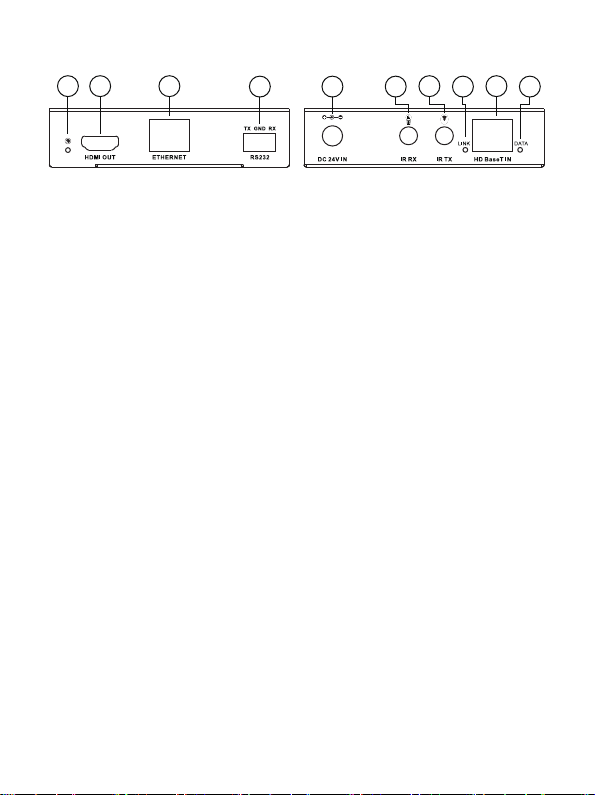
Receiver
1 2 3
4
5
7
6
9
8
10
1.OUTPUT LED: The output status indicating lamp. This red LED illuminates
when the TV plugs in with HDMI cable.
2.HDMI OUT: HDMI output port. This slot is where you connect the HDTV
or monitor with HDMI cable.
3.ETHERNET: This slot provides Internet signal from transmitter or to
transmitter.
4.RS232: Phoenix jack provides Serial port control signal from transmitter
or to transmitter.
5.DC IN: Plug the 24V DC power supply into the unit.
6.IR RX: Chanel 2 IR Receiver. Connect with Wideband IR Rx.
7.IR TX: Chanel 1 IR Transmitter. Connect with Wideband IR Tx.
8.LINK LED: The connection status indicating lamp.
※Illuminate: The Transmitter and Receiver are in good connections
※Flashing: The Transmitter and Receiver are in poor connections
※Dark: The Transmitter and Receiver are in no connections
9.HD BaseT IN: Standard HD BaseT signal input port. Connect HD BaseT
transmitter with a UTP cable following the standard of IEEE-568A or IEEE-568B.
10.DATA LED: The data status indicating lamp.
※Illuminate: The HDMI signal with HDCP.
※Flashing: The HDMI signal without HDCP.
※Dark: No HDMI signal.
- 4/8 -
 Loading...