

Page 1
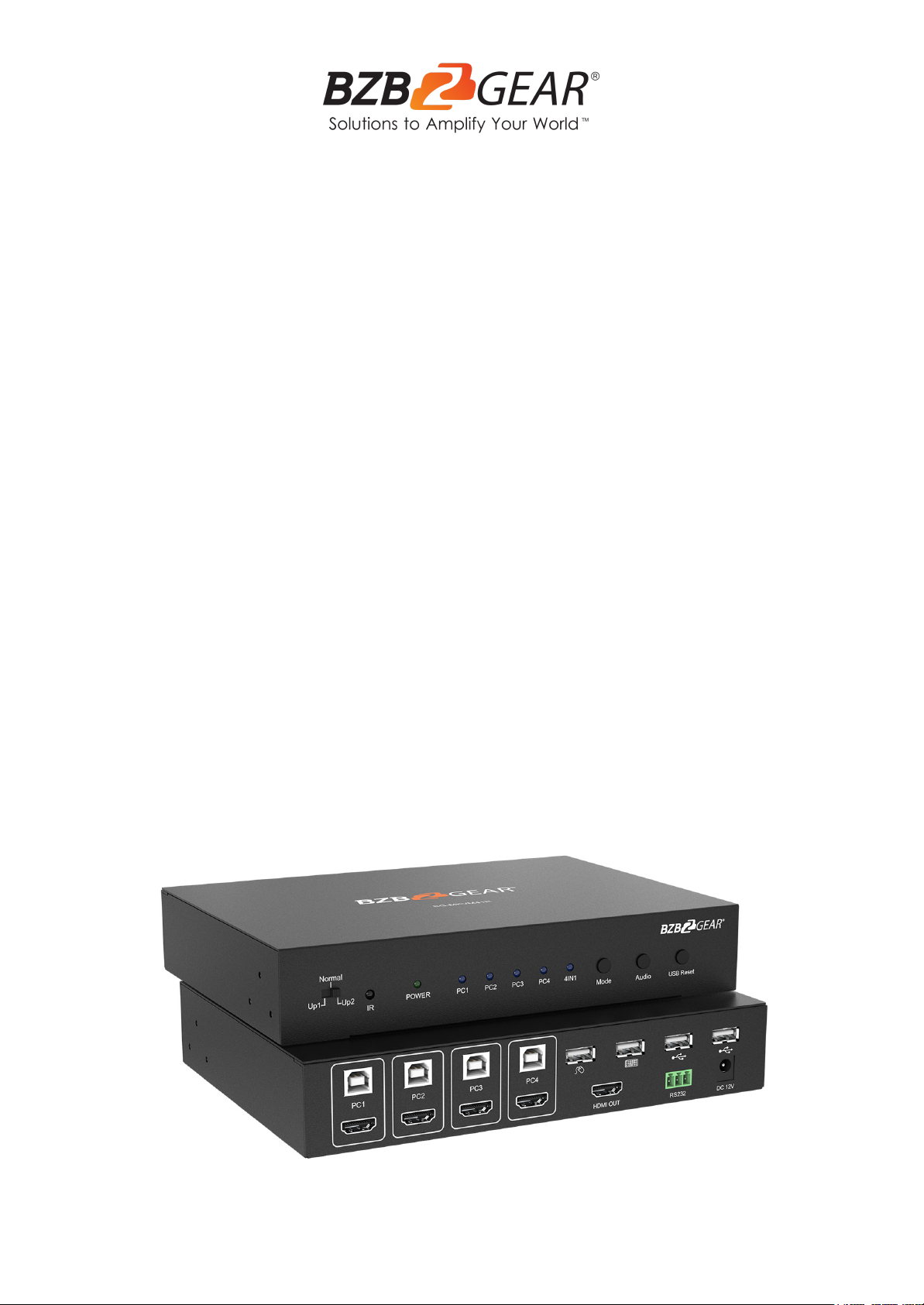
BG-MKVM41R
4X1 1080P Full HD HDMI/USB 2.0 Seamless Quad KVM Multiviewer
User Manual
Page 2

BZBGEAR BG-MKVM41R PRODUCT MANUAL
Address: 830 National Drive #140, Sacramento, CA 95834, USA · Tel: +1(888)499-9906 · Email: [email protected] 2
Page 3

BZBGEAR BG-MKVM41R PRODUCT MANUAL
TABLE OF CONTENTS
Address: 830 National Drive #140, Sacramento, CA 95834, USA · Tel: +1(888)499-9906 · Email: [email protected] 3
Statement 4
Safety Precaution 4
Introduction 5
Features 5
Packing List 5
Technical Specifications 6
Operation Controls and Functions 7
Connection And Operation 9
Remote Control 10
Through Mode & Sync Mode 11
RS232 Connection 12
Application Example 13
Tech Support 14
Warranty 14
Mission Statement 15
Copyright 16
Page 4

BZBGEAR BG-MKVM41R PRODUCT MANUAL
Statement
Address: 830 National Drive #140, Sacramento, CA 95834, USA · Tel: +1(888)499-9906 · Email: [email protected] 4
Please read these instructions carefully before connecting, operating, or configuring this
product. Please save this manual for future reference.
Safety Precaution
● Unpack the equipment carefully and save the original box and packing material for
possible future shipment.
● Follow basic safety precautions to reduce the risk of fire, electrical shock and injury to
persons.
● To prevent damaging this product, avoid heavy pressure, strong vibration, or immersion
during transportation, storage, and installation.
● Do not dismantle the housing or modify the module.
● Using supplies or parts not meeting the products’ specifications may cause damage,
deterioration or malfunction.
● Do not put any heavy items on the extension cable in case of extrusion.
● Install the device in a place with fine ventilation to avoid damage caused by overheating.
● Do not twist or pull by force ends of the optical cable. It can cause malfunction.
● The housing of this product is made of organic materials. Do not expose to any liquid,
gas, or solids which may corrode the shell.
● Unplug this device during lightning storms.
● Do not use liquid or aerosol cleaners to clean this unit. Clean only with a soft dry
microfiber cloth.
● Always unplug the power to the device before cleaning.
● If an object or liquid falls or spills on to the housing, unplug the module immediately.
● To prevent the risk of electric shock, do not open the case. Installation and maintenance
should only be carried out by qualified technicians.
● Do not use the product beyond the specified temperature, humidity, or power supply
specifications.
● This product does not contain parts that can be maintained or repaired by users.
Damage caused by dismantling the product without authorization from BZBGEAR is not
covered under the warranty policy.
● Installation and use of this product must strictly comply with local electrical safety
standards.
● Product specifications may be subject to technical upgrades without further notice.
● Unplug the power cord when left unused for a long period of time.
● Information on disposal for scrapped devices: do not burn or mix with general
household waste, please treat them as normal electrical wastes.
Page 5

BZBGEAR BG-MKVM41R PRODUCT MANUAL
Introduction
● 1x BG-MKVM41R 4x1
● 1x 12V/DC, 2A Power Supply
● 1x Remote Control
● 2x L shape stand feet
● 6x Screw
● 1x Phoenix plugs for RS232 cable
termination
● 1x User Manual
● 1х Quick Start Guide
Address: 830 National Drive #140, Sacramento, CA 95834, USA · Tel: +1(888)499-9906 · Email: [email protected] 5
The KVM switcher allows 4 PCs with HDMI ports to share one display and one keyboard &
mouse, allowing the display to switch seamlessly between 4 PCs. In addition, it supports
the unique 4 in 1 Multi-Viewer mode, which allows you to operate 4 PCs with a keyboard &
mouse on the same screen without switching. It provides 2 additional USB 2.0 sharing
ports, allowing 4 PCs to share one printer or other USB2.0 device.
It supports resolutions of up to 1080p@60Hz. Also, it is fully compatible with a wide variety
of Windows and Mac OS operating systems. The product can be controlled in various ways:
through the mouse button, keyboard hotkey, front panel button, IR control, etc.
Features
● Compliant with HDMI 1.3a, HDCP 1.2
● Multiplexed HDMI 4-input and 1-output
● Up to 1080p@60Hz High Definition resolution
● 4 in 1 Quad Multi-viewer and seamless switch (with same resolution)
● Unique 4 in1 Multi-Viewer mode, which allows you to operate 4 PCs with a keyboard
& mouse on the same screen without switching
● Mouse button, keyboard hotkeys, front panel button, IR control
● Multi-output resolution
Packing List
Page 6
BZBGEAR BG-MKVM41R PRODUCT MANUAL
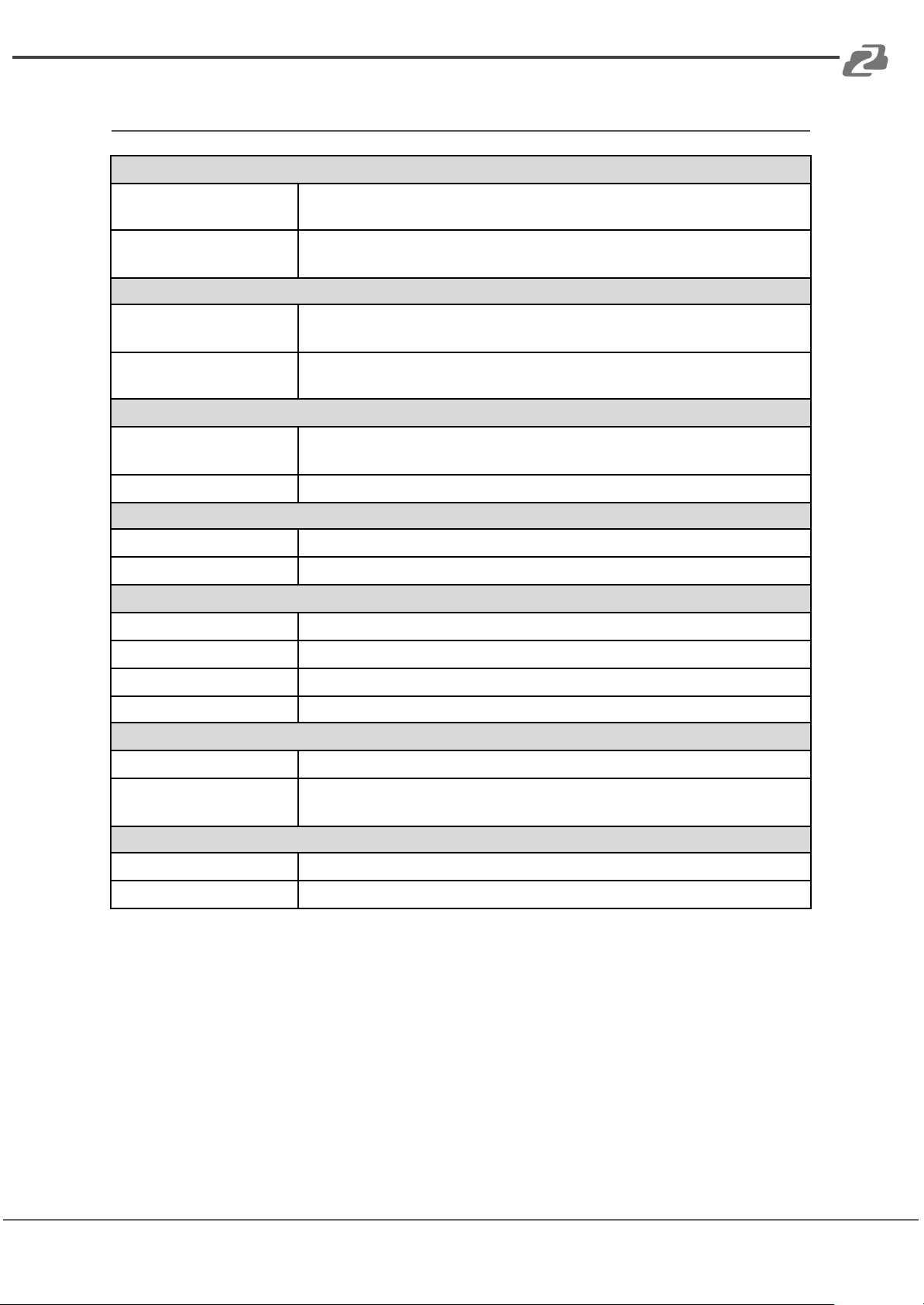
Technical Specifications
Signal Inputs/Output
Maximum Single Link
Range
1920x1080@60
HDMI Input/Output
Connector
Type A 19 pin
Operating Frequency
Vertical Frequency Range
50/60Hz
Video Amplifier
Bandwidth
2.25Gbps
Resolutions
Input Resolution
480i60Hz, 480p60Hz, 576i50Hz, 576p50Hz, 720p50/60Hz,
1080i50/60Hz, 1080p24/25/30/50/60Hz
Output Resolution
720p, 1080p
Mechanical Data
Chassis Material
Metal
Color
Black
Environmental
Operating Temperature
32°F to +158°F / 0°C to +70°C
Operating Humidity
10% to 85% RH (no condensation)
Storage Temperature
14°F to 176°F / -10°C to +80°C
Storage Humidity
5% to 90% RH (no condensation)
Power Requirement
External Power Supply
12V DC@2A
Power Consumption
(max)
24W
Regulatory Approvals
Main Unit
FCC, CE
Power Supply
UL, CE, FC C, REACH, ROHS
Address: 830 National Drive #140, Sacramento, CA 95834, USA · Tel: +1(888)499-9906 · Email: [email protected] 6
Page 7
BZBGEAR BG-MKVM41R PRODUCT MANUAL
Operation Controls and Functions
Address: 830 National Drive #140, Sacramento, CA 95834, USA · Tel: +1(888)499-9906 · Email: [email protected] 7
Front Panel
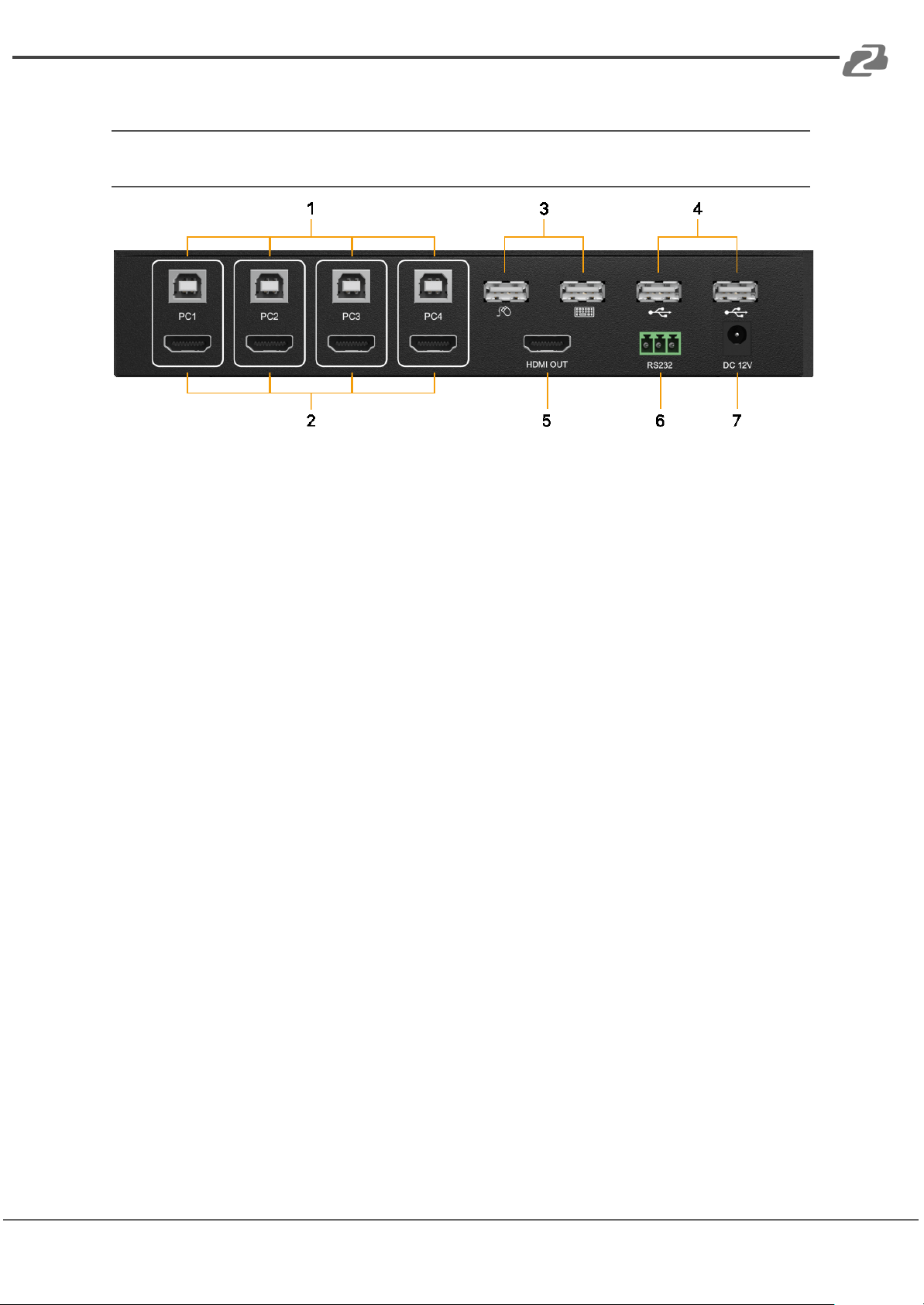
1. USB 2.0 Type B Inputs (PC1-PC4): Connect to USB 2.0 ports of 4 PCs
respectively.
2. HDMI Inputs (PC1-PC4): Connect to HDMI ports of 4 PCs respectively.
3. USB 2.0 Type A: Connect the keyboard and mouse.
4. USB 2.0 Type A: Provides 2 additional USB 2.0 sharing ports to connect USB 2.0
devices (such as USB Hard Disk, Printer, etc).
5. HDMI Output: Connect to a display to view the signal sources.
6. RS-232: Upgrade firmware.
7. DC 12V: Plug the 12V DC power supply into the unit and connect the adapter to the
AC wall outlet.
Page 8
BZBGEAR BG-MKVM41R PRODUCT MANUAL
Rear Panel
Address: 830 National Drive #140, Sacramento, CA 95834, USA · Tel: +1(888)499-9906 · Email: [email protected] 8
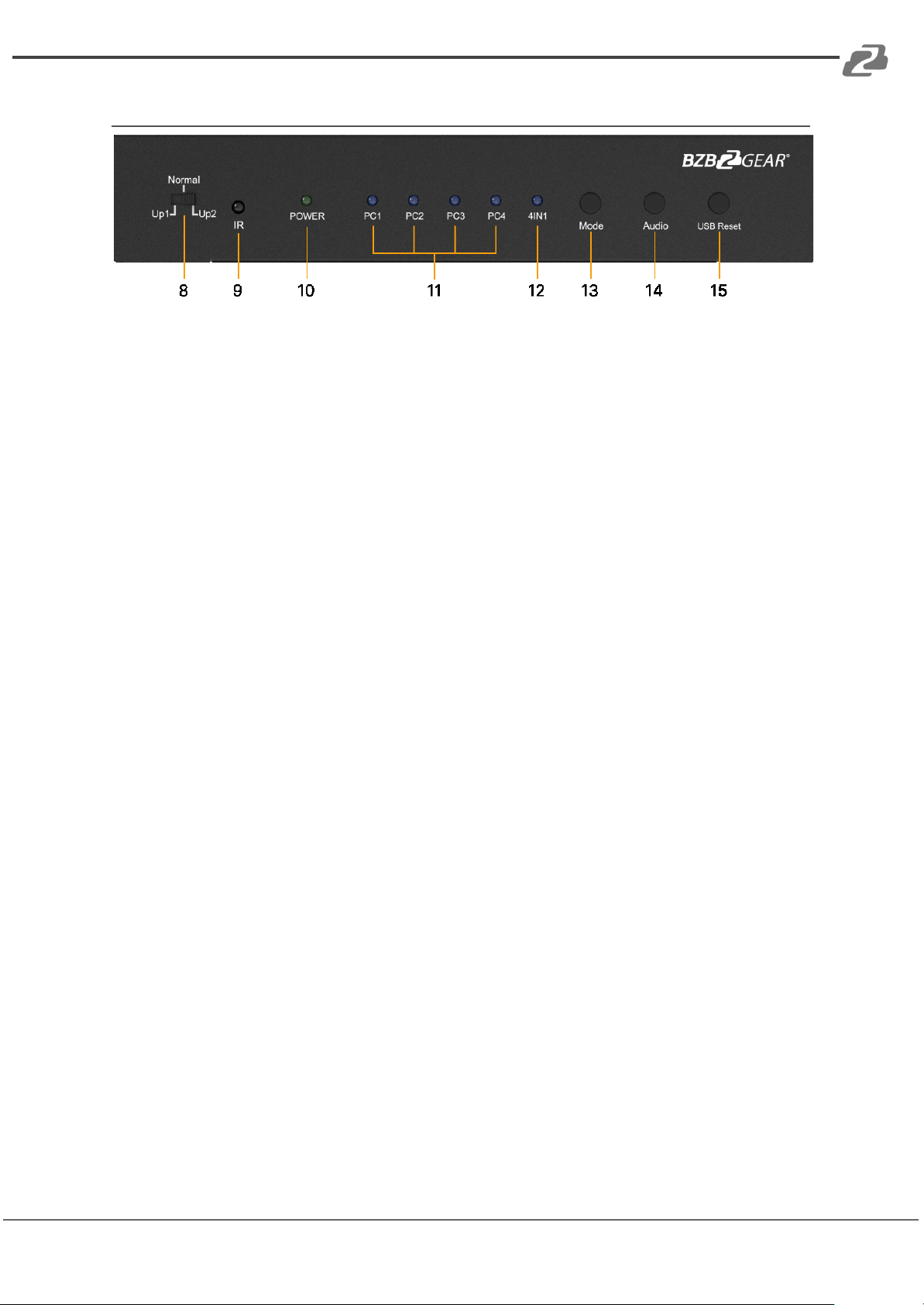
8. Update function select switch:
● Normal: Normal use
● Up_1: Upgrade data for MCU_1 via RS232
● Up_2: Upgrade data for MCU_2 via RS232.
9. IR: Remote control receiver window.
10. Power LED: The blue LED illuminates when the device is connected to the power
supply.
11. PC1-PC4 LED: Input LED - Indicate which input is selected.
12. 4IN1 LED: Indicates 4IN1 mode is selected.
13. Mode Button: Press this button to select the input.
14. Audio Button: In the 4IN1 mode, press this button to select the audio from the input
sources.
15. Reset Button: Press this button to reset the KVM switch.
Page 9
BZBGEAR BG-MKVM41R PRODUCT MANUAL
Connection And Operation
Address: 830 National Drive #140, Sacramento, CA 95834, USA · Tel: +1(888)499-9906 · Email: [email protected] 9
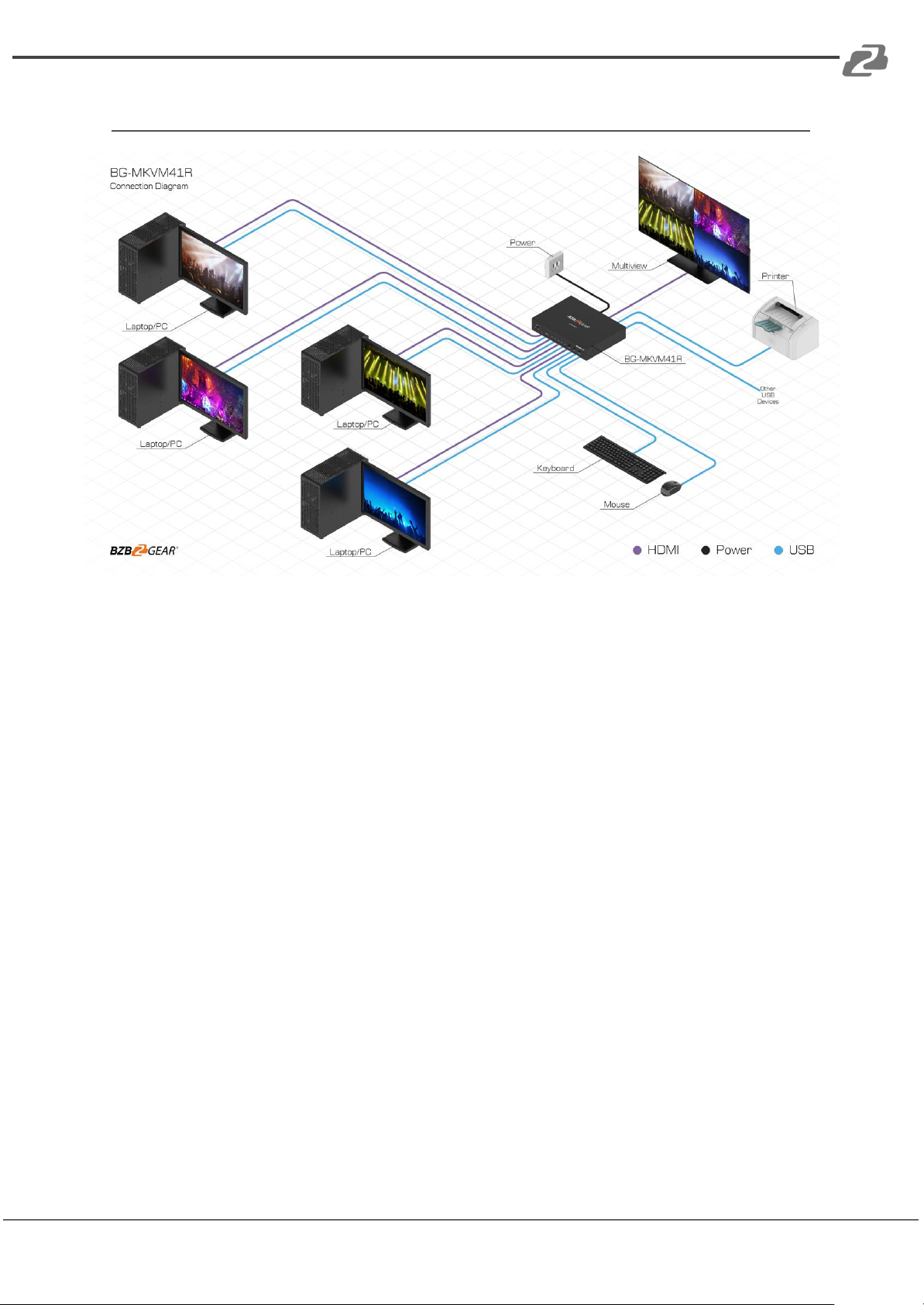
1. Connect up to 4 PCs using HDMI and USB cables to their respective ports on each
device.
2. Connect the HDMI output of the HDMI Switcher to a high-definition display device
via HDMI Cable.
3. Connect the keyboard, mouse and USB2.0 device to the corresponding interface of
the KVM switcher.
4. The Switcher is powered by an external power supply which is included. Connect
power first to the source.
5. Select the computer screen you want to operate by mouse button, keyboard hot
keys, front panel button, IR control.
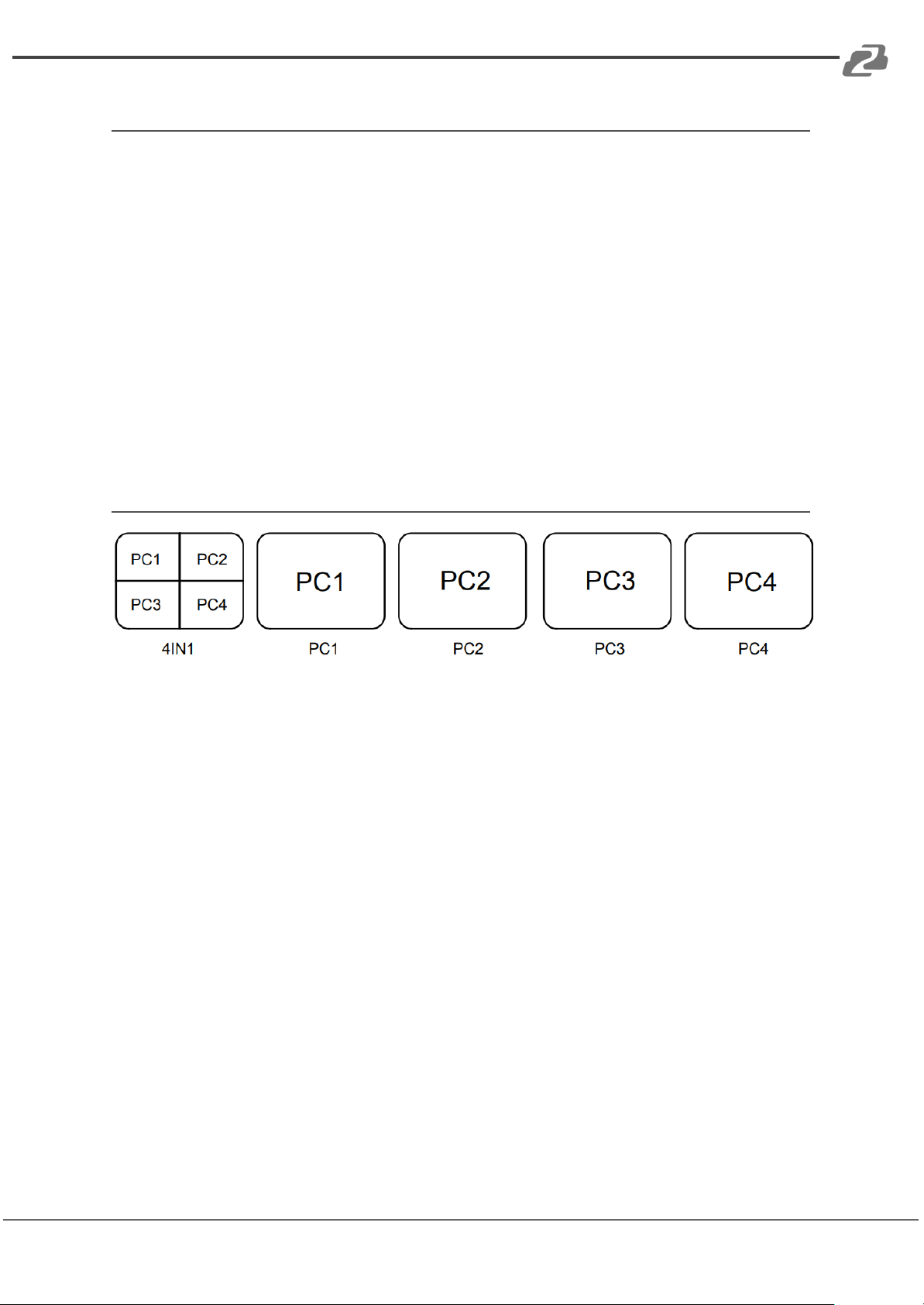
Detail Description of Display Mode
The product provides 5 Screen Modes as below Mode 1 ~ 5.
● 4IN1: The 4 PCs are displayed in 2x2 on one screen. You can operate 4 PCS without
switching
● PC1: PC1 full screen mode, you can operate PC1 only
● PC2: PC2 full screen mode, you can operate PC2 only.
● PC3: PC3 full screen mode, you can operate PC3 only.
● PC4: PC4 full screen mode ,you can operate PC4 only
Page 10
BZBGEAR BG-MKVM41R PRODUCT MANUAL
Remote Control
Address: 830 National Drive #140, Sacramento, CA 95834, USA · Tel: +1(888)499-9906 · Email: [email protected] 10
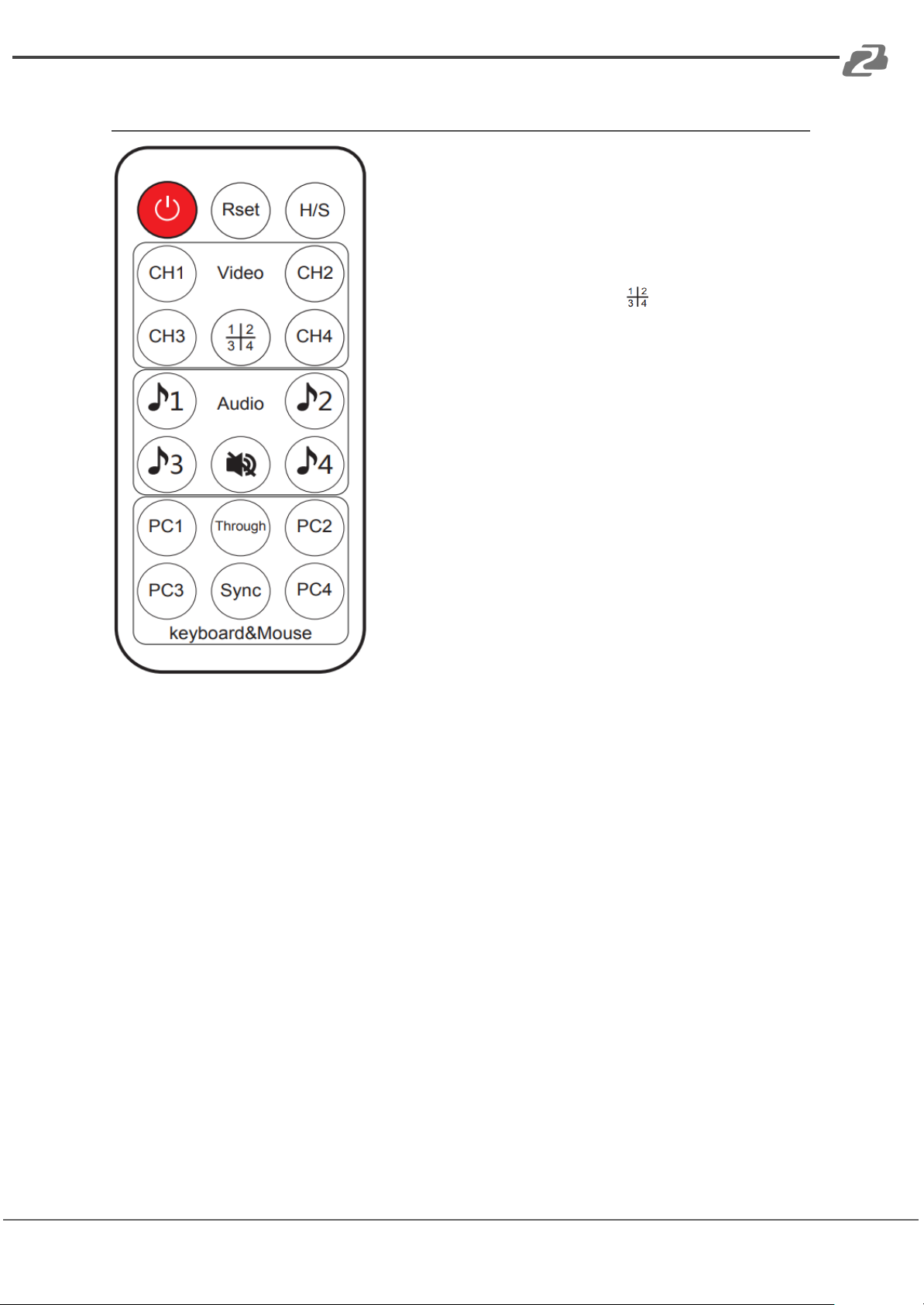
ON/OFF: Power on/off switch
Reset button: Reset the KVM Switcher
H/S Resolution button: upscale 720P signal into 1080P
or downscale 1080P signal into 720P
Mode select button (Ch1-Ch4, ): Press these
buttons, the quad multi-viewer will select the
corresponding mode; see the detail description of
display mode
Audio Select button(♪1- ♪4): Press these buttons to
select the audio from the input sources in the 4IN1
mode
Mute button: Turn off Sound
Keyboard & Mouse Mode select button (PC1-PC4):
Press these buttons to select the PC you want to
operate at the 4IN1 mode. At this point, the keyboard &
mouse can only operate the selected PC
Through/Sync button: Select Through or Sync mode
Page 11
BZBGEAR BG-MKVM41R PRODUCT MANUAL
Through Mode & Sync Mode
Address: 830 National Drive #140, Sacramento, CA 95834, USA · Tel: +1(888)499-9906 · Email: [email protected] 11
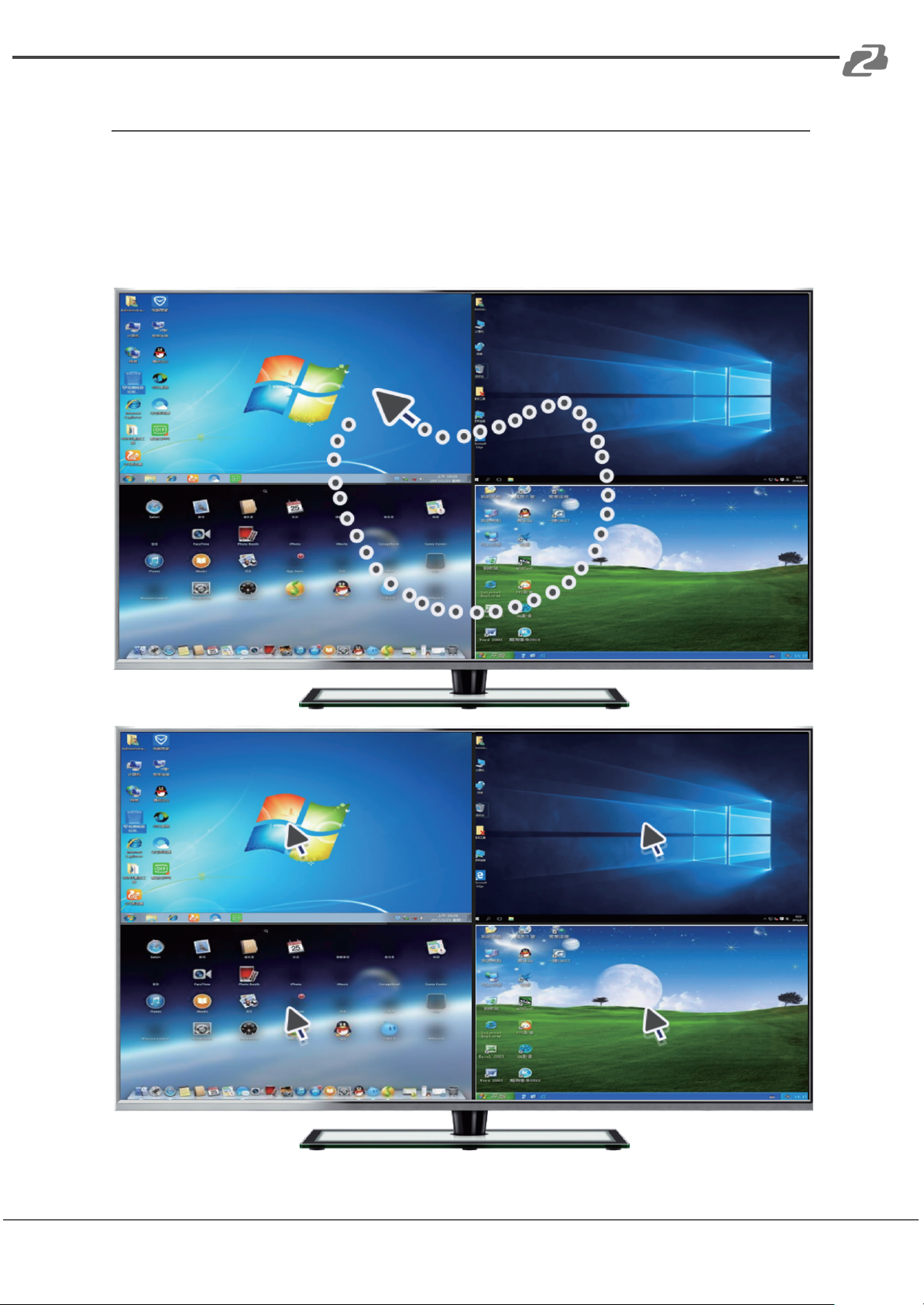
There are 2 modes for Keyboard & mouse in the 4 in 1 mode:
● Through Mode: In this mode, the mouse can move across the screen of the 4 PCs.
You can operate any PC at will. The Keyboard and USB 2.0 device will be switched
to the PC where the mouse is located.
● Sync Mode: In this mode, the keyboard & mouse will operate the last selected PC.
Page 12
BZBGEAR BG-MKVM41R PRODUCT MANUAL
Hotkey Commands
Command
Function
Mouse HOTKEY
[wheel key]+[wheel key]
1.At 4IN1 mode, switch to full screen mode
2.At full screen mode, Switch to 4IN1 mode
Keyboard HOTKEY
[*]+[1]
Switch to PC1
[*]+[2]
Switch to PC2
[*]+[3]
Switch to PC3
[*]+[4]
Switch to PC4
[*]+[5]
Switch to 4IN1 Mode
[*]+[0]
At 4IN1 Mode.Keyboard&Mouse switch to Sync Mode
[*]+[S]
At 4IN1 Mode.Keyboard&Mouse switch to Through Mode
[*]+[F1]
At 4IN1 Mode.Keyboard&Mouse and USB2.0 switch to PC1
[*]+[F2]
At 4IN1 Mode.Keyboard&Mouse and USB2.0 switch to PC2
[*]+[F3]
At 4IN1 Mode.Keyboard&Mouse and USB2.0 switch to PC3
[*]+[F4]
At 4IN1 Mode.Keyboard&Mouse and USB2.0 switch to PC4
[*]+[Page Up]
At 4IN1 Mode,switch the audio from the input sources
[*]+[Page Down]
Switch to next PC
Address: 830 National Drive #140, Sacramento, CA 95834, USA · Tel: +1(888)499-9906 · Email: [email protected] 12
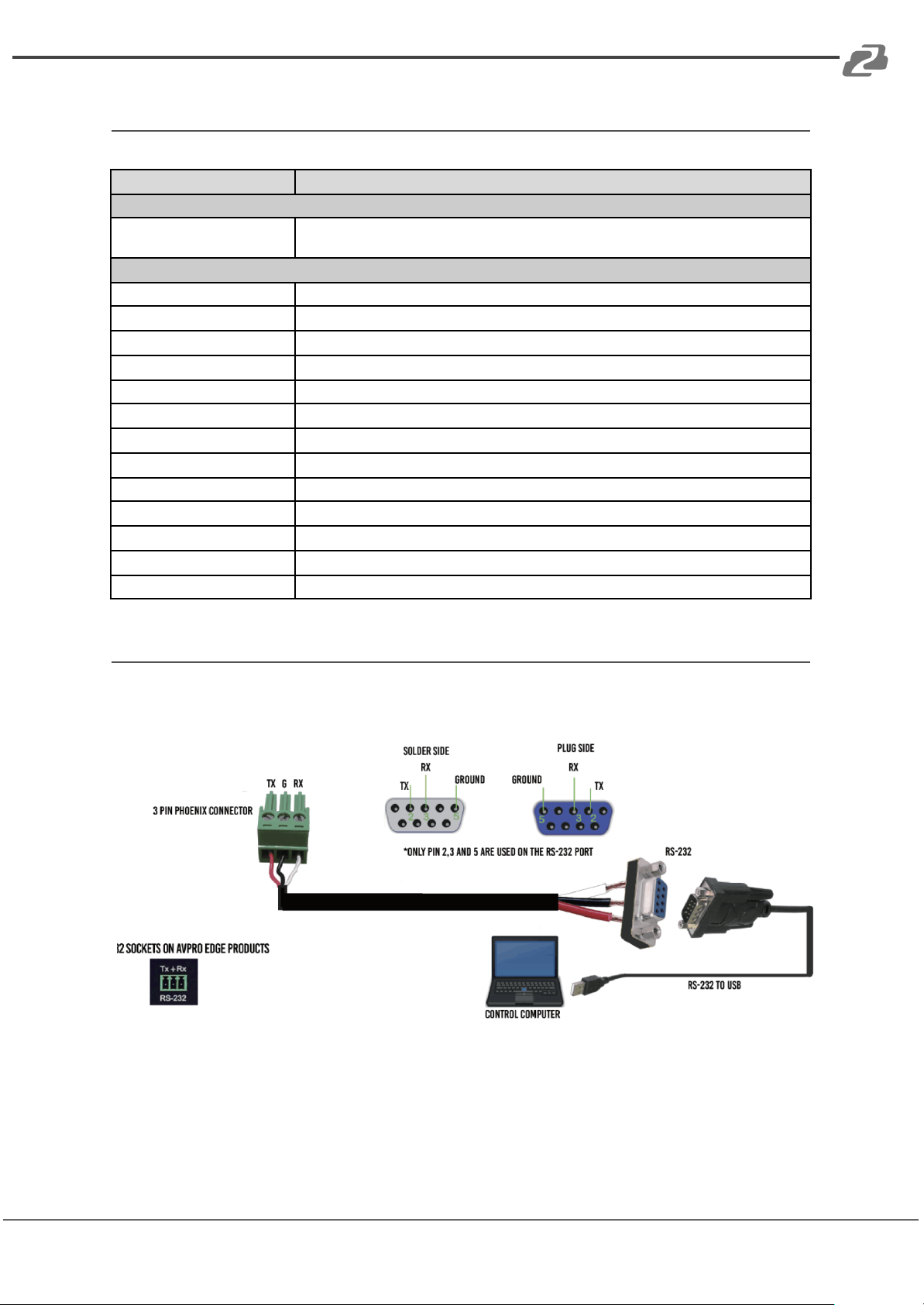
RS232 Connection
Please connect the product and PC with serial port cable as pictured below to control via
RS232.
Page 13
BZBGEAR BG-MKVM41R PRODUCT MANUAL
Application Example
Address: 830 National Drive #140, Sacramento, CA 95834, USA · Tel: +1(888)499-9906 · Email: [email protected] 13
Page 14

BZBGEAR BG-MKVM41R PRODUCT MANUAL
Tech Support
Phone
1.888.499.9906
Email
Live Chat
bzbgear.com
Address: 830 National Drive #140, Sacramento, CA 95834, USA · Tel: +1(888)499-9906 · Email: [email protected] 14
Have technical questions? We may have answered them already!
Please visit BZBGEAR’s support page (bzbgear.com/support) for helpful information and
tips regarding our products. Here you will find our Knowledge Base
(bzbgear.com/knowledge-base) with detailed tutorials, quick start guides, and step-by-step
troubleshooting instructions. Or explore our YouTube channel, BZB TV
(youtube.com/c/BZBTVchannel), for help setting up, configuring, and other helpful how-to
videos about our gear.
Need more in-depth support? Connect with one of our technical specialists directly:
Warranty
BZBGEAR Pro AV products and cameras come with a three-year warranty. An extended
two-year warranty is available for our cameras upon registration for a total of five years.
For complete warranty information, please visit bzbgear.com/warranty.
For questions, please call 1.888.499.9906 or email [email protected].
Page 15

BZBGEAR BG-MKVM41R PRODUCT MANUAL
Mission Statement
Address: 830 National Drive #140, Sacramento, CA 95834, USA · Tel: +1(888)499-9906 · Email: [email protected] 15
BZBGEAR is a breakthrough manufacturer of high-quality, innovative audiovisual equipment
ranging from AVoIP, professional broadcasting, conferencing, home theater, to live
streaming solutions. We pride ourselves on unparalleled customer support and services.
Our team offers system design consultation, and highly reviewed technical support for all
the products in our catalog. BZBGEAR delivers quality products designed with users in
mind.
Page 16

BZBGEAR BG-MKVM41R PRODUCT MANUAL
Copyright
Address: 830 National Drive #140, Sacramento, CA 95834, USA · Tel: +1(888)499-9906 · Email: [email protected] 16
All the contents in this manual and its copyright are owned by BZBGEAR. No one is allowed
to imitate, copy, or translate this manual without BZBGEAR’s permission. This manual
contains no guarantee, standpoint expression or other implies in any form. Product
specification and information in this manual is for reference only and subject to change
without notice.
All rights reserved. No reproducing is allowed without acknowledgement.
 Loading...