

Page 1
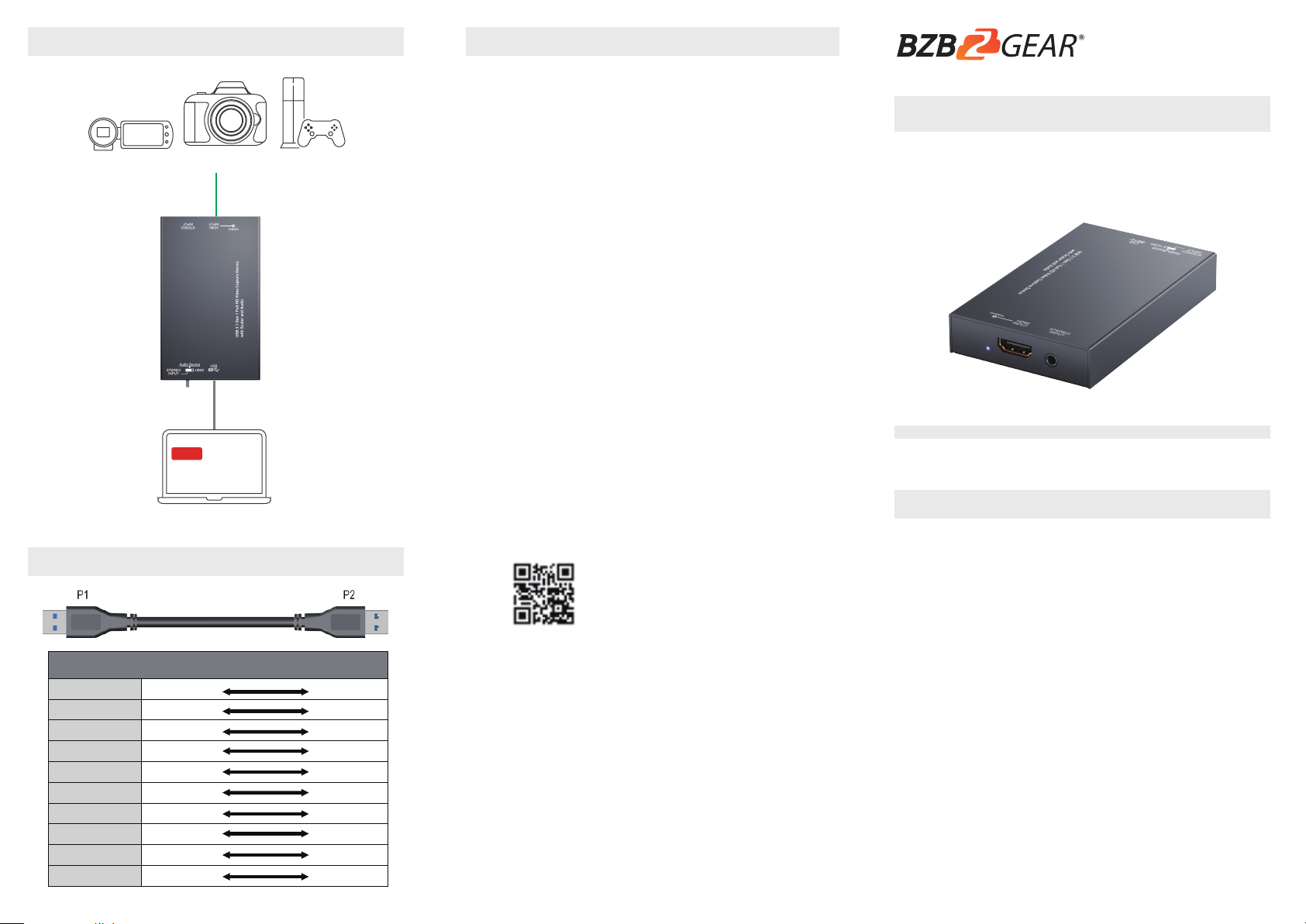
CONNECTION DIAGRAM
Camcoder
LIVE
DSLR Camera
HDMI CABLE
USB 3.0
PS4
WARRANTY
BZBGEAR wants to assure you peace of mind.
We're so confident in the quality of our products
that along with the manufacturer's one-year
limited warranty, we are offering free second-year
warranty coverage upon registration*.
Taking advantage of this program is simple,
just follow the steps below:
1. Register your product within 90 days of
purchase by visiting BZBGEAR.com/warranty.
2. Complete the registration form. Provide all
necessary proof of purchase details, including
serial number and a copy of your sales receipt.
For questions, please call 1.888.499.9906 or
email [email protected].
BG-CHA
USB 3.1 Gen 1 Full HD Video Capture Device
with Scaler and Audio
User Manual
USB PIN DEFINITION
P1 P2
VBUS
D-
D+
GND
SSRX-
SSRX+
GND
SSTX-
SSRX+
Shield
1
2
3
4
5
6
7
8
9
SHELL
Laptop
For complete warranty information, please
visit BZBGEAR.com/warranty or scan the QR code
below.
INTRODUCTION
The BG-CHA USB 3.1 Gen 1 Full HD Video
Capture Device with Scaler and Audio provides a
professional way to capture HDMI video signals. It
adopts USB 3.1 Gen 1 (USB 3.0) interface, which can
realize high-speed transmission. Users can capture
Full HD (1080p60) video by this capture device.
Besides, BG-CHA can capture and display original
uncompressed HDMI video with more realistic color
1
2
3
4
5
6
7
8
9
SHELL
*Terms and conditions apply. Registration is
required.
rendition. BG-CHA also uses large volume image
buffer technology which effectively avoids the video
tearing. The high sampling rate and high sampling
accuracy assure images with high sharpness, rich
details, and less color edges.
Page 2
SPECIFICATIONSFEATURES
Technical
Role of usage
Video Capture Device
bandwidth
Output Video
Format
ESD protection
Human body model — ±15kV [air-gap discharge] & ±8kV [contact discharge]
(not complete list)
Skype (Windows, OS X), Hangout (Windows), TeamViewer (Windows)
OS Support
Windows 7 /8.1 /10, Mac and Linux OS
Housing
Metal enclosure
Model
102 x 62 x 17mm [4" x 2.4" x 0.6"]
Package
140 x 113 x 24mm [5.5" x 4.4" x 0.9"]
Carton
405 x 275 x 255mm [1'3" x 10.8" x 10"]
Model
Package
Fixedness
Wall-mounting case with screws
Power supply
Via USB
Power consumption
3 Watts [max]
TROUBLESHOOTING
Supports HDMI output resolution scaler with audio
embedding
HDMI video and audio streams over USB 3.1 Gen 1
Supports UVC1.0
Supports input and output video resolution up to
1080p 60Hz
Auto-detection on video format to ensure
plug-play operations
Recording Video Format: H.264 (Software
Compression)
Works on multiple operating system platforms
(Windows 7/8.1/10, Mac and Linux OS)
Compatible with most 3rd party software such as
OBS Studio and AMCap
Supports USB 3.1 (MJPG/YUY2) and USB 2.0 (MJPG)
Low Lattency
System Requirements (Recommanded)
Windows® 7(SP1) / Windows 8.1 / Windows 10
PC: Intel® CoreTM i5-4440 3.10GHz + NVIDIA®
GeForce® GTX 660 or higher
Laptop: Intel® Core i7-4810MQ + NVIDIA GeForce GTX
870M or higher
4GB RAM or higher
1.
Video quality is apparently related to the capability of
computer and software setting.
i
2.
Please use the included USB 3.1 cable in the box to
protect the device and avoid furthur compatible issues.
PACKAGE CONTENTS
1x BG-CHA
1x USB 3.1 Gen 1 A to A Cable (host to device)
1x User Manual
Model Name BG-CHA
Input Video
bandwidth
Video support Up to 1080p60
Audio Input SDI Embedded Audio & Stereo audio Input
Audio Format 2 Channel, 44.1 and 48KHz sample rate, up to 16bit PCM
Recording Mode Software Compression
Recording Video
PCB stack-up 6-layer board [impedance control — differential 100Ω; single 50Ω]
Firmware update Feasible via USB Port
Input 1x HDMI + 1x 3.5mm
Output 1x USB
HDMI connector Type A [19-pin female]
USB connector
Software compatibility
Mechanical
Dimensions
[L x W x H]
Weight
Operation temperature 0~40°C [32~104°F]
Storage temperature -20~60°C [-4~140°F]
Relative humidity 20~90% RH [no condensation]
YUY2 (USB3.1 Gen 1), MJPG (USB2.0/3.1 Gen 1)
OBS Studio (Windows, Linux), AMCap (Windows), Potplayer (Windows),
150MHz
Up to 350MBps (USB)
USB 3.1 Type A (SuperSpeed USB)
144g[5 oz]
227g[8 oz]
PANEL DESCRIPTIONS
1 5432
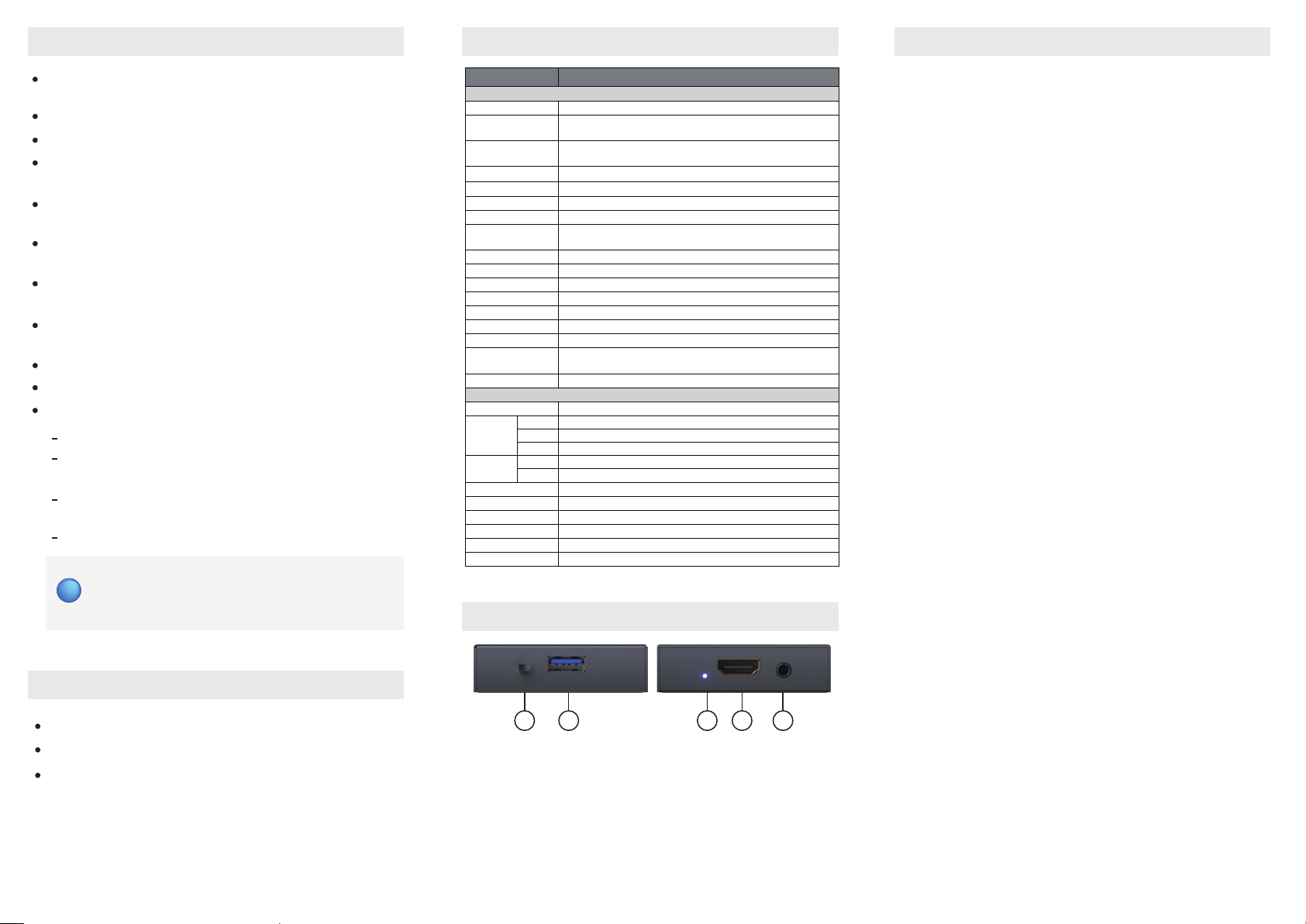
AUDIO SWITCH: [left] Audio from stereo audio in,
1.
[right] Audio from HDMI
USB OUT: Connect to a USB host (PC, NB, MAC…)
2.
LED INDICATOR: Input signal indicator LED
3.
HDMI IN: Connect to a HDMI source
4.
STEREO AUDIO IN: Connect to analog stereo audio
5.
source
Our USB device has done comprehensive tests before
shipment. Most of the incompatibilities we have
experienced are not from the USB capture device
itself, but from the sophisticated software and
hardware combination of PC or laptop. Please follow
the following suggestions to see any helps.
OBS is popular USB capture freeware and has
1.
excellent compatibility. Please download it and
start with OBS if users are not familiar with USB
capture device.
https://obsproject.com/download
The USB device supports HDCP mechanism to
2.
protect legal content from pirates. If any HDMI input
with HDCP protection, OSD will display a message
to indicate HDCP existence. No capture will be
legally allowed if HDCP is detected. Please use
non-HDCP protected HDMI sources or disable
HDCP in order to get USB device work. Device like
PS4 supports such a feature to turn HDCP off.
Due to the complexities of OS and computer
3.
hardware, different USB ports on PC or laptop may
have different performance or limitation. Please try
all USB ports to see if there are any differences.
Please must use the USB cable in box. We do not
4.
guarantee the overall performance when the USB
capture box works with some other USB cables.
5.
HDMI cable quality may also play an essential role
when capturing. Please be sure of that HDMI cable
can do 1080P@60 HDMI signal transmission or
better. Try different cables when the device is not
able to work as expected.
6.
If audio has noise, please adjust sampling
frequency setting on PC or laptop. If the default
sampling rate is 48000 Hz, please select 44100 Hz
and vice versa. The path of setting sampling
frequency on windows 10 is:
Start → Setting → System → Sound → Device properties
→ Additional device properties → Advanced
 Loading...