

Page 1

BG-8K-HS41
8K HDMI 4x1 Switcher
User Manual
Page 2

BZBGEAR BG-8K-HS41 PRODUCT MANUAL
Address: 830 National Drive #140, Sacramento, CA 95834, USA · Tel: +1(888)499-9906 · Email: [email protected] 2
Page 3

BZBGEAR BG-8K-HS41 PRODUCT MANUAL
TABLE OF CONTENTS
Address: 830 National Drive #140, Sacramento, CA 95834, USA · Tel: +1(888)499-9906 · Email: [email protected] 3
Statement 4
Safety Precaution 4
Introduction 5
Features 5
Packing List 5
Specifications 6
Operation Controls and Functions 7
IR Remote 8
Application Diagram 9
Tech Support 10
Warranty 10
Mission Statement 11
Copyright 12
Page 4

BZBGEAR BG-8K-HS41 PRODUCT MANUAL
Statement
Address: 830 National Drive #140, Sacramento, CA 95834, USA · Tel: +1(888)499-9906 · Email: [email protected] 4
Please read these instructions carefully before connecting, operating, or configuring this
product. Please save this manual for future reference.
Safety Precaution
● To prevent damaging this product, avoid heavy pressure, strong vibration, or immersion
during transportation, storage, and installation.
● The housing of this product is made of organic materials. Do not expose to any liquid,
gas, or solids which may corrode the shell.
● Do not expose the product to rain or moisture.
● To prevent the risk of electric shock, do not open the case. Installation and maintenance
should only be carried out by qualified technicians.
● Do not use the product beyond the specified temperature, humidity, or power supply
specifications.
● This product does not contain parts that can be maintained or repaired by users.
Damage caused by dismantling the product without authorization from BZBGEAR is not
covered under the warranty policy.
● Installation and use of this product must strictly comply with local electrical safety
standards.
Page 5

BZBGEAR BG-8K-HS41 PRODUCT MANUAL
Introduction
● 1x 8K HDMI 4x1 switcher
● 1x IR Remote
● 1x 5V/1A Power Supply
● 1x User Manual
Address: 830 National Drive #140, Sacramento, CA 95834, USA · Tel: +1(888)499-9906 · Email: [email protected] 5
This 8K HDMI 4x1 Switcher can switch any of 4 HDMI sources to 1 HDMI display. It
supports video resolution up to 8K@60Hz 4:4:4, 48Gbps video bandwidth. It is suitable for
outdoor display, video conference, security monitoring, home theater and other
applications.
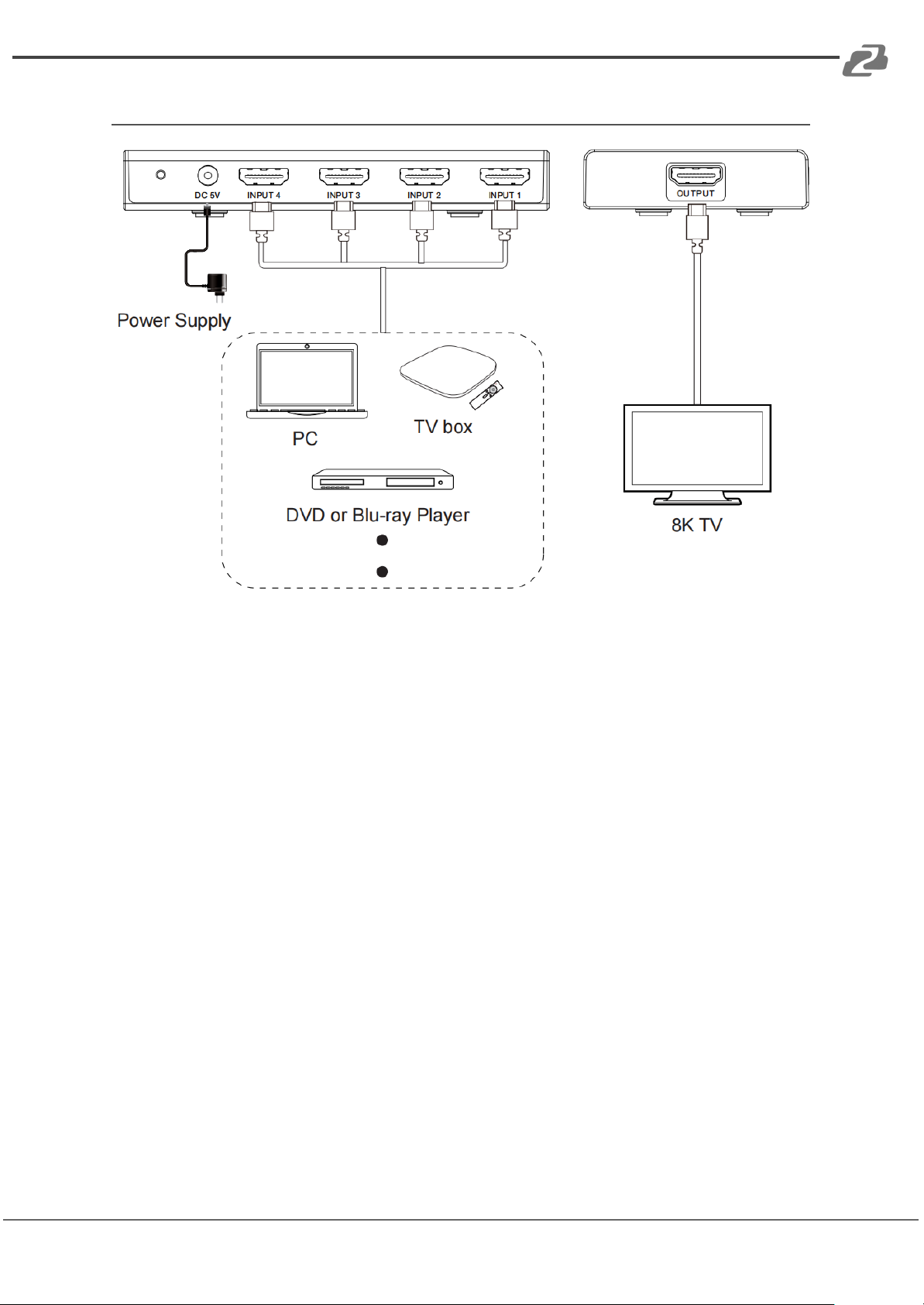
By using this HDMI 8K switcher, you are allowed to connect from four HDMI INPUT ports to
four HDMI source devices via an individual HDMI cable, then connect from HDMI OUTPUT
port to your external monitor (such as HDMI projector, HDMI TV or HDMI ordinary display).
You can switch between four sources by pressing the switch button on the front panel of
the switcher.
Please pay attention that this switcher is not a bi-directional switcher, you can only use from
four sources to one display (only 4 in 1 out, not 1 in 4 out).
It can work well with xbox or PS5 to achieve 4K@120hz on your TVs or relative monitors.
Features
● HDMI 2.1 and HDCP 2.3 compliant
● Support 48Gbps video bandwidth
● 8K@60Hz 4:4:4 8/10/12bit, 8K@60Hz 4:2:0 12-bit, 8K@30Hz 4:4:4 10-bit, 4K@120Hz
4:4:4 10-bit video support
● Support HDR, HDR10, HDR10+, Dolby Vision, HLG pass through
● VRR, FVA, ALLM support
● Support HDMI audio formats: LPCM 7.1CH, Dolby TrueHD, and DTS-HD Master
Audio
● 4x1 switch output, auto switch is supported
● Built-in Equalizer and Driver
● Auto EDID management
● Compact design for easy and flexible installation
Packing List
Page 6
BZBGEAR BG-8K-HS41 PRODUCT MANUAL
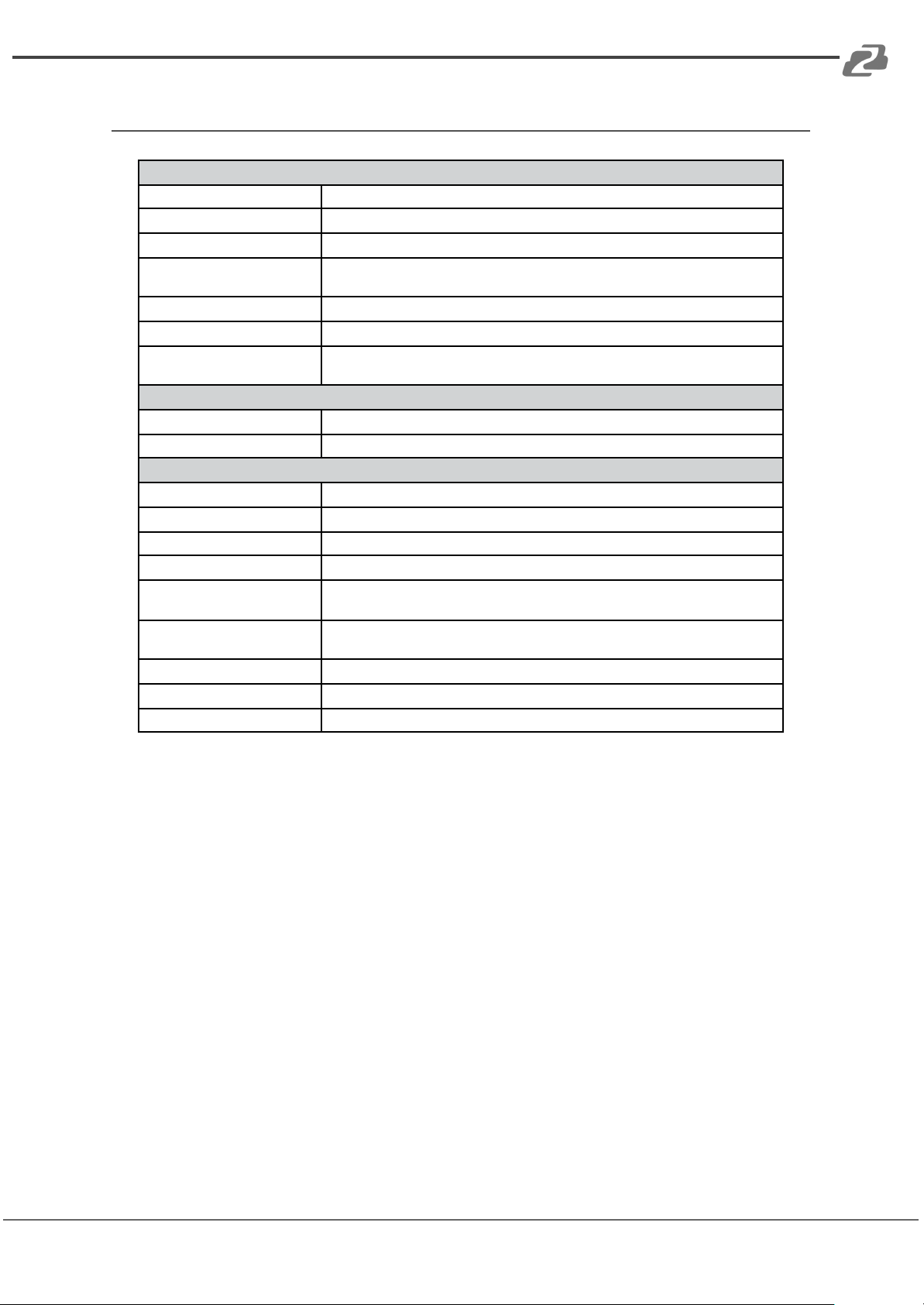
Specifications
Technical
HDMI Compliance
HDMI 2.1
HDCP Compliance
HDCP 2.3
Video Bandwidth
48Gbps
Video Resolution
Up to 8K@60Hz 4:4:4 8/10/12bit, 8K@60Hz 4:2:0 12-bit, 8K@30Hz 4:4:4 10-bit,
4K@120Hz 4:4:4 10-bit
Color Depth
8-bit,10-bit,12-bit
Color Space
RGB, YCbCr 4:4:4 / 4:2:2 / 4:2:0
HDMI Audio Formats
LPCM, Dolby Digital/Plus/EX, Dolby True HD, DTS, DTS-EX, DTS-96/24, DTS High
Res, DTS-HD Master Audio, DSD
Connection
Input
4×HDMI INPUT [Type A, 19-pin female]
Output
1×HDMI OUTPUT [Type A, 19-pin female]
Mechanical
Housing
Plastic Enclosure
Silkscreen Color
Black
Dimensions
122mm (W) × 65mm (D) × 19mm (H)
Weight
88g
Power Supply
Input: AC100 - 240V 50/60Hz, Output: DC 5V/1A
(US/EU standards, CE/FCC/UL certified)
Power
Consumption
3.4W (Max)
Operation Temperature
0°C ~ 40°C / 32°F ~ 104°F
Storage Temperature
-20°C ~ 60°C / -4°F ~ 140°F
Relative Humidity
20~90% RH (non-condensing)
Address: 830 National Drive #140, Sacramento, CA 95834, USA · Tel: +1(888)499-9906 · Email: [email protected] 6
Page 7
BZBGEAR BG-8K-HS41 PRODUCT MANUAL
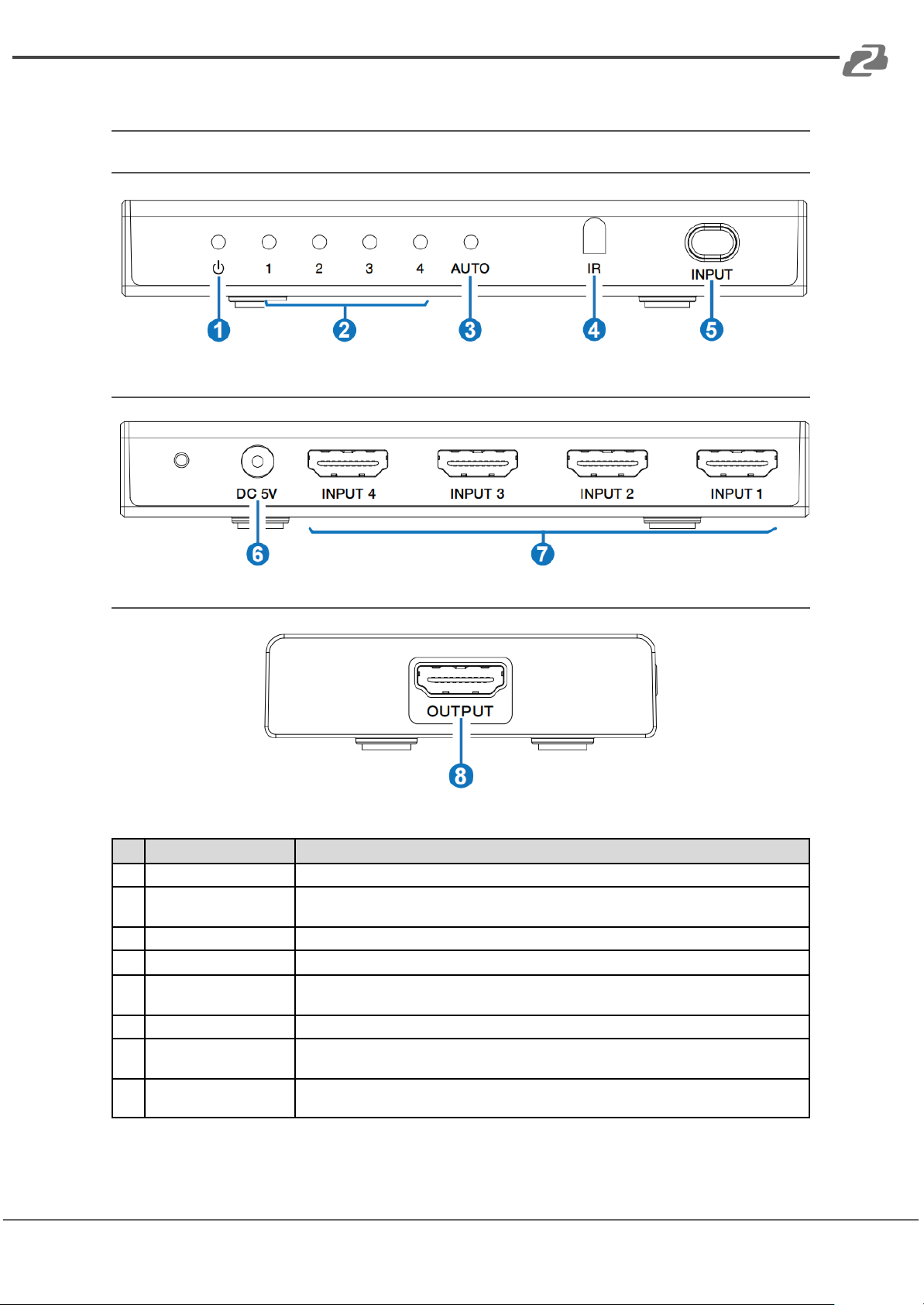
Operation Controls and Functions
No.
Name
Function Description
1
POWER LED
When the device is powered on, the white power LED is on.
2
INPUT LED (1~4)
When the INPUT 1/2/3/4 port is selected as the signal source input channel, the
corresponding white LED will be on.
3
AUTO LED
When the auto switching mode is enabled, the corresponding white LED will be on.
4
IR Window
IR input signal receiving window.
5
INPUT button
▪ Short press this button to circularly select signal source.
▪ Long press this button for 3 seconds to enable the auto switching mode.
6
DC 5V
DC 5V/1A Power input port.
7
INPUT port (1~4)
HDMI signal input ports, connected to HDMI source device such as DVD or PS5 with an
HDMI cable.
8
OUTPUT port
HDMI signal output port, connected to HDMI display device such as TV or Monitor with an
HDMI cable.
Address: 830 National Drive #140, Sacramento, CA 95834, USA · Tel: +1(888)499-9906 · Email: [email protected] 7
Front Panel
Rear Panel
Side Panel
Page 8
BZBGEAR BG-8K-HS41 PRODUCT MANUAL
Notes:
Address: 830 National Drive #140, Sacramento, CA 95834, USA · Tel: +1(888)499-9906 · Email: [email protected] 8
1. If you need to use the switcher to output signals of 4K@120Hz or 8K@ 60Hz, please
make sure that your HDMI cable, HDMI signal source and HDMI display all support the
above resolution.
2. The length of the HDMI cables connected to both ends of the switcher should not be
too long, otherwise, it will easily cause the screen to flicker. The following HDMI cables
are suggested.
8K60, 8K30, 4K120: Ultra HDMI 2.1 cable, IN/OUT 2 meters.
4K60 4:4:4: HDMI 2.0 cable, IN/OUT 3 meters.
4K60 4:2:0, 4K30, 1080P: HDMI cable, IN/OUT 5 meters.
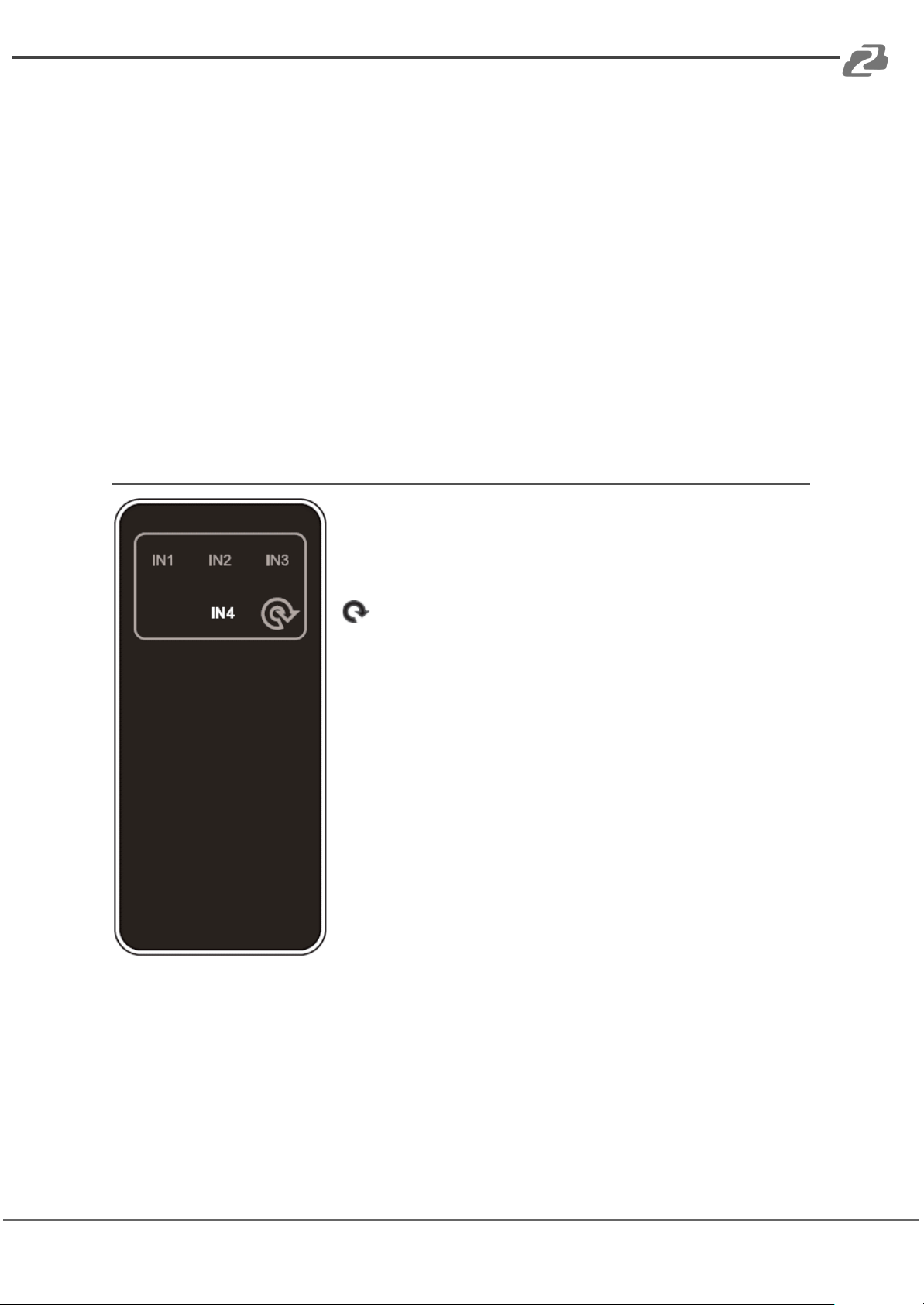
IR Remote
IN1/2/3/4 : Press IN1/2/3/4 button to select HDMI signal
source INPUT 1/2/3/4 to the OUTPUT port.
: Press this button to circularly switch HDMI signal source
INPUT 1/2/3/4 to the OUTPUT port.
Page 9
BZBGEAR BG-8K-HS41 PRODUCT MANUAL
Application Diagram
Address: 830 National Drive #140, Sacramento, CA 95834, USA · Tel: +1(888)499-9906 · Email: [email protected] 9
Page 10

BZBGEAR BG-8K-HS41 PRODUCT MANUAL
Tech Support
Phone
1.888.499.9906
Email
Live Chat
bzbgear.com
Address: 830 National Drive #140, Sacramento, CA 95834, USA · Tel: +1(888)499-9906 · Email: [email protected] 10
Have technical questions? We may have answered them already!
Please visit BZBGEAR’s support page (bzbgear.com/support) for helpful information and
tips regarding our products. Here you will find our Knowledge Base
(bzbgear.com/knowledge-base) with detailed tutorials, quick start guides, and step-by-step
troubleshooting instructions. Or explore our YouTube channel, BZB TV
(youtube.com/c/BZBTVchannel), for help setting up, configuring, and other helpful how-to
videos about our gear.
Need more in-depth support? Connect with one of our technical specialists directly:
Warranty
BZBGEAR Pro AV products and cameras come with a three-year warranty. An extended
two-year warranty is available for our cameras upon registration for a total of five years.
For complete warranty information, please visit bzbgear.com/warranty.
For questions, please call 1.888.499.9906 or email [email protected].
Page 11

BZBGEAR BG-8K-HS41 PRODUCT MANUAL
Mission Statement
Address: 830 National Drive #140, Sacramento, CA 95834, USA · Tel: +1(888)499-9906 · Email: [email protected] 11
BZBGEAR is a breakthrough manufacturer of high-quality, innovative audiovisual equipment
ranging from AVoIP, professional broadcasting, conferencing, home theater, to live
streaming solutions. We pride ourselves on unparalleled customer support and services.
Our team offers system design consultation, and highly reviewed technical support for all
the products in our catalog. BZBGEAR delivers quality products designed with users in
mind.
Page 12

BZBGEAR BG-8K-HS41 PRODUCT MANUAL
Copyright
Address: 830 National Drive #140, Sacramento, CA 95834, USA · Tel: +1(888)499-9906 · Email: [email protected] 12
All the contents in this manual and its copyright are owned by BZBGEAR. No one is allowed
to imitate, copy, or translate this manual without BZBGEAR’s permission. This manual
contains no guarantee, standpoint expression or other implies in any form. Product
specification and information in this manual is for reference only and subject to change
without notice.
All rights reserved. No reproducing is allowed without acknowledgement.
 Loading...