

Page 1

B-Box Residential user manual
B-Box Res 2.5~10.0
User Manual
Rev 1.0_April.2017
Copyright © BYD Company Limited. All rights reversed.
Without the written consent of BYD Company, any entity or individual shall not extract,
copy contents of the document, it is not allowed to be translated in any conditions.
Page 2

B-Box Residential user manual
Statement:
The product version update or other reasons for changes should be subjected to adjust on
the condition of BYD’s notice. Unless otherwise agreed, the document used as guidance
only, all statements information and suggestions in this document do not constitute any
expression.
You can contact BYD side if you have any questions.
BYD Lithium Battery Company Limited
TEL: 0755-8988 8888
FAX: 0755-8961 9653
Page 3

Page 3
Contents
1.1 About this manual
............................................................................................................................... 4
1.2 Target Group
........................................................................................................................................ 4
1.3 Intend usage
......................................................................................................................................... 4
1.4 B-BOX and B-Plus definition
........................................................................................................... 4
1.5 Identifying the Product
....................................................................................................................... 4
2 Safety
............................................................................................................................................................ 5
2.1 Safety precaution
................................................................................................................................. 5
2.2 Safety guidelines for installation
...................................................................................................... 6
3 Technical parameters
............................................................................................................................... 7
4 Technical explanation
.............................................................................................................................. 8
5 Product overview
....................................................................................................................................... 9
5.1 B-BOX System Brief introduction
................................................................................................... 9
5.2 B-BOX configuration table
............................................................................................................. 10
5.3 B-BOX System diagram
.................................................................................................................. 10
5.4 General introduction of BMU
......................................................................................................... 11
5.5 General introduction of B-Plus 2.5
................................................................................................ 12
5.6 Operating environment
..................................................................................................................... 13
5.7 B-Plus 2.5 address switch introduction
......................................................................................... 14
6 Cleaning and maintenance
....................................................................................................................15
6.1 Cleaning
.............................................................................................................................................. 15
6.2 Maintenance
....................................................................................................................................... 15
6.2.1 Recharge requirement with normal storage
........................................................................... 15
6.2.2Recharge requirement with over discharge storage
.............................................................. 16
7 Dispose special situation
........................................................................................................................16
7.1 Battery over discharged maintenance
............................................................................................ 16
7.2 Force Majeure
.................................................................................................................................... 16
8 B-BOX configuration list with different inverter
...........................................................................17
8.1 B-BOX configuration list with SMA sunny island-On/Off grid
............................................... 17
8.2 B-BOX configuration list with GOODWE ES-On/Off grid
...................................................... 18
8.3 B-BOX configuration list with GOODWE BP-On/ grid
............................................................ 18
8.4 B-BOX configuration list with Victron Multiplus/Multigrid-On/Off grid
.............................. 18
8.5 B-BOX configuration list with Solax -On grid
............................................................................ 19
8.6 B-BOX configuration list with Victron Quattro- On/Off grid
................................................... 19
9 Normal issues and solutions
..................................................................................................................21
9.1 Normal alarm displayed on the SRC of SMA sunny island and the solution
......................... 21
9.2Normal alarm displayed on the APP of GOODWE and the solution
........................................ 22
9.3Normal alarm displayed on the screen of Solax and the solution
.............................................. 22
9.4 Normal alarm display on the BMU of B-BOX and the solution
............................................... 23
9.5Normal alarm display on B-Plus 2.5and solution
......................................................................... 24
10 Warranty
.................................................................................................................................................26
11 Login in after service web
...................................................................................................................26
Page 4

Page 4
1 General Information
1.1 About this manual
This user manual introduces the B-Box product information, using guidance, safety caution items
and normal failure and actions. Users can contact with the after service center if had any
abnormal failure or urgent occurs.
1.2 Target Group
This user manual is applied for the B-BOX 2.5, B-BOX 5.0, B-BOX 7.5, and B-BOX 10.0.
1.3 Intend usage
The B-BOX can be used in household energy storage application, includes on/off grid system.
When B-BOX works with different inverter, user should refer to the configuration list with the
approved inverters brands which are suggested by BYD.
1.4 B-BOX and B-Plus definition
BYD battery box products B-Box Res 2.5~10.0 are defined as below:
B-Box: Battery Box
B-Plus2.5: battery unit with nominal capacity is 2.56KWh, will be installed inside the cabinet as
an energy storage module.
B-Box2.5: Battery nominal capacity is 2.56KWh (Includes 1pcs B-Plus2.5)
B-Box 5.0: Battery nominal capacity is 5.12KWh (Includes 2pcs of B-Plus2.5)
B-Box 7.5: Battery nominal capacity is 7.68 KWh (Includes 3pcs of B-Plus2.5)
B-Box 10.0: Battery nominal capacity is 10.24KWh (Includes 4pcs of B-Plus2.5)
1.5 Identifying the Product
The Type Label describes the product identification, which is attached on the product. For safe
usage, the user must be well-informed of the contents in the Type Label. The Type Label
includes:
Product Name:
Product Type/Nominal Capacity:
Nominal Voltage:
Max Current Discharge & Charge:
Ambinet Temperature Range:
Page 5
Page 5
2 Safety
2.1 Safety precaution
Warning, notice and caution
Users are be kindly requested to use the battery which is delivered from BYD Lithium Battery
Company Limited in strict accordance with the Datasheet and remarks include at the end of this
document.
BYD Lithium Battery Co., Ltd. will not guarantee the use of this data sheet outside of any
accident.
WARNING
Do not crush, dispose according to safety regulations (Do not dispose in fire or water).
Recharge Battery at least every 6 months (when in storage).
Once discharged, recharge battery within 7days. If there is no charging operation within 7days,
please power off the battery disconnect it form system
Do not expose to temperatures above 50℃,and keep out of direct sunlight.
Must be grounded correctly. Do not reverse the front panel.
Do not short, reverse polarity or connect in series.
Disconnect from power and load before maintenance.
May only be operated by qualified professionals.
Storage according to related standard.
Do not put one battery on another when unpackaged.
In the process of transportation and storage, the goods are not allowed be stacked at a height or
layers above the specification.
When increase the battery, should power off the battery and other power input first.
B-BOX product only can be used in home energy storage application, and it is not allowed for
life-sustaining medical devices and automotive application.
NOTICE
Inadvertent operation of damaged B-Box can lead to a dangerous situation that may result in
serious injury due to electrical shock. Only can operate B-Box when it is technically faultless and
in an operationally safe stat.
Regularly check the B-Box for visible damage. Making sure that all safety equipment is freely
accessible at all time. If B-Box is damaged, do not touch it.
Please contact BYD after service supplier if a significant event message displays on LCD or APP
of inverter.
Page 6
Page 6
CAUTION
Li-ion battery inside, when disassembling the system, do not intentionally short the positive(+)
and negative(-) terminals with metallic objects.
All works on system and electrical connections must be carried out by qualified personnel only.
B-Box provides an emergency switch when for urgent situation.
A potentially hazard circumstance such as excessive heat or electrolyte mist may occur incorrect
operation, damage, abuse. The safety precautions and the warning messages described are not
fully understood, or if you have any questions, please contact after service for guidance. The
safety section may not include all regulations for your locale.
Personnel working with B-Box must review applicable federal, state and local regulations as well
as the industry standards regarding this product.
When transport the system with package type, remove the battery from cabinet and transport them
separately.
2.2 Safety guidelines for installation
CAUTION
Li-ion battery (energy storage unit) inside. When assembling the system, do not intentionally
make a short condition between the positive (+) and negative (-) terminals of the battery box with
a metallic object.
All works on the B-Box and electrical connections must be carried out by qualified personnel
only. B-Box provides a safe source of electrical energy when operated as intended and as
designed.
Potentially hazardous circumstances such as excessive heat or electrolyte mist may occur under
improper operating conditions, damage, misuse and abuse. The following safety precautions and
the warning messages described in this section must be observed. If any of the following
precautions are not fully understood, or if you have any questions, contact customer service for
guidance. The Safety Section may not include all regulations for your locale; personnel working
with B-Box must review applicable federal, state and local regulations as well as the industry
standards regarding this product.
Installation personnel cannot wear watches, etc., to avoid short circuit and man-made damage.
CAUTION
Due to heavy weight of BYD B-Box Res 2.5~10.0, please use strong package and do safety
protection during transportation, and make sure to the safety to avoid man-made damage.
Page 7
Page 7
3 Technical parameters
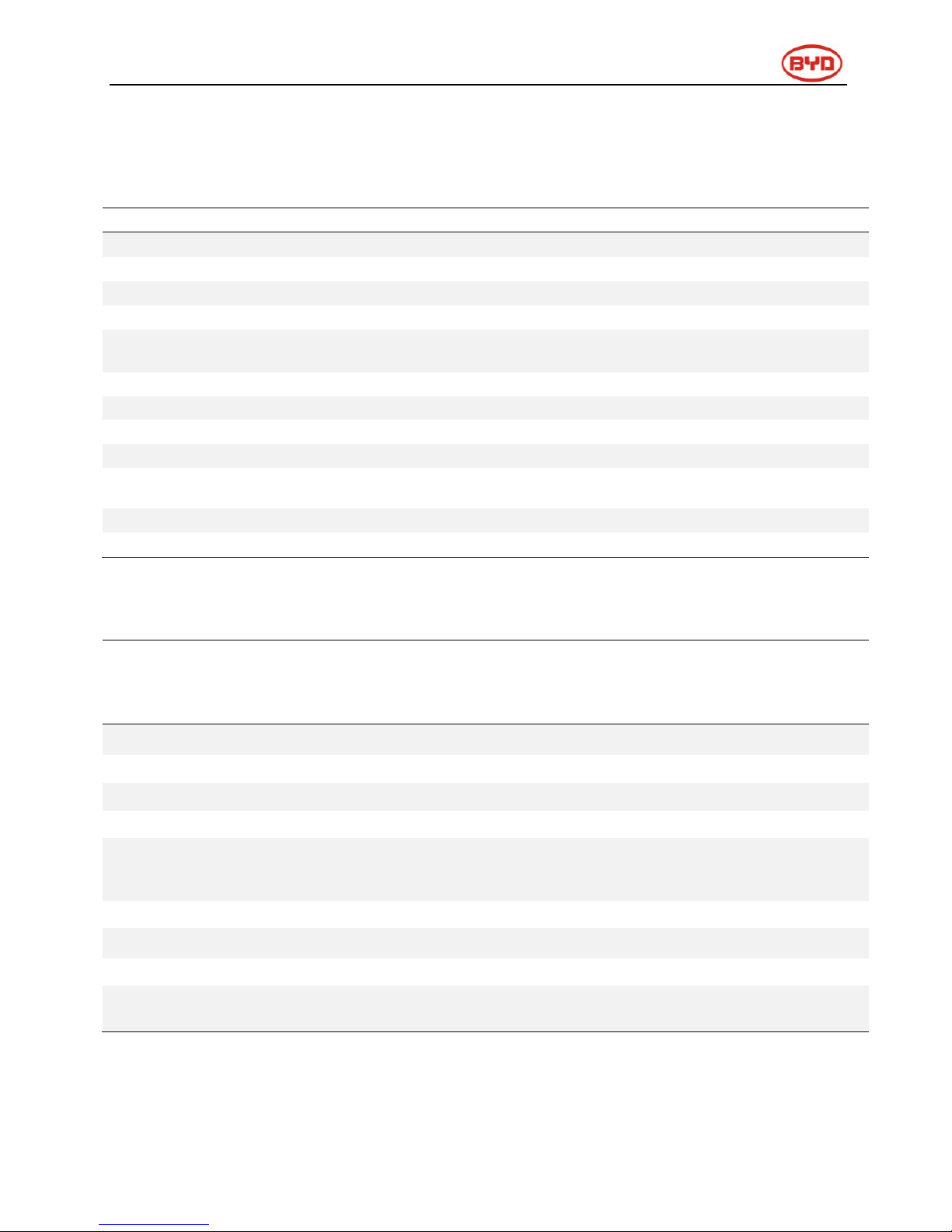
When B-BOX works in different temperatures, the current of charge and discharge will be
adjusted automatically, detail parameters setting please refer to below table:
Parameter setting of charge current in various temperature
Protect temp. /Resume temp. (℃)
Normal current(A)
-7~2
0.06C*N
2~12
0.12C*N
12~50
0.7C*N
Remark:
1.Effective time is 2mins when change from one temperature range to another.)
2.N=B-Plus2.5 battery quantity
Discharge current control with temperature
Protect temp./Resume temp.(℃)
Normal current(A)
-20~50/(-15-50)
0.7~1C*N
Remark:
1.N= B-Plus2.5 U battery quantity
B-Box Res 2.5
B-Box Res 5.0
B-Box Res 7.5
B-Box Res 10.0
Battery Type
Lithium Iron phosphate battery
Battery module
B-Plus2.5
Nominal Battery Energy
2.56
5.12
7.68
10.24
Max Output power(KW)
2.5
5.0
7.5
10.0
Usable battery energy(KWh)(0.2C
charge &discharge at @+25℃)(KWh)
2.45
4.90
7.35
9.80
Nominal voltage(V)
51.2
Operating Voltage Range(V)
43.2~56.4
Ambient Temperature Range[℃]
-10~+50
Communication
RS485/CAN
Cabinet Net Dimension(W*D*H
mm)(Without ground feet)
620* 328* 1700
Net Weight(Kg)
103
137
171
205
IP level
IP55
Page 8

Page 8
4 Technical explanation
No.
Terms
comment
1
Discharge
Battery output power for load
2
Charge
Battery power supply(such as DC charger)
3
Full charged
Battery full charge, SOC is 100%.
4
Idle
Battery is on status of neither charge nor discharge and had not full charged.
5
Shutdown mode
Power off
6
SOC
State of Charge
7
SW
Software
8
HW
Hardware
9
Battery voltage
The voltage between B+/B-
10
Pack voltage
The voltage between P+/P-
11
Cell voltage
Single cell voltage
12
Failure
Battery or BMS are broken, need to change new unit
13
Alarm
Battery will stop charge or discharge immediately
14
Protect
When battery stops charging or discharging (e.g. cell is over voltage), it is resumable.
15
Over discharged
Battery module or batteries overvoltage, need timely supplement electricity.
Page 9
Page 9
5 Product overview
5.1 B-BOX System Brief introduction
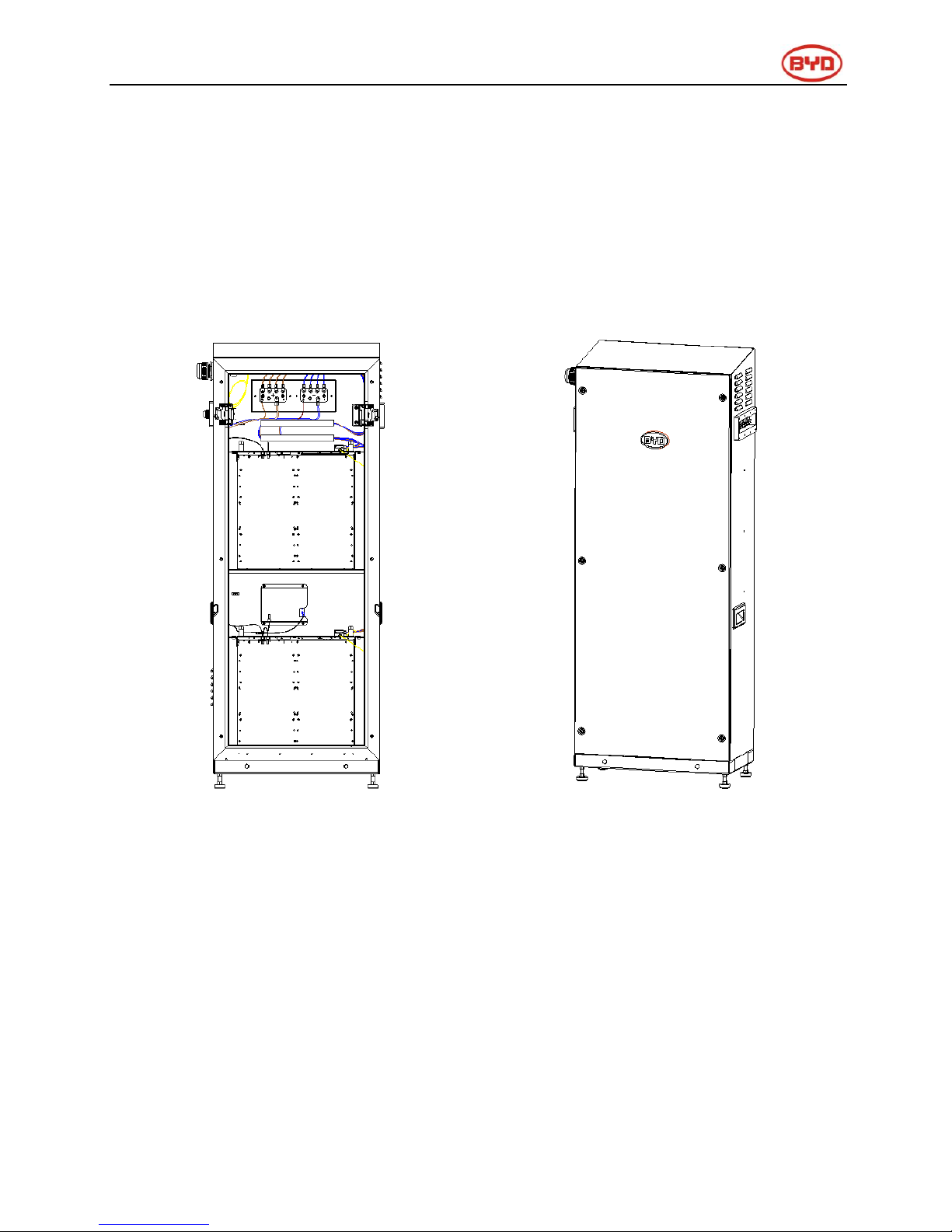
B-Box is the short name of battery box, the energy storage part in the electric power system is
household, the B-box carries BYD’s lithium battery with excellent performance. There are 1/2/3/4
pcs batteries modules in each box, and the box support parallel connection to expend capacity
from 2.5KWh to 80KWh, which can meet various capacity requirement for customers.
Internal view
External drawing
Page 10
Page 10
5.2 B-BOX configuration table
No.
Component
Name
Description
1
Cabinet
B-Box
Cabinet
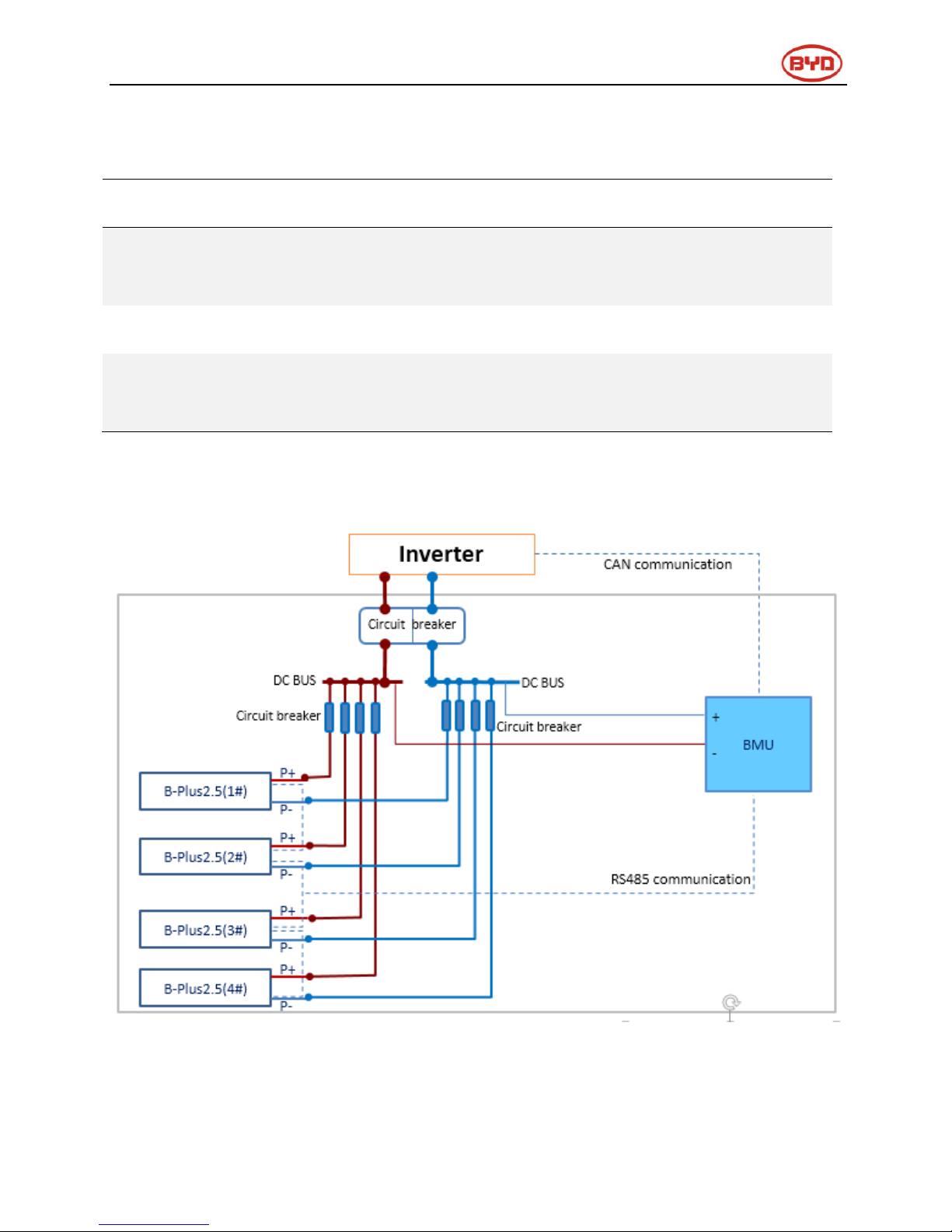
The Cabinet is used to install the B-Plus 2.5 inside and provide DC
output(Each cabinet can install max 4pcs B-Plus2.5)
2
Battery
B-Plus2.5
Battery module with 51.2V50Ah, BYD’s P/N is: U3A1 -50P-A.
3
BMU
BMU
Battery management unit. Provide communication with external
equipment.
5.3 B-BOX System diagram
System diagram
Page 11
Page 11
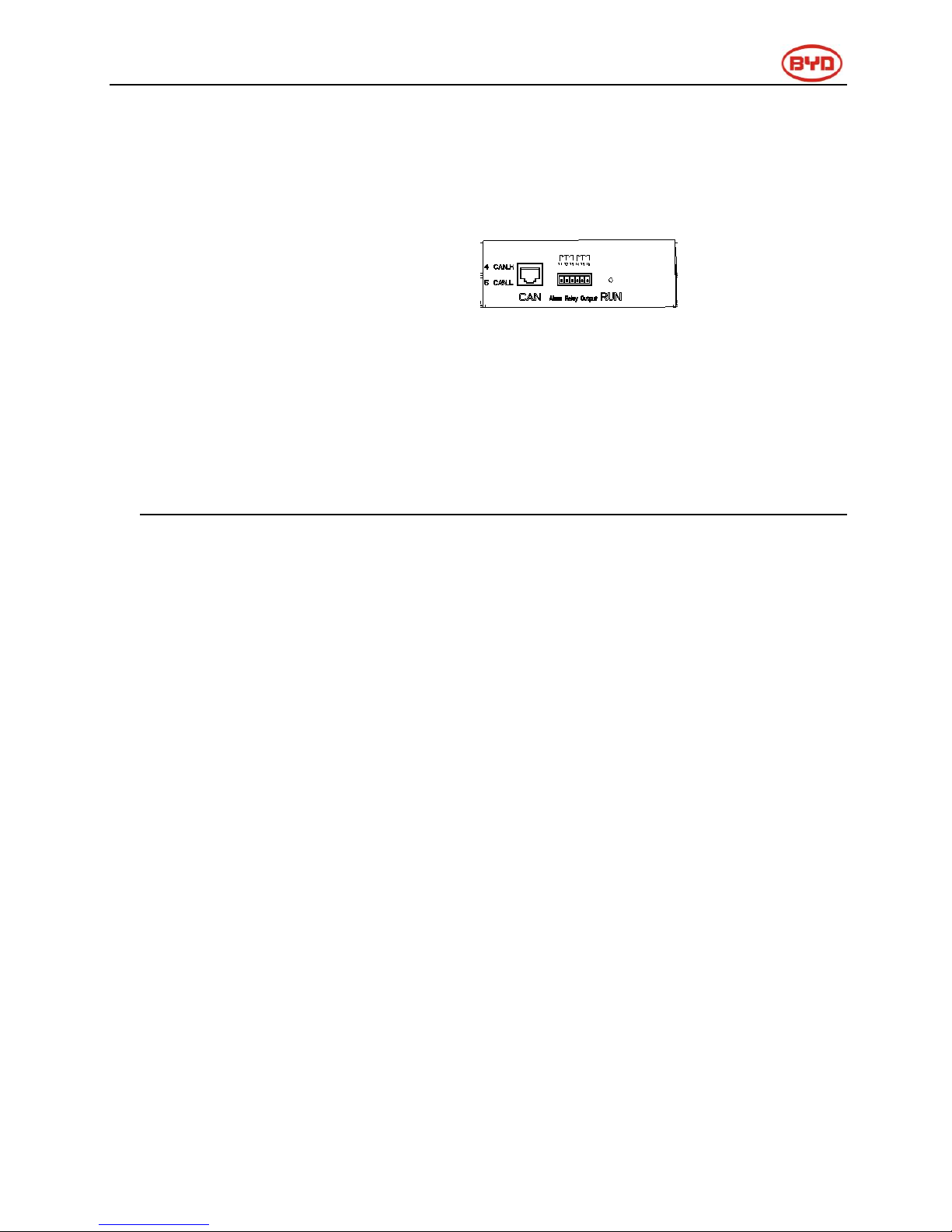
5.4 General introduction of BMU
BMU is battery management unit which installed in cabinet; the function is to manage the
battery’s charge and discharge, select information from battery and report to inverter.
Main function:
✓
CAN /RS485 communicate with inverter
✓
RS485 communicate with battery/BMS
✓
Dry contact terminal
✓
Other Communication interface for maintenance
✓
Charge and discharge management
Page 12
Page 12
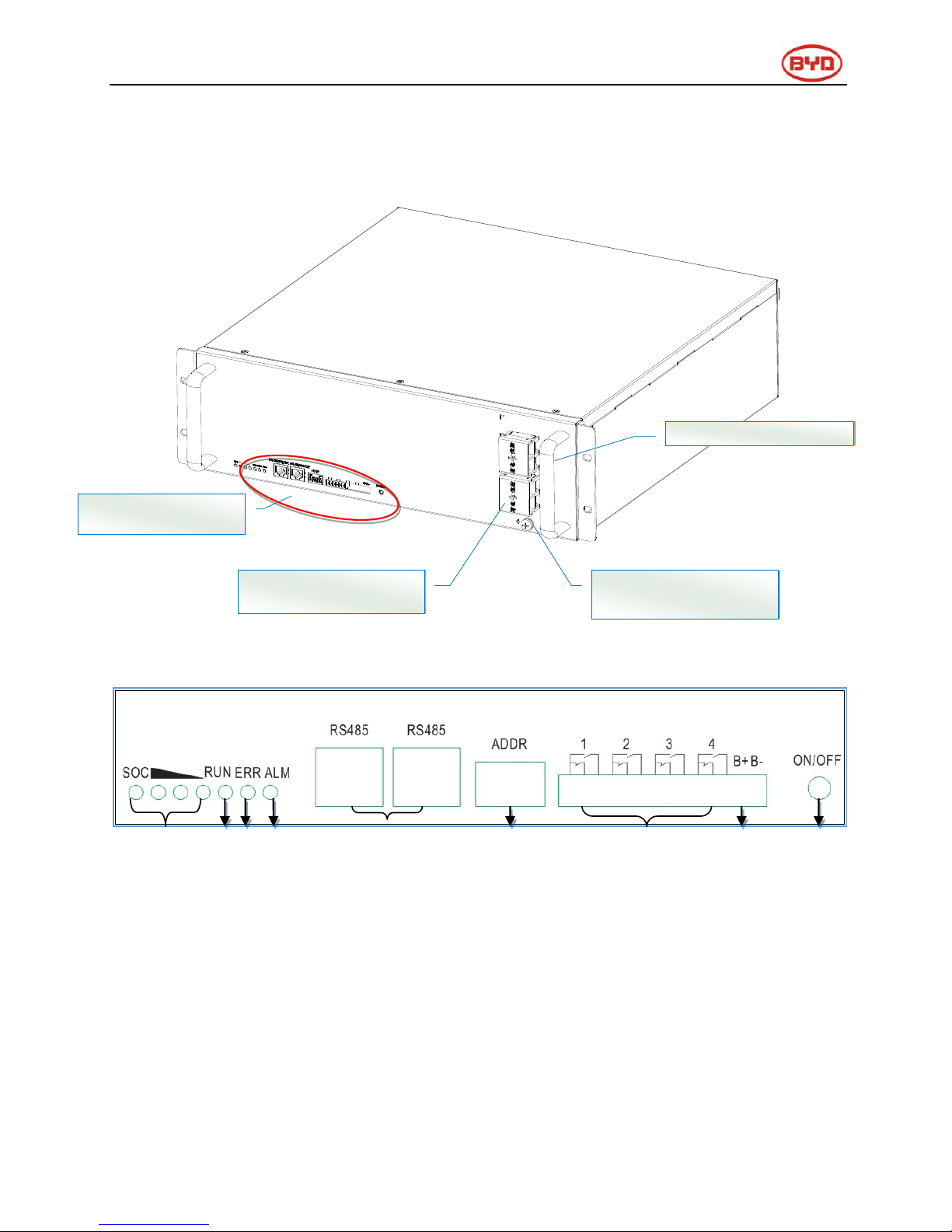
5.5 General introduction of B-Plus 2.5
B-Plus is the commercial name of BYD U3A1-50P-A backup battery with 51.2V& 50Ah which
is designed for energy storage application. B-Plus 2.5 is an integrated battery which consist of
shell, BMS and cells.
B-Plus 2.5 overview
① ② ③ ④ ⑤ ⑥ ⑦ ⑧ ⑨
⑩
Display and
communicate
GND : Grounded
terminal
P-: Negative terminal (DC+)
P+: Positive terminal (DC-)
Page 13
Page 13
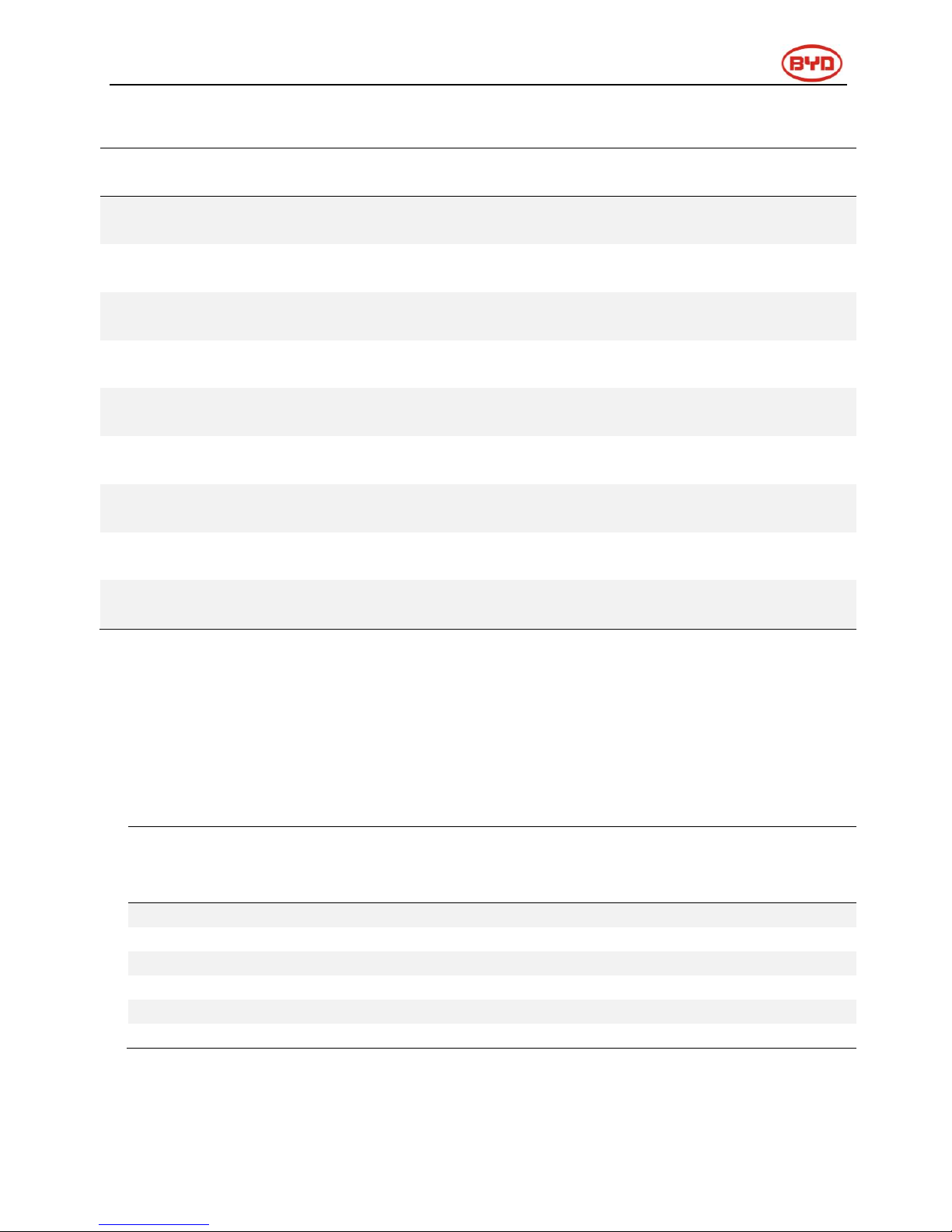
Display and communicate interface
No.
Interface
Mark
Function
SOC LED
SOC
Indicate State of capacity of battery
RUN LED
RUN
Indicate the Plus is running status
ERR LED
ERR ADDR
Indicate error status
ALM LED
Alarm
Indicate alarm status
RJ45 terminal
RS485
Communication ports
Address
ADDR
When parallel connection, need setting address.
Alarm relay output
1.2.3.4
Not using
Test terminal
B- B+
Measure battery voltage when testing.
ON/OFF
ON/OFF
Activity battery when no external powers add on battery.
5.6 Operating environment
Operating environment parameters
No.
Item
Requirement
Unit
Remark
Min.
Typical
Max.
1
Discharging temperature
-10
25
50
℃
2
Charging temperature
-10
25
50
℃
3
Relative humidity
5
95
%
4
Absolute humidity
0.26
25
g/m3
5
Elevation
-
2000 - m
6
IP level
20
Page 14

Page 14
5.7 B-Plus 2.5 address switch introduction
After finished the battery installation, installer should setup battery address by “ADDR” switch.
“ADDR” switch introduction:
Function: Communicate between battery and BMU, BMU will communicate with external
equipment when use CAN communication.
Each DIP switch definition:
There are 6 bit switches, keep the switch on down side means”0”, turn up the switch to “ON”
means “1”.
Address: 000000 Address:100000
For example: when two battery in using, “ADDR” setting:
No.1 battery address: 100000 No.2 battery address: 010000
Please refer to the configuration list in Appendex1.
Notice: Make sure of the highest address of BMS connecting to BMU which communication with
inverter.
Page 15
Page 15
6 Cleaning and maintenance
6.1 Cleaning
The B-BOX system is recommended to be cleaned periodically. If the enclosure is in a dirty
condition, please use a soft and dry brush or a vacuum to remove the dirt. Do not use liquids such
as solvents, abrasives or corrosive liquids in the enclosures.
6.2 Maintenance
6.2.1 Recharge requirement with normal storage
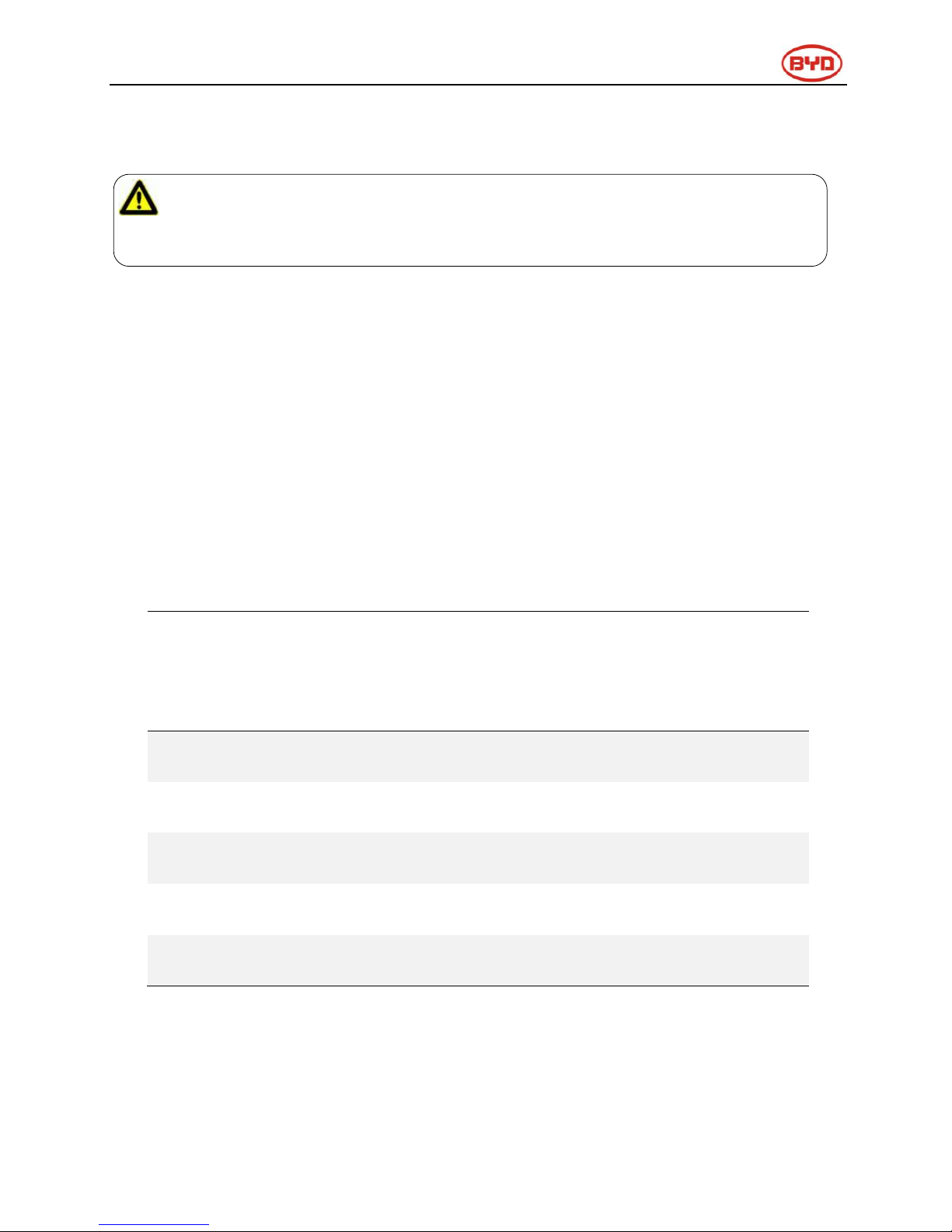
The B-BOX should be installed in position with the temperature range of -10
℃~
+50℃.The
load-bearing of battery’s package is less than 300Kg, So don’t let more than 7 modules in stack.
When the battery stored for a long time, need a regular maintenance according to the following
table Charge battery with current of 0.5C (25A) for 1 hour when maintenance.
Storage parameters under different storage conditions-1
Storage
environment
temperature
Relative humidity
of storage
environment
Storage
time
SOC
Below -20℃
/
prohibit
/
-20~25℃
5%~70%
≤12 months
30%≤SOC≤60%
25~35℃
5%~70%
≤6months
30%≤SOC≤60%
35~45℃
5%~70%
≤3months
30%≤SOC≤60%
Above 45℃
/
prohibit
/
CAUTION:
When user needs to clean the B-BOX, please stop the system firstly.
Page 16
Page 16
6.2.2Recharge requirement with over discharge storage
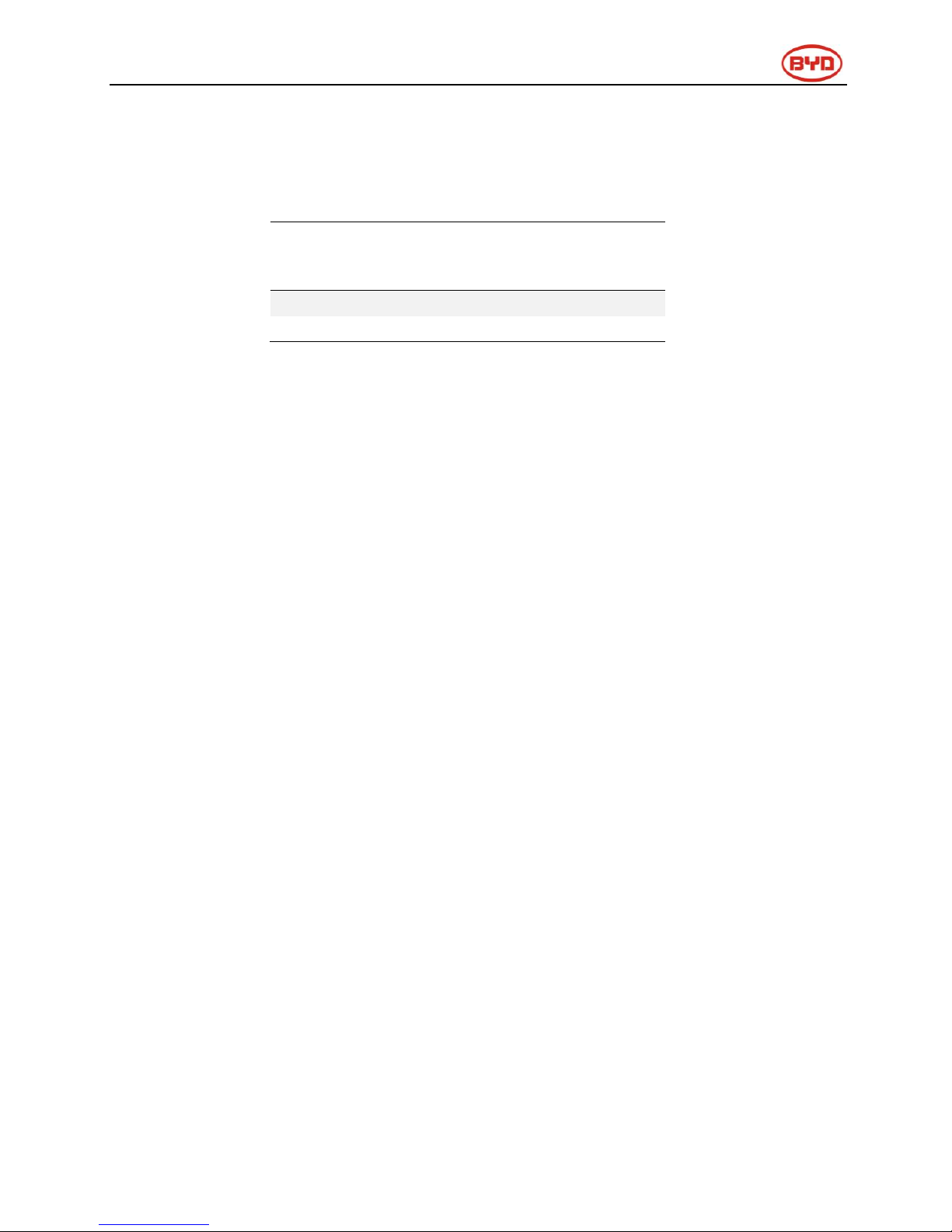
When in storage, if module over discharged, the module will be damaged after several days if do
not charge the module in time.
Storage parameters under different storage conditions-2
Storage
environment
temperature
Storage time
-20~25℃
≤15 days
25~45℃
≤7 days
7 Dispose special situation
7.1 Battery over discharged maintenance
When battery over discharge which may cause by black out, continuously rainy day, etc, the
battery can provide limited energy, user should pay attention to the backup time of the battery.
7.2 Force Majeure
Catastrophic accidents, including lightning, floods, earthquakes, fires and other disasters, can
bring unpredictable damage to the whole system.
Page 17

Page 17
8 B-BOX configuration list with different
inverter
8.1 B-BOX configuration list with SMA sunny island-On/Off grid
1 Phase on Grid
Inverter Type
B-Plus 2.5
Cabinets
SI 3.0M
≥1
≥1
SI 4.4M
≥1
≥1
SI 6.0H
≥1
≥1
SI 8.0H
≥1
≥1
Remark: Maximum B-Plus quantity is 32,Cabinet quantity is 8.
3 Phase on Grid
Inverter Type
B-Plus 2.5
Cabinets
SI 3.0M
≥3
≥1
SI 4.4M
≥4
≥1
SI 6.0H
≥4
≥1
SI 8.0H
≥4
≥1
1 Phase off Grid
Inverter Type
B-Plus 2.5
Cabinets
SI 3.0M
≥3
≥1
SI 4.4M
≥3
≥1
SI 6.0H
≥5
≥2
SI 8.0H
≥5
≥2
3 Phase off Grid
Inverter Type
B-Plus 2.5
Cabinets
SI 3.0M
≥8
≥2
SI 4.4M
≥8
≥2
SI 6.0H
≥12
≥3
SI 8.0H
≥12
≥3
Remark: Maximum B-Plus quantity is 32, Cabinet quantity is 8.
Page 18

Page 18
8.2 B-BOX configuration list with GOODWE ES-On/Off grid
1 Phase on Grid
Inverter Type
B-Plus 2.5
Cabinets
3.6kW
≥1
①
≥1
4.6kW
≥1
①
≥1
1 Phase off Grid
Inverter Type
B-Plus 2.5
Cabinets
3.6kW
≥2
≥1
4.6kW
≥2
≥1
Remark: Maximum B-Plus quantity is 32,Cabinet quantity is 8.
①This configuration is only for self-consumption application
8.3 B-BOX configuration list with GOODWE BP-On/ grid
1 Phase on Grid
Inverter Type
B-Plus 2.5
Cabinets
2.5kW
≥1
≥1
Remark: Maximum B-Plus quantity is 32, Cabinet quantity is 8.
8.4 B-BOX configuration list with Victron Multiplus/Multigrid-On/Off grid
1 Phase on Grid
Inverter Type
B-Plus 2.5
Cabinets
3KVA
≥1
≥1
5KVA
≥1
≥1
1 Phase off Grid
Inverter Type
B-Plus 2.5
Cabinets
3KVA
≥2
≥1
5KVA
≥3
≥1
Page 19
Page 19
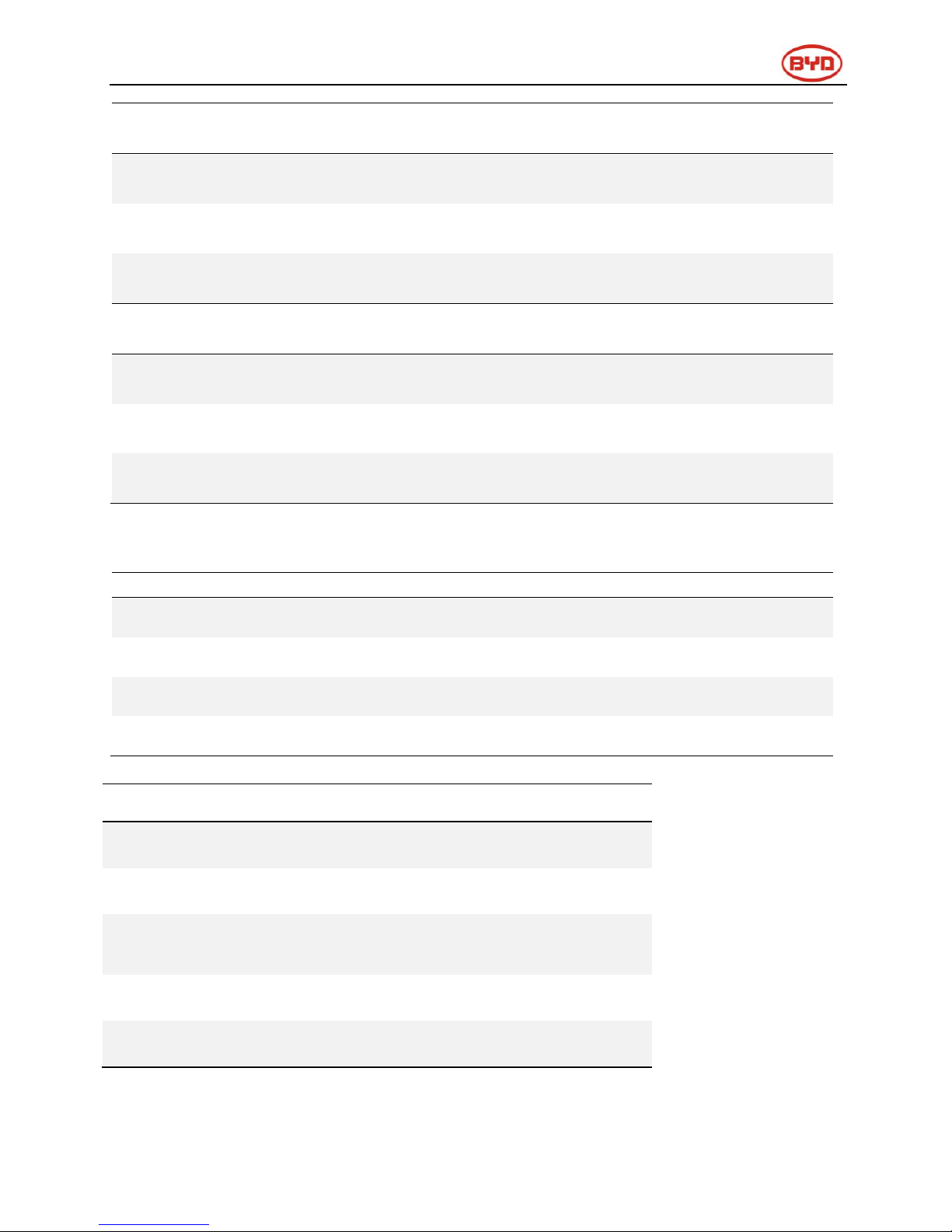
3 Phase on Grid
Inverter Type
B-Plus 2.5
Cabinets
3KVA
≥3
≥1
5KVA
≥3
≥1
3 Phase off Grid
Inverter Type
B-Plus 2.5
Cabinets
3KVA
≥6
≥2
5KVA
≥9
≥2
8.5 B-BOX configuration list with Solax -On grid
1 Phase on Grid
Inverter Type
B-Plus 2.5
Cabinet
SK-SU 3000
≥1
≥1
SK-SU 3700
≥1
≥1
S K-SU 5000
≥1
≥1
8.6 B-BOX configuration list with Victron Quattro- On/Off grid
1 Phase on Grid
Inverter Type
B-Plus 2.5
Cabinet
5KVA
≥1
≥1
8KVA
≥1
≥1
10KVA
≥1
≥1
15KVA
≥1
≥1
Page 20

Page 20
1 Phase off Grid
Inverter Type
B-Plus 2.5
Cabinet
5KVA
≥3
≥1
8KVA
≥5
≥2
10KVA
≥6
≥2
15KVA
≥9
≥3
3 Phase on Grid
Inverter Type
B-Plus 2.5
Cabinet
5KVA
≥3
≥1
8KVA
≥4
≥1
10KVA
≥5
≥2
15KVA
≥6
≥2
3 Phase off Grid
Inverter Type
B-Plus 2.5
Cabinet
5KVA
≥9
≥3
8KVA
≥15
≥4
10KVA
≥18
≥5
15KVA
≥27
≥9
Page 21

Page 21
9 Normal issues and solutions
9.1 Normal alarm displayed on the SRC of SMA sunny island and the
solution
SMA SRC
Reason
Solution
F221
External Alarm-Invalid Bat Type
Reset battery type to "Li" on SRC.
F920(XA01General)
1.AnyB-Plus2.5hasfailedto
communicate with the BMU;
2.RS485communicationbetween
the BMU and the B-Plus 2.5have
failed;
1.Inspect whether the RS485
communicate cable has been connected
correctly and reliability;
2.Inspect DIP switch setting according
to the setting of DIP switch guidance in
user manual;
3.Change BMU in cabinet;
F921(XA02DcHiVolt)
External Alarm - Battery High
Voltage
If the red led of the B-Plus 2.5 is on,
please contact the service provider to
change the battery. If not, check the
system settings according to the
guidelines.
F922(XA03DcLoVolt)
External Alarm - Battery Low
Voltage
F923(XA04DcHiTmp)
External Alarm - Battery High
Temp
F924(XA05DcLoTmp)
External Alarm - Battery Low
Temp
F925(XA06DcHiTmpC)
External Alarm - Battery High
Temp Charge
F926(XA07DcLoTmpC)
External Alarm - Battery Low
Temp Charge
F927(XA08DcHiCur)
External Alarm - Battery High
Current Discharge
F928(XA09DcHiChgCur)
External Alarm - Battery High
Current Charge
F930(XA11Short)
External Alarm - Short circuit
1.Power off;
2.Inspect if there is short connection of
cable between P+&P-;
3.If short connection is confirmed,
please reconnect cable correctly;
4.restart battery;
F931(XA12Bms)
External Alarm - BMS internal
If the red led of the B-Plus 2.5 is on,
Page 22

Page 22
F932(XA13CellBal)
External Alarm - Cell imbalance
please contact the service provider to
change the battery. If not, check the
system settings according to the
guidelines.
F952
External Alarm –ExtBMS Timeout
1.Inspect whether the CAN
communication cable has been
connected correctly and reliability;
2.Change BMU in cabinet;
9.2Normal alarm displayed on the APP of GOODWE and the solution
APP of GOODWE
Reason
Solution
BMS status: Battery
communication fail
Inverter and BMU
communication failure
1.Inspect whether the CAN
communication cable has been
connected correctly and
reliability;
2.Change BMU in cabinet;
9.3Normal alarm displayed on the screen of Solax and the solution
Screen of Solax
Reason
Solution
BMS LOST
Inverter and BMU
communication failure
1.Inspect whether the CAN
communication cable has been
connected correctly and
reliability;
2.Change BMU in cabinet;
Page 23

Page 23
9.4 Normal alarm display on the BMU of B-BOX and the solution
LED of the BMU
Reason
Solution
Flash 1 time
Inverter and BMU
communication failure
1.Inspect whether the CAN
communication cable has been
connected correctly and
reliability;
2.Change BMU in cabinet;
Flash 2 times
Battery not found
BMU and first battery
connection check whether
normal
Flash 3 times
Cell parts not found
Check for battery capacity lights
in the form of the Lantern show,
check the corresponding battery
lines of communication, and the
address is set correctly.
Flash 4 times
Any battery failure
Check battery light stay lit, and
if so, please contact your
Installer to replace the battery.
Page 24

Page 24
9.5Normal alarm display on B-Plus 2.5and solution
B-Plus display info
Reason
Solution
LED
Yellow led(Alarm) blinks
for 0.5Hz,other led is
off ;
Battery has powered off
abnormally;
Press ON/OFF button
for 2-3 seconds to
restart the battery, If
the battery cannot be
resumed, contact the
service provider;
Flashing Lantern (lantern
and alternate capacity
display, 10S cycle)
Communication connection
timeout
Check the
communication wire
1/3 and 2/4 flashing
Update statue
If not update the
firmware, reset the
battery.
Yellow led (Alarm)
is
normally on
1. press on/off button 1S
release, hear a short
buzzer sound;
2.run lights stay lit, ALM
by flashing lights,
showing alarm code;
1time
Under voltage (BAT or CELL)
Automatically resume
2times
Over charge
Automatically resume
3times
Low temperature charge
over-current
Automatically resume
4times
Charge short circuit
Automatically resume
5times
Discharge short circuit
Automatically resume
6times
Parallel short circuit
Automatically resume
7times
Discharge over-current
protection
Automatically resume
8times
High temperature protection
Automatically resume
9times
Low temperature protection
Automatically resume
10times
PACK over voltage protection
Automatically resume
Red led (Err)
is
normally
1time
Voltage sensor failure
Change the battery
Page 25

Page 25
on
1) press the on/off button
press the 1S released hear
short buzzer sound;
2) run lights stay lit, ERR
by flashing lights,
showing alarm code;
2times
Temperature sensor failure
Change the battery
3times
Charging circuit failure
Change the battery
4times
Discharge circuit failure
Change the battery
5times
Batteries failure
Change the battery
6times
536 communication failure
Change the battery
Buzzer
15S for the cycle, each
time the buzzer number
of successive rings
4times
Reverse 、short circuit
1.Power off;
2.Inspect short/reverse
connection of cable
between P+&P-;
3.If short/reverse
connection is
confirmed, please
reconnect cable
correctly;
4.restart battery;
3times
Batteries failure
Change the battery
2times
Voltage sensor failure
、
Temperature sensor failure
Change the battery
1time
Charging/Discharge circuit
failure
Change the battery
Page 26

Page 26
10 Warranty
BYD provides warranty when the product is installed and used according to the description of
user manual / installation manual / warranty letter.
11 Login in after service web
In order to get after service in time, after installation, please login your B-BOX information in our
after service operator web:
For technical problems or inquiries for usage, please contact our installation company.
The following information is required for timely customer service.
Product type
Serial Number
Connected PV module type and number
Option equipment
Any using problems please contact us by below address:
Contact us:
China
BYD LITHIUM BATTERY Co.,LTD
Customer Service Mailbox: [email protected]
Telephone:+86 0755 89888888
Address:No.1 Baoping Road, Baolong Industrial Town, Longgang Shenzhen, 518116, China
Germany
EFT Energy for tomorrow
Customer Service Mailbox: [email protected]
Telephone: +49-6996759811
Address :Buchenstraße, 37 Lohr a. Main 97816, Germany
Australia
Alps Power Pty Ltd
Customer Service Mailbox: [email protected]
Telephone: +61 2 8005 6688
Address: 201/15 Chatham Road, West Ryde NSW 2114 Australia
 Loading...