

Page 1
User manual
www.bvfheating.com
BVF SYME
model-E
PRODUCT SPECIFICATION
Voltage: 230V, 50/60Hz
Load Current: 16A(Max)
Temp. Setting Range: 5~80°C
Ambient temp: 0~50°C
Sensor: NTC3950, 10Kohms at 25°C
Accuracy: ± 0.5°C
Protection Class: IP30
PRODUCT FEATURES
• Android and iOS application
• 4.3inch Color Touch Screen Operation
• Supports electric heating systems ( Max.16A)
• Adjustable Comfort Mode, Economy Mode, Party
Mode, Holiday Mode and Program Mode Control
• 5+1+1 Days Programmable
• External and Internal Sensor Select
• Languages select: English, French, German, Dutch,
Hungarian, Slovakian, Finnish, Estonian
• Clock and Date Display
• Temp. Calibration
• Temp. Protection
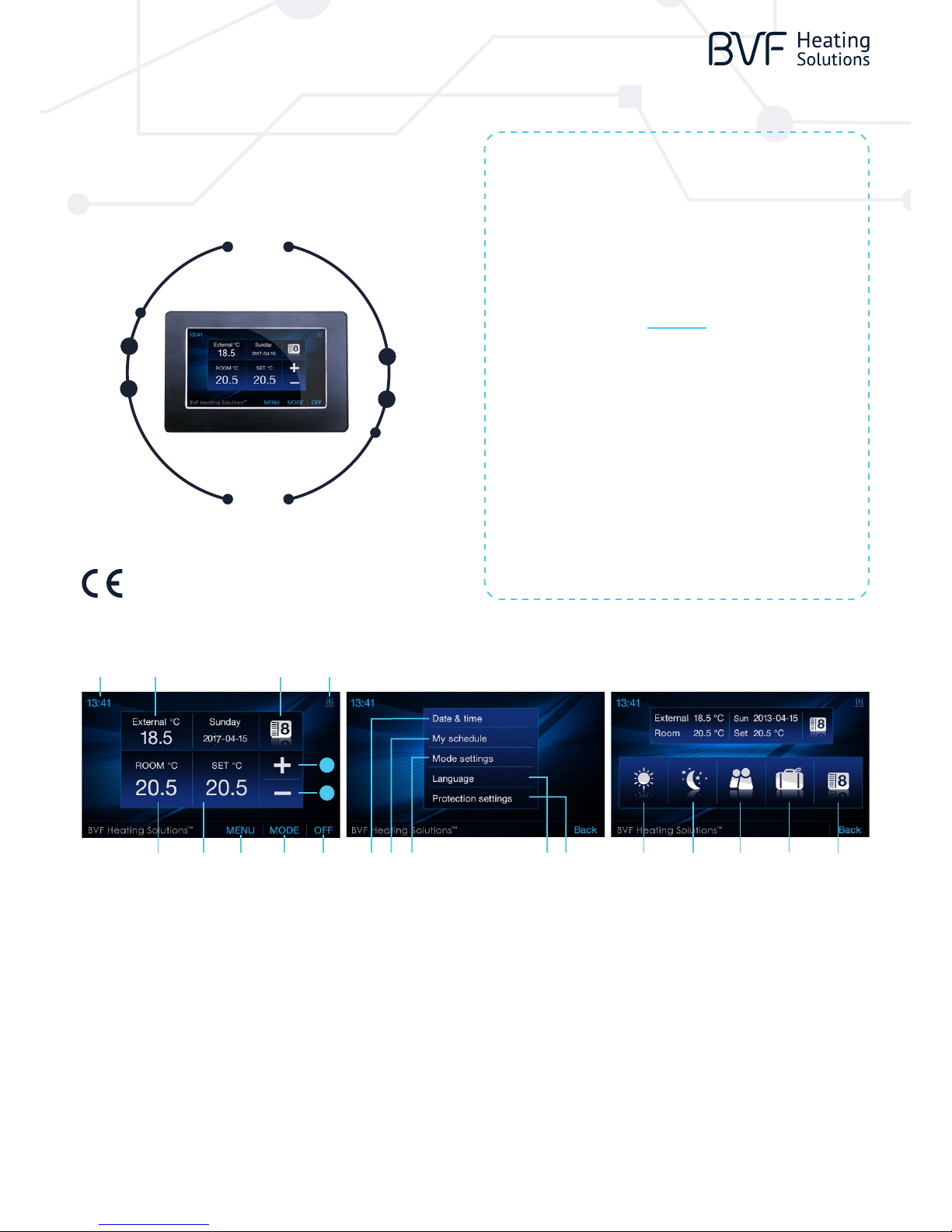
1
1110 6 9
4
5
237 12 1513 168 14
1 ON/OFF Button Use to turn on/o Thermostat
2 Mode Button Use to Choose Working Mode
3 Menu Button Use to Menu Settings
4 Down Button Decrease Temp. or other parameter setting
5 Up Button Increase Temp. or other parameter setting
6 External Temp. Show Floor Temp.
7 Room Temp. Show Actual Room Temp.
8 Set Temp. Range: 5-80°C
9 Mode Icon Show Current Working Mode
10 Clock Show Current Time & Enter Parameter Setting
11 Heating Icon Will Show When in Heating
12 Date &Time Button Use to Set Weekday and Time
13 PRG. Schedule Review
Button
Use to Check 5+1+1 Days Programmable
Schedule
14 Mode Temp. Pre-set
Button
Use to Pre-set Mode’s Working Temp.
15 Language Select
Button
Use to Select English, French, German, Dutch,
Hungarian, Slovakian, Finnis, Estonian Language
16 Protection Temp. Set
Button
Use to Set Over Protection Temp. & Low Protection
Temp.
17 Comfort Mode Button Once Select, Thermostat Will Work According to
Pre-set Temp. of Comfort Mode.
18 Economy Mode
Button
Once Select, Thermostat Will Work According to
Pre-set Temp. of Economy Mode.
19 Party Mode Button Once Select, Thermostat Will Work According to
Pre-set Temp. of Party Mode.
20 Holiday Mode Button Once Select, Thermostat Will Work According to
Pre-set Temp. of Holiday Mode.
21 PRG. Mode Button Once Select, Thermostat Will Work According to
Pre-set Temp. of 5+1+1 PRG.Mode.
17 18 19 20 21
Page 2
User manual
www.bvfheating.com
1. SCHEDULE REVIEW & EDIT
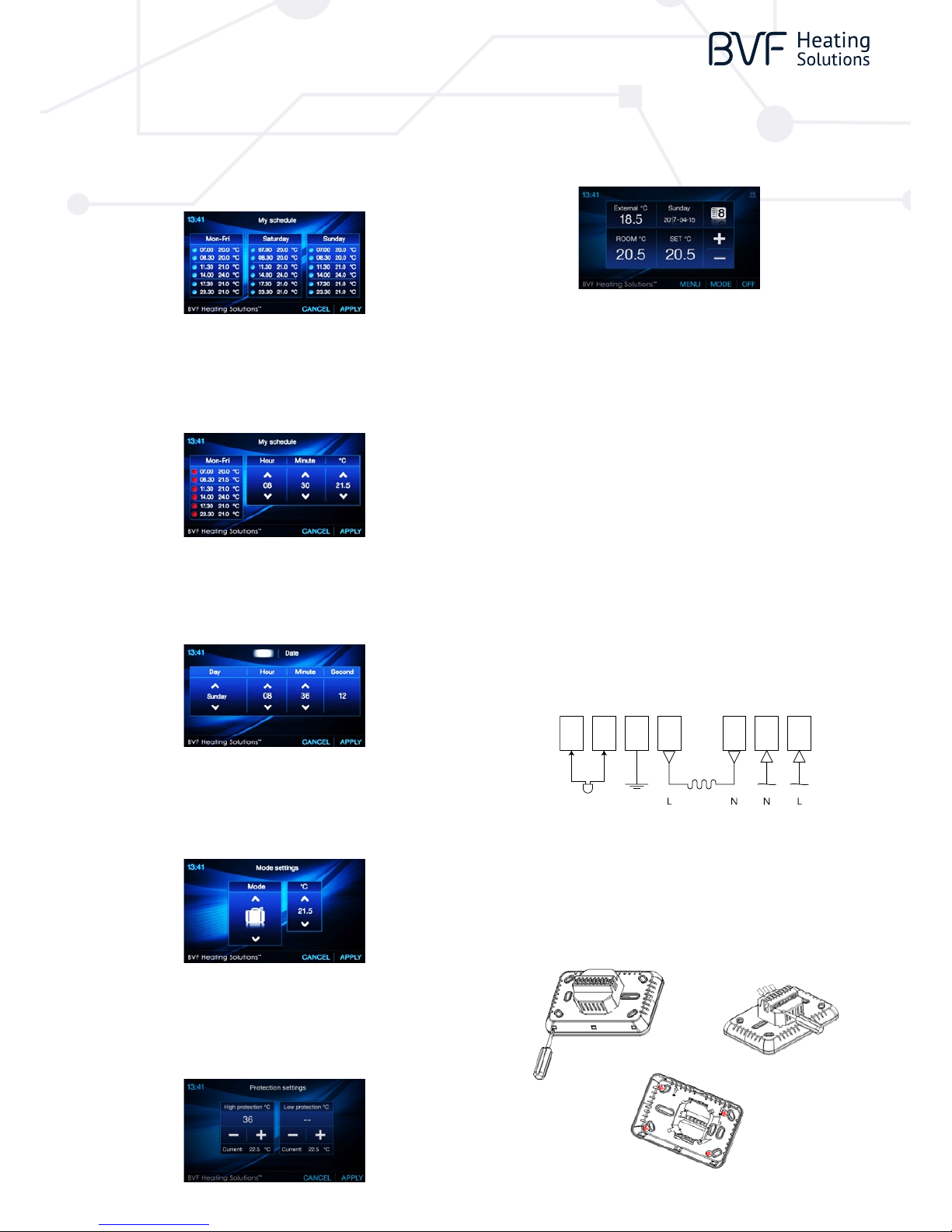
you can review weekly schedule. You can press the three column to change the
5+1+1 events.
For example, if you want to edit Sat. schedule, you can press Sat. column, then
you will enter the edit page as picture shows. Every setting can be nish by
pressing or button.
2. TIME AND DATE SETTINGS
Press Menu button, choose Time and date button to edit date and time by or
button. After setting pls. press “ APPLY” to save the changes.
5. ENTER PARAMETER SETTINGS
Within 3 seconds after turning thermostat to OFF mode, press
THE BVF HEATING SOULTIONS for 3 seconds, then will enter parameter setting,
you can set the desired value by pressing “<<” or “>>” , and go to other pages by
pressing “Pre” or “Next”.
6. WIRING DIAGRAM
3. MODE PRE-SET TEMP. SETTINGS
Press Menu button, choose mode settings button to pre-set mode working
temp. by up and down Button. After setting, pls. press “APPLY” to save the
changes.
7. INSTALLATION
Using a screw driver to open the upper and lower body part, then connect the
wiring to terminals tightly, then x the lower body part into wall with attached
screws.
4. HIGH PROTECTION SETTINGS
Press Menu then select protection button to enter Protection Settings page.
You can set High Protection temp. & Low Protection temp. by up and down
button. After setting, pls. press “ APPLY” to save the changes.
1. In Sun. column, there are six periods. You can press up or down button to
choose the period you are going to change. Whichever period is selected,
will display.
2. After period is selected, you can set hour, minute and temperature by
pressing and button.
3. After new schedule is set, pls. press “APPLY” to save the new schedule.
MENU DESCRIPTION RANGE
01 Temp. Oset -8 °C ~8 °C
02 Dead Zone 0 °C ~3 °C
03 Set Point Max. 5 °C ~80 °C
04 Set Point Min. 5 °C ~80 °C
05 NTC Select (Internal, External) I only, E only, I & E, I or E
06 Low Protection Max. 5 °C ~10 °C
07 Low Protection Min. 5 °C ~10 °C
08 High Protection Max. 5 °C ~90 °C
09 High Protection Min. 5 °C ~90 °C
10 Backlight o Time after Operation 3s ~180s
11 Min. Backlight Brightness of Standby Status 1% ~100%
12 Relay Delay Time 0s ~250s
13 Relay Output Normal(NO); Inverted(NC)
14 Restore << or >>
7
EXTERNAL
SENSOR
360 0W/16A 230V/AC
6 5
4 3 2 1
 Loading...