

Page 1

QUICK
START
GUIDE
BK-Kit-4
Thank you for purchasing
®
Kit
®
Kit.
the ButtKicker
This guide will help you quickly set up
your new ButtKicker
Contents:
ButtKicker® Advance
Chair/Couch Mounting
Accessory Kit
Remote Control
BKA300-4
Power Amplifier
Wireless Transmitter
& Receiver
ButtKicker
Cable Kit
®
Page 2

START HERE
1. Attach the ButtKicker® Advance to the CMAK mounting plate
a. Place the ButtKicker
®
Advance on the CMAK mounting
plate on the side opposite the rubber feet.
b. Insert the carriage bolts up through the square holes
and secure them in place with the star washers and
acorn nuts using the supplied wrench to make sure the
bolts are tight.
c. Connect the supplied speaker wire to the red and black
speaker terminals on the ButtKicker® Advance unit.
2. Position the CMAK mounting plate under your furniture
a. If possible, put the CMAK mounting plate under a leg
at the center of the furniture. If there isnt a leg at the
center, place it under one of the corner legs.
b. Sometimes, there is room to hide the ButtKicker®
Advance on the inside of the furniture. You may need
to pull back the dust cover to provide access to the
inside of the furniture.
®
Note: Make sure there is proper ventilation and clearance for the ButtKicker
if placed inside the furniture.
c. It is very important that the other legs of the furniture
are supported using the supplied rubber isolators. If
possible, these should be screwed into the legs using
the supplied wood screws. However, if needed, they can
simply be placed under the other legs of the furniture.
Advance
Refer to main diagram
and Figure 1
Refer to main diagram,
Figure 1 and Figure 2
3. Set up the Power Amplifier BKA300-4
a. Using the banana plugs, connect the speaker wire from the
ButtKicker® Advance to the output terminal on the amplifier.
b. Plug one end of the RCA audio cable into the subwoofer
output of your A/V processor and the other end into
the RCA In on the back of the RF Transmitter.
Note: The supplied RCA Y connector or Speaker Level Interface Adaptor may be
used to enable the use of both a subwoofer and the ButtKicker
processor or to connect to an A/V processor that does not have a RCA subwoofer output.
Use either the Y connector or the Speaker Level Interface Adaptor but not both.
®
Advance with your A/V
c. Connect the AC adapter into the back of the RF
Transmitter and plug into an electrical outlet.
d. Plug the RF Receiver unit into the RF Receiver input
on the back of the BKA300-4 Power Amplifier. The
green light on the side of the RF Receiver indicates that
the unit is powered on.
Note: Refer to the BKA300-4 Owners Manual, Wireless Setup section for complete
setup and usage details.
4. System Adjustment
a. Turn on the rest of your home theater ; play a movie or
music track with some deep low frequency material at
normal listening volumes.
b. Next slowly increase the Intensity of the BKA300-4
Power Amplifier using the Remote Control or front
panel controls until your desired level of intensity for
the ButtKicker
c. Invite your friends and family to watch a movie
or listen to music and ENJOY!
®
Advance is reached.
Refer to Figure 3
Page 3
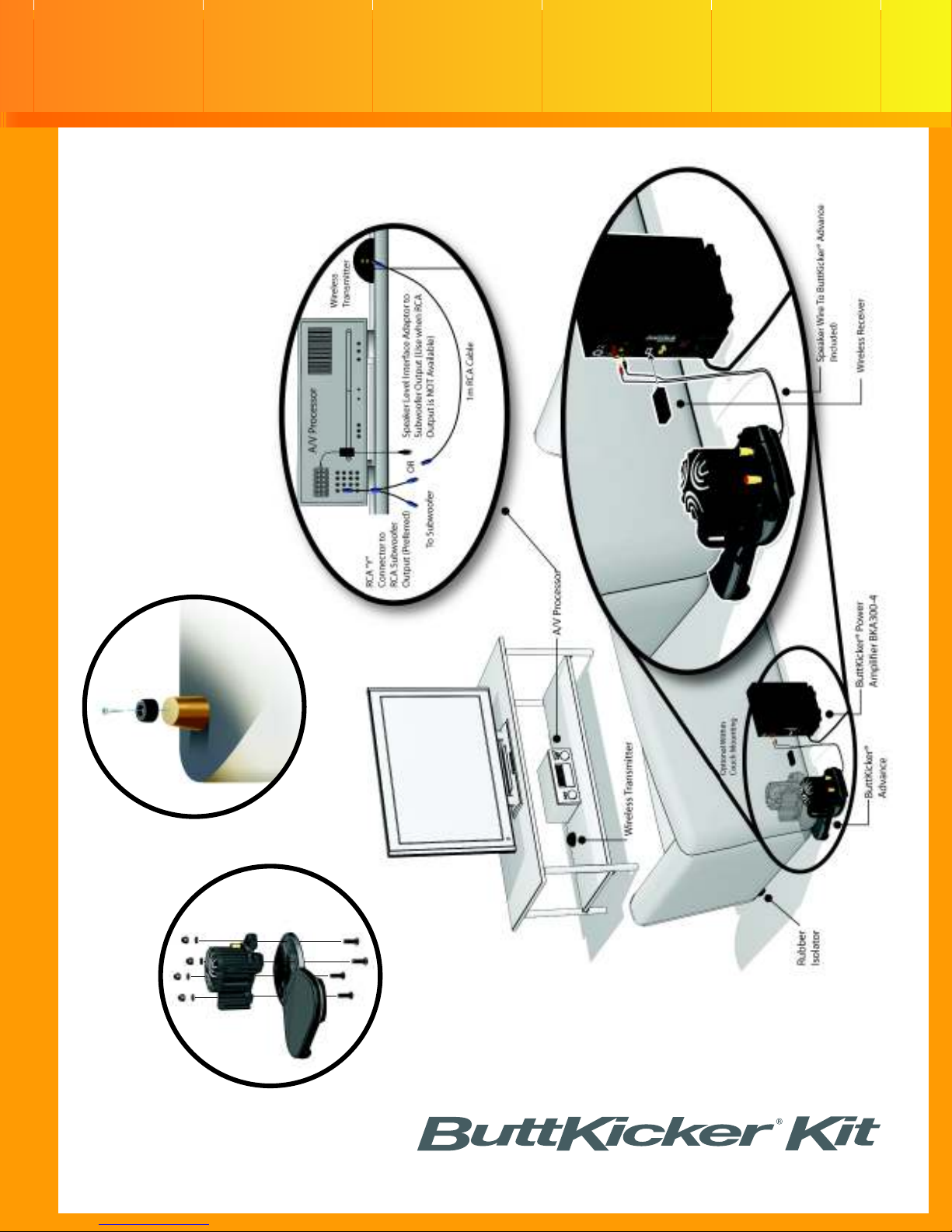
Figure 2
Figure 3
Figure 1
STANDARD INSTALLATION
Page 4
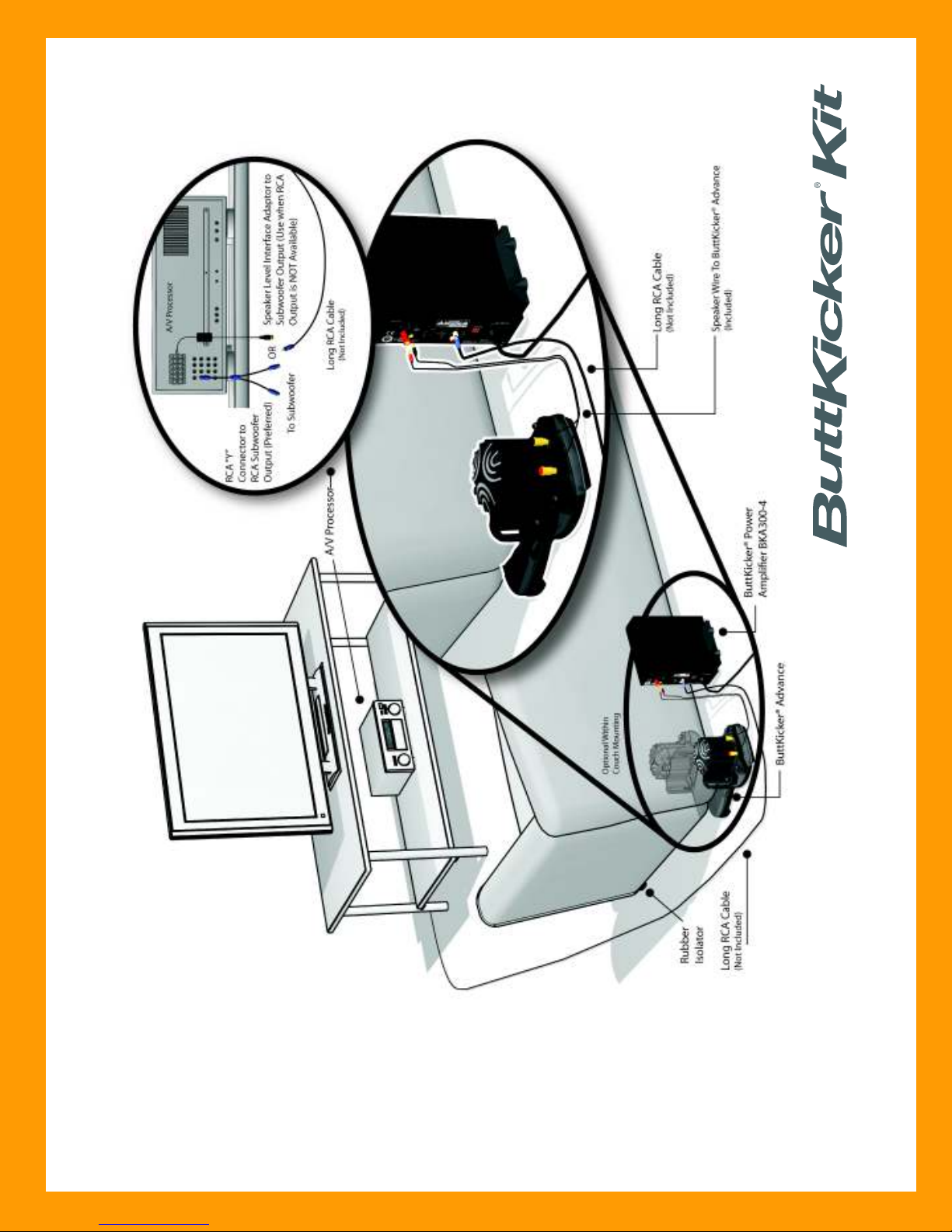
OPTIONAL INSTALLATION
OPTION 1
Page 5
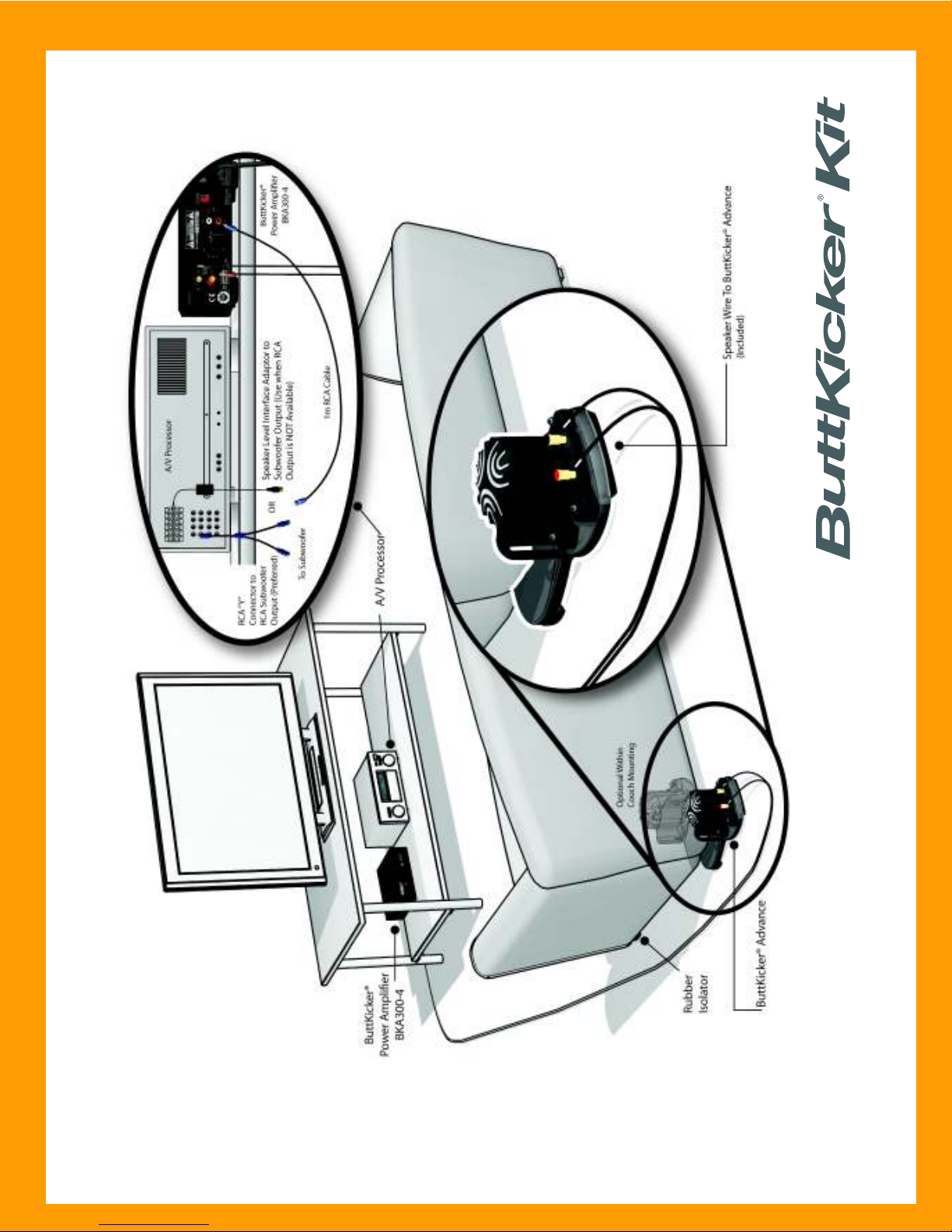
OPTIONAL INSTALLATION
OPTION 2
Page 6

If you have questions or need technical support,
STOP!
please contact The Guitammer Company, not
the store where you purchased the product.
The Guitammer Company
1-888-676-2828 / 1-614-898-9370
8:30 AM 5:30 PM EST
Email us at:
[email protected]
Visit us on the web at:
www.thebuttkicker.com
FAQs
Q. What are the three Preset EQ buttons on the Remote Control for?
A. Movie setting: Frequency response is flat with no filtering or cutoffs.
Music setting: Set to +6dB increase of frequencies below 25 Hz with a frequency roll
off of -12dB per octave above 100 Hz.
Game setting: Set to -6dB reduction of frequencies below 25 Hz with a frequency roll
off of -12dB per octave above 100 Hz.
Q. When using the ButtKicker® Power Amplifier BKA300-4 without the wireless option, I get a
"buzz" or "hum" from my speakers now. It's always there, even if the sound is turned all the
way down. What's my problem?
A. Your home theater system has developed a "Ground Loop" which is caused by having more
than one ground connection in the system. Most likely, your cable TV combined with the
ground of the ButtKicker® Power Amplifier BKA300-4 power cord is causing interference
in the audio system. In fact, any other electronic device with a grounded power plug might
cause the problem as well.
You can eliminate the problem in your system by adding a "Ground Loop Isolator", available
at numerous places, such as Radio Shack (item #270-054). Plug one end of the ground loop
isolator into the RCA input on the back of the ButtKicker® Power Amplifier BKA300-4 and then
plug the RCA cable coming from your A/V processor into the other end of the ground loop isolator.
Q. I have the ButtKicker® Power Amplifier BKA300-4 turned up all the way, but I want even
more intensity. How do I do this?
A. Most A/V processors have an option to increase the output from the subwoofer channel.
Turn up this output to get more audio signal to the ButtKicker
This may require you to turn down the volume of your subwoofer so that it is balanced with
the rest of the system.
Q. My floor is carpeted. Do I really need to use the rubber isolators?
A. Yes! The isolators will support and level your furniture; they will maximize the effect of the
ButtKicker® Advance; and they will make sure that the effect is contained within the furniture.
®
Power Amplifier BKA300-4.
For more information, refer to the Owners Manuals included with each product.
Visit www.thebuttkicker.com for support, more FAQs and information about other ButtKicker
brand products and accessories.
®
 Loading...