

Page 1
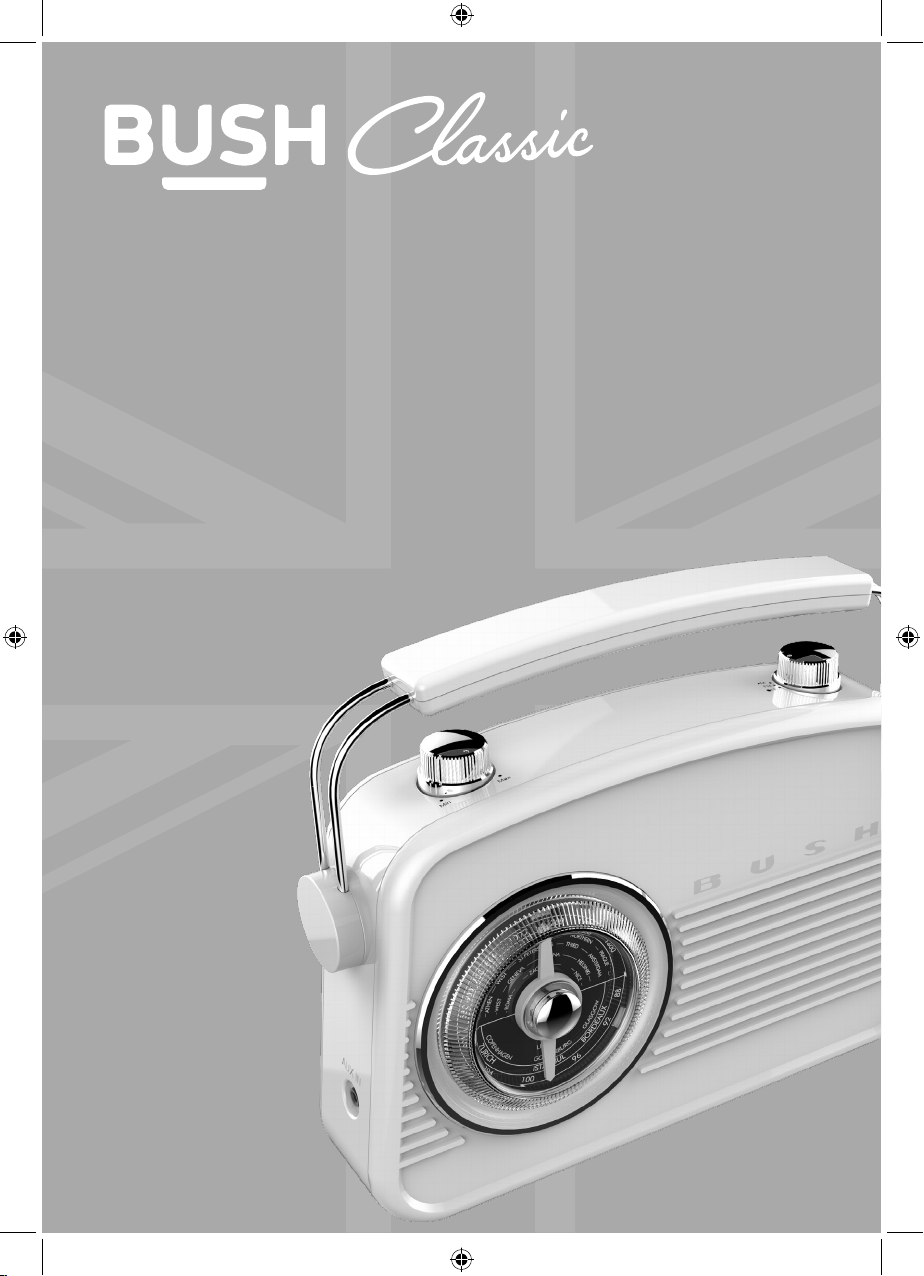
Instruction manual
Model: JN-7024
SKU: 133336624
Page 2
If you require any technical guidance or find that your product is not operating as intended, a simple solution can often be found in the
Troubleshooting
You’ll soon be enjoying your new Retro FM/AM Radio.
It all begins here, with your instructions. Don’t worry, there’s
nothing too technical coming up. Just simple, step-by-step
guidance to get you up and running quickly. Sound good? Then
let’s get started.
Help and Guidance
We’re here to help you get the most from your Retro FM/AM Radio. Should you require
any guidance, a simple solution can often be found online at:
www.bush-support.com
If you still require further assistance, call one of our experts on 0345 600 3021.
2
Page 3
Contents
section of these instructions, or online at www.bush-support.com If you still require further assistance, call one of our experts on 0345 600 3021.
Safety information
1
General safety information 6
Power source 6
Moisture and water 7
Heat sources and flames 7
Ventilation 7
Positioning the Retro FM/AM Radio 8
Getting to know your Retro FM/AM Radio
2
Connection 14
Inserting the batteries (optional) 14
Change the mode 15
Adjusting the volume 15
Using your FM/AM Radio
3
FM Radio mode 18
AM Radio mode 19
Aux in mode 20
Other information
4
Specification 24
Product support
5
Troubleshooting 28
Help and assistance 29
Your Bush Guarantee 31
3
Page 4

This page is left intentionally blank
Page 5

1Safety information
Page 6
Safety information
Important - Please read these instructions fully before
installing or operating
Safety information
If you require any technical guidance or find that your product is not operating as intended, a simple solution can often be found in the
Troubleshooting
General safety information
• Keep the product and all its parts out of reach of small children.
• This product is not intended for use by persons (including children) with reduced
physical, sensory or mental capabilities, or lack of experience and knowledge, unless
they have been given supervision or instruction concerning the use of the appliance
by a person responsible for their safety.
• Do not attempt to open the product. This product does not contain any user
serviceable parts. Unauthorised handling of the device may damage it and will void
your warranty.
• Do not use your Radio near emergency/intensive care medical equipment or during
an electrical storm.
Power source
• Only use the power supply that came with the product. Using an unauthorised power
supply will invalidate your guarantee and may irrecoverably damage the product.
• Disconnect your Radio from the mains power supply during thunderstorms.
• Always check that you have completely switched off your Radio, before you change
or disconnect the power supply.
• Where the mains power plug or an appliance coupler is used as the disconnect
device, the disconnect device shall remain readily operable.
• If the Radio will not be used for a long period of time, make sure that all of the
batteries are removed from the battery compartment and the mains power is
unplugged.
• Only use recommended batteries or those of the same or equivalent type. Do not mix
old and new batteries or batteries of different types.
• Batteries are to be inserted with the correct polarity. The supply terminals are not to be
short-circuited.
• Remove the batteries from the Radio if they will not be used for an extended period of
time.
6
Page 7
Safety information
Important - Please read these instructions fully before
installing or operating
Safety information
section of these instructions, or online at www.bush-support.com If you still require further assistance, call one of our experts on 0345 600 3021.
• Never throw batteries in a fire or attempt to open the outer casing. Do not expose
batteries to excessive heat, such as sunshine.
• Batteries are harmful if swallowed, so keep away from young children.
• CAUTION: Danger of explosion if batteries are incorrectly replaced. Replace only with
the same or equivalent type.
Moisture and water
• Do not use this product near water or moisture.
• Do not use this product near a bath or sink, near a swimming pool or anywhere else
that water or moisture is present.
• Do not place objects filled with water, such as a vase, on or near the product.
• Keep it dry. Avoid exposure to precipitation, humidity and liquids which could all affect
the product circuitry.
Heat sources and flames
• Do not leave this product in high temperatures as electronic devices and plastic parts
may warp in heat.
• Keep it away from bright sunlight or heat sources, such as a radiator.
• Never place any type of candle or naked flame on top of, or near the product.
Ventilation
• Do not block or cover slots, holes or openings on the product by placing on soft
furnishings such as carpets, rugs or beds as these are provided for functionality and/or
ventilation to ensure safe operation of the product.
7
Page 8
Safety information
Important - Please read these instructions fully before
installing or operating
Safety information
If you require any technical guidance or find that your product is not operating as intended, a simple solution can often be found in the
Troubleshooting
Positioning the Retro FM/AM Radio
It is important that you consider carefully in advance where your Radio will be situated and
make sure that it is:
• on a flat and stable surface.
• within 1 metre of a power socket (if using mains power). Please ensure that the mains
power lead is not a trip hazard.
• at least 1 metre away from other electrical appliances to avoid interference.
• where there is enough height for the telescopic radio aerial.
• Never place your Radio directly onto antique or polished surfaces.
Caution
To avoid possible hearing damage, do not listen to this radio at high volume levels for long
periods of time. Always keep the volume within reasonable limits.
8
Page 9

This page is left intentionally blank
section of these instructions, or online at www.bush-support.com If you still require further assistance, call one of our experts on 0345 600 3021.
Page 10

This page is left intentionally blank
Page 11

2
Getting to know your
Retro FM/AM Radio
Page 12

Getting to know your Retro FM/AM Radio
You’ll be up and running in no time
Getting to know your Retro FM/AM Radio
If you require any technical guidance or find that your product is not operating as intended, a simple solution can often be found in the
Troubleshooting
Ready? Let’s begin...
Please read these instructions carefully. They contain important information which will
help you get the best from your product and ensure safe and correct installation and
operation.
If you require any further assistance, our technical experts are happy to help. For full
details, refer to the product support section at the end of these instructions.
Your Retro FM/AM Radio
Fig 1.
1
12
Page 13
Getting to know your Retro FM/AM Radio
You’ll be up and running in no time
Getting to know your Retro FM/AM Radio
section of these instructions, or online at www.bush-support.com If you still require further assistance, call one of our experts on 0345 600 3021.
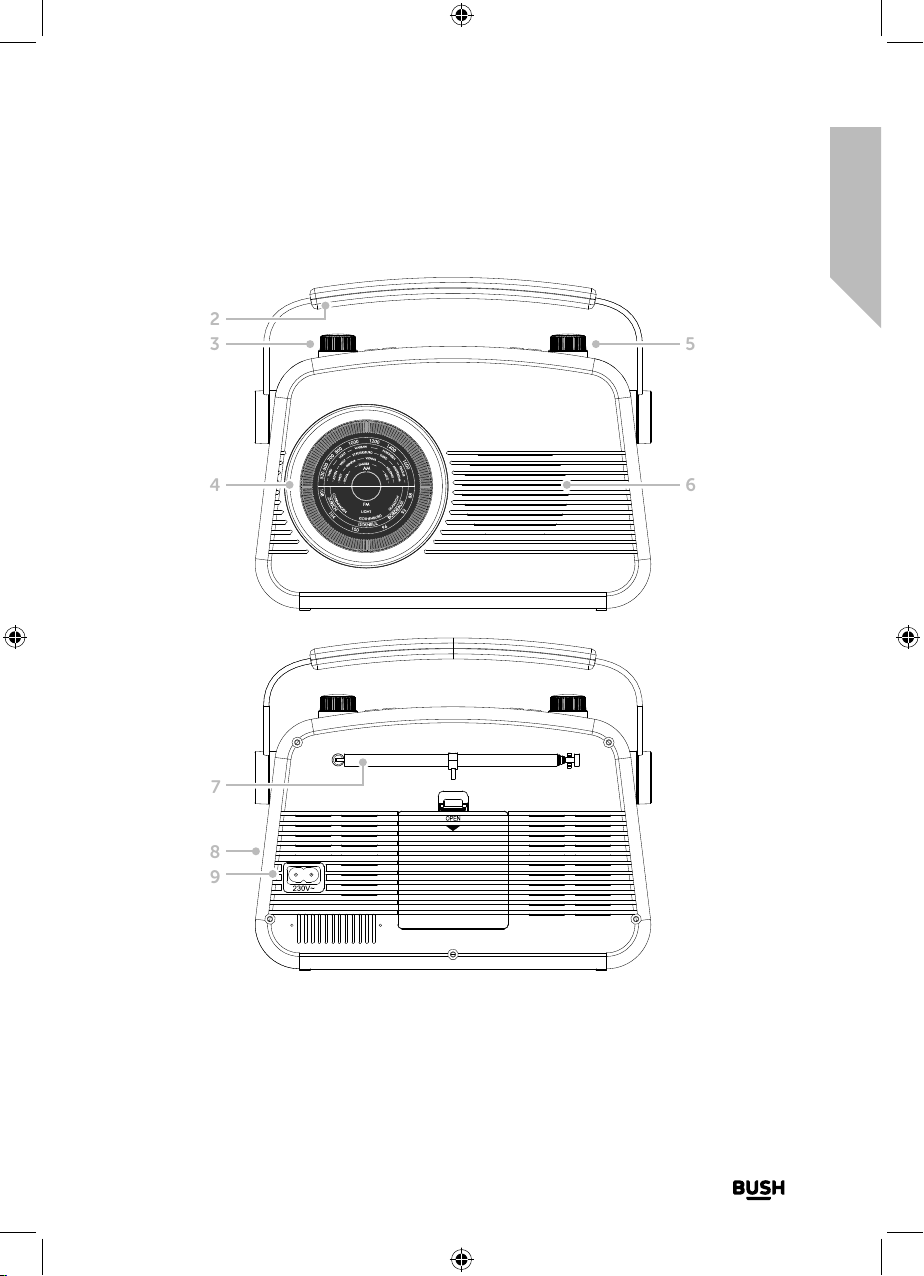
Fig 2.
2
3
4 6
Fig 3.
5
7
8
9
1. Battery compartment, insert 4 x 1.5V
AA-size (LR6) batteries (not supplied)
2. Carry handle
3. Volume control
4. Rotary tune control
5. OFF/FM/AM rotary control
6. Speaker
7. Telescopic aerial
8. Aux in socket (on side)
9. Mains power socket
13
Page 14
Getting to know your Retro FM/AM Radio
You’ll be up and running in no time
Getting to know your Retro FM/AM Radio
If you require any technical guidance or find that your product is not operating as intended, a simple solution can often be found in the
Troubleshooting
Connection
1. Connect the mains power lead into the socket on the back of the Radio and fully
extend the radio aerial in a vertical position to obtain the maximum signal strength.
2. Plug the power lead into the mains power wall socket and switch on.
3. Turn the OFF/FM/AM rotary on the top of the radio to clockwise to turn the product
On.
Inserting the batteries (optional)
1. Before installing the batteries (not included) please ensure that the Radio is switched
off (turn the right hand rotary on the top to ‘OFF’) and is unplugged from the mains
power supply.
2. On the back of the Radio, push down the tabs to release and remove the battery
compartment cover.
3. Insert 4 x 1.5V AA-size (also known as LR-6) batteries, making sure to note the ‘+’ and
‘-‘ markings and position the batteries the correct way around.
4. Replace the battery cover, making sure it ‘clicks’ shut.
If used continuously on battery power, your Radio has an approximate battery life of 5
hours when using good quality alkaline batteries. When the battery power is low, please
switch off the Radio and replace the batteries.
Note: For battery operation please ensure that the mains power is switched off and
remove the mains power plug from the socket on the back of the Radio.
Switch on
Turn the OFF/FM/AM rotary on the top of the radio clockwise to turn the product On.
Note: Always make sure that the aerial is fully extended, to ensure the maximum signal
strength and the best possible sound quality.
14
Page 15
Getting to know your Retro FM/AM Radio
You’ll be up and running in no time
Getting to know your Retro FM/AM Radio
section of these instructions, or online at www.bush-support.com If you still require further assistance, call one of our experts on 0345 600 3021.
Switch o
Turn the OFF/FM/AM rotary on the top of the radio to ‘OFF’. To completely switch off the
Radio, switch off the mains power at the wall socket.
Change the mode
Turn the OFF/FM/AM rotary on the top of the radio to ‘FM’ or ‘AM’ as required.
Adjusting the volume
Turn the rotary volume wheel on the top of the radio, anti-clockwise to decrease the
volume and clockwise to increase the volume.
15
Page 16

This page is left intentionally blank
Page 17

Using your
Retro FM/AM Radio
3
Page 18
Using your Retro FM/AM Radio
Let’s get started
Using your Retro FM/AM Radio
If you require any technical guidance or find that your product is not operating as intended, a simple solution can often be found in the
Troubleshooting
Telescopic aerial
Please make sure that the aerial on the back of the Radio is fully extended before you
attempt to tune to an FM station. This will ensure that the maximum signal strength is
available when the Radio is tuning to a station. Extending the aerial also ensures the best
possible sound quality.
FM Radio mode
Check that your Radio is in FM radio mode. If you are not already in FM mode, turn the
OFF/FM/AM rotary on the top of the radio to ‘FM’.
Tuning to an FM station
In FM mode:
Use the rotary tuning dial on the front of the radio to tune to your favourite FM station.
Please use the frequencies marked on the dial as a guide.
The tuning dial will move both clockwise and anti-clockwise but does have a ‘stop’ point.
If you turn the tuning dial and reach the ‘stop’ point, please turn the dial in the opposite
direction to tune.
Note: If reception is still poor, check that the aerial is fully extended and then adjust the
tuning dial slowly, or try moving the Radio to another location.
18
Page 19
Using your Retro FM/AM Radio
Let’s get started
Using your Retro FM/AM Radio
section of these instructions, or online at www.bush-support.com If you still require further assistance, call one of our experts on 0345 600 3021.
AM Radio mode
Check that your Radio is in AM radio mode. If you are not already in AM mode, turn the
OFF/FM/AM rotary on the top of the radio to ‘AM’.
Tuning to an AM station
In AM mode:
Use the rotary tuning dial on the front of the radio to tune to your favourite AM station.
Please use the frequencies marked on the dial as a guide.
The tuning dial will move both clockwise and anti-clockwise but does have a ‘stop’ point.
If you turn the tuning dial and reach the ‘stop’ point, please turn the dial in the opposite
direction to tune.
Note: If reception is still poor, check that the aerial is fully extended and then adjust the
tuning dial slowly, or try moving the Radio to another location.
19
Page 20
Using your Retro FM/AM Radio
Let’s get started
Using your Retro FM/AM Radio
If you require any technical guidance or find that your product is not operating as intended, a simple solution can often be found in the
Troubleshooting
Aux in mode
Using the Aux in socket on the side of the radio you can make a quick and easy
connection to an external sound source that has a Line or Headphone analogue output to
play through your radio.
These may include:
• iPod, iPhone, iPad or other mobile products
• MP3 players
• CD or tape walkmans
• Personal computers or laptops
Connecting to the Aux in socket
1. With the rotary control turned to AUX AM or FM mode, connect one end of a 3.5mm
audio connection cable (not included) to the headphone (or auxiliary out) socket of
your secondary device, connect the other end to the Aux in socket on the side of your
radio.
2. To gain optimal volume levels, adjust the volume level on both the secondary device
and on the radio.
Note: Please remember to unplug the 3.5mm audio cable from the Aux in socket after
you have finished listening to your external device, to enable you to listen to your radio
in AM or FM mode again.
20
Page 21

section of these instructions, or online at www.bush-support.com If you still require further assistance, call one of our experts on 0345 600 3021.
This page is left intentionally blank
Page 22

This page is left intentionally blank
Page 23

Other information 4
Page 24
Other information
Helpful technical information
Other information
If you require any technical guidance or find that your product is not operating as intended, a simple solution can often be found in the
Troubleshooting
Specification
Power source: Input AC 230V~/50Hz
Batteries: 4 x 1.5V AA size (LR6)
(Optional, not supplied)
Frequency range: FM: 87 MHz to 108 MHz
AM: 522 kHz to 1620 kHz
24
Page 25

section of these instructions, or online at www.bush-support.com If you still require further assistance, call one of our experts on 0345 600 3021.
This page is left intentionally blank
Page 26

This page is left intentionally blank
Page 27

Product support 5
Page 28
Product support
Help is always at hand
Product support
If you require any technical guidance or find that your product is not operating as intended, a simple solution can often be found in the
Troubleshooting
Troubleshooting
If you are experiencing problems with your Radio, there are some quick and easy checks
that you can do, which may help to solve the problem.
No sound / power:
• Adjust the volume using the rotary control on the top of the radio.
• Check that you do not have an Aux in cable connected. Unplug the Aux in cable.
• If you have batteries fitted, they may be exhausted and need to be replaced. Please
use only good quality AA size batteries.
• Check that the mains power lead is connected at the back of the radio, the mains
power wall socket is switched on and the rotary control on the top of the radio is
switched to AM or FM.
Radio reception is poor:
• Fully extend the aerial to get the best reception and sound quality.
• Retune for radio stations, see pages 18 and 19.
• Try moving your Radio to another location to see if reception improves.
• Check that you do not have other electrical equipment too close to your Radio,
causing interference.
28
Page 29
Product support
Help is always at hand
Product support
section of these instructions, or online at www.bush-support.com If you still require further assistance, call one of our experts on 0345 600 3021.
Help and assistance
If you require any technical guidance or find that your Retro FM/AM Radio is not operating
as intended, a simple solution can often be found in the Troubleshooting section of these
instructions or online at www.bush-support.com
If you still require further assistance, call one of our experts on 0345 600 3021*. To help
give us give you a fast and efficient service please have the following information ready:
You can find these
on the rating plate - a
Model Ref.
Serial number
small information
panel (usually a sticker
or metal plate) on the
rear or base of your
product.
Date of purchase
Local call rates applies*
This will be shown on
your receipt
Lines open 8am-7pm Monday to Saturday and
10am-4pm Sunday.
*Calls to Bush enquiry lines may attract a charge and set up fee from residential lines depending on
your call plan/tari. Mobile and other providers costs may vary, see www.bt.com/pricing for details.
For security and training purposes, telephone calls to and from customer service centres may be
recorded and monitored. Calls from Republic of Ireland will attract international call charges.
29
Page 30

Product support
Help is always at hand
Product support
If you require any technical guidance or find that your product is not operating as intended, a simple solution can often be found in the
Troubleshooting
Disposal
• This product should not be treated as normal household waste and it should
be recycled. Please take it to your nearest collection facility or for further
details contact your local council or visit www.recycle-more.co.uk
• Batteries contain substances that may be harmful to the environment and
human health. Keep out of the reach of children and seek immediate medical
help if swallowed.
• Batteries should not be disposed of in the normal household waste but taken
to appropriate local recycling facilities, where and when these are available.
• Never throw batteries in a fire or attempt to open the outer casing
This product is intended for use within the UK. This equipment complies with the essential
requirements of the Radio Equipment Directive 2014/53/EU.
Declaration of Conformance
Hereby, Argos Ltd, declares that this Retro FM/AM Radio JN-7024 / 133336624 is in
compliance with the essential requirements and other relevant provisions of the Radio
Equipment Directive 2014/53/EU. The complete declaration of conformity can be
obtained by contacting http://www.bush-support.com/
30
Page 31
Product support
Help is always at hand
Product support
section of these instructions, or online at www.bush-support.com If you still require further assistance, call one of our experts on 0345 600 3021.
Call us now and register your 12 month guarantee
Thank you for choosing Bush. Your new product is guaranteed against faults and breakdowns for 12 months.
Don’t forget to register it with us today so we can provide you with our best possible after-sales service and
useful updates.
www.bushregistration.co.uk
FREEPHONE*
0800 597 8548
Lines are open 8am - 8pm, 365 days a year. *Calls may be recorded and monitored.
Your Bush Guarantee
This product is guaranteed for twelve months from the date of original purchase. Any defect that arises due to
faulty materials or workmanship will be repaired free of charge (or if applicable the product will be replaced or the
purchase price refunded) where possible during this period by the dealer from who your purchased the unit.
The guarantee is subject to the following provisions:
• The guarantee does not cover accidental damage,
misuse, cabinet parts, knobs or consumable items.
• The product must be correctly installed and
operated in accordance with the instructions
contained in the manual.
• It must be used solely for domestic purposes. The
guarantee will be rendered invalid if the product is
Important Data Protection Information
To find out how we and Domestic & General Insurance Plc use your data, please refer to the guarantee registration
material or visit www.bushregistration.co.uk
re-sold or has been damaged by inexpert repair.
• Specifications are subject to change without
notice.
• Bush disclaim any liability for loss or damage arising
from the breakdown of the product.
• This guarantee is in addition to and does not
diminish your statutory or legal rights.
Guarantor: Argos Ltd. 489 - 499 Avebury Blvd. - Milton Keynes - MK9 2NW
31
Page 32
Contact:
www.bush-support.com
Helpline: 0345 600 3021.
 Loading...