

Page 1
min.
3 cm
Quick Start Guide - Dali care bed
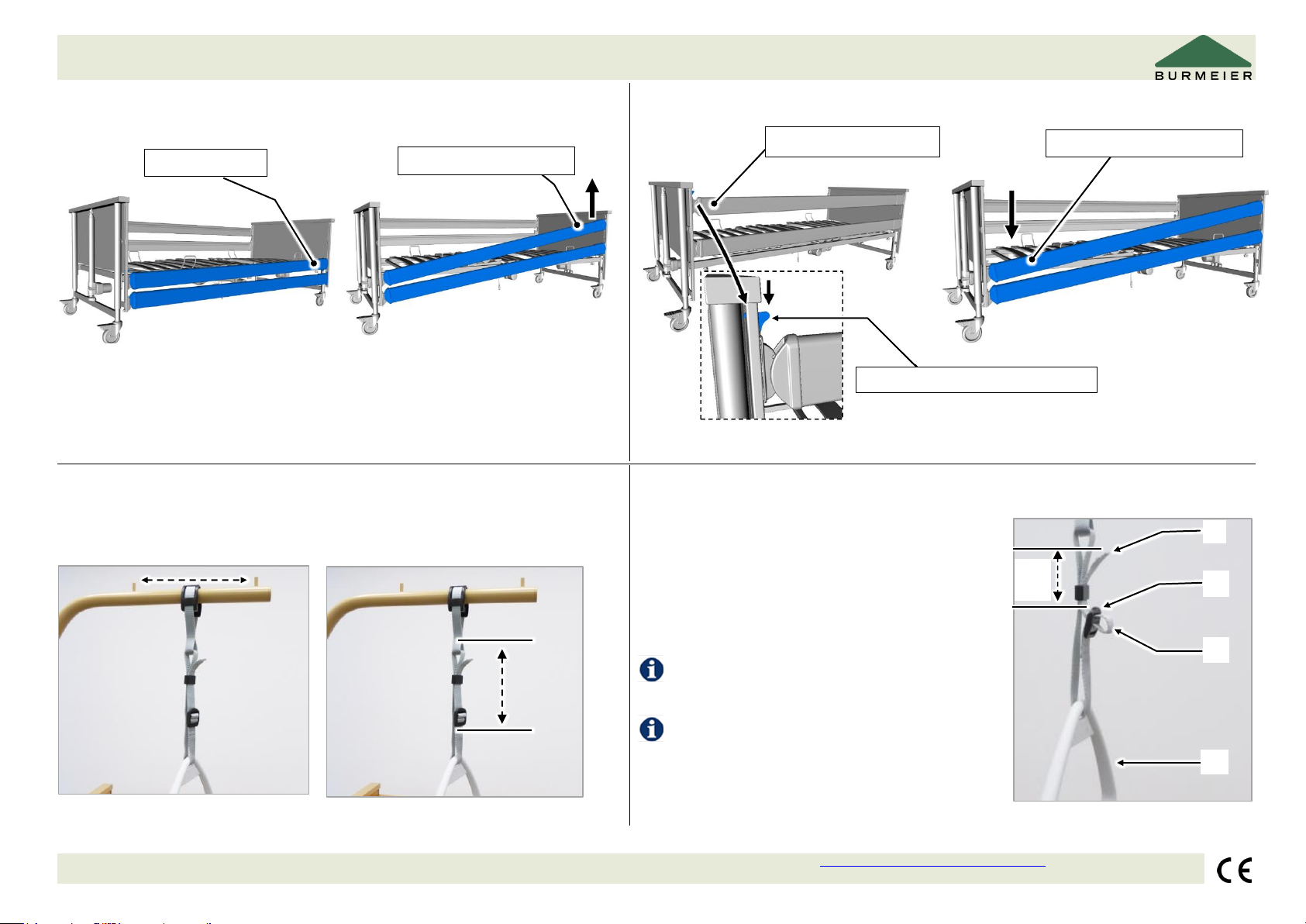
Safety sides
Raising
Lowering
3) Check that the safety side bars are securely locked in place by pressing down
on them.
4) Repeat the process on the other side.
4) Repeat the process on the other side.
Triangular grab handle
Adjusting horizontally
Adjusting vertically
Operation (shortening/lengthening)
Draw the strap through the buckle :
To shorten: Pull the end of the strap upwards
To lengthen: Pull the triangular grab handle
downwards
Burmeier GmbH & Co. KG - Pivitsheider Straße 270 D - 32791 Lage/Lippe - Tel.: +49 52 32/98 41- 0 – Fax: +49 52 32/98 41- 41 – e-mail: [email protected] - www.burmeier.com - (2019.05.24_V1_273852)
Maximum loading capacity 75 kg.
Make sure when lengthening the strap that
the end of the strap projects at least 3 cm
beyond the top of the buckle.
2) Pull the bar upwards
1) Grasp the bar
1) Raise the bar slightly
3) Carefully lower the bar
2) Press the release lever downwards
Turn page
Page 2
Quick Start Guide - Dali care bed
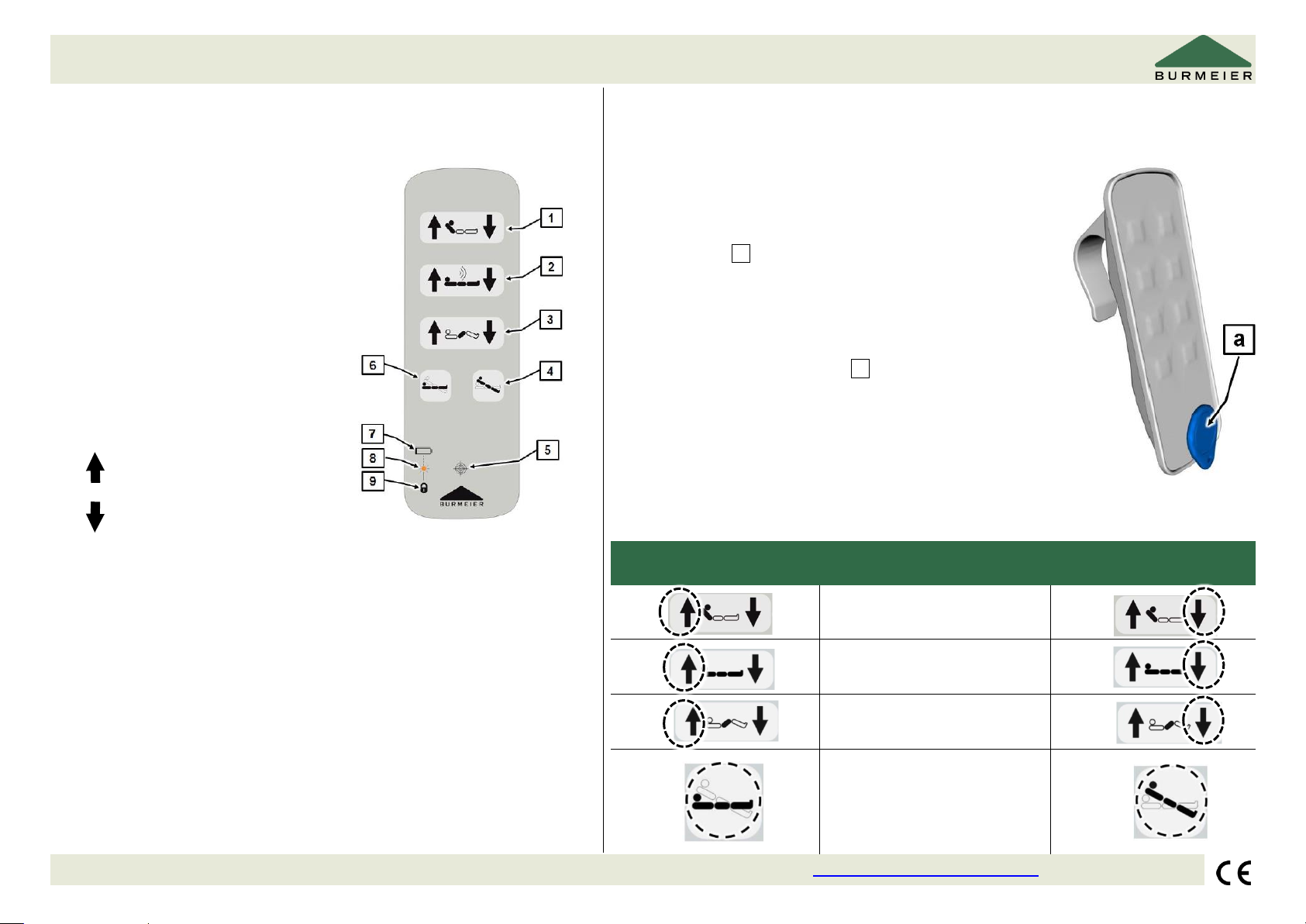
Bluetooth handset (wireless)
(In the Dali standard, Dali low-entry and Dali wash)
Locking function – Bluetooth handset
1
Backrest
Please note:
There is a magnetic sensor at the bottom of the handset.
A loose magnet a (part of the delivery) is required to lock or
unlock functions.
Proceed as follows to lock/unlock adjustments
on the handset:
1. Hold the supplied magnet a to the magnetic sensor
integrated in the manual switch
2. Then lock/unlock the desired function.
To lock, press the right button on the handset. To
unlock, press the left button (see following table).
2
Mattress base height
3
Thigh rest
4
Reverse-Trendelenburg
position
5
Magnetic sensor (identifiable
by cross-hair symbol)
6
Sleep position
7
Battery symbol
8
LED
9
Locking symbol
The following basic rule applies:
= raising
= lowering
Explain the handset functions to the resident!
The electric motors operate as long as the corresponding button
is pressed.
With the exception of the reverse-Trendelenburg position and sleep
position, all of the bed's adjustment options work in both directions.
The handset is water-protected and can be wiped clean with a cloth.
The handset can be hung on the bed with its elastic hook.
Unlock
Function
Lock
Backrest
Mattress base height
Thigh rest
Sleep position/reverseTrendelenburg position
Burmeier GmbH & Co. KG - Pivitsheider Straße 270 D - 32791 Lage/Lippe - Tel.: +49 52 32/98 41- 0 – Fax: +49 52 32/98 41- 41 – e-mail: [email protected] - www.burmeier.com - (2019.05.24_V1_273852)
Turn page
Page 3
Quick Start Guide - Dali care bed
Coupling the handset with the control unit (only in the Dali standard, wash and low-entry)
Please note: Before the bed functions can be adjusted, the handset must be coupled (connected) with the control unit.
Coupling is only necessary when commissioning the bed, replacing the Bluetooth handset and replacing the control unit.
Proceed as follows:
1. Plug the power pack into the electric socket.
• If the power pack was already in the socket, remove the power pack from the socket, wait approx. 10 s and plug it in again.
2. Within 20 s, press the two buttons for up/down mattress base height simultaneously (within 0.5 s) for at least 5 seconds.
• The LED on the control unit lights up orange for 4 seconds if coupling was successful.
• The LED on the control unit flashes orange 4 times if the coupling was not successful. In this case, repeat steps 1 and 2.
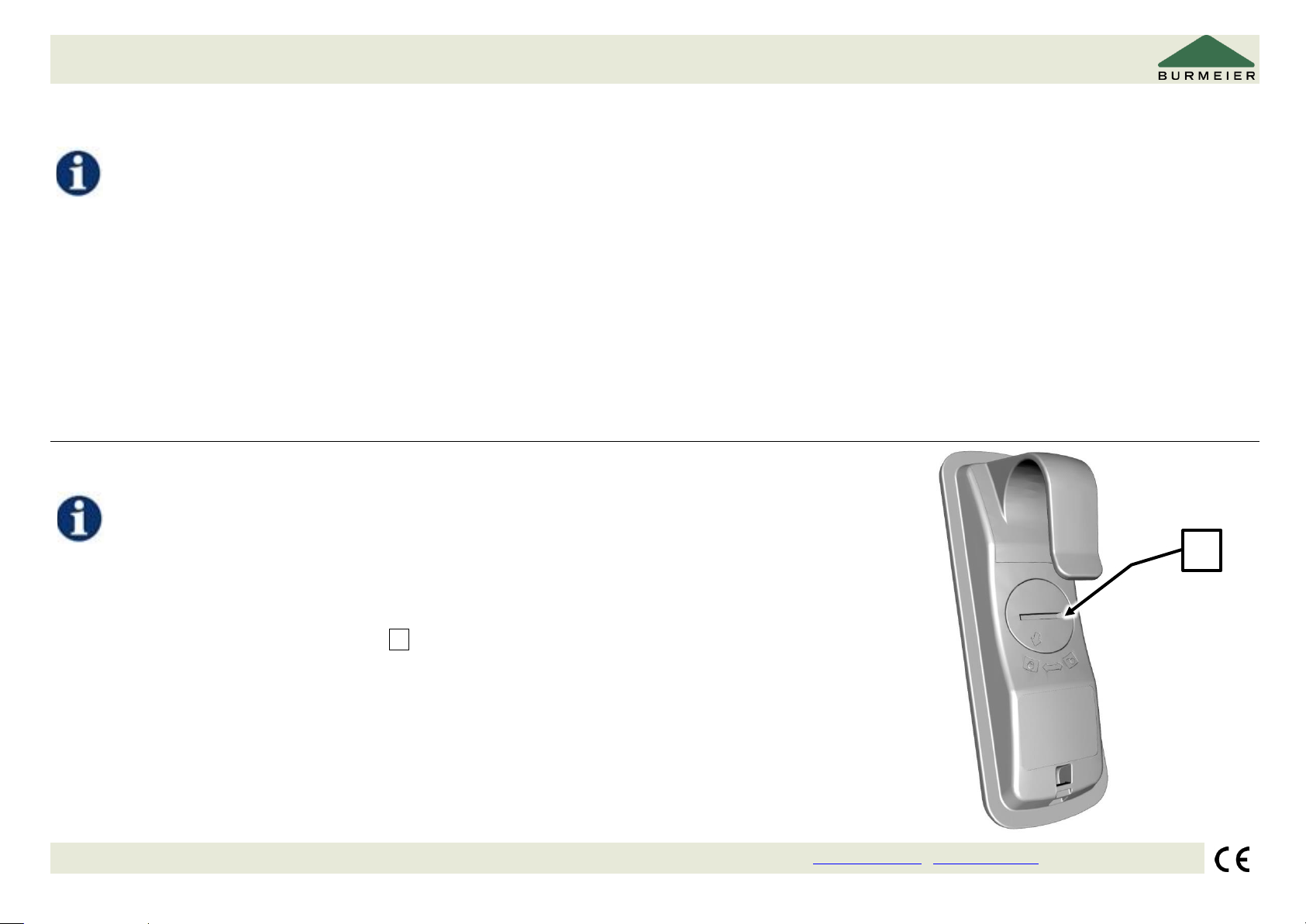
Battery – Bluetooth handset
The Bluetooth handset is powered by a CR 2032 lithium battery.
When the battery is low, the LED display on the handset flashes yellow 4 times each time the
button is pressed. The battery must then be replaced within a few days.
Proceed as follows:
1. Open the battery compartment cover a on the back of the handset.
• For example, insert a coin into the slot of the cover and turn it counter-clockwise.
2. Remove the old battery.
3. Insert the new battery (observe polarity).
4. Close the battery compartment with the cover (turn clockwise).
Burmeier GmbH & Co. KG - Pivitsheider Straße 270 D - 32791 Lage/Lippe - Tel.: +49 52 32/98 41- 0 – Fax: +49 52 32/98 41- 41 – e-mail: [email protected] - www.burmeier.com - (2019.05.24_V1_273852)
a
Turn page
Page 4
Quick Guide - Dali care bed
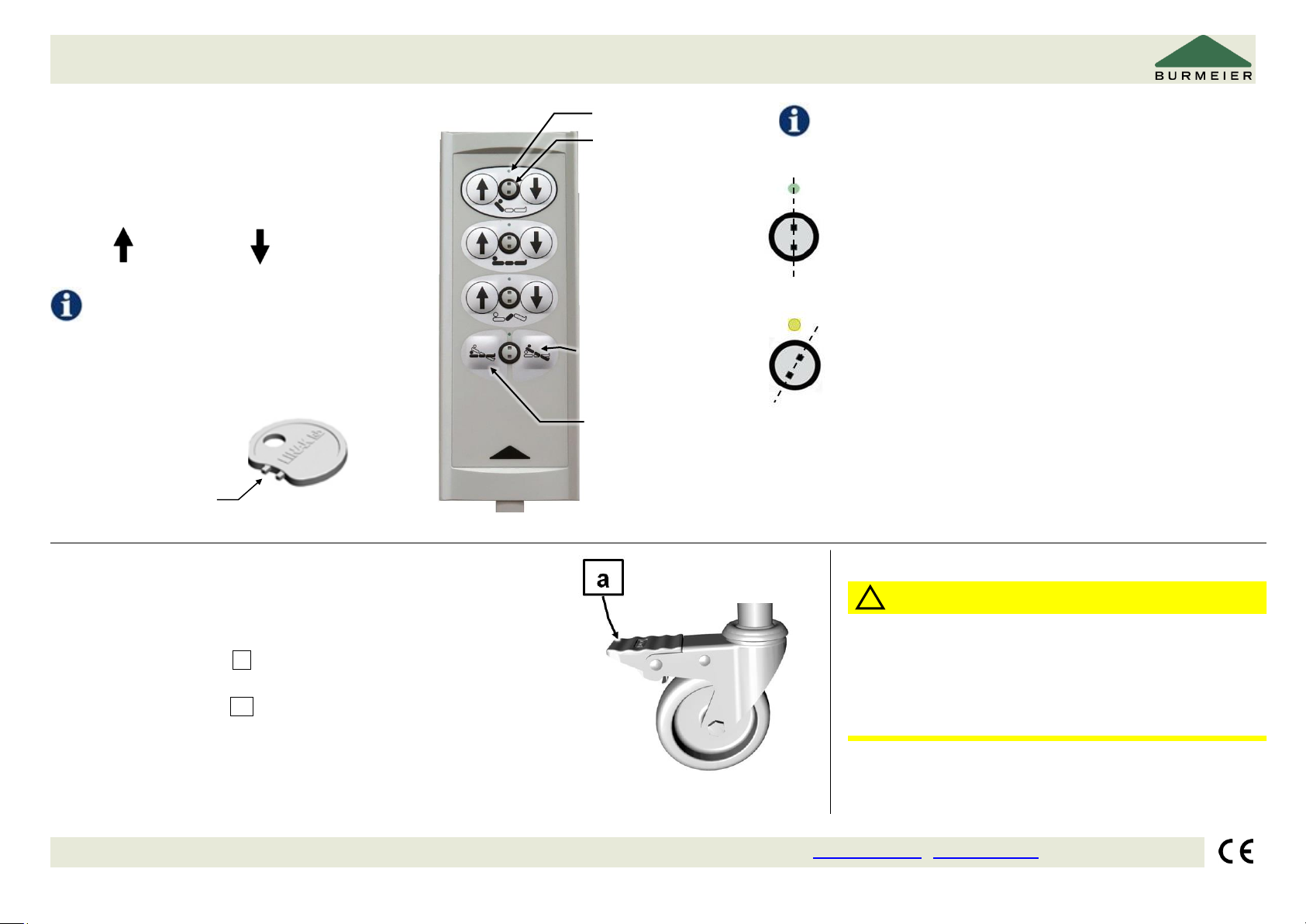
Cable handset
(In the Dali standard, Dali low-entry and Dali econ)
Operation
The following basic rule applies to the keys:
Raise: Lower:
For safety reasons, the
handset is equipped with a locking function.
Turn the lock clockwise to the locked position using the
locking key.
The colour of the respective display changes from
green to yellow.
Do not forcibly turn the locking key! The lock or the handset
could be damaged.
Actuator released:
The lock is in a vertical position
Colour of display: green
Keys can be operated (“click” sound)
Drive locked:
Lock turned approx. 15° clockwise
Colour of display: yellow
Keys are locked
Castors - operation
Caution! Operate the castors with the foot only.
Wear closed shoes when operating the bed to avoid foot injuries.
Moving: Raise the pedal a with the top of your foot.
Braking: Press the pedal a down with your foot.
CAUTION
The Quick Start Guide does not replace the main
instruction manual for the Dali care bed.
Read the main instruction manual carefully and observe
the safety instructions!
Burmeier GmbH & Co. KG - Pivitsheider Straße 270 D - 32791 Lage/Lippe - Tel.: +49 52 32/98 41- 0 – Fax: +49 52 32/98 41- 41 – e-mail: [email protected] - www.burmeier.com - (2019.05.24_V1_273852)
Turn page
!
Locking key
Display
Backrest
Mattress base
height
Thigh rest
ReverseTrendelenburg
position
Lock
Sleep position
 Loading...