

Page 1
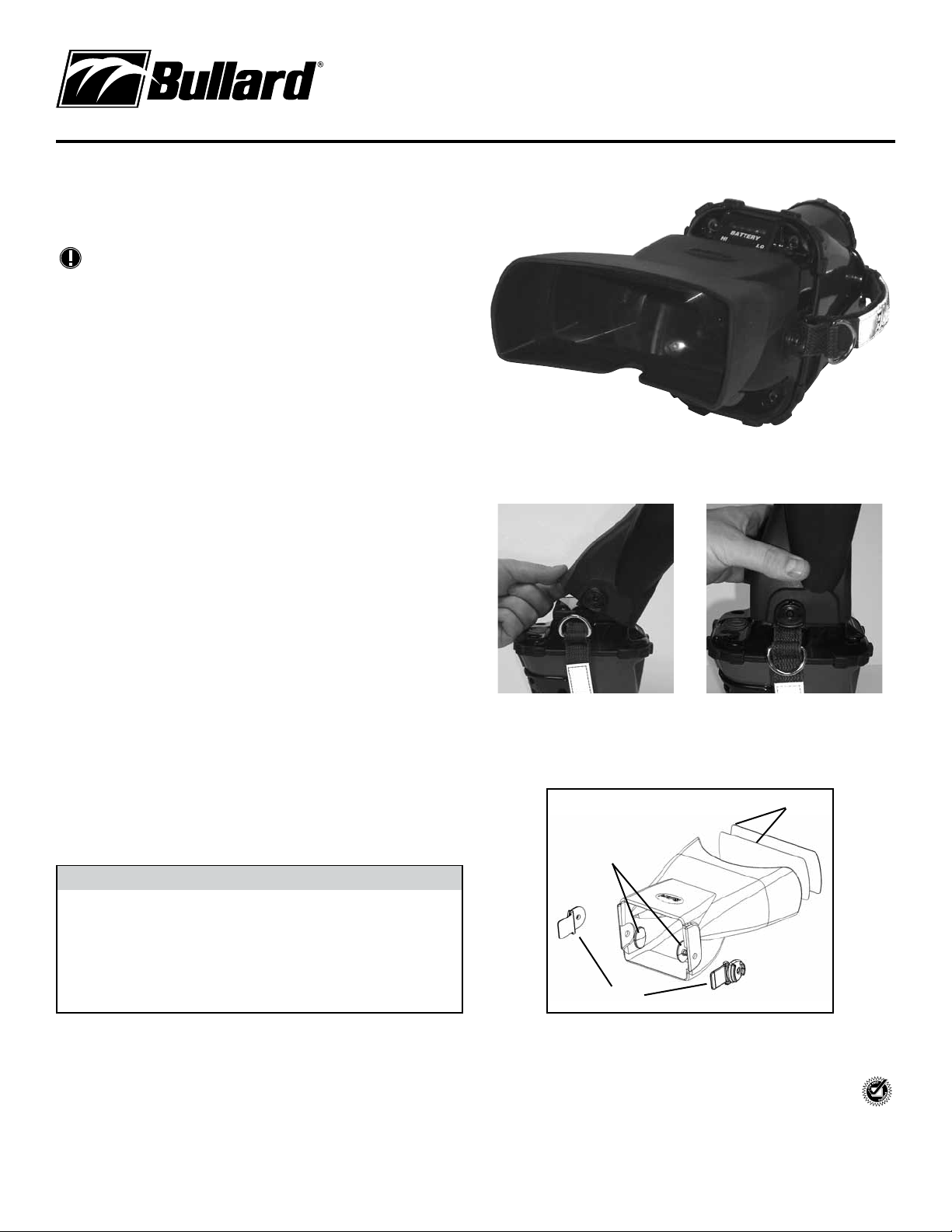
T3 Series Glare Shield was designed for the Bullard T3 and TacSight Series
Thermal Imagers to enhance viewing in bright, outdoor environments by
eliminating glare.
NOTE
The T3 Series Glare Shield is compatible with MobileLink handheld receivers.
Installation:
1.) Place the Glare Shield in your hands with the clips facing away from your
body and the Bullard embossed logo face up. The nose “notch” should be at
the bottom half of the shield, facing your body.
2.) With your thermal imager lens pointing down and the LCD screen facing up,
tilt the Glare Shield slightly forward (away from the body), allowing the rubber housing to overlap the boot at the top of the camera screen (Figure 1).
3.) Next, slip the clips on each side of the Glare Shield behind the nylon straps
of the camera and gently pull forward and down to create a seal around the
lens. (If you are not able to create this seal, use your finger(s) to properly
seat the Glare Shield) (Figure 2).
4.) To remove, place both hands around the base of the shield and lift
straight out.
Lens Replacement Instructions:
1.) Take the polycarbonate lens and the magnifying lens and place on top of one
another, with the smooth side out. The “rough” side should be sandwiched in
between the lenses (Figure 3).
2.) With the widest portion of the Glare Shield facing you, gently pull the rubber
housing apart and seat the lenses inside the grooves.
Order part number T3GLARESHIELDLENS
Clip Replacement Instructions:
1.) First, make sure you have the replacement part kit T3GLARESHIELDCLIPS.
Using a 3/16” drill bit, drill through the circular area on each clip until the
clip and button detatch from the Glare Shield (Figure 3).
2.) To attach the new clips, place each button on the inside of the Glare Shield,
placing them through the corresponding holes.
3.) Snap each clip to the button to secure.
Order part number T3GLARESHIELDCLIPS
� CAUTION
WHEN USING THE T3 GLARE SHIELD WITH T3 SERIES THERMAL
IMAGERS, TACSIGHT
HANDHELD RECEIVER, DO NOT POSITION THE VIEWING DISPLAY
TOWARD THE SUN FOR EXTENDED PERIODS, ESPECIALLY DURING
NON-USE. THE MAGNIFICATION ELEMENTS WITHIN THE GLARE SHIELD
WILL CAUSE DAMAGE TO THE DISPLAY WHEN EXPOSED TO DIRECT
SUNLIGHT. DETACH THE GLARE SHIELD WHEN NOT IN USE. BULLARD
WILL NOT WARRANT REPAIRS RESULTING FROM SUN DAMAGE
INVOLVING THE GLARE SHIELD OPTICS.
®
SERIES THERMAL IMAGERS, OR MOBILELINK
Figure 1
Figure 3
Buttons
T3 Series Glare Shield
Instruction Manual
Figure 2
Lenses
Clips
Americas:
E.D. Bullard Company
1898 Safety Way
Cynthiana, KY 41031-9303
Toll free: 877-BULLARD (285-5273)
Tel: 859-234-6616
Fax: 859-234-8987
www.bullard.com
Europe:
Bullard GmbH
Lilienthalstrasse 12
53424 Remagen • Germany
Tel: +49-2642 999980
Fax: +49-2642 9999829
www.bullardextrem.com
Asia-Pacific:
Bullard Asia Pacific Pte. Ltd.
LHK Building
701, Sims Drive, #04-03
Singapore 387383
Tel: +65-6745-0556
Fax: +65-6745-5176
www.bullard.com
©2012 Bullard. All rights reserved. Bullard is a
registered trademark of Bullard.
TacSight is a registed trademark of Bullard.
ISO 9001
certified
6050047416D (0212)
 Loading...