

Page 1
Eclipse® Thermal Imager
User Manual
(EU English)
Congratulations
Congratulations on the purchase of your new Bullard Eclipse Thermal Imager.
The Eclipse represents a milestone in handheld firefighting thermal imaging,
offering breakthroughs in portability, ease-of-use, and affordability to create
the market’s first truly personal-issue thermal imager. Designed with high-heat,
impact-resistant engineered polymers and infused with the latest thermal imaging
technology, the Eclipse is a powerful firefighting tool.
The benefits of using thermal imaging technology as a firefighting tool encompass
nearly every aspect of a firefighter’s job. Thermal imaging is not, however, a
technology designed to replace current firefighting tactics. Rather, it is a tool that
allows the firefighter to be more effective and make better decisions. Some of the
many uses for your Bullard Eclipse Thermal Imager include:
• Search and rescue
• Scene assessment
• Locating the seat of the re
• Determining the spread of the re
• Locating hot spots
• Identifying potential ashover situations
• Determining ventilation points
• Determining entry and exit points
• Overhaul
• Hazmat
• Wildland reghting
• Incident investigation
• Training
� WARNING
Read all instructions and warnings before using this product.
Your thermal imager is like any other tool. It must be used properly and safely.
All users should be trained on the proper and safe use of thermal imaging
prior to using the Eclipse Thermal Imager. This is especially important for users
who may use the Eclipse Thermal Imager in hazardous or IDLH (immediately
dangerous to life and health) environments.
Failure to follow this information could result in death or serious injury.
seconds, after which, the
Eclipse will function normally.
After registration; however, the
advisory screen will disappear
and the Eclipse will power up to
normal operation in less than
four seconds.
Registration is accomplished
by installing the Eclipse Control
Panel software onto your
computer and then connecting
your Eclipse Thermal Imager via
the enclosed data cable, when
prompted during the installation
process. Once this is done,
simply follow the on-screen instructions.
Connecting Your Eclipse
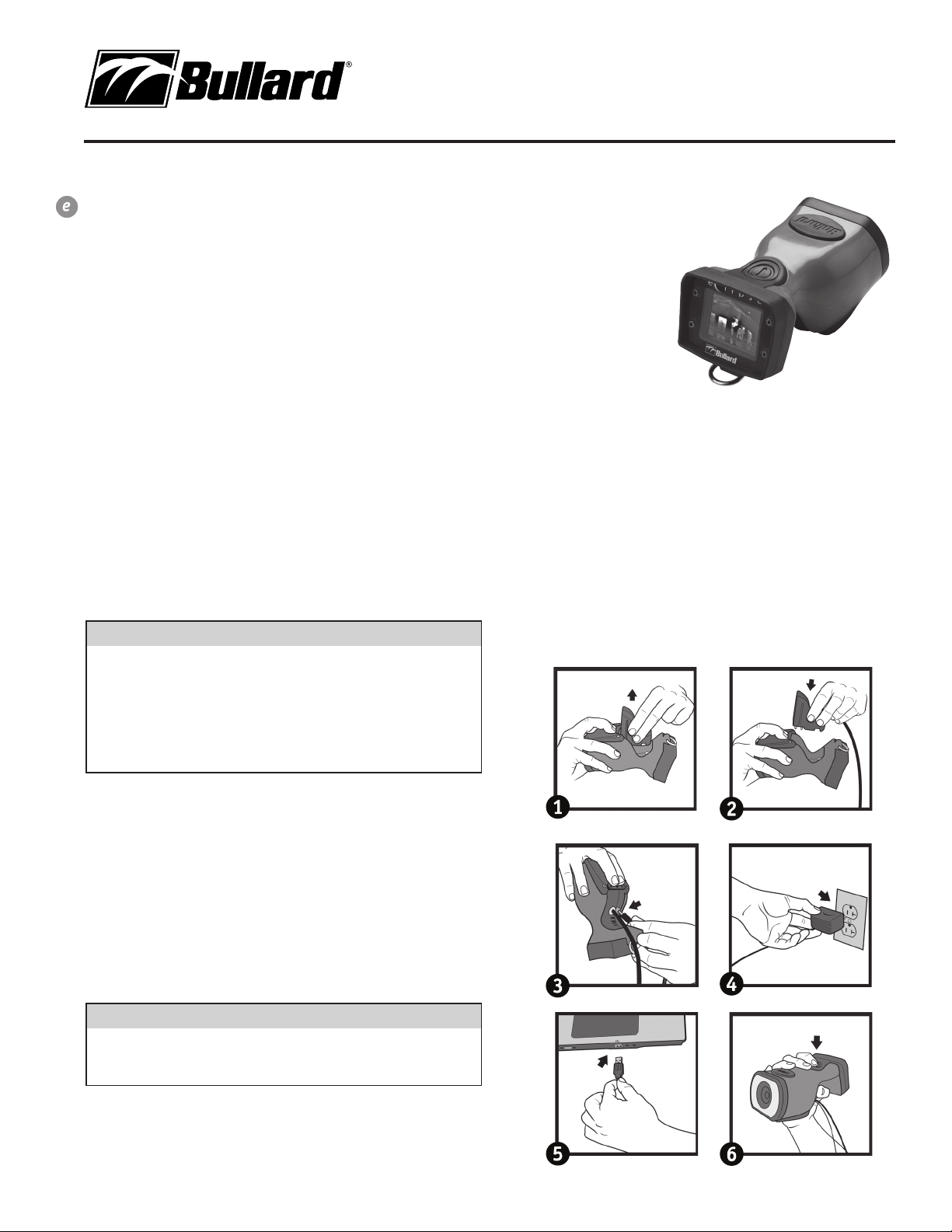
After installing the Eclipse Control Panel software, you will need to connect
your Eclipse Thermal Imager to your computer. In order to connect your
Eclipse to your computer, please follow these steps (Figure 2):
1.
Press in firmly and pull back on battery release to release battery.
2.
Press in firmly and pull back on battery release and insert data cable assembly.
3. Connect power adaptor to data cable assembly.
4. Connect power adaptor to power outlet.
5. Connect USB to PC.
6. Turn on Eclipse by pressing power button.
Getting Started
Registering Your Eclipse
Before using your Eclipse Thermal Imager for the first time, it is necessary for you
to register the product with Bullard. Registration accomplishes several important
tasks. First, registration assures that you will always stay informed of the latest
product updates, service and training issues related to the Eclipse Thermal
Imager. Second, registration will reduce the startup time of your imager from 45
seconds to less than four seconds. Third, registration activates a security feature
on the Eclipse that saves your user information to the imager itself. With this
feature activated, should your Eclipse ever become lost or stolen, simply provide
Bullard with a copy of a police report, and we can ag that serial number. If the
imager is ever returned to Bullard for service or upgrade, you will be notified.
� WARNING
Do not connect your Eclipse Thermal Imager to your computer until prompted
to do so during installation of the Eclipse Control Panel software. Failure to
observe this practice may result in the installation of defective USB drivers.
Installing the Software
If you turn on your Eclipse prior to registration, you will see a screen advising
you of the need to register your Eclipse. This screen will be displayed for 45
www.bullard.com
Figure 2
Page 2
Use and Operation
Power
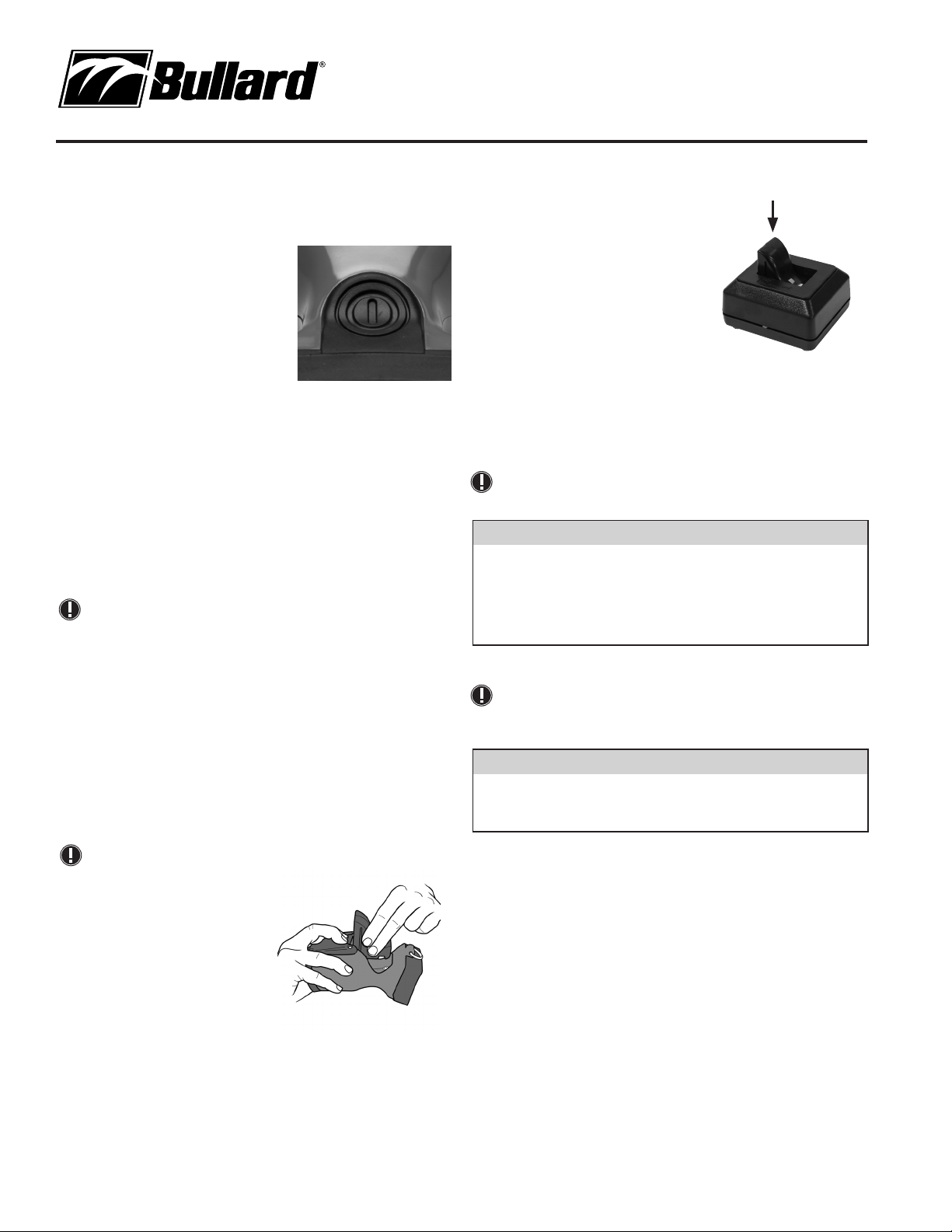
To turn on your Bullard Eclipse Thermal
Imager, depress the black power button
located on top of the unit (Figure 3). Upon
pressing the power button, you will hear an
audible click, and the thermal imager will
display the Bullard logo. A thermal image
will appear within a few seconds. This image
consists of black, white and gray elements
indicating heat signatures of objects and
scene dynamics. Warmer elements appear as
lighter shades, while cooler elements appear
as darker shades.
To turn off power, depress the power button.
Battery Status Indicator
A battery status indicator, located at the bottom center of the display,
indicates the remaining battery charge for the Eclipse. A full charge is
indicated by a full green bar in the battery indicator. During operation, the bar
will deplete from left to right, changing to yellow when it reaches 40% charge,
and then to red when it reaches 20% charge. At 10% remaining charge, the
red bar will ash.
NOTE
You will periodically observe a momentary freeze in the image. This is normal
and is a function of the self calibration shutter. The shutter will activate every
30 seconds to three minutes, depending on the environment.
Loading/Unloading a Battery
To load a battery (Figure 4), depress and then slide the battery release
switch in the direction of the arrow indicated on the button. With the battery
release switch engaged, slide the battery into the groove in the cavity located
at the bottom of the unit. You will hear an audible “click” when the battery
is properly seated. To unload a battery, depress and then slide the battery
release switch in the direction of the arrow indicated on the switch. With
the battery release switch engaged, grip the battery by its exposed bottom
section and pull it away from the unit (Figure 4).
NOTE
If the battery is inserted without
first retracting the battery release
switch, the battery will not fully
seat. If this occurs, remove the
battery and follow reload using
the instructions above.
The battery latch mechanism
prevents accidental battery
release upon impact.
Charging and Maintaining
Batteries
If you purchased an Eclipse Powerhouse with your Eclipse Thermal Imager, see
the enclosed Powerhouse manual for charging instructions. If you purchased an
Eclipse Thermal Imager only, you received a charging base.
To charge a battery in the charger included with your Eclipse, place it in the
charging base (Figure 5). A steady red light will indicate that the battery is
charging, while a steady green light will indicate a full charge. The system will
2
www.bullard.com
Figure 3
Figure 4
detect the full charge and will not overcharge
the battery.
A completely drained battery takes up to three
hours to fully recharge.
As with all batteries, your Bullard
rechargeable battery will experience a
slow drain of its charge during storage.
The amount of drain varies widely based
on storage conditions. To ensure adequate
battery life, charge each of your batteries
every two weeks or, for best performance,
keep your Eclipse and spare battery charged in your vehicle in the Eclipse
Powerhouse™ truck mount charger accessory (part number: ECLPOWERHOUSE).
If you are using a Powerhouse charger, follow the instructions contained in the
accompanying manual.
Figure 5
NOTE
Ensure that the charging base is receiving power from a source via either the
AC or DC power adapters. If you do not see the red LED illuminate when you
place a battery into the charger, the battery is not charging.
� WARNING
Do not allow the metal contacts on the battery to come in contact with a
conductive surface, such as a metal table or another battery. While the Eclipse
is equipped with protective circuitry to prevent product damage, contact with
conductive surfaces can complete the battery circuit and cause the battery to
overheat or melt. Failure to observe this warning may result in permanent
battery damage, property damage and/or serious injury.
NOTE
New, fully charged NiMH batteries will provide a run time of more than three
hours. To extend the potential lifespan of your batteries, fully drain and
recharge each battery monthly. For best operational results, develop a clear
formalized plan for maintaining, charging, and replacing your batteries.
� WARNING
The Eclipse Thermal Imager is extremely sensitive to intense, radiant heat
sources. Never point the Eclipse at the sun or any other source of extreme
radiant heat, as this could severely damage the thermal imager.
Retractable Strap
The Eclipse Thermal Imager fits easily into a turnout gear pocket for convenient
storage while crawling or working. Additionally, Bullard offers a retractable strap
that can be used with the Eclipse, so that it is always at the ready. The strap (part
number: ECLRETRACT), purchased separately, can be mounted to a D-ring on your
turnout gear coat and connected to the D-ring on the Eclipse.
Care Instructions
The Bullard Eclipse Thermal Imager requires little maintenance. For best results,
after each use:
• Clean the outside of the unit with mild soap or detergent.
• Wipe the lens with a soft cloth.
• Clean the display with a soft cloth.
• Check screw tightness on cover display.
• Store your thermal imager in the optional truck mount or in the delivery case
provided.
• All thermal imagers should be maintained using a proper program.
Page 3
Eclipse® Thermal Imager
User Manual
(EU English)
Cleaning the Lens
The Bullard Eclipse lens is recessed in an impact resistant bezel. The lens
can be cleaned with a soft cloth and soapy water as required.
Replacing the Video Display
Cover Window
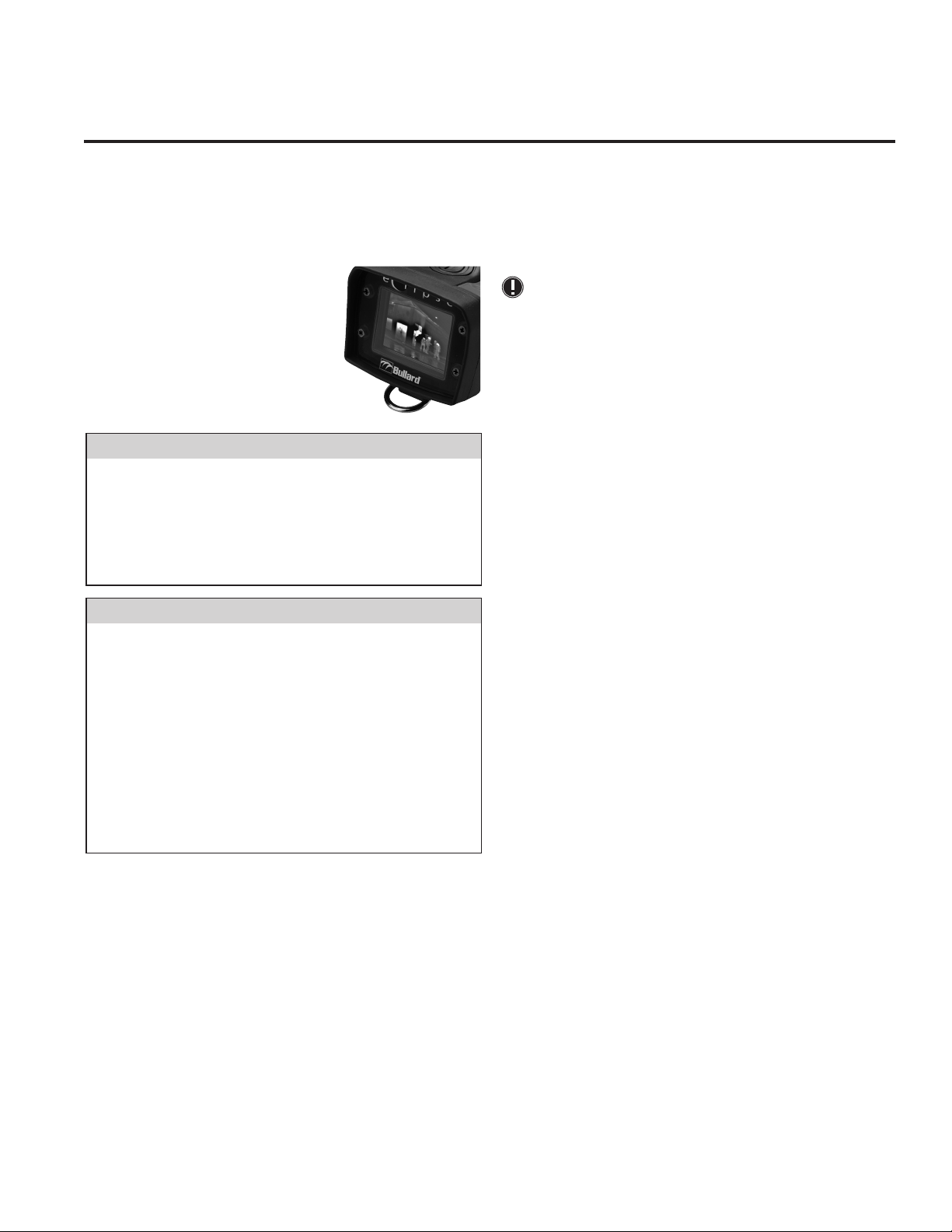
The display cover (Figure 6) has a scratch-resistant
hard coating to minimize marring. However, if heavy
scratching or gouging does occur, the cover window
can be replaced. To do this, remove the four Phillips
head screws along the sides of the window. Remove
the plastic display cover window and replace with
a new one (part number: ECLWINDOW). Do not
over-tighten.
Figure 6
� CAUTION
Do not use solvents or paint thinners to clean your Bullard Eclipse Thermal
Imager, as they could permanently mar the surface or degrade the protective
properties of the casing.
Do not intentionally submerge the unit underwater or subject the unit to
high-pressure water. Follow care instructions described above.
Failure to observe these instructions may result in product damage.
Any damage caused by improper care is not covered under warranty.
� WARNING
Do not attempt to disassemble the Bullard Eclipse Thermal Imager.
Disassembling the unit voids all warranties. For your convenience, TORX head
screws have been used to mark all areas that are non user-serviceable.
Like all thermal imagers sold at the time of this printing, the Bullard Eclipse
is not certified as intrinsically safe. Failure to follow these instructions could
result in death, serious injury and/or product damage.
Thermal imaging is not a technology designed to replace current fire fighting
tactics. Rather, it is a tool that allows the firefighter to be more effective and
to make better decisions.
Firefighters should not stop using basic fire safety tactics. All firefighters
should receive proper training on the following topics: how thermal imagers
work; the uses and limitations of thermal imagers; image interpretation; and
the safety considerations for thermal imaging use.
Service
If your Bullard Thermal Imager is not performing properly, consult the Eclipse
Control Panel software and click on the Troubleshooting /FAQ tab. If the
information in your troubleshooting session does not help remedy your issue,
contact your local Bullard distributor where you purchased the eclipse. Describe
the problem to the Bullard dealer as completely as possible and provide the
reference number from your Eclipse Control Panel troubleshooting session. For
your convenience, your local distributor will try to help you diagnose or correct the
problem over the phone. Before returning your Bullard Thermal Imager, you should
verify with your local distributor that the product should be returned to Bullard.
Your local dealer and Bullard Customer Service will provide you with written
permission and a return authorization number.
If the return is a non-warranty repair, your local distributor will provide you with a
repair invoice estimate. To authorize repair, you must provide a purchase order to
your distributor for the amount of the estimate. Once Bullard or a local distributor
authorizes your repair, they will issue you a return authorization number so that
you can return the unit to the Bullard service station. Bullard will repair the unit
and ship it from our service station within 48 business hours. If the cost of repairs
exceeds the stated quote by more than 15% or by more than 100 Euro, a Bullard
representative will re-estimate your repair and your local distributor will contact
you for authorization to complete repairs. After repairs are completed and the
goods have been returned to you, the local distributor will invoice you for the
actual repair amount.
NOTE
Prior to returning your Bullard Thermal Imager, decontaminate and clean
the thermal imager to remove any hazardous or contaminated materials
that may have settled on the product during use. Laws and/or shipping
regulations prohibit the shipment of hazardous or contaminated materials.
Products suspected of contamination will be professionally decontaminated
at the customer’s expense.
Returned products will be inspected upon return to the Bullard facility. If the repair
is under warranty, Bullard will repair the unit and ship it from our service station
within 48 business hours.
Warranty
Bullard warrants to the original purchaser that the Bullard Eclipse and all
features/accessories installed in the unit as well as battery charging units are
free of defects in materials and workmanship under intended use and service for
a period of two (2) years from date of activation. Bullard’s obligation under this
warranty is limited to repairing or replacing, at Bullard’s option, articles that are
returned within the warranty period and that, after examination, are shown to
Bullard’s satisfaction to be defective, subject to the following limitations:
a) Article must be returned to Bullard with shipping charges prepaid.
b) Article must not be altered from its original configuration.
c) Article must not have been misused, abused, or damaged in transport.
d) Maintenance and field replaceable items, if defective, are covered under
warranty for a ninety (90) day period from the date of purchase. These
items include:
• Straps
• Display covers
e) Warranty period for batteries is 1 year from manufacturing date indicated
on battery
Bullard provides a limited lifetime warranty on the Eclipse outer shell. This
warrants that the outer shell is free of defects in materials and workmanship
under intended use and service for the original purchaser. Bullard’s obligation
under this warranty is limited to repairing or replacing, at Bullard’s option, articles
that after examination are shown to Bullard’s satisfaction to be defective, subject
to the following limitations:
1. Article must not be altered from its original configuration.
2. Article must not have been misused, abused, or damaged in transport.
3. When the outer shell is obsolete and Bullard no longer stocks the part, the
limited lifetime warranty will be terminated.
In no event shall Bullard be responsible for damages, loss of use, or other
indirect, incidental, consequential or special costs, expenses or damages incurred
by the purchaser, notwithstanding that Bullard has been advised of the possibility
of such damages.
Any implied warranties, including warranties of merchantability and fitness for
a particular purpose, are limited in duration to two (2) years from the date of
manufacture of this.
Some states do not allow the exclusion or limitation of incidental or consequential
damages, or allow limitations on how long an implied warranty lasts, so the above
limitations or exclusions may not apply to you. This warranty gives you specic
legal rights, and you may have other rights which vary from state to state.
www.bullard.com
3
Page 4
Americas:
Bullard
1898 Safety Way
Cynthiana, KY 41031-9303 • USA
Toll-free within USA: 877-BULLARD (285-5273)
Tel: +1-859-234-6616
Fax: +1-859-234-8987
Europe:
Bullard GmbH
Lilienthalstrasse 12
53424 Remagen • Germany
Tel: +49-2642 999980
Fax: +49-2642 9999829
www.bullard.com
Asia-Pacific:
Bullard Asia Pacific Pte. Ltd.
LHK Building
701, Sims Drive, #04-03
Singapore 387383
Tel: +65-6745-0556
Fax: +65-6745-5176
ISO 9001
certified
©2012 Bullard. All rights reserved.
Eclipse is a registered trademark
of Bullard
6050068839C GMBH EN (0812)
 Loading...