

Page 1
CONTENTS
Fabric Waterproof
Bluetooth Speaker
USER MANUAL
WHAT’S INCLUDED
PRODUCT FEATURES
DIAGRAM OF CONTROLS
TECHNOLOGY SPECIFICATION
CHARGING BLUETOOTH SPEAKER
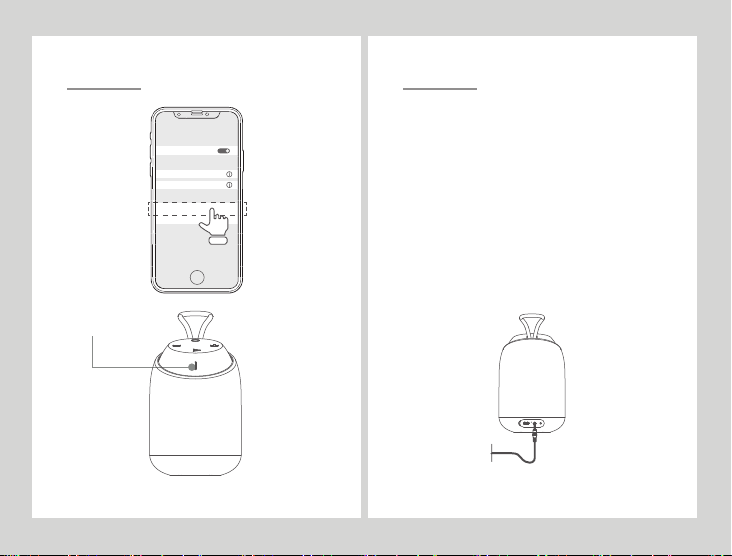
BLUETOOTH MODE
BLUETOOTH PAIRING DIAGRAM
AUX-IN MODE
CARE AND MAINTENANCE
LIMITED WARRANTY
Produktkomponenten
Produkteigenschaften
Produktabbildung
Technische Parameter
Bluetooth Stereoanlage Laden
Bluetooth-Modus
Bluetooth-Verbindungsdiagramm
AUX-IN Audio-Eingangsmodus
Wartung und pflegung
Garantieanweisungen
Garantiekarte
2
2
3
3
4
5
6
7
8
9
2
2
3
3
4
5
6
7
8
9
10
Page 2

製品の組立部品
製品の特徴
製品の図解
技術デ ータ
ブルートゥーススピーカーの充 電
ブルートゥースモード
ブル ートゥースペア 見 取り図
AUX-INオーディオインモード
ケアとメンテナンス
補修説明
補修カード
产品组件
产品特点
产品图解
技术参数
蓝牙音响充电
蓝牙模式
蓝牙连接示意图
AUX-IN 音源输入模式
维护和保养
保修说明
保修卡
WHAT’S INCLUDED
2
2
3
3
4
5
6
7
8
9
10
11
11
12
13
14
15
16
17
18
19
20
1
Mini Diver unit
User manual
Aux-in Cable
Micro USB Charging cable
PRODUCT FEATURES
Great for Shower & Outdoor use
IPX7 Waterproof Certification
Bluetooth V4.2
Rechargeable battery
Hands-free function
Aux-in jack
Excellent Sound Quality
1pc
1pc
1pc
1pc
2
Page 3
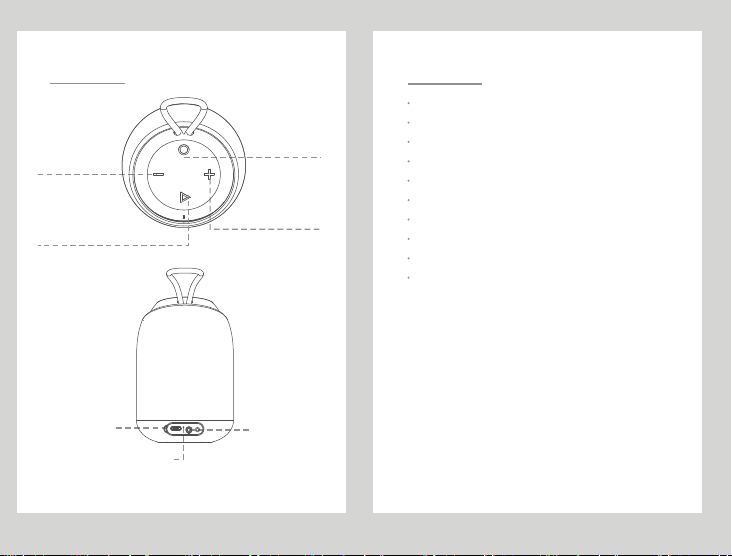
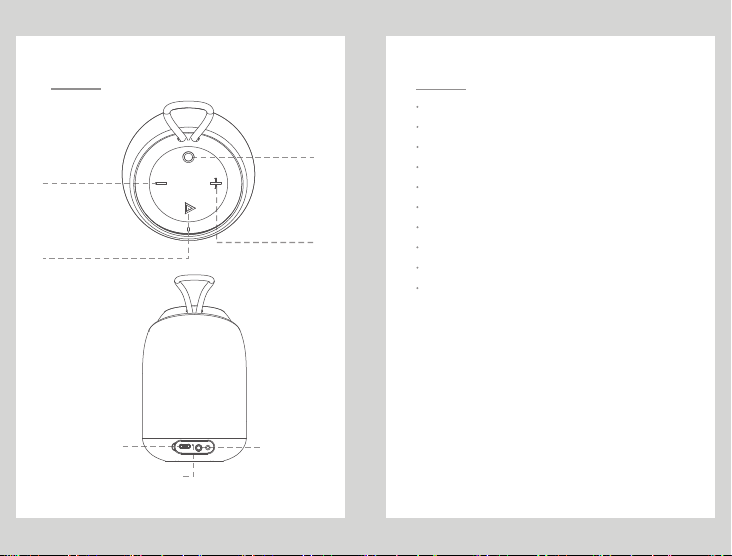
DIAGRAM OF CONTROLS
Volume - / Last Track
Long press : last track
Short press : volume down
Play / Pause
Hands-free : Long press - Refuse calls
Short press - Answer calls
Bluetooth pairing : Long press
Charging LED Indicator
TECHNOLOGY SPECIFICATION
Model No: Mini Diver
Speaker dirver: 4Ω
Turn On / Turn Off
Long press : turn on/off
Short press :Mode
Volume + / Next Track
Long press : next track
Short press : volume up
AUX-in JackInput DC-5V
3
Sensitivity: 82±3dB
Output Power: 5W
Frequency Range: 90Hz-18KHz
Speaker unit size: 1.75"
Bluetooth receive range: about 10m
Play Time: about 7-8 hours(with 50% volume)
Charging Time: about 3 hours
Product Size:Φ76×116mm
4
Page 4
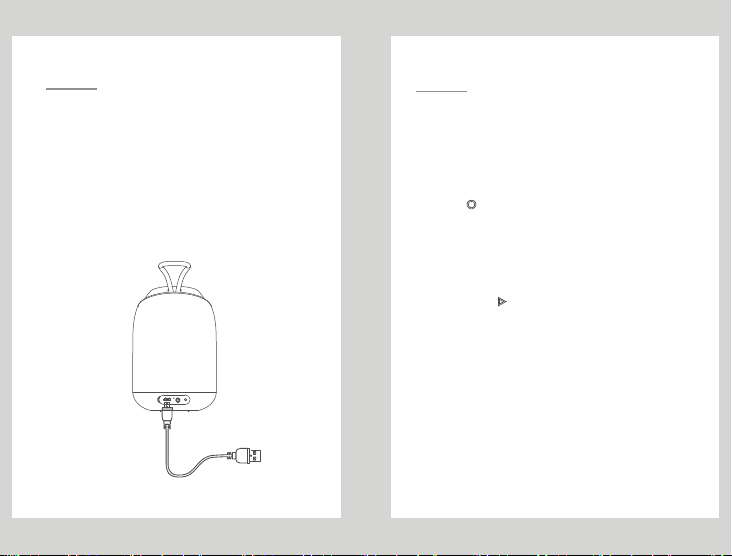
CHARGING BLUETOOTH SPEAKER
NOTE:
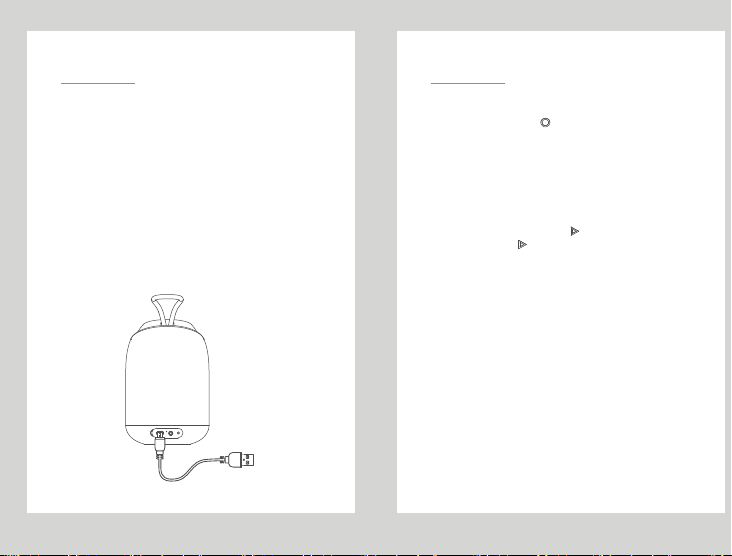
Before using Mini Diver, please use the micro USB cable
(included in the package) charging.
(1). The Bluetooth speaker must be turned off before
charging, to avoid making the Bluetooth speaker work
abnormal, please do not charge when the unit is power
on.
(2). Plug the small micro USB pin into the charger port on
the rear side of speaker, and the another end of the cable
(the standard USB 2.0 plug) into any standard USB port
(such as a computer or USB charger).
(3). The red LED will automatically turn on while it’s
charging, when fully the charged, the LED indicator light
will be turned off.
BLUETOOTH MODE
PAIRING
1. Long press and hold" "to turn speaker on;
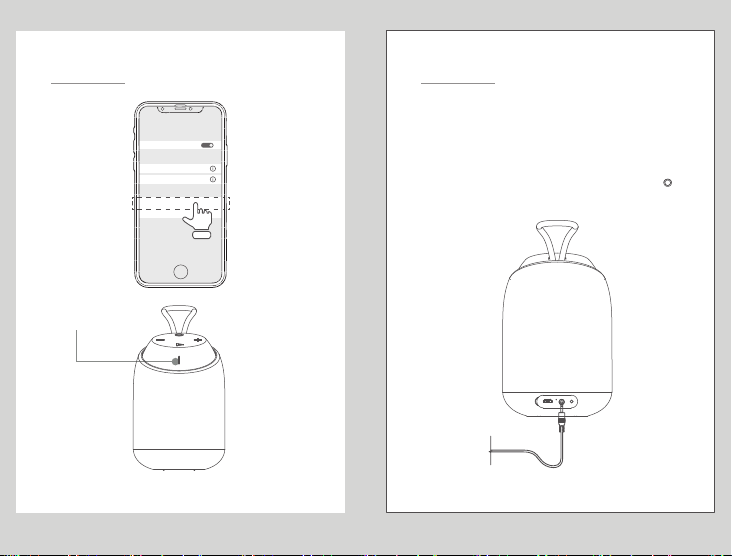
2. Mini Diver ready to pairing, the Bluetooth LED indicator
will be flashing blue, Usually set the steps to enter the
"Settings" - > "Bluetooth" - > "Mini Diver";
3. Once paired successfully, the power indicator turns blue
and makes a prompt sound;
4. When incoming call,press " " button to answer, Hang
up, please press " " again .
Note:
(1). If the Bluetooth speaker is in low power or in weak
state, sometimes it may not be connected to the phone,
PC, IPAD or other devices. please charging immediately
before using.
(2). When the enable audio device is Bluetooth
connected, if it is exceeds the connection distance over
10M, the signal will be disconnected. when you closing
the speaker, it will automatically be reconnected.
5
6
Page 5
BLUETOOTH PAIRING DIAGRAM
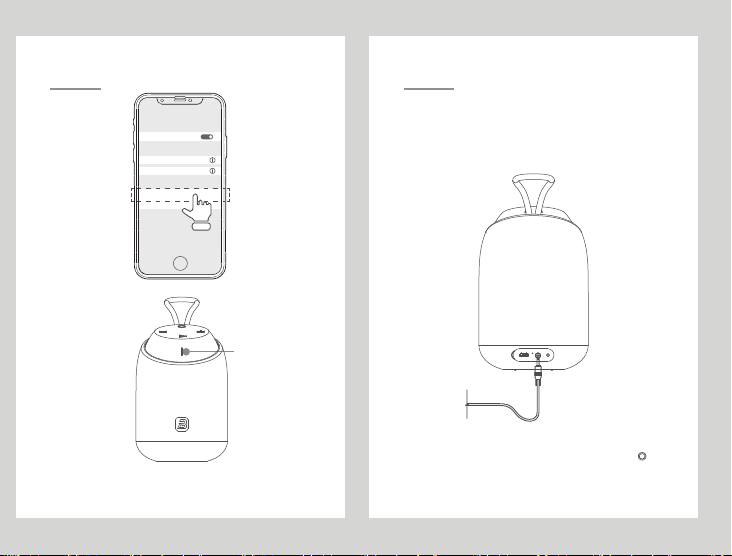
BLUETOOTH
PAIRED DEVICES
M37
SA23
AVAILABLE DEVICES
Mini Diver
M39
Bluetooth LED Light
AUX-IN MODE
(1). Connect with a 3.5mm cable for Aux-in mode playing,
the LED indicator to be Red.
(2). In AUX-IN mode, can not answer the incoming calls
via Mini Diver speaker.
Note: When AUX-IN jack is connected it will be
automatically turn on AUX-IN mode. But Short press “ ”
is switch mode to Bluetooth.
7
8
Page 6
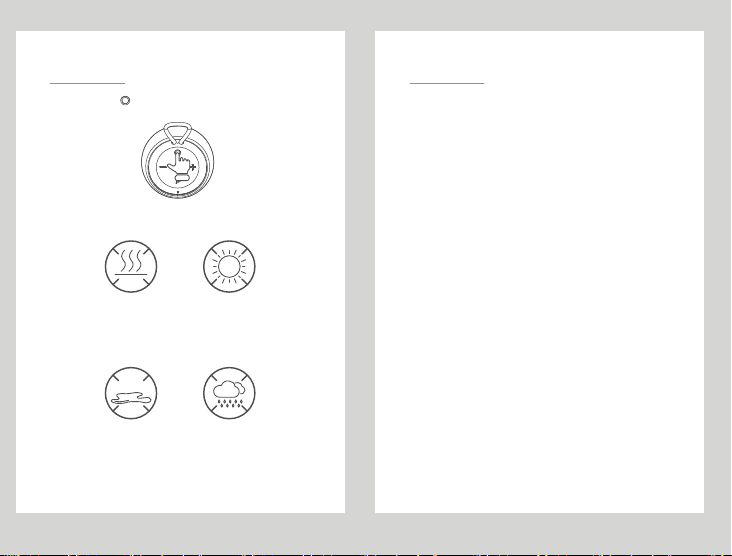
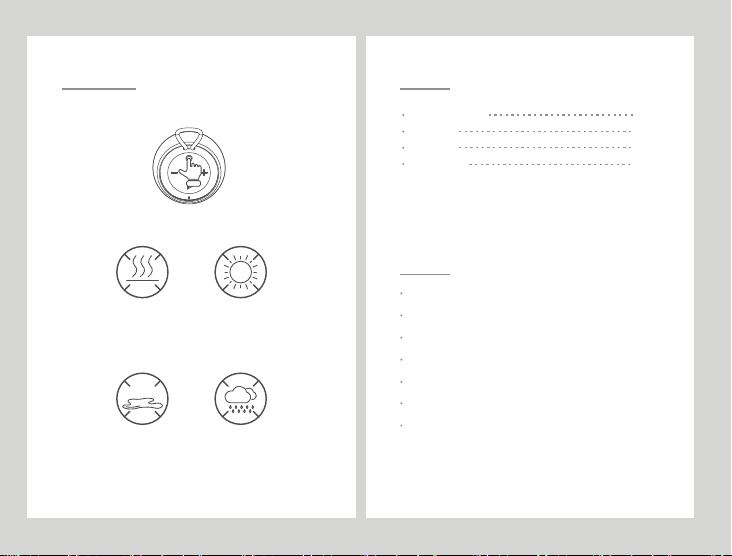
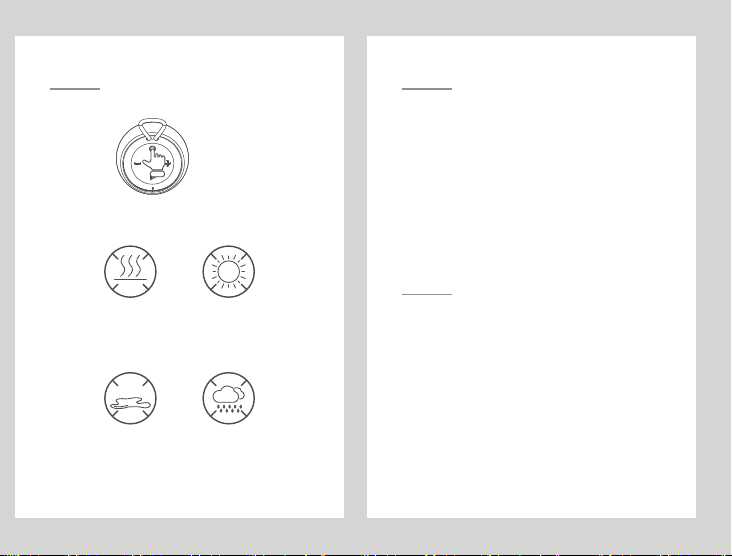
1. Long press “ ” 2 seconds to turn off the device, to
make sure that it is properly protected.
2. Avoid high temperatures (above 40 degrees Celsius),
for example, in hot cars or direct sunlight.
>40℃
High temperature will be damage the surface and reduce battery life.
3. Do not expose the speakers and other accessories
under the rain or liquid.
LIQUID
9 10
LIMITED WARRANTY CARE AND MAINTENANCE
BUGANi(ShenZhen) Company Limited which is a subsidiary under
Shenzhen
BUGANI Digital Co., Ltd. The warrants of BUGANi products that it
will furnish a replacement or repair any part which proves(upon inspection by
BUGANI) to be defective under normal use within 18 months of the original
purchase date.
This warranty does not apply to appearance items, accessories in the human
damage caused by leaking batteries. It also does not apply to the product, or
to any part thereof, that has been damaged through misuse or negligence.
Furthermore, this warranty will become invalid, in the judgment of BUGANi
products or any parts has been installed incorrectly, repaired or altered by
other than BUGANi Service department.
This warranty gives you specific legal rights and you may also have other
rights which very from state to state. Some states do not allow the exclusion
or limitation of incidental or consequential damages or limitation incidental or
consequential damages or limitations on how long an implied warranty lasts,
so the above exclusions and limitations may not apply to you.
For Service, Warranty, or Product Information,
Please contact BUGANi(Shen Zhen) Company Limited,
PLEASE SAVE THIS CARD TOGETHER WITH ORIGINAL DATED PROOF
OF PURCHASE FOR YOUR RECORDS AND FOR CUSTOMER SERVICE.
Page 7
NOTE: This equipment has been tested and found to comply with the limits for a
Class B digital device, pursuant to part 15 of the FCC Rules. These limits are
designed to provide reasonable protection against harmful interference in a
residential installation. This equipment generates uses and can radiate radio
frequency energy and, if not installed and used in accordance with the
instructions, may cause harmful interference to radio communications. However,
there is no guarantee that interference will not occur in a particular installation. If
this equipment does cause harmful interference to radio or television reception,
which can be determined by turning the equipment off and on, the user is
encouraged to try to correct the interference by one or more of the following
measures:
- Reorient or relocate the receiving antenna.
- Increase the separation between the equipment and receiver.
-Connect the equipment into an outlet on a circuit different from that to which the
receiver is connected.
-Consult the dealer or an experienced radio/TV technician for help
Changes or modifications not expressly approved by the party responsible for
compliance
could void the user's authority to operate the equipment.
This device complies with Part 15 of the FCC Rules. Operation is subject to the
following two conditions:
(1) this device may not cause harmful interference, and
(2) this device must accept any interference received, including interference that
may
cause undesired operation.
204 -8200 04
FCC ID: 2AOQO-MINIDIVER
Produktkomponenten
Mini Diver Bluetooth Stereoanlage
Anweisung
Ladekabel
AUX-IN-Leitung
Produkteigenschaften
Geeignet für Dusche und Außenbereich
IPX7 Wasserdichte Zertifizierung
Bluetooth V4.2
wiederaufladbare Batterie
Unterstützen Sie Freisprechanrufe
AUX-Eingang
Hohe Klangqualität
1pc
1pc
1pc
1pc
11
2
Page 8
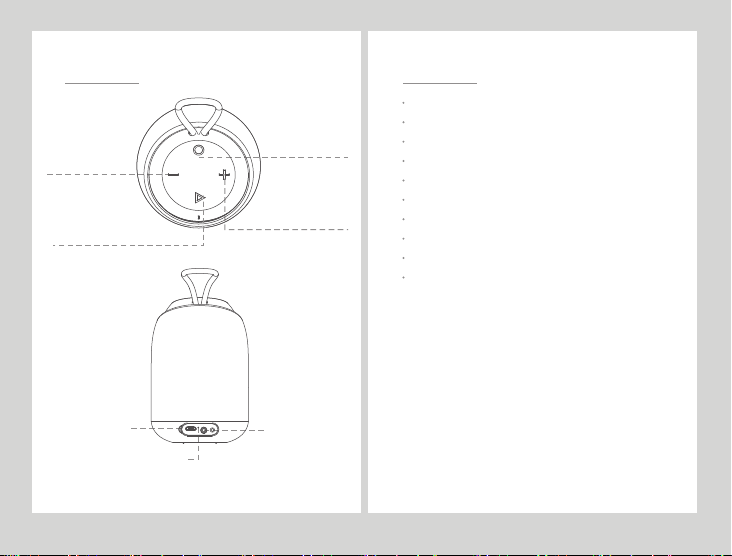
Produktabbildung
Leiser / auf einem Lied
Lang drücken: das vorherige Lied
Kurz drücken: Leiser
Wiedergabe / Pause
Lang drücken:Paarung
Freisprechen: kurze Antwort drücken, lange ablehnen
Öffne den Schlüssel
Lang drücken:Einschalten
Kurz drücken: Modusschalter
Lautstärke plus / nächstes Lied
Lang drücken: nächstes Lied
Kurz drücken: Lautstärke plus
Technische Parameter
Produkttyp: Mini Taucher
Lautsprecher Impedanz: 4Ω
Empfindlichkeit: 82 ± 3 dB
Nennleistung: 5W
Frequenzbereich: 90Hz-18KHz
Speaker Size Spezifikationen: 1.75 "
Drahtlose Übertragungsdistanz: ungefähr 10 Meter
Spielzeit: ca. 7-8 Stunden (50% des Volumens)
Ladezeit: ca. 3 Stunden
Produktgröße: Φ76 × 116mm
Ladeschnittstelle DC-5V
Ladeanzeige
AUX-Audioeingang
3
4
Page 9
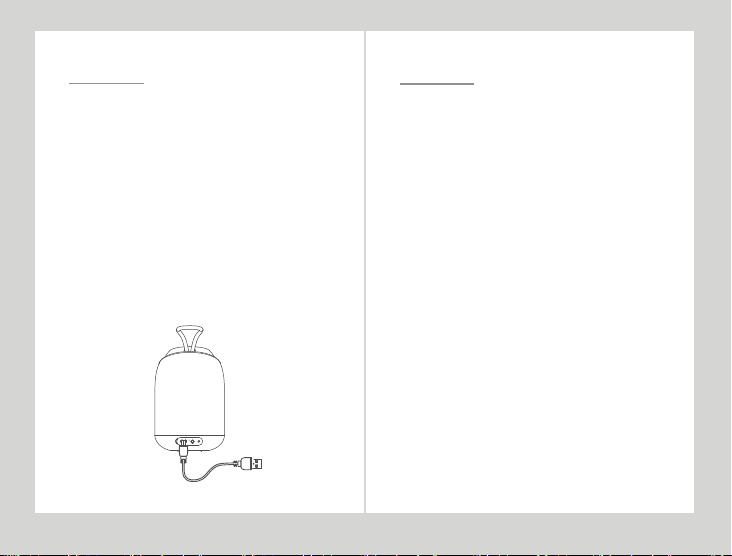
Bluetooth Stereoanlage Laden
Dieser Lautsprecher verfügt über einen eingebauten
Akku, der vor der ersten Verwendung des
Lautsprechers vollständig aufgeladen werden muss
1. Lautsprecher müssen vor dem Ladevorgang
ausgeschaltet werden, bitte laden Sie sie nicht im
einschaltenden-Zustand, sonst funktioniert der
Lautsprecher nicht.
2. Stecken Sie den kleinen Micro-USB-Stecker in den
Ladeanschluss an der Rückseite des Lautsprechers und
das andere Ende des Kabels (ein
Standard-USB-2.0-Stecker) in einen beliebigen
Standard-USB-Anschluss (z. B. nen Computer oder ein
USB-Ladegerät).
3. Während des Ladevorgangs wird die rote LED
automatisch eingeschaltet und die LED schaltet sich
automatisch aus, wenn sie vollständig geladen ist.
5
Bluetooth-Modus
Paarung
1. Drücken Sie lange die Power-Taste, hören Sie einen
Ton, der eingeschaltet ist.
2. Der Mini Diver ist bereit für die Kopplung mit
Bluetooth.In diesem Moment wird das Gerät aufgefordert,
das blaue Licht zu blinken.Die Einstellungen gehen wie
folgt vor: Gehen Sie zu "Einstellungen" → "Bluetooth" →
"Mini Diver", wählen Sie die Paarung und drücken Sie OK.
3. Nach der erfolgreichen Paarung wird die
Betriebsanzeige blau und ein Signalton ertönt.
4. Wenn Sie anrufen, drücken Sie die Taste "rechts", um
den Anruf anzunehmen. Legen Sie das Telefon auf, bitte
klicken Sie auf "rechts".
Hinweis:
(1) Wenn der Bluetooth-Lautsprecher schwach oder
schwach ist, können Sie möglicherweise zu einem
bestimmten Zeitpunkt keine Verbindung zu einem
Mobiltelefon, einem PC, einem IPAD oder einem anderen
Gerät herstellen. Sofort vor Gebrauch aufladen.
(2) Wenn das Bluetooth-Gerät mit Bluetooth verbunden
ist, wird das Signal getrennt, wenn der
Verbindungsabstand 10M überschreitet. Wenn Sie den
Lautsprecher ausschalten, wird die Verbindung
automatisch wiederhergestellt.
6
Page 10
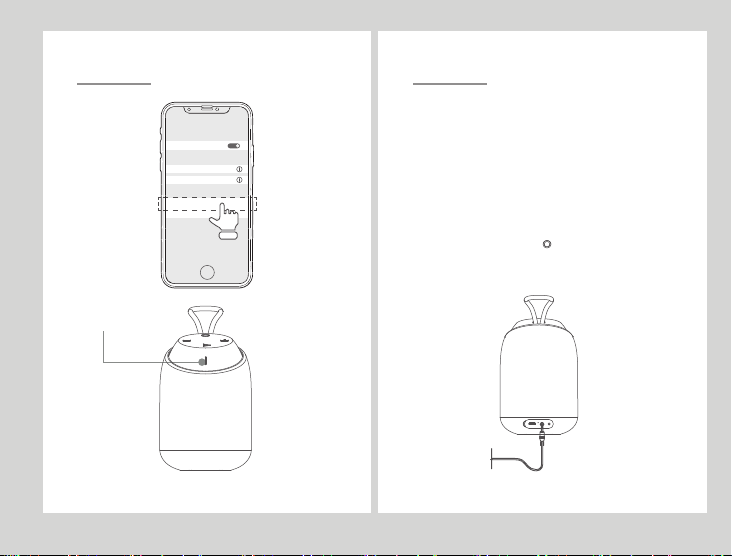
Bluetooth-Verbindungsdiagramm
BLUETOOTH
PAIRED DEVICES
M37
SA23
AVAILABLE DEVICES
Mini Diver
M39
Bluetooth-Anzeige 、AUX-Anzeige
AUX-IN Audio-Eingangsmodus
(1) Für AUX-In-Modus Wiedergabe, wenn an AUX 3,5
mm Kabel angeschlossen. Wenn Sie das
3,5-mm-AUX-Kabel einstecken, wechselt die
Bluetooth-Anzeige von blau zu rot.
(2) Im AUX-In-Modus können Sie einen eingehenden
Anruf nicht über den Mini-Taucher beantworten.
Hinweis:
Wenn die Aux - In - Buchse angeschlossen ist, beginnt
der Aux - In - Wiedergabemodus vor dem Einschalten.
Drücken Sie kurz die Taste " "
Wechseln Sie in den Bluetooth-Verbindungsmodus,
verbinden Sie die Bluetooth-Wiedergabe.
7
8
Page 11
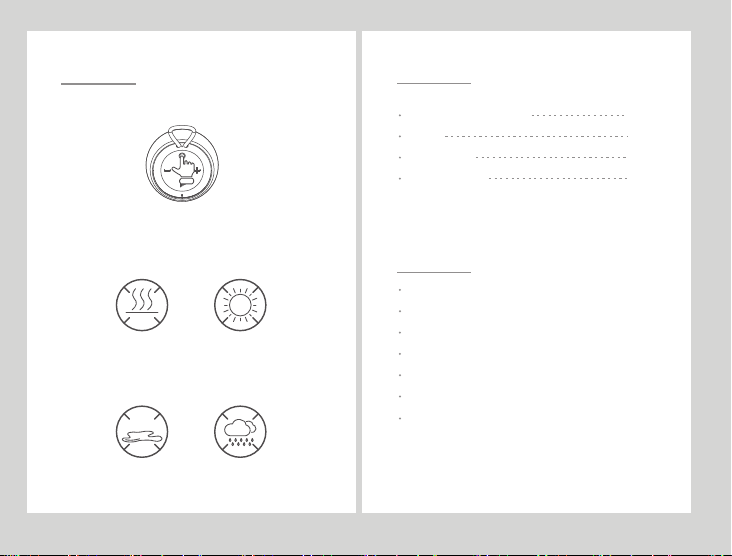
Wartung und pflegung
1, Der Strom des Lautsprechers wird ausgeschaltet, und
sicher sein und ordnungsgemäß geschützt werden.
2, Um hohe Temperaturen (über 40 Grad Celsius) zu
vermeiden, zum Beispiel wird es in einem
Hochtemperaturabteil oder durch direkte
Sonneneinstrahlung platziert.
>40℃
Hohe Temperaturen können die Oberfläche beschädigen und die
Batterielebensdauer verringern.
3, Setzen Sie dieses Produkt und anderes Zubehör nicht
Regen oder Flüssigkeit aus.
LIQUID
製品の組立部品
Mini Diver ブル ートゥー ス
説明書
充電ケーブル
AUX-INケーブル
製品の特徴
シャ ワ ーと アウトド ア に 適 用 す る
IPX7級防水認証
ブ ル ートゥ ー ス V4.2
充電式電池
ハンズフリー通話をサポートする
AUXイン
高品質の音質
1pc
1pc
1pc
1pc
9
2
Page 12
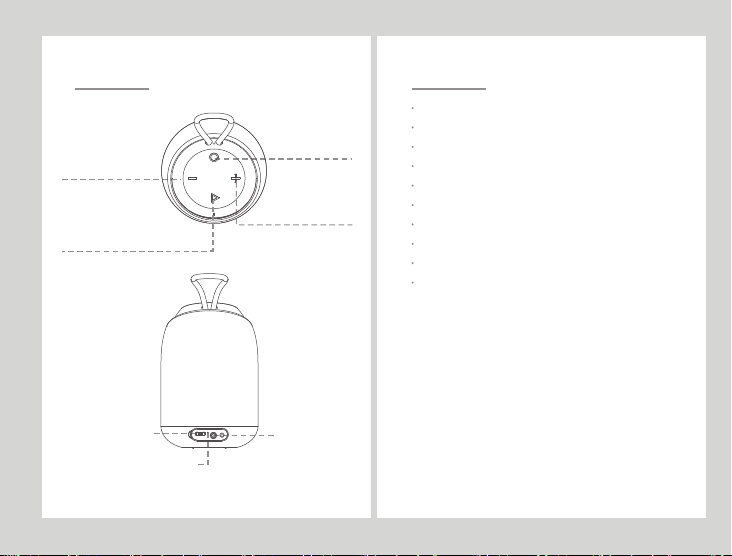
製品の図解
ボリュームマイナス/前の曲
長く押す:前の曲
短く押す:ボリューム マ イナス
再生/停止
長く 押 す:ペ アを す る
ハンドフリー通 話:短く押して出る、長く押して拒 否する
スイッチボ タン
長く 押 す:オ ー プン
短く 押 す:モ ード の 切 り替 え
ボリューム プラス /次の曲
長く押す:次の曲
短く押す:ボリューム プラス
技術デ ータ
製 品 モ デ ル: MiniDiver
スピーカーインピーダンス:4Ω
感 度: 82±3dB
定格電力:5W
頻度範囲:90Hz-18KHz
スピーカーのサイズ仕様:1.75”
無線伝送距離:約10m
再生期間:約7-8時 間( 50%の ボリュームで)
充電期間:約3時間
製品のサイズ:Φ76×116mm
充電インタ ーフェースDC-5V
充電 インジケ ータライト
AUXオー ディオイ ン
3
4
Page 13
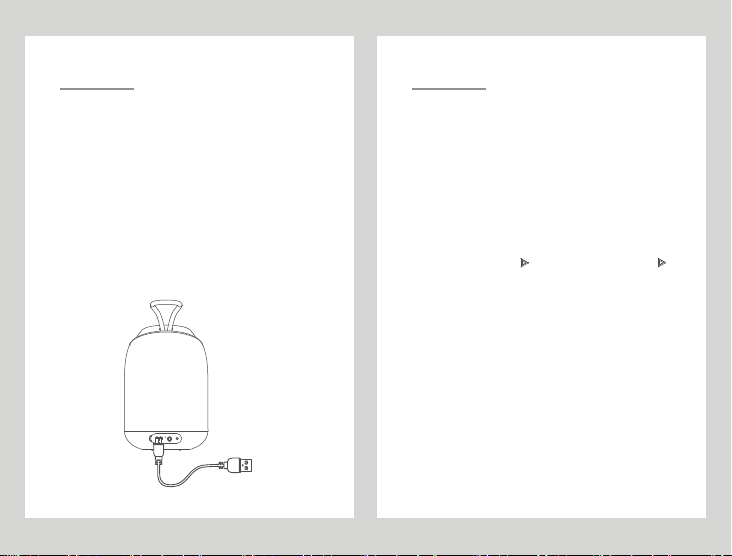
ブルートゥーススピーカーの充電
このスピーカーにはビルトイン充電式電池があります。初め
てスピーカーを使用する前に、電池に十分充電しなければな
りませ ん 。
1.充電前に、スピーカーをシャットダウンしなければなりませ
ん。スピーカーの異常動きをさせないため、オープン状態で
充電しないでください。
2.小さいmicro USBプラグをスピーカーの裏側にある充電
インターフェースに差し込んで、ケーブルの反対側(標準
USB2.0プラグ)をいかなる標準USBポート(例えば、コン
ピュータ やUSB充電器)に差し込みます。
3.充電の時、赤いLEDが自動的に開いて、充電済みの時、
LEDインジケータライトが自動的にオフになります。
ブルートゥースモード
ペアを する
1.「◎」ボタンを長く押して、ヒント音を聞いたら、スピ
ーカーがオープンです。
2.Mini Diverスピーカーをブルートゥースペアの準備状態
に置いたら、青いライトが点滅します。一般的な設置ス
テップは「設置」→「ブルートゥース」→「Mini Diver
」で、ペアを選択し、OKを押します。
3.ペアが成功したら、電源のインジケータライトが青くな
って、ヒント音が出します。
4. ..... 電話が来る時、「 」ボタンを押して出ます。「 」
ボタンをもう一度押して、電話を切ります。
ご注意:
(1).もし、ブルートゥースは低出力や弱電状態であった
ら、偶に携帯やパソコン、IPADと他のデバイスに接続で
きない場合があります。使用前に、充電してください。
(2). ブルートゥースデバイスがブルートゥースに接続
した時、10メートルの接続距離を超えたら、信号が切ら
れます。スピーカーをオフにした時、改めて自動的に接
続できます。
5
6
Page 14
ブル ートゥースペ ア見取り図
BLUETOOTH
PAIRED DEVICES
M37
SA23
AVAILABLE DEVICES
Mini Diver
M39
ブ ルー トゥー スイ ン ジ ケー タラ イト
/AUXインジケー タライト
AUX-INオーディオインモード
(1) AUX3.5mmのケーブルと接続した時、AUX-inモー
ドで再生します。AUX3.5mmのケーブルを差し込んだ
ら、ブルートゥースインジケータライトが青から赤くな
ります。
(2) AUX-inモードの状態で、Mini Diverスピーカーを
通して電話に出ることができません。
ご注意:
AUX-inインターフェースが接続されたら、デバイスがオ
ープンした時、デフォルトでAUX-in再生モードが優先で
す。「◎」ボタンを短く押して、ブルートゥースペアモ
ードに切り替え、ブルートゥースに接続して再生できま
す。
7
8
Page 15
1.スピーカーをシャットダウンしたから、保存してください。
適当な保護を与えることが必要です。
2.高温(40℃以上)を避けて保存してください。例えば
、高温の車内や直射日光の当たる場所。
>40℃
高温に置いたら、表面が傷付きやすくて電池の寿命も短くなります。
3.この製品及び他の部品を雨や液体の中に置かないでくだ
さい。
LIQUID
9 11
产品组件ケアとメンテナンス
Mini Diver蓝牙音响
说明书
充电线
AUX-IN线
产品特点
适合淋浴和户外使用
IPX7级防水认证
蓝牙V4.2
可充电电池
支持免提通话
AUX 输入
高品质音质
1台
1份
1条
1条
Page 16
产品图解
音量减 / 上一曲
长按:上一曲
短按:音量减
播放/暂停
长按:配对
免提通话:短按接听,长按拒接
开关键
长按:开机
短按:模式切换
音量加/下一曲
长按:下一曲
短按:音量加
技术参数
产品型号:Mini Diver
扬声器阻抗:4Ω
灵敏度:82±3dB
额定功率:5W
频率范围:
90Hz-18KHz
扬声器尺寸规格:1.75"
无线传输距离:约10米
播放时间:约7-8小时(50%音量)
充电时间:约3小时
产品尺寸:Φ76×116mm
充电接口 DC-5V
充电指示灯
AUX音频输入
12
13
Page 17
蓝牙音响充电
此音箱有内置充电电池,在首次使用音箱之前,必须给电池充
满电。
充电前必须将音箱关机,请勿在开机状态下充电,避免造
1、
成音箱工作不正常。
将小micro USB插头插入扬声器背面的充电器端口,将电
2、
缆的另一端(标准USB 2.0插头)插入任何标准的USB端口(
如电脑或USB充电器)。
在充电时,红色LED将自动开启,充满电后,LED指示灯
3、
将自动关闭。
14
蓝牙模式
配对
(配对周边需具有A2DP功能,才能传输立体声音乐)
两个蓝牙功能设备(如:蓝牙音箱和蓝牙手机,蓝牙音箱和PC,
蓝牙音箱和IPAD)之间建立的加密无线连接。
长按开" "键,听到提示音,即已开机。
1、
将Mini Diver音箱处于准备配对蓝牙状态,此时设备提示蓝灯
2、
会闪烁,通常设置步骤为进入“设置”→“蓝牙”→“Mini
Diver”,选择配对,然后按下确定。
配对成功后,电源指示灯变成蓝色并发出提示音。
3、
来电时,按下" "按钮接听来电。挂断电话,请再按一下" ".
4、
注意:
(1). 如果蓝牙音箱处于低功率或弱电状态,有时可能无法连接到手机、PC、
IPAD或其他设备。使用前请立即充电。
(2). 当蓝牙设备蓝牙连接时,如果超过10M的连接距离,信号将被断开。当你
关闭扬声器时,它会自动重新连接。
15
Page 18
蓝牙连接示意图
BLUETOOTH
PAIRED DEVICES
M37
SA23
AVAILABLE DEVICES
Mini Diver
M39
16
图1
蓝牙指示灯/AUX指示灯
图2
AUX-IN 音源输入模式
(1). 与AUX 3.5mm电缆连接时,用于AUX- in模式播放。插入
AUX 3.5mm线时,蓝牙指示灯由蓝色变成红色。
(2). 在AUX- in模式下,不能通过Mini Diver 音箱接听来电。
注意:
当Aux - in插孔连接时,开机后默认优先Aux – in播放模式。短按“ ”键
可以切换到蓝牙连接模式,进行连接蓝牙播放.
17
Page 19
维护和保养
1、存放时将音箱电源关闭,并确信受到适当保护。
2、避免高温(高于40摄氏度),例如置于高温的车厢内或。
受阳光直射。
>40℃
高温会使表面受损,并降低电池寿命。
3、请勿将本产品及其它配件暴露于雨水或液体中。
液体
18
保修说明
尊敬的客户,您好!
承蒙惠顾BUGANI音响产品,谨致谢意!为保障您的权益,在您购买
BUGANI音响产品后仔细阅读以下内容:
本保修卡作为本公司产品保修的唯一凭证。
1、凭本保修卡和相关销售发票可获得本公司免费保修服务,如您不能出示
销售证明,该产品的免费保修期将自其生产日期算起。
2、产品自售出之日起7日内,发生性能故障,产品本身及包装完整外观无
损;可以选择退货、换同型号同规格产品或免费修理。
3、产品自售出之日起15日内,发生性能故障,产品本身及包装完整,外观
无损;可以选择换同型号同规格产品或免费修理。
4、产品在本公司对应保修期内,可享受免费保修服务(人为因素除外)。
5、返修产品若需要邮寄的,邮寄费用由发送方单向负责。
6、非本保修卡外的其他售后承诺,深圳市布迦尼电子有限公司不承担责任
不适用保修范围
下列情况不属于免费维修范围,敬请注意:
1、未能提供保修卡和相关销售发票。
2、产品的清洁和正常情况下的损耗(如外壳,接插部件的自然损耗,老化及.
磨损)。
3、未按照使用说明书要求安装、使用、维护、保管导致的产品故障或损坏。
4、擅自涂改、撕毁产品条形码或保修卡。
5、已经超出保换、保修期限。
6、擅自改动本身固有结构、电路、擅自拆装、改装。
7、因意外事故,人为滥用导致的产品损坏,如输出短路、高压输入、超负荷
工作、高温、进水、机械破坏、摔坏、产品严重氧化或者生锈等等。
8、客户发回返修途中由于运输、装卸所导致的损坏。
9、因不可抗拒力如地震、火灾、水灾等导致的产品故障或损坏。
其他非产品本身设计、技术、制造、质量等问题而导致的故障或损坏。
19
Page 20
DESIGNED FOR
iPhone | iPad | iPod | Android Phones | Mp3 | PC | Mac
PORTABLE BLUETOOTH SPEAKER
SHENZHEN BUGANI ELECTRONICS CO.,LTD
Room 2206, Huichao Tech Building, 12th Jinhai Road, Xixiang Town,
Bao'an District, Shenzhen, China.
 Loading...