

Page 1
Unpacking and Setup
This section provides unpacking and setup information for the Print Server.
Open the shipping carton of the Print Server and carefully unpack its contents.
The carton should contain the following items:
Main Unit (Print Server) 1
Power Adapter 1
DriveNavigator Installation CD 1
Quick Setup Guide (this user’s guide) 1
If any items are missing or damaged, please contact the reseller or retailer from
which the product was purchased.
This product does not support Mac OS 9.
Macintosh
Quick Setup Guide
Print Server
LPV3-U2-US
www.buffalotech.com
QSG-LPV3-U2-MAC
Page 2
2
Print Server Setup
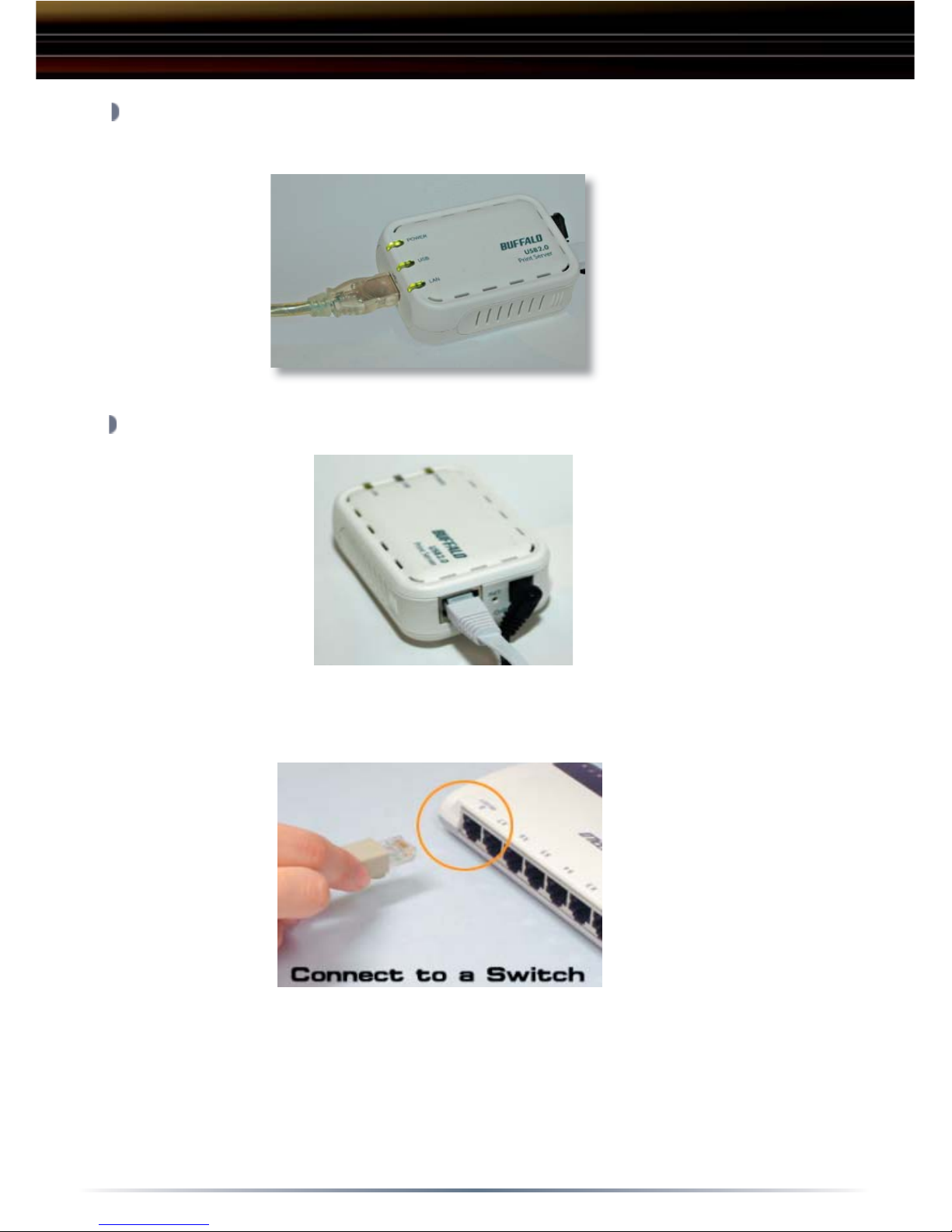
Plug the Print Server’s power cord into a power outlet. Connect the USB
cable from your printer into the USB port on the Print Server.
Connect the included Ethernet Cable into the Ethernet port on the Print
Server.
Connect the other end of the included Ethernet Cable into a hub, switch or
router on the network.
Page 3
3
Choose between Rendevous, Appletalk or IP Printing as your method of
communication with the printer:
Rendevous
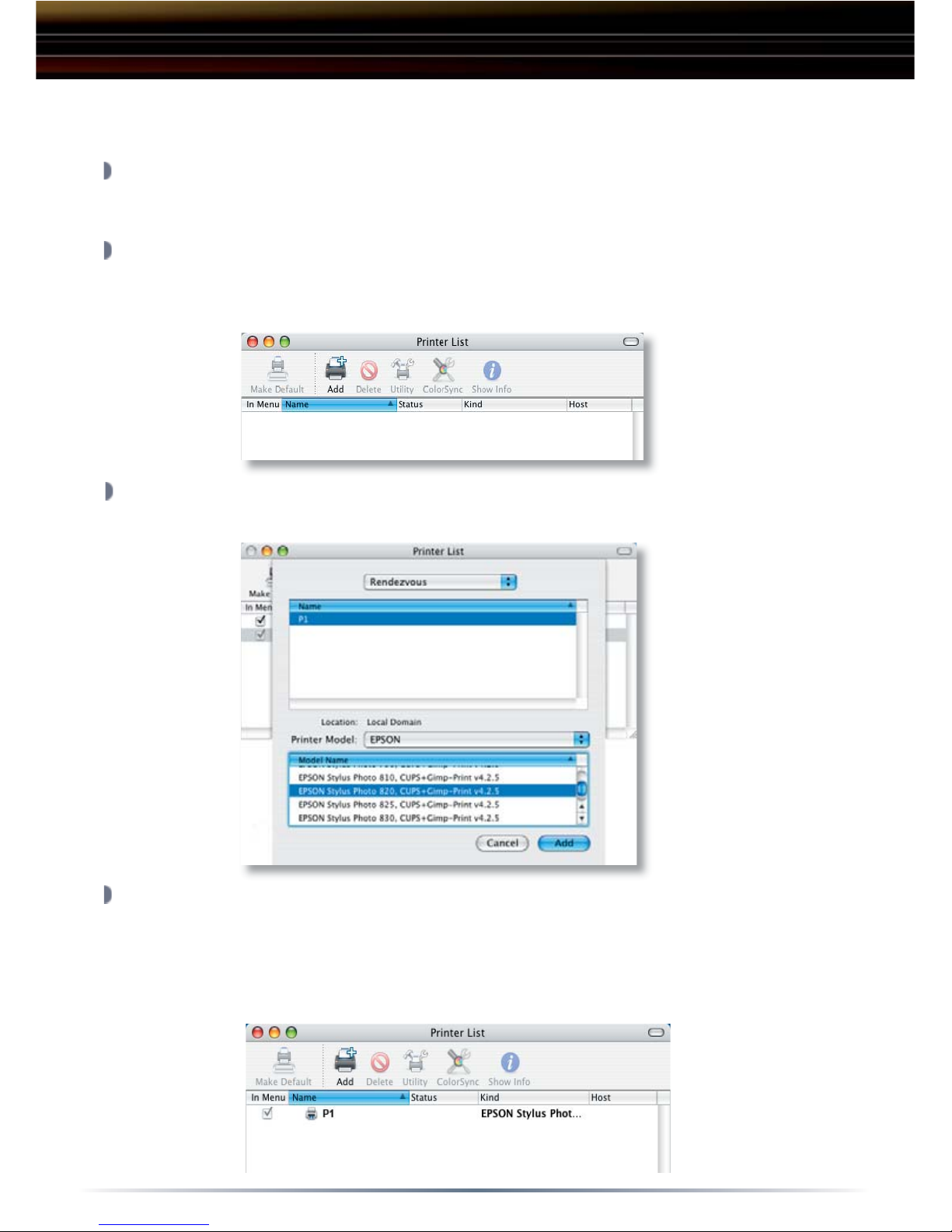
Open System Preferences and click Print & Fax.
Click Printing and then click Set Up Printers.
Click Add and select Rendevous. A Rendezvous-enabled printer will
appear in the Printer List. Select the printer in the Printer List.
From the Printer Model pop-up menu, select your printer in the Model
Name list and click Add.
The printer will now appear in the Printer List in bold type as the default
printer. It also appears in the Printer pop-up menu when you print a
document.
Mac OS X
Print Server Setup
Page 4
4
Appletalk
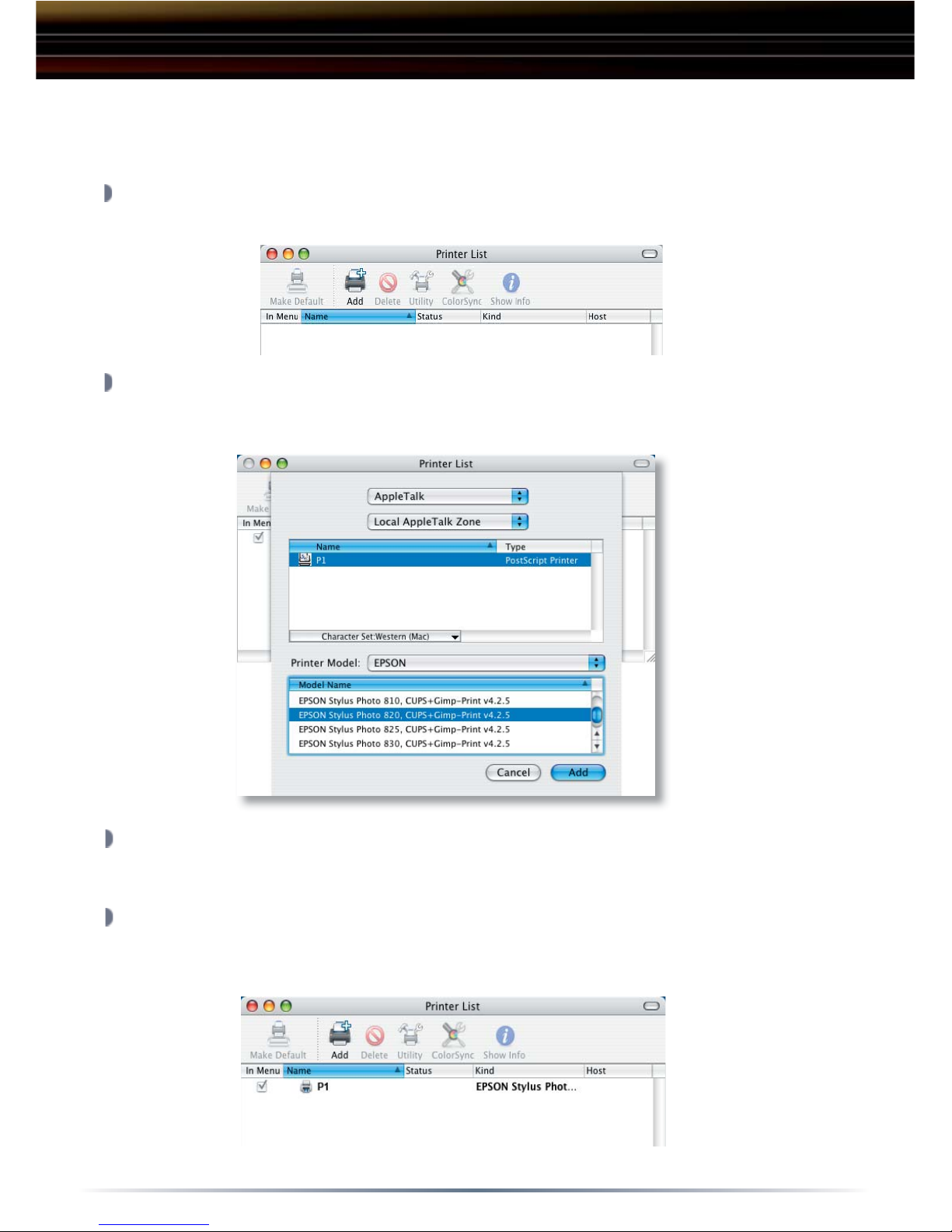
Open System Preferences and click Print & Fax.
Click Printing and then click Set Up Printers.
Click Add and select Appletalk. Your local zone will automatically be
selected. All Appletalk-enabled printers will appear in the Printer List.
Select the printer in the Printer List.
From the Printer Model pop-up menu, select your printer in the Model
Name list and click Add.
The printer will now appear in the Printer List in bold type as the default
printer. It also appears in the Printer pop-up menu when you print a
document.
Print Server Setup
Mac OS X
Page 5
5
DriveStation Setup
Mac OS X
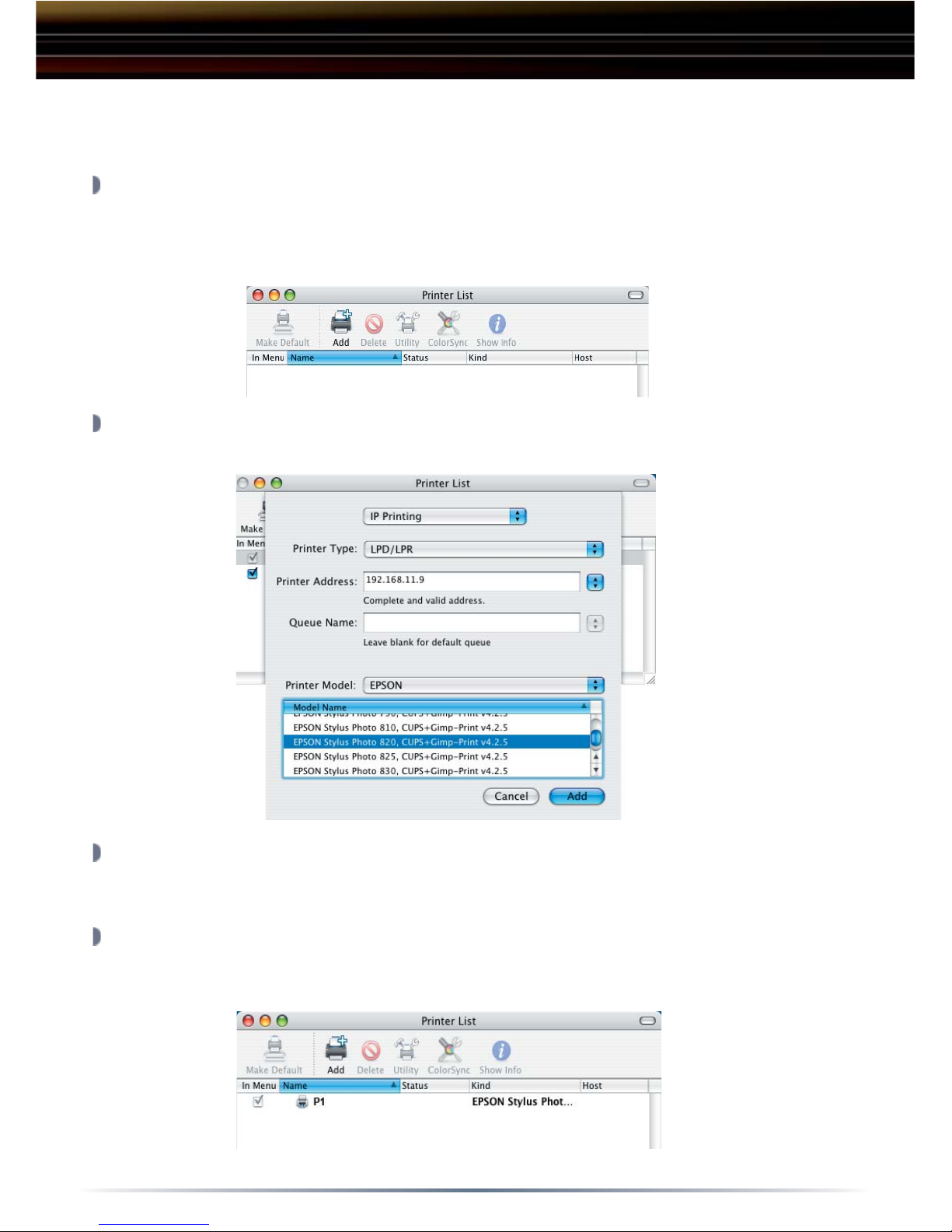
IP Printing
To add an IP printer, you need to know the IP address or DNS name of the
printer. See your network administrator for assistance.
Open System Preferences and click Print & Fax.
Click Printing and then click Set Up Printers.
Click Add and select IP Printing. Enter the IP address of your printer and
select the printer in the Printer Model List.
From the Printer Model pop-up menu, select your printer in the Model
Name list and click Add.
The printer will now appear in the Printer List in bold type as the default
printer. It also appears in the Printer pop-up menu when you print a
document.
Page 6

6
Technical Support
Buffalo Technology offers toll-free technical support 24 hours a day, 7 days
a week for this product. Customers in the United States and Canada may
obtain technical support using the following information:
FCC Warning
This device complies with part 15 of the FCC Rules. Operation is subject
to the following two conditions: (1) This device may not cause harmful
interference, and (2) this device must accept any interference received,
including interference that may cause undesired operation.
Technical Specifi cations
USB Standards: USB Specifi cation Rev. 2.0
Capacity: 160, 250 GB
Seek Time: Max. 11 milliseconds
Transmission Speed: Max. 480 Mbps
Power Consumption: Max. 25W, Average 17W
Power Supply: AC100V 50/60Hz
Dimensions: 53(W) x 173(H) x 164(D) mm
Weight: 3.15 lb.
Operating Environment: 5 - 35 degree C
20-80% humidity (non-condensing)
Dimension
s:
53(W) x 173(H) x 164(D) m
m
Power Consumption: Max.
2
5W, Average 17W
Seek Time
:
Max. 11 milliseconds
USB Standards
:
USB Specifi cation Rev. 2.0
Page 7

7
Buffalo Technology (USA) products come with a one-year limited warranty from
the date of purchase. Buffalo Technology (USA) warrants to the original purchaser
the product; good operating condition for the warranty period. This warranty does
not include non-Buffalo Technology (USA) installed components. If the Buffalo
product malfunctions during the warranty period, Buffalo Technology (USA) will, at
its discretion, repair or replace the product at no charge, provided the product has
not been subjected to misuse, abuse, or non-Buffalo Technology (USA) authorized
alterations, modifications or repair.
When returning a product, include your original proof of purchase. Return cannot
be processed without proof of purchase. Shipment of returned products to Buffalo
Technology (USA) is the responsibility of the purchaser. All expressed and implied
warranties for the Buffalo Technology (USA) product line are limited in duration to
the above period.
Under no circumstances shall Buffalo Technology (USA) be liable in any way to the
user for damages, including any lost profits, lost savings or other incidental or consequential damages arising out of the use of, or inability to use the Buffalo products. Buffalo Technology (USA) reserves the right to revise or update its products,
software, or documentation without obligation to notify any individual or entity.
Please have your proof of purchase receipt to get warranty support. All defective products shall be returned to the original place of purchase with a copy
of proof of purchase. All RMAs are governed by the RMA policy or procedures
of each individual reseller selling Buffalo WLAN products. In no event shall Buffalo Technology (USA) liability exceed the price paid for the product from direct,
indirect, special, incidental, or consequential damages resulting from the use of
the product, its accompanying software, or its documentation. Buffalo Technology
(USA) does not offer refunds for any product.
Buffalo Technical Support Information
(Please have your proof of purchase when calling Buffalo Technical Support)
United States of America & Canada
Buffalo Technology (USA) Inc.
4030 West Braker Lane, Suite 120
Austin, Texas 78759-5315
Warranty Statement
Page 8

Technical Support is available 24 hours a day, 7 days a week
(USA / Canada)
Toll-Free: 866-752-6210
email: [email protected]
©2004, Buffalo Technology (USA), Inc.
4030 W. Braker Ln. Suite 120
Austin, Texas 78759
Tel: 800-456-9799
Fax: 512-794-8606
 Loading...