

Page 1
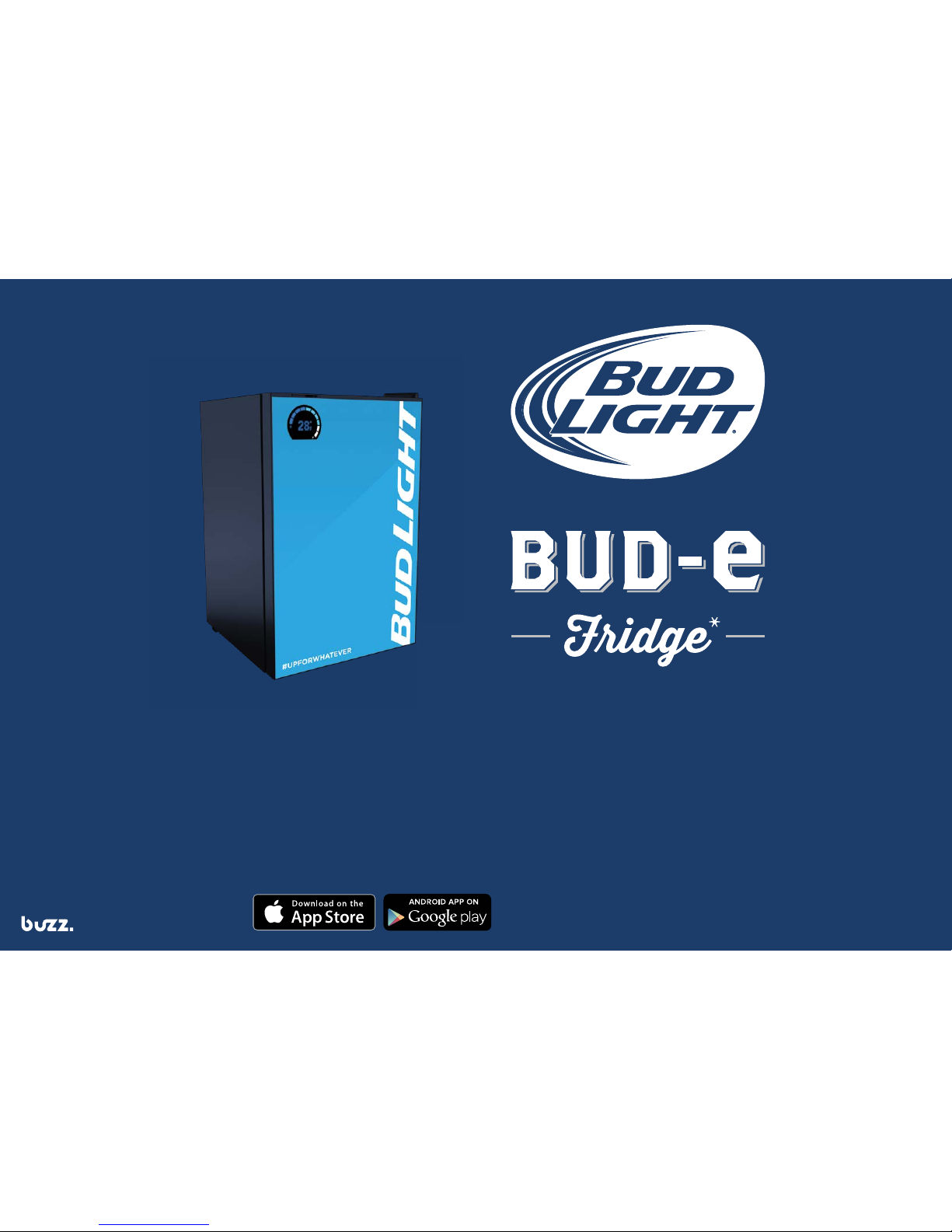
* Bud Light , Bud-e Fridge and Bud-e App are trademarks
of Anheuser-Busch, LLC.
Designed and manufactured by
Toll free number 1-855-283-7331
www.budlight.com
Apple and the Apple logo are trademarks of Apple Inc.,
registered in the U.S. and other countries. App Store
is a service mark of Apple Inc. Android and Google
Play are trademarks of Google Inc.
USER GUIDE (USA)
Never run out of cold Bud Light!
Countdown to cold
Below zero temperature
Page 2
32
SAVE THIS
USER GUIDE
You will need this manual for safety
instructions and operating procedures.
Put it and the original sales invoice in
a safe, dry place for future reference.
Model number:
010275
Serial number:
IC # 11838A-CONNREFG
FCC # 2AA7-CCONNREFG
Move packaged unit to approximate position of installation and allow unit to rest upright in the correct position
for 24 hours before plugging in. Failure to comply will void warranty.
NOTES BEFORE INSTALLATION
1. Allow unit to rest upright in the correct position for 24 hours
before plugging in.
2. Position unit in a well ventilated area and ensure you allow a
minimum of 3/4 inches on the sides and 2 inches at the
top and back of the refrigerator.
3. Do not rest any objects on the top or sides of the unit.
4. The refrigerator requires a 110V US type power outlet.
5. After turning the refrigerator on, allow it to reach preprogrammed temperature (0°C/32°F) over a 12 hour period.
3 LEDs will light up to indicate the correct temperature.
6. After this initial period (minimum 12 hours) the refrigerator
setting can be changed to achieve below zero temperatures
by illuminating all 5 LEDs (-1.5°C/-3.0°C) or (29°F/26°F)
7. To ensure the unit can reach below zero temperatures
efciently, please load with cold beer as opposed to room
temperature product where possible.
8. It is normal for the sides of the refrigerator to be warm at
times during operation.
Page 3
4
Read all of the instructions before using this appliance.
When using this appliance, always exercise basic safety
precautions, including the following:
1. Use this appliance only for its intended purpose
as described in this user guide.
2. This refrigerator must be properly installed in accordance
with the installation instructions before it is used. See
grounding instructions in the installation section.
3. Never unplug your refrigerator by pulling on the power
cord. Always grasp the plug rmly and pull straight out
from the outlet.
4. Contact a certied electrician to repair or replace immediately,
all electric service cords that have become frayed or otherwise
damaged. Do not use a cord that shows cracks or abrasion
damage along its length, the plug or the connector end.
5. Do not use any electrical device or any sharp instrument
when removing any ice build up.
6. Unplug your refrigerator before cleaning. Note: If for
any reason this product requires service, we strongly
recommend that a certied technician performs the service.
7. Before you throw away your old refrigerator take off the
doors. Leave the shelves in place so that children may not
easily climb inside.
8. After your refrigerator is in operation, do not touch the cold
surfaces when hands are damp or wet. Skin may adhere
to these extremely cold surfaces.
9. This refrigerator should not be recessed or built-in
in an enclosed cabinet. It is designed for free-standing
installation only.
10. Do not operate your refrigerator in the presence of
explosive fumes.
TABLE OF CONTENTS
5
SAFETY PRECAUTIONS
Danger Risk of child entrapment or fridge falling.
Risk of child choking on small parts. This fridge
is not made for use by children. Before you throw
away your old refrigerator take off the doors.
Leave the shelves in place so that children may
not easily climb inside.
Safety Precautions 5
Installing Refrigerator 7
Parts Overview 9
Getting Started 10
Connecting to Wi-Fi 11
Mobile App 12
Wi-Fi Status 13
Temperature Settings 14
Refrigerator Beer Capacity 15
Stocking and Removing Beer 16
Care and Cleaning 18
Troubleshooting 19
Limited Warranty & Disclaimer 22
FCC and IC 26
Page 4
6 7
INSTALLING YOUR REFRIGERATOR SAFETY PRECAUTIONS (continued)
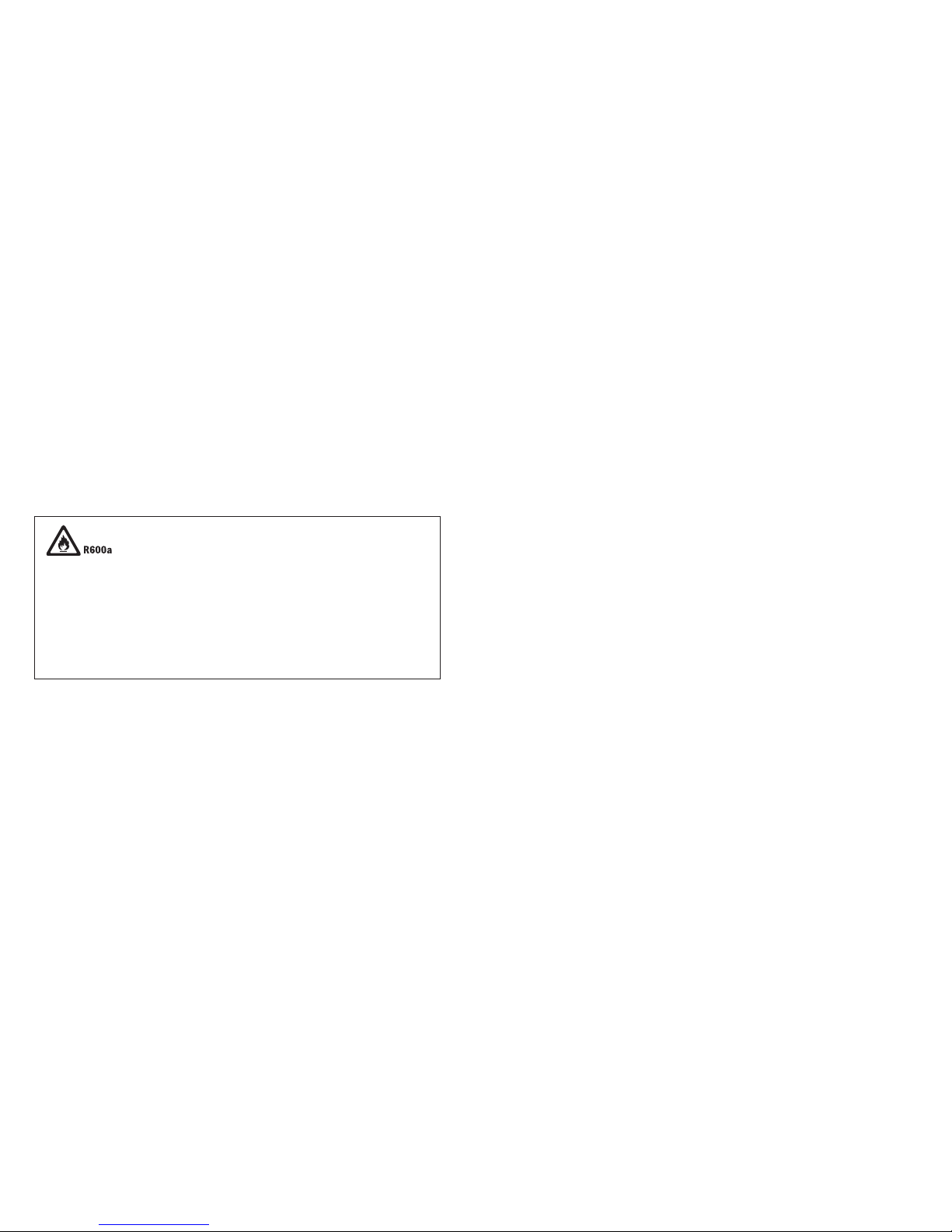
Danger – Risk of re or explosion. Flammable refrigerant used. To be repaired only by trained and authorized service
personnel. Do not puncture refrigerant tubing. Do not use mechanical devices to defrost refrigerator.
Caution – Risk of re or explosion. Flammable refrigerant used. Consult repair manual/owner’s guide before attempting
to service this product. All safety precautions must be followed.
Caution – Risk of re or explosion. Dispose of properly in accordance with federal or local regulations.
Flammable refrigerant used.
Caution – Risk of re or explosion due to puncture of refrigerant tubing; follow handling instructions carefully.
Flammable refrigerant used.
Unpacking Your Refrigerator
1. Remove all packaging material. This includes the foam base
and all adhesive tape holding the refrigerator accessories
inside and outside.
2. Inspect and remove any remains of packing, tape or printed
materials before powering on the refrigerator.
Levelling Your Refrigerator
• Your refrigerator has two levelling legs which are located in
the front bottom corners of your refrigerator. After properly
placing your refrigerator in its nal position, you can level
your refrigerator.
• Levelling legs can be adjusted by turning them clockwise to
raise your refrigerator or by turning them counter-clockwise
to lower your refrigerator. The refrigerator door will close
easier when the levelling legs are extended.
Proper Air Circulation
• To ensure your refrigerator works at the maximum
efciency it was designed for, you should install it in a
location where there is proper air circulation, plumbing
and electrical connections.
• The following are recommended clearances around
the refrigerator:
Sides……………3/4" (19mm)
Top....................2" (50mm)
Back..................2" (50mm)
Electrical Requirements
• Make sure there is a suitable power outlet with proper
grounding to power the refrigerator.
• Avoid the use of three prong adapters or cutting off the
third grounding prong in order to accommodate a two
prong outlet. This is a dangerous practice since it provides
no effective grounding for the refrigerator and may result
in shock hazard.
Page 5
INSTALLING YOUR REFRIGERATOR (continued)
8 9
PARTS OVERVIEW
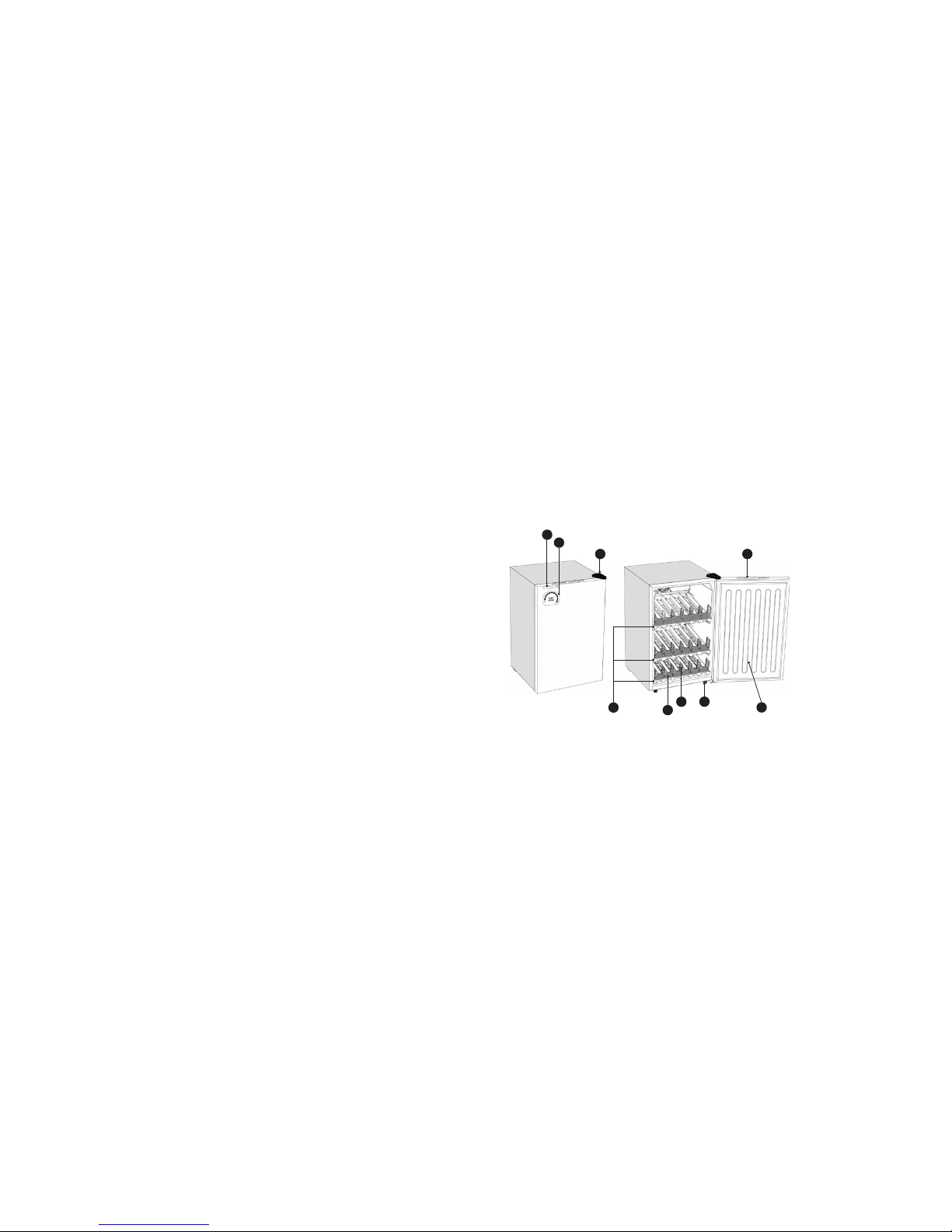
Parts overview:
1. Speaker
2. Display
3. Door hinge
4. Control panel
5. Door
6. Shelves (x3)
7. Shelf roller (x18)
8. Shelf gates (x21)
9. Front feet (x2 adjustable)
Sounds/alerts overview:
• Adding stock
• Pressing the ‘PAIR’ button
• Pressing any function
button on the control panel
• End of cold countdown
• Door open
• Full fridge
• Power on
1
2
3 4
7
8
9
6
5
Use of Extension Cords
Avoid the use of an extension cord because of potential safety
hazards under certain conditions. If it is necessary to use an
extension cord, use only a 3-wire extension cord that has a
3-blade grounding plug and a 3-slot outlet that will accept the
plug. The marked rating of the extension cord must be equal
to or greater than the electrical rating of the appliance.
Installation Limitations
• Do not install your refrigerator in any location not properly
insulated or heated, e.g. garage, etc. Your refrigerator was
not designed to operate in temperature settings below 55˚
Fahrenheit / 12˚ Celsius.
• Select a suitable location for the refrigerator on a hard
even surface away from direct sunlight or heat source, e.g.
radiators, baseboard heaters, cooking appliances, etc.
Any oor unevenness should be corrected with the levelling
legs located on the front bottom corners of the refrigerator.
In addition to the sounds from the amplied speaker, normal
operating sounds you may hear:
• Boiling water, gurgling sounds or slight vibrations are the
result of the refrigerant circulating through the cooling coils.
• The thermostat control will click when it cycles on and off.
Page 6
10 11
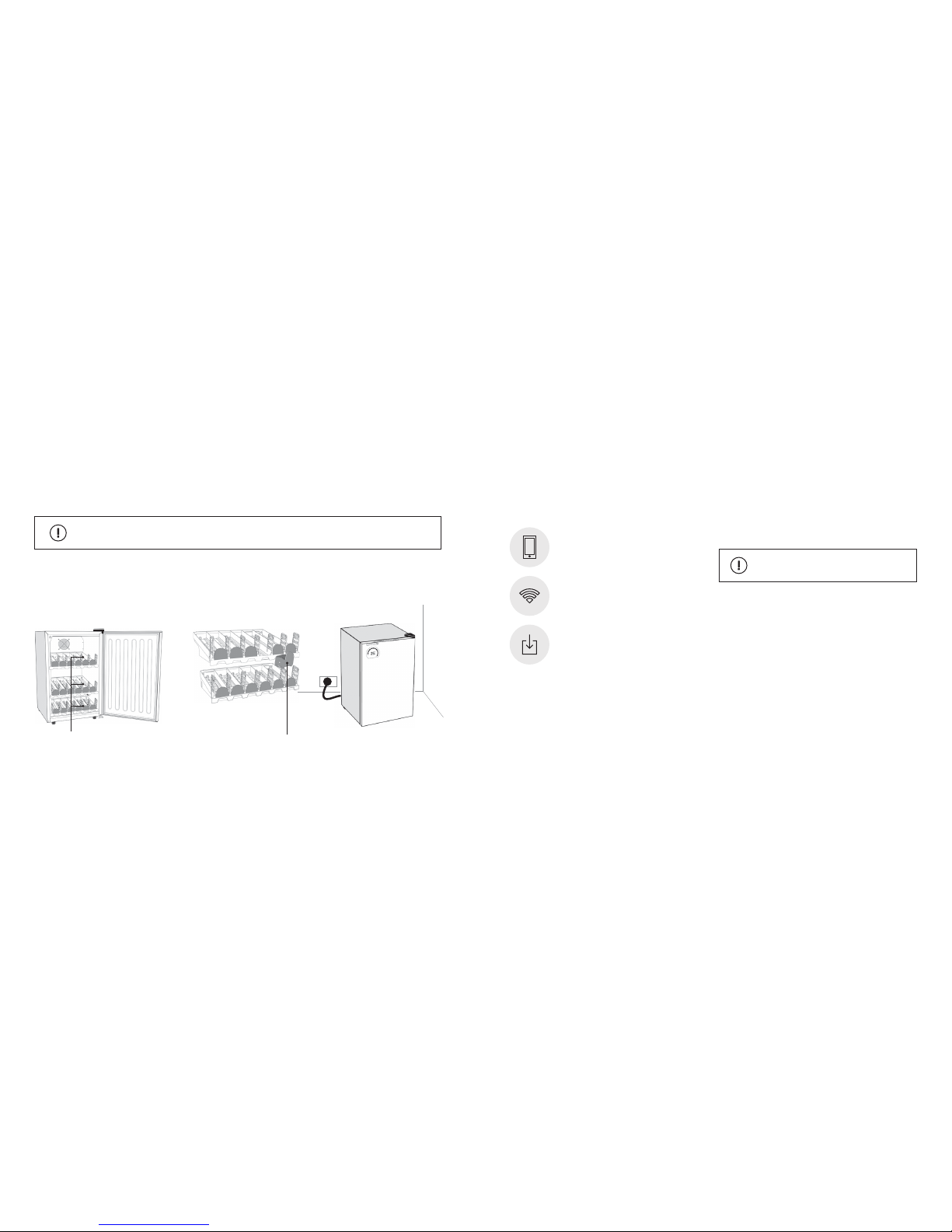
Remove the tape
off the rollers
Open refrigerator door and remove
all internal packaging and tape.
Check there is one ‘colour roller’ per
channel with silver magnetic feet
facing down as shown.
Plug the refrigerator into a 110V
power outlet.
1. 2. 3.
Colour roller x 18
• Make sure your phone is connected to the Wi-Fi network
you wish to connect your refrigerator to.
• For best Wi-Fi connection results turn your iPhone screen
to maximum brightness.
• For best Wi-Fi connection results do not place refrigerator
in direct sunlight during the connection process or where
there may be bright or ashing lights.
WARNING
An iOS or Android mobile device.
Download the Bud-e App and follow
on screen prompts to connect.
Wi-Fi router - 802.11b/g/n with broadband
internet connection.
GETTING STARTED CONNECTING TO WI-FI
Before connecting to Wi-Fi you will need
This product will not connect to any Wi-Fi networks
requiring secondary authentication.
Move packaged unit to approximate position of installation and allow unit to rest upright in the correct position
for 24 hours before plugging in. Failure to comply will void warranty.
Page 7
13
12
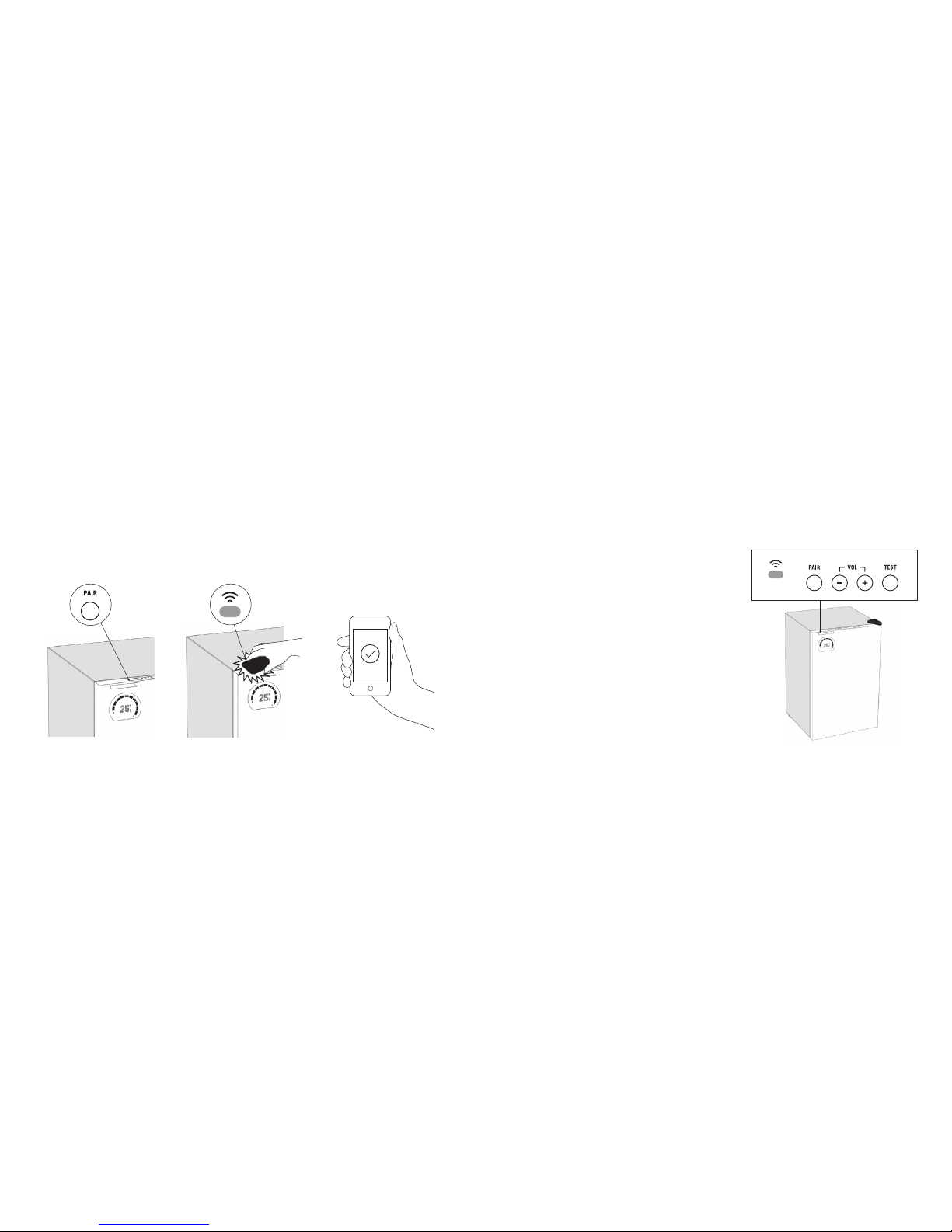
Press the pair button on top of the
refrigerator door. This will wake the
Wi-Fi sensor for connection.
When countdown starts, hold the
screen of your device at against
the Wi-Fi sensor until the screen
stops ashing.
Once connected, the Bud-e App
will display real time stock count
and temperature of the refrigerator.
1. 2. 3.
Wi-Fi LED status
Flashing red = not connected
Flashing green = connected successfully
Solid green = updating rmware
(do not unplug refrigerator during this process)
Flashing amber = has not received any
Wi-Fi settings
Off = normal operation
(the unit is still connected to Wi-Fi)
Note: If Wi-Fi connection is lost the Wi-Fi icon on the display
will ash red. The refrigerator will automatically re-connect to
your Wi-Fi network when it becomes available again.
Wi-Fi status LED is located on
top of the refrigerator door.
Bud-e App - WI-FI CONNECTION
Download the Bud-e App and follow on screen prompts to connect
WI-FI STATUS LED (top panel)
Page 8
15
14
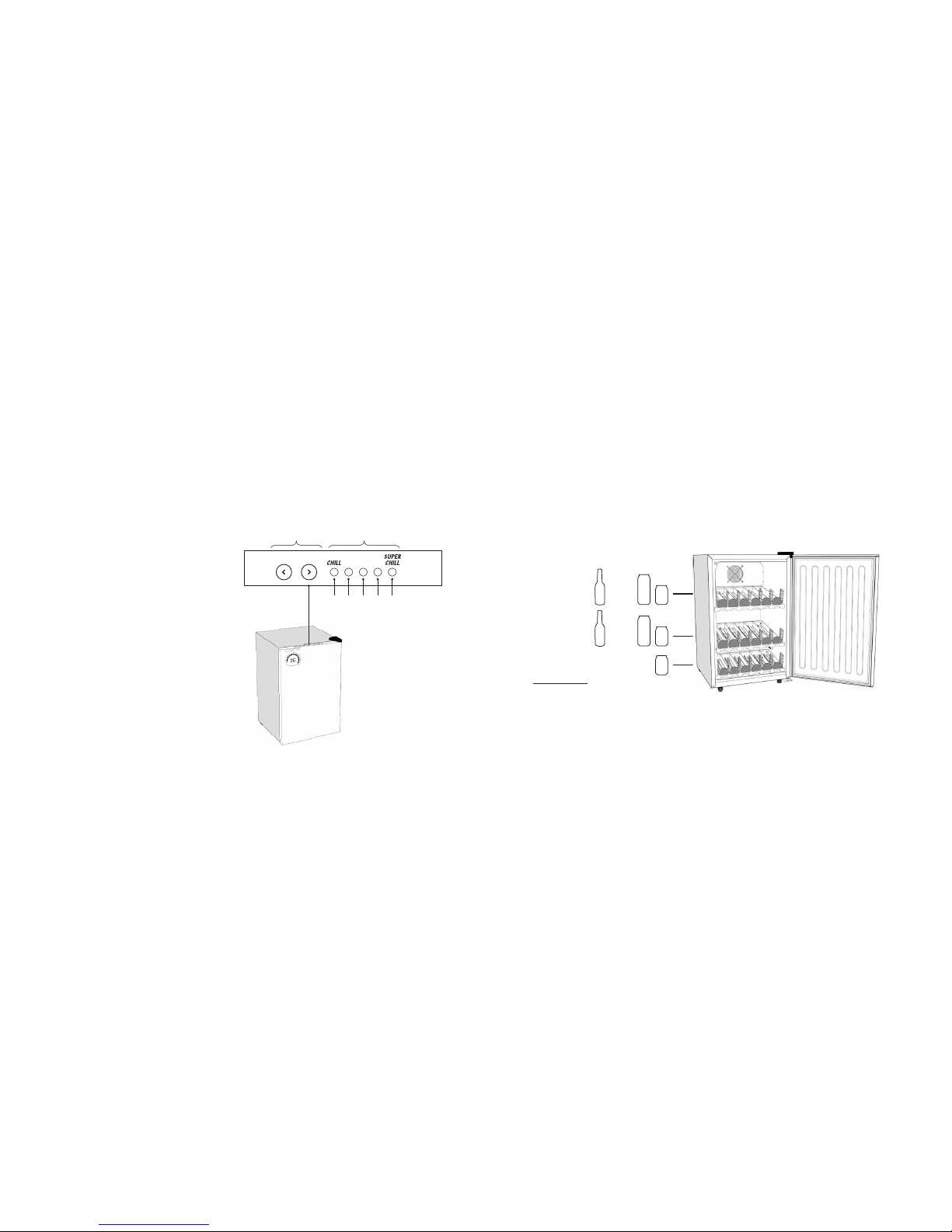
The refrigerator has 5 temperature settings*:
1 LED on = 5°C = 41°F
2 LEDs on = 2°C = 35°F
3 LEDs on = 0°C (default) = 32°F
4 LEDs on = -1.5°C = 29°F
5 LEDs on = -3.0°C = 27°F
Select Fahrenheit or Celsius via the mobile App
*Please note these are approximate temperature settings
only. Actual temperature may differ depending on stock
and environment.
Buttons
Display
2 3 4
5
1
Temperature settings are located
on top of the refrigerator door.
x30
x30
x18
Total 78
and/or
and/or
TEMPERATURE SETTINGS
REFRIGERATOR BEER CAPACITY
Page 9
17
16
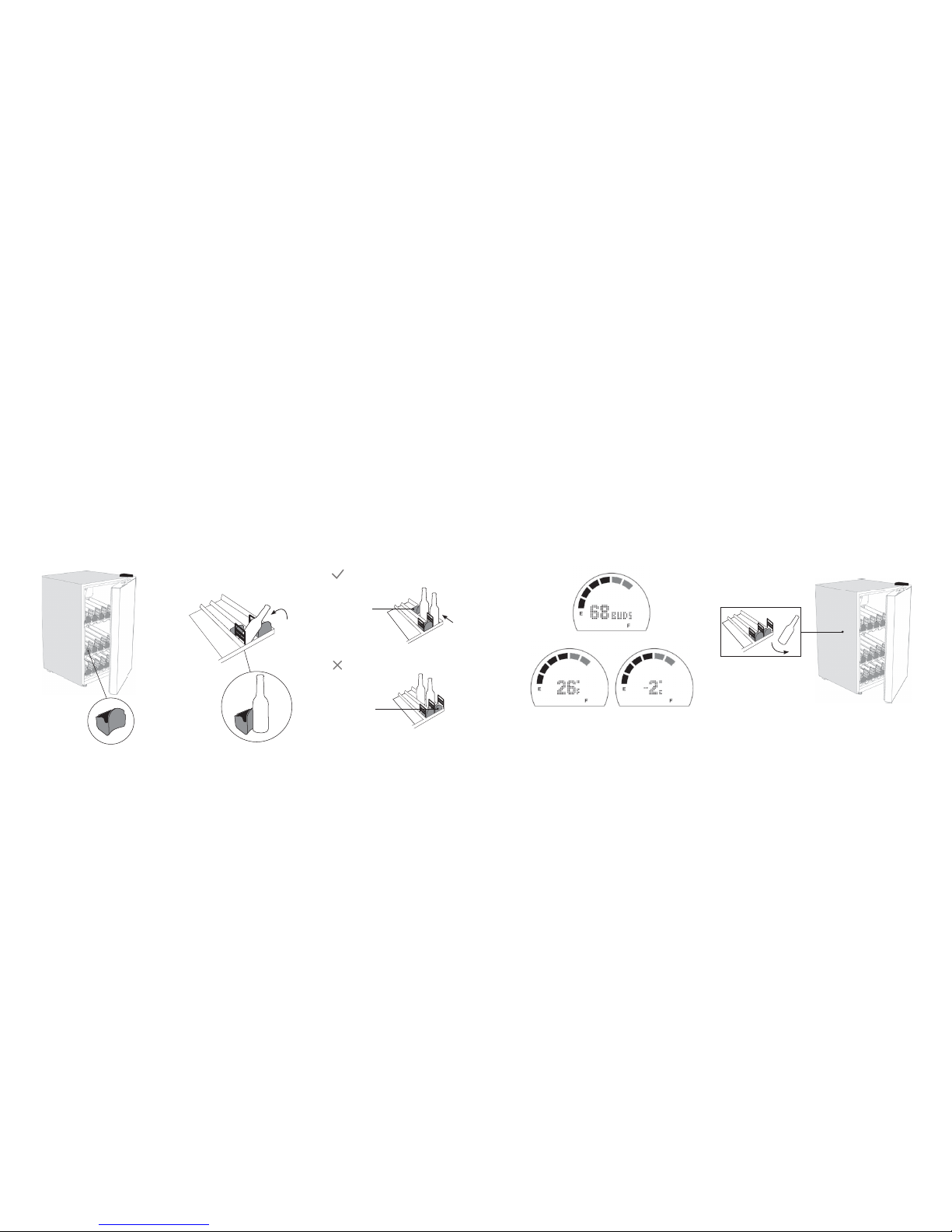
Make sure there is a ‘colour roller’ in
each channel.
Push base of bottle or can in
direction shown making sure it
pushes the colour roller further back
into the shelf channel.
Make sure roller is directly behind
bottle or can for accurate stock
counting.
1. 2. 3.
Incorrect way to stock:
Correct way to stock:
Roller behind
the bottle
Roller in front
of the bottles,
not active
On closing the refrigerator door the stock levels will be
displayed on the door for 5 seconds. Change temperature
indicator from Fahrenheit to Celsius via the mobile App.
The colour rollers measure the stock level. When removing
beer make sure the colour roller slides as far towards the
door as possible.
4. 5.
Stock count
Temperature
The Bud-e Fridge measures the number of items you have left using technology that was calibrated using standard
355mL/12-ounce Budweiser and Bud Light bottles and cans. Use of other packaging may have varying results for
this functionality. Contact customer service at 1-855-283-7331 for more details.
STOCKING AND REMOVING BEER STOCKING AND REMOVING BEER (continued)
Page 10

Cleaning and Maintenance
Warning: To avoid electric shock, always unplug your
refrigerator before cleaning. Ignoring this warning may
result in death or injury.
Caution: Before using cleaning products, always read and
follow manufacturer’s instructions and warnings to avoid
personal injury or product damage.
General: Wipe down your refrigerator with a damp cloth,
do not expose the internals to any liquids.
• Dry with a soft cloth.
• Do not use harsh chemicals, abrasives, ammonia,
chlorine bleach, concentrated detergents, solvents
or metal scouring pads. Some of these chemicals
may dissolve, damage and/or discolour your refrigerator.
Door Gaskets: Clean door gaskets every three months
according to “General Cleaning” section. Gaskets must
be kept clean and pliable to ensure a proper seal.
Petroleum jelly applied lightly on the hinge side of gaskets
will keep the gasket pliable and ensure a good seal.
Power Interruptions
Occasionally there may be power interruptions due
to thunderstorms or other causes. Remove the power
cord from AC outlet when a power outage occurs.
When power has been restored, re-plug power cord
to AC outlet. Clean refrigerator before reusing.
Vacation and Moving Care
For long vacations or absences, empty the refrigerator, remove
AC cord from socket and clean the refrigerator and door
gaskets according to “General Cleaning” section. Prop doors
open so air can circulate inside. When moving, always move
the refrigerator vertically. Do not move with the unit lying down.
Possible damage to the sealed system could occur. The Bud-E
Fridge should only be operated in a dry environment and
protected from the elements, should be operated away from
heat sources and should not be moved by a single person
to avoid injuries.
Energy Saving Tips
The refrigerator should be located in the coolest area of the
room, away from heat-producing appliances or heating
ducts, and out of direct sunlight.
18
PROPER REFRIGERATOR CARE AND CLEANING
Refrigerator does not operate:
• Check if refrigerator is plugged in.
• Check if there is power at the AC outlet, by checking
the circuit breaker.
Stock temperature appears too warm:
• Frequent door openings will slow the cooling process.
• Allow enough time for recently added stock to reach
desired temperature.
• Check gaskets for proper seal.
• Adjust temperature control to colder setting.
Stock temperature is too cold:
• If temperature control setting is too cold, adjust to a warmer
setting and allow several hours for temperature to adjust.
Refrigerator’s compressor runs too frequently:
• This may be normal to maintain constant temperature
during high temperature and humid days.
• Doors may have been opened frequently or for an
extended period of time.
• Check gasket for proper seal.
• Check to see if doors are completely closed.
Moisture build up on interior or exterior
of the refrigerator:
• This is normal during high temperature or humidity periods.
• Prolonged or frequent door openings may cause this.
• Check door gaskets for proper seal.
Refrigerator has an unpleasant odour:
• Interior needs cleaning.
19
TROUBLESHOOTING
Page 11

Refrigerator door does not shut properly:
• Level the refrigerator.
• Check for blockages, i.e. stock loaded incorrectly.
Popping or cracking sound when the
compressor comes on:
• Check to ensure the refrigerator is level.
• The oor may be uneven or weak. The refrigerator rocks
on the oor when it is moved slightly. Be sure the oor can
adequately support the refrigerator. Level the refrigerator
by putting wood or metal shims under part of the
refrigerator.
• The refrigerator is touching the wall. Re-level the
refrigerator and move it away from the wall.
See the “Installing Your Refrigerator” section.
My refrigerator won’t connect to Wi-Fi:
When conguring your device with Wi-Fi connection,
please ensure the following:
1. The device is powered on.
2. The status LED is ashing when connecting to Wi-Fi.
If your status LED is not ashing, you may need to restart
your refrigerator.
3. The screen of your mobile device is as close as possible
to the Wi-Fi sensor for the entire time the screen is ashing.
4. Your phone and device are as stationary as possible during
the connection process.
5. Move your refrigerator closer to the Wi-Fi router to ensure
good signal strength.
My Wi-Fi network is not showing up in the App:
• If your network is not listed by the Bud-e App, it may
be a hidden network. If it is hidden, then manually type
in the network’s name.
20
TROUBLESHOOTING (continued)
21
I am not hearing audio alerts:
• Make sure the volume is turned up by pressing
‘VOL +’ button.
The displayed stock level is different from the
actual stock level:
• Make sure the colour rollers have slid all the way to the
back of a bottle or can or the front of shelf if there are
no vessels in that channel.
• Make sure the colour rollers have their silver magnets
facing downwards.
My refrigerator is beeping at me:
• Make sure the door is closed properly.
Bud Light, Bud-e Fridge and Bud-e App are trademarks of Anheuser-Busch, LLC.
This product is intended for legal drinking age consumers.
© Buzz Agency Pty Ltd 2015 All Rights Reserved. Provisional Patent
No. 2014904101
TROUBLESHOOTING (continued)
Page 12

22
BUD-E FRIDGE - UNITED STATES
IMPORTANT: THIS LIMITED WARRANTY (“WARRANTY” or “LIMITED
WARRANTY”) APPLIES ONLY FOR CONSUMERS WHO HAVE PURCHASED
AND USE (“PURCHASERS”) THE “BUD-e” SMART FRIDGE (THE “UNIT”)
IN THE UNITED STATES AND DOES NOT APPLY TO ANYONE WHO HAS
RECEIVED A UNIT FOR FREE OR FOR TESTING PURPOSES (“NONPURCHASER”) FROM ANHEUSER-BUSCH, LLC (“SELLER”) OR ANY OTHER
PARTY, INCLUDING, BUT NOT LIMITED TO, LICENSEES, PROMOTIONAL
AGENCIES OR PRIZING PROVIDERS. PURCHASERS MUST RETAIN PROOF
OF PURCHASE IN ORDER TO OBTAIN WARRANTY SERVICE.
PLEASE SEE THE SECTION BELOW APPLICABLE TO YOUR SITUATION
PRIOR TO USE OF THE UNIT.
1.PURCHASERS:
BY USING THE UNIT AS A PURCHASER, YOU ARE AGREEING TO BE BOUND
BY THE TERMS OF THE LIMITED WARRANTY AS SET OUT BELOW. DO NOT
USE YOUR UNIT UNTIL YOU HAVE READ THE TERMS OF THE WARRANTY
SET OUT HEREIN BY SELLER. IF YOU DO NOT AGREE TO THE TERMS OF
THIS LIMITED WARRANTY, DO NOT USE THE PRODUCT AND RETURN IT
WITHIN 30 DAYS.
This Warranty applies to the Bud Light branded Bud-e Fridge Unit sold to
Purchasers in the United States and only where the Unit is used in the country
in which it is purchased. Proof of original purchase date is required to obtain
service under this Limited Warranty.
For all service and Warranty-related inquiries, please contact Seller
at 1-855-283-7331 for help and troubleshooting with your Unit.
WHAT IS COVERED BY THIS WARRANTY?
Seller, located at One Busch Place, St. Louis, MO 63118, warrants the Unit
contained in the original packaging against defects in materials and workmanship
when used normally in accordance with the instruction manual contained in the
Unit packaging, on the Unit website and/or those guidelines sent out from time
to time by Seller to end users (the “Guidelines”). Seller’s Guidelines include, but
are not limited to, information contained in technical specications, user manuals
and service communications.
WHAT IS NOT COVERED BY THIS WARRANTY?
This Limited Warranty does not apply to any non-Bud Light branded hardware
products or any software, even if packaged or sold with the Unit. Manufacturers,
suppliers, or publishers other than Seller, may provide their own warranties to
you – please contact them for further information. Software or online applications
(“app”) distributed or promoted by Seller with or without the Bud Light brand
(including, but not limited to system software) are not covered by this Limited
Warranty. Please refer to the licensing agreement accompanying the software or
the app for details of your rights with respect to its use. Seller does not warrant
that the operation of the Unit will be uninterrupted/error-free, or the timing for your
Unit to receive any sort of signal (which will vary depending on your home wireless
strength and conguration, or the length of time that data feed will be available,
and potentially other factors). Seller is not responsible for damage arising from the
Unit’s use, including failure to follow instructions or Guidelines relating to the Unit.
THE DATA SERVICES FOR THE UNIT MAY TERMINATE AT ANY
TIME WITHOUT NOTICE.
LIMITED WARRANTY & DISCLAIMER
This Limited Warranty does not apply to:
(a) Service to correct the installation of your Unit, to instruct you on how to use your
Unit, to replace or repair house fuses, or to correct house wiring or plumbing;
(b) Service to repair or replace consumable parts, such as light bulbs, air lters,
or protective coatings. Consumable parts are excluded from warranty coverage;
(c) Cosmetic damage, including but not limited to scratches, dents, chips and
broken plastic;
(d) Any food or beverage loss due to Unit failures;
(e) Damage caused by accident, alterations, abuse, misuse, liquid contact, re,
earthquake, acts of God, improper installation, installation not in accordance with
electrical or plumbing codes, or use of consumables or cleaning products not
approved by Seller or other external cause;
(f) Damage and repairs caused by operating the Unit outside Seller’s Guidelines,
operating instructions or user guides (see note below), and in accordance with
normal, single-family household use;
(g) Damage caused by service (including upgrades and expansions) performed
by anyone who is not a representative of Seller or an Authorized Service Provider
(“ASP”);
(h) Defects caused by normal wear and tear or otherwise due to the normal aging
of the Unit;
(i) Units that has been modied to alter functionality or capability;
(j) If any serial number (if applicable) has been removed or defaced from the Unit; or
(k) Low or unavailable Wi-Fi signal strength, damage from improperly applying
power or signals beyond acceptable ranges to the Unit or any Purchaser’s hardware
or components that host or are connected to the Product.
In all excluded circumstances outlined herein, the costs of repair or replacement
shall be borne by the Purchaser.
IMPORTANT NOTE: The Unit must be operated per the instructions set out
n the Unit’s “user guide”, which forms an integral part of the Seller’s Guidelines.
The unit must be allowed to rest upright in the correct position for 24 hours
before plugging in. FAILURE TO COMPLY WITH THESE INSTRUCTIONS WILL VOID
WARRANTY.
WHAT IS THE PERIOD OF COVERAGE?
This Limited Warranty applies for a period of ONE (1) YEAR from the date of original
retail purchase (“Warranty Period”).
HOW TO OBTAIN WARRANTY SERVICE
Please access and review the help resources described below before seeking
Warranty service. If the Unit is still not functioning properly after making use of these
resources, please contact a Seller representative using the information provided
below. A Seller representative or ASP will help determine whether your Unit requires
service and, if it does, will inform you how Seller will provide it.
When contacting Seller via telephone long distance charges may apply depending
on your location.
For all service and Warranty-related inquiries, please rst contact Seller at
1-855-283-7331 for help and troubleshooting with the Unit.
Seller reserves the right to change the method by which Seller may provide
Warranty service to you, and your Unit’s eligibility to receive a particular method
of service. Service will be limited to the options available in the state where service
is requested. Service options, parts availability and response times may vary
according to state. You may be responsible for shipping and handling charges
if the Unit cannot be serviced in the state in which the Unit is located. Service for
locations outside of the United States is not available under this Limited Warranty.
Please also refer to the “YOUR RESPONSIBILITIES” section below.
HOW DOES STATE CONSUMER LAW RELATE TO THIS WARRANTY?
This Limited Warranty gives you specic legal rights, and you may also have other
rights which vary from state to state. OTHER THAN AS PERMITTED BY LAW,
SELLER DOES NOT EXCLUDE, LIMIT OR SUSPEND OTHER RIGHTS YOU MAY
HAVE, INCLUDING THOSE THAT MAY ARISE FROM THE NONCONFORMITY
OF A SALES CONTRACT OR APPLICABLE CONSUMER PROTECTION LAW.
FOR A FULL UNDERSTANDING OF YOUR RIGHTS YOU SHOULD CONSULT
THE LAWS OF YOUR STATE.
23
Page 13

WARRANTY LIMITATIONS
THE WARRANTIES SET FORTH IN THIS LIMITED WARRANTY ARE THE SOLE
AND EXCLUSIVE WARRANTIES GIVEN BY SELLER WITH RESPECT TO THE UNIT
AND ARE IN LIEU OF AND EXCLUDE ALL OTHER WARRANTIES, REMEDIES
AND CONDITIONS, WHETHER ORAL, WRITTEN, STATUTORY, EXPRESS OR
IMPLIED, ARISING BY OPERATION OF LAW OR OTHERWISE, INCLUDING
WITHOUT LIMITATION, ANY IMPLIED WARRANTIES OF MERCHANTABILITY AND
FITNESS FOR A PARTICULAR PURPOSE. INSOFAR AS SUCH WARRANTIES
CANNOT BE DISCLAIMED, SELLER LIMITS THE DURATION AND REMEDIES
OF SUCH WARRANTIES TO THE DURATION OF THIS EXPRESS WARRANTY
AND, AT SELLER’S OPTION, THE REPAIR OR REPLACEMENT SERVICES
DESCRIBED HEREIN. SOME STATES DO NOT ALLOW LIMITATIONS ON HOW
LONG AN IMPLIED WARRANTY (OR CONDITION) MAY LAST, SO THE LIMITATION
DESCRIBED ABOVE MAY NOT APPLY TO YOU.
YOUR RESPONSIBILITIES
Before receiving Warranty service, Seller or its agents may require that you furnish
proof of purchase details, pictures, respond to questions designed to assist with
diagnosing potential issues and follow Seller’s procedures for obtaining Warranty
service, including sending the Unit to a designated location for Warranty service
and review. It is therefore important that you maintain your proof of purchase
details. DURING WARRANTY SERVICE IT IS POSSIBLE THE CONTENTS OF THE
STORAGE MEDIA WILL BE LOST, REPLACED OR REFORMATTED. SELLER AND
ITS AGENTS ARE NOT RESPONSIBLE FOR ANY LOSS OF DATA OR OTHER
INFORMATION CONTAINED ON THE STORAGE MEDIA OR ANY OTHER PART
SERVICED.
Following Warranty service, and subject to the terms contained herein, your Unit
or a replacement device will be returned to you as congured when originally
purchased, subject to applicable updates. You will be responsible for reinstalling all
other software programs, apps, data and Wi-Fi settings information, if applicable.
Recovery and reinstallation of other software programs, apps, data and information
are not covered under this Limited Warranty. IMPORTANT: Do not open the Unit
(except in accordance with Unit Guidelines). Only Seller or an ASP should perform
service on the Unit.
WHAT WILL SELLER DO IN THE EVENT THE WARRANTY IS BREACHED?
If during the Warranty Period you submit a valid claim to Seller or an ASP, Seller will,
at its option, (i) repair the Unit using new or previously used parts that are equivalent
to new in performance and reliability, (ii) replace the Unit with a device that is at least
functionally equivalent to the Unit and is formed from new and/or previously used
parts that are equivalent to new in performance
and reliability, or (iii) exchange the Unit for a refund of your purchase price.
LIMITATION OF LIABILITY
EXCEPT AS PROVIDED IN THIS LIMITED WARRANTY AND TO THE MAXIMUM
EXTENT PERMITTED BY LAW, SELLER IS NOT RESPONSIBLE FOR DIRECT,
SPECIAL, INCIDENTAL OR CONSEQUENTIAL DAMAGES RESULTING FROM
ANY BREACH OF WARRANTY OR CONDITION, OR UNDER ANY OTHER
LEGAL THEORY, INCLUDING BUT NOT LIMITED TO LOSS OF USE; LOSS OF
REVENUE; LOSS OF ACTUAL OR ANTICIPATED PROFITS (INCLUDING LOSS
OF PROFITS ON CONTRACTS); LOSS OF THE USE OF MONEY; LOSS OF
ANTICIPATED SAVINGS; LOSS OF BUSINESS; BUSINESS INTERRUPTION; LOSS
OF OPPORTUNITY; LOSS OF GOODWILL; LOSS OF REPUTATION; LOSS OF,
DAMAGE TO, COMPROMISE OR CORRUPTION OF DATA; COST OF REPAIRING
OR REPLACING OTHER PROPERTY WHICH WAS DAMAGED IF THIS PRODUCT
DOES NOT WORK PROPERLY; OR ANY INDIRECT OR CONSEQUENTIAL LOSS
OR DAMAGE HOWSOEVER CAUSED INCLUDING THE REPLACEMENT OF
EQUIPMENT AND PROPERTY, ANY COSTS OF RECOVERING, PROGRAMMING,
OR REPRODUCING ANY PROGRAM OR DATA STORED IN OR USED WITH THE
UNIT, THE UNIT APP OR ANY FAILURE TO MAINTAIN THE CONFIDENTIALITY OF
INFORMATION STORED ON THE UNIT PRODUCT.
SELLER DISCLAIMS ANY REPRESENTATION THAT IT WILL BE ABLE TO
REPAIR ANY UNIT UNDER THIS LIMITED WARRANTY OR REPLACE THE UNIT
WITHOUT RISK TO OR LOSS OF INFORMATION STORED IN THE UNIT. SOME
STATES DO NOT ALLOW THE EXCLUSION OR LIMITATION OF INCIDENTAL OR
CONSEQUENTIAL DAMAGES, SO THE ABOVE LIMITATION OR EXCLUSION MAY
NOT APPLY TO YOU.
2. NON-PURCHASERS:
YOU ACKNOWLEDGE AND AGREE THAT BY USING YOUR UNIT AS A NONPURCHASER, YOU ARE AGREEING TO BE BOUND BY THE TERMS OF THE
DISCLAIMER (“DISCLAIMER”) AS SET OUT BELOW. DO NOT USE YOUR UNIT
UNTIL YOU HAVE READ THE TERMS OF THIS DISCLAIMER BY SELLER. IF YOU
DO NOT AGREE TO THE TERMS OF THIS DISCLAIMER, DO NOT USE THE UNIT
AND RETURN IT WITHIN 30 DAYS.
SELLER MAKES NO EXPRESS OR IMPLIED WARRANTIES, INCLUDING
ANY WARRANTY OF MERCHANTABILITY, FITNESS FOR A PARTICULAR
PURPOSE, OR SUITABILITY. SELLER PROVIDES THE UNIT “AS IS” AND HAS
NOT MADE, DOES NOT MAKE AND SHALL NOT BE DEEMED TO MAKE
ANY REPRESENTATION OR WARRANTY, EITHER EXPRESS OR IMPLIED, OF
ANY KIND WHATSOEVER WITH RESPECT TO THE UNIT, INCLUDING, BUT
NOT LIMITED TO, THE CONDITION, DESIGN, OPERATION, WORKMANSHIP,
MERCHANTABILITY OR FITNESS FOR A PARTICULAR USE OR PURPOSE,
THE ABSENCE OF LATENT OR OTHER DEFECTS, WHETHER OR NOT
DISCOVERABLE, THE ABSENCE OF ANY INFRINGEMENT OF ANY PATENT,
TRADEMARK OR COPYRIGHT, OR THE ABSENCE OF ANY VIOLATION OR
CONFLICT OF ANY LAW, GOVERNMENTAL REGULATION, CONTRACT OR
SPECIFICATION. YOU WAIVE AND RELEASE SELLER FROM ANY LIABILITY FOR
DAMAGES, WHETHER DIRECT, INCIDENTAL, SPECIAL OR CONSEQUENTIAL
RESULTING FROM ANY CONDITION, BREACH OF WARRANTY OR OTHER
LEGAL THEORY. SELLER SHALL NOT BE LIABLE FOR ANY LOSS, DAMAGE OR
EXPENSE OF ANY KIND OR NATURE CAUSED DIRECTLY OR INDIRECTLY BY
THE UNIT OR FOR THE USE OR MAINTENANCE OF IT, OR FOR THE FAILURE OF
OPERATIONS OF IT, OR FOR ANY DELAY OR FAILURE OF SERVICE OR LOSS OF
USE OR ANY OTHER DAMAGE WHATSOEVER AND HOWEVER CAUSED.
THE DATA SERVICES FOR THE UNIT MAY TERMINATE AT ANY TIME
WITHOUT NOTICE.
3. GENERAL
No reseller, agent, or employee of Seller is authorized to make any modication,
extension, or addition to this Limited Warranty. If any term is held to be illegal or
unenforceable, the legality or enforceability of the remaining terms shall not be
affected or impaired. This Limited Warranty is governed by and construed under the
laws of the United States. Seller or its successor in title is the warrantor under this
Limited Warranty.
PRIVACY
YOU AUTHORIZE SELLER TO COLLECT AND USE DATA FROM YOUR USE
OF THE UNIT AND THE BUD-e APP. SELLER WILL MAINTAIN AND USE YOUR
INFORMATION ONLY IN ACCORDANCE WITH THE PRIVACY POLICY AVAILABLE
AT http://origin-www.budlight.com/us/privacy.aspx
4. ADDITIONAL INFORMATION
For other information, updates, or troubleshooting please visit
www.budlight.com
Customer & Warranty Service Hotline – 1-855-283-7331
Hours of Operation: 12 pm EST – 9 pm EST (subject to change without notice)
24 25
Page 14

This device complies with Part 15 of the FCC Rules / Industry
Canada licence-exempt RSS standard(s). Operation is subject
to the following two conditions: (1) this device may not cause
harmful interference, and (2) this device must accept any
interference received, including interference that may cause
undesired operation.
Changes or modications not expressly approved by the party
responsible for compliance could void the user’s authority
to operate the equipment.
This equipment has been tested and found to comply with
the limits for a Class B digital device, pursuant to part 15
of the FCC Rules. These limits are designed to provide
reasonable protection against harmful interference in a
residential installation. This equipment generates uses and
can radiate radio frequency energy and, if not installed and
used in accordance with the instructions, may cause harmful
interference to radio communications. However, there is no
guarantee that interference will not occur in a particular installation.
If this equipment does cause harmful interference to radio or
television reception, which can be determined by turning the
equipment off and on, the user is encouraged to try to correct
the interference by one or more of the following measures:
• Reorient or relocate the receiving antenna.
• Increase the separation between the equipment
and receiver.
• Connect the equipment into an outlet on a circuit
different from that to which the receiver is connected.
• Consult the dealer or an experienced radio/TV
technician for help.
Under Industry Canada regulations, this radio transmitter
may only operate using an antenna of a type and maximum
(or lesser) gain approved for the transmitter by Industry
Canada. To reduce potential radio interference to other users,
the antenna type and its gain should be so chosen that the
equivalent isotropically radiated power (e.i.r.p.) is not more
than that necessary for successful communication.
FCC AND IC
26
Page 15

 Loading...