

Page 1
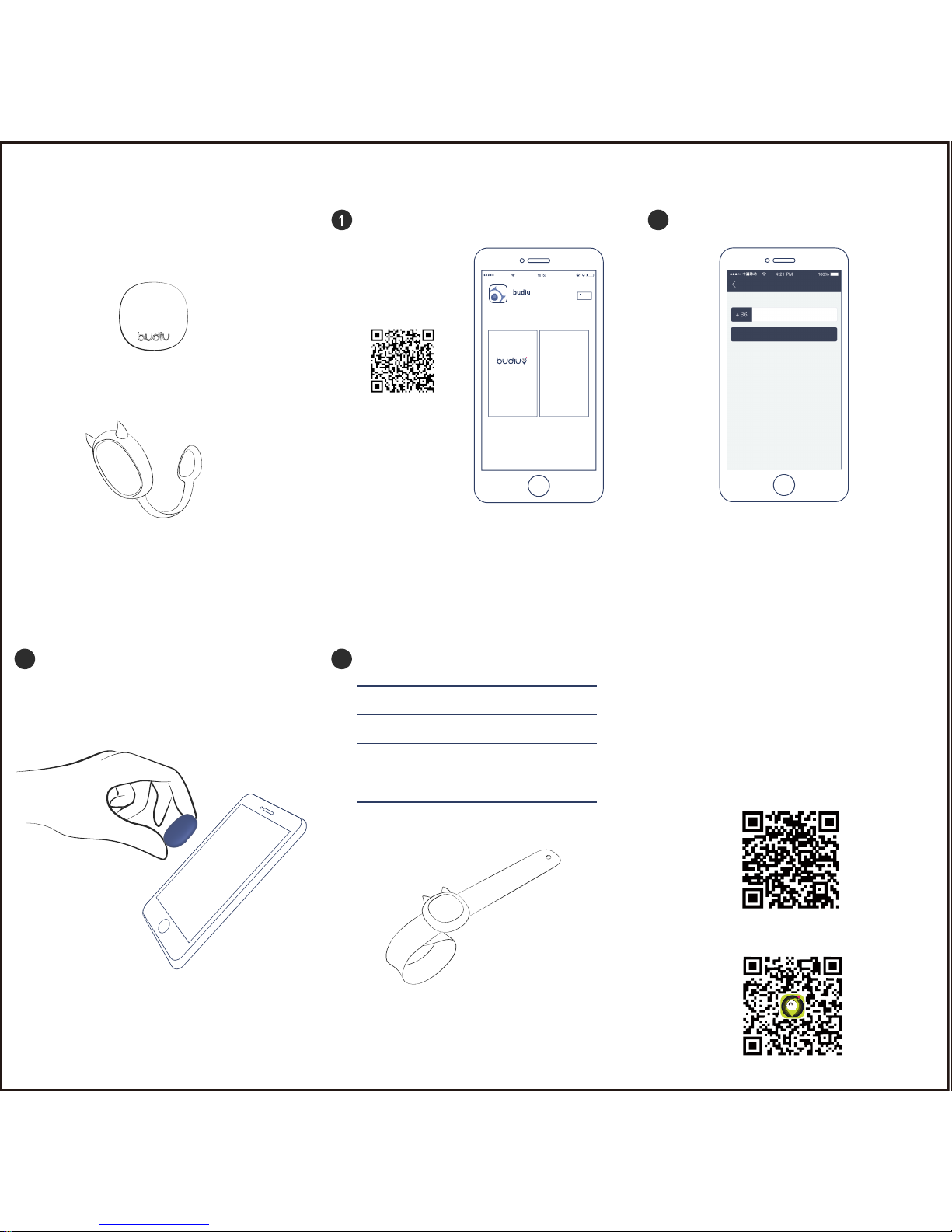
Blue Button
magnetic sheath
This Budiu Blue Button bundle
consists of one Blue Button and
one magnetic sheath.
User’ Manual
a) Scan the QR code above to download and install
the App via App Store, Wechat, browser and the like.
b) Go to the site www.ebudiu.com on your computer
to download the App and sync to your phone.
Download and install App on your smartphone
Please scan the QR code
to begin installation
2
Register
a) Please enter valid number during registration.
The number will be used as credential of guardian.
b) Enter a password, 6 – 18 digits combining
letters and numbers.
3
Log in and follow the instructions to place Blue
Button accordingly. After activated, Blue Button
shall function well.
Activate Blue Button
4
Dimensions: 27mm*27mm*8mm
Safe Material: food-grade ABS
Battery Life: 6 months
Waterproof Capability: Water Resistant 5m
(Wristband, magnetic sheath and other accessories
can be purchased separately on our website)
More details
Contact Budiu
Website: www.ebudiu.com
Wechat Account: ibudiu
Weibo Page: budiu
Service Tel: 4008747168
Wristband
QR code for budiu mall
QR code for budiu wechat
s
register
register
Page 2
Budiu Blue Button Warranty Card
Customer Name :
Contact Number :
Date of Purchase :
Purchase Channel :
Dealer Name :
Product Model Number :
Serial No. :
Warranty
Please keep this warranty card properly and safely for maintenance.
Warranty period: one year from the date of the original purchase.
Within warranty period, under normal use and maintenance, if Budiu
Blue Button malfunctions due to non-human factors, Budiu is
responsible to repair, replace or supply any defective part at their
option.
Page 3

Date of return for
repair / exchange
damage description /
return reason / solution
Date of
handing over
name of maintenance
center / signature of
maintenance personnel
Website: www.ebudiu.com
Wechat Account: ibudiu
Weibo Page: budiu步丢
Service Tel: 4008747168
The power of interpretation of this warranty shall be
vested in Beijing ANDL Technology Co., Ltd
Please Note
This is a limited one-year warranty. Budiu will not provide free warranty
for the cases listed below (although within warranty period).
Warranty period expired.
Products not properly used in accordance with manufacturer’s
instructions or recommendations.Product not properly assembled or
installed according to manufacturer’s instructions.
Any artificial damage due to disassembly by person or parties
unauthorized by Budiu.
Any artificial damage due to misuse, mishandling, abuse, shipment and
other force majeure.
The barcode or QR code of product is amended or vandalized unilaterally
by customer.
Budiu Blue Button Warranty Card
Page 4
subject to the following two conditions:
(1) This device may not cause harmful interference, and (2) this
device must accept any interference received including
interference that may cause undesired operation.
Any Changes or modifications not expressly approved by the
party responsible for compliance could void the user's
authority to operate the equipment.
This device complies with part 15 of the FCC Rules. Operation is
The App connects the Buidu Blue Button.
With signal strength, the App get the distance between
the phone and the chip and alarm when beyond safe zone.
When the connection is established, you will see the blinking of
the LED light from the bottom of the device
 Loading...