

Page 1

Operation Instructions for
MMC Control System
MMC Control
Page 2

Instructions to the User for FCC
This equipment has been tested and found to comply with the limits for a class B digital device pursuant
to part 15 of the FCC Rules. These limits are designed to provide reasonable protection against harmful
interference in a residential installation. This equipment generates, uses and can radiate radio frequency
energy and if not installed and used in accordance with the instructions, may cause harmful interference
to radio communications. However, there is no guarantee that interference will not occur in a particular installation. If this equipment does cause harmful interference to radio or television reception, which
can be determined by turning the equipment off and on, the user is encouraged to try to correct the
interference by one or more of the following measures:
• Reorient or relocate the receiving antenna.
• Increase the separation between the equipment and receiver.
• Connect the equipment into an outlet on a circuit different from that to which the receiver is
connected.
• Consult the dealer or an experienced radio/TV technician for help.
Operation with non-approved equipment or unshielded cables is likely to result in interference to radio
and TV reception. The user is cautioned that changes and modications made to the equipment without
the approval of the manufacturer could void the user’s authority to operate the equipment.
This device complies with Part 15 of the FCC Rules.
Operation is subject to the following two conditions:
(1) This device may not cause harmful interference and
(2) this device must accept any interference received,
including interference that may cause undesired operation.
Information for Canadian Users (IC Notice)
Operation is subject to the following two conditions: (1) This device may not cause interference, and (2)
this device must accept any interference, including interference that may cause undesired operation of
the device.
Page 3
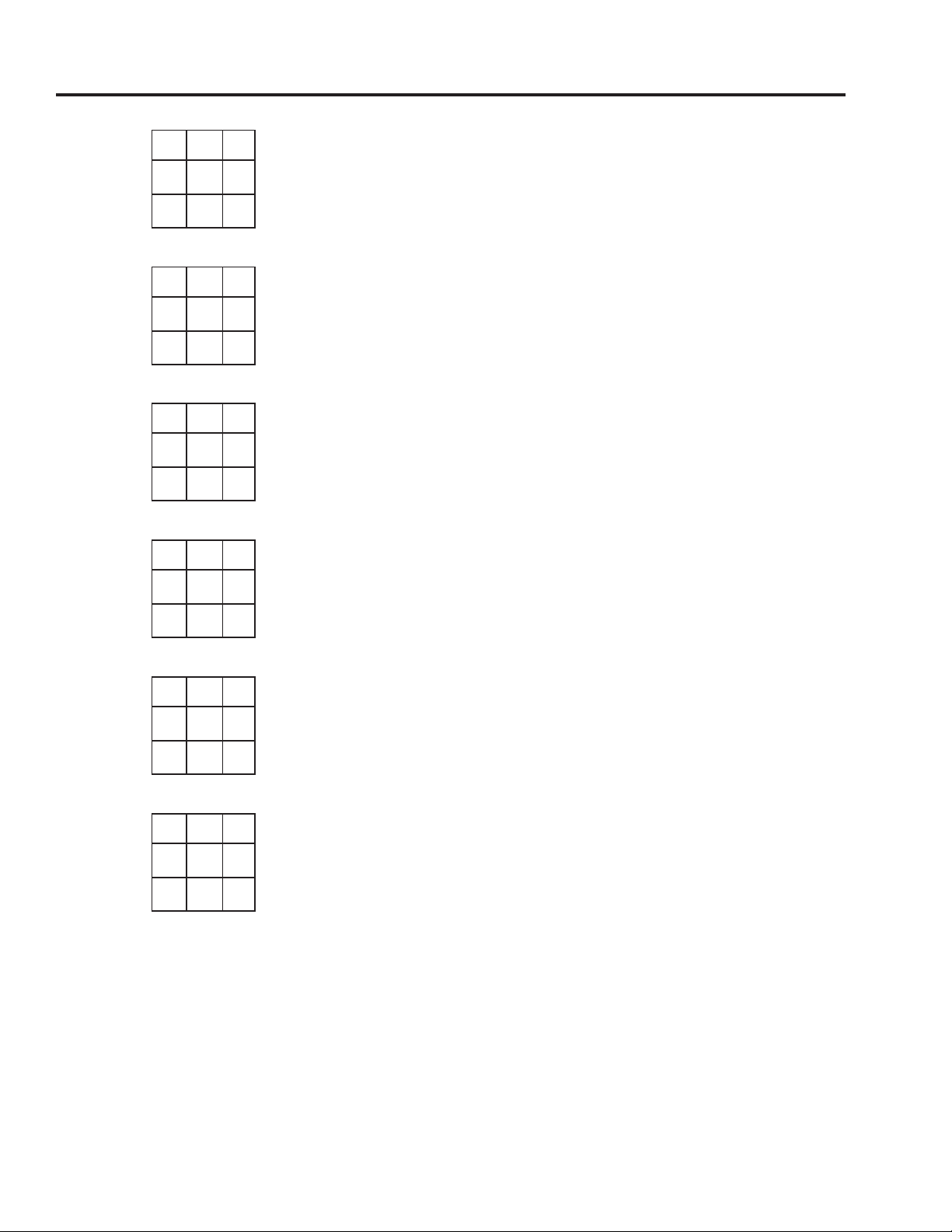
Dip Switch Table for MMC RF Board
1 1 1 Maintained
on 1 2 3 Open is Open and Close is Close
1 1 Momentary to
1 Maintained
on 1 2 3 Open is Open and Close is Close
1 1 Momentary
1
on 1 2 3 Open is Open and Close is Close
1 1 Maintained
1
on 1 2 3 Open is Close and Close is Open
1 Momentary to
1 1 Maintained
on 1 2 3 Open is Close and Close is Open
1 Momentary
1 1
on 1 2 3 Open is Close and Close is Open
If switch 3 is off, the action is ‘open is open and close is close’.
If switch 3 is on, the action is ‘open is close and close is open’.
Page 4
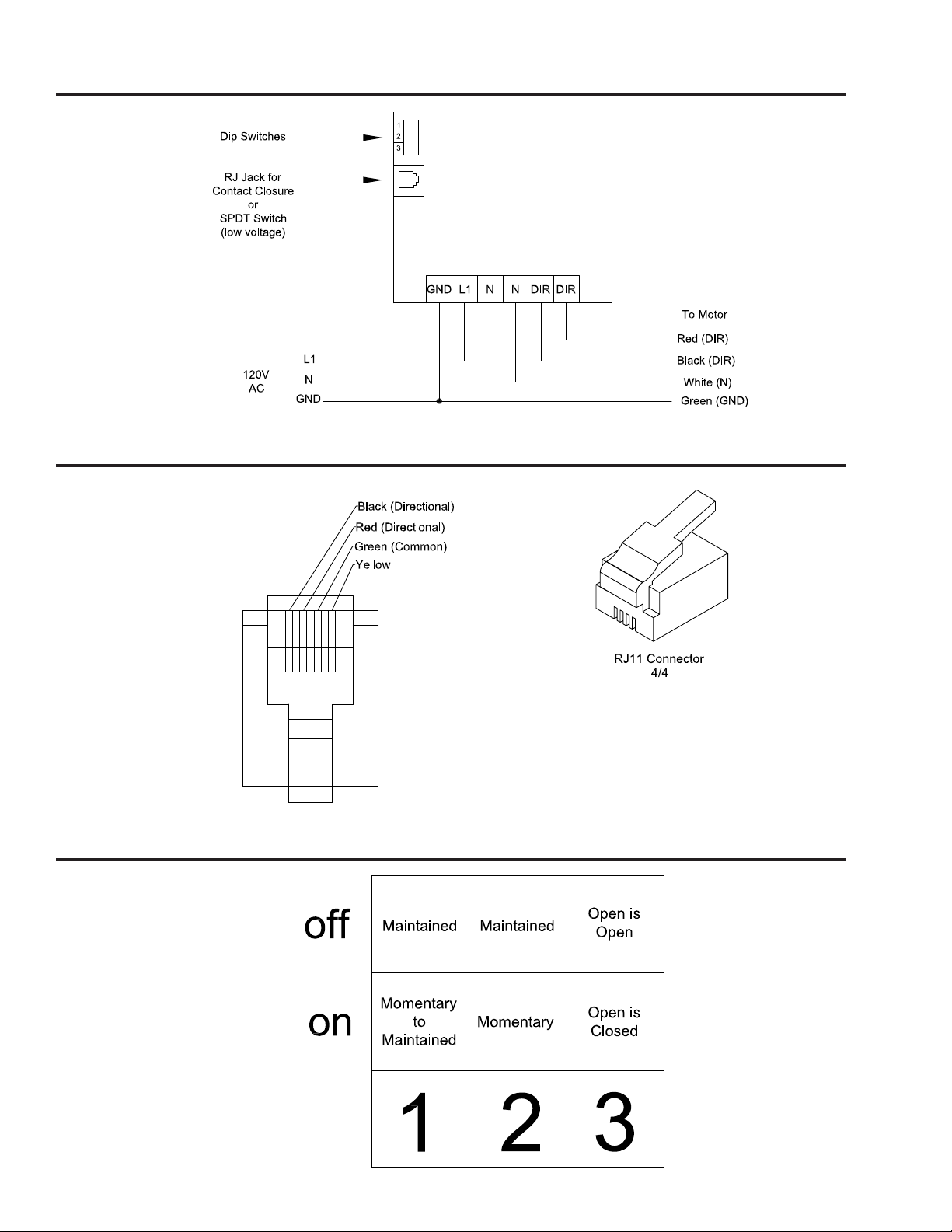
Basic Wiring of MMC-RF Board
Switch Pin Out for MMC
Functional Explanation for Dip Switch
Page 5
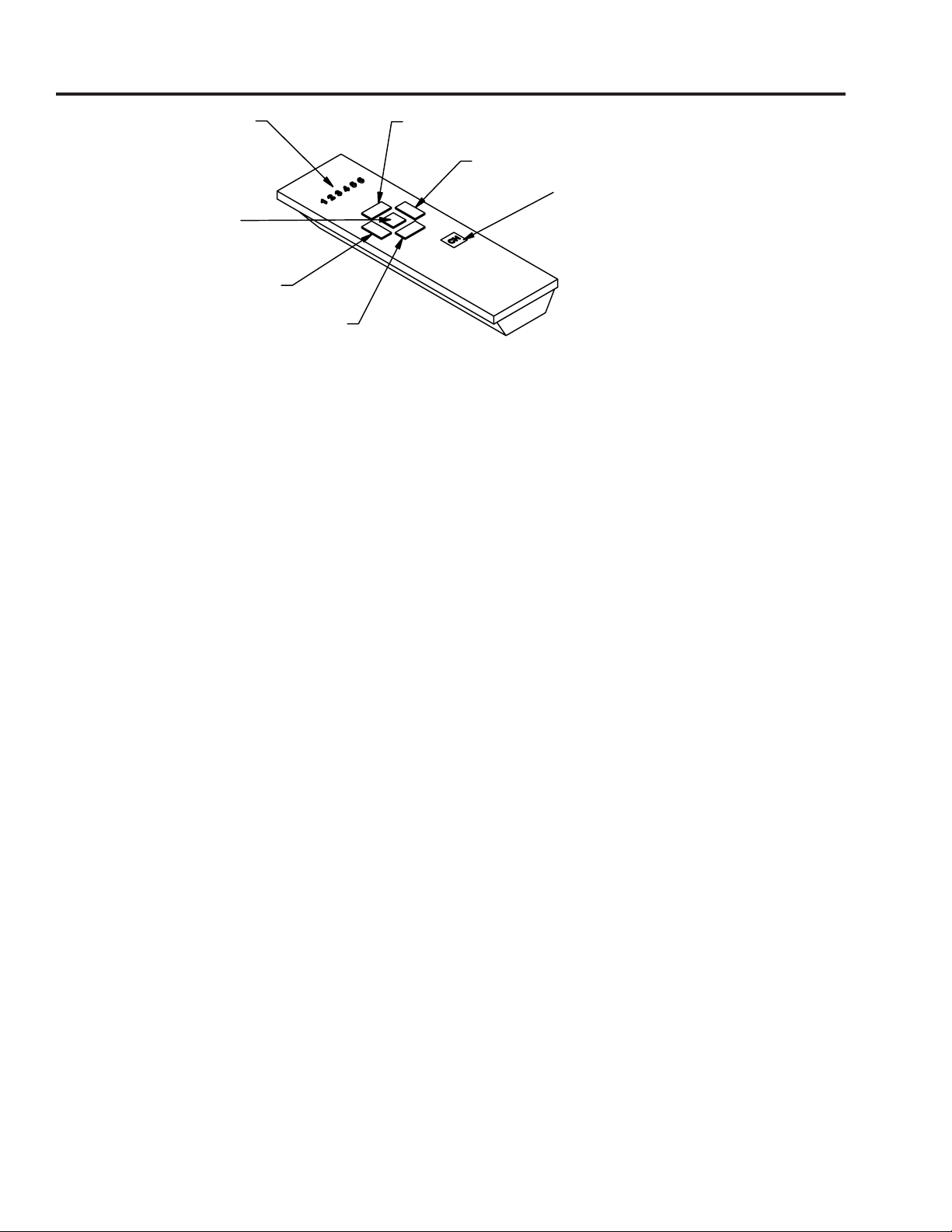
MMC Programming
Channel
Up
Indicator
Right
Channel Selection Button
Stop
Left
Down
1) Programming the Handsender for One Motor
Note: To put MMC into program mode, unplug the MMC for 30 seconds and then reconnect. The
program mode is now engaged for the rst three minutes the MMC has been plugged in. When programming a new system, any Tumo systems within range that have been programmed within the last
three minutes must be unplugged to prevent them from becoming recongured to match the new
system. Each MMC can learn up to four channels. To delete all channels from a programmed motor,
make sure the MMC is in program mode and press the STOP and DOWN buttons simultaneously .
The MMC handsender can control up to 6 MMC’s or 6 groups of MMC’s. Before using the handsender, the
MMC needs to recognize the handsender. Put MMC into program mode and press the channel selection
button. This will light up the last channel that was selected. Press again and the next channel will be selected
and light up, etc. Continue pressing the channel selection button until the channel you wish to program is
selected and the corresponding channel number LED lights up, then press the stop button. Before the MMC
leaves program mode, press and hold the UP and DOWN buttons simultaneously. The selected channel
number will light up with a slow ash. The MMC will then react with a movement to indicate that the receiver is receiving the signal from the handsender and to conrm that communication between MMC and
handsender is established. Press the LEFT or RIGHT button to test. The channel has now been programmed.
2) Programming one Handsender to Control Multiple Receivers or
Multiple Groups of Receivers.
Note: When programming a new system, any Tumo systems within range that have been programmed
within the last three minutes must be unplugged to prevent them from becoming recongured to
match the new system.
Select channel on the handsender (for example, channel 2) by repeatedly pressing the channel selection
button until the "2" is lit. To program another MMC to recognize this same channel(2) repeat the same
programming procedure in step 1 for the new MMC. Six MMC’s can be programmed to be controlled
by the same handsender this way. Select this channel to conrm that a particular receiver has been programmed to communicate with this channel by pressing LEFT or RIGHT. You should see the system react.
Continue this procedure until all six channel number LEDs light up. All the MMC’s will now respond when
you press the LEFT or RIGHT button. Any one of the six channels can be programmed this way for a
group of receivers. In this case, each channel will control all the receivers in that group at the same time.
Page 6
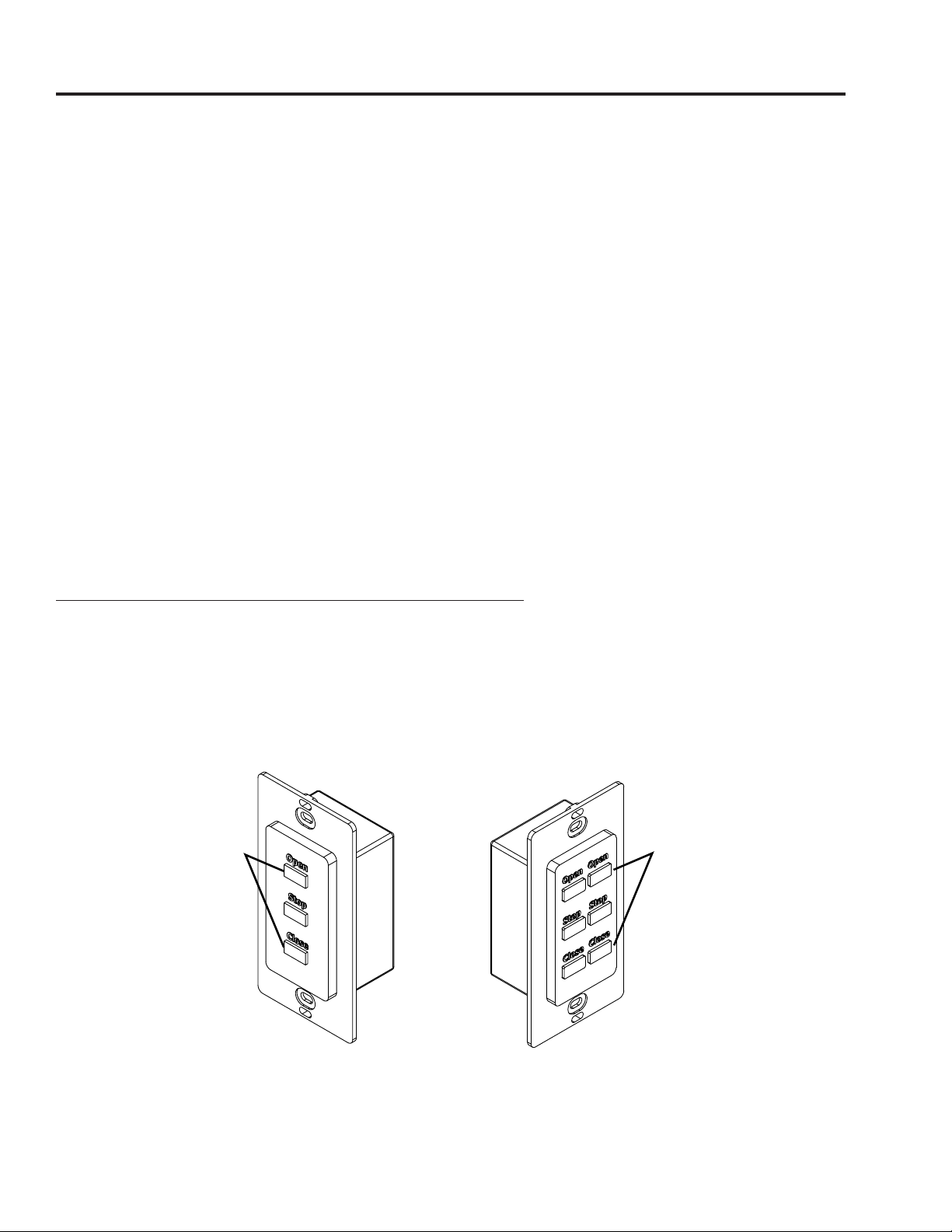
MMC Programming
Push at the
3) Delete Channel Settings at the MMC
Using the CHANNEL SELECTION button, select the channel programmed to the MMC for which you
wish to cancel the channel setting. Press and hold the UP and STOP buttons until the receiver reacts with
4 clicks. This channel setting has now been deleted from the MMC. If you now press or hold any of the
directional buttons for that channel, the MMC should not click.
4) Replacing the Handsender Battery
The handsender is powered by two lithium-ion button batteries, model number: CR24300. This battery
style is fairly common and should be easy to nd at most retail stores that sell electronic equipment or
accessories. The battery will last for over two years under normal conditions. When the channel LED
numbers one and six are lit up at the same time, this means the batteries are almost dead and need to be
replaced. Open the handsender case with both hands by twisting the top edge of the handsender until
the entire front cover pops off. The cover may be a little tight to remove. When inserting the new batteries, be sure to place the positive side down. After inserting the new batteries, replace the cover, and the
handsender will be ready for use.
Programming wireless RF Tumo switch to a MMC
Note: To program to a wireless RF switch, rst you must put the MMC into program mode as described
on page 21.
Once the motor is in program mode, push the open and close buttons on the wireless switch at the same
time. The track will react with a movement to indicate the motor is receiving the signal from the wireless
switch. If this happens, your switch is now programmed.
Push at the
same time
to learn to
the motor
same time
to learn to
the motor
Page 7
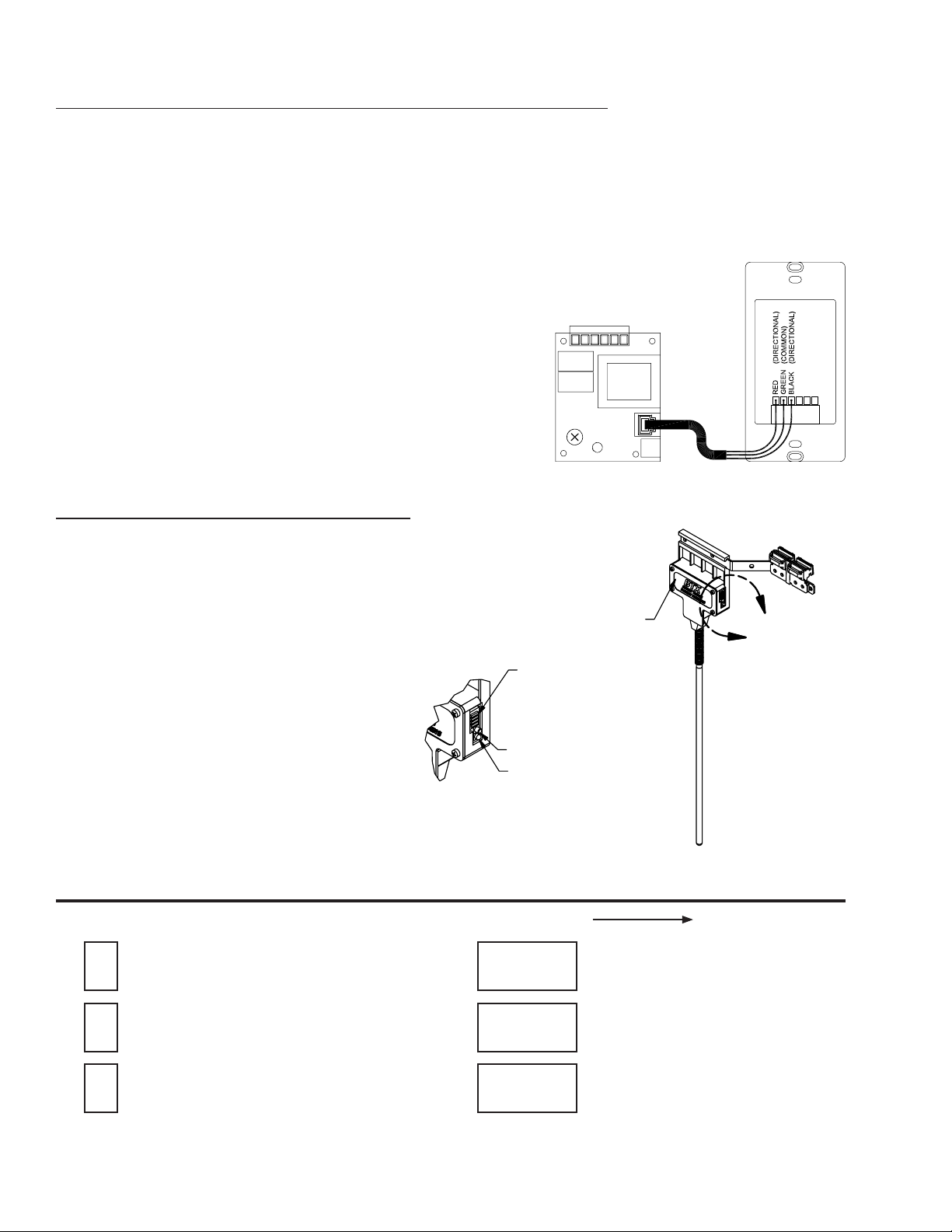
Connecting Tumo Xcel Drapery Systems to other controls
The Tumo Xcel Drapery System can be easily linked with most third-party control devices through the
low-voltage connecting port at the bottom of the motor. This port can be used to connect to both local
and network controls. BTX Supply can provide technical assistance upon request to meet your project
needs. With the Tumo Xcel Drapery System, only a BTX low-voltage wall switch is needed to perform
control operations. Simply connect the motor to a low-voltage switch by plugging one end of the provided
RJ-11-4 lead into the low-voltage port on the motor. Plug the other end of the modular wire into the
low-voltage port of the switch, and x the wall switch at convenient position.
Programming Smart Touch to a MMC
To program the Smart Touch to the MMC, push and hold program button
for a few seconds until the relay in the MMC clicks (if no motor attached)
or the system jogs. Test the Smart Touch by moving the botton either left or
right to activate the MMC.
REMOVABLE BATTERY COVER
A
SLIDE DIP SWITCHES
PUSH BUTTON SWITCH
LED INDICATOR
Dip Switch Table for Smart Touch
OFF/OPEN ON/CLOSE
Pull the Left shade Opens
(Button on the right master)
Pull the Right shade Closes
(Button on the right master)
Pull the Right shade Opens
(Button on the right master)
Pull the Left shade Closes
(Button on the right master)
NOTE: This is for a split draw system.
Page 8

Warranty & Return Policy
1. Contract
All offers, quotes and sales by BTX Window
Automation, Inc. (BTX) are subject to these
Terms and Con dit ions of Sal e. No other
agreements have been made or will be valid
unless expressly conrmed in writing by BTX.
2. ACCEPTANCE
BY TAKING DELIVERY OF BTX PRODUCTS,
PURCHASER ASSENTS TO THE TERMS AND
CON DITI ONS STATED HEREIN, UNLE SS
OT HE RW IS E E XP RE SS LY AGRE ED IN
WRITING BY BTX. BTX HEREBY OBJECTS
TO ANY DIFFERENT OR ADD ITIONAL
TERMS AND CONDITIONS WHICH MAY BE
PROPOSED OR HAVE BEEN PROPOSED BY
PURCHASER IN ANY PURCHASE ORDER
FO RMS OR OTH ER DO CUMEN TS. THE
TERMS AND CONDITIONS STATED HEREIN
SHALL PREVAIL OVER A NY DIFFERENT
OR ADDITIONAL TERMS AND CONDITIONS
PROPOSED BY PURCHASER AND SHALL
APPLY TO THE SALE OR SHIPMENT OF ANY
GOODS IN RESPONSE TO PURCHASER'S
ORDER.
3. Prices and Delivery
All quoted prices are valid for a period of 60
days from the date of issue, unless otherwise
agreed by BTX in writing. Prices on accepted
orders remain rm for a period of four months
from the date of order acceptance, provided nal
delivery occurs within that period. If delivery is
to occur more than four months from the date of
order acceptance, prices are subject to change
in accordance with any changes in the published
BTX price list which occur after the date of order
acceptance. All prices quoted are FOB Dallas,
excluding all freight, packaging and taxes. All
delivery dates are approximate.
4. Payment Terms
(a) Open account payment terms may be
established fro m time to time at the sole
discretion of BTX, and are subject to credit
approval in writing. Terms on open accounts
are payment in full, net 30 days from date of
invoice. Payment terms for single transactions
and transactions other than on open account are
net C.O.D. or prepay unless conrmed otherwise
in writing by BTX.
(b) Amounts past due are subject to a nance
charge of 1.5% per month to the legal limit, and
the nance charge will apply without further prior
notice. In case of purchaser's delinquency in
payment or insolvency, BTX retains the right to
halt or interrupt all further deliveries and service
to the purchaser until all past due amounts have
been paid, and to require payment in advance
for orders not yet delivered, without any liability
resulting for BTX. Purchaser expressly agrees
to indemnify BTX and hold BTX harmless from
all charges and liability which might arise in any
manner from purchaser's nonpayment.
5. Inspection, Acceptance and Claims
Al l cla im s by pu rchas er ag ainst BTX fo r
shortages must be made in writing to BTX within
fourteen days from date of shipment from BTX's
Dallas base or they are waived. Any claims for
transport damage are the responsibility of the
recipient and must therefore be led with the
carrier by the recipient.
6. Risk of Loss
Full risk of loss, damage or destruction of the
goods shall pass to purchaser upon delivery of
the goods to the carrier at the point of shipment
or upon
delivery at storage, whichever applies.
7. Force Majeure
If an order cannot be completed due to causes
beyond BTX's control, BTX retains the right to
10763 Sanden Dr. • Dallas, TX 75238 • (214) 340-2800 • (800) 422-8839 • FAX (214) 343-2252 • www.btxinc.com
either cancel the uncompleted portion of the
order or complete the order if and when this
becomes possible. Purchaser shall not have
the right to withhold payment on delivered goods
and/or services, nor to unilaterally change the
order or cancel same. Force majeure includes
but is not limited to strikes, lock-outs, storms,
oods and the like, terrorism, wars, revolutions,
major equipment failu res or fire damage at
production facilities, etc.
8. Warranty
BTX extends a three-year limited warranty for
its MotorDrape™ DC systems and controls.
BTX warrants its other systems and 110/220V
mot ors and har dware acce ssories agains t
defects in material and workmanship for a period
of ve years from date of shipment from BTX's
Dallas base; however, pull chains and cords
for roller shades are excluded. BTX controls
and electric and electronic components carry
a one-year warranty against defects in material
and workmanship from date of shipment from
BTX's Dallas base. BTX does not warrant cords
and tapes for lift systems, nor customer ’s own
materials, and BTX disclaims any written, oral
or implied warranties for such materials. If any
item to which a warranty applies proves to be
defective during the specied warranty period
under normal and proper use and provided the
equipment or part has been properly stored,
installed and maintained with due regard to any
directives, instructions and operating procedures
provided, BTX shall, upon presentation of proof
of purchase, repair or replace the item at the sole
option of BTX, F.O.B. Dallas. Application of the
warranty will be determined by BTX technical
staff after return of the item, its inspection and
any necessary investiga tion. This warr anty
does not apply in case of defects resulting
from faulty installation, misuse, misapplication,
abuse, mishandling, shipping or failure to follow
instructions. This warranty does not cover any
incidental, special or consequential damages,
labor on location, service calls, reinstallation,
or expen ses invol ved in shippi ng, packi ng,
and returning the good s. It also does not
cover damages caused by re, ood, or act of
God. BTX warrants items repaired or replaced
pursuant to the above warranty, under normal
and proper use, sto rage, insta lla tio n and
maintenance, against defects in material and
workmanship for a period of 30 days from date
of start-up of such repaired or replaced item or
the expiration of the original warranty, whichever
is longer. Correction of nonconformities in the
manner and for the period of time specied
herein shall be purchaser's exclusive remedy
and shall constitute fulllment of all liabilities of
BTX, whether in warranty, contract, negligence,
tort, or otherwise with respe ct to the item
delivered. In no event shall BTX be responsible
for providing access to the allegedly defective
item or for disassembly or reinstallation of such
item or parts.
9. DISCLAIMER
THE FOREGOING EXPRESS WARRANTIES
ARE EXCLUSIVE AND IN LIEU OF ALL OTHER
WARRANTIES, WRITTEN, ORAL OR IMPLIED.
ALL OTHER WARRANTIES, INCLUDING ANY
WARR ANT Y OF MER CHANTABI LITY OR
FITNESS FOR A PARTICULAR PURPOSE,
ARE HEREBY DISCLAIMED.
10. LIMITED LIABILITY
BT X'S LI AB IL ITY FO R AN Y A ND AL L
CLAIMS, CHARGES, EXPENSES, DAMAGES,
LOSSES AND INJURIES ARISING OUT OF
OR RELATING TO ITS PERFORMANCE OR
BREACH OF ANY AGREEMENT OF SALE
FOR GOODS AND/OR THE MANUFACTURE,
SAL E, DELIVERY, RESA LE, REPAI R OR
USE OF ANY GOODS SHALL NOT EXCEED
THE PURCHASE PRICE OF SUCH GOODS,
REGARDLESS WHE THER THE CLAIM IS
BASED ON CONTRACT, TORT, NEGLIGENCE,
STATUTE, STRICT LIABILITY, WILLFUL OR
WANTON CONDUCT, WARRANTY (EXPRESS
OR IMPLIED), OR OTHERWISE. THIS SHALL
BE PURCHASER'S SOLE AND EXCLUSIVE
RE ME DY AG AINST BTX OTHER THAN
TH E REMEDY PR OVIDE D FO R UNDER
TH E EXP RE SS BT X WARR AN TIES. IN
NO EVENT SHALL BTX BE LIABLE FOR
INCIDENTAL, SPECIAL, CONSEQUENTIAL
OR EXEMPLARY DAMAGES.
11. ARBITRATION
BTX AND PURCHASER AGREE THAT THIS
TRANSACTI ON INVOLVE S INTE RSTATE
COMMERCE AND THAT AT THE OPTION OF
BTX, ANY DISPUTE RELATING TO IT IN ANY
MANNER SHALL BE SUBMITTED TO BINDING
ARBITRATION BEFOR E THE AME RICA N
ARBITRATION ASSOCIATION AND SHALL BE
GOVERNED BY THE FEDERAL ARBITRATION
ACT OR, IF THAT STATUTE IS INAPPLICABLE,
ANY DISPUTE SHALL BE GOVERNED BY
THE TEXAS ARBITRATION ACT; HOWEVER,
NO ARBITRATOR MAY AWARD PUNITIVE
DA MAGES . PU RC HAS ER AGREE S TO
PAY AL L C OS TS INCU RR ED BY BTX ,
INCLUDING BUT NOT LIMITED TO COSTS OF
ARBITRATION, COLLECTION, REASONABLE
ATTORNEY'S FEES, EXPENSES AND ANY
COURT COSTS.
12. Return
No goods may be returned without the express
written approval of BTX and the receipt of
an BTX RGA identification number. Goods
approved for return must be returned in original
packaging, freight prepaid, clearly marked with
the BTX RGA identification number and be
accompanied by a copy of the original invoice.
Application of the warranty will be determined
by BTX technical staff after return of the item,
its inspection, and any necessary investigation.
A restocking charge of 25% of invoice value will
apply on all items accepted for return.
13. Liens and Security Interest
Purchaser will not permit to be created or to
remain undischarged any lien, encumbrance
or charge upon the goods supplied by BTX
until BTX has rece ived payment in full for
such goods. If any liens, encumbrances or
charges shall be led against BTX goods prior
to payment in full, purchaser shall discharge
the liens, encumbrances or charges within ten
days and reimburse BTX for expenses incurred
in defending its security interest. Title to the
goods shall remain with BTX until payment in
full has been received.
14. Statute of Limitations
Any action against BTX shall be commenced
within one year after the cause of action has
arisen.
15. Choice of Law and Venue
The rights and duties of the parties hereunder
and the construction and effect of these terms
an d con dit ions sh all be gov erned by th e
laws of the State of Texas. Venue shall lie in
Dallas, Texas, to the exclusion of any other
jurisdiction.
16. This agreement supersedes any inconsistent
or additional promises made by any employee,
representative, agent or dealer of BTX.
17. If any part of this agreement is found
invalid, the balance of the agreement remains
enforceable.
WTY-030806
 Loading...