

Page 1

391519
391 520
391 521
4 Channel 1 TB HR DVR
8 Channel 2 TB HR DVR
16 Channel 4 TB HR DVR
User Manual
LE04476AC-01SC-14W11
en
Page 2

2
Indice
1 Product Description....................................................................................................................................... 5
1.1 Front View .................................................................................................................................................................... 5
1.2 Reverse ........................................................................................................................................................................ 7
1.3 Remote control ........................................................................................................................................................... 8
2 First connection ........................................................................................................................................... 10
2.1 Recorder start-up and navigation.........................................................................................................................10
2.2 Changing language, date and time ......................................................................................................................14
2.3 Changing a camera name ......................................................................................................................................16
3 Basic Functionalities ................................................................................................................................... 19
3.1 Recording settings ..................................................................................................................................................19
3.1.1 Enable/Disable recording using a calendar ................................................................................................................................ 19
3.1.2 Continuous recording calendar settings ....................................................................................................................................... 21
3.1.3 Enable/disable manual recording .................................................................................................................................................... 23
3.2 Recording playback .................................................................................................................................................25
3.3 Exporting a recording on a USB key/hard drive................................................................................................27
4 Advanced functionalities ............................................................................................................................ 29
4.1 Alarm and motion detection ..................................................................................................................................29
4.1.1 Recording and other external alarm action settings ............................................................................................................... 29
4.2 Recording search by event ....................................................................................................................................39
4.3 Main and secondary stream settings ..................................................................................................................41
4.4 Dynamic privacy masking zones ..........................................................................................................................43
4.5 Motorised camera control ......................................................................................................................................46
4.5.1 Wiring the RS485 control bus ............................................................................................................................................................ 46
4.5.2 Motorised camera control .................................................................................................................................................................... 47
4.5.3 Set predefined positions (presets) ................................................................................................................................................... 48
4.5.4 Using the preset positions ................................................................................................................................................................... 49
4.5.5 Automatic recording ............................................................................................................................................................................... 50
4.6 Credential configuration .........................................................................................................................................52
4.6.1 Adding an administrator and/or user account ............................................................................................................................ 52
4.6.2 Changing an administrator and/or user account ....................................................................................................................... 54
4.7 Network functionalities ...........................................................................................................................................56
4.7.1 Addressing .................................................................................................................................................................................................. 56
4.7.2 Local connection (Windows) .............................................................................................................................................................. 60
4.7.3 Connecting using Config Tool ........................................................................................................................................................... 62
4.7.4 Edit network settings using Config Tool ....................................................................................................................................... 63
4.7.5 Remote connection ................................................................................................................................................................................. 64
4.7.6 Sending e-mail .......................................................................................................................................................................................... 78
Page 3

User Manual
4 Channel 1 TB HR DVR
8 Channel 2 TB HR DVR
16 Channel 4 TB HR DVR
4 Channel 1 TB HR DVR
3
5 Specifications ............................................................................................................................................... 80
5.1 Recording length ......................................................................................................................................................81
Page 4
4
Contents
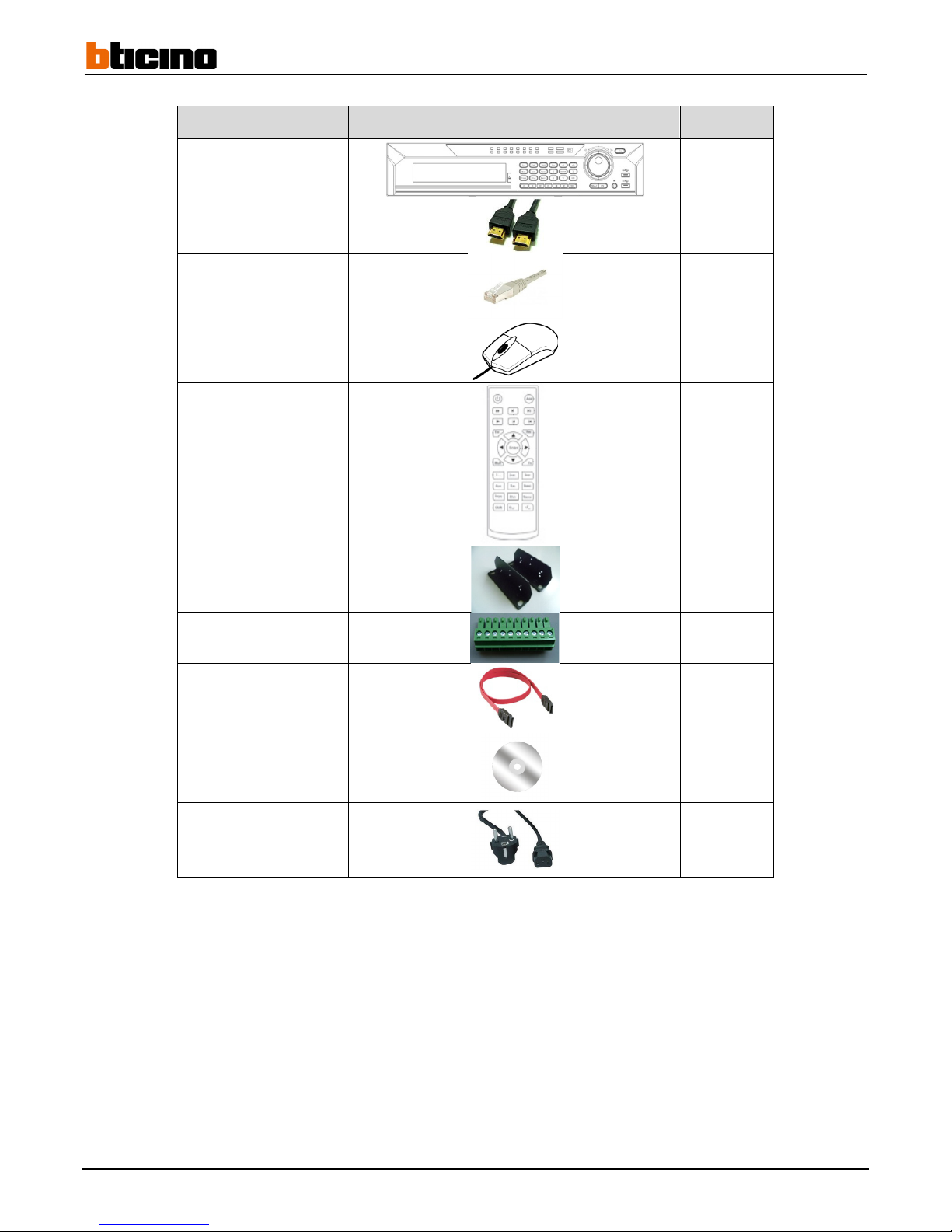
Description Illustration Quantity
Recorder
1
HDMI Cable
1
Ethernet Cable
1
Mouse
1
Remote control
1
Accessory rack
2
Input/output terminal
4
HDD SATA cable
5
User Manual and CD
1
Power cable
1
Page 5
User Manual
4 Channel 1 TB HR DVR
8 Channel 2 TB HR DVR
16 Channel 4 TB HR DVR
4 Channel 1 TB HR DVR
5
1 Product Description
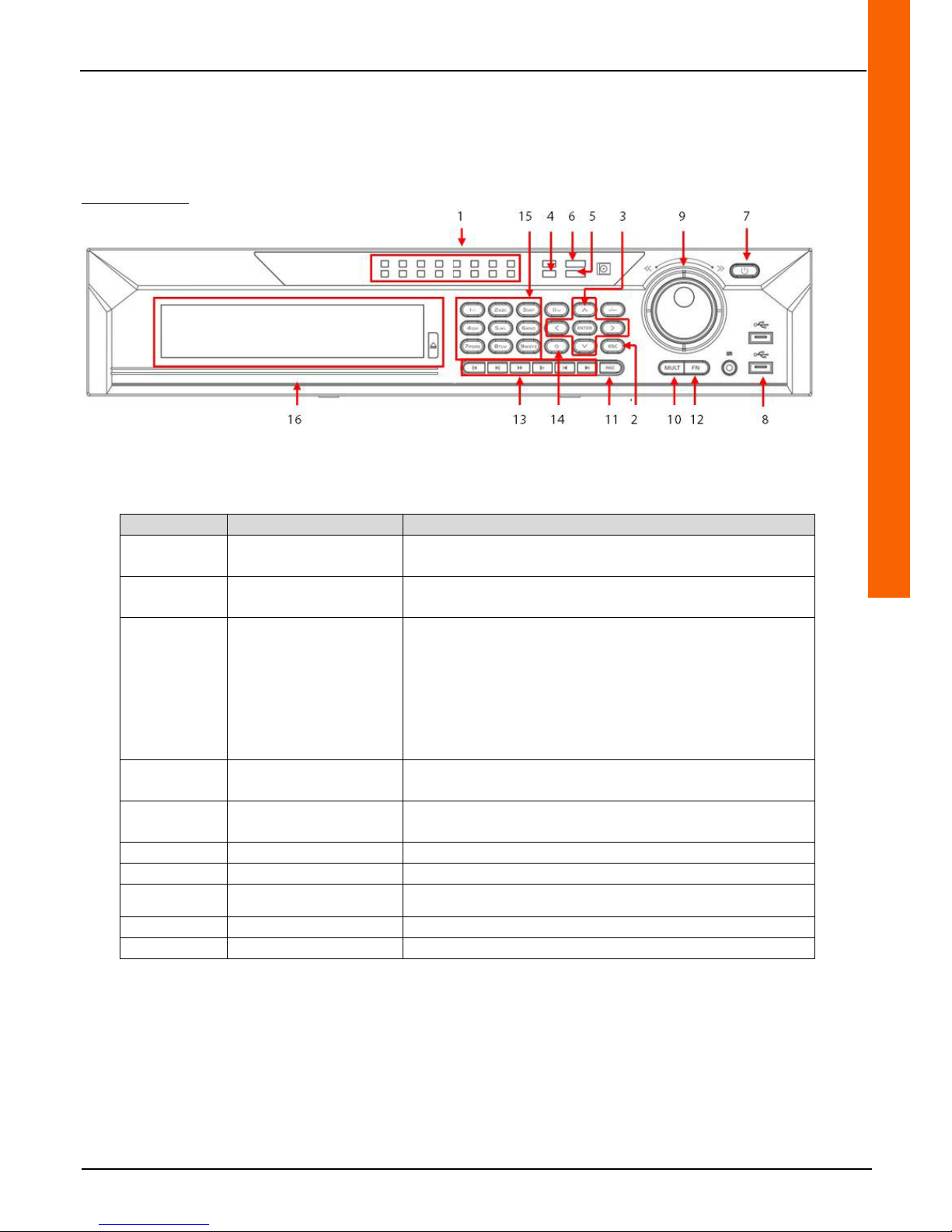
1.1 Front View
391519/520/521
Identification Description Functionality
1 Lights 1 through 16
An on light indicates that the camera associated with that light is
recording
2 Cancel
From a menu: returns to the previous menu or cancels the
current operation
3 Direction keys
During playback: controls the time bar
In the menus: moves toward the right and/or the left
From a menu: Moves up and/or down
While setting a parameter: enables or edits the configuration
From the tiles: displays the main menu
From a menu: accesses the selected menu
From a menu: confirms the edited setting
4 HDD status light
An on light indicates that a problem has occurred with the hard
drive
5 Network status light
An on light indicates that a problem has occurred with the
network
6 Power light An on light indicates that the recorder is powered up
7 Start/Stop Press on this button for 4 seconds to turn the recorder on or off
8
USB port Connecting USB devices (mouse, USB key)
9 Control wheel During playback: Allows manual playback speed control
10 Multiple displays From the tiles: changes the tile multiple display mode
Page 6

6
Identification Description Functionality
11 Recording From the tiles: displays the "RECORD" menu
12 Auxiliary button
From the tiles: displays a camera view
Displays the telemetry and colour control functionalities from a
numeric or text keypad: press this button for 1.5 seconds to
delete the character in front of the cursor
During dynamic privacy mask configuration: define the zone
using this button and the direction arrows
From a text keypad: toggles from numbers to lower and upper
case letters and special characters
From the «INFO HDD» menu: toggles from HDD recording
information to other information
13 Playback controls
During playback: slows playback speed
During playback: increases playback speed
During pause or playback: reverses playback direction
During reverse playback: pauses play
During playback: pauses play
During pause: restarts playback
During playback: moves to the previous recording
During playback: moves to the next recording
During drop-down menu configuration: moves the selection
down
14 Upper case
From a text keypad: toggles between numbers and lower and
upper case letters and special characters
Activates or cancels automatic recording
15 Numeric keypad In an entry field: enter letters, numbers and special characters
16 DVD player/recorder Reads and writes DVDs
Page 7
User Manual
4 Channel 1 TB HR DVR
8 Channel 2 TB HR DVR
16 Channel 4 TB HR DVR
4 Channel 1 TB HR DVR
7
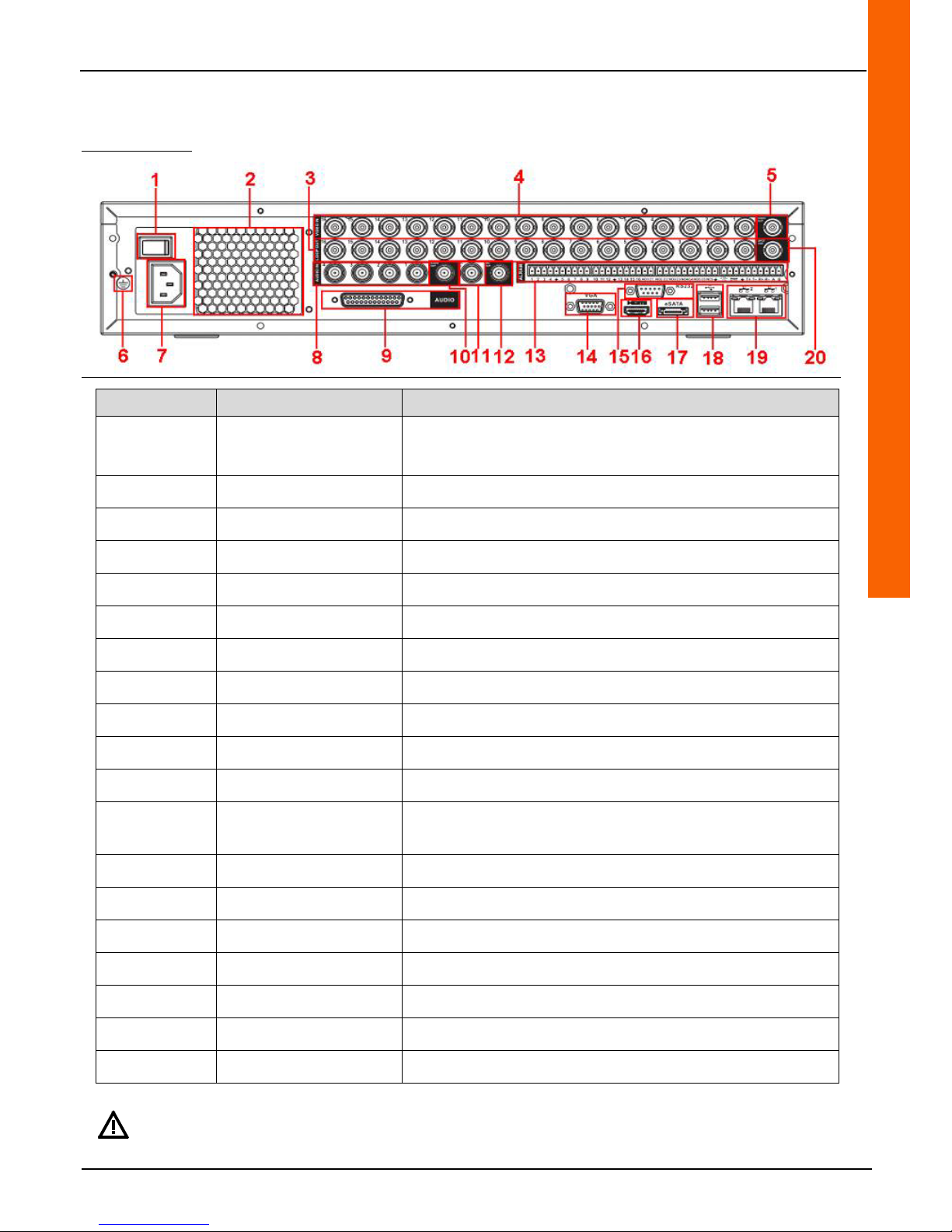
1.2 Reverse
391 519/520/521
Number Description Function
1 Power switch
0 = Off
1 = On
2 Fan Cooling the device
3 BNC video loop outputs Output copying video from the input
4 BNC video inputs Video input
5 Video output (BNC) Connection of the main monitor
6 Earth /
7 Power supply Connection of a 230 VAC power supply
8 BNC audio inputs 1 to 4
9 Audio inputs 5 to 16 (DB25 – BNC adaptor)
10 Audio output (BNC) Connection of a speaker
11/12 Audio input/outputs Connection of a microphone. Two-way communication.
13
RS485/Alarm input and
outputs (terminal block)
Connection of the RS485 bus of a motorised camera and the alarm
I/O
14 Video output (VGA) Connection of the main monitor
15 RS232 port Connection of a COM troubleshooting tool
16 Video output (HDMI) Connection of the main monitor
17 eSATA port Connection of an external hard drive
18 USB port Connection of USB devices (mouse, USB key)
19 Ethernet ports (RJ45) Connection to the local area network (LAN)
20 BNC video matrix output Connection of a screen for using matrix functions
For a higher quality image or better resolution, the use of VGA or HDMI output is recommended over the use of
BNC output.
Page 8
8
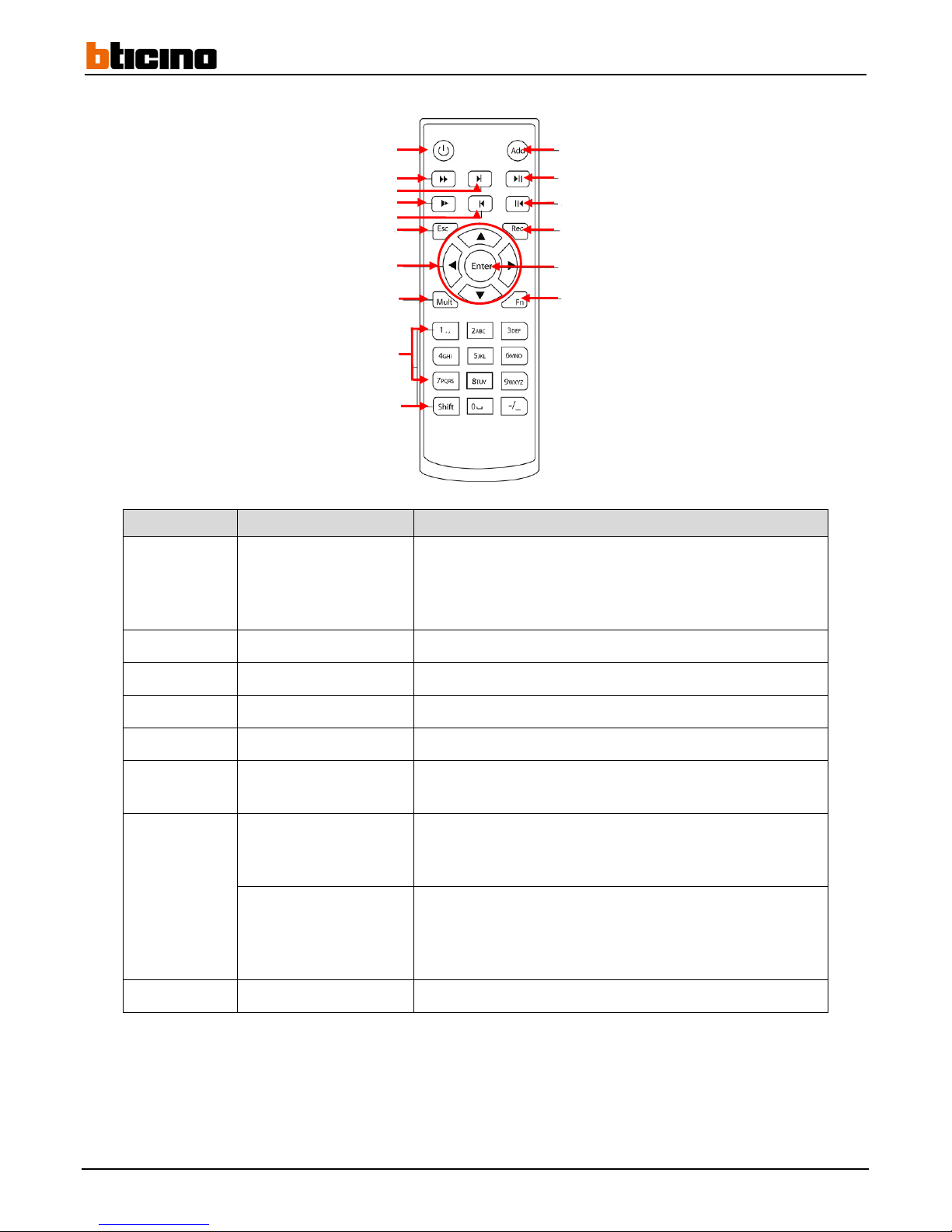
1.3 Remote control
Identification Description Functionality
1 Power on/off
When the recorder is off: press for 3 seconds to turn the recorder
on
When the recorder is on: press for 5 seconds to turn the recorder
off
2 Fast forward During playback: speeds up playback (2x, 4x, 6x, 8x)
3 Next recording During playback: moves to the next recording
4 Slow
During playback: slows down playback (2x, 4x, 6x, 8x)
5 Previous recording During playback: moves to the previous recording
6 Cancel
From a menu: returns to the previous menu or cancels the
current operation
7
Up/Down
From the tiles: changes tile display mode
From a menu: moves the cursor up and/or down
When the cursor is on a setting: edits the setting
Left/Right
From a smaller tile display mode to the highest accepted number
of cameras: moves to displays from other cameras
From a menu: moves the cursor to the left or to the right
When the cursor is on a setting: moves to the next setting
8 Multiple displays From the tiles: edits the multiple tile display mode
1
2
3
4
5
6
7
8
9
11
12
13
14
15
16
10
Page 9

User Manual
4 Channel 1 TB HR DVR
8 Channel 2 TB HR DVR
16 Channel 4 TB HR DVR
4 Channel 1 TB HR DVR
9
Identification Description Functionality
9 Keys 0 to 9
From the tiles: selects the camera to display
During password entry: Selects the numbers
10 Upper case
From a text keypad: toggles between numbers and lower and
upper case letters and special characters
Enables or disables automatic recording
11 Address
From the tiles when several recorders are assigned to one
address: displays the field in which to enter the address to access
the recorder corresponding to that address
12 Forward/Pause
From the tiles: displays «SEARCH» menu
During playback: pauses playback
During pause: restarts playback
13 Reverse play/Pause
During playback: pauses playback
During pause: restarts reverse playback
14 Recording From the tiles: displays the "RECORD" menu
15 Confirmation/Menu
From the tiles: displays main menu
From a menu: accesses the selected menu
From a menu: confirms the edited setting
16 Help functionality
Displays the colour and telemetry control functions
Page 10
10
2 First connection
2.1 Recorder start-up and navigation
Once the monitor, mouse, network cable and power cord are connected, the recorder can be powered up by toggling the power
switch to position "1" (refer to paragraph 1.2).
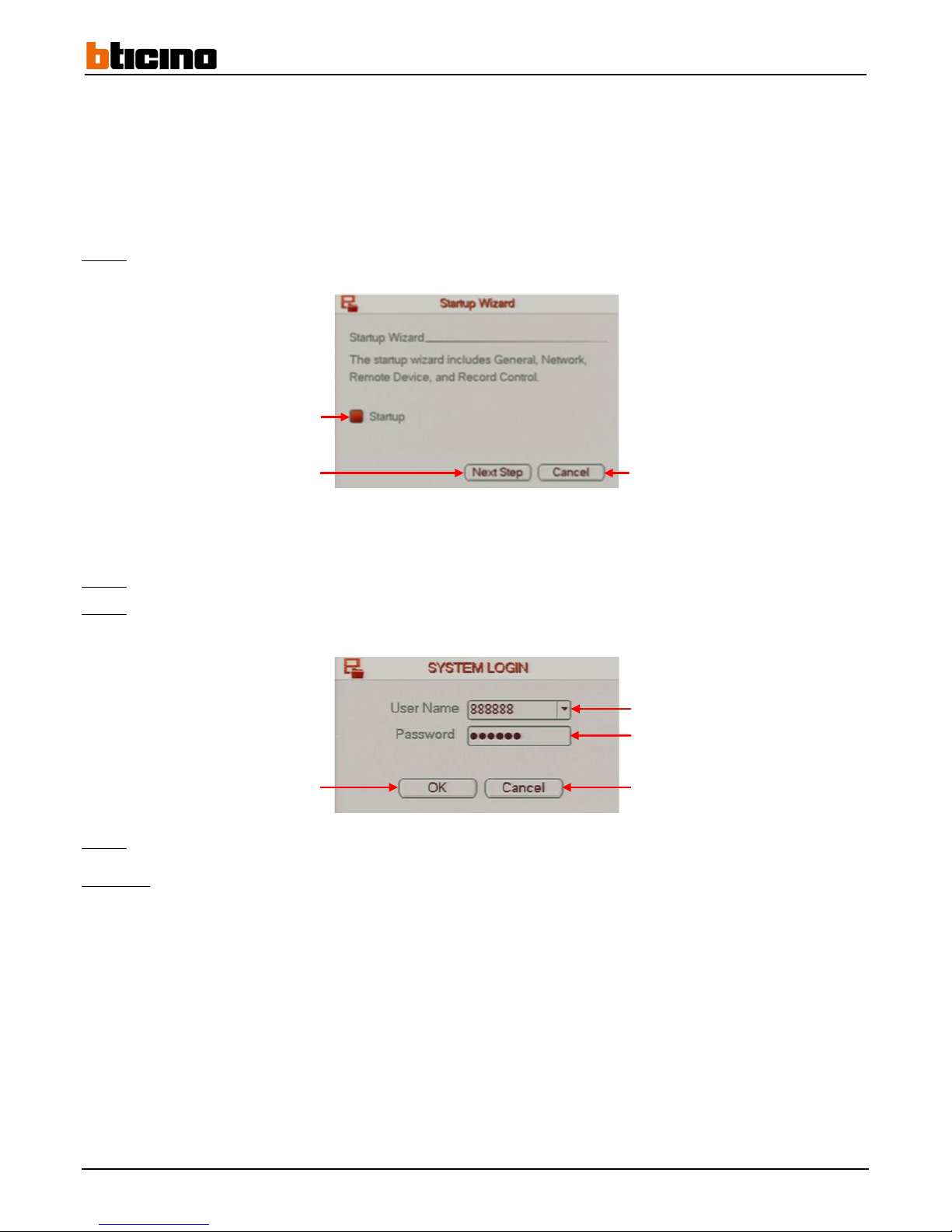
A configuration wizard appears.
Step 1:
Click on the "Next Step" button to proceed to the next step of the tutorial, or click on the "Cancel" button to close the
tutorial.
After the "next step" button has been selected, a window asking for user credentials will appear.
Step 2:
Select a user name in the "User Name" line drop-down menu (Default name: 888888).
Step 3:
Enter the password in the password field by the "Password" line field (Default password: 888888).
Step 4:
Click on the "OK" button to confirm the operation, or click on the "Cancel" button to cancel the operation.
Comment:
Untick the "Start-up" line box to disable the settings wizard for future recorder start-ups.
Go to the next step
Leave the tutorial
Select the user name
Enter the password
Cancel the operation Confirm the operation
Disable the wizard for future
startups
Page 11
User Manual
4 Channel 1 TB HR DVR
8 Channel 2 TB HR DVR
16 Channel 4 TB HR DVR
4 Channel 1 TB HR DVR
11
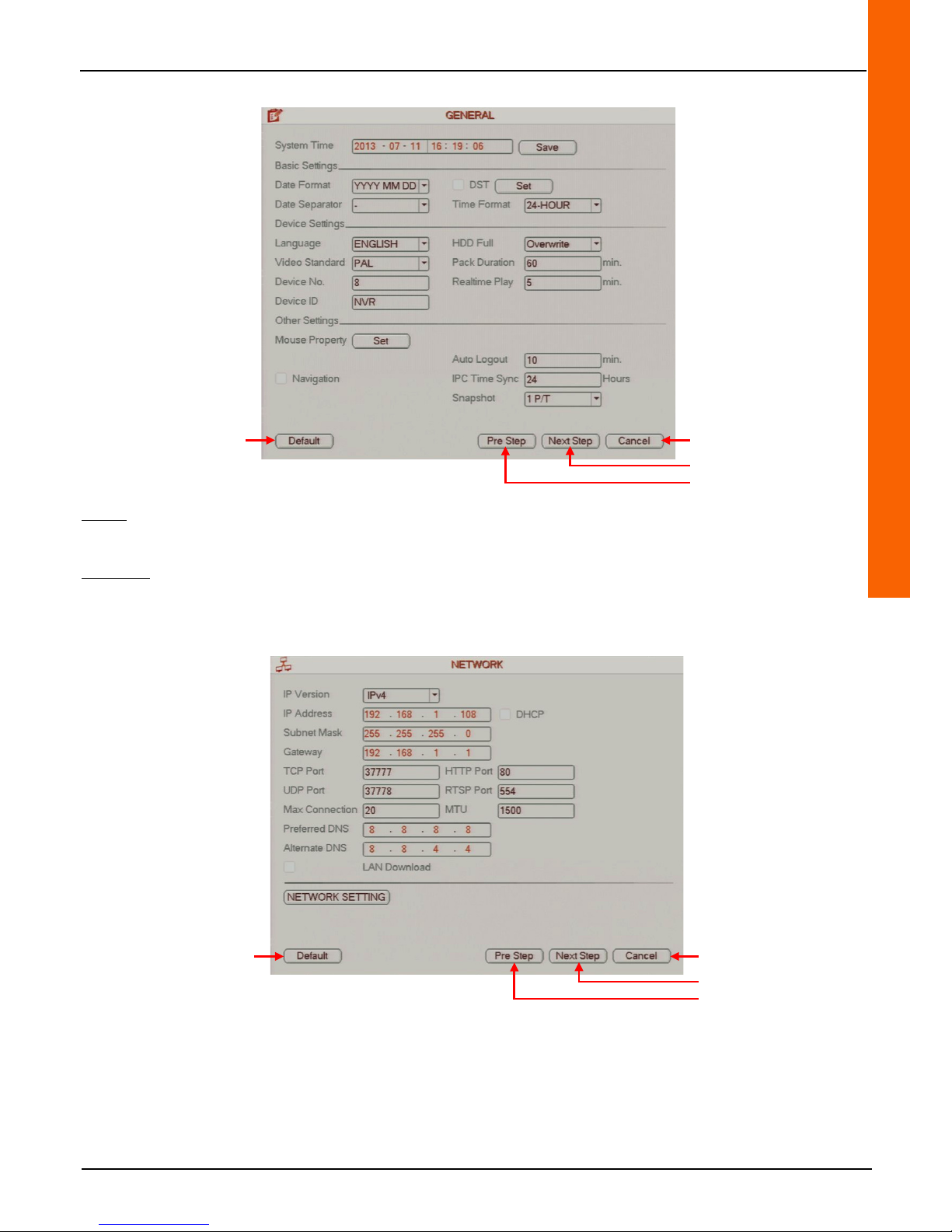
The tutorial shows how to configure the "GENERAL" menu settings (refer to paragraph 2.2).
Step 5: Click on the "Next Step" button to go to the next step in the tutorial. Click on the "Prev Step" button to go back to the
previous step or click on the "Cancel" button to leave the tutorial.
Comment:
Click on the "Default" button to reset the default settings.
The tutorial shows how to configure the "NETWORK" menu settings (refer to paragraph 4.7).
Cancel the operation
Reset
default settings
Go to the next step
Go back to the previous step
Cancel the operation
Reset
default settings
Go back to the previous step
Go to the next step
Page 12
12
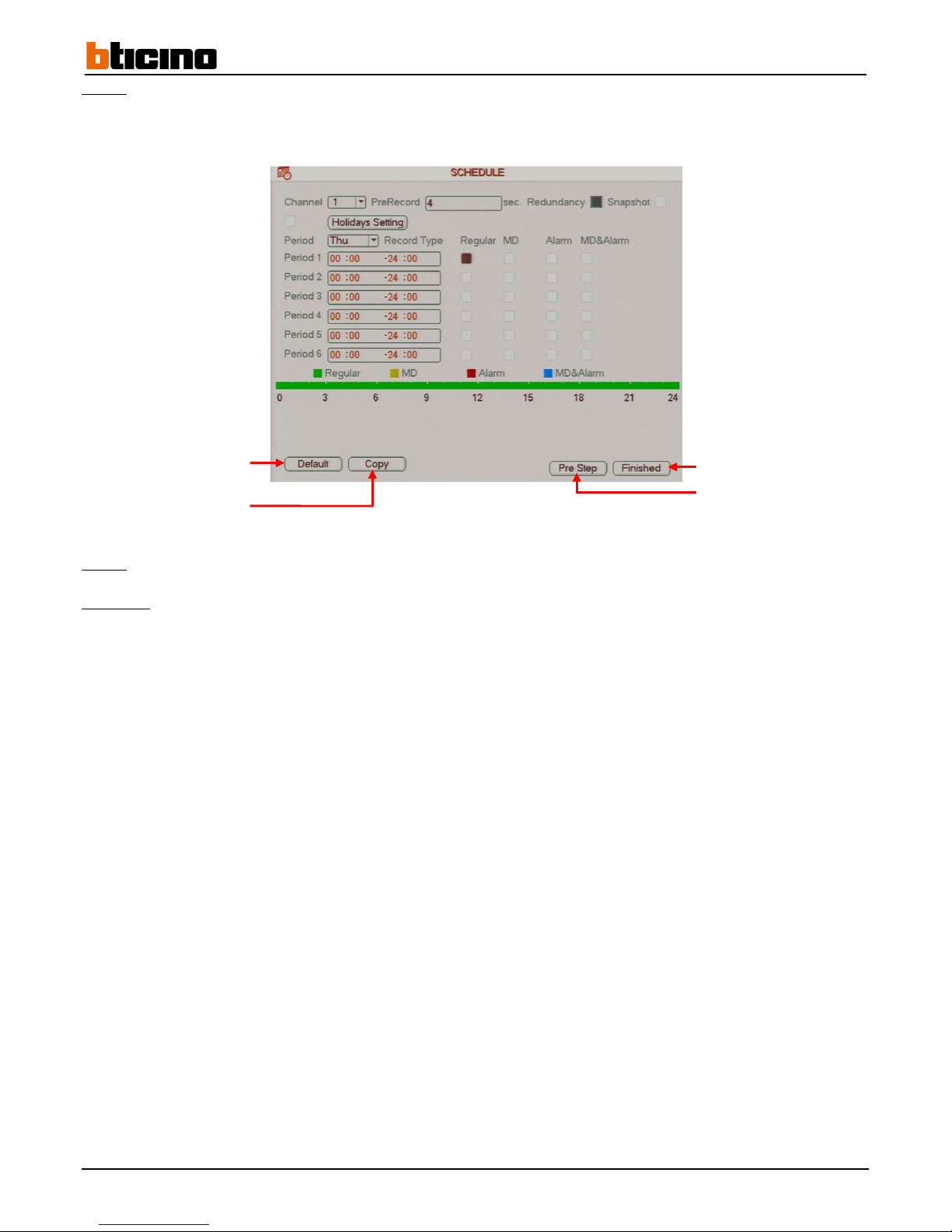
Step 6: Click on the "Next Step" button to go to the next step in the tutorial. Click on the "Prev Step" button to go back to the
previous step or click on the "Cancel" button to leave the tutorial.
The tutorial shows how to configure the "SCHEDULE" menu settings (refer to paragraph 3.2.2).
Step 7:
Click on the "Finished" button to save and finish the tutorial, or click on the "Prev Step" to go back to the previous step.
Comment:
• Click on the "Default" button to reset the default settings.
• Click on the "Copy" button to copy the settings to another, several or all of the cameras.
End tutorial
Reset
default settings
Copy settings
Go back to the previous step
Page 13
User Manual
4 Channel 1 TB HR DVR
8 Channel 2 TB HR DVR
16 Channel 4 TB HR DVR
4 Channel 1 TB HR DVR
13
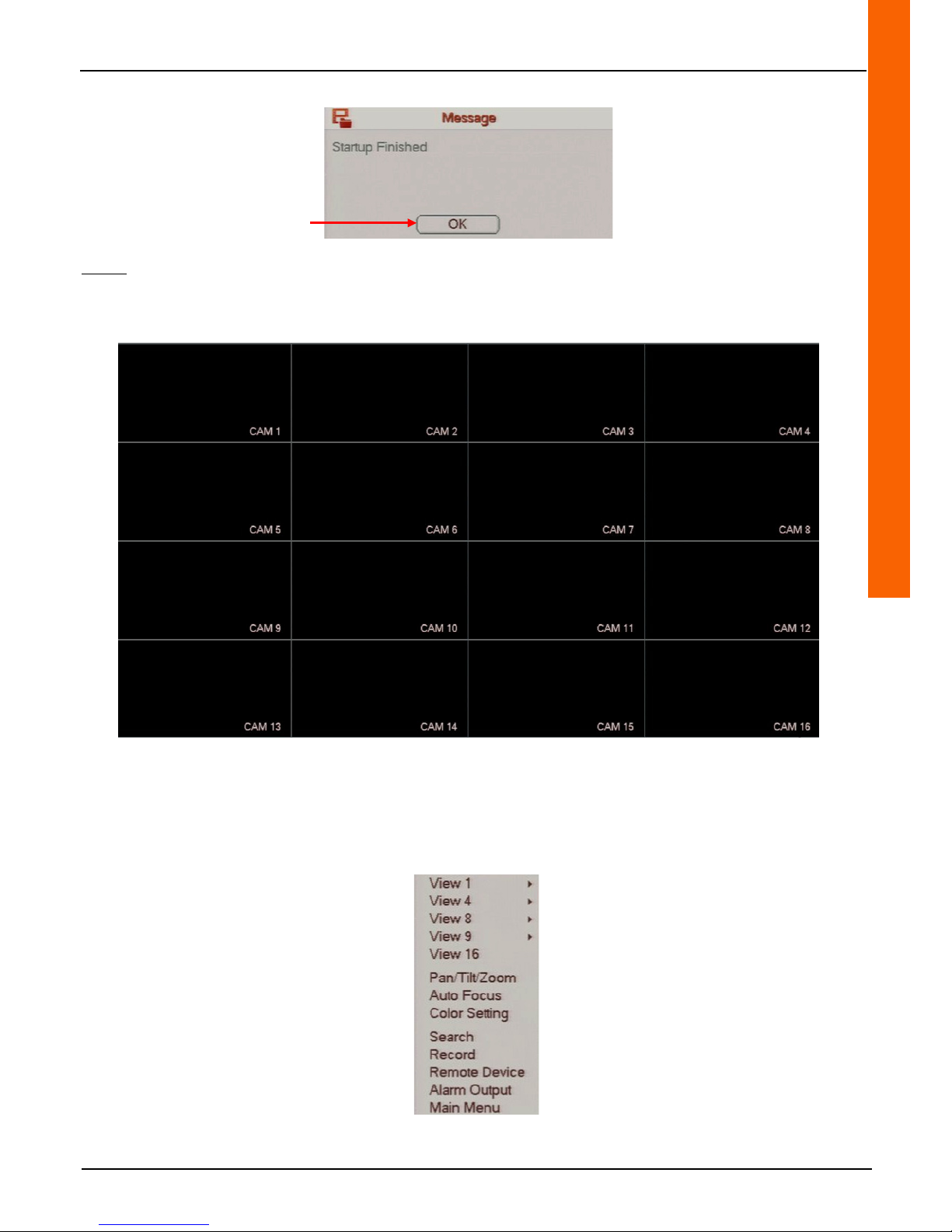
A message appears to confirm that the tutorial is finished.
Step 8: Click on the "OK" button to save the operation.
After having finished or exited the tutorial, the direct tiles are displayed (4 views for recorder reference 391577, 8 views for
recorder reference 391578, 16 views for recorder reference 391579 and 32 views for recorder reference 391580).
Example using a recorder reference 391579
Double-click on one of the views for a full screen display. Double-click again to return to the previous tiles.
Right-click on the direct tiles to display the drop-down menu to access the following menu shortcuts: display the tiles in different
ways: "Pan/Tilt/Zoom", "Auto Focus", "Colour Setting", "Search", "Record",
"Remote Device", "Alarm Output" and "Main Menu".
Confirm the operation
Page 14
14
2.2 Changing language, date and time
Note: To access this menu from the wizard, proceed directly to steps 4 to 8.
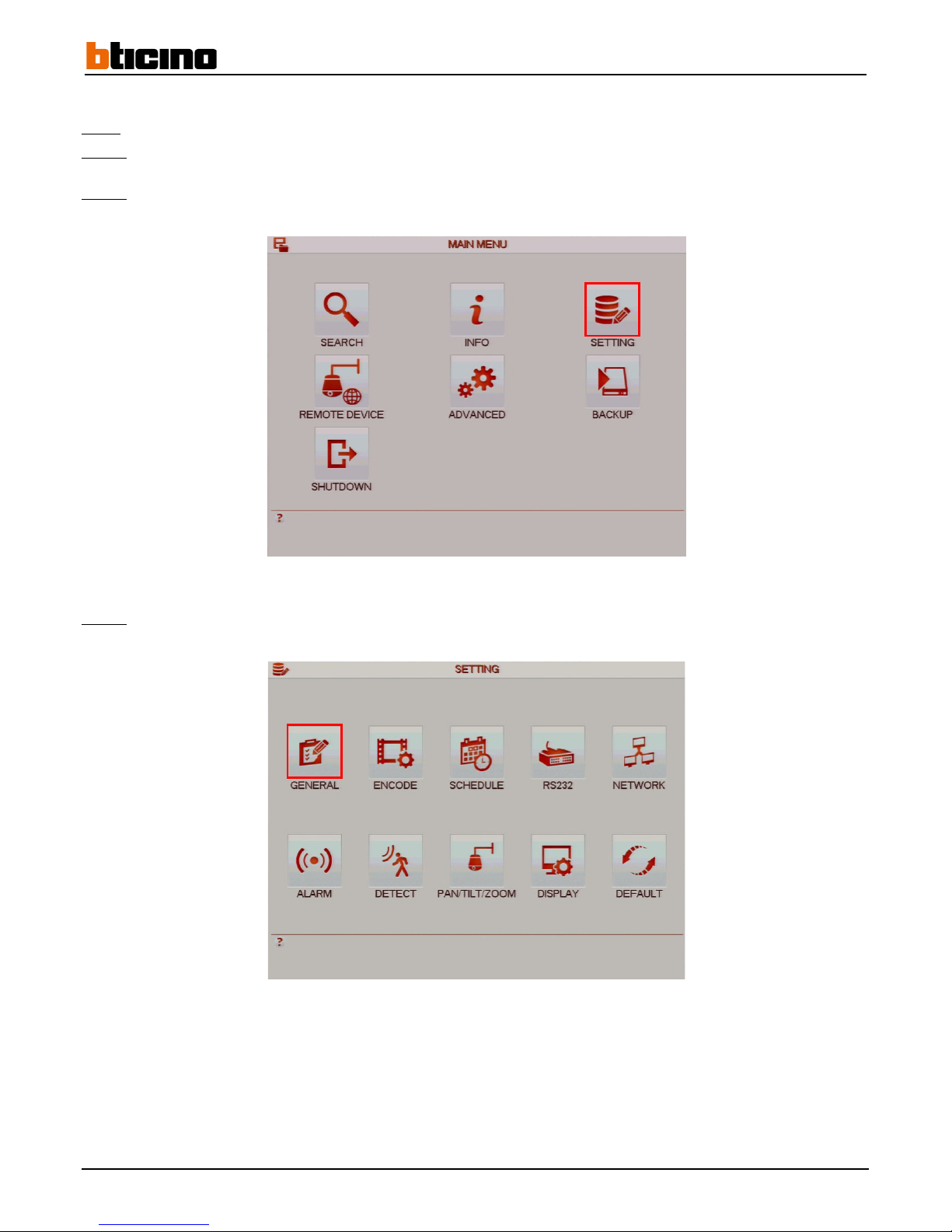
Step 1:
Left-click anywhere on the tiles to access the main menu or right-click to access the drop-down menu and click on "Main
Menu".
Step 2:
Click on the "SETTING" button to access the "SETTING" menu.
Step 3:
Click on the "GENERAL" button to access the "GENERAL" menu.
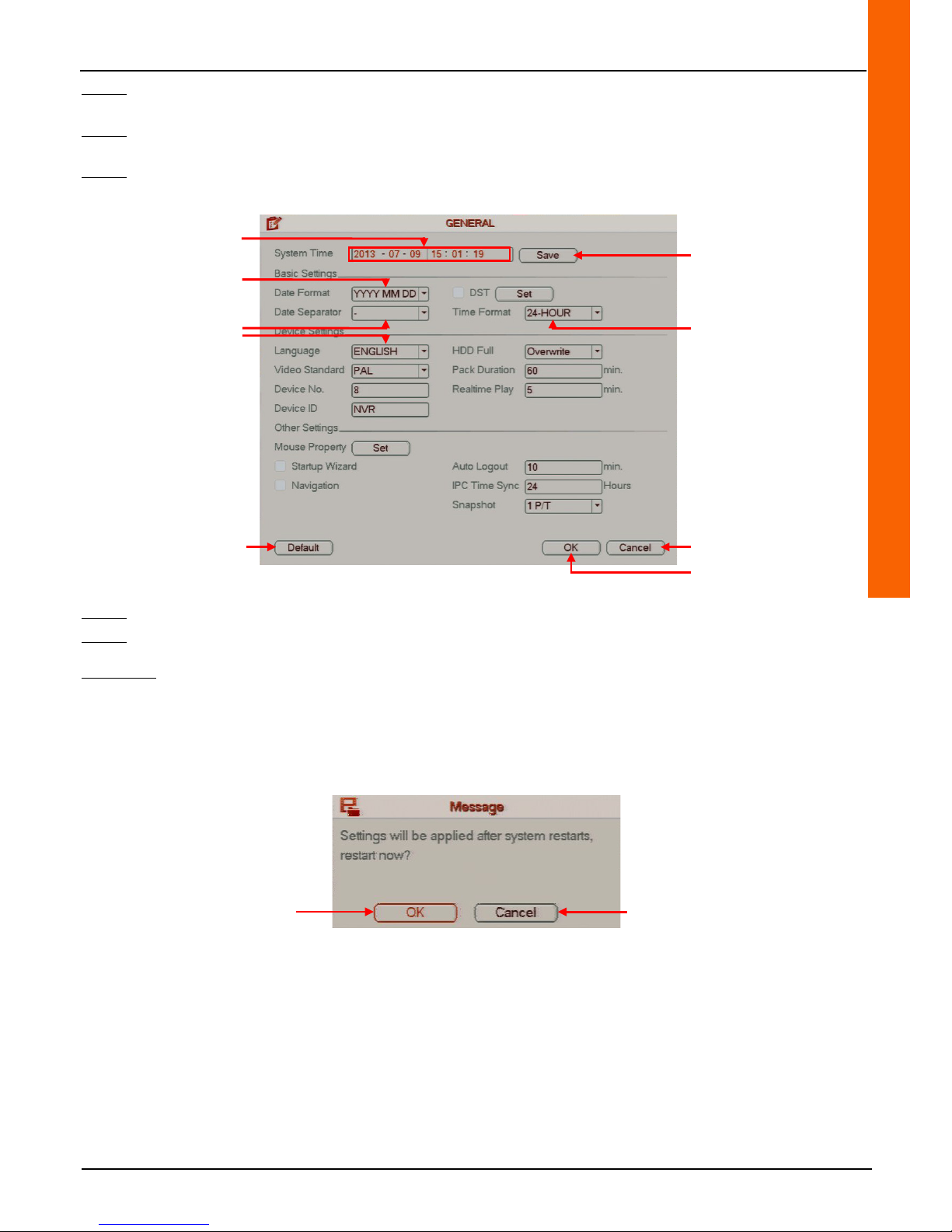
The "General" menu window appears.
Page 15
User Manual
4 Channel 1 TB HR DVR
8 Channel 2 TB HR DVR
16 Channel 4 TB HR DVR
4 Channel 1 TB HR DVR
15
Step 4: Enter the date and time in the “System Time" line field then click on the "Save" button on the same line to save
operation.
Step 5: Select the date format from the "Date Format" line drop-down menu, the character separators from the "Date
Separator" line drop-down menu and the time format from the "Time format" line-drop down menu.
Step 6: Select the language from the "Language" line drop-down menu to set the recorder language.
Step 7:
Click on the "OK" button to confirm the operation, or click on the "Cancel" button to cancel the operation.
Step 8:
Right-click to return to the previous menu. Then right-click again to return to the direct tiles.
Comments:
• Click on the "Default" button to restore the default settings.
• After having saved the operation, a message will appear requesting that the recorder be restarted. Click on the "OK"
button to confirm the operation, or click on the "Cancel" button to cancel the operation.
•
The recorder restarts.
Cancel the operation
Reset
default settings
Confirm the operation
Save the operation
Set date and time
Set the date format
Set the separator sign
Set the language
Set the time format
Cancel the operation Confirm the operation
Page 16
16
2.3 Changing a camera name
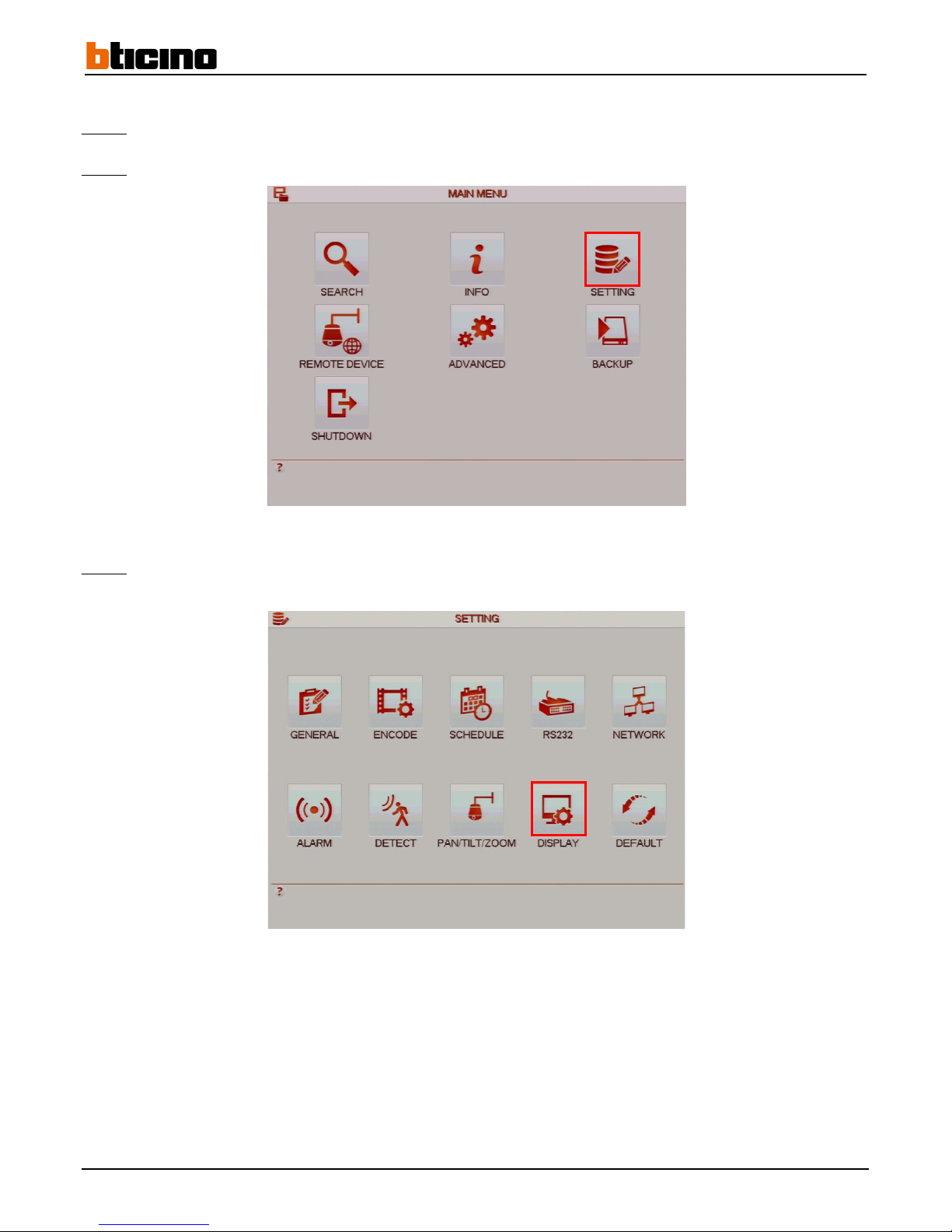
Step 1: Left-click anywhere on the tiles to access the main menu or right-click to access the drop-down menu and click on "Main
Menu".
Step 2:
Click on the "SETTING" button to access the "SETTING" menu.
Step 3:
Click on the "DISPLAY" button to access the "DISPLAY" menu.
Page 17
User Manual
4 Channel 1 TB HR DVR
8 Channel 2 TB HR DVR
16 Channel 4 TB HR DVR
4 Channel 1 TB HR DVR
17
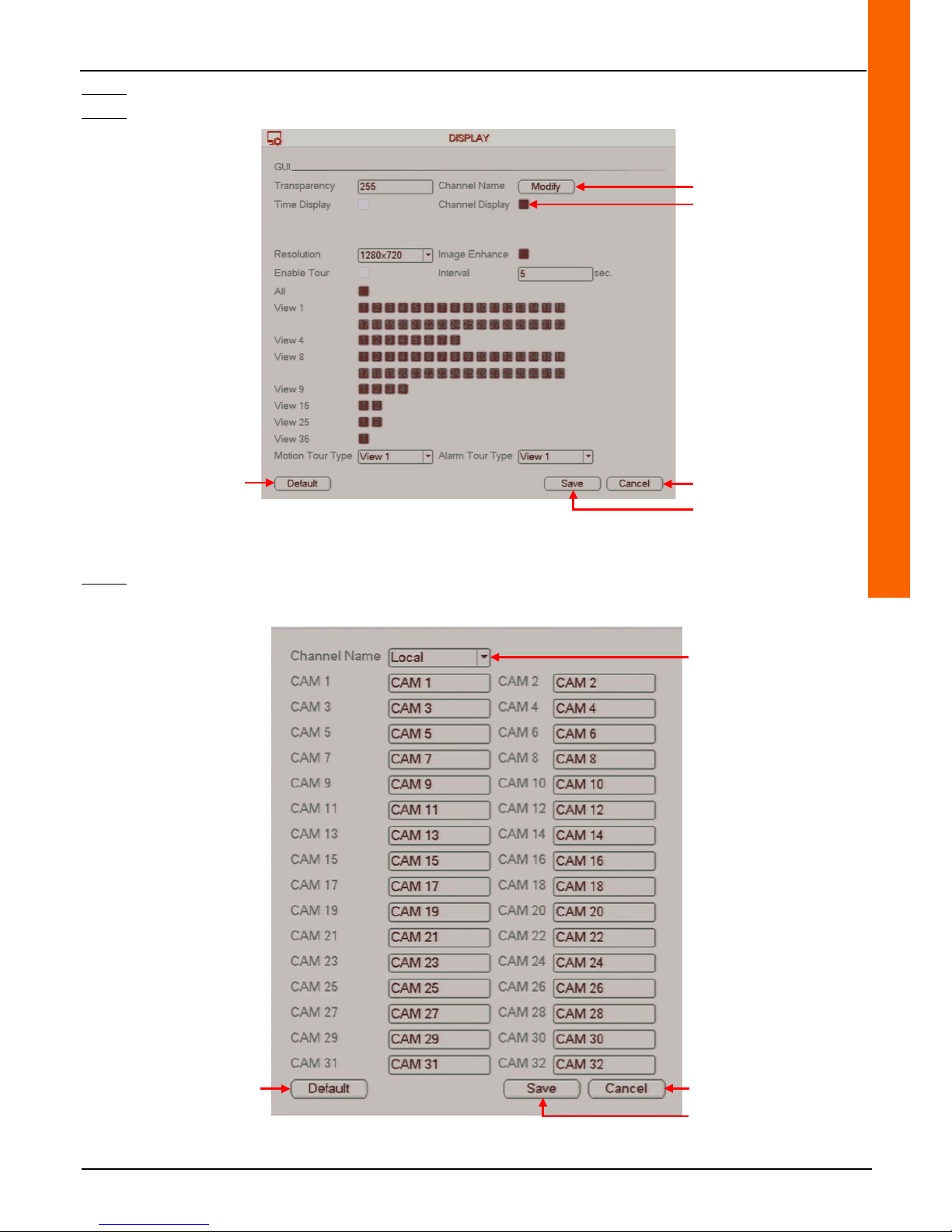
Step 4: Click on the "Modify" button on the "Channel Name" line to modify the name of one, several or all the cameras.
Step 5: Check the "Channel Display" line box to enable the camera name display (local settings).
Step 6: Enter the camera name in the field on the camera to be named.
Edit camera names
Cancel the operation
Save the operation
Cancel the operation
Save the operation
Select the name to edit
(local or remote)
Reset
default settings
Reset
default settings
Enable camera name display
Page 18

18
Step 7: Click on the "Save" button to save the operation or on "Cancel" to cancel the operation.
Step 8:
Click on the "Save" button to save the operation and exit the "DISPLAY" menu or on "Cancel" to cancel the operation.
Step 9:
Right-click to return to the previous menu. Then right-click again to return to the direct tiles.
Comments:
• Click on the "Default" button to restore the default settings.
Page 19
User Manual
4 Channel 1 TB HR DVR
8 Channel 2 TB HR DVR
16 Channel 4 TB HR DVR
4 Channel 1 TB HR DVR
19
3 Basic Functionalities
3.1 Recording settings
The recorder records continuously by default on all the connected cameras.
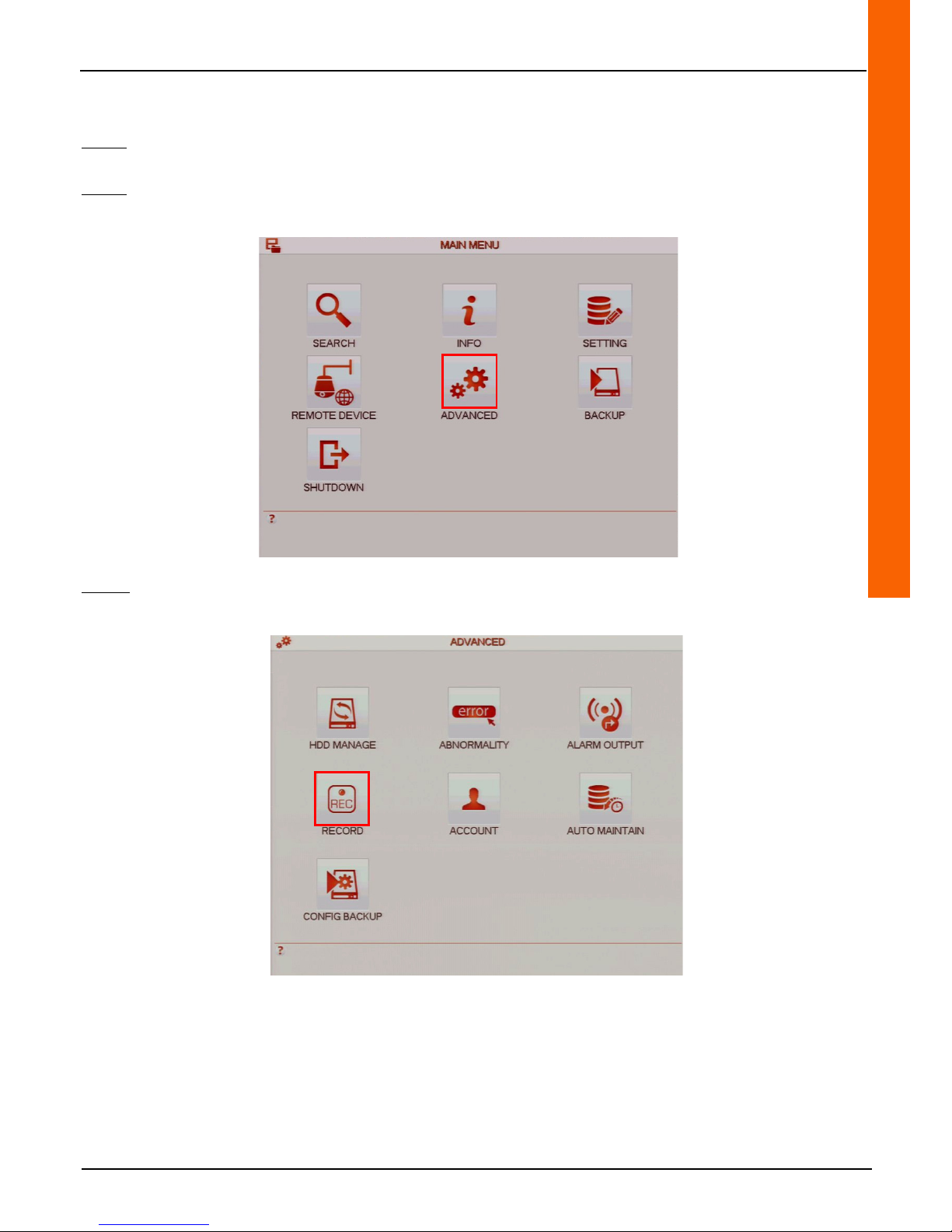
3.1.1 Enable/Disable recording using a calendar
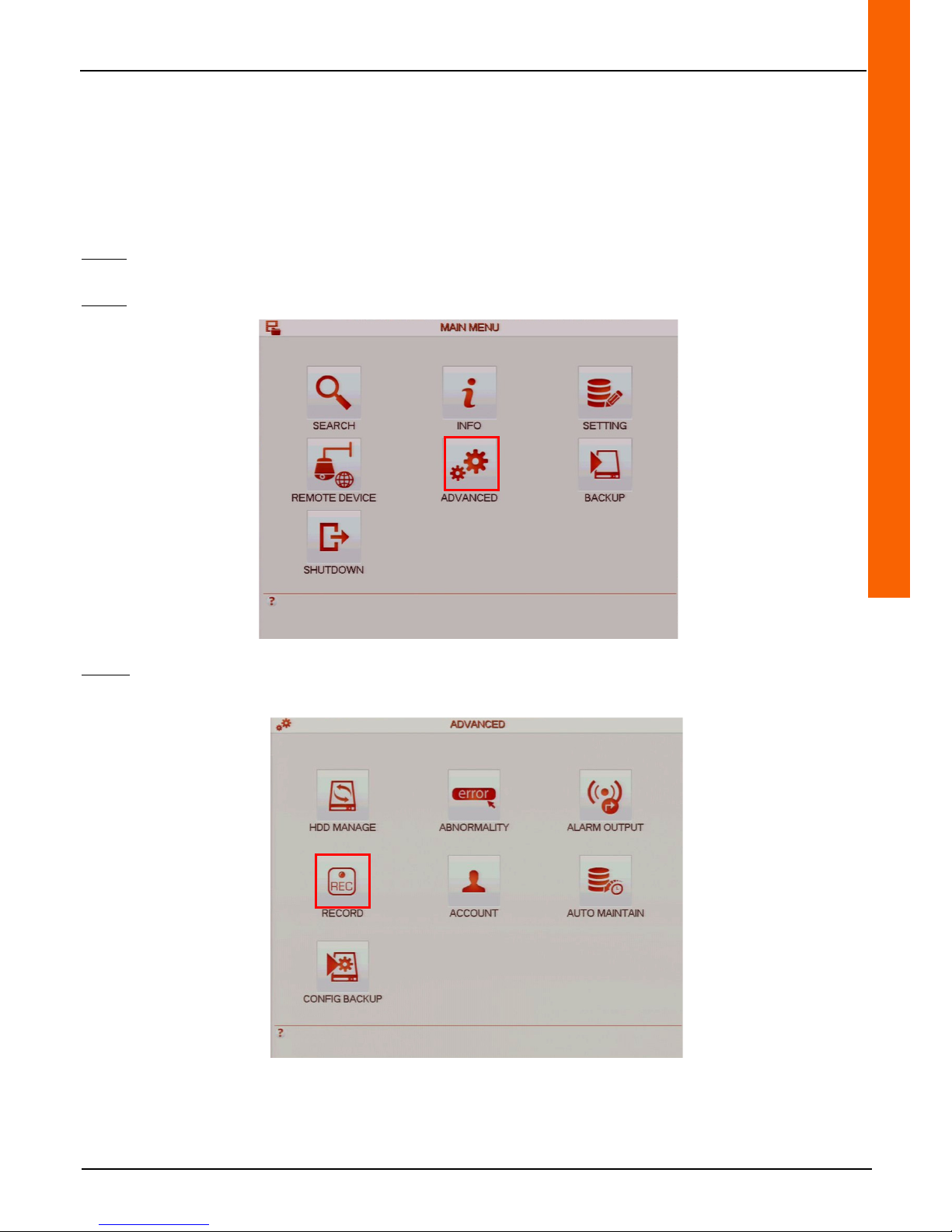
Step 1: Left-click anywhere on the tiles to access the main menu or right-click to access the drop-down menu and click on
"Main Menu".
Step 2: Click on the "ADVANCED" button to access the "ADVANCED" menu.
Step 3:
Click on the "RECORD" button to access the "RECORD" menu.
Page 20
20
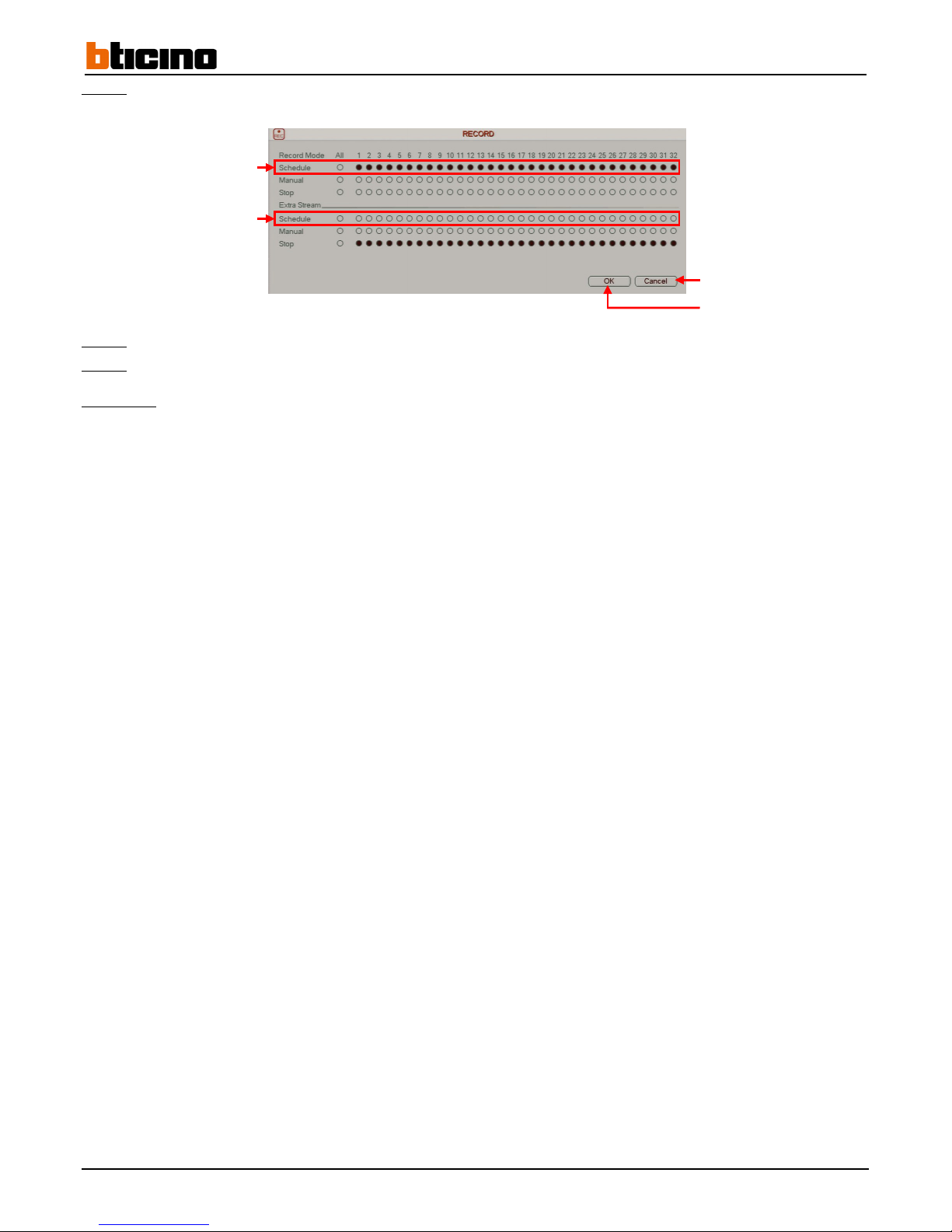
Step 4: Check the boxes that correspond to the cameras on the "Schedule" line on the first level in the window in order to enable
continuous recording (using a calendar).
Step 5:
Click on the "OK" button to confirm the operation, or click on the "Cancel" button to cancel the operation.
Step 6:
Right-click to return to the previous menu. Then right-click again to return to the direct tiles.
Comments:
• Right-click on the direct tiles to display the menu shortcut drop-down menu then click on "Record" to access the
"RECORD" menu.
• Tick the "All" column box to select all the cameras at the same time.
• To access recordings from a smartphone or tablet, the recording must be enabled on the secondary stream calendar.
Enable recording on the main
stream calendar
Cancel the operation
Confirm the operation
Enable recording on the secondary
stream calendar
Page 21
User Manual
4 Channel 1 TB HR DVR
8 Channel 2 TB HR DVR
16 Channel 4 TB HR DVR
4 Channel 1 TB HR DVR
21
3.1.2 Continuous recording calendar settings
Note: To access this menu from the wizard, proceed directly to steps 4 to 10.
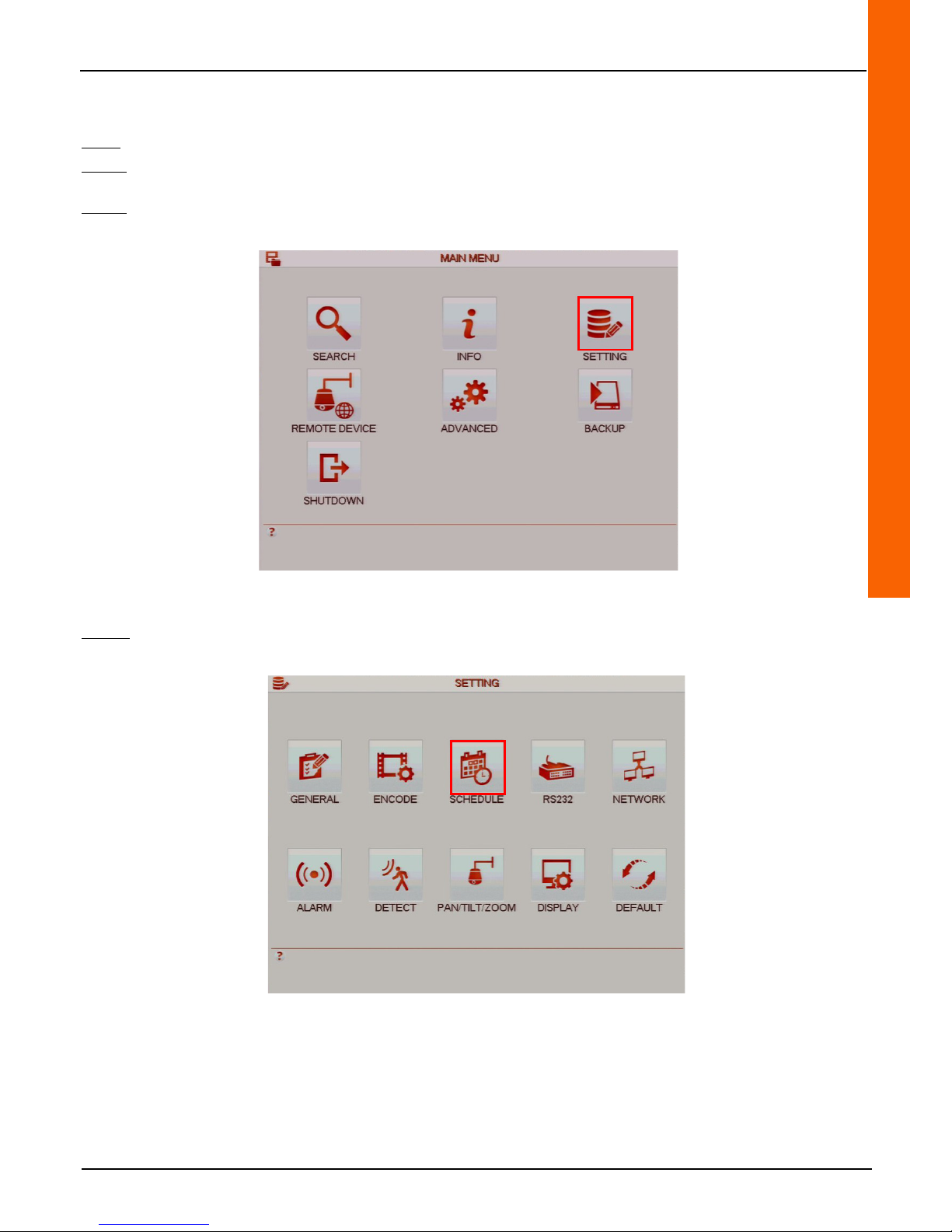
Step 1: Left-click anywhere on the tiles to access the main menu or right-click to access the drop-down menu and click on
"Main Menu".
Step 2: Click on the "SETTING" button to access the "SETTING" menu.
Step 3:
Click on the "SCHEDULE" button to access the "SCHEDULE" menu.
Page 22
22
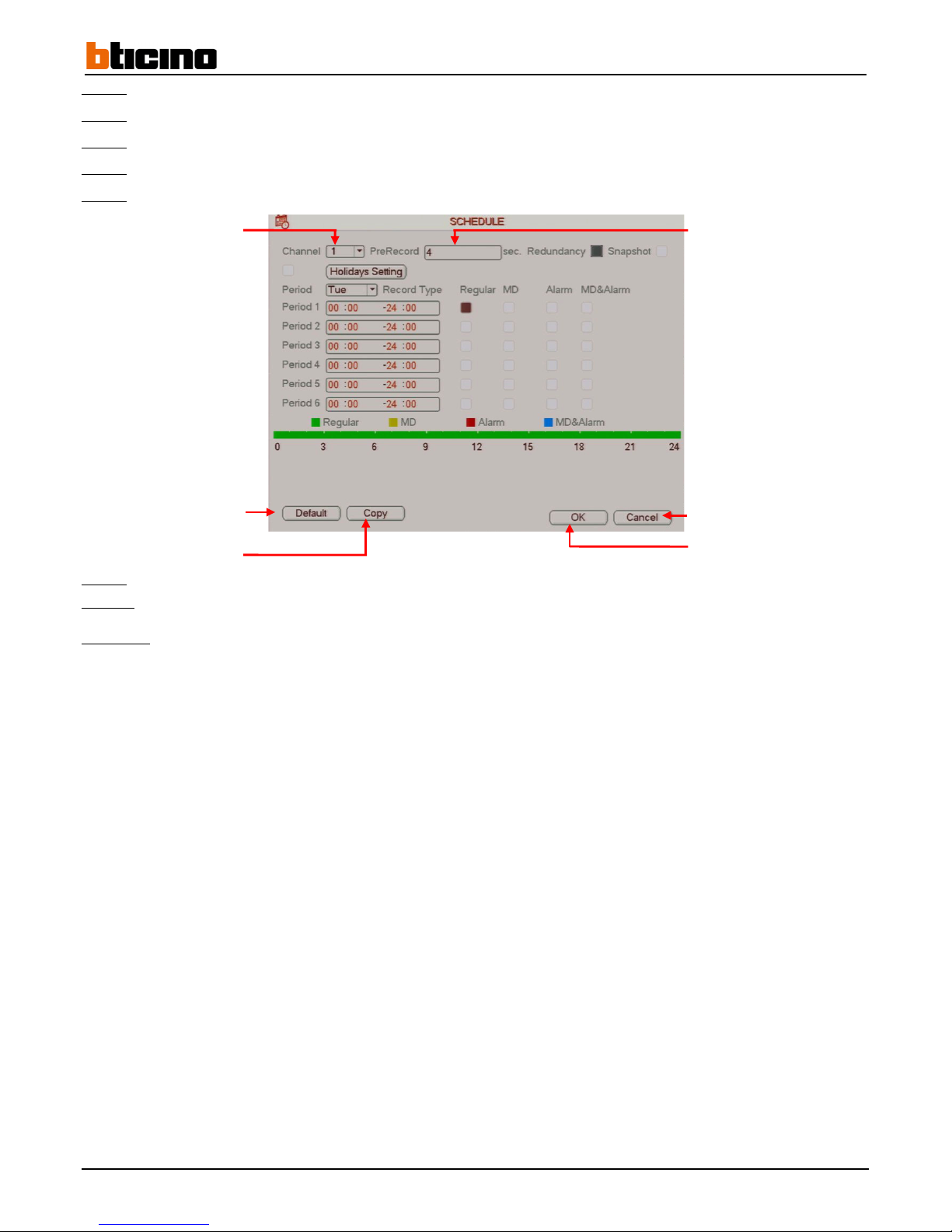
Step 4: Select the camera in the "Channel" line drop-down in order to configure it.
Step 5:
Enter pre-record time on the "PreRecord" line field.
Step 6:
Select the day of the week in the "Period" line drop-down to configure it.
Step 7:
Select up to six time periods by checking the "Regular" column box in order to enable continuous recording.
Step 8: Enter a time interval in one of the six period fields to define the start and end time.
Step 9: Click on the "OK" button to confirm the operation, or click on the "Cancel" button to cancel the operation.
Step 10:
Right-click to return to the previous menu. Then right-click again to return to the direct tiles.
Comment:
• Click on the "Default" button to restore the default settings.
• Click on the "Copy" button to copy the settings to another, several or all of the cameras.
• Check the "Holidays Setting" box and click on the button to enable and configure recordings by calendar dates.
Cancel the operation
Confirm the operation
Reset
default settings
Copy the settings
Select the camera
Enter length of time of
the
Page 23
User Manual
4 Channel 1 TB HR DVR
8 Channel 2 TB HR DVR
16 Channel 4 TB HR DVR
4 Channel 1 TB HR DVR
23
3.1.3 Enable/disable manual recording
Step 1: Left-click anywhere on the tiles to access the main menu or right-click to access the drop-down menu and click on
"Main Menu".
Step 2: Click on the "ADVANCED" button to access the "ADVANCED" menu.
Step 3: Click on the "RECORD" button to access the "RECORD" menu.
Page 24
24
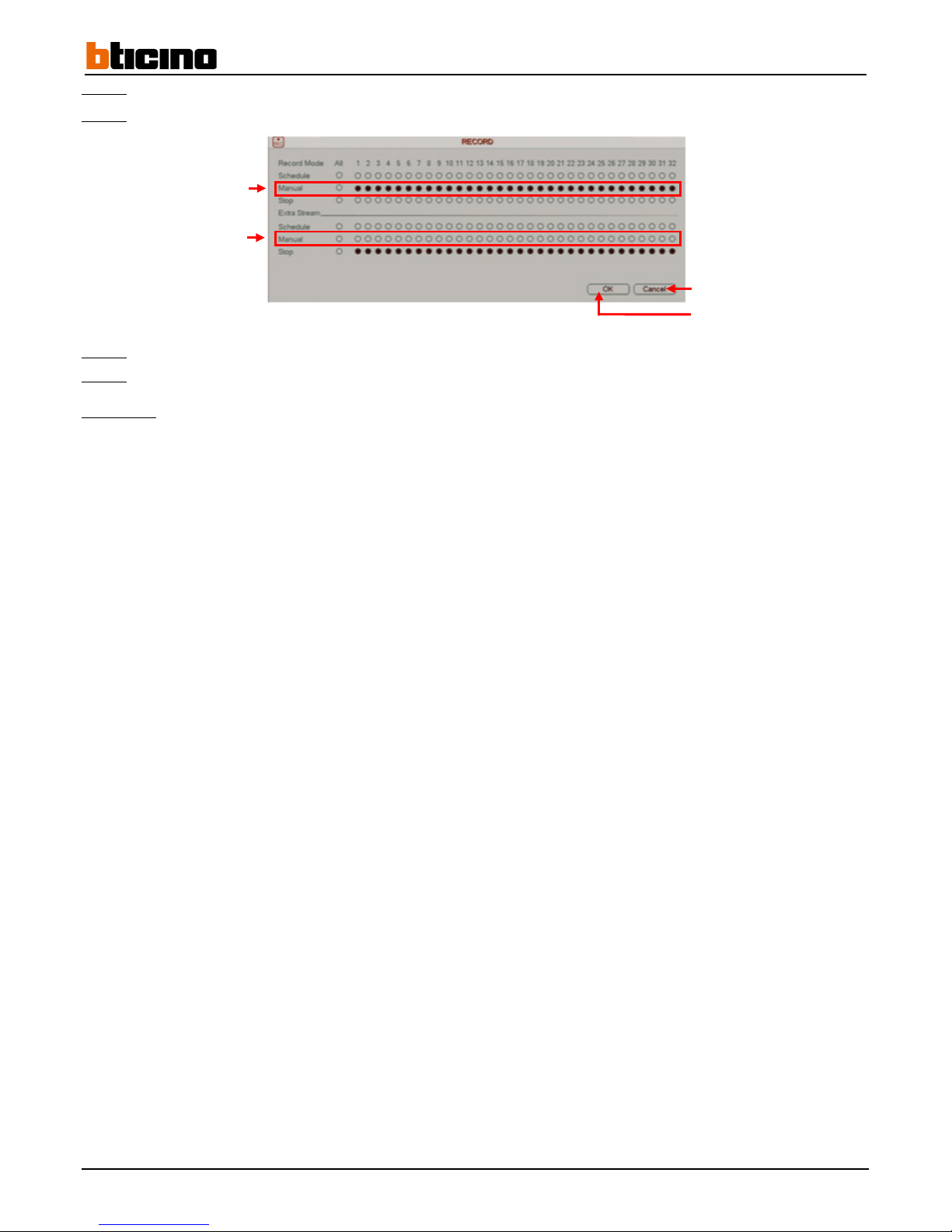
Step 4: Check the boxes that correspond to the "Manual" line cameras to enable manual recording (forced recording).
Step 5:
Check the boxes that correspond to the "Stop" line cameras to disable manual recording.
Step 6:
Click on the "OK" button to confirm the operation, or click on the "Cancel" button to cancel the operation.
Step 7:
Right-click to return to the previous menu. Then right-click again to return to the direct tiles.
Comments:
• Right click on the direct tiles to display the menu shortcut drop-down menu then click on "Record" to access the
"RECORD" menu.
• Check the "All" column box to select all the cameras at the same time.
Enable main stream manual
recording
Cancel the operation
Confirm the operation
Enable secondary stream manual
recording
Page 25
User Manual
4 Channel 1 TB HR DVR
8 Channel 2 TB HR DVR
16 Channel 4 TB HR DVR
4 Channel 1 TB HR DVR
25
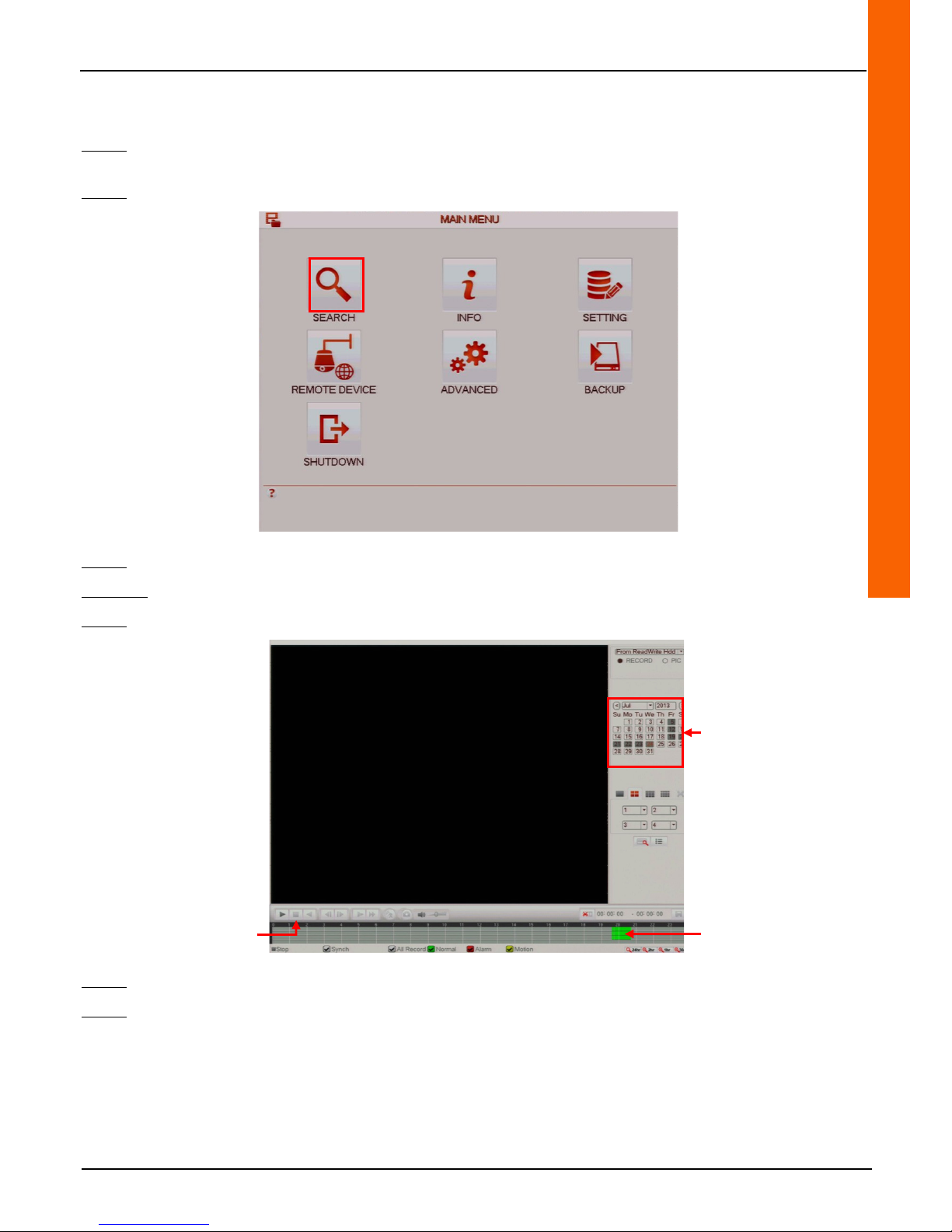
3.2 Recording playback
Step 1: Left-click anywhere on the tiles to access the main menu or right-click to access the drop-down menu and click on
"Main Menu".
Step 2: Click on the "SEARCH" menu to access the "SEARCH" menu.
Step 3: Click on a grey coloured day on the calendar to access the recordings that were made on that day.
Method 1:
Step 4:
Click on a green coloured day on the time bar to start playback on a continuous recording.
Step 5:
Click on the "Stop" button to stop playback.
Step 6:
Right-click to return to the previous menu. Then right-click again to return to the direct tiles.
Using the calendar to access
recordings
Start playback
Stop playback
Page 26
26
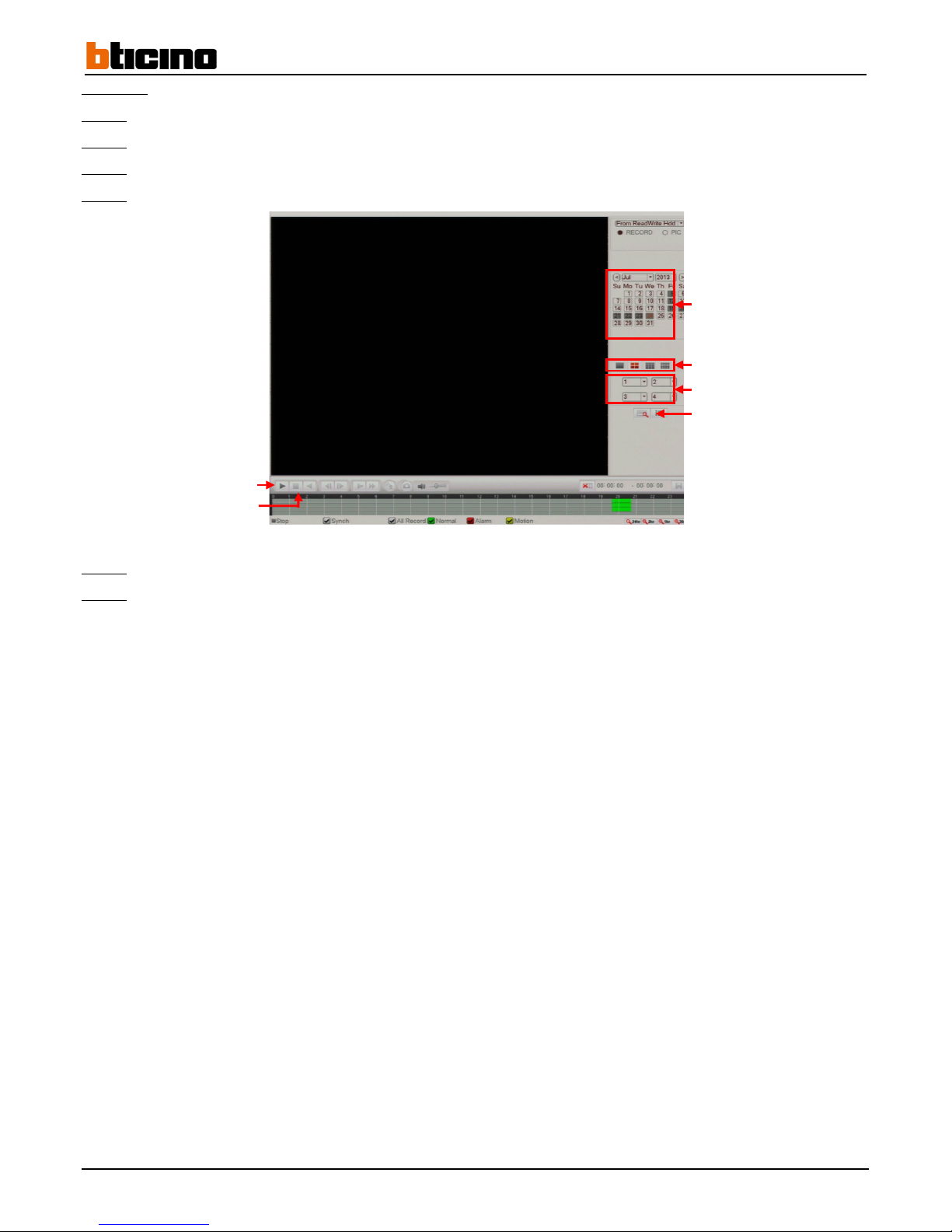
Method 2:
Step 4:
Click on one of the tabs to select camera display modes.
Step 5:
Select the cameras to display from the drop-down menus according to the selected display mode.
Step 6:
Click on the "List" button to display the recordings by the times they started.
Step 7:
Click on a recording to automatically start playback.
Step 8:
Click on the "Stop" button to stop playback.
Step 9:
Right-click to return to the previous menu. Then right-click again to return to the direct tiles.
Using the calendar to access
recordings
Select the display mode
Select the cameras to display
Start playback
Stop playback
Display recordings
Page 27
User Manual
4 Channel 1 TB HR DVR
8 Channel 2 TB HR DVR
16 Channel 4 TB HR DVR
4 Channel 1 TB HR DVR
27
3.3 Exporting a recording on a USB key/hard drive
Step 1: Insert a USB key or hard drive in a recorder USB port.
Step 2: Left-click anywhere on the tiles to access the main menu or right-click to access the drop-down menu and click on
"Main Menu".
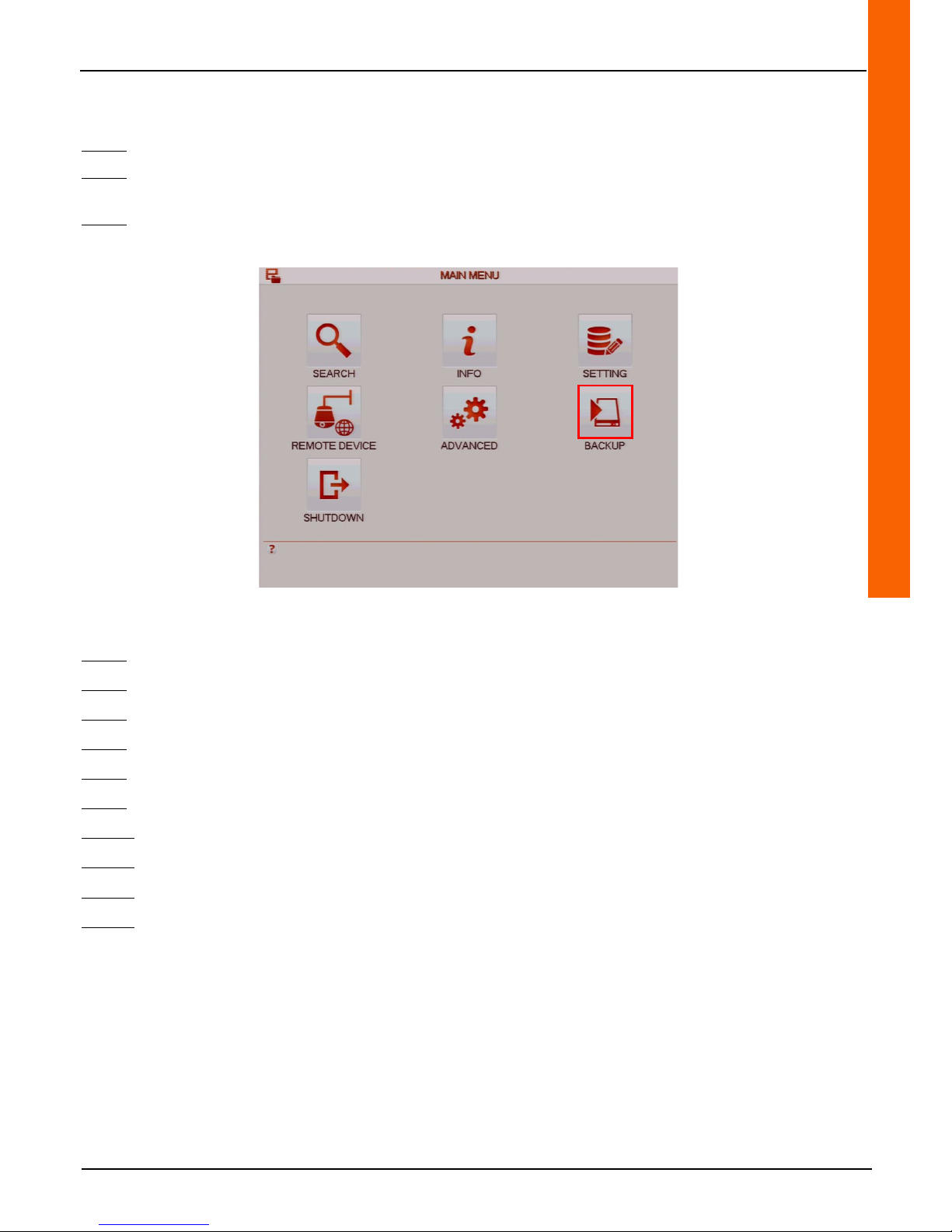
Step 3: Click on the "BACKUP" button to access the "BACKUP" menu.
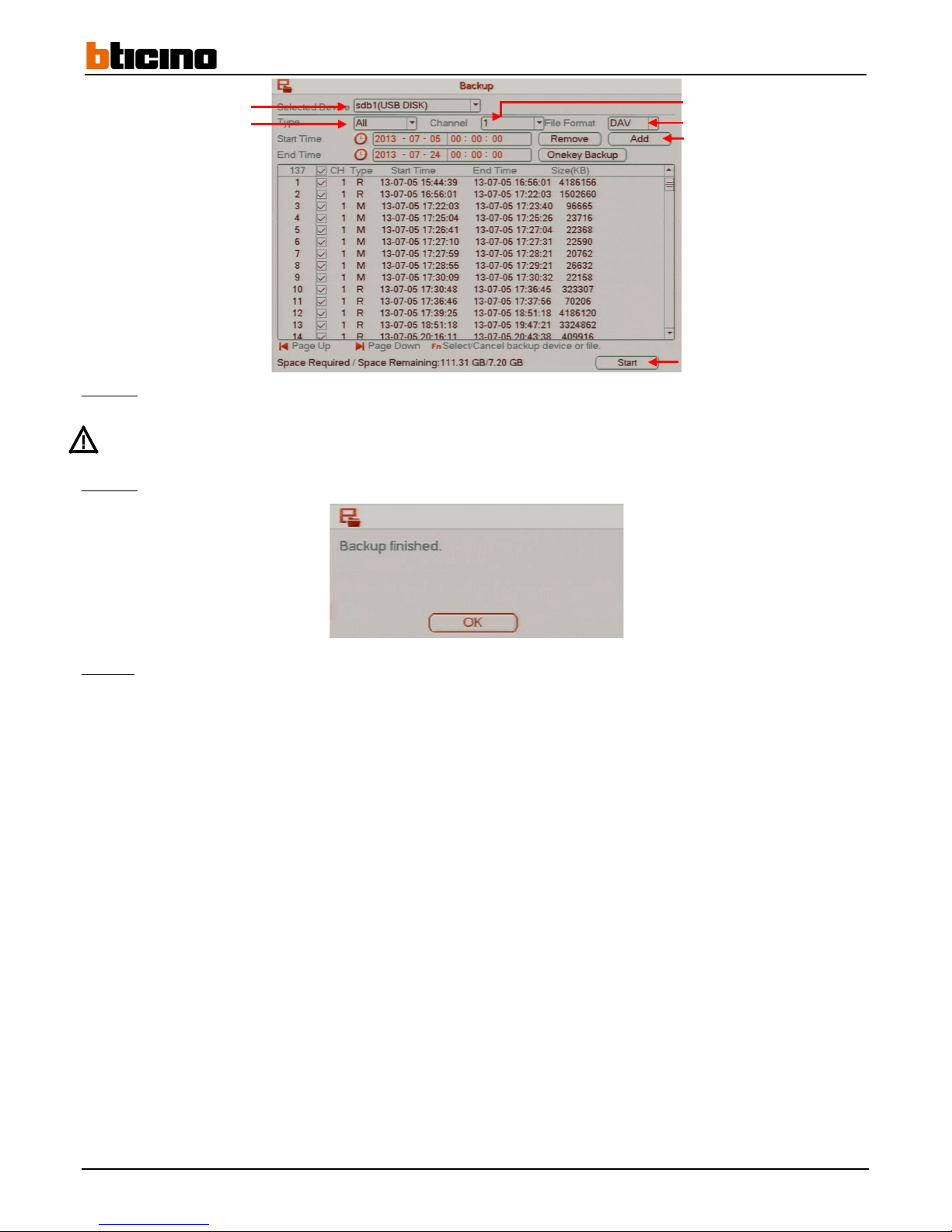
Step 4:
Select the USB key or hard drive from the list and click on the "Backup" button.
Step 5:
Select the USB device from the drop-down menu on the "Selected Device" line to which to export the recordings.
Step 6:
Select the event type from the drop-down menu on the "Type" line.
Step 7:
Select the camera from the drop-down menu on the "Channel" line.
Step 8:
Select the file format to be exported from the drop-down menu on the "File Format" line.
Step 9:
Insert a USB key or hard drive into a USB port on the recorder.
Step 10:
Click on the clock logo on the "Start Time" to display the calendar and select the recording search start date.
Step 11:
Click on the clock logo on the "End Time" to display the calendar and select the recording search end date.
Step 12:
Click on the "Add" button to display all the recordings included in the time frame defined above.
Step 13:
Click on the tick boxes to select recordings to be exported, or click on the box in the title line to select all of the
recordings.
Page 28
28
Step 14:
Once the recordings are selected, click on the "Start" button to start the export process.
Do not remove the USB device during the export process.
Step 15:
When the export is finished, the message "Backup finished" is displayed. Click on the "OK" button to finish.
Step 16:
Right-click to return to the previous menu. Then right-click again to return to the direct tiles.
Select the USB device
Select the event type
Select the camera
Select file format
Display recordings
Begin export
Page 29
User Manual
4 Channel 1 TB HR DVR
8 Channel 2 TB HR DVR
16 Channel 4 TB HR DVR
4 Channel 1 TB HR DVR
29
4 Advanced functionalities
4.1 Alarm and motion detection
4.1.1 Recording and other external alarm action settings
4.1.1.1 Wiring an alarm input and/or output
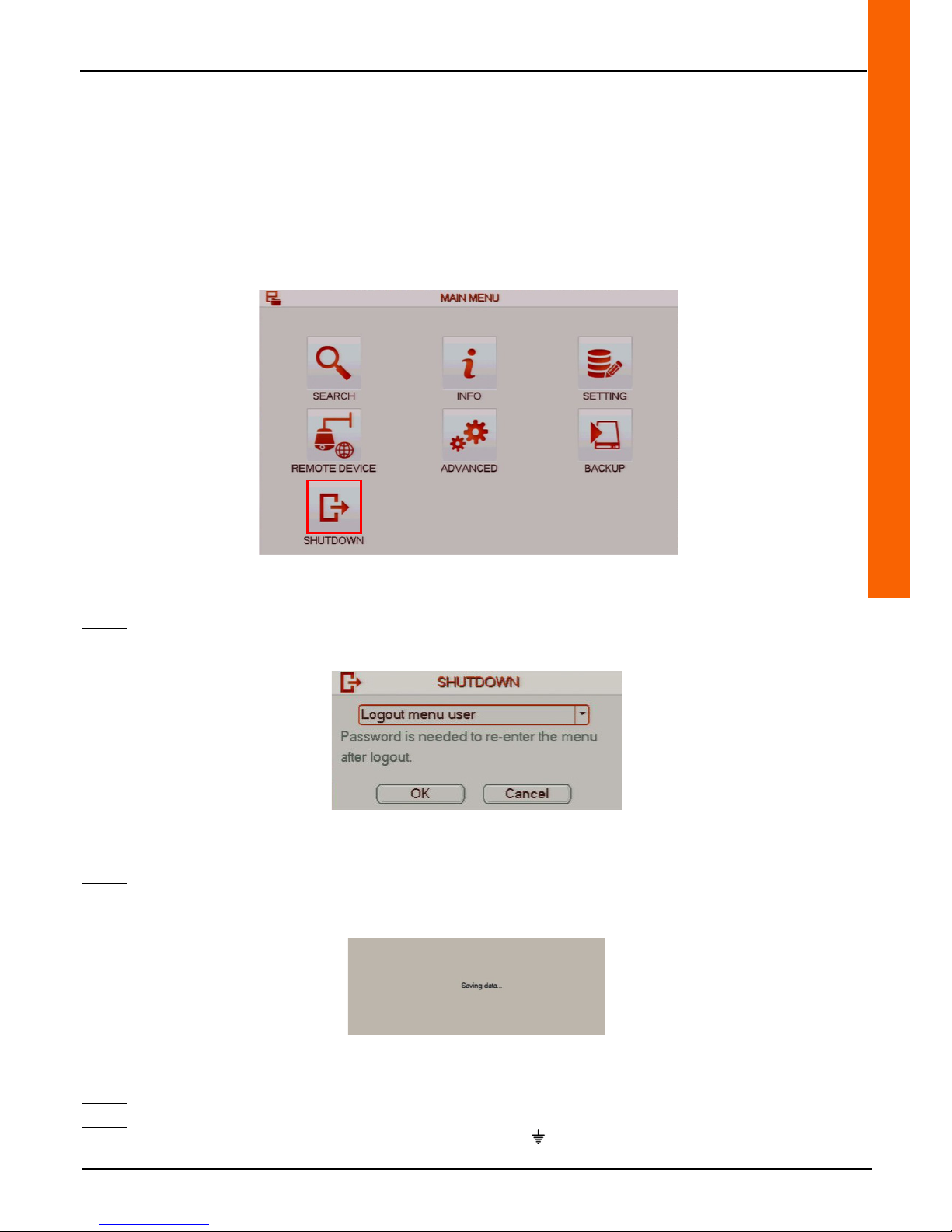
Step 1: Click on the "SHUTDOWN" button to access the "SHUTDOWN" menu.
Step 2:
Select "Shutdown" from the drop-down menu to shut off the recorder.
Step 3:
Click on the "OK" button to confirm the operation, or click on the "Cancel" button to cancel the operation. The "Saving
data" message is displayed.
Step 4:
Set the recorder power switch on the 0 position.
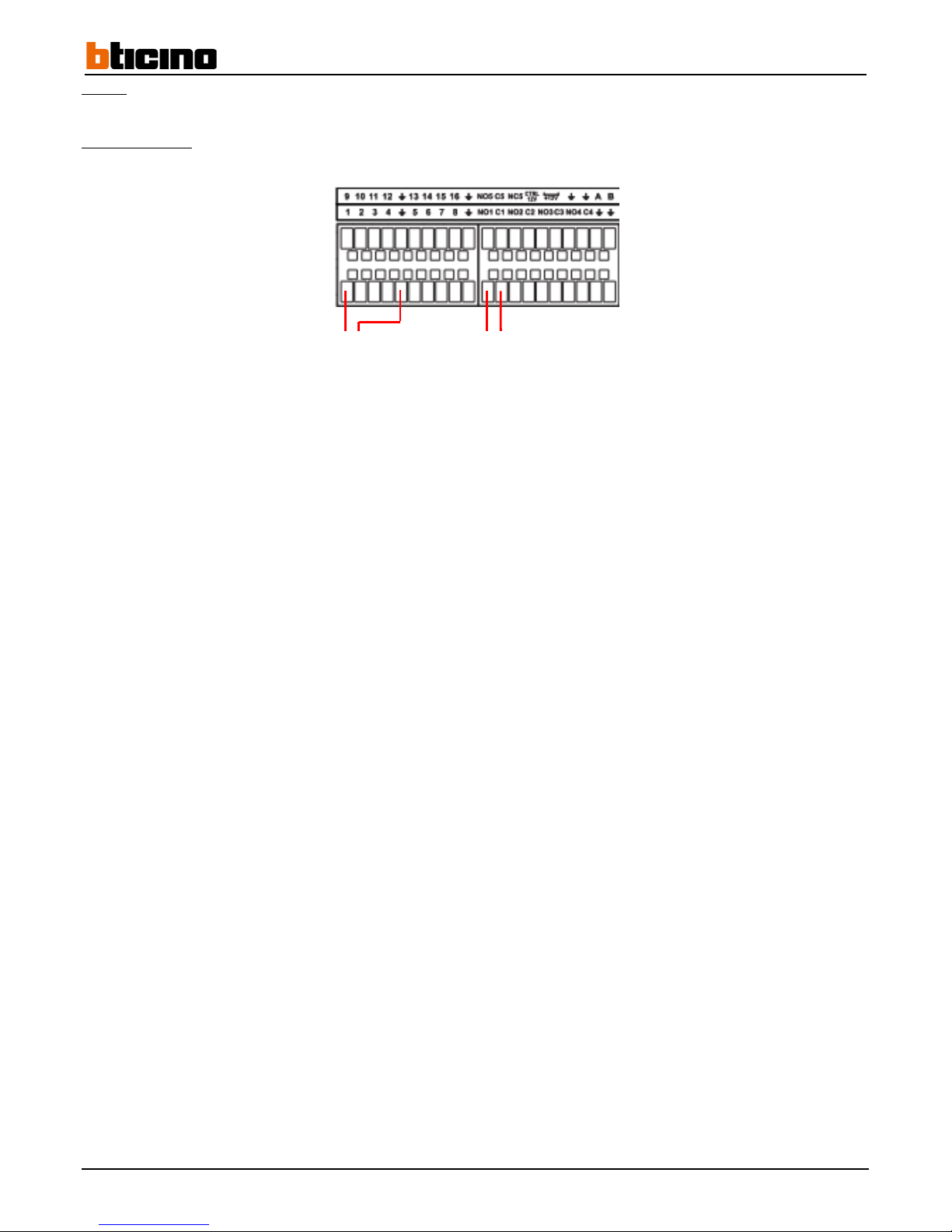
Step 5: Wire an alarm input between numbered terminal (from 1 to 16 for a 4 channel recorder, from 1 to 8 for an 8 to 16 channel
recorder and 1 to 16 channels for a 32 channel recorder) and the terminal .
Page 30
30
Step 6: Wire an alarm output between the "NO" and "C" terminal on a same alarm contact.
391 519/520/521
Alarm input
Alarm output
Page 31
User Manual
4 Channel 1 TB HR DVR
8 Channel 2 TB HR DVR
16 Channel 4 TB HR DVR
4 Channel 1 TB HR DVR
31
4.1.1.2 Setting alarm actions
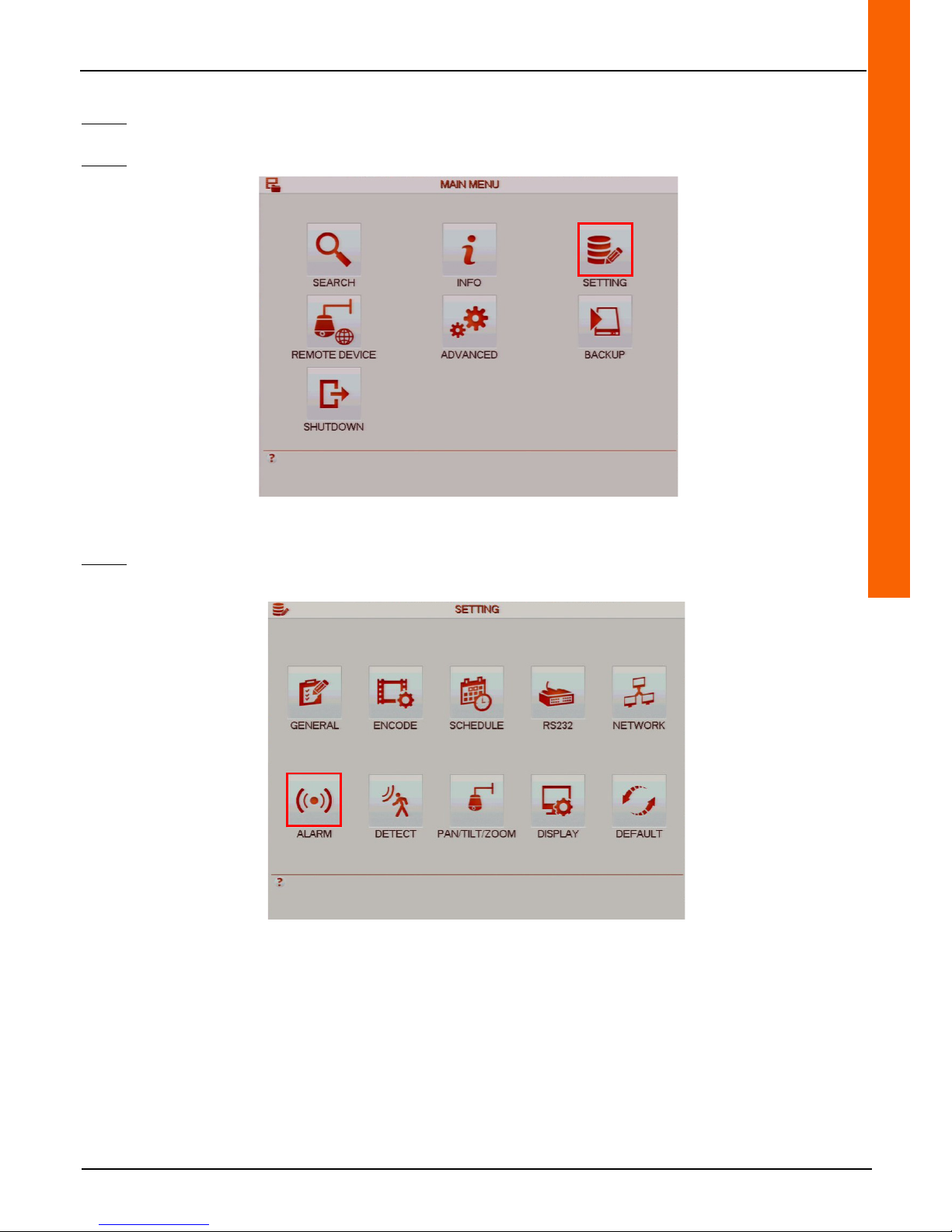
Step 1: Left-click anywhere on the tiles to access the main menu or right-click to access the drop-down menu and click on
"Main Menu".
Step 2: Click on the "SETTING" button to access the "SETTING" menu.
Step 3: Click on the "ALARM" button to access the "ALARM" menu.
Page 32
32
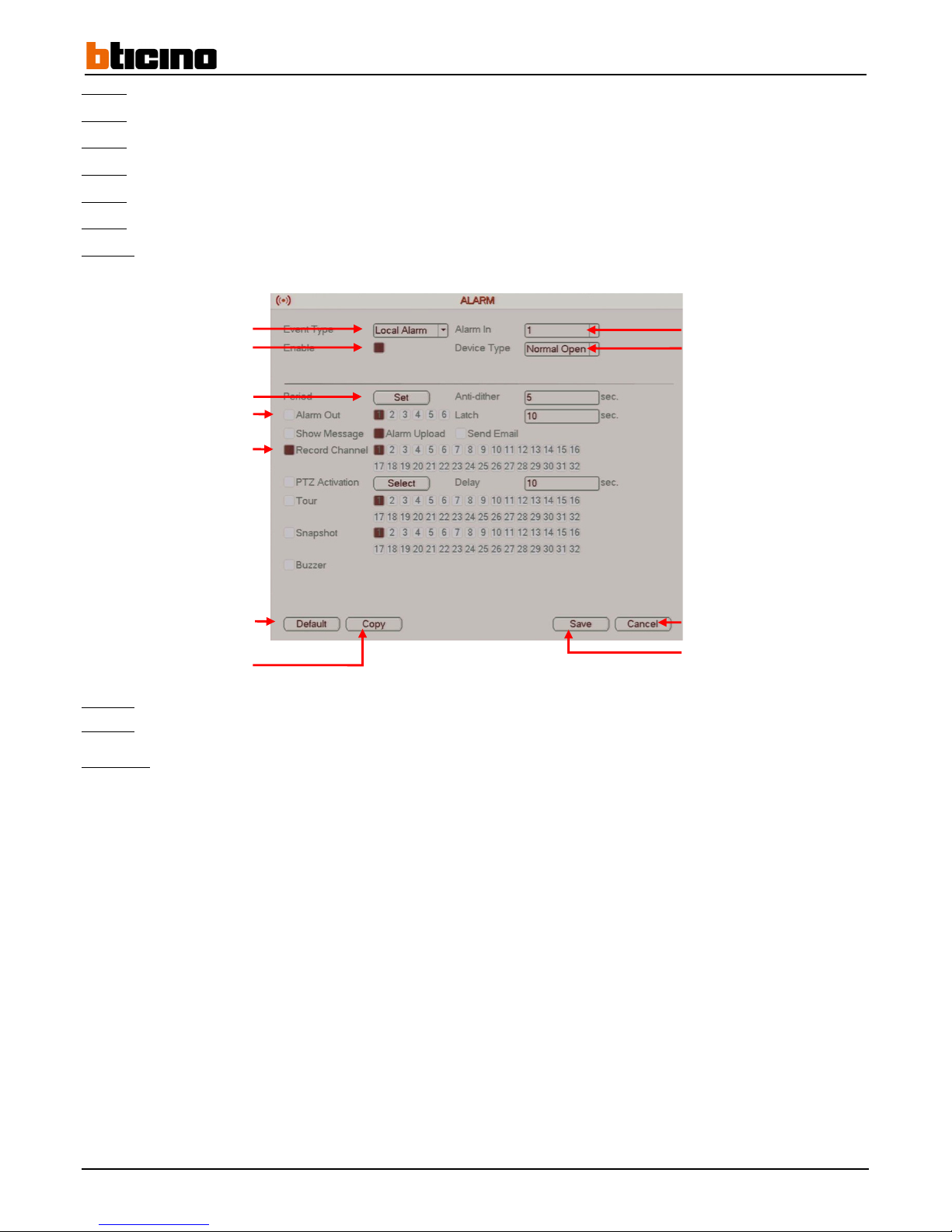
Step 4: Select the alarm type from the "Event Type" line drop-down menu (in this case, select "Local Alarm").
Step 5:
Click on the "Enable" line tick box to enable the alarm actions.
Step 6:
Select the alarm input from the "Alarm In" line drop-down menu.
Step 7:
Select the input contact type from the "Device Type" line drop-down menu (NO or NC).
Step 8:
Click on the "Set" button on the "Period" line to schedule alarm actions using a calendar.
Step 9:
Click on the "Alarm Out" line tick box to enable the related alarm output(s).
Step 10:
Click on the “Record Channel" line tick box to enable the recording by a camera triggered by an alarm.
Step 11:
Click on the "Save" button to save the operation or click on the "Cancel" button to cancel the operation.
Step 12:
Right-click to return to the previous menu. Then right-click again to return to the direct tiles.
Comment:
• Click on the "Default" button to restore the default settings.
• Click on the "Copy" button to copy the settings to another, several or all of the cameras.
• Select "IPC External Alarm" from the drop-down menu on the "Event Type" line. This type of alarm is used to for an alarm
wired to a camera. When a camera detects an alarm, it transmits the information to the recorder in order for it recognise
it.
Enable actions upon alarm
Configure using a calendar
Enable output(s) upon alarms
Enable recordings upon alarm
Select alarm input
Select alarm input type
Cancel the operation
Save the operation
Reset
default settings
Copy settings
Select an alarm type
Page 33
User Manual
4 Channel 1 TB HR DVR
8 Channel 2 TB HR DVR
16 Channel 4 TB HR DVR
4 Channel 1 TB HR DVR
33
4.1.1.3 Recording upon alarm
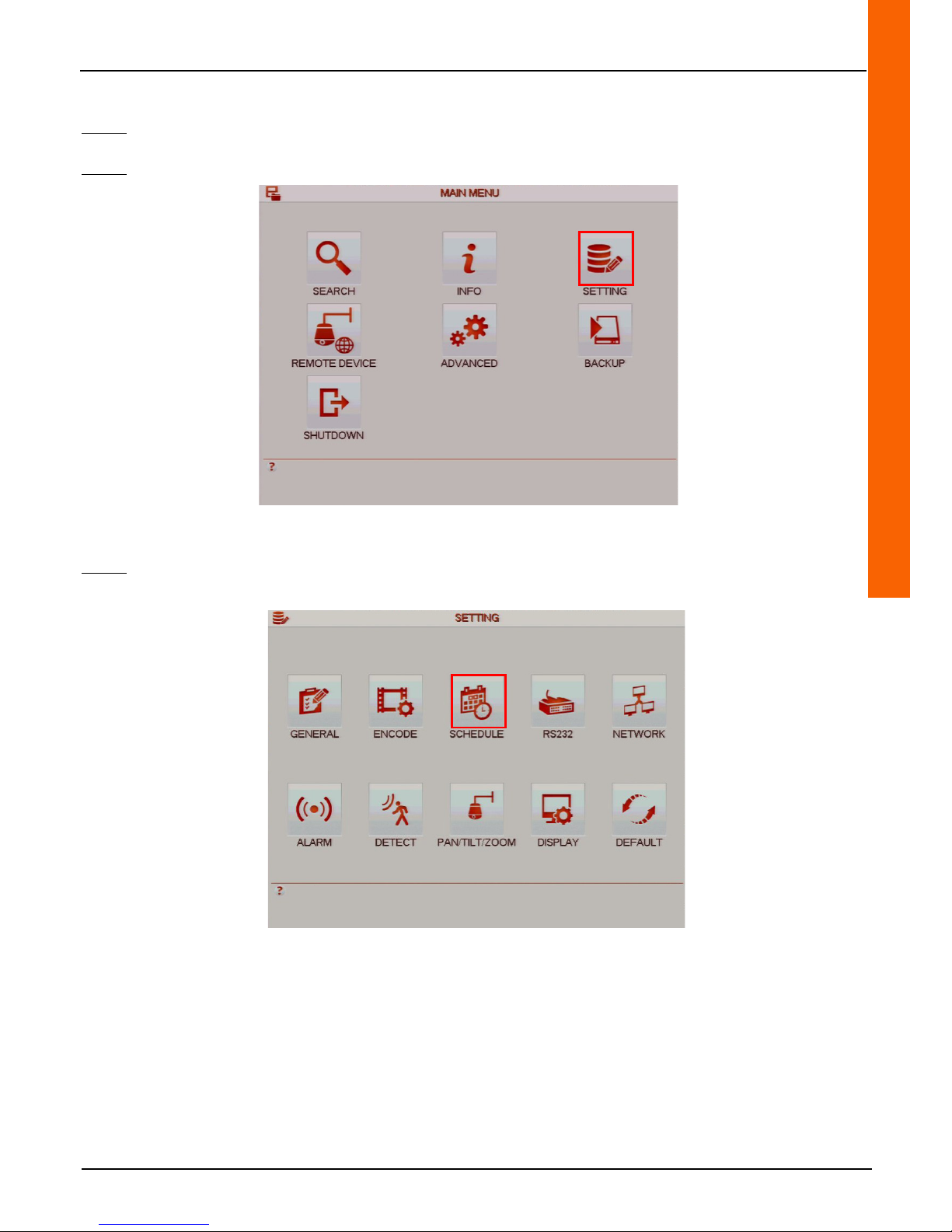
Step 1: Left-click anywhere on the tiles to access the main menu or right-click to access the drop-down menu and click on
"Main Menu".
Step 2: Click on the "SETTING" button to access the "SETTING" menu.
Step 3:Click on the "SCHEDULE" button to access the "SCHEDULE" menu.
Page 34
34
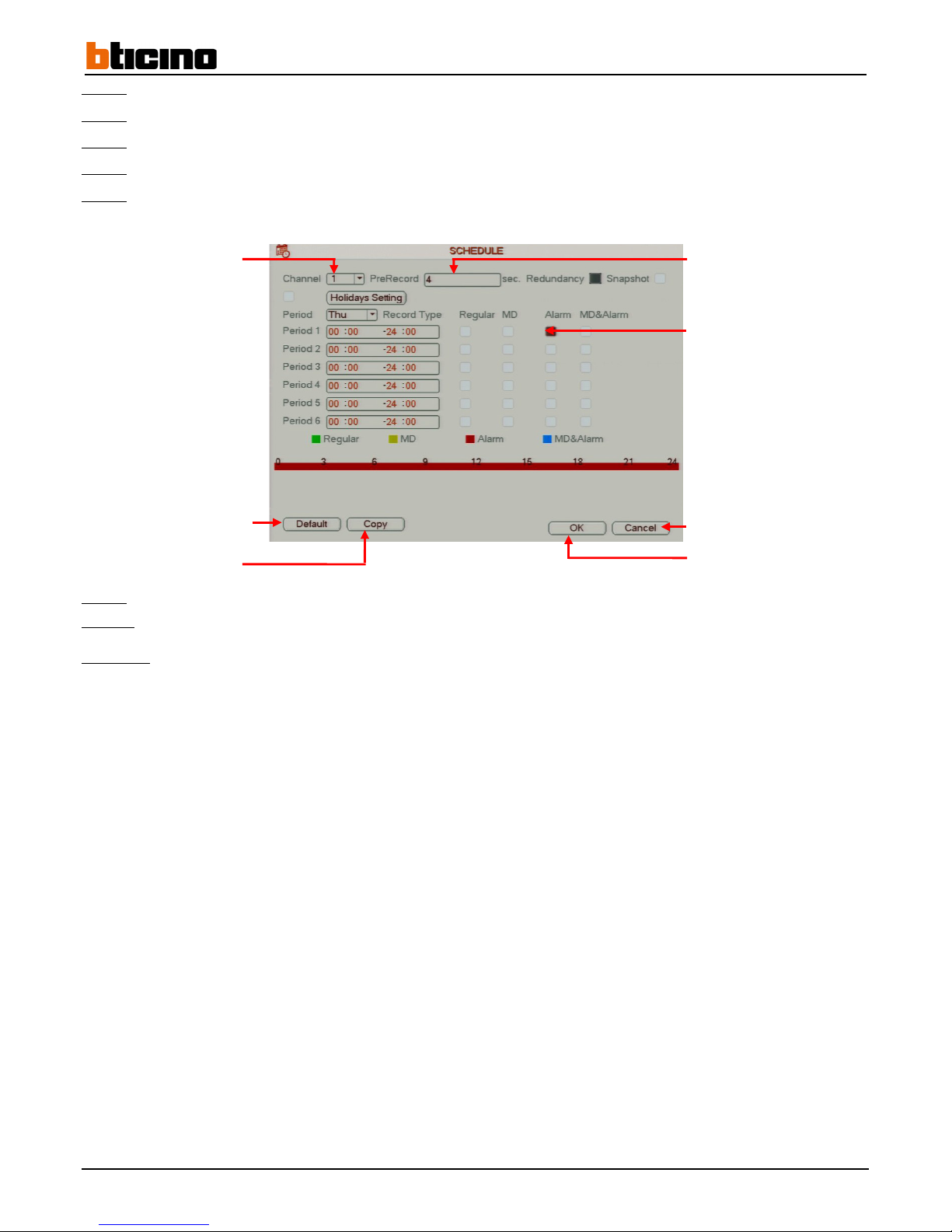
Step 4: Select the camera in the "Channel" line drop-down menu in order to configure it.
Step 5:
Enter pre-record time on the "PreRecord" line entry field.
Step 6:
Select the day of the week in the "Period" line drop-down to configure it.
Step 7:
Select up to six time periods by checking the boxes in the "Alarm" column to enable them.
Step 8:
Enter the times periods in one of the six period fields to define the start and end times.
Step 9: Click on the "OK" button to confirm the operation, or click on the "Cancel" button to cancel the operation.
Step 10:
Right-click to return to the previous menu. Then right-click again to return to the direct tiles.
Comment:
• Click on the "Default" button to restore the default settings.
• Click on the "Copy" button to copy the settings to another, several or all of the cameras.
• Check the "Holidays Setting" box and click on the button to enable and configure recordings using calendar dates.
Cancel the operation
Confirm the operation
Reset
default settings
Copy settings
Select the camera
Enter length of time of
the
pre-recording
Select the time periods
Page 35
User Manual
4 Channel 1 TB HR DVR
8 Channel 2 TB HR DVR
16 Channel 4 TB HR DVR
4 Channel 1 TB HR DVR
35
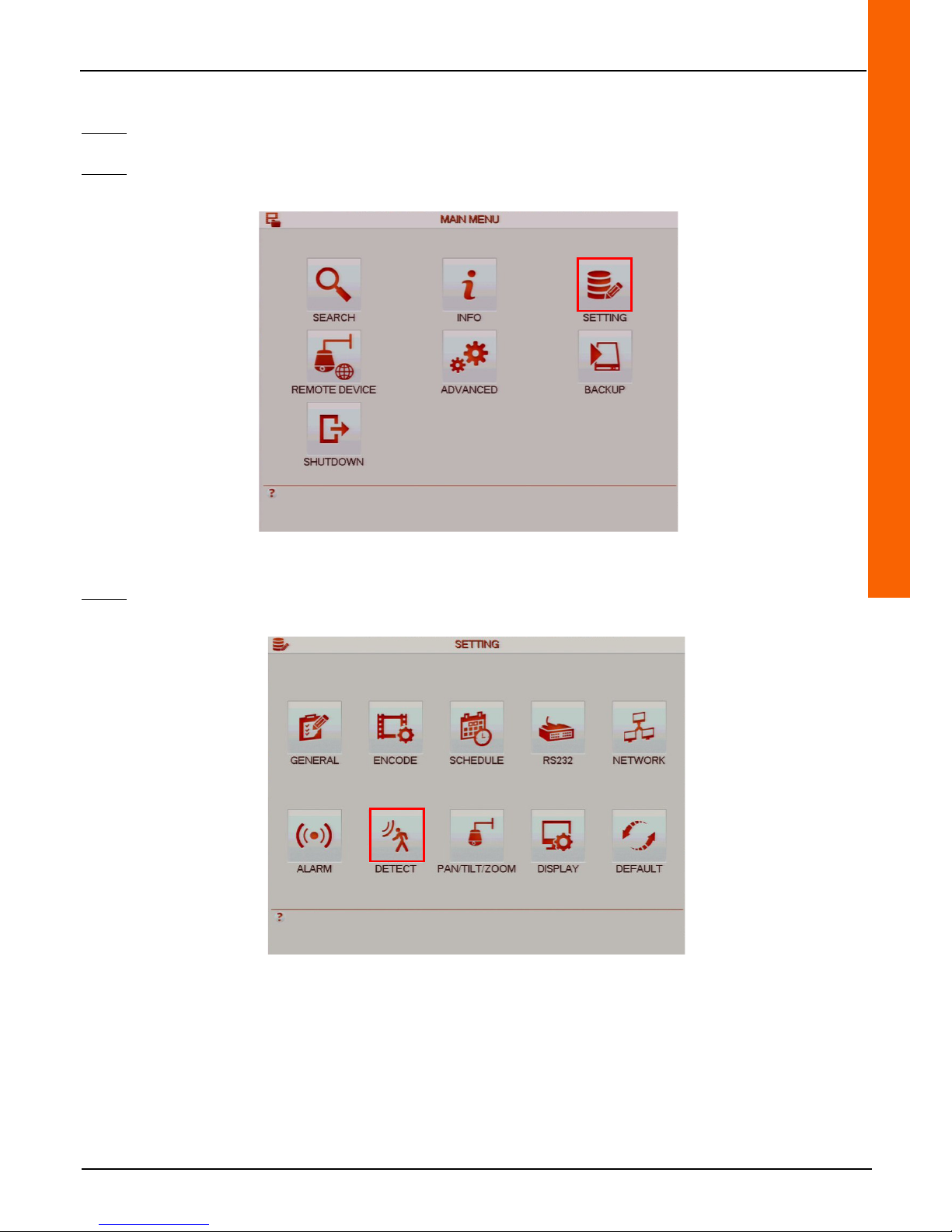
4.1.1.4 Set actions upon motion detection
Step 1: Left-click anywhere on the tiles to access the main menu or right-click to access the drop-down menu and click on
"Main Menu".
Step 2: Click on the "SETTING" button to access the "SETTING" menu.
Step 3: Click on the "DETECT" button to access the "DETECT" button.
Page 36
36
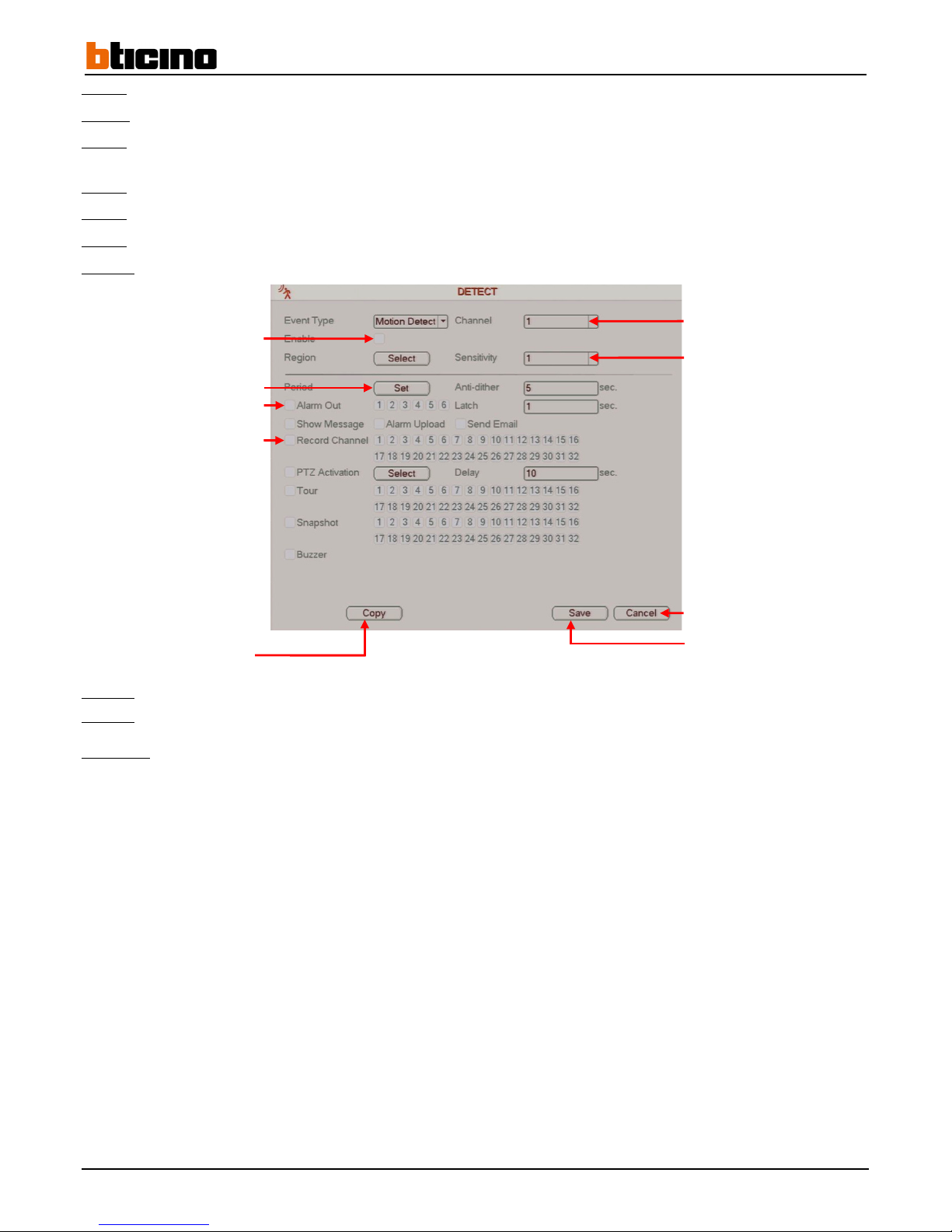
Step 4: Click on the tick box on the "Enable" line to enable the alarm actions.
Step 5:
Select the camera performing motion detection from "Channel" line drop-down menu.
Step 6:
Select the motion detection sensitivity from the "Sensitivity" line drop-down menu (sensitivity settings range from 1 to 6,
1 being the least sensitive and 6 being the most sensitive.
Step 7:
Click on the "Select" button on the "Region" line to set the detection zone(s).
Step 8:
Click on the "Set" button on the "Period" line to schedule the motion sensing actions on a calendar.
Step 9:
Click on the "Alarm Out" line tick box to enable the alarm output(s) by selecting its channel.
Step 10:
Click on the tick box in the "Record Channel" line to enable camera recording upon motion detection.
Step 11:
Click on the "Save" button to save the operation or click on the "Cancel" button to cancel the operation.
Step 12:
Right-click to return to the previous menu. Then right-click again to return to the direct tiles.
Comment:
• Click on the "Copy" button to copy the settings to another, several or all of the cameras.
• At least one camera must be connected to the recorder in order to set the motion detection zone(s).
Enable actions upon motion
detecting
Configure using a calendar
Enable alarm outputs
Enable recording upon motion
detecting
Select the motion detecting
camera
Select motion detection sensitivity
Cancel the operation
Save the operation
Copy settings
Page 37
User Manual
4 Channel 1 TB HR DVR
8 Channel 2 TB HR DVR
16 Channel 4 TB HR DVR
4 Channel 1 TB HR DVR
37
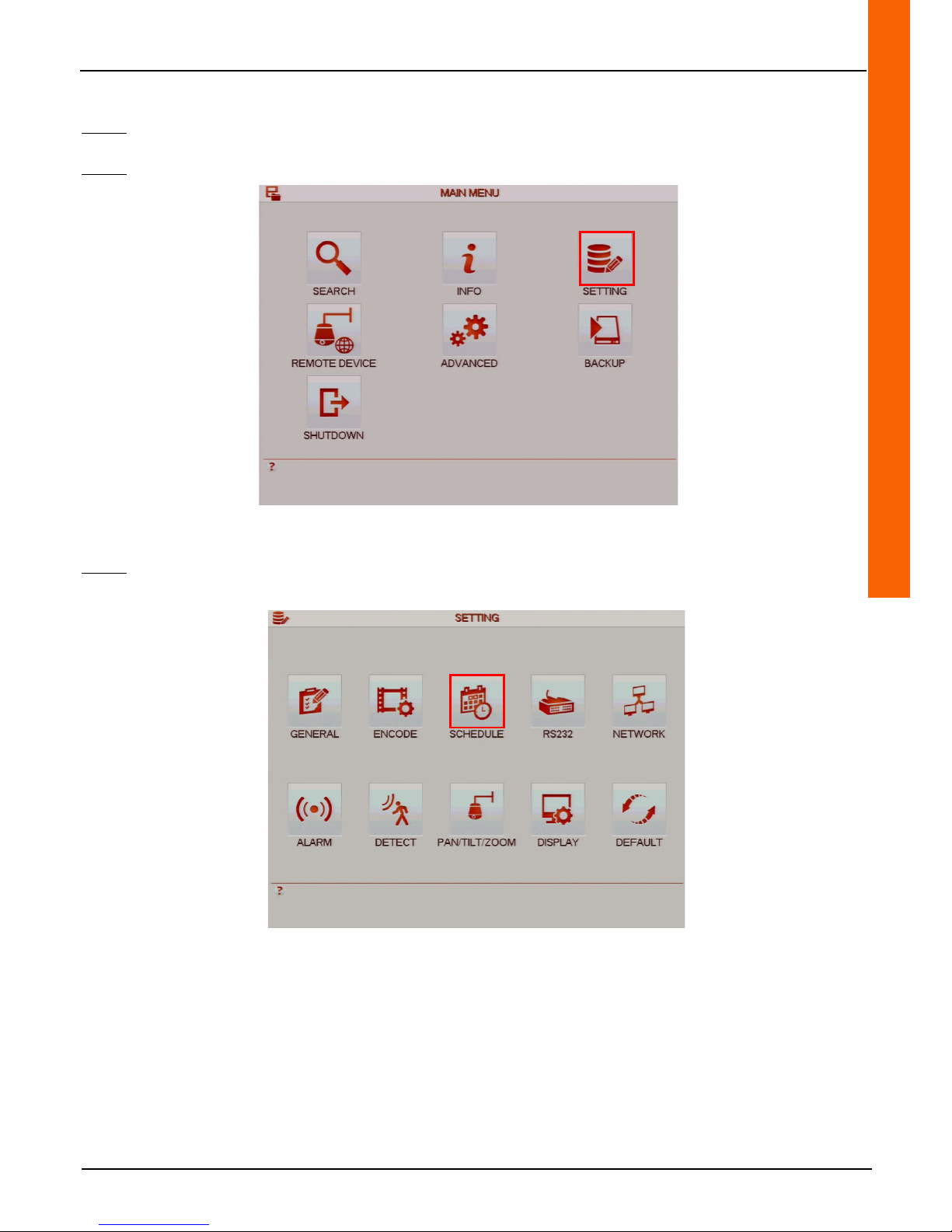
4.1.1.5 Recording upon motion detection
Step 1: Left-click anywhere on the tiles to access the main menu or right-click to access the drop-down menu and click on
"Main Menu".
Step 2: Click on the "SETTING" button to access the "SETTING" menu.
Step 3: Click on the "SCHEDULE" button to access the "SCHEDULE" menu.
Page 38
38
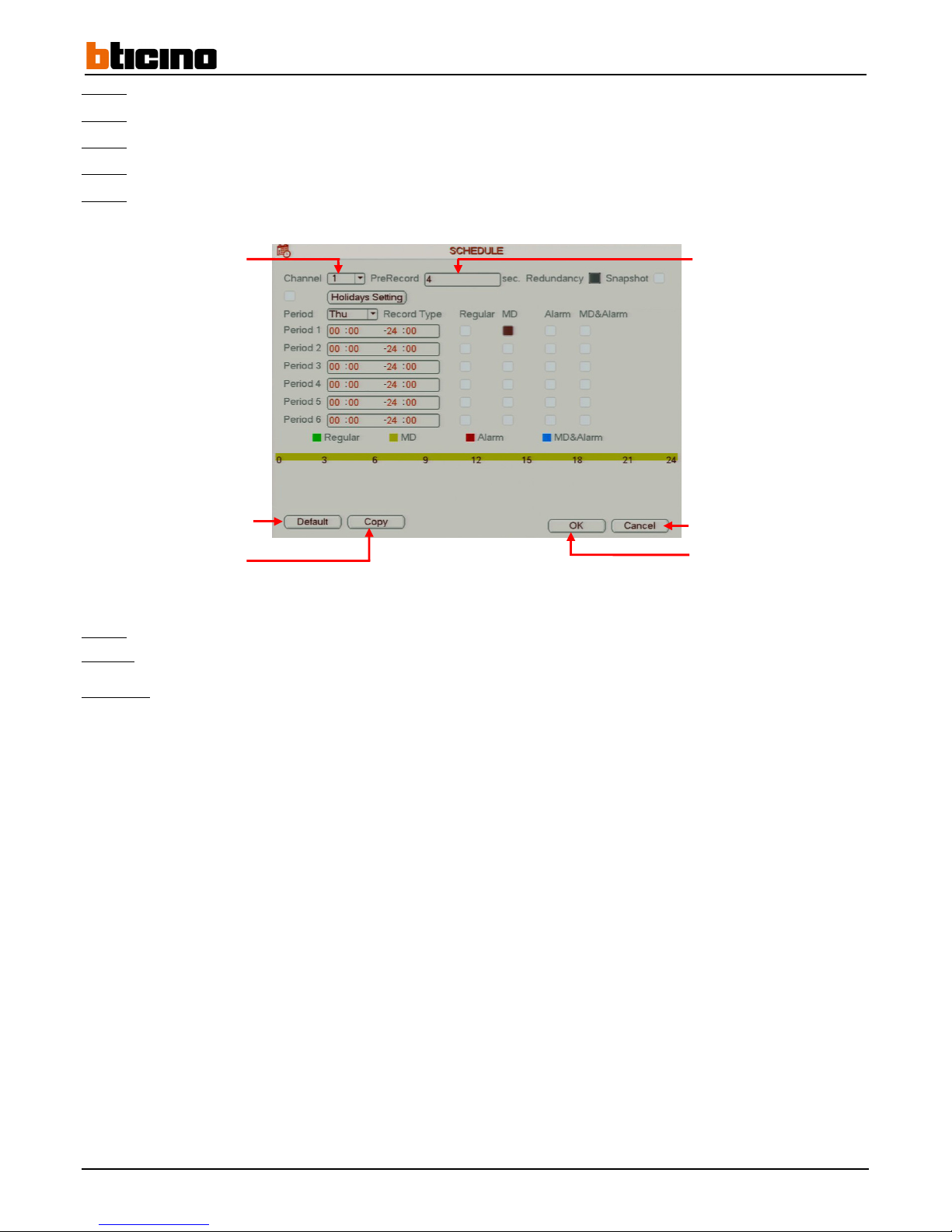
Step 4: Select the camera in the "Channel" line drop-down in order to configure it.
Step 5:
Enter pre-record time period on the "PreRecord" line entry field.
Step 6:
Select the day of the week in the "Period" line drop-down to configure it.
Step 7:
Enable up to six time periods by checking the boxes in the "MD" column.
Step 8:
Enter the time period in one of the six period fields to define the start and end times.
Step 9:
Click on the "OK" button to confirm the operation, or click on the "Cancel" button to cancel the operation.
Step 10:
Right-click to return to the previous menu. Then right-click again to return to the direct tiles.
Comment:
• Click on the "Default" button to restore the default settings.
• Click on the "Copy" button to copy the settings to another, several or all of the cameras.
• Check the "Holidays Setting" box and click on the button to enable and configure recordings using calendar dates.
Cancel the operation
Confirm the operation
Reset
default settings
Copy settings
Select the camera
Enter length of time of the
pre-recording
Page 39
User Manual
4 Channel 1 TB HR DVR
8 Channel 2 TB HR DVR
16 Channel 4 TB HR DVR
4 Channel 1 TB HR DVR
39
4.2 Recording search by event
Step 1: Left-click anywhere on the tiles to access the main menu or right-click to access the drop-down menu and click on
"Main Menu".
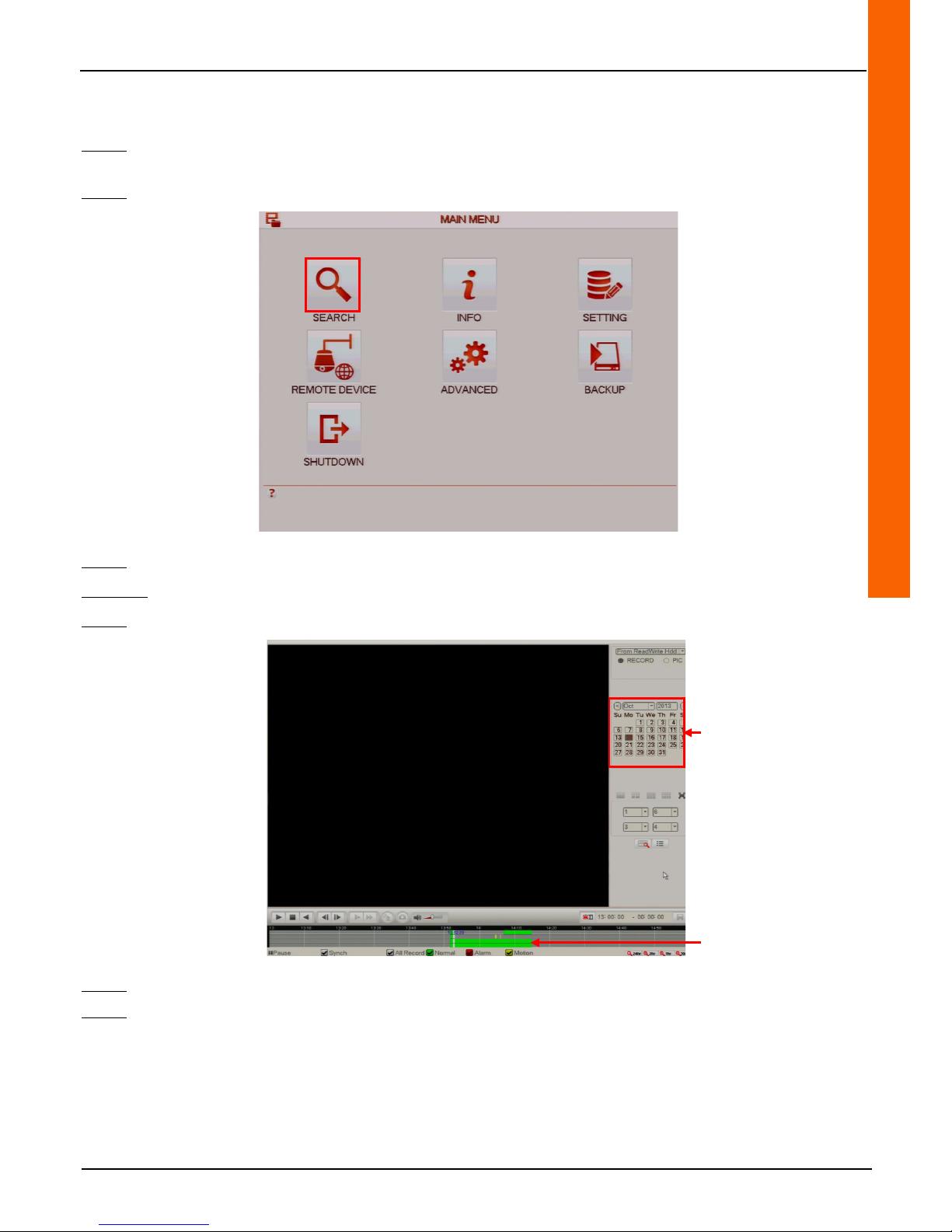
Step 2: Click on the "SEARCH" menu to access the "SEARCH" menu.
Step 3: Click on a green-coloured day on the calendar to access the recordings from that day.
Method 1:
Step 4:
Click on a green, yellow or red coloured recording on the time bar to start recording playback.
Step 5:
Click on the "Stop" button to stop playback.
Step 6:
Right-click to return to the previous menu. Then right-click again to return to the direct tiles.
Using the calendar to access
recordings
Start recording playback
Page 40
40
Method 2:
Step 4:
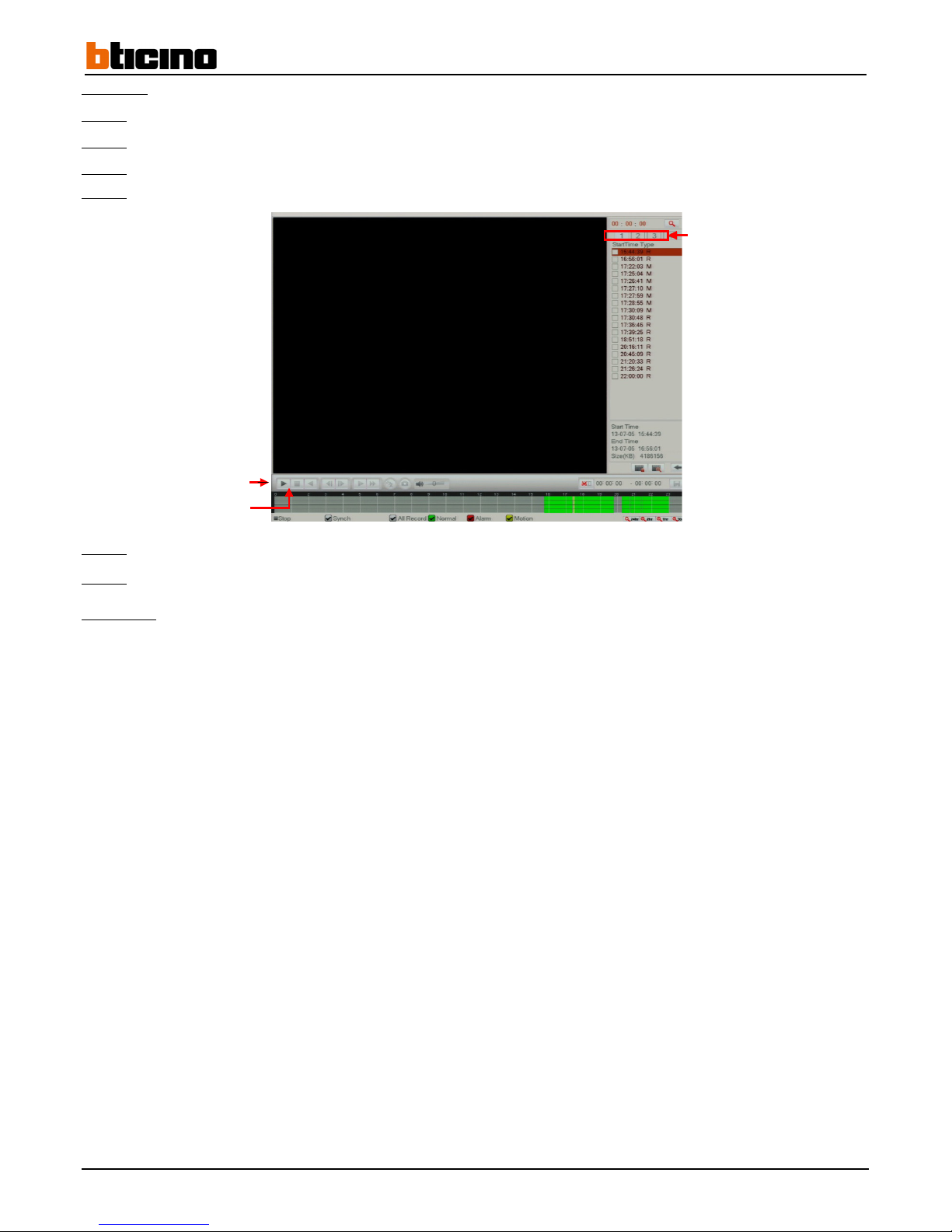
Click on the "List" button to display recordings by event.
Step 5:
Click on a tab to select a camera.
Step 6:
Click on a recording on the "Start Time Type" list.
Step 7:
Click on the "Play" button to start playback.
Step 8:
Click on the "Stop" button to stop playback.
Step 9:
Right-click to return to the previous menu. Then right-click again to return to the direct tiles.
Comments:
• The recordings are listed according to recording start time.
• The letter "R" represents continuous recordings (green coloured recordings).
• The letter "M" represents continuous motion detecting recordings (yellow coloured recordings).
• The letter "A" represents recordings triggered by an alarm (red coloured recordings).
Select the camera
Start playback
Stop playback
Page 41
User Manual
4 Channel 1 TB HR DVR
8 Channel 2 TB HR DVR
16 Channel 4 TB HR DVR
4 Channel 1 TB HR DVR
41
4.3 Main and secondary stream settings
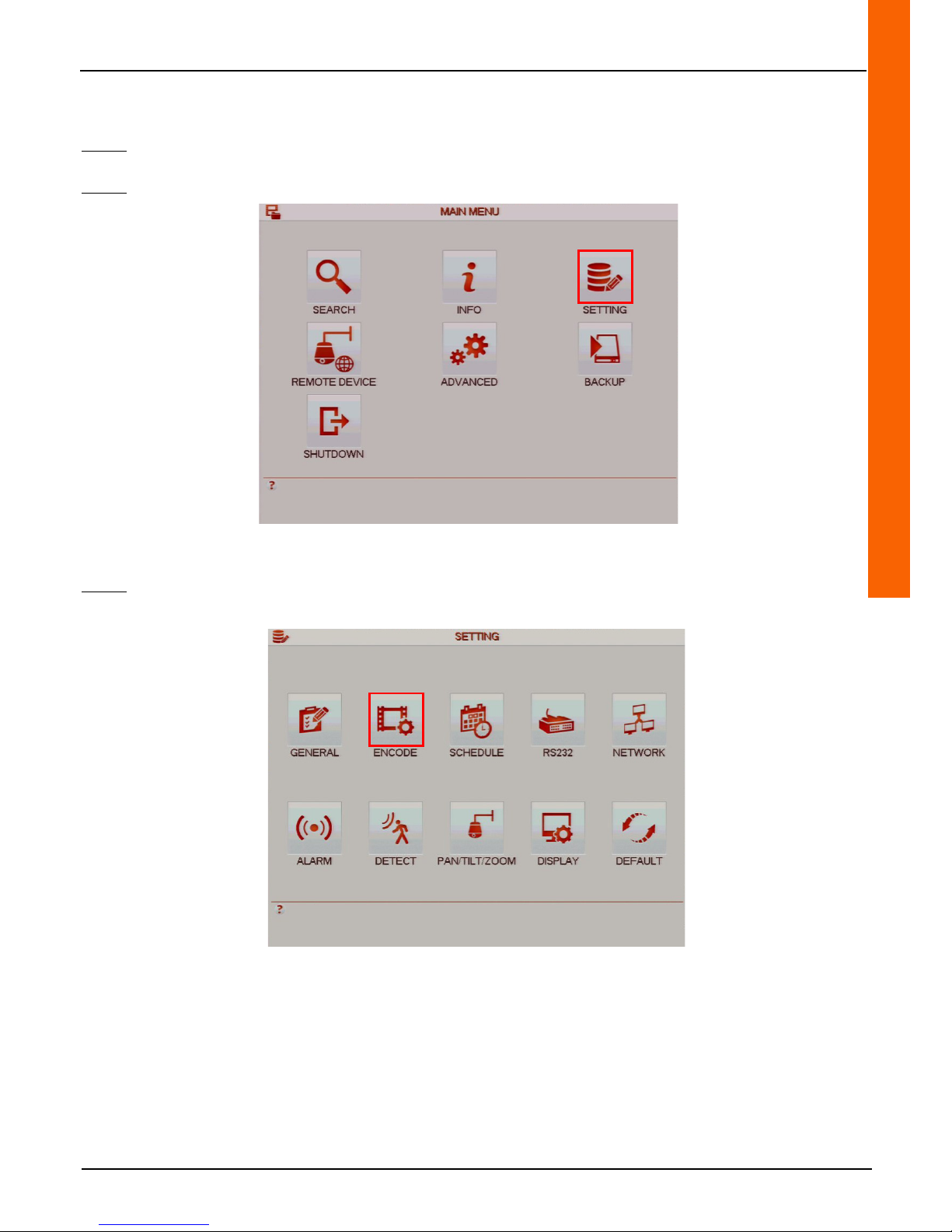
Step 1: Left-click anywhere on the tiles to access the main menu or right-click to access the drop-down menu and click on
"Main Menu".
Step 2: Click on the "SETTING" button to access the "SETTING" menu.
Step 3: Click on the "ENCODE" button to access the "ENCODE" menu.
Page 42
42
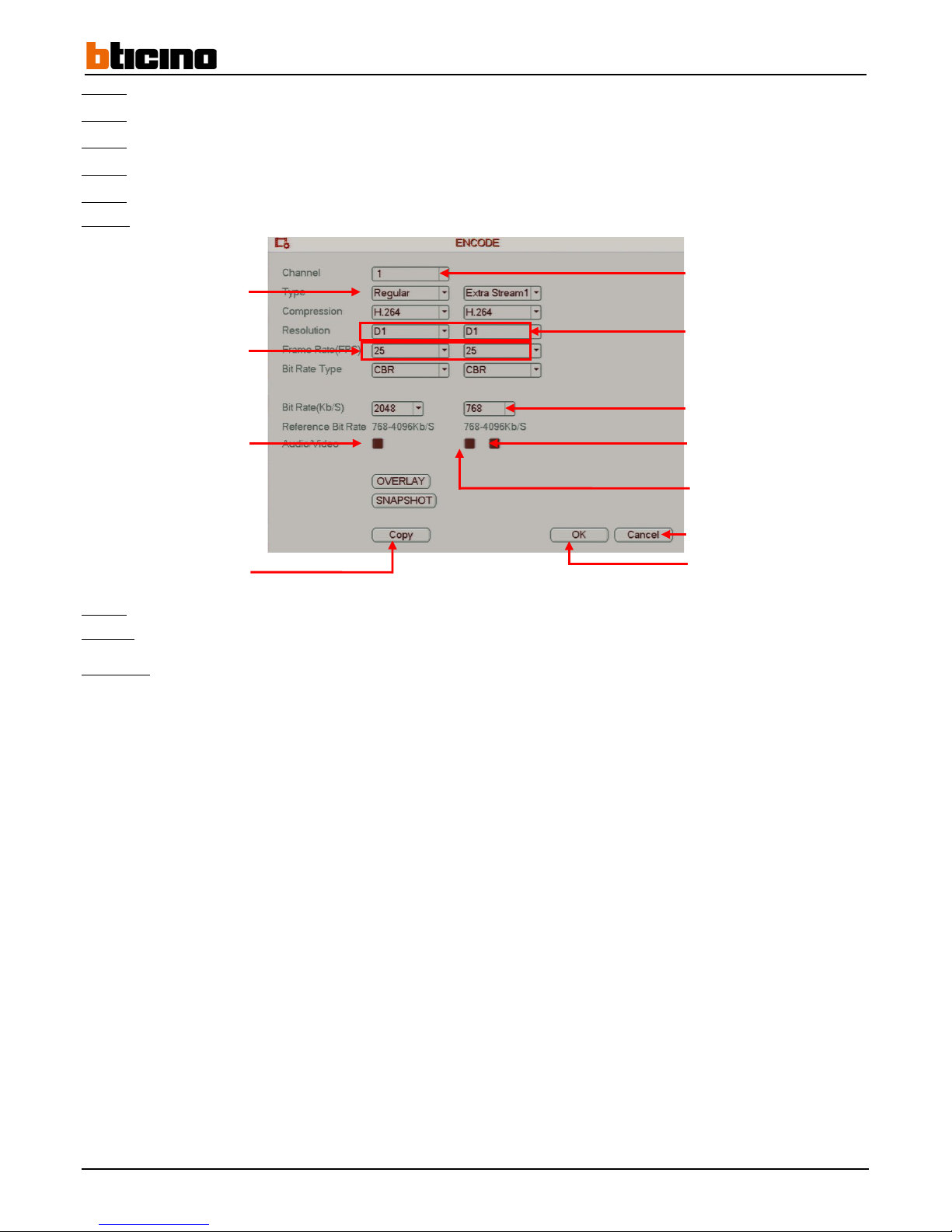
Step 4: Select the camera from the "Channel" line drop-down menu (only for the main stream).
Step 5:
Select the event type from the "Type" line drop-down menu (only for the main stream).
Step 6:
Select the resolution from the "Resolution" line drop-down menus.
Step 7:
Select the number of images per second from the "Frame Rate (FPS)" line drop-down menus.
Step 8:
Select the bit rate from the "Bit Rate (Kb/S)" line drop-down menus.
Step 9:
Enable the secondary stream broadcast by checking the "Video" box displayed on the secondary streaming portion.
Step 9: Click on the "OK" button to confirm the operation, or click on the "Cancel" button to cancel the operation.
Step 10:
Right-click to return to the previous menu. Then right-click again to return to the direct tiles.
Comment:
• Click on the "Copy" button to copy the settings to another, several or all of the cameras.
Cancel the operation
Confirm the operation
Copy settings
Select the camera
Select event type
Select resolution
Select rate
Select the number of images per
second
Enable or disable
secondary stream
Enable or disable main
stream audio
Enable or disable secondary
stream audio
Page 43
User Manual
4 Channel 1 TB HR DVR
8 Channel 2 TB HR DVR
16 Channel 4 TB HR DVR
4 Channel 1 TB HR DVR
43
4.4 Dynamic privacy masking zones
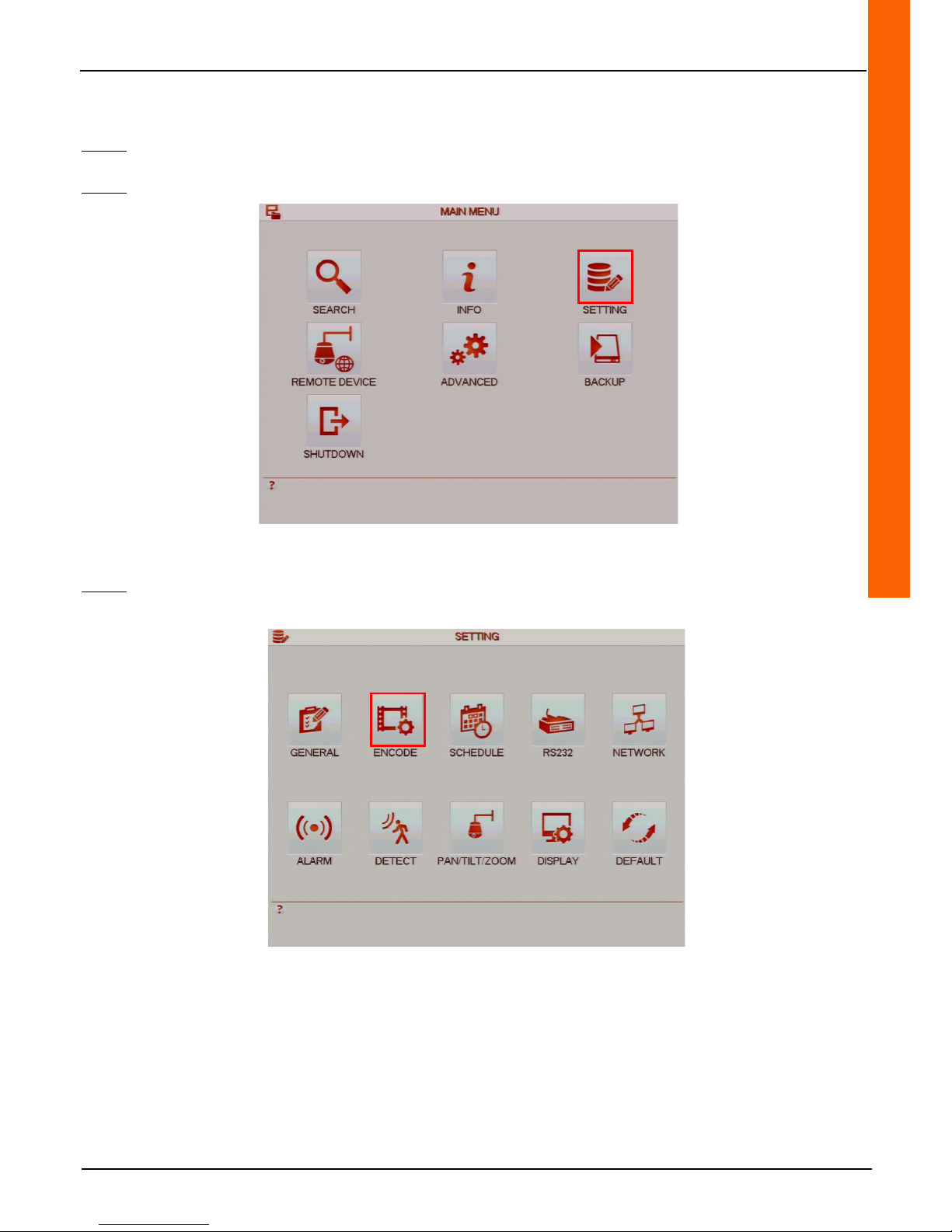
Step 1: Left-click anywhere on the tiles to access the main menu or right-click to access the drop-down menu and click on
"Main Menu".
Step 2: Click on the "SETTING" button to access the "SETTING" menu.
Step 3: Click on the "ENCODE" button to access the "ENCODE" menu.
Page 44
44
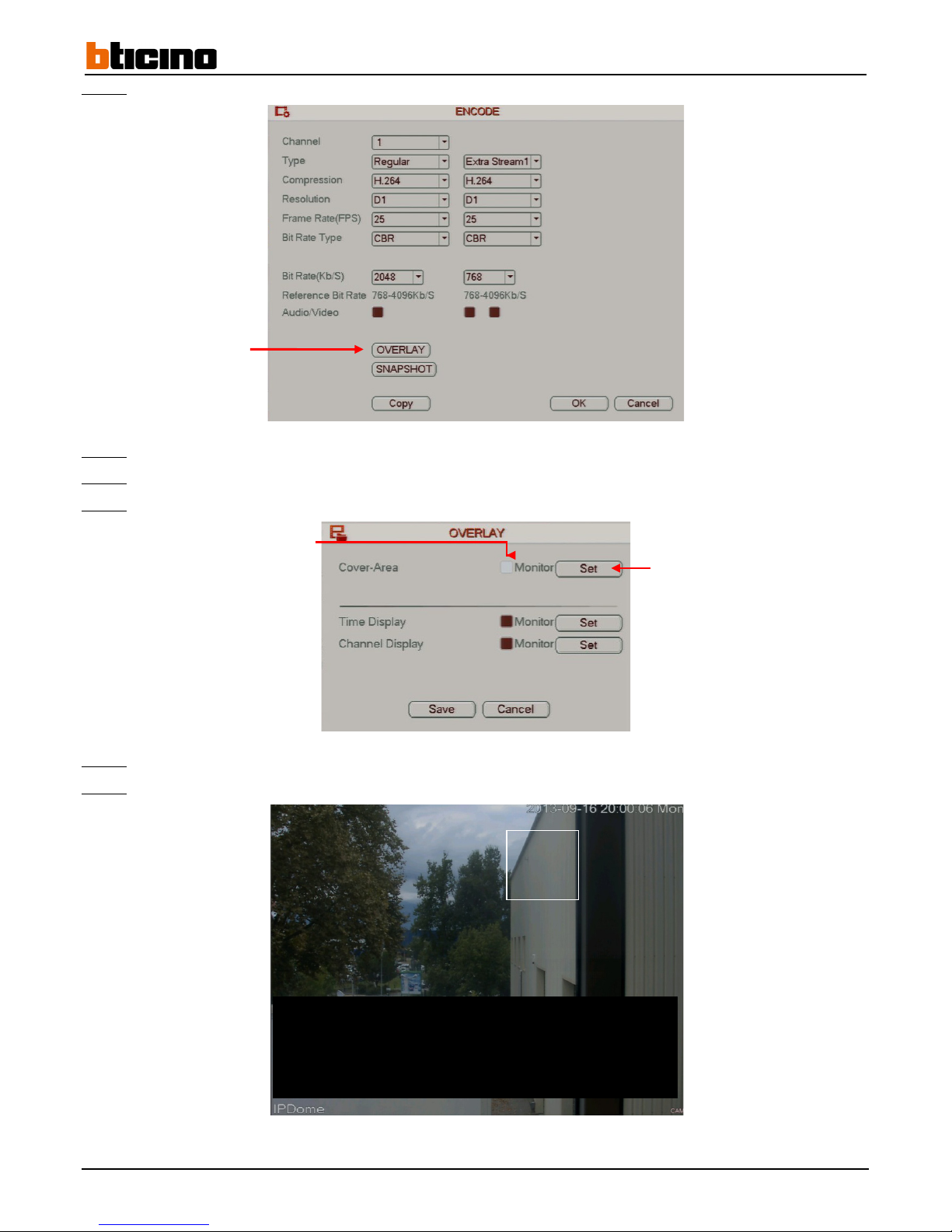
Step 4: Click on the "OVERLAY” button to access the "OVERLAY" menu.
Step 5:
Tick the "Cover-Area" line "Monitor" box to enable dynamic privacy masking.
Step 6:
Tick the box(es) to enable one or more dynamic privacy masking zones.
Step 7:
Click on the "Set" button on the "Cover-Area" line to set the masks using the mouse.
Step 8:
Click inside one of the zones, hold the mouse key down and move the mouse to change its position.
Step 9:
Click on one of the zone angles, hold the mouse key down and move the mouse to resize.
Display settings
Enable dynamic masking
Configure masks
Page 45

User Manual
4 Channel 1 TB HR DVR
8 Channel 2 TB HR DVR
16 Channel 4 TB HR DVR
4 Channel 1 TB HR DVR
45
Step 10: Once the mask size and position are set, right click to go back to the previous screen.
Step 11: Click on the "OK" button to confirm the operation, or click on the "Cancel" button to cancel the operation.
Step 12: Right-click to return to the previous menu. Then right-click again to return to the direct tiles.
Comment:
• Click on the "Copy" button to copy the settings to another, several or all of the cameras.
Page 46
46
4.5 Motorised camera control
4.5.1 Wiring the RS485 control bus
4.5.1.1 Wiring the RS485 bus
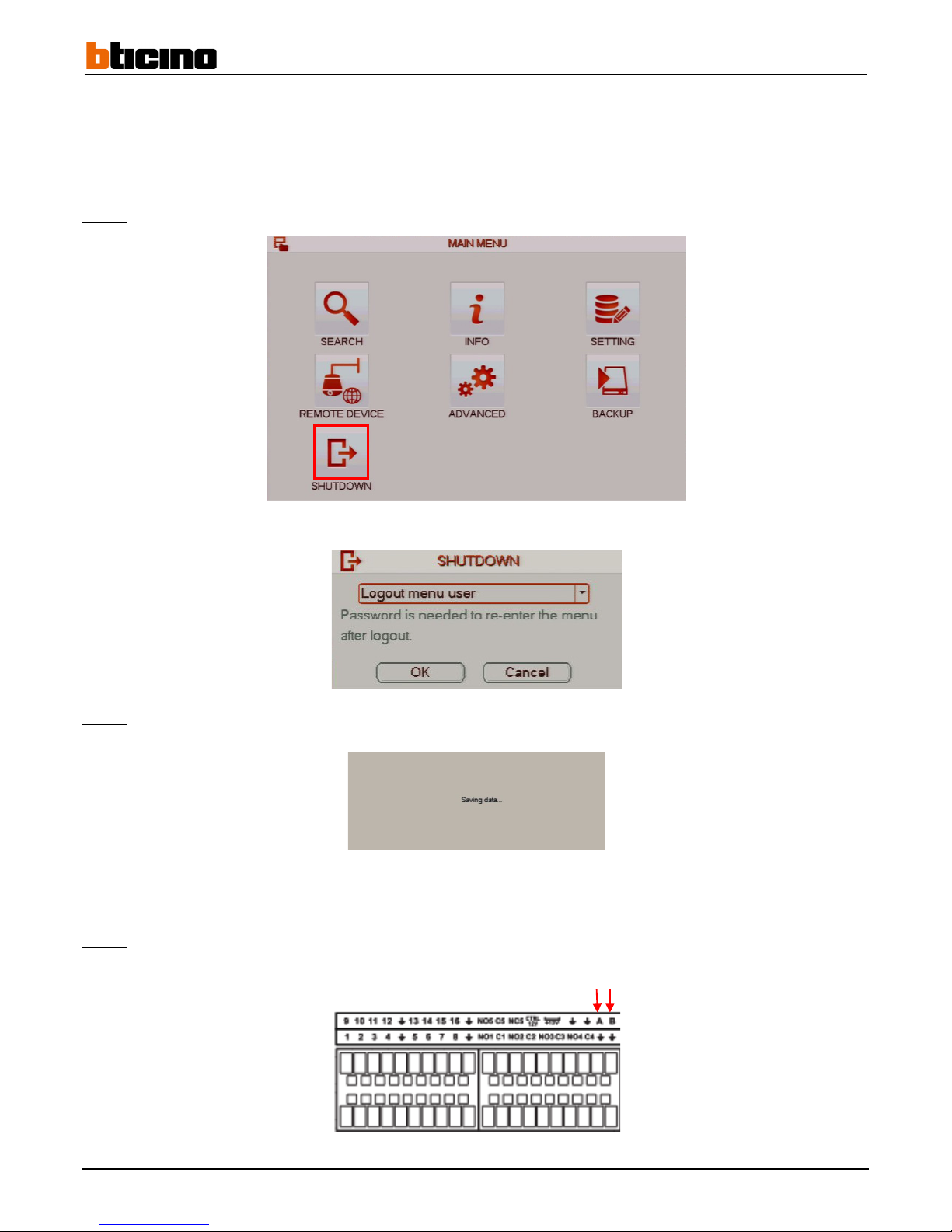
Step 1:
Click on the "SHUTDOWN" button to access the "SHUTDOWN" menu.
Step 2:
Select "Shutdown" from the drop-down menu to shut off the recorder.
Step 3:
Click on the "OK" button to confirm the operation, or click on the "Cancel" button to cancel the operation. The "Saving
data" message is displayed.
Step 4:
Set the recorder power switch on the 0 position.
Step 5: Wire the bus on terminals A and B (A = + and B = -).
+ -
Page 47
User Manual
4 Channel 1 TB HR DVR
8 Channel 2 TB HR DVR
16 Channel 4 TB HR DVR
4 Channel 1 TB HR DVR
47
4.5.2 Motorised camera control
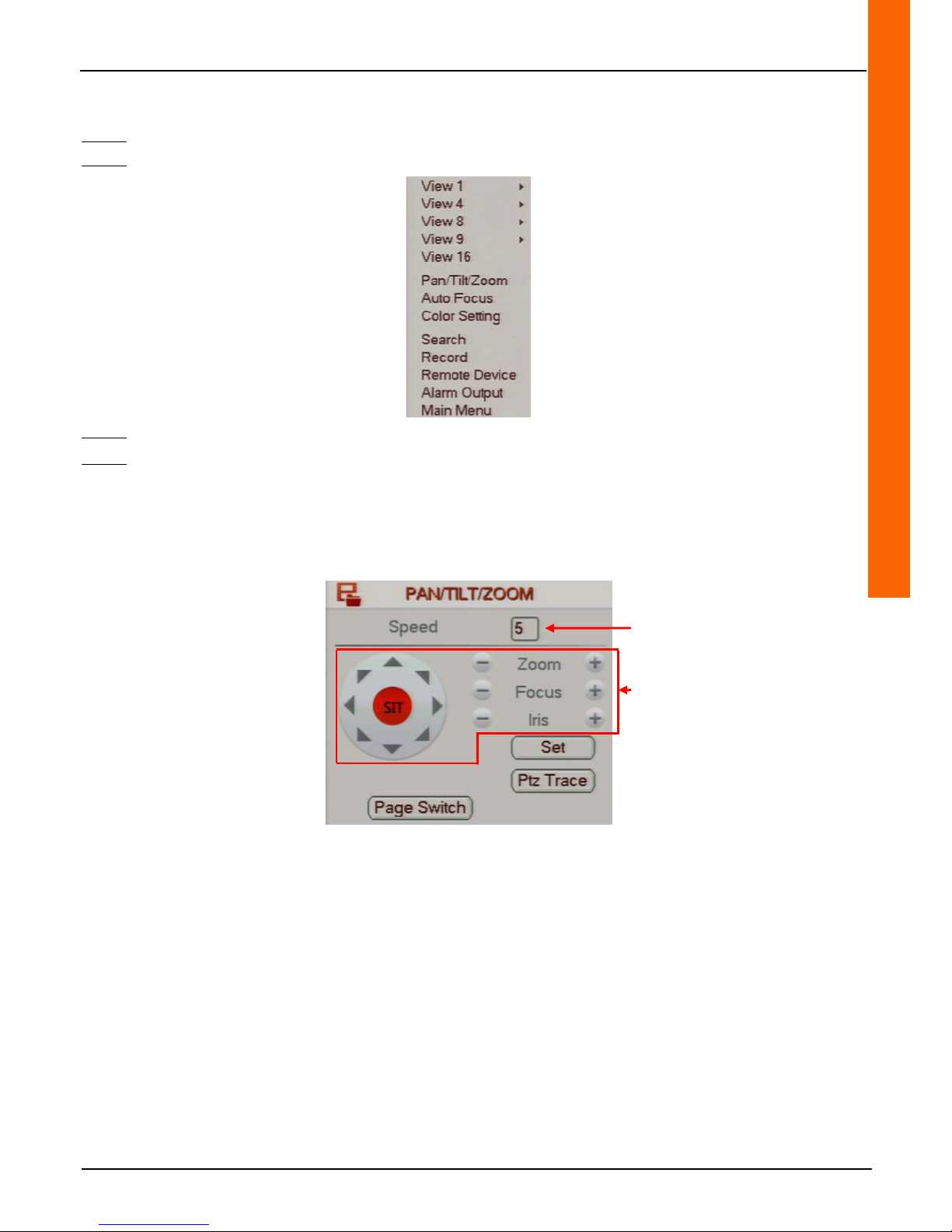
Step 1: Display the motorised camera view on the direct tiles and right click to display the drop-down menu.
Step 2: Click on the "Pan/Tilt/Zoom" to access the "Pan/Tilt/Zoom" command menu.
Step 3: Enter the sweep speed in the "Speed" line entry field.
Step 4: Click on the direction arrows to pivot the motorised camera.
On the "Zoom" line, click on "+" or "-" in order to zoom.
On the "Focus" line, click on "+" or "-" in order to set the focus.
On the "Zoom" line, click on "+" or "-" in order to adjust the iris.
Change sweep speed
Control the motorised camera
Page 48
48
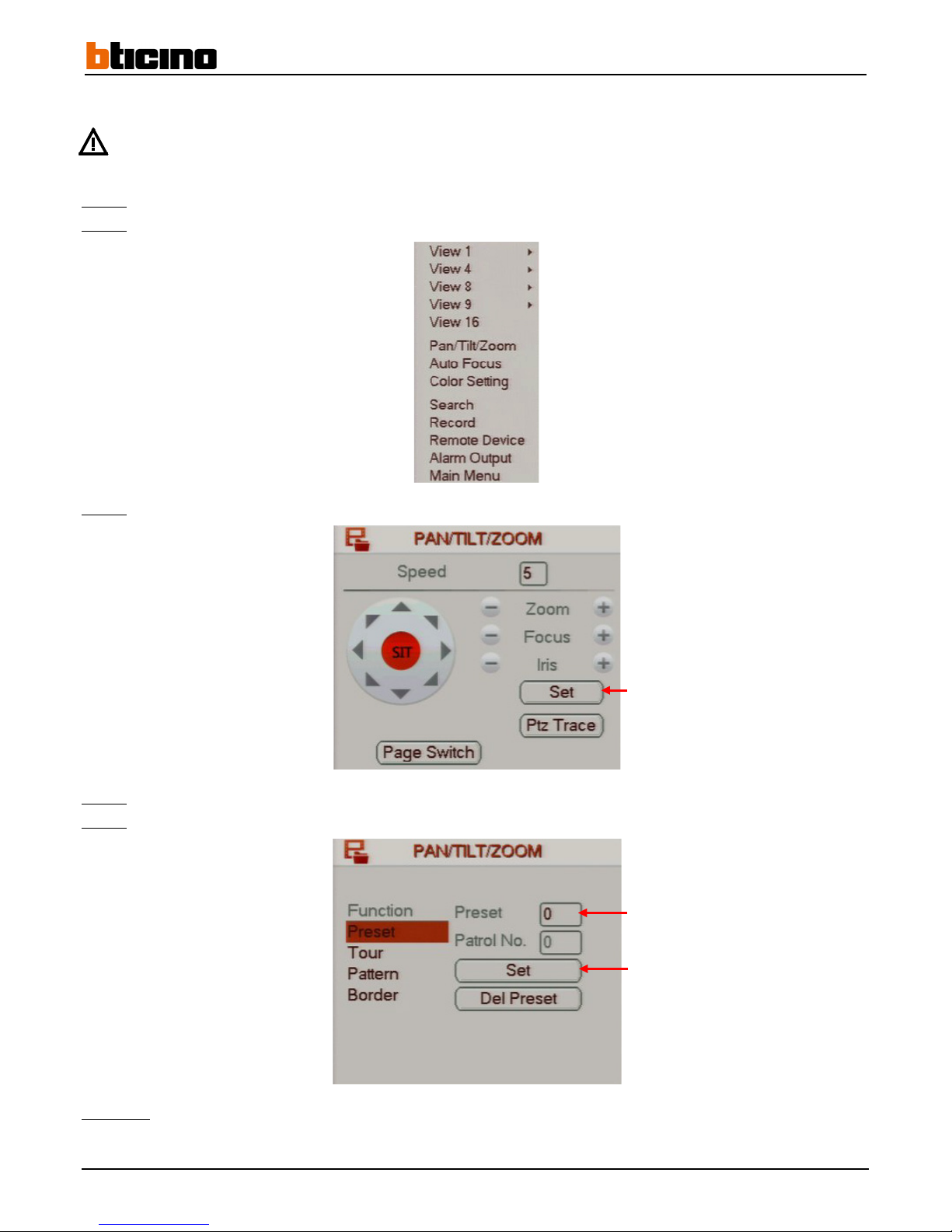
4.5.3 Set predefined positions (presets)
Setting presets using each motorised camera's OSD menu is recommended. These presets then can be used
through the recorder menu.
Step 1:
Display the motorised camera view on the direct tiles and right click to display the drop-down menu.
Step 2:
Click on the "Pan/Tilt/Zoom" to access the "Pan/Tilt/Zoom" command menu.
Step 3:
Click on the "Set" button to set the preset positions.
Step 4:
Enter the number of the preset position in the "Preset" line field.
Step 5:
Click on the "Set" button to save the preset position.
Comment:
Right-click to return to the previous menu.
Set preset positions
Enter the preset position number.
Save the preset position
Page 49
User Manual
4 Channel 1 TB HR DVR
8 Channel 2 TB HR DVR
16 Channel 4 TB HR DVR
4 Channel 1 TB HR DVR
49
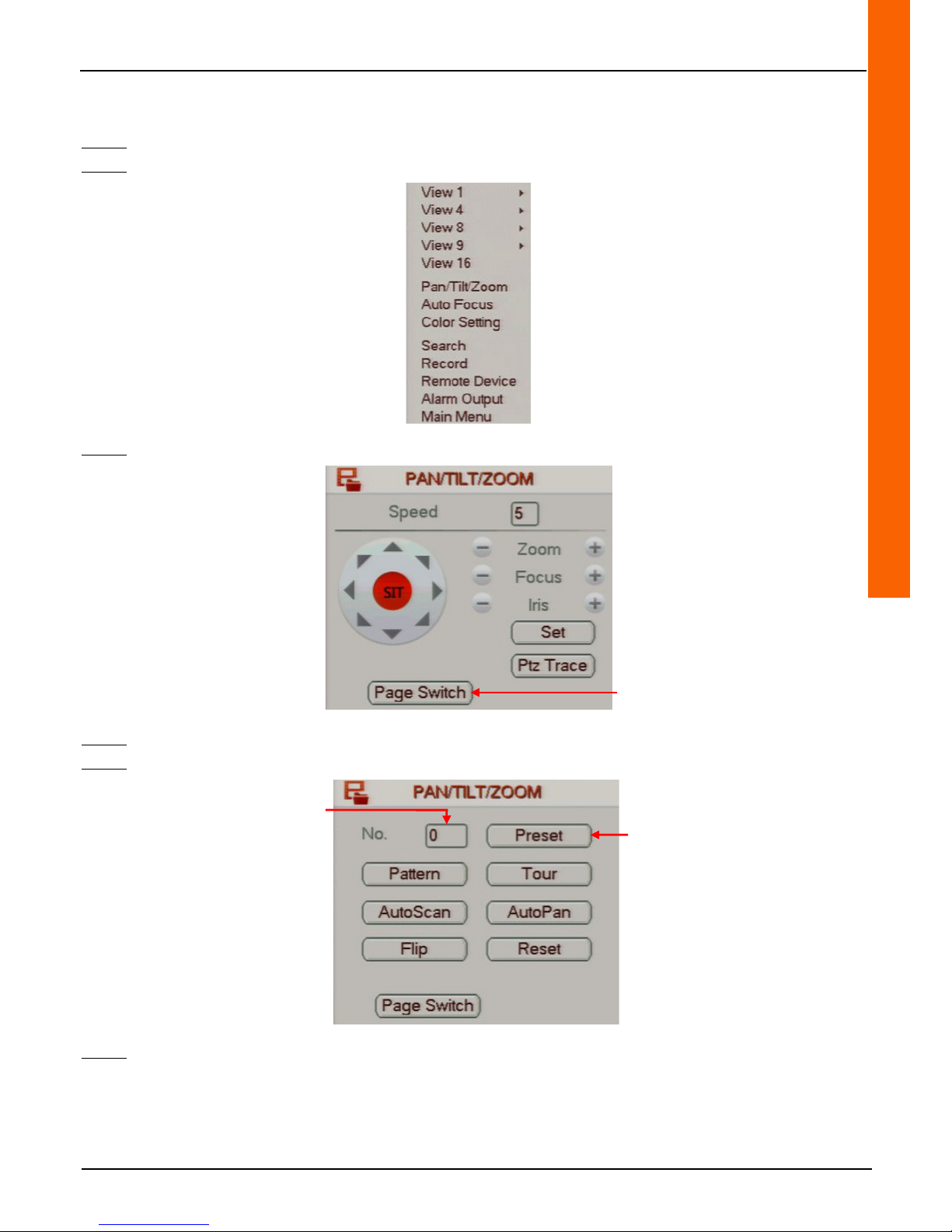
4.5.4 Using the preset positions
Step 1: Display the motorised camera view on the direct tiles and right-click to display the drop-down menu.
Step 2: Click on the "Pan/Tilt/Zoom" to access the "Pan/Tilt/Zoom" command menu.
Step 3: Click on the «Page Switch» button to access the following page.
Step 4:
Enter the preset position number in the "No." line field.
Step 5:
Click on the "Preset" button to access the preset position.
Step 6:
Right-click to leave the menu.
Go to the next page
Access the preset position
Enter the preset position
number.
Page 50
50
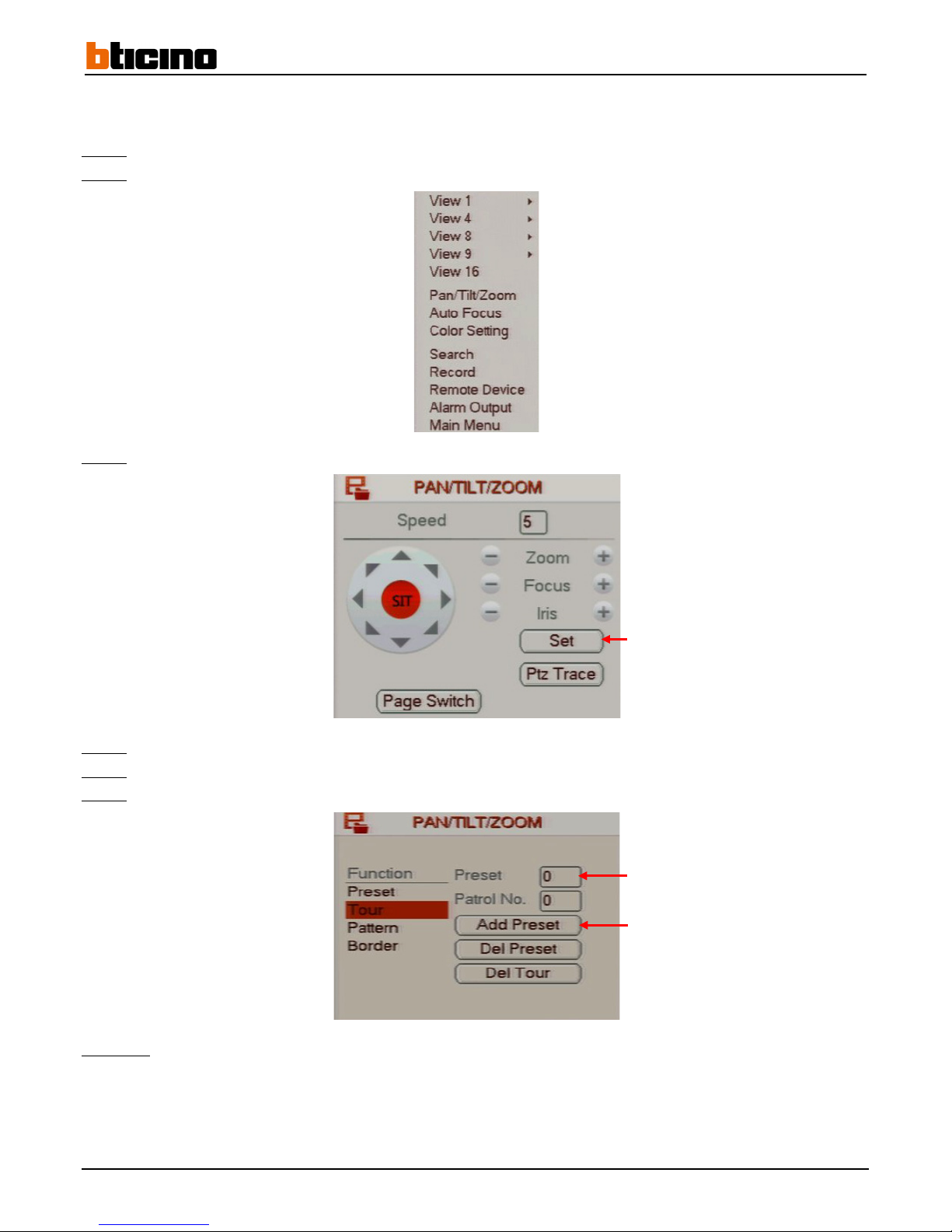
4.5.5 Automatic recording
After having set the preset positions, automatic record allows a cyclical display one after the other.
Step 1:
Display the motorised camera view on the direct tiles and right-click to display the drop-down menu.
Step 2:
Click on the "Pan/Tilt/Zoom" to access the "Pan/Tilt/Zoom" command menu.
Step 3:
Click on the "Set" button to define the preset positions to display during automatic recording.
Step 4:
Select "Tour" on the list on the left.
Step 5:
Enter the number of the preset position in the "Preset" line field.
Step 6:
Click on the "Add preset" button to add an preset position to automatic recording.
Comment:
Right-click to return to the previous menu.
Define preset positions
Enter the preset position number.
Add the preset position
Page 51
User Manual
4 Channel 1 TB HR DVR
8 Channel 2 TB HR DVR
16 Channel 4 TB HR DVR
4 Channel 1 TB HR DVR
51
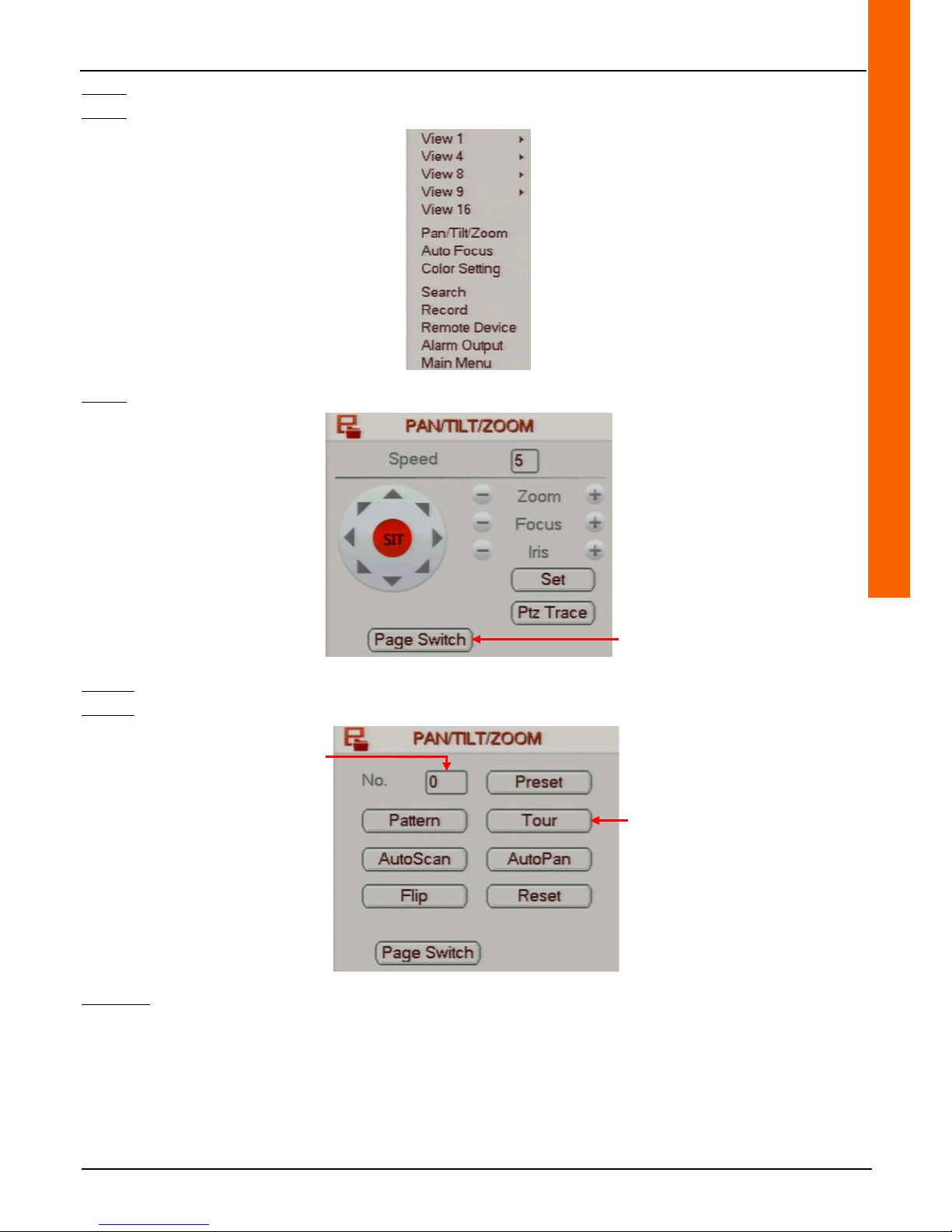
Step 7: Display the motorized camera view on the direct tiles and right-click to display the drop-down menu.
Step 8: Click on the "Pan/Tilt/Zoom" to access the "Pan/Tilt/Zoom" command menu.
Step 9: Click on the «Page Switch» button to access the following page.
Step 10:
Enter an automatic recording number in the "No." line field.
Step 11:
Click on the "Tour" button to start automatic recording.
Comment:
Right-click to leave the menu.
Go to the next page
Start automatic recording
Enter the preset position
number.
Page 52
52
4.6 Credential configuration
4.6.1 Adding an administrator and/or user account
The administrator account credentials by default are:
• User Name: 888888
• Password: 888888
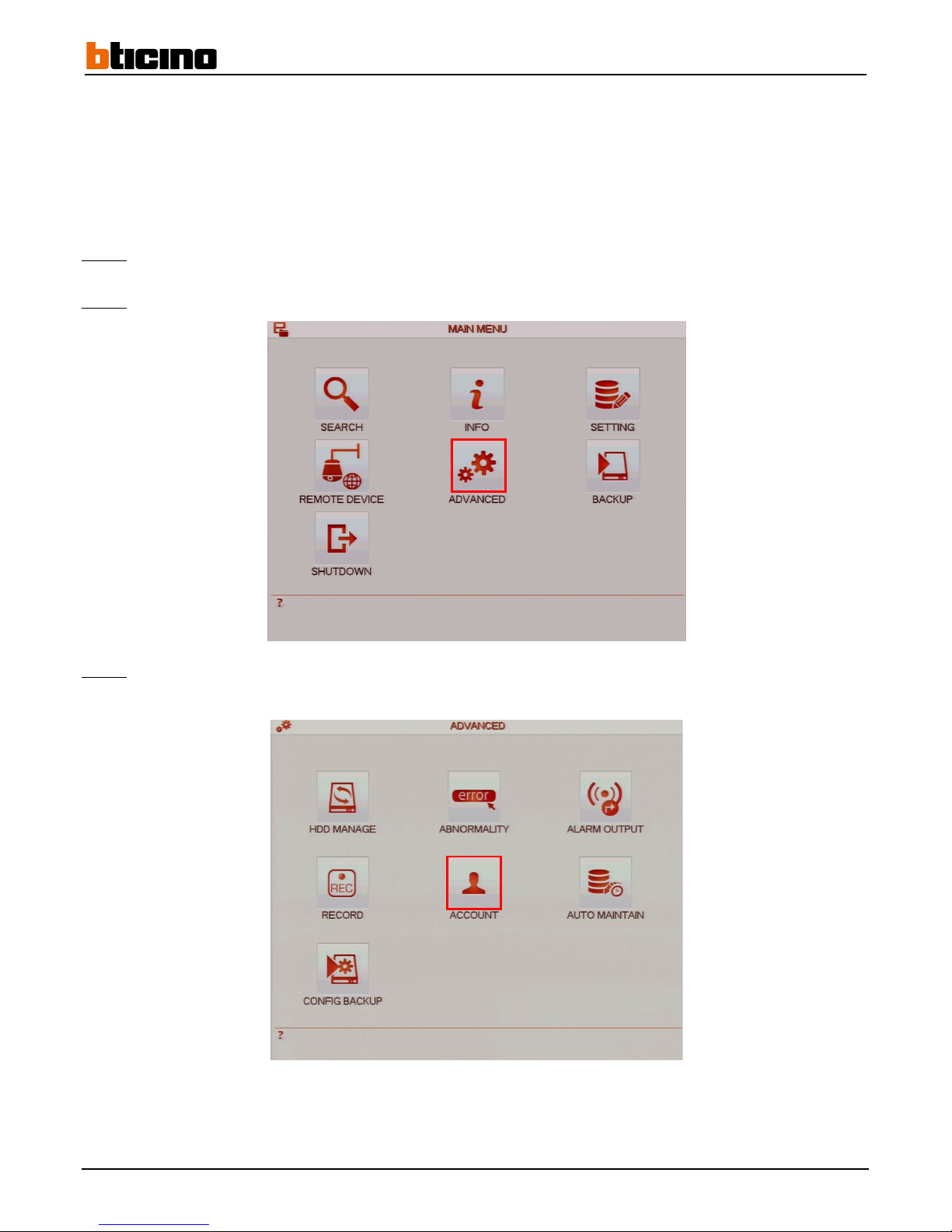
Step 1: Left-click anywhere on the tiles to access the main menu or right-click to access the drop-down menu and click on "Main
Menu".
Step 2:
Click on the "ADVANCED" button to access the "ADVANCED" menu.
Step 3:
Click on the "ACCOUNT" button to access the "ACCOUNT" menu.
Page 53
User Manual
4 Channel 1 TB HR DVR
8 Channel 2 TB HR DVR
16 Channel 4 TB HR DVR
4 Channel 1 TB HR DVR
53
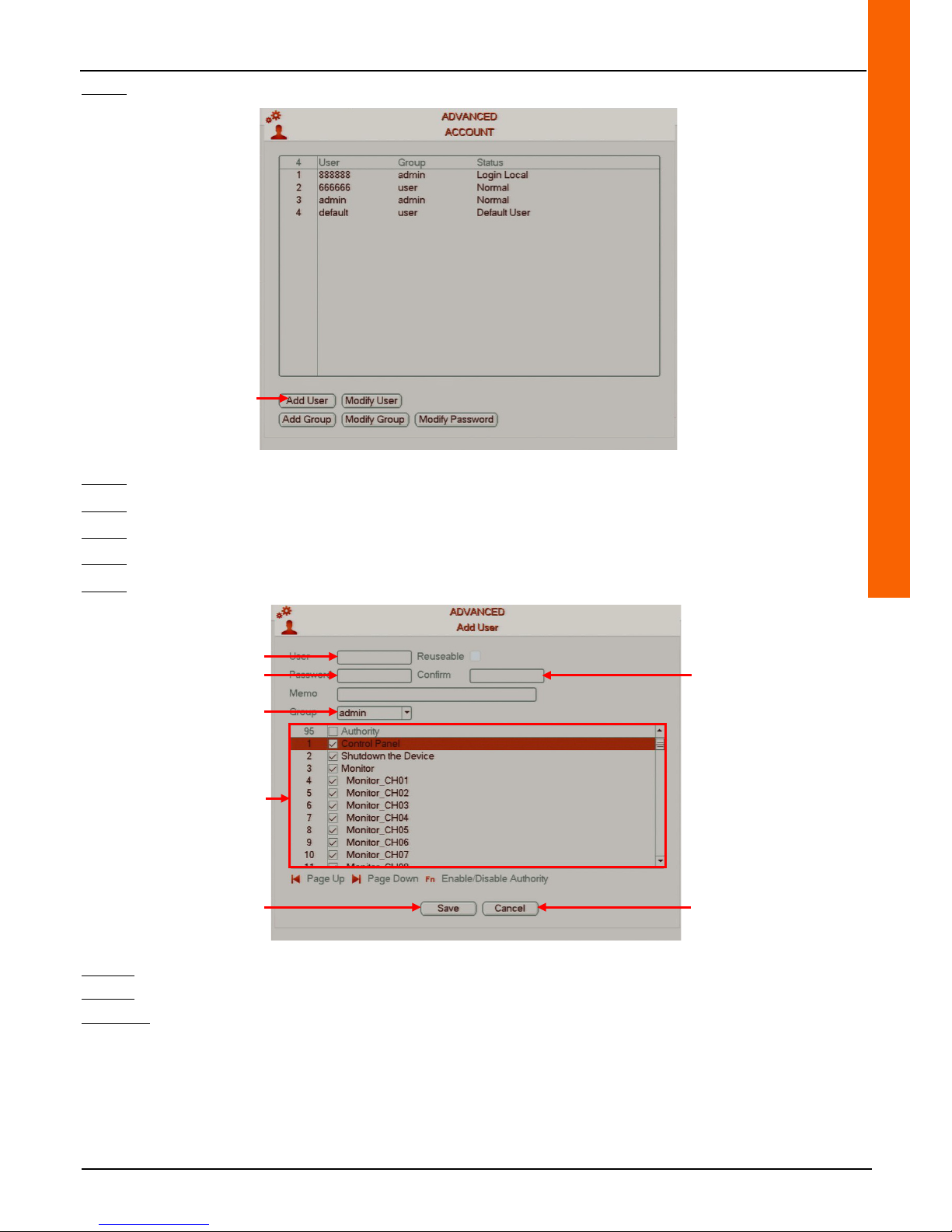
Step 4: Click on the "Add User" button to access the "Add User" menu.
Step 5: Enter the account user name in the "User" line field.
Step 6: Enter the account password in the «Password» line field.
Step 7: Enter the account password again in the "Confirm" line field.
Step 8: Select the account type from the "Group" line drop-down menu.
Step 9: Tick the boxes on the list to select account rights.
Step 10:
Click on the "Save" button to save the operation or click on the "Cancel" button to cancel the operation.
Step 11:
Right-click to return to the previous menu. Then right-click again to return to the direct tiles.
Comment:
• A user or administrator account can only be added from an administrator account.
• The "Group" line drop-down is used to set the account as an administrator ("admin") account or a user ("user") account.
The rights available on the list will differ depending on the type of account selected.
• A message can be entered in the "Memo" line field in case the password is forgotten.
Access the "Add User" menu
Enter the user name
Enter the password
Select the account type
Save the operation
Cancel the operation
Enter the password again
Select the account rights
Page 54
54
4.6.2 Changing an administrator and/or user account
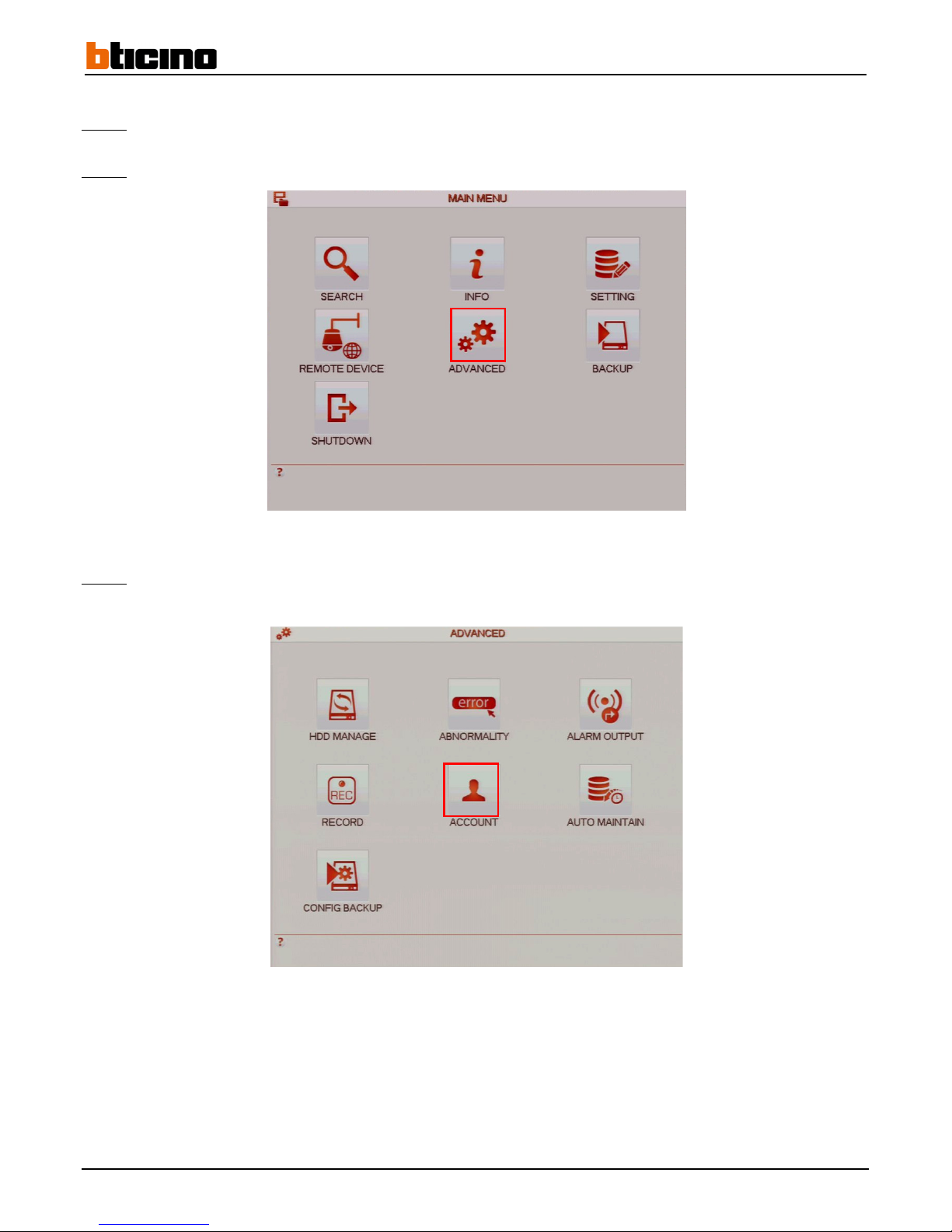
Step 1: Left-click anywhere on the tiles to access the main menu or right-click to access the drop-down menu and click on "Main
Menu".
Step 2:
Click on the "ADVANCED" button to access the "ADVANCED" menu.
Step 3:
Click on the "ACCOUNT" button to access the "ACCOUNT" menu.
Page 55
User Manual
4 Channel 1 TB HR DVR
8 Channel 2 TB HR DVR
16 Channel 4 TB HR DVR
4 Channel 1 TB HR DVR
55
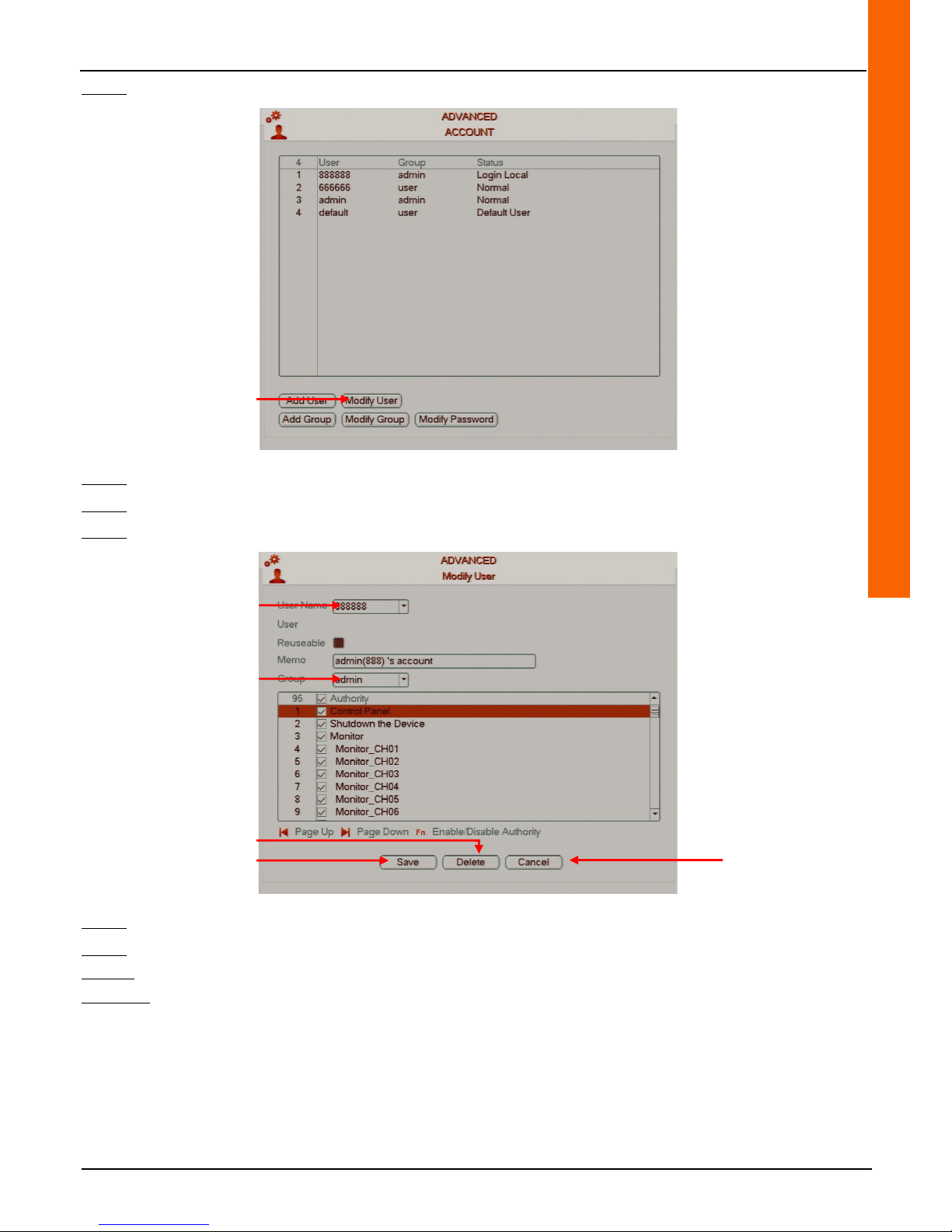
Step 4: Click on the "Modify User" button to access the "Modify User" menu.
Step 5: Select the account to be edited from the "User Name" line drop-down menu.
Step 6: Select the account type from the "Group" line drop-down menu.
Step 7: Tick the boxes on the list to select account rights.
Step 8:
Click on the "Delete" button to delete the selection.
Step 9:
Click on the "Save" button to save the operation or click on the "Cancel" button to cancel the operation.
Step 10:
Right-click to return to the previous menu. Then right-click again to return to the direct tiles.
Comment:
• It is possible to change the user name in the "User" line field when editing a user account.
• The message entered in case of a forgotten password when the account was added is displayed in the "Memo" line field
and can be edited.
Access the "Modify User" menu
Selecting the account
Selecting the account type
Save the operation
Cancel the operation
Delete the selection
Page 56
56
4.7 Network functionalities
4.7.1 Addressing
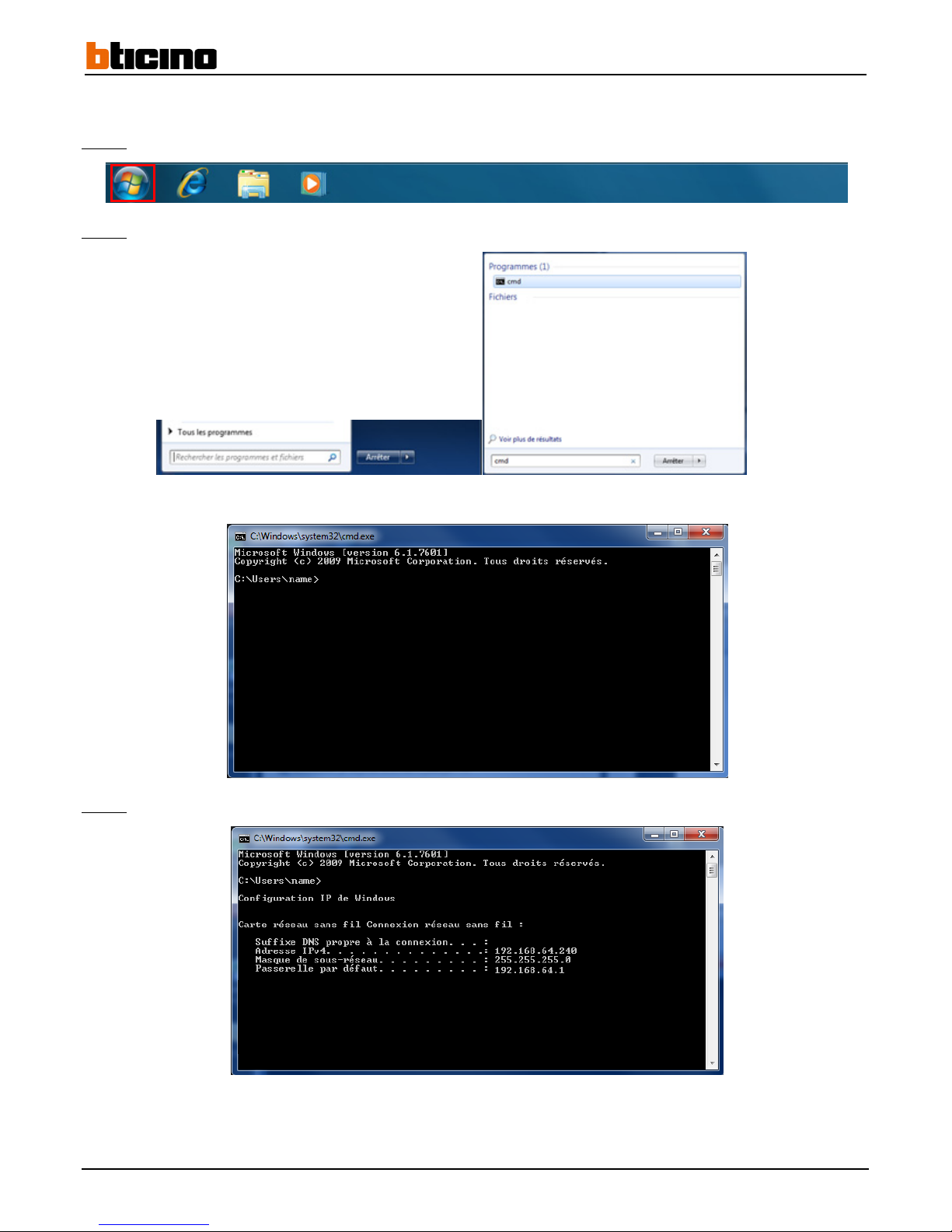
Step 1: Display the "Start" menu on the computer by clicking on the task bar button.
Step 2:
Enter "cmd" in the "Search programs and files" line and press on the "Enter" key on the keyboard.
The terminal window is displayed.
Step 3:
Enter "ipconfig" and press the "Enter" key on the keyboard.
The network information is displayed: Default P address, subnet mask and gateway.
Page 57

User Manual
4 Channel 1 TB HR DVR
8 Channel 2 TB HR DVR
16 Channel 4 TB HR DVR
4 Channel 1 TB HR DVR
57
Step 4: Select the recorder IP address
The router IP address is usually the same as the default gateway address.
The table below shows the most common default router IP addresses (as examples).
The computer, recorder and router IP addresses must be in the same subnetwork.
Example 1:
The computer IP address is 192.168.1.179.
The subnet mask is 255.255.255.0
The router IP address is (usually the same as the default gateway IP address) 192.168.1.1
In this case, there is no need to change the recorder default IP address which is 192.168.1.108
Example 2:
The computer IP address is 192.168.0.179.
The subnet mask is 255.255.255.0.
The default gateway is 192.168.0.254
In this case, the recorder IP address must be changed or it will not be able to communicate on the network.
The IP address to assign the recorder:
- must be within the following range: 192.168.0.1 and 192.168.0.254.
- it must not be used by any other network device (in this example, the 192.168.0.179 and 192.168.0.254 would not be used. They are
reserved for the computer and the router).
In this example, the 192.168.0.108 IP address can be assigned.
Name of access providers Default IP address
Alice-Box 192.168.1.1
AOL-Box 192.168.1.1
B-Box 192.168.1.254
Club-Internet-Box 192.168.1.1
Darty-Box 192.168.1.254
Darty-Box (mode expert) 192.168.1.254
Neuf-Box 192.168.1.1
Orange LiveBox 192.168.1.1
SFR-Box 192.168.1.1
C-Box 192.168.30.1
Free-Box 192.168.0.254
Numéricâble (CastleNet) 192.168.100.1
Numéricâble (Netgear) 192.168.0.1
Page 58
58
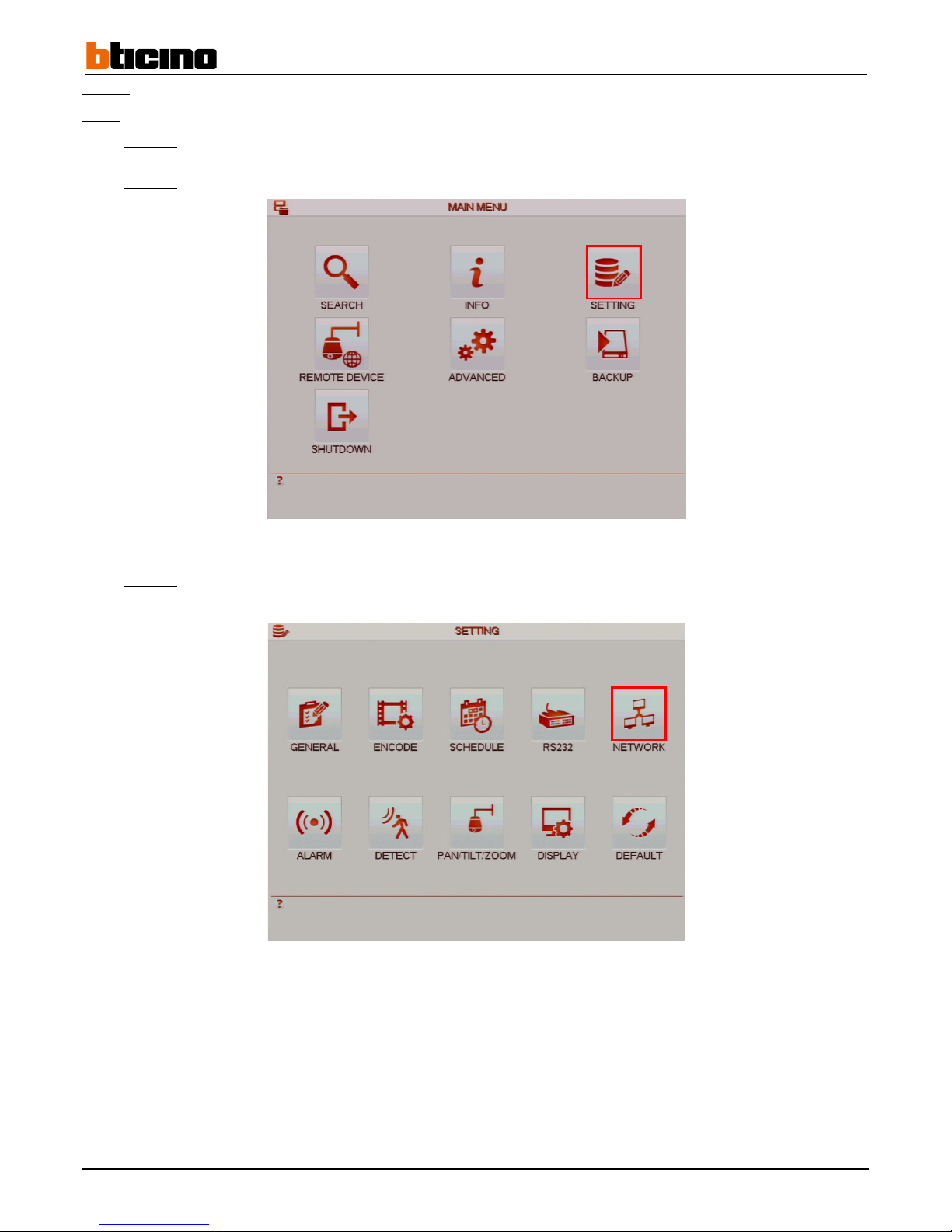
Step 5: Settings
Note:
To use this menu from the wizard, please go directly to steps 5-4 and 5-8.
Step 5-1:
Left-click anywhere on the tiles to access the main menu, or right-click to display the drop down-menu and click
on "Main Menu".
Step 5-2:
Click on the "SETTING" button to access the "SETTING" menu.
Step 5-3:
Click on the "NETWORK" button to access the "NETWORK" menu.
Page 59
User Manual
4 Channel 1 TB HR DVR
8 Channel 2 TB HR DVR
16 Channel 4 TB HR DVR
4 Channel 1 TB HR DVR
59
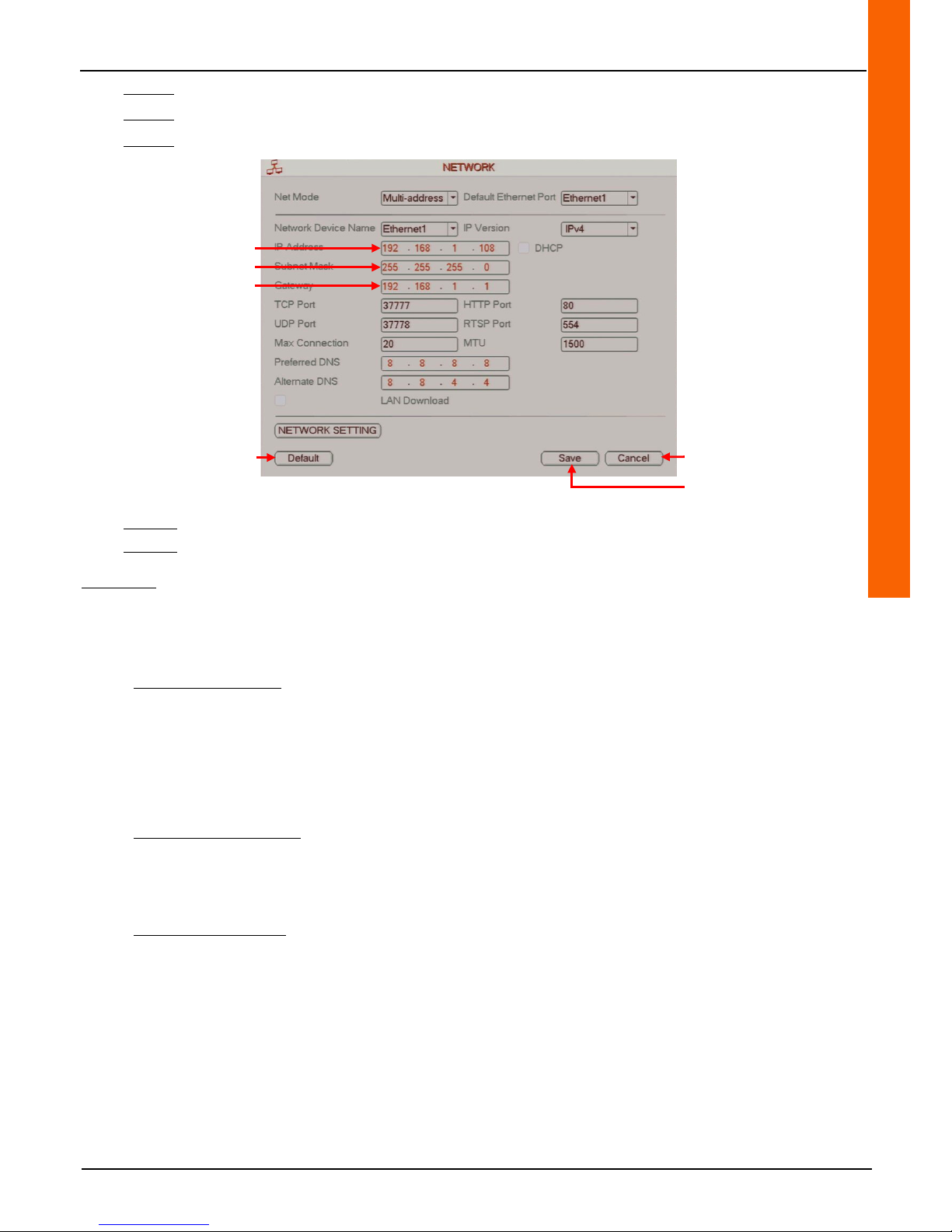
Step 5-4: Enter the recorder IP address in the "IP Address" line field.
Step 5-5: Enter the subnet mask in the "Subnet Mask" line field (by default, leave 255.255.255.0).
Step 5-6: Enter the router IP address in the "Gateway" line field.
Step 5-7: Click on the "Save" button to save the operation or click on the "Cancel" button to cancel the operation.
Step 5-8: Right-click to return to the previous menu. Then right-click again to return to the direct tiles.
Comments:
• Click on the "Default" button to restore the default settings.
• Select the Ethernet port management from the "Net Mode" line drop down-menu (only with the reference recorder 4 306
84).
Method 1: MultiAdress
Each of the two network connections have a different IP address. It is possible to connect the recorder to a dedicated LAN
for the port 1 cameras and another LAN on port 2 (or 2 VLANS can be used instead). The remote access (or VMS) can be
used from both networks.
Advantage: it is possible to set up cameras on a dedicated LAN, and connect the recorder to each LAN. This can keep the
existing LAN from becoming overloaded due to adding new cameras. The additional load will only be present when accessing
the recorder remotely.
Method 2: FaultTolerance
Both network connections are connected to the same network and use the same address. One needs to be defined as the
primary connection. If it goes down, the second one takes over (redundancy).
Advantage: redundancy (somewhat like RAID1 for NAS)
Method 3: LoadBalance
Both network connections are connected to the network, have the same address and share the network load. In this case
there is no redundancy but 2x the performance of method 2. only useful in the case
Advantage: performs on systems that don't use Gigabit Ethernet switches. Non redundant (resembles RAID0 for NAS)
Cancel the operation
Save the operation
Reset
default settings
Enter recorder IP address
Enter subnet mask IP address
Enter router IP address
Page 60
60
4.7.2 Local connection (Windows)
The recorder can be accessed using the Internet Explorer web browser.
The recorder default IP settings are as follows:
• IP address: 192.168.1.108
• User name: admin
• Password: admin
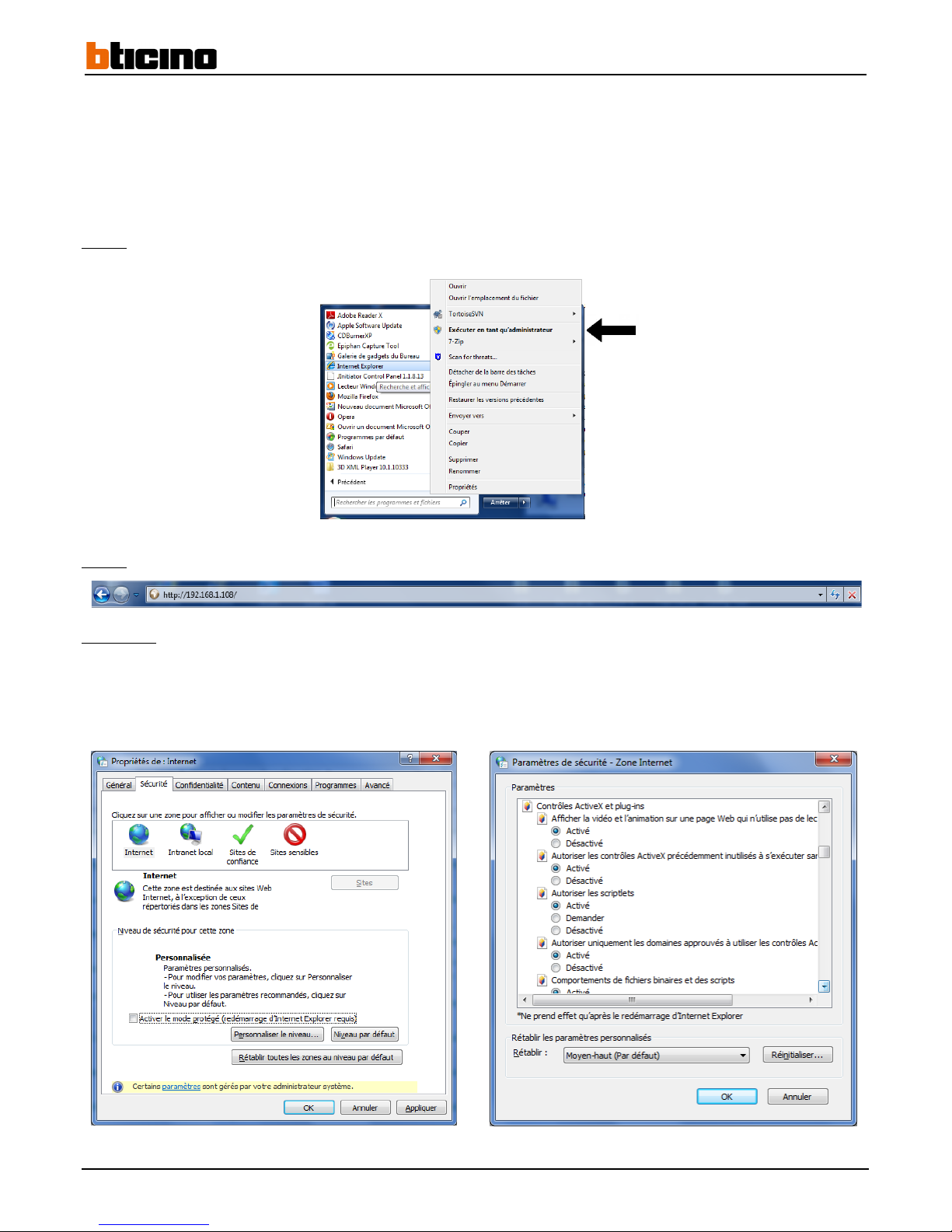
Step 1: Open Internet Explorer in administrator mode.
Step 2:
Enter the recorder IP address in the address bar.
Comments:
• If the system displays a warning message asking you to install the webrec.cab control, click on the "OK" button. The
system will install it automatically.
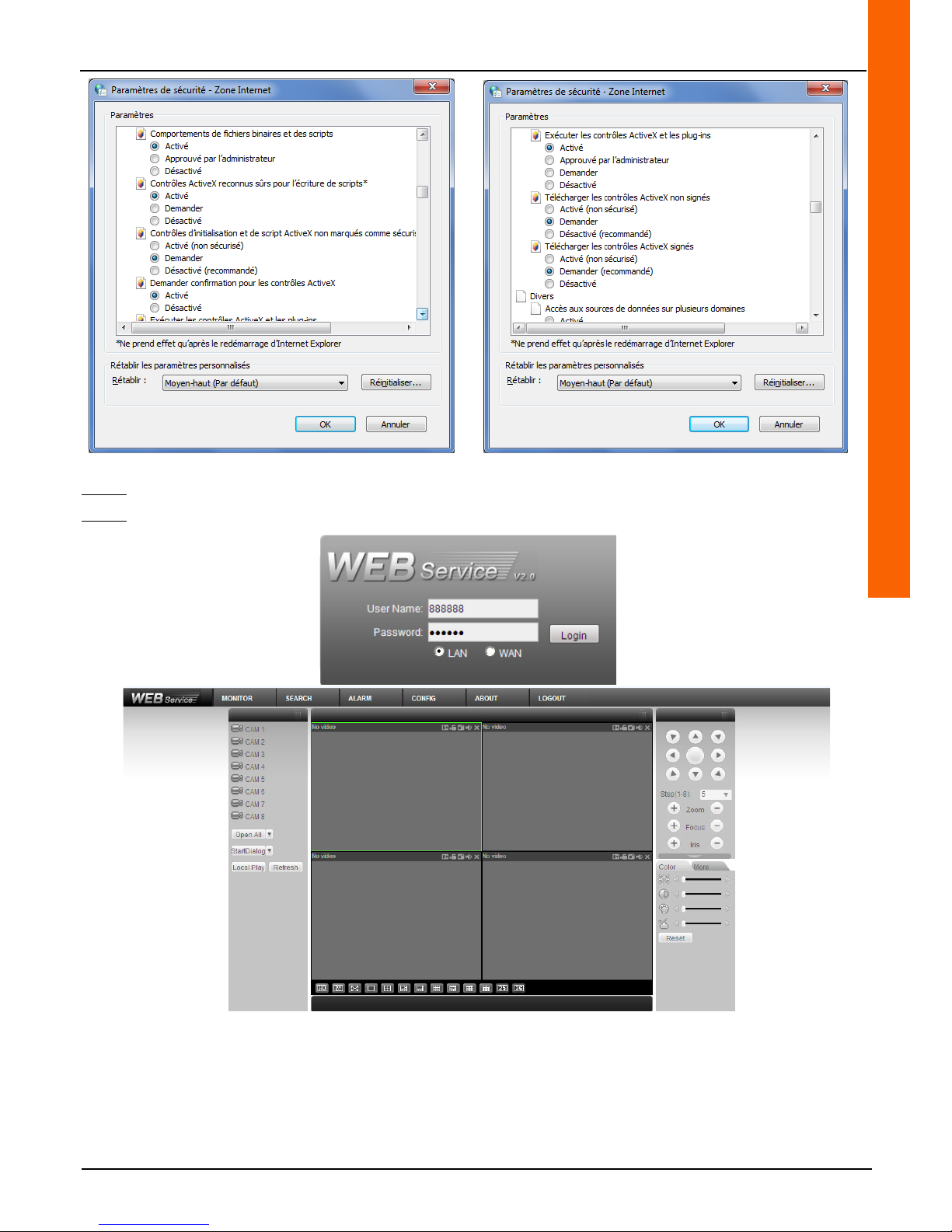
• If the file does not install, lower the Internet Explorer security (see the example below) or disable the phishing filter. Make
sure you have administrator rights for the Windows session.
Page 61
User Manual
4 Channel 1 TB HR DVR
8 Channel 2 TB HR DVR
16 Channel 4 TB HR DVR
4 Channel 1 TB HR DVR
61
Step 3: Enter the username and password.
Step 4: Click on the "Login" button.
Page 62
62
4.7.3 Connecting using Config Tool
The Config Tool software is compatible only with Windows.
This configuration tool allows fast IP address searching and editing, it also allows changes to be made to the recorder network.
This software is available on the CD provided with the recorder.
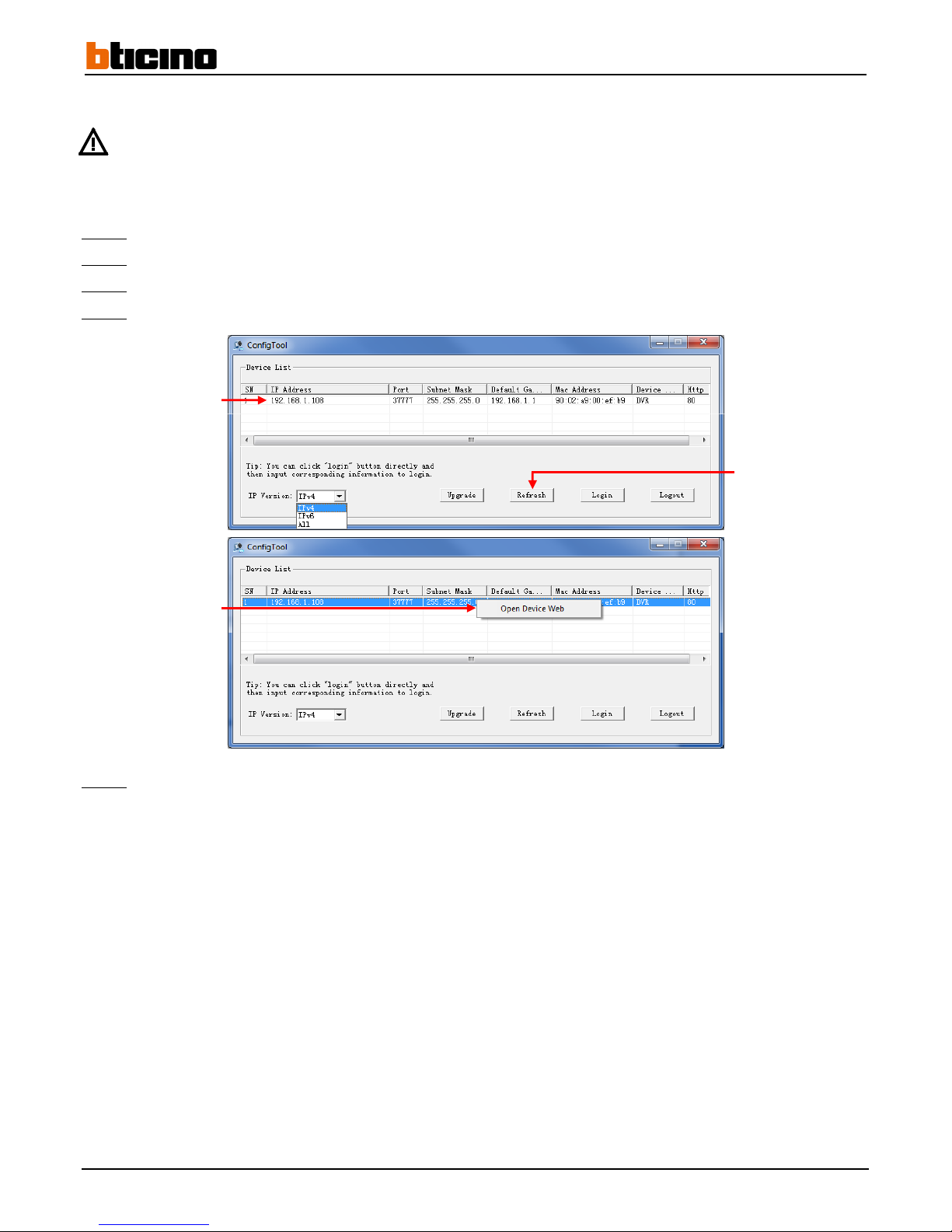
Step 1:
Open Config Tool V1.07.0.R.121203 (or higher).
Step 2:
Click on the "Refresh" button to refresh the list of devices connected to the same network segment.
Step 3:
Right-click on the recorder IP address to display the drop-down menu.
Step 4:
Click on "Open Device Web" to connect to the recorder.
Step 5:
Follow the steps listed on paragraph 4.7.2 to finish the connection.
Refresh the list
Recorder IP address
Connect to the recorder
Page 63
User Manual
4 Channel 1 TB HR DVR
8 Channel 2 TB HR DVR
16 Channel 4 TB HR DVR
4 Channel 1 TB HR DVR
63
4.7.4 Edit network settings using Config Tool
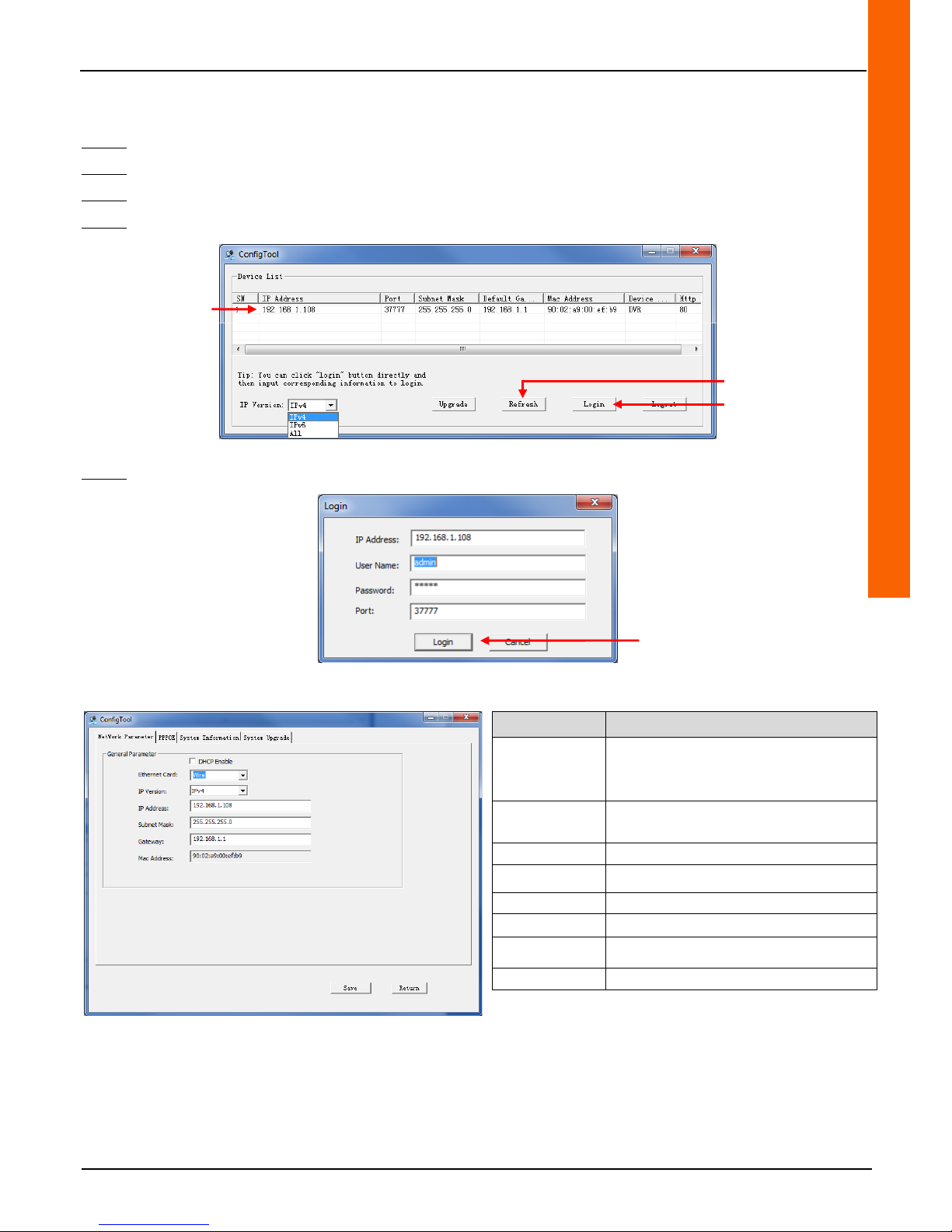
Step 1: Open Config Tool.
Step 2: Click on the "Refresh" button to refresh the list of devices connected to the same network segment.
Step 3: Left-click on the recorder IP address to display the drop-down menu.
Step 4: Click on "Login" to access the recorder network settings.
Step 5: Click again on "Login" to access the recorder network settings (the identifiers have already been entered).
The main interface is displayed.
Functionalities Description
DHCP Enable
(DHCP
enabled)
Enables or disables the DHCP
functionality.
IPv4/IPv6
(IPv4/IPv6)
Selects "IPv4" or "IPv6" from a drop-down
list. The IP addresses can be edited.
IP Address
Recorder IP address.
Subnet Mask
Recorder subnet mask.
Gateway
Recorder gateway.
Mac Address
Recorder MAC address.
Save (Record)
Saves changes.
Return
Returns to previous interface.
Refresh the list
Recorder IP address
Access recorder network
settings
Access recorder network
settings
Page 64
64
4.7.5 Remote connection
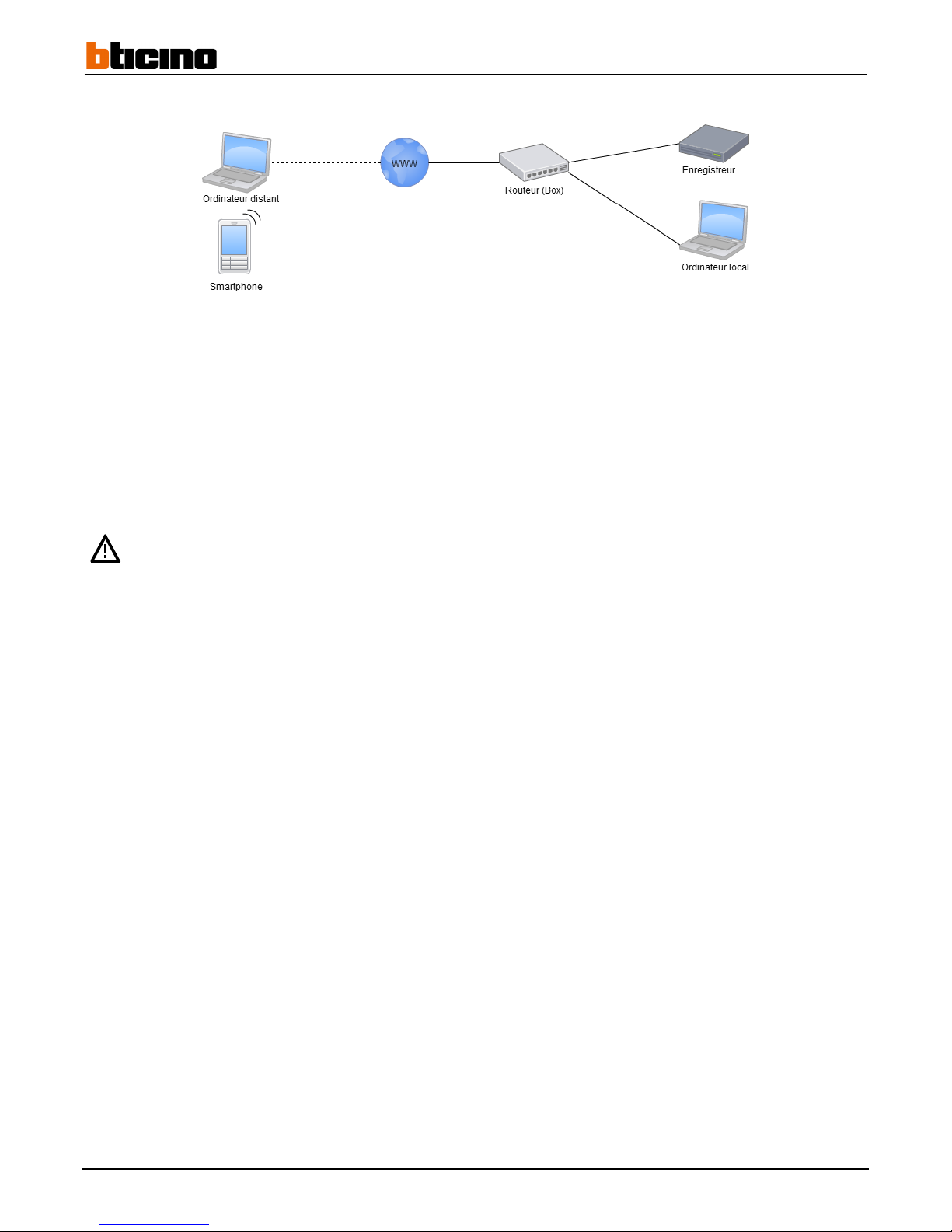
To connect to a recorder from a local network computer, please follow the instructions in paragraphs 4.7.1 to 4.7.5.
To connect to a recorder from a computer outside the local network, first you must connect to the external router IP address. Your
Internet service provider (ISP) must provide you with the following information:
- IP address type (static or dynamic).
- If the IP address is dynamic, it's possible to obtain a static IP. If yes, please request it.
If the IP address is static, please go to paragraph 4.7.6.2
If the IP address is dynamic, it is not possible to obtain a static IP. Access must be configured with a dynamic DNS account.
Modem routers provided by telecommunications operators are the property of these operators. The settings can
be reset or updated at any time. Previous client configurations can be changed or deleted.
Page 65
User Manual
4 Channel 1 TB HR DVR
8 Channel 2 TB HR DVR
16 Channel 4 TB HR DVR
4 Channel 1 TB HR DVR
65
4.7.5.1 Configuring a dynamic DNS
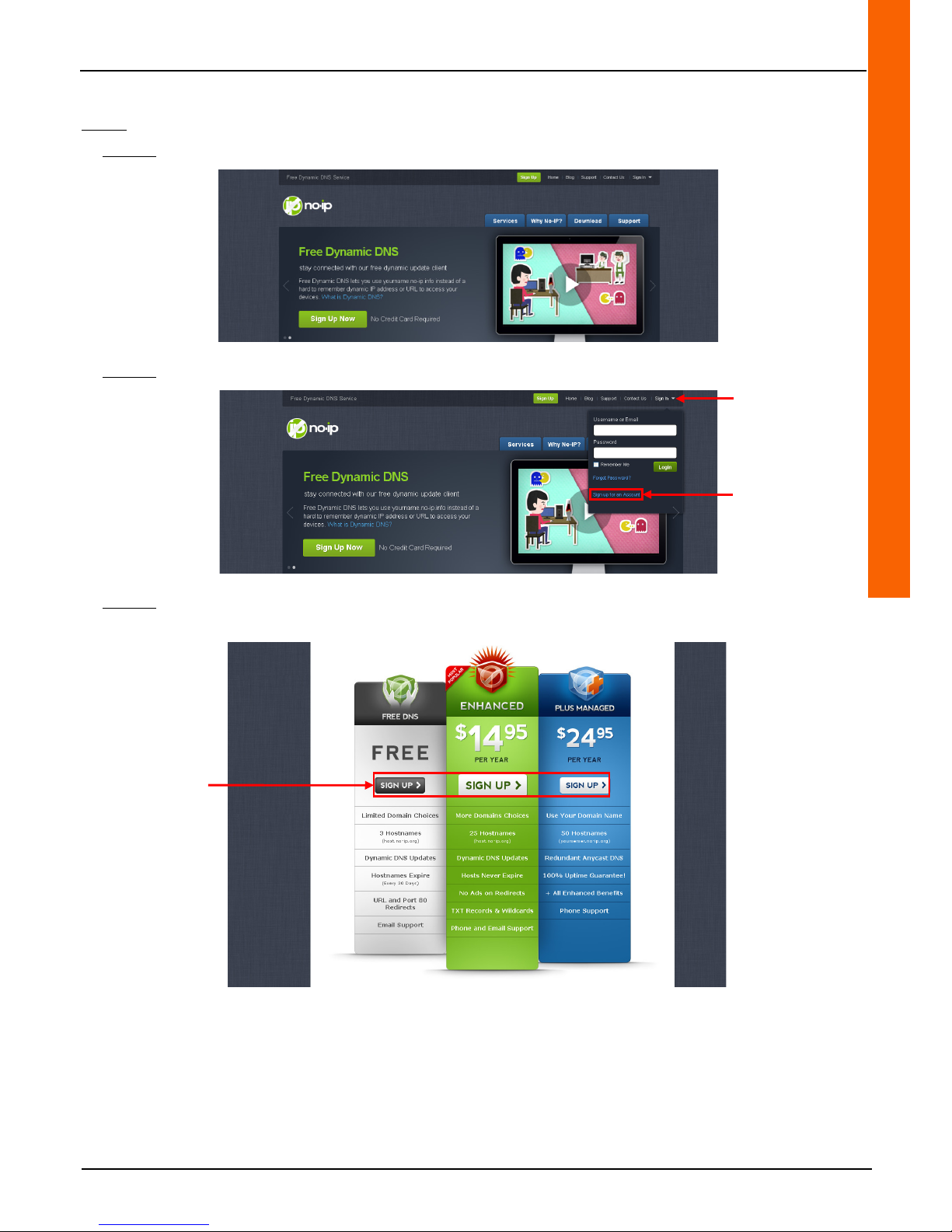
Step 1: Creating a DNS No-IP account
Step 1-1: Enter the following address in the browser address bar: www.no-ip.com. The web page will open.
Step 1-2: Click on the "Sign In" button then click on the "Sign up for an Account" link.
Step 1-3: A new page requesting for a selection between a free or paid account. Select the desired account by clicking on
"SIGN UP". A new page opens.
Sign In
Sign up for an Account
Creating an account
Page 66
66
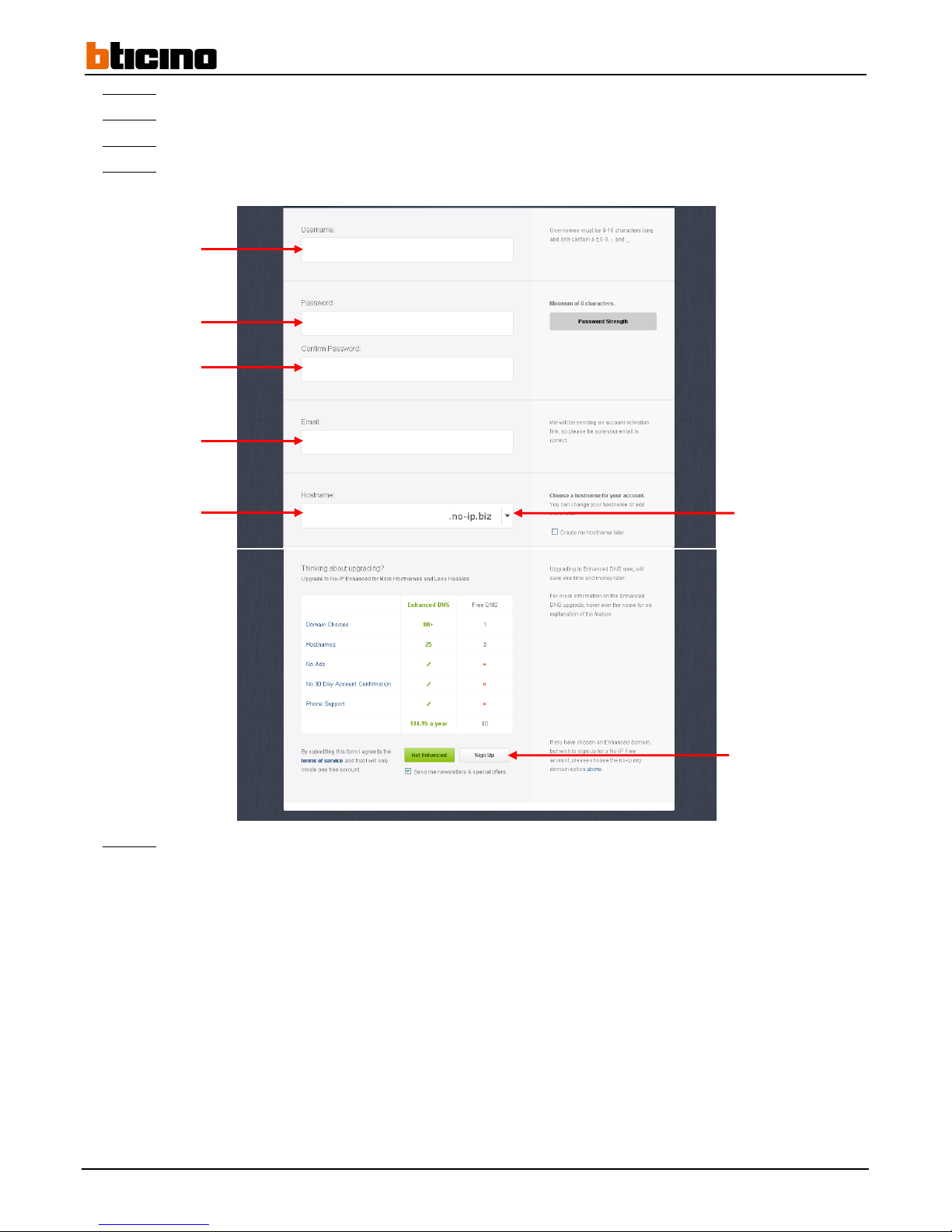
Step 1-4: Enter a user name in the "Username" line field.
Step 1-5:
Enter the password in the "Password" line field and enter it again in the "Confirm Password" line field.
Step 1-6:
Enter the user e-mail address in the "E-mail" line field.
Step 1-7:
Enter the host name in the "Hostname" field name then select the same extension from drop-down on the same line
(default: .no-ip.biz).
Step 1-8:
Click on the "Sign Up" button to save.
User name
Password
Confirm password
E-mail address
Host name
Extension selection
Sign Up
Page 67
User Manual
4 Channel 1 TB HR DVR
8 Channel 2 TB HR DVR
16 Channel 4 TB HR DVR
4 Channel 1 TB HR DVR
67
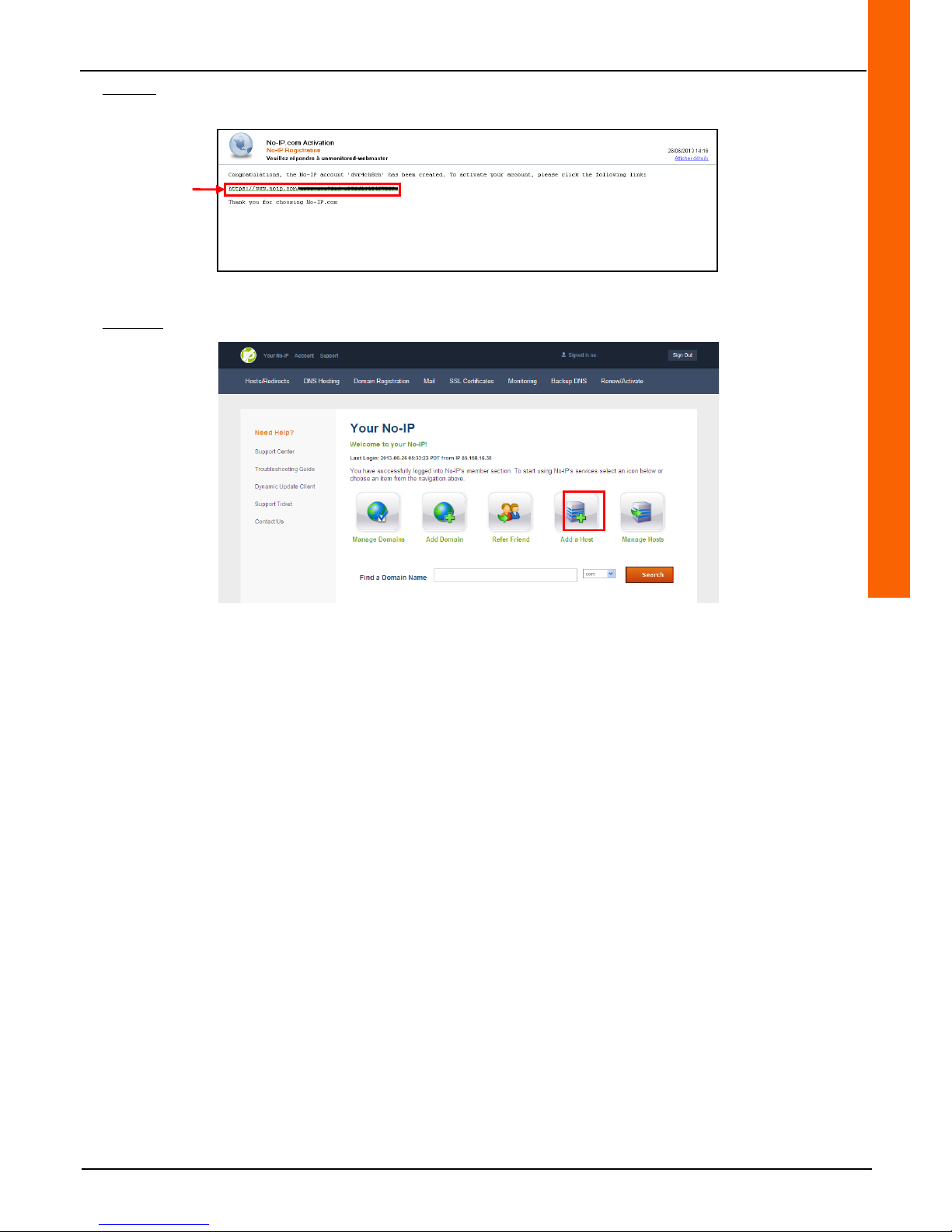
Step 1-9: An account registration confirmation email is sent to the e-mail inbox. Read this e-mail and click on the account
activation link in the e-mail.
The web browser displays the newly created account home page.
Step 1-10: Click on the "Add a Host" button to add a host. A new page opens.
Activation link
Page 68
68
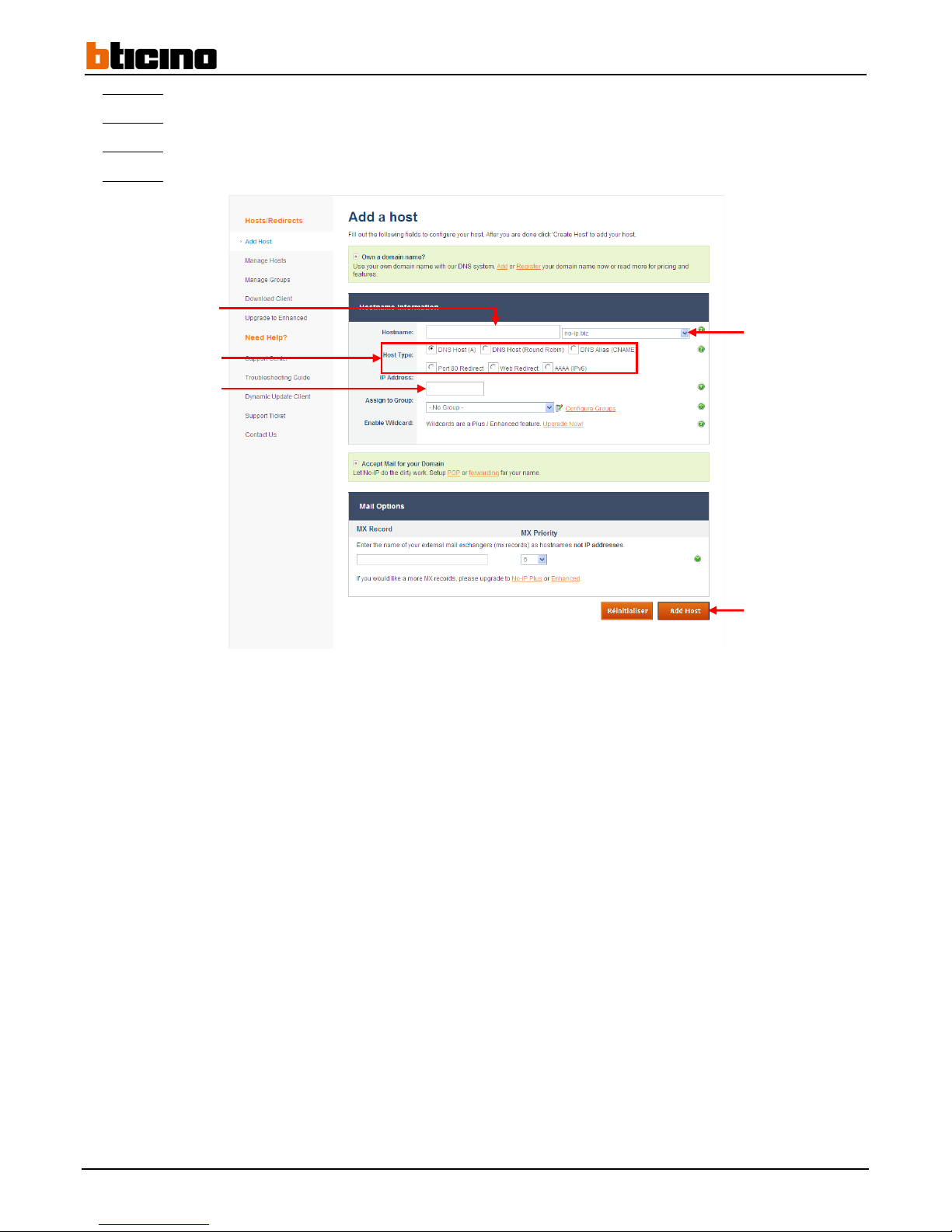
Step 1-11: Enter the host name in the "Hostname" line field- you can use the recorder name for example.
Step 1-12:
Select the extension in the "Hostname" line drop-down menu.
Step 1-13:
Select the "DNS Host A" host type from the "Host Type" line.
Step 1-14:
Enter the router's external IP address in the "IP Address" line field (if the field is not filled automatically)+(1).
Host name
Host type
Router external IP
address
Extension selection
Add Host
Page 69
User Manual
4 Channel 1 TB HR DVR
8 Channel 2 TB HR DVR
16 Channel 4 TB HR DVR
4 Channel 1 TB HR DVR
69
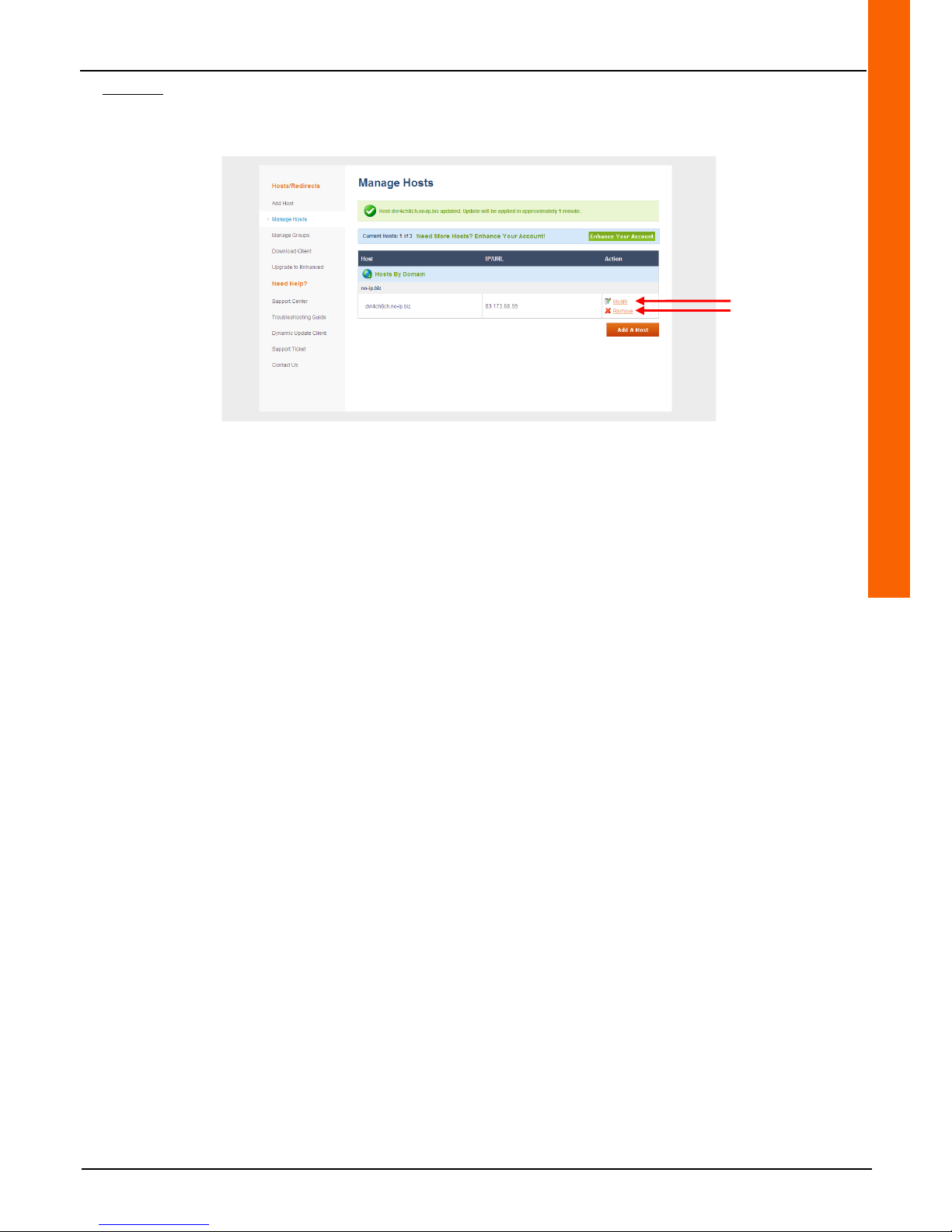
Step 1-15: Click on the "Add Host" button to confirm.
The web browser displays the "Manage Hosts" host management page. From this page, hosts can be changed using the
"Modify" link and deleted using "Remove" link.
(1)
- To find the router's external IP address, you must enter its configuration page. To enter the router's configuration
page, enter its internal IP address in the web browser's address bar. To find it, please follow the steps in paragraph 4.7.1
(the router's internal IP address is usually the same as the default gateway address)
- Please refer to the router user manual for further information.
Edit
Delete
Page 70
70
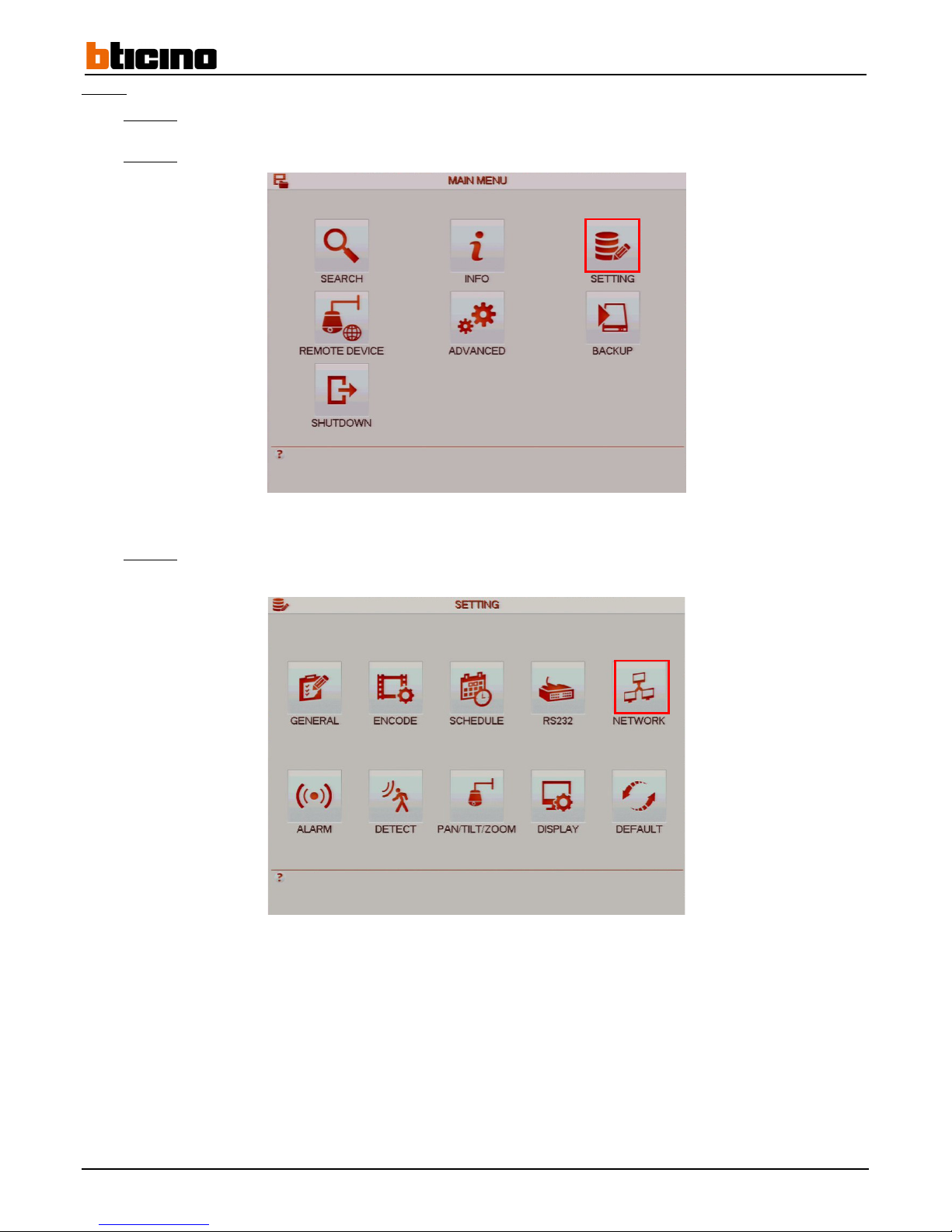
Step 2: Recorder settings
Step 2-1:
Left-click anywhere on the tiles to access the main menu or right-click to access the drop-down menu and click
on "Main Menu".
Step 2-2:
Click on the "SETTING" button to access the "SETTING" menu.
Step 2-3:
Click on the "NETWORK" button to access the "NETWORK" menu.
Page 71
User Manual
4 Channel 1 TB HR DVR
8 Channel 2 TB HR DVR
16 Channel 4 TB HR DVR
4 Channel 1 TB HR DVR
71
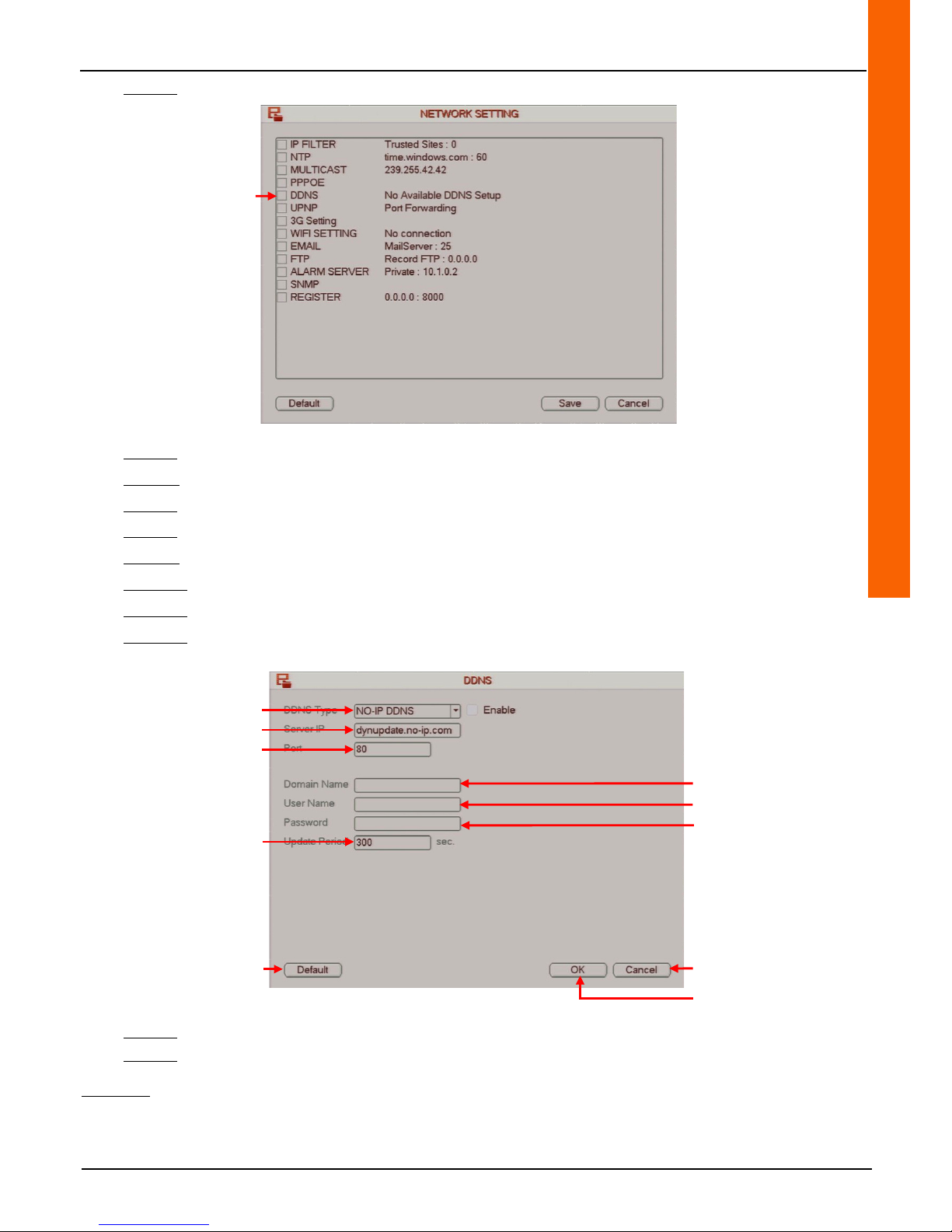
Step 2-4:Double-click on the "DDNS" line to access the "DDNS" menu.
Step 2-5: Select the DNS server type from the "DDNS Type" drop-down menu.
Step 2-6: Check the "Enable" box on the "DDNS Type" line to enable DNS function.
Step 2-7: Enter the DNS server address in the "Server IP" line field.
Step 2-8: Enter the web port in the "Port" line field.
Step 2-9: Enter the host name followed by its extension in the "Domain Name" line field.
Step 2-10: Enter the DNS account user name in the "User Name" line field.
Step 2-11:
Enter the DNS account password in the "Password" line field.
Step 2-12:
Enter the time period during which the connection between the computer and the recorder will no not be
interrupted while the IP address is edited in the "Update Period" line field.
Step 5-7:
Click on the "OK" button to confirm the operation, or click on the "Cancel" button to cancel the operation.
Step 5-8:
Right-click to return to the previous menu. Then right-click again to return to the direct tiles.
Comment:
• Click on the "Default" button to reset default settings.
Cancel the operation
Save the operation
Reset
default settings
Access the DDNS menu
Select the DNS server
Enter the DNS server address
Enter the web port
Enter the host name
followed by its extension
Enter the DNS account user
name
Enter the DNS account
password
Enter length of connection time
Page 72
72
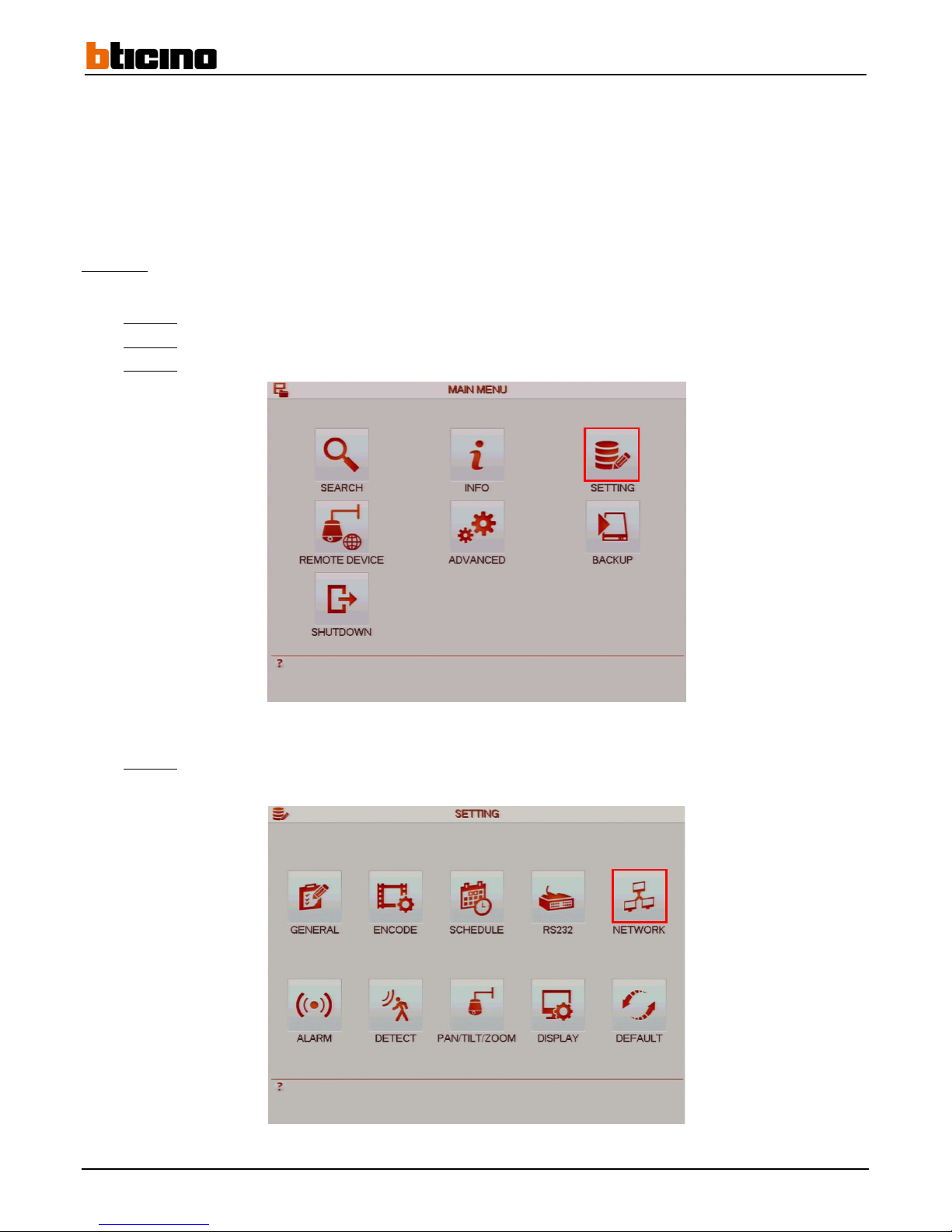
4.7.5.2 Setting port redirection (NAT configuration)
The recorder uses three ports:
- 80 for the http port
- 37777 for the TCP port
- 37778 for the UDP port
These ports can be edited if necessary.
In the case of remote access, port redirection must be accessed (NAT configuration):
Method 1:
Automatic configuration (using UPnP)
The UPnP IGD can be used to automatically configure port redirection.
Step 1-1:
Open the router configuration menu by entering its internal IP address in the web browser address bar.
Step 1-2:
Refer to the router user manual to set up the UPnP IGD.
Step 1-3:
Click on the "SETTING" button to access the "SETTING" menu.
Step 1-4:
Click on the "NETWORK" button to access the "NETWORK" menu.
Page 73
User Manual
4 Channel 1 TB HR DVR
8 Channel 2 TB HR DVR
16 Channel 4 TB HR DVR
4 Channel 1 TB HR DVR
73
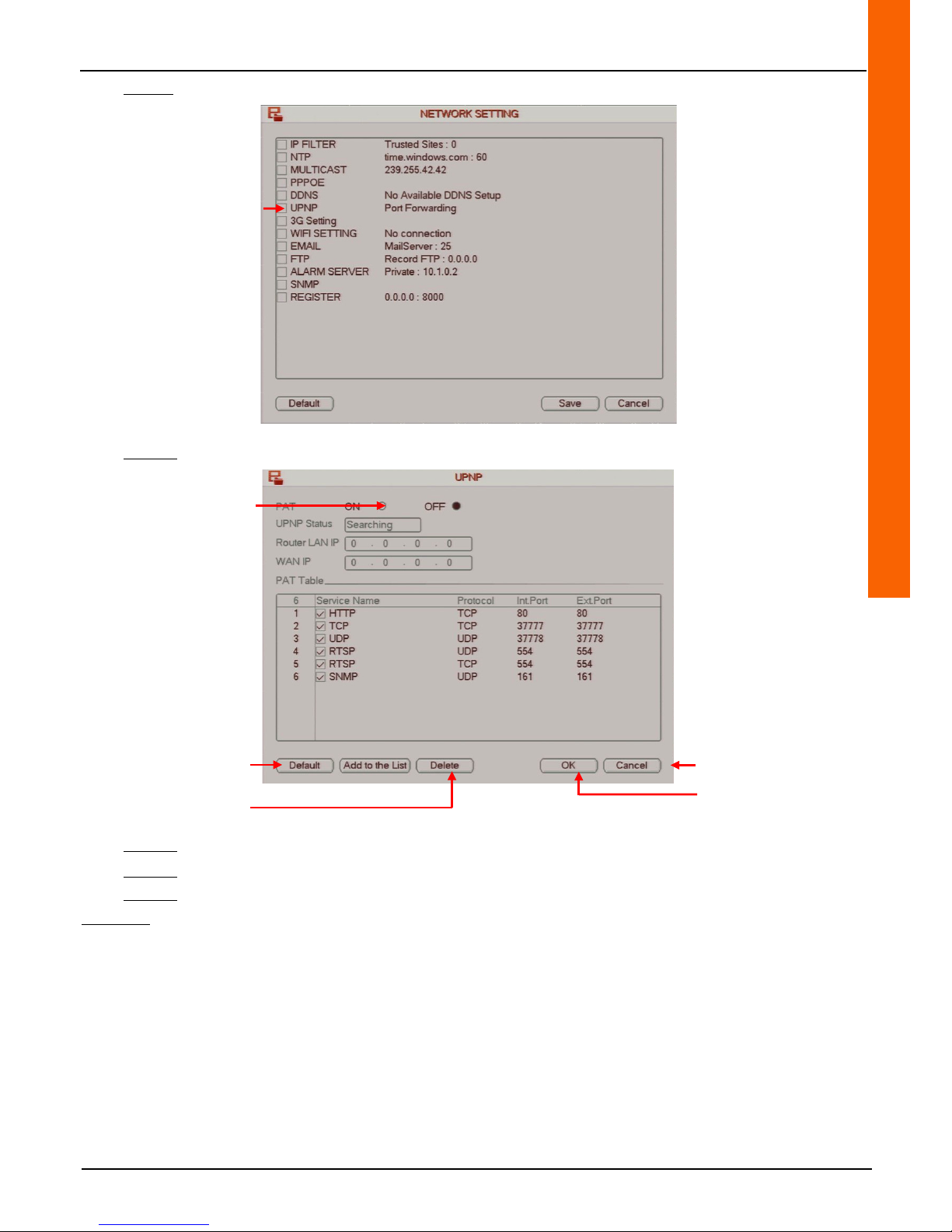
Step1-5:Double-click on the "UPNP" line to access the "UPNP" menu.
Step 1-6: Check the "ON" box on the "PAT" line to enable automatic port redirection.
Step 1-7:
Click on the "Delete" button to delete the selection.
Step 1-8:
Click on the "OK" button to confirm the operation, or click on the "Cancel" button to cancel the operation.
Step 1-9:
Right-click to return to the previous menu. Then right-click again to return to the direct tiles.
Comment:
• Click on the "Default" button to restore the default settings.
Accessing the UPNP menu
Enable automatic port
redirection
Cancel the operation
Save the operation
Reset
default settings
Deleting the selection
Page 74
74
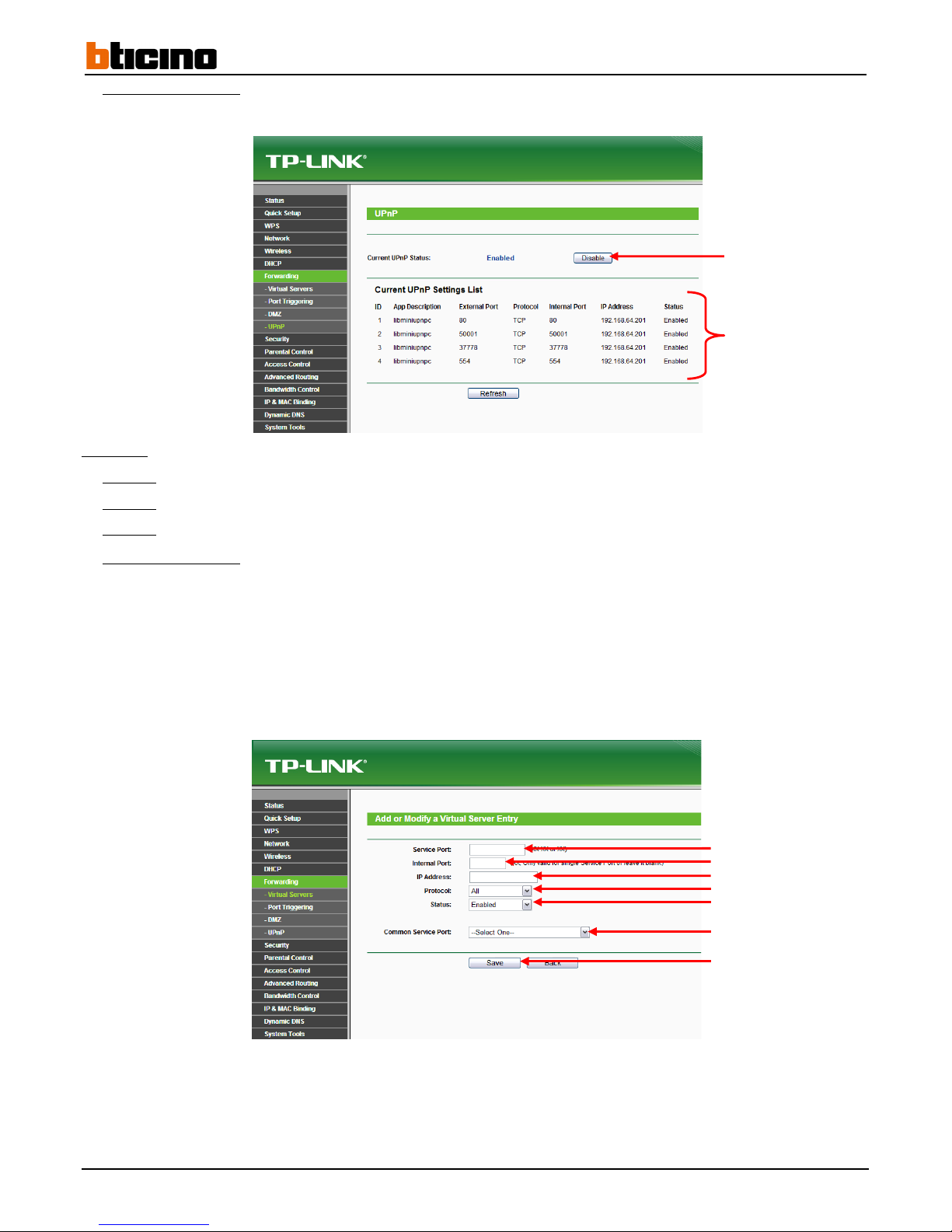
TP-Link router example:
- Enable the UPnP IGD by clicking on the corresponding button.
Method 2:
Manual configuration
Step 2-1:
Open the router configuration menu by entering its internal IP address in the web browser address bar.
Step 2-2:
Refer to the router user manual to manually configure port redirection settings.
Step 2-3:
Verify that the ports are directed either through the router or by testing the remote connection.
TP-Link router example:
- Enter the port name in the "Service Port" line field.
- Enter the internal port number in the "Internal Port" line field.
- Enter the recorder internal IP address in the "IP Address" line field.
- Select the "TCP" protocol from the "Protocol" drop-down menu.
- Select "Enable" from the "Status" line drop-down menu.
- Select "Select One" from the "Common Service Port" line drop-down menu.
- Click on the "Save" to confirm and save the settings.
Enable/Disable UPnP IGD
Port name
IP address
Port number
Protocol
List of automatically
redirected ports
Status
Predefined port
Confirm and save
Page 75

User Manual
4 Channel 1 TB HR DVR
8 Channel 2 TB HR DVR
16 Channel 4 TB HR DVR
4 Channel 1 TB HR DVR
75
Example of dual recorder access connected on the same router:
In the case where two recorders are connected to the same router, they must be assigned a different http port and media. A
rule must be created to redirect:
- For recorder n°1:
Port 10080 to 192.168.64.201:80
Port 37777 to 192.168.64.201:37777
Port 37778 to 192.168.64.201:37778
- For recorder n°2:
Port 10081 to 192.168.64.202:80
Port 37779 to 192.168.64.202:37779
Port 37780 to 192.168.64.202:37780
4.7.5.3 Connecting to a computer
Case 1: Static IP address
Example for recorder n°1 from the previous example:
-Recorder n°1 IP address: 192.168.64.201
- Recorder n°1 external IP address: 83.173.68.59
- HTTP port: 10080
Enter the router external IP address in the web browser address bar followed by the http port: http://83.173.68.59:10080.
Case 2: Dynamic IP address
Example using recorder n°1 from the previous example:
-Recorder n°1 IP address: 192.168.64.201
- No-IP Server host name: dvr4ch8ch.no-ip.biz
- HTTP port: 10080
Enter the host name followed by the DNS server in the web browser search bar followed by the http port: http://dvr4ch8ch.noip.biz:10080.
Page 76
76
4.7.5.4 Connecting to the "Bticino Camera Viewer" application (iOS/Android)
The "Bticino Camera Viewer" application available at the Appstore and Google play provide a local or remote connection to a
video surveillance system using a 3G or WI-FI connection.
It includes live view, instant photos and recording playback functionalities.
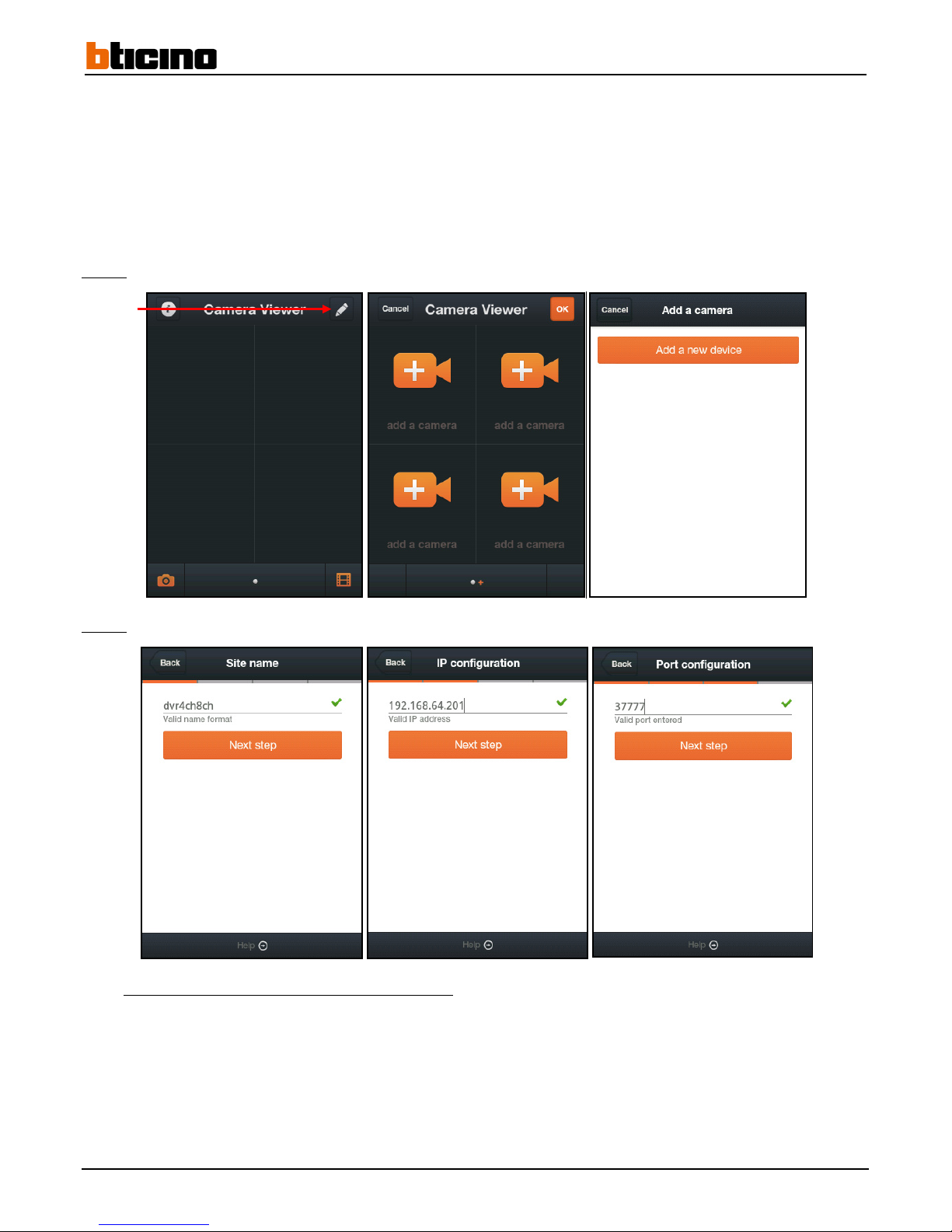
Step 1:
Add a new device by pressing the "Edit" button and selecting "add a camera." Then press the "Add a new device" button.
Step 2:
Enter the device name, IP address of the recorder and the media/ mobile port 1.
Example using recorder No. 1 from the previous example:
- IP address of the recorder 1: 192.168.64.201
- Media / Mobile Port 1: 37777
Edit
Page 77
User Manual
4 Channel 1 TB HR DVR
8 Channel 2 TB HR DVR
16 Channel 4 TB HR DVR
4 Channel 1 TB HR DVR
77
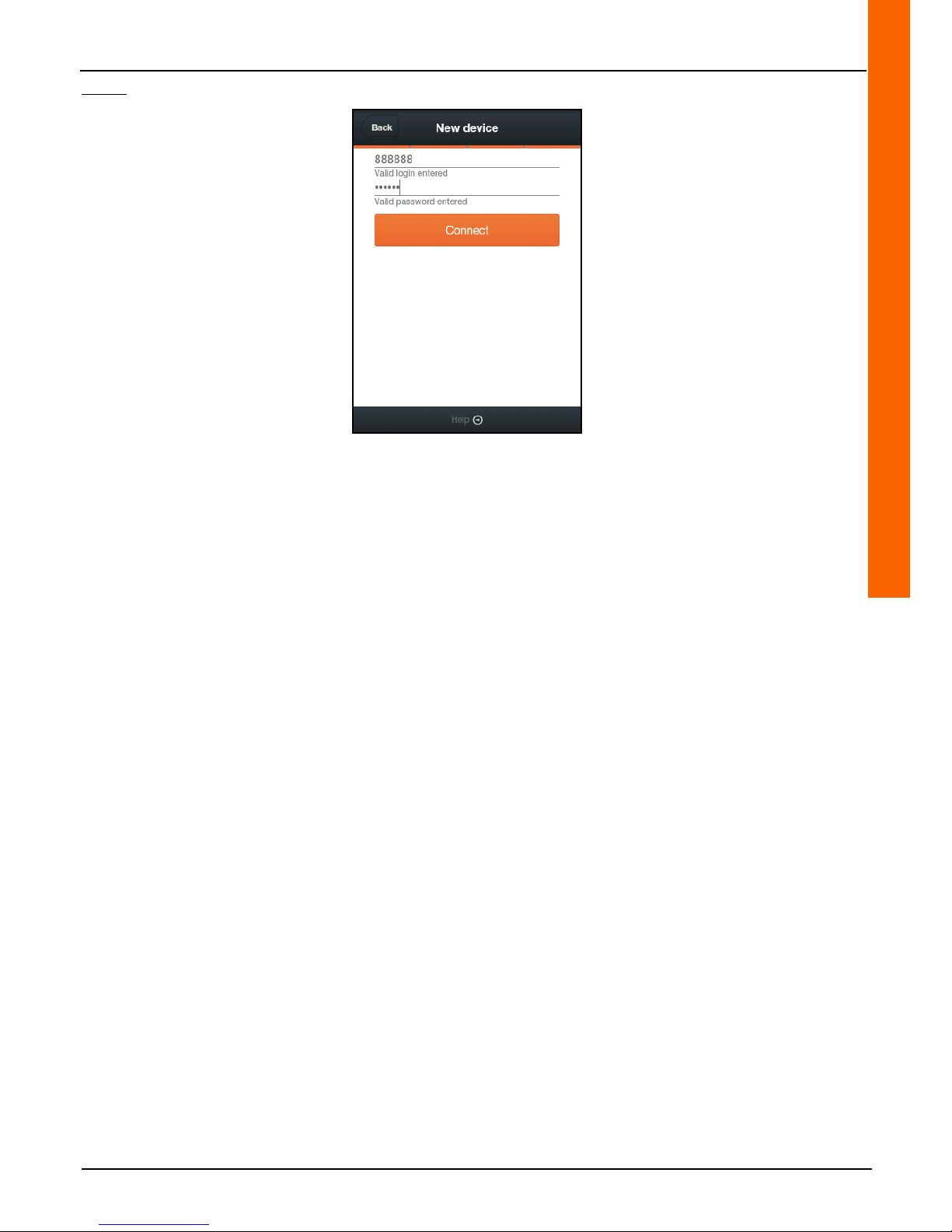
Step 3: Enter the recorder identifiers.
Page 78
78
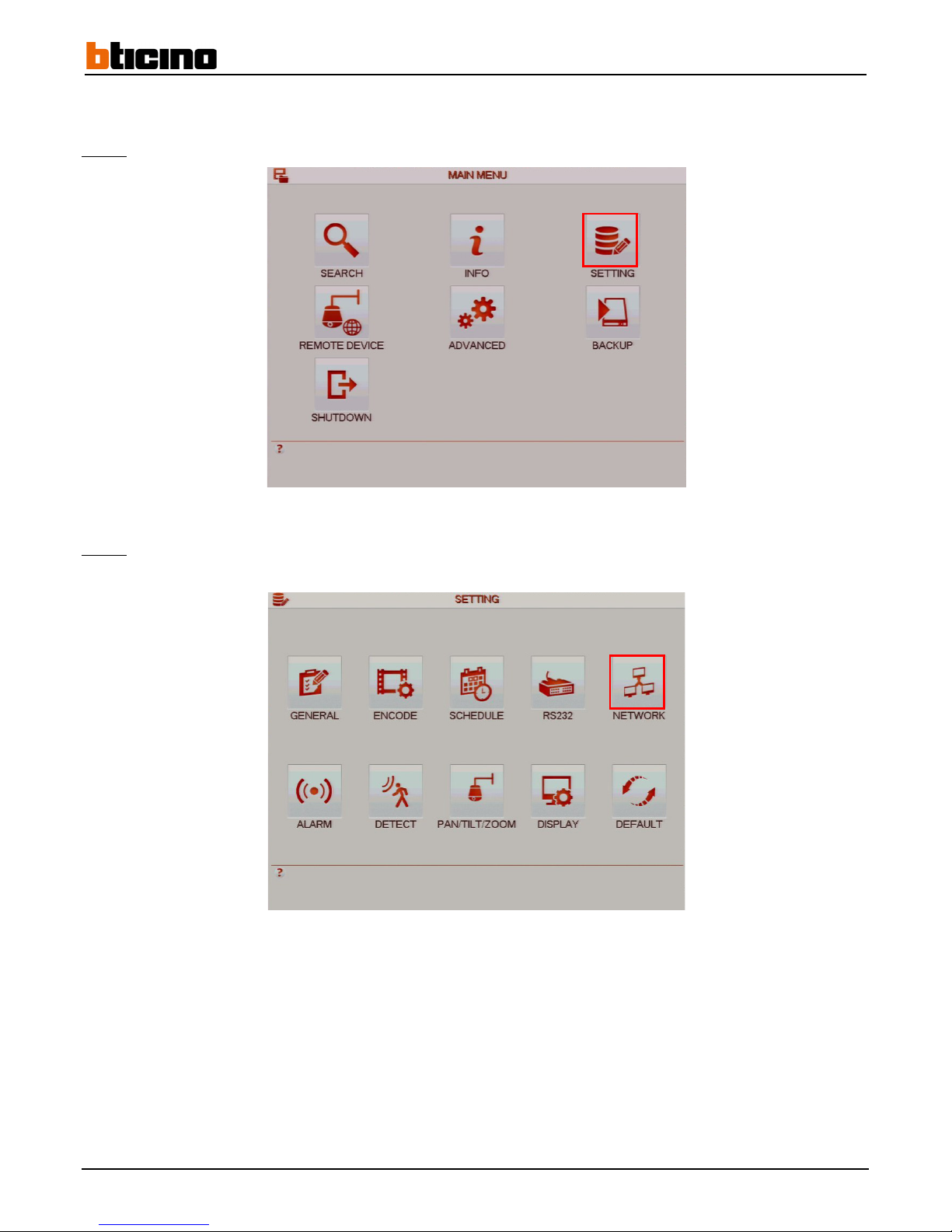
4.7.6 Sending e-mail
The e-mail functionality can send e-mails using movement detection and alarm triggers...
Step 1:
Click on the "SETTING" button to access the "SETTING" menu.
Step 2:
Click on the "NETWORK" button to access the "NETWORK" menu.
Page 79
User Manual
4 Channel 1 TB HR DVR
8 Channel 2 TB HR DVR
16 Channel 4 TB HR DVR
4 Channel 1 TB HR DVR
79
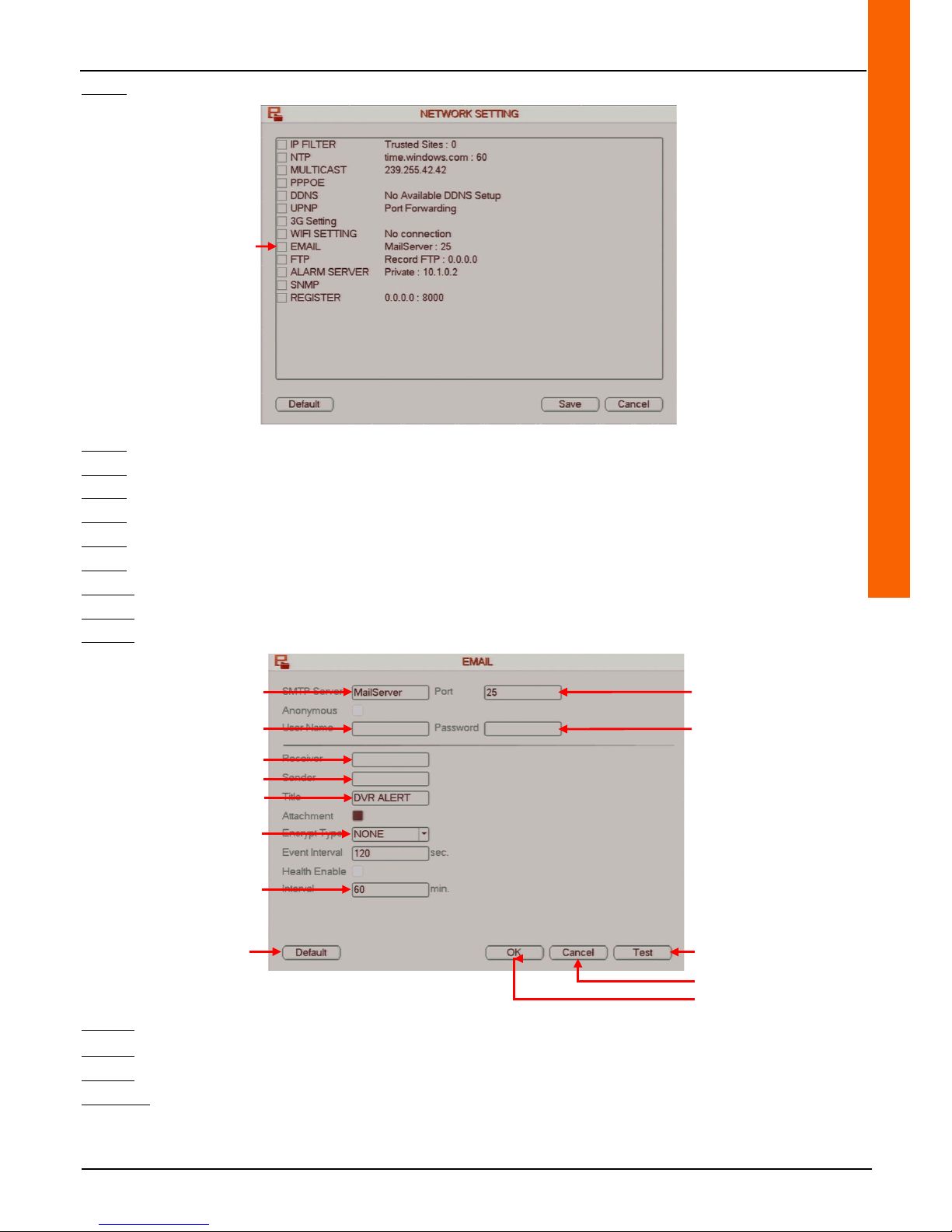
Step 3: Double-click on the "E-MAIL" line to access the "E-MAIL" menu.
Step 4: Enter the SMTP server address in the "SMTP Server" line field.
Step 5: Enter the SMTP port in the "Port" line field.
Step 6: Enter the SMTP account user name in the "User Name" line field.
Step 7: Enter the SMTP password in the "Password" line field.
Step 8: Enter the recipient e-mail address in the "Receiver" line field.
Step 9: Enter the sender e-mail address in the "Sender" line field.
Step 10: Enter the subject that will appear on the mail when it is received in the "Title" line field.
Step 11:
Select the "SSL" protocol from the "Encrypt type" line drop-down menu to enable the security protocol.
Step 12:
Enter the minimum time interval between sending two e-mails in the "Interval" line field.
Step 13:
Click on the "Test" button to test the e-mail.
Step 14:
Click on the "OK" button to confirm the operation, or click on the "Cancel" button to cancel the operation.
Step 15:
Right-click to return to the previous menu. Then right-click again to return to the direct tiles.
Comment:
• Click on the "Default" button to restore the default settings.
Access the E-MAIL menu
Enter the SMTP server address
Enter the SMTP account user
name
Enter the SMTP port
Enter the SMTP account
password
Enter the recipient e-mail address
Enter the sender e-mail address
Enter e-mail subject
Select security protocol
Enter time interval
Cancel the operation
Reset
default settings
Confirm the operation
Test e-mail sending
Page 80
80
5 Specifications
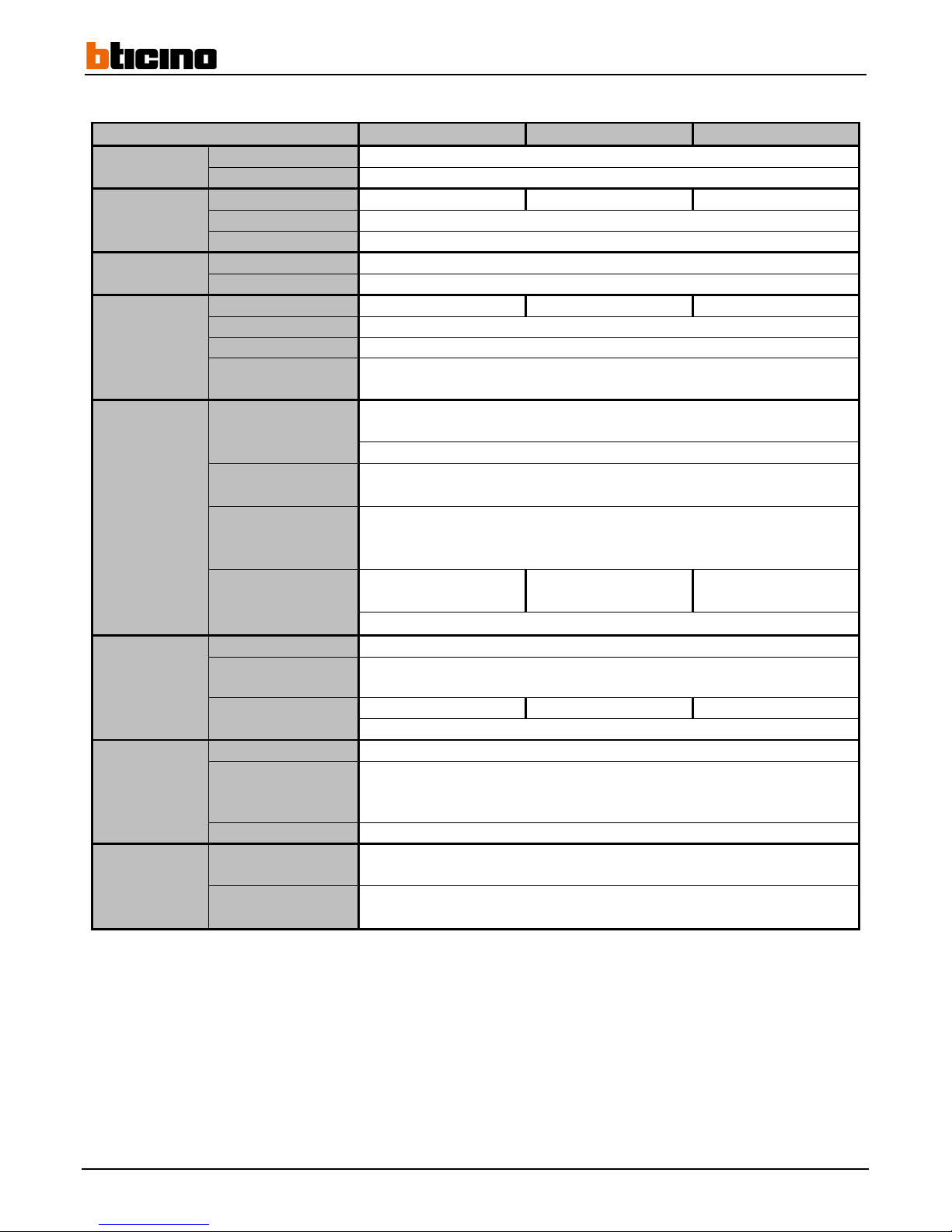
Products 391 519 391 520 391521
System
Main processor Integrated high performance microprocessor
Operating system Linux
Video
Input 4 channels 8 channels 16 channels
Standard
PAL
Output 1 BNC, 1 VGA, 1 HDMI
Audio
Input 1 BNC
Output 1 BNC
Display
Multivision 1/4 1/4/8 1/4/8/16
Resolution 1920×1080/1280×1024/1280×720/1024×768
Masking 4 customisable zones with 4 sides per camera
OSD
Camera title/time/Video loss/Camera lock
Motion detection/recording
Recording
Video/audio
compression
H.264
Recording mode Manual/Calendar(permanent, motion detection, alarm)/Stop
Recording interval
1 to 120 min (default: 60 min)/pre-recording: 1 to sec
Post-recording: 10 to sec
Resolution
960H (960x576)
D1 (704x576)
HD1,CIF
Recording capacity
100fps@960H
100fps@D1
200fps@960H
200fps@D1
400fps@960H
400fps@D1
Rate 48 to 8192kb/s
Video and
alarm
detection
Motion detection Zones: 396 (22×18)/Sensitivity: 1 to 6 (max level: 6)
Video loss and
camera masking
Supported
Alarm inputs 4 channels 8 channels 16 channels
Alarm outputs 6 channels
Playback and
backup
Search mode Time/Date/Alarm/Motion detection/Exact search
Playback
functionalities
Playback/Pause/Back/Fast forward/Slow/Next file/Previous file/Next
camera/Previous camera/Full screen/Repeat
Recording selection/Digital zoom
Backup mode USB device/DVD-RW/device eSATA/Network upload
Network
Ethernet
2 RJ45 port
(10/100/1000)
Network
functionalities
HTTP/TCP/IP/IPv4/IPv6/UPNP/RTSP/UDP/SMTP/NTP/DHCP/DNS/IP Filter/PPPOE
DDNS/FTP/Alarm server/Network camera search
Page 81
User Manual
4 Channel 1 TB HR DVR
8 Channel 2 TB HR DVR
16 Channel 4 TB HR DVR
4 Channel 1 TB HR DVR
81
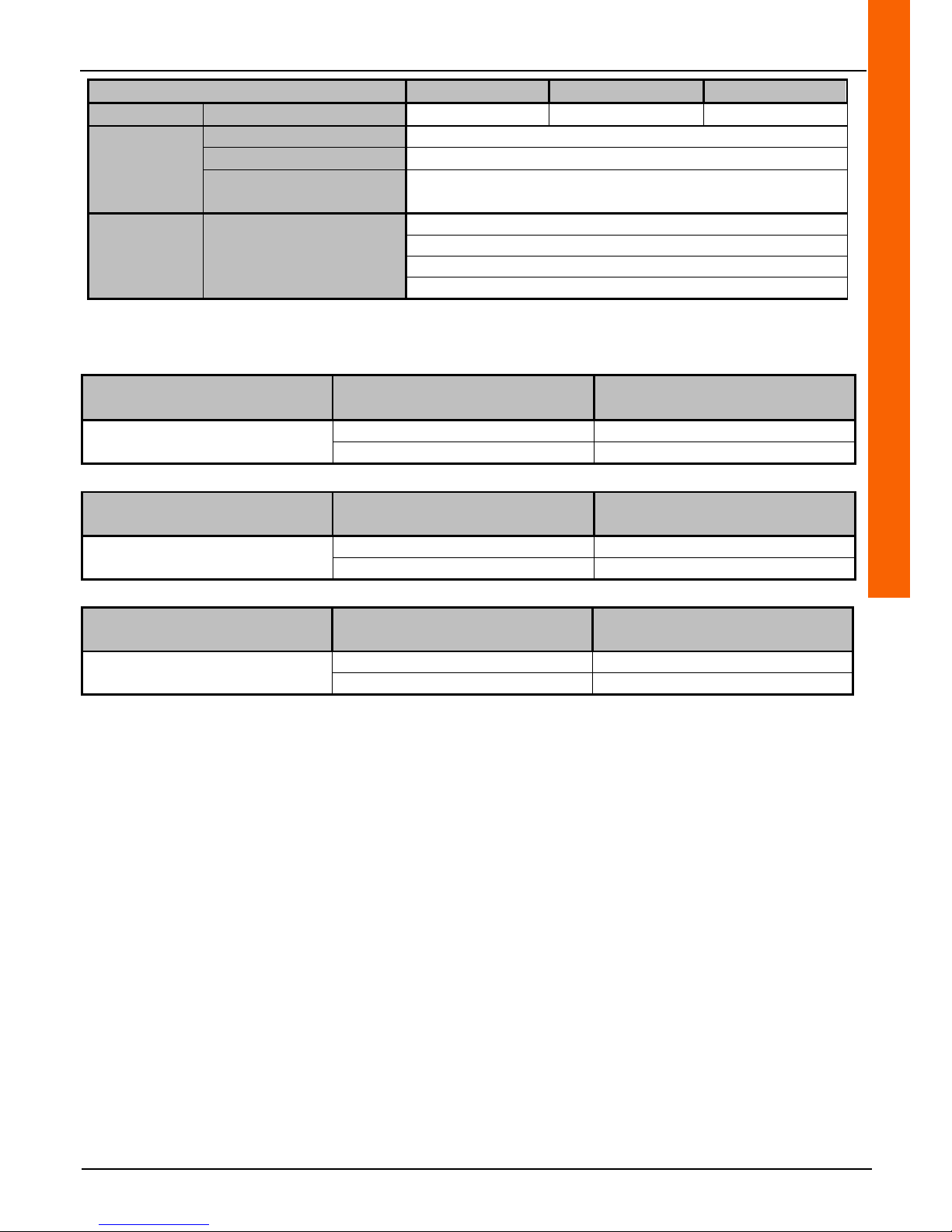
Products 391519 391520 391521
Hard drive
Hard drive provided 1 × 1TB 1 × 2TB 2 × 2TB
Auxiliary
interface
USB interface 4 USB ports
eSATA 1 port
Power supply
100 – 240V AC
50/60Hz
Environmental
Electrical consumption 45 W
Conditions of use
-10°C +55°C
Dimensions
440mm×460mm×89mm
Weight 6 kg (without HDD)
5.1 Recording length
391519
D1 resolution (768Kb/s)
with 4 cameras
960H resolution (768Kb/s)
with 4 cameras
25fps per camera
28 days 28 days
1TB 1 HDD 1TB 1 HDD
391520
D1 resolution (768Kb/s)
with 8 cameras
960H resolution (768Kb/s)
with 8 cameras
25fps per camera
28 days 28 days
2TB 1 HDD 2TB 1 HDD
391521
D1 resolution (768Kb/s)
with 16 cameras
960H resolution (768Kb/s)
with 16 cameras
25fps per camera
28 days 28 days
2TB 2HDD 2TB 2 HDD
Page 82

 Loading...