

Page 1
1
344192
BT00642-a
30 mm
168 mm
150 mm
ON
OFF
J1 J2
BUS
1
2
5
1
P M
N
ART.344182
1 2 43
6
5
7
12
11
910 8
13
1617
19
18
14
15
-EN
TECHNICAL SHEETS
Dimensional data
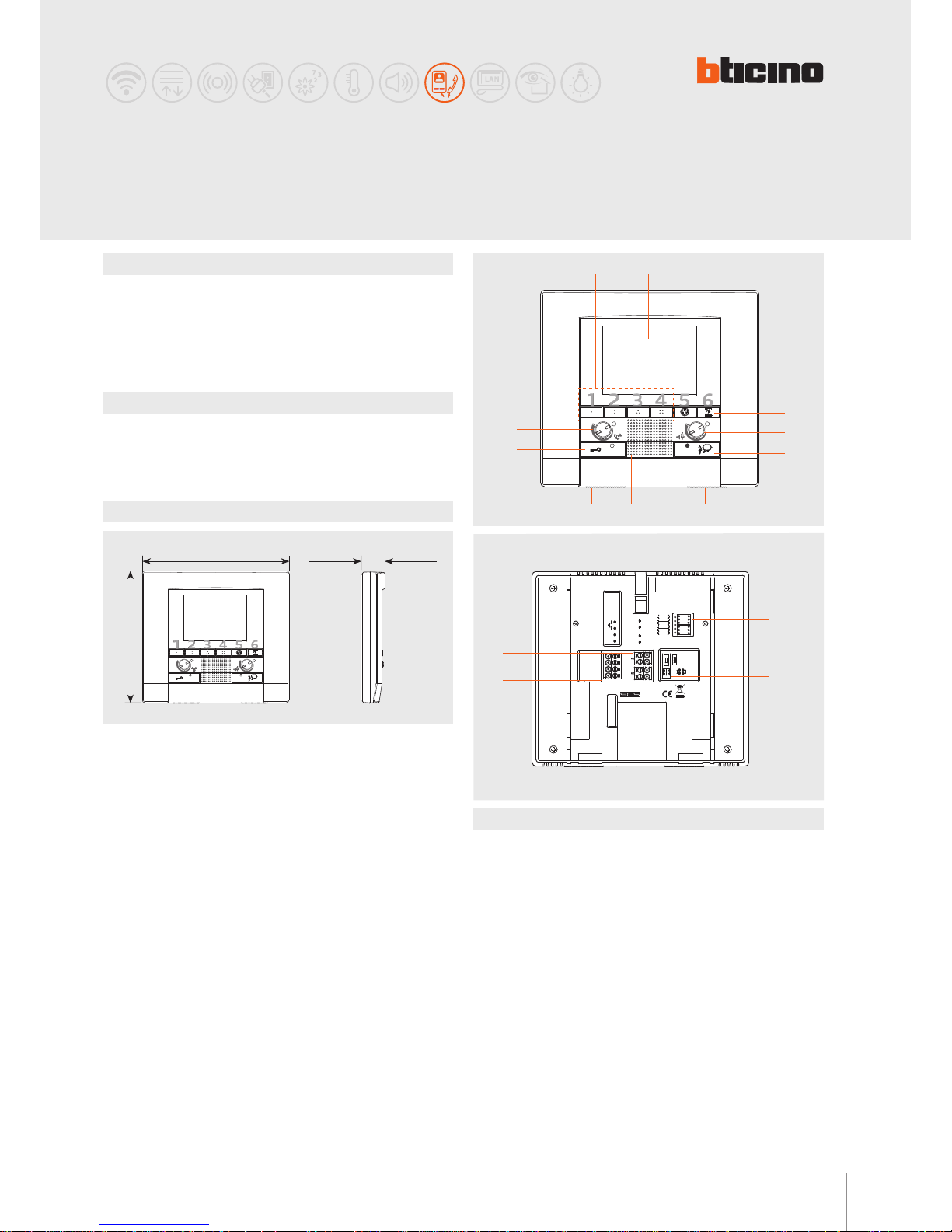
Description
2 WIRE handsfree video handset for wall mounted installation.
With 3.5” colour LCD display.
Keys available: auto-switching on, door lock release, staircase lights, handsfree
connection, and four programmable keys.
Signalling LED for call exclusion, door status, connection with the entrance panel.
It can be wall mounted using the appropriate bracket (supplied).
Technical data
Power supply from SCS BUS: 18 – 27 Vdc
Stand by absorption: 5 mA
Max. operating absorption: 320 mA
Operating temperature: 5 - 40°C
Legend
1 - 4 Programmable keys (through conguration)
2 - 3.5” colour LCD display
3 - Entrance panel/cycling key
4 - Microphone
5 - Staircase light switching on key
6 - Loudspeaker volume adjustment
7 - Connection key + LED
8 - Brightness adjustment
9 - Loudspeaker
10 - Display colour adjustment
11 - Door lock key + LED
12 - Bell adjustment and exclusion (LED)
13 - Line termination ON/OFF micro-switch
14 - Congurator socket
15 - Jumper J2 - MASTER/SLAVE (remove to enable SLAVE)
16 - Jumper J1 - remove to enable additional power supply
17 - Additional power supply connection clamps
18 - Clamps for the connection of oor call auxiliary services and extra bell
19 - Clamps for the connection of the 2-WIRE SCS BUS
POLYX
handsfree video handset
Rear view
Front view
Page 2
2
BT00642-a
344192
P M
N
-EN
TECHNICAL SHEETS
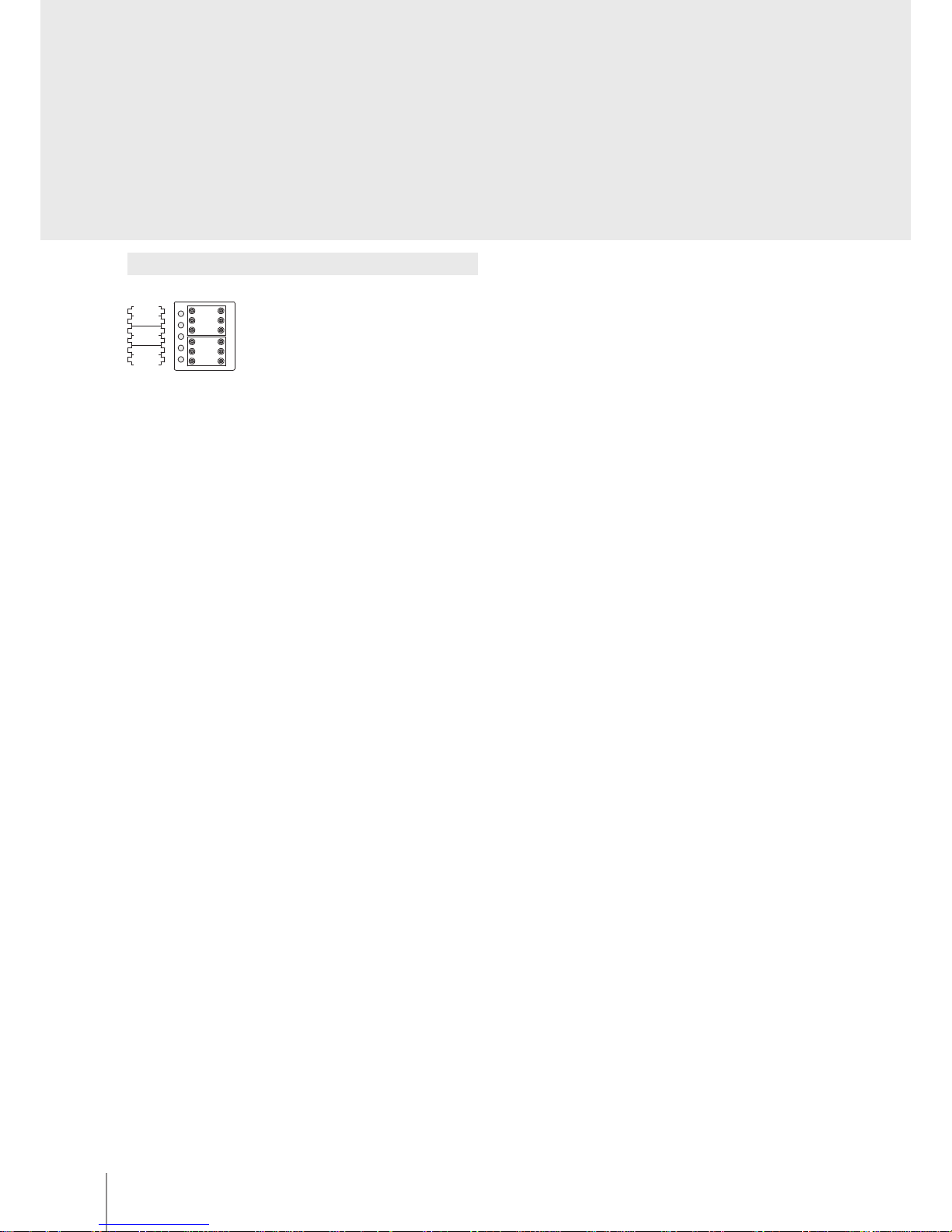
Conguration
The device must be only physically congured.
N – handset number
The N congurator assigns each video handset an identication number within the
system. The handsets must be congured in progressive order. The handsets must be
congured in progressive mode. Handsets with parallel connection (max 3 are allowed
inside the apartment without item 346850) must be congured with the same N
congurator. Additional audio handsets, video handsets and/or bells can be installed in
parallel to the basic video handset.
P – entrance panel association
The P congurator identies the associated EP, or the rst entrance panel that switches
itself on when the pushbutton is pressed the rst time, as well as which door lock with
idle video handset is activated, when the pushbutton is pressed.
M – operating mode
The M congurator assigns the operating mode to the 4 programmable keys following
the indications of the following pages.
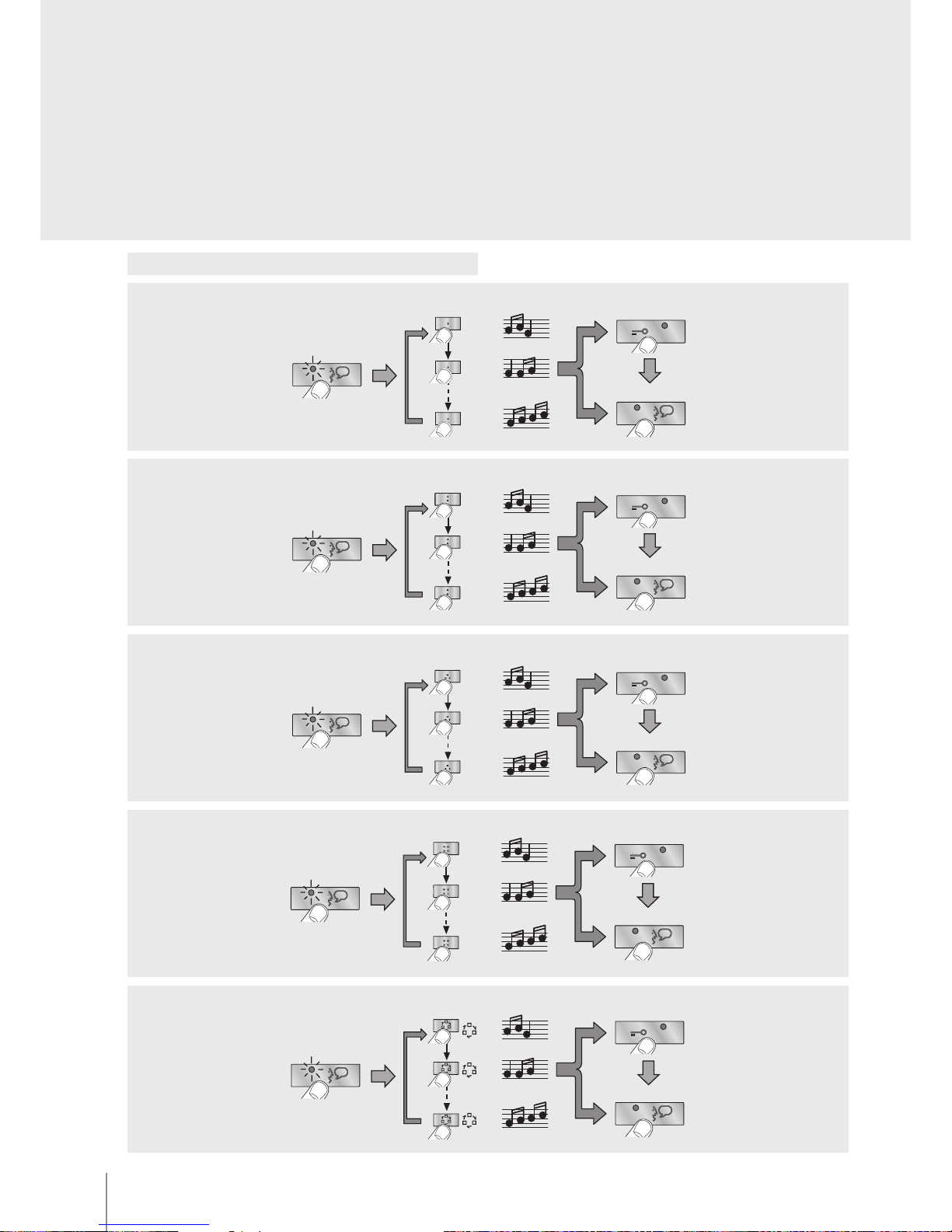
The video handset oers the possibility to select among 16 types of bells with
programmed ringtones, which can be freely associated to the following type of calls:
- Calls from the entrance panel (congured with S=0)
- Calls from the entrance panel (congured with S=1)
- Intercom call
- Floor call
(See the bell programming table in the following pages)
Page 3
3
344192
BT00642-a
-EN
TECHNICAL SHEETS
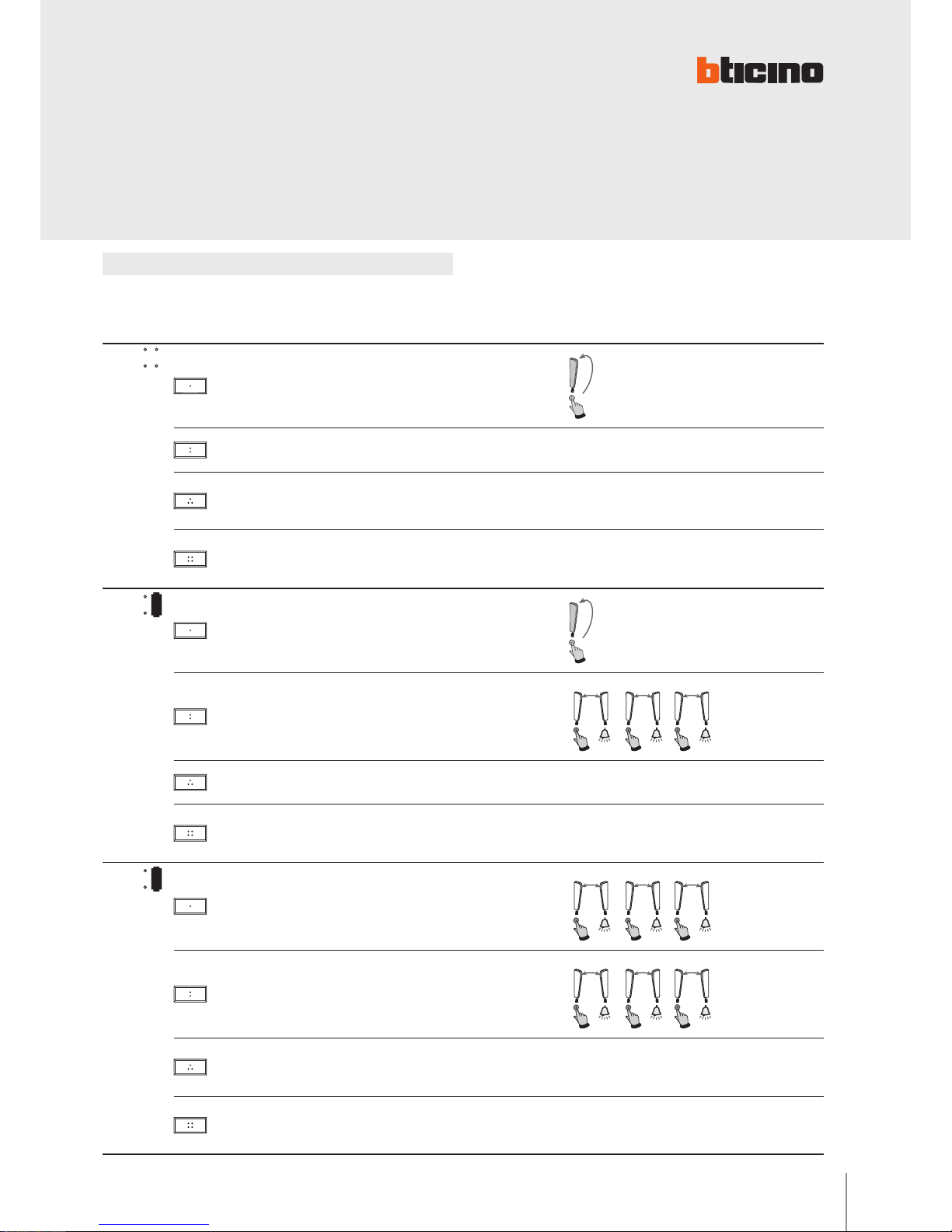
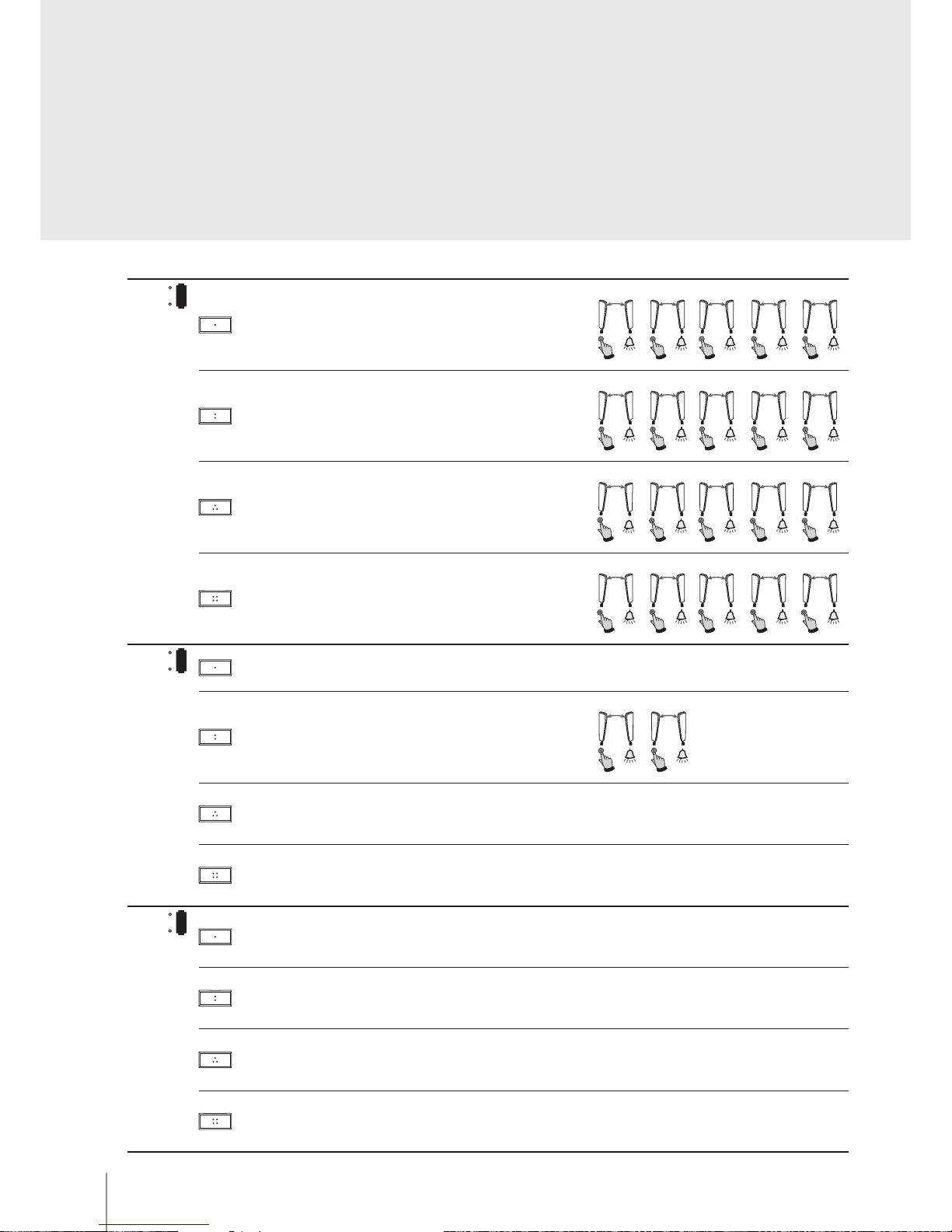
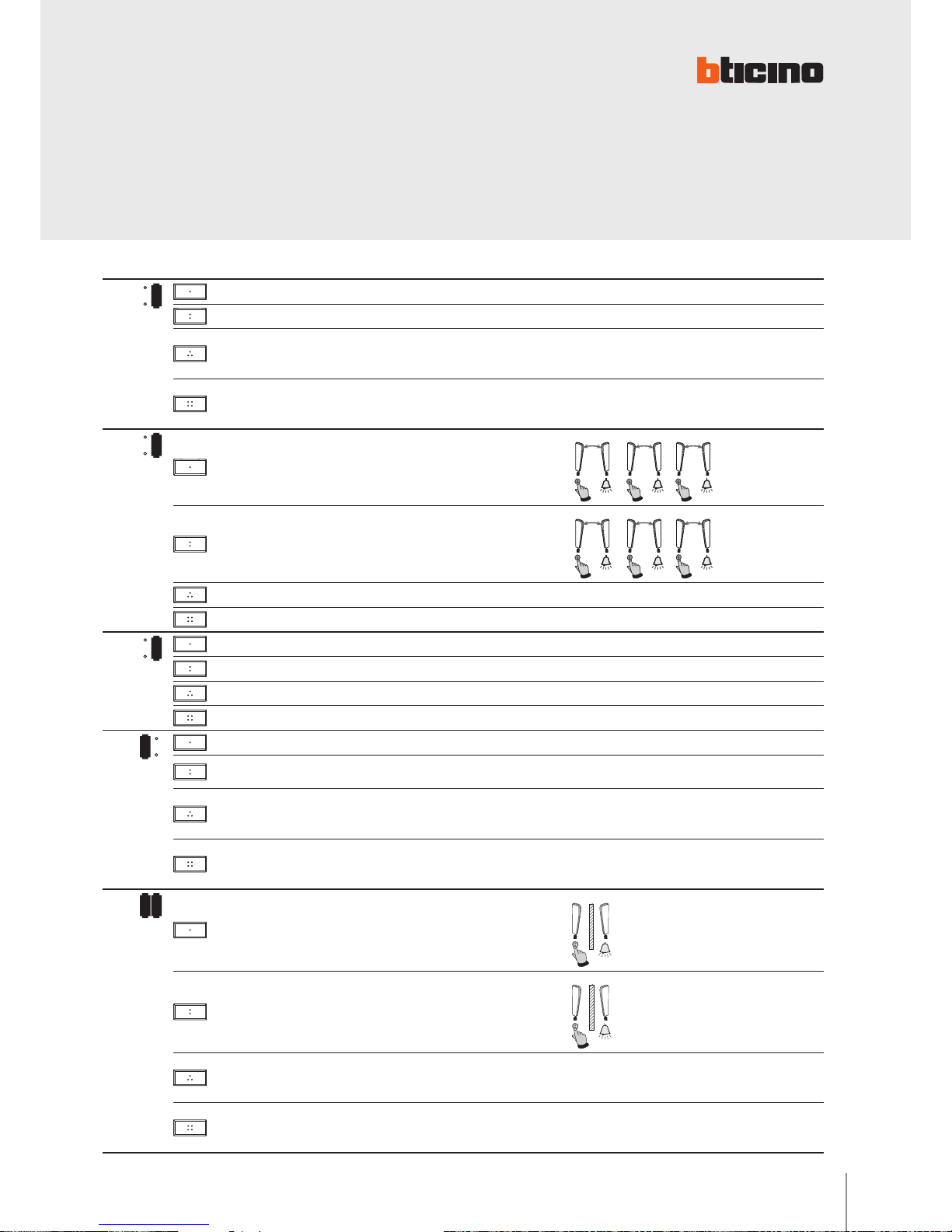
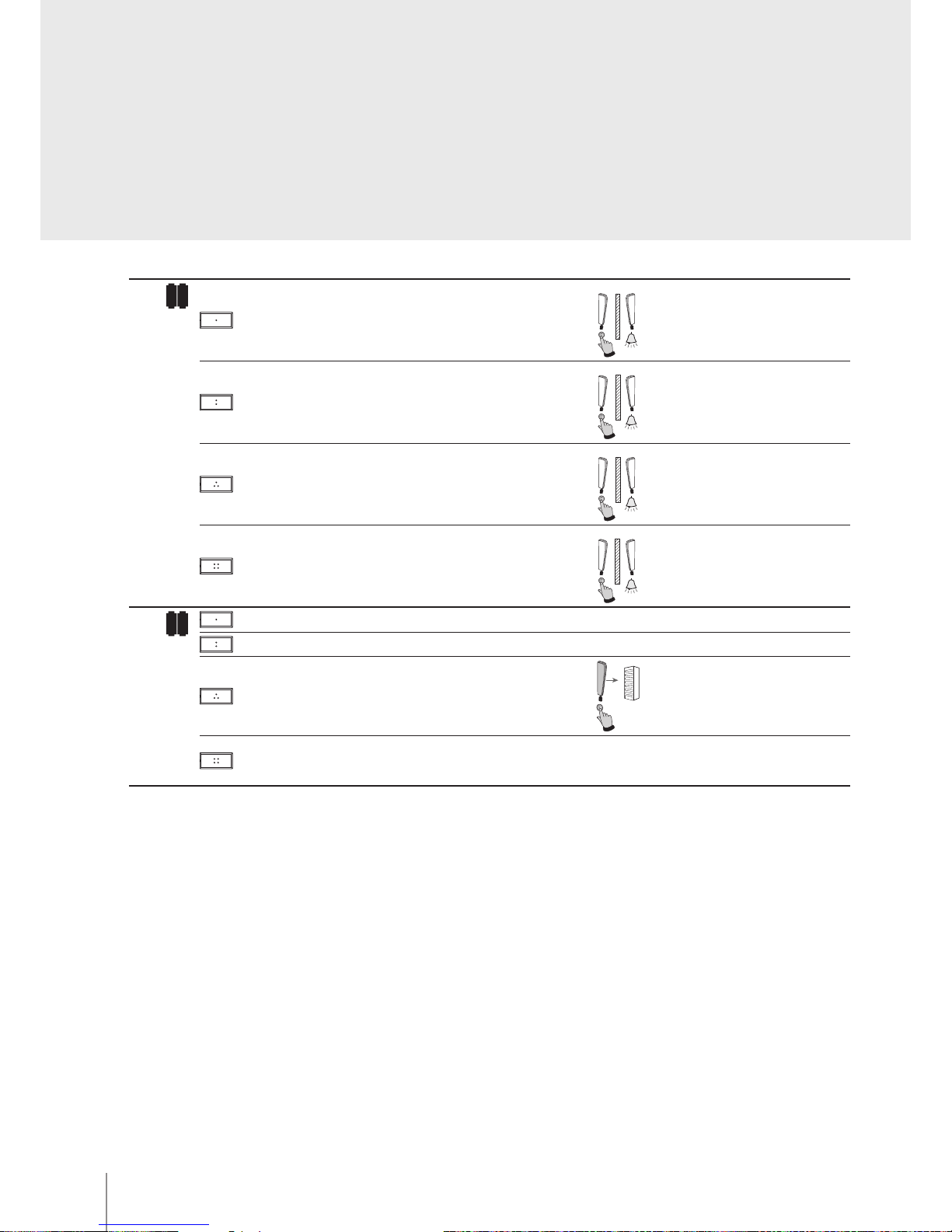
Below are the various operating modes that can be assigned to the 4 programmable keys:
Conguration
MODE KEY FUNCTION NOTES
MOD =
1
Intercom on itself, it sends the call to all handsets with the same address.
2
EP activation (congured with P+1), directly, without call, or activation of the
actuator, item 346200 (congured with P+1 and MOD=9)
3
EP door lock release (congured with P+1), directly, without call, or activation of
the actuator, item 346200 (congured with P+1 and MOD=5), or activation of door
lock actuators 346230-346260 (congured with P+1)
4
EP door lock release (congured with P+2), directly, without call, or activation of
the actuator, item 346200 (congured with P+2 and MOD=5), or activation of door
lock actuators 346230-346260 (congured with P+2)
1
MOD =
1
Intercom on itself, it sends the call to all handsets with the same address.
2
Intercom inside the apartment, in systems with apartment interface item 346850,
or intercom among apartments without apartment interface.
2
N=1N=22N=2N=32N=3N=2
3
EP activation (congured with P+1), directly, without call, or activation of the
actuator, item 346200 (congured with P+1 and MOD=9)
4
EP door lock release (congured with P+1), directly, without call, or activation of
the actuator, item 346200 (congured with P+1 and MOD=5), or activation of door
lock actuators 346230-346260 (congured with P+1)
2
MOD =
1
Intercom inside the apartment, in systems with apartment interface item 346850,
or intercom among apartments without apartment interface.
1
N=1N=31N=2N=1
1
N=3N=1
2
Intercom inside the apartment, in systems with apartment interface item 346850,
or intercom among apartments without apartment interface.
2
N=1N=22N=2N=32N=3N=2
3
EP door lock release (congured with P+1), directly, without call, or activation of
the actuator, item 346200 (congured with P+1 and MOD=5), or activation of door
lock actuators 346230-346260 (congured with P+1)
4
EP door lock release (congured with P+2), directly, without call, or activation of
the actuator, item 346200 (congured with P+2 and MOD=5), or activation of door
lock actuators 346230-346260 (congured with P+2)
Page 4
4
BT00642-a
344192
-EN
TECHNICAL SHEETS
MODE KEY FUNCTION NOTES
3
MOD =
1
Intercom inside the apartment, in systems with apartment interface item 346850,
or intercom among apartments without apartment interface.
1
N=1N=51N=2N=11N=3N=1
1
N=4N=11N=5N=1
2
Intercom inside the apartment, in systems with apartment interface item 346850,
or intercom among apartments without apartment interface.
2
N=1N=22N=2N=52N=3N=22N=4N=22N=5N=2
3
Intercom inside the apartment, in systems with apartment interface item 346850,
or intercom among apartments without apartment interface.
3
N
=
N1
=
3
3
N=2N=33N=3N=5
3
N=4N=3
3
N=5N=3
4
Intercom inside the apartment, in systems with apartment interface item 346850,
or intercom among apartments without apartment interface.
4
N=1N=44N=2N=44N=3N=4
4
N=4N=5
4
N=
5N
=4
4
MOD =
1
EP activation (congured with P+1), directly, without call, or activation of the
actuator, item 346200 (congured with P+1 and MOD=9)
2
Intercom inside the apartment, in systems with apartment interface item 346850,
or intercom among apartments without apartment interface.
2
N=1N=2
2
N=2N=1
3
EP door lock release (congured with P+1), directly, without call, or activation of
the actuator, item 346200 (congured with P+1 and MOD=5), or activation of door
lock actuators 346230-346260 (congured with P+1)
4
EP door lock release (congured with P+2), directly, without call, or activation of
the actuator, item 346200 (congured with P+2 and MOD=5), or activation of door
lock actuators 346230-346260 (congured with P+2)
5
MOD =
1
EP door lock release (congured with P+1), directly, without call, or activation of
the actuator, item 346200 (congured with P+1 and MOD=5), or activation of door
lock actuators 346230-346260 (congured with P+1)
2
EP door lock release (congured with P+2), directly, without call, or activation of
the actuator, item 346200 (congured with P+2 and MOD=5), or activation of door
lock actuators 346230-346260 (congured with P+2)
3
EP door lock release (congured with P+3), directly, without call, or activation of
the actuator, item 346200 (congured with P+3 and MOD=5), or activation of door
lock actuators 346230-346260 (congured with P+3)
4
EP door lock release (congured with P+4), directly, without call, or activation of
the actuator, item 346200 (congured with P+4 and MOD=5), or activation of door
lock actuators 346230-346260 (congured with P+4)
Page 5
5
344192
BT00642-a
-EN
TECHNICAL SHEETS
MODE KEY FUNCTION NOTES
6
MOD =
1
Activation of the scenario saved in the scenario module (SCENARIO 1)
2
Activation of the scenario saved in the scenario module (SCENARIO 2)
3
EP door lock release (congured with P+1), directly, without call, or activation of
the actuator, item 346200 (congured with P+1 and MOD=5), or activation of door
lock actuators 346230-346260 (congured with P+1)
4
EP door lock release (congured with P+2), directly, without call, or activation of
the actuator, item 346200 (congured with P+2 and MOD=5), or activation of door
lock actuators 346230-346260 (congured with P+2)
7
MOD =
1
Intercom inside the apartment, in systems with apartment interface item 346850,
or intercom among apartments without apartment interface.
1
N=1N=3
1
N=2N=1
1
N=3N=1
2
Intercom inside the apartment, in systems with apartment interface item 346850,
or intercom among apartments without apartment interface.
2
N=1N=22N=2N=3
2
N=3N=2
3
Activation of the scenario saved in the scenario module (SCENARIO 1)
4
Activation of the scenario saved in the scenario module (SCENARIO 2)
8
MOD =
1
Activation of the scenario saved in the scenario module (SCENARIO 1)
2
Activation of the scenario saved in the scenario module (SCENARIO 2)
3
Activation of the scenario saved in the scenario module (SCENARIO 3)
4
Activation of the scenario saved in the scenario module (SCENARIO 4)
1
MOD =
1
General Intercom, sends a call to all the handsets of the system.
2
EP activation (congured with P+1), directly, without call, or activation of the
actuator, item 346200 (congured with P+1 and MOD=9)
3
EP door lock release (congured with P+1), directly, without call, or activation of
the actuator, item 346200 (congured with P+1 and MOD=5), or activation of door
lock actuators 346230-346260 (congured with P+1)
4
EP door lock release (congured with P+2), directly, without call, or activation of
the actuator, item 346200 (congured with P+2 and MOD=5), or activation of door
lock actuators 346230-346260 (congured with P+2)
1 2
MOD =
1
Intercom between apartments, in systems with apartment interface, item 346850
1
N=1
2
Intercom between apartments, in systems with apartment interface, item 346850
2
N=2
3
EP door lock release (congured with P+1), directly, without call, or activation of
the actuator, item 346200 (congured with P+1 and MOD=5), or activation of door
lock actuators 346230-346260 (congured with P+1)
4
EP door lock release (congured with P+2), directly, without call, or activation of
the actuator, item 346200 (congured with P+2 and MOD=5), or activation of door
lock actuators 346230-346260 (congured with P+2)
Page 6
6
BT00642-a
344192
-EN
TECHNICAL SHEETS
MODE KEY FUNCTION NOTES
1 3
MOD =
1
Intercom between apartments, in systems with apartment interface, item 346850
1
N=1
2
Intercom between apartments, in systems with apartment interface, item 346850
2
N=2
3
Intercom between apartments, in systems with apartment interface, item 346850
3
N=3
4
Intercom between apartments, in systems with apartment interface, item 346850
4
N=4
1 6
MOD =
1
Activation of the scenario saved in the scenario module (SCENARIO 1)
2
Activation of the scenario saved in the scenario module (SCENARIO 2)
3
General Intercom, sends a call to all the handsets of the system.
4
EP door lock release (congured with P+1), directly, without call, or activation of
the actuator, item 346200 (congured with P+1 and MOD=5), or activation of door
lock actuators 346230-346260 (congured with P+1)
Page 7
7
344192
BT00642-a
-EN
TECHNICAL SHEETS
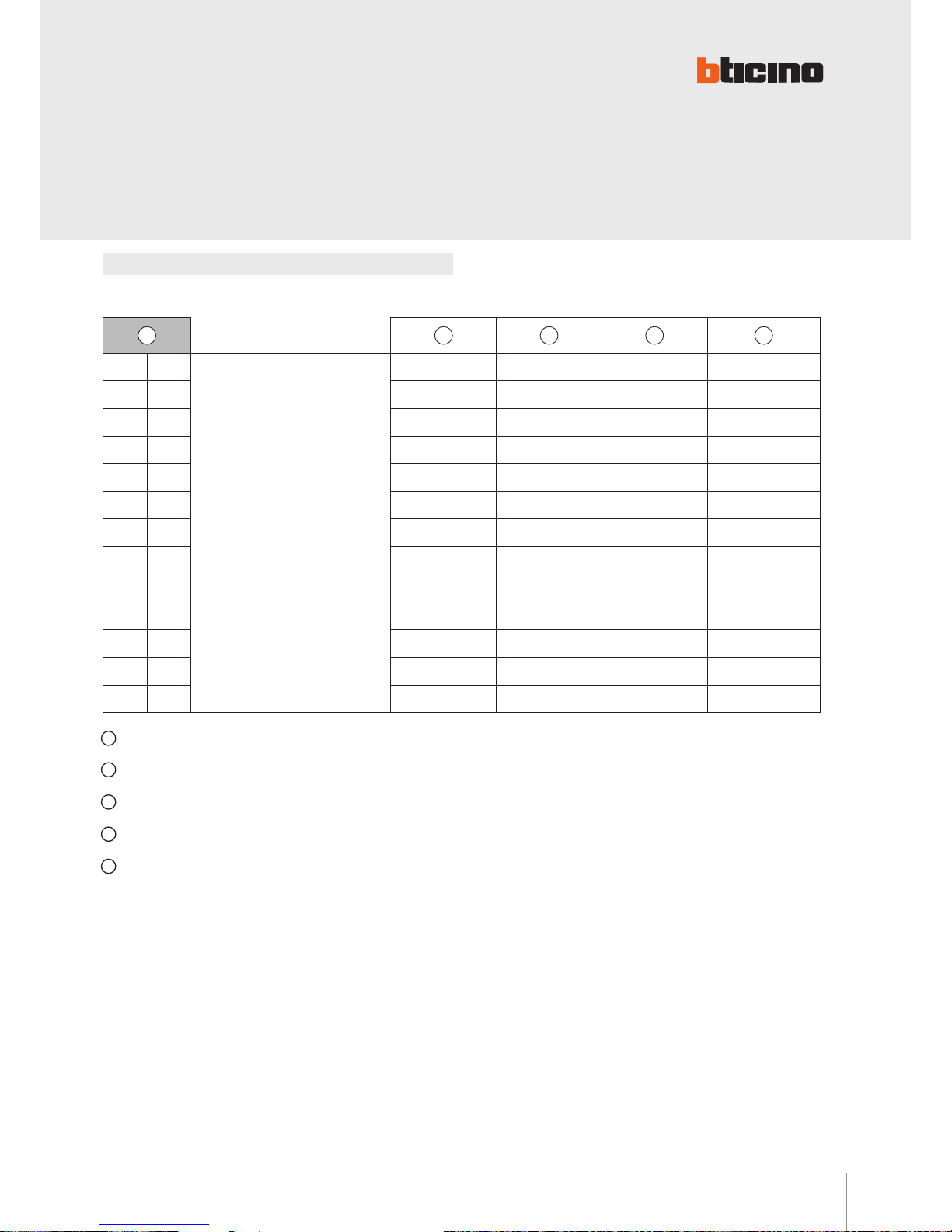
Conguration
A Conguration selected for the operation of the keys (see previous pages)
B Conguration selected for the operation of the keys + OFFICE function
C Conguration selected for the operation of the keys + PAGING function
D Conguration selected for the operation of the keys + HANDSFREE function (Can be activated only on a single device for each unit system)
E Conguration selected for the operation of the keys + OFFICE and PAGING function
Further SPECIAL functions (e.g. professional studio, pager, handsfree) can be enabled by
conguring MOD in the following modes:
A B C D E
0 0
+
20 = B
40 = C
60 = D
80 = E
20 40 60 80
1 0 30 50 70 90
0 1 21 41 61 81
0 2 22 42 62 82
1 2 32 52 72 92
0 3 23 43 63 83
1 3 33 53 73 93
0 4 24 44 64 84
0 5 25 45 65 85
0 6 26 46 66 86
1 6 36 56 76 96
0 7 27 47 67 87
0 8 28 48 68 88
Page 8
8
BT00642-a
344192
>3s
Led ON
BEEP
EXIT
>3s
BEEP
EXIT
>3s
Led ON
BEEP
EXIT
>3s
Led ON
>3s
BEEP
BEEP
BEEP
EXIT
EXIT
2
1
CLAK
3
-EN
TECHNICAL SHEETS
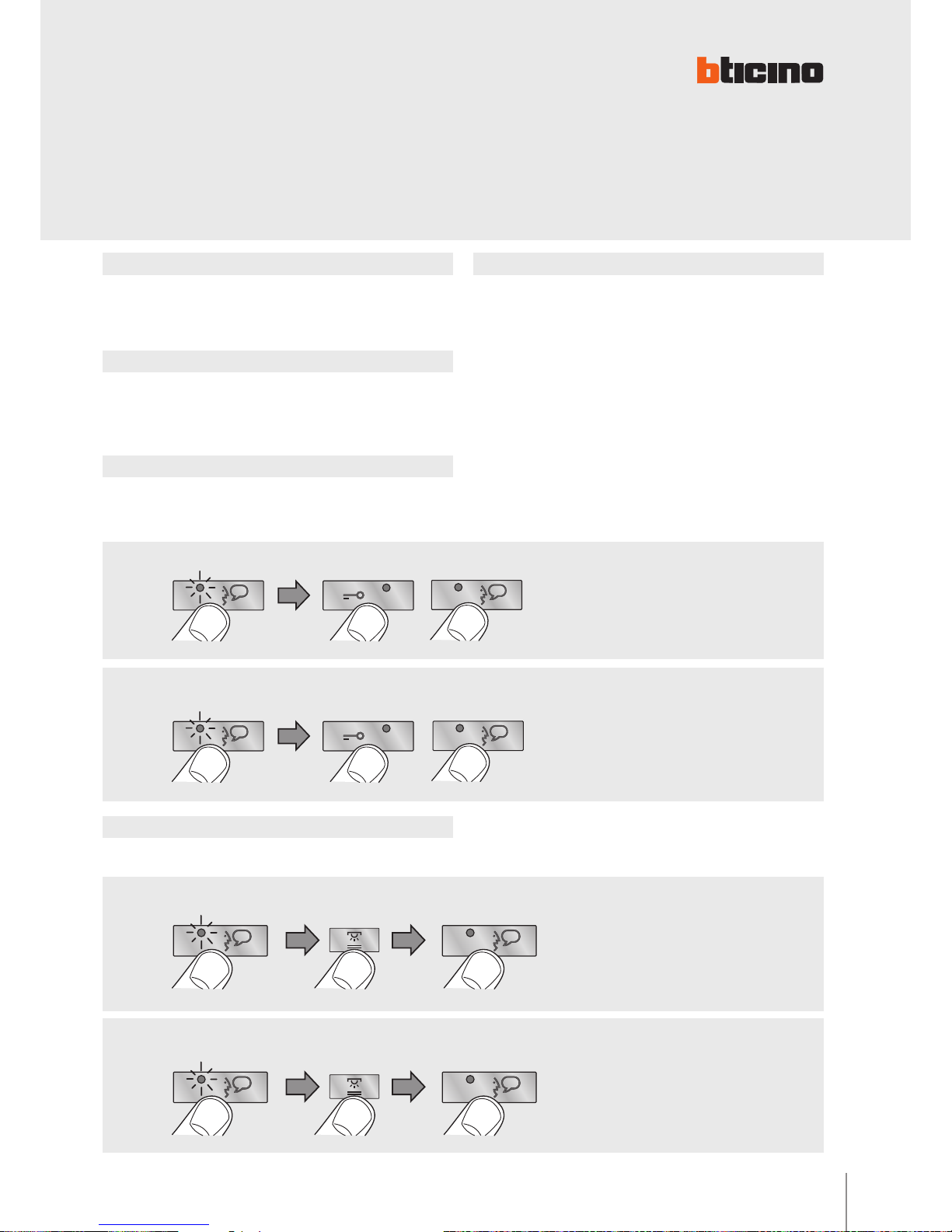
OFFICE FUNCTION DETAIL
To ENABLE the function
To DISABLE the function
It cannot be enabled together with the “DOOR STATUS” function.
With the function active, when a call is received from
the entrance panel, the video handset rings and the
associated door lock is automatically released, without
the need for pressing the door lock release key on the
video handset.
Page 9
9
344192
BT00642-a
>3s
BEEP
EXIT
>3s
BEEP
EXIT
>3s
BEEP
EXIT
>3s
>3s
BEEP
EXIT
EXIT
BEEP
BEEP
BEEP
BEEP
>3s
BEEP
BEEP
>3s
BEEP
BEEP
>3s
-EN
TECHNICAL SHEETS
DOOR STATUS function PUSH TO TALK function
PAGING function
HANDSFREE function
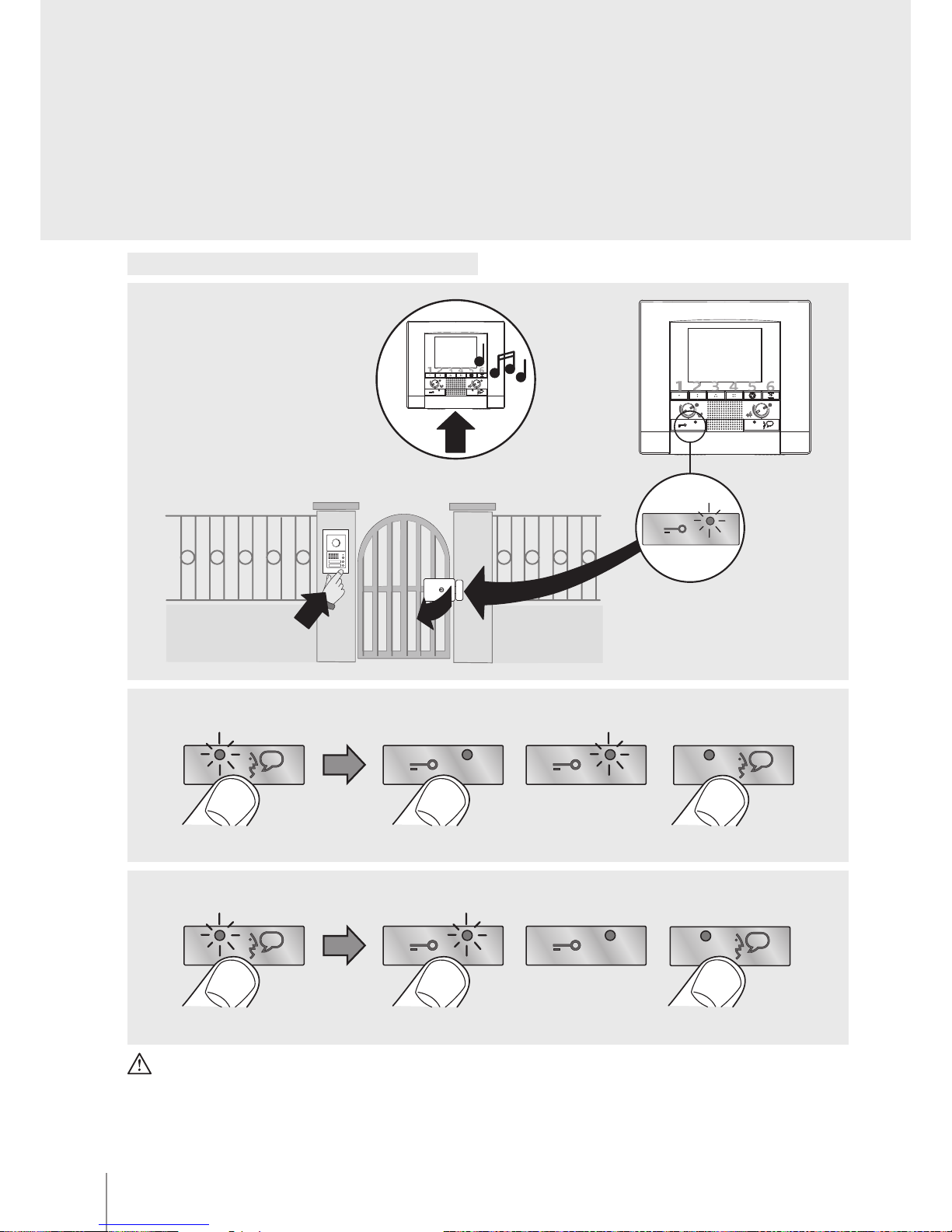
This function noties the status of the door lock. If open, the “door lock LED” ashes, if
closed, the LED stays o.
NOTA: è attivabile solo se l’impianto lo prevede; NON è attivabile contemporaneamente
alla OFFICE function.
Enable/disable key sound
In the base conguration when a key is pressed, a beep is emitted. This function may be
disabled/enabled with the following procedure:
If the entrance panel is in a particularly noisy position, during the conversation it will
be possible to enable the “PUSH TO TALK” function, which will provide a better quality
of communication.
To enable the PUSH TO TALK function during the conversation proceed as follows:
- Press the Connection key for at least 2 seconds, to enable the communication with the
entrance panel.
The LED stays green.
- Release the key to listen to the entrance panel. The LED turns red.
- To end the connection press the Connection key briey.
The LED turns o.
This function can be used to send voice messages using the microphone of the device
through the speakers of the sound system. To activate briey press the ”Connection” key
while the device is in the idle condition. The activation of the function is conrmed by
the green LED coming on. To DISABLE the func tion press the ”Connection” key again.
The HANDSFREE function automatically activates the microphone and the loudspeaker
when a call is received, without the need for pressing the Connection key to answer (the
connection is automatically established when the call is received).
To ENABLE the function
To ENABLE the function
To DISABLE the function
To DISABLE the function
Page 10
10
BT00642-a
344192
EXIT
OK
1
17
2
>3s
2
2
2
EXIT
OK
1
17
2
>3s
1
1
1
EXIT
OK
1
17
2
>3s
3
3
3
EXIT
OK
1
16
2
>3s
4
4
4
EXIT
OK
1
17
2
>3s
2
2
2
EXIT
OK
1
17
2
>3s
1
1
1
EXIT
OK
1
16
2
>3s
3
3
3
EXIT
OK
1
16
2
>3s
2
2
2
EXIT
OK
1
17
2
>3s
1
1
1
EXIT
OK
1
16
2
>3s
1
1
1
EXIT
OK
1
17
2
>3s
2
2
2
EXIT
OK
1
17
2
>3s
1
1
1
EXIT
OK
1
17
2
>3s
3
3
3
EXIT
OK
1
17
2
>3s
4
4
4
EXIT
OK
1
16
2
>3s
EXIT
OK
1
17
2
>3s
2
2
2
EXIT
OK
1
17
2
>3s
1
1
1
EXIT
OK
1
17
2
>3s
3
3
3
EXIT
OK
1
16
2
>3s
4
4
4
EXIT
OK
1
17
2
>3s
2
2
2
EXIT
OK
1
17
2
>3s
1
1
1
EXIT
OK
1
16
2
>3s
3
3
3
EXIT
OK
1
16
2
>3s
2
2
2
EXIT
OK
1
17
2
>3s
1
1
1
EXIT
OK
1
16
2
>3s
1
1
1
EXIT
OK
1
17
2
>3s
2
2
2
EXIT
OK
1
17
2
>3s
1
1
1
EXIT
OK
1
17
2
>3s
3
3
3
EXIT
OK
1
2
>3s
4
4
EXIT
OK
1
17
2
>3s
2
2
2
EXIT
OK
1
17
2
>3s
1
1
1
EXIT
OK
1
2
3
3
EXIT
OK
1
17
2
>3s
2
2
2
EXIT
OK
1
17
2
>3s
1
1
1
EXIT
OK
1
16
2
>3s
3
3
3
EXIT
OK
1
16
2
>3s
2
2
2
EXIT
OK
1
17
2
>3s
1
1
1
EXIT
OK
1
16
2
>3s
1
1
1
EXIT
OK
1
17
2
>3s
2
2
2
EXIT
OK
1
17
2
>3s
1
1
1
OK
1
3
3
OK
1
2
EXIT
OK
1
17
2
>3s
1
1
1
OK
1
2
2
2
EXIT
OK
1
17
2
>3s
1
1
1
EXIT
OK
1
16
2
>3s
2
2
2
EXIT
OK
1
17
2
>3s
1
1
1
EXIT
OK
1
16
2
>3s
1
1
1
OK
2
EXIT
OK
1
17
2
>3s
1
1
1
OK
OK
1
1
EXIT
OK
1
2
1
1
EXIT
OK
1
16
2
>3s
1
1
1
-EN
TECHNICAL SHEETS
Programming of bells
Bell selection from MAIN ENTRANCE PANEL (S=0)
Bell selection from SECONDARY ENTRANCE PANEL (S=1)
INTERCOM CALL bell selection
EXTERNAL INTERCOM CALL bell selection
(only with interface item 346850)
FLOOR CALL bell selection
 Loading...