

Page 1
2005-08-19 ver 9
© 2003 BSR Svenska AB
Saab Trionic 7
9-3 2000»
9-5 1998»
Before operating the unit,
please read the manual carefully
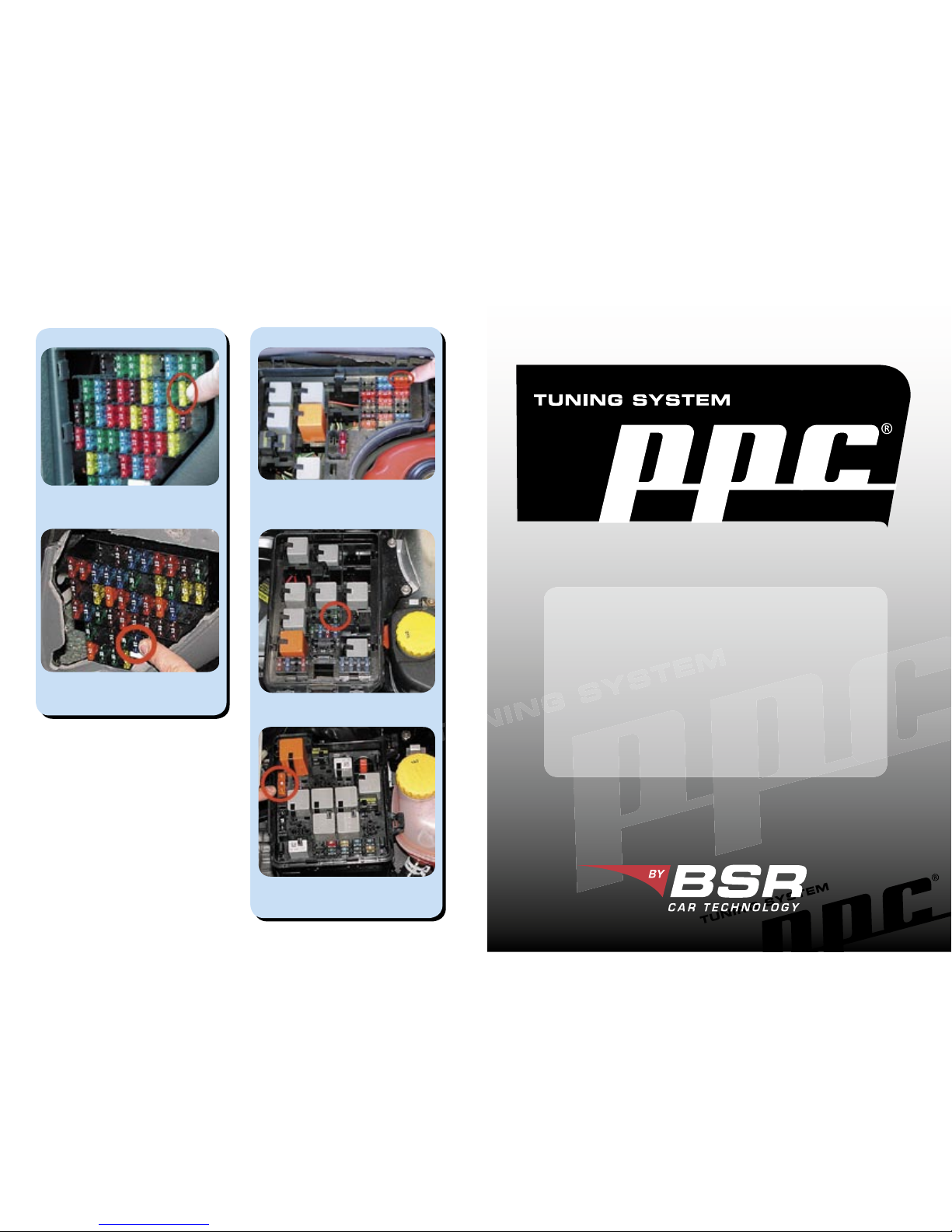
Saab 9-5 Remove fuse no 35 to turn off low
beams. The fuse is located on the driver’s
side, at the left, inside the panel.
Saab 9-5, variant 2: Remove this fuse to
turn off the engine cooling fan. The fuse is
located in the engine house.
Saab 9-5, variant 1: Remove fuse no 15
to turn off the engine cooling fan. The fuse
is located in the engine house.
Saab 9-3 Remove fuse no 15 to turn off low
beams. The fuse is located on the driver’s
side, at the left, inside the panel.
Saab 9-3 Remove fuse no 3 to turn off the
engine cooling fan. The fuse is located in
the engine house.
low beams
engine cooling fan
”Disconnect fan”
9-3
9-5
Page 2
1. Heat up the engine
2. Make sure the car battery is fully charged
3. Connect PPC® to the car
4. Turn ignition on to second position
5. Turn off current consumers
6. Press ENTER
7. Follow instructions on the display
8. Display shows ”Done, remove PPC”
9. Turn ignition off
10. Remove PPC
®
Show stored VIN
Menu function
The VIN to which PPC® is married
is displayed. Your PPC® only works
with that VIN.
Press
MENU
to get this
menu function.
Press
ENTER
to select
the displayed function.
Technical specifi cation
Communication to car:................. CAN high
CAN low
K-line
Communication to PC:.................. RS232
USB
Power requirement:..................... 9-16V/ DC
Energy consumption:................... max 500mAh
Display:...................................... 1x16 LCD
PPC®:......................Portable Program Carrier
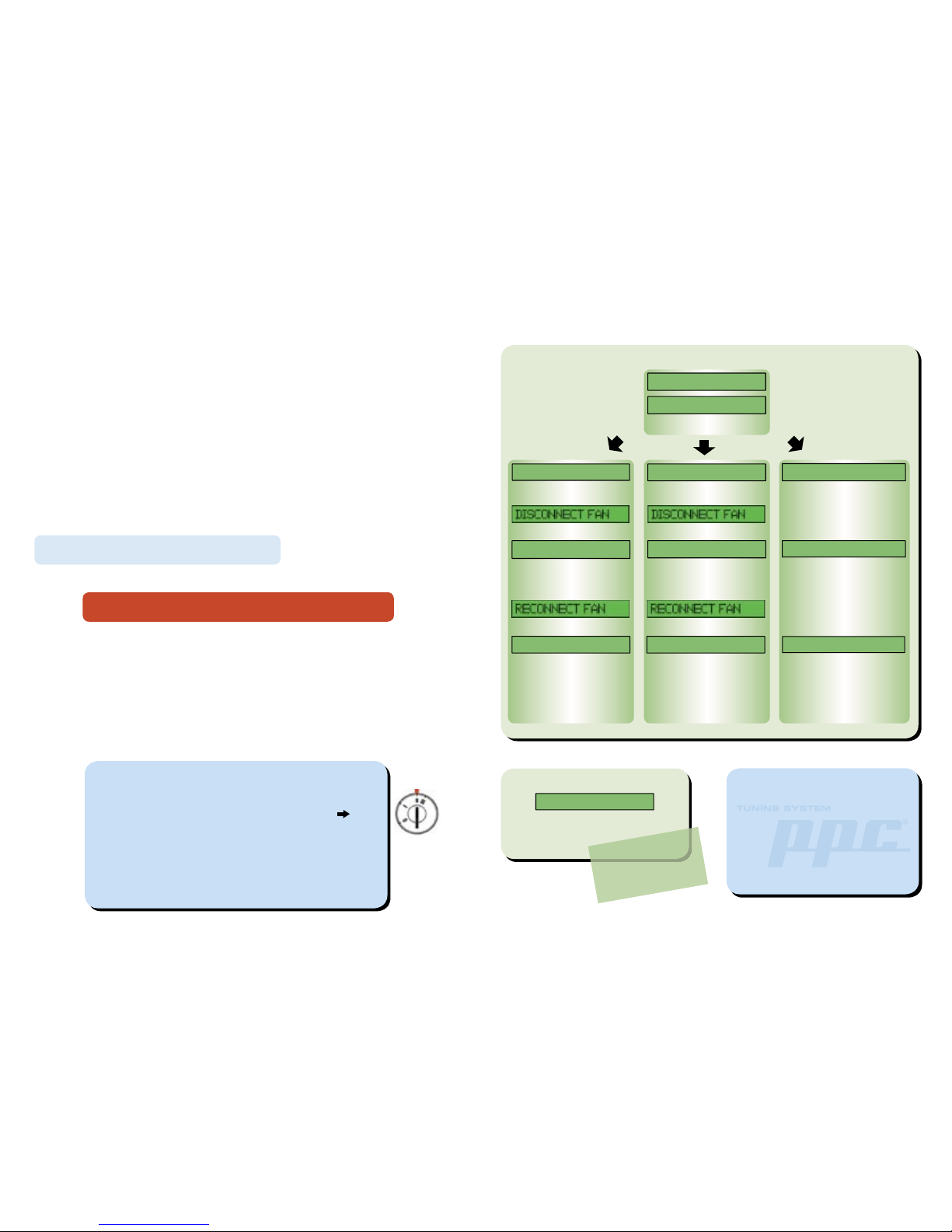
Tune Car?
Tuning 0-100%
Read car?
Reading 0-100%
Press (ENTER)
Please wait...
Done, remove PPc
Done, remove PPc
Press ENTER to start
programming. Duration: 20 min.
Press ENTER to start reading.
Duration: approx 60 min.
Turn ignition off and remove PPC
®
from the diagnostic outlet.
The car is now successfully
tuned!
Turn ignition off and remove PPC
®
from the diagnostic outlet.
PPC® now contains your car’s
original software.
This fi le can be sent to BSR via
Internet. For more info see our
website http://www.bsrab.se/ppc
One of the three following
alternatives will be activated.
Return to orig?
Press ENTER to start
programming. Duration: 20 min.
Original 0-100%
Done, remove PPc
Turn ignition off and remove PPC
®
from the diagnostic outlet.
The car’s original software is
now installed.
Programming must not be
interrupted. Do not disconnect
OBDII cable before display
shows DONE REMOVE PPC.
Reading must not be
interrupted. Do not disconnect
OBDII cable before display
shows DONE REMOVE PPC.
Programming must not be
interrupted. Do not disconnect
OBDII cable before display
shows DONE REMOVE PPC.
Instructions shown on the display
Disconnect cooling fan and low beams, then press Enter. See next page!
Reconnect cooling fan and low beams, then press Enter.
Manual for Saab Trionic 7
Getting started
Check that the car has been properly serviced and that no warning lamps are lit. If anything is
wrong with the car it should fi rst be taken to a car repair shop. Reloading the software will not fi x
a malfunctioning car.
Take the car for a testdrive and heat up the engine to normal temperature before PPC® tuning.
Make sure that the car battery is fully charged, if any doubt connect battery charger.
Use EU 98 octane fuel (US 93 octane).
Cell phone might cause interference. Please remove or turn it off.
Connecting PPC® to the car
Connect the supplied OBDII cable to the PPC® modular port. Do not connect PPC® to the car and
PC at the same time, it can damage PPC®.
Connect PPC® to the OBDII outlet of the car. The OBDII outlet is located under the steering wheel.
Turn ignition on, to the second position before the starter motor gets activated.
Turn off all current consumers, such as: radio, headlight, air conditioning, electric seat heater,
window defroster, cooling fan etc. Do not activate any current consumers while programming.
Operating instructions
When PPC® is connected to the car the status is displayed.
Press MENU button to scroll through the menu functions.
Press ENTER button to select the displayed function.
Do not activate any electrical accessories (cell phone, radio, air conditioning etc.) while
installing the PPC® software. Do not open or close car doors.
After programming disconnect PPC® from the car. PPC® must not be connected to the car while
driving!
Upgrading the PPC
®
Software upgrades can be downloaded to PPC®. To be able to do that you need a COM-port cable,
USB-cable and the program PPC Update. You fi nd PPC Update on the BSR website:
http://www.bsrab.se/ppc. You can also read the supplied manual for PPC Update.
Storage
The PPC® must not be exposed to water, moisture or condensation. Store PPC® in a place free
from dust and vibrations. Do not store PPC® near strong magnetic fi elds.
Programming must not be interrupted! Do not disconnect
OBDII cable before display shows ”Done, remove PPC”.
 Loading...