

Page 1
User manual
Telemedicine System for
self-testing of glucose
Page 2

2
The system
Information about BSICare line
BSICare meter
BSICare strips
The applications
Applications usage
Getting started
How to get a drop of blood
Testing
Warnings
Glycemic diary
Changing the BSICare settings
BSICare bolus application
Calculation of the bolus suggestion
General recommendations
Warnings
Bolus suggestion settings and changing the BSICare bolus settings
Procedure for the calculation of the suggestion bolus
BSICare bolus glycemic diary
Care and maintenance
Replacing the batteries
Control solutions BSICare
Warranty
Error messages
Technical features
Symbols
Warnings for the healthcare
Table of contents
Page 3

3
The BSICare line includes:
BSICare meter
BSICare strips
Control solutions BSICare
BSICare/BSICare bolus applications (for Android and iOS systems)
BSICare.it, website for the user registration, for the activation of the service, for transferring
and management of the data.
* Please check the compatibility of the smartphone or tablet type on www.bsicare.it.
The system
BSICare is a system suitable for the quantitative determination of glucose in the blood,
consisting of BSICare application, BSICare meter, BSICare strips and a device (smartphone or
tablet) Android or iOS. In order to use the system correctly, you should read carefully the USER
MANUAL of the meter and the INSTRUCTION FOR USE of the strips.
The results are stored in the device’s memory and they can be sent to a central server (www.
bsicare.it)
that allows you to manage your data and make it visible to your doctor. The system is bidirectional, that is able to receive and send data. Self-monitoring of glucose can be helpful, but the
treatments which must be performed should always be agreed with the doctor.
Information about BSICare line
Page 4
4
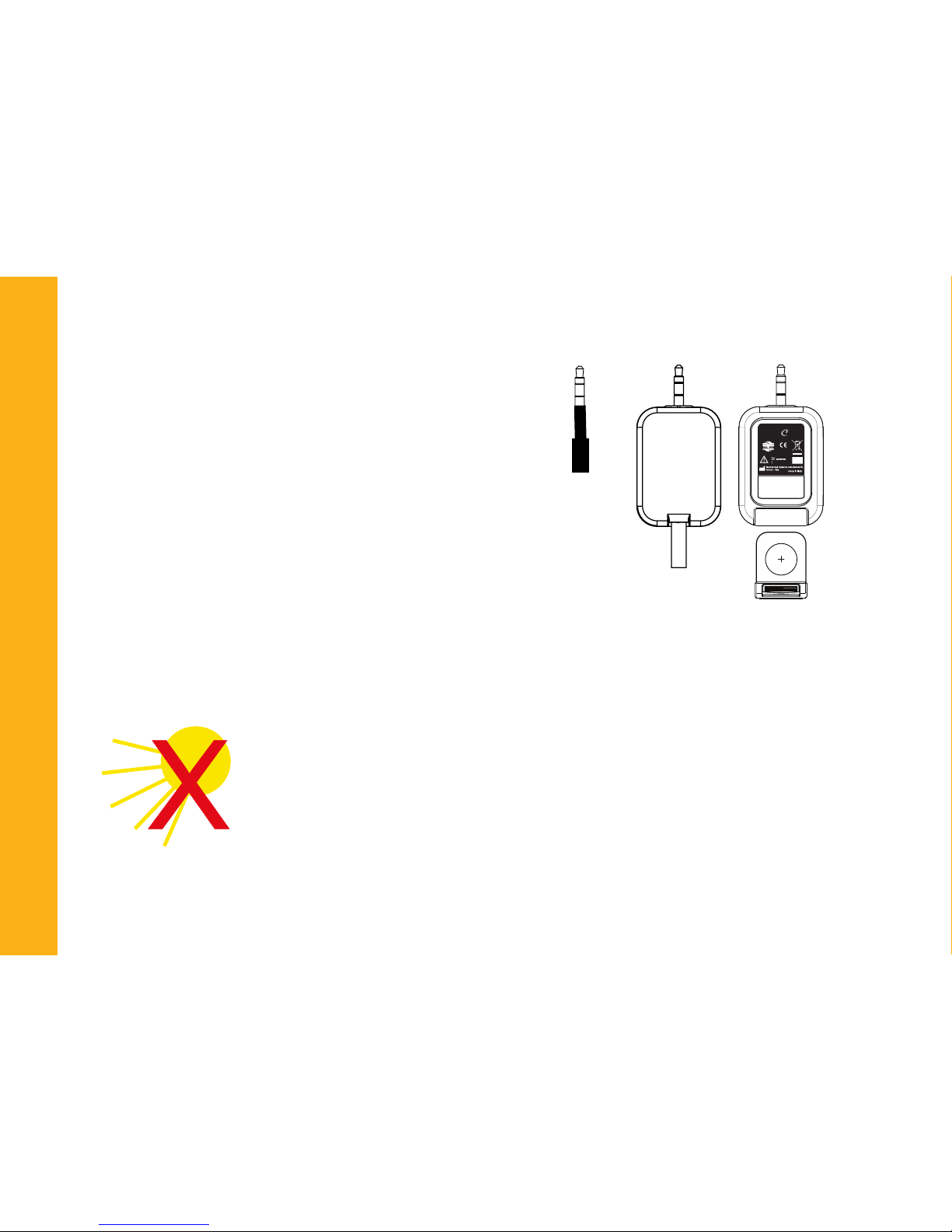
1- Test strip slot
2- Jack connection
3- Jack adapter (please check the list of the devices
compatible on the website www.bsicare.it)
4- Battery compartment
BSICare meter
0344
S/N:
LOT:
0000001
09/2012
X CR1620
BSI
are
1
2
3
4
BSICare strips
The proper use of the BSICare strips is very important to get accurate results.
Please observe the following points:
• The strips are sensitive to light and moisture, therefore store the strips only in
their original vial.
• Protect the vial from direct sunlight and store it at a temperature between 5
and 30 ° C (41-86 ° F).
Page 5
5
• After taking a strip out, close the vial immediately with its own cap.
• Expired strips should not be used.
• Write the rst opening date on the vial: the strips must be used within 120
days after the rst opening.
• Do not use damaged strips.
• Read carefully the instruction for use contained in the strips package.
• Take measurements only with original BSICare strips.
• Do not touch the strips with wet or dirty hands.
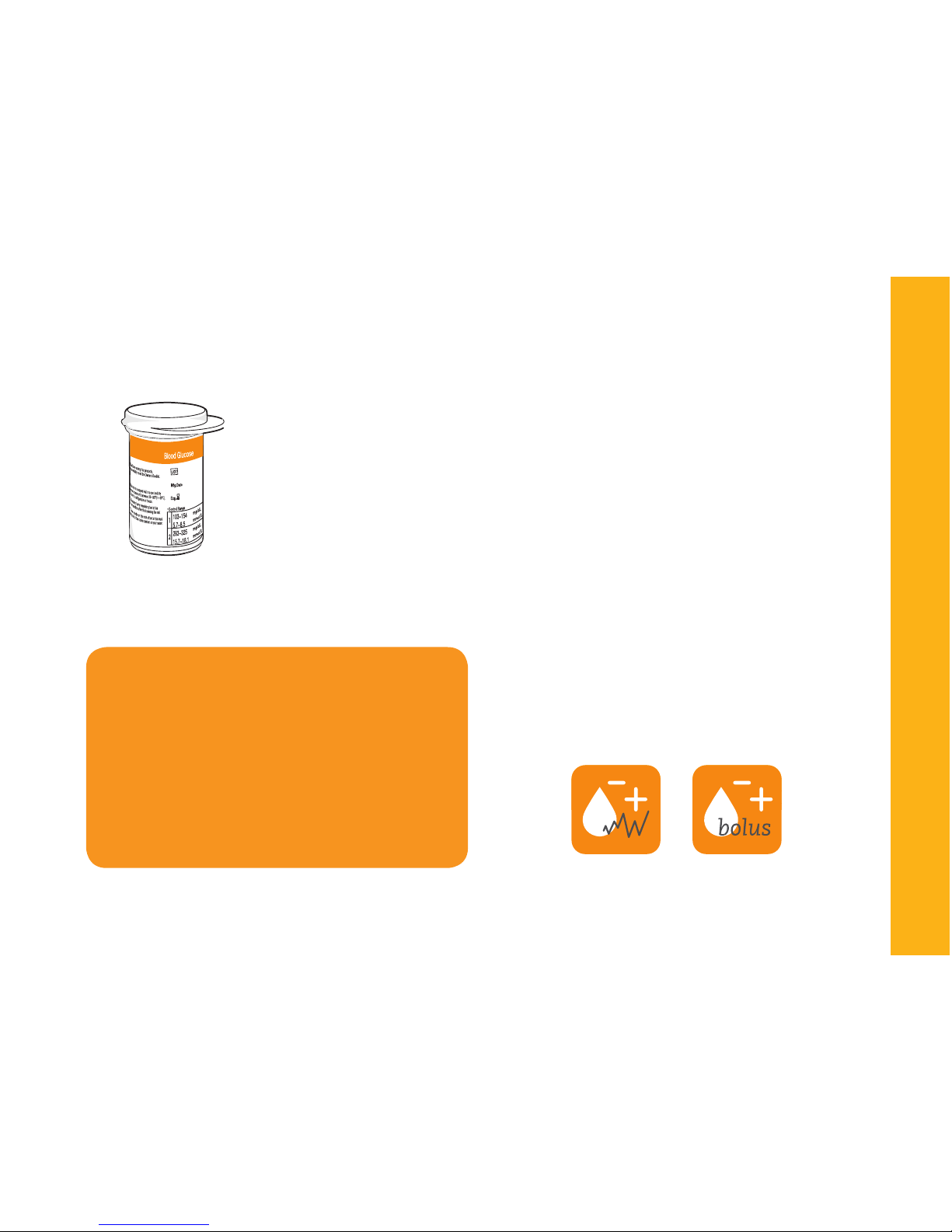
The BSICare system can use two different applications:
• BSICare for the blood glucose measurement and
for the management of the glycemic diary.
• BSICare bolus for the blood glucose measurement, for the management of the glycemic diary
and for the calculation of the bolus insulin suggestion.
The applications
WARNING
IT IS RECOMMENDED TO DOWNLOAD
AND USE ONLY ONE OF THE TWO APPLICATIONS.
OTHERWISE REMEMBER THAT THE DATA
ACQUIRED BY MEANS OF THE TWO APPLICATIONS ARE CONTAINED IN THEIR
CORRESPONDING DATABASES AND
CANNOT BE INTEGRATED WITH EACH
OTHER.
Page 6
6
2 OK Mode (with login)
OK mode is carried out using a login with credentials
previously registered on the website www.bsicare.it and in
addition to having all the features of the system, it works
in connection with the server by sending the processed
data.
Applications usage
The BSICare applications can be
used in two modes:
1 OFFLINE Mode
2 OK Mode (with login)
OK
OFF
LINE
1 OFFLINE Mode (without login)
The OFFLINE mode allows you to perform the measurements
and all the subsequent operations, including storage in the
glycemic diary, but does not send any data to the server since
it was not logged (OFFLINE).
Warning!
It is necessary to register on the website www.bsicare.it in order to send the data to the
personal folder or to the structure by which you are followed.
Page 7
7
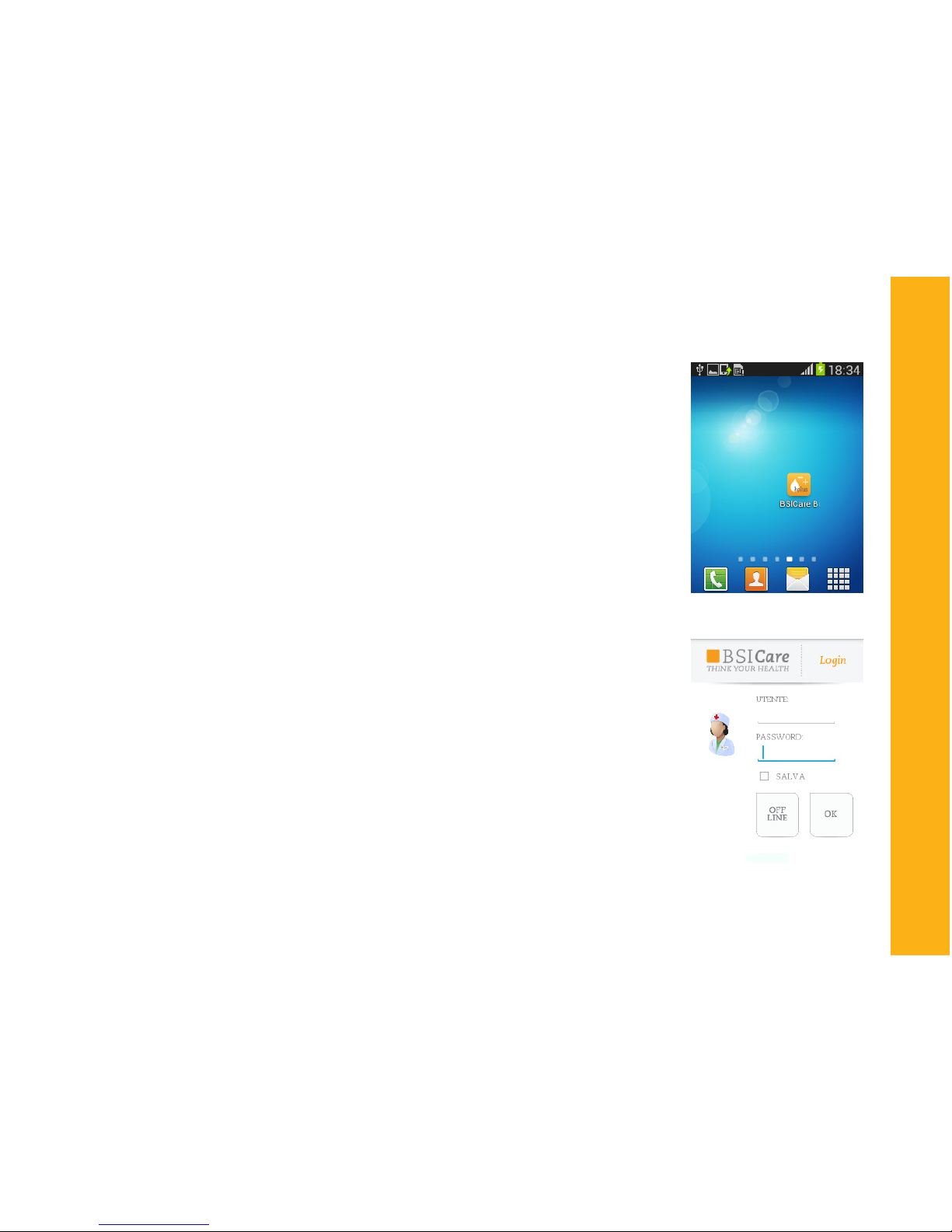
When performing the rst measurement, it is necessary:
1. To start the application BSICare on the smartphone.
2. In order to send the data to the server (OK mode), please enter
the credentials for the access, if you are already registered, or enter
into the “OFFLINE mode”.
The user registration can be done on the website www.bsicare.it ,
section “User Registration”.
Note:
1- The rst access,when in OK mode, requires a mandatory data
connection.
2- The OFFLINE mode is a connectionless mode; therefore the
processed data are not sent to the server, but they remain on the
database of the device you are using. Such data cannot be exported
but only consulted.
Only in the case of the BSICare bolus application, the obtained
OFFLINE database can be transferred to the server after logging on
with credentials.
If you want to use the BSICare Bolus application, please see chapter
page
Getting
Page 8

8
In order to perform a test with the BSICare system, it is necessary to collect a drop of capillary blood
according to the following procedure:
• Wash your hands thoroughly with warm water to intensify the blood circulation in the ngers and
therefore
to make easier the blood withdrawal.
• Dry your hands thoroughly.
• Check if the nger to prick is completely dry.
• Prepare the lancing device contained in the BSICare kit by inserting the sterile lancet (needle).
Carefully read the instruction for use of the lancing device contained within the BSICare kit.
How to get a drop of blood
Use a new, not damaged lancet for each blood sampling and use
the lancing device only on yourself to prevent crosscontamination. Before inserting, please make sure that the lancets and the
protections of the lancets are intact.
Only an intact lancet protection can guarantee the sterility of the
lancet itself.
Page 9
9
Before testing, please read carefully the instruction for use of the strips.
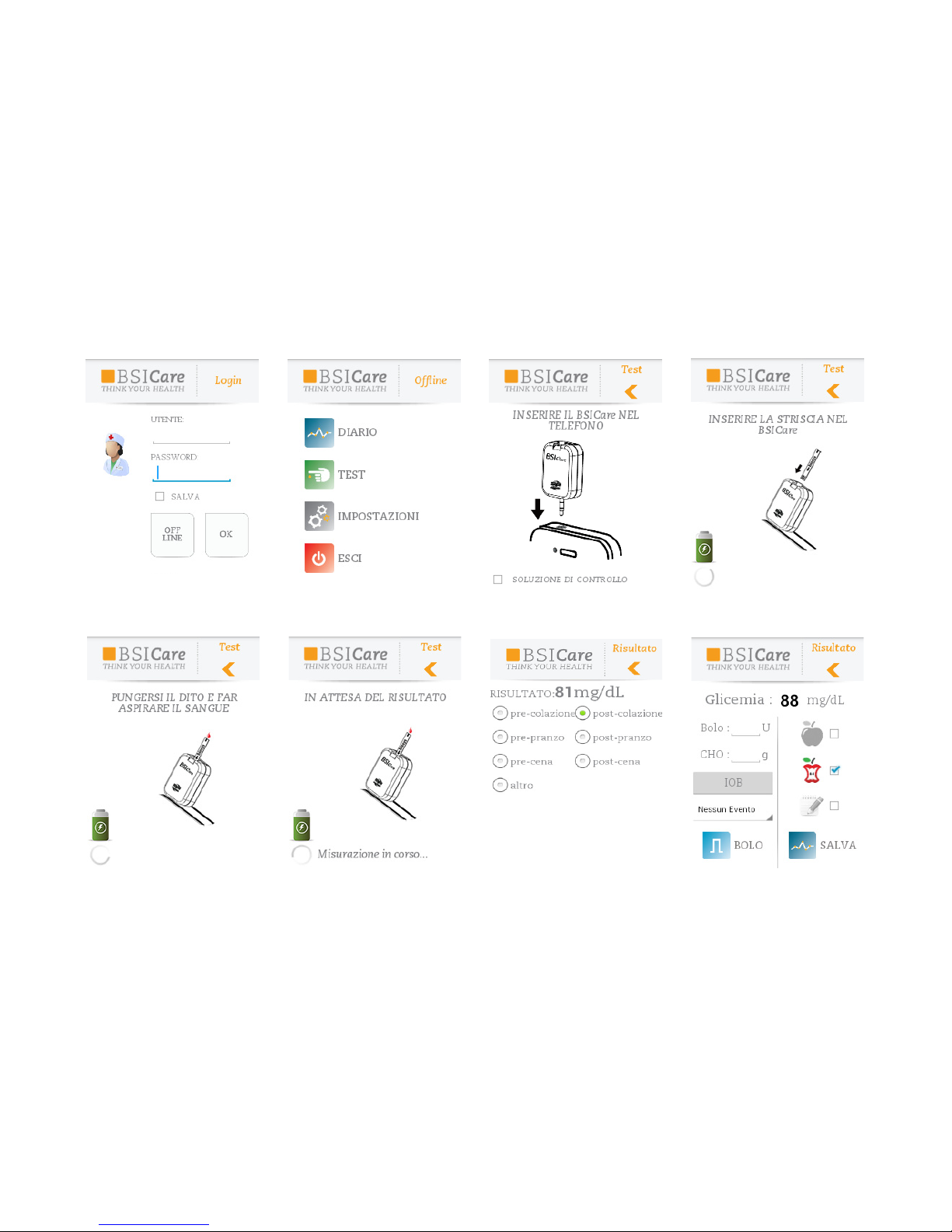
1. Start the application on the device.
2. Select the OFF-LINE or OK mode (Figure 1).
3. Press “TEST” (Figure 2).
4. Insert the BSICare meter in the headset jack of the smartphone until it does not
go any further (Figure 3).
Do not insert the BSICare meter in the headset jack before the message “INSERT
BSICare
INTO THE SMARTPHONE” appears on the display.
5. Check if the battery icon is green before going on (Figure 4).
6. The display of the smartphone will show the message “INSERT A STRIP INTO THE
BSICare” (g.4). Take a strip out from the vial and insert it into the meter until it
does not go any further, with the printed or colored side facing up.
7. The display of the smartphone will show the message “PRICK A FINGER AND LET
ASPIRATE THE BLOOD “(Figure 5). Prick your nger using the lancing device and the
sterile lancet. Bring the nger near the end of the strip. Let the blood be automatically aspirated. After about 5 seconds the result will be shown on the display (Fig.
“Result”). If the value is outside the set threshold of glucose, a pop-up window with
an alert message will be shown together with the result. If you use the BSICare
bolus application to calculate the bolus suggestion follow the instructions described
on page
Testing
Page 10
10
3
1 2 3 4
5 6
Start
Result
Bolus application display
Page 11
11
Once the testing is over, select the eld or the symbol regarding the period of the measurement before saving.
The measured and calculated values are stored in the glycemic diary, which can be accessed
by selecting the “DIARY” icon. Used strips and materials must be disposed properly, avoiding
contaminations. When disposing the instrument please refer to the current regulations for
electric and electronic waste.
IF YOU GET RESULTS WHICH DO NOT CORRESPOND TO YOUR HEALTH CONDITIONS
AND TO YOUR FEELINGS, RUN THE CHECK OF THE METER USING THE CONTROL SOLUTIONS AND ADVISE YOUR PHYSICIAN. IF YOU GET EXTREME VALUES, TOO HIGH
(HI) OR TOO LOW (LO), CONTACT YOUR PHYSICIAN IMMEDIATELY.
Warnings
In a laboratory and in a hospital, biological safety procedures
in handling potentially infected material must be followed,
especially when the measurements are performed on different patients. Clean the meter regularly and dispose of the used
strips in order to ensure that there is no risk of infection for
other people.
Page 12
12
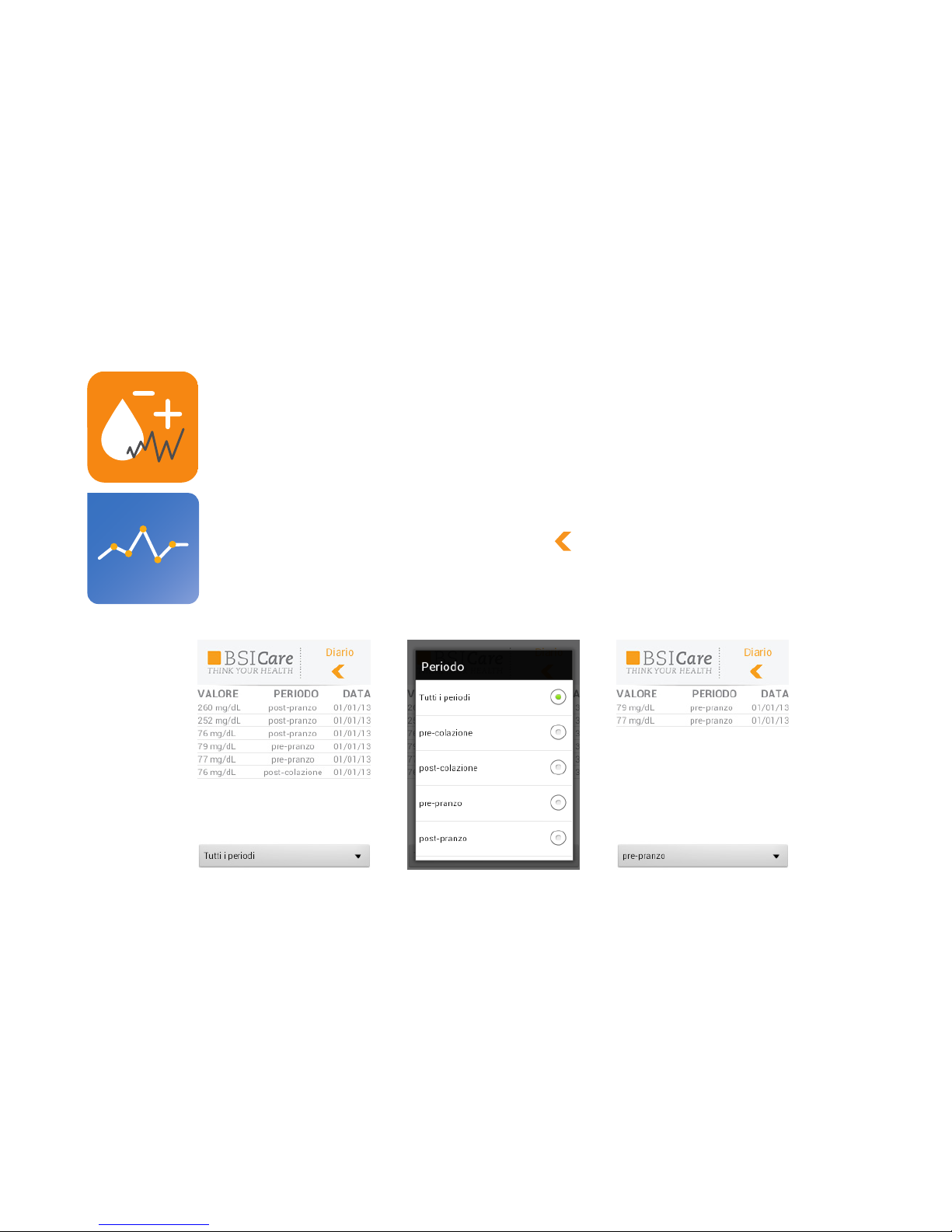
The results are stored in the phone memory (maximum 2000
results).
Procedure
1. Start the application.
2. Click on “DIARY”.
3. Once the list is shown, it is possible to lter the performed
measures by time slot.
4. To go back, press the button
Glycemic diary
1
2
3 4
Page 13
13
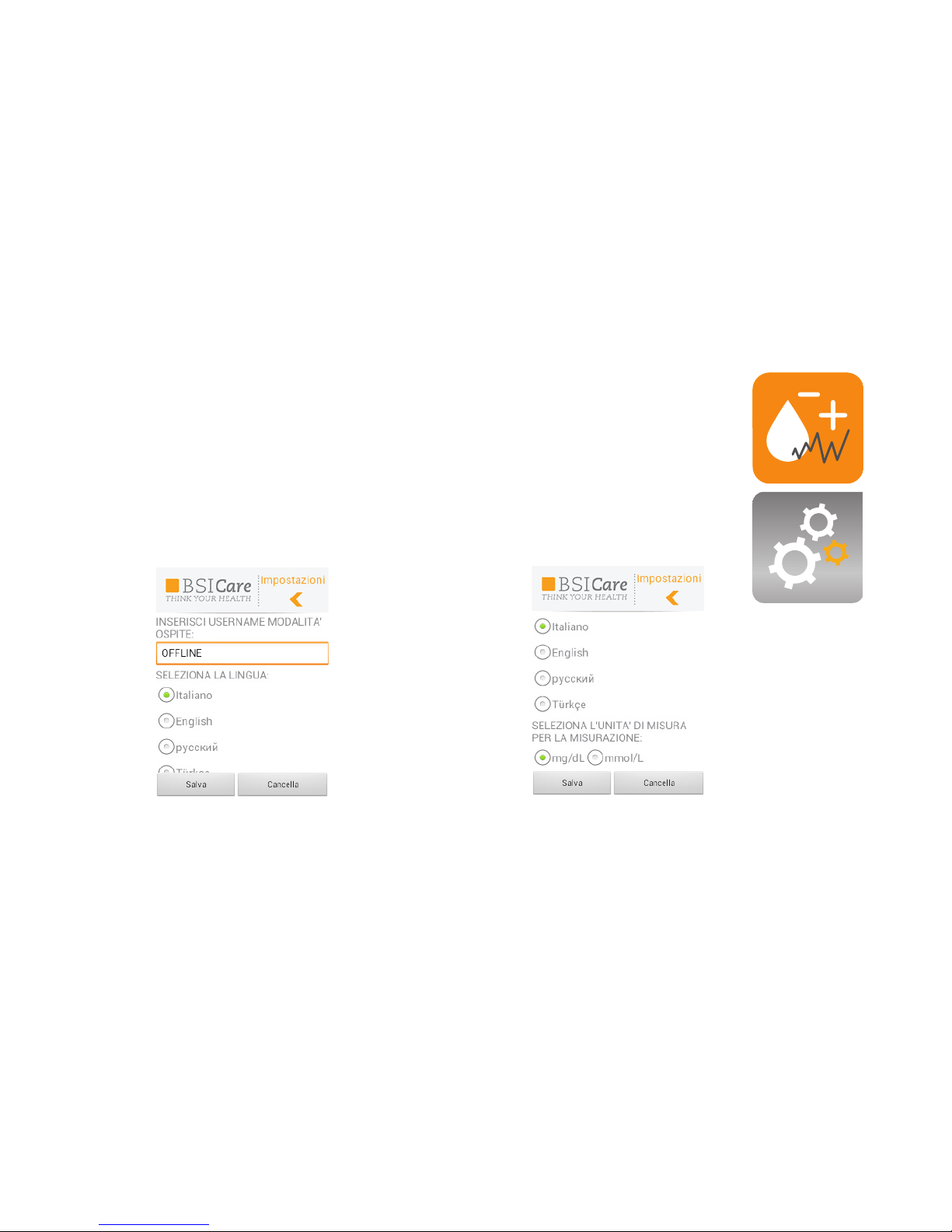
Start the application and enter the menu “SETTINGS”.
It is possible to change the following parameters:
. Language
. Unit of measurement.
Changing the BSICare settings
Page 14
14
General recommendations
Dene the bolus suggestion settings together with your diabetologist before using this function. Some information is already set in the application when purchasing. Change the settings
together with your doctor before doing the bolus suggestion calculation for the rst time, in
order to get accurate results. The bolus suggestion function is suitable for those patients who
are already trained to use such a function for the management of their insulin therapy.
The bolus suggestion function is important to get a more accurate dose of insulin.
Calculation of the bolus suggestion
Warning: the bolus calculation is only a suggested quantity.
The function bolus suggestion displays automatically the amount of insulin (bolus)
recommended according to the settings agreed together with the diabetologist.
To carry out the bolus suggestion please set, along with your physician, the
parameters from the settings menu.
BSICare bolus application
Warning!
The application shows only the word “BOLUS”, but it stands for “Bolus suggestion”.
Read carefully before use. This section provides information regarding the function
for calculating the bolus suggestion.
BOLUS=suggestion
Page 15

15
Warnings :
If you want to use the bolus suggestion function, the parameters must be
set in the device when turning it on the rst time.
Take always the recommended amount of insulin only after checking the
result, depending on how you feel. If necessary, adjust the bolus or check
whether the settings are correct.
Take the amount of carbohydrates that you entered for the bolus suggestion
calculation. If you are not going to take any carbohydrates, write 0 in the
“CHO” eld. It is important not to write any values of carbohydrates if you
do not plan to take any carbohydrates after the bolus intake corresponding
to the insulin action time to avoid possible states of severe hypoglycemia.
Meals and doses of insulin taken previously should not be considered in the
calculation of the bolus.
The bolus suggestion function cannot edit mistakes of data entry, but can only warn you if
you exceed the allowed limits for a given parameter.
If the data are sent to the medical facility which is taking care of you, the parameters will be
set up directly by the doctor through the web platform.
Page 16
16
WARNINGS!
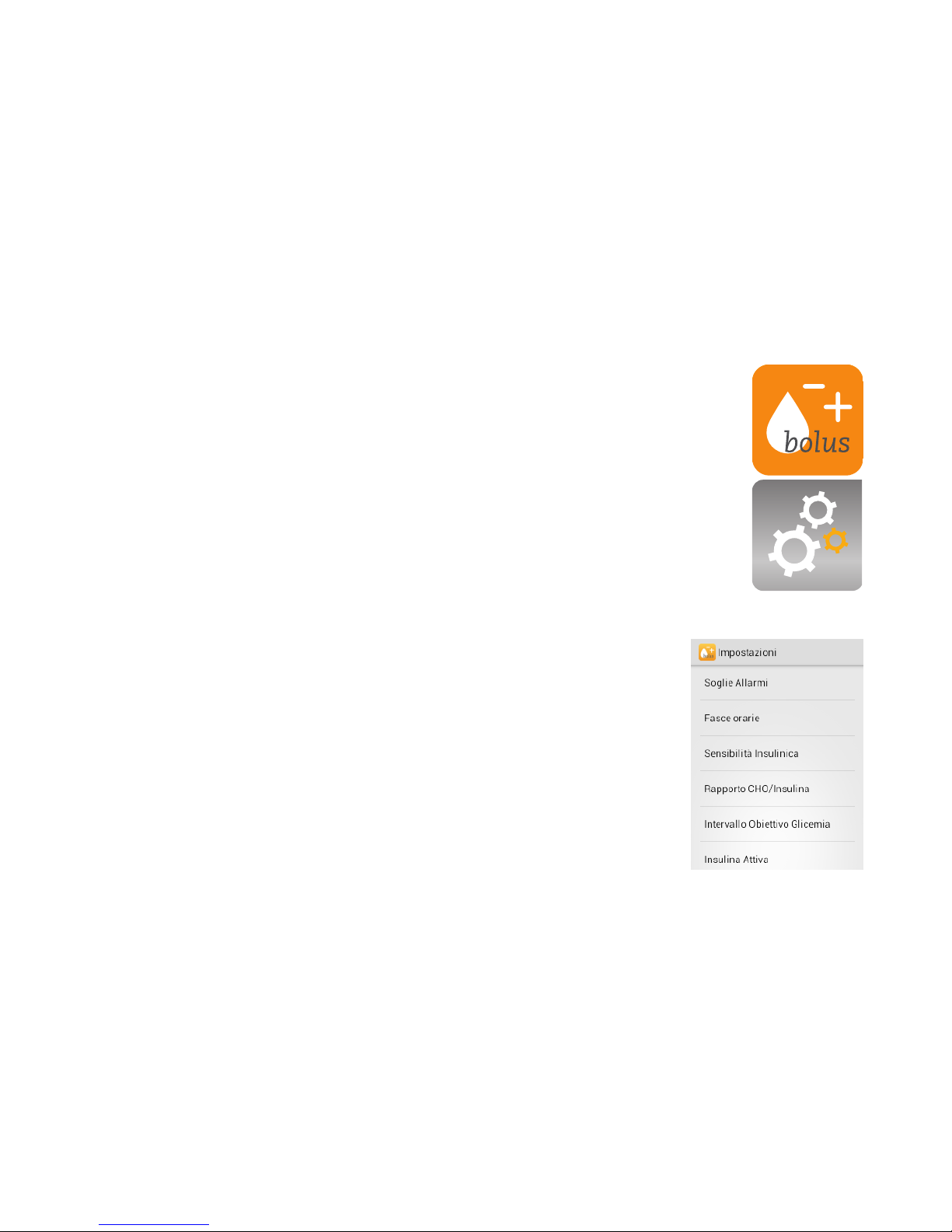
When using the BSICare bolus application in OK mode (login) the settings
for the suggestion bolus calculation must be inserted from the server.
When using the BSICare bolus application in OFFLINE mode, enter the
SETTINGS menu. To deepen the meaning of the setting items please
contact the physician.
Settings
Unit of measurement: The preset unit is mg / dL. When you want to
change it, enter “unit of measurement” and select the desired unit of
measurement.
Alarm thresholds: the hypoglycemia and hyperglycemia thresholds
should be set with your diabetologist. The instrument will warn you
when the values fall outside the thresholds.
Time slots: Insulin needs vary during the day and the bolus calculation
will take this into consideration. It is possible to set up seven time slots:
pre-breakfast, post-breakfast, pre-lunch, post-lunch, pre-dinner, afterdinner, night. It is possible to change the start time of each time slot (this
is necessary for the calculation of the bolus).
Bolus suggestion settings and changing the BSICare bolus settings
Page 17

17
Insulin sensitivity: Insulin sensitivity refers to the time period and indicates the amount of
insulin necessary to lower the blood sugar at a certain level. The insulin sensitivity can be set
for each of the seven time slots (necessary for the bolus calculation). These values will be set
by your diabetologist.
CHO / Insulin ratio : the carbohydrates (CHO) / Insulin ratio indicates, how many carbs are
needed to compensate one unit of insulin in the different time slots. So 7 values of CHO /
Insulin must be set after consulting your diabetologist (necessary for the calculation of the
bolus).
Glicemy target interval : the glicemy target values indicate the target values to obtain in the 7
time slots. Please consult your diabetologist to set the glicemy target values (necessary for the
calculation of the bolus).
Insulin on board: this is the insulin which has already been provided but not yet fully used. To
calculate correctly the insulin on board it is necessary to set:
• Action Time (duration of insulin action and increase of blood glucose after a meal)
• Latency time (relative to the time that insulin requires to be effective during the action time).
Necessary for the bolus calculation.
Health Events: it is possible to set the activities that take into account a certain consumption
of insulin:
Activity 1 (light activity); Activity 2 (moderate activity); Activity 3 (intense activity), stress;
disease; premenstrual. To each of these events it is possible to correlate the amount of insulin
which then will be added to and therefore to automatically correct the bolus calculation (necessary for the bolus calculation).
Page 18

18
Procedure for the calculation of the suggestion bolus
Neonatal usage is disabled. Do not enable when using with adults. In the bolus application
when the function neonatal blood is enabled, the corresponding icon will appear during the
measurement (not necessary for the bolus calculation).
Mathematical basis of the bolus suggestion:
Bolus suggestion= bolus meal + bolus correction - IOB (active insulin)
The bolus meal is the amount of insulin (suggestion) as a function of the introduced carbohydrates.
This value takes into account the preset CHO / insulin ratio. The bolus correction is the
amount of insulin (suggestion) as a function of the measured blood glucose, of the preset
glicemy target interval and insulin sensitivity. Therefore it is really important to set all the
parameters correctly in order to use the bolus suggestion function.
After setting all the parameters, it is possible to use the bolus suggestion function after performing a blood glucose test. If you do not want to calculate the bolus, press “SAVE” to store
the result in the diary.
Procedure for the calculation of the suggestion bolus
After testing, if you want to calculate the bolus suggestion, follow the steps described on the
next page.
Page 19
19
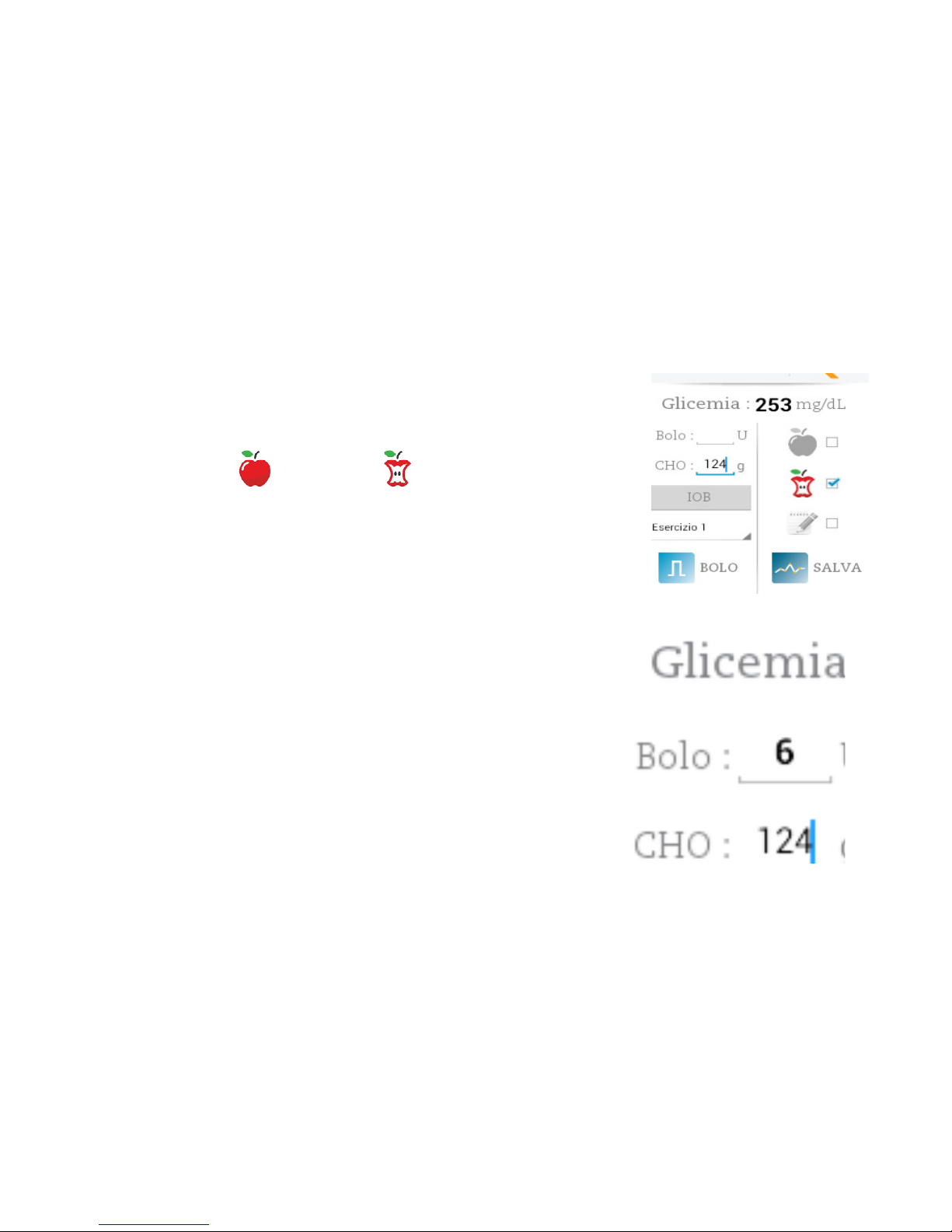
Procedure
1. Select the event in the box.
2. Enter the amount in grams of carbohydrates
3. Select the icon (premeal) or (postmeal).
4. Press bolus (BOLUS).
It is possible to save all blood sugar and bolus values in the
diary by pressing “SAVE” .
Carbohydrates
The default unit of measurement in the meter is grams.
WARNING!
When using the BSICare Bolus application in the connected
mode (login) the parameters for the calculation of the bolus
suggestion must be set from the server and not on the device.
WARNING!
For the meaning of the congurable parameters please see
chapter “Bolus suggestion settings” and consult
your diabetologist.
1
2
4
3
Page 20
20
The results will be stored in the phone memory (maximum 2000 results).
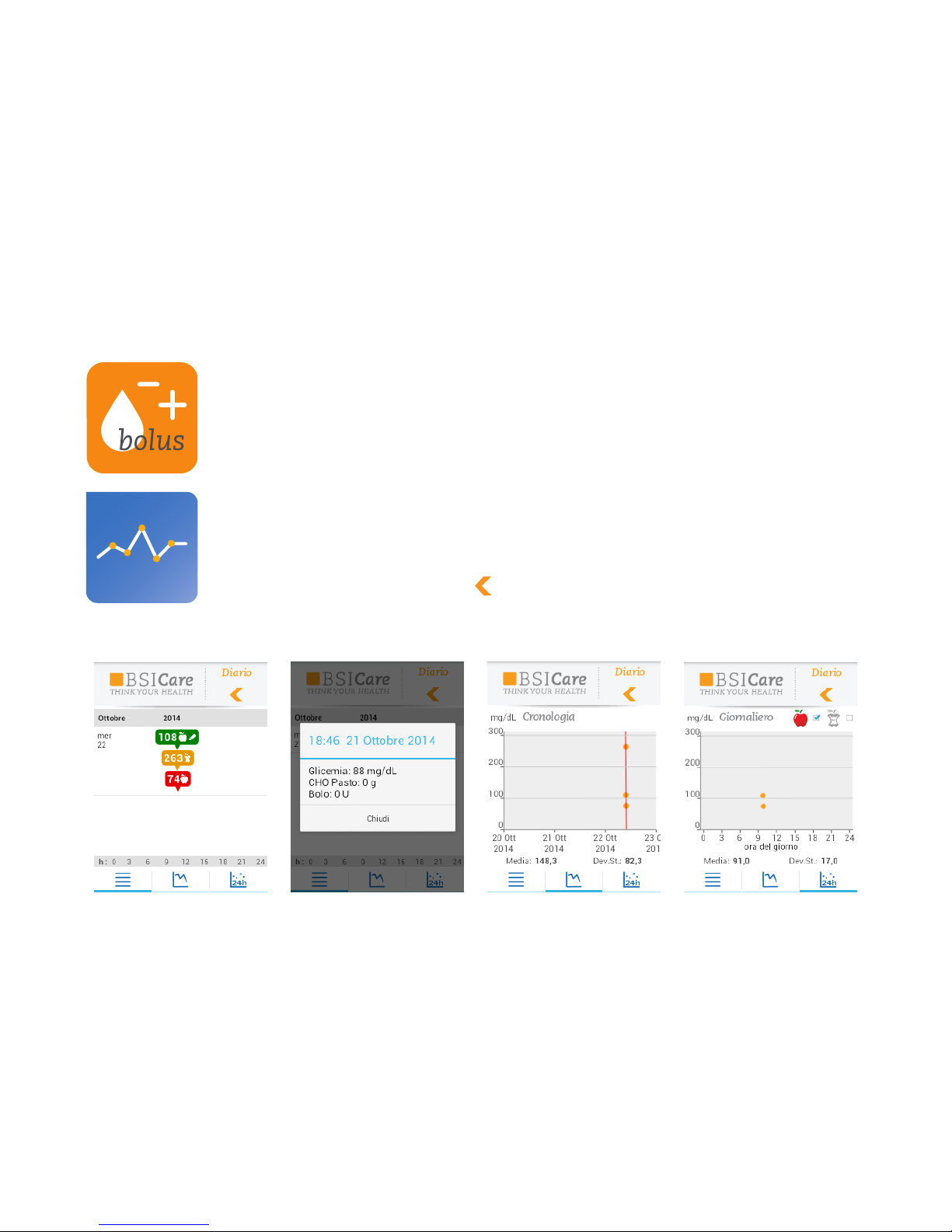
Procedure
1. Start the application.
2. Click on “DIARY”. It is possible to lter the performed measures by time slot.
3. Once the list is shown, it is possible to view the details, the averages, the
standard deviations and the related graphics of the measurements. Values
marked with an “N” refer to measurements performed with the neonatal blood
function enabled.
4. To go back, press the button
BSICare bolus glycemic diary
Page 21

21
It is not necessary to perform particular cleaning operations, except for the outside of the
meter when contaminated with blood or other material (dust, lint, etc..). In this case use only
a cloth moistened with cold water or with a 70% alcohol solution.
When testing different people, such as in a hospital, it is necessary to clean the meter after
each measurement with a 70% alcohol solution before proceeding with the next measurement.
Warnings
If the BSICare meter is too cold or too hot (eg. after being stored in a car at very low or high
temperature), please allow it cooling down or heating up slowly at room temperature (it takes
about 20 minutes).
Care and maintenance
Replacing the batteries
The BSICare meter is equipped with a 3V lithium battery (type CR1620).
If the battery icon is red on the smartphone display, it is necessary to replace the battery
before testing.
Page 22
22
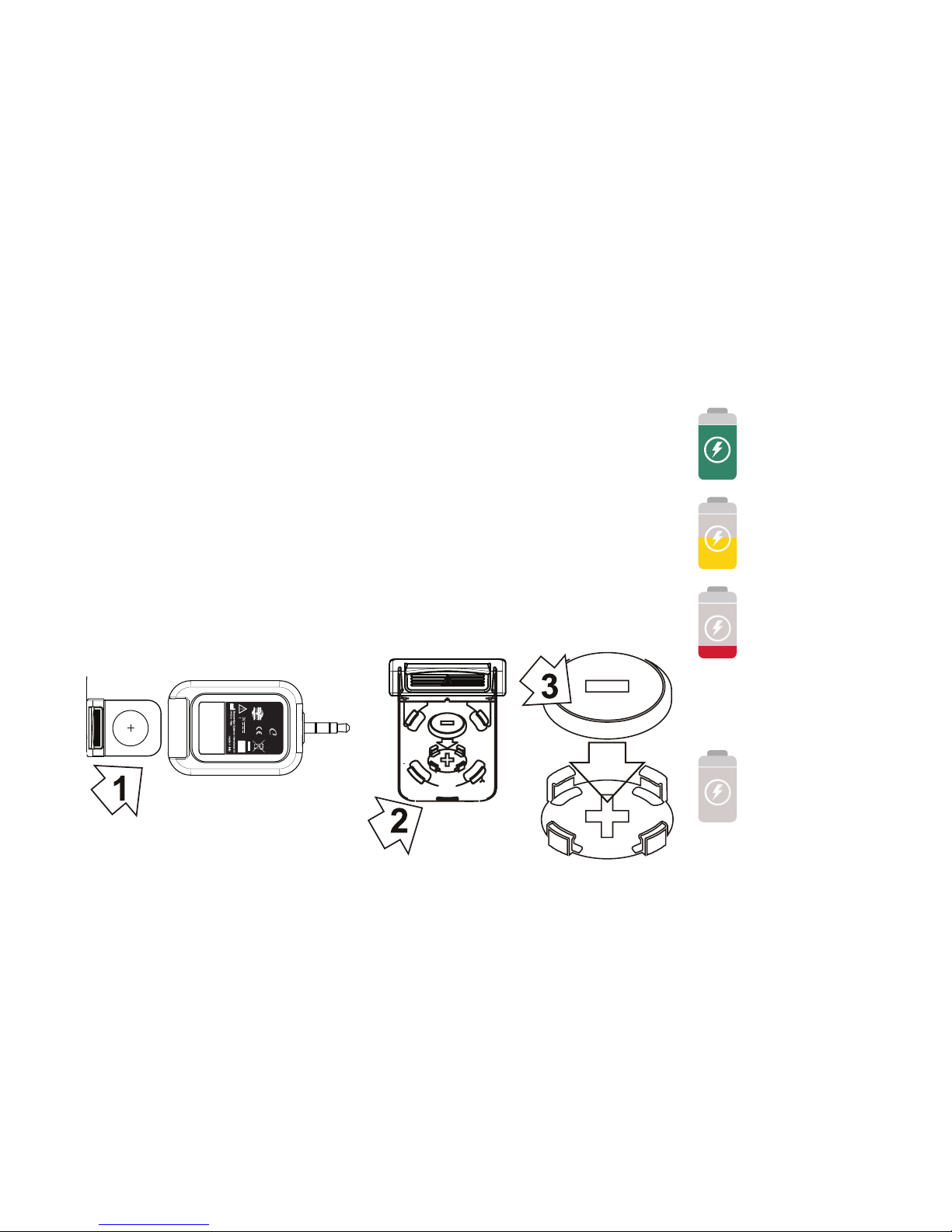
Please make sure that the new battery is the correct type of battery
before inserting it.
To replace the battery, follow these instructions:
• Open the battery compartment at the rear of the meter (1).
• Remove the old battery from the plastic support (2).
• Place the new battery so that the negative pole is facing up (3).
• Insert and close the battery compartment.
The battery should be properly disposed.
Full
battery
0344
S/N:
LOT:
0000001
09/2012
X CR1620
BSI
are
Displayed icons
Low battery
Empty
battery or
compatibility
problems of
the smartphone
Connection
problems
Page 23
23
Please read carefully the instruction for use contained in the package of the
control solutions.
It is possible to check the functioning of the BSICare meter using the BSICare
control solutions.
Control solutions can be found as an accessory from specialized retailers.
WARNING!
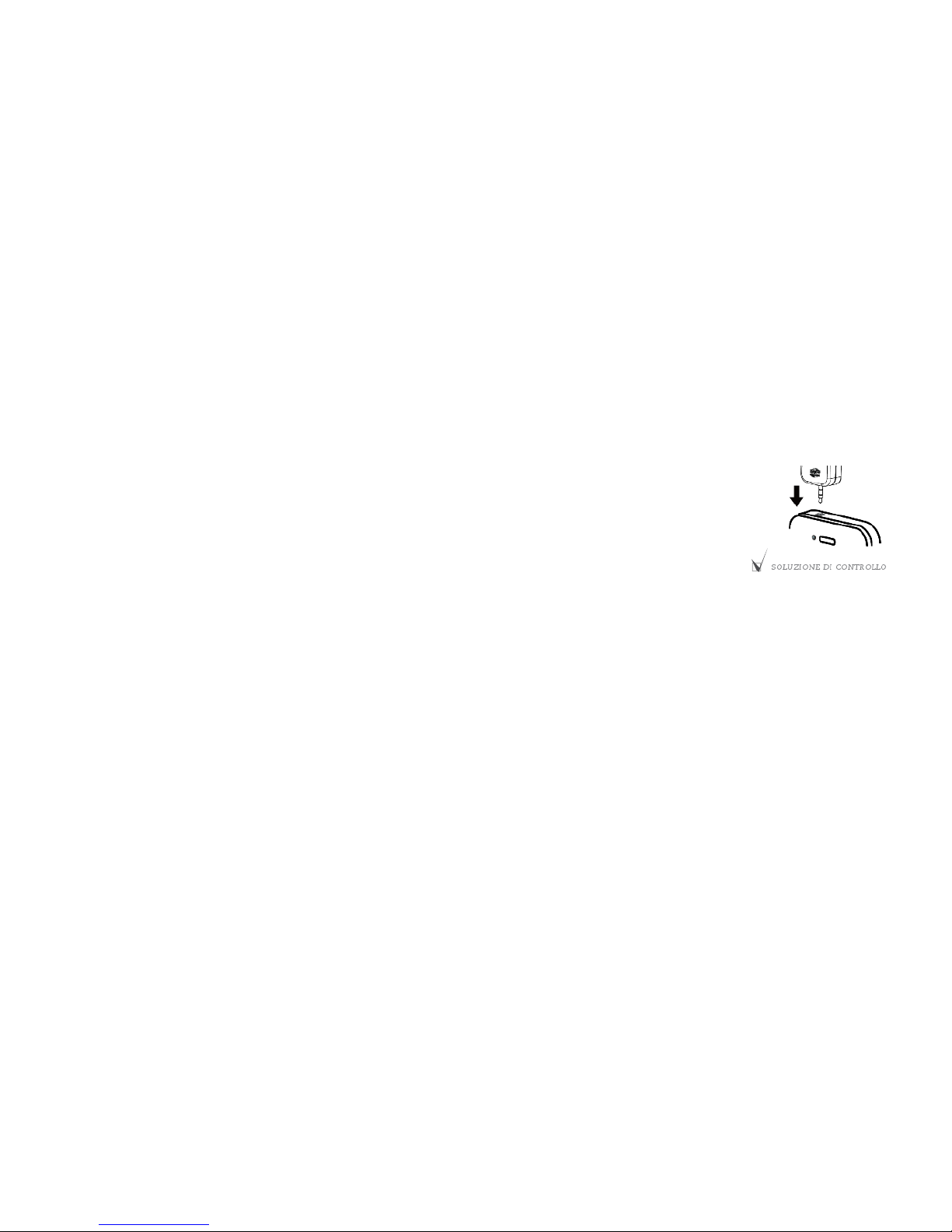
It is recommended to select “CONTROL SOLUTION” (please see the gure) to not
include the control solutions results in the calculation of the measurements
average.
The control solution is applied on the strip as well as blood.
When performing the test with the control solutions, the result obtained must
fall within the range printed on the label of the strips vial that you are using.
In this way it is possible to learn how to use the BSICare meter and at the same
time to check if it is working properly.
Write down the opening date on the vial when the control solution is opened for
the rst time.
The control solution should be used within 90 days from the rst opening.
Check if the expiration date is still valid.
A test using the control solutions should be carried out:
• When suspecting a defect of the BSICare meter.
• When suspecting the possibility of a malfunction or wrong measurement.
The result obtained with the control solutions will not be saved in the “Diary” for not
inuencing the blood glucose average.
Control solutions BSICare
Page 24

24
Warranty
Biochemical Systems International Srl grants the customer that the meter will be free of defects in materials and manufacturer handling for 3 years starting from the purchasing date.
During such a period, Biochemical Systems International Srl should replace the defective
instrument with an equivalent version or the same model after verifying the defect.
Such warranty is subject to exceptions and limitations as described below.
The warranty is limited to the replacement due to defects in some parts and handling.
Instruments that present defects due to damages caused from improper use, alteration,
negligence, technical assistance performed by not authorised personnel, accident, abuse or
by using strips which are different from BSICare will not be replaced.
Biochemical Systems International Srl reserves the right to apply technical modications to
the BSICare meter without the obligation to include such changes to those products already
introduced in the market.
No other warranty will be granted for this product except for the replacement option
described above.
Every responsibility for special, indirect or consequential damages is excluded.
Page 25
25
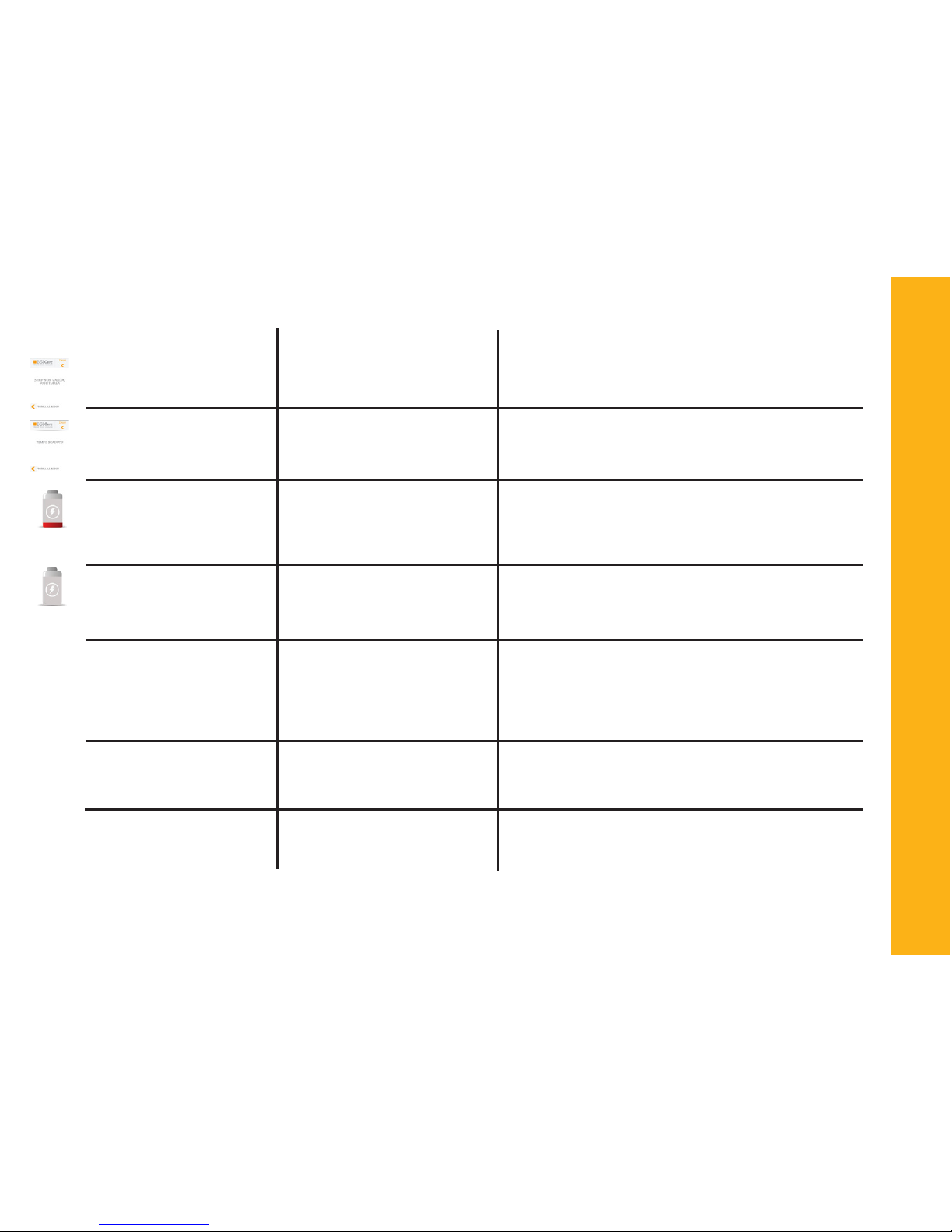
Message/Icon
The strip is not valid
Time off
Empty Battery
Verify the BSICare insertion
Grey Battery
Value lower than 20 mg/
dL (1,1 mmol/L)
Value higher than 600
mg/dL (33,3 mmol/L
Insufcient blood
volume, repeat the test
Error messages
Error
The strip is used or not valid
90 seconds without applying the blood sample have
exceeded
Flat battery
Wrong BSICare insertion
When starting the measurement, the battery icon stays
grey
The result is lower than the
reading threshold
The result is higher than the
reading threshold
Insufcient blood volume
Solution
Please replace the strip with a new one
Please disconnect the BSICare meter and repeat
the procedure. If the error remains, please contact
the customer service
Please check if the BSICare is correctly inserted
Replace the battery
If the error remains, please check the compatibility of the device or contact the customer service
If the result does not match your feelings, please
repeat the test. If you get “Lo” again, please contact your physician for further information
Wash your hands thoroughly and repeat the test
Please contact the physician immediately, repeat
the test in the hospital
Repeat the test using a new strip and apply a bigger drop of blood
Lo
Hi
Page 26
26
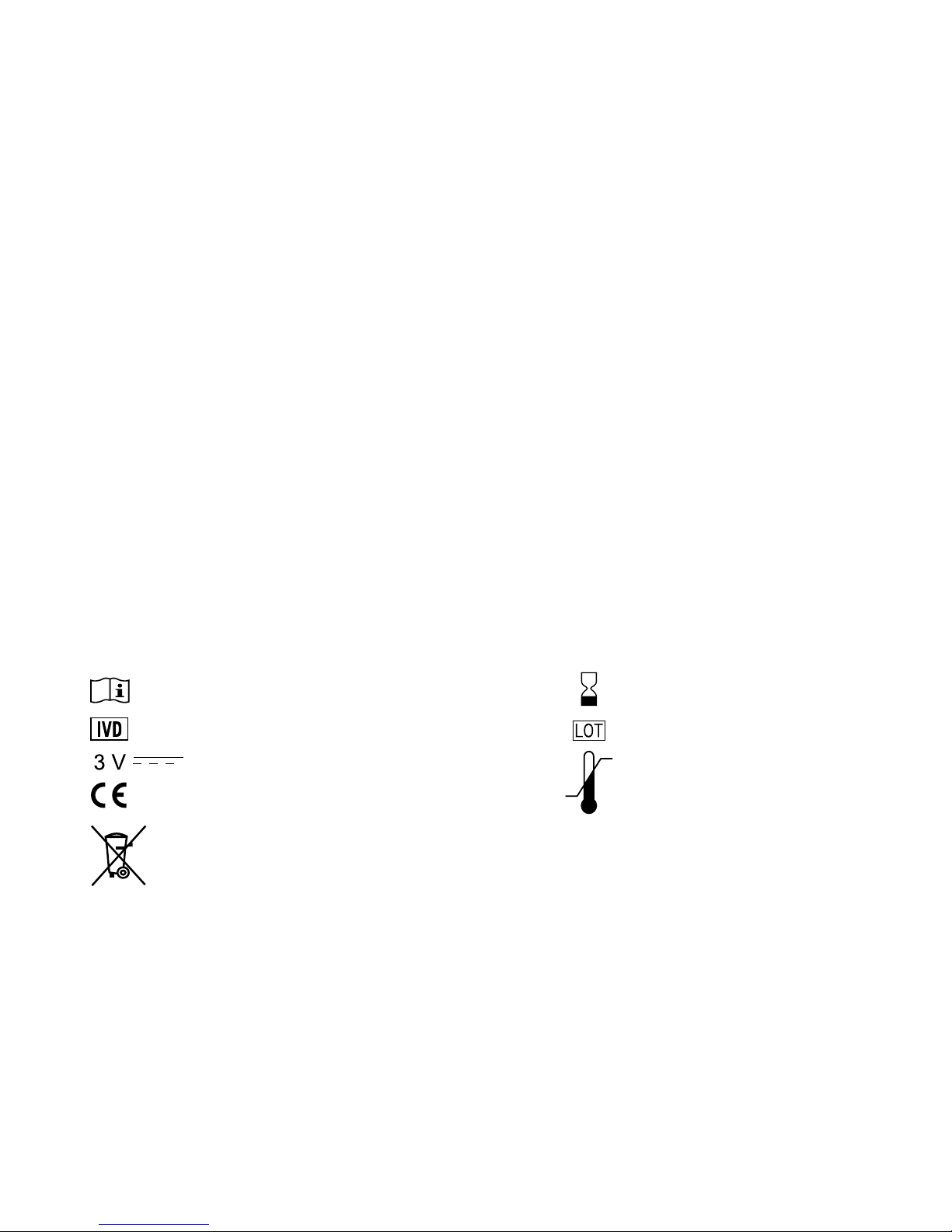
In-Vitro Diagnosticum
Use by...
Batch number
Temperature limitations
Direct current and battery type
EC mark
Do not dispose of the meter in the urban waste. Make a separate collection
for Electric and Electronic Waste.
Simboli
Consult instrusctions for use
Speciche tecniche
Model
Sample volume
Reactive strips
Range of measurement
Reading time
Battery
Temperature thresholds
Humidity thresholds
Storage
Dimensions
Weight
BSICare meter
0,5 μL
BSICare
20-600 mg/dL (1,1-33,3 mmol/L)
5 seconds
1x3V mod. CR1620
10-40°C (50-104°F)
10-90% RH
5-30°C (41-86°F)
43x30x14 mm
14 g (including batteries)
Page 27

27
Warnings for the healthcare
The BSICare strips contain the glucose oxidase, an enzyme specic for glucose. Therefore, they
can be used on dialysis patients where the concentration of maltose in the blood increases,
without the risk of false positives. The strips containing the enzyme glucose dehydrogenase
together with the coenzyme PQQ (GDH-PQQ) determine glucose in a less specic way instead,
and, therefore, they are inuenced by high concentrations of other sugars in the blood. Thus,
they are not recommended for patients on dialysis.
http://www.fda.gov/MedicalDevices/Safety/AlertsandNotices/PatientAlerts/ucm177189.htm
In the case of patients who are treated with a glucose solution to maintain the blood vessels
pervious, the measurement of blood glucose (both from venipuncture and ngerpricking) must
be performed on the side opposite to the one where the glucose solution has been given. The
risk is to obtain falsely elevated results that can lead to mistakes in the immediate therapy.
http://www.ncbi.nlm.nih.gov/pubmed/24502221
https://www.gov.uk/drug-safety-update/glucose-solutions-false-blood-glucose-readingswhen-used-to-ush-arterial-lines
Page 28
28
Biochemical Systems International S.r.l.
Via G. Ferraris, 220 - 52100 Arezzo - Italia
www.biosys.it / [email protected]
Tel. 0039 0575 984164 - Fax +39 0575 984238
0344
MBSIC IT ED2015 Maggio
 Loading...