

Page 1

1
Gigabit Ethernet Media Converter
(Two Fiber Ports and Four UTP Ports)
user manual
(Do not use until you read this manual carefully)
Page 2

2
Brief introduction
Many thanks for purchasing Gigabit Ethernet media converter!
This product supports 10/100/1000Base-T, 1000Base-X protocol, as well as full duplex and half duplex mode. This manual is for 10/100/1000M transceivers. The following
purchasing guide is for customer’s reference.
Purchasing guide for optical transceivers
Model Specifications
UTP-MM 10/100/1000M adaptive, multi mode 2km,
SC
UTP-SM 10/100//1000M adaptive, single mode 20km,
SC
UTP-SM 10/100/1000M adaptive, single mode 40km,
SC
UTP-SM 10/100/1000M adaptive, single mode 60km,
SC
UTP-SM 10/100/1000M adaptive, single mode 80km,
SC
Packing list
Please check the following items in the package before installing the transceiver.
Gigabit Ethernet optical transceiver 1set
AC/DC adapter (external) 1pc
Page 3
3
Power line (built-in) 1pc
User manual 1copy
Please contact the dealer immediately for any loss or damage to the above items.
Installation
1. Interface
RJ-45 interface
The transmission media adopts CAT5 twisted-pair with typical length of 100 meter. It features the function of automatically identifying the through line and cross wire.
Fiber interface
All of two fiber interface is SFP fiber module. It is easy to change fiber module according to custom’s requirement, such as link length, fiber type etc.
2. Connection
The network device (work station, hub or switch) with RJ-45 interface is connected to RJ-45 jack of Media Converter through twisted-pair. And the multi/single mode fiber is
connected to SFP fixed in SFP slots.
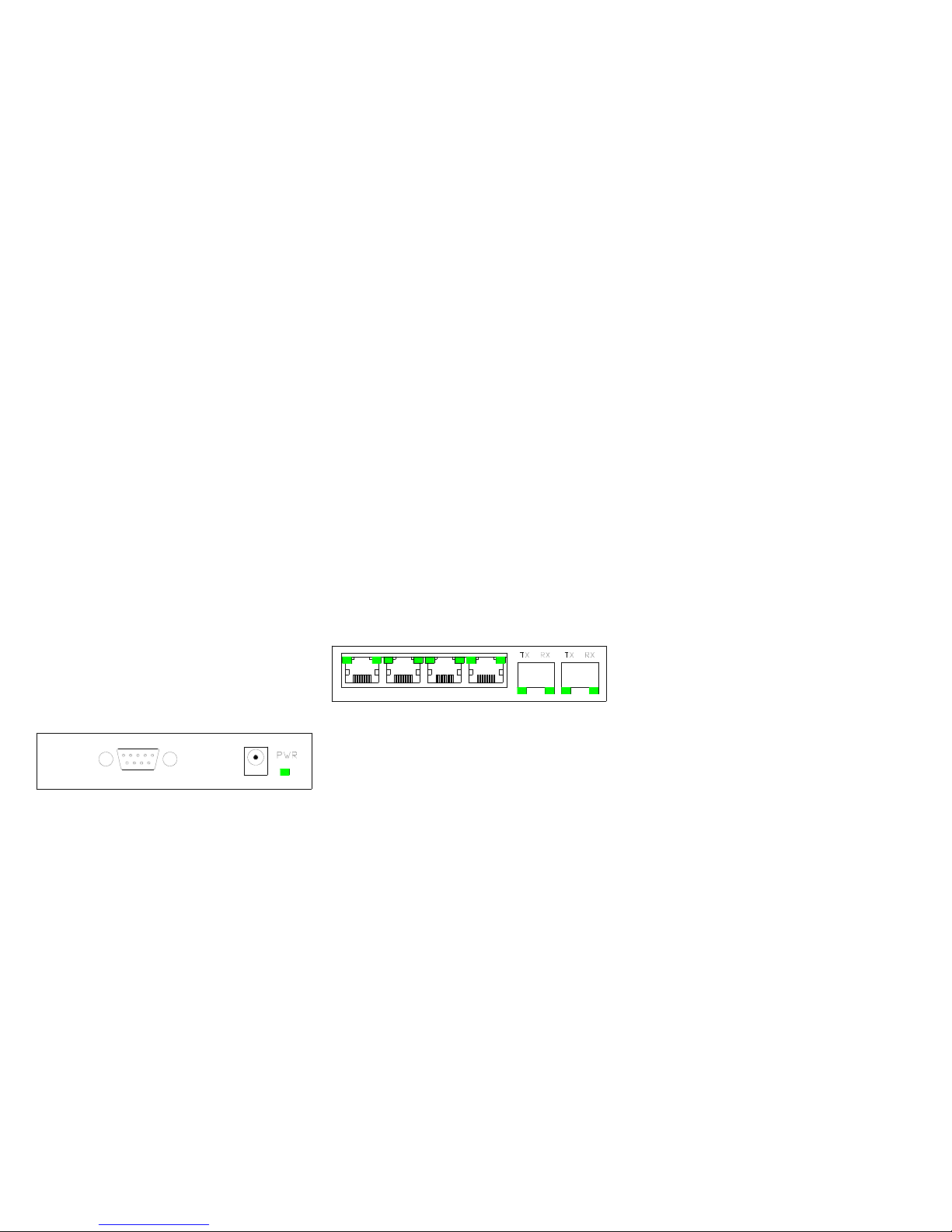
Figure 1 Front Panel of Media Converter
Figure 2 Back Panel of Media Converter
Explanation for LED indicator lamp
LED indicator lamps serve as device monitoring and trouble display. The following is the explanation for each LED indicator lamp.
Page 4
4
LED function status Describing
ON Power is ON. PWR Power LED
OFF Power is Fail.
ON Optical Signal Detected FX-SD
(RIGHT-DOWN)
Fiber port signal detect LED
OFF No laser input.
ON Fiber link is ok.
Blink Acted
FX-LINK/ACT
(LEFT-DOWN)
Fiber port link/action status LED
OFF Fiber link is fail.
3 Blinks 1000M speed
2 Blinks 100M speed
TX-SPEED
(RIGHT-UP)
UTP port speed LED
1 Blinks 10M speed
ON Link is ok.
TX-LINK/ACT
(LEFT-UP)
UTP port link/action status LED
Blink Data is been received or transmitted
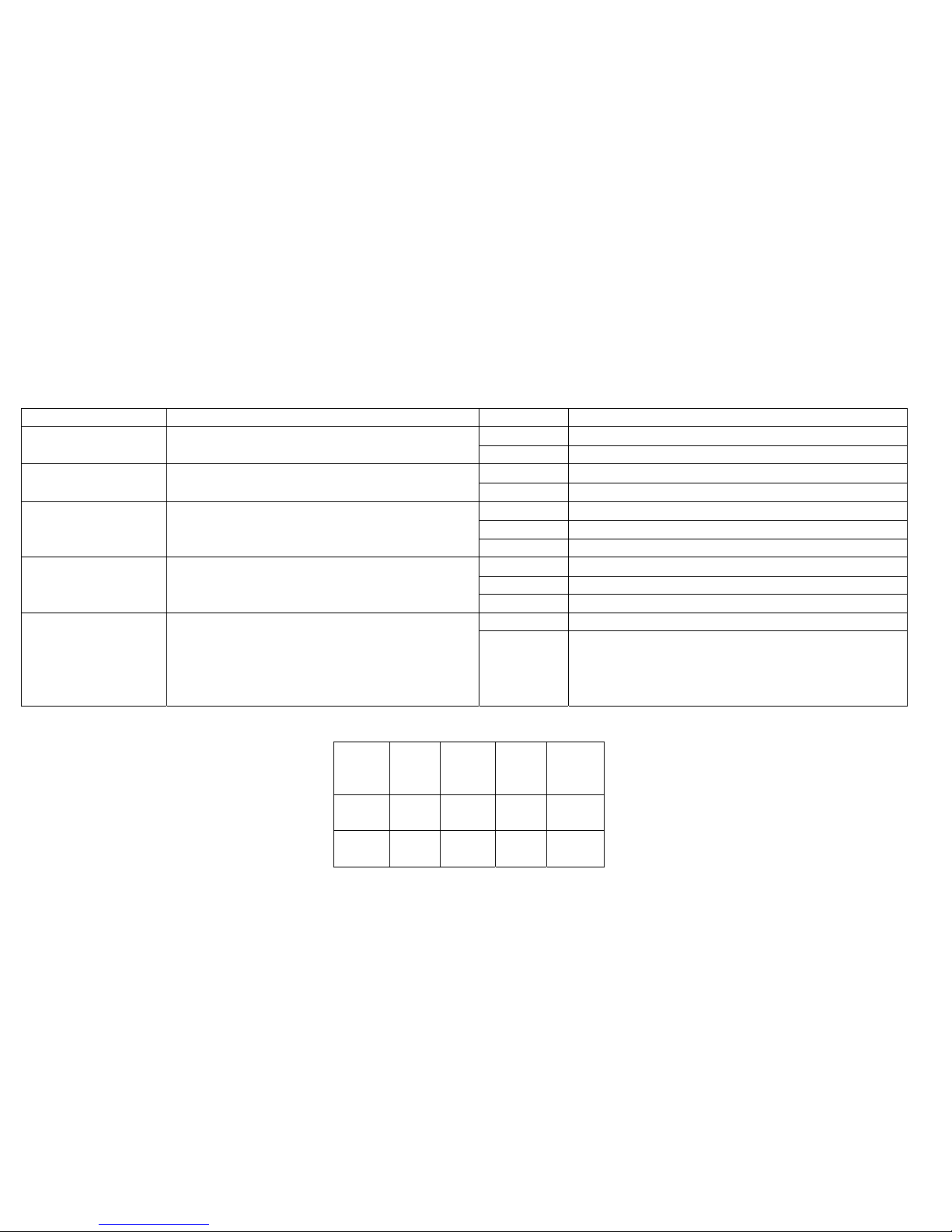
Transmission characteristics of single fiber transceiver
Product
model
Optical
wavelength
(m)
optical
power
(dBm)
Receiving
sensitivity
(dBm)
Transmission
distance
(km)
UTP-SM
(20km)
1310/1550
1550/1310
-3~-8
<-22 20
UTP-SM
(40km)
1310/1550
1550/1330
0~-5
<-24 40
Page 5

5
UTP-SM
(60km)
1310/1550
1550/1330
0~-3
<-25 60
Fiber transmission features:
Product
model
Optical
wavelength
(nm)
Optical
power
(dBm)
Sensibility
(dBm)
Transmission
distance (km)
UTP-MM 850
-12~-15
<-20 0.55
UTP-SM 20 1310
-3~-8
<-22 20
UTP-SM 40 1310
0~-5
<-24 40
UTP-SM 60 1310
0~-3
<-25 60
UTP-SM 80 1550DFB
0~-1
<-25 80
Main features
1. Supports 10/100/1000Base-T, 1000Base-X protocol.
2. Flow control for full duplex and half duplex.
3. Supports up to 10k byte JUMBO frame.
4.Suppots Fiber Port Trunking, Increasing Fiber Channel Bandwidth and Supply Fiber Channel Redundancy.
5. Supports Ports Based VLANS and TAG Based VLANS.
6. In conformity to safety code of FCC and CE MARK.
Technical parameters:
1. Standard Protocol: 10/100/1000Base-T, 1000Base-X protocol
2.Connector: Four UTP RJ-45connector, Two SFP SLOTS
3. Operation mode: full duplex mode or half duplex mode
4. Power supply parameter: outside: 5V DC 3A
Page 6

6
5. Environmental temperature: 0℃-60 ℃
6. Relative humidity: 5%-90%
8. TP cable: Cat5 UTP cable
9. Transfer fiber:
multi-mode: 50/125, 62.5/125 or 100/140μm
single mode:: 8.3/125, 8.7/125, 9/125 or 10/125μm
10 .Dimensions:
40mm x 110mm x 140mm
Cautions:
1. This product is suitable for indoor application.
2. Put on the dust cover of fiber interface when not used.
3. It is forbidden to stare at the TX fiber-transfer end with naked eyes.
4. Single optical fiber transceiver must be used in pair (See the attachment description in delivery).
Trouble shooting:
1. Device is not matched. Please select the corresponding network device according to the transfer rate of the product (10Mbps or 100Mbps) when connected to other network devices (network card, hub, switch).
2. Line loss is excessive during the fiber wiring. Excessive loss in connector plug-in and fiber soldering welding, and excessive intermediate nodes may cause excessive loss rate or abnormal operation.
 Loading...