

Page 1
USER'S MANUAL
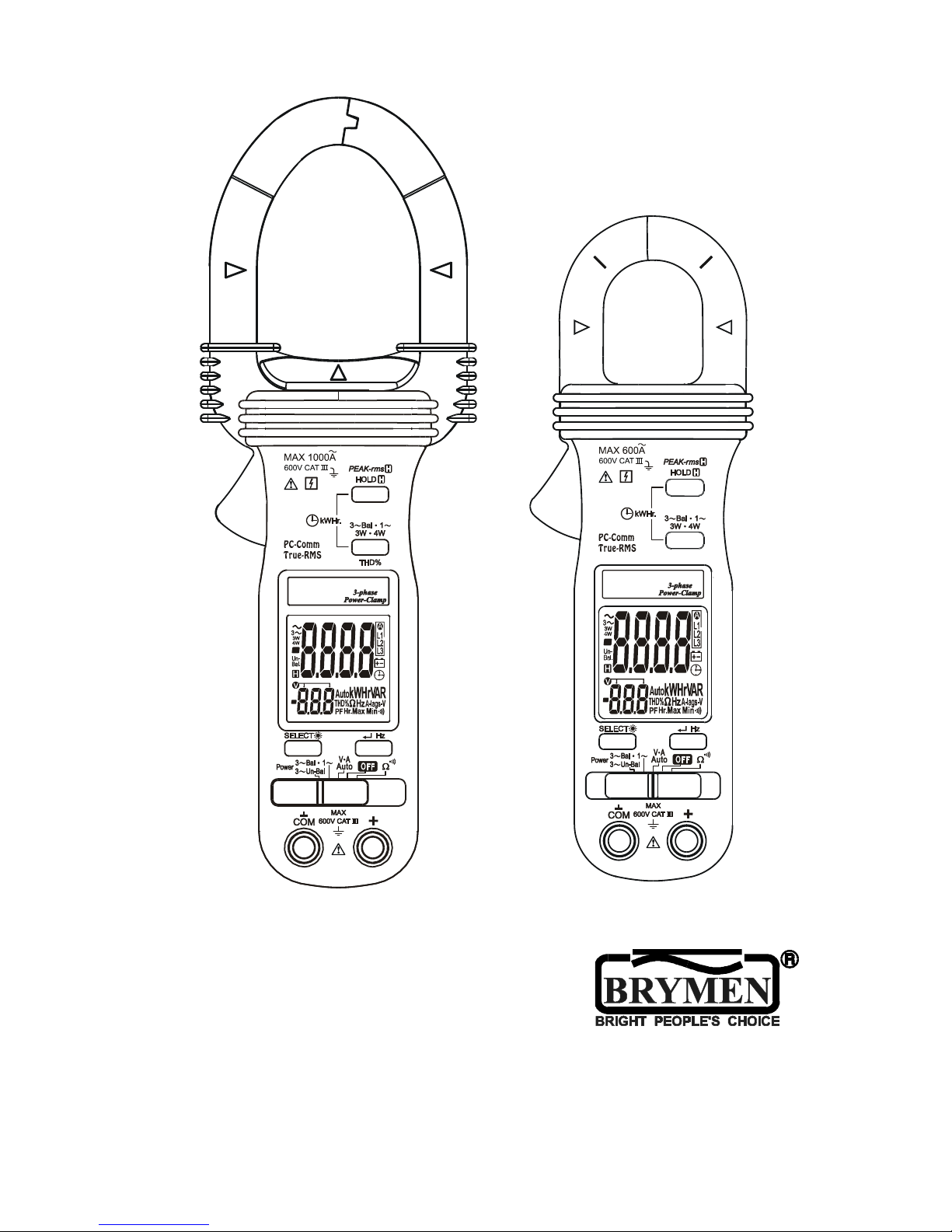
BM157 & BM357
3-Phase PowerClampTM
Page 2

1
1) SAFETY
This manual contains information and warnings that must be followed for operating the
instrument safely and maintaining the instrument in a safe operating condition. If the
instrument is used in a manner not specified by the manufacturer, the protection
provided by the instrument may be impaired.
The meter protection rating, against the users, is double insulation per IEC61010-1 2nd
Ed., EN61010-1 2nd Ed., UL61010-1 2nd Ed., CAN/CSA C22.2 No. 61010.1-0.92,
IEC61010-2-032, EN61010-2-032 & UL61010B-2-032:
Category CAT III 600V AC & DC.
PER IEC61010 OVERVOLTAGE INSTALLATION CATEGORY
OVERVOLTAGE CATEGORY II
Equipment of OVERVOLTAGE CATEGORY II is energy-consuming equipment to be
supplied from the fixed installation.
Note – Examples include household, office, and laboratory appliances.
OVERVOLTAGE CATEGORY III
Equipment of OVERVOLTAGE CATEGORY III is equipment in fixed installations.
Note – Examples include switches in the fixed installation and some equipment for
industrial use with permanent connection to the fixed installation.
OVERVOLTAGE CATEGORY IV
Equipment of OVERVOLTAGE CATEGORY IV is for use at the origin of the installation.
Note – Examples include electricity meters and primary over-current protection
equipment.
TERMS IN THIS MANUAL
WARNING identifies conditions and actions that could result in serious injury or even
death to the user.
CAUTION identifies conditions and actions that could cause damage or malfunction
in the instrument.
Page 3

2
WARNING
To reduce the risk of fire or electric shock, do not expose this product to rain or
moisture. The meter is intended only for indoor use.
To avoid electrical shock hazard, observe the proper safety precautions when working
with voltages above 60 VDC or 30 VAC rms. These voltage levels pose a potential
shock hazard to the user.
Keep your hands/fingers behind the hand/finger barriers (of the meter and the test
leads) that indicate the limits of safe access of the hand-held part during measurement.
Inspect test leads, connectors, and probes for damaged insulation or exposed metal
before using the instrument. If any defects are found, replace them immediately.
This Clamp-on meter is designed to apply around or remove from uninsulated
hazardous live conductors. But still, individual protective equipment must be used if
hazardous live parts in the installation where measurement is to be carried out could be
accessible.
CAUTION
Disconnect the test leads from the test points before changing meter functions.
INTERNATIONAL ELECTRICAL SYMBOLS
! Caution ! Refer to the explanation in this Manual
Caution ! Risk of electric shock
Earth (Ground)
Double Insulation or Reinforced insulation
Fuse
AC--Alternating Current
DC--Direct Current
Application around and removal from hazardous live conductors is permitted
2) CENELEC Directives
The instruments conform to CENELEC Low-voltage directive 2006/95/EC and
Electromagnetic compatibility directive 2004/108/EC
Page 4
3
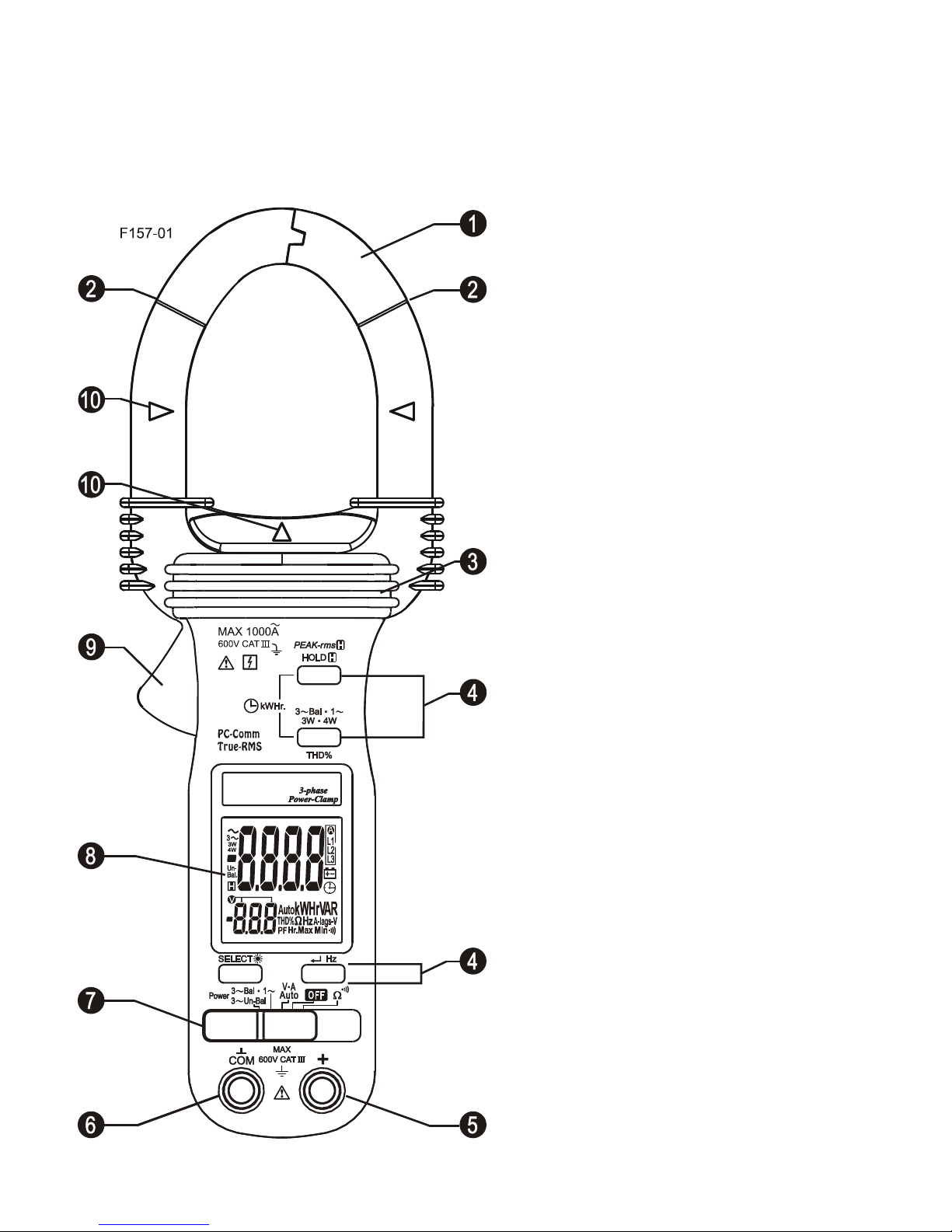
3) PRODUCT DESCRIPTION
Note: Top of the line model is used as representative for illustration purposes. Please
refer to your respective model for function availability.
1) Transformer Clamp Jaws for AC
current magnetic field pick up
2) Jaw marking lines for ACA (& thus
Power) position error indication
3) Hand/Finger Barrier to indicate the
limits of safe access to the jaws during
current measurements
4) Push-buttons for special functions &
features
5) Input Jack for all functions EXCEPT
non-invasive ACA current (& thus
Power) function
6) Common (Ground reference) Input
Jack for all functions EXCEPT
non-invasive ACA current (& thus
Power) function
7) Slide-switch Selector to turn the
power ON/OFF and Select a function
8) LCD display
9) Jaw trigger for opening the
transformer clamp jaws
10) Jaw center Indicators, at where
best ACA (& thus Power) accuracy is
specified
Page 5
4
4) OPERATION
CAUTION
Before and after hazardous voltage measurements, test the voltage function on a
known source such as line voltage to determine proper meter functioning.
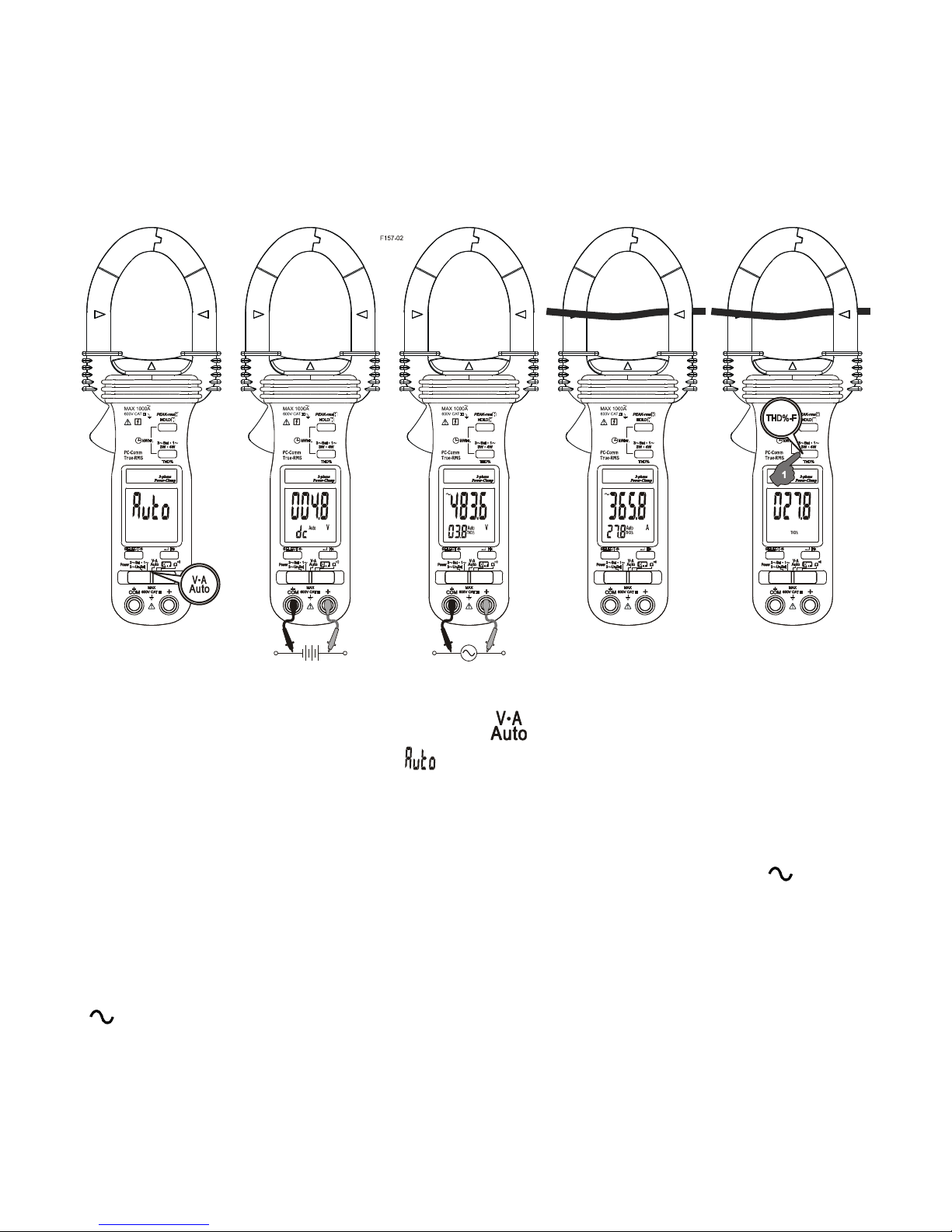
AutoVATM function
Set the slide-switch function-selector to the position.
●With no input, the meter displays “ ” when it is ready.
●With no ACA current input via the jaws but a voltage signal above the nominal
threshold of DC 2.4V or AC 30V (40Hz ~ 500Hz) up to the rated 600V is present on
V-COM terminals, the meter displays the voltage value in appropriate DC or AC,
whichever larger in peak magnitude. Annunciators “Auto” “dc” and “Auto” “ ” turn on
respectively.
●On the contrary, with no voltage signal present on V-COM terminals but a ACA
current signal above the nominal threshold of AC 1A (40Hz ~ 500Hz) up to the rated
1000A is input via the jaws, the meter displays the ACA current value. Annunciators
“ ” and “Auto” turn on accordingly.
●The Auto-VA feature stays at the auto-selected function as long as its signal remains
above the specified threshold. Press SELECT button momentarily to manually select
and lock (annunciator “Auto” turns off) thru the functions ACA, ACV, DCV and then goes
back to Auto-VA.
Page 6

5
CAUTION (Application and removal of the Clamp-on meter)
●For non-invasive ACA current measurements, press the jaw trigger and clamp the
jaws around only one single conductor of a circuit for load current measurement. Make
sure the jaws are completely closed, or else it will introduce measurement errors.
Enclosing more than one conductor of a circuit will result in differential current (like
identifying leakage current) measurement. Locate the conductor(s) at the Jaws center
as much as possible to get the best measuring accuracy. For removal, press the jaw
trigger and remove the jaws from the conductor(s).
●Adjacent current-carrying devices such as transformers, motors and conductor wires
will affect measurement accuracy. Keep the jaws away from them as much as possible
to minimize influence.
THD%-F Total Harmonic Distortion - Fundamental function (model 157 only)
Total Harmonic Distortion - Fundamental (THD%-F) function is designed to give basic
indication on the presence of Harmonics. It is the percentage ratio of the Total
Harmonics RMS value to the Fundamental RMS value of a voltage or current signal,
and is given by the expression:
THD%-F = (Total Harmonics RMS / Fundamental RMS) x 100%
An ideal sinusoidal waveform has a theoretical value of 0 THD%. A badly distorted
sinusoidal waveform may have a much higher THD% value of even up to several
hundreds. It is thus a good parameter to identify the degree of “cleanness” on power
systems.
When the meter is in ACV or ACA function, THD%-F values will be displayed in the
secondary mini display automatically. Press THD%-F button momentarily toggles
THD% readings to main display.
Page 7
6
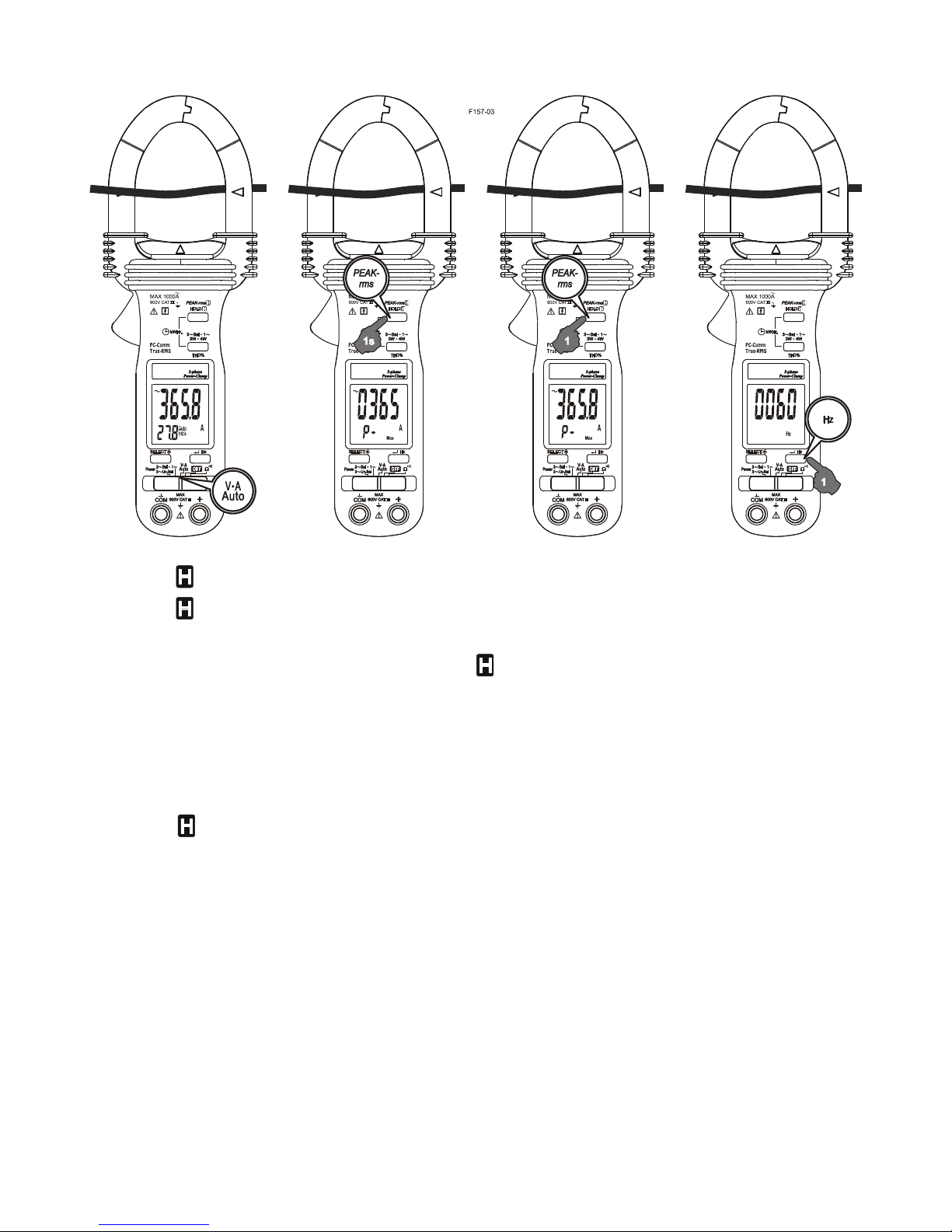
Peak-rms mode
Peak-rms compares and displays the maximum RMS value of surge voltage or
current with durations as short as 65ms. When ACV or ACA function is auto-selected or
manual-selected, press and hold Peak-rms button for one second or more toggles to
this mode. The annunciators “P-” “Max” turn on. APO (Auto Power Off) feature is
disabled automatically accordingly.
In ACA function, the Peak-rms mode starts at the highest 1000A (600A for model 357)
range to maximize measuring dynamic range. Before making measurement, press the
Peak-rms button momentarily again can manually select thru lower measuring
dynamic range 400.0A or 40.00A for higher measuring resolutions.
Line-level Frequency (Hz) function
When ACV or ACA function is auto-selected or manual-selected, press Hz button
momentarily toggles to Line-level Frequency (Hz) function. The Hz trigger level is
determined by the selected function-range from where the Hz function is activated.
In ACA function, activating the Hz function during significant measurements can get the
most appropriate trigger level to avoid electrical noises in most cases. Activating the Hz
function at AC 40.00A range (before making significant measurements) can get the
lowest trigger level (highest sensitivity).
Page 8

7
HOLD mode
When any function is auto-selected or manual-selected, press HOLD button
momentarily toggles to Hold mode. The annunciator “ ” turns on. Hold mode freezes
the display for later viewing.
Notes on Displacement Power Factor & Total Power Factor
●Introduction: Power is the rate of change of energy with respect to time (in terms of
voltage V and current A). Instantaneous (real) power w = vi where v is the
instantaneous voltage and i the instantaneous current. The average (real) power is the
mean of vi and is given by:
W = ω/2π∫vi dt , over the interval from 0 to 2π/ω
●Displacement Power Factor (more traditional): Assuming V and A are pure
sinusoidal waveforms without harmonics (as in most traditional cases), that is, v = V sin
ωt and i = I sin (ωt -θ), the expression can be simplified to:
W = 1/2 x V x I x Cosθ where V and I are the peak values, θ is the
displacement power factor angle, and Cosθ is the displacement power factor. Using
RMS values, it is written as:
W = V
rms
x A
rms
x Cosθ
Practically, in such cases without harmonics, θ is also called the phase-shift angle of
the current A to the voltage V. An inductive circuit is said to have a lagging power factor
since current A lags voltage V (phase-shift angle θ and thus Sinθ are both “+”), and a
capacitive circuit is said to have a leading power factor since current A leads voltage V
(phase-shift angle θ and thus Sinθ are both “-”).
●Total Power Factor (encountering harmonics): When encountering distorted
waveforms with the presence of harmonics, however, the simplified power expression
should not be used since substituting the above mentioned pure sinusoidal V and A
functions cannot fulfill the actual conditions. Cosine of phase-shift angle (Cosθ), or the
displacement power factor, is no longer the only component constituting the overall
power factor. Harmonics do increase apparent power and thus decrease the overall
power factor. That is, the Total Power Factor is actually affected by both phase-shift
angle and harmonics, and is given by the expression:
Total Power Factor (PF) = Real Power (W) / Apparent Power (VA)
In order to improve overall system power factor, nowadays power-system engineer
needs to address both phase-shift and harmonics problems. Practically, harmonics
should be dealt with (e.g. filtering out) before phase-shift to be corrected (e.g. installing
capacitors in parallel with inductive loads).
Page 9
8
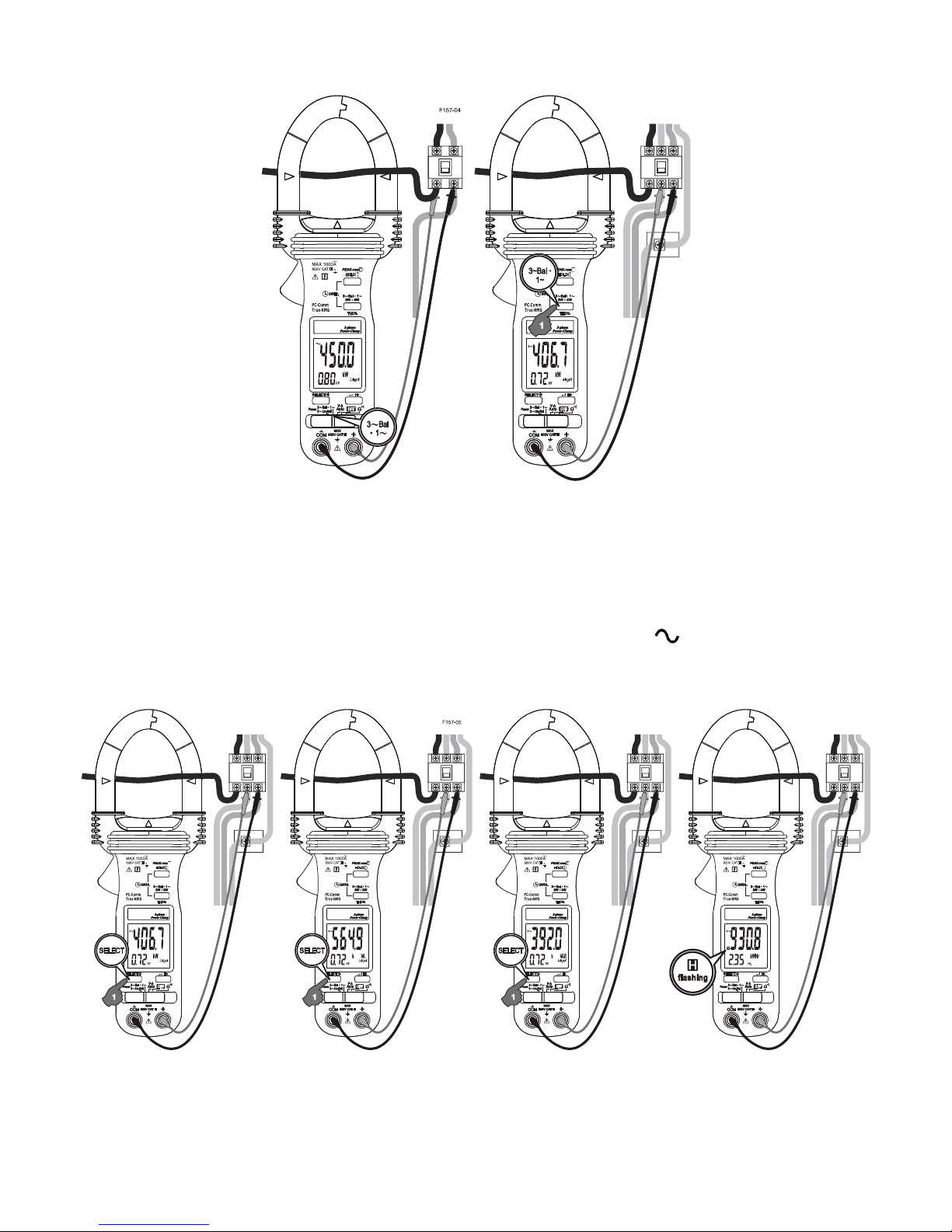
Single-Phase Power & 3-Phase Balanced-Load Power functions
Set the slide-switch function-selector to the “3~Bal ● 1~” Power position.
●Default at last selected function.
●Press “3~Bal ● 1~” button momentarily to toggle between “Single-Phase” and
“3-Phase Balanced Load” Power functions. Annunciators “ ” and “3~” turn on
respectively.
●Press SELECT button momentarily selects between W (real power), VAR (reactive
power), VA (apparent power) & kWHr (real-time readings or stored result) functions. In
W (real power), VAR (reactive power), or VA (apparent power) function:
Page 10

9
1. PF (Total Power Factor) is displayed automatically in the secondary mini display.
2. Annunciator “A-lags-V” turns on to indicate an inductive circuit is being measured.
That is, the Current waveform is lagging the Voltage waveform, and the phase-shift
angle θ is “+”.
3. On the contrary, together with significant PF values, WITHOUT “A-lags-V” being
turned on indicates that a capacitive circuit is being measured. That is, the Current
waveform is leading the Voltage waveform, and the phase-shift angle θ is “-”.
Note:
1. Under proper measurement setups for load circuits, the W (real power) readings are
always positive. Negative W readings indicate reversed clamp-on jaws direction or test
leads polarities, or even incorrect voltage lines are being measured as in 3-phase
measurement setups. Correct them for proper “A-lags-V” indications.
2. When encountering largely distorted waveforms, “A-lags-V” detection might be
affected due to the influence of harmonics. It is recommended to manage (e.g. filter out)
harmonics problems before measuring/dealing with phase-shift problems.
Page 11
10
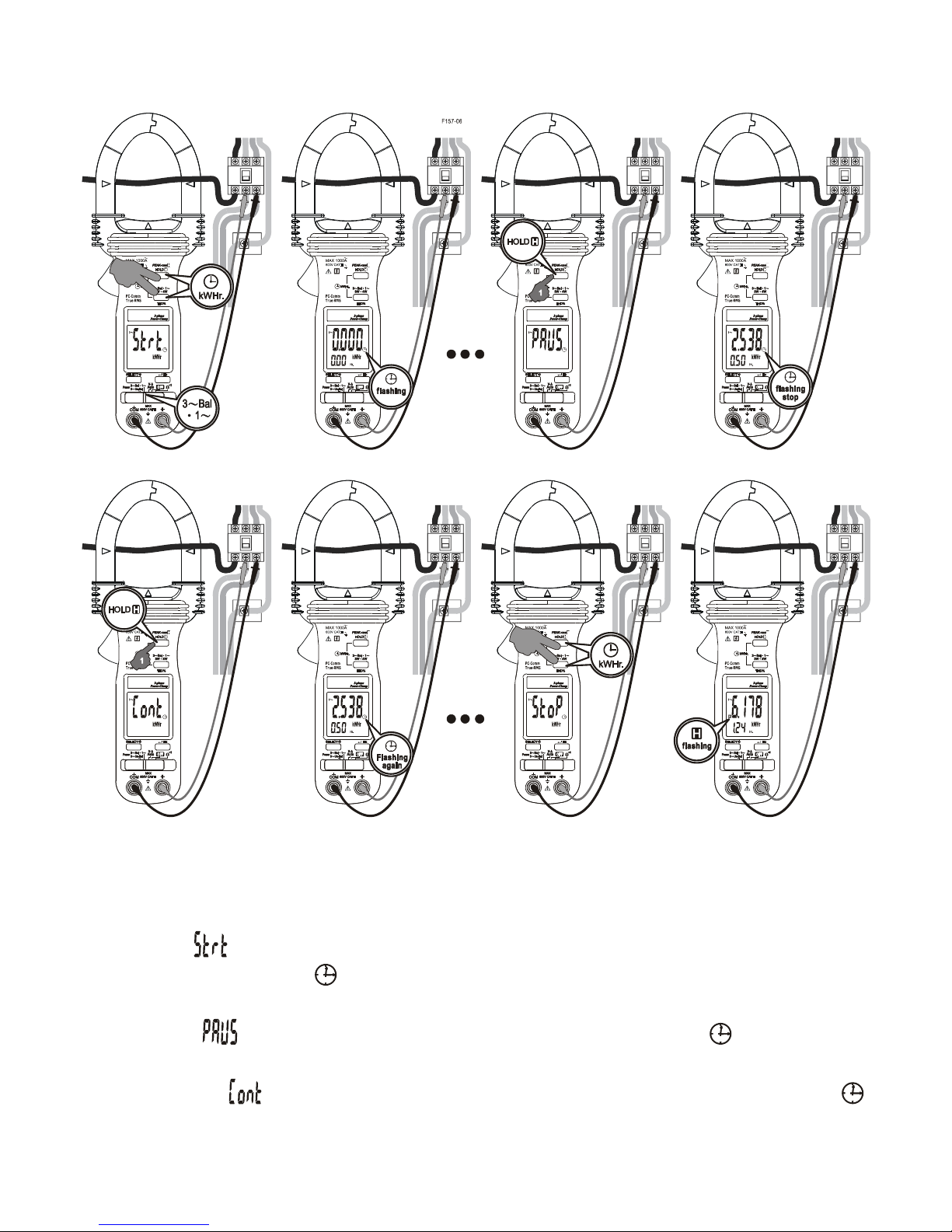
kWHr (kilo-Watt-Hour) Recording function
Set the slide-switch function-selector to the “3~Bal ● 1~” Power position. Setup power
measurements as mentioned in the previous “Single-Phase Power & 3-Phase
Balanced-Load Power functions” section
●To start (“ ”) kWHr Recording, press “3~Bal ● 1~” and “HOLD” buttons at the
same time. Annunciator “ ” turns on & flashes. kWHr accumulated time (in Hour) is
displayed automatically in the secondary mini display.
●To pause (“ ”), press “HOLD” button momentarily. Annunciator “ ” stops flashing
and is always on.
●To continue (“ ”), press the “HOLD” button momentarily again. Annunciator “ ”
resumes flashing.
Page 12
11
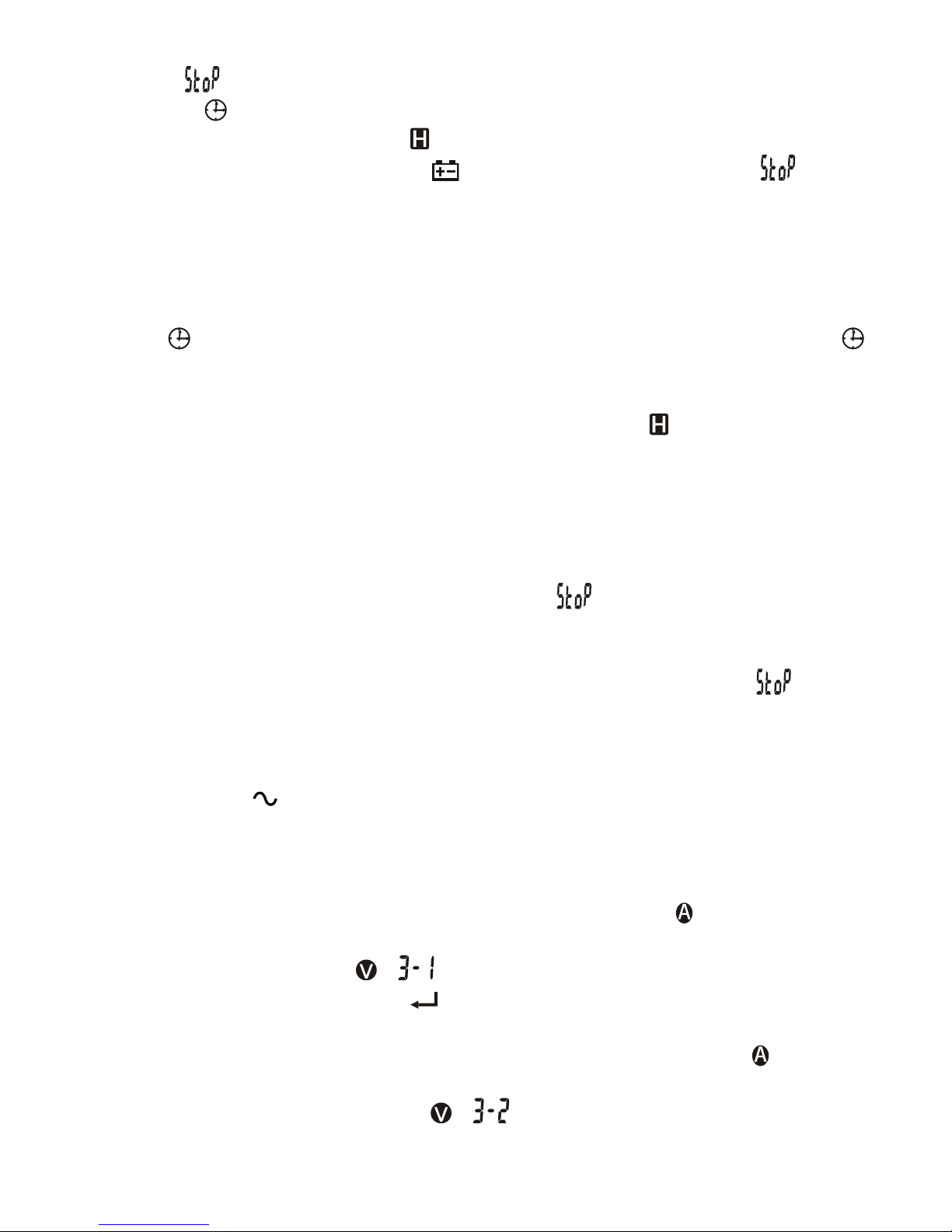
●To stop (“ ”), press the “3~Bal ● 1~” and “HOLD” buttons at the same time again.
Annunciator “ ” turns off. The kWHr Recording result is then displayed on the LCD
for immediate viewing. Annunciator “ ” turns on & flashes.
●When the low battery annunciator “ ” turns on, the meter will stop (
“ ”
) kWHr
recording session automatically and display kWHr Recording result as in above.
Note:
●During kWHr Recording session, real-time W, VAR, VA as well as kWHr
accumulated readings can be selected by pressing the SELECT button momentarily. A
flashing “ ” denotes that kWHr Recording is still under-going. An always on “ ”
denotes that kWHr Recording is being paused.
●When kWHr Recording is not activated, kWHr stored result instead of accumulated
readings is displayed when selected as in above. Annunciator “ ” turns on & flashes.
●The meter separately stores one Single-Phase and one 3-Phase-Balanced-Load
kWHr result for later viewing. When they are being viewed, press “3~Bal ● 1~” button
momentarily to toggle between them.
●When the display readings exceed 9999kWHr/999hours, exponential readings are
displayed. “2.3E4” kWHr represents 2.3 x 10⁴ kWHr, or 23000 kWHr for example,.
●After the kWHr Recording session is stopped (
“ ”
) properly, the new result will
supersede the previous one stored in the non-volatile memory. You can then switch off
the meter for transportation, storage, or even battery changing with memory remained.
●To avoid mis-storage to memory, it is important to properly stop (
“ ”
) kWHr
Recording session before sliding the slide-switch function-selector to any other
function positions.
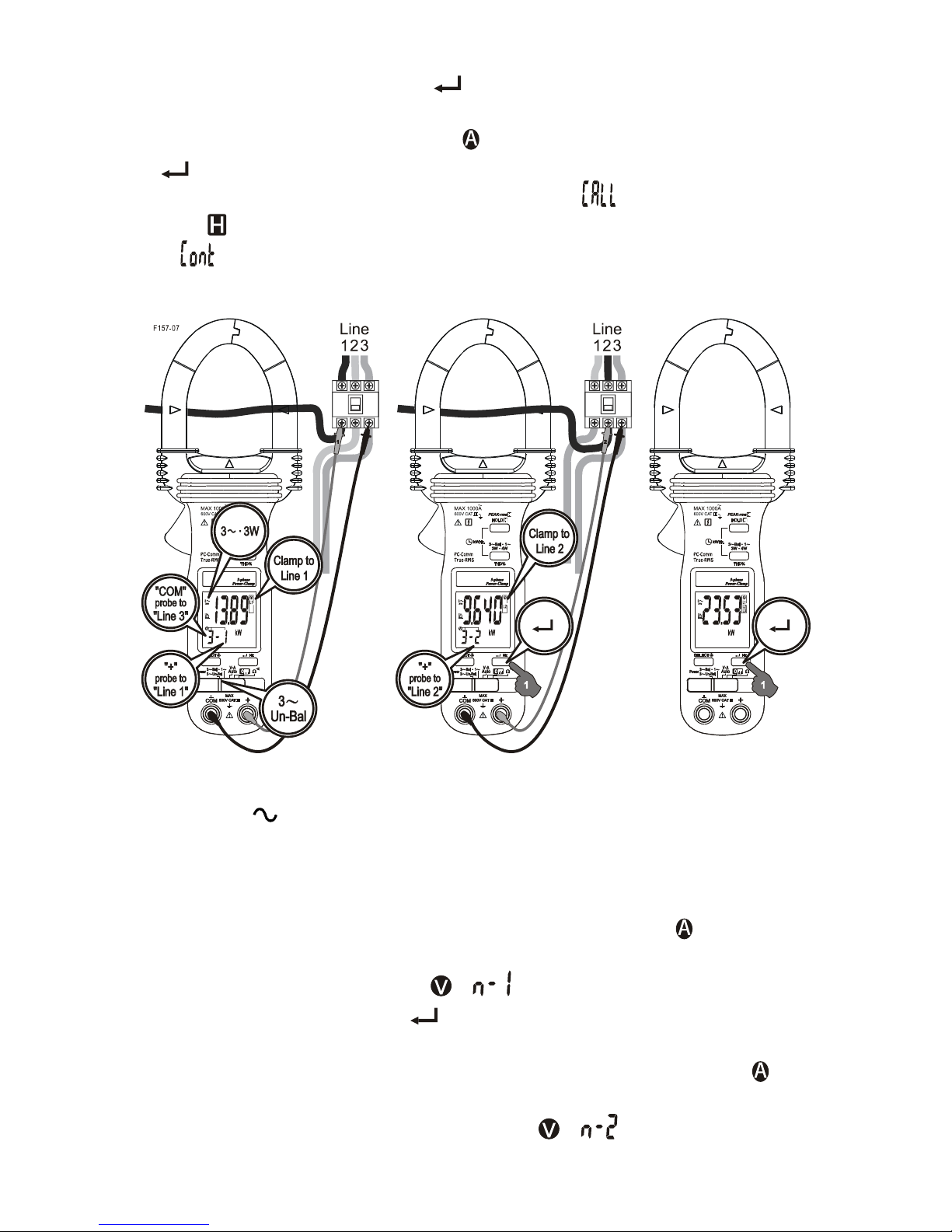
3-Phase 3-Wire (3 3W) Unbalanced-Load Power Function
●Set the slide-switch function-selector to the “3~Un-Bal” Power position. Press
“3W●4W” button momentarily to select 3-Wire measurements. Annunciator “3W” turns
on.
●Clamp the jaws around “Line 1” as reminded by annunciators “ L1”, and connect
Black test probe (COM terminal) to “Line 3” and Red test probe (+ terminal) to “Line 1”
as reminded by annunciators “ ” on mini-display.
●When the reading is stable, press “ ” button momentarily to enter the first measuring
value.
●Then clamp the jaws around “Line 2” as reminded by annunciators “ L2”, and
connect Black test probe (COM terminal) to “Line 3” and Red test probe (+ terminal) to
“Line 2” as reminded by annunciators “ ” on mini-display.
Page 13
12
●When the reading is stable, press “ ” button momentarily to enter the second
measuring value. The meter will then calculate, store and display the total 3-Phase
Power result automatically. Annunciators “ L1 L2 L3” turn on.
●Press “ ” button momentarily again for new measurements.
●Press “SELECT” button momentarily to view (“ ”) the last stored result.
Annunciator “ ” turns on & flashes. Press “SELECT” button momentarily again to
continue (“ ”).
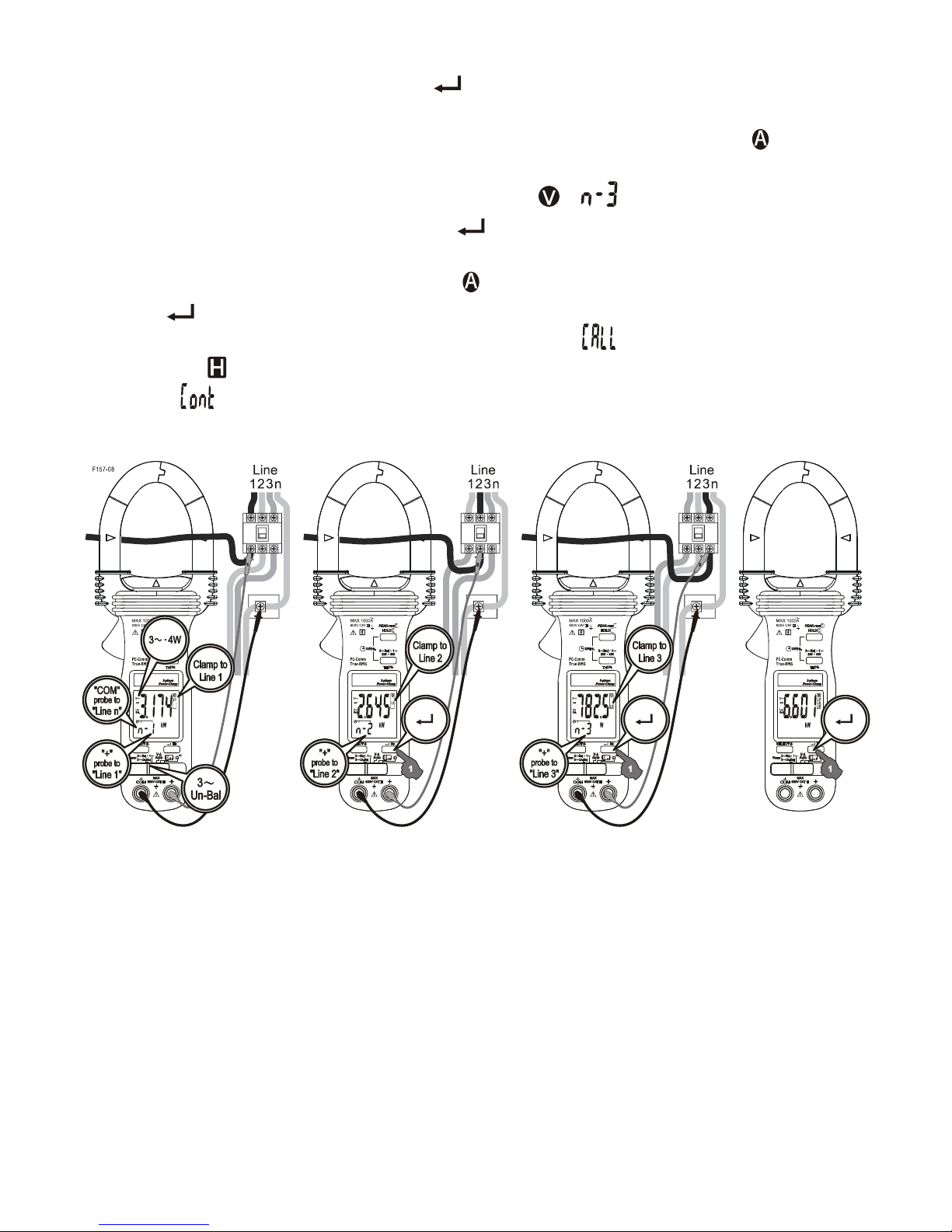
3-Phase 4-Wire (3 4W) Unbalanced-Load Power function
●Set the slide-switch function-selector to the “3~Un-Bal” Power position. Press
“3W●4W” button momentarily to select 4-Wire measurements. Annunciator “4W” turns
on.
●Clamp the jaws around “Line 1” as reminded by annunciators “ L1”, and connect
Black test probe (COM terminal) to “Line n (neutral)” and Red test probe (+ terminal) to
“Line 1” as reminded by annunciators “ ” on mini-display.
●When the reading is stable, press “ ” button momentarily to enter the first measuring
value.
●Then clamp the jaws around “Line 2” as reminded by annunciators “ L2”, and
connect Black test probe (COM terminal) to “Line n (neutral)” and Red test probe (+
terminal) to “Line 2” as reminded by annunciators “ ” on mini-display.
Page 14
13
●When the reading is stable, press “ ” button momentarily to enter the second
measuring value.
●Then clamp the jaws around “Line 3” as reminded by annunciators “ L3”, and
connect Black test probe (COM terminal) to “Line n (neutral)” and Red test probe (+
terminal) to “Line 3” as reminded by annunciators “ ” on mini-display.
●When the reading is stable, press “ ” button momentarily to enter the third
measuring value. The meter will then calculate, store and display the total 3-Phase
Power result automatically. Annunciators “ L1 L2 L3” turn on.
● Press “ ” button momentarily again for new measurements.
●Press “SELECT” button momentarily to view (“ ”) the last stored result.
Annunciator “ ” turns on & flashes. Press “SELECT” button momentarily again to
continue (“ ”).
Page 15
14
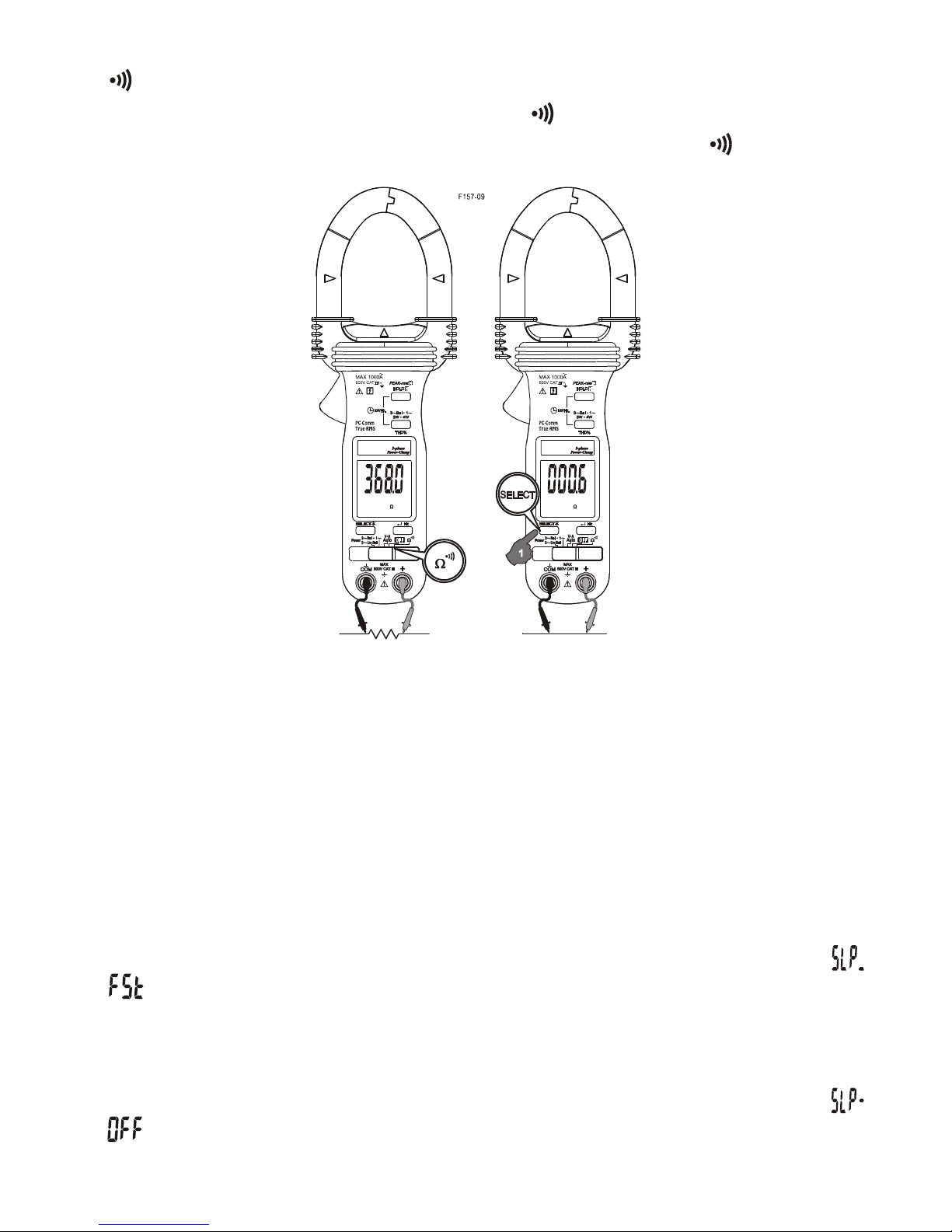
/ functions
Set the slide-switch function-selector to the / function position. Default at last
selected function. Press SELECT button to toggle between and measurement
functions.
Backlighted display
Press the SELECT button for 1 second or more to toggle the display backlight on or off.
Auto Power Off (APO)
The meter turns off after approximately 30 minutes of neither switch nor button activity.
To wake up the meter from APO, press SELECT button or slide the function-selector to
OFF position and back on again. Always turn the function-selector to OFF when the
meter is not in use.
Auto Power Off Quick Test
Press-and-hold the 3W.4W button while powering the meter on. The LCD displays “ ”
& “ ” to confirm activation right after the 3W.4W button is released. Quick test APO
timing is 10 seconds after such activation.
Disabling Auto-Power-Off (APO)
Press-and-hold the HOLD button while powering the meter on. The LCD displays “ ”
& “ ” to confirm activation right after the HOLD button is released.
Page 16

15
Line Frequency setup
Press-and-hold the Hz button while powering the meter on. LCD displays the last 50Hz
or 60 Hz setup. Press SELECT button momentarily to select 50Hz or 60Hz to cope with
your local line frequency. Press Hz button for one second to store your selection and
resume measurements. Incorrect line frequency setup will introduce errors to THD%.
PC computer interface capabilities
The instrument equips with an optical isolated data output port at the bottom case near
the battery compartment. Optional purchase PC interface kit BRUA-13X (including
BA-1XX Optical Adapter Back, BC-100R Cable, BUA-2303 USB-to-Serial adaptor & Bs
software/driver CD) is required to connect the meter to PC computer USB port. The
Data Recording System software equips with a digital meter, an analog meter, a
comparator meter, and a Data Graphical recorder. Refer to the README file comes
with the interface kit for further details.
5) MAINTENANCE
WARNING
To avoid electrical shock, disconnect the meter from any circuit, remove the test leads
from the input jacks and turn OFF the meter before opening the case. Do not operate
with open case.
Trouble Shooting
If the instrument fails to operate, check batteries and test leads etc., and replace as
necessary. Double check operating procedure as described in this user’s manual
If the instrument voltage-resistance input terminal has subjected to high voltage
transient (caused by lightning or switching surge to the system) by accident or
abnormal conditions of operation, the series fusible resistors will be blown off (become
high impedance) like fuses to protect the user and the instrument. Most measuring
functions through this terminal will then be open circuit. The series fusible resistors and
the spark gaps should then be replaced by qualified technician. Refer to the LIMITED
WARRANTY section for obtaining warranty or repairing service.
Cleaning and Storage
Periodically wipe the case with a damp cloth and mild detergent; do not use abrasives
or solvents. If the meter is not to be used for periods of longer than 60 days, remove the
batteries and store them separately
Page 17
16
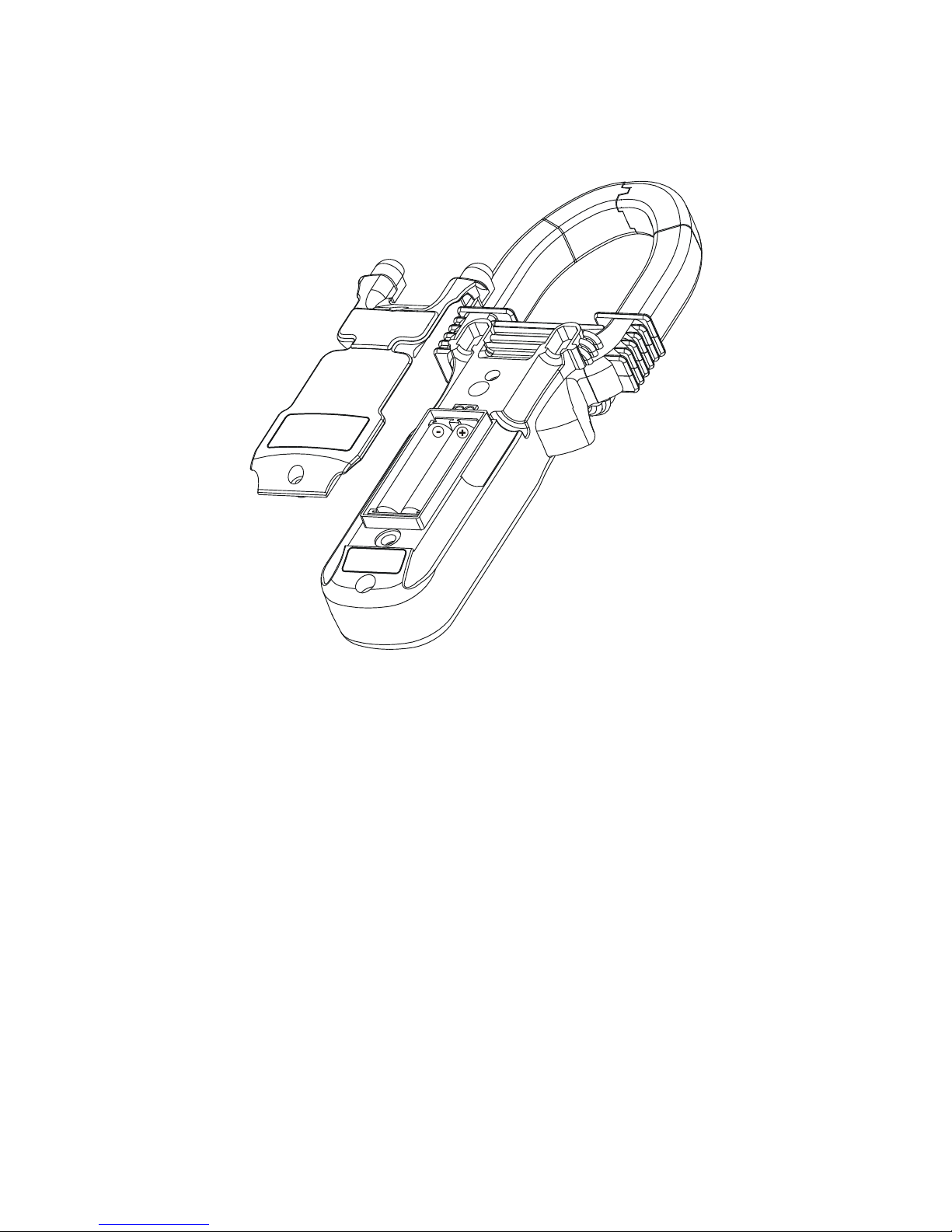
Battery replacement
The meter uses standard 1.5V AAA Size (NEDA 24A or IEC LR03) battery X 2
Loosen the 2 captive screws from the battery cover case. Lift the battery cover case.
Replace the batteries. Replace battery cover case. Re-fasten the screws.
6) Specifications
General Specifications
Display :
Voltage functions: 6000 counts LCD display
Power, Ohm & Hz functions: 9999 counts LCD display
ACA clamp-on function: 4000 counts LCD display
Update Rate :
Power function: 2 per second nominal
Voltage, ACA clamp-on & Ohm functions: 2 per second nominal
Hz function: 1 per second nominal
Polarity : Automatic
Low Battery : Below approx. 2.4V
Operating Temperature : 0oC to 40oC
Relative Humidity : Maximum relative humidity 80% for temperature up to 31oC
decreasing linearly to 50% relative humidity at 40oC
Altitude : Operating below 2000m
Storage Temperature : -20oC to 60oC, < 80% R.H. (with battery removed)
Page 18

17
Temperature Coefficient : nominal 0.15 x (specified accuracy)/ oC @(0oC -18oC or
28oC -40oC), or otherwise specified
Sensing : True RMS sensing
Safety : Meets IEC61010-1 2nd Ed., EN61010-1 2nd Ed., UL61010-1 2nd Ed.,
CAN/CSA C22.2 No. 61010.1-0.92, IEC61010-2-032, EN61010-2-032 &
UL61010B-2-032
Measurement Category : III 600 Volts ac & dc
Transient protection : 6.5kV (1.2/50s surge)
Pollution degree : 2
E.M.C. : Meets EN61326-1:2006 (EN55022, EN61000-3-2, EN61000-3-3,
EN61000-4-2, EN61000-4-3, EN61000-4-4, , EN61000-4-5, EN61000-4-6,
EN61000-4-8, EN61000-4-11)
In an RF field of 3V/m:
Total Accuracy = Specified Accuracy + 50 digits
Performance above 3V/m is not specified
Overload Protections :
ACA Clamp-on jaws :
AC 1000A rms continuous for model 157;
AC 600A rms continuous for model 357
+ & COM terminals (all functions) : 600VDC/VAC rms
Power Supply : standard 1.5V AAA Size (NEDA 24A or IEC LR03) battery X 2
Power Consumption :
Voltage, ACA, Hz & Power functions: 11mA typical
Ohm function: 5.5mA typical
APO Timing : Idle for 30 minutes
APO Consumption : 4A typical
Dimension : L224 X W78 X H40 mm for model 157; L189 X W78 X H40 mm for model
357
Weight : 224 gm approx for model 157; 192 gm approx for model 357
Jaw opening & Conductor diameter : 45mm max for model 157; 26mm max for
model 357
Special features : Backlighted display; AutoVATM (Auto Selection on ACV, DCV or ACA
functions); selectable Power parameters of W, VAR & VA with Total Power Factor in
dual-display; Total harmonic distortion THD%-F in dual-display (model 157 only); kWHr
Recording; Display Hold; PEAK-rms HOLD; PC-Comm computer interface capabilities
Accessories : Test leads (pair), batteries installed, user's manual & soft carrying pouch
Optional accessories : PC interface kit BRUA-13X (including BA-1XX Optical Adapter
Back, BC-100R Cable, BUA-2303 USB-to-Serial adaptor & Bs software/driver CD)
Page 19
18
Electrical Specifications
Accuracy is ±(% reading digits + number of digits) or otherwise specified, at 23 oC ±5
o
C & less than 75% R.H.
True RMS ACV & ACA clamp-on accuracies are specified from 0% to 100% of range or
otherwise specified. Maximum Crest Factor are as specified below, and with frequency
spectrums, besides fundamentals, fall within the meter specified AC bandwidth for
non-sinusoidal waveforms. Fundamentals are specified at 50Hz and 60Hz.
AC Voltage
RANGE Accuracy
50Hz / 60Hz
600.0V 0.5% + 5d
45Hz ~ 500Hz
600.0V 1.5% + 5d
500Hz ~ 3.1kHz
600.0V 2.5% + 5d
CMRR : >60dB @ DC to 60Hz, Rs=1k
Input Impedance: 2M, 30pF nominal
Crest Factor:
model 157: < 2.3 : 1 at full scale & < 4.6 : 1 at half scale
model 357: < 2 : 1 at full scale & < 4 : 1 at half scale
ACV AutoVATM Threshold: 30VAC (40Hz ~ 500Hz only) nominal
DC Voltage
RANGE Accuracy
600.0V 0.5% + 5d
NMRR : >50dB @ 50/60Hz
CMRR : >120dB @ DC, 50/60Hz, Rs=1k
Input Impedance: 2M, 30pF nominal
DCV AutoVATM Threshold: 2.4VDC nominal
Page 20
19
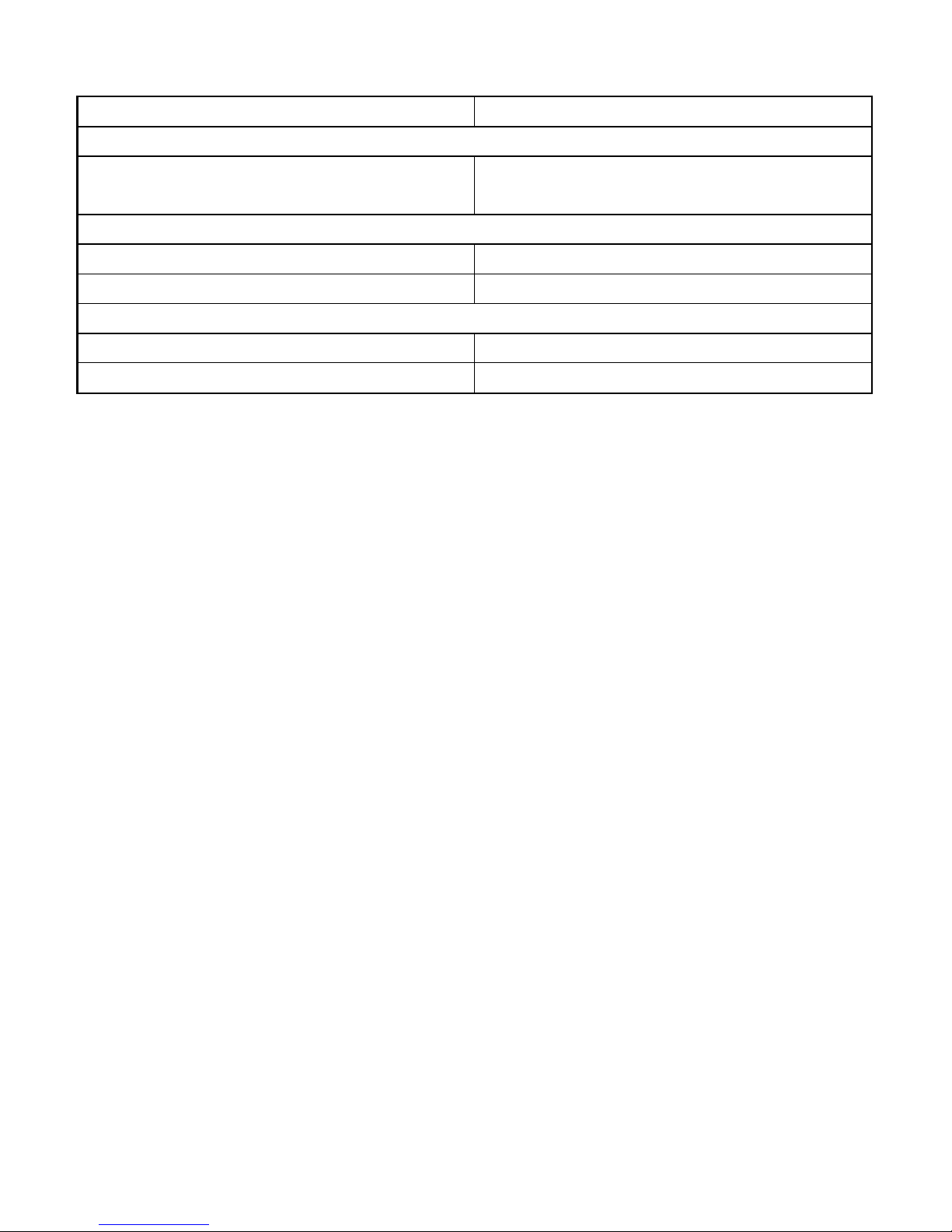
ACA Current (Clamp-on)
RANGE Accuracy
1) 2)
50Hz / 60Hz
40.00A, 400.0A,
1000A (600A for model 357)
1.0% + 5d
45Hz ~500Hz
40.00A, 400.0A 2.0% + 5d
1000A (600A for model 357) 2.5% + 5d
500Hz ~ 3.1kHz
40.00A, 400.0A 2.5% + 5d
1000A (600A for model 357) 3.0% + 5d
ACA AutoVATM Threshold: 1A AC (40Hz ~ 500Hz only) nominal
Crest Factor:
model 157:
< 2.5 : 1 at full scale & < 5.0 : 1 at half scale for 40.00A & 400.0A ranges
< 1.4 : 1 at full scale & < 2.8 : 1 at half scale for 1000A range
model 357:
< 3 : 1 at full scale & < 6 : 1 at half scale for 40.00A, 400.0A & 600A ranges
1)
Induced error from adjacent current-carrying conductor: < 0.06A/A
2)
Specified accuracy is from 1% to 100% of range and for measurements made at the
jaw center. When the conductor is not positioned at the jaw center, position errors
introduced are:
Add 1% to specified accuracy for measurements made WITHIN jaw marking lines
(away from jaw opening)
Add 4% to specified accuracy for measurements made BEYOND jaw marking lines
(toward jaws opening)
PEAK-rms HOLD (ACA & ACV only)
Response: 65ms to >90%
Page 21
20
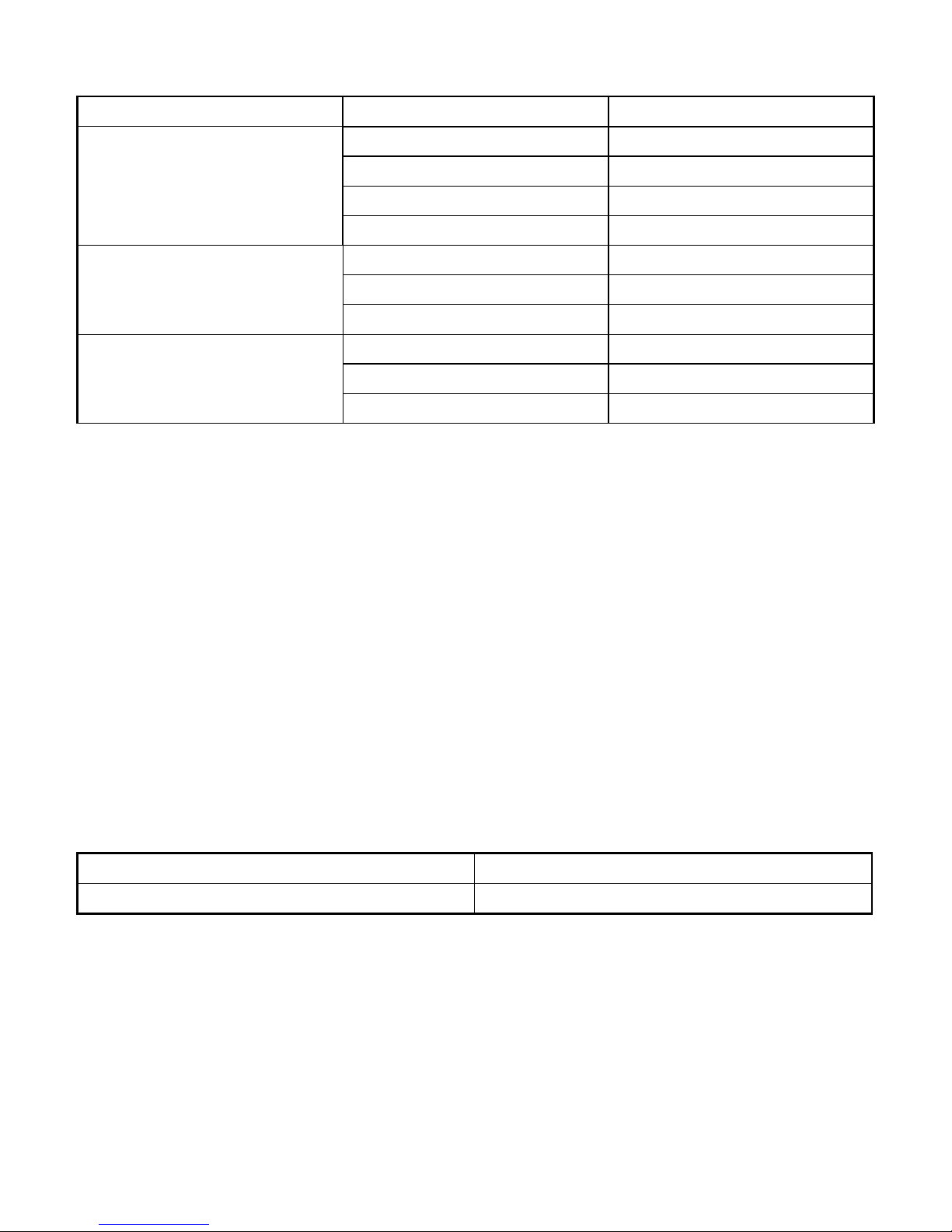
THD%-F (model 157 only)
RANGE
Harmonic order
Accuracy
1)
Fundamental 1.5% + 6d
2nd ~ 3rd 7% + 6d
4th ~ 21st 2.5% + 6d
2) 3)
0.0% ~50.0%
22nd ~ 51st 10% + 10d 4)
2nd ~ 3rd Unspecified
4th ~ 21st 2.5% + 6d
5) 6)
50.0% ~100%
22nd ~ 51st 10% + 10d
4)
2nd ~ 3rd Unspecified
4th ~ 21st 7% + 6d
2) 4)
100% ~450%
7)
22nd ~ 51st Unspecified
THD%-F is defined as: (Total Harmonic RMS / Fundamental RMS) x 100%
1)
Accuracy specified @ fundamental 70V & Total RMS 600V for ACV THD%-F,
fundamental 6A & Total RMS 1000A for ACA THD%-F, and Crest Factors @ :
< 2.5 for 600V Range
< 2.5 for 40A Range
< 3.0 for 400A Range
< 1.6 for 1000A Range
2)
Add 4d to specified accuracy @ 40A Range
3)
Add 4.5% to specified accuracy @ 1000A range
4)
Unspecified @ 1000A range
5)
Add 1% + 4d to specified accuracy @ 40A Range
6)
Add 4.5% to specified accuracy @ 400A ~ 750A; unspecified @ > 750A
7)
~150% for 600V Range
Frequency
RANGE Accuracy
5Hz ~ 500Hz 0.5%+4d
Sensitivity (Sine RMS)
40A range: > 4A
400A range: > 40A
1000A (600A for model 357) range: > 400A
600V range: > 30V
Page 22
21
Ohms
RANGE Accuracy
999.9
1.0% + 6d
Open Circuit Voltage : 0.4VDC typical
Audible Continuity Tester
Audible threshold: between 10 and 300.
Response time: 250s
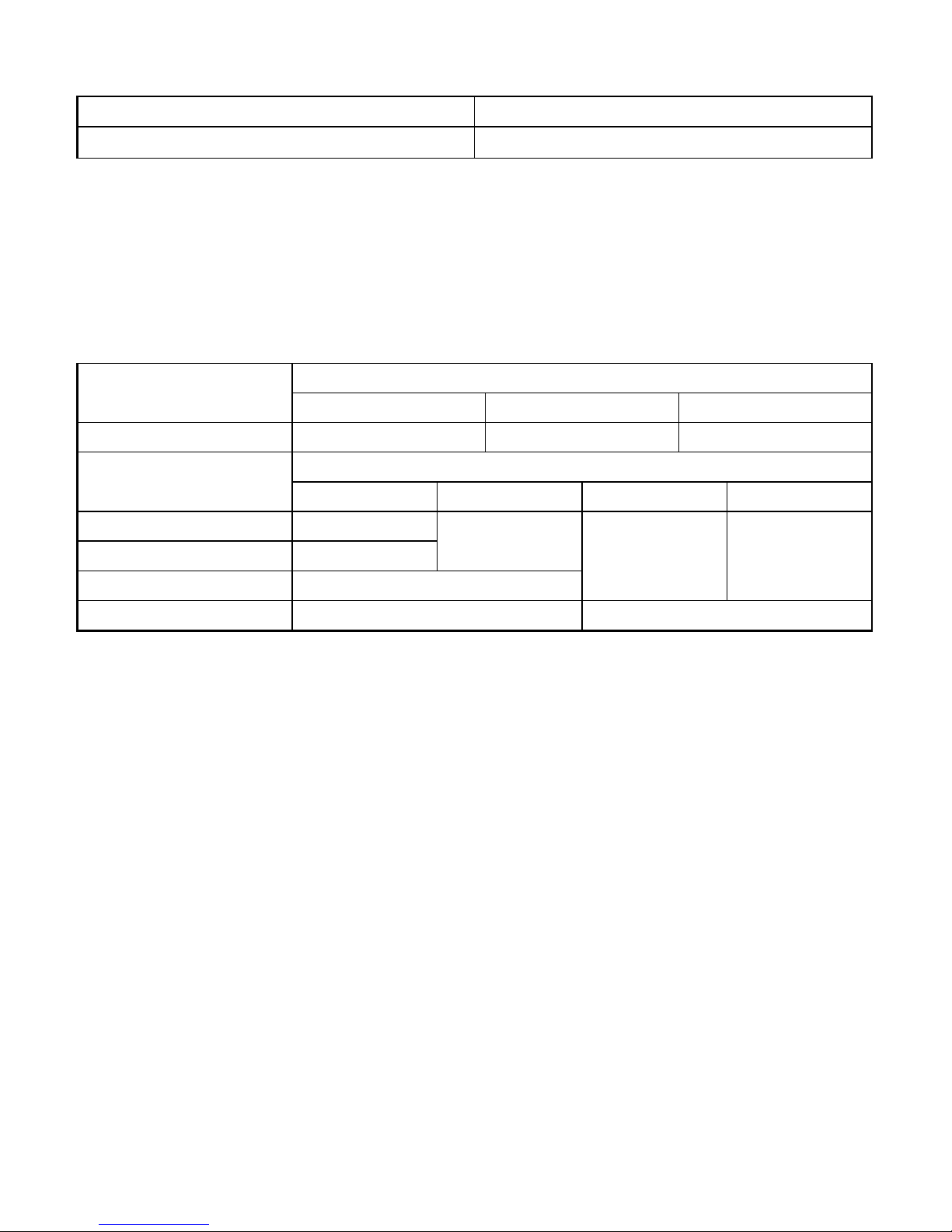
Single-Phase & 3-Phase Balanced-Load Power
Accuracy
1) 2) 3)
RANGE 5)
0 ~ 600.0kVA
F ~ 10th 11th ~ 45th 46th ~ 51st
@ PF = 0.99 ~ 0.1 2.0%+6d 3.5%+6d 5.5%+6d
Accuracy
1) 2) 4)
RANGE 5)
0 ~ 600.0kW / kVAR
F ~ 10th 11th ~ 25th 26th ~ 45th 46th ~ 51st
@ PF = 0.98 ~ 0.70 2.0%+6d
@ PF = 0.70 ~ 0.50 3.0%+6d
3.5%+6d
@ PF = 0.50 ~ 0.30 4.5%+6d
4.5%+6d
10%+6d
@ PF = 0.30 ~ 0.20 10%+6d 15%+6d
1)
Specified accuracy is for ACA clamp measurement at the center of jaws. When the
conductor is not positioned at the jaw center, position errors introduced are:
Add 1% to specified accuracy for ACA measurements made WITHIN jaw marking
lines (away from jaw opening)
Accuracy is not specified for ACA measurement made BEYOND jaw marking lines
(toward jaws opening)
2)
Add 4d to specified accuracy for 3-Phase Balanced-Load Power measurements.
3)
Add 1% to specified accuracy @ ACA fundamental < 6A or ACV fundamental < 90V.
Accuracy is not specified @ ACA fundamental < 1A or ACV fundamental < 30V
4)
Add 1% to specified accuracy @ ACA fundamental < 6A or ACV fundamental < 90V.
Accuracy is not specified @ ACA fundamental < 2A or ACV fundamental < 50V
5)
0 ~ 360.0 for model 357
Page 23

22
Total Power Factor (PF)
RANGE Accuracy
1)
F ~ 21st 22nd ~ 51st 0.10 ~ 0.99
3d 5d
1)
Specified accuracy @ ACA fundamental > 2A ; ACV fundamental > 50V
A-lags-V Indication:
LCD annunciator “A-lags-V” turns on to indicate an inductive circuit, or Current A lags
Voltage V (i.e., phase-shift angleθ is “+”).
A-lags-V Indication is specified at 50/60Hz fundamental without the presence of
harmonics, and at ACV > 90V, ACA > 9A and PF < 0.95
kWHr (kilo-Watt-Hour Energy)
Time base accuracy: < 30ppm
Non-volatile memory: Separately stores one 3-Phase-Balanced-Load and one
Single-Phase result
3-Phase Unbalanced-Load Power
This 3-Phase Unbalanced-Load Power measurement is achieved thru the calculation of
discrete single-phase measurements that are taken one at a time manually. Since it is
not real-time on all 3 phases simultaneously, it is intended only for stable power
conditions without significant power fluctuations over the time of measurements. Result
accuracy is hence the accumulated accuracy of the discrete single-phase
measurements plus the associated fluctuations.
Page 24

LIMITED WARRANTY
BRYMEN warrants to the original product purchaser that each product it manufactures
will be free from defects in material and workmanship under normal use and service
within a period of one year from the date of purchase. BRYMEN's warranty does not
apply to accessories, fuses, fusible resistors, spark gaps, batteries or any product
which, in BRYMEN's opinion, has been misused, altered, neglected, or damaged by
accident or abnormal conditions of operation or handling.
To obtain warranty service, contact your nearest BRYMEN authorized agent or send
the product, with proof of purchase and description of the difficulty, postage and
insurance prepaid, to BRYMEN TECHNOLOGY CORPORATION. BRYMEN assumes
no risk for damage in transit. BRYMEN will, at its option, repair or replace the
defective product free of charge. However, if BRYMEN determines that the failure
was caused by misused, altered, neglected, or damaged by accident or abnormal
conditions of operation or handling, you will be billed for the repair.
THIS WARRANTY IS EXCLUSIVE AND IS IN LIEU OF ALL OTHER WARRANTIES,
EXPRESSED OR IMPLIED, INCLUDING BUT NOT LIMITED TO ANY IMPLIED
WARRANTY OR MERCHANTABILITY OR FITNESS FOR A PARTICULAR PURPOSE
OR USE. BRYMEN WILL NOT BE LIABLE FOR ANY SPECIAL, INDIRECT,
INCIDENTAL OR CONSEQUENTIAL DAMAGES.
BRYMEN TECHNOLOGY CORPORATION
TEL:+886 2 2226 3396
FAX:+886 2 2225 0025
http://www.brymen.com
PRINTED ON RECYCLABLE PAPER, PLEASE RECYCLE
COPYRIGHT © MMIX Btc, ALL RIGHTS RESERVED
P/N: 7M1C-1051-0000 PRINTED IN TAIWAN
 Loading...