

Page 1

704D----A
LEGACYt 13 SEER SINGLE--PACKAGED AIR CONDITIONER SYSTEM
WITH PURON (R--410A) REFRIGERANT
SINGLE AND THREE PHASE
2--5 NOMINAL TONS (SIZES 24--60)
Installation Instructions
NOTE: Read the entire instruction manual before starting the
installation.
NOTE: Installer: Make sure the Owner’s Manual and Service
Instructions are left with the unit after installation.
TABLE OF CONTENTS
PAGE
SAFETY CONSIDERATIONS 1.........................
INTRODUCTION 2...................................
RECEIVING AND INSTALLA TION 2--10.................
Check Equipment 2..................................
Identify Unit 2....................................
Inspect Shipment 2.................................
Provide Unit Support 2...............................
Roof Curb 2......................................
Slab Mount 2.....................................
Provide Clearances 2.................................
Field Fabricate Ductwork 2............................
Rig and Place Unit 6.................................
Inspection 6......................................
Rigging/Lifting of Unit 7............................
Connect Condensate Drain 7...........................
Install Duct Connections 7.............................
Configuring Units for Downflow (Vertical) Discharge 7....
Install Electrical Connections 8.........................
High--Voltage Connections 9.........................
Special Procedures for 208v Operation 9................
Control Voltage Connections 9........................
Standard Connection 10.............................
Transformer Protection 10...........................
PRE-- S TART--UP 11...................................
START--UP 11--13.....................................
Check for Refrigerant Leaks 11.........................
Start--Up Adjustments 11..............................
Checking Cooling Control Operation 11................
Checking and Adjusting Refrigerant Charge 11...........
Indoor Airflow and Airflow Adjustments 12.............
Single Cooling Fan Speed Set--up 12...................
Two Cooling Fan Speeds Set-- up 12....................
Continuous Fan Operation 13........................
Cooling Sequence of Operation 13.....................
MAINTENANCE 22--24................................
Air Filter 22......................................
Indoor Blower and Motor 22.........................
Outdoor Coil, Indoor Coil, and Condensate Drain Pan 23...
Outdoor Fan 23...................................
Electrical Controls and Wiring 23.....................
Refrigerant Circuit 24...............................
Evaporator Airflow 24..............................
Puron Items 24....................................
TROUBLESHOOTING 25..............................
START--UP CHECKLIST 25............................
VERTICAL ECONOMIZER 29--47.......................
General 29.........................................
Accessories 29......................................
Installation 29--35...................................
Small Chassis 29--30...............................
Large Chassis 33--35...............................
CONFIGURATION 36--45..............................
OPERATION 46......................................
TROUBLESHOOTING 47..............................
SAFETY CONSIDERATIONS
Installation and servicing of this equipment can be hazardous due
to mechanical and electrical components. Only trained and
qualified personnel should install, repair, or service this equipment.
Untrained personnel can perform basic maintenance functions such
as cleaning and replacing air filters. All other operations must be
performed by trained service personnel. When working on this
equipment, observe precautions in the literature, on tags, and on
labels attached to or shipped with the unit and other safety
precautions that may apply.
Follow all safety codes. Wear safety glasses, protective clothing,
and work gloves. Use quenching cloth for brazing operations.
Have fire extinguisher available. Read these instructions
thoroughly and follow all warnings or cautions included in
literature and attached to the unit. Consult local building codes, the
current editions of the National Electrical Code (NEC) NFPA 70.
In Canada refer to the current editions of the Canadian Electrical
Code CSA C22.1.
Recognize safety information. This is the safety--alert symbol
When you see this symbol on the unit and in instructions or manuals, be alert to the potential for personal injury. Understand these
signal words: DANGER, WARNING, and CAUTION. These
words are used with the safety--alert symbol. DANGER identifies
the most serious hazards which will result in severe personal injury
or death. WARNING signifies hazards which could result in personal injury or death. CAUTION is used to identify unsafe practices which may result in minor personal injury or product and property damage. NOTE is used to highlight suggestions which will
result in enhanced installation, reliability, or operation.
!
ELECTRICAL SHOCK HAZARD
Failure to follow this warning could result in personal
injury or death.
Before installing or servicing system, always turn off main
power to system and install lockout tag. There may be
more than one disconnect switch. Turn off accessory heater
power switch if applicable.
A09034
Fig. 1 -- Unit 704D----A
.
WARNING
1
Page 2
!
WARNING
PERSONAL INJURY AND ENVIRONMENTAL
HAZARD
Failure to relieve system pressure could result in personal
injury and/or death.
1. Relieve pressure and recover all refrigerant before
servicing existing equipment, and before final unit disposal.
Use all service ports and open all flow-- control devices,
including solenoid valves.
2. Federal regulations require that you do not vent
refrigerant into the atmosphere. Recover during system
repair or final unit disposal.
INTRODUCTION
The 704D----A packaged air conditioner is fully self--contained and
designed for outdoor installation (See Fig. 1). See Fig. 2 and 3 for
unit dimensions. All unit sizes have discharge openings for both
horizontal and downflow configurations, and are factory shipped
704D-- --A
with all downflow duct openings covered. The unit may be
installed either on a rooftop or on a ground-- level cement slab. (See
Fig. 4 for roof curb dimensions.)
RECEIVING AND INSTALLATION
Step 1 — Check Equipment
IDENTIFY UNIT
The unit model number and serial number are printed on the unit
informative plate. Check this information against shipping papers.
INSPECT SHIPMENT
Inspect for shipping damage before removing packaging materials.
If unit appears to be damaged or is torn loose from its anchorage,
have it examined by transportation inspectors before removal.
Forward claim papers directly to transportation company.
Manufacturer is not responsible for any damage incurred in transit.
Check all items against shipping list. Immediately notify the
nearest equipment distribution office if any item is missing. To
prevent loss or damage, leave all parts in original packages until
installation.
If the unit is to be mounted on a curb in a downflow application,
review Step 7 to determine which method is to be used to remove
the downflow panels before rigging and lifting into place. The
panel removal process may require the unit to be on the ground.
Step 2 — Provide Unit Support
IMPORTANT: The unit must be secured to the curb by installing
screws through the bottom of the curb flange and into the unit base
rails. When installing large base units onto the common curb, the
screws must be installed before allowing the full weight of the unit
to rest on the curb. A minimum of six screws are required for large
base units. Failure to secure unit properly could result in an
unstable unit. See Warning near Rigging/Lifting information and
accessory curb instructions for more details.
For hurricane tie downs, contact distributor for details and PE
(Professional Engineering) Certificate if required.
ROOF CURB
Install accessory roof curb in accordance with instructions shipped
with curb (See Fig. 4). Install insulation, cant strips, roofing, and
flashing. Ductwork must be attached to curb.
IMPORTANT: The gasketing of the unit to the roof curb is
critical for a water tight seal. Install gasketing material supplied
with the roof curb. Improperly applied gasketing also can result in
air leaks and poor unit performance.
Curb should be level to within 1/4 in. (6.35 mm) (See Fig. 6). This
is necessary for unit drain to function properly. Refer to accessory
roof curb installation instructions for additional information as
required.
Installation on older “G” series roof curbs.
Two accessory kits are available to aid in installing a new “G”
series unit on an old “G” roof curb.
1. Accessory kit number CPADCURB001A00, (small chassis)
and accessory kit number CPADCURB002A00, (large
chassis) includes roof curb adapter and gaskets for the
perimeter seal and duct openings. No additional
modifications to the curb are required when using this kit.
2. An alternative to the adapter curb is to modify the existing
curb by removing the outer horizontal flange and use
accessory kit number CPGSKTKIT001A00 which includes
spacer blocks (for easy alignment to existing curb) and
gaskets for the perimeter seal and duct openings. This kit is
used when existing curb is modified by removing outer
horizontal flange.
!
UNIT/STRUCTURAL DAMAGE HAZARD
Failure to follow this caution may result in property damage.
Ensure there is sufficient clearance for saw blade when cutting
the outer horizontal flange of the roof curb so there is no
damage to the roof or flashing.
CAUTION
SLAB MOUNT
Place the unit on a solid, level concrete pad that is a minimum of 4
in. (102 mm) thick with 2 in. (51 mm) above grade. The slab
should extend approximately 2 in. (51 mm) beyond the casing on
all 4 sides of the unit (See Fig. 7). Do not secure the unit to the slab
except when required by local codes.
Step 3 — Provide Clearances
The required minimum service clearances are shown in Fig. 2 and
3. Adequate ventilation and outdoor air must be provided. The
outdoor fan draws air through the outdoor coil and discharges it
through the top fan grille. Be sure that the fan discharge does not
recirculate to the outdoor coil. Do not locate the unit in either a
corner or under an overhead obstruction. The minimum clearance
under a partial overhang (such as a normal house overhang) is 48
in. (1219 mm) above the unit top. The maximum horizontal
extension of a partial overhang must not exceed 48 in. (1219 mm)
IMPORTANT: Do not restrict outdoor airflow. An air restriction
at either the outdoor-- air inlet or the fan discharge may be
detrimental to compressor life.
Do not place the unit where water, ice, or snow from an overhang
or roof will damage or flood the unit. Do not install the unit on
carpeting or other combustible materials. Slab--mounted units
should be at least 4 in. (102 mm) above the highest expected water
and runoff levels. Do not use unit if it has been under water.
Step 4 — Field--Fabricate Ductwork
Secure all ducts to roof curb and building structure on vertical
discharge units. Do not connect ductwork to unit. For horizontal
applications, unit is provided with flanges on the horizontal
openings. All ductwork should be secured to the flanges. Insulate
and weatherproof all external ductwork, joints, and roof openings
with counter flashing and mastic in accordance with applicable
codes.
2
Page 3

704D-- --A
A09467
Fig. 2 -- 704D ----A24--36 Unit Dimensions
3
Page 4

704D-- --A
A09468
Fig. 3 -- 704D ----A42--60 Unit Dimensions
4
Page 5

HVAC unit
base rails
Anchor screw
Flashing field
supplied
Roofing material
field supplied
Cant strip
field supplied
HVAC unit
basepan
Sealing
Gasket
Roofcurb
Wood nailer*
Roofcurb*
Insulation
(field supplied)
B
G
C
F
A
H
D
Dashed lines show cross support
location for large basepan units.
E
A09413
704D-- --A
*Provided with roofcurb
ROOF CURB DETAIL
SMALL/COMMON CURB
A09090
B
C
G
SUPPLY
AIR
SMALL
BASE
UNIT
H
A
F
RETURN
E
AIR
LARGE
BASE
UNIT
D
UNIT PLACEMENT ON
LARGE CURB
A09415
COMMON CURB
SMALL OR LARGE BASE UNIT
A09094
UNIT
SIZE
Small
or
Large
CATALOG
NUMBER
CPRFCURB010A00
CPRFCURB011A00
CPRFCURB012A00
Large
CPRFCURB013A00
* Part Numbers CPRCURB010A00 and CPRCURB011A00 can be u sed on both small and large basepan units. The cross supports must be located based on
whether the unit is a small basepan or a large basepan.
NOTES:
1. Roof curb must be set up for unit being installed.
2. Seal strip must be applied, as required, to unit being installed.
3. Roof curb is made of 16--gauge steel.
4. Attach ductwork to curb (flanges of duct rest on curb).
5. Insulated panels: 1--in. (25.4 mm) thick fiberglass 1 lb. density.
A
IN.
(mm)
11
(279)
14
(356)
11
(279)
14
(356)
B
(small/common
base)
IN. (mm)*
10 (254)
14 (356)
Fig. 4 -- Roof Curb Dimensions
B
(large base)
IN. (mm)*
14 (356)
A09414
C
IN.
(mm)
16
(406)
D
IN.
(mm)
47.8
(1214)
E
IN.
(mm)
32.4
(822)
43.9
(1116)
F
IN.
(mm)
2.7 (69)
G
IN. (mm)HIN. (mm)
30.6 (778)
46.1 (1170)
42.2 (1072)
5
Page 6

CAUTION - NOTICE TO RIGGERS
A
PRUDENCE - AVIS AUX MANIPULATEUR
PANNEAUX D'ACCES DOIT ÊTRE EN PLACE POUR MANIPULATION.
Use top skid as spreader bar. / Utiliser la palette du haut comme barre de répartition
ACCESS PANELS MUST BE IN PLACE WHEN RIGGING.
DUCTS
MINIMUM HEIGHT: 36" (914.4 mm)
HAUTEUR MINIMUM
UNIT HEIGHT
HAUTEUR D'UNITÉ
SEAL STRIP MUST BE IN
PLACE BEFORE PLACING
UNIT ON ROOF CURB
BANDE SCELLANT DOIT ÊTRE
EN PLACE AVANT DE PLACER
L'UNITÉ SUR LA BASE DE TOIT
704D-- --A
DETAIL A
SEE DETAIL A
VOIR DÉTAIL A
SMALL CABINET LARGE CABINET
Unit*
Rigging
Weight
* For 460 volt units, add 14 lb (6.35 kg) to the rigging weight.
NOTE: See dimensional drawing for corner weights.
24 30 36
lb kg lb kg lb kg lb kg lb kg lb kg
279 127 284 129 290 132
VOIR DÉTAIL A
Unit*
Rigging
Weight
50CY502286 2.0
A09051
42 48 60
378 171 384 174 406 184
Fig. 5 -- 704D ----A Unit Suggested Rigging
Ducts passing through an unconditioned space must be insulated
and covered with a vapor barrier. If a plenum return is used on a
vertical unit, the return should be ducted through the roof deck to
attention should be paid to excessive wear at hoist hooking points
and load support areas. Materials showing any kind of wear in
these areas must not be used and should be discarded.
comply with applicable fire codes. See unit rating plate for any
required clearances around ductwork. Cabinet return--air static
shall not exceed -- .25 IN. W.C.
Step 5 — Rig and Place Unit
Rigging and handling of this equipment can be hazardous for
many reasons due to the installation location (roofs, elevated
structures, etc.).
Only trained, qualified crane operators and ground support staff
should handle and install this equipment.
When working with this equipment, observe precautions in the
literature, on tags, stickers, and labels attached to the equipment,
B
A-B
(6.35)
1/4
and any other safety precautions that might apply.
Training for operators of the lifting equipment should include, but
Fig. 6 -- Unit Leveling Tolerances
not be limited to, the following:
1. Application of the lifter to the load, and adjustment of the
!
WARNING
lifts to adapt to various sizes or kinds of loads.
2. Instruction in any special operation or precaution.
3. Condition of the load as it relates to operation of the lifting
kit, such as balance, temperature, etc.
Follow all applicable safety codes. Wear safety shoes and work
UNIT FALLING HAZARD
Failure to follow this warning could result in personal
injury or death.
Never stand beneath rigged units or lift over people.
gloves.
INSPECTION
Prior to initial use, and at monthly intervals, all rigging shackles,
clevis pins, and straps should be visually inspected for any damage,
evidence of wear, structural deformation, or cracks. Particular
1. Leave top shipping skid on the unit for use as a spreader bar
to prevent the rigging straps from damaging the unit. If the
skid is not available, use a spreader bar of sufficient length
to protect the unit from damage.
C
MAXIMUM ALLOWABLE
DIFFERENCE in. (mm)
B-C
(6.35)
1/4
1/4
A-C
(6.35)
A07925
6
Page 7

!
WARNING
PROPERTY DAMAGE HAZARD
Failure to follow this warning could result in personal
When straps are taut, the clevis should be a minimum of 36
in. (914 mm) above the unit top cover.
Rigging/Lifting of Unit (See Fig. 5)
!
WARNING
UNIT FALLING HAZARD
Failure to follow this warning could result in personal
injury or death.
Large base units must be secured to common curb before
allowing full weight of unit to rest on curb. Install screws
through curb into unit base rails while rigging crane is still
supporting unit.
Lifting holes are provided in base rails as shown.
1. Attach shackles, clevis pins, and straps to the base rails of
the unit. Be sure materials are rated to hold the weight of the
unit (See Fig. 5).
2. Attach a clevis of sufficient strength in the middle of the
straps. Adjust the clevis location to ensure unit is lifted level
with the ground.
After the unit is placed on the roof curb or mounting pad, remove
the top skid.
2˝
(50.8mm)
OPTIONAL
RETURN
AIR
OPENING
EVAP. COIL COND. COIL
Fig. 7 -- Slab Mounting Detail
OPTIONAL
SUPPLY
AIR
OPENING
A07926
Step 6 — Connect Condensate Drain
NOTE: When installing condensate drain connection be sure to
comply with local codes and restrictions.
Model 704D ----A disposes of condensate water through a 3/4 in.
NPT fitting which exits through the base on the evaporator coil
access side. See Fig. 2 and 3 for location.
Condensate water can be drained directly onto the roof in rooftop
installations (where permitted) or onto a gravel apron in ground
level installations. Install a field--supplied 2 --in. (51 mm)
condensate trap at end of condensate connection to ensure proper
drainage. Make sure that the outlet of the trap is at least 1 in. (25
mm) lower than the drain pan condensate connection to prevent the
pan from overflowing (See Fig. 8). When using a gravel apron,
make sure it slopes away from the unit.
Connect a drain tube using a minimum of 3/4 --in. PVC or 3/4 --in.
copper pipe (all field--supplied) at the outlet end of the 2-- in. (51
mm) trap. Do not undersize the tube. Pitch the drain tube
downward at a slope of at least 1--in. (25 mm) for every 10 ft (3.1
m) of horizontal run. Be sure to check the drain tube for leaks.
Prime trap at the beginning of the cooling season start--up.
TRAP
OUTLET
1-in. (25 mm) min.
2-in. (51 mm) min.
A09052
Fig. 8 -- Condensate Trap
Step 7 — Install Duct Connections
The design and installation of the duct system must be in
accordance with the standards of the NFPA for installation of
non--residence type air conditioning and ventilating systems,
NFPA 90A or residence type, NFPA 90B and/or local codes and
ordinances.
Select and size ductwork, supply--air registers, and return air grilles
according to ASHRAE (American Society of Heating,
Refrigeration, and Air Conditioning Engineers) recommendations.
The unit has duct flanges on the supply-- and return--air openings
on the side of the unit.
When designing and installing ductwork, consider the following:
1. All units should have field--supplied filters or accessory
filter rack installed in the return--air side of the unit.
Recommended sizes for filters are shown in Table 1.
2. Avoid abrupt duct size increases and reductions. Abrupt
change in duct size adversely affects air performance.
IMPORTANT: Use flexible connectors between ductwork and
unit to prevent transmission of vibration. Use suitable gaskets to
ensure weather--tight and airtight seal. When electric heat is
installed, use fireproof canvas (or similar heat resistant material)
connector between ductwork and unit discharge connection. If
flexible duct is used, insert a sheet metal sleeve inside duct. Heat
resistant duct connector (or sheet metal sleeve) must extend 24--in.
(610 mm) from electric heater element.
3. Size ductwork for cooling air quantity (cfm). The minimum
air quantity for proper electric heater operation is listed in
Table 2. Heater limit switches may trip at air quantities
below those recommended.
4. Seal, insulate, and weatherproof all external ductwork. Seal,
insulate and cover with a vapor barrier all ductwork passing
through conditioned spaces. Follow latest Sheet Metal and
Air Conditioning Contractors National Association
(SMACNA) and Air Conditioning Contractors Association
(ACCA) minimum installation standards for residential
heating and air conditioning systems.
5. Secure all ducts to building structure. Flash, weatherproof,
and vibration--isolate duct openings in wall or roof
according to good construction practices.
CONFIGURING UNITS FOR DOWNFLOW
(VERTICAL)
ELECTRICAL SHOCK HAZARD
Failure to follow this warning could result in personal
injury or death.
Before performing service or maintenance operations on the
system, turn off main power to unit and install lockout tag.
1. Open all electrical disconnects and install lockout tag before
starting any service work.
DISCHARGE
!
WARNING
704D-- --A
7
Page 8

2. Remove horizontal (metal) ductcovers to access vertical
(downflow) discharge duct knockouts in unit basepan. (See
Fig. 9.)
NOTE: These panels are held in place with tabs similar to an
electrical knockout. Reinstall horizontal duct covers (Fig. 9)
shipped on unit from factory. Insure openings are air and
watertight.
NOTE: The design and installation of the duct system must be in
accordance with the standards of the NFPA for installation of
nonresidence--type air conditioning and ventilating systems, NFPA
90A or residence--type, NFPA 90B; and/or local codes and
ordinances.
Adhere to the following criteria when selecting, sizing, and
installing the duct system:
1. Units are shipped for side shot installation.
2. Select and size ductwork, supply--air registers, and
return--air grilles according to American Society of Heating,
Refrigeration and Air Conditioning Engineers (ASHRAE)
recommendations.
704D-- --A
3. Use flexible transition between rigid ductwork and unit to
prevent transmission of vibration. The transition may be
screwed or bolted to duct flanges. Use suitable gaskets to
ensure weather--tight and airtight seal.
4. All units must have field-- supplied filters or accessory filter
rack installed in the return--air side of the unit.
Recommended sizes for filters are shown in Table 1.
5. Size all ductwork for maximum required airflow (either
heating or cooling) for unit being installed. Avoid abrupt
duct size increases or decreases or performance may be
affected.
6. Adequately insulate and weatherproof all ductwork located
outdoors. Insulate ducts passing through unconditioned
space, and use vapor barrier in accordance with latest issue
of Sheet Metal and Air Conditioning Contractors National
Association (SMACNA) and Air Conditioning Contractors
of America (ACCA) minimum installation standards for
heating and air conditioning systems. Secure all ducts to
building structure.
7. Flash, weatherproof, and vibration--isolate all openings in
building structure in accordance with local codes and good
building practices.
Horizontal Duct Covers
Basepan
Downflow
(Vertical)
Supply
Knockout
Fig. 9 -- Supply and Return Duct Opening
Step 8 — Install Electrical Connections
!
WARNING
ELECTRICAL SHOCK HAZARD
Failure to follow this warning could result in personal
injury or death.
The unit cabinet must have an uninterrupted, unbroken
electrical ground to minimize the possibility of personal
injury if an electrical fault should occur. This ground may
consist of an electrical wire connected to the unit ground
screw in the control compartment, or conduit approved for
electrical ground when installed in accordance with NFPA
70 (NEC) (latest edition) (in Canada, Canadian Electrical
Code CSA C22.1) and local electrical codes.
A09061
Basepan
Downflow
(Vertical)
Return
Knockout
A09088
8
Page 9

!
CAUTION
UNIT COMPONENT DAMAGE HAZARD
Failure to follow this caution may result in damage to the
unit being installed.
1. Make all electrical connections in accordance with
NFPA 70 (NEC) (latest edition) and local electrical codes
governing such wiring. In Canada, all electrical
connections must be in accordance with CSA standard
C22.1 Canadian Electrical Code Part 1 and applicable
local codes. Refer to unit wiring diagram.
2. Use only copper conductor for connections between
field--supplied electrical disconnect switch and unit. DO
NOT USE ALUMINUM WIRE.
3. Be sure that high--voltage power to unit is within
operating voltage range indicated on unit rating plate. On
3--phase units, ensure phases are balanced within 2
percent. Consult local power company for correction of
improper voltage and/or phase imbalance.
4. Do not damage internal components when drilling
through any panel to mount electrical hardware, conduit,
etc.
HIGH--VOLTAGE CONNECTIONS
The unit must have a separate electrical service with a
field--supplied, waterproof disconnect switch mounted at, or within
sight from the unit. Refer to the unit rating plate, NEC and local
codes for maximum fuse/circuit breaker size and minimum circuit
amps (ampacity) for wire sizing.
The field-- supplied disconnect may be mounted on the unit over
the high--voltage inlet hole when the standard power and
low--voltage entry points are used. See Fig. 2 and 3 for acceptable
location.
See unit wiring label (Fig. 12, 13 and 14) and Fig. 10 for reference
when making high voltage connections. Proceed as follows to
complete the high--voltage connections to the unit.
Single phase units:
1. Run the high-- voltage (L1, L2) and ground lead into the
control box.
2. Connect ground lead to chassis ground connection.
3. Locate the black and yellow wires connected to the line side
of the contactor.
4. Connect field L1 to black wire on connection 11 of the
compressor contactor.
HIGH VOLTAGE
POWER LEADS
(SEE UNIT WIRING
LABEL
3-PHASE SHOWN
1-PHASE USES
TWO POWER
LEADS
CONTROL BOX
LOW-VOLTAGE
POWER LEADS
(SEE UNIT
WIRING LABEL)
)
EQUIP GR
SPLICE BOX
FIELD-SUPPLIED
FUSED DISCONNECT
WHT(W1)
VIO (W2)
YEL(Y)
GRN(G)
RED(R)
BRN(C)
BLU (DH)
GRA (Y2)
3-Phase
Only
W1
W2
C
DH
POWER
SUPPLY
Y
G
R
THERMOSTAT
(TYPICAL
A09066
Fig. 10 -- High-- and Control--Voltage Connections
5.ConnectfieldwireL2toyellowwireonconnection23of
the compressor contactor.
Three--phase units:
1. Run the high-- voltage (L1, L2, L3) and ground lead into the
control box.
2. Connect ground lead to chassis ground connection.
3. Locate the black and yellow wires connected to the line side
of the contactor.
4. Connect field L1 to black wire on connection 11 of the
compressor contactor.
5.ConnectfieldwireL3toyellowwireonconnection13of
the compressor contactor.
6. Connect field wire L2 to blue wire from compressor.
SPECIAL PROCEDURES FOR 208--V OPERATION
!
WARNING
ELECTRICAL SHOCK HAZARD
Failure to follow this warning could result in personal
injury or death.
Before installing or servicing system, always turn off main
power to system and install lockout tag. With disconnect
switch open, move black wire from transformer (3/16
in.)(4.8 mm) terminal marked 230 to terminal marked 208.
This retaps transformer to primary voltage of 208 vac.
)
704D-- --A
CONTROL VOLTAGE CONNECTIONS
NOTE: Do not use any type of power-- stealing thermostat. Unit
control problems may result.
Use no. 18 American Wire Gage (AWG) color--coded, insulated
(35°C minimum) wires to make the control voltage connections
between the thermostat and the unit. If the thermostat is located
more than 100 ft (30.5 m) from the unit (as measured along the
control voltage wires), use no. 16 AWG color--coded, insulated
(35° C minimum) wires.
9
Page 10
STANDARD CONNECTION
Locate the seven (eight for 3 --phase) low voltage thermostat leads
in 24 volt splice box. A gray wire is standard on 3--phase units for
connection to an economizer. See Fig. 10 for connection diagram.
Run the low--voltage leads from the thermostat, through the control
wiring inlet hole grommet (Fig. 2 and 3), and into the low--voltage
splice box. Provide a drip loop before running wires through panel.
Secure and strain relief all wires so that they do not interfere with
operation of unit.
If an accessory electric heater is installed, low voltage leads from
heater must be connected to factory supplied control leads from
Indoor Fan Board P4 connector. Factory wires are provided for
electric heat staging W1 and W2 (W2 and W3 on IFB). If room
thermostat has only one stage of supplemental heat, connect white
and violet wires shown in Fig. 10 to second stage heat field wire.
Some electric heaters have four control wires (plus common wire).
Consult unit wiring diagram and electric heater wiring diagram for
additional details.
TRANSFORMER PROTECTION
The transformer is of the energy--limiting type, however a direct
short will likely blow a secondary fuse. If an overload or short is
present, correct overload condition and check for blower fuse on
Indoor Fan Board. Replace fuse as required with correct size and
rating.
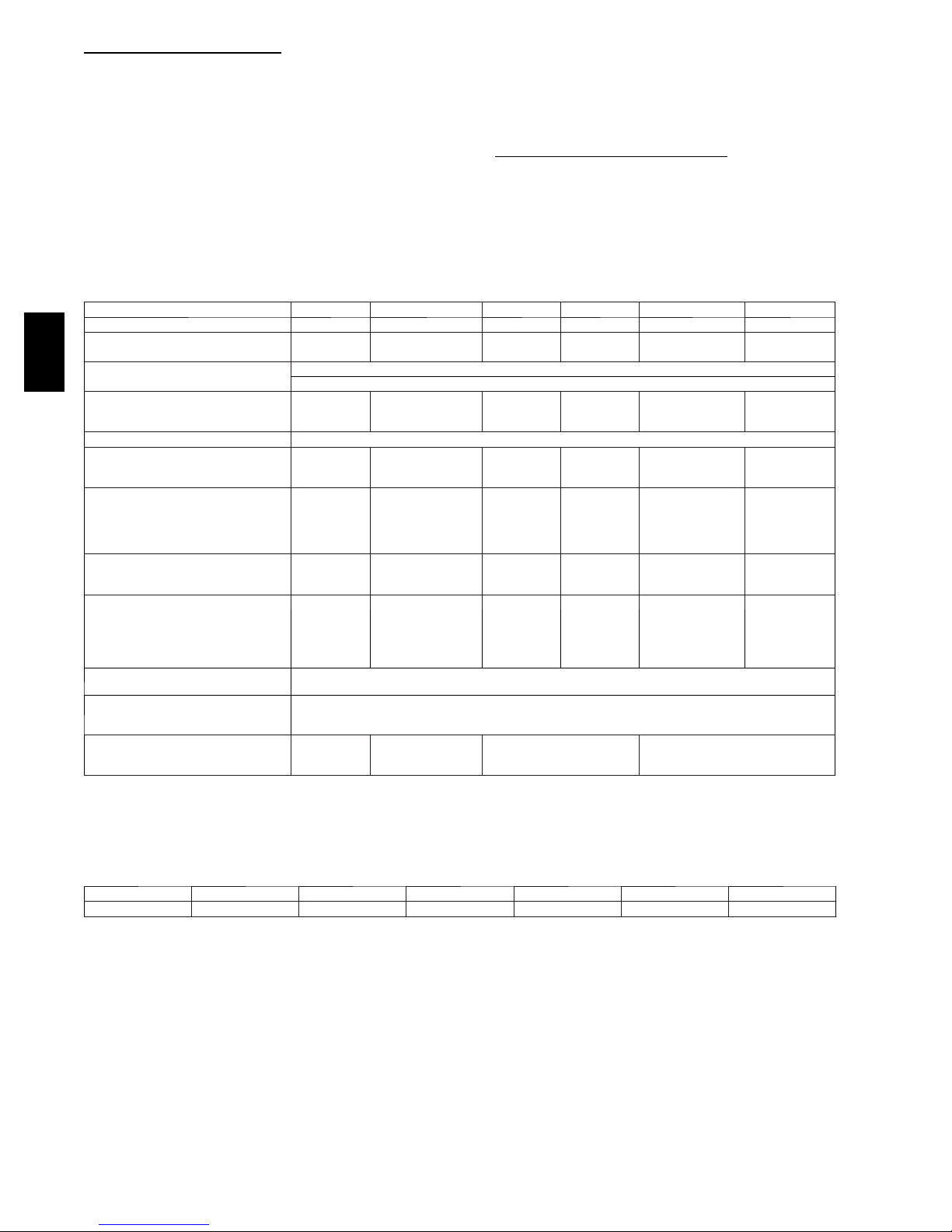
Table 1 – Physical Data--Unit 704D---- A
UNIT SIZE 24 30 36 42 48 60
NOMINAL CAPACITY (ton) 2 2 --- 1/ 2 3 3 --- 1/ 2 4 5
SHIPPING WEIGHT* lb.
SHIPPING WEIGHT* (kg)
COMPRESSORS
704D-- --A
Quantity
REFRIGERANT (R --- 410A)
Quantity lb
Quantity (kg)
REFRIGERANT METERING DEVICE TXV
OUTDOOR COIL
Rows...Fins/in.
Face Area (sq ft)
OUTDOOR FAN
Nominal Cfm
Diameter in.
Diameter (mm)
Motor Hp (Rpm)
INDOOR COIL
Rows...Fins/in.
Face Area (sq ft)
INDOOR BLOWER
Nominal Cooling Airflow (Cfm)
Size in.
Size (mm.)
Motor HP (RPM)
HIGH -- -PRESSURE SWITCH
(psig) Cut--- out Reset (Auto)
L O S S --- O F --- C H A R G E / L O W --- P R E S SURE SWITCH (Liquid Line) (psig)
cut--- out Reset (auto)
RETURN--- AIR FILTERS†}
Throwaway Size in.
Throwaway Size (mm)
*For 460 volt units add 14 lb (6.35 kg) to the shipping weight.
{ Required filter sizes shown are based on the larger of the AHRI (Air Conditioning, Heating and Refrigeration Institute) rated cooling airflow or the heating
airflow velocity of 300 ft/minute for throwaway type or 450 ft/minute for high ---capacity type. Air filter pressure drop for non -- -standard filters must not exceed 0.08
IN. W.C.
} If using accessory filter rack refer to the filter rack installation instructions
for correct filter sizes and quantity.
279
127
4.8
2.2
1...21
10.2
2800
24
610
1/5 (810)
2...17
3.7
800
10x10
254x254
1/2 (1050)
20x20x1
508x508x25
284
129
6.2
2.8
1...21
11.9
3000
24
610
1/5 (810)
3...17
3.7
1000
10x10
254x254
1/2 (1050)
20x24x1
508x610x25
290
132
6.4
2.9
1...21
15.4
3200
24
610
1/5 (810)
3...17
3.7
1200
11x10
279.4x254
3/4 (1000)
610x762x25
Scroll
1
1/5 (810)
279.4x254
3/4 (1075)
650 +/ --- 15
420 +/ --- 25
2 0 + / --- 5
45 +/ --- 10
24x30x1
378
171
6.1
2.7
1...21
13.6
3600
26
660
3...17
4.7
1400
11x10
384
174
6.4
2.9
1...21
15.5
4000
26
660
1/5 (810)
3...17
4.7
1600 1750
11x10
279.4x254
1.0 (1075) 1.0 (1040)
24x36x1
610x914x25
2...21
1/5 (810)
3...17
11x10
279.4x254
Table 2 – Minimum Airflow for Safe Electric Heater Operation (CFM)
SIZE 24 30 36 42 48 60
Cfm 800 1000 1200 1400 1600 1750
406
184
10.0
4.5
15.5
3200
26
660
5.7
10
Page 11

PRE--START-- UP
!
WARNING
ENVIRONMENTAL, FIRE, EXPLOSION,
ELECTRICAL SHOCK HAZARD
Failure to follow this warning could result in personal
injury or death and/or property damage.
1. Follow recognized safety practices and wear protective
goggles when checking or servicing refrigerant system.
2. Relieve and recover all refrigerant from system before
touching or disturbing compressor plug if refrigerant
leak is suspected around compressor terminals.
3. Never attempt to repair soldered connection while
refrigerant system is under pressure.
4. Do not use torch to remove any component. System
contains oil and refrigerant under pressure.
5. To remove a component, wear protective goggles and
proceed as follows:
a. Shut off electrical power to unit and install
lockout tag.
b. Relieve and reclaim all refrigerant from system
using both high-- and low--pressure ports.
c. Cut component connecting tubing with tubing
cutter and remove component from unit.
d. Carefully unsweat remaining tubing stubs when
necessary. Oil can ignite when exposed to torch
flame.
Proceed as follows to inspect and prepare the unit for initial
start --up:
1. Remove all access panels (see Fig. 17).
2. Read and follow instructions on all DANGER, WARNING,
CAUTION, and INFORMATION labels attached to, or
shipped with unit.
3. Make the following inspections:
a. Inspect for shipping and handling damages, such as
broken lines, loose parts, disconnected wires, etc.
b. Inspect for oil at all refrigerant tubing connections and
on unit base. Detecting oil generally indicates a
refrigerant leak. Leak test all refrigerant tubing
connections using electronic leak detector, or
liquid--soap solution. If a refrigerant leak is detected, see
following Check for Refrigerant Leaks section.
c. Inspect all field -- and factory--wiring connections. Be
sure that connections are completed and tight.
d. Ensure wires do not touch refrigerant tubing or sharp
sheet metal edges.
e. Inspect coil fins. If damaged during shipping and
handling, carefully straighten fins with a fin comb.
4. Verify the following conditions:
a. Make sure that condensate drain pan and trap are filled
with water to ensure proper drainage.
b. Make sure that all tools and miscellaneous loose parts
have been removed.
START-- UP
Step 1 — Check for Refrigerant Leaks
Proceed as follows to locate and repair a refrigerant leak and to
charge the unit:
1. Locate leak and make sure that refrigerant system pressure
has been relieved and reclaimed from both high-- and
low--pressure ports.
2. Repair leak following accepted practices.
NOTE: Install a filter drier whenever the system has been opened
for repair.
3. Add a small charge of Puron (R--410A) refrigerant vapor to
system and leak-- test unit.
4. Recover refrigerant from system and evacuate to 500
microns if no additional leaks are found.
5. Charge unit with Puron (R--410A) refrigerant, using an
accurate scale. Refer to unit rating plate for required charge.
Step 2 — Start--Up Cooling Section And Make
Adjustments
Complete the required procedures given in the Pre--Start--Up
section before starting the unit. Do not jumper any safety devices
when operating the unit. Do not operate the unit when the outdoor
temperature is below 40°F(4°C) (unless accessory low--ambient
kit is installed). Do not rapid cycle the compressor. Allow 5
minutes between “on” cycles to prevent compressor damage.
CHECKING COOLING CONTROL OPERATION
Start and check the unit for proper cooling control operation as
follows:
1. Place room thermostat SYSTEM switch in OFF position.
Observe that blower motor starts when FAN switch is
placed in ON position and shuts down when FAN switch is
placed in AUTO position.
2. Place SYSTEM switch in COOL position and FAN switch
in AUTO position. Set cooling control below room
temperature. Observe that compressor, condenser fan, and
evaporator blower motors start. Observe that compressor
and outdoor fan shut down when control setting is satisfied
and that indoor blower shuts down after 90 sec. fan time
delay expires.
IMPORTANT: Three--phase, scroll compressors are direction
oriented. Unit must be checked to ensure proper compressor
3--phase power lead orientation. If not corrected within 5 minutes,
the internal protector will shut off the compressor. The 3--phase
power leads to the unit must be reversed to correct rotation. When
turning backwards, the difference between compressor suction and
discharge pressures may be minimal.
CHECKING AND ADJUSTING REFRIGERANT
CHARGE
The refrigerant system is fully charged with Puron (R--410A)
refrigerant and is tested and factory sealed.
NOTE: Adjustment of the refrigerant charge is not required
unless the unit is suspected of not having the proper Puron
(R--410A) charge.
A subcooling charging chart is attached to the inside of the
compressor access panel (see Fig. 17). The chart includes the
required liquid line temperature at given discharge line pressures
and outdoor ambient temperatures.
An accurate thermocouple-- or thermistor--type thermometer, and a
gauge manifold are required when using the subcooling charging
method for evaluating the unit charge. Do not use mercury or small
dial--type thermometers because they are not adequate for this type
of measurement.
NOTE: Allow system to operate for a minimum of 15 minutes
before checking or adjusting refrigerant charge.
IMPORTANT: When evaluating the refrigerant charge, an
indicated adjustment to the specified factory charge must always be
very minimal. If a substantial adjustment is indicated, an abnormal
condition exists somewhere in the cooling system, such as
insufficient airflow across either coil or both coils.
11
704D-- --A
Page 12
Proceed as follows:
1. Remove caps from low-- and high-- pressure service fittings.
2. Using hoses with valve core depressors, attach low-- and
high--pressure gauge hoses to low-- and high--pressure
service fittings, respectively.
3. Start unit and let run until system pressures stabilize.
4. Measure and record the following:
a. Outdoor ambient--air temperature (°F[°C] db).
b. Liquid line temperature (°F[°C]) at T XV.
c. Discharge (high-- side) pressure (psig).
d. Suction (low--side) pressure (psig) (for reference only).
5. Using Cooling Charging Charts compare outdoor--air
temperature (°F[°C] db) with the discharge line pressure
(psig) to determine desired system operating liquid line
temperature (See Fig. 15).
6. Compare actual liquid line temperature with desired liquid
line temperature. Using a tolerance of ±2°F(±1.1°C), add
refrigerant if actual temperature is more than 2°F(1.1°C)
higher than proper liquid line temperature, or remove
704D-- --A
refrigerant if actual temperature is more than 2°F(1.1°C)
lower than required liquid line temperature.
NOTE: If the problem causing the inaccurate readings is a
refrigerant leak, refer to Check for Refrigerant Leaks section.
INDOOR AIRFLOW AND AIRFLOW ADJUSTMENTS
!
UNIT OPERATION HAZARD
Failure to follow this caution may result in unit damage.
For cooling operation, the recommended airflow is 350 to
450 cfm for each 12,000 Btuh of rated cooling capacity. For
heating operation, the airflow must produce a temperature
rise that falls within the range stamped on the unit rating
plate.
NOTE: Be sure that all supply-- and return--air grilles are open,
free from obstructions, and adjusted properly.
!
ELECTRICAL SHOCK HAZARD
Failure to follow this warning could result in personal
injury or death.
Disconnect electrical power to the unit and install lockout
tag before changing blower speed.
This unit is factory-set up for use with a single cooling fan speed.
In addition, this unit has the field-selectable capability to run two
different cooling fan speeds: The rated cooling fan speed (350~400
CFM/Ton) and an enhanced dehumidification fan speed (As low as
320 CFM/Ton) for use with either a dehumidistat or a thermostat
that supports dehumidification.
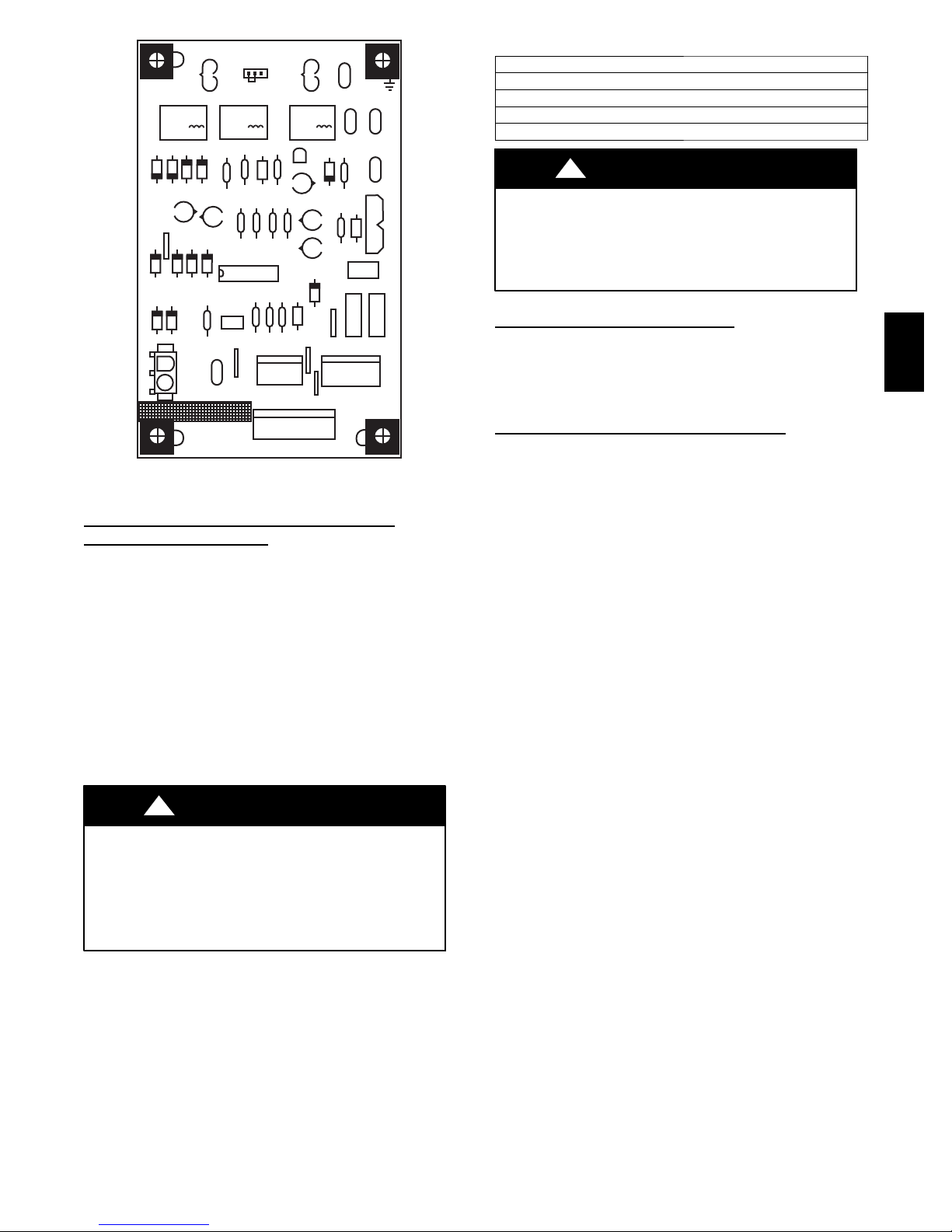
The cooling speed is marked “LOW” on the interface fan board
(IFB) (See Fig. 11) . The factory-shipped settings are noted in
Table 4. There are 4 additional speed tap wires available for use in
either electric heating or cooling (For color coding on the indoor
fan motor leads, see Table 3). The additional 4 speed tap wires are
CAUTION
WARNING
shipped loose with vinyl caps and are located in the control box,
near the interface fan board (IFB) (See Fig. 11).
SINGLE COOLING FAN SPEED SET--UP (Dehumidification feature not
To change cooling speed:
1. Remove the vinyl cap off of the desired speed tap wire
(Refer to Table 3 for color coding). Add the wet coil
pressure drop in Table 5 to the system static to determine the
correct cooling airflow speed in Table 4 that will deliver the
nominal cooling airflow as listed in Table 1 for each size.
2. Remove the current speed tap wire from the “LOW”
terminal on the interface fan board (IFB) (See Fig. 11) and
place vinyl cap over the connector on the wire.
3. Connect the desired speed tap wire to the “LOW” terminal
on the interface fan board (IFB).
NOTE: If accessory electric heat is installed, and the electric heat
fan speed is chosen to be the same as the normal cooling fan speed,
the dry airflow must meet or exceed the minimum airflow speed
specified in Table 2 for the specific size unit.
used)
TWO COOLING FAN SPEEDS SET--UP (Dehumidification feature
IMPORTANT: Dehumidification control must open control
circuit on humidity rise above set point.
Use of the dehumidification cooling fan speed requires use of
either a 24 VAC dehumidistat or a thermostat which includes
control of a 24 VAC dehumidistat connection. In either case, the
dehumidification control must open the control circuit on humidity
rise above the dehumidification set point. Dehumidification
controls are available with the reverse logic; these must not be
used.
1. Using Fig. 11, move the two pin DEHUM jumper from the
“STD” position to the “DEHUM” position.
2. Remove fan speed tap wire from the “LOW” terminal on
the interface fan board (IFB) (See Fig. 11).
3. Determine correct normal cooling fan speed for unit and
application. Add the wet coil pressure drop in Table 5 to
the system static to determine the correct cooling airflow
speed in Table 4 that will deliver the nominal cooling
airflow as listed in Table 1 for each size.
NOTE: If accessory electric heat is installed, the dry
airflow must meet or exceed the minimum airflow speed
specified in Table 2 for the specific size unit. The electric
heat fan speed will be the same as the normal cooling fan
speed.
4. Remove the vinyl cap off of the desired speed tap wire
(Refer to Table 3 for color coding) for the normal cooling
fan speed and place desired speed tap wire on “HIGH” on
the interface board.
5. Refer to airflow tables (Table 4) to determine allowable
speeds for the dehumidification cooling fan speed. In Table
4, speeds that are not allowed for dehumidification cooling
are shaded.
6. Remove the vinyl cap off of the desired speed tap wire
(Refer to Table 3 for color coding) for the dehumidification
cooling fan speed and place desired speed tap wire on the
“LOW” connection on the interface board (IFB). Verify
that static pressure is in the acceptable range for the speed
tap to be used for dehumidification cooling.
7. Use any spare vinyl plugs to cap any unused speed tap
wires.
used)
12
Page 13
HIGH LOW COM
07 09 080L0
C9
QIL Z2 06 04
D5 D3
P3
SDL
SSTZ-8
QC5
R2
C4
QCB
Y
KZ
R13 C8 R11 Q1
ALO
A7 R9 AB A15
C7
JW5
R3 R5 R6
P1
STD
QC4
DEHUM
U1
P2 JW3
R W2 Y C W3W3W2 W2C
Y2 Y1
W2W3
QC3
KL
D2
Q3
RL
G1
G2
Z1
C3
JWZ
JW4
GCR
YDH
DCR QCR
C
QC1
AL2
01
C0
R4 RL4
24VAC/R3AMP CDM/C
F1
P4
A09059
Fig. 11 -- Interface Fan Board (IFB)
SINGLE SPEED COOLING WITH HIGHER
ELECTRIC H EAT
This unit can also be configured to operate with single speed
cooling and a higher speed for an accessory electric heater.
1. Using Fig. 11, move the two pin DEHUM jumper from the
“STD” position to the “DEHUM” position.
2. See Table 2 for minimum airflow for electric heat operation.
Add electric heater and filter pressure drop to duct system
static pressure to determine total external static pressure.
3. Select speed tap from Table 4 that will achieve required
airflow from Table 2.
4. Remove the vinyl cap off of the desired speed tap wire
(Refer to Table 3 for color coding).
5. Connect the desired speed tap wire to the “HIGH” terminal
on the interface fan board (IFB).
!
UNIT OPERATION HAZARD
Failure to follow this caution may result in unit component
damage or improper operation.
To use this mode, a speed connection must be made on the
“HIGH” terminal that meets or exceeds the minimum
airflow found in Table 2.
SPEED
CAUTION
Table 3 – Color Coding for Indoor Fan Motor Leads
Black = High Speed
Orange = Med--High Speed
Red = Med Speed
Pink = Med --Low Speed
Blue = Low Speed
!
WARNING
ELECTRICAL SHOCK HAZARD
Failure to follow this warning could result in personal
injury or death.
Disconnect electrical power to the unit and install lockout
tag before changing blower speed.
CONTINUOUS FAN OPERATION
When the DEHUM feature is not used, the continuous fan speed
will be the same as cooling fan speed. When the DEHUM feature
is used, the continuous fan will operate on IFB “LOW” speed
when the DH control lead is not energized, or IFB “HIGH” speed
when the DH lead is energized (see Fig. 11).
COOLING SEQUENCE OF OPERATION
With the room thermostat SYSTEM switch in the COOL position
and the FAN switch in the AUTO position, the cooling sequence of
operation is as follows:
When the room temperature rises to a point that is slightly above
the cooling control setting of the thermostat, the thermostat
completes the circuit between thermostat terminal R to terminals Y
and G. These completed circuits through the thermostat connect
contactor coil (C) (through unit wire Y) and time delay relay
(TDR) (through unit wire G) across the 24--V secondary of
transformer (TRAN).
The normally open contacts of energized contactor (C) close and
complete the circuit through compressor motor (COMP) to
condenser (outdoor) fan motor (OFM). Both motors start instantly.
A set of normally open contacts on the interface fan board (IFB)
are closed which energizes a circuit to the indoor fan motor (IFB).
NOTE: Once the compressor has started and then has stopped, it
should not be started again until 5 minutes have elapsed.
The cooling cycle remains on until the room temperature drops to a
point that is slightly below the cooling control setting of the room
thermostat. At this point, the thermostat breaks the circuit between
thermostat terminal R to terminals Y and G. These open circuits
deenergize contactor coil C and IFB. The condenser and
compressor motors stop. After a 90 --second delay, the blower
motor stops. The unit is in a standby condition, waiting for the next
call for cooling from the room thermostat.
704D-- --A
13
Page 14

Table 4 – Dry Coil Air Delivery* -- Horizontal and Downflow Discharge --
Unit 704D-- --A24--60
UNIT MOTOR SPEED
Low Blue CFM 754 650 538 429 --- --- --- --- ---
Med-Low Pink CFM 851 777 675 591 475 --- --- --- ---
704D------A24
704D------A30
704D------A36
704D------A42
704D------A48
704D-- --A
704D------A060
* Air delivery values a r e without air filter and a re for dry coil (See Table 5 --- 704D------A Wet Coil Pressure Drop table).
1
Factory --- shipped cooling speed
Note: Deduct field---supplied air filter pressure drop and wet coil pressure drop to obtain external static pressure available for ducting.
Shaded areas indicate airflows that are not recommended for dehumidification control.
1
Medium
Med-High Orange CFM 1009 917 840 759 667 577 447 --- ---
High Black CFM 1241 1167 1111 1036 969 881 818 731 640
Low Blue CFM 741 638 547 415 --- --- --- --- ---
Med-Low Pink CFM 973 887 823 733 665 538 451 --- ---
Medium Red CFM 1088 1023 954 881 800 723 658 563 461
Med-High
Med-High
1
High Black CFM 1202 1140 1082 1015 961 881 810 732 631
Low Blue CFM 1234 1168 1093 1021 961 894 825 759 687
Med-Low Pink CFM 1290 1223 1154 1090 1027 977 894 828 762
1
Medium
Med-High Orange CFM 1606 1546 1489 1430 1371 1316 1258 1208 1140
High Black CFM 1630 1580 1517 1463 1407 1339 1277 1210 1131
Low Blue CFM 1295 1234 1182 1126 1075 1016 955 898 857
Med-Low Pink CFM 1345 1282 1235 1194 1140 1095 1027 974 921
Medium Red CFM 1505 1452 1413 1358 1323 1282 1234 1169 1130
1
High Black CFM 1705 1643 1607 1568 1518 1483 1448 1404 1360
Low Blue CFM 1402 1351 1311 1263 1224 1172 1136 1080 1041
Med-Low Pink CFM 1457 1404 1367 1318 1284 1233 1197 1144 1104
1
Medium
Med-High Orange CFM 2149 2111 2062 2026 1980 1945 1905 1864 1793
High Black CFM 2344 2306 2259 2203 2141 2070 1991 1902 1803
Med-Low Pink CFM 1678 1635 1602 1558 1513 1474 1438 1404 1349
1
Medium
Med-High Orange CFM 2131 2088 2065 2013 1982 1941 1888 1860 1785
High Black CFM 2461 2409 2339 2286 2192 2140 2062 1968 1874
WIRE
COLOR
Red CFM 941 851 774 684 576 479 --- --- ---
Orange CFM 1140 1064 996 915 840 758 687 564 480
Red CFM 1354 1290 1226 1158 1102 1046 981 918 843
Orange CFM 1545 1492 1449 1411 1362 1313 1278 1231 1188
Red CFM 1736 1695 1642 1601 1553 1512 1465 1427 1381
Red CFM 1962 1915 1880 1843 1794 1753 1711 1675 1628
0.1 0.2 0.3 0.4 0.5 0.6 0.7 0.8 0.9
EXTERNAL STATIC PRESSURE (IN. W.C.)
Table 5 – 704D----A Wet Coil Pressure Drop (IN. W.C.)
UNIT
SIZE
600 700 800 900 1000 1100 1200 1300 1400 1500 1600 1700 1800 1900 2000
24 0.030 0.037 0.044 0.053 0.063 --- --- --- --- --- --- --- --- --- --30 --- 0.037 0.044 0.053 0.063 0.072 0.081 0.105 --- --- --- --- --- --- --36 --- --- --- 0.055 0.060 0.090 0.100 0.110 0.140 --- --- --- --- --- --42 --- --- --- --- 0.045 0.050 0.060 0.065 0.075 0.080 0.090 0.094 0.110 --- --48 --- --- --- --- --- --- 0.041 0.063 0.085 0.100 0.104 0.110 0.120 0.130 --60 --- --- --- --- --- --- --- --- --- 0.060 0.065 0.072 0.077 0.085 0.100
STANDARD CFM (S.C.F .M)
Table 6 – Wet Coil Air Delivery (CFM) -- Downflow -- High Speed with 1-- in. (25 mm) Filter and Economizer
UNIT SIZE
0.1 0.2 0.3 0.4 0.5 0.6 0.7 0.8 0.9 1.0
36 1333 1289 1256 1214 1152 1118 1076 1035 997 950
42 1612 1569 1527 1481 1451 1393 1351 1317 1278 1242
48 2166 2085 2002 1919 1798 1709 1582 1467 1270 988
60 2298 2239 2180 2110 2044 1951 1862 1777 1697 1591
EXTERNAL STATIC PRESSURE (IN. W.C.)
Table 7 – Filter Pressure Drop (IN. W.C.)
FILTER SIZE
in. (mm)
20X20X1
(508X508X25)
20X24X1
(508X610x25)
24X30X1
(610X762x25)
24X36X1
(610X914X25)
500 600 700 800 900 1000 1100 1200 1300 1400 1500 1600 1700 1800 1900 2000 2100 2200 2300
0.05 0.07 0.08 0.10 0.12 0.13 0.14 0.15 — — — — — — — — — — —
— — — .09 .10 .11 .13 .14 .15 .16 — — — — — — — — —
— — — 0.04 0.05 0.06 0.07 0.07 0.08 0.09 0.10 — — — — — — — —
— — — — — — — 0.06 0.07 0.07 0.08 0.09 0.09 0.10 0.11 0.12 0.13 0.14 0.14
CFM
Table 8 – Electric Heat Pressure Drop (IN. W.C.)
Small Cabinet: 24--36 CFM
5kw 0.00 0.00 0.00 0.00 0.00 0.00 0.00 0.00 0.02 0.04 0.06 0.07
7.5 kw 0.00 0.00 0.00 0.00 0.00 0.00 0.02 0.03 0.05 0.07 0.08 0.09
10 kw 0.00 0.00 0.00 0.00 0.00 0.02 0.04 0.06 0.07 0.09 0.10 0.11
15 kw 0.00 0.00 0.00 0.02 0.04 0.06 0.08 0.10 0.12 0.14 0.16 0.18
20 kw 0.00 0.00 0.02 0.04 0.06 0.08 0.09 0.11 0.13 0.15 0.17 0.19
500 600 700 800 900 1000 1100 1200 1300 1400 1500 1600
Electric Heat Pressure Drop (IN. W.C.)
Large Cabinet 42--60 CFM
5kw 0.00 0.00 0.00 0.01 0.02 0.03 0.04 0.05 0.06 0.07 0.08 0.09 0.10 0.11 0.12
7.5 kw 0.00 0.00 0.01 0.02 0.03 0.04 0.05 0.06 0.07 0.08 0.09 0.10 0.11 0.12 0.13
10 kw 0.00 0.00 0.01 0.02 0.03 0.04 0.05 0.06 0.07 0.08 0.09 0.10 0.11 0.12 0.13
15 kw 0.00 0.02 0.03 0.04 0.05 0.06 0.07 0.08 0.09 0.10 0.11 0.12 0.13 0.14 0.15
20 kw 0.02 0.03 0.04 0.05 0.06 0.07 0.08 0.09 0.10 0.11 0.12 0.13 0.14 0.15 0.16
1100 1200 1300 1400 1500 1600 1700 1800 1900 2000 2100 2200 2300 2400 2500
14
Page 15
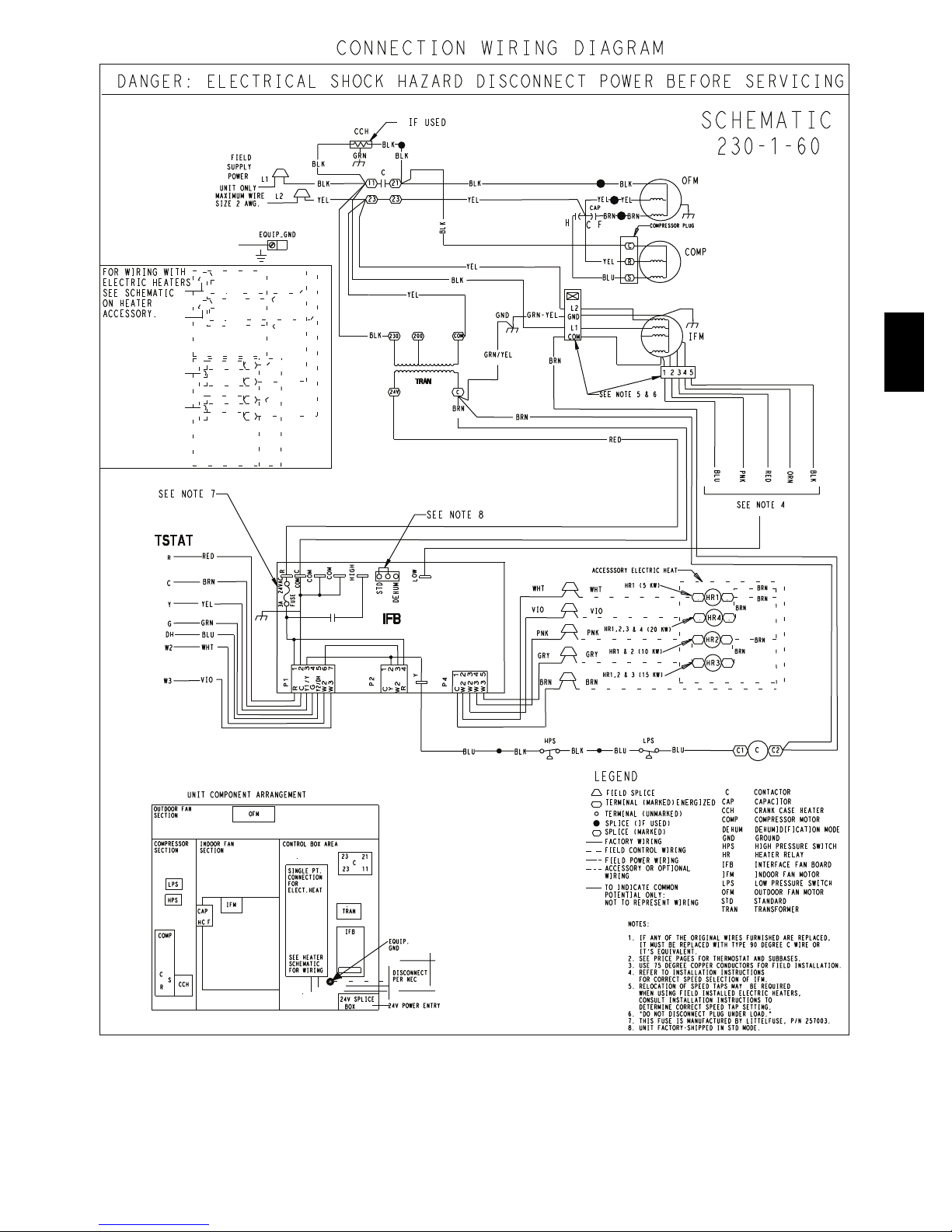
CONNECTION WIRING DIAGRAM
DANGER: ELECTRICAL SHOCK HAZARD DISCONNECT POWER BEFORE SERVICING
FOR WIRING WITH
ELECTRIC HEATERS
SEE SCHEMATIC
ON HEATER
ACCESSORY.
SEE NOTE 7
TSTAT
UNIT ONLY
MAXIMUM WIRE
SIZE 2 AWG.
12
11
N1
FIELD
SUPPLY
POWER
L1
L2
EQUIP_GND
IF USED
CCH
BLK
GRN
BLK
1
BLK
1
YEL
C
11 21
23 23
BLK
BLK
YEL
BLK
H
BLK
YEL
YEL
CAP
BRN
BRN
F
C
COMPRESSOR PLUG
C
YEL
YEL
BLK
R
BLU
S
YEL
L2
GRN-YEL
GND
BLK
230
COM
200
GRN/YEL
TRAN
24V
C
BRN
BRN
GND
L1
COM
BRN
SEE NOTE 5 & 6
SCHEMATIC
230-1-60
OFM
COMP
IFM
2435
1
704D-- --A
RED
BLU
SEE NOTE 8
RED
R
BRN
C
YEL
Y
GRN
G
DH
BLU
WHT
W2
VIO
W3
R
24VAC
3A
C
COM
HIGH
COM
COM
FUSE
STD
IFB
DEHUM
LOW
WHT
VIO
PNK
GRY
54321
6
7
P1
G
C
R
Y1/Y
Y2/DH
W3
W2
123
4
Y
P2
R
Y
C
W2
P4
12435
C
W2
W2
W3
W3
BRN
ACCESSSORY ELECTRIC HEAT
1
WHT
1
VIO
HR1,2,3
1
PNK
1
GRY
HR1,2 & 3 (15 KW)
1
BRN
HR1 (5 KW)
& 4 (20 KW)
HR1 & 2 (10 KW)
HR1
1
1
HR4
HR2
HR3
PNK
SEE NOTE 4
3
BRN
3
BRN
RED
BLK
ORN
BRN
BRN
BRN
UNIT COMPONENT ARRANGEMENT
OUTDOOR FAN
SECTION
COMPRESSOR
INDOOR FAN
SECTION
SECTION
LPS
HPS
CAP
CF
H
COMP
C
S
CCH
R
HPS
BLU
BLK
BLK
LPS
BLU
BLU
C
C2
C1
LEGEND
FIELD SPLICE
OFM
CONTROL BOX AREA
SINGLE PT.
CONNECTION
FOR
IFM
ELECT.HEAT
SEE HEATER
SCHEMATIC
FOR WIRING
23
C
TRAN
IFB
24V SPLICE
BOX
21
1123
EQUIP.
GND
DISCONNECT
PER NEC
24V POWER ENTRY
TERMINAL (MARKED)
TERMINAL (UNMARKED)
SPLICE (IF USED)
SPLICE (MARKED)
FACTORY WIRING
FIELD CONTROL WIRING
FIELD POWER WIRING
ACCESSORY OR OPTIONAL
WIRING
TO INDICATE COMMON
POTENTIAL ONLY:
NOT TO REPRESENT WIRING
NOTES:
1. IF ANY OF THE ORIGINAL WIRES FURNISHED ARE REPLACED,
IT MUST BE REPLACED WITH TYPE 90 DEGREE C WIRE OR
IT'S EQUIVALENT.
2. SEE PRICE PAGES FOR THERMOSTAT AND SUBBASES.
3. USE 75 DEGREE COPPER CONDUCTORS FOR FIELD INSTALLATION.
4. REFER TO INSTALLATION INSTRUCTIONS
FOR CORRECT SPEED SELECTION OF IFM.
5. RELOCATION OF SPEED TAPS MAY BE REQUIRED
WHEN USING FIELD INSTALLED ELECTRIC HEATERS,
CONSULT INSTALLATION INSTRUCTIONS TO
DETERMINE CORRECT SPEED TAP SETTING.
6. "DO NOT DISCONNECT PLUG UNDER LOAD."
7. THIS FUSE IS MANUFACTURED BY LITTELFUSE, P/N 257003.
8. UNIT FACTORY-SHIPPED IN STD MODE.
ENERGIZED
C CONTACTOR
CAP CAPACITOR
CCH CRANK CASE HEATER
COMP COMPRESSOR MOTOR
DEHUM DEHUMIDIFICATION MODE
GND GROUND
HPS HIGH PRESSURE SWITCH
HR HEATER RELAY
IFB INTERFACE FAN BOARD
IFM INDOOR FAN MOTOR
LPS LOW PRESSURE SWITCH
OFM OUTDOOR FAN MOTOR
STD STANDARD
TRAN TRANSFORMER
A10205C
Fig. 12 -- Connection Wiring Diagram 208/230--1 --60
15
Page 16

LADDER WIRING DIAGRAM
DANGER: ELECTRICAL SHOCK HAZARD DISCONNECT POWER BEFORE SERVICING
L1
BLK
11
11
11
BLK
BLK
BLK
BLK
IF USED
BLK
BLK
BLK
21
704D-- --A
SEE NOTE 7
R
C
Y
G
DH
W2
W3
RED
BRN
YEL
GRN
BL
WHT
VIO
RED
FUSE
3A
P1-1
P1-2
P1-3
P1-4
P1-5
P1-6
P1-7
BLK
RED
24VAC
IFB
G/Y
CCH
OFM
R
C
YEL
S
BRN
BRN
F
C
CAP
H
BLU
S
R
C
COMP
G
L
C
N
X
230
G/Y
TRAN
24V
IFM
YEL
YEL
G
YEL
COM
G/Y
23
YEL
C
L2
YEL
C
23
23
YEL
23
G/Y
P2-1
P2-2
P2-3
P2-4
P4-1
P4-2
P4-3
P4-4
P4-5
STD
DEHUM
Y
LOW
HIGH
BLU
WHT
VIO
PNK
GRY
BRN
SEE NOTE 8
SEE NOTE 4
C
WHT
VIO
PNK
GRY
BRN
BLU
PNK
RED
ORN
BLK
BLK
HPS
BLK
BLU
HR1
HR4
HR2
HR3
BRN
LPS
BLU
ACCESSORY
ELECTRIC HEAT
1
2
IFM
3
4
5
C2
C1
C
BRN
BRN
BRN
C
BRN
BRN
C,TRAN
50VL500269
D
A10205L
Fig. 12 Cont. -- Ladder Wiring Diagram 208/230-- 1--60
16
Page 17

704D-- --A
Fig. 13 -- Connection Wiring Diagram 208/230--3 --60
A10202C
17
Page 18

704D-- --A
Fig. 13 Cont. -- Ladder Wiring Diagram 208/230-- 3--60
A10202L
18
Page 19

CONNECTION WIRING DIAGRAM
DANGER: ELECTRICAL SHOCK HAZARD DISCONNECT POWER BEFORE SERVICING
BLK
C
11 21
13 23
460
24
RED
YEL
IF USED
BLU
BLK
TRAN
BLK
YEL
BLK
FU1 5 AMP
FU2 5 AMP
RED
YEL
C
C
460V
1423
AUTOTRANSFORMER
460
24
BRN
BLK
230V
FOR WIRING WITH
ELECTRIC HEATERS
OFM
YEL
CAP
BRN
COMPRESSOR PLUG
T1
T3
YEL
T2
SEE NOTE 8
RED
BLK
BLU
YEL
GND
GRN-YEL
BLK
GRN/YEL
COMP
L2
GND
L1
COM
BRN
SEE SCHEMATIC
ON HEATER
ACCESSORY.
2435
1
SEE NOTE 5 & 6
BRN
RED
BLU
YEL
FIELD
SUPPLY
POWER
UNIT ONLY
MAXIMUM WIRE
SIZE 2 AWG.
ECON
PLUG
7 7
6 6
11 11
10 10
8 8
2 2
3 3
4 4
1 1
5 5
9 9
12 12
L1
EQUIP_GND
CCH
GRN
BLK
1
BLK
1
L3
YEL
1
L2
BLK
PNK
PNK
ECON
BLU
SAT
BLU
GRY
RED
BRN
YEL
BLK
SCHEMATIC
460-3-60
IFM
BLU
PNK
SEE NOTE 4
704D-- --A
RED
ORN
BLK
TSTAT
GRY
Y2
SEE NOTE 7
RED
R
BRN
C
YEL
Y1
GRN
G
DH
BLU
W2
WHT
VIO
W3
UNIT COMPONENT ARRANGEMENT
OUTDOOR FAN
SECTION
COMPRESSOR
SECTION
INDOOR FAN
SECTION
LPS
HPS
CAP
CF
H
COMP
C
S
CCH
R
SEE NOTE 9
R
C
COM
24VAC
3A
FUSE
P1
C
R
OFM
IFM
LOW
COM
COM
54321
6
7
G
W3
W2
Y1/Y
Y2/DH
CONTROL BOX AREA
SINGLE PT.
CONNECTION
FOR
ELECT.HEAT
SEE HEATER
SCHEMATIC
FOR WIRING
STD
P2
21
TRAN
24V SPLICE
IFB
123
C
IFB
BOX
Y
DEHUM
W2
C
HIGH
4
R
11
1323
Y
EQUIP.
GND
24V POWER ENTRY
12435
P4
C
W2
DISCONNECT
PER NEC
ACCESSSORY ELECTRIC HEAT
1
WHT
1
VIO
1
PNK
1
GRY
1
BLK
COLOR CODE
BLK BLACK
BLU BLUE
BRN BROWN
GRY GRAY
GRN GREEN
ORN ORANGE
PNK PINK
RED RED
VIO VIOLET
WHT WHITE
YEL YELLOW
BRN
HPS
BLK
NOTES:
1. IF ANY OF THE ORIGINAL WIRES FURNISHED ARE REPLACED,
IT MUST BE REPLACED WITH TYPE 90 DEGREE C WIRE OR
IT'S EQUIVALENT.
2. SEE PRICE PAGES FOR THERMOSTAT AND SUBBASES.
3. USE 75 DEGREE COPPER CONDUCTORS FOR FIELD INSTALLATION.
4. REFER TO INSTALLATION INSTRUCTIONS
FOR CORRECT SPEED SELECTION OF IFM.
5. RELOCATION OF SPEED TAPS MAY BE REQUIRED
WHEN USING FIELD INSTALLED ELECTRIC HEATERS,
CONSULT INSTALLATION INSTRUCTIONS TO
DETERMINE CORRECT SPEED TAP SETTING.
6. "DO NOT DISCONNECT PLUG UNDER LOAD."
7. THIS FUSE IS MANUFACTURED BY LITTELFUSE, P/N 257003
8. THESE FUSES ARE MANUFACTURED BY COOPER BUSSMAN, P/N FNQ-R-5
9. DEHUM FEATURE CANNOT BE USED WHEN ECONOMIZER IS INSTALLED.
UNIT FACTORY-SHIPPED IN STD MODE.
W3
W2
W3
HR1 (5 KW)
WHT
VIO
HR1,2,3
PNK
HR1 & 2 (10 KW)
GRY
HR1,2 & 3 (15 KW)
BRN
BLU
LEGEND
FIELD SPLICE
TERMINAL (MARKED)
TERMINAL (UNMARKED)
SPLICE (IF USED)
SPLICE (MARKED)
FACTORY WIRING
FIELD CONTROL WIRING
FIELD POWER WIRING
ACCESSORY OR OPTIONAL
WIRING
TO INDICATE COMMON
POTENTIAL ONLY:
NOT TO REPRESENT WIRING
& 4 (20 KW)
LPS
HR1
1
1
HR4
HR2
HR3
BLU
C CONTACTOR
CAP CAPACITOR
CCH CRANK CASE HEATER
ENERGIZED
COMP COMPRESSOR MOTOR
DH DEHUMIDIFICATION MODE
DEHUM DEHUMIDIFICATION MODE
ECON ECONOMIZER
GND GROUND
HPS HIGH PRESSURE SWITCH
HR HEATER RELAY
IFB INTERFACE FAN BOARD
IFM INDOOR FAN MOTOR
LPS LOW PRESSURE SWITCH
OFM OUTDOOR FAN MOTOR
STD STANDARD MODE
TRAN TRANSFORMER
BRN
3
BRN
BRN
3
BRN
BRN
C
C2
C1
A10204C
Fig. 14 -- Connection Wiring Diagram 460-- 3--60
19
Page 20

LADDER WIRING DIAGRAM
DANGER: ELECTRICAL SHOCK HAZARD DISCONNECT POWER BEFORE SERVICING
YEL
L3
YEL
13
13
C,TRAN
BRN
13
BLK
ECON
HARNESS
2
3
BRN
4
5
6
7
PNK
PNK
COM C
BLU
BLU
SAT
8
L1
L2
BLK
11
11
11
BLK
BLK
IF USED
21
RED
BLK
BLK
BLU
BLK
C
704D-- --A
BLK
RED
SEE NOTE 7
R
C
Y1
G
DH
W2
W3
Y2
RED
BRN
YEL
GRN
BLU
WHT
VIO
VIO
YEL
RED
FUSE
3A
P1-1
P1-2
P1-3
P1-4
P1-5
P1-6
P1-7
P2-1
P2-2
P2-3
P2-4
Y
P4-1
P4-2
P4-3
P4-4
P4-5
STD
DEHUM
24VAC
"Y1/Y"
"Y2/DH"
"W2"
"W3"
LOW
HIGH
IFB
"R"
"C"
"G"
BLK
ACCESSORY
ELECTRIC HEAT
WHT
VIO
PNK
GRY
BRN
SEE NOTE 9
SEE NOTE 4
WHT
VIO
PNK
GRY
BRN
HPS
BLU
PNK
RED
ORN
BLK
BLK
HR1
HR4
HR2
HR3
L
BLU
G
IFM
N
460V
24V
C
BRN
T1
COMP
X
1
2
3
4
5
CCH
OFM
CAP
T2
LPS
G/Y
C
23
GRN
R
S
YEL
YEL
YEL
T3
G/Y
TRAN
460V
YEL
24V
G/Y
C2
C
BRN
BRN
BRN
C1
BRN
C
BRN
BLU
IFM
C
G/Y
BRN
RED
Fig. 14 Cont. -- Ladder Wiring Diagram 460--3--60
20
50VL500271
D
A10204L
Page 21

704D-- --A
A08490
Fig. 15 -- Cooling Charging Chart
21
Page 22

MAINTENANCE
To ensure continuing high performance, and to minimize the
possibility of premature equipment failure, periodic maintenance
must be performed on this equipment. This cooling unit should be
inspected at least once each year by a qualified service person. To
troubleshoot unit, refer to Table 9, Troubleshooting Chart.
NOTE TO EQUIPMENT OWNER: Consult your local dealer
about the availability of a maintenance contract.
!
WARNING
PERSONAL INJURY AND UNIT DAMAGE
HAZARD
Failure to follow this warning could result in personal
injury or death and possible unit component damage.
The ability to properly perform maintenance on this
equipment requires certain expertise, mechanical skills,
tools and equipment. If you do not possess these, do not
attempt to perform any maintenance on this equipment,
704D-- --A
other than those procedures recommended in the Owner’s
Manual.
!
WARNING
AIR FILTER
IMPORTANT: Never operate the unit without a suitable air filter
in the return--air duct system. Always replace the filter with the
same dimensional size and type as originally installed. See Table
11 for recommended filter sizes.
Inspect air filter(s) at least once each month and replace
(throwaway--type) or clean (cleanable--type) at least twice during
each cooling season and twice during the heating season, or
whenever the filter becomes clogged with dust and lint.
INDOOR BLOWER AND MOTOR
NOTE: All motors are pre--lubricated. Do not attempt to lubricate
these motors.
For longer life, operating economy, and continuing efficiency,
clean accumulated dirt and grease from the blower wheel and
motor annually.
!
WARNING
ELECTRICAL SHOCK HAZARD
Failure to follow this warning could result in personal
injury or death.
Disconnect and install lockout tag electrical power to the
unit before cleaning the blower motor and wheel.
ELECTRICAL SHOCK HAZARD
Failure to follow these warnings could result in personal
injury or death:
1. Turn off electrical power to the unit and install lockout
tag before performing any maintenance or service on this
unit.
2. Use extreme caution when removing panels and parts.
3. Never place anything combustible either on or in contact
with the unit.
!
UNIT OPERATION HAZARD
Failure to follow this caution may result in equipment
damage or improper operation.
Errors made when reconnecting wires may cause improper
and dangerous operation. Label all wires prior to
disconnecting when servicing.
The minimum maintenance requirements for this equipment are as
follows:
1. Inspect air filter(s) each month. Clean or replace when
necessary.
2. Inspect indoor coil, drain pan, and condensate drain each
cooling season for cleanliness. Clean when necessary.
3. Inspect blower motor and wheel for cleanliness each
cooling season. Clean when necessary.
4. Check electrical connections for tightness and controls for
proper operation each cooling season. Service when
necessary.
5. Ensure electric wires are not in contact with refrigerant
tubing or sharp metal edges.
CAUTION
To clean the blower motor and wheel:
1. Remove and disassemble blower assembly as follows:
a. Remove blower access panel (see Fig. 17).
b. Disconnect 5 pin plug and 4 pin plug from indoor
blower motor. Remove capacitor if required.
c. On all units remove blower assembly from unit.
Remove screws securing blower to blower partition and
slide assembly out. Be careful not to tear insulation in
blower compartment.
d. Ensure proper reassembly by marking blower wheel and
motor in relation to blower housing before disassembly.
e. Loosen setscrew(s) that secures wheel to motor shaft,
remove screws that secure motor mount brackets to
housing, and slide motor and motor mount out of
housing.
2. Remove and clean blower wheel as follows:
a. Ensure proper reassembly by marking wheel orientation.
b. Lift wheel from housing. When handling and/or
cleaning blower wheel, be sure not to disturb balance
weights (clips) on blower wheel vanes.
c. Remove caked--on dirt from wheel and housing with a
brush. Remove lint and/or dirt accumulations from
wheel and housing with vacuum cleaner, using soft
brush attachment. Remove grease and oil with mild
solvent.
d. Reassemble wheel into housing.
e. Reassemble motor into housing. Be sure setscrews are
tightened on motor shaft flats and not on round part of
shaft. Reinstall blower into unit.
f. Connect 5 pin plug and 4 pin plug to indoor blower
motor. Reinstall capacitor if required.
g. Reinstall blower access panel (see Fig. 17).
3. Restore electrical power to unit. Start unit and check for
proper blower rotation and motor speeds during cooling
cycles.
22
Page 23

MOTOR
FAN GRILLE
A
MOTOR SHAFT
A08505
MAX DISTANCE BETWEEN TOP OF FAN GRILLE AND BOTTOM OF FAN BLADE
SIZE
24 7.3 185
30 7.3 185
36 7.3 185
42 7.6 193
48 7.6 193
60 7.6 193
Fig. 16 -- Fan Blade Position
IN. MM
between the coils. Be sure to flush all dirt and debris from the unit
base.
Inspect the drain pan and condensate drain line when inspecting
the coils. Clean the drain pan and condensate drain by removing all
foreign matter from the pan. Flush the pan and drain trough with
clear water. Do not splash water on the insulation, motor, wiring, or
air filter(s). If the drain trough is restricted, clear it with a
“plumbers snake” or similar probe device.
OUTDOOR FAN
“A”
704D-- --A
CONTROL
ACCESS
PAN EL
A09207
COMPRESSOR
ACCESS PANEL
Fig. 17 -- Unit Access Panels
BLOWER
ACCESS
PAN EL
OUTDOOR COIL, INDOOR COIL AND
CONDENSATE DRAIN P
Inspect the condenser coil, evaporator coil, and condensate drain
pan at least once each year.
The coils are easily cleaned when dry; therefore, inspect and clean
the coils either before or after each cooling season. Remove all
obstructions, including weeds and shrubs, that interfere with the
airflow through the condenser coil.
Straighten bent fins with a fin comb. If coated with dirt or lint,
clean the coils with a vacuum cleaner, using the soft brush
attachment. Be careful not to bend the fins. If coated with oil or
grease, clean the coils with a mild detergent and water solution.
Rinse coils with clear water, using a garden hose. Be careful not to
splash water on motors, insulation, wiring, or air filter(s). For best
results, spray condenser coil fins from inside to outside the unit. On
units with an outer and inner condenser coil, be sure to clean
AN
!
CAUTION
UNIT OPERATION HAZARD
Failure to follow this caution may result in damage to unit
components.
Keep the condenser fan free from all obstructions to ensure
proper cooling operation. Never place articles on top of the
unit.
1. Remove 6 screws holding condenser grille and motor to top
cover.
2. Turn motor/grille assembly upside down on top cover to
expose the fan blade.
3. Inspect the fan blades for cracks or bends.
4. If fan needs to be removed, loosen the setscrew and slide the
fan off the motor shaft.
5. When replacing fan blade, position blade as shown in Fig.
16.
6. Ensure that setscrew engages the flat area on the motor shaft
when tightening
7. Replace grille.
ELECTRICAL CONTROLS AND WIRING
Inspect and check the electrical controls and wiring annually. Be
sure to turn off the electrical power to the unit.
Remove access panels (see Fig. 17) to locate all the electrical
controls and wiring. Check all electrical connections for tightness.
Tighten all screw connections. If any smoky or burned connections
23
Page 24

are noticed, disassemble the connection, clean all the parts, restrip
the wire end and reassemble the connection properly and securely.
After inspecting the electrical controls and wiring, replace the
access panels (see Fig. 17). Start the unit, and observe at least one
complete heating cycle and one complete cooling cycle to ensure
proper operation. If discrepancies are observed in either or both
operating cycles, or if a suspected malfunction has occurred, check
each electrical component with the proper electrical
instrumentation. Refer to the unit wiring label when making these
checkouts.
NOTE: Refer to the heating and/or cooling sequence of operation
in this publication as an aid in determining proper control
operation
REFRIGERANT CIRCUIT
Inspect all refrigerant tubing connections and the unit base for oil
accumulations annually. Detecting oil generally indicates a
refrigerant leak.
!
704D-- --A
EXPLOSION, SAFETY AND ENVIRONMENTAL
HAZARD
Failure to follow this warning could result in personal
injury, death or equipment damage.
This system uses Puron (R--410A) refrigerant which has
higher operating pressures than R-- 22 and other refrigerants.
No other refrigerant may be used in this system. Gauge set,
hoses, and recovery system must be designed to handle
Puron. If you are unsure, consult the equipment
manufacturer.
WARNING
3. Apply ohmmeter leads across switch. You should have
continuity on a good switch.
NOTE: Because these switches are attached to refrigeration
system under pressure, it is not advisable to remove this device for
troubleshooting unless you are reasonably certain that a problem
exists. If switch must be removed, remove and recover all system
charge so that pressure gauges read 0 psi (0 Pa). Never open system
without breaking vacuum with dry nitrogen.
HIGH--PRESSURE SWITCH
The high-- pressure switch is located in the discharge line and
protects against excessive condenser coil pressure. It opens at 650
psig (31.1 kPa). High pressure may be caused by a dirty condenser
coil, failed fan motor, or condenser air recirculation.
To check switch:
1. Turn off all power to unit.
2. Disconnect leads on switch.
3. Apply ohmmeter leads across switch. You should have
continuity on a good switch.
COPELAND SCROLL COMPRESSOR (PURON
REFRIGERANT)
The compressor used in this product is specifically designed to
operate with Puron (R--410A) refrigerant and cannot be
interchanged.
The compressor is an electrical (as well as mechanical) device.
Exercise extreme caution when working near compressors. Power
should be shut off, if possible, for most troubleshooting techniques.
Refrigerants present additional safety hazards.
!
WARNING
If oil is detected or if low cooling performance is suspected,
leak--test all refrigerant tubing using an electronic leak--detector,
halide torch, or liquid-- soap solution. If a refrigerant leak is
detected, refer to Check for Refrigerant Leaks section.
If no refrigerant leaks are found and low cooling performance is
suspected, refer to Checking and Adjusting Refrigerant Charge
section.
EVAPORATOR AIRFLOW
The heating and/or cooling air--flow does not require checking
unless improper performance is suspected. If a problem exists, be
sure that all supply-- and return--air grilles are open and free from
obstructions, and that the air filter is clean. When necessary, refer to
Indoor Airflow and Airflow Adjustments section to check the
system airflow.
PURON ITEMS
The indoor metering device is a TXV type device.
PRESSURE SWITCHES
Pressure switches are protective devices wired into the control
circuit (low voltage). They shut off compressor if abnormally high
or low pressures are present in the refrigeration circuit. These
pressure switches are specifically designed to operate with Puron
(R--410A) systems. R--22 pressure switches must not be used as
replacements for the Puron (R--410A) air conditioner.
LOSS OF CHARGE/LOW--PRESSURE SWITCH
(AIR CONDITIONER
This switch is located on the liquid line and protects against low
suction pressures caused by such events as loss of charge, low
airflow across indoor coil, dirty filters, etc. It opens on a pressure
drop at about 20 psig (957 Pa). If system pressure is above this,
switch should be closed.
To check switch:
1. Turn off all power to unit.
2. Disconnect leads on switch.
ONLY)
EXPLOSION HAZARD
Failure to follow this warning could result in personal
injury or death and/or property damage.
Wear safety glasses and gloves when handling refrigerants.
Keep torches and other ignition sources away from
refrigerants and oils.
The scroll compressor pumps refrigerant throughout the system by
the interaction of a stationary and an orbiting scroll. The scroll
compressor has no dynamic suction or discharge valves, and it is
more tolerant of stresses caused by debris, liquid slugging, and
flooded starts. The compressor is equipped with a noise reducing
shutdown device and an internal pressure relief port. The pressure
relief port is a safety device, designed to protect against extreme
high pressure. The relief port has an operating range between 550
(26.3 kPa) and 625 (29.9 kPa) psig differential pressure.
REFRIGERANT
!
WARNING
EXPLOSION, ENVIRONMENTAL SAFETY
HAZARD
Failure to follow this warning could result in personal
injury, death or equipment damage.
This system uses Puron (R--410A) refrigerant which has
higher operating pressures than R-- 22 and other refrigerants.
No other refrigerant may be used in this system. Gauge set,
hoses, and recovery system must be designed to handle
Puron. If you are unsure, consult the equipment
manufacturer.
This system uses Puron (R--410A) refrigerant which has higher
operating pressures than R--22 and other refrigerants. No other
refrigerant may be used in this system. Gage set, hoses, and
recovery system must be designed to handle Puron. If you are
24
Page 25

unsure, consult the equipment manufacturer. Failure to use Puron
compatible servicing equipment or replacement components may
result in property damage or injury.
COMPRESSOR OIL
The Copeland scroll compressor uses 3MAF POE oil. If additional
oil is needed, use Uniqema RL32--3MAF. If this oil is not
available, use Copeland Ultra 32 CC or Mobil Arctic EAL22 CC.
This oil is extremely hygroscopic, meaning it absorbs water
readily. POE oils can absorb 15 times as much water as other oils
designed for HCFC and CFC refrigerants. Take all necessary
precautions to avoid exposure of the oil to the atmosphere.
SERVICING SYSTEMS ON ROOFS WITH SYNTHETIC MATERIALS
POE (polyolester) compressor lubricants are known to cause long
term damage to some synthetic roofing materials. Exposure, even if
immediately cleaned up, may cause embrittlement (leading to
cracking) to occur in one year or more. When performing any
service that may risk exposure of compressor oil to the roof, take
appropriate precautions to protect roofing. Procedures which risk
oil leakage include, but are not limited to, compressor replacement,
repairing refrigerant leaks, replacing refrigerant components such
as filter drier, pressure switch, metering device, coil, accumulator,
or reversing valve.
Synthetic Roof Precautionary Procedure
1. Cover extended roof working area with an impermeable
polyethylene (plastic) drip cloth or tarp. Cover an
approximate10x10ft (3x3m)area.
2. Cover area in front of the unit service panel with a terry
cloth shop towel to absorb lubricant spills, prevent run--offs,
and protect drop cloth from tears caused by tools or
components.
3. Place terry cloth shop towel inside unit immediately under
component(s) to be serviced and prevent lubricant run--offs
through the louvered openings in the unit base.
4. Perform required service.
5. Remove and dispose of any oil contaminated material per
local codes.
LIQUID LINE FILTER DRIER
The filter drier is specifically designed to operate with Puron. Use
only factory--authorized components. Filter drier must be replaced
whenever the refrigerant system is opened. When removing a filter
drier, use a tubing cutter to cut the drier from the system. Do not
unsweat a filter drier from the system. Heat from unsweating will
release moisture and contaminants from drier into system.
PURON (R--410A) REFRIGERANT CHARGING
Refer to unit information plate and charging chart. Some R--410A
refrigerant cylinders contain a dip tube to allow liquid refrigerant to
flow from cylinder in upright position. For cylinders equipped
with a dip tube, charge Puron units with cylinder in upright
position and a commercial metering device in manifold hose.
Charge refrigerant into suction--line.
TROUBLESHOOTING
Refer to the Troubleshooting Chart (Table 9 for troubleshooting
information.
START--UP CHECKLIST
Use the Start--Up Checklist at the back of this manual.
704D-- --A
25
Page 26

AIR CONDITIONER WITH PURON (R--410A) QUICK REFERENCE GUIDE
Puron refrigerant operates at 50--70 percent higher pressures than R--22. Be sure that servicing equipment and replacement components are
designed to operate with Puron. Puron refrigerant cylinders are rose colored.
S Puron refrigerant cylinders manufactured prior to March 1, 1999, have a dip tube that allows liquid to flow out of cylinder in upright
position.
Cylinders manufactured March 1, 1999 and later DO NOT have a dip tube and MUST be positioned upside down to allow liquid to flow.
S Recovery cylinder service pressure rating must be 400 psig. DOT 4BA400 or DOT BW400.
S Puron systems should be charged with liquid refrigerant. Use a commercial type metering device in the manifold hose.
S Manifold sets should be minimum 700 psig high--side and 180 psig low--side with 550 psig low--side retard.
S Use hoses with minimum 700 psig service pressure rating.
S Leak detectors should be designed to detect HFC refrigerant.
S Puron, as with other HFCs, is only compatible with POE oils.
S Vacuum pumps will not remove moisture from oil.
S Only use factory specified liquid-- line filter driers with rated working pressures no less than 600 psig.
S Do not install a suction--line filter drier in liquid line.
S POE oils absorb moisture rapidly. Do not expose oil to atmosphere.
S POE oils may cause damage to certain plastics and roofing materials.
704D-- --A
S Wrap all filter driers and service valves with wet cloth when brazing.
S A Puron liquid--line filter drier is required on every unit.
S Do not use an R-- 22 TXV.
S Never open system to atmosphere while it is under a vacuum.
S When system must be opened for service, break vacuum with dry nitrogen and replace filter driers.
S Always replace filter drier after opening system for service.
S Do not vent Puron into the atmosphere.
S Observe all warnings, cautions, and bold text.
S Do not leave Puron suction line driers in place for more than 72 hrs.
26
Page 27

Table 9 – Troubleshooting Chart
SYMPTOM CAUSE REMEDY
Compressor and outdoor fan will not start
Compressor will not start but condenser fan
runs
Three-- phase scroll compressor (size 030-060 unit) has a low pressure differential 3--phase power leads to the unit
Compressor cycles (other than normally
satisfying) cooling/heating calls
Compressor operates continuously
Excessive head pressure
Head pressure too low
Excessive suction pressure Refrigerant overcharged Recover excess refrigerant
Suction pressure too low
Power failure Call power company
Fuse blown or circuit breaker tripped Replace fuse or reset circuit breaker
Defective contactor, transformer, control relay, or high--
pressure, loss-- of-- charge or low-- pressure switch
Insufficient line voltage Determine cause and correct
Incorrect or faulty wiring Check wiring diagram and rewire correctly
Thermostat setting too low/too high Reset thermostat setting
Faulty wiring or circuit
Loose connections in compressor
Compressor motor burned out, seized, or Determine cause
internal overload open Replace compressor
Defective run capacitor, overload, or PTC (positive
temperature coefficient) thermistor
One leg of 3 --phase power dead
Low input voltage Determine cause and correct
Scroll compressor is rotating in the wrong direction
Refrigerant overcharge or undercharge
Defective compressor Replace and determine cause
Insufficient line voltage Determine cause and correct
Blocked outdoor coil Determine cause and correct
Defective run/start capacitor, overload or start relay Determine cause and replace
Faulty outdoor fan motor or capacitor Replace
Restriction in refrigerant system Locate restriction and remove
Dirty air filter Replace filter
Unit undersized for load Decrease load or increase unit size
Thermostat temperature set too low Reset thermostat setting
Low refrigerant charge Locate leak, repair, and recharge
Air in system
Outdoor coil dirty or restricted Clean coil or remove restriction
Dirty air filter Replace filter
Dirty indoor or outdoor coil Clean coil
Refrigerant overcharged Recover excess refrigerant
Air in system
Indoor or outdoor air restricted or air short-- cycling Determine cause and correct
Low refrigerant charge Check for leaks, repair and recharge
Restriction in liquid tube Remove restriction
Dirty air filter Replace filter
Low refrigerant charge Check for leaks, repair and recharge
Metering device or low side restricted Remove source of restriction
Insufficient coil airflow Check filter–replace if necessary
Temperature too low in conditioned area Reset thermostat setting
Outdoor ambient below 55°F(13°C) Install low--ambient kit
Filter drier r estricted Replace
Replace component
Check wiring and repair or replace
Determine cause and replace
Replace fuse or reset circuit breaker
Determine cause
Correct the direction of rotation by reversing the
Recover refrigerant, evacuate system, and recharge to capacities shown on rating plate
Recover refrigerant, evacuate system, and recharge
Recover refrigerant, evacuate system, and recharge
704D-- --A
27
Page 28

START--UP CHECKLIST
(Remove and Store in Job Files)
I. PRELIMINARY INFORMATION
MODEL NO.:
SERIAL NO.:
DATE:
TECHNICIAN:
II. PRESTART--UP (Insert check mark in box as each item is completed)
( ) VERIFY THAT ALL PACKING MATERIALS HAVE BEEN REMOVED FROM UNIT
( ) REMOVE ALL SHIPPING HOLD DOWN BOLTS AND BRACKETS PER INSTALLATION INSTRUCTIONS
( ) CHECK ALL ELECTRICAL CONNECTIONS AND TERMINALS F OR TIGHTNESS
( ) CHECK THAT INDOOR (EVAPORATOR) AIR FILTER IS CLEAN AND IN PLACE
( ) VERIFY THAT UNIT INSTALLATION IS LEVEL
( ) CHECK FAN WHEEL, AND PROPELLER FOR LOCAT ION IN HOUSING/ORIFICE AND SETSCREW TIGHTNESS
III. START--UP
ELECTRICAL
704D-- --A
SUPPLY VOLTAGE
COMPRESSOR AMPS
INDOOR (EVAPORATOR) FAN AMPS
TEMPERATURES
OUTDOOR (CONDENSER) AIR TEMPERATURE DB
RETURN-- AIR TEMPERATURE DB WB
COOLING SUPPLY AIR DB WB
PRESSURES
REFRIGERANT SUCTION PSIG, SUCTION LINE TEMP*
REFRIGERANT DISCHARGE PSIG, LIQUID TEMP{
( ) VERIFY REFRIGERANT CHARGE USING CHARGING CHARTS
* Measured at suction inlet to compressor
{ Measured at liquid line leaving condenser.
28
Page 29

VERTICAL ECONOMIZER
(FACTORY INSTALLED OPTION)
GENERAL
Economizers are recommended for only commercial packaged
products that have X13 motors. The Economizer system utilizes
the latest technology available for integrating the use of free
cooling with mechanical cooling for rooftop units. The solid state
control system optimizes energy consumption, zone comfort, and
equipment cycling by operating the compressors when the outdoor
air temperature is too warm, integrating the compressor with
outdoor air when free cooling is available, and locking out the
compressor when outdoor air temperature is too cold. Demand
ventilation is supported.
The Economizer system utilizes gear--drive technology with a
direct --mount spring return actuator that will close upon loss of
power. The Economizer system comes standard with an outdoor air
temperature sensor, a supply air temperature sensor, and low
temperature compressor lockout switch. Indoor enthalpy, outdoor
enthalpy, and CO
Barometric relief dampers provide natural building pressurization
control. Barometric relief dampers are built into the design and are
standard. See Table 10 for Hood Package contents. See Table 11
forsensorusage.
SMALL CHASSIS
(Sizes 30 and 36)
Qty Content Description Qty Content Description
1 Hood Side, Right 1 Hood Side, Right
1 Hood Side, Left 1 Hood Side, Left
2 Angle, Filter 2 Angle, Filter
1
(20--- 1/2” x 16---1/2 x 1”)
(521 x 419 x 25 mm)
18
(#10 --- 14 x 5/8” w/Seal
2
( # 8 --- 1 8 x 3 / 4 ” Ty p e B P a n
APPLICATION
Outdoor A ir Dry Bulb
Single Enthalpy HH57AC078
Differential Enthalpy HH57AC078 and CRENTDIF004A00*
CO2for DCV Control
U s i n g a W a l l --- M ou n t e d
CO
Sensor
2
CO2for DCV Control
U s i n g a D u c t ---
Mounted CO
*CRENTDIF004A00 accessory is used on many different base units. As
such, these kits may contain parts that will not be needed for installation.
{33ZCSENCO2 and CGCDXSEN004A00 are accessory CO
**33ZCASPC02 AND CGCDXASP00100 are accessory aspirator boxes
required for duct ---mounted applications.
{{CRCBDIOX005A00 is an accessory that contains both 33ZCSENCO2
AND 33ZVASPC02 accessories.
sensors are available for field installation.
2
Table 10 – Package Contents
LARGE CHASSIS
(Sizes 42, 48, and 60)
Aluminum Filter
1
Screws
18
Washer)
Screws
2
Head)
1 Bracket, Sensor
Aluminum Filter
(20--- 1/2” x 16---1/2 x 1”)
(521 x 419 x 25 mm)
(#10 --- 14 x 5/8” w/Seal
( # 8 --- 1 8 x 3 / 4 ” Ty p e B P a n
Table 11 – Economizer Sensor Usage
Sensor
2
ECONOMIZER WITH OUTDOOR AIR DRY BULB
None, The outdoor air dry bulb sensor is factory
33ZCSENC02 or CGCDXSEN004A00
33ZCSENC02 or
CGCDXSEN004A00{
and 33ZCASPCO2 or
CGCDXASP00100**
SENSOR
Accessories Required
installed.
or CRCBDIOX005A00{{
Screws
Washer)
Screws
Head)
sensors.
2
ACCESSORIES
The economizer has several field--installed accessories available to
optimize performance. Refer to Table 12 for authorized parts.
Table 12 – Accessory List
DESCRIPTION PART NUMBER
Outdoor Air Enthalpy Sensor HH57AC078
Indoor Air Enthalpy Sensor CRENTDIF004A00
Return Air CO2Sensor (4---20 mA) CRCBDIOX005A00
CO2Room Sensor (4 --- 20 mA)
Aspirator Box for duct Mount CO2Sensor
( 4 --- 2 0 m A )
Space Temperature and CO2Room
Sensor with Override (4 --- 20mA)
Space Temperature and CO2Room
Sensor with Override and Set Point
( 4 --- 2 0 m A )
Heat Pump Relay Package CPRLYKIT001A00
33ZCSENX02 Or
CGCDXSEN004A00
33ZCASPC02 Or
CGCDXASP001A00
33ZCT55C02
33ZCT56C02
INSTALLATION
Small Chassis
To install the Vertical Economizer on the small chassis perform the
following procedure:
1. Turn off unit power supply and install lockout tag.
!
WARNING
ELECTRICAL SHOCK HAZARD
Failure to follow this warning could result in personal
injury or death.
Before installing or servicing system, always turn off main
power to system and install lockout tag. There may be more
than one disconnect switch. Turn off accessory heater
power switch if applicable.
2. Remove economizer hood top panel from the return side of
the unit. See Fig. 18. Keep screws and panel next to the
unit.
3. Open economizer hood package found on the top skid.
4. Remove red shipping tape that attaches the outside air
temperature (OAT) sensor to the economizer assembly.
Using two #8 fasteners, found in the hood package, attach
the OAT sensor to the economizer according to Fig. 19.
NOTE: See label attached to economizer for OAT installing
details.
5. Remove horizontal return duct cover panel and cut the wire
ties that hold the hood divider to the economizer assembly.
Slide hood divider off from the two slots holding it in place
and place next to the unit. See Fig. 20.
704D-- --A
29
Page 30

6. Replace horizontal return duct cover panel. Screw in place
ensuring all seams are air and watertight.
7. Install the 2 angle filter brackets to the right and left hood
side panels respectively with the #10 screws provided. See
Fig. 21.
8. Assemble hood according to Fig. 22 screwing together with
provided #10 sheet metal screws.
9. Install assembled hood over the economizer opening in the
replacement return chamber panel. See Fig. 23. Screw in
place through pre-punched holes. Make sure all seams are
air and watertight.
NOTE: The two wires that connect to the outside air temperature
sensor (OAT) should remain accessible.
10. Connect the outside air temperature sensor (OAT) to the
economizer per wiring diagram.
11. Open the filter clips on the inside of the hood top. Insert the
aluminum filter into the hood and close the clips to hold in
place. See Fig. 24.
12. To replace 12 x 20 x1 (304.8mm x 508mm x 25.4mm) air
704D-- --A
filters, open the filter access door (horizontal return duct
cover panel), remove old filters and install new disposable
filters in filter rack. See Table 13 for filter part number.
OAT Sensor
Fig. 18 -- Economizer Hood Top Panel Removal
Hood Top
Panel
A09689
Indoor Coil Air Filter
Table 13 – Filter Part Number
DESCRIPTION PAR T NU MB ER
12 x 20 x 1
(304.8 x 508 x 25.4 mm)
KH01AA312
OAT Sensor
Fig. 19 -- Oat Sensor Installed
A09690
NOTE: The economizer control settings and the filters are
accessible through the filter access door.
13. Economizer controls are set to a standard factory setting.
Nevertheless, you can adjust these settings through the filter
access door. Review the settings in the Operation section:
(1.) The standard economizer controller has a factory
setting of “C” for the outdoor air temperature
changeover and 63_F(17_C) for the supply air
(mixed air) temperature sensor. The outdoor air
temperature changeover setting is adjusted on the
sensor by setting the dip switches on the sensor.
The ABCD potentiometer on the economizer
control should be set to the “D” position.
(2.) The low ambient compressor lockout switch setting
is fixed at 42_F(5.6_C).
(3.) The minimum position for the outdoor air damper
can be configured at the controller. When not using
2
sensor, the DCV Max potentiometer must be
aCO
completely closed (CCW) for the Minimum Position potentiometer to function correctly.
(4.) Settings for the optional outdoor enthalpy sensor,
indoor enthalpy sensor, and CO
sensor can also be
2
configured at the controller.
14. Replace the filter access panel. Screw in place ensuring all
seams are air and watertight.
15. Install all economizer accessories then power HVAC unit
and test cycle economizer.
30
Page 31

Hood
Divider
Hood
Divider
(Removed)
Horizontal
Return
Duct Cover
Panel
Left Hood
Side Panel
704D-- --A
A09691
Fig. 20 -- Horizontal Return Duct Cover Panel Removal
Right Hood
Side Panel
Filter Angle Bracket
Filter Angle Bracket
A09692
Fig. 21 -- Filter Angle Bracket Installation
31
Page 32

Hood Top Panel
Right Hood
Side Panel
Hood Divider
Left Hood
704D-- --A
Side Panel
A09693
Fig. 22 -- Economizer Hood Assembly
Fig. 23 -- Economizer Hood Installation
Filter Clips
Aluminum
Filter
A09694
A09695
Fig. 24 -- Filter Installation (See Through View)
32
Page 33

Large Chassis
To install the Vertical Economizer on the large chassis perform the
following procedure:
1. Turn off unit power supply and install lockout tag.
!
WARNING
ELECTRICAL SHOCK HAZARD
Failure to follow this warning could result in personal
injury or death.
Before installing or servicing system, always turn off main
power to system and install lockout tag. There may be more
than one disconnect switch. Turn off accessory heater
power switch if applicable.
2. Remove economizer hood top panel from the return side of
the unit. See Fig. 25. Keep screws and panel next to the
unit.
3. Remove red shipping tape that attaches the outside air
temperature (OAT) sensor to the economizer assembly and
place sensor next to the unit.
4. Remove horizontal return duct cover panel and cut the wire
ties that hold the hood divider to the economizer assembly.
Slide hood divider off from the two slots holding it in place
and place next to the unit. See Fig. 26.
5. Replace horizontal return duct cover panel. Screw in place
ensuring all seams are air and watertight.
6. Open economizer hood package found on the top skid.
Mount OAT sensor to its assigned bracket by screwing
together with provided two #8 fasteners. Afterwards install
OAT sensor to the right side hood panel with the provided
#10 screws. See Fig. 27.
7. Install the 2 angle filter brackets to the right and left hood
side panels respectively with the #10 screws provided. See
Fig. 28.
8. Assemble hood according to Fig. 29 screwing together
with provided #10 sheet metal screws.
9. Install assembled hood over the economizer opening in the
replacement return chamber panel. See Fig. 30. Screw in
place through pre-punched holes. Make sure all seams are
air and watertight.
NOTE: The two wires that connect to the outside air temperature
sensor (OAT) should remain accessible.
10. Connect the outside air temperature sensor (OAT) to the
economizer per wiring diagram.
704D-- --A
Filter Access
Panel
Hoop Top
Panel
OAT Sensor
A09696
Fig. 25 -- Economizer Hood Top Panel Removal
Horizontal
Return Duct
Cover Panel
Hood
Divider
Fig. 26 -- Horizontal Return Duct Cover Panel and Hood Divider Removal
Hood Divider
(Removed)
A09697
33
Page 34

A09698
Fig. 27 -- OAT Bracket Installation
704D-- --A
Left Hood
Side Panel
Filter Angle
Bracket
Filter Angle Bracket
Right Hood
Side Panel
Left Hood Side
Right Hood Side
A09699
Fig. 28 -- Filter Angle Bracket Installation
34
Page 35

Left Hood
Side Panel
Right Hood
Side Panel
Hood Top Panel
Hood
Divider
704D-- --A
A09700
Fig. 29 -- Hood Assembly
NOTE: The economizer control settings and the filters are
accessible through the filter access door.
A09701
Fig. 30 -- Economizer Hood Installation
11. Open the filter clips on the inside of the hood top. Insert the
aluminum filter into the hood and close the clips to hold in
place. See Fig. 31.
12. T o replace air filters, open filter access door remove old
filters and install new disposable filters in filter rack. See
Table 14 for filter part numbers.
IMPORTANT: On the the bent coil (See Fig. 32 to determine coil
type) filter rack, the 18 x 24x1(257.2mm x 609.6mm x25.4mm)
filter must be installed through the filter access door first then
installthe16x24x1(406.4mm x 609.6mm x 25.4mm) filter.
Table 14 – Filter Part Number
DESCRIPTION PART NUMBER
Straight Indoor
Coil Air Filter
Bent Indoor
Coil Air Filter
14 x 24 x 1
(355.6 x 609.6 x 25.4 mm)
16 x 24 x 1
(406.4 x 609.6 x 25.4 mm)
16 x 24 x 1
(406.4 x 609.6 x 25.4 mm)
18 x 24 x 1
(457.2 x 609.5 x 25.4 mm)
KH01AA314
KH01AA316
KH01AA316
KH01AA318
13. Economizer controls are set to a standard factory setting.
Nevertheless, you can adjust these settings through the filter
access door. Review the settings in the Operation section:
(1.) The standard economizer controller has a factory
setting of “C” for the outdoor air temperature
changeover and 63_F(17_C) for the supply air
(mixed air) temperature sensor. The outdoor air
temperature changeover setting is adjusted on the
sensor by setting the dip switches on the sensor.
The ABCD potentiometer on the economizer
control should be set to the “D” position.
(2.) The low ambient compressor lockout switch setting
is fixed at 42_F(5.6_C).
(3.) The minimum position for the outdoor air damper
can be configured at the controller. When not using
2
sensor, the DCV Max potentiometer must be
aCO
completely closed (CCS) for the Minimum Position potentiometer to function correctly.
(4.) Settings for the optional outdoor enthalpy sensor,
indoor enthalpy sensor, and CO
sensor can also be
2
configured at the controller.
14. Replace the filter access panel. Screw in place ensuring all
seams are air and watertight.
15. Install all economizer accessories then power HVAC unit
and test cycle economizer.
35
Page 36

CONFIGURATION
Economizer Standard Sensors
OUTDOOR AIR TEMPERATURE (OAT) SENSOR— The
outdoor air temperature sensor (HH57AC080) is a 10 to 20mA
deviceused to measurethe outdoor--airtemperature. The outdoor--air
temperature is used to determine when the Economizer can be used
for free cooling. The operating range of temperature measurement is
40 to 100_F (4.4 to 37.8_C).The sensorhas 8 selectable temperature
changeover setpoints. The temperature changeover is set using 3 dip
Filter
Clips
Aluminum
Filter
704D-- --A
A09704
Fig. 31 -- Filter Installation (See through view)
Top filter
Bottom
filter rack
Screw
(Note 4 and 5)
rack
Evaporator
Coil
RIGHT SIDE
switches on the sensor. The ABCD potentiometer on the controller
should be set to the “D” position. See Fig. 35.
SUPPLY AIR TEMPERATURE (SAT) SENSOR—The supply
air temperature sensor is a 3 KΩ thermistor located at the inlet of the
indoor fan. See Fig. 33. The operating range of temperature
measurement is 0_ to 158_F (--17.8_ to 70_C). See Table 15 for
sensor temperature/resistance values. The temperature sensor looks
like an eyelet terminal with wires running to it. The sensor is located
in the “crimp end” and is sealed from moisture.
Table 15 – Supply Air Sensor Temperature/Resistance Values
TEMPERATURE
(_F)
--- 2 2 --- 3 0 53,010
--- 4 --- 2 0 29,091
14 --- 1 0 16,590
32 0 9,795
50 10 5,970
68 20 3,747
77 25 3,000
86 30 2,416
104 40 1,597
122 50 1,080
140 60 746
158 70 525
CELSIUS (_C) RESISTANCE (OHMS)
Supply Air Temperature
Sensor (SAT)
BENT COIL
To p f il t er
rack
Bottom
filter rack
STRAIGHT COIL
Fig. 32 -- Indoor Coil with Filter Rack
Evaporator
Coil
Indoor
Blower
A09707
Fig. 33 -- SAT Location
A09714
36
Page 37

LOW TEMPERATURE COMPRESSOR LOCKOUT
SWITCH—The Economizer is equipped with a low ambient
temperature lockout switch located in the outdoor airstream which is
used to lock out the compressors below a 42_F(5.6_C) ambient
temperature.
Economizer Control Modes
—Determine the Economizer control
mode before set up of the control. Some modes of operation may
require different sensors. Refer to Table 11. The Economizer is
supplied from the factory with a supply air temperature sensor, a
low temperature compressor lockout switch, and an outdoor air
temperature sensor. This allows for operation of the Economizer
with outdoor air dry bulb changeover control. Additional
accessories can be added to allow for different types of changeover
control and operation of the Economizer and unit.
OUTDOOR DRY BULB CHANGEOVER— The standard
controller is shipped from the factoryconfiguredfor outdoor drybulb
changeover control. The outdoor air and supply air temperature
sensors are included as standard.
For this control mode, the outdoor temperature is compared to a
selectable set point on the sensor. See Fig. 35. If the outdoor--air
temperature is above the set point, the Economizer will adjust the
outdoor air dampers to minimum position. If the outdoor--air
temperature is below the set point, the position of the outdoor-- air
dampers will be controlled to provide free cooling using outdoor
air. When in this mode, the LED next to the free cooling set point
potentiometer will be on. The changeover temperature set point is
set using the switches on the sensor. See Fig. 35 for the
corresponding temperature changeover values.
In this mode of operation, the outdoor--air temperature is compared
to the return--air temperature and the lower temperature airstream is
used for cooling. When using this mode of changeover control, turn
the free cooling/enthalpy set point potentiometer fully clockwise to
the D setting. See Fig. 34 and Fig. 39.
EXHAUST FAN
SETPOINT
LED LIGHTS WHEN
EXHAUST CONTACT
MINIMUM DAMPER
POSITION SETTING
MAXIMUM DAMPER DEMAND
CONTROL VENTILATION
LED LIGHTS WHEN
DEMAND CONTROL
VENTILATION INPUT
IS ABOVE SETPOINT
DEMAND CONTROL
VENTILATION SETPOINT
LED LIGHTS WHEN
OUTDOOR AIR IS
SUITABLE FOR FREE
IS MADE
SETPOINT
COOLING
CHANGEOVER SETPOINT
ENTHALPY
A09708
Fig. 34 -- Economizer Controller Potentiometer and LED
Locations
(8.9°C)
(11.7°C)
(12.8°C)
(14.4°C)
(17.2°C)
(20°C)
(22.8°C)
(25.6°C)
A10134
Fig. 35 -- Outdoor Air Temperature Changeover Set Points
ECONOMIZER
RETURN AIR
SENSOR
RETURN DUCT
(FIELD-PROVIDED)
A09710
Fig. 36 -- Enthalpy Sensor Mounting Location
704D-- --A
37
Page 38

85
(29)90(32)95(25)
CONTROL
CONTROL POINT
CURVE
APPROX ˚F (˚C)
AT 50% RH
A 73 (23)
70 (21)
B
67 (19)
C
63 (17)
D
30
28
26
ENTHALPY – BTU PER POUND DRY AIR
24
22
20
18
16
14
12
45
(7)
40
(4)
35
(2)
38
36
34
32
60
(16)
55
(13)
B
50
C
(10)
D
704D-- --A
35
(2)40(4)45(7)50(10)55(13)60(16)65(18)70(21)75(24)80(27)85(29)90(32)95(36)
APPROXIMATE DRY BULB TEMPERATURE — ˚F (˚C)
46
44
80
42
40
65
(18)
A
(27)
75
(24)
70
(21)
100
90
80
70
60
B
C
D
RELATIVE HUMIDITY (%)
50
40
30
A
Fig. 37 -- Enthalpy Changeover Setpoints
6000
5000
4000
3000
2000
1000
0
2 345678
Fig. 38 -- CO2Sensor Maximum Range Setting
OUTDOOR ENTHALPY CHANGEOVER—For enthalpy
control, accessory enthalpy sensor (part number HH57AC078) is
required. Replace the standard outdoor dry bulb temperature sensor
with the accessory enthalpy sensor in the same mounting location.
When the outdoor air enthalpy rises above the outdoor enthalpy
changeover set point, the outdoor-- air damper moves to its
minimum position. The outdoor enthalpy changeover set point is
set with the outdoor enthalpy set point potentiometer on the
Economizer controller. The set points are A, B, C, and D. See Fig.
37. The factory--installed 620-- ohm jumper must be in place across
terminals SR and SR+ on the Economizer controller. See Fig. 39
and Fig. 40.
100
105
(38)
(41)
20
100
105
(38)
(41)
800 ppm
900 ppm
1000 ppm
1100 ppm
110
(43)
10
110
(43)
A09711
A09713
N1
P1
T1
AQ+
SO+
SR+
EXH
EXH
DCV
Free
Cool
Set
10V
2V
Min
Pos
Open
DCV
Max
10V
2V
DCV
Set
10V
2V
C
B
DA
N
P
T
AQ
SO
SR
TR TR1
24 Vac
24
COM
Vac
HOT
12
5
43
EF1EF
A09712
Fig. 39 -- Economizer Controller
DIFFERENTIAL ENTHALPY CONTROL — For differential
enthalpy control, the Economizer controller uses two enthalpy
sensors (HH57AC078 and CRENTDIF004A00), one in the outside
air and one in the return airstream. The Economizer controller
compares the outdoor air enthalpy to the return air enthalpy to
determine Economizeruse. The controller selects the lower enthalpy
air(return or outdoor)for cooling. Forexample, whenthe outdoor air
has a lower enthalpy than the return air and is below the set point,the
Economizeropensto bring in outdoorair for freecooling.Replacethe
standard outside air dry bulb temperature sensor with the accessory
enthalpy sensor in the same mounting location. Mount the return air
enthalpy sensor in the return air duct. See Fig. 36. When using this
mode of changeover control, turn the enthalpy set point potentiometer fully clockwise to the D setting.
INDOOR AIR QUALITY (IAQ) SENSOR INPUT —The IAQ
input can be used fordemand control ventilation control based on the
level of CO
measured in the space or return air duct. Mount the
2
accessory IAQ sensor according to manufacturer specifications. The
IAQ sensor should be wired to the AQ and AQ1 terminals of the
controller. Adjust the DCV potentiometersto correspond to the DCV
voltage output of the indoor air quality sensor at the user determined
set point. SeeFig. 38. If a separate field--supplied transformer is used
to power the IAQ sensor, the sensor must not be grounded or the
Economizer control board will be damaged.
EXHAUST SET POINT ADJUSTMENT—The exhaust set point
will determine when the exhaust fan runs based on damper position
(if power exhaust is installed). The set point is modified with the
Exhaust Fan Set Point (EXH SET) potentiometer. See Fig. 40 for
Wiring Diagram. The set point represents the damper position above
which the exhaust fans will be turned on. When there is a call for
exhaust, the Economizer controller provides a 45 ± 15 seconddelay
beforeexhaust fan activation to allow the dampers toopen. This delay
allows the damper to reach the appropriate position to avoid
unnecessary fan overload.
MINIMUM POSITION CONTROL — There is a minimum
damper position potentiometer on the Economizer controller. See
Fig. 34 and 40. The minimum damper position maintains the
minimumairflowinto the buildingduring the occupiedperiod.When
using demand ventilation, the minimum damper position represents
the minimum ventilation position for VOC (volatile organic
compound) ventilation requirements. The DCV Max potentiometer
must be fully closed (CCW) to allow the Minimum Position
potentiometer to function correctly.
38
Page 39

When demand ventilation control is not being used, the minimum
position potentiometer should be used to set the occupied ventilation
position. The maximum demand ventilation position should be
turned fully clockwise. Adjust the minimum position potentiometer
to allow the minimum amount of outdoor air, as required by local
codes, to enter the building. Make minimum position adjustments
with at least 10_F (12.2_C) temperature difference between the
outdoor and return--air temperatures. To determine the minimum
position setting, perform the following procedure:
1. Calculate the appropriate mixed air temperature using the
following formula:
(T
x OA/100) + (TRx RA/100) = T
o
M
TO= Outdoor-- Air Temperature
OA = Percent of Outdoor Air
= Return--Air Temperature
T
R
RA = Percent of Return Air
= Mixed--Air Temperature
T
M
As an example, if local codes require 10% outdoor air
during occupied conditions, outdoor--air temperature is
60_F (15.6_C), and return-- air temperature is 75_F
(23.9_C). (60 x .10) + (75 x .90) = 73.5_F (23.1_C)
2. Disconnect the supply air sensor from terminals T and T1.
3. Ensure that the factory--installed jumper is in place across
terminals P and P1. If remote damper positioning is being
used, make sure that the terminals are wired according to
Fig. 40 and that the minimum position potentiometer is
turned fully clockwise.
4. Connect 24 vac across terminals TR and TR1.
5. Carefully adjust the minimum position potentiometer until
the measured mixed--air temperature matches the calculated
value.
6. Reconnect the supply air sensor to terminals T and T1.
Remote control of the Economizer damper is desirable when
requiring additional temporary ventilation. If a field--supplied
remote potentiometer (Honeywell part number S963B1128) is
wired to the Economizer controller, the minimum position of the
damper can be controlled from a remote location. To control the
minimum damper position remotely, remove the factory installed
jumper on the P and P1 terminals on the Economizer controller.
Wire the field -- supplied potentiometer to the P and P1 terminals on
the Economizer controller. See Fig. 39 and Fig. 40.
704D-- --A
39
Page 40

BLOWER MOTOR
BLK SPEEDTAB
HIGH
C
CC
LOW
COM C
RED
3
4
FIELD SPLICE
Y
YEL
BLK
BRN
1
5
(NOT USED)
GRY
BRN
IFB
RED
2-STAGE T-STAT
REWGOY1Y2V
11
(NOT USED)
GRY
10
(NOT USED)
YEL
GRY
YEL
8
2
LALS
BLU
BLU
SAT
704D-- --A
2
1
3
RED
BLK
WHT
BLK
BLU
UNIT
PL6-R
FOR STD
SEE NOTE 4
ECONOMIZER MOTOR
PINK
PINK
6
7
BLU
LPS
BLU
BLK
HPS
BLK
9
12
(NOT USED)
ORG
FACTORY WIRING
FIELD OR ACCESSORY CONTROL WIRING
SPLICE
48SD500120
LEGEND
C COMPRESSOR CONTACTOR
DVC DEMAND CONTROLLED VENTILATION
HPS HIGH PRESSURE SWITCH
IAQ INDOOR AIR QUALITY SENSORS
IFB INDOOR FAN BOARD
LALS LOW TEMPERATURE COMPRESSOR LOCKOUT SWITCH
LPS LOW PRESSURE SWITCH
OAT OUTDOOR AIR TEMPERATURE SENSOR
POT POTENTIOMETER
SAT SUPPLY AIR TEMPERATURE SENSOR
COM
24Vac
24
HOT
Vac
BOARD
ECONOMIZER IV
10V
2V
EXH
P
BLK
P1
REMOTE MIN
POSITION POT
REMOTE POT (135 Ohm)
-
+
MIN
POS
OPEN
T
T1
TR1
WIRING FOR AC AND GAS/ELECTRIC MODELS
POTENTIOMETER DEFAULTS SETTINGS:
POWER EXHAUST MIDDLE
MINIMUM POS. 1/4 OPEN
DCV MAX. FULLY CLOSED
DCV SET MIDDLE
TR
PNK
VIO
BLK
SET
EXH
N
N1
(FIELD
ACCESSORY)
ENTHALPY C SETTING
MAX
DCV
10V
2V
7
2
IAQ
IAQ SENSOR
FIELD INSTALLED
4
5
2
1
DCV
AQ1
6
1
EF1EF
3
SET
DCV
10V
2V
FREE
AQ
SO
SO+
SR+
BLK
RED
+
S
OAT TEMP/
ENTHALPY SENSOR
FIELD SPLICE
C
D
B
A
COOL
SR
620k
S
+
ENTHALPY SENSOR
(FIELD ACCESSORY)
TAN
Fig. 40 -- Economizer Wiring Diagram
ACCESSORY
TO PWR EXHAUST
NOTES: 1. 620 OHM, 1 WATT 5% RESISTOR SHOULD BE REMOVED ONLY WHEN
USING DIFFERENTIAL ENTHALPY OR DRY BULB.
2. IF A SEPARATE FIELD SUPPLIED 24V TRANSFORMER IS USED FOR THE
IAQ SENSOR POWER SUPPLY, IT CANNOT HAVE THE SECONDARY OF THE
TRANSFORMER GROUNDED.
3. FOR FIELD INSTALLED REMOTE MINIMUM POSITION POT,
REMOVE BLACK WIRE JUMPER BETWEEN P AND P1 AND SET
CONTROL MINIMUM POSITION POT TO THE MINIMUM POSITION.
4. FOR VERTICAL ECONOMIZER THE ECONOMIZER MOTOR CONNECTIONS ARE
AS SHOWN.FOR HORIZONTAL ECONOMIZER THE ECONOMIZER MOTOR IS
ATTACHED TO THE ECONOMIZER IV BOARD, (THE WIRES SHOWN ARE NOT
UTILIZED --BLK, WHT & RED) 5. WHEN NOT USING A CO2 SENSOR, THE DCV MAX POTENTIOMETER MUST
BE COMPLETELY CLOSED (CCW) FOR THE MINIMUM POSITION
POTENTIOMETER TO FUNCTION CORRECTLY.
A10098
40
Page 41

704D-- --A
A10201
Fig. 41 -- Connection Wiring Diagram 230-- 3
41
Page 42

704D-- --A
A10201
Fig. 41 Cont. -- Ladder Wiring Diagram 230--3
42
Page 43

704D-- --A
A10203
Fig. 42 -- Connection Wiring Diagram 460-- 3
43
Page 44

704D-- --A
A10203
Fig. 42 Cont. -- Ladder Wiring Diagram 460--3
44
Page 45

DAMPER MOVEMENT — Damper movement from full open to
full closed (or vice versa) takes 2 1/2 minutes.
THERMOSTATS — The Economizer control works with conventionalthermostats thathave a Y1 (cool stage 1), Y2(coolstage 2), W1
(heatstage 1), W2 (heatstage2), andG (fan).The Economizercontrol
does not support space temperaturesensors. Connections are madeat
the thermostat terminal connection board located in the main control
box.
OCCUPANCY CONTROL — The factory default configuration
for the Economizer control is occupied mode. Occupied status is
provided by the black jumperfrom terminalTR to terminal N. When
unoccupied mode is desired, install a field supplied time clock
function in place of the jumper between TR and N. SeeFig. 40. When
the timeclock contacts are closed, the Economizer control will be in
occupied mode. When the time clockcontacts are open (removing the
24--v signalfrom terminalN), the Economizer will be in unoccupied
mode.
DEMAND CONTROLLED VENTILATION (DCV)—When
using the Economizer for demand controlled ventilation, there are
someequipment selection criteria which should be considered.When
selecting the heat capacity and cool capacity of the equipment, the
maximum ventilation rate must be evaluated for design conditions.
The maximum damper position must be calculated to provide the
desired fresh air. Typically the maximum ventilation rate will be about
5 to 10% more than the typical CFM required per person, using
normal outside air design criteria. An exponential anticipatory
strategy should be taken with the following conditions: a zone with
a largearea,varied occupancy, and equipment that cannot exceed the
required ventilation rate at design conditions. Exceeding the required
ventilation rate means the equipment can condition air at a maximum
ventilation rate that is greater than the required ventilation rate for
maximum occupancy. An exponential--anticipatory strategy will
causethe freshair suppliedto increaseas the room CO
even though the CO
CO
level reaches the set point, the damper will be at maximum
2
set point has not been reached. By the time the
2
level increases
2
ventilation and should maintainthe setpoint. In order to havetheCO
sensorcontrolthe economizerdamper in this manner, first determine
the damper voltage output for minimum or base ventilation. Base
ventilation is the ventilation required to remove contaminants during
unoccupied periods. The following equation may be used to
determine the percent of outside--air entering the buildingfor a given
damper position. For best results there should be at least a 10_F
(12.2_C) difference in outside and return--air temperatures.
(T
x OA/100) + (TRx RA/100) = T
o
M
TO= Outdoor--Air Temperature
OA = Percent of Outdoor Air
T
= Return--Air Temperature
R
RA = Percent of Return Air
T
= Mixed--Air Temperature
M
Once base ventilation has been determined, set the minimum damper
position potentiometer to the correct position. The same equation can
be used to determine the occupied or maximum ventilation rate to the
building.For example, an output of 3.6 volts to the actuator provides
a base ventilation rate of 5% and an output of 6.7 volts provides the
maximum ventilation rate of 20% (or base plus 15 CFM per person).
Use Fig. 38 to determine the maximum setting of the CO
sensor. For
2
example, a 1100ppm set point relates to a 15 CFM per persondesign.
Use the 1100 ppm curve on Fig. 38 to find the point when the CO
sensor output will be 6.7 volts. Line up the point on the graph with
the left side of the chart to determine that the range configuration for
the CO
sensorshould be 1800 ppm. The Economizer controller will
2
output the 6.7volts from the CO
sensorto theactuatorwhen theCO
2
concentration in the space is at 1100 ppm.
The DCV set point may be left at 2 volts since the CO
voltage will be ignored by the Economizer controller until it rises
above the 3.6 volt setting of the minimum position potentiometer.
Once the fully occupied damper position has been determined, set
the maximum damper demand control ventilation potentiometer to
this position. Do not set to the maximum position as this can result
in over ventilation to the space and potential high--humidity levels.
SENSOR CONFIGURATION — The CO2sensor has preset
CO
2
standard voltage settings that can be selected anytime after the sensor
is powered up. Use setting 1 or 2 for equipment. See Table 16.
1. Press Clear and Mode buttons. Hold at least 5 seconds until
the sensor enters the Edit mode.
2. Press Mode twice. The STDSET Menu will appear.
3. Use the Up/Down button to select the preset number. See
Table 16.
4. Press Enter to lock in the selection.
5. Press Mode to exit and resume normal operation.
The custom settings of the CO
sensor can be changed anytime
2
after the sensor is energized. Follow the steps below to change the
nonstandard settings:
1. Press Clear and Mode buttons. Hold at least 5 seconds until
the sensor enters the Edit mode.
2. Press Mode twice. The STDSET Menu will appear.
3. Use the Up/Down button to toggle to the NONSTD menu
and press Enter.
4. Use the Up/Down button to toggle through each of the nine
variables, starting with Altitude, until the desired setting is
reached.
5. Press Mode to move through the variables.
6. Press Enter to lock in the selection, then press Mode to
continue to the next variable.
DEHUMIDIFICATION OF FRESH AIR WITH DCV
CONTROL—Information from ASHRAE indicates that the largest
humidity load on any zone is the fresh air introduced. For some
applications, an energy recovery unit can be added to reduce the
2
moisture content of the freshair being brought into the building when
the enthalpy is high. In most cases, the normal heating and cooling
processes are more than adequate to remove the humidity loads for
most commercial applications.
If normal rooftop heating and cooling operation is not adequate for
the outdoor humidity level, an energy recovery unit and/or a
dehumidification option should be considered.
2
2
sensor
2
704D-- --A
45
Page 46

Sensor Standard Settings
2
VENTILATION
RATE
(CFM/
PERSON)
ANALOG
OUTPUT
0 --- 1 0V
4 --- 2 0m A
2 --- 1 0V
7 --- 2 0m A
0 --- 1 0V
4 --- 2 0m A
0 --- 1 0V
4 --- 2 0m A
0 --- 1 0V
4 --- 2 0m A
0 --- 1 0V
4 --- 2 0m A
0 --- 1 0V
4 --- 2 0m A
0 --- 1 0V
4 --- 2 0m A
0 --- 1 0V
4 --- 2 0m A
CO
2
CONTROL
RANGE
(PPM)
0---2000 1000 50
0---2000 1000 50
0---2000 1100 50
0---1100 1100 50
0 --- 9 00 900 50
1---1100 1100 50
0 --- 9 00 900 50
0---9999 5000 500
0---2000 700 50
OPTIONAL
RELAY
SETPOINT
(PPM)
SETTING EQUIPMENT OUTPUT
1 Proportional Any
2
3 Exponential Any
4 Proportional 15
5 Economizer Proportional 20
6 Exponential 15
7 Exponential 20
8 Health & Safety Proportional ---
704D-- --A
9 Parking/Air Intakes/Loading Docks Proportional ---
Interface w/Standard Building
Control System
Table16–CO
Proportional Any
Table17–CO2Sensor Standard Settings Economizer Input/Output Logic
INPUTS OUTPUTS
DEMAND
CONTROL
VENTILATION
(DCV)
Below set (DCV
LED Off)
Above set (DCV
LED On)
* For single enthalpy control, the module compares outdoor enthalpy to the ABCD set point.
{Power at N terminal dete rmines Occupied/Uno ccupied setting: 24 vac (Occupied), now power (Uno ccupied).
**Modulating is based on the supply---air sensor signal.
{{Modulation is based on the DCV signal.
***Modulation is based on the greater of DCV and supply--- air sensor signals, between minimum position and either maximum position (DCV) or fully open (supply--- air signal).
{{{Modulating is based on the greater of DCV and supply--- air sensor signals, between closed and wither maximum position (DCV) or fully open (supply--- air signal).
Sequence of Operation—When free cooling is not available, the
compressor will be controlled by the thermostat. When free cooling
is available, the outdoor--air damper is modulated by the Economizer
control to provide a 50_ to 55_F(10_ to 12.8_C) supply-- air
temperature into the zone. As the supply--air temperature fluctuates
above 55_ (12.8_C) or below 50_F(10_C), the dampers will be
modulated (open or close) to bring the supply--air temperature back
within the set points. For Economizer operation, there must be a
thermostat call for the fan (G). This will move the damper to its
minimum position during the occupied mode.
NOTE: The DCV Max potentiometer must be closed (CCW)
when not using CO
Above 50_F(10_C) supply--air temperature, the dampers will
modulate from 100% open to the minimum open position. From
50_Fto45_F(10_ to 7.2_C) supply--air temperature, the dampers
will maintain at the minimum open position. Below 45_F(7.2_C),
the dampers will be completely shut. As the supply-- air temperature
rises, the dampers will come back open to the minimum open
ENTHALPY
OUTDOOR RETURN
High (Free Cooling
LED off)
Low (Free Cooling
LED on)
High (Free Cooling
LED off)
Low (Free Cooling
LED on)
OPERATION
sensor.
2
Low
High
Low
High
COMPRESSOR NTERMINAL
Y1 Y2
On On On On
Off Off Off Off
On On On Off
On Off Off Off
Off Off Off Off Minimum position Closed
On On On On
On Off On Off
Off Off Off Off
On On On Off
Off Off Off Off
STAGE1STAGE
2
OCCUPIED UNOCCUPIED
DAMPER
Minimum position ClosedOn Off On Off
Modulating** (between min.
p o s i tio n a n d f u l l --- o p e n)
Modulating{{ (between
min. position and DCV
maximum)
Modulating*** Modulating{{{On Off Off Off
Modulating** (between closed
Modulating{{ (between closed
and DCV maximum)
power exhaust is installed, as the outdoor--air damper opens and
closes, the power exhaust fans will be energized and deenergized.
If field--installed accessory CO
sensors are connected to the
2
Economizer control, a demand controlled ventilation strategy will
begin to operate. As the CO
set point, the minimum position of the damper will be
CO
2
increased proportionally. As the CO
level in the zone increases above the
2
level decreases because of the
2
increase in fresh air, the outdoor--air damper will be proportionally
closed. Damper position will follow the higher demand condition
from DCV mode or free cooling mode. Damper movement from
full closed to full open (or vice versa) will take between 1 1/2 and
2 1/2 minutes. If free cooling can be used as determined from the
appropriate changeover command (dry bulb, enthalpy curve, or
differential enthalpy), a call for cooling (Y1 closes at the
thermostat) will cause the control to modulate the dampers open to
maintain the supply air temperature set point at 50_ to 55_F(10_
to 12.8_C). As the supply air temperature drops below the set point
range of 50_ to 55_F(10_ to 12.8_C), the control will modulate
the outdoor--air dampers closed to maintain the proper supply--air
temperature.
position once the supply--air temperature rises to 48_F(8.9_C). If
RELAY
HYSTERESIS
(PPM)
a n d f u ll --- op e n )
46
Page 47

TROUBLESHOOTING
See Table 17 for Economizer logic. An Economizer simulator
program is available to help with Economizer training and
troubleshooting.
Economizer Preparation —This procedure is used to prepare the
Economizer for troubleshooting. No troubleshooting or testing is
done by performing the following procedure.
NOTE: This procedure requires a 9--v battery, 1.2 kilo--ohm
resistor, and a 5.6 kilo--ohm resistor which are not supplied with
the Economizer.
1. Disconnect power at TR and TR1. All LEDs should be off.
Exhaust fan contacts should be open.
2. Disconnect device at P and P1.
3. Jumper P to P1.
4. Disconnect wires at T and T1. Place 5.6 kilo--ohm resistor
across T and T1.
5. Jumper TR to 1.
6. Jumper TR to N.
7. If connected, remove sensor from terminals S
Connect 1.2 kilo--ohm 4074EJM checkout resistor across
terminals S
and +.
o
8. Put 620--ohm resistor across terminals SR and +.
9. Set minimum position, DCV set point, and exhaust potentiometers fully CCW (counterclockwise).
10. Set DCV maximum position potentiometer fully CW
(clockwise).
11. Set enthalpy potentiometer to D.
12. Apply power (24 vac) to terminals TR and TR1.
Differential Enthalpy — To check differential enthalpy:
1. Make sure Economizer preparation procedure has been
performed.
2. Place 620--ohm resistor across S
and +.
o
3. Place 1.2 kilo-- ohm resistor across SR and +. The Free Cool
LED should be lit.
4. Remove 620-- ohm resistor across S
and +. The Free Cool
o
LED should turn off.
5. Return Economizer settings and wiring to normal after
completing troubleshooting.
Single Enthalpy—To check single enthalpy:
1. Make sure Economizer preparation procedure has been
performed.
2. Set the enthalpy potentiometer to A (fully CCW). The Free
Cool LED should be lit.
3. Set the enthalpy potentiometer to D (fully CW). The Free
Cool LED should turn off.
4. Return Economizer settings and wiring to normal after
completing troubleshooting.
DCV (Demand Controlled Ventilation) and Power
Exhaust—To check DCV and Power Exhaust:
1. Make sure Economizer IV preparation procedure has been
performed.
2. Ensure terminals AQ and AQ1 are open. The LED for both
DCV and Exhaust should be off. The actuator should be
fully closed.
3. Connect a 9--v battery to AQ (positive node) and AQ1
(negative node). The LED for both DCV and Exhaust
should turn on. The actuator should drive to between 90
and 95% open.
4. Turn the Exhaust potentiometer CW until the Exhaust LED
turns off. The LED should turn off when the potentiometer
is approximately 90%. The actuator should remain in
position.
o
and +.
5. Turn the DCV set point potentiometer CW until the DCV
LED turns off. The DCV LED should turn off when the
potentiometer is approximately 9-- v. The actuator should
drive fully closed.
6. Turn the DCV and Exhaust potentiometers CCW until the
Exhaust LED turns on. The exhaust contacts will close 30
to 120 seconds after the Exhaust LED turns on.
7. Return Economizer settings and wiring to normal after
completing troubleshooting.
DCV Minimum and Maximum Position —To check the DCV
minimum and maximum position:
1. Make sure Economizer preparation procedure has been
performed.
2. Connect a 9--v battery to AQ (positive node) and AQ1
(negative node). The DCV LED should turn on. The actuator should drive to between 90 and 95% open.
3. Turn the DCV Maximum Position potentiometer to
midpoint. The actuator should drive to between 20 and 80%
open.
4. Turn the DCV Maximum Position potentiometer to fully
CCW. The actuator should drive fully closed.
5. Turn the Minimum Position potentiometer to midpoint. The
actuator should drive to between 20 and 80% open.
6. Turn the Minimum Position Potentiometer fully CW . The
actuator should drive fully open.
7. Remove the jumper from TR and N. The actuator should
drive fully closed.
8. Return Economizer settings and wiring to normal after
completing troubleshooting.
Supply--Air Input—To check supply--air input:
1. Make sure Economizer preparation procedure has
beenperformed.
2. Set the Enthalpy potentiometer to A. The Free Cool LED
turns on. The actuator should drive to between 20 and 80%
open.
3. Remove the 5.6 kilo--ohm resistor and jumper T to T1. The
actuator should drive fully open.
4. Remove the jumper across T and T1. The actuator should
drive fully closed.
5. Return Economizer settings and wiring to normal after
completing troubleshooting.
Economizer Troubleshooting Completion —This procedure is
used to return the Economizer to operation. No troubleshooting or
testing is done by performing the following procedure.
1. Disconnect power at TR and TR1.
2. Set enthalpy potentiometer to previous setting.
3. Set DCV maximum position potentiometer to previous
setting. Set DVC Max potentiometer to fully closed (CCW)
when not using a CO
sensor.
2
4. Set minimum position, DCV set point, and exhaust potentiometers to previous settings.
5. Remove 620--ohm resistor from terminals SR and +.
6. Remove 1.2 kilo--ohm checkout resistor from terminals SO
and +. If used, reconnect sensor from terminals SO and +.
7. Remove jumper from TR to N.
8. Remove jumper from TR to 1.
9. Remove 5.6 kilo-- ohm resistor from T and T1. Reconnect
wires at T and T1.
10. Remove jumper from P to P1. Reconnect device at P and
P1.
11. Apply power (24 vac) to terminals TR and TR1.
704D-- --A
47
Page 48

REQUIRED CLEARANCES TO COMBUSTIBLE MATL
NEC. REQUIRED CLEARANCES
REQUIRED CLEARANCE FOR OPERATION AND SERVICING
704D-- --A
A10230
Fig. 43 -- 704D ----A 30-- 36 3 Phase with Economizer
48
Page 49

REQUIRED CLEARANCES TO COMBUSTIBLE MATL
NEC. REQUIRED CLEARANCES
REQUIRED CLEARANCE FOR OPERATION AND SERVICING
704D-- --A
A10231
Fig. 44 -- 704D ----A 42-- 60 3 Phase with Economizer
49
Page 50

704D-- --A
E2010 Bryant Heating & Cooling Systems D 7310 W. Morris St. D Indianapolis, IN 46231 Edition Date: 04/10
Manufacturer reserves the right to discontinue, or c hange at any time, specifications or designs without notice and without incurr ing obligations.
50
Catalog No. II704D---07
Replaces: II704D--- 06
 Loading...