

Page 1
• Read this Quick Reference before you start using your P-touch.
• Keep this Quick Reference in a handy place for future reference.
1500PC
Quick Reference
Model : PT-1500PC
Page 2

Thank you for purchasing the P-touch 1500PC!
With your new Brother label printer, you can print personalized labels for any purpose. Simply insert a
label cassette into the PT-1500PC, design your label with the enclosed P-touch label-designing software,
and then print it out. Your customized label prints out in seconds. Label tape cassettes are available in
various sizes and colors—ideal for color-coded labeling or any other special labeling needs.
Two label-designing applications are available on the enclosed CD-ROM. The easy-to-use P-touch Quick
Editor software allows text to be entered and formatted quickly so that simple labels can be printed
instantly. The more advanced P-touch Editor Ver. 3.1 application not only automates complex layout
functions, but it also includes a variety of pre-formatted templates for immediate use.
Federal Communications Commission (FCC) Declaration of
Conformity (For USA Only)
Responsible Party : Brother International Corporation
100 Somerset Corporate Boulevard
Bridgewater, NJ 08807-0911 USA
TEL : (908) 704-1700
declares that the product
Product Name : Brother Label Printer P-touch 1500PC
Model Number : PT-1500PC
complies with Part 15 of the FCC Rules. Operation is subject to the following two conditions: (1) this
device may not cause harmful interference, and (2) this device must accept any interference received,
including interference that may cause undesired operation.
This equipment has been tested and found to comply with the limits for a Class B digital device, pursuant
to Part 15 of the FCC Rules. These limits are designed to provide reasonable protection against harmful
interference in a residential installation. This equipment generates, uses, and can radiate radio frequency
energy and, if not installed and used in accordance with the instructions, may cause harmful interference to radio communications. However, there is no guarantee that interference will not occur in a
particular installation. If this equipment does cause harmful interference to radio or television reception,
which can be determined by turning the equipment off and on, the user is encouraged to try to correct
the interference by one or more of the following measures:
– Reorient or relocate the receiving antenna.
– Increase the separation between the equipment and receiver.
–
Connect the equipment to an outlet on a circuit different from that to which the receiver is connected.
– Consult the dealer or an experienced radio/TV technician for help.
– The enclosed interface cable should be used in order to ensure compliance with the limits for a Class
B digital device.
– Changes or modifications not expressly approved by Brother Industries, Ltd. could void the user’s
authority to operate the equipment.
Patent numbers and patent publication numbers which are related to this product are as below:
USP4839742 USP4983058 USP5120147
USP4927278 USP5009530
USP4976558 USP5069557
Page 3

1
Table of contents
Unpacking ...................................................................................................................2
General description .....................................................................................................2
General precautions ....................................................................................................2
Inserting a photo into the photo frame ........................................................................3
Tape cassettes ..............................................................................................................3
Changing the tape caessette ........................................................................................4
Connecting the AC adapter ......................................................................................... 4
Power/Feed key ...........................................................................................................5
Connecting the USB interface cable ............................................................................5
Software and printer driver .........................................................................................5
For PC-compatible users (Windows
®
98/98SE/Me/2000) .............................................. 6
Before installation .................................................................................................6
Installing P-touch Quick Editor ............................................................................. 6
Installing P-touch Editor Ver. 3.1 ...........................................................................8
Installing the printer driver ....................................................................................9
Reading the User’s Guide ..................................................................................... 9
Uninstalling the software and printer driver ........................................................ 10
Replacing, deleting or adding another printer driver ........................................... 10
For Macintosh users ................................................................................................... 11
Before installation ............................................................................................... 11
Installing P-touch Quick Editor ........................................................................... 12
Installing P-touch Editor Ver. 3.1 .........................................................................12
Selecting the driver .............................................................................................13
Reading the User’s Guide ................................................................................... 13
Uninstalling the software and printer driver ........................................................ 14
Starting up the P-touch Editor software .....................................................................15
Starting up P-touch Quick Editor......................................................................... 15
Starting up P-touch Editor Ver. 3.1 ......................................................................15
Using P-touch Quick Editor .......................................................................................16
Specifying a label size ........................................................................................ 16
Entering text ........................................................................................................ 16
Importing text ..................................................................................................... 17
Using the Text History list ................................................................................... 17
Adding a symbol................................................................................................. 17
Changing the background color ..........................................................................17
Viewing the text.................................................................................................. 17
Printing ...............................................................................................................17
Hiding/displaying P-touch Quick Editor (Windows only) .................................... 18
Quitting P-touch Quick Editor ............................................................................ 18
Printing a label .......................................................................................................... 18
Removing the label backing ....................................................................................... 19
Quitting P-touch Quick Editor ................................................................................... 19
Maintenance ..............................................................................................................19
Cleaning the print head and roller ...................................................................... 19
Troubleshooting .........................................................................................................20
Monitoring the P-touch status ............................................................................. 20
Problem-solving .................................................................................................. 21
Machine specifications .....................................................................................21
Accessories .......................................................................................................22
Page 4
2
General description
General precautions
• Use only Brother TZ tapes with this machine. Do not use tapes that do not have the mark.
• Do not pull on the tape being fed from the P-touch. Otherwise, the tape cassette may be damaged.
• Avoid using the machine in extremely dusty places, and keep it out of both direct sunlight and rain.
• Do not expose the machine to high temperatures or high humidity.
•
Do not leave any rubber or vinyl objects on the machine for an extended period of time. Doing so may cause staining.
• Do not clean the machine with alcohol or other organic solvents. Use a soft, dry cloth only.
• Do not put any foreign objects into or anything on the machine.
• To avoid injures, do not touch the cutter’s edge.
• Do not touch the print head, which becomes very hot when the P-touch is used. Even after the machine is turned off, the
print head remains hot for some time.
• Use only the enclosed AC adapter (model AD-60) designed exclusively for this machine. Use of any other adapter will
void the warranty.
• Use only the enclosed USB interface cable. Use of any other cable will void the warranty.
• When the machine is not being used for a long period of time, disconnect the AC adapter.
• Do not try to disassemble the P-touch.
• IBM® is a trademark of International Business Machines, Inc.
•
Microsoft® and Microsoft Windows® are registered trademarks of Microsoft Corp. in the US and other countries.
• Macintosh and Power Macintosh are registered trademarks of Apple Computer, Inc.
•
All other software and product names mentioned are trademarks or registered trademarks of their respective companies.
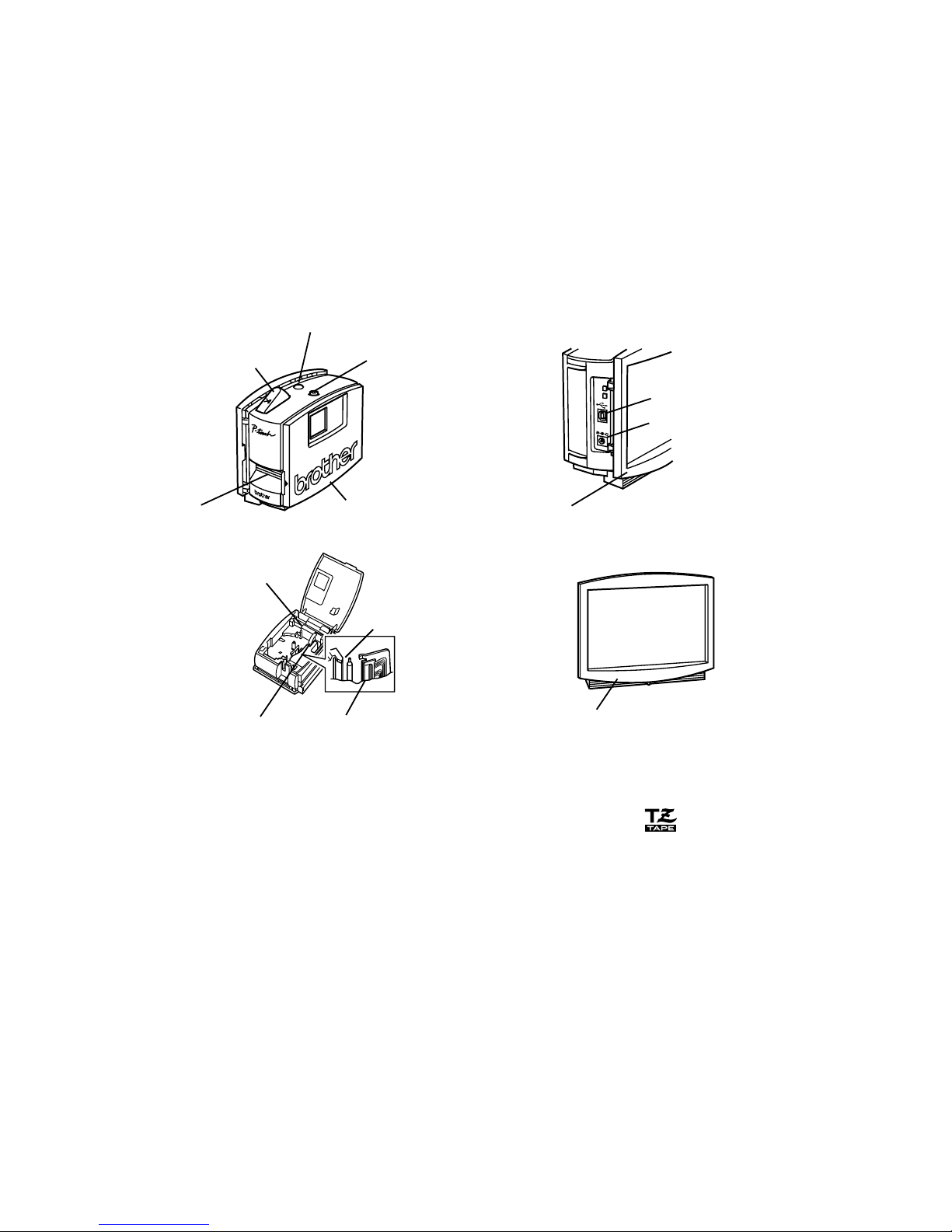
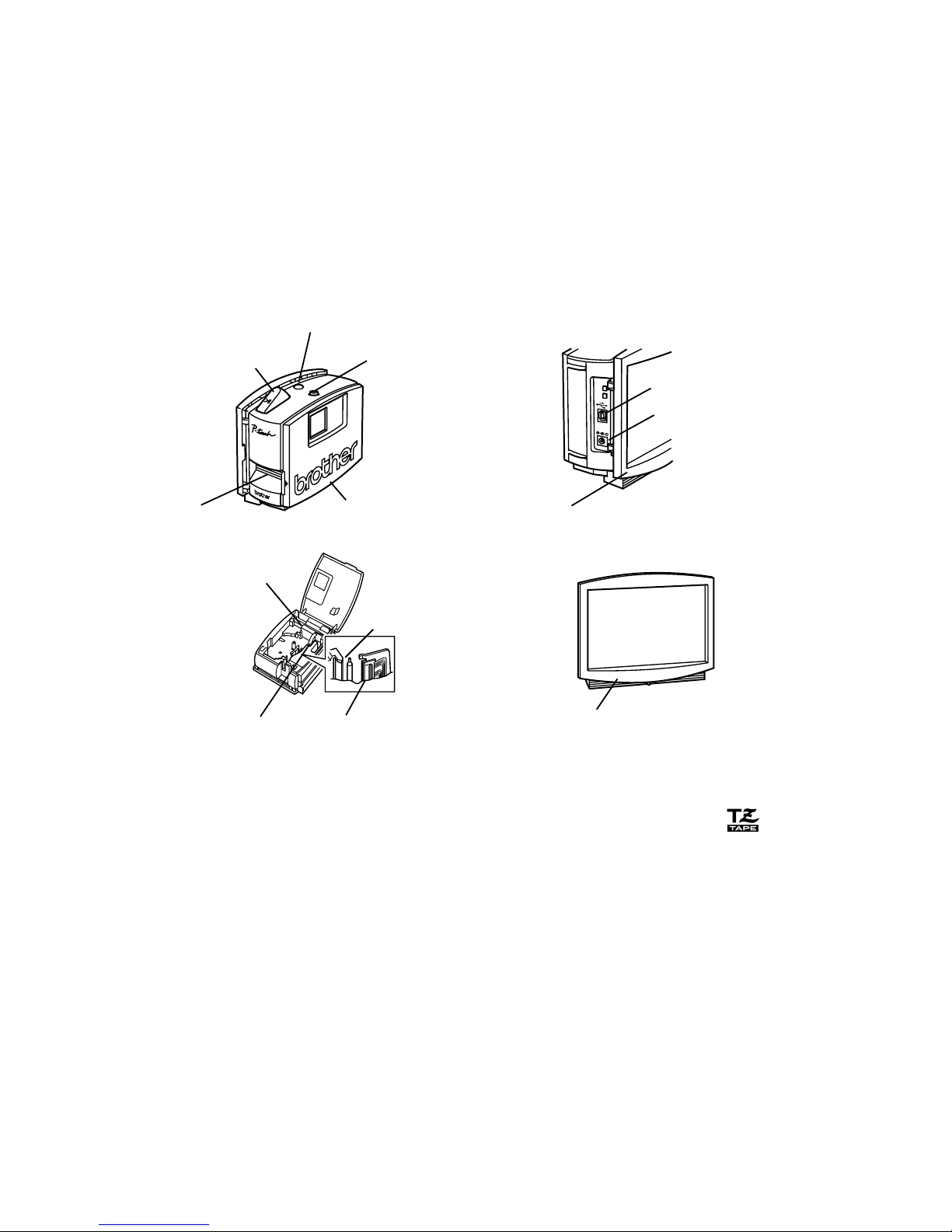
DC IN 9.5V
Status indicator
Power/Feed key
AC adapter connector
Tape compartment cover
Tape cutter button
Photo frame
Tape exit slot
USB port
Photo frame (uninstalled)
Print head
Cutter
Tape
separator
Release lever
Unpacking
• PT-1500PC (with photo frame attached)
• 1/2” (12 mm) wide TZ tape cassette (black characters on white tape; 16’ 3/8” (5 meters))
• AC adapter (model AD-60; for plugging the PT-1500PC into the AC outlet)
•
USB Interface cable (for connecting the PT-1500PC to either an IBM PC-compatible or Macintosh computer)
• Quick Reference
• CD-ROM containing the PC and Mac software and their manuals
Page 5
3
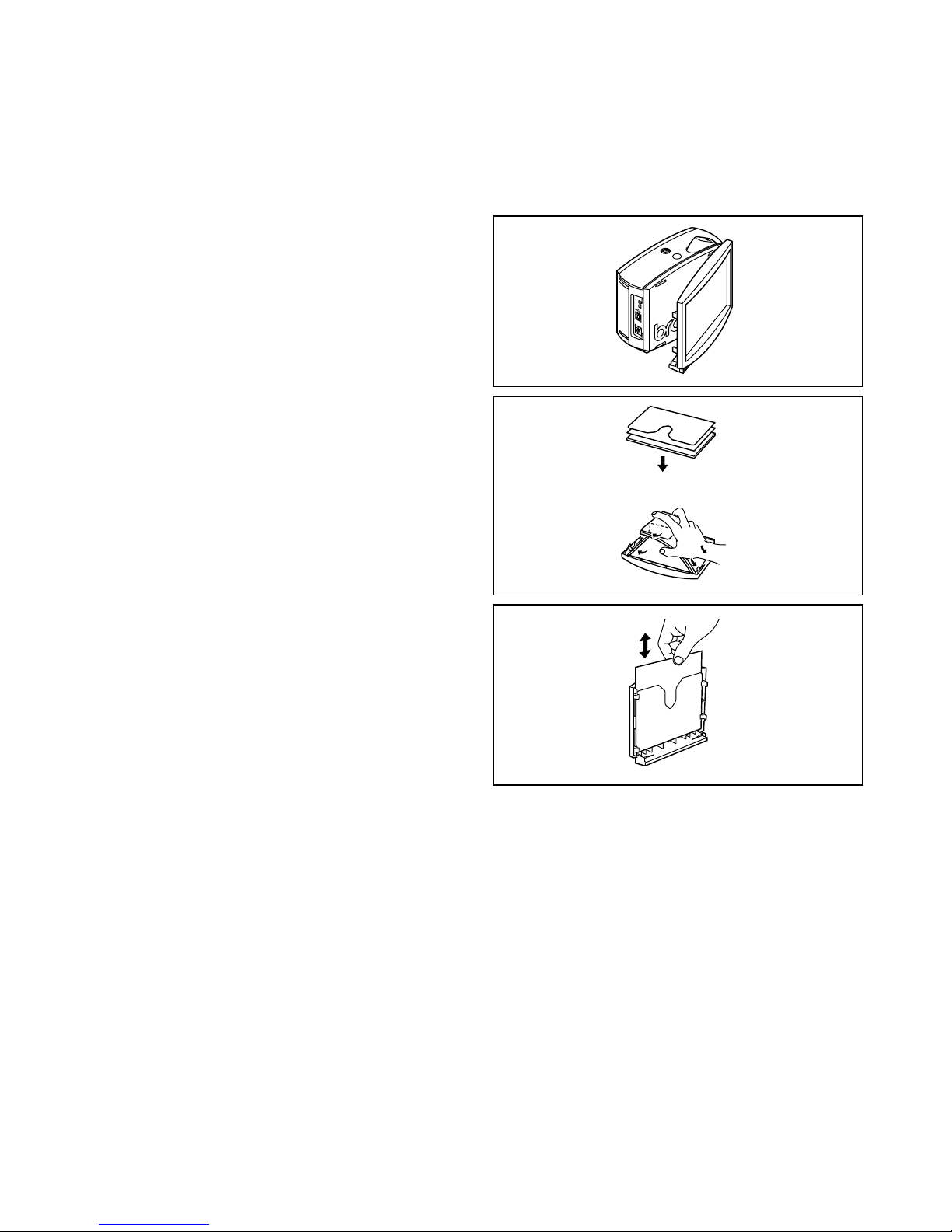
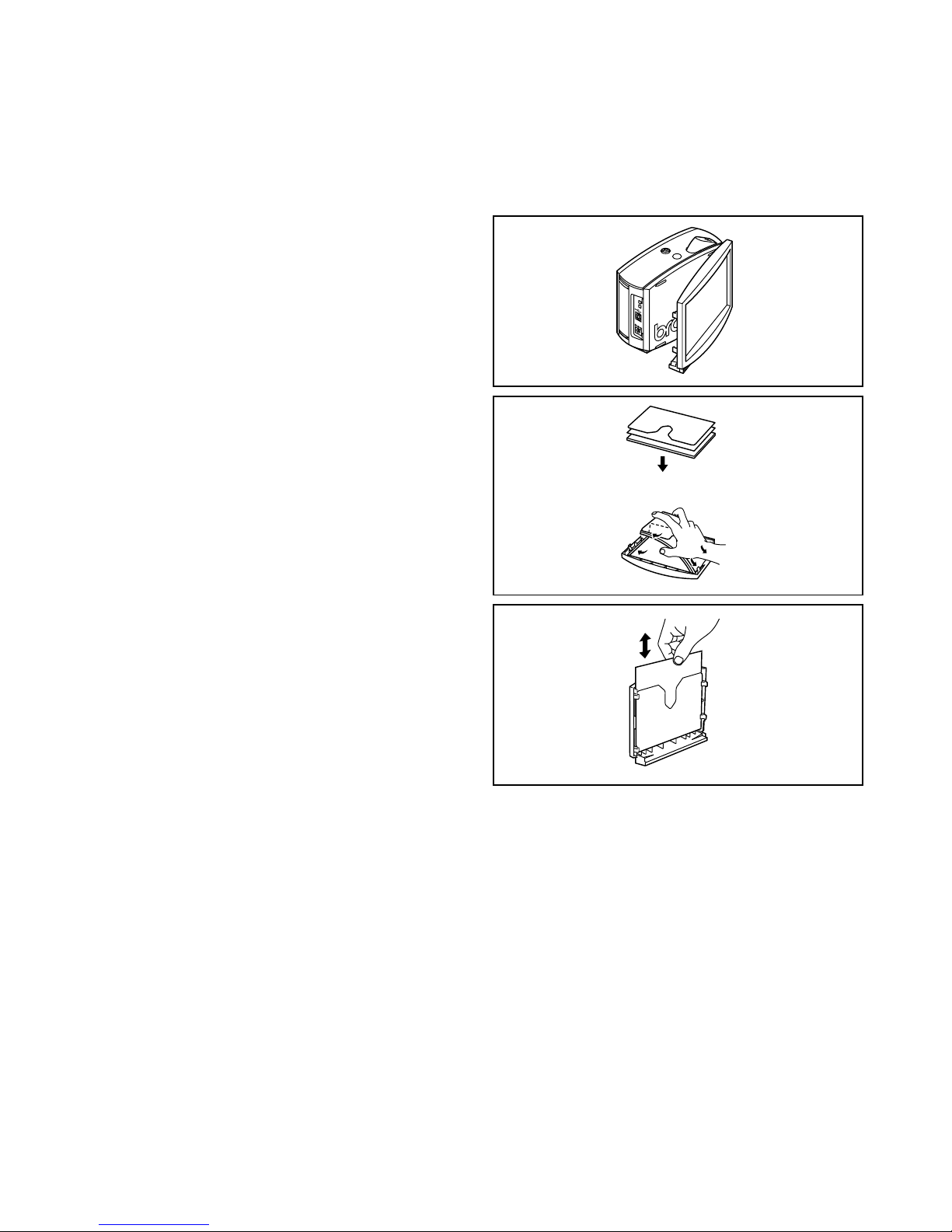
Inserting a photo into the photo frame
1 Remove the photo frame from the
PT-1500PC by carefully pulling off the
frame, grabbing it from the back of the
PT-1500PC as shown.
Be careful that the tape compartment
cover is not opened when removing
the photo frame.
2 Remove the cardboard backing and the
clear protective sheet from the photo
frame.
3 Stack the clear protective sheet, the
photo, and the cardboard backing in that
order, facing down.
4 Insert one end of the stack under the two
tabs on one side of the frame, and then
insert the stack under the two tabs on the
other side of the frame.
5 Attach the photo frame to the side of the
PT-1500PC opposite to the tape
compartment cover.
• Without removing the cardbord backing and
the clear protective sheet from the photo frame
Slide the photo between the cardbord
backing and the clear protective sheet.
DC
I
N
9.5
V
Tape cassettes
• Do not pull on the tape being fed from the machine, otherwise the tape cassette may be damaged.
• If the label is attached to a wet or dirty surface, it may easily peel off. Before affixing the label, clean
the surface where it will be attached.
• Depending on the environmental conditions and the material, condition, roughness, and shape of
the affixing surface, the label may move out of place or peel off. In order to test the label’s adhesive
strength or before using this label where safety is a particular concern, test the label by affixing a
small piece of it to a hidden area of the intended surface.
• Sunlight, wind and rain may cause the color of the label to fade or the label to peel off.
• Markings made with oil-based or water-based ink may be visible through a label affixed over them.
To hide the markings, use two labels layered on top of each other, or use tape with a dark background.
• This tape may not be adequate in cases where liabilities may result due to damage or injuries.
A photo can be inserted into the photo frame attached to the PT-1500PC, turning it into a decorative
addition to your workspace.
Insert a photo into the photo frame in either of the following two ways:
• By removing the photo frame from the PT-1500PC
Page 6
4
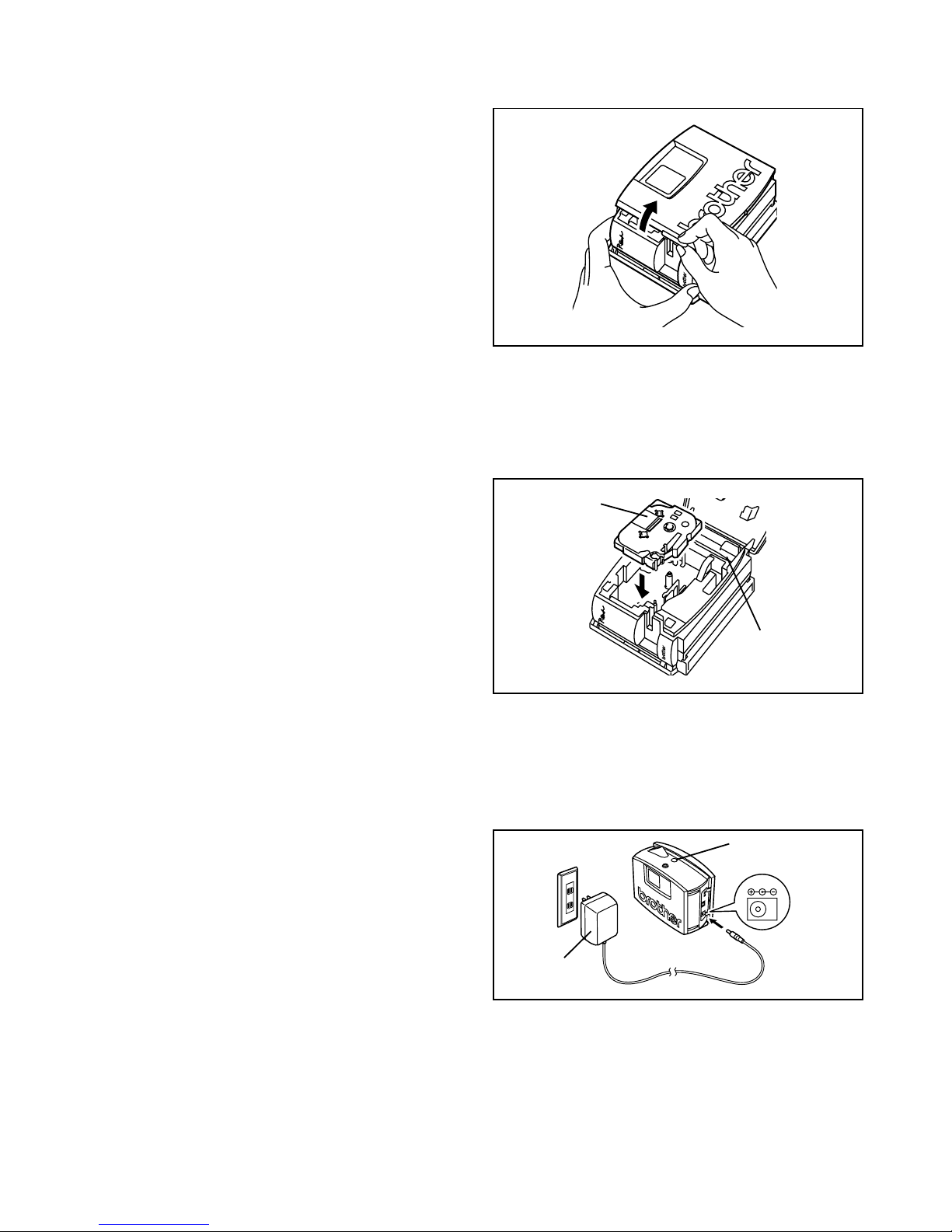
Changing the tape cassette
1 Lift open the tape compartment cover. The
installed cassette is also released.
Be careful that the photo frame does not
fall off when the tape compartment cover
is opened.
2 If a tape cassette is already installed, remove
it by pulling it straight up.
3 If the ink ribbon in the tape cassette to be
installed is loose, use your finger to wind the
toothed wheel in the direction of the arrow
on the cassette until there is no slack in the
ribbon. Also, make sure that the end of the
tape feeds under the tape guide.
If you are inserting a new tape cassette
provided with a stopper, be sure to
remove the stopper.
4 Insert the tape cassette firmly into the tape
compartment, making sure that the entire
back of the cassette touches the bottom of
the compartment.
When inserting the tape cassette, make
sure that the ink ribbon does not catch on
the corner of the metal guide.
5 Securely close the tape compartment cover
by pressing down on the textured area of the
cover near the tape exit slot.
Tape cassette
Tape
separator
Connecting the AC adapter
Connect the AC adapter to the PT-1500PC as described below.
1 Insert the plug on the adapter cord into the
connector marked DC IN 9.5V on the PT1500PC.
2 Insert the plug on the adapter into the nearest
standard electrical outlet. The status indicator
lights up in green to indicate that the
machine is on.
To turn off the PT-1500PC, press the
Power/Feed key so that the status
indicator goes off.
DC IN 9.5V
Status indicator
AC adapter
Page 7
5
Brother Co., Ltd. and its suppliers possess all rights and copyrights to this software (including, but
not limited to, the programming, images, clip art, templates, and text incorporated into the software), the text in the enclosed manuals, and duplicates of the software. This software, either in
part or in whole, may not be duplicated, modified, reverse-engineered, disassembled or decompiled
without permission.
With the enclosed CD-ROM, the following can be installed:
• P-touch Quick Editor
• P-touch Editor Ver. 3.1
• PT-1500PC printer driver
Power/Feed key
The power/feed key ( ) can be used both for turning on and off the PT-1500PC and for feeding out tape.
• To turn the PT-1500PC on or off:
Press once.
• To feed out some tape:
Hold down for at least two seconds.
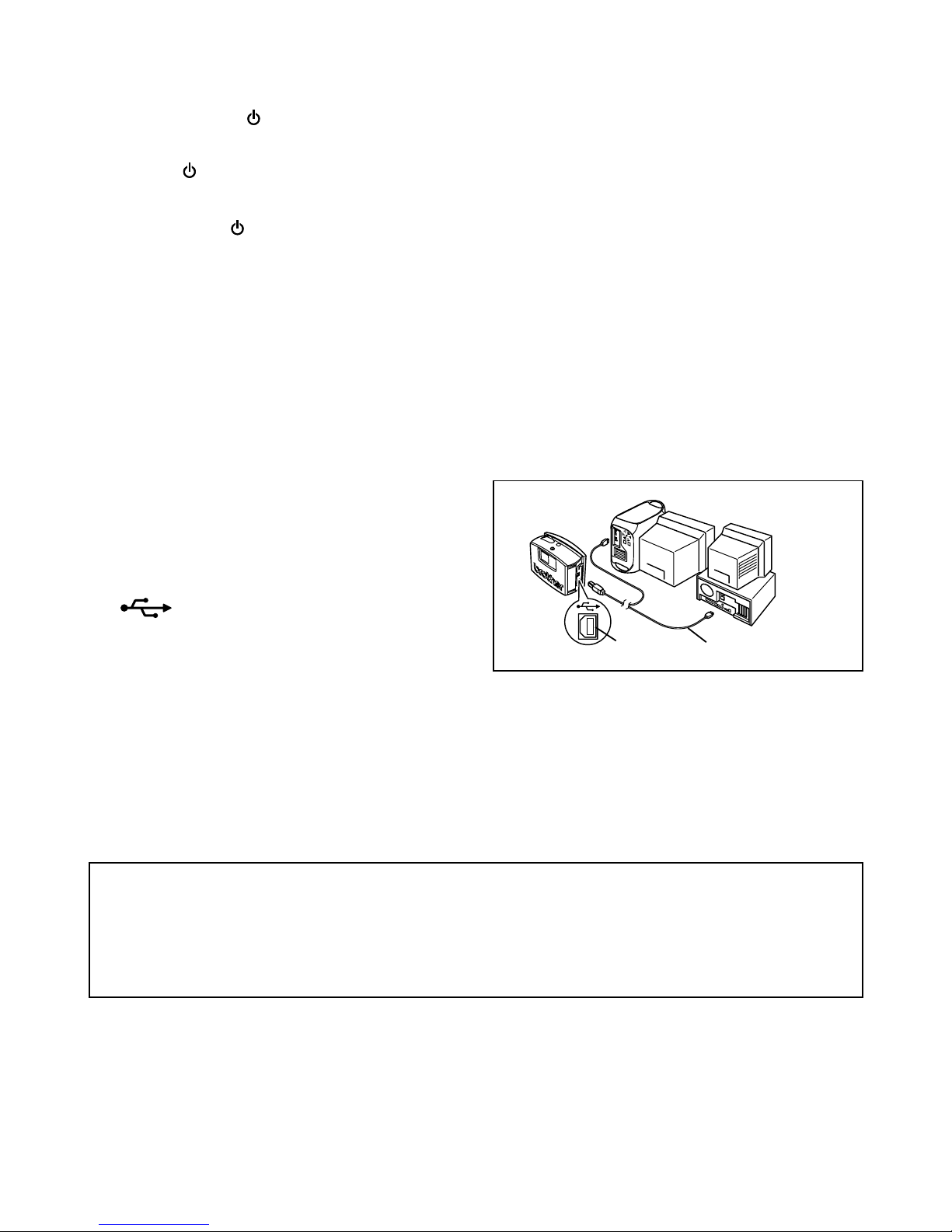
1 Insert the flat connector on the enclosed USB
interface cable into the USB port on the
computer.
2 Insert the square connector on the enclosed
USB interface cable into the USB port
( ) on the PT-1500PC.
When making a USB connection through
a hub, a proper connection may not be
possible due to the type of hub used. If
printing is not possible with a hub
connection, try connecting the PT1500PC directly to the computer using
the USB interface cable.
Software and printer driver
Connecting the USB interface cable
Connect the PT-1500PC to the computer as described below.
When connecting the PT-1500PC to an IBM PC-compatible computer, label-designing software
and the printer driver must be installed before the PT-1500PC is connected to the computer and
plugged in using the AC adapter. Follow the installation procedures on pages 6 through 10 to
install the software and the printer driver, and then connect the PT-1500PC to the computer when
you are instructed to do so.
USB port
USB interface cable
Page 8
6
For PC-compatible users (Windows® 98/98SE/Me/2000)
Before labels can be printed on the PT-1500PC, label-designing software and the PT-1500PC printer
driver must be installed. In order to design labels that can be printed on the PT-1500PC, two applications
are available on the enclosed CD-ROM: P-touch Quick Editor and P-touch Editor Ver. 3.1
Before installation
Check that your system configuration meets the following requirements.
Computer: IBM PC or compatible
Operating system:
Microsoft® Windows® 2000 or pre-installed with Microsoft® Windows® 98/98SE/Me
Hard disk free space: At least 20 MB
Available memory: Minimum 32 MB
Monitor: VGA or higher graphics card
USB port
CD-ROM drive
Do not connect the PT-1500PC to the computer before installing the label-designing software,
otherwise it may not be installed correctly. Be sure not to connect the PT-1500PC until you are
instructed to do so.
For installation on Windows® 2000, administrator privileges are required.
In addition, printing requires power user or administrator privileges.
This software cannot be operated in Users groups.
Installing P-touch Quick Editor
The P-touch Quick Editor software provides quick access to the more simple label-designing features for easy
text input and instant printing of labels. Install the P-touch Quick Editor software on a PC as described below.
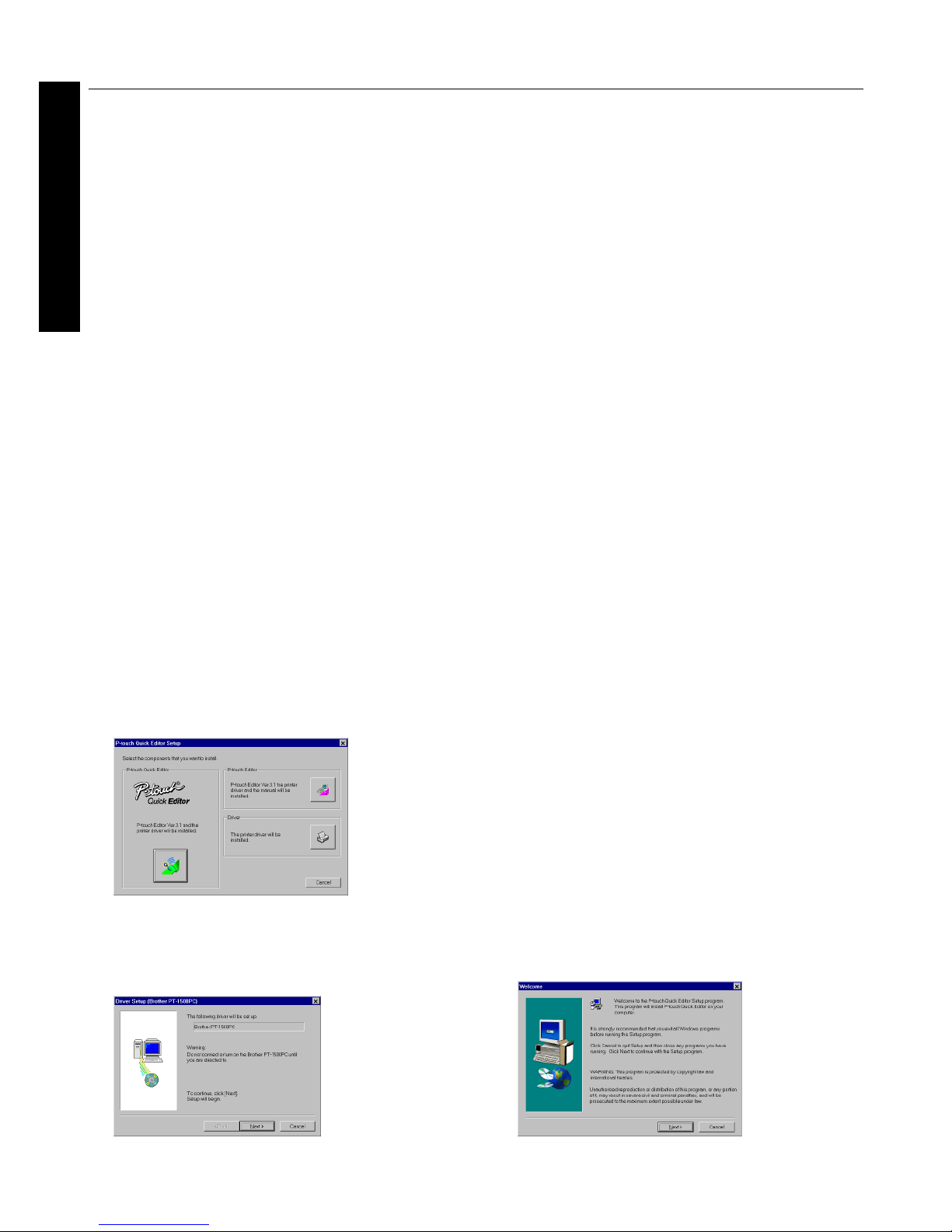
1
Insert the enclosed CD-ROM into the
computer’s CD-ROM drive. A dialog box
appears, allowing you to select what to install.
T
o install just the printer driver, click the bottom
button (Driver) on the right side. The first Driver
Setup dialog box appears, informing you that the
PT-1500PC printer driver will be installed.
Continue with the procedure in
Installing
the printer driver
on page 9.
To install the P-touch Editor Ver. 3.1 software,
click the top button (P-touch Editor) on the
right side. Then, continue with the procedure
in
Installing P-touch Editor Ver. 3.1
on page 8.
If the dialog box does not automatically
appear, double-click “My Computer” on the
desktop, double-click the icon for the CDROM drive containing the CD-ROM, and
then double-click “Setup.exe” to display the
dialog box.
2
Click the left button (P-touch Quick Editor). The
InstallShield® Wizard for installing the P-touch
Quick Editor software starts up, and then the
Welcome dialog box appears.
For Windows®
Page 9
7
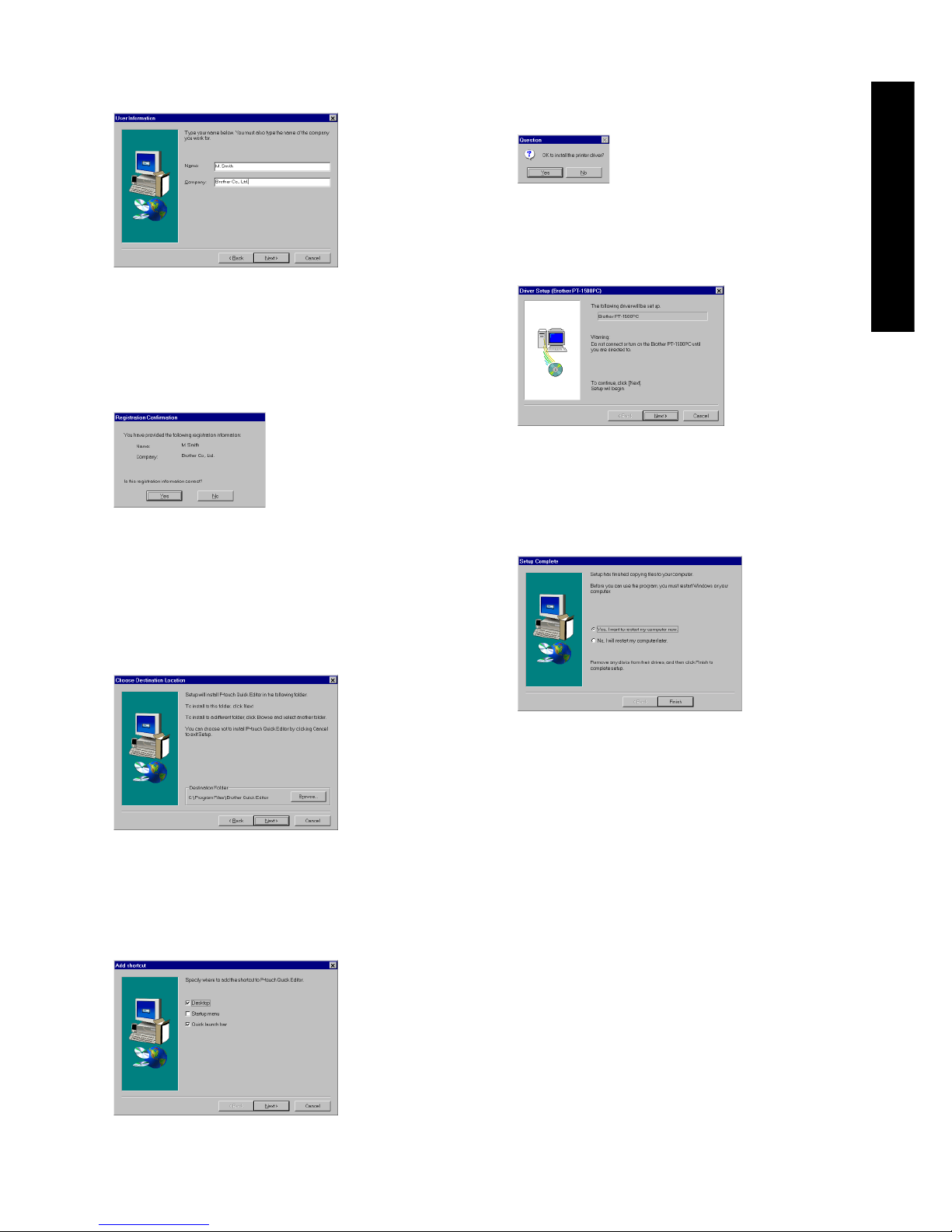
3 Carefully read the contents of the dialog box,
and then click the Next button to continue.
The User Information dialog box appears.
4 Type the necessary information into the
appropriate boxes (If the information has
already been registered in Windows®, it will
automatically appear.), and then click the
Next button. A dialog box appears, asking for
confirmation of the entered information.
5 Click the Yes button to register the entered
information.
To change the information, click the No
button, and then return to step 3.
The Choose Destination Location dialog box
appears.
6 Click the Next button to begin installation.
7 After P-touch Quick Editor is installed, a
dialog box appears, allowing you to select
where the shortcut to P-touch Quick Editor
will be added.
8 Select the desired location for the shortcut,
and then click the Next button. A dialog box
appears, allowing you to select whether or
not to install the printer driver.
To install the printer driver, click the Yes
button. The first Driver Setup dialog box
appears, informing you that the PT-1500PC
printer driver will be installed.
Continue with the procedure in
Installing the
printer driver
on page 9.
If the printer driver is already installed, click
the No button. A dialog box appears,
showing that installation is finished.
Select “Yes, I want to restart may computer
now.”, click the Finish button to restart the
computer, and then remove the CD-ROM
from the CD-ROM drive.
For Windows®
Page 10
8
Installing P-touch Editor Ver. 3.1
The P-touch Editor Ver. 3.1 software includes a
variety of more complex functions for printing
barcodes and images, enabling you to design just
about any label that you can imagine. Install the
P-touch Editor Ver. 3.1 software on a PC as described below.
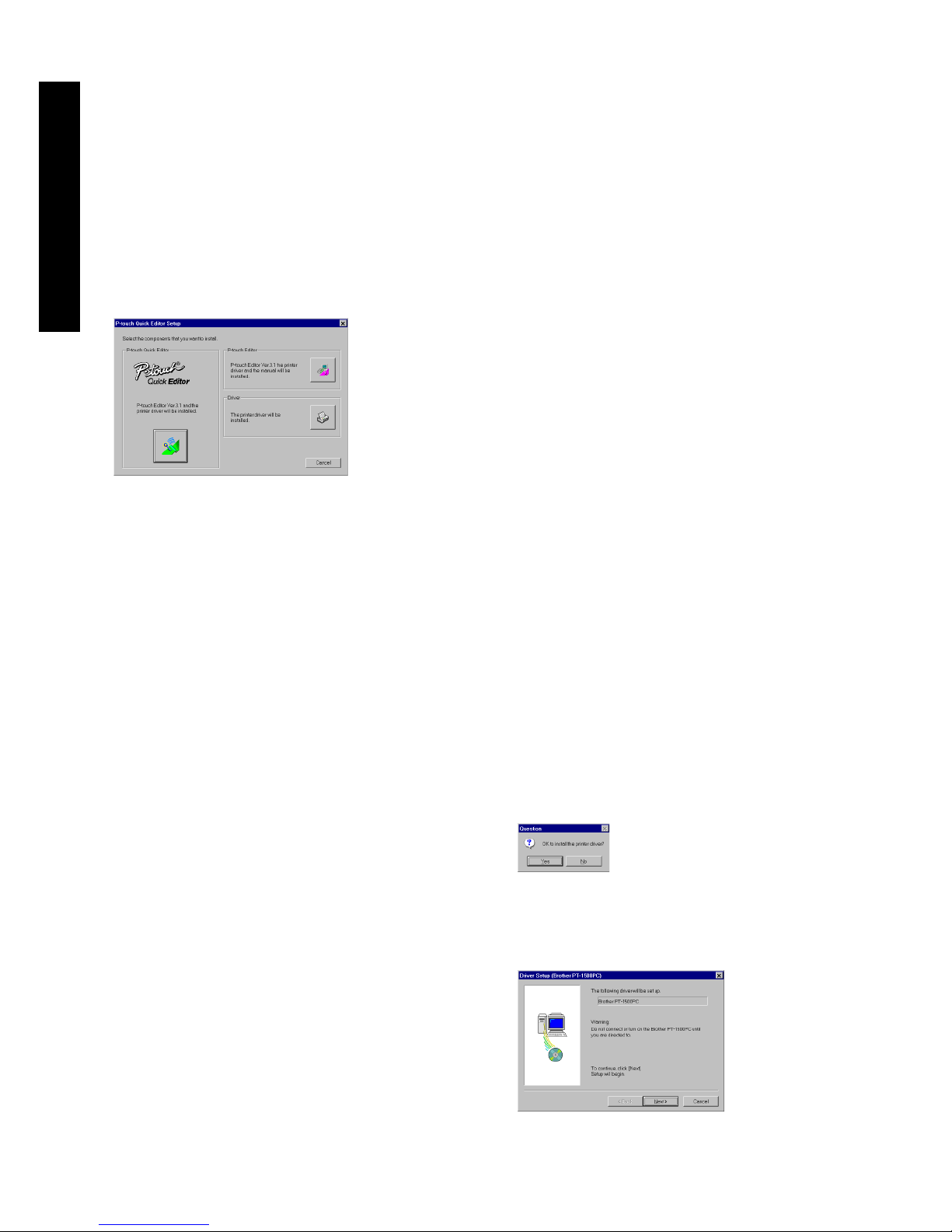
1 Insert the enclosed CD-ROM into the
computer’s CD-ROM drive. A dialog box
appears, allowing you to select what to
install.
To install just the printer driver, click the
bottom button (Driver) on the right side.
The first Driver Setup dialog box appears,
informing you that the PT-1500PC printer
driver will be installed.
Continue with the procedure in
Installing
the printer driver
on page 9.
To install the P-touch Quick Editor
software, click the left button (P-touch
Quick Editor). Then, continue with the
procedure in
Installing P-touch Quick
Editor
on page 6.
If the dialog box does not automatically
appear, double-click “My Computer” on the
desktop, double-click the icon for the CDROM drive containing the CD-ROM, and
then double-click “Setup.exe” to display the
dialog box.
2 Click the top button (P-touch Editor) on the
right side. The InstallShield® Wizard for
installing the P-touch Editor Ver. 3.1 software
starts up, and then the Welcome dialog box
appears.
3 Follow the instructions that appear and
continue with the installation. During
installation, the following installation
methods will be available.
Typical
All of the basic options (P-touch Editor Ver.
3.1, clip art, Auto Format templates, Help,
and 13 fonts) are installed.
Compact
Only P-touch Editor Ver. 3.1 is installed.
Custom
Editor: P-touch Editor Ver. 3.1
Clip Art: Illustrations for the P-touch
Editor Ver. 3.1 Clip Art function
Fonts: 13 fonts
Auto Format Templates: Templates for
the Auto Format function
User’s Guide: User’s Guide (HTML) for
the P-touch Editor Ver. 3.1
The User’s Guide can also be viewed
from the CD-ROM without installing it
onto the computer.
Help: Help files for P-touch Editor Ver. 3.1
If the Change button can be clicked while
an option is selected, sub-components
can be selected. Click the Change button
to display the Select Sub-components
dialog box, and then select the subcomponents that you wish to install by
putting a check mark beside them. If
certain options or sub-components are
not installed, some P-touch Editor Ver. 3.1
functions may not be available. After
selecting the desired sub-components,
click the Continue button.
4 After P-touch Editor Ver. 3.1 is installed, a
dialog box appears, allowing you to select
whether or not to install the printer driver.
To install the printer driver, click the Yes
button. The first Driver Setup dialog box
appears, informing you that the PT-1500PC
printer driver will be installed.
For Windows®
Page 11
9
Continue with the procedure in
Installing the
printer driver
below.
If the printer driver is already installed, click
the No button. A dialog box appears,
showing that installation is finished.
Select “Yes, I want to restart may computer
now.”, click the Finish button to restart the
computer, and then remove the CD-ROM
from the CD-ROM drive.
Installing the printer driver
With Plug-and-Play, new devices connected to the
system are detected, and their drivers are automatically installed. Since the PT-1500PC will be
connected through the USB port, its driver will be
installed with Plug-and-Play. Be sure to read the
installation instructions described below before
installing the printer driver supplied on the CDROM.
Be sure not to connect the PT-1500PC until you
are instructed to do so.
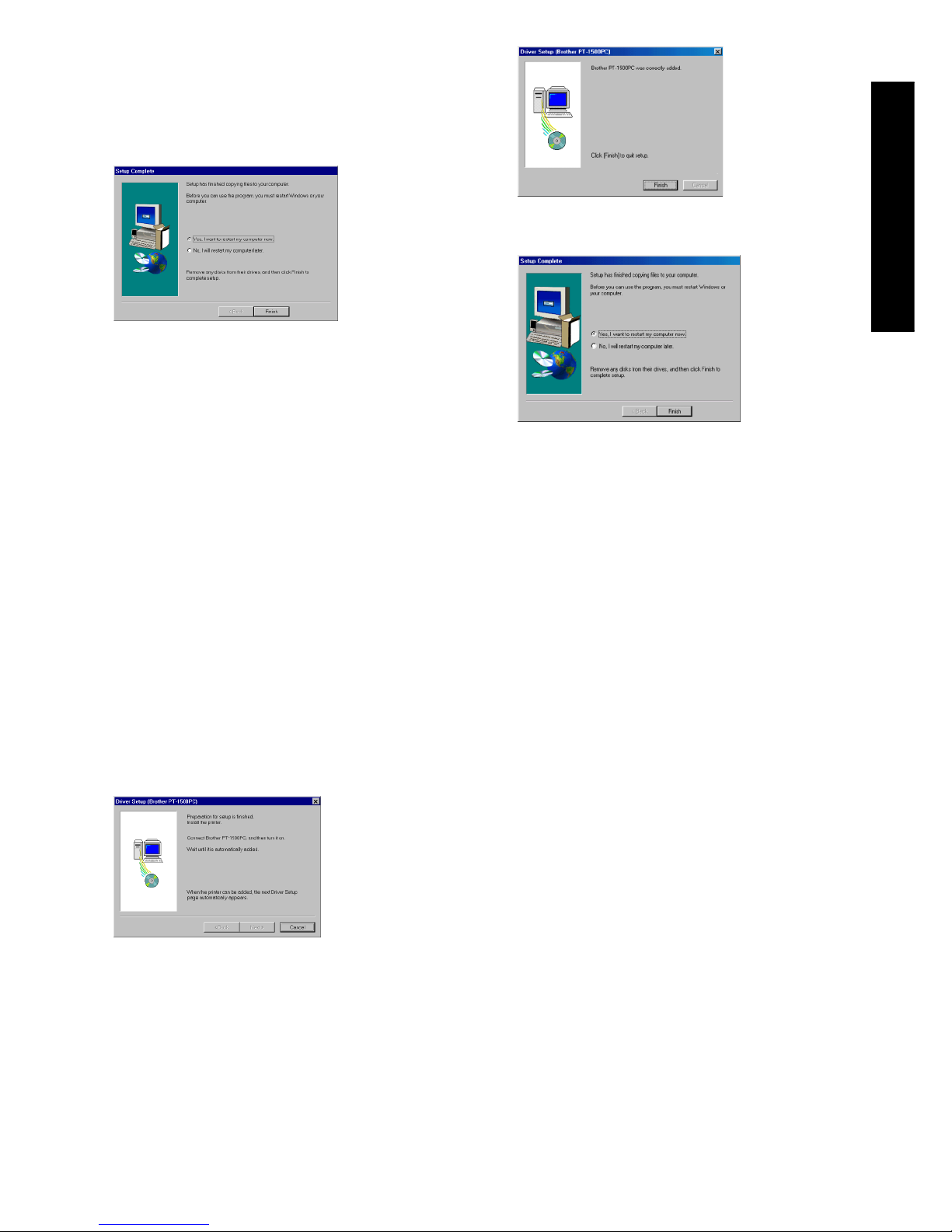
1 Click the Next button. A dialog box appears,
instructing you to connect the PT-1500PC to
the computer.
2 Connect the PT-1500PC to the computer
using the enclosed USB interface cable as
described on page 5, and then turn on the
PT-1500PC. A dialog box appears, showing
that the printer driver has been installed.
3 Click the Finish button. A dialog box
appears, showing that installation is finished.
4 Select “Yes, I want to restart my computer
now.”, click the Finish button to restart the
computer, and then remove the CD-ROM
from the computer.
Reading the User’s Guide
The P-touch Editor User’s Guide can be viewed
either by inserting the CD -ROM into the drive
each time you wish to refer to it or by installing it
onto your hard disk so that it is quickly available
at any time. Since the User’s Guide is an HTML
document, a browser is needed to read it.
• From the CD-ROM:
1 Start up Windows Explorer.
2 Select the CD-ROM drive.
3 Double-click “Main.htm” in the Manual
folder within the Ptouch folder on the
CD-ROM.
• From the P-touch Editor 3.1 group window:
Double-click The User’s Guide P-touch
Editor Ver3.1 icon.
• With the Start button:
1 Click the Start button in the taskbar to
display the Start menu.
2 Select “Programs”.
3 Select “P-touch Editor 3.1”.
4 Click “The User’s Guide P-touch Editor
Ver3.1”.
For Windows®
Page 12
10
Uninstalling the software and
printer driver
Uninstall the P-touch Editor Ver. 3.1/P-touch Quick
Editor software from a PC as described below.
1 Start up Windows® 98/98SE/Me/2000.
2 Click the Start button in the taskbar, select
“Settings”, and then click “Control Panel”.
3 In the Control Panel window, double-click
“Add/Remove Programs”.
4 In the Add/Remove Programs Properties
dialog box, select "P-touch Quick Editor" (to
delete the P-touch Quick Editor software) or
“P-touch Editor 3.1” (to delete the P-touch
Editor Ver. 3.1 software), and then click the
Add/Remove button.
5 A message appears, asking if you wish to
delete the selected application. Click the Yes
button to delete the application.
If you do not wish to delete the
application, click the No button.
6 In the dialog box that appears, indicating that
the application is deleted, click the OK
button.
Replacing, deleting or adding
another printer driver
1 Turn off the PT-1500PC, and then disconnect
it from the computer.
2 Insert the enclosed CD-ROM into the
computer’s CD-ROM drive. A dialog box
appears, allowing you to select what to
install.
If the dialog box does not automatically appear,
double-click “My Computer” on the desktop,
double-click the icon for the CD-ROM drive
containing the CD-ROM, and then double-click
“Setup.exe” to display the dialog box.
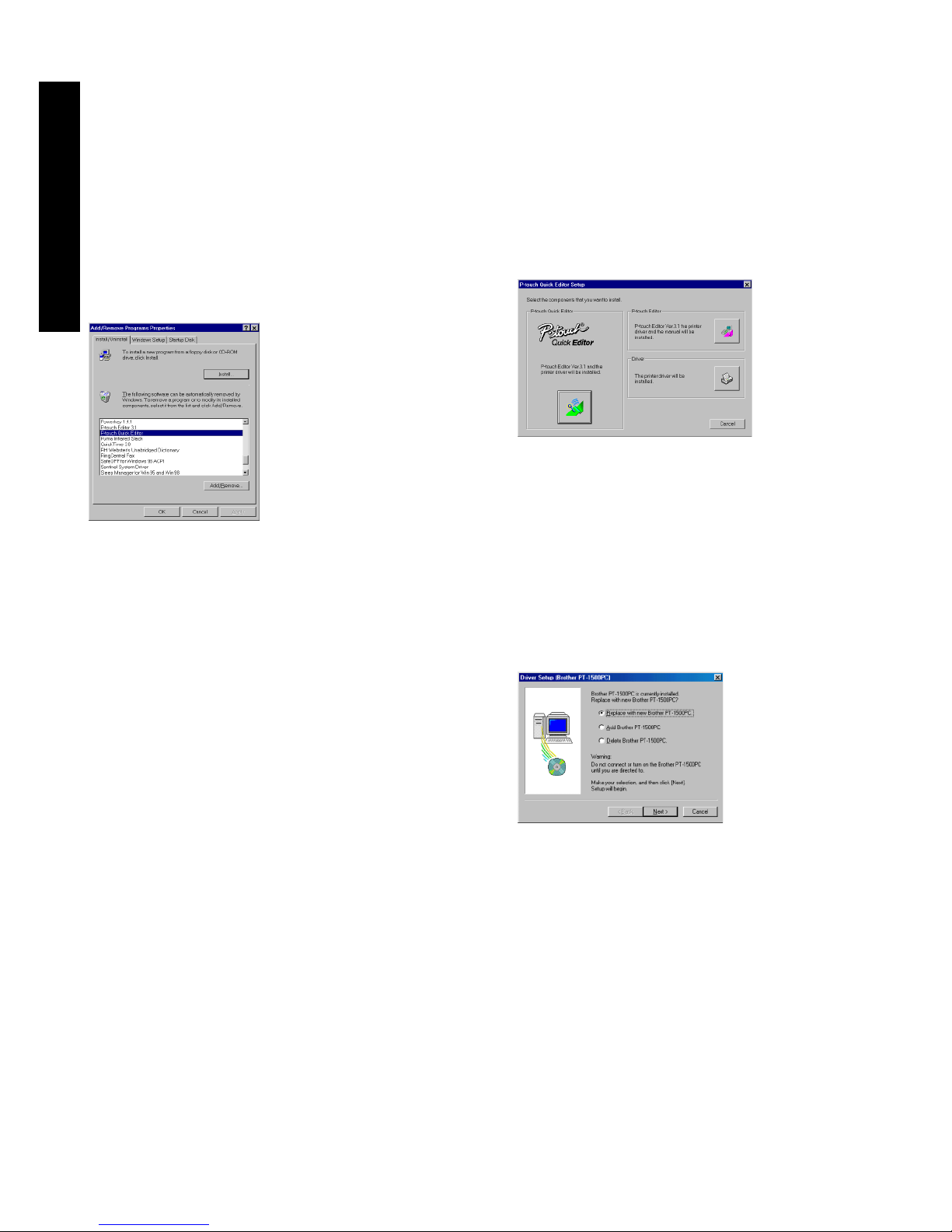
3 Click the bottom button (Driver) on the right
side. The first Driver Setup dialog box
appears, allowing you to select whether to
replace, delete or add another PT-1500PC
printer driver.
4 Select the desired operation, and then click
the Next button.
If “Replace with new Brother PT-1500PC”
is selected, the previously installed printer
driver is deleted, and replaced with a new
one. Select this option when upgrading
the printer driver, or when running
Windows® 2000 and changing to a
PT-1500PC with a different serial number.
If “Add Brother PT-1500PC” is selected, a
new printer driver is added. With USB on
Windows® 98/Me, only a port is added
without adding the PT-1500PC as a new
printer. Select this option when connecting
and using multiple PT-1500PCs with the
same computer.
For Windows®
Page 13
11
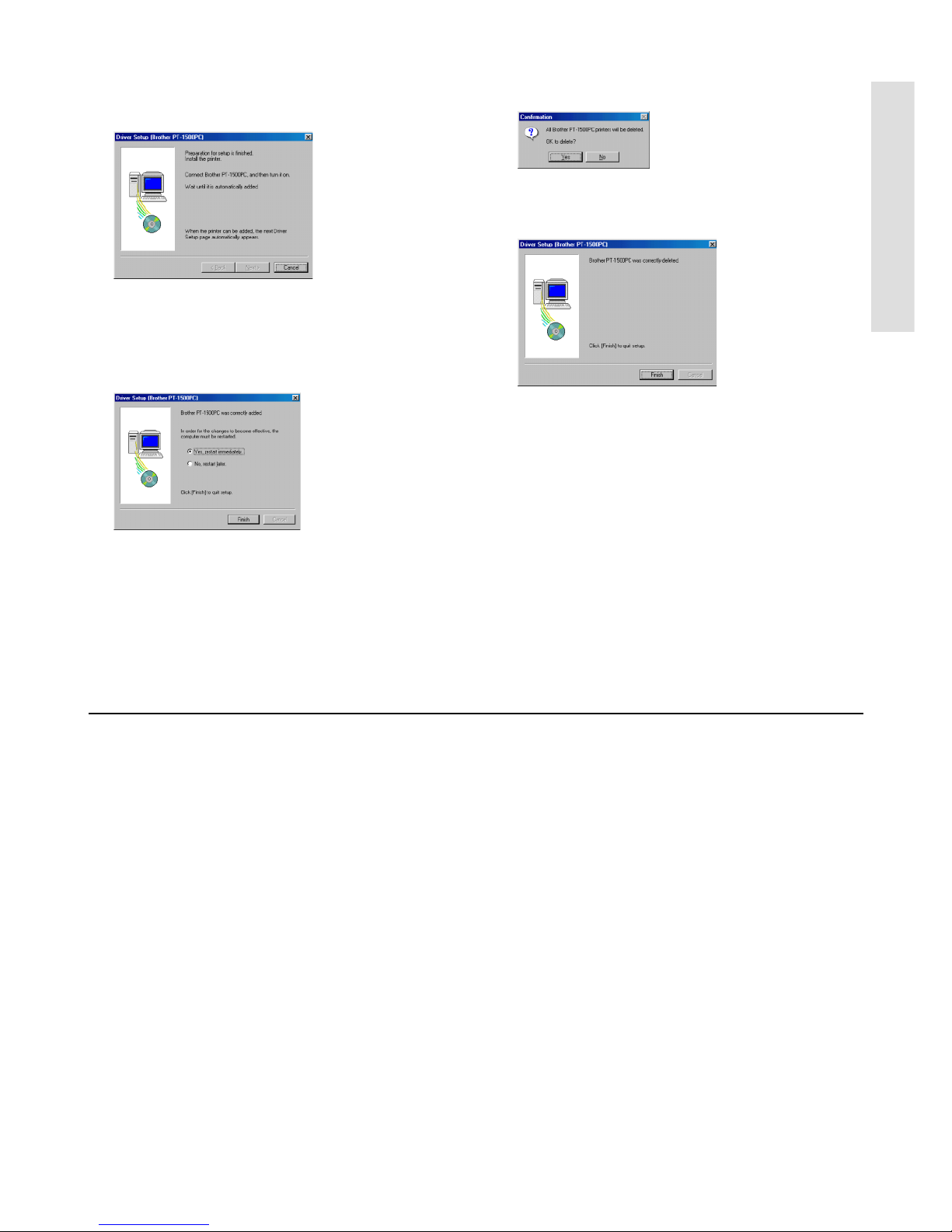
5 If “Replace with new Brother PT-1500PC” or
“Add Brother PT-1500PC” was selected: A
dialog box appears, instructing you to
connect the PT-1500PC to the computer.
Connect the PT-1500PC to the computer
using the enclosed USB interface cable as
described on page 5, and then turn on the
PT-1500PC. A dialog box appears, showing
that the printer driver has been installed.
Select “Yes, restart immediately.”, and then
click the Finish button to restart the
computer.
If “Delete Brother PT-1500PC” was selected:
A dialog box appears, asking for confirmation
to delete all PT-1500 printer drivers.
Click the Yes button. A dialog box appears,
showing that the printer drivers have been
deleted.
Click the Finish button. If a dialog box
appears, explaining that the computer should
be restarted, select the option for restarting
the computer, and then click the Finish
button.
For Macintosh users
Before labels can be printed on the PT-1500PC, label-designing software and the PT-1500PC printer
driver must be installed. In order to design labels that can be printed on the PT-1500PC, two applications
are available on the enclosed CD-ROM: P-touch Quick Editor and P-touch Editor Ver. 3.1
Before installation
Check that your system configuration meets the following requirements.
Computer: Macintosh
Operating system: Mac OS 8.6 or later
* This software is only compatible with Mac OS X classic.
The Mac version of the software is for a Mac with an English operating system. If the software is
installed on a Mac with an operating system in a different language, the software may not run properly.
Hard disk free space: At least 30 MB
A few hundred megabytes of additional free space may be needed when printing long labels or
large amounts of data.
Available memory free space: Minimum 24 MB
USB port
CD-ROM drive
For Macintosh
Page 14
12
For Macintosh
Installing P-touch Quick Editor
The P-touch Quick Editor software provides quick access to the more simple label-designing features for easy
text input and instant printing of labels. Install the P-touch
Quick Editor software on a Mac as described below.
1 With the PT-1500PC and computer turned
off, connect the PT-1500PC to the Macintosh
using the enclosed USB interface cable. Be
sure to leave the PT-1500PC off.
2 Turn on the Macintosh.
3
Insert the enclosed CD-ROM into the computer’s
CD-ROM drive. A folder opens, allowing you to
view the contents of the CD-ROM.
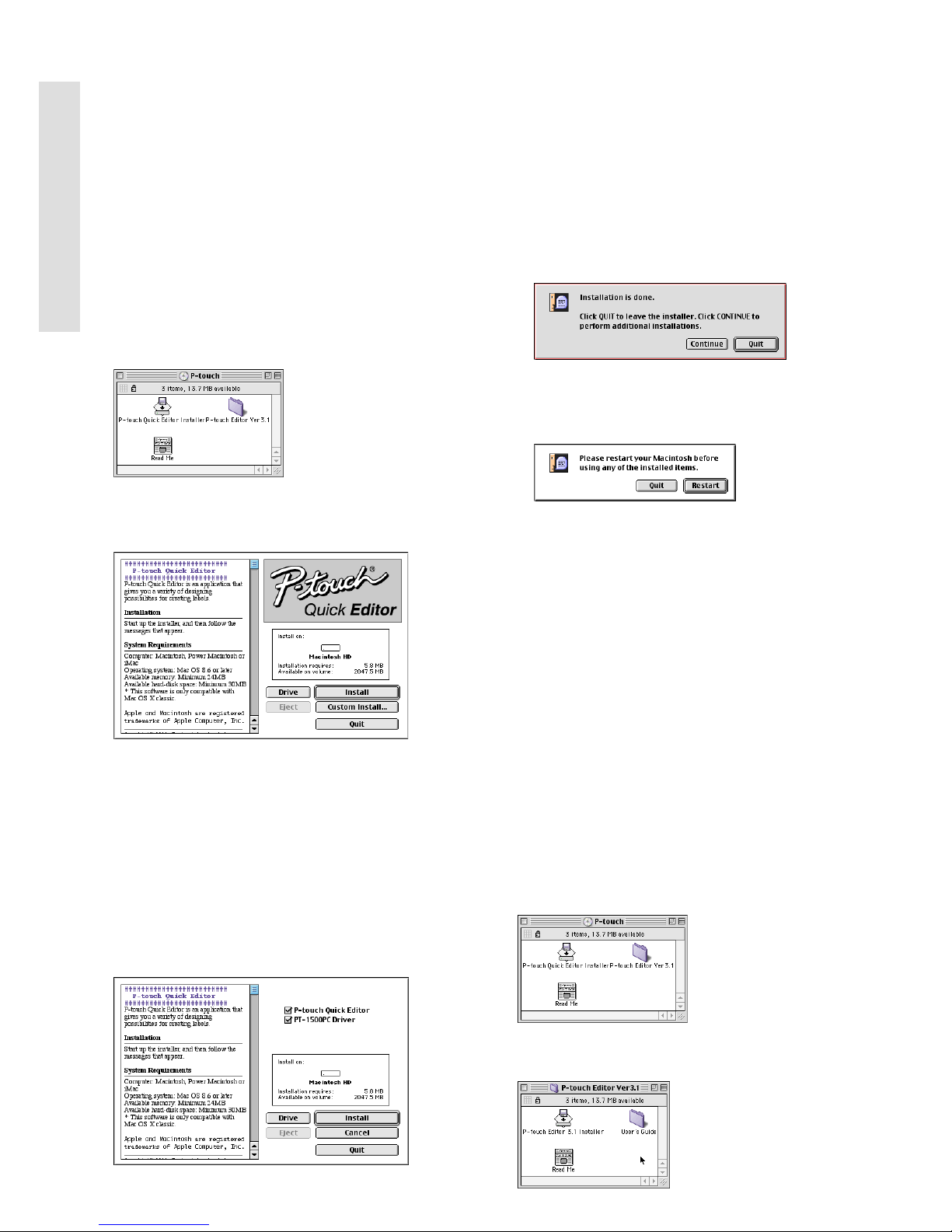
4 Double-click the P-touch Quick Editor
Installer icon in the folder that appears. The
installer starts up.
5 Select the installation method.
Clicking the Install button immediately starts
installing the most basic options.
About 30 MB of available hard-disk space is
needed to begin installation. In order to install
all options, about 30 MB of available harddisk space is needed. If enough hard-disk
space is available, click the Install button.
Clicking the Custom Install button displays a dialog
box that allows you to select which options to install.
Only the options with a check mark beside
them are installed. Select the options that
you wish to install, and then click the Install
button to begin installation.
In order to print from the PT-1500PC,
“PT-1500PC Driver” must be selected for
installation.
6 When the installation is finished and the
following dialog box appears, click the Quit
button.
7 When the dialog box appears asking if you
wish to restart the computer, click the Restart
button to restart the computer.
Installing P-touch Editor Ver. 3.1
The P-touch Editor Ver. 3.1 software includes a
variety of more complex functions for printing
barcodes and images, enabling you to design just
about any label that you can imagine. Install the
P-touch Editor Ver. 3.1 software on a PC as described below.
1 With the PT-1500PC and computer turned
off, connect the PT-1500PC to the Macintosh
using the enclosed USB interface cable. Be
sure to leave the PT-1500PC off.
2 Turn on the Macintosh.
3 Insert the enclosed CD-ROM into the
computer’s CD-ROM drive. A folder opens,
allowing you to view the contents of the CDROM.
4 Double-click the P-touch Editor Ver3.1 folder
to open it.
Page 15
13
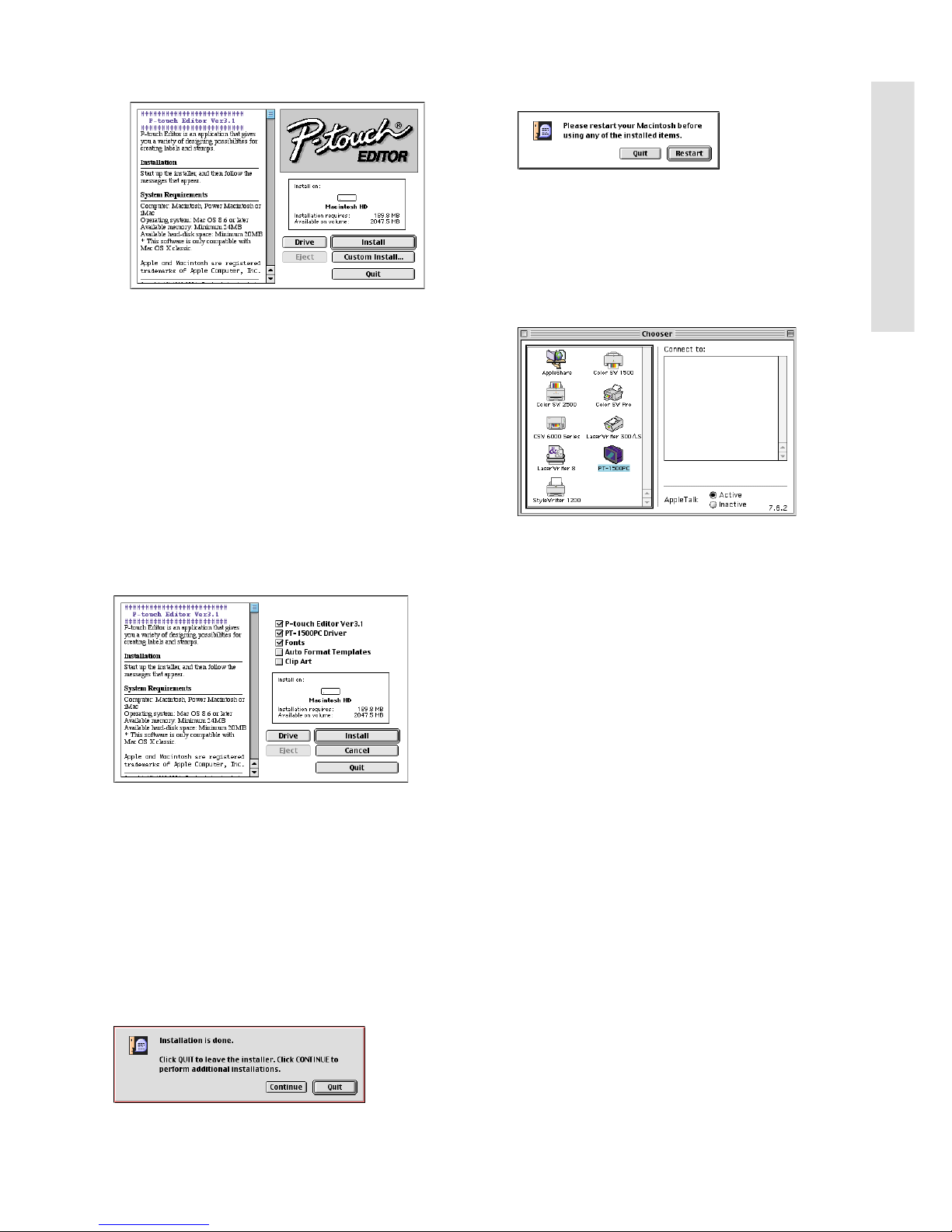
5 Double-click the P-touch Editor 3.1 Installer
icon in the folder. The installer starts up.
6 Select the installation method.
Clicking the Install button immediately starts
installing the most basic options. (Some clip
art illustrations are not installed.)
About 30 MB of available hard-disk space is
needed to begin installation.
In order to install all options, about
120 MB of available hard-disk space is
needed. If enough hard-disk space is
available, click the Install button.
Clicking the Custom Install button displays a
dialog box that allows you to select which
options to install.
Only the options with a check mark beside
them are installed. Select the options that
you wish to install, and then click the Install
button to begin installation.
In order to print from the PT-1500PC,
“PT-1500PC Driver” must be selected for
installation.
7 When the installation is finished and the
following dialog box appears, click the Quit
button.
8 When the dialog box appears asking if you
wish to restart the computer, click the Restart
button to restart the computer.
Selecting the printer
1 Pull down the Apple menu and select
“Chooser” to display the Chooser window.
2 In the list on the left, click the PT-1500PC
icon.
3 Close the Chooser window to confirm your
settings.
Reading the User’s Guide
The P-touch Editor User’s Guide can be viewed
either by inserting the CD -ROM into the drive
each time you wish to refer to it or by installing it
onto your hard disk so that it is quickly available
at any time. Since the User’s Guide is an HTML
document, a browser is needed to read it.
• From the CD-ROM:
Double-click “Main.htm” in the User’s
Guide folder within the P-touch Editor
Ver3.1 folder on the CD-ROM.
• With the Start button:
Double-click “Main.htm” in the User’s
Guide folder within the P-touch Editor
Ver3.1 folder installed on the hard disk.
For Macintosh
Page 16

14
Uninstalling the software and printer
driver
Uninstall P-touch Quick Editor, P-touch Editor
Ver3.1 and the printer driver as described below.
When deleting the printer driver, be sure that
the P-touch is turned off and unplugged.
1 Drag the following folder to the Trash icon:
• P-touch Quick Editor folder (for the Ptouch Quick Editor software)
• P-touch Editor Ver3.1 folder (for the Ptouch Editor Ver. 3.1 software)
2 In the System Folder, open the Extensions
folder.
3 Drag the following icons to the Trash icon:
• PT-1500PC and USB PT-1500PC
Extension
4 In the System Folder, open the Preferences
folder.
5 Drag the following icons to the Trash icon:
• P-touch Quick Editor Prefs, P-touch Editor
3.1 Prefs, and PT-1500PC Prefs
The software and the printer driver are now
deleted.
For Macintosh
Page 17
15
Starting up the P-touch Editor software
Starting up P-touch Quick Editor
When P-touch Quick Editor is installed on a
PC, you can choose to add shortcuts to the
desktop, the StartUp menu, and to the Quick
Launch toolbar.
On an IBM PC-compatible computer:
•
If a shortcut was added to the StartUp menu:
P-touch Quick Editor automatically starts up
when the computer is started up.
• If a shortcut was added to the desktop:
Double-click the P-touch Quick Editor
icon on the desktop.
•
If a shortcut was added to the Quick Launch toolbar:
Double-click the P-touch Quick Editor
icon in the Quick Launch toolbar.
• If no shortcuts were added:
1 Click the Start button in the taskbar to
display the Start menu.
2 Select “Programs”.
3 Click “P-touch Quick Editor”.
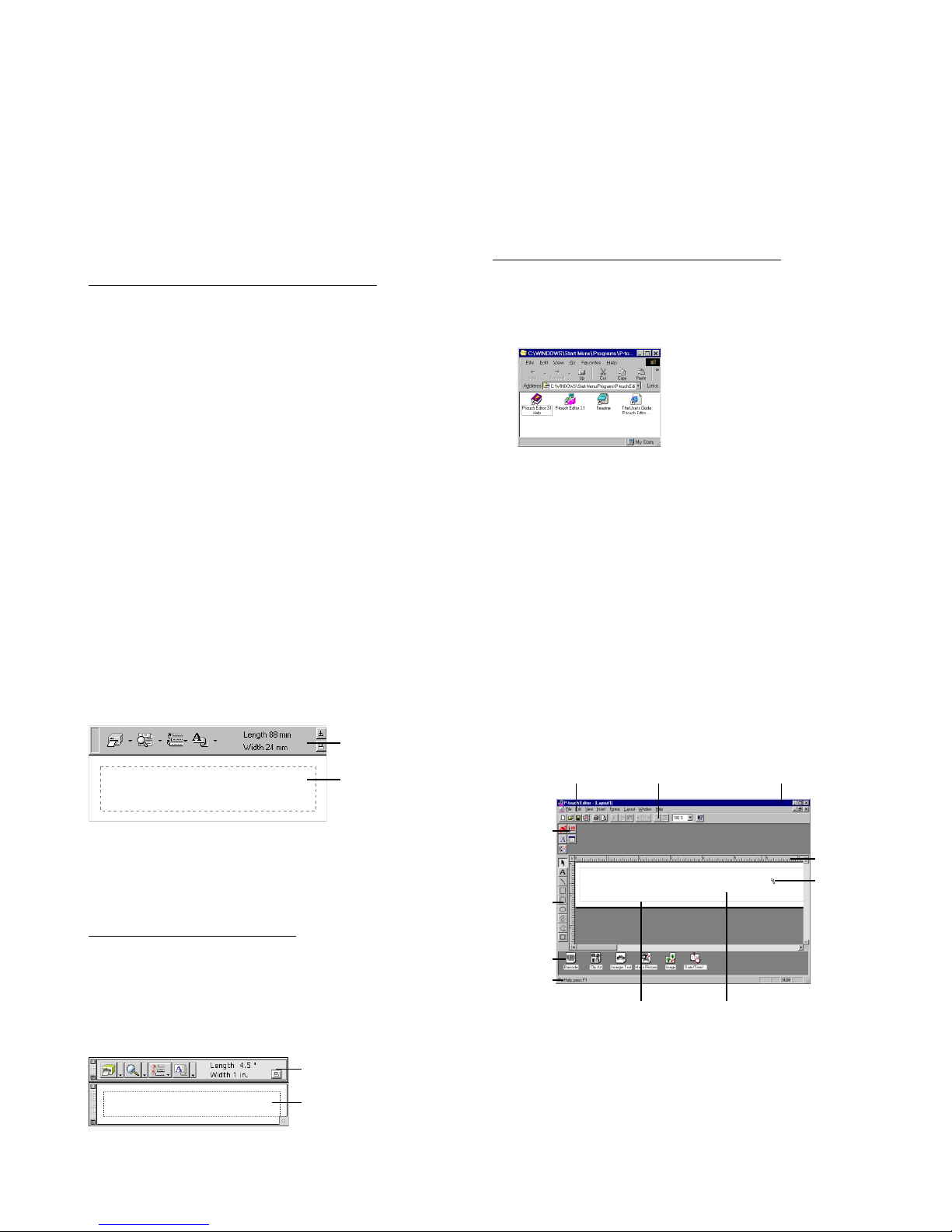
After P-touch Quick Editor is started, the
following window is displayed.
P-touch Quick Editor can be hidden or
displayed by clicking its icon in the system
tray, at the right of the taskbar.
On a Macintosh computer:
•
Double-click the P-touch Quick Editor icon in the Ptouch Quick Editor folder installed on the computer.
After P-touch Quick Editor is started, the following window is displayed.
Starting up P-touch Editor Ver. 3.1
The P-touch Editor Ver. 3.1 application makes it
easy for anyone to design more complex labels
and print them for almost any need imaginable.
On an IBM PC-compatible computer:
• By clicking the P-touch Editor icon:
Double-click the P-touch Editor 3.1 icon
in the P-touch Editor 3.1 group window.
• With the Start button:
1 Click the Start button in the taskbar to
display the Start menu.
2 Select “Programs”.
3 Select “P-touch Editor 3.1”.
4 Click “P-touch Editor 3.1”.
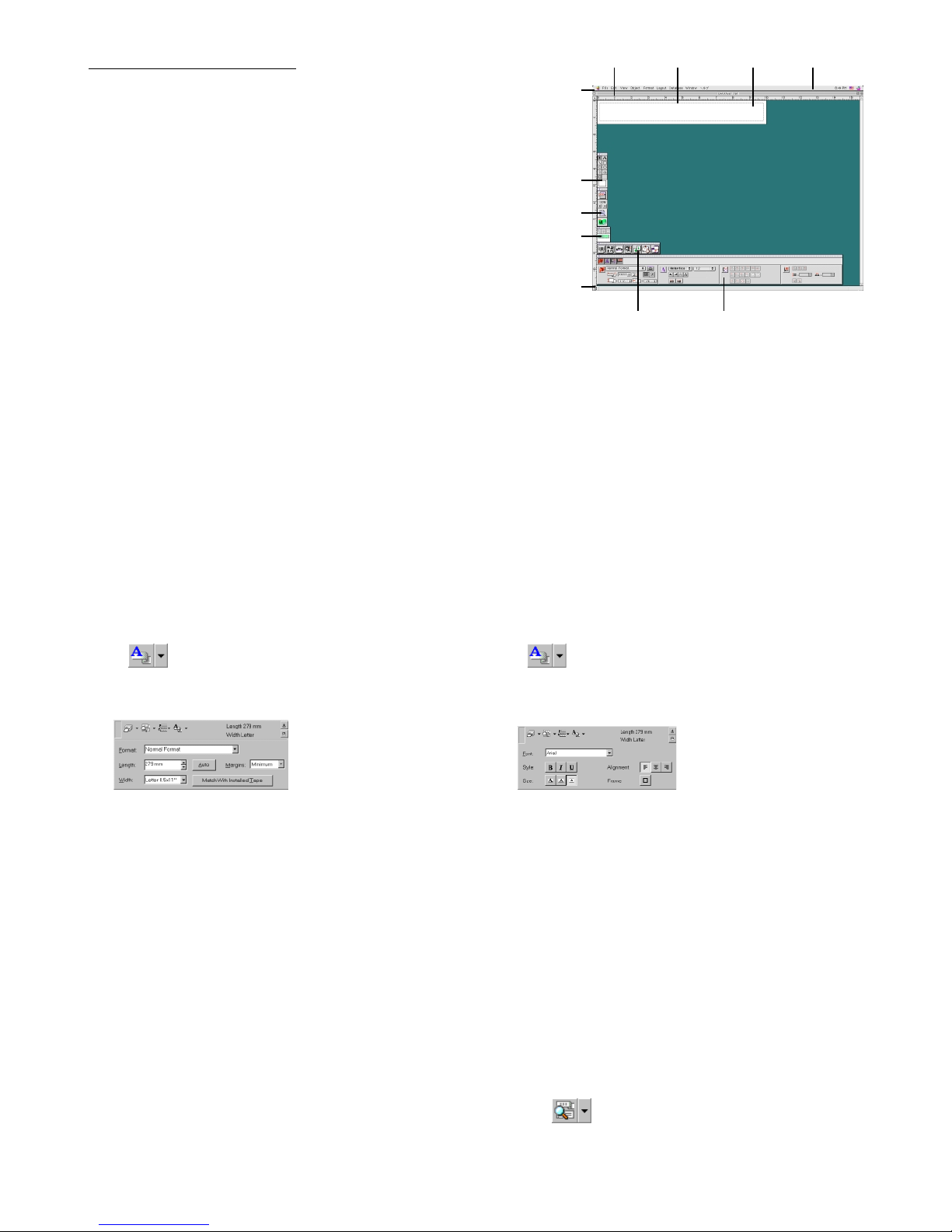
After P-touch Editor Ver. 3.1 is started, the following window is displayed.
For more details on the functions of P-touch
Editor Ver. 3.1, refer to its User’s Guide,
which can either be installed on the
computer or viewed from the CD-ROM .
Menu bar Standard toolbar
Property
dock
Layout area
Print area
Object
dock
Title bar
Rulers
Cursor
Status
bar
Draw
toolbar
Toolbar
Label view
Toolbar
Label view
Page 18
16
On a Macintosh computer:
• Double-click the P-touch Editor Ver3.1.6
icon in the P-touch Editor Ver3.1 folder
installed on the computer.
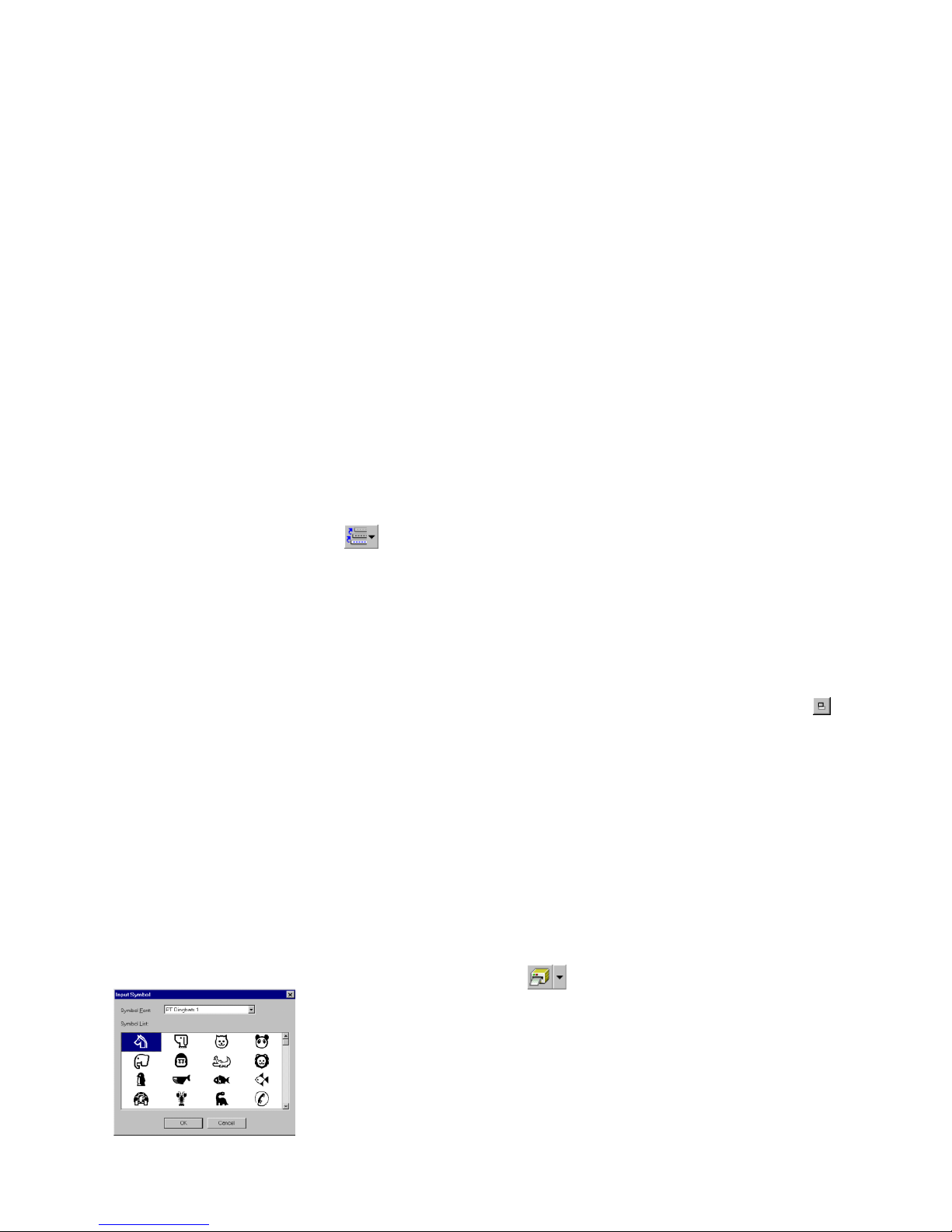
After P-touch Editor Ver. 3.1 is started, the following window is displayed.
For more details on the functions of P-touch
Editor Ver. 3.1, refer to its User’s Guide,
which can either be installed on the
computer or viewed from the CD-ROM .
Using P-touch Quick Editor
The P-touch Quick Editor enables you to design a simple label layout quickly and easily. In addition to the
various functions available through the buttons in the toolbar, right-clicking (Windows) or holding down the
Control key and clicking (Macintosh) in the label view displays a pop-up menu containing more commands.
Specifying a label size
Before entering text, the label size must be set. A
selection of preset layout sizes is available for a
variety of needs.
1 Click the arrow beside the Properties button
( ) to display a drop-down menu.
2 Click [Tape Settings] to display various label
format settings.
The Tape Settings can also be displayed by
selecting [View Properties], then clicking
[Tape Settings] in the pop-up menu,
displayed by right-clicking (Windows) or
holding down the Control key and
clicking (Macintosh) in the label view.
3 In the Format list, click the desired label
format.
The size of the label layout can also be set
by specifying the Length and Width settings
or by dragging the edges of the label view
until the layout is the desired size.
Entering text
The entire text can quickly be formatted by specifying the font, size, style and alignment. In addition, a frame can be drawn around the text.
1 Click the arrow beside the Properties button
( ) to display a drop-down menu.
2 Click [Text Settings] to display various text
format settings.
The Text Settings can also be displayed by
selecting [View Properties], then clicking
[Text Settings] in the pop-up menu,
displayed by right-clicking (Windows) or
holding down the Control key and
clicking (Macintosh) in the label view.
3 In the Text Settings, select the desired text
formats.
4 Click in the label view, and then type or
import the text.
Typing in the label view shows the text as
it will appear when it is printed. However,
by clicking the Change View button
( ), the text is displayed in the text
box, giving you a clearer view of the
entered text.
Menu bar
Draw toolbar
Print toolbar
Database
toolbar
Status bar
Object dock Property dock
Rulers Layout area Print area Title bar
Page 19
17
3
In the Symbol List view, select the desired symbol.
4 Click the OK button. The selected symbol is
added at the left of the text.
If a symbol has already been added to the
text, it will be replaced by the newly
selected symbol.
Changing the background color
The background color of the layout can be
changed to suit your preference.
• (Windows) Right-click in the label view (or text
box), select [Background Color] in the menu
that appears, and then click the desired color
from the list.
(Macintosh) Hold down the Control key and
click in the label view (or text box), select
[Background Color] in the menu that appears,
and then click the desired color from the list.
To select a color other than those listed,
select [User Settings] (Windows) or [User
Setting] (Macintosh) from the Background
Color submenu, create the desired color
in the dialog box that appears, and then
click the OK button.
Viewing the text
Layouts that are too long to fit in the screen can be
scrolled by clicking the Arrange button ( ) to
view the left, the center, then the right side of the
layout with each click of the button.
If the label view (or text box) has been
moved away from the tool bar, it will be
docked before scrolling.
Printing
Before printing labels, certain print options can
be selected.
1 Click the arrow beside the Print button
( ) to display a drop-down menu.
2 (Windows) Click [Print Options]. The Print
dialog box appears.
(Macintosh) Click [Print]. A dialog box
containing the print options appears.
On the Macintosh, this dialog box can
also be displayed by just clicking the Print
button.
Importing text
Text that has already been typed in another application can easily be imported into the label.
1 Select the desired text in the other
application.
2 Import the text into the label layout either by
pressing the designated shortcut keys
(Windows only) or by dragging it from the
other application.
(Windows only) To specify the shortcut
keys used to import text, right-click in the
label view (or text box), and then click
[Options] in the menu that appears. In the
Options dialog box that appears, select the
desired shortcut keys for importing text.
Using the Text History list
The 10 most recently printed texts are automatically stored for future use.
1 Click the Text History button ( ) to
display the Text History list.
2 Click the desired text.
Text selected from the Text History list
replaces all text already entered in the
layout.
Adding a symbol
A symbol from the various installed symbol fonts
can be added at the left side of the label text.
1 (Windows) Right-click in the label view (or text
box), select [Symbols] in the menu that appears,
and then click [Insert/Change]. The Input Symbol dialog box appears.
(Macintosh) Hold down the Control key and
click in the label view (or text box), select
[Symbol font] in the menu that appears, and
then click [Import/Change]. A dialog box
displaying symbols appears.
2 In the Symbol Font list, select the desired
symbol font.
Page 20
18
Printing a label
1 Turn on the PT-1500PC and start up the computer.
2 Start up either P-touch Quick Editor or P-touch Editor Ver. 3.1, and make sure that the PT-1500PC
is selected as the printer.
3 Design your label.
4 Click the [Print] command in the application,
select the desired print settings, and then
click the Print button. The status indicator of
the PT-1500PC flashes while it is receiving
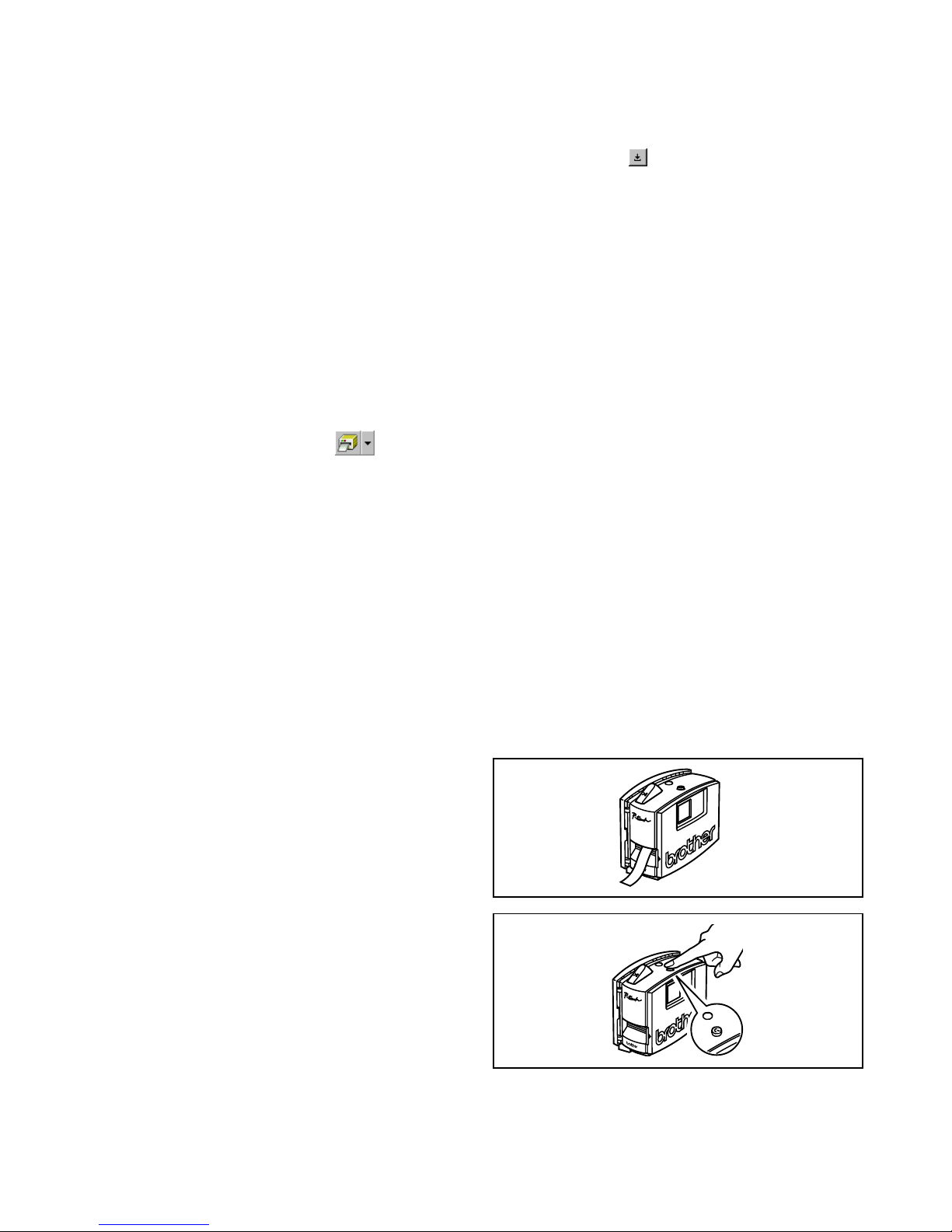
the data. After the label is printed, press in on
the tape cutter button to cut off the label.
While printing multiple copies, the PT1500PC may stop printing for a short
while in order for the print head to cool
down. Printing will continue once the
print head has sufficiently cooled down.
To feed out extra tape, hold down the
Power/Feed key for a few seconds.
Feed
3 Select the desired print settings.
Cut Marks: This option allows you to select
whether or not to print cut marks (:), which
indicate where to cut the label so that the left
and right margins are equal.
Mirror Printing: This option allows you to
print the text in reverse so it can be attached
to a window.
Copies: This option allows enter the number
of copies to be printed.
4 (Windows) Click the OK button.
(Macintosh) Click [Print]. The layout is
printed.
(Windows) To begin printing:
1 Either click the Print button ( ), or click
the arrow beside the Print button, and click
[Print] in the drop-down menu.
2 Select the desired print settings.
3 Click the OK button.
Hiding/displaying P-touch Quick
Editor (Windows only)
P-touch Quick Editor can be hidden by clicking
the Hide button ( ). Re-display P-touch Quick
Editor by clicking its icon in the system tray, at the
right of the taskbar.
Quitting P-touch Quick Editor
• (Windows) Do either of the following:
Right-click the P-touch Quick Editor icon
in the system tray, and then click [Exit] in
the menu that appears.
Right-click in the label view (or text box),
and then click [Exit] in the menu that
appears.
(Macintosh) Do either of the following:
Click [Quit] in the [File] menu
Hold down the Control key and click in
the label view (or text box), and then click
[Quit] in the menu that appears.
Page 21
19
Quitting P-touch Quick Editor
On an IBM PC-compatible computer:
• From the application:
Right-click in the label view (or text box), and then click [Exit] in the menu that appears.
• From the taskbar:
Right-click on the P-touch Quick Editor icon in the system tray, at the right of the taskbar, and
then click [Exit] in the menu that appears.
On a Macintosh computer:
• From the pop-up menu:
While holding down the Control key, click in the label view (or text box), and then click [Quit]
in the menu that appears.
• From the application menu:
Click the [File] menu, and then click the [Quit] command.
Maintenance
Cleaning the print head and roller
A blank horizontal line appearing through the printed label indicates that the print head and roller are
dirty. Clean the print head and roller according to the following procedure.
1 Turn off the PT-1500PC.
2 Open the tape compartment cover.
3 Remove the tape cassette if one is installed.
Removing the label backing
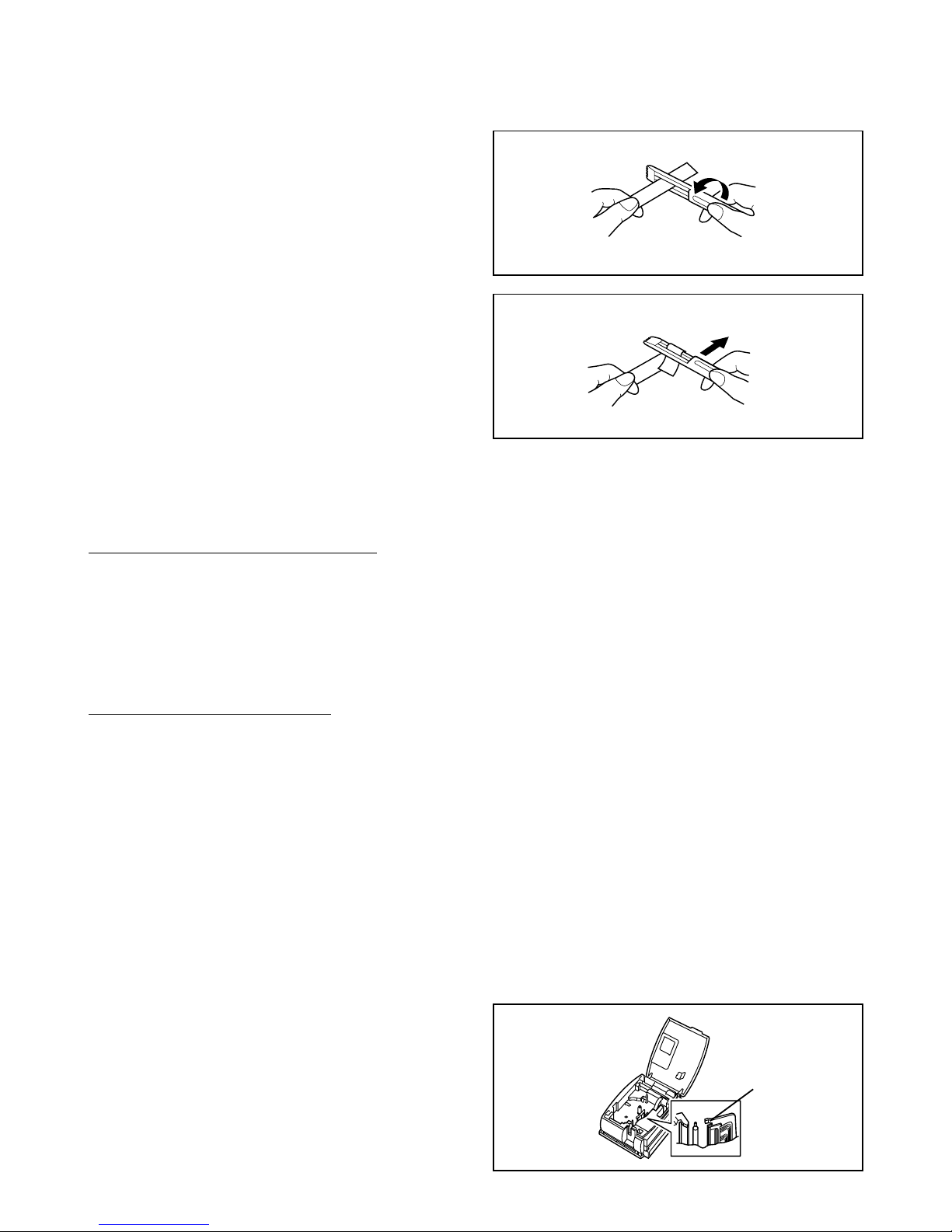
The enclosed tape separator enables you to easily remove the backing from labels printed on laminated tape.
Print head
1
Hold the tape in your left hand, with the
printed surface facing up, and hold the stick
in your right hand.
2
Pass the tape halfway through the long
narrow hole in the stick.
3
Turn the stick three-quarters of a turn
towards you, and then pull the stick away
from you as shown in the illustration.
4
Peel off the label backing.
G
H
A
B
C
D
E
F
A
B
C
D
E
F
Page 22
20
Troubleshooting
Monitoring the P-touch Status
You can determine the status of the PT-1500PC from the status indicator.
Status Indicator
Lights up
Flashes a few times
Flashes quickly
Flashes, staying off
longer that it is on
Flashes slowly
Cause→Remedy
• The P-touch is operating normally and is in stand-by.
• The P-touch is receiving data from the computer correctly.
• The cassette is not installed. → Install a cassette.
• A transmission error occurred. → Press the power/feed key to turn
the PT-1500PC off, then on again.
•
The tape cutter button was pressed while printing
→
Try printing again.
• An EEPROM error occurred. → Contact your service representative.
• The print head is cooling down. → Wait until printing continues.
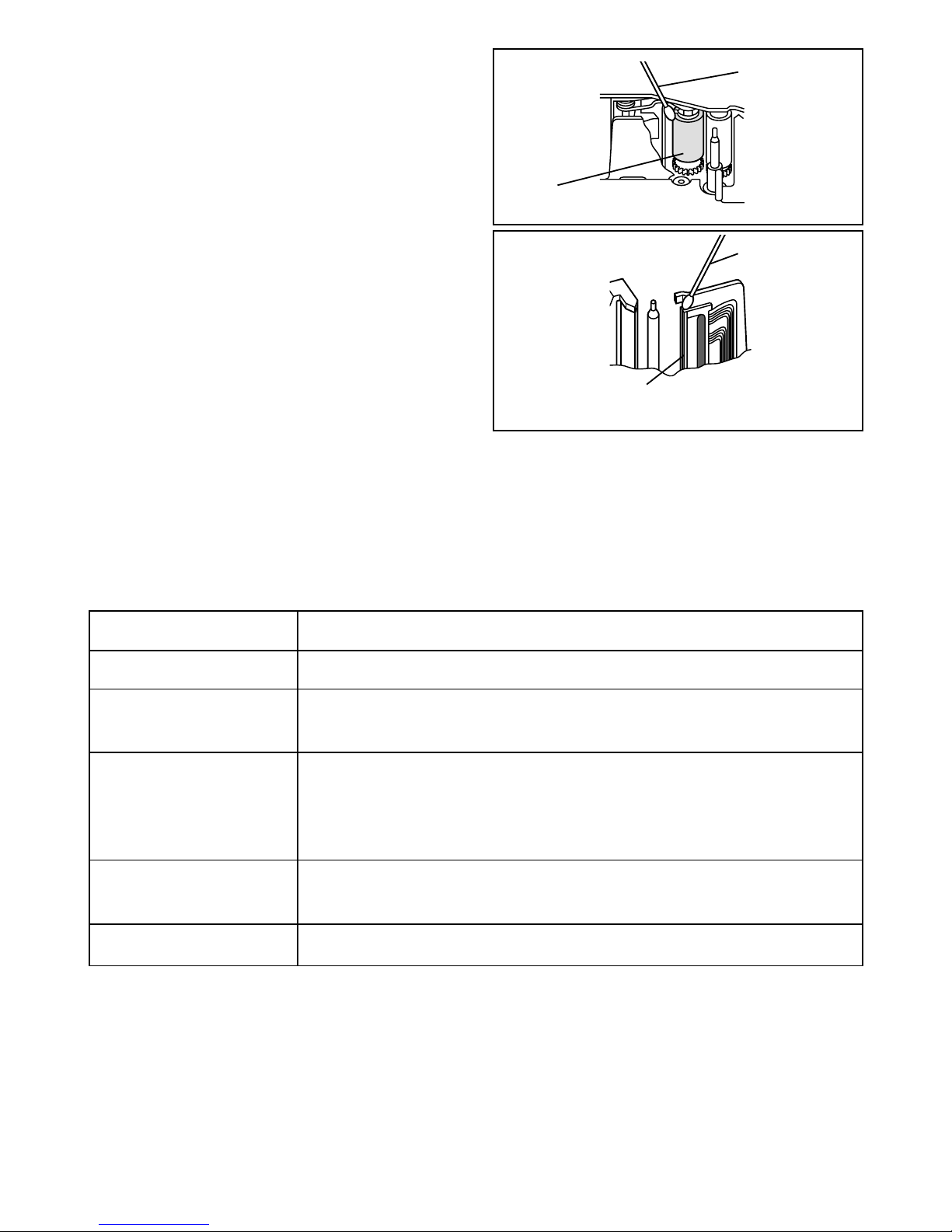
4 Use a dry cotton swab to gently wipe up and
down along the print head and roller.
Caution:
Be careful not to touch the cutter near the
print head and roller while cleaning them.
In addition, do not try to clean the
print head immediately after printing,
otherwise you may be burned.
5 Insert the tape cassette, and then close the
tape compartment cover.
* Cleaning can easily be done using the
optional print head cleaning cassette
(TZ-CL4).
Cotton swab
Print head
(area to be cleaned)
Cotton swab
Roller
(area to be cleaned)
Page 23
21
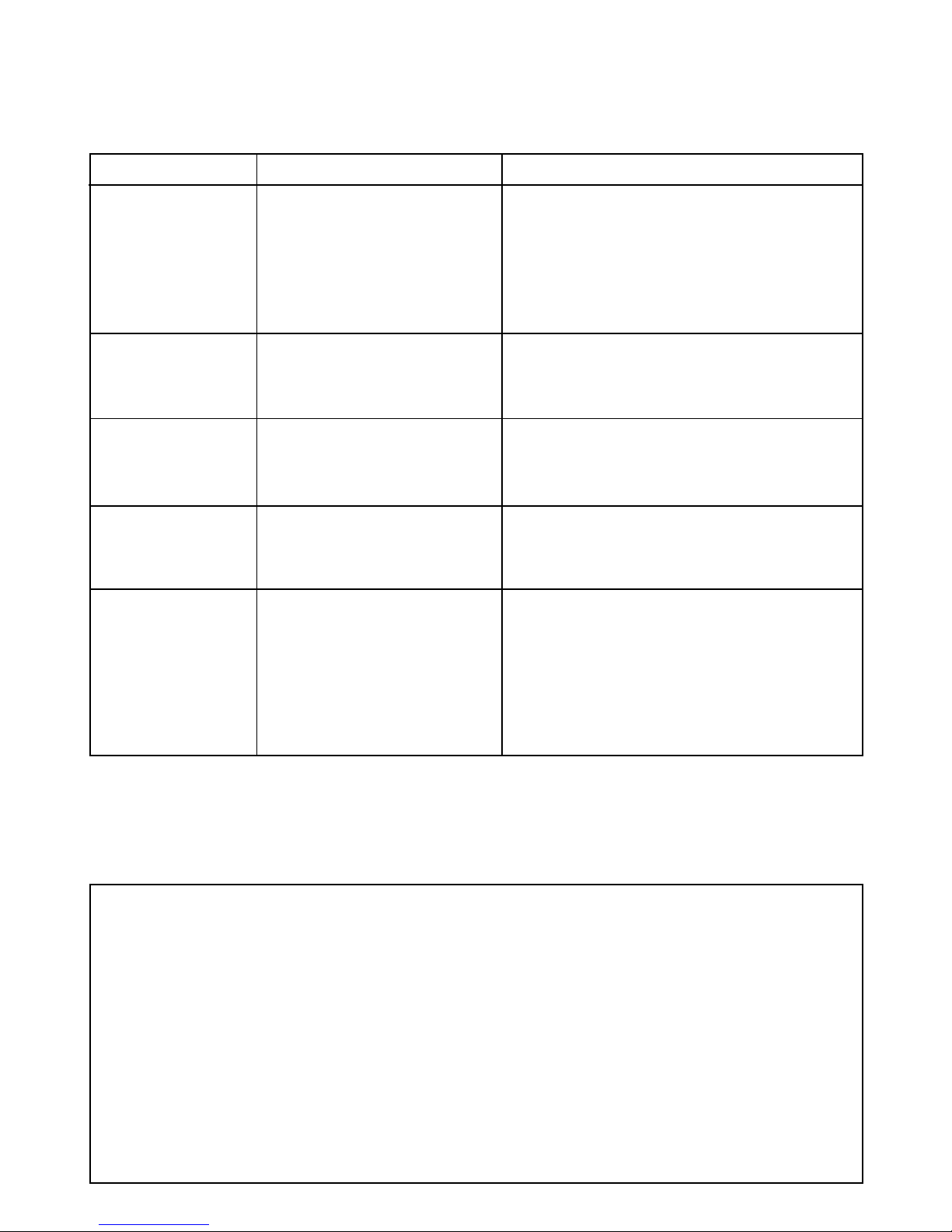
Problem
The P-touch does
not print. A
printing error is
indicated.
While printing,
striped tape appears.
The status indicator does not light
up or flash.
A blank horizontal
line appears through
the printed label.
A data transmission error appears
on the computer.
Cause
• The interface cable is not
correctly connected.
• The tape cassette is not inserted correctly.
• The tape compartment
cover is open.
There is no more tape in the
tape cassette.
The AC adapter in not correctly connected.
The print head and roller are
dirty.
The wrong port is selected.
Solution
Check that the interface cable is correctly
connected, the tape cassette is correctly installed, and that the tape compartment cover
is closed.
Insert a new tape cassette, and then either
press the Power/Feed key or turn the P-touch
off, then on again.
Check that the AC adapter is correctly connected. If
the power button still does not light up or flash, contact your service representative.
Clean the print head and roller according to
the procedure in
Cleaning the print head and
roller
on page 19.
Windows
Under “Print to the following port” in the
printer Properties dialog box, select
“PTUSB:” for the USB connection.*
Mac
Select in the Chooser the PT-1500PC where the
P-touch is connected.
Problem-solving
If you think the P-touch is not printing correctly, but you cannot determine the problem with the status
indicator, refer to the following list of possible problems, and then perform the necessary operations.
* If two or more of the same P-touch models are connected through their USB ports, select “PTUSB
(PT-1500PC-XXXXXXXXX):” (where XXXXXXXXX is the serial number) instead of “PTUSB:”. The serial number is written above the barcode on the silver label attached to the bottom of the P-touch.
Machine specifications
Power supply: AC 120 V, 60 Hz (AC adapter model AD-60)
Label tape: 5 widths available:
1/4” (6 mm)
3/8” (9 mm)
1/2” (12 mm)
3/4” (18 mm)
1” (24 mm)
Print head: 112 dots
180 dpi
Port: USB
Dimensions: 6 1/2” × 2 2/3” × 5 3/8” (166 × 66.5 × 137.4 mm)
Weight: 18 ozs (540 g)
Page 24
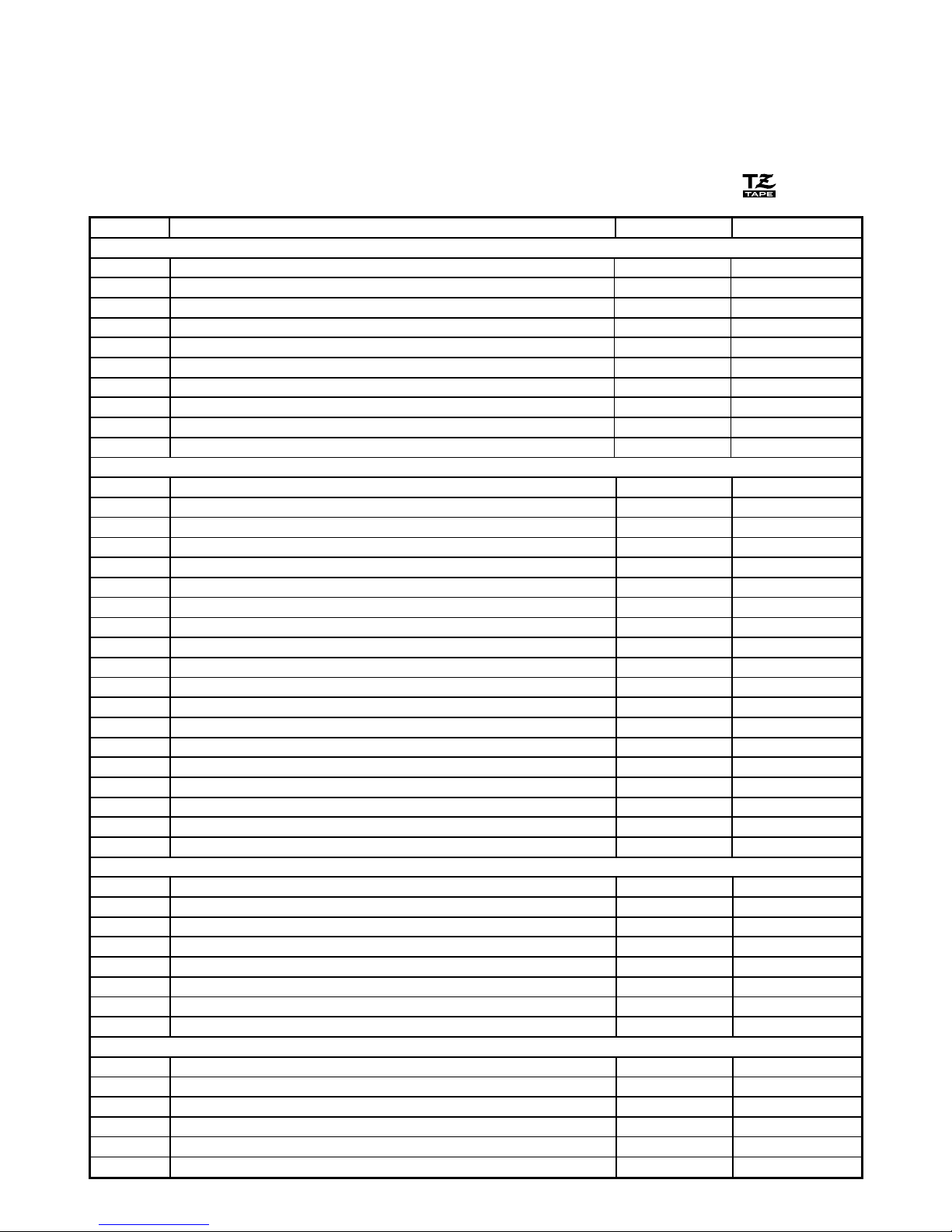
22
Stock No. Description QTY/PACKAGE PRICE
1” (24 mm) laminated tapes
TZ-151 Black Characters on Clear Adhesive 1 $22.99
TZ-251 Black Characters on White Adhesive 1 $23.99
TZ-451 Black Characters on Red Adhesive 1 $23.99
TZ-651 Black Characters on Yellow Adhesive 1 $23.99
TZ-B51 Black Characters on Orange Fluorescent Adhesive 1 $28.99
TZ-252 Red Characters on White Adhesive 1 $23.99
TZ-354 Gold Characters on Black Adhesive 1 $26.99
TZ-355 White Characters on Black Adhesive 1 $26.99
TZ-S151 Industrial (Strong Adhesive) Black Characters on Clear Adhesive 1 $25.99
TZ-S251 Industrial (Strong Adhesive) Black Characters on White Adhesive 1 $25.99
3/4” (18 mm) laminated tapes
TZ-141 Black Characters on Clear Adhesive 1 $18.99
TZ-145 White Characters on Clear Adhesive 1 $20.99
TZ-241 Black Characters on White Adhesive 1 $20.99
TZ-242 Red Characters on White Adhesive 1 $20.99
TZ-243 Blue Characters on White Adhesive 1 $20.99
TZ-344 Gold Characters on Black Adhesive 1 $23.99
TZ-345 White Characters on Black Adhesive 1 $23.99
TZ-441 Black Characters on Red Adhesive 1 $20.99
TZ-541 Black Characters on Blue Adhesive 1 $20.99
TZ-545 White Characters on Blue Adhesive 1 $23.99
TZ-641 Black Characters on Yellow Adhesive 1 $20.99
TZ-741 Black Characters on Green Adhesive 1 $20.99
TZ-B41 Black Characters on Orange Fluorescent Adhesive 1 $24.99
TZ-M41 Black Characters on Clear (matte) Adhesive 1 $20.99
TZ-S141 Industrial (Strong Adhesive) Black Characters on Clear Adhesive 1 $21.99
TZ-S241 Industrial (Strong Adhesive) Black Characters on White Adhesive 1 $21.99
TZ-WB41 Black Characters on Bugs Bunny Adhesive 1 $23.99
TZ-WT41 Black Characters on Taz Adhesive 1 $23.99
TZ-WS41 Black Characters on Tweety & Sylvester Adhesive 1 $23.99
1/2” (12 mm) laminated tapes
TZ-131 Black Characters on Clear Adhesive 1 $16.99
TZ-231 Black Characters on White Adhesive 1 $17.99
TZ-232 Red Characters on White Adhesive 1 $17.99
TZ-334 Gold Characters on Black Adhesive 1 $20.99
TZ-335 White Characters on Black Adhesive 1 $20.99
TZ-631 Black Characters on Yellow Adhesive 1 $17.99
TZ-S131 Industrial (Strong Adhesive) Black Characters on Clear Adhesive 1 $18.99
TZ-S231 Industrial (Strong Adhesive) Black Characters on White Adhesive 1 $18.99
3/8” (9 mm) laminated tapes
TZ-121 Black Characters on Clear Adhesive 1 $14.99
TZ-221 Black Characters on White Adhesive 1 $16.99
TZ-325 White Characters on Black Adhesive 1 $18.99
TZ-421 Black Characters on Red Adhesive 1 $16.99
TZ-S121 Industrial (Strong Adhesive) Black Characters on Clear Adhesive 1 $17.99
TZ-S221 Industrial (Strong Adhesive) Black Characters on White Adhesive 1 $17.99
Accessories
• Supplies
Obtain tape cassettes from your nearest authorized dealer. Brother cannot be held responsible for
trouble caused by the use of unauthorized supplies.
Use only Brother TZ tapes with this machine. Do not use tapes that do not have the mark.
Page 25
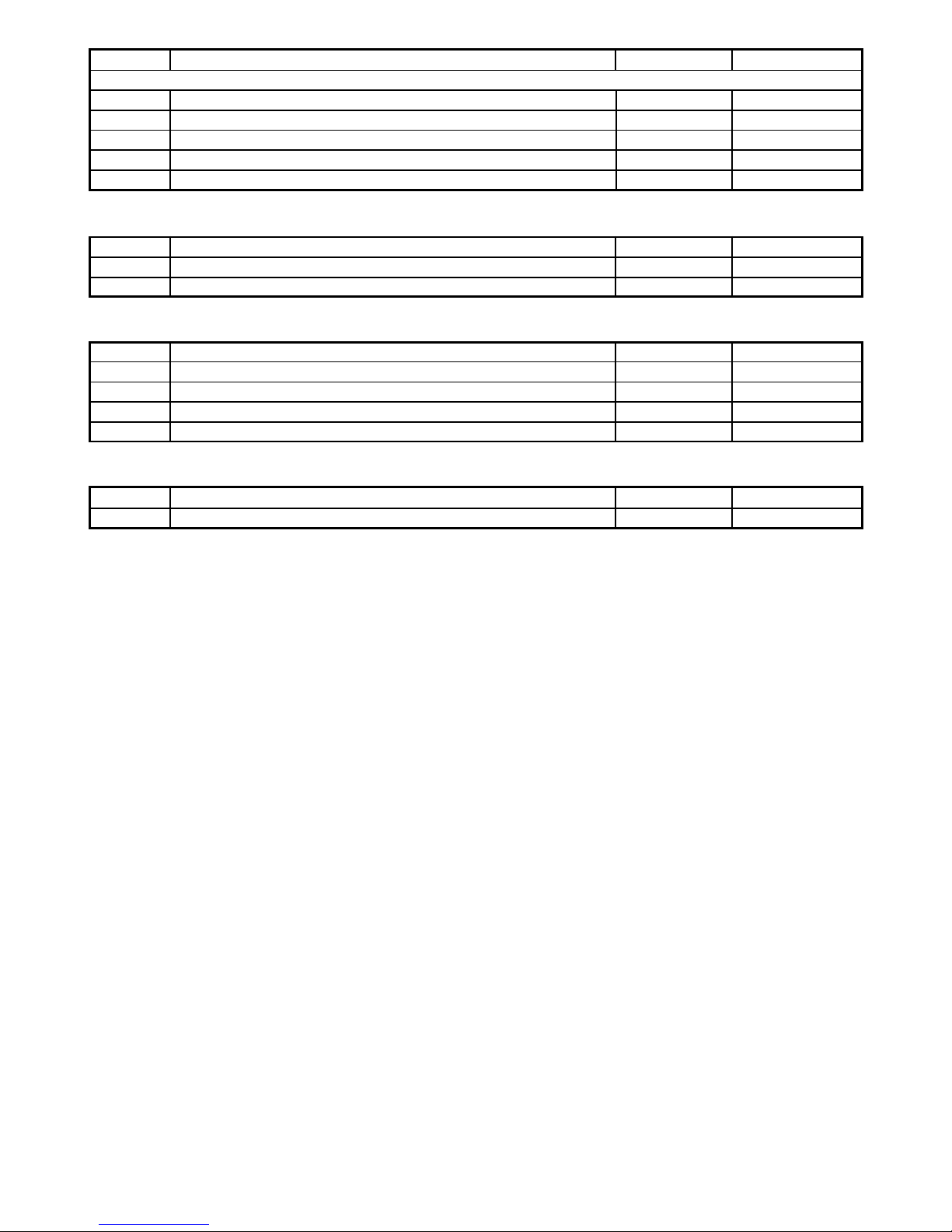
23
Stock No. Description QTY/PACKAGE PRICE
SK-LB Stamp-Making Kit for Large Black 1 $39.99
SK-MB Stamp-Making Kit for Medium Black 1 $37.99
SH-LB Additional Stamper for Large Black 1 $27.99
SH-MB Additional Stamper for Medium Black 1 $24.99
Options
Stock No. Description QTY/PACKAGE PRICE
TZ-CL4 Print Head Cleaning Cassette 1 $20.99
Special tapes
Stock No. Description QTY/PACKAGE PRICE
TZ-SE4 Black Characters on 3/4” (18 mm) Security Adhesive 1 $29.99
TZ-FA3 Blue Characters on 1/2” (12 mm) Fabric Adhesive 1 $24.99
Stamp kit
Stock No. Description QTY/PACKAGE PRICE
1/4” (6 mm) laminated tapes
TZ-111 Black Characters on Clear Adhesive 1 $12.99
TZ-211 Black Characters on White Adhesive 1 $14.99
TZ-315 White Characters on Black Adhesive 1 $17.99
TZ-S111 Industrial (Strong Adhesive) Black Characters on Clear Adhesive 1 $15.99
TZ-S211 Industrial (Strong Adhesive) Black Characters on White Adhesive 1 $15.99
Page 26

24
BROTHER CONTACT INFORMATION
Service Center Locations
If you need a local service center, please call 1-800-284-HELP (4357)
to locate the authorized service center closest to you.
Note: Be sure to call the Service Center before your visit.
Service centers do not provide operational assistance. See “Operational Assistance”.
Operational Assistance
For technical and operational assistance you may call Brother Customer Service at:
Voice 1-877-4-P-touch, or Fax 1-901-379-1210
Assistance on the Internet
For product information and downloading the latest drivers: http://www.brother.com
For purchasing accessories and certain Brother products: http://www.brothermall.com
Accessories and Supplies
To order Brother accessories or supplies by Visa, MasterCard, Discover or American Express,
you may call toll tree 1-888-879-3232, or complete the order form in your user’s guide
and
fax both sides of the form to 1-800-947-1445
For purchasing accessories on the Internet: http://www.brothermall.com
To order by mail or pay by check, please complete the accessory order form and mail it along
with payment to:
Brother International Corporation
Attn: Consumer Accessory Division
P.O. Box 341332
Bartlett, TN 38184-1332
Brother fax-back system
Brother Customer Service has installed an easy-to-use fax-back System so you can get instant answers
to common technical questions and product information for all Brother products.
This system is available 24 hours a day, 7 days a week. You can use the system to send the
information to any fax machine, not just the one you are calling from.
Please call 1-800-521-2846 and follow the voice prompts to receive faxed instructions on how to use
the system and an index of fax-back subjects.
Page 27
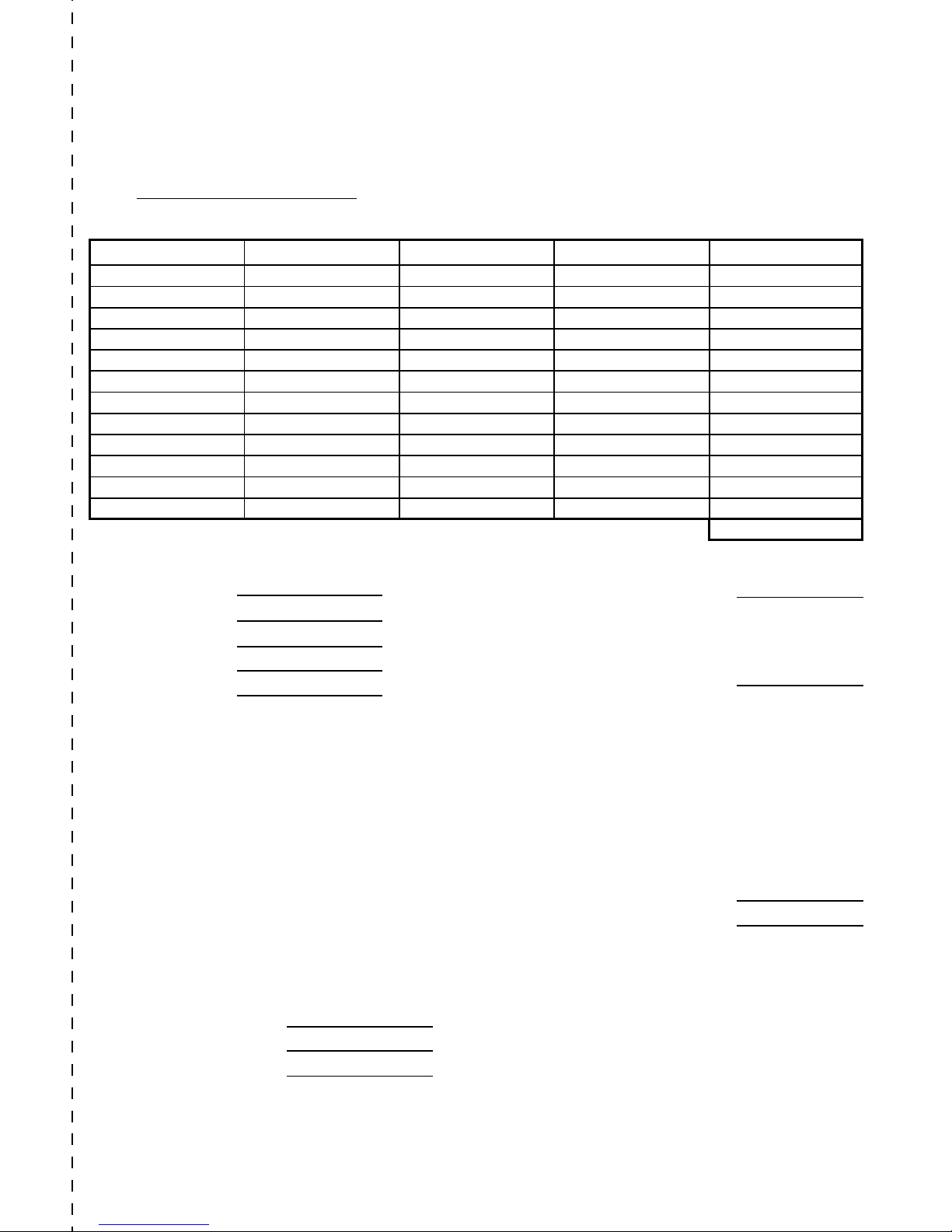
Name:
Address:
City:
State/Zip:
Daytime Phone:
SEND ORDER FORM TO:
Brother International Corp.
Attn: Consumer Accessory Div.
P.O. Box 341332
Bartlett, TN38184-1332
Accessory Subtotal: $
AZ, CA, CO, CT, FL, GA, IL, LA,
MA, MD, MI, MN, MO, NC, NJ,
NV, NY, OH, PA, TN, TX, VA, WA
residents add applicable sales tax $
Shipping/Handing Options
Please choose one:
• Standard ($5.00)
• 2nd day air freight ($8.75) Mandatory for all
deliveries outside of the continental U.S. (Alaska,
Hawaii, Puerto Rico, Virgin Islands & Canada)
• All other overseas orders ($25.00) $
TOTAL DUE (US dollars) $
✂
P-TOUCH ACCESSORY ORDER FORM
Dear Customer:
This order form is provided for your convenience should your retailer not stock the item(s) needed. To
order by mail, send this completed form along with proper payment to the address below OR credit card
holders: Call toll-free 1-888-879-3232, fax completed order form to 1-800-947-1445, or visit our web
site at http://www.brothermall.com. Please refer to the Accessories listing in your User’s Guide for stock
no. and price.
Method of payment (Check one)
( ) Visa ( ) MasterCard ( ) Discover ( ) American Express ( ) Check/Money Order
Account Number
Expiration Date
Signature
* Prices subject to change without notice.
Stock No. Description Price Quantity Total
Subtotal
Page 28
Name:
Address:
City:
State/Zip:
Daytime Phone:
SEND ORDER FORM TO:
Brother International Corp.
Attn: Consumer Accessory Div.
P.O. Box 341332
Bartlett, TN38184-1332
Accessory Subtotal: $
AZ, CA, CO, CT, FL, GA, IL, LA,
MA, MD, MI, MN, MO, NC, NJ,
NV, NY, OH, PA, TN, TX, VA, WA
residents add applicable sales tax $
Shipping/Handing Options
Please choose one:
• Standard ($5.00)
• 2nd day air freight ($8.75) Mandatory for all
deliveries outside of the continental U.S. (Alaska,
Hawaii, Puerto Rico, Virgin Islands & Canada)
• All other overseas orders ($25.00) $
TOTAL DUE (US dollars) $
✂
P-TOUCH ACCESSORY ORDER FORM
Dear Customer:
This order form is provided for your convenience should your retailer not stock the item(s) needed. To
order by mail, send this completed form along with proper payment to the address below OR credit card
holders: Call toll-free 1-888-879-3232, fax completed order form to 1-800-947-1445, or visit our web
site at http://www.brothermall.com. Please refer to the Accessories listing in your User’s Guide for stock
no. and price.
Method of payment (Check one)
( ) Visa ( ) MasterCard ( ) Discover ( ) American Express ( ) Check/Money Order
Account Number
Expiration Date
Signature
* Prices subject to change without notice.
Stock No. Description Price Quantity Total
Subtotal
Page 29

Referencia rápida
Page 30

¡Gracias por adquirir la impresora P-touch 1500PC!
Con su nueva impresora de etiquetas Brother, podrá imprimir etiquetas personalizadas para cualquier propósito.
Simplemente tiene que introducir un casete de cinta para etiquetas en la PT-1500PC, diseñar su etiqueta con el
software de diseño de etiquetas P-touch incluido y finalmente imprimirla. Su etiqueta personalizada se imprimirá
en cuestión de segundos. Los casetes de cinta para etiquetas están disponibles en varios tamaños y colores–ideal
para etiquetado codificado con color o cualquier otra necesidad de etiquetado especial.
En el CD-ROM incluido hay disponibles dos aplicaciones para diseño de etiquetas. El software de edición rápida
“P-touch Quick Editor”, fácil de usar, permite introducir texto y formatearlo rápidamente para poder imprimir
instantáneamente etiquetas sencillas. La aplicación “P-touch Editor Ver. 3.1” más avanzada no solamente automatiza
funciones de diseño complejas, sino que además incluye una variedad de plantillas ya formateadas para uso inmediato.
Declaración de Conformidad de la Federal Communications Commission (FCC) [Comisión Federal de Comunicaciones] (Sólo para EE.UU.)
Parte responsable : Brother International Corporation
100 Somerset Corporate Boulevard
Bridgewater, NJ 08807-0911 USA
Tel: (908) 704-1700
declara que el producto
Nombre del producto : Impresora de etiquetas Brother P-touch 1500PC
Número de modelo : PT-1500PC
cumple con el Apartado 15 de las Normas FCC. El funcionamiento está sujeto a las dos condiciones siguientes: (1)
este dispositivo no deberá causar ninguna interferencia nociva, y (2) este dispositivo deberá aceptar cualquier
interferencia recibida, incluidas las interferencias que puedan provocar un funcionamiento no deseado.
Este equipo ha sido sometido a pruebas y se ha comprobado que se encuentra dentro de los límites establecidos
para los dispositivos digitales de Clase B, conforme al Apartado 15 de las Normas FCC. Estos límites están diseñados
para proporcionar una protección razonable contra interferencias nocivas en una instalación residencial. Este equipo
genera, utiliza y puede irradiar energía de radiofrecuencia, y de no instalarse y utilizarse de acuerdo con las
instrucciones, puede provocar una interferencia nociva en las comunicaciones de radio. No obstante, no existen
garantías de que no se producirán interferencias en una instalación concreta. Si este equipo produce interferencias
nocivas en la recepción de radio o televisión, lo que puede determinarse encendiendo y apagando el equipo, se
anima al usuario a intentar corregir la interferencia mediante una o más de las medidas siguientes:
– Vuelva a orientar o colocar la antena receptora.
– Aumente la separación entre el equipo y el receptor.
–
Conecte el equipo a una toma de corriente de un circuito distinto al que esté conectado el receptor.
– Consulte con el distribuidor o con un técnico especializado en radio-TV para conseguir ayuda.
–
El cable de interfaz incluido debe utilizarse para asegurar el cumplimiento de los límites establecidos para los
dispositivos digitales de Clase B.
– Los cambios o modificaciones que no estén expresamente aprobados por Brother Industries, Ltd,
podrán invalidar la autoridad que el usuario tiene para utilizar el equipo.
A continuación se ofrecen los números de patentes y números de publicación de patentes
relacionados con este producto:
USP4839742 USP4983058 USP5120147
USP4927278 USP5009530
USP4976558 USP5069557
Page 31

1
Índice
Desembalaje ................................................................................................................2
Descripción general ....................................................................................................2
Precauciones generales ...............................................................................................2
Inserción de una foto en el portafotos .........................................................................3
Casetes de cinta ........................................................................................................... 3
Cambio del casete de cinta .......................................................................................... 4
Conexión del adaptador de CA .................................................................................... 4
Tecla de encendido y apagado/avance ........................................................................ 5
Conexión del cable de interfaz USB ............................................................................5
Software y controlador de impresora .......................................................................... 5
Para usuarios con PC compatible (Windows
®
98/98SE/Me/2000) .................................6
Antes de la instalación ..........................................................................................6
Instalación del P-touch Quick Editor..................................................................... 6
Instalación del P-touch Editor Ver. 3.1 ..................................................................8
Instalación del controlador de impresora ..............................................................9
Lectura de la Guía del usuario ..............................................................................9
Desinstalación del software y controlador de impresora ..................................... 10
Sustitución, eliminación o adición de otro controlador de impresora.................. 10
Para un ordenador Macintosh .................................................................................... 11
Antes de la instalación ........................................................................................ 11
Instalación del P-touch Quick Editor................................................................... 12
Instalación del P-touch Editor Ver. 3.1 ................................................................12
Selección de la impresora ...................................................................................13
Lectura de la Guía del usuario ............................................................................13
Desinstalación del software y controlador de impresora ..................................... 14
Inicio del software P-touch Editor ............................................................................. 15
Inicio del P-touch Quick Editor........................................................................... 15
Inicio del P-touch Editor Ver. 3.1 ........................................................................ 15
Utilización del P-touch Quick Editor ......................................................................... 16
Especificación de un tamaño de etiqueta ............................................................16
Introducción de texto .......................................................................................... 16
Importación de texto ........................................................................................... 17
Utilización la lista de historial de texto ...............................................................17
Adición de un símbolo ....................................................................................... 17
Para cambiar el color de fondo ...........................................................................17
Para ver el texto ..................................................................................................17
Para imprimir ...................................................................................................... 17
Para ocultar/visualizar el P-touch Quick Editor (Windows solamente) ................ 18
Para salir del P-touch Quick Editor ..................................................................... 18
Impresión de una etiqueta .........................................................................................18
Para quitar el respaldo de la etiqueta ........................................................................19
Para salir del P-touch Quick Editor ...........................................................................19
Mantenimiento ..........................................................................................................19
Limpieza del cabezal de impresión y rodillo....................................................... 19
Localización y solución de problemas .......................................................................20
Seguimiento del estado de la P-touch ................................................................. 20
Solución de problemas ....................................................................................... 21
Especificaciones de la máquina ................................................................................. 21
Accesorios .................................................................................................................22
Page 32
2
Descripción general
Precauciones generales
• Utilice solamente cintas Brother TZ con esta máquina. No utilice cintas que no tengan la marca .
• No tire de la cinta cuando esté saliendo de la P-touch. Si lo hace podrá dañar el casete de cinta.
• Evite utilizar la máquina en lugares muy polvorientos y manténgala protegida de la luz solar directa y de la lluvia.
• No exponga la máquina a temperaturas o humedades altas.
•
No deje ningún objeto de goma o plástico encima de la máquina durante un periodo de tiempo prolongado. Si lo hace, éstos objetos podrán ocasionar manchas.
• No limpie la máquina con alcohol ni otros disolventes orgánicos. Utilice solamente un paño suave y seco.
• No introduzca ningún objeto extraño en la máquina ni ponga nada encima de ella.
• Para evitar sufrir heridas, no toque el borde de la cuchilla.
• No toque el cabezal de impresión porque se pone muy caliente cuando se utiliza la P-touch. El cabezal de impresión se
mantiene caliente incluso durante algún tiempo después de haber apagado la máquina.
•
Utilice solamente el adaptador de CA incluido (modelo AD-60) diseñado exclusivamente para esta máquina. La utilización de cualquier otro
adaptador de CA anulará la garantía.
• Utilice solamente el cable de interfaz incluido. La utilización de cualquier otro cable anulará la garantía.
• Cuando no vaya a utilizar la máquina durante un largo periodo de tiempo, desconecte el adaptador de CA.
• No trate de desmontar la P-touch.
• IBM® es una marca comercial de International Business Machines, Inc.
• Microsoft® y Microsoft Windows® son marcas comerciales registradas de Microsoft Corp. en EE UU y en otros países.
• Macintosh y Power Macintosh son marcas comerciales registradas de Apple Computer, Inc.
•
Todos los demás nombres de software y productos mencionados son marcas comerciales o marcas comerciales registradas de sus respectivas compañías.
DC IN 9.5V
Indicador de
estado
Tecla de
encendido
apagado/avance
Conector para el adaptador
de CA
Tapa de compartimiento
de la cinta
Botón de corte de
la cinta
Portafotos
Ranura de
salida de la cinta
Puerto USB
Portafotos (sin instalar)
Cabezal de
impresión
Cortador
Separador
de cinta
Palanca de
liberación
Desembalaje
• PT-1500PC (con portafotos colocado)
• Casete de cinta TZ de 12 mm (1/2”) de ancho (caracteres negros sobre cinta blanca; 5 metros (16’ 3/8’’))
• Adaptador de CA (modelo AD-60; para enchufar la PT-1500PC en la toma de corriente de CA)
•
Cable de interfaz USB (para conectar la PT-1500PC a un ordenador compatible con PC IBM u ordenador Macintosh)
• Referencia rápida
• CD-ROM que contiene el software para PC y Mac y sus manuales
Page 33
3
Inserción de una foto en el portafotos
1 Quite el portafotos de la PT-1500PC
agarrándolo por la parte trasera de la PT1500PC, y tirando de él con cuidado
como se muestra.
Tenga cuidado de que no se abra la
tapa del compartimiento de la cinta
cuando quite el portafotos.
2 Quite el cartón de refuerzo y la hoja de
protección transparente del portafotos.
3 Ponga la hoja de protección transparente,
la foto y el cartón de refuerzo uno encima
de otro en ese orden, mirando hacia
abajo.
4 Inserte un extremo de las tres piezas
juntas debajo de las dos lengüetas de un
lado del marco y después debajo de las
dos lengüetas del otro lado del marco.
5 Coloque el portafotos en el costado de la
PT-1500PC opuesto a la tapa del
compartimiento de la cinta.
• Sin quitar el refuerzo de cartón ni la hoja de
protección transparente del portafotos.
Deslice la foto entre el refuerzo de cartón
y la hoja de protección transparente.
DC
I
N
9.5
V
Casetes de cinta
•
No tire de la cinta que esté saliendo de la máquina, porque si lo hace podrá estropearse el casete de cinta.
• Si coloca la etiqueta en una superficie húmeda o sucia, podrá desprenderse fácilmente. Antes de
colocar la etiqueta, limpie la superficie donde vaya a colocarla.
•
Dependiendo de las condiciones ambientales y del material, condición, aspereza y forma de la superficie de
adhesión, la etiqueta podrá moverse de su lugar o desprenderse. Para comprobar la fuerza adhesiva de la
etiqueta o antes de utilizar esta etiqueta donde la seguridad sea cuestión prioritaria, haga una prueba fijando un
pequeño trozo de la etiqueta en un lugar oculto de la superficie donde la quiera adherir.
• La luz solar, el viento y la lluvia podrán decolorar o desprender la etiqueta.
•
Las marcas hechas con tintas a base de aceite o a base de agua podrán verse a través de una etiqueta adherida sobre
ellas. Para ocultar las marcas, utilice dos etiquetas poniendo una encima de la otra, o utilice cinta con fondo negro.
• Esta cinta podrá no ser adecuada en casos donde puedan crearse responsabilidades debido a daños
o lesiones.
En el portafotos colocado en la PT-1500PC se puede insertar una foto, para convertirla en uno más de
los objetos decorativos de su lugar de trabajo.
Inserte una foto en el portafotos en una de las dos formas siguientes:
• Quitando el portafotos de la PT-1500PC
Page 34
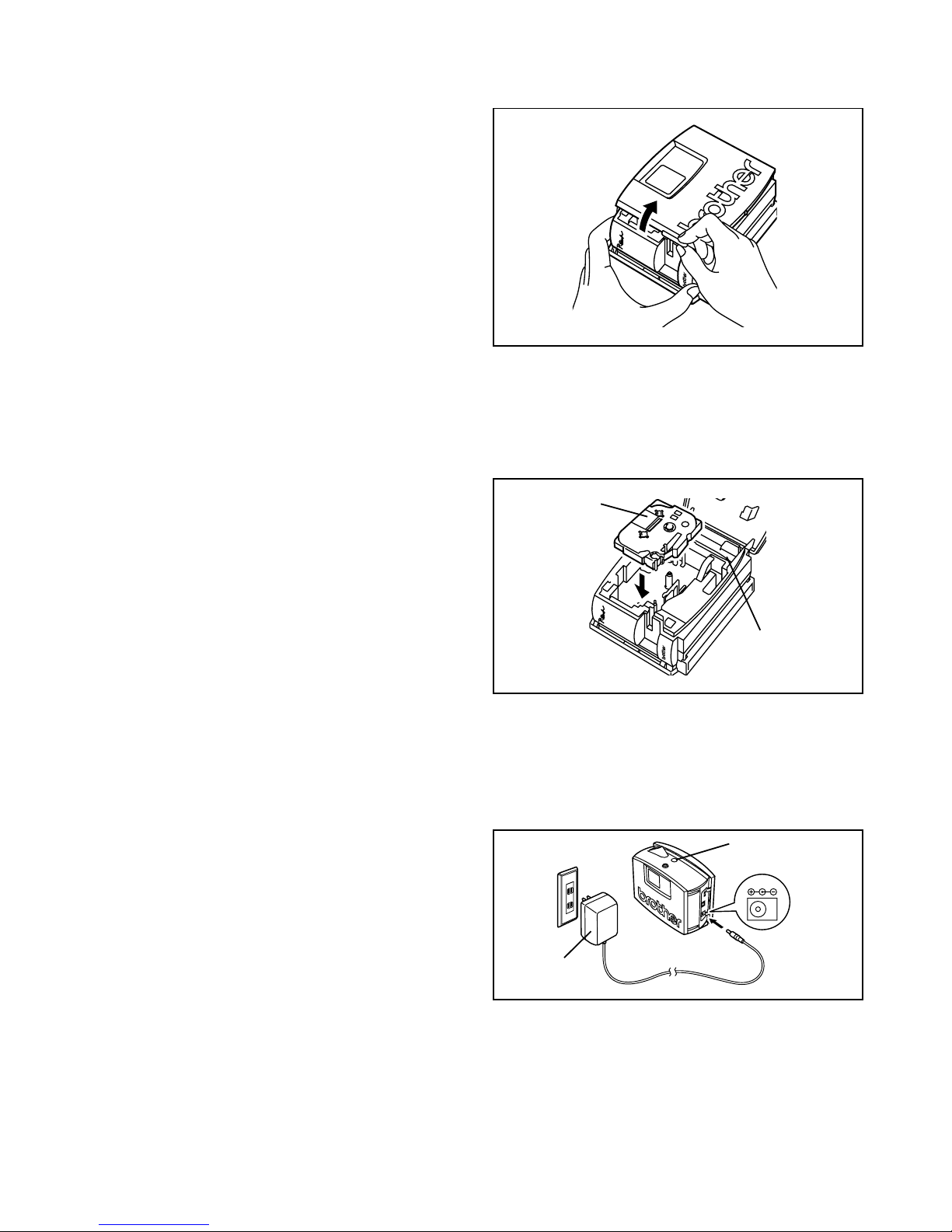
4
Cambio del casete de cinta
1
Abra la tapa del compartimiento de la cinta
levantándola. El casete instalado se soltará a la vez.
Tenga cuidado de que el portafotos no se
caiga cuando abra la tapa del
compartimiento de la cinta.
2
Si ya hay una cinta de casete instalada, extráigala
tirando de ella hacia arriba en línea recta.
3
Si la cinta entintada del casete a instalar está floja, gire
con el dedo la rueda dentada en la dirección indicada por
la flecha que hay en el casete hasta que no haya holgura
en la cinta entintada. También, asegúrese de que el
extremo de la cinta pase por debajo de la guía de cinta.
Si está colocando un casete de cinta nuevo
provisto de tope, no se olvide de retirar el tope.
4 Inserte el casete de cinta firmemente en el
compartimiento de la cinta, asegurándose
que toda la parte posterior del casete esté
tocando el fondo del compartimiento.
Cuando inserte el casete de cinta, asegúrese
que la cinta entintada no se enganche en la
esquina de la guía metálica.
5
Cierre firmemente la tapa del compartimiento de la cinta
presionando hacia abajo en el área rugosa de la tapa
junto a la ranura de salida de la cinta.
Casete de cinta
Separador
de cinta
Conexión del adaptador de CA
Conecte el adaptador de CA a la PT-1500PC como se describe a continuación.
1 Inserte la clavija del cable del adaptador en
el conector marcado DC IN 9.5V de la PT1500PC.
2 Inserte la clavija del adaptador en la toma de
corriente estándar más cercana. El indicador
de estado se encenderá en color verde para
indicar que la máquina está encendida.
Para apagar la PT-1500PC, presione la tecla de
encendido y apagado/avance de forma que el
indicador de estado se apague.
DC IN 9.5V
Indicador de
estado
Adaptador
de CA
Page 35
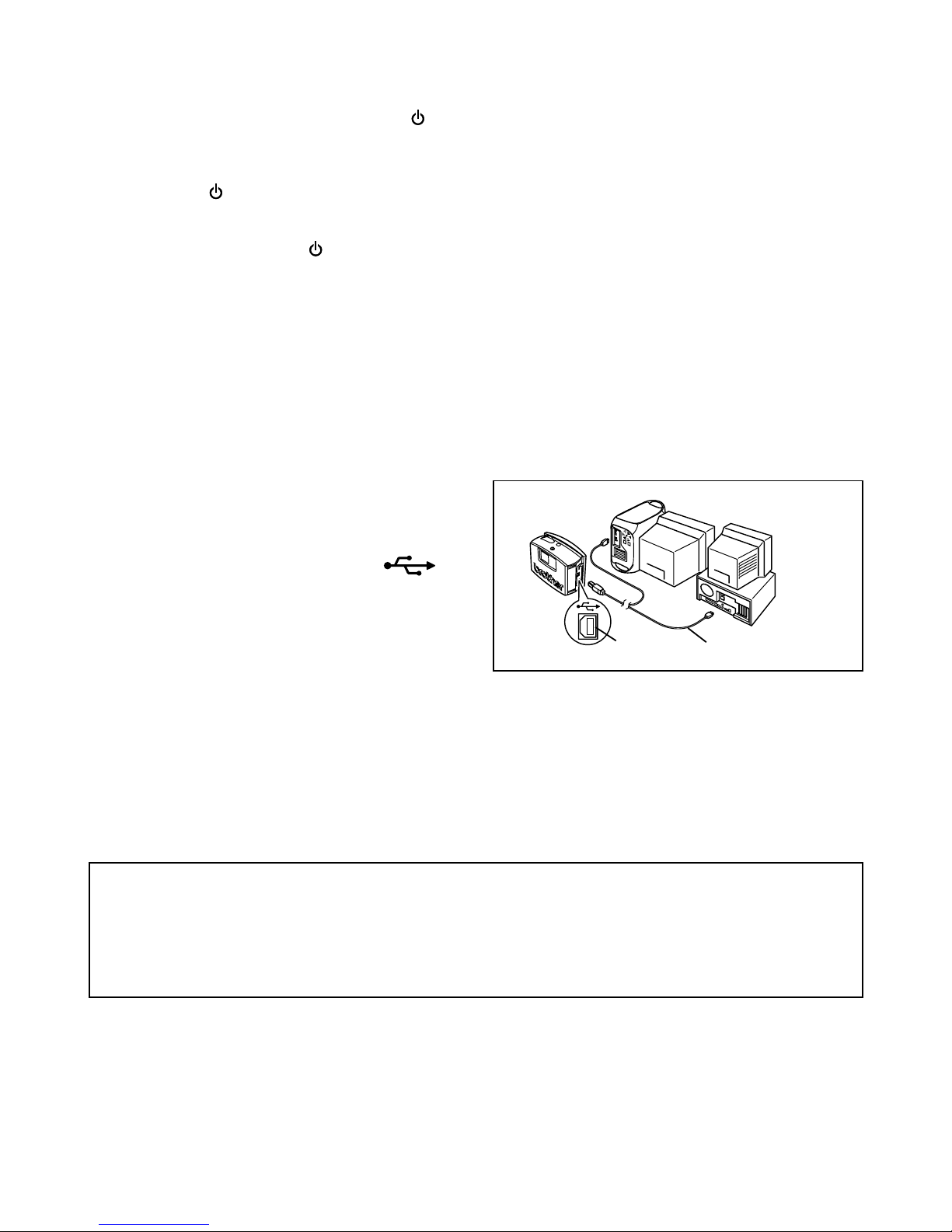
5
Brother Co., Ltd. y sus suministradores poseen todos los derechos y los derechos de autor de este
software (incluyendo, pero sin su limitación, la programación, las imágenes, los clips de arte, las
plantillas, y el texto incorporados en el software), del texto en los manuales incluidos, y de las
duplicaciones del software. Está prohibido duplicar, modificar, hacer ingeniería inversa,
desensamblar o descompilar este software, ya sea parcial o en su totalidad sin permiso.
Con el CD-ROM incluido, se puede instalar lo siguiente:
• P-touch Quick Editor
• P-touch Editor Ver. 3.1
• Controlador de impresora PT-1500PC
Tecla de encendido y apagado/avance
La tecla de encendido y apagado/avance ( ) puede utilizarse para encender y apagar la PT-1500PC y
para avanzar la cinta.
• Para encender o apagar la PT-1500PC:
Presione una vez.
• Para avanzar algo de cinta:
Mantenga presionado durante dos segundos por lo menos.
1
Inserte el conector plano del cable de interfaz
USB incluido en el puerto USB del ordenador.
2 Inserte el conector cuadrado del cable de
interfaz incluido en el puerto USB ( )
de la PT-1500PC.
Cuando haga una conexión USB utilizando un
concentrador de conectores, tal vez no sea posible
hacer una buena conexión debido al tipo de
concentrador de conectores utilizado. Si resulta
imposible imprimir con una conexión utilizando un
concentrador de conectores, intente conectar la PT1500PC directamente al ordenador utilizando el
cable de interfaz USB.
Software y controlador de impresora
Conexión del cable de interfaz USB
Conecte la PT-1500PC al ordenador como se describe a continuación.
Cuando vaya a conectar la PT-1500PC a un ordenador compatible con PC IBM, antes de conectarla al
ordenador y de enchufarla utilizando el adaptador de CA, deberá haber instalado el software de diseño de
etiquetas y el controlador de impresora. Siga los procedimientos de instalación de las páginas 6 a 10 para
instalar el software y el controlador de impresora, y después conecte la PT-1500PC al ordenador cuando se le
pida que lo haga.
Puerto
USB
Cable de interfaz
USB
Page 36
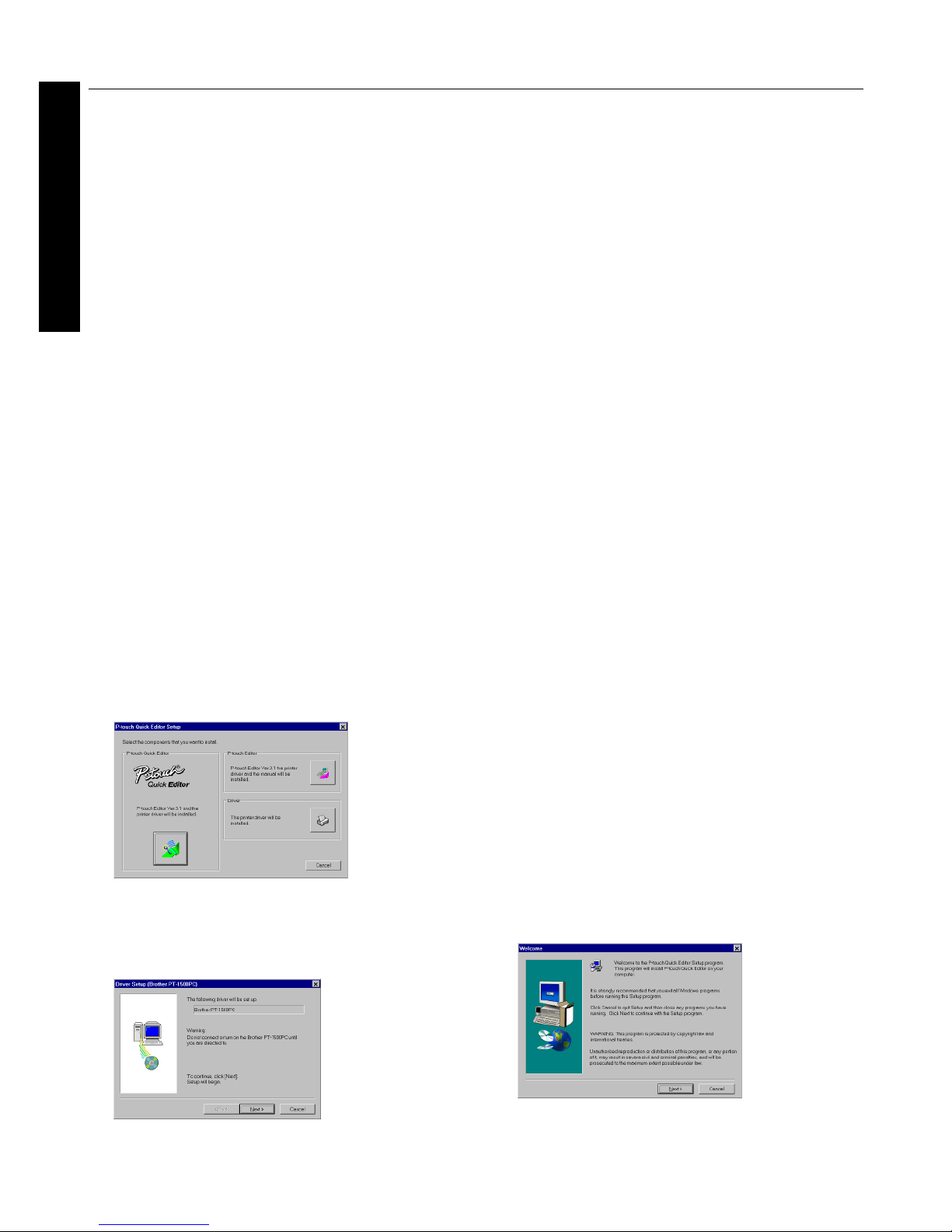
6
Para usuarios con PC compatible (Windows® 98/98SE/Me/2000)
Antes de poder imprimir etiquetas con la PT-1500PC, deberá instalarse el software de diseño de etiquetas y el
controlador de impresora PT-1500PC. Para diseñar etiquetas que se puedan imprimir con la PT-1500PC, en el CDROM incluido hay disponibles dos aplicaciones: P-touch Quick Editor y P-touch Editor Ver. 3.1.
Antes de la instalación
Compruebe que la configuración de su sistema satisface los siguientes requisitos.
Ordenador: PC IBM o compatible
Sistema operativo::
Microsoft® Windows® 2000 o preinstalado con Microsoft
®
Windows® 98/98SE/Me
Espacio libre en disco duro: Como mínimo 20 MB
Memoria disponible: Como mínimo 32 MB
Monitor: VGA o tarjeta de gráficos superior
Puerto USB
Unidad de CD-ROM
No conecte la PT-1500PC al ordenador antes de haber instalado el software de diseño de etiquetas, de lo contrario,
podrá no instalarse correctamente. Asegúrese de no conectar la PT-1500PC hasta que se le haya pedido que lo haga.
Para instalar en Windows® 2000, se requieren privilegios de administrador.
Además, imprimir requiere usuario avanzado o privilegios de administrador.
Este software no se puede utilizar en Grupo de usuarios.
Instalación del P-touch Quick Editor
El software P-touch Quick Editor ofrece un acceso rápido a las funciones más sencillas de diseño de etiquetas y permite una fácil introducción
de texto y una impresión de etiquetas instantánea. Instale el software P-touch Quick Editor en el PC como se describe a continuación.
1
Introduzca el CD-ROM incluido en la unidad de CDROM del ordenador. Aparecerá un cuadro de diálogo
que le permitirá seleccionar lo que quiera instalar.
Para instalar solamente el controlador de impresora, haga clic
sobre el botón inferior (Driver) del lado derecho. Aparecerá el
primer cuadro de diálogo “Driver Setup”, informándole de que
se va a instalar el controlador de impresora PT-1500PC.
Continúe con el procedimiento de “
Instalación del
controlador de impresora
” en la página 9.
Para instalar el software P-touch Editor Ver. 3.1, haga
clic sobre el botón superior (P-touch Editor) del lado
derecho. Después continúe con el procedimiento de
“Instalación del P-touch Editor Ver. 3.1”
en la página 8.
Si el cuadro de diálogo no apareciera automáticamente,
haga doble clic sobre “My Computer” en el escritorio, haga
doble clic sobre el icono de la unidad de CD-ROM que
contenga el CD-ROM y a continuación haga doble clic
sobre “Setup.exe” para visualizar el cuadro de diálogo.
2
Haga clic sobre el botón izquierdo (P-touch Quick
Editor). Se iniciará el asistente “InstallShield® Wizard”
para instalar el software P-touch Quick Editor y a
continuación aparecerá el cuadro de diálogo “Welcome”
Para Windows
®
Page 37
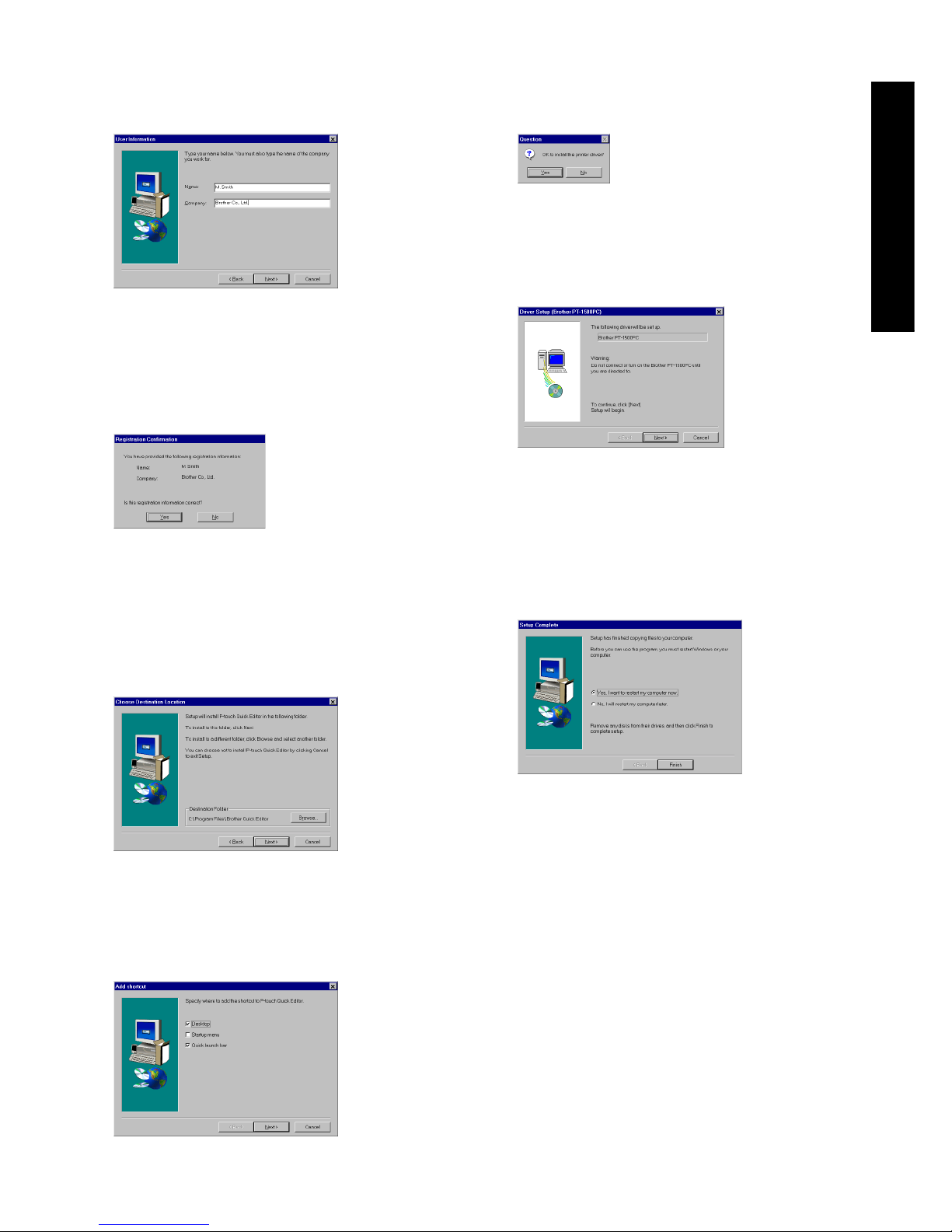
7
3
Lea atentamente el contenido del cuadro de diálogo y a
continuación haga clic sobre el botón “Next” para
continuar. Aparecerá un cuadro de diálogo “User
Information”.
4
Ingrese la información necesaria en los cuadros
apropiados (Si la información ya ha sido registrada en
Windows®, aparecerá automáticamente.), y a
continuación haga clic sobre el botón “Next”. Aparecerá
un cuadro de diálogo pidiéndole que confirme la
información ingresada.
5 Haga clic sobre el botón “Yes” para registrar
la información ingresada.
Para cambiar la información, haga clic sobre el
botón “No” y a continuación vuelva al paso 3.
Aparecerá el cuadro de diálogo “Choose
Destination Location”.
6
Haga clic sobre el botón “Next” para iniciar la instalación.
7
Después de haberse instalado el P-touch Quick
Editor, aparecerá un cuadro de diálogo, que le
permitirá seleccionar dónde va a ser añadido el
acceso directo del P-touch Quick Editor.
8
Seleccione la ubicación deseada para el acceso directo y a
continuación haga clic sobre el botón “Next”. Aparecerá un
cuadro de diálogo que le permitirá seleccionar si quiere o
no instalar el controlador de impresora.
Para instalar el controlador de impresora,
haga clic sobre el botón “Yes”. Aparecerá el
primer cuadro de diálogo “Driver Setup”,
informándole de que se va a instalar el
controlador de impresora PT-1500PC.
Continúe con el procedimiento de
“
Instalación del controlador de impresora
”
en la página 9.
Si el controlador de impresora ya está
instalado, haga clic sobre el botón “No”.
Aparecerá un cuadro de diálogo que le
muestra que la instalación ha finalizado.
Seleccione “Yes, I want to restart my computer
now”, haga clic sobre el botón “Finish” para
reiniciar el ordenador y a continuación extraiga el
CD-ROM del ordenador.
para Windows
®
Page 38
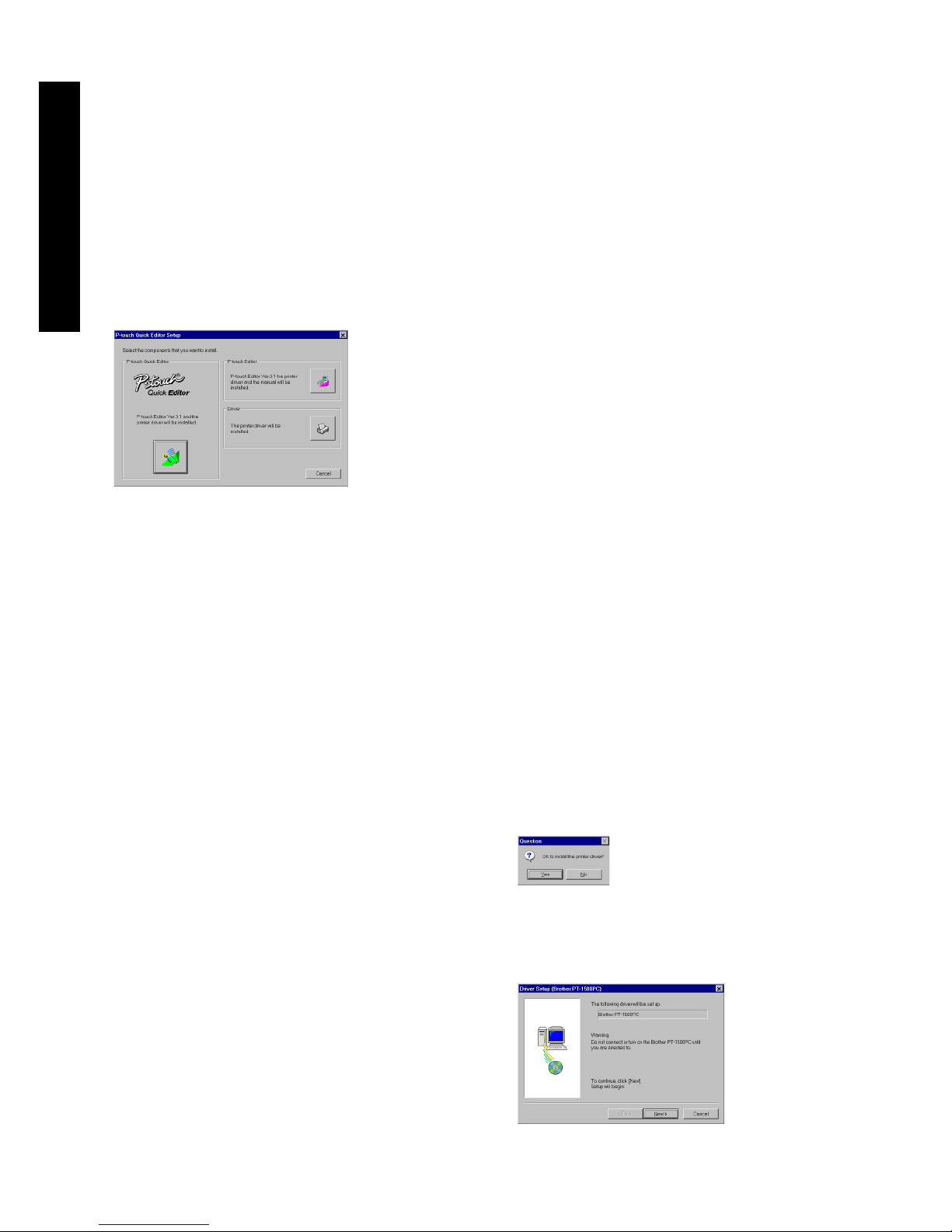
8
Instalación del P-touch Editor Ver.
3.1
El software P-touch Editor Ver. 3.1 incluye una variedad
de funciones más complejas para imprimir códigos de
barras e imágenes, que le permitirán diseñar
prácticamente cualquier etiqueta que usted pueda
imaginar. Instale el P-touch Editor Ver. 3.1 en un PC
como se describe a continuación.
1
Introduzca el CD-ROM incluido en la unidad de CDROM del ordenador. Aparecerá un cuadro de diálogo
que le permitirá seleccionar lo que quiera instalar.
Para instalar solamente el controlador de
impresora, haga clic sobre el botón inferior
(Driver) del lado derecho. Aparecerá el primer
cuadro de diálogo “Driver Setup”,
informándole de que se va a instalar el
controlador de impresora PT-1500PC.
Continúe con el procedimiento de “
Instalación
del controlador de impresora
” en la página 9.
Para instalar el software P-touch Quick Editor,
haga clic sobre el botón izquierdo (P-touch
Quick Editor). Después continúe con el
procedimiento de
“Instalación del P-touch
Quick Editor”
en la página 6.
Si el cuadro de diálogo no apareciera
automáticamente, haga doble clic sobre “My
Computer” en el escritorio, haga doble clic sobre el
icono de la unidad de CD-ROM que contenga el CDROM y a continuación haga doble clic sobre
“Setup.exe” para visualizar el cuadro de diálogo.
2
Haga clic sobre el botón superior (P-touch Editor)
del lado derecho. Se iniciará el asistente
“InstallShield® Wizard” para instalar el software P-
touch Editor Ver. 3.1 y a continuación aparecerá
el cuadro de diálogo “Welcome”
3
Siga las instrucciones que aparecen y continúe
con la instalación. Durante la instalación, estarán
disponibles los siguientes métodos de instalación.
Typical
Se instalan todas las opciones básicas (P-touch
Editor Ver. 3.1, clips de arte, plantillas Auto
Format, Ayuda, y 13 fuentes).
Compact
Solamente se instala el P-touch Editor Ver. 3.1.
Custom
Editor: P-touch Editor Ver. 3.1
Clip Art: Ilustraciones para la función de
clips de arte del P-touch Editor Ver. 3.1
Fonts: 13 fuentes
Auto Format Templates: Plantillas para la
función de formato automático
User’s Guide:
Guía del usuario (HTML) para
el P-touch Editor Ver. 3.1
La Guía del usuario también se puede
ver desde el CD-ROM sin necesidad
de instalarla en el ordenador.
Help:
Los archivos de ayuda para el P-touch
Editor Version 3.1
Si se puede hacer clic sobre el botón “Change”
mientras se selecciona una opción, se podrán
seleccionar subcomponentes. Haga clic sobre el botón
“Change” para visualizar el cuadro de diálogo “Select
Sub-components” y a continuación seleccione los
subcomponentes que desee instalar poniendo una
marca de verificación junto a ellos. Si ciertas opciones o
subcomponentes no están instalados, algunas funciones
del P-touch Editor Ver. 3.1 podrán no estar disponibles.
Una vez seleccionados los subcomponetes deseados,
haga clic sobre el botón “Continue”.
4
Después de haber instalado el P-touch Editor Ver.
3.1, aparecerá un cuadro de diálogo que le
permitirá seleccionar si quiere o no instalar el
controlador de impresora.
Para instalar el controlador de impresora, haga clic sobre el
botón “Yes”. Aparecerá el primer cuadro de diálogo “Driver
Setup”, informándole de que se va a instalar el controlador
de impresora PT-1500PC.
Para Windows
®
Page 39
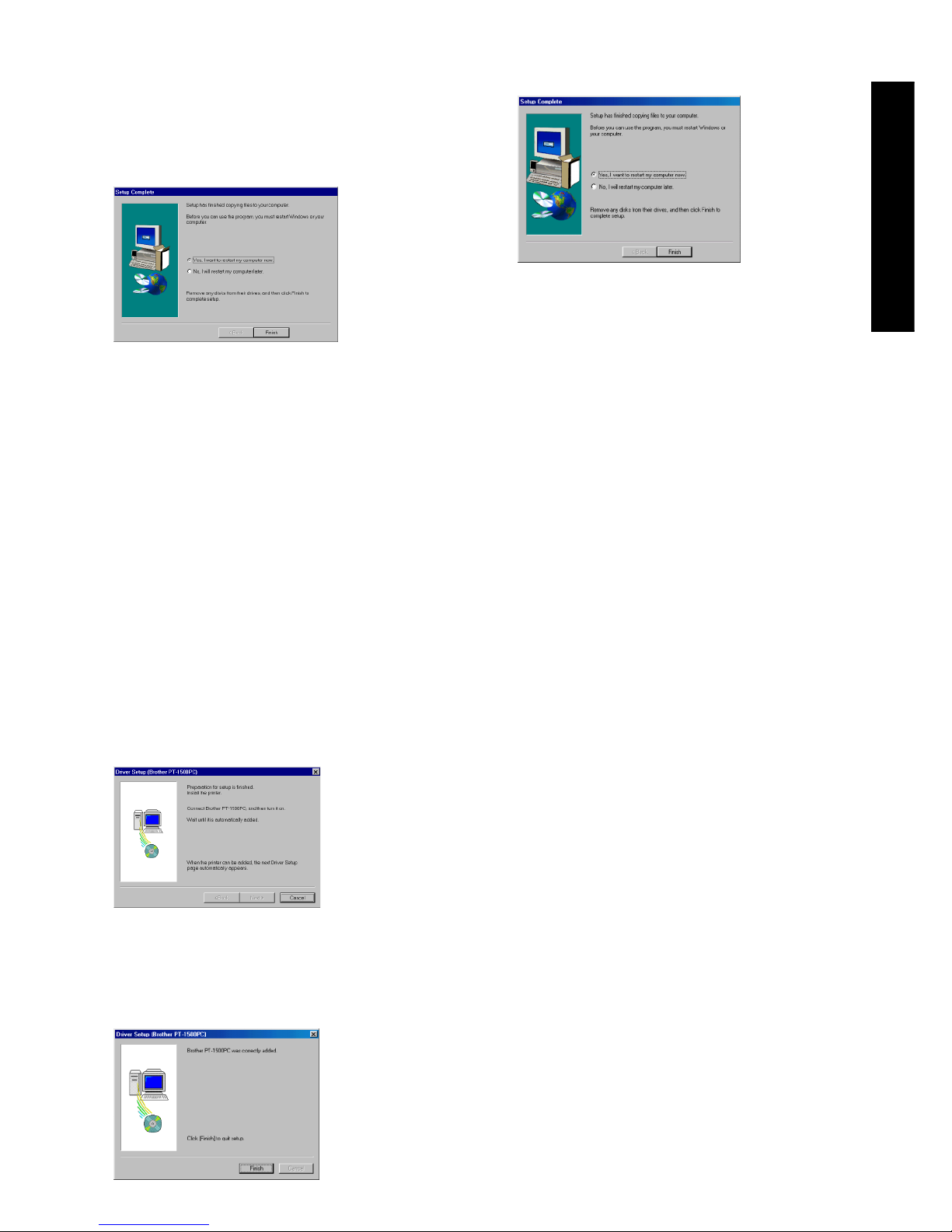
9
Continúe con el procedimiento de “
Instalación del
controlador de impresora
” abajo.
Si el controlador de impresora ya está instalado,
haga clic sobre el botón “No”. Aparecerá un
cuadro de diálogo que le muestra que la
instalación ha finalizado.
Seleccione “Yes, I want to restart my computer
now”, haga clic sobre el botón “Finish” para
reiniciar el ordenador y a continuación extraiga el
CD-ROM del ordenador.
Instalación del controlador de impresora
Con Plug-and-Play, el ordenador detecta los nuevos dispositivos
conectados al sistema, y sus controladores se instalan
automáticamente. Como la PT-1500PC va a ser conectada a
través de un puerto USB, su controlador será instalado con
Plug-and-Play. Asegúrese de leer las instrucciones de
instalación descritas más abajo antes de instalar el controlador
de impresora incluido en el CD-ROM.
Asegúrese de no conectar la PT-1500PC hasta que se le indique
que lo haga.
1
Haga clic sobre el botón “Next”. Aparecerá un cuadro
de diálogo indicándole que conecte la PT-1500PC al
ordenador.
2
Conecte la PT-1500PC al ordenador utilizando el cable
de interfaz USB incluido como se describe en la página
5, y a continuación encienda la PT-1500PC. Aparecerá
un cuadro de diálogo mostrándole que el controlador de
impresora ha sido instalado.
3
Haga clic sobre el botón “Finish”. Aparecerá un cuadro
de diálogo mostrándole que la instalación ha terminado.
4
Seleccione “Yes, I want to restart my computer
now”, haga clic sobre el botón “Finish” para
reiniciar el ordenador y a continuación extraiga el
CD-ROM del ordenador.
Lectura de la Guía del usuario
La Guía de usurario del P-touch Editor puede leerse
introduciendo el CD-ROM en la unidad cada vez que desee
consultarla o bien instalándola en el disco duro para tenerla
disponible rápidamente en cualquier momento. Dado que la
Guía del usuario es un documento HTML, es necesario un
navegador para poder leerla.
• Desde el CD-ROM:
1 Inicie el Windows Explorer.
2 Seleccione la unidad de CD-ROM.
3 Haga doble clic sobre “Main.htm” en la
carpeta “Manual” que hay dentro de la
carpeta “Ptouch” del CD-ROM.
• Desde la ventana de grupo P-touch Editor 3.1:
Haga doble clic sobre el icono “The
User’s Guide P-touch Editor Ver3.1”.
• Con el botón “Start”:
1
Haga clic sobre el botón “Start” en la barra de
tareas para visualizar el menú de inicio.
2 Seleccione “Programs”.
3 Seleccione “P-touch Editor 3.1”.
4 Haga clic sobre “The User’s Guide P-
touch Editor Ver3.1”.
Para Windows
®
Page 40
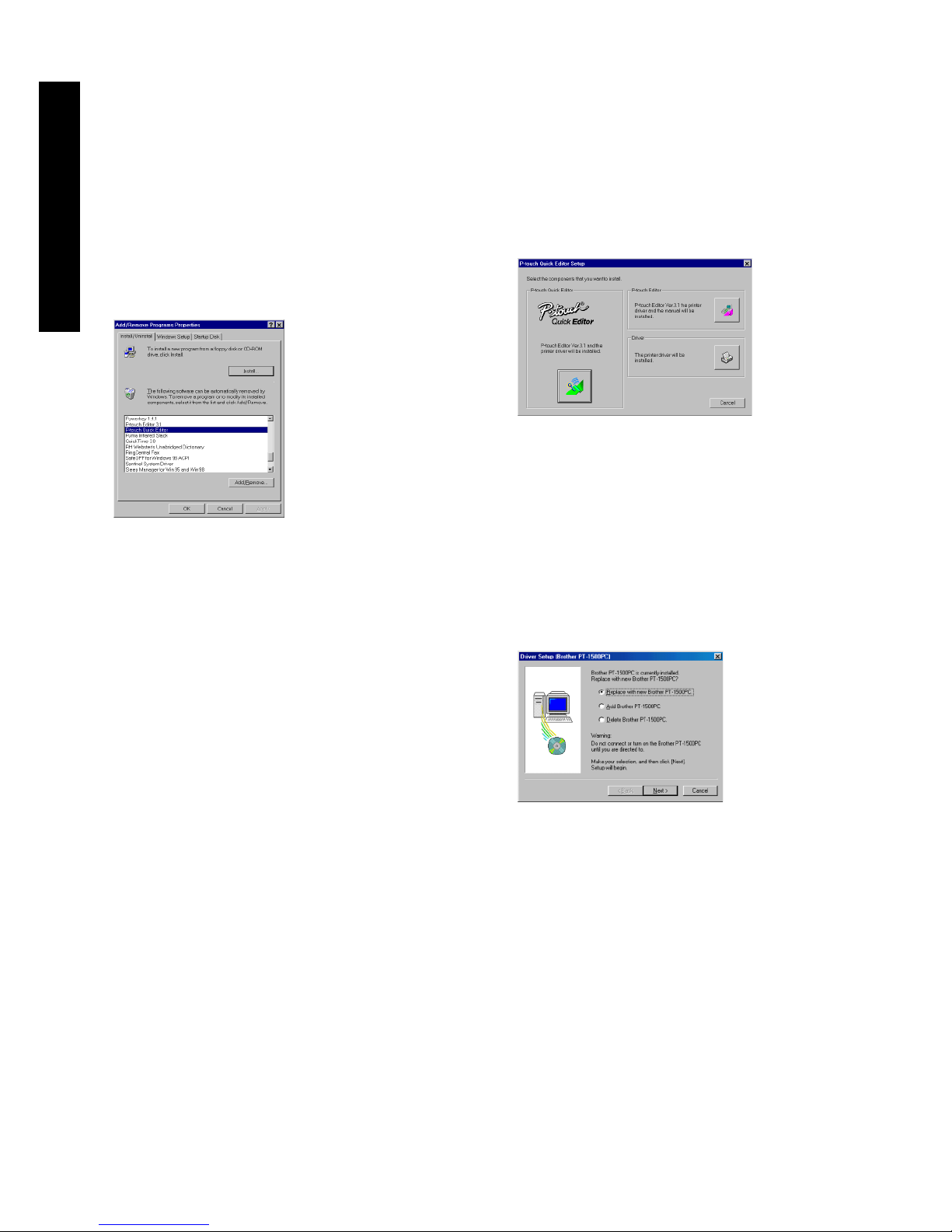
10
Desinstalación del software y
controlador de impresora
Desinstale el software P-touch Editor Ver. 3.1/P-touch
Quick Editor del PC como se describe a continuación.
1
Inicie Windows® 98/98SE/Me/2000.
2
Haga clic sobre el botón “Start” en la barra de
tareas, seleccione “Settings” y a continuación
haga clic sobre “Control Panel”.
3 En la ventana de “Control Panel”, haga doble
clic sobre “Add/Remove Programs”.
4
En el cuadro de diálogo “Add/Remove Programs
Properties”, seleccione “P-touch Quick Editor”
(para eliminar el software P-touch Quick Editor) o
“P-touch Editor 3.1” (para eliminar el software Ptouch Editor Ver. 3.1), y a continuación haga clic
sobre el botón “Add/Remove”.
5
Aparecerá un mensaje, preguntándole si desea
borrar la aplicación seleccionada. Haga clic sobre
el botón “Yes” para borrarla.
Si no desea borrar la aplicación, haga clic
sobre el botón “No”.
6 En el cuadro de diálogo que aparece,
indicándole que la aplicación ha sido
eliminada, haga clic sobre el botón “OK”.
Sustitución, eliminación o adición
de otro controlador de impresora
1 Apague la PT-1500PC y a continuación
desconéctela de la impresora.
2
Introduzca el CD-ROM incluido en la unidad de CDROM del ordenador. Aparecerá un cuadro de diálogo
que le permitirá seleccionar lo que quiera instalar.
Si el cuadro de diálogo no apareciera
automáticamente, haga doble clic sobre “My
Computer” en el escritorio, haga doble clic sobre el
icono de la unidad de CD-ROM que contenga el CDROM y a continuación haga doble clic sobre
“Setup.exe” para visualizar el cuadro de diálogo.
3
Haga clic sobre el botón inferior (Driver) del lado derecho.
Aparecerá el primer cuadro de diálogo “Driver Setup”,
permitiéndole seleccionar si quiere sustituir, eliminar o
añadir otro controlador de impresora PT-1500PC.
4
Seleccione la operación deseada y a continuación haga
clic sobre el botón “Next”.
Si se selecciona “Replace with new Brother PT1500PC”, el controlador de impresora instalado con
anterioridad será eliminado, y en su lugar se
instalará uno nuevo. Seleccione esta opción cuando
quiera actualizar el controlador de impresora, o
cuando trabaje con Windows® 2000 y quiera
cambiar a una PT-1500PC que tenga un número de
serie diferente.
Si se selecciona “Add Brother PT-1500PC”, se
añadirá un nuevo controlador de impresora. Con
USB en Windows® 98/Me, solamente se añade un
puerto sin añadir la PT-1500PC como nueva
impresora. Seleccione esta opción cuando quiera
conectar y utilizar múltiples PT-1500PC con el
mismo ordenador.
Para Windows
®
Page 41
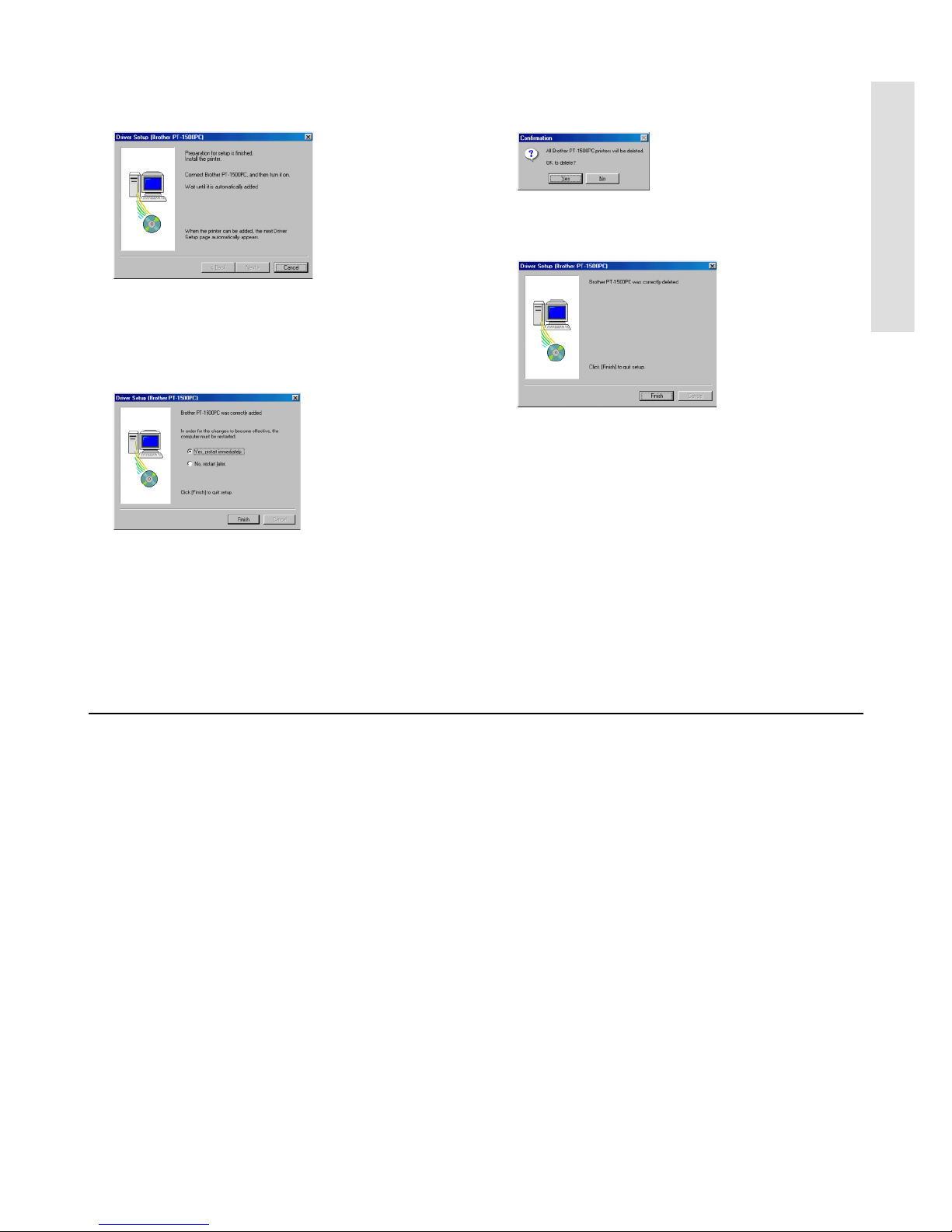
11
5
Si se seleccionó “Replace with new Brother PT-
1500PC” o “Add Brother PT-1500PC”: Aparecerá un
cuadro de diálogo indicándole que conecte la PT1500PC al ordenador.
Conecte la PT-1500PC al ordenador utilizando el cable
de interfaz USB incluido como se describe en la página
5 y a continuación encienda la PT-1500PC. Aparecerá
un cuadro de diálogo mostrándole que el controlador de
impresora ha sido instalado.
Seleccione “Yes, restart immediatelly” y a continuación
haga clic sobre el botón “Finish” para reiniciar el
ordenador.
Si se seleccionó “Delete Brother PT-1500PC”:
Aparecerá un cuadro de diálogo pidiéndole que
confirme que quiere eliminar todos los
controladores de impresora PT-1500PC.
Haga clic sobre el botón “Yes”. Aparecerá un
cuadro de diálogo mostrándole que los
controladores de impresora han sido eliminados.
Haga clic sobre el botón “Finish”. Si aparece un
cuadro de diálogo explicando que el ordenador
ha de ser reiniciado, seleccione la opción para
reiniciarlo y a continuación haga clic sobre el
botón “Finish”.
Para un ordenador Macintosh
Antes de poder imprimir etiquetas con la PT-1500PC, deberá instalarse el software de diseño de etiquetas y el
controlador de impresora PT-1500PC. Para diseñar etiquetas que se puedan imprimir con la PT-1500PC, en el CDROM incluido hay disponibles dos aplicaciones: P-touch Quick Editor y P-touch Editor Ver. 3.1.
Antes de la instalación
Compruebe que la configuración de su sistema satisface los siguientes requisitos.
Ordenador: Macintosh
Sistema operativo: Mac OS 8.6 o posterior
* Este software solamente es compatible con Mac OS X clásico.
La versión Mac del software es para un Mac con sistema operativo en la versión inglesa. Si se instala el software en
un Mac con un sistema operativo en un idioma diferente, el software podrá no instalarse debidamente.
Espacio libre en disco duro: Como mínimo 30 MB
Puede que sean necesarios unos cuantos centenares de megabytes adicionales de espacio libre
en el disco duro cuando se impriman etiquetas largas o grandes cantidades de datos.
Espacio libre de memoria requerido: Como mínimo 24 MB
Puerto USB
Unidad de CD-ROM
Para Macintosh
Page 42
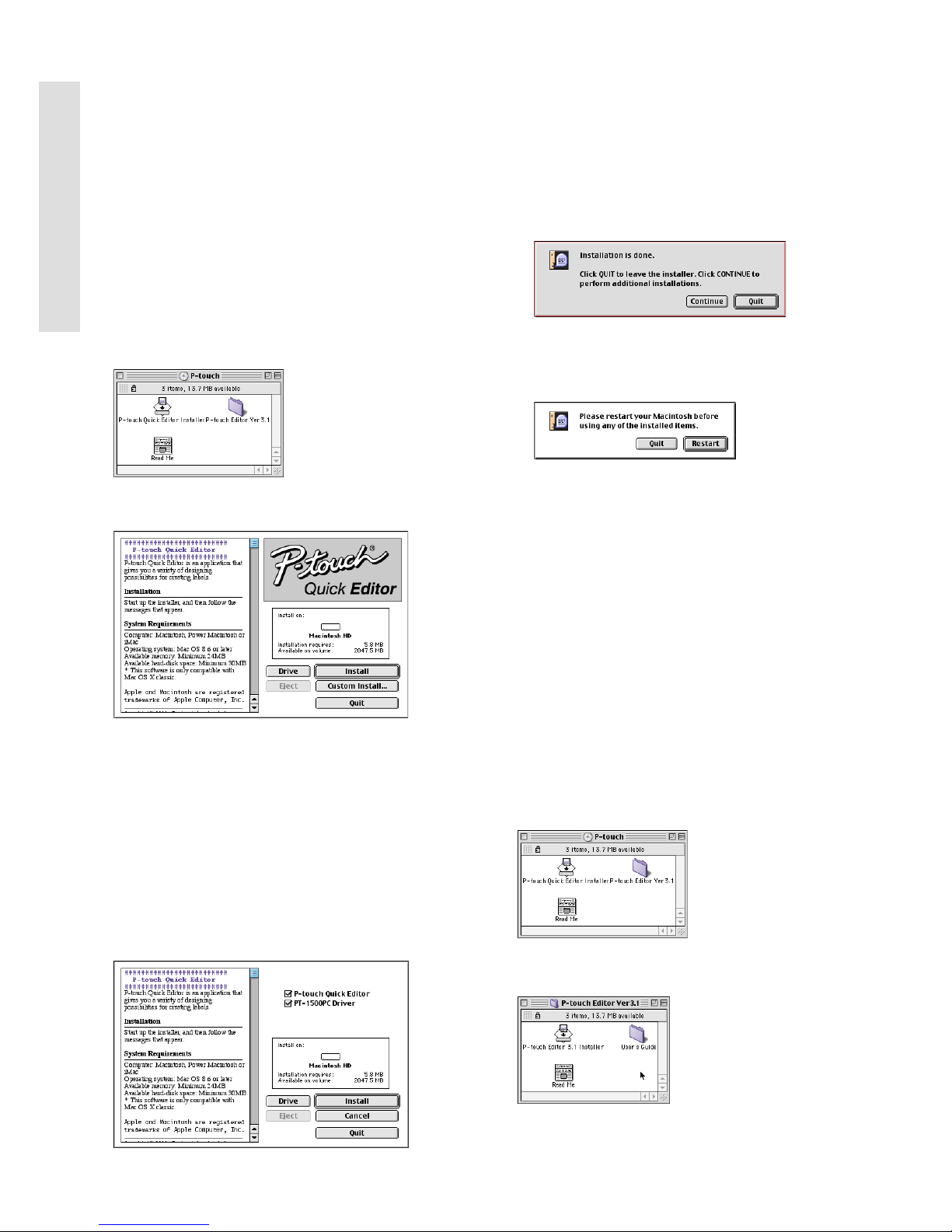
12
Para Macintosh
Instalación del P-touch Quick Editor
El software P-touch Quick Editor ofrece un acceso rápido
a las funciones más sencillas de diseño de etiquetas y
permite una fácil introducción de texto y una impresión
de etiquetas instantánea. Instale el software P-touch Quick
Editor en un Mac como se describe a continuación.
1
Con la PT-1500PC y el ordenador apagados, conecte la PT1500PC al Macintosh utilizando el cable de interfaz USB
incluido. Asegúrese de dejar la PT-1500PC apagada.
2 Encienda el Macintosh.
3
Introduzca el CD-ROM incluido en la unidad de CDROM del ordenador. Se abrirá una carpeta que le
permitirá ver el contenido del CD-ROM.
4
Haga doble clic sobre el icono “P-touch Quick Editor
Installer” en la carpeta que aparece. Se iniciará el instalador.
5
Seleccione el método de instalación.
Al hacer clic sobre el botón “Install” comenzará
inmediatamente la instalación de las opciones más básicas.
Para comenzar la instalación se necesitan unos 30 MB
de espacio libre en el disco duro. Para poder instalar
todas las opciones, se necesitan unos 30 MB de espacio
libre en el disco duro. Si hay disponible suficiente espacio
en el disco duro, haga clic sobre el botón “Install”.
Al hacer clic sobre el botón “Custom Install” se
visualizará un cuadro de diálogo que le permitirá
seleccionar las opciones que quiera instalar.
Solamente se instalarán las opciones que tengan una de
marca de verificación junto a ellas. Seleccione las
opciones que quiera instalar y a continuación haga clic
sobre el botón “Install” para iniciar la instalación.
Para poder imprimir con la PT-1500PC, se deberá
seleccionar la instalación de “PT-1500PC Driver”.
6
Cuando termine la instalación y aparezca el siguiente
cuadro de diálogo, haga clic sobre el botón “Quit”.
7
Cuando aparezca el cuadro de diálogo, preguntándole si
quiere reiniciar el ordenador, haga clic sobre el botón
“Restart” para reiniciar el ordenador.
Instalación del P-touch Editor Ver. 3.1
El software P-touch Editor Ver. 3.1 incluye una variedad
de funciones más complejas para imprimir códigos de
barras e imágenes, que le permitirán diseñar
prácticamente cualquier etiqueta que usted pueda
imaginar. Instale el P-touch Editor Ver. 3.1 en un PC
como se describe a continuación.
1
Con la PT-1500PC y el ordenador apagados, conecte la PT1500PC al Macintosh utilizando el cable de interfaz USB
incluido. Asegúrese de dejar la PT-1500PC apagada.
2 Encienda el Macintosh.
3
Introduzca el CD-ROM incluido en la unidad de
CD-ROM del ordenador. Se abrirá una carpeta
que le permitirá ver el contenido del CD-ROM.
4 Haga doble clic sobre la carpeta “P-touch
Editor Ver3.1” para abrirla.
Page 43
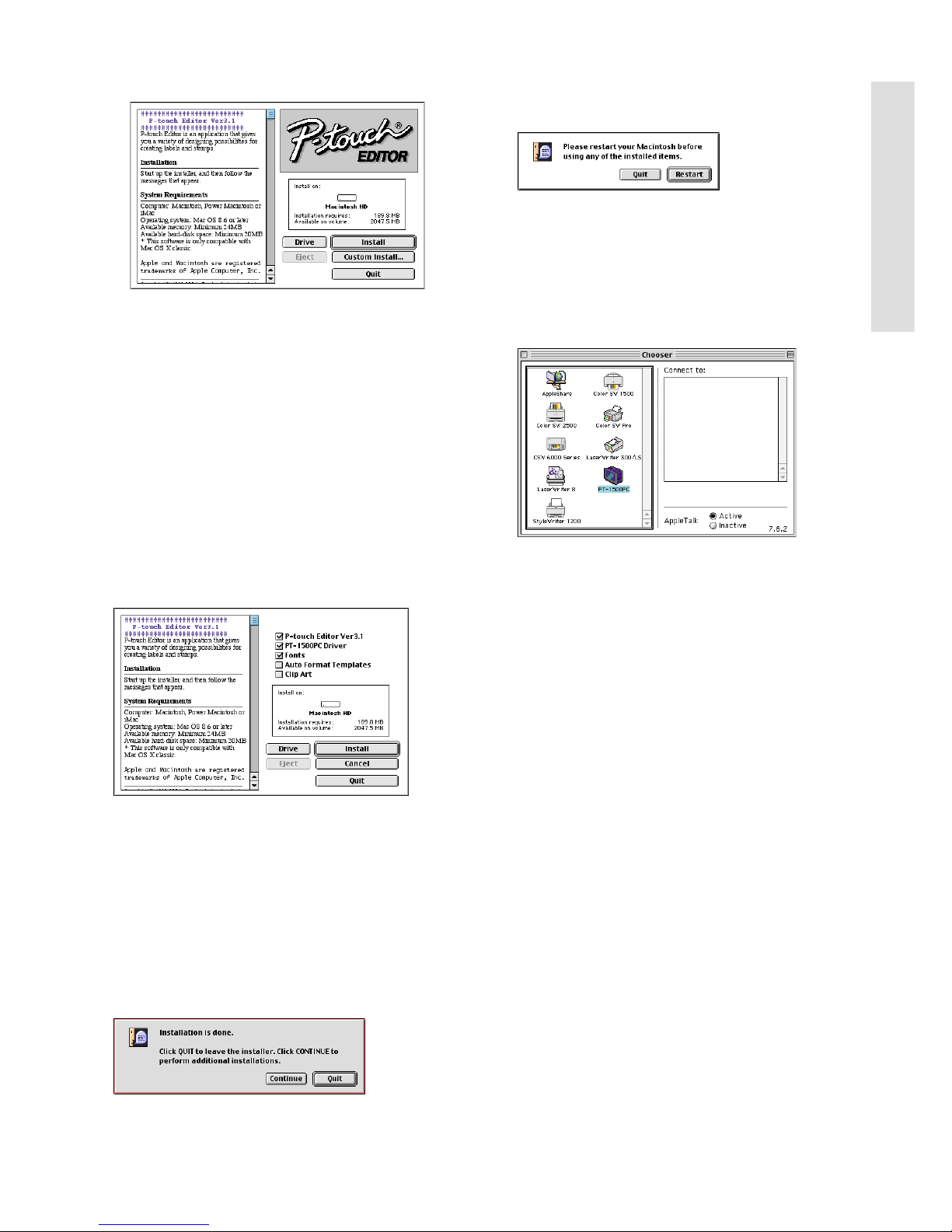
13
5
Haga doble clic sobre el icono “P-touch Editor 3.1
Installer” de la carpeta. Se iniciará el instalador.
6 Seleccione el método de instalación.
Al hacer clic sobre el botón “Install” comenzará
inmediatamente la instalación de las opciones más
básicas. (Algunas ilustraciones de los clips de arte no se
instalarán.)
Para comenzar la instalación se necesitan unos 30 MB
de espacio libre en el disco duro. Para poder instalar
todas las opciones, se necesitan unos 120 MB de
espacio libre en el disco duro. Si hay disponible
suficiente espacio en el disco duro, haga clic sobre el
botón “Install”.
Al hacer clic sobre el botón “Custom Install” se
visualizará un cuadro de diálogo que le permitirá
seleccionar las opciones que quiera instalar.
Solamente se instalarán las opciones que tengan una de
marca de verificación junto a ellas. Seleccione las
opciones que quiera instalar y a continuación haga clic
sobre el botón “Install” para iniciar la instalación.
Para poder imprimir con la PT-1500PC, se deberá
seleccionar la instalación de “PT-1500PC Driver”.
7 Cuando termine la instalación y aparezca el
siguiente cuadro de diálogo, haga clic sobre
el botón “Quit”.
8 Cuando aparezca el cuadro de diálogo,
preguntándole si quiere reiniciar el
ordenador, haga clic sobre el botón “Restart”
para reiniciar el ordenador.
Selección de la impresora
1
Despliegue el menú Apple y seleccione “Chooser”
para visualizar la ventana “Chooser”.
2 En la lista de la izquierda, haga clic sobre el
icono “PT-1500PC”.
3
Cierre la ventana “Chooser” para confirmar su
configuración.
Lectura de la Guía del usuario
La Guía de usurario del P-touch Editor puede leerse
introduciendo el CD-ROM en la unidad cada vez que desee
consultarla o bien instalándola en el disco duro para tenerla
disponible rápidamente en cualquier momento. Dado que la
Guía del usuario es un documento HTML, es necesario un
navegador para poder leerla.
• Desde el CD-ROM:
Haga doble clic sobre “Main.htm” en la
carpeta “User’s Guide” que hay dentro de
la carpeta “P-touch Editor Ver3.1” del
CD-ROM.
• Con el botón “Start”:
Haga doble clic sobre “Main.htm” en la
carpeta “User’s Guide” que hay dentro de
la carpeta “P-touch Editor Ver3.1”
instalada en el disco duro.
Para Macintosh
Page 44

14
Desinstalación del software y controlador
de impresora
Desinstale el software P-touch Quick Editor, Ptouch Editor Ver3.1 y el controlador de impresora
como de describe a continuación.
Cuando vaya a borrar el controlador de
impresora, asegúrese de que la P-touch está
apagada y desenchufada.
1 Arrastre la siguiente carpeta hasta el icono
“Trash”:
• Carpeta P-touch Quick Editor (para el
software P-touch Quick Editor)
• Carpeta P-touch Editor Ver3.1 (para el
software P-touch Editor Ver. 3.1)
2 En la carpeta “System”, abra la tarjeta
“Extensions”.
3 Arrastre los siguientes iconos hasta el icono
“Trash”:
• PT-1500PC y USB PT-1500PC Extension
4 En la carpeta “System”, abra la tarjeta
“Preferences”.
5 Arrastre los siguientes iconos hasta el icono
“Trash”:
• P-touch Quick Editor Prefs, P-touch Editor
3.1 Prefs, y PT-1500PC Prefs
Ahora estarán borrados el software y el controlador
de impresora.
Para Macintosh
Page 45
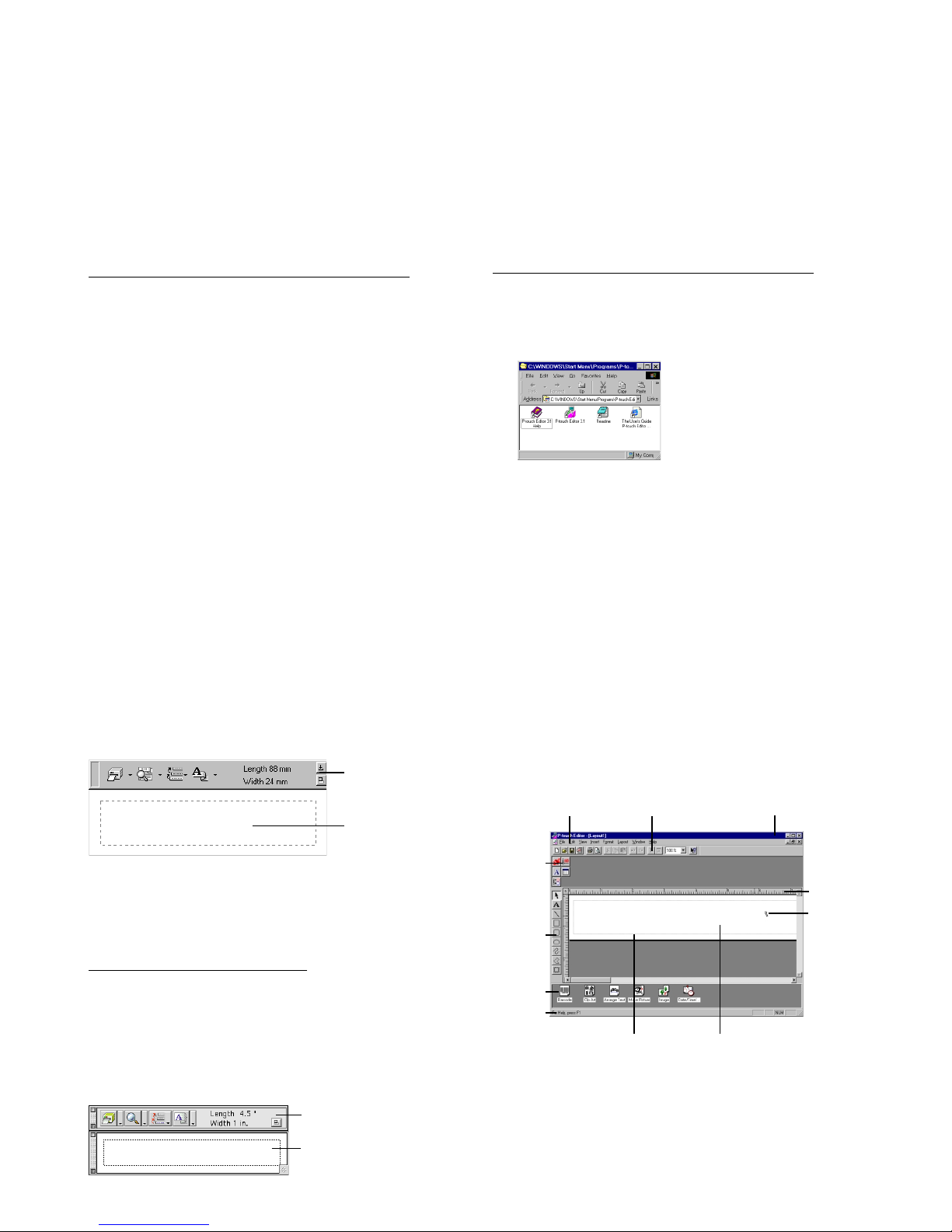
15
Inicio del software P-touch Editor
Inicio del P-touch Quick Editor
Cuando instale el P-touch Quick Editor en un PC,
podrá elegir si quiere añadir accesos directos al
escritorio, al menú de inicio “StartUp” y a la barra
de herramientas “Quick Launch”.
En un ordenador compatible con PC IBM:
• Si se ha añadido un acceso directo al menú
de inicio “StartUp”:
El P-touch Quick Editor se iniciará
automáticamente cuando se inicie el ordenador.
•
Si se ha añadido un acceso directo al escritorio:
Haga doble clic sobre el icono P-touch
Quick Editor en el escritorio.
•
Si se a añadido un acceso directo a la barra de
herramientas “Quick Launch”:
Haga doble clic sobre el icono P-touch Quick Editor
en la barra de herramientas “Quick Launch”.
• Si no se han añadido accesos directos:
1
Haga clic sobre el botón “Start” en la barra de
tareas para visualizar el menú de inicio.
2 Seleccione “Programs”.
3 Haga clic sobre “P-touch Quick Editor”.
Una vez iniciado el P-touch Quick Editor, se
visualizará la siguiente ventana.
P-touch Quick Editor puede ocultarse o visualizarse
haciendo clic sobre su icono en al bandeja de
sistema, a la derecha de la barra de tareas.
En un ordenador Macintosh:
• Haga doble clic sobre el icono “P-touch
Quick Editor” en la carpeta P-touch Quick
Editor instalada en el ordenador.
Una vez iniciado el P-touch Quick Editor, se visualizará la
siguiente ventana.
Inicio del P-touch Editor Ver. 3.1
La aplicación P-touch Editor Ver. 3.1 hace que a
cualquiera le resulte fácil diseñar etiquetas
complicadas e imprimirlas para casi cualquier
necesidad imaginable.
En un ordenador compatible con PC IBM:
• Haciendo clic sobre el icono P-touch Editor:
Haga doble clic sobre el icono “Ptouch Editor
3.1” en la ventana de grupo P-touch Editor 3.1.
• Con el botón “Start”:
1
Haga clic sobre el botón “Start” en la barra de
tareas para visualizar el menú de inicio.
2 Seleccione “Programs”.
3 Seleccione “P-touch Editor 3.1”.
4 Haga clic sobre “P-touch Editor 3.1”.
Una vez iniciado el P-touch Editor Ver. 3.1, se
visualizará la siguiente ventana.
Para ver más detalles sobre las funciones del
P-touch Editor Ver. 3.1, consulte su Guía del
usuario, que puede instalarse en el
ordenador o bien verse desde el CD-ROM.
Barra de
menús
Barra de herramientas
estándar
Banco de
propiedades
Área de
composición
Área de
impresión
Banco de
objetos
Barra de
título
Reglas
Cursor
Barra de
estado
Barra de
herramientas
de dibujo
Barra de
herramientas
Vista de etiqueta
Barra de herramientas
Vista de etiqueta
Page 46
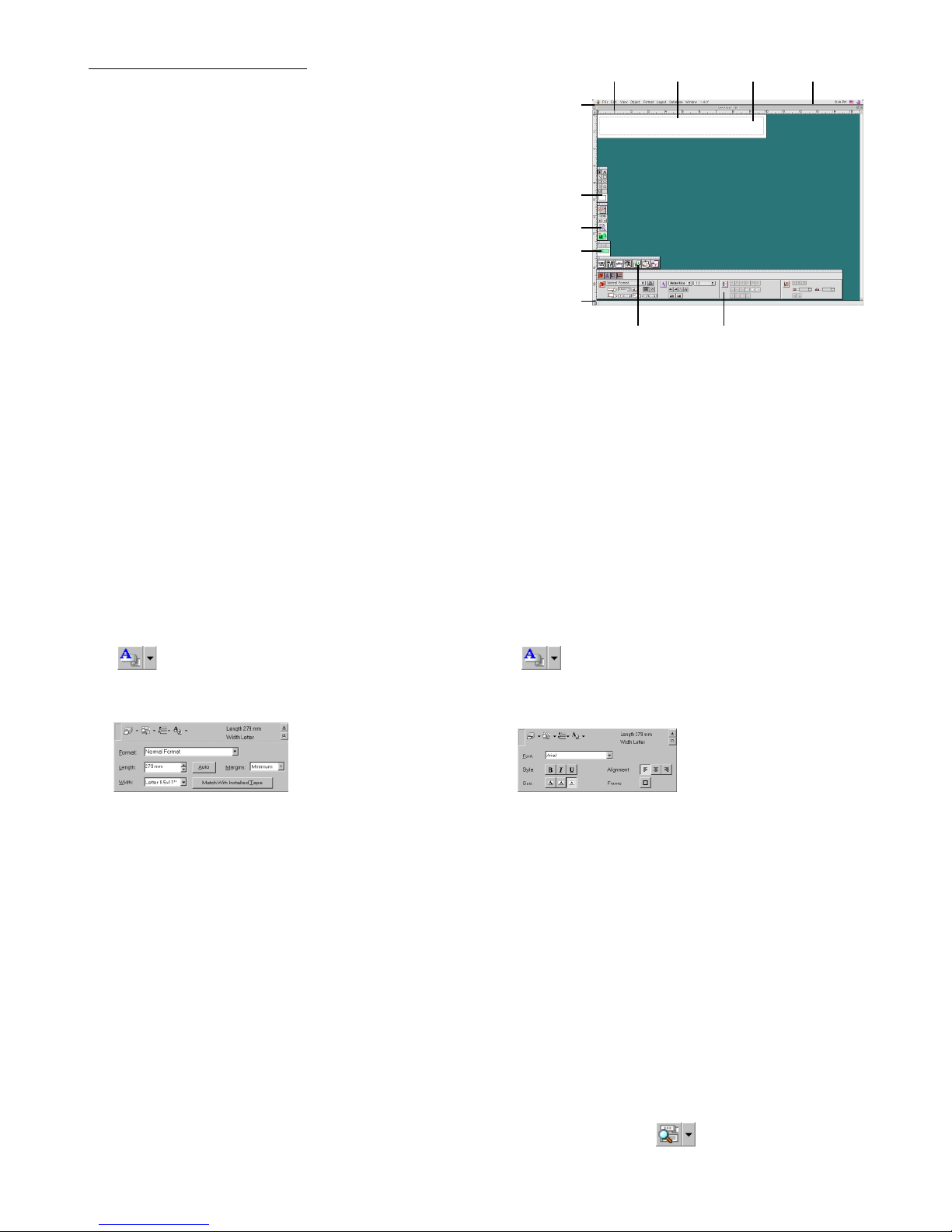
16
En un ordenador Macintosh:
• Haga doble clic sobre el icono “P-touch
Editor Ver3.1.6” en la carpeta P-touch Editor
Ver.3.1 instalada en el ordenador.
Una vez iniciado el P-touch Editor Ver. 3.1, se
visualizará la siguiente ventana.
Para más detalles sobre las funciones del Ptouch Editor Ver. 3.1, consulte su Guía del
usuario”, que puede instalarse en el
ordenador o bien verse desde el CD-ROM.
Utilización del P-touch Quick Editor
El P-touch Quick Editor le permite diseñar una etiqueta sencilla rápida y fácilmente. Además de las varias funciones
disponibles mediante los botones de la barra de herramientas, haciendo clic en el botón derecho (Windows) o manteniendo
presionada la tecla “Control” y haciendo clic (Macintosh) sobre la vista de etiqueta, se visualiza un menú desplegable que
contiene más comandos.
Especificación de un tamaño de etiqueta
Antes de introducir texto, se deberá establecer el tamaño
de etiqueta. Hay una selección de tamaños de diseño
predefinido para una variedad de necesidades.
1
Haga clic sobre la flecha al lado del botón “Properties”
( ) para visualizar un menú desplegable.
2
Haga clic sobre [Tape Settings] para visualizar
varios ajustes de formato de etiquetas.
Los ajustes de cinta también se pueden visualizar
seleccionando [View Properties] y haciendo clic
después sobre [Tape Settings] en el menú
desplegable, visualizado haciendo clic con el
botón derecho (Windows) o manteniendo
presionada la tecla “Control” y haciendo clic
(Macintosh) en la vista de etiqueta.
3 En la lista de formatos, haga clic sobre el
formato de etiqueta deseado.
El tamaño del diseño de etiqueta también se
puede establecer especificando los ajustes de
longitud y anchura o arrastrando los bordes de la
vista de etiqueta hasta que el diseño adquiera el
tamaño deseado.
Introducción de texto
El texto entero se puede formatear rápidamente
especificando el tipo de letras, tamaño y alineación.
También se puede dibujar un cuadro alrededor del texto.
1
Haga clic sobre la flecha al lado del botón “Properties”
( ) para visualizar un menú desplegable.
2 Haga clic sobre [Text Settings] para
visualizar varios ajustes de formato de texto.
Los ajustes de texto también se pueden
visualizar seleccionando [View Properties], y
haciendo clic después sobre [Text Settings] en el
menú desplegable, visualizado haciendo clic
con el botón derecho (Windows) o manteniendo
presionada la tecla “Control” y haciendo clic
(Macintosh) en la vista de etiqueta.
3 En los ajustes de texto, seleccione los
formatos de texto deseados.
4 Haga clic en la vista de etiqueta, y después
ingrese o importe el texto.
Al teclear en la vista de etiqueta el texto se
mostrará como aparecerá cuando sea impreso.
Sin embargo, haciendo clic sobre el botón
“Change View” ( ), el texto se visualizará
en el cuadro de texto, ofreciéndole una visión
más clara del texto ingresado.
Barra de
menús
Barra de herramientas
de dibujo
Barra de herramientas
de impresión
Barra de herramientas
de la base de datos
Barra de
estado
Banco de
objetos
Banco de
propiedades
Reglas
Área de
composición
Área de
impresión
Barra de
título
Page 47

17
Importación de texto
El texto que ya haya sido ingresado en otra aplicación
puede ser importado fácilmente a la etiqueta.
1
Seleccione el texto deseado en la otra aplicación.
2
Importe el texto al diseño de etiqueta presionando las
teclas de acceso directo designadas (Windows
solamente) o bien arrastrándolo desde la otra aplicación.
(Windows solamente) Para especificar las teclas
de acceso directo utilizadas para importar
texto, haga clic con el botón derecho en la vista
de etiqueta (ocuadro de texto), y después haga
clic sobre [Options] en el menú que aparece.
En el cuadro de diálogo “Options” que aparece,
seleccione las teclas de acceso directo
deseadas para importar texto.
Utilización la lista de historial de texto
Los 10 textos impresos más recientemente se
almacenan automáticamente para uso posterior.
1 Haga clic sobre el botón “Text History”
( ) para visualizar la lista “Text History”.
2 Haga clic sobre el texto deseado.
El texto seleccionado en la lista “Text
History” reemplazará todo el texto ya
introducido en el diseño.
Adición de un símbolo
Se puede añadir un símbolo al lado izquierdo del texto de la
etiqueta desde las diferentes fuentes de símbolos instaladas.
1
(Windows) Haga clic con el botón derecho en la vista de
etiqueta (o cuadro de texto), seleccione [Symbols] en el
menú que aparece, y después haga clic sobre [Insert/
Change]. Aparecerá el cuadro de diálogo “Imput Symbol”.
(Macintosh) Mantenga presionada la tecla “Control” y haga
clic sobre la vista de etiqueta (o cuadro de texto), seleccione
[Symbol font] en el menú que aparece, y después haga
clic sobre [Import/Change]. Aparecerá un cuadro de
diálogo visualizando símbolos.
2 En la lista de fuentes de símbolos, seleccione
la fuente de símbolo deseada.
3
En la vista de la lista de símbolos, seleccione el
símbolo deseado.
4
Haga clic sobre el botón “OK”. El símbolo
seleccionado se añadirá a la izquierda del texto.
Si ya se ha añadido un símbolo al texto, éste será
reemplazado por el nuevo símbolo seleccionado.
Para cambiar el color de fondo
El color de fondo del diseño se puede cambiar
según sus preferencias.
• (Windows) Haga clic con el botón derecho
sobre la vista de etiqueta (o cuadro de texto),
seleccione [Background Color] en el menú que
aparece, y después haga clic sobre el color
deseado de la lista.
(Macintosh) Mantenga presionada la tecla
“Control” y haga clic sobre la vista de etiqueta
(o cuadro de texto), seleccione [Background
Color] en el menú que aparece, y después haga
clic sobre el color deseado de la lista.
Para seleccionar un color diferente a los de la
lista, seleccione [User Settings] (Windows) o
[User Setting] (Macintosh) en el submenú
“Background Color”, cree el color deseado en
el cuadro de diálogo que aparece, y después
haga clic sobre el botón “OK”.
Para ver el texto
Los diseños que sean muy grandes y no entren en
la pantalla se pueden desplazar haciendo clic
sobre el botón “Arrange” ( ) para ver el lado
izquierdo, el centro, y después el derecho del
diseño cada vez que se haga clic con el botón.
Si la vista de etiqueta (o cuadro de texto) ha
sido movida de la barra de herramientas,
retornará a ella antes de desplazarse.
Para imprimir
Antes de imprimir etiquetas se podrán seleccionar
ciertas opciones de impresión.
1 Haga clic sobre la flecha junto al botón
“Print” ( ) para visualizar un menú
desplegable.
2 (Windows) Haga clic sobre [Print Options].
Aparecerá el cuadro de diálogo.
(Macintosh) Haga clic sobre [Print].
Aparecerá un cuadro de diálogo con las
opciones de impresión.
Page 48
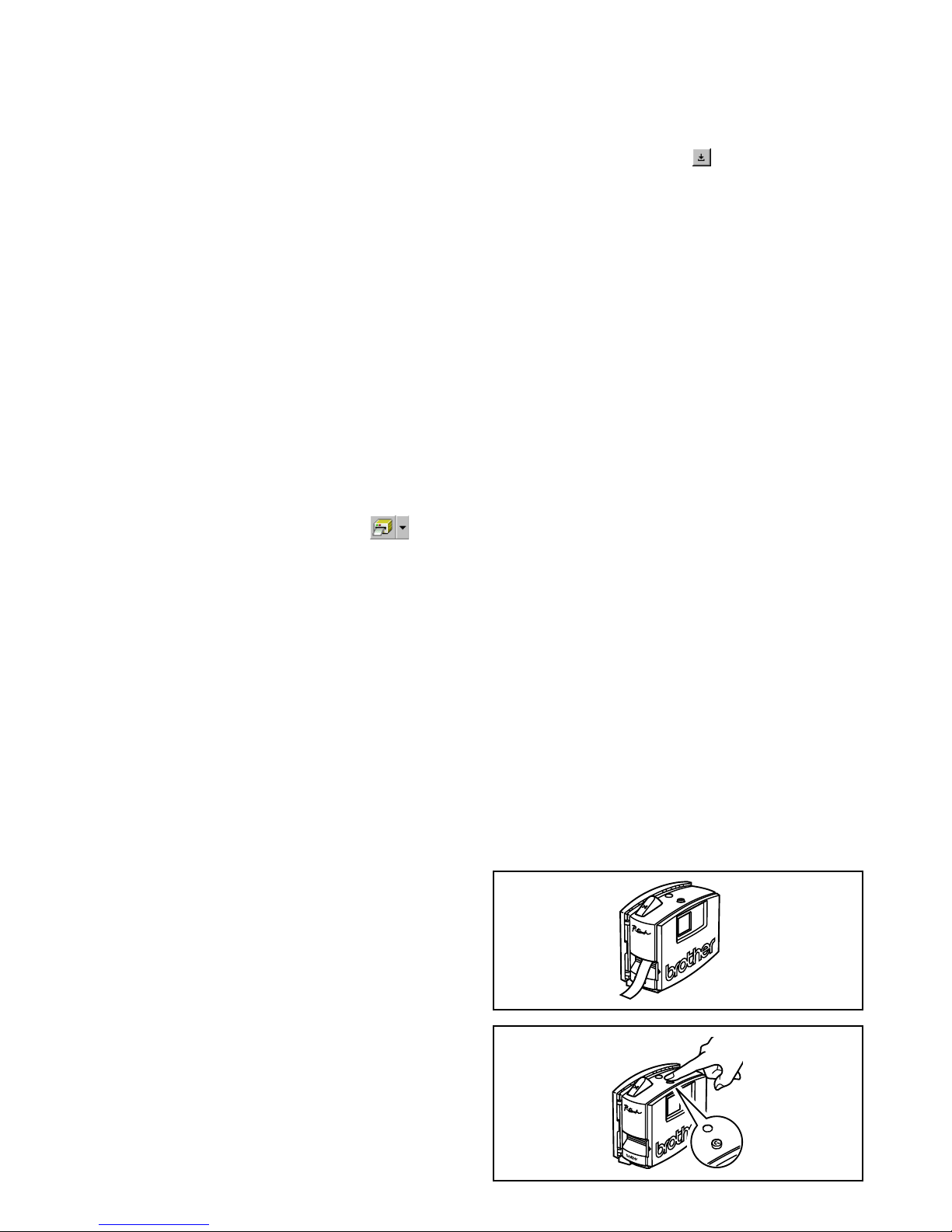
18
Impresión de una etiqueta
1 Encienda la PT-1500PC y inicie el ordenador.
2
Inicie el P-touch Quick Editor o bien el P-touch Editor Ver. 3.1, y asegúrese de que la impresora seleccionada es la PT-1500PC.
3 Diseñe su etiqueta.
4
Haga clic sobre el comando [Print] en la aplicación,
seleccione los ajustes de impresión deseados, y a
continuación haga clic sobre el botón “Print”. El
indicador de estado de la PT-1500PC parpadeará
mientras ésta esté recibiendo datos. Después de
imprimirse la etiqueta, presione sobre el botón de
corte de la cinta para cortar la etiqueta.
Mientras se estén imprimiendo múltiples copias, la PT1500PC podrá dejar de imprimir durante un rato para
dar tiempo a que el cabezal de impresión se enfríe. La
impresión se reanudará una vez que el cabezal de
impresión se haya enfriado suficientemente.
Para avanzar cinta extra, mantenga
presionada la tecla de encendido y apagado/
avance durante unos pocos segundos.
Feed
En el Macintosh, este cuadro de diálogo
también puede visualizarse haciendo clic
solamente sobre el botón “Print”.
3 Seleccione los ajustes de impresión
deseados.
Cut Marks: Esta opción le permite
seleccionar si quiere o no imprimir marcas
de corte (:), que indican por dónde cortar la
etiqueta para que los márgenes derecho e
izquierdo sean iguales.
Mirror Printing: Esta opción le permite
imprimir texto en reverso para poder
colocarlo en una ventana.
Copies: Esta opción le permite introducir el
número de copias a imprimir.
4 (Windows) Haga clic sobre el botón “OK”.
(Macintosh) Haga clic sobre [Print]. Se
imprimirá el diseño.
(Windows) Para comenzar a imprimir:
1 Haga clic sobre el botón “Print” ( ), o
bien sobre la flecha junto al botón “Print”, y
haga clic sobre [Print] en el menú
desplegable.
2 Seleccione los ajustes de impresión
deseados.
3 Haga clic sobre el botón “OK”.
Para ocultar/visualizar el P-touch
Quick Editor (Windows solamente)
El P-touch Quick Editor se puede ocultar haciendo
clic sobre el botón “Hide” ( ). Vuelva a visualizar
el P-touch Quick Editor haciendo clic sobre su
icono en la bandeja de sistema, a la derecha de la
barra de tareas.
Para salir del P-touch Quick Editor
• (Windows) Haga uno de lo siguiente:
Haga clic con el botón derecho sobre el
icono del P-touch Quick Editor en la
bandeja de sistema, y después haga clic
sobre [Exit] en el menú que aparece.
Haga clic con el botón derecho sobre la
vista de etiqueta (o cuadro de texto), y
después haga clic sobre [Exit] en el menú
que aparece.
(Macintosh) Haga uno de lo siguiente:
Haga clic sobre [Quit] en el menú [File].
Mantenga presionada la tecla “Control” y
haga clic sobre la vista de etiqueta (o
cuadro de texto), y después haga clic
sobre [Quit] en el menú que aparece.
Page 49
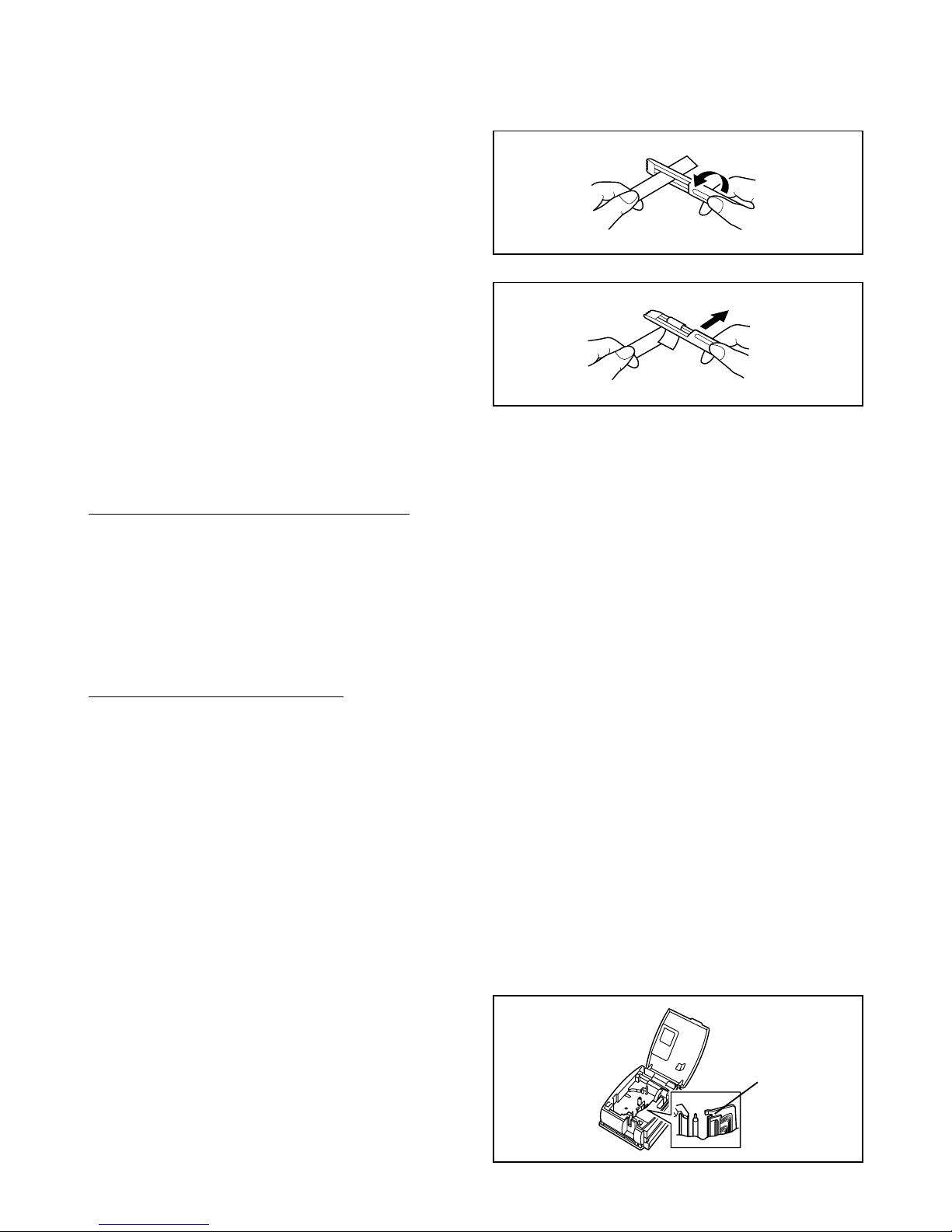
19
Mantenimiento
Limpieza del cabezal de impresión y rodillo
La aparición de una línea horizontal en blanco a través de la etiqueta impresa indica que el cabezal de impresión
y el rodillo están sucios. Limpie el cabezal de impresión y el rodillo de acuerdo con el siguiente procedimiento.
1 Apague la PT-1500PC.
2 Abra la tapa del compartimiento de la cinta.
3 Extraiga el casete de cinta si está instalado.
Para salir del P-touch Quick Editor
En un ordenador compatible con PC IBM:
• Desde la aplicación:
Haga clic con el botón derecho en la vista de etiqueta (o cuadro de texto), y a continuación
haga clic sobre [Exit] en el menú que aparece.
• Desde la barra de tareas:
Haga clic con el botón derecho en el icono P-touch Quick Editor en la bandeja de sistema, a la
derecha de la barra de tareas, y a continuación haga clic sobre [Exit] en el menú que aparece.
En un ordenador Macintosh:
• Desde el menú desplegable:
Mientras mantiene presionada la tecla “Control”, haga clic sobre la vista de etiqueta (o cuadro
de texto), y a continuación haga clic sobre [Quit] en el menú que aparece.
• Desde el menú de la aplicación:
Haga clic sobre el menú [File], y a continuación haga clic sobre el comando [Quit].
Cabezal de
impresión
G
H
A
B
C
D
E
F
A
B
C
D
E
F
Para quitar el respaldo de la etiqueta
El separador de cinta suministrado le permite quitar fácilmente el respaldo de las etiquetas impresas en cinta laminada.
1
Sujete la cinta con la mano izquierda, con
la superficie impresa hacia arriba, y sujete
la barra con la mano derecha.
2
Pase la cinta hasta la mitad a través del
agujero estrecho y largo de la barra.
3
Gire la barra tres cuartos de vuelta hacia
usted, y después aleje la barra de usted
como de muestra en la ilustración.
4
Desprenda el respaldo de la etiqueta.
Page 50
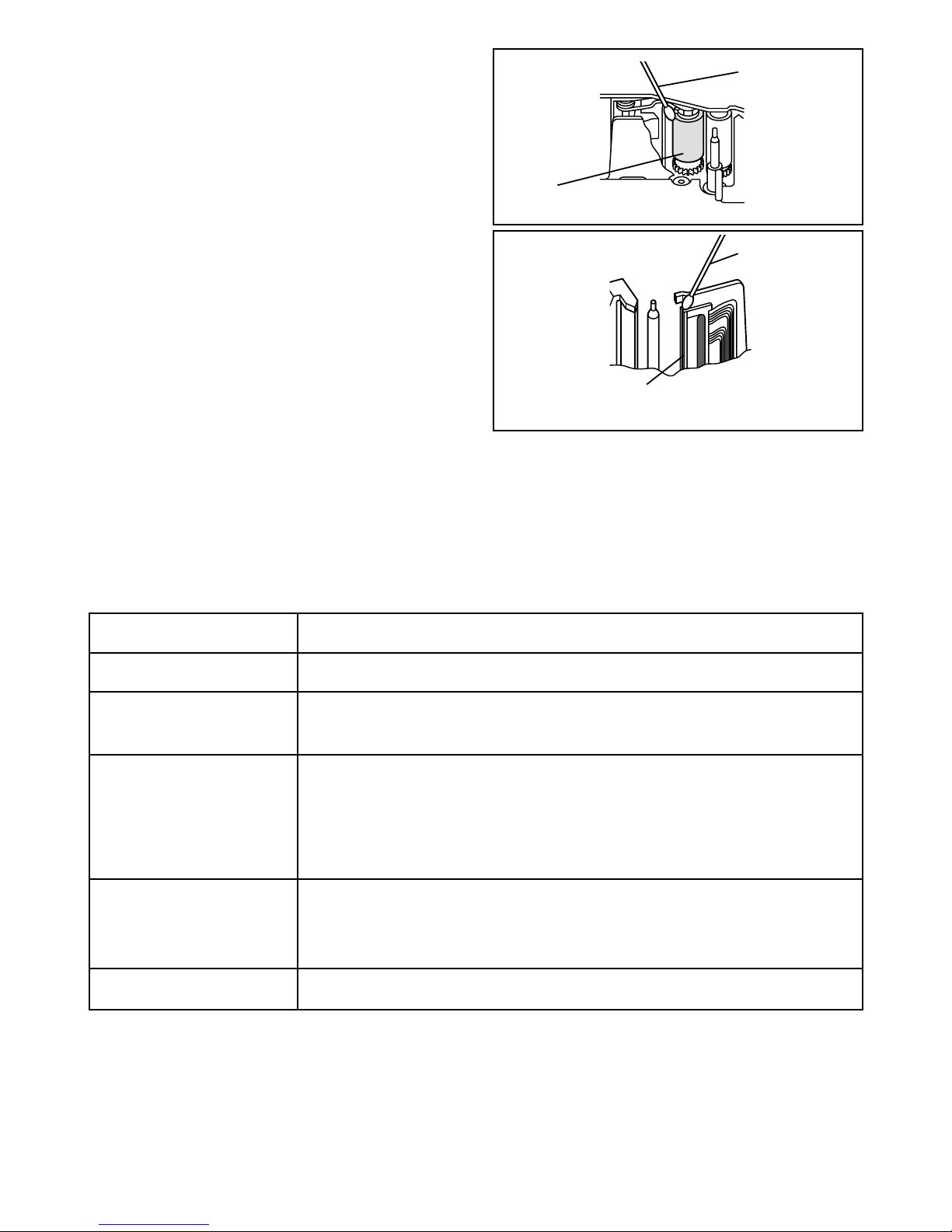
20
Localización y solución de problemas
Seguimiento del estado de la P-touch
Usted puede determinar el estado de la PT-1500PC observando el indicador de estado.
Indicador de estado
Se enciende
Parpadea unas cuantas
veces
Parpadea rápidamente
Parpadea, manteniéndose
apagado más tiempo que
encendido
Parpadea lentamente
Causa→remedio
• La P-touch está funcionando normalmente y está en espera.
• La P-touch está recibiendo correctamente datos del ordenador.
• El casete no está instalado. → Instale un casete.
•
Ha ocurrido un error de transmisión. → Presione la tecla de encendido y apagado/
avance para apagar la PT-1500PC, y después vuelva a encenderla.
•
Se ha presionado el botón de corte de la cinta mientras se imprimía. →
Intente imprimir otra vez.
•
Ha ocurrido un error EEPROM. → Póngase en contacto con el representante de
servicio.
•
El cabezal de impresión se está enfriando. → Espere hasta que continúe la impresión.
Bastoncillo de
algodón
Cabezal de impresión
(área a limpiar)
Bastoncillo de
algodón
Rodillo
(área a limpiar)
4 Utilice un bastoncillo de algodón para frotar
suavemente de arriba a abajo a lo largo del
cabezal de impresión y rodillo.
Precaución: Tenga cuidado de no tocar la
cuchilla que hay junto al cabezal
de impresión y del rodillo cuando
los limpie. Además, no intente
limpiar el cabezal de impresión
inmediatamente después de
imprimir porque podrá quemarse.
5 Introduzca el casete de cinta y a
continuación cierre la tapa del
compartimiento de la cinta.
* La limpieza puede hacerse fácilmente
empleando el casete de limpieza de
cabezales de impresión opcional (TZ-CL4).
Page 51
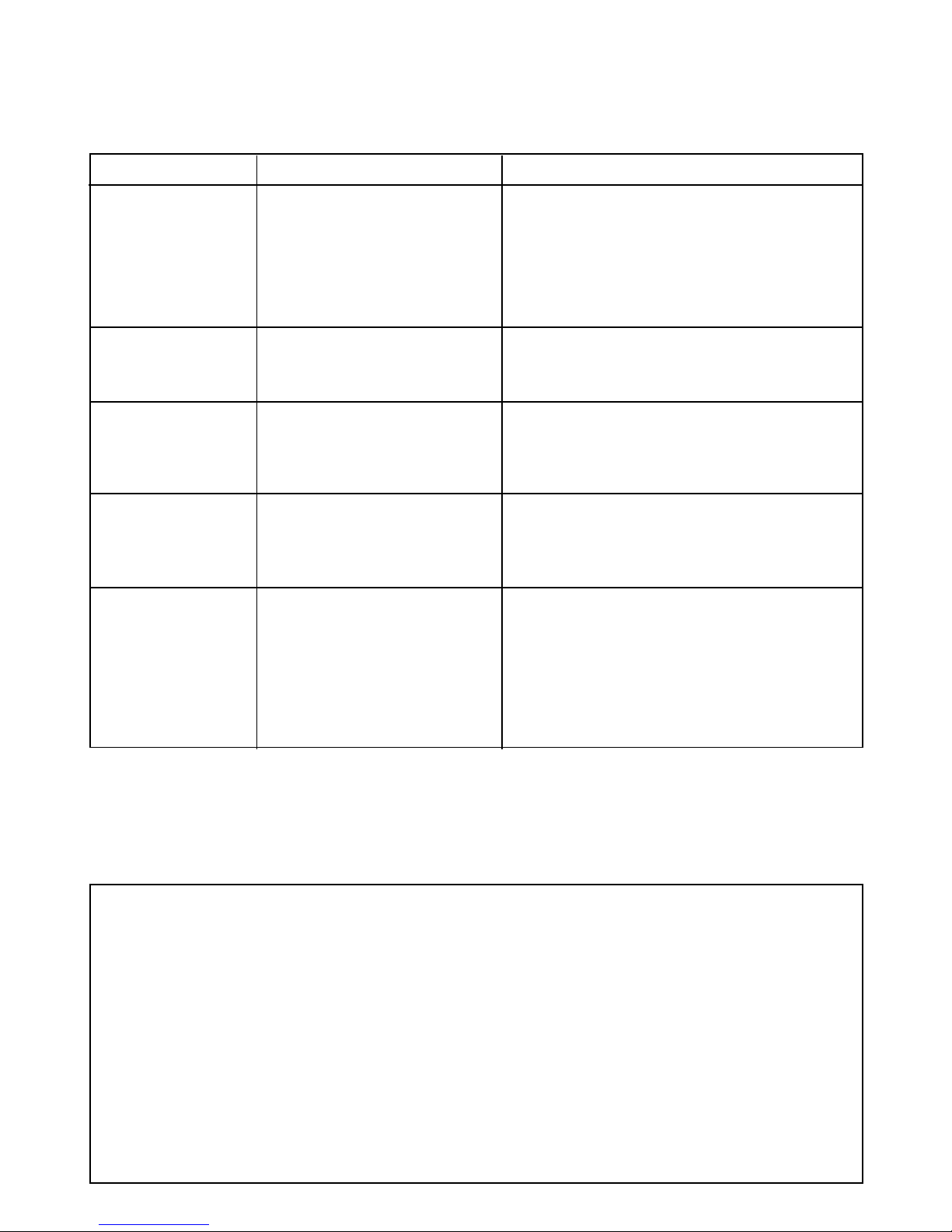
21
Problema
La P-touch no
imprime. Se indica
un error de
impresión.
Aparece cinta a rayas
durante la impresión.
El indicador de estado
no se enciende ni
parpadea.
Aparece una línea horizontal en blanco a lo
largo de la etiqueta
impresa.
Aparece un error de
transmisión de datos
en el ordenador.
Causa
• El cable de interfaz no está
conectado correctamente.
• El casete de cinta no está
insertado correctamente.
• La tapa del compartimiento
de la cinta está abierta.
No hay más cinta en el casete
de cinta.
El adaptador de CA no está
conectado correctamente.
El cabezal de impresión y el
rodillo están sucios.
El puerto seleccionado es
incorrecto.
Solución
Compruebe que el cable de interfaz está
conectado correctamente, que el casete de
cinta está instalado correctamente, y que la
tapa del compartimiento de la cinta de cinta
está cerrada.
Introduzca un casete de cinta nuevo y después presione
la tecla de encendido y apagado/avance o bien apague
la P-touch y después enciéndala otra vez.
Compruebe que el adaptador de CA está conectado
correctamente. Si el indicador de estado sigue sin
encenderse o parpadear, póngase en contacto con el
representante de servicio.
Limpie el cabezal de impresión y el rodillo de acuerdo
con el procedimiento descrito en “
Limpieza del
cabezal de impresión y rodillo
” en la página 19.
Windows
En “Print to the following port” del cuadro de
diálogo “Properties” de la impresora, seleccione
“PTUSB:” para una conexión USB.*
Mac
Seleccione en el “Chooser” la PT-1500PC donde
esté conectada la P-touch.
Solución de problemas
Si piensa que la P-touch no está imprimiendo correctamente, pero no puede determinar el problema
con el indicador de estado, refiérase a la siguiente lista de posibles problemas y realice las operaciones
* Si hay conectadas dos o más P-touch del mismo modelo a través de sus puertos USB, seleccione “PTUSB” (PT-1500PC-
XXXXXXXXX):” (done XXXXXXXXX es el número de serie) en lugar de “PTUSB:”. El número de serie está escrito por encima
del código de barras en la etiqueta plateada colocada en la parte inferior de la P-touch.
Especificaciones de la máquina
Alimentación:
120 V CA, 60 Hz (Adaptador de CA modelo AD-60)
Tipo de etiqueta: 5 anchuras disponibles:
6 mm (1/4’’)
9 mm (3/8’’)
12 mm (1/2’’)
18 mm (3/4’’)
24 mm (1’’)
Cabezal de impresión: 112 puntos
180 ppp
Puerto: USB
Dimensiones: 166 × 66,5 × 137,4 mm (6 1/2’’ × 2 2/3’’ × 5 3/8’’)
Peso: 540 g (18 ozs)
Page 52
22
N.° de producto
Descripción CANT./PAQUETE PRECIO
Cintas laminadas de 24 mm (1”)
TZ-151 Caracteres negros sobre cinta transparente 1 $20.99
TZ-251 Caracteres negros sobre cinta blanca 1 $23.99
TZ-451 Caracteres negros sobre cinta roja 1 $23.99
TZ-651 Caracteres negros sobre cinta amarilla 1 $23.99
TZ-B51 Caracteres negros sobre cinta naranja fluorescente 1 $28.99
TZ-252 Caracteres rojos sobre cinta blanca 1 $23.99
TZ-354 Caracteres dorados sobre cinta negra 1 $26.99
TZ-355 Caracteres blancos sobre cinta negra 1 $26.99
TZ-S151
Caracteres negros industriales (adhesivo fuerte) sobre adhesivo transparente
1 $25.99
TZ-S251
Caracteres negros industriales (adhesivo fuerte) sobre adhesivo blanco
1 $25.99
Cintas laminadas de 18 mm (3/4”)
TZ-141 Caracteres negros sobre cinta transparente 1 $18.99
TZ-145 Caracteres blancos sobre cinta transparente 1 $20.99
TZ-241 Caracteres negros sobre cinta blanca 1 $20.99
TZ-242 Caracteres rojos sobre cinta blanca 1 $20.99
TZ-243 Caracteres azules sobre cinta blanca 1 $20.99
TZ-344 Caracteres dorados sobre cinta negra 1 $23.99
TZ-345 Caracteres blancos sobre cinta negra 1 $23.99
TZ-441 Caracteres negros sobre cinta roja 1 $20.99
TZ-541 Caracteres negros sobre cinta azul 1 $20.99
TZ-545 Caracteres blancos sobre cinta azul 1 $23.99
TZ-641 Caracteres negros sobre cinta amarilla 1 $20.99
TZ-741 Caracteres negros sobre cinta verde 1 $20.99
TZ-B41 Caracteres negros sobre cinta naranja fluorescente 1 $24.99
TZ-M41 Caracteres negros sobre cinta transparente (mate) 1 $20.99
TZ-S141
Caracteres negros industriales (adhesivo fuerte) sobre adhesivo transparente
1 $21.99
TZ-S241
Caracteres negros industriales (adhesivo fuerte) sobre adhesivo blanco
1 $21.99
TZ-WB41 Caracteres negros sobre cinta Bugs Bunny 1 $23.99
TZ-WT41 Caracteres negros sobre cinta Taz 1 $23.99
TZ-WS41 Caracteres negros sobre cinta Tweety & Sylverter 1 $23.99
Cintas laminadas de 12 mm (1/2”)
TZ-131 Caracteres negros sobre cinta transparente 1 $16.99
TZ-231 Caracteres negros sobre cinta blanca 1 $17.99
TZ-232 Caracteres rojos sobre cinta blanca 1 $17.99
TZ-334 Caracteres dorados sobre cinta negra 1 $20.99
TZ-335 Caracteres blancos sobre cinta negra 1 $20.99
TZ-631 Caracteres negros sobre cinta amarilla 1 $17.99
TZ-S131
Caracteres negros industriales (adhesivo fuerte) sobre adhesivo transparente
1 $18.99
TZ-S231
Caracteres negros industriales (adhesivo fuerte) sobre adhesivo blanco
1 $18.99
Cintas laminadas de 9 mm (3/8”)
TZ-121 Caracteres negros sobre cinta transparente 1 $14.99
TZ-221 Caracteres negros sobre cinta blanca 1 $16.99
TZ-325 Caracteres blancos sobre cinta negra 1 $18.99
TZ-421 Caracteres negros sobre cinta roja 1 $16.99
TZ-S121
Caracteres negros industriales (adhesivo fuerte) sobre adhesivo transparente
1 $17.99
TZ-S221
Caracteres negros industriales (adhesivo fuerte) sobre adhesivo blanco
1 $17.99
Accesorios
• Accesorios de consumo
Adquiera los casetes de cinta en el distribuidor autorizado que le quede más cerca. Brother no puede
hacerse responsable de los problemas causados por el empleo de accesorios de consumo no autorizados.
Emplee sólo cintas Brother TZ con esta máquina. No emplee cintas que no tengan la marca
.
Page 53
23
N.° de producto
Descripción CANT./PAQUETE PRECIO
SK-LB Juego para hacer sellos para negro grande 1 $39.99
SK-MB Juego para hacer sellos para negro medio 1 $37.99
SH-LB Estampador adicional para negro grande 1 $27.99
SH-MB Estampador adicional para negro medio 1 $24.99
Opciones
N.° de producto
Descripción CANT./PAQUETE PRECIO
TZ-CL4 Casete de limpieza del cabezal de impresión 1 $20.99
Cintas especiales
N.° de producto
Descripción CANT./PAQUETE PRECIO
TZ-SE4 Caracteres negros sobre cinta de seguridad de 18 mm (3/4”) 1 $29.99
TZ-FA3 Caracteres azules sobre cinta de tela de 12 mm (1/2”) 1 $24.99
Juego de sellos
Cintas laminadas de 6 mm (1/4”)
TZ-111 Caracteres negros sobre cinta transparente 1 $12.99
TZ-211 Caracteres negros sobre cinta blanca 1 $14.99
TZ-315 Caracteres blancos sobre cinta negra 1 $17.99
TZ-S111
Caracteres negros industriales (adhesivo fuerte) sobre adhesivo transparente
1 $15.99
TZ-S211
Caracteres negros industriales (adhesivo fuerte) sobre adhesivo blanco
1 $15.99
Page 54

24
INFORMACIÓN PARA CONTACTAR CON BROTHER
Lugares de los centros de reparación
Si necesita recurrir a un centro de reparación, le rogamos que llame al 1-800-284-HELP (4357)
para localizar el centro de reparación autorizado más cercano a usted.
Nota: Asegúrese de llamar al centro de reparación antes de visitarlo.
Los centros de reparación no ofrecen asistencia sobre el funcionamiento. Consulte “Asistencia sobre
el funcionamiento”.
Asistencia sobre el funcionamiento
Para asistencia técnica y sobre el funcionamiento puede llamar al servicio al cliente de Brother:
1-877-4-P-touch (voz), o 1-901-379-1210 (Fax)
Asistencia en Internet
Para obtener información sobre el producto y descargar los controladores más recientes: http://www.brother.com
Para hacer pedidos de accesorios y ciertos productos Brother: http://www.brothermall.com
Accesorios y suministros
Para hacer pedidos de accesorios o suministros Brother mediante Visa, MasterCard, Discover o American
Express puede llamar gratis al 1-888-879-3232, o rellenar el formulario de pedidos que se encuentra
en
la guía del usuario y enviar por fax ambas caras del mismo al 1-800-947-1445
Para hacer pedidos de accesorios por Internet: http://www.brothermall.com
Para hacer pedidos por correo o mediante pago con cheque, rellene el formulario de pedido de accesorios y
envíelo por correo junto con el importe a:
Brother International Corporation
Attn: Consumer Accesory División
P.O. Box 341332
Bartlett, TN 38184-1332
Sistema de contestación por fax
El servicio al cliente Brother tiene instalado un sistema de contestación por fax de forma que el
cliente puede obtener respuestas instantáneas a las preguntas comunes e información sobre productos
de todos los productos Brother.
Este servicio está disponible las 24 horas del día, 7 días a la semana. El cliente puede utilizar este
sistema para que le sea enviada la información a cualquier facsímil, no solamente el facsímil desde el
que usted está llamando.
Llame por favor al 1-800-521-2846 y siga las indicaciones de voz para recibir instrucciones por fax
sobre cómo utilizar el sistema y un índice de solicitudes que se pueden hacer por fax.
Page 55

Printed in China
LA6423001
 Loading...