

Page 1
LP510R/LP510RSL QUICK START GUIDE
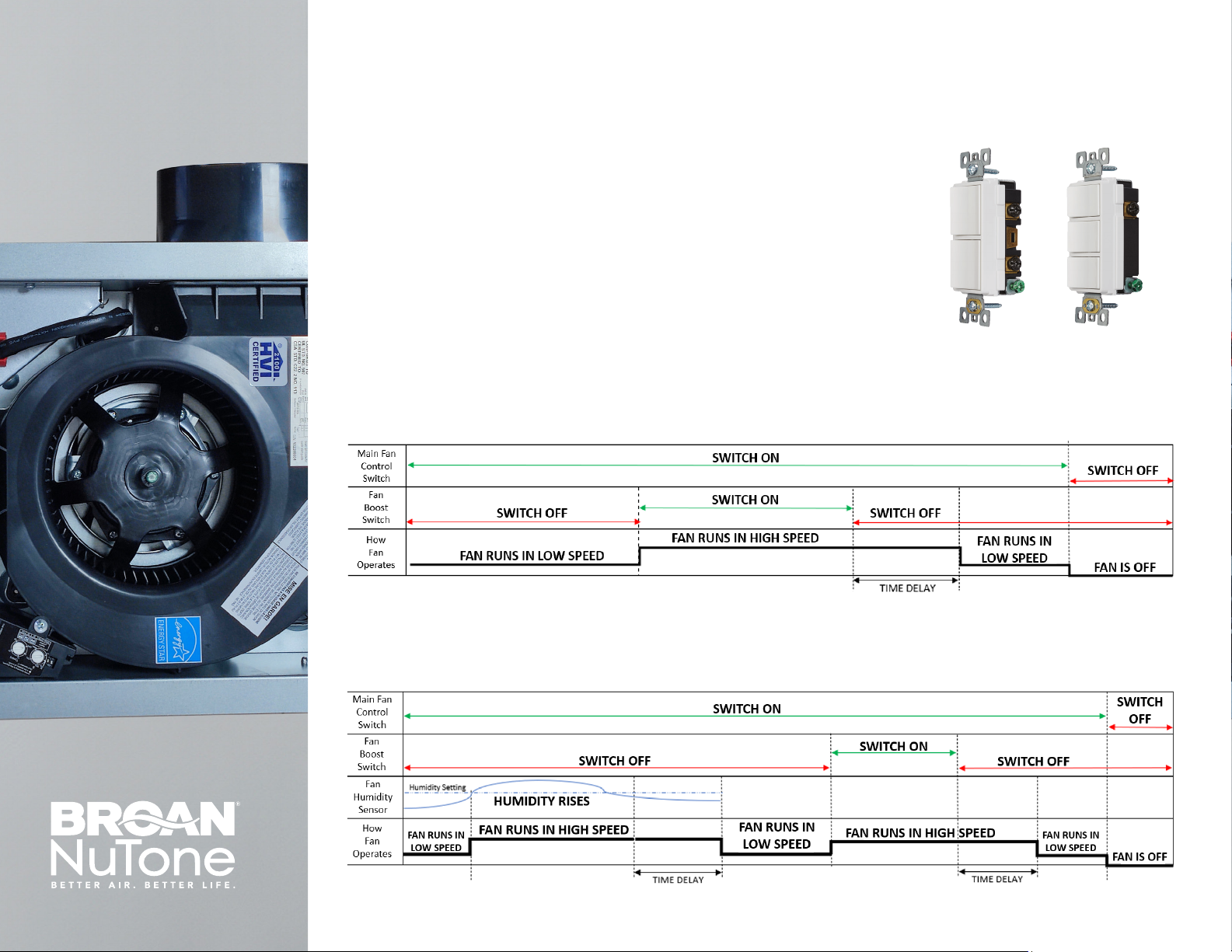
WALL SWITCH OPERATION
It is recommended that a 2-rocker switch is installed in the wall for the LP510R
fan model, and a 3-rocker switch is installed for the LP510RSL fan model.
Switches (pictured right) are not included with the fan units. Humidity sensing
is a built-in feature for the LP510RSL fan and does not require a wall switch for
functionality.
P2RW P3RW
LP510R Lo-Prole 50-80-100 Selectable CFM & Continuous Run
LP510RSL Lo-Prole 50-80-100 Selectable CFM, Continuous Run, Humidity Sensing
Page 2
LP510R/LP510RSL QUICK START GUIDE
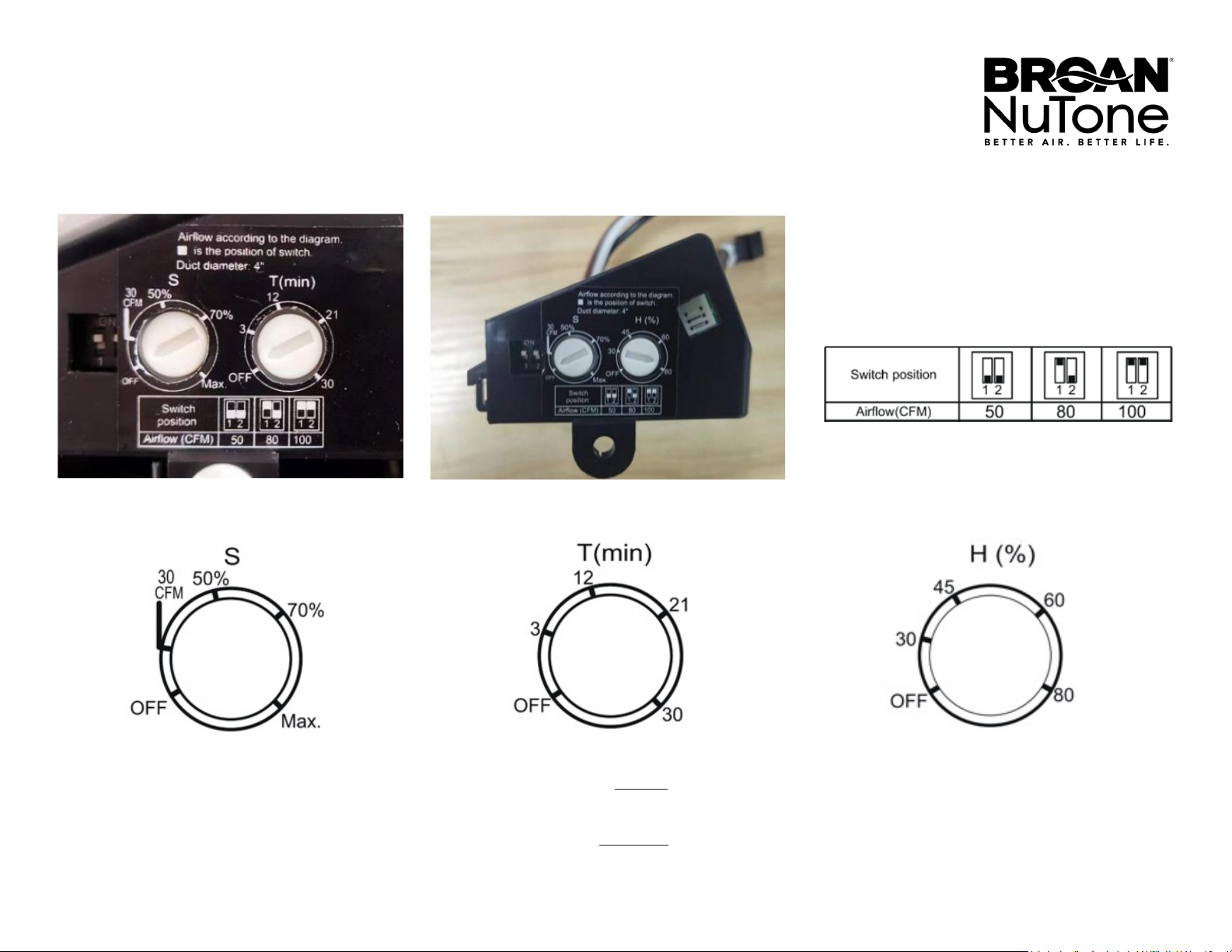
SETTINGS
LP510R/ LP510RF LP510RSL
HIGH SPEED SETTING SWITCH
Sets high speed Boost airow level to 50, 80, or
100 CFM.
LOW SPEED SETTING DIAL
Sets low speed continuous airow level from
30 CFM at the lowest setting up to the air ow
rate of the high speed boost airow. % Setting is
based on high speed boost airow.
50% of 80 CFM = 40 CFM continuous
TIME DELAY SETTING DIAL
Sets time delay level for LP510R model from 3 to
30 minutes and will switch the fan to the low-
speed setting after the Boost switch is turned off
for the set period. For LP510RSL the time delay is
factory set to 20 minutes.
HUMIDITY SETTING DIAL
Sets humidity point for the LP510RSL model from
30% to 80% humidity and will switch the fan to the
high-speed setting when the humidity in the room
reaches the set level. Time delay is factory set to
20 minutes
Page 3

LP510R/LP510RSL QUICK START GUIDE
TROUBLESHOOTING FAQ
Why is there a delay when I turn on my fan to low speed
continuous airow mode?
• The fan system is sensing the air pressure in the ductwork and then
adjusting to corresponding fan speed. This process can take about
10 seconds.
When I ip on the Control Switch on my wall, my fan does not
turn on.
• First, verify the function of your wall switches. Starting with both
wall switches in the off position, ip the rst switch on. If the fan
begins to run after approximately 10 seconds, this is your control
switch. If the fan does not turn on, this is your boost switch.
• If the control switch still does not turn on the fan, the continuous
run feature settings may need to be adjusted. First, switch the power
to the fan off at the service panel and lock or mark the disconnect
with a warning tag and refer to instruction manual to adjust
continuous airow setting. If the dial is pointing directly at or below
the 30 CFM setting, the continuous run feature is turned off and the
fan will not operate in continuous run mode.
My humidity sensing fan (LP510RSL) turns on to high speed boost
mode too often.
• The humidity sensor in the fan responds to either a rapid increase
in humidity or the humidity in the room has gone above the useradjustable set point. If the fan continuously responds to changing
environmental conditions, the humidity setting may need to be
increased. First, switch the power to the fan off at the service panel
and lock or mark the disconnect with a warning tag and refer to your
instruction manual to adjust the humidity sensing rating.
Why does my humidity sensing fan (LP510RSL) not function during
some seasons and weather changes?
• Temperature changes in a room due to a change in seasons and
weather may cause the humidity sensor values to change. If this
happens, follow the steps above to adjust the humidity setting
accordingly.
My humidity sensing fan (LP510RSL) does not boost up to high
speed mode when I turn my shower on.
• If the fan is located away from the shower area, the humidity point
may not be triggered and the humidity setting may need to be
adjusted to a lower level. First, switch the power to the fan off at the
service panel and lock or mark the disconnect with a warning tag and
refer to your instruction manual to adjust the humidity sensing rating.
If the fan continuous to not operate after adjusting,
contact Broan Technical Support for further assistance.
1-800-637-1453
www.Broan-NuTone.com
Broan- NuTone LLC
Hartford, Wisconsin 53027
©2022 Broan- NuTone LLC | Printed in U.S.A.
99851155A | 1/23
 Loading...