

Page 1
1
ROLLING THUNDER
TM
SYNCHRONIZED FULL
SPECTRUM SOUNDS
Page 2
2
WWW.BROADWAY-LIMITED.COM
T
hank you for purchasing the Broadway
Limited Rolling Thunder
TM
System. We
strive every day to make model railroading
a more enjoyable hobby and to that
end, we’ve developed Rolling ThunderTM.
Real trains shake the very ground they roll
on. Their sounds are unmistakable in their
depth and power. With your new Rolling
Thunder
TM
system, you can unlock the more
realistic sounds of your Paragon3 equipped
BLI locomotives in both frequency and
volume. Rolling Thunder
TM
truly represents
the next generation in model railroading
technology. Enjoy.
Robert Grubba
President / CEO
Broadway Limited Imports, LLC
Page 3

3
ROLLING THUNDER
TM
M
odel train sound systems have
always been limited by the
physical size of the speakers that can
t in a scale model. Until now.
Broadway Limited locomotives
equipped with the Paragon3 sound
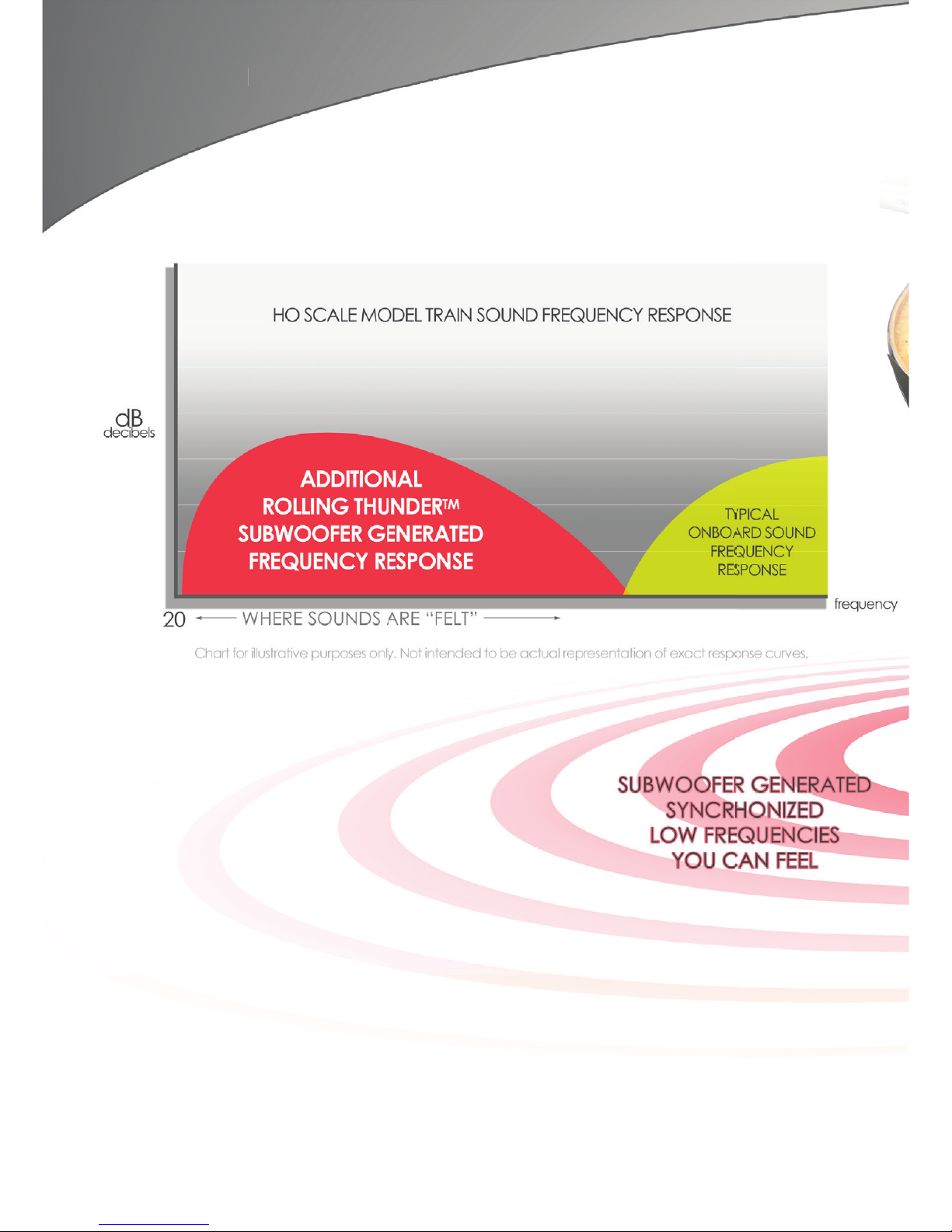
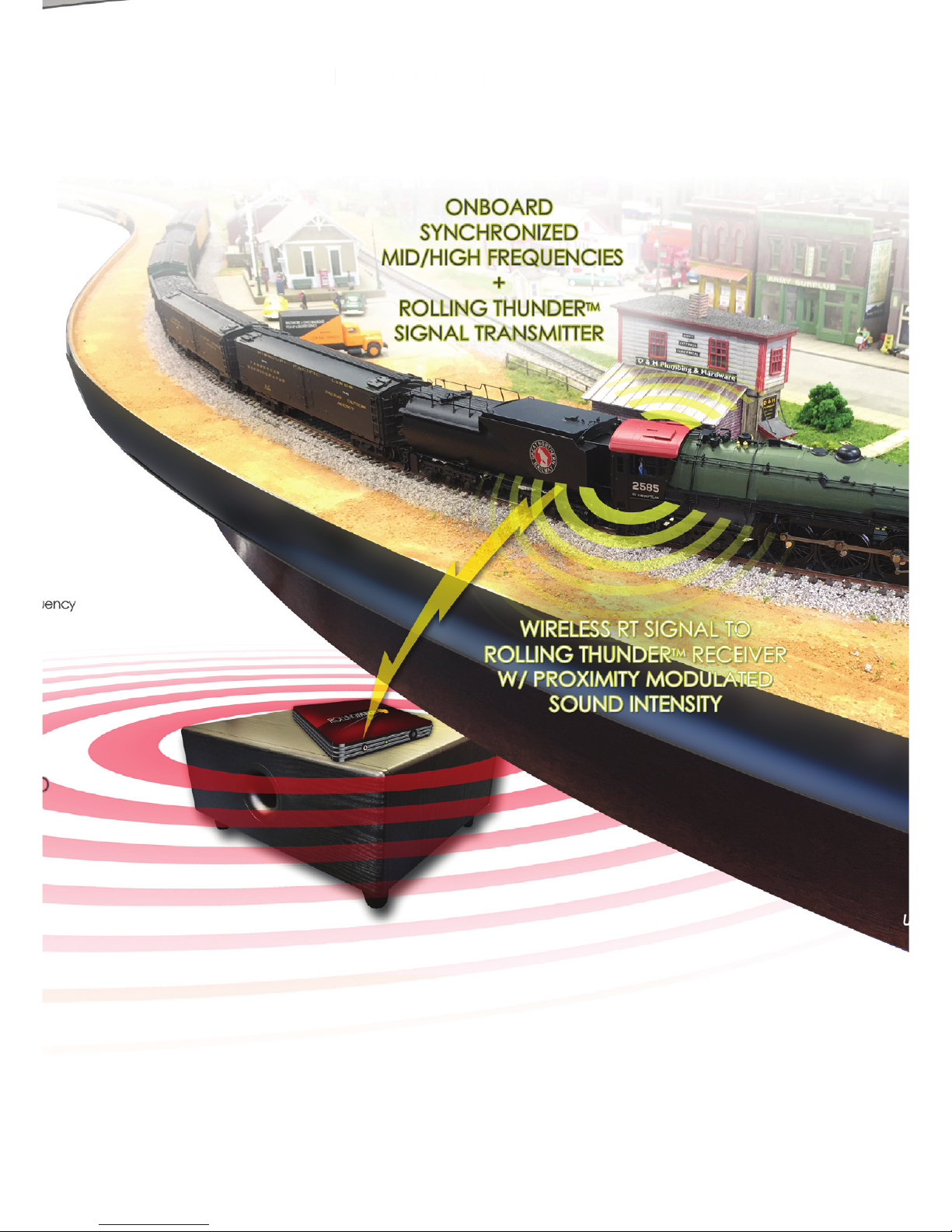
system transmit the low frequency
portion of the locomotive sounds to
the Rolling ThunderTM receiver. The
receiver is connected to a powerful
subwoofer that reproduces the
deep rumbling sounds of a real
locomotive, perfectly synchronized
to the movement of the model and
to the higher frequency sounds that
continue to play through the speaker
in the model. The result is the most
realistic sounding model train ever
made.
Page 4
4
WWW.BROADWAY-LIMITED.COM
Page 5
5
ROLLING THUNDER
TM
TM
Page 6
6
WWW.BROADWAY-LIMITED.COM
Setup
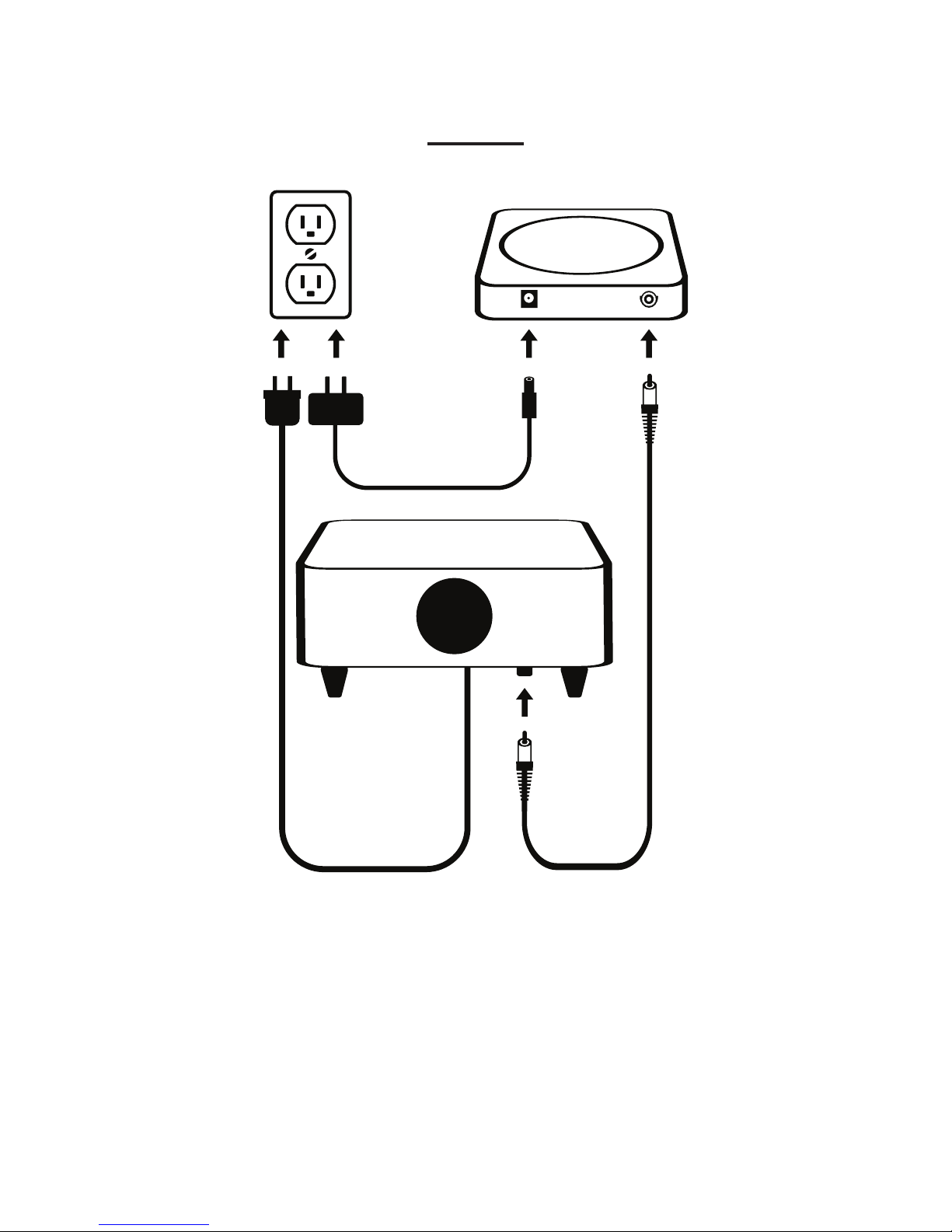
For most layouts, the subwoofer should
be positioned under the center of
the layout. The receiver should be
RT Receiver
Subwoofer
RCA Cable
Wall Power
Page 7
7
ROLLING THUNDER
TM
positioned near the layout controls,
plugged into a household outlet. The
red power light will ash for a few
seconds, then stay on. The supplied
RCA cable should be used to connect
the receiver to the subwoofer. To
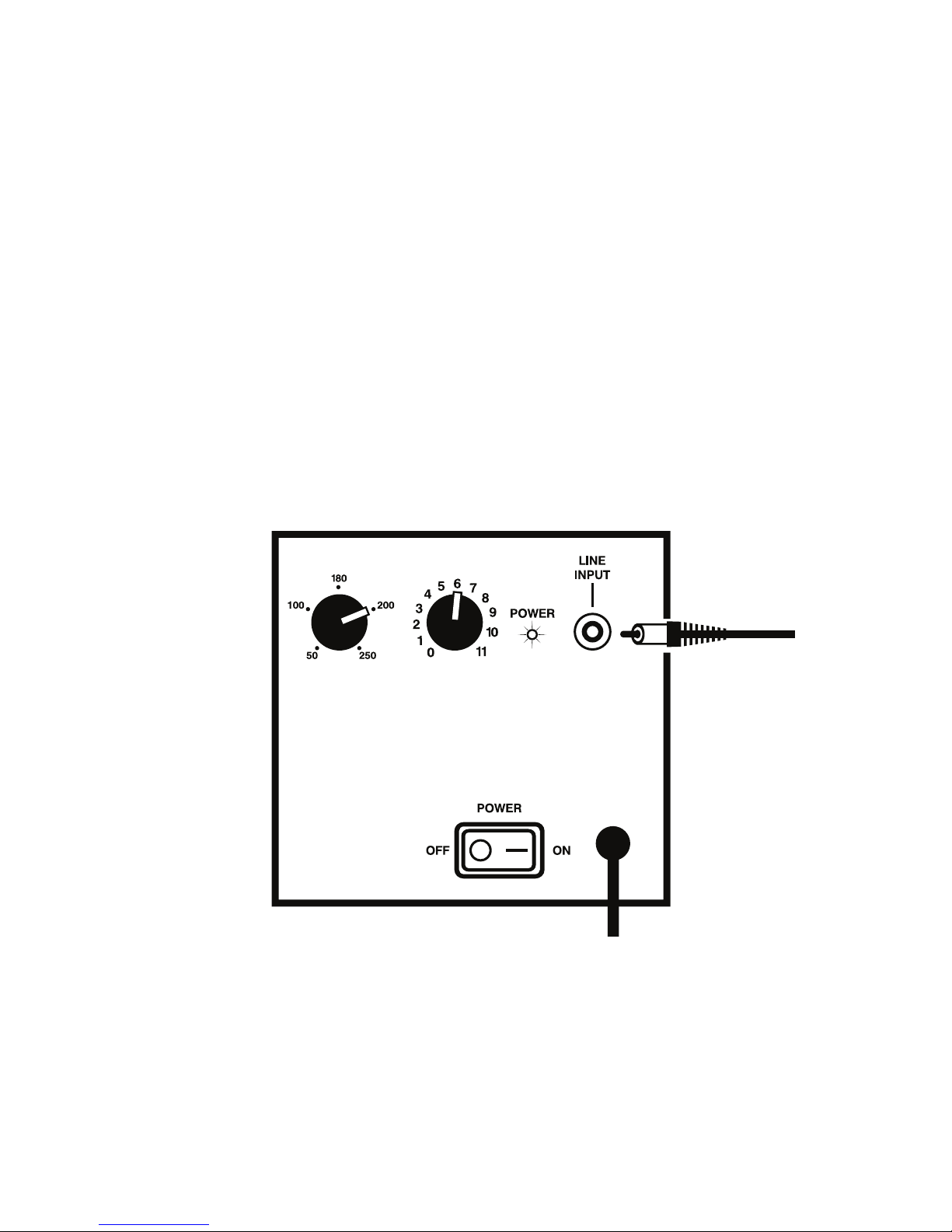
start, set the Subwoofer Level knob to
6 and the Low Pass Frequency knob
to 200. Turn on the power switch.
LOW PASS
FREQUENCY (Hz)
SUBWOOFER
LEVEL
Place your Paragon3 locomotive on
the track and operate normally. You
should hear the deep low frequency
Page 8

8
WWW.BROADWAY-LIMITED.COM
sounds coming from the subwoofer
within a few seconds of starting the
locomotive. If you do not hear the
subwoofer after the rst 10 seconds
of running the locomotive, you may
need to position the receiver and
the locomotive closer together. The
locomotive can typically transmit
about 15 feet, but may need to
be closer to the receiver to begin
transmitting. Positioning the receiver
near the height of the track will
improve reception.
When running a locomotive, adjusting
the volume of the locomotive with
Function Key 8 or with the DC Master
will also adjust the volume played
through the subwoofer.
Setting CV214 for a locomotive will
adjust the subwoofer volume for that
locomotive. The range is 0-255. A
Page 9

9
ROLLING THUNDER
TM
higher number is louder. The default
is 128.
If you are running one locomotive at
a time on a layout less than 15 feet
long, you probably don’t need to
read the rest of this manual.
Using Multiple Locomotives
The subwoofer can only play the
sounds of one locomotive at a time.
Once the receiver locks onto the rst
locomotive, it will continue to play
the sounds from that locomotive
until that locomotive moves out of
range or is turned off, after which the
next available locomotive will begin
playing through the subwoofer. If
more than one locomotive is running
at the same time, each locomotive
must be set to a unique transmit
channel. There are 29 channels,
Page 10

10
WWW.BROADWAY-LIMITED.COM
selected by setting CV 212 for that
locomotive to a value between 1
and 29. Channels 1-4 should be used
rst, Then 5,6, 7, etc. (Using channels
5-29 require changing CV143 in the
receiver to match the highest channel
number. See page 16).
Page 11

11
ROLLING THUNDER
TM
Larger Layouts
For larger layouts or in areas with
unusual electrical interference, it
may be necessary to increase the
transmitter power of the locomotive. To
do that set CV213 for that locomotive
according to the following table.
Transmitter Power Level
(915 MHz)
Locomotive CV 213
Value
1 (Lowest) 240
2 224
3 208
4 192
5 176
6 160
7 144
8 (Highest) 128
Page 12

12
WWW.BROADWAY-LIMITED.COM
Fading
It is difcult for our ears to tell the
direction of low frequency sounds,
so when the locomotive is close to
the subwoofer it appears that all
the sounds are coming from the
locomotive. If the locomotive gets
too far from the subwoofer while still
transmitting, it becomes apparent to
the listener that the low frequency
sounds are not coming from the
locomotive. For this reason, once
the locomotive starts to get out of
transmission range, the subwoofer
sounds will begin to fade away.
Once the locomotive (or another
locomotive) gets close to the receiver
again, the low frequency sounds will
gradually fade in and begin playing
again.
On smaller layouts, this effect is kind
Page 13

13
ROLLING THUNDER
TM
of cool, so you may want to achieve
it by moving the receiver all the way
to one end of the layout, or farther.
You may also need to lower the
transmitter power of the locomotive
so the sounds can fade in and out.
Very small layouts may require some
ne tuning of the receiver. See below.
Multiple Receivers and Subwoofers
Larger layouts can be equipped with
multiple receivers and transmitters.
If they are spaced out around the
layout, the low frequency sounds will
follow the locomotive as it moves
around the layout. This provides a
very realistic effect.
Fine Tuning the Receiver
There are a number of settings in
the receiver that can be adjusted
Page 14

14
WWW.BROADWAY-LIMITED.COM
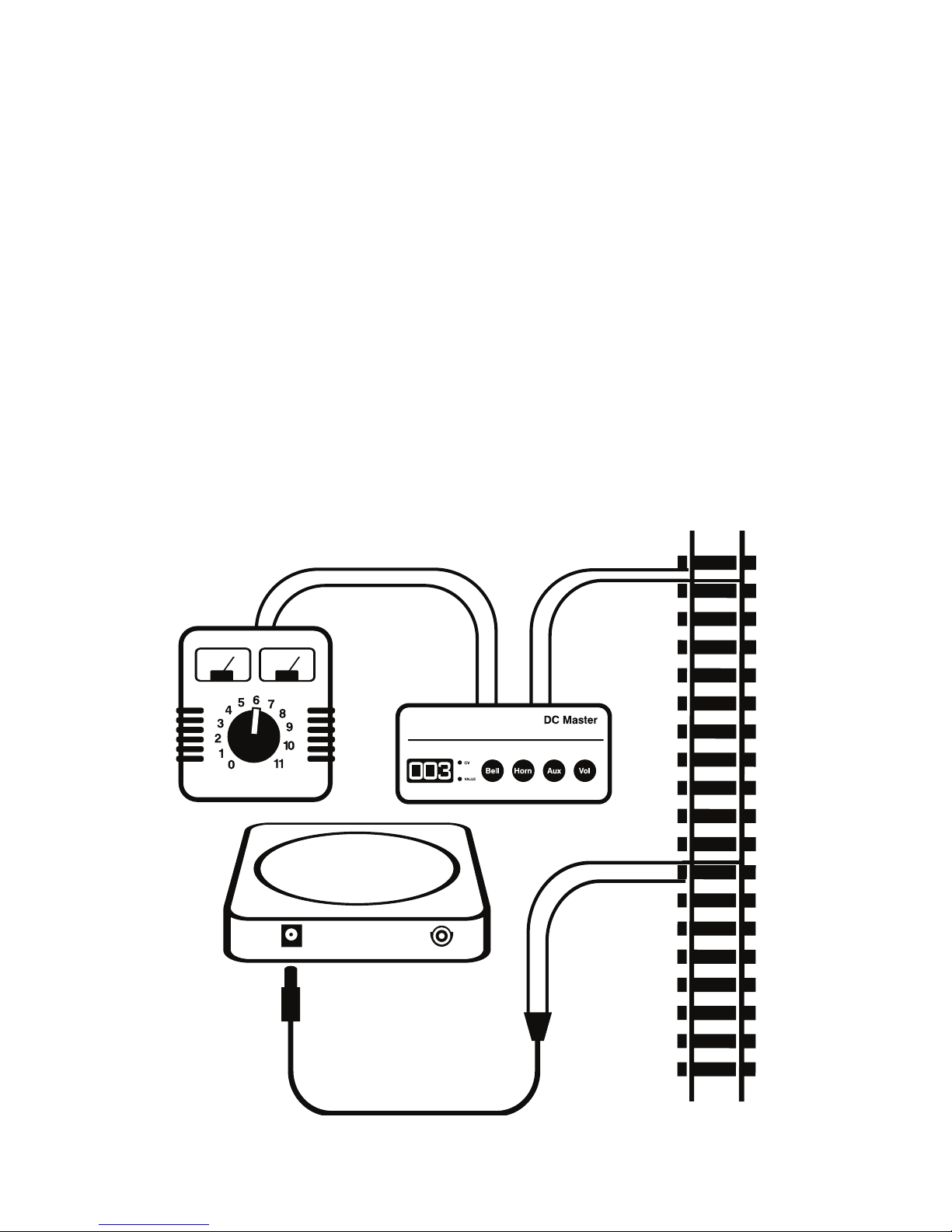
using the BLI DCMaster or any NMRA
compliant Digital Command Control
(DCC) system. To set using a DC
Master or DCC, instead of plugging
the receiver into household power
use the supplied track power cable
and connect the receiver to your
track.
Using DCMaster, hold both the Aux
and Vol buttons down while turning
on track power all the way. Then use
the Bell and Horn buttons to display
the CV you want to change. Press
Vol to select. Then use Bell and Horn
to display the new value. Press Vol to
select.
For DCC, the receiver’s default
address is 1. You will need to use
Operations Mode programming. To
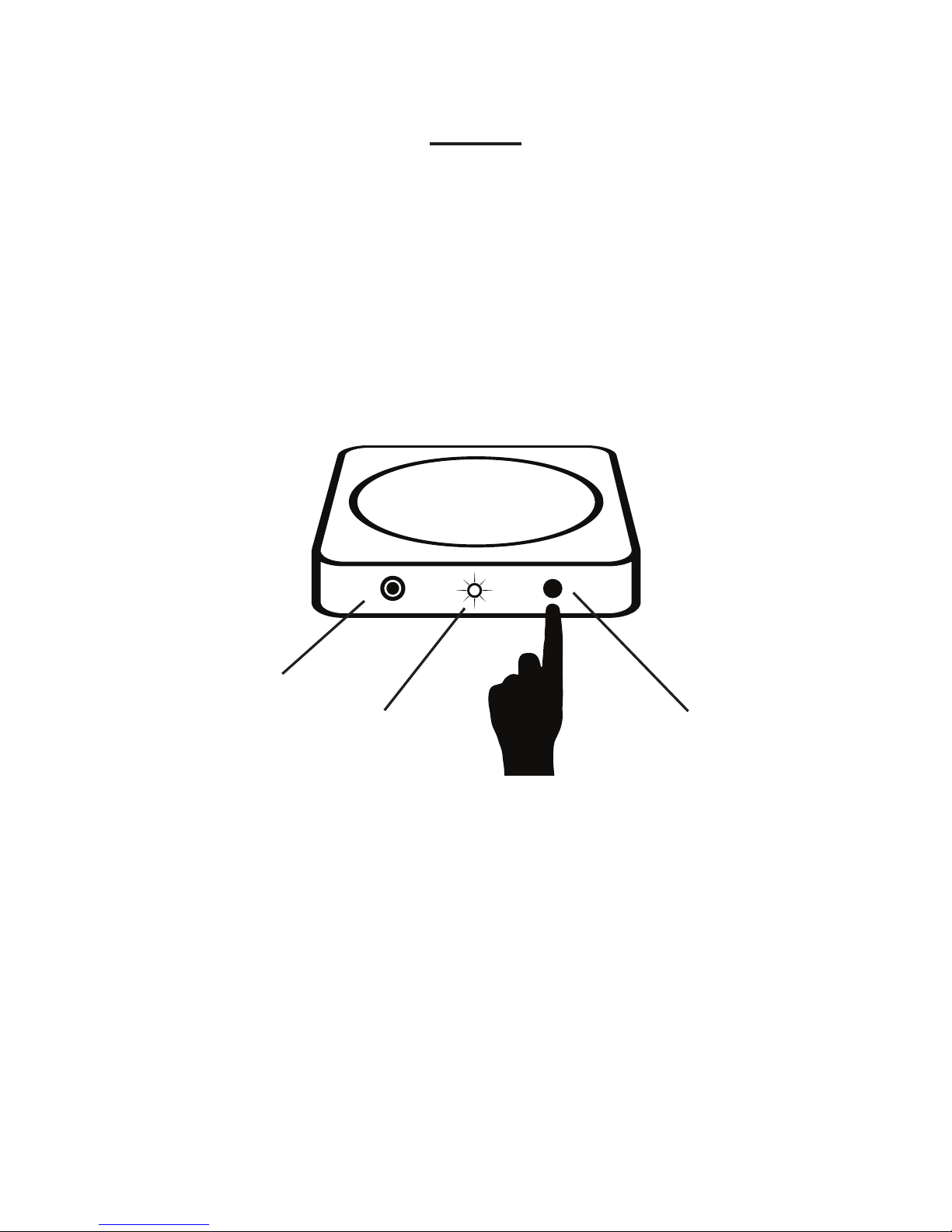
change CV’s, press the Program/
Reset button on the receiver for one
Page 15
15
ROLLING THUNDER
TM
second. The power light will start
ashing. Program the desired CV’s
and then press the Program/Reset
button again to exit the programming
mode.
After programming, it is best to switch
back to the wall power plug to
prevent inadvertent reprogramming.
RT Receiver
Page 16

16
WWW.BROADWAY-LIMITED.COM
Receiver Channels
The receiver must scan all available
channels until it nds a locomotive.
To scan faster, the channels it scans
are limited by CV’s 142 and 143.
CV142 sets the starting channel. Its
default is 1. CV 143 sets the ending
scan channel. Its default is 4. To use
more than 4 separate locomotive
channels, set CV143 for the receiver
equal to the highest locomotive
channel used. Acceptable values
Are 1-29. Setting the value higher
than needed can increase the time
required for the receiver to connect
to each locomotive.
To dedicate a subwoofer to one
locomotive, set the receiver CV142 &
143 to the channel of the locomotive.
Using this setup, you could, for example,
Page 17

17
ROLLING THUNDER
TM
set all the locomotives operating on
one track loop to channel 1 and all
the locomotives operating on second
loop to operate on channel 2, and
dedicate a receiver and subwoofer
for each loop:
Loop 1, CV212 of the locomotives =1
and for that receiver CV142 = 1 and
CV 143 = 1.
Loop 2, CV212 of the locomotives =2
and for that receiver CV142 = 2 and
CV 143 = 2.
Two receivers can be connected to
one subwoofer using BLI part #1597,
Multi-Receiver Expansion Cable.
Plug the expansion cable into the
subwoofer, and connect the RCA
cables from the receivers into the
expansion cable.
Page 18
18
WWW.BROADWAY-LIMITED.COM
Reset
To reset the receiver to factory
defaults, unplug the power cord.
Hold down the Program/Reset button
while plugging the power cord back
in. (Or set CV8 to 8.)
RT Receiver
USB CONNECTION
POWER INDICATOR
LIGHT
RESET / PROGRAM
BUTTON
Page 19

19
ROLLING THUNDER
TM
If the engine does not transmit far
enough:
First, set CV213 to 128 in the locomotive,
which sets the transmitter strength to
maximum.
If that is not sufcient, change the
following CV’s in the receiver, using
the instructions on page 14.
Set CV141 to 40
Set CV136 to 50
Set CV135 to 60
These settings lower the signal strength
needed to lock onto a locomotive.
CV141 is the minimum signal strength
to lock onto. Default is 100, so 40 is
pretty low. Setting lower than 40 can
cause it to lock onto background
noise.
Page 20

20
WWW.BROADWAY-LIMITED.COM
CV135 is the signal strength above
which the bass sound fades in.
(Default is 135)
CV136 is the signal strength below
which the bass sound starts to fade
out. (Default is 111.) It has to be
lower than CV135. If the range is still
insufcient, set CV142 and CV143 to
1.
CV143 is the upper scan channel.
CV142 is the lower scan channel.
If CV142 and CV143 both equal 1,
the receiver will only receive from
locomotives on channel 1, instead
of scanning. This helps if the signal
strength is weakened by local
interference. The locomotive must
be set to channel 1 also, which is the
default setting. (CV212 = 1 in the
Page 21

21
ROLLING THUNDER
TM
locomotive.)
As a last resort, set CV132, (minimum
bass volume) to 60, and try
setting CV141 to a lower value than
40.
For more detailed instructions, refer
to the Rolling Thunder Technical
Reference manual at:
www.broadway-limited.com
Page 22

22
WWW.BROADWAY-LIMITED.COM
NOTES:
____________________________________
____________________________________
____________________________________
____________________________________
____________________________________
____________________________________
____________________________________
____________________________________
____________________________________
____________________________________
____________________________________
Page 23

23
ROLLING THUNDER
TM
NOTES:
____________________________________
____________________________________
____________________________________
____________________________________
____________________________________
____________________________________
____________________________________
____________________________________
____________________________________
____________________________________
____________________________________
Page 24
24
WWW.BROADWAY-LIMITED.COM
Broadway Limited Imports, LLC
9 East Tower Circle
Ormond Beach, FL 32174
United States of America
TEL: 386.673.8900
FAX: 386.673.8080
E-mail: [email protected]
www.broadway-limited.com
www.facebook.com/BroadwayLimited
Copyright ©2015
BROADWAY LIMITED IMPORTS, LLC
 Loading...